
Upload Electronic Holdings from Springer Yoel Kortick Senior

- Slides: 22
Upload Electronic Holdings from Springer Yoel Kortick Senior Librarian © 2018 Ex Libris | Confidential & Proprietary
Agenda I II IV Introduction The setup The update from Springer Summary © 2018 Ex Libris | Confidential & Proprietary 2
Introduction • In addition to this presentation see also the on line help at Upload Electronic Holdings from Springer. • It is possible to both import and continuously update Springer electronic holdings by automatically retrieving the institutionspecific holdings using an integration profile. • This feature is advantageous because it can replace the manual, multi-step workflow of contacting Springer for your specific institutional holdings, converting the provided feed to meet the Portfolio Loader format, and then uploading the holdings using the Portfolio Loader. © 2018 Ex Libris | Confidential & Proprietary 3
Introduction • This feature ensures that your institution-specific electronic holdings for Springer collections are up-to-date and reflect your purchases. • To support this capability, the following Springer collections that you need to activate are in the Community Zone: • Springer. Link Journals - Auto. Holdings (Community Zone Collection ID = 6138600000884) • Springer. Link Books - Auto. Holdings (Community Zone Collection ID = 6138600000883) © 2018 Ex Libris | Confidential & Proprietary 4
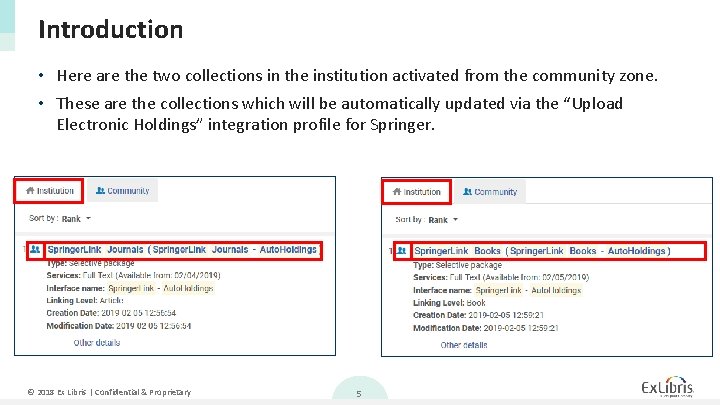
Introduction • Here are the two collections in the institution activated from the community zone. • These are the collections which will be automatically updated via the “Upload Electronic Holdings” integration profile for Springer. © 2018 Ex Libris | Confidential & Proprietary 5
Agenda I II IV Introduction The setup The update from Springer Summary © 2018 Ex Libris | Confidential & Proprietary 6
The setup • The first step is to obtain from Springer an institution token. • This is a token used by Springer to identify your institution and thereby provide the holdings files for your institution. • This token will be put into the integration profile. © 2018 Ex Libris | Confidential & Proprietary 7
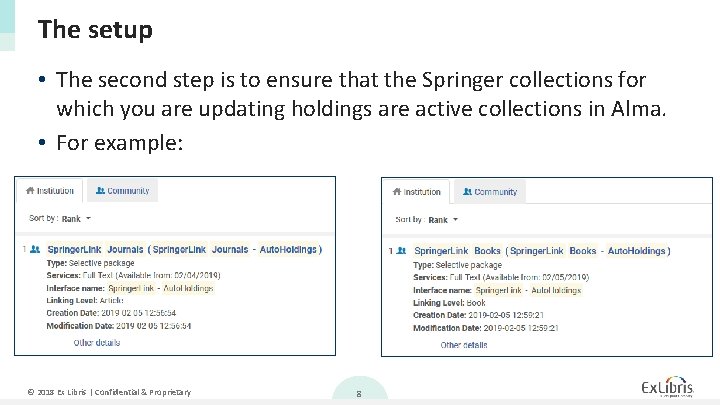
The setup • The second step is to ensure that the Springer collections for which you are updating holdings are active collections in Alma. • For example: © 2018 Ex Libris | Confidential & Proprietary 8
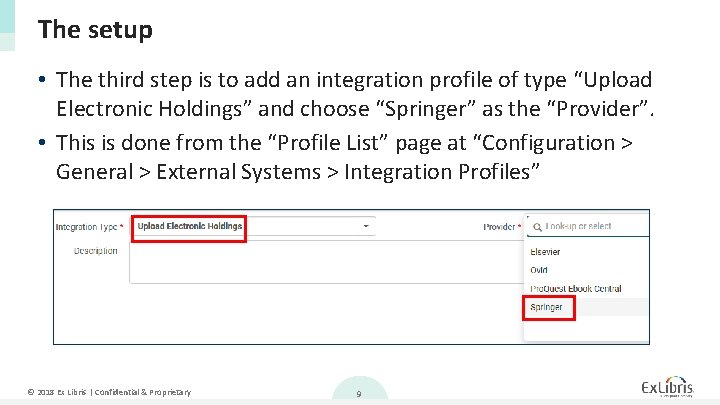
The setup • The third step is to add an integration profile of type “Upload Electronic Holdings” and choose “Springer” as the “Provider”. • This is done from the “Profile List” page at “Configuration > General > External Systems > Integration Profiles” © 2018 Ex Libris | Confidential & Proprietary 9
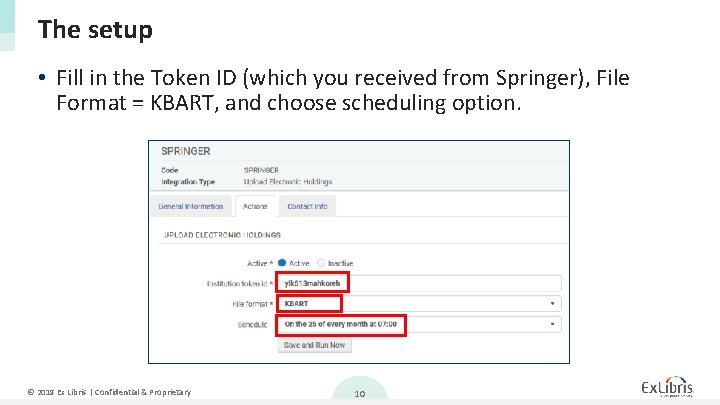
The setup • Fill in the Token ID (which you received from Springer), File Format = KBART, and choose scheduling option. © 2018 Ex Libris | Confidential & Proprietary 10
Agenda I II IV Introduction The setup The update from Springer Summary © 2018 Ex Libris | Confidential & Proprietary 11
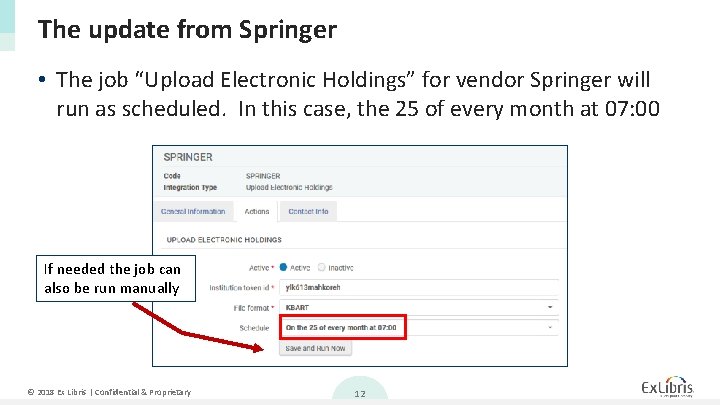
The update from Springer • The job “Upload Electronic Holdings” for vendor Springer will run as scheduled. In this case, the 25 of every month at 07: 00 If needed the job can also be run manually © 2018 Ex Libris | Confidential & Proprietary 12
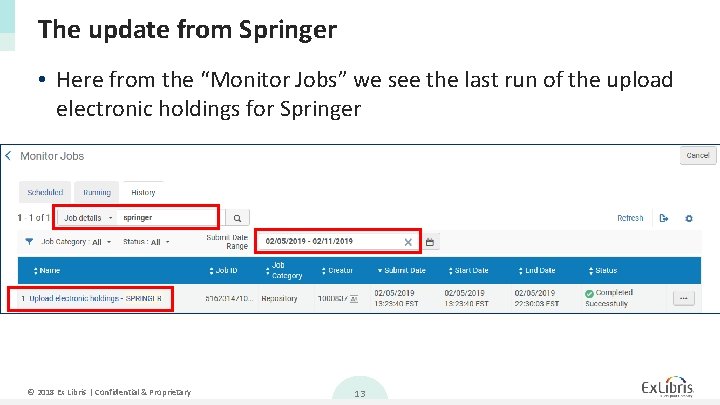
The update from Springer • Here from the “Monitor Jobs” we see the last run of the upload electronic holdings for Springer © 2018 Ex Libris | Confidential & Proprietary 13
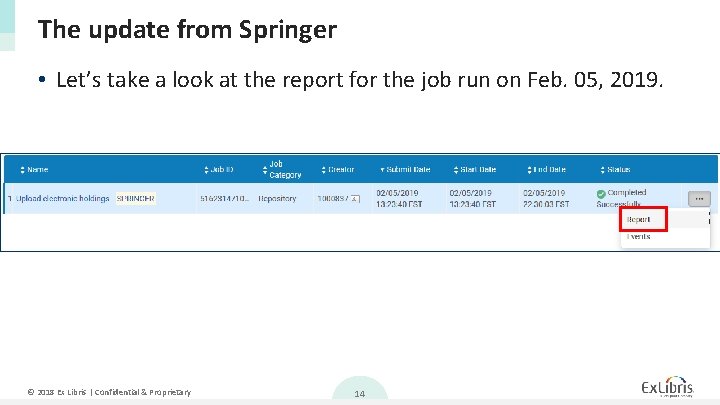
The update from Springer • Let’s take a look at the report for the job run on Feb. 05, 2019. © 2018 Ex Libris | Confidential & Proprietary 14
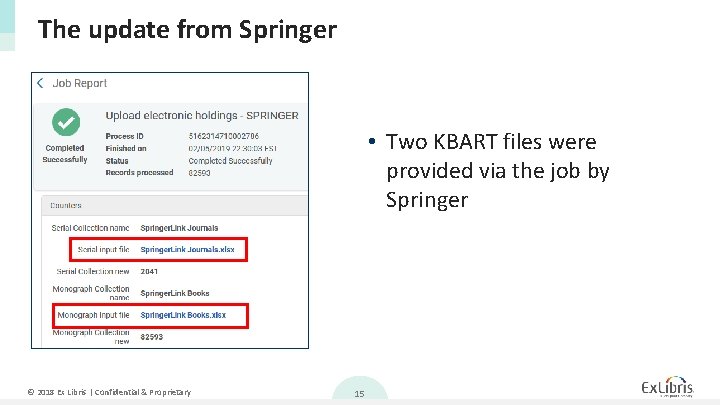
The update from Springer • Two KBART files were provided via the job by Springer © 2018 Ex Libris | Confidential & Proprietary 15
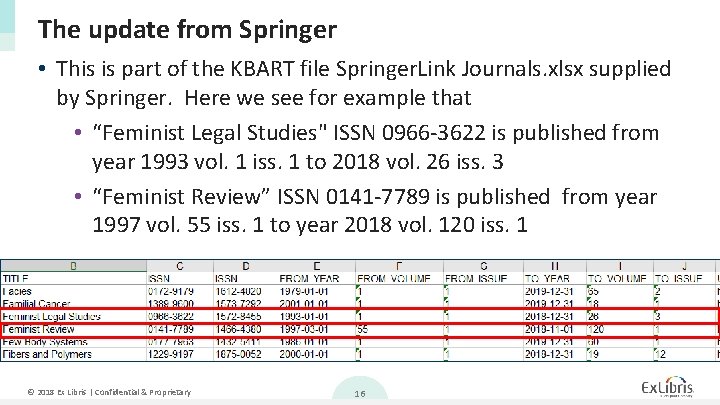
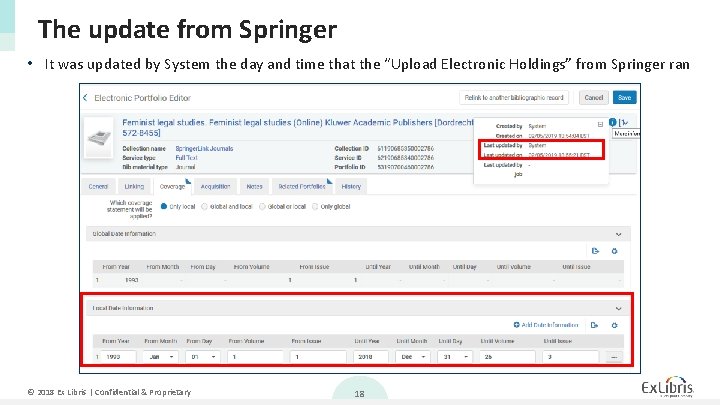
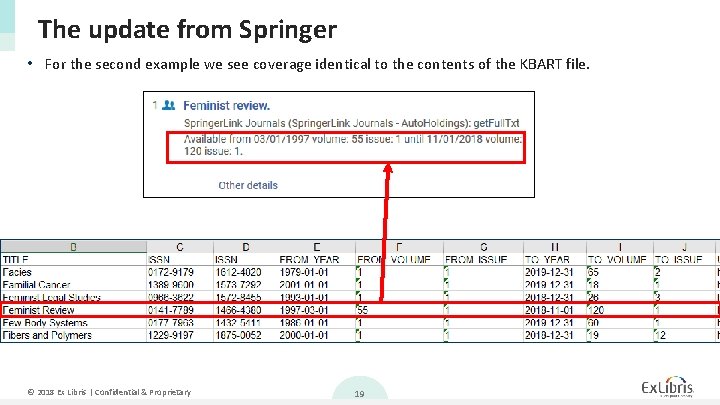
The update from Springer • This is part of the KBART file Springer. Link Journals. xlsx supplied by Springer. Here we see for example that • “Feminist Legal Studies" ISSN 0966 -3622 is published from year 1993 vol. 1 iss. 1 to 2018 vol. 26 iss. 3 • “Feminist Review” ISSN 0141 -7789 is published from year 1997 vol. 55 iss. 1 to year 2018 vol. 120 iss. 1 © 2018 Ex Libris | Confidential & Proprietary 16
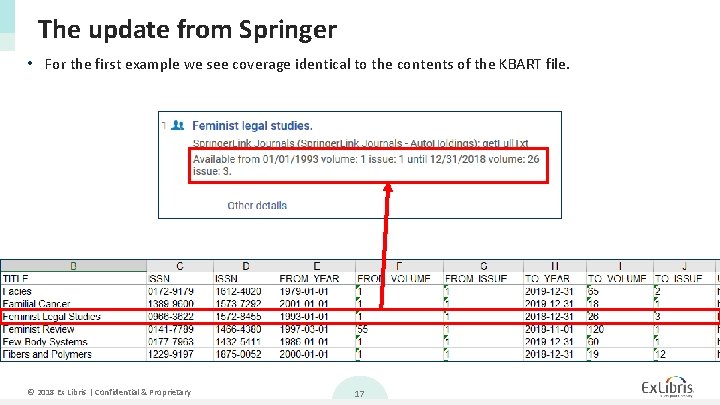
The update from Springer • For the first example we see coverage identical to the contents of the KBART file. © 2018 Ex Libris | Confidential & Proprietary 17
The update from Springer • It was updated by System the day and time that the “Upload Electronic Holdings” from Springer ran © 2018 Ex Libris | Confidential & Proprietary 18
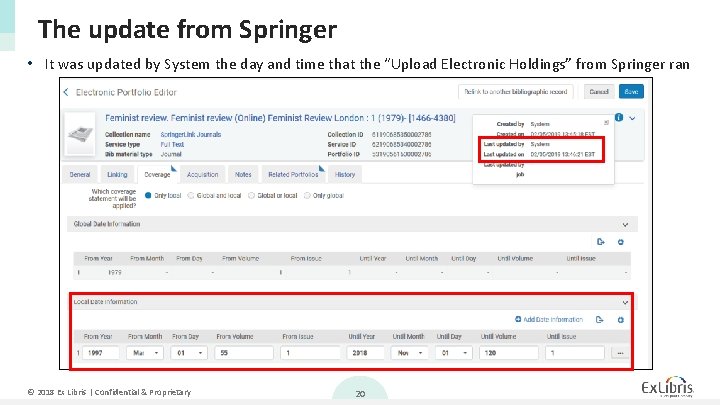
The update from Springer • For the second example we see coverage identical to the contents of the KBART file. © 2018 Ex Libris | Confidential & Proprietary 19
The update from Springer • It was updated by System the day and time that the “Upload Electronic Holdings” from Springer ran © 2018 Ex Libris | Confidential & Proprietary 20
Agenda I II IV Introduction The setup The update from Springer Summary © 2018 Ex Libris | Confidential & Proprietary 21
Summary • After a simple setup the institution was able to automatically receive files from Springer, have them upload to Alma, and update the holdings of the electronic resources. • No manual work was done. • This is a great time saver, replacing the need to get the files from the vendor, make sure they are in proper format, and manually load to Alma. © 2018 Ex Libris | Confidential & Proprietary 22