
University Computer LifeCycle Replacement Plan Employee Labs and
University Computer Life-Cycle Replacement Plan Employee, Labs and Service Desks

6 Penny Wise Pound Foolish
Basic Computer Facts and Assumptions • This proposal assumes the life-cycle of each employee’s primary computer, but we realize some employees have multiple computers. • The proposal does not include computers from grants. • We anticipate an annual 10% increase in the demand for notebooks over desktops with simplified docking per year beginning FY 16 • Currently do not recommend tablet as the primary teaching device, but this will mature quickly for subsequent years. • Different type of computers (i. e. desktop, notebook, tablet) have different life-cycle replacements • Apple Computers are more costly than PCs • Notebooks are more costly than desktops • 11. 4% of the computers on campus are Apple (not including Tablets) • Lower cost Phablet options may be a solution for employees that do not work at a desk. • Many of the numbers are derived from a best guess when actual number are not provided.
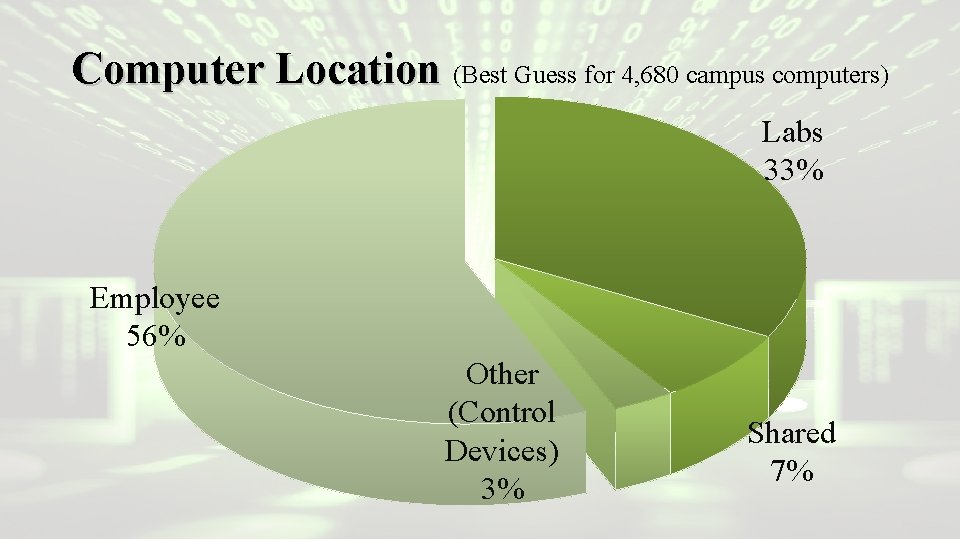
Computer Location (Best Guess for 4, 680 campus computers) Labs 33% Employee 56% Other (Control Devices) 3% Shared 7%
Goals • Eliminate any computer that is older than 8 years old from the university inventory • All computers must run the Dell KACE Client • Provide a computer replacement life-cycle for all full-time faculty and staff members – A pool of computers for part-time and GAs • Reduce the number overall lab computers, particularly in private labs • Total computer # in inventory 3, 976 core to replace @$300 with a lifecycle cost of @$1, 192, 800 • Total computers 4, 680 to replace @$300 with a life-cycle cost of @$1, 404, 000 – How many employees are core?
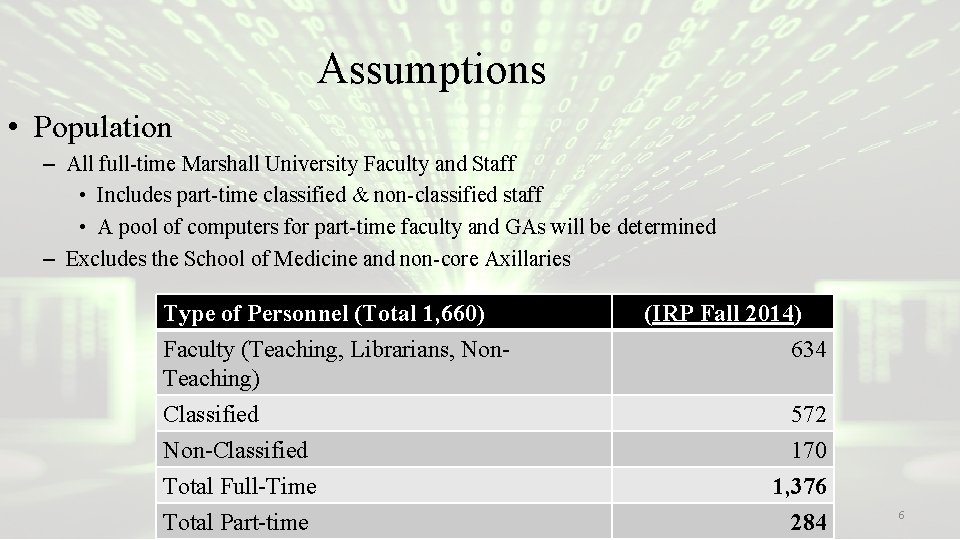
Assumptions • Population – All full-time Marshall University Faculty and Staff • Includes part-time classified & non-classified staff • A pool of computers for part-time faculty and GAs will be determined – Excludes the School of Medicine and non-core Axillaries Type of Personnel (Total 1, 660) Faculty (Teaching, Librarians, Non. Teaching) Classified Non-Classified Total Full-Time Total Part-time (IRP Fall 2014) 634 572 170 1, 376 284 6
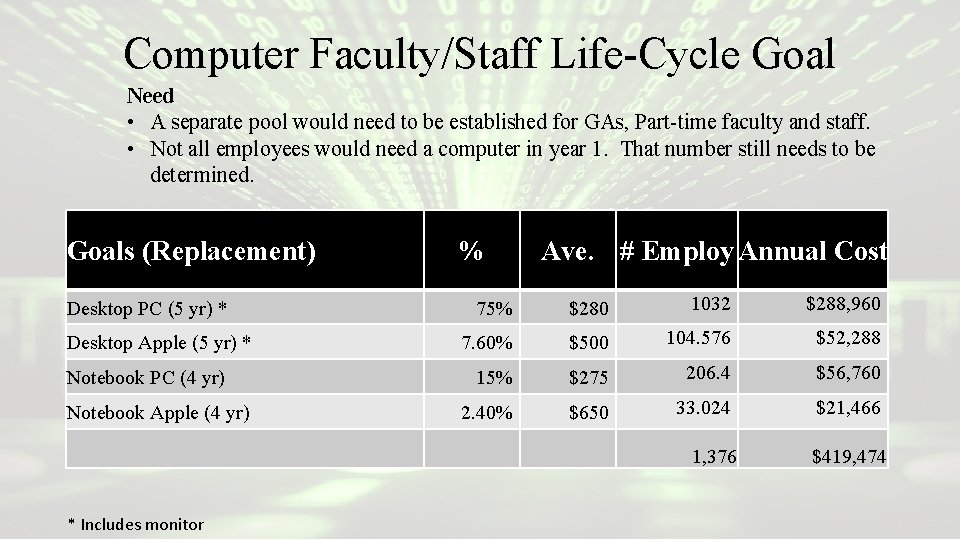
Computer Faculty/Staff Life-Cycle Goal Need • A separate pool would need to be established for GAs, Part-time faculty and staff. • Not all employees would need a computer in year 1. That number still needs to be determined. Goals (Replacement) Desktop PC (5 yr) * Desktop Apple (5 yr) * Notebook PC (4 yr) Notebook Apple (4 yr) % Ave. # Employ Annual Cost 75% $280 1032 $288, 960 7. 60% $500 104. 576 $52, 288 15% $275 206. 4 $56, 760 2. 40% $650 33. 024 $21, 466 1, 376 * Includes monitor $419, 474
Computer Labs • Computer labs are expensive to equip, staff, and maintain. • Students are increasingly arriving on campus with their own devices, including notebook computers. • Student computer ownership needs to be emphasized • Private computer labs normally have low utilization • Private labs normally have restrictive hours of operation
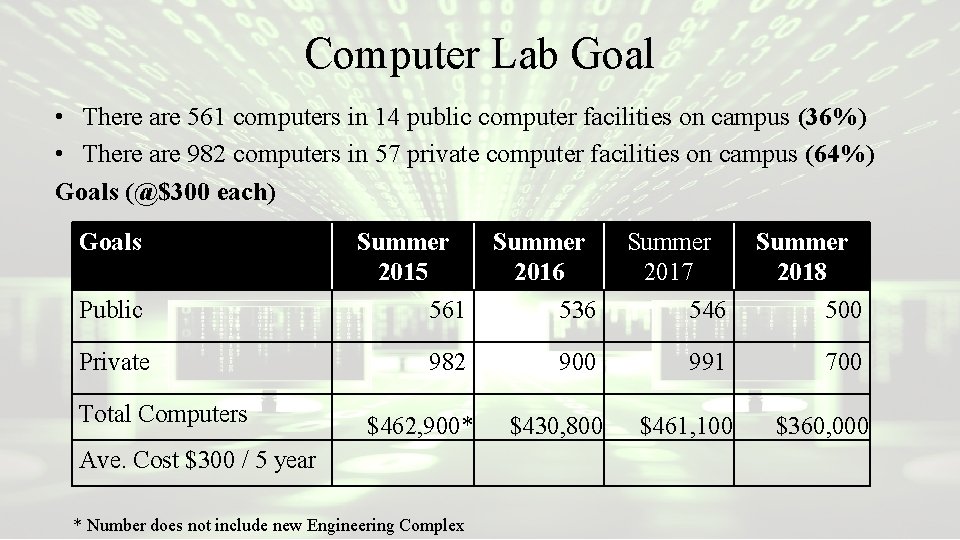
Computer Lab Goal • There are 561 computers in 14 public computer facilities on campus (36%) • There are 982 computers in 57 private computer facilities on campus (64%) Goals (@$300 each) Goals Summer 2015 Summer 2016 Summer 2017 Summer 2018 Public 561 536 546 500 Private 982 900 991 700 $462, 900* $430, 800 $461, 100 $360, 000 Total Computers Ave. Cost $300 / 5 year * Number does not include new Engineering Complex
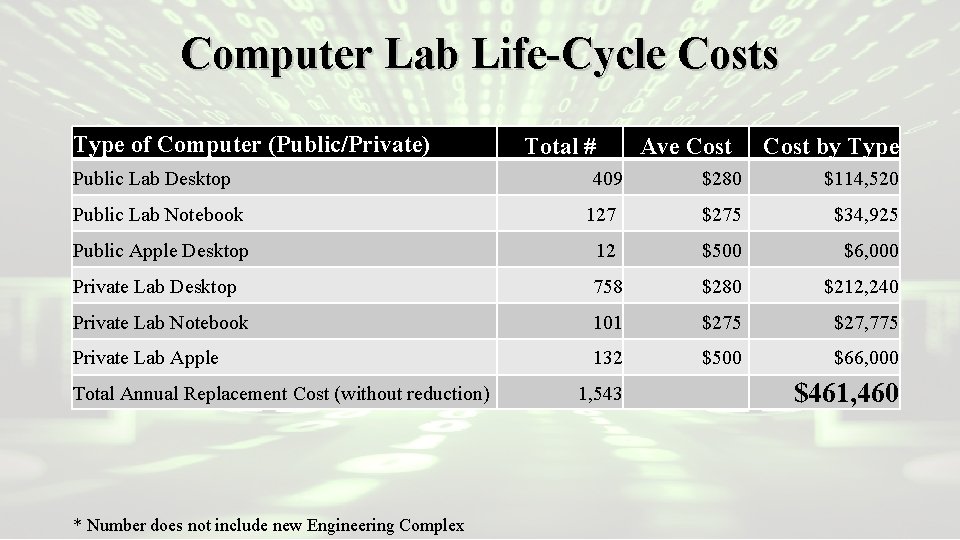
Computer Lab Life-Cycle Costs Type of Computer (Public/Private) Public Lab Desktop Total # 409 Ave Cost by Type $280 $114, 520 Public Lab Notebook 127 $275 $34, 925 Public Apple Desktop 12 $500 $6, 000 Private Lab Desktop 758 $280 $212, 240 Private Lab Notebook 101 $275 $27, 775 Private Lab Apple 132 $500 $66, 000 Total Annual Replacement Cost (without reduction) * Number does not include new Engineering Complex 1, 543 $461, 460
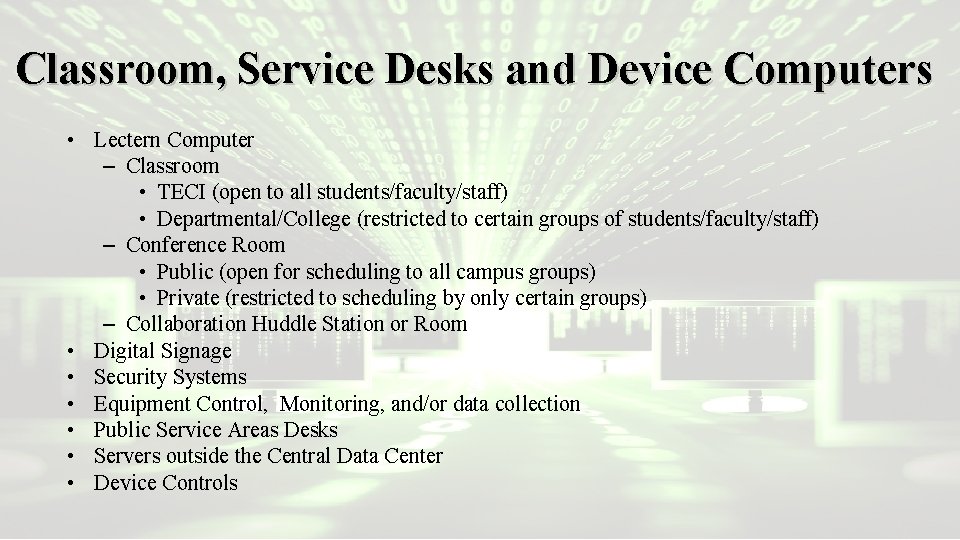
Classroom, Service Desks and Device Computers • Lectern Computer – Classroom • TECI (open to all students/faculty/staff) • Departmental/College (restricted to certain groups of students/faculty/staff) – Conference Room • Public (open for scheduling to all campus groups) • Private (restricted to scheduling by only certain groups) – Collaboration Huddle Station or Room • Digital Signage • Security Systems • Equipment Control, Monitoring, and/or data collection • Public Service Areas Desks • Servers outside the Central Data Center • Device Controls
- Slides: 11