
Universal Serial Bus Host Specification and Implementation 304

Universal Serial Bus Host Specification and Implementation 304 -648 B: VLSI Design Atanu Chattopadhyay May 18, 2001 1

Section 1: The USB Protocol and Components 2
Introduction to the USB Protocol • External Bus Standard. • Allows connection of peripheral devices. • Connects Devices such as keyboards, mice, scanners, printers, joysticks, audio devices, disks. • Facilitates transfers of data at 480 (USB 2. 0 only), 12 or 1. 5 Mb/s (mega-bits/second). • Developed by a Special Interest Group including Intel, Microsoft, Compact, DEC, IBM, Northern Telecom and NEC originally in 1994 3
USB 2. 0 l. A USB 2. 0 requires a similar engineering effort to USB 1. 1 l Backwards and forwards compatible – Old devices work with new hosts – New devices work with old hosts l The only difference is really the addition of a 40 x high-speed mode and the inclusion of a more complicated external bus interface 4
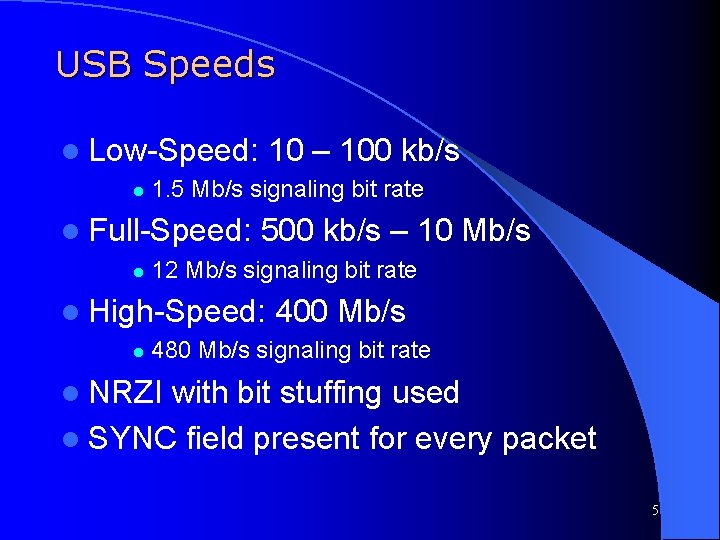
USB Speeds l Low-Speed: l 1. 5 Mb/s signaling bit rate l Full-Speed: l 10 – 100 kb/s 500 kb/s – 10 Mb/s 12 Mb/s signaling bit rate l High-Speed: l 400 Mb/s 480 Mb/s signaling bit rate l NRZI with bit stuffing used l SYNC field present for every packet 5
Feature Set Common protocol to interface various components and manufacturers. • Provides support for real-time data. • Allows Flexibility to send real-time (Isochronous/periodic) and non-real-time (Asynchronous) data over a common link. • Wide range of packet sizes – In High speed mode, a 1/8 th of a 1 ms “microframe” can be specified to keep buffers small at high transfer rates • 6
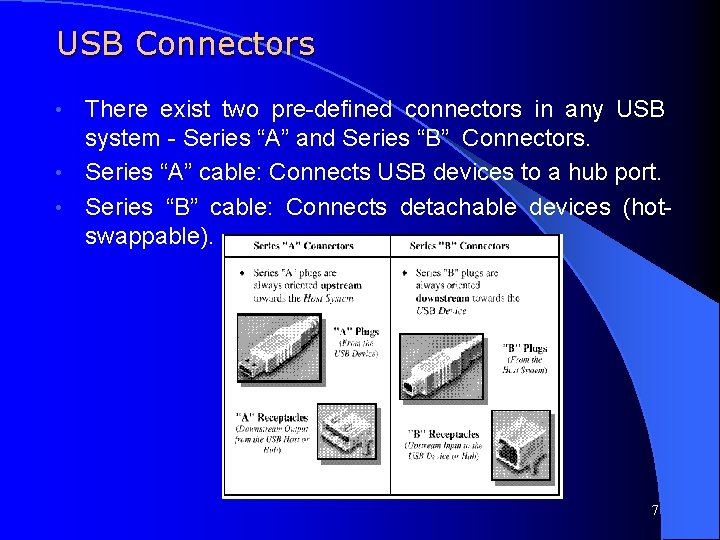
USB Connectors There exist two pre-defined connectors in any USB system - Series “A” and Series “B” Connectors. • Series “A” cable: Connects USB devices to a hub port. • Series “B” cable: Connects detachable devices (hotswappable). • 7
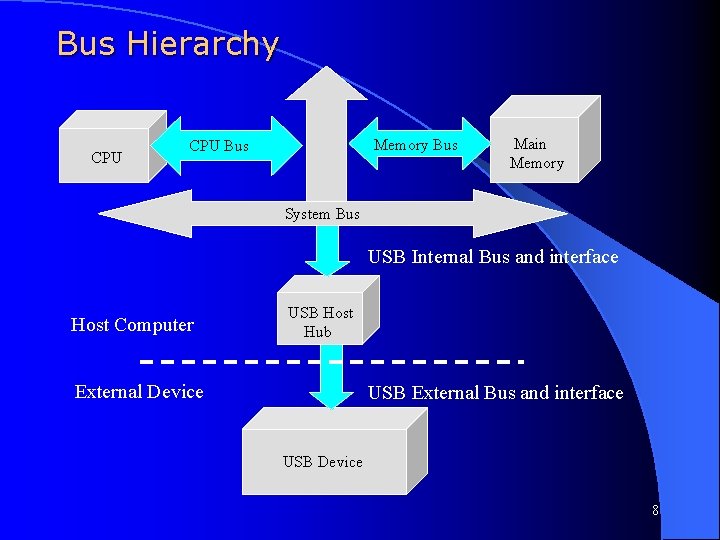
Bus Hierarchy CPU Memory Bus CPU Bus Main Memory System Bus USB Internal Bus and interface Host Computer USB Host Hub External Device USB External Bus and interface USB Device 8
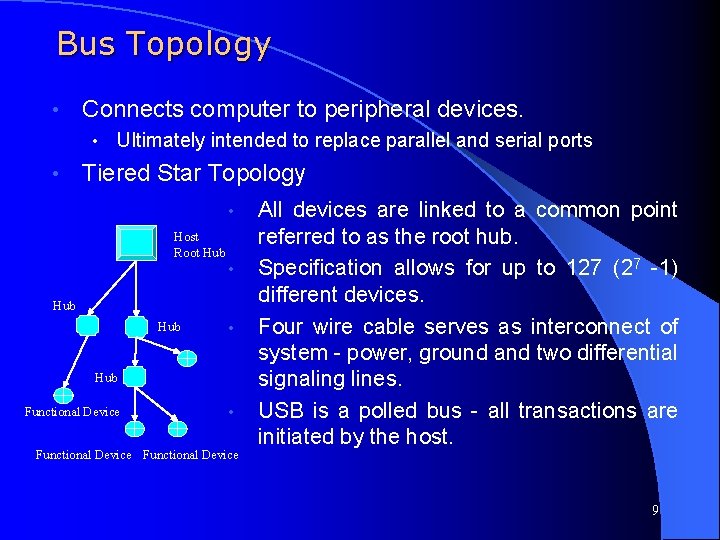
Bus Topology • Connects computer to peripheral devices. • • Ultimately intended to replace parallel and serial ports Tiered Star Topology • Host Root Hub • Hub Functional Device • Functional Device All devices are linked to a common point referred to as the root hub. Specification allows for up to 127 (27 -1) different devices. Four wire cable serves as interconnect of system - power, ground and two differential signaling lines. USB is a polled bus - all transactions are initiated by the host. 9
USB Host Device that controls entire system usually a PC of some form. Processes data arriving to and from the USB port. • Contains a sophisticated set of software drivers. • Drivers schedule and compose USB transactions. • Access individual devices to obtain configuration information. • Software dependence of USB systems make it difficult to use on standalone systems without OS support • Physical interface to USB Root Hub is referred to as the USB Host Controller. • 10
USB Hub Tests for new devices and maintains status information of child devices. 2. Serve as repeaters, boosting strength of up and downstream signals. 3. Electrically isolates devices from one another allowing an expanded number of devices. 1. Allows slower devices to be places on a faster branch. ie. allows a 1. 5 Mb/s device may be connected to a 12 Mb/s line 2. Allows malfunctioning devices to be removed 4. May be integrated into various components or purchased as stand alone devices. 11
USB Devices 1. 2. 3. 4. 5. All functional devices are slaves - only responding to data reads or writes, never initiating any. Many indicate a need to transmit or receive data through polling. Contain registers that identify relevant configuration information. Exist in conjunction with corresponding set of software drivers inside the host system. Examples include joysticks, keyboards, printers, etc. 12
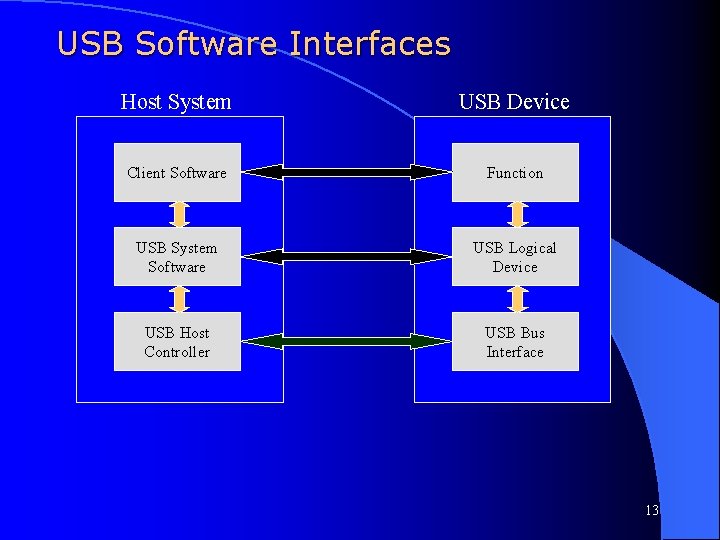
USB Software Interfaces Host System USB Device Client Software Function USB System Software USB Logical Device USB Host Controller USB Bus Interface 13
USB Software Interfaces • Client software determines what transactions are required with a given device. • • Scheduling and configuration of data transfers is completed in USB system software level. • • What data is to be transferred? When and how often is data is to be transferred? Data transfers are composed and regulated at the USB Host Controller level. How is data to appear to the functional device? • How does system keep track of data that has been sent and received? • 14
Section 2: USB Data Structures and Transactions 15
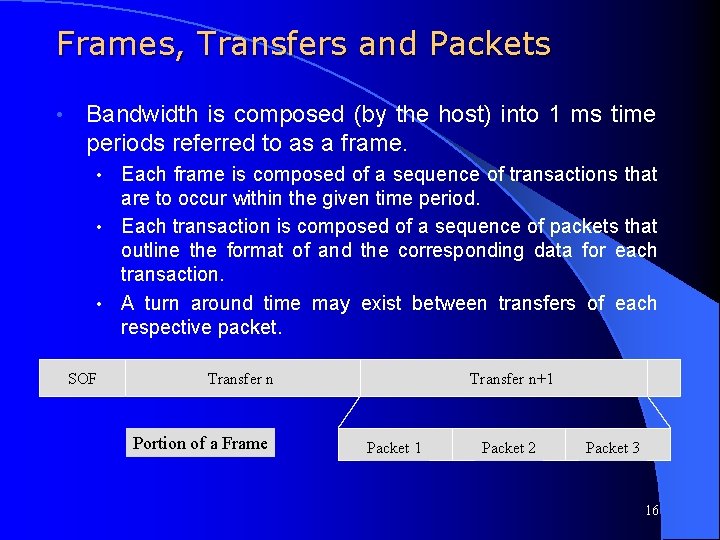
Frames, Transfers and Packets • Bandwidth is composed (by the host) into 1 ms time periods referred to as a frame. Each frame is composed of a sequence of transactions that are to occur within the given time period. • Each transaction is composed of a sequence of packets that outline the format of and the corresponding data for each transaction. • A turn around time may exist between transfers of each respective packet. • SOF Transfer n Portion of a Frame Transfer n+1 Packet 2 Packet 3 16
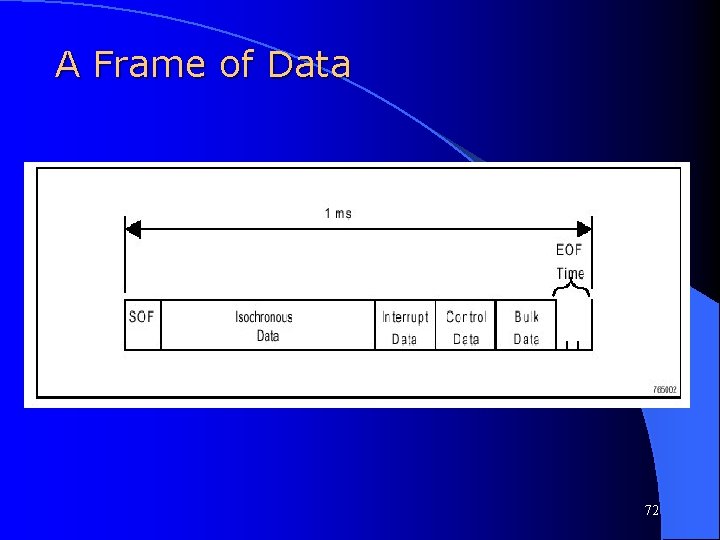
Frames, Transfers and Packets Data is configured by the host system to be sent out within a given frame. • Length of frame can be dynamically altered by the host controller to facilitate more efficient use of bandwidth. • • Impossible for the host to know exactly how long it will take to perform entire set of transactions at time of scheduling. Start of Frame is indicated by a SOF packets. • Transactions are generally initiated with a token packet, followed by a data packet and concluded with a handshaking packet. • • Lengthy transfers are broken into smaller ones and sent over a number of frames. 17
Transfer Types • There exists four basic types of transfers: • 1) Control Transfers • 2) Bulk Transfers • 3) Polling (Interrupt) • 4) Isochronous (real-time) Transfers • USB specification refers to Polling transfers as Interrupt Transfers. However, this terminology may be misleading and in this document we will use the term Polling Transfers. 18
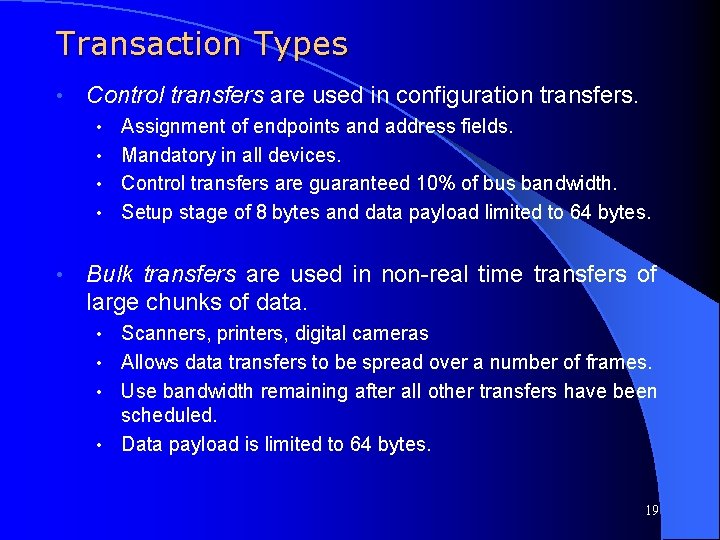
Transaction Types • Control transfers are used in configuration transfers. Assignment of endpoints and address fields. • Mandatory in all devices. • Control transfers are guaranteed 10% of bus bandwidth. • Setup stage of 8 bytes and data payload limited to 64 bytes. • • Bulk transfers are used in non-real time transfers of large chunks of data. Scanners, printers, digital cameras • Allows data transfers to be spread over a number of frames. • Use bandwidth remaining after all other transfers have been scheduled. • Data payload is limited to 64 bytes. • 19
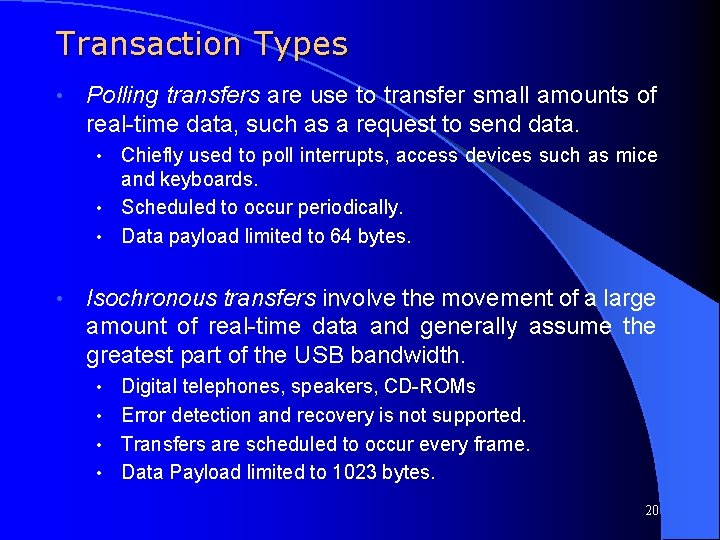
Transaction Types • Polling transfers are use to transfer small amounts of real-time data, such as a request to send data. Chiefly used to poll interrupts, access devices such as mice and keyboards. • Scheduled to occur periodically. • Data payload limited to 64 bytes. • • Isochronous transfers involve the movement of a large amount of real-time data and generally assume the greatest part of the USB bandwidth. Digital telephones, speakers, CD-ROMs • Error detection and recovery is not supported. • Transfers are scheduled to occur every frame. • Data Payload limited to 1023 bytes. • 20
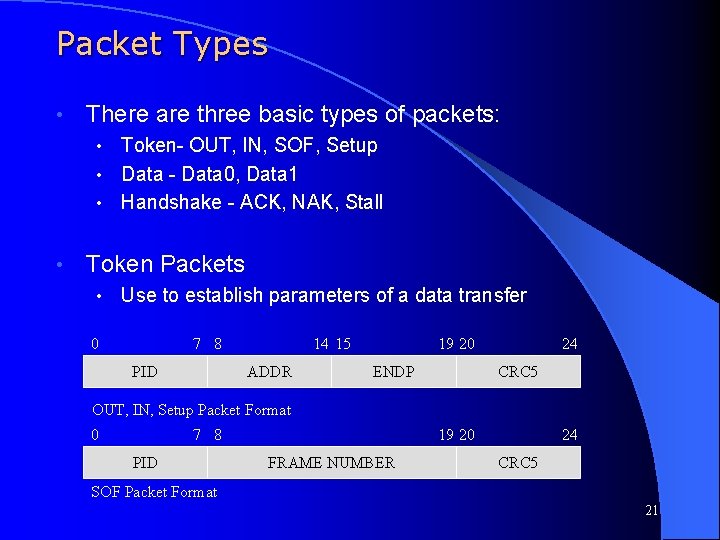
Packet Types • There are three basic types of packets: Token- OUT, IN, SOF, Setup • Data - Data 0, Data 1 • Handshake - ACK, NAK, Stall • • Token Packets • Use to establish parameters of a data transfer 0 7 8 PID 14 15 ADDR 19 20 ENDP 24 CRC 5 OUT, IN, Setup Packet Format 0 7 8 PID 19 20 FRAME NUMBER 24 CRC 5 SOF Packet Format 21
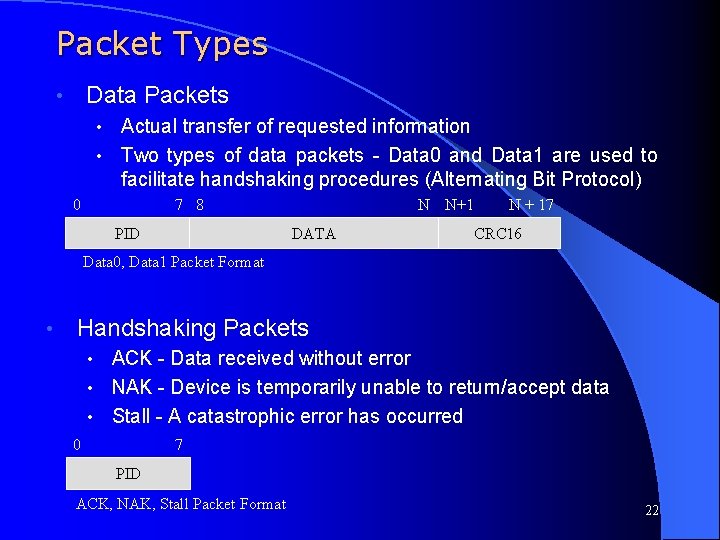
Packet Types Data Packets • Actual transfer of requested information • Two types of data packets - Data 0 and Data 1 are used to facilitate handshaking procedures (Alternating Bit Protocol) • 0 7 8 PID N N+1 DATA N + 17 CRC 16 Data 0, Data 1 Packet Format • Handshaking Packets ACK - Data received without error • NAK - Device is temporarily unable to return/accept data • Stall - A catastrophic error has occurred • 0 7 PID ACK, NAK, Stall Packet Format 22
Field Types • PID - Packet Identifier • • ADDR - Device Address • • a 16 bit field is used for data, and a 5 bit field is used for all other packets Frame Number - Identifies Frame Number • • Indicates which set of registers within given device. CRC 5 and CRC 16 - A Cyclic Redundancy Check field is affixed to end of packets to check for data errors • • Indicates device being accesses ENDP - Destination Endpoint • • Indicates type of packet. 11 bit field uniquely identifying the given frame Data - Information to be transmitted • Must be an integral number of bytes. 23
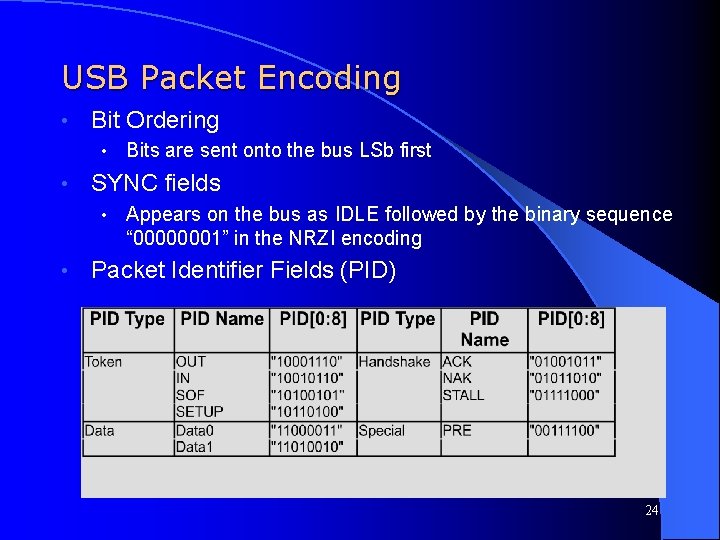
USB Packet Encoding • Bit Ordering • • SYNC fields • • Bits are sent onto the bus LSb first Appears on the bus as IDLE followed by the binary sequence “ 00000001” in the NRZI encoding Packet Identifier Fields (PID) 24
USB Packet Encoding • Address Fields • • Endpoint Fields • • 7 -bit field, specifies source or destination of data packet 4 -bit field, permits more flexible addressing of functions in which more than one endpoint is required Frame Number Field 11 -bit field that is incremented by the host on a per-frame basis. • Rolls over upon reaching its maximum value of 0 x 7 FFH • 25
USB Packet Encoding • Data Fields Ranges from 0 to 1023 bytes and must have an integral number of bytes. • Data bits within each byte are shifted out LSb first • • End of Packet Fields • Both differential lines are driven to ‘ 0’ for two lock cycles and then one of them to ‘ 1’ for one clock cycle 26
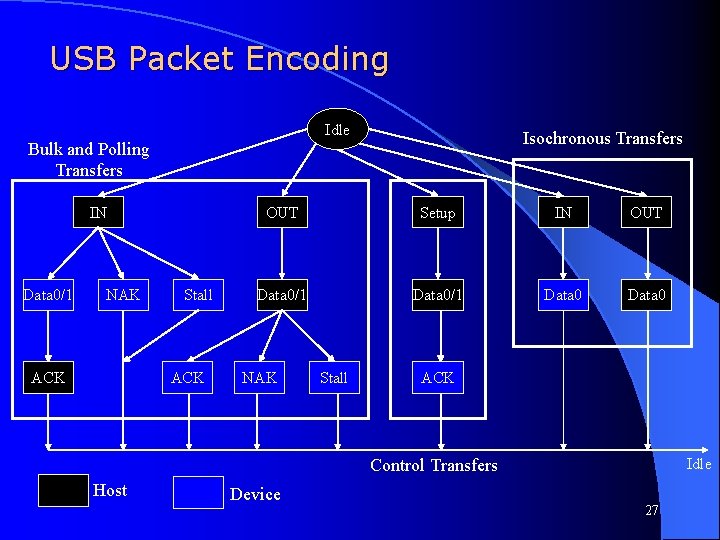
USB Packet Encoding Idle Isochronous Transfers Bulk and Polling Transfers IN Data 0/1 NAK ACK Stall ACK OUT Setup IN OUT Data 0/1 Data 0 NAK Stall ACK Control Transfers Host Device Idle 27
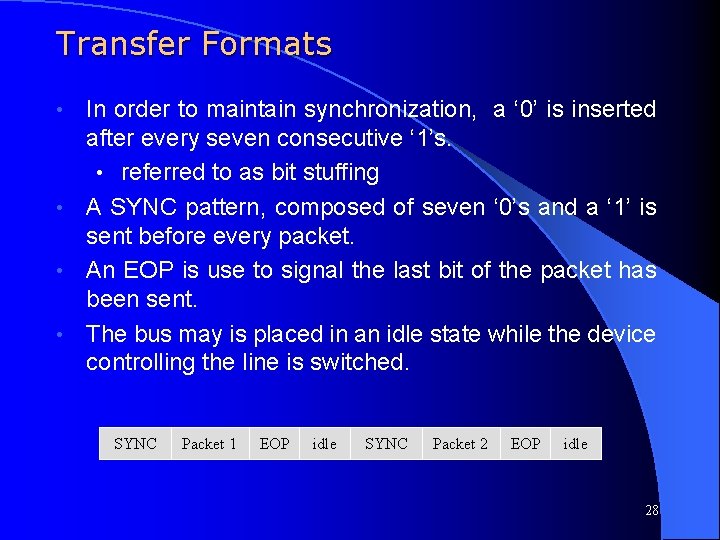
Transfer Formats In order to maintain synchronization, a ‘ 0’ is inserted after every seven consecutive ‘ 1’s. • referred to as bit stuffing • A SYNC pattern, composed of seven ‘ 0’s and a ‘ 1’ is sent before every packet. • An EOP is use to signal the last bit of the packet has been sent. • The bus may is placed in an idle state while the device controlling the line is switched. • SYNC Packet 1 EOP idle SYNC Packet 2 EOP idle 28
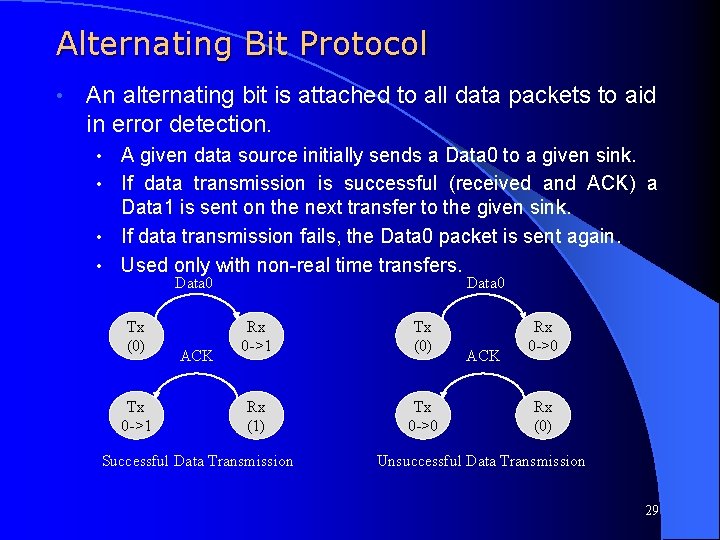
Alternating Bit Protocol • An alternating bit is attached to all data packets to aid in error detection. A given data source initially sends a Data 0 to a given sink. • If data transmission is successful (received and ACK) a Data 1 is sent on the next transfer to the given sink. • If data transmission fails, the Data 0 packet is sent again. • Used only with non-real time transfers. • Data 0 Tx (0) Tx 0 ->1 ACK Data 0 Rx 0 ->1 Tx (0) Rx (1) Tx 0 ->0 Successful Data Transmission ACK Rx 0 ->0 Rx (0) Unsuccessful Data Transmission 29
Detected Errors • If an error is detected in the CRC field of any packet the corresponding transfer is terminated. No handshaking packet is sent, and the line goes to idle. • If an error is detected, it indicates that the wrong device may have claimed the transaction and it is important that the transfer not be made for fear of corrupting data. • Host must recognize this situation and recover from it. • The alternating bit protocol provides a mechanism by which the source can re-transmit the same data and the sink can know this is old data and not an all-new transaction. • 30
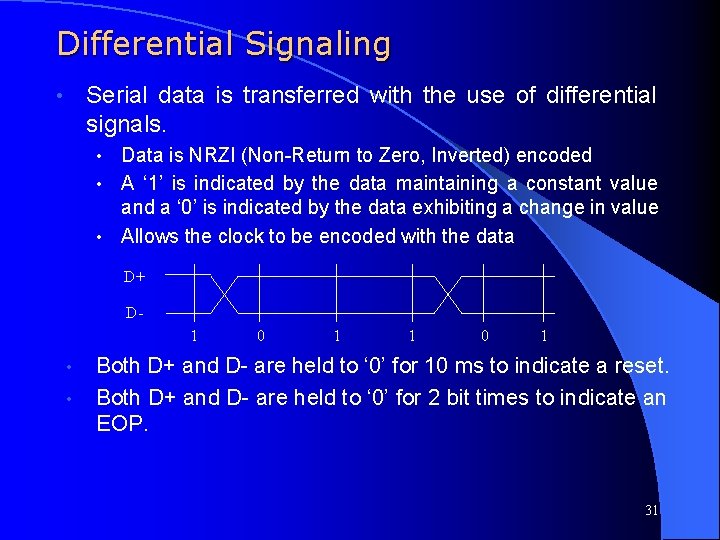
Differential Signaling Serial data is transferred with the use of differential signals. • Data is NRZI (Non-Return to Zero, Inverted) encoded • A ‘ 1’ is indicated by the data maintaining a constant value and a ‘ 0’ is indicated by the data exhibiting a change in value • Allows the clock to be encoded with the data • D+ D 1 • • 0 1 1 0 1 Both D+ and D- are held to ‘ 0’ for 10 ms to indicate a reset. Both D+ and D- are held to ‘ 0’ for 2 bit times to indicate an EOP. 31
Inter-Packet Delay Definition – The time a device needs to wait to begin transmitting a packet after a packet has been received to prevent collisions on the USB. This time is based on the length and propagation delay characteristics of the cable and the location of the transmitting device in relation to other devices on the USB l Inter-Packet Delay is measured from the last transition in the EOP to the first transition that starts the next packet l A device is required to allow 2 bit times of inter-packet delay. The delay is measured at the responding device with a bit time defined in terms of the response. l The host must provide at least 2 bit times after last transition of the EOP and the start of the new packet l 32
Inter-Packet Delay l If a device is expected to provide a response to a host transmission, the maximum inter-packet delay is 6. 5 bit times l The maximum inter-packet delay for a host response is 7. 5 bit times, measured from the host’s port pins l There is no maximum inter-packet delay between packets in unrelated transactions. 33
Bus Turn-Around Time l Definition – Neither the device nor the host will send an indication that a received packet had an error. Thus, absence of positive acknowledgement is considered to be the indication that there was an error. As a consequence of this method of error reporting, the host and USB function need to keep track of how much time has elapsed from when the transmitter completes sending a packet until it begins to receive a response. This time is called the bus turn-around time. Both the device and the host require turn-around timers l The device bus turn-around is defined by the worst case round trip delay plus the maximum device response delay l – l If a response is not received within this worst case timeout, then the transmitter considers that the packet transmission has failed USB devices timeout no sooner than 16 bit times and no later than 18 bit times after the end of the previous EOP 34
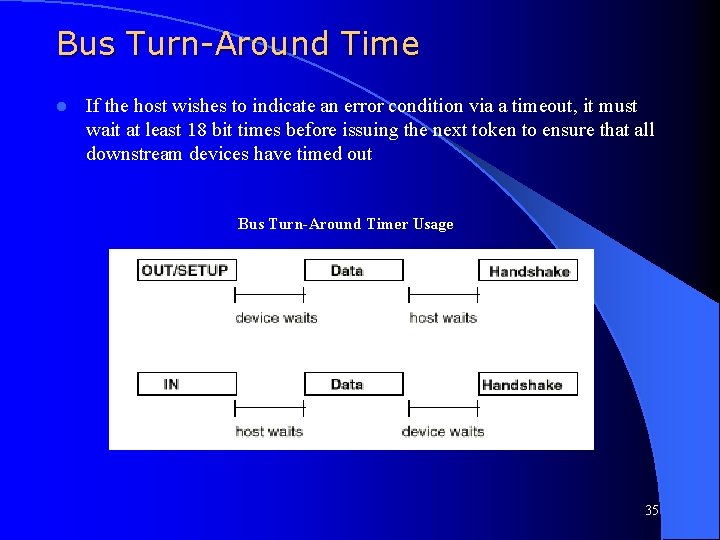
Bus Turn-Around Time l If the host wishes to indicate an error condition via a timeout, it must wait at least 18 bit times before issuing the next token to ensure that all downstream devices have timed out Bus Turn-Around Timer Usage 35
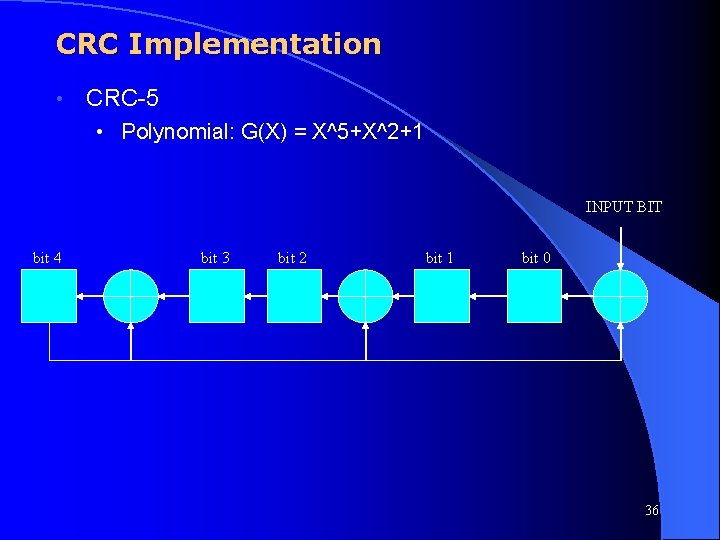
CRC Implementation • CRC-5 • Polynomial: G(X) = X^5+X^2+1 INPUT BIT bit 4 bit 3 bit 2 bit 1 bit 0 36
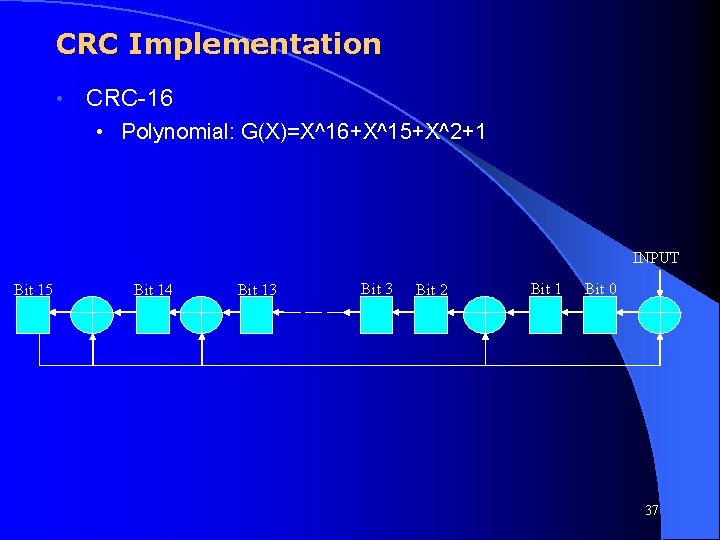
CRC Implementation • CRC-16 • Polynomial: G(X)=X^16+X^15+X^2+1 INPUT Bit 15 Bit 14 Bit 13 Bit 2 Bit 1 Bit 0 37
Section 3: USB Host Controller (SW) 38
Frame List • USB system software compiles a linked list referred to as the Frame List detailing the data to be sent out during each frame. • Exact format of frame list and corresponding data structures is outlined by the OHCI (Open Host Controller Interface) or UHCI (Universal Host Controller Interface) standards. • Host controller accesses frame list to obtain a pointer to a data structure (referred to as a Transfer Descriptor) that outlines the details of the data to be sent. • Data structure contains a pointer to the data to be sent/ address to store incoming data. It also contains a pointer to the next data structure to be sent. 39
Frame List Every millisecond the Host Controller Interface increases its Frame Number and accesses a subsequent address in the Frame List. • Real time data is accessed first by the host controller. • Non-real time data is queued and accessed when the host controller identifies that additional bandwidth is available. • The HCI updates (status/ data) each Transfer Descriptor that it processes. • 40
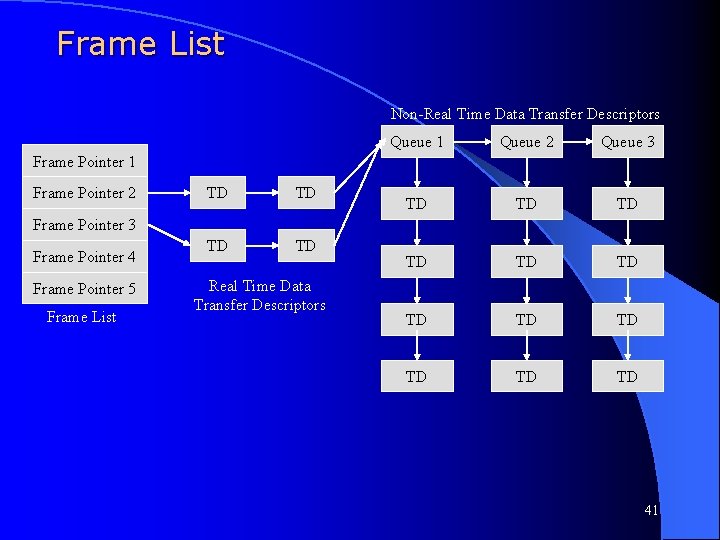
Frame List Non-Real Time Data Transfer Descriptors Queue 1 Queue 2 Queue 33 TD TD TD Frame Pointer 1 Frame Pointer 2 TD TD Frame Pointer 3 Frame Pointer 4 Frame Pointer 5 Frame List Real Time Data Transfer Descriptors 41
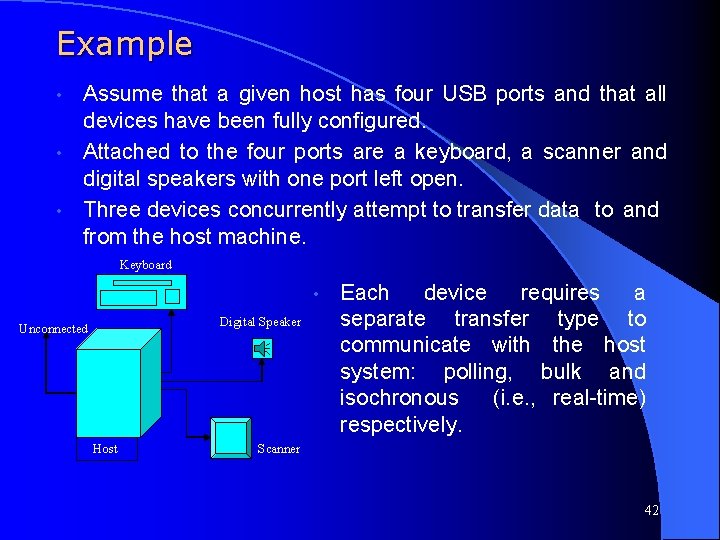
Example Assume that a given host has four USB ports and that all devices have been fully configured. • Attached to the four ports are a keyboard, a scanner and digital speakers with one port left open. • Three devices concurrently attempt to transfer data to and from the host machine. • Keyboard • Digital Speaker Unconnected Host Each device requires a separate transfer type to communicate with the host system: polling, bulk and isochronous (i. e. , real-time) respectively. Scanner 42
Example Digital Speakers will require a constant influx of data whenever they are to be broadcasting a given signal. • The keyboard is to be checked every second frame to see if any new characters have been entered. • The scanner will use any available bandwidth to transfer various images to the host system. • USB system drivers will schedule the relevant transfers to occur as required by the functional devices. • 43
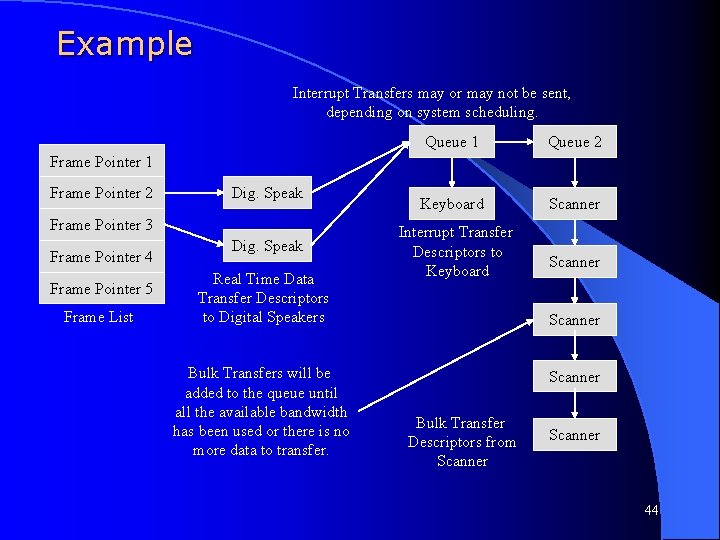
Example Interrupt Transfers may or may not be sent, depending on system scheduling. Queue 1 Queue 2 Keyboard Scanner Frame Pointer 1 Frame Pointer 2 Dig. Speak Frame Pointer 3 Frame Pointer 4 Frame Pointer 5 Frame List Dig. Speak Real Time Data Transfer Descriptors to Digital Speakers Bulk Transfers will be added to the queue until all the available bandwidth has been used or there is no more data to transfer. Interrupt Transfer Descriptors to Keyboard Scanner Bulk Transfer Descriptors from Scanner 44
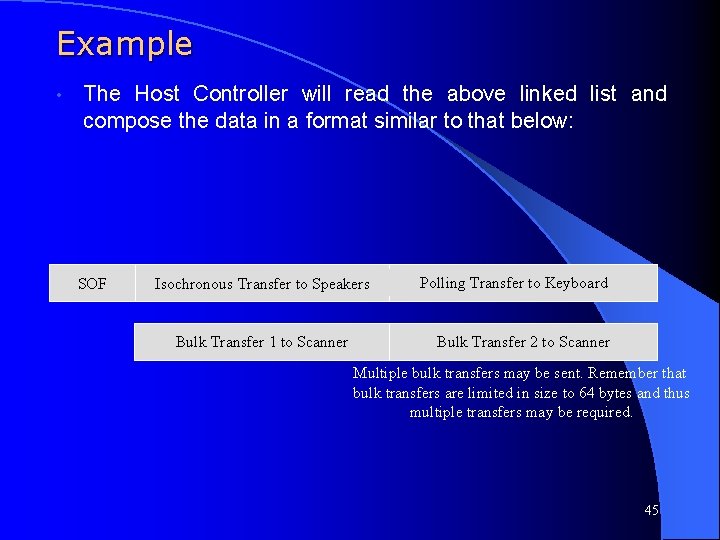
Example • The Host Controller will read the above linked list and compose the data in a format similar to that below: SOF Isochronous Transfer to Speakers Bulk Transfer 1 to Scanner Polling Transfer to Keyboard Bulk Transfer 2 to Scanner Multiple bulk transfers may be sent. Remember that bulk transfers are limited in size to 64 bytes and thus multiple transfers may be required. 45
![Frame List Pointer l Composed of one word – Frame List Pointer [31: 4]](http://slidetodoc.com/presentation_image/54d77616463098b8d69676d37bd68c45/image-46.jpg "Frame List Pointer l Composed of one word – Frame List Pointer [31: 4]")
Frame List Pointer l Composed of one word – Frame List Pointer [31: 4] (FLP) - This field contains the address of the first data object to be processed in the frame and corresponds to memory address signals [31: 4], respectively – Reserved [3: 2] - These bits must be written as 0 s – QH/TD Select [1] (Q) - 1=QH. 0=TD. This bit indicates to the hardware whether the item referenced by the link pointer is a TD or a QH. This allows the Host Controller to perform the proper type of processing on the item after it is fetched – Terminate [0] (T) - 1=Empty Frame (pointer is invalid). 0=Pointer is valid (points to a QH or TD). This bit indicates to the Host Controller whether the schedule for this frame has valid entries in it 46
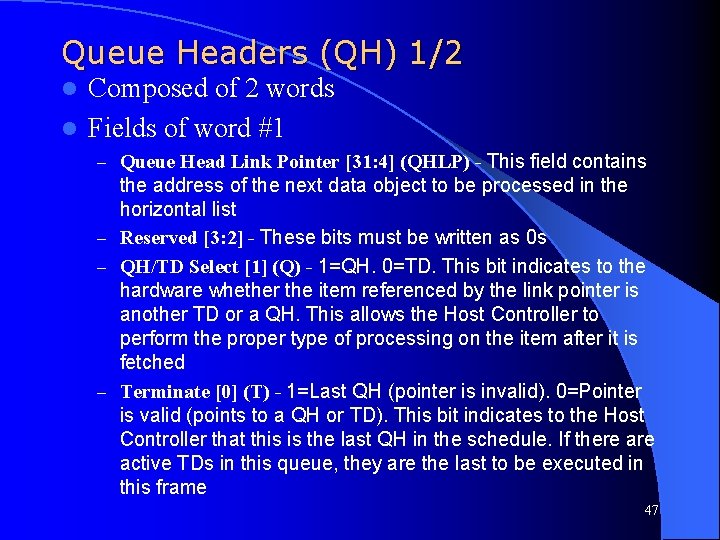
Queue Headers (QH) 1/2 Composed of 2 words l Fields of word #1 l – Queue Head Link Pointer [31: 4] (QHLP) - This field contains the address of the next data object to be processed in the horizontal list – Reserved [3: 2] - These bits must be written as 0 s – QH/TD Select [1] (Q) - 1=QH. 0=TD. This bit indicates to the hardware whether the item referenced by the link pointer is another TD or a QH. This allows the Host Controller to perform the proper type of processing on the item after it is fetched – Terminate [0] (T) - 1=Last QH (pointer is invalid). 0=Pointer is valid (points to a QH or TD). This bit indicates to the Host Controller that this is the last QH in the schedule. If there active TDs in this queue, they are the last to be executed in this frame 47
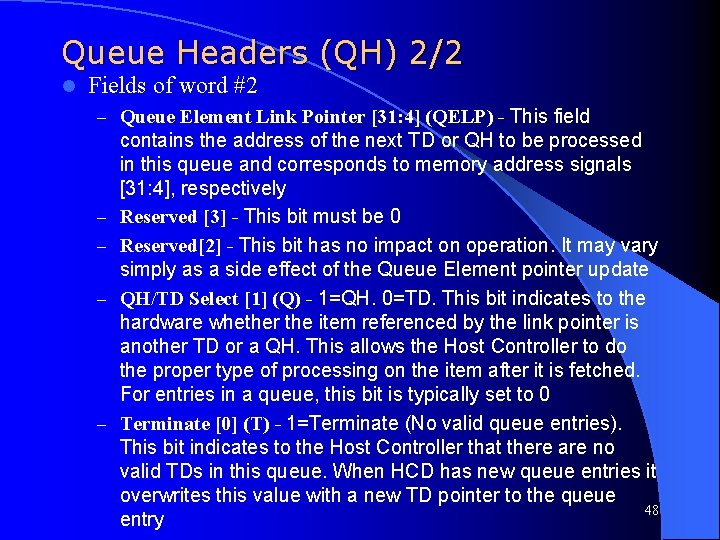
Queue Headers (QH) 2/2 l Fields of word #2 – Queue Element Link Pointer [31: 4] (QELP) - This field – – contains the address of the next TD or QH to be processed in this queue and corresponds to memory address signals [31: 4], respectively Reserved [3] - This bit must be 0 Reserved[2] - This bit has no impact on operation. It may vary simply as a side effect of the Queue Element pointer update QH/TD Select [1] (Q) - 1=QH. 0=TD. This bit indicates to the hardware whether the item referenced by the link pointer is another TD or a QH. This allows the Host Controller to do the proper type of processing on the item after it is fetched. For entries in a queue, this bit is typically set to 0 Terminate [0] (T) - 1=Terminate (No valid queue entries). This bit indicates to the Host Controller that there are no valid TDs in this queue. When HCD has new queue entries it overwrites this value with a new TD pointer to the queue 48 entry
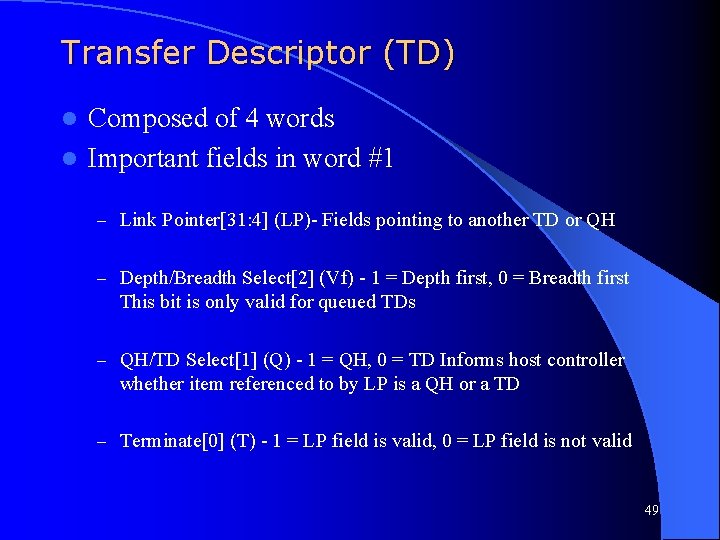
Transfer Descriptor (TD) Composed of 4 words l Important fields in word #1 l – Link Pointer[31: 4] (LP)- Fields pointing to another TD or QH – Depth/Breadth Select[2] (Vf) - 1 = Depth first, 0 = Breadth first This bit is only valid for queued TDs – QH/TD Select[1] (Q) - 1 = QH, 0 = TD Informs host controller whether item referenced to by LP is a QH or a TD – Terminate[0] (T) - 1 = LP field is valid, 0 = LP field is not valid 49
![Transfer Descriptor (TD) l Important fields in word #2 – Isochronous Select[25] (ISO) -](http://slidetodoc.com/presentation_image/54d77616463098b8d69676d37bd68c45/image-50.jpg "Transfer Descriptor (TD) l Important fields in word #2 – Isochronous Select[25] (ISO) -")
Transfer Descriptor (TD) l Important fields in word #2 – Isochronous Select[25] (ISO) - 1 = Isochronous Transfer Descriptor, 0 = Non isochronous transfer descriptor – Status bits l l l Active[23] - 1 = TD to be executed, 0 = TD shouldn’t be executed Stalled[22] - 1 = STALL handshake was received from device NAK received[19] - 1 = NAK received CRC/Timeout error[18] - 1 = CRC or timeout error detected Bitstuff error[17] - 1 = More than 6 ‘ 1’s in a row were detected – Actual Length[10: 0] (Act. Len) - Written by the host controller at the end of a Usb transaction to indicate the actual number of bytes that were transferred 50
![Transfer Descriptor (TD) l Important fields in word #3 – Maximum Length[31: 21] (Max.](http://slidetodoc.com/presentation_image/54d77616463098b8d69676d37bd68c45/image-51.jpg "Transfer Descriptor (TD) l Important fields in word #3 – Maximum Length[31: 21] (Max.")
Transfer Descriptor (TD) l Important fields in word #3 – Maximum Length[31: 21] (Max. Len) - Specifies the maximum number of data bytes allowed for a particular transfer 0 x 000 -> 1 byte, 0 x 001 -> 2 bytes, …, 0 x 7 FF -> 0 bytes l Values ranging from 0 x 500 to 0 x 7 FE are illegal and cause a consistency check failure – Data Toggle [19] (D) - This bit is used to synchronize data transfers between a USB endpoint and the host. This bit determines which data PID is sent or expected (DATA 0/DATA 1). The Data Toggle bit provides a 1 -bit sequence number to check whether the previous packet completed. This bit must always be 0 for Isochronous TDs. l – Endpoint[18: 15] (End. Pt) - 4 -bit field extends the addressing, internal to a particular device by providing 16 endpoints – Device Address[14: 8] - Identifies a specific device – Packet Identification[7: 0] (PID) - Contains the Packet ID to be used for the particular transaction 51
![Transfer Descriptor (TD) l Important fields in word #4 – Buffer Pointer[31: 0] (Buf.](http://slidetodoc.com/presentation_image/54d77616463098b8d69676d37bd68c45/image-52.jpg "Transfer Descriptor (TD) l Important fields in word #4 – Buffer Pointer[31: 0] (Buf.")
Transfer Descriptor (TD) l Important fields in word #4 – Buffer Pointer[31: 0] (Buf. Ptr) - Corresponds to memory address [31: 0], respectively 52
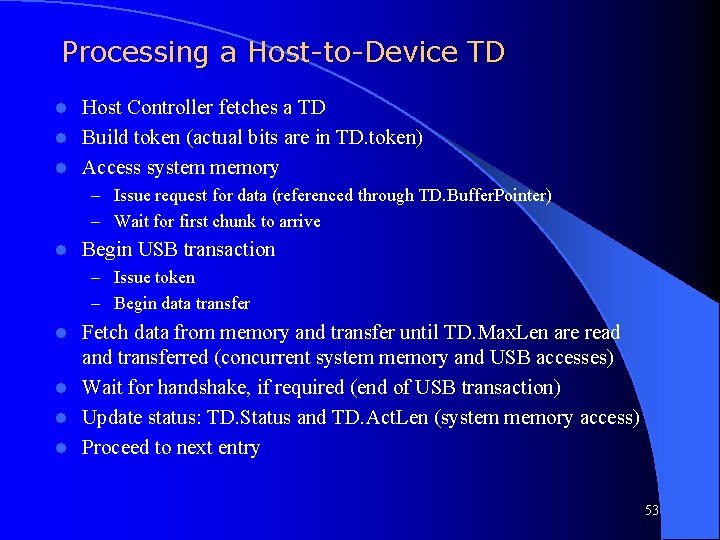
Processing a Host-to-Device TD Host Controller fetches a TD l Build token (actual bits are in TD. token) l Access system memory l – Issue request for data (referenced through TD. Buffer. Pointer) – Wait for first chunk to arrive l Begin USB transaction – Issue token – Begin data transfer Fetch data from memory and transfer until TD. Max. Len are read and transferred (concurrent system memory and USB accesses) l Wait for handshake, if required (end of USB transaction) l Update status: TD. Status and TD. Act. Len (system memory access) l Proceed to next entry l 53
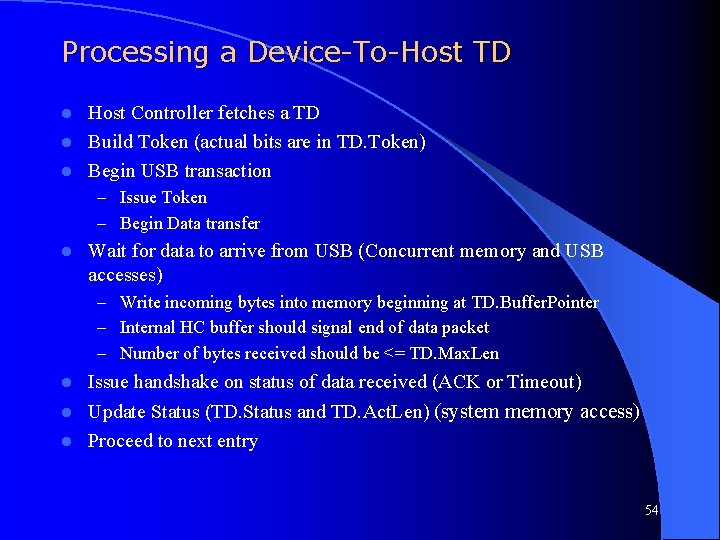
Processing a Device-To-Host TD Host Controller fetches a TD l Build Token (actual bits are in TD. Token) l Begin USB transaction l – Issue Token – Begin Data transfer l Wait for data to arrive from USB (Concurrent memory and USB accesses) – Write incoming bytes into memory beginning at TD. Buffer. Pointer – Internal HC buffer should signal end of data packet – Number of bytes received should be <= TD. Max. Len l Issue handshake on status of data received (ACK or Timeout) Update Status (TD. Status and TD. Act. Len) (system memory access) l Proceed to next entry l 54
Schedule List traversal l Transfer Queuing – Definition: When TDs are accessed via a queue header – Queue is advanced only if top element’s execution status satisfies an advance criteria – Composed of a QH and a linked list of TDs and QHs l The QH contains two link pointers – A queue head link pointer (horizontal pointer) l Used to link a single transfer queue to another transfer queue l If the T bit is set, this QH represents the last data structure in this frame; no further processing is needed – A queue element link pointer (vertical pointer) l Points to the first data structure (QH or TD) being managed by this QH l If T bit is set, the queue is empty 55
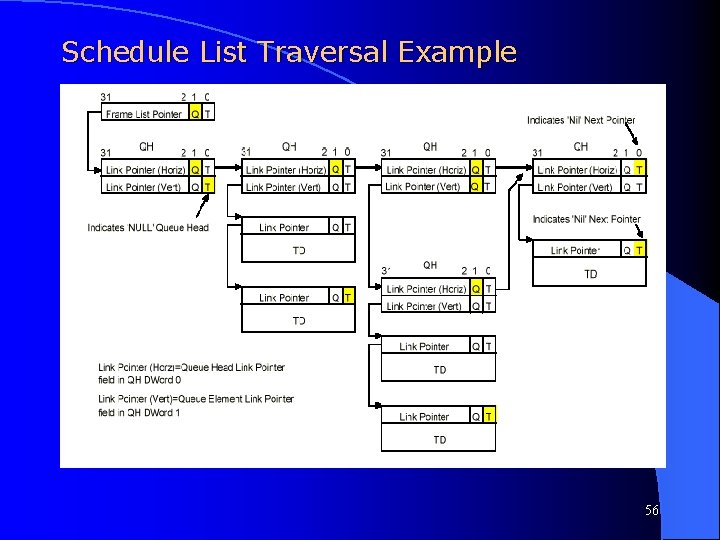
Schedule List Traversal Example 56
Schedule List Traversal Example l First column shows typical example of empty queue – Vertical link pointer T bit set to 1 l Second column shows expected typical configuration – Horizontal link pointer references another QH – Vertical link pointer references a valid TD l Third column shows example of nested QH – Vertical link pointer points to another QH – When this occurs, a new Q context is entered and the Q context just exited is NULL (Host controller will not update the vertical pointer field) l Fourth Column shows example of a termination node – Horizontal link pointer T bit set to 1 57
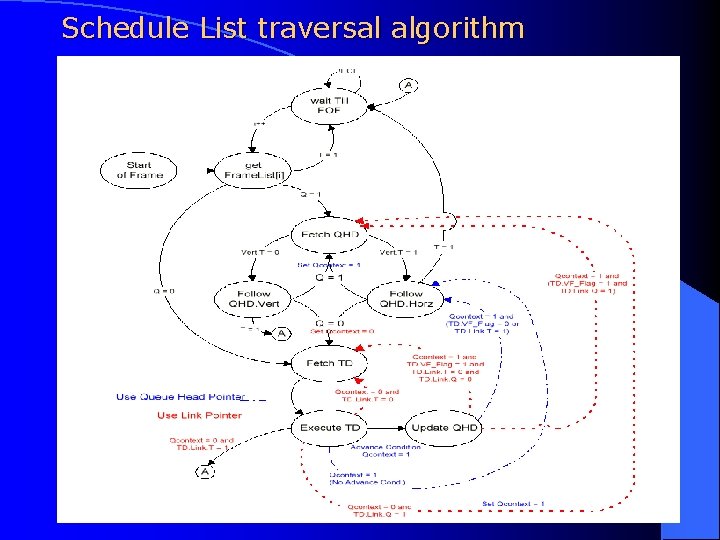
Schedule List traversal algorithm 58
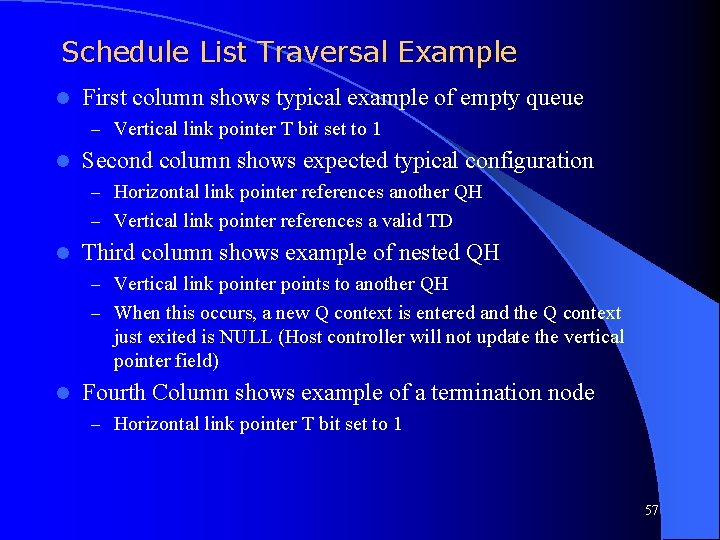
Schedule List Traversal Characteristics A QH’s vertical link pointer references the ‘TOP’ queue member l A QH’s horizontal link pointer references the next “work” element in the frame l Each queue member references the next element within a queue l In the simplest model, the Host Controller follows vertical link point to a queue element, then executes the element. If the completion status of the TD satisfies the advance criteria, the Host Controller advances the queue by writing the just-executed TD’s link pointer back into the QH’s Queue Element link pointer. The next time the queue head is traversed, the next queue element will be the Top element l 59

Schedule List Traversal Characteristics The traversal has two options: Breadth first, or Depth first l For Breadth-First, the Host Controller only executes the top element from each queue. The execution path is: l – QH (Queue Element Link Pointer) -> TD -> Write-Back to QH (Queue Element Link Pointer) -> QH (Queue Head Link pointer) Breadth-First is also performed for every transaction execution that fails the advance criteria l In a Depth-first traversal, the top queue element must complete successfully to satisfy the advance criteria for the queue l – The Host Controller then follows the TD’s link pointer to the next scheduled item l Regardless of traversal mode, when the advance criteria are met, the successful TD’s link pointer is written back to the QH’s Queue Element link pointer 60

Schedule List Traversal Characteristics l When the Host Controller encounters a QH, it caches the QH internally, and sets internal state to indicate it is in a Q-context. It needs this state to update the correct QH (for auto advancement) and also to make the correct decisions on how to traverse the Frame List. l Restricting the advancement of queues to advancement criteria implements a guaranteed data delivery stream. l A queue is NEVER advanced on an error completion status 61
Section 4: USB 2. 0 Extensions 62
UHCI/EHCI in USB l The Universal Host Controller Interface I used to implement hosts for USB 1. 1 l The Extended Universal Host Controller Interface specification extends the functionality to be compatible with USB 2. 0 63
USB Blocks l Recall: l USB driver: – The system SW that supports USB l Client driver SW: – The code specific to a device either provided with the device or through the OS 64
USB Blocks (cont. ) l HCD: Host Controller Driver – SW layer between HC and USBD – HCD interprets requests from USBD – Builds Frame list, Transfer Descriptor (basic data structure), Queue head and data buffer data structures for HC l HC: Host Controller – Managed by HCD, reports status of transactions – Executes lists generated by HCD – Generates tokens and/or data packets 65
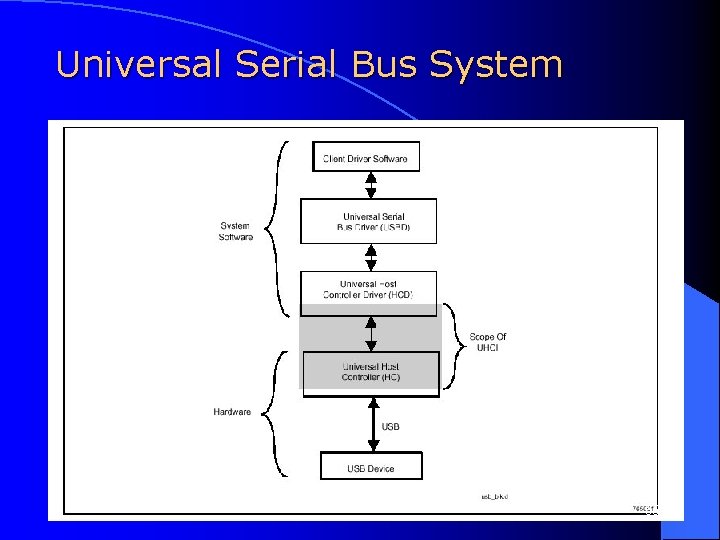
Universal Serial Bus System 66
UHCI l The Host Controller Driver (HCD) is SW responsible for scheduling traffic on USB by posting and maintaining transactions in main memory. l The Host Controller (HC) moves data between memory and USB devices by initiating USB transactions. It needs a large BW to function adequately. 67
UHCI Features l Standard off-the-shelf HCD available (OS dependant) l Easy to implement HC requiring ~ 10 k gates – Pointers set by SW – Only hardware Op is a copy of the link pointers – No numerical operations required l Small built initialization code needs to be custom 68
UHCI Features (cont. ) l Same basic data structures used for isochronous/queued transfers l HC transfers data over USB by executing a schedule of actions from memory set by HCD l HC generates frames every 1 ms to send info based on required isochronous transfers and the other transfers in order from the schedule 69
Data Transfer Types l Isochronous: – Constant, fixed-rate transfers between USB device and host. – Failed transactions are NOT retried l Interrupt: – Small, spontaneous transfers from a device – Predictable service interval but unpredictable flow of data – Requires Quick (often infrequent) Response 70
Data Transfer Types (cont. ) l Control: – Conveys control, status or configuration info – Setup phase, zero or more data phases and status phase – Control transfers to an endpoint must be handled FIFO l Bulk: – Guaranteed transmission of data between client and host without regard for latency. – Useful for moving large amounts of data with large allowable service latencies 71
A Frame of Data 72
Data Structures Link Pointers: Connect the data “objects” together l Frame List: An array of upto 1024 entries (corresponding to 1 frame each). An entry is a reference for the transactions the HC should execute in a frame l Transfer Descriptors: Contains pointers to data buffers to be transferred and control and status fields l Queue Heads: Data structures to organize nonisochronous transfers l 73
Scheduling l l l Upto 90% of transfers can be isochronous (as scheduled by HCD) Upto 10% of transfers can be control (SW control) Scheduling is handled by the frame list (each entry is a pointer to the first structure that needs to be plpaced in a frame) Low speed bulk transfers are not allowed BW can be reclaimed for full speed control/bulk transfers 74
EHCI Improvements l Enhanced Host Controller Interface was created to include USB 2. 0 enhancements l Full support for low, full and high speed transfers l EHCI focuses on high speed transfers using existing UHCI for low/full speed devices 75
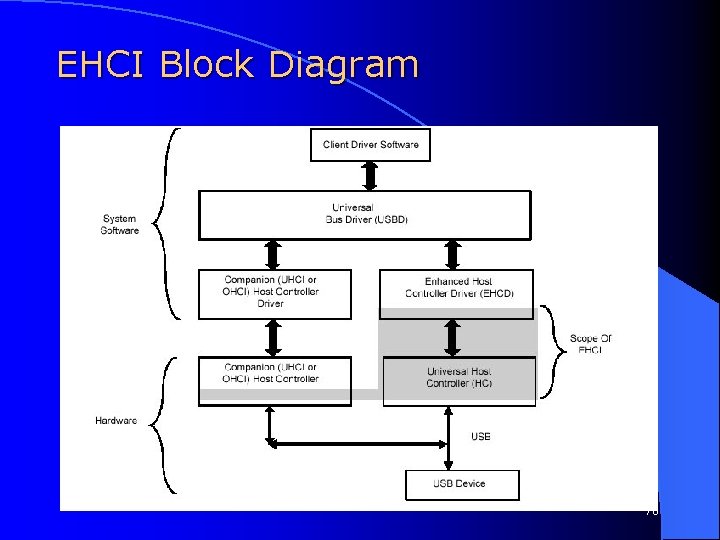
EHCI Block Diagram 76
USB 2. 0 Host Controller l l l A USB 2. 0 HC includes a high-speed mode controller and 0 or more USB 1. 1 HCs EHCI is used for all high-speed devices. EHCI cannot be used for full or low speed devices USB 2. 0 HC can implement USB provided at least USB 1. 1 software is available Full USB 2. 0 functionality only requires USB 1. 1 and EHCI software to be resident on system The port routing Logic is key to the USB 2. 0 HC 77
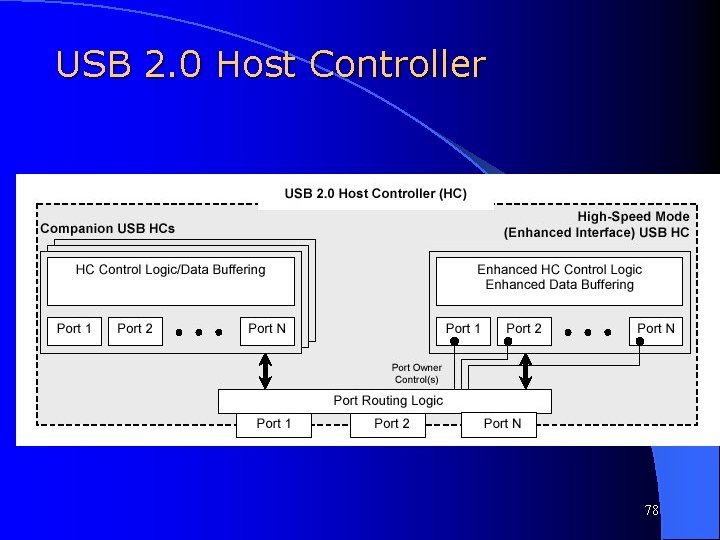
USB 2. 0 Host Controller 78
EHCI Features EHCI provides support for asynchronous and periodic transfers l High and Full speed transfers are managed by different interface data structures (optimized) l For high speed microframe: l – 80% periodic transfers – Remaining 20% may or not be filled l Full and Low speed devices can be implemented on a high-speed bus using split transfers 79
Section 5: USB Implementation 80
Design Considerations for USB Host l USB is versatile and easy to implement because of its dependence on sophisticated software control. – Simplification to the protocol is required to implement it without driver support l Due to the requirement of a high speed interface (> 1 GHz), the 2. 0 specification is not implemented. To include it requires the addition of an independent high speed module. 81
Specification All transfers involve 32 -bit packets l The data frame is restricted to a fixed to a constant 8 packets. l Only one client can be addressed per frame l – With proper CPU synchronization, multiple targets can be accessed per frame All transactions are Bulk without guarantee (no provision for isochronous transfers provided) l No PID field is implemented for simplicity l Only a 5 -bit CRC is used l 82
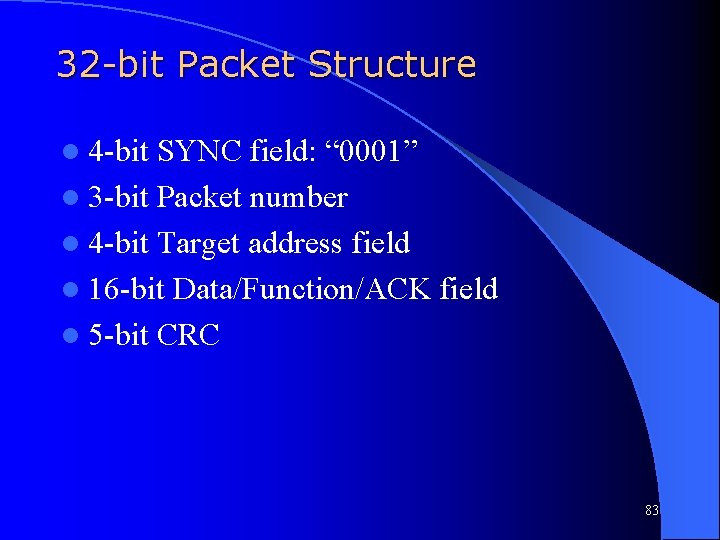
32 -bit Packet Structure l 4 -bit SYNC field: “ 0001” l 3 -bit Packet number l 4 -bit Target address field l 16 -bit Data/Function/ACK field l 5 -bit CRC 83
USB Write Operation l l l CPU writes to the control registers indicates that an 8 -word “write” is to occur to a specific client from a specific memory location. (USB slave interface) USB Host master interface fetches the data and places it in the transmit FIFO A token is sent to the client (Read code: HEX 0009, Write code: HEX 000 D) When data is ready, a 5 -bit CRC is added and it is converted to NRZI bit-stuffed serial An ACK/NACK packet is received to complete transfer A status register is updated for the CPU and the CPU initiated read/write command is cleared 84
USB Read Operation l l l CPU writes to the control registers indicates that an 8 -word “read” is to occur to a specific client from a specific memory location. (USB slave interface) A token is sent to the client Client responds with serial data. The data is unstuffed, decoded and the CRC is verified. If the CRC does not match, the transfer is flagged with an error signal. When incoming data is ready in the Receive FIFO, the USB Host master interface requests the bus and transmits the data to main memory An ACK/NACK packet is sent to complete the USB transfer A status register is updated for the CPU and the CPU initiated read/write command is cleared 85
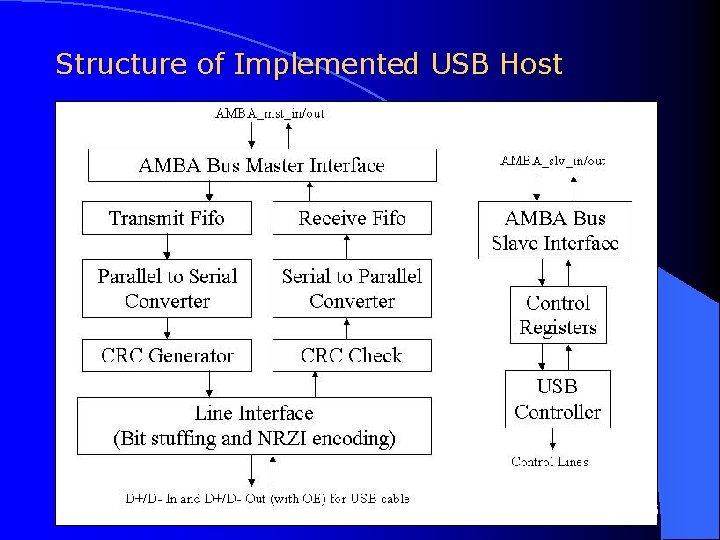
Structure of Implemented USB Host 86
- Slides: 86