
Universal Grading Template Center This Overlay Over Image
- Slides: 15
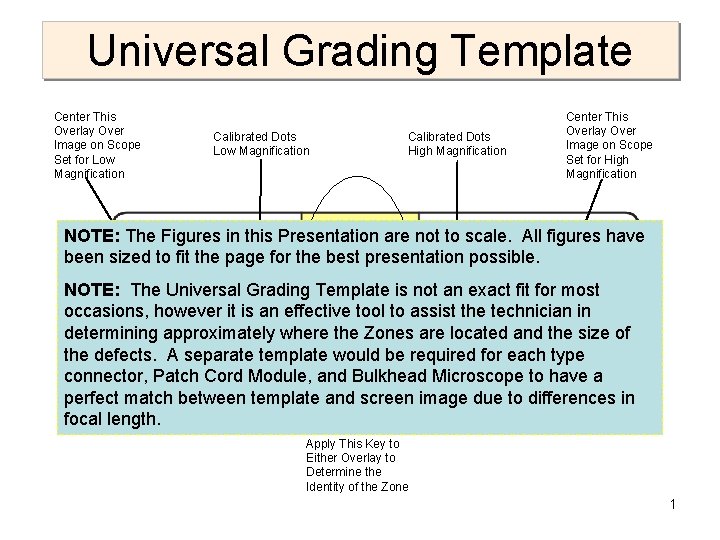
Universal Grading Template Center This Overlay Over Image on Scope Set for Low Magnification Calibrated Dots High Magnification Center This Overlay Over Image on Scope Set for High Magnification NOTE: The Figures in this Presentation are not to scale. All figures have been sized to fit the page for the best presentation possible. NOTE: The Universal Grading Template is not an exact fit for most occasions, however it is an effective tool to assist the technician in determining approximately where the Zones are located and the size of the defects. A separate template would be required for each type connector, Patch Cord Module, and Bulkhead Microscope to have a perfect match between template and screen image due to differences in focal length. Apply This Key to Either Overlay to Determine the Identity of the Zone 1
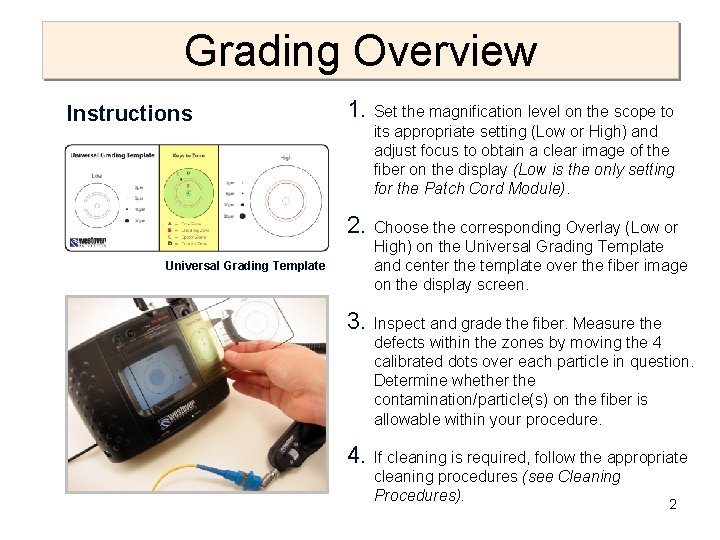
Grading Overview Instructions 1. Set the magnification level on the scope to its appropriate setting (Low or High) and adjust focus to obtain a clear image of the fiber on the display (Low is the only setting for the Patch Cord Module). 2. Choose the corresponding Overlay (Low or High) on the Universal Grading Template and center the template over the fiber image on the display screen. 3. Inspect and grade the fiber. Measure the defects within the zones by moving the 4 calibrated dots over each particle in question. Determine whether the contamination/particle(s) on the fiber is allowable within your procedure. 4. If cleaning is required, follow the appropriate cleaning procedures (see Cleaning Procedures). 2 Universal Grading Template
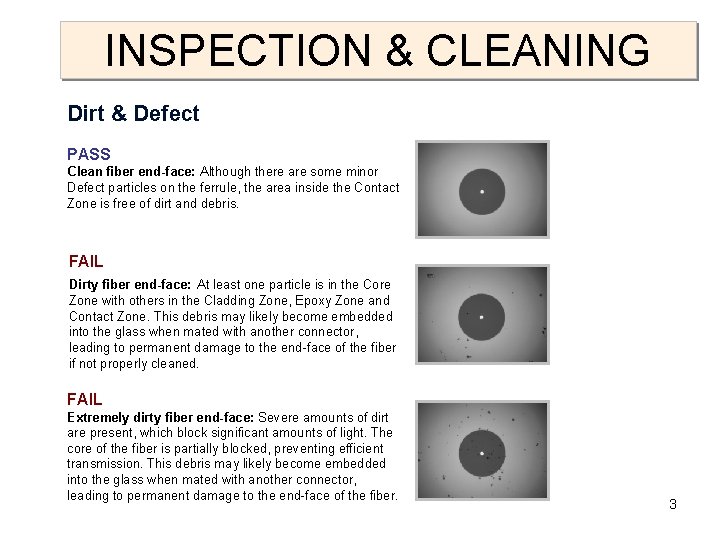
INSPECTION & CLEANING Dirt & Defect PASS Clean fiber end-face: Although there are some minor Defect particles on the ferrule, the area inside the Contact Zone is free of dirt and debris. FAIL Dirty fiber end-face: At least one particle is in the Core Zone with others in the Cladding Zone, Epoxy Zone and Contact Zone. This debris may likely become embedded into the glass when mated with another connector, leading to permanent damage to the end-face of the fiber if not properly cleaned. FAIL Extremely dirty fiber end-face: Severe amounts of dirt are present, which block significant amounts of light. The core of the fiber is partially blocked, preventing efficient transmission. This debris may likely become embedded into the glass when mated with another connector, leading to permanent damage to the end-face of the fiber. 3
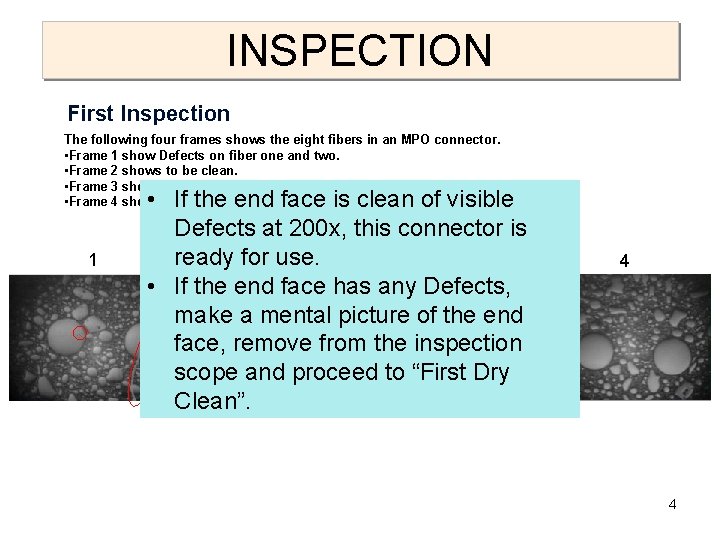
INSPECTION First Inspection The following four frames shows the eight fibers in an MPO connector. • Frame 1 show Defects on fiber one and two. • Frame 2 shows to be clean. • Frame 3 shows Defects on both fibers. • Frame 4 shows both fibers clean. You must go to First Dry Clean. 1 • If the end face is clean of visible Defects at 200 x, this connector is ready for 2 use. 3 • If the end face has any Defects, make a mental picture of the end face, remove from the inspection scope and proceed to “First Dry Clean”. 4 4
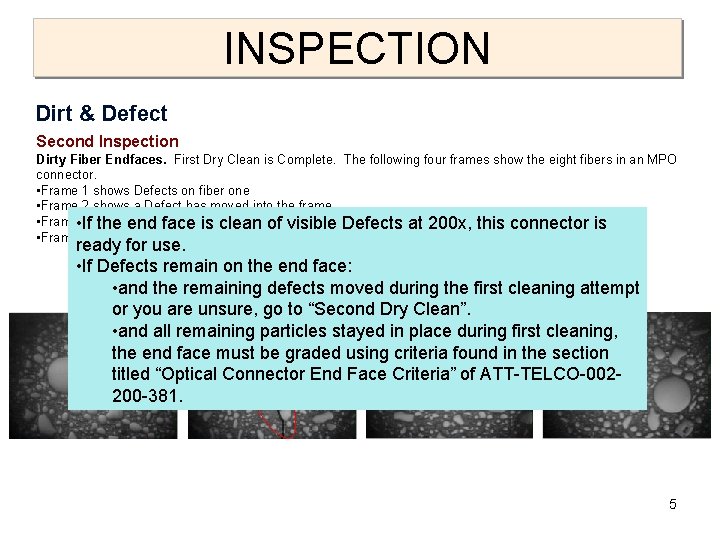
INSPECTION Dirt & Defect Second Inspection Dirty Fiber Endfaces. First Dry Clean is Complete. The following four frames show the eight fibers in an MPO connector. • Frame 1 shows Defects on fiber one • Frame 2 shows a Defect has moved into the frame • Frame • If 3 shows both face fibers clean the end is clean of visible Defects at 200 x, this connector is • Frame 4 shows both fibers clean. You must go to the Second Dry Clean. ready for use. • If Defects remain on the end face: 1 • and the remaining 2 defects moved during 3 the first cleaning attempt 4 or you are unsure, go to “Second Dry Clean”. • and all remaining particles stayed in place during first cleaning, the end face must be graded using criteria found in the section titled “Optical Connector End Face Criteria” of ATT-TELCO-002200 -381. 5
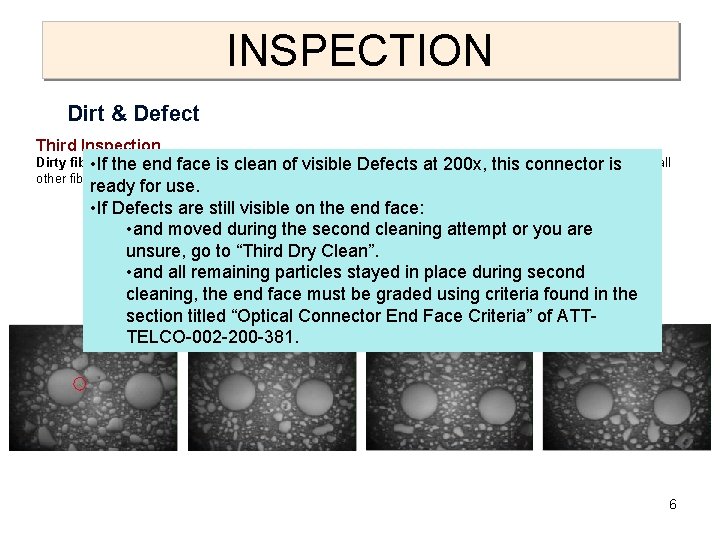
INSPECTION Dirt & Defect Third Inspection Dirty fiber Clean has completed. Fiber of Frame 1 still shows Defects • Ifend-face: the end. Second face Dry is clean of been visible Defects at 1200 x, this connector is while all other fibers are clean. We must move in to the Grading procedure at this time. ready for use. • If Defects are still visible on the end face: • and moved during the second cleaning attempt or you are unsure, go to “Third Dry Clean”. • and all remaining particles stayed in place during second cleaning, the end face must be graded using criteria found in the 1 2 Connector End Face 3 Criteria” of ATT- 4 section titled “Optical TELCO-002 -200 -381. 6
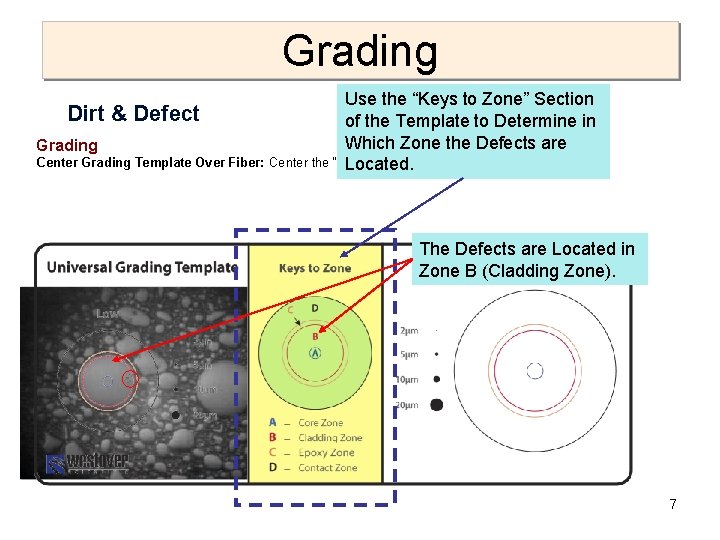
Grading Use the “Keys to Zone” Section Dirt & Defect of the Template to Determine in Which Zone the Defects are Grading Center Grading Template Over Fiber: Center the “Low” side of the Universal over the fiber image. Located. The Defects are Located in Zone B (Cladding Zone). 7
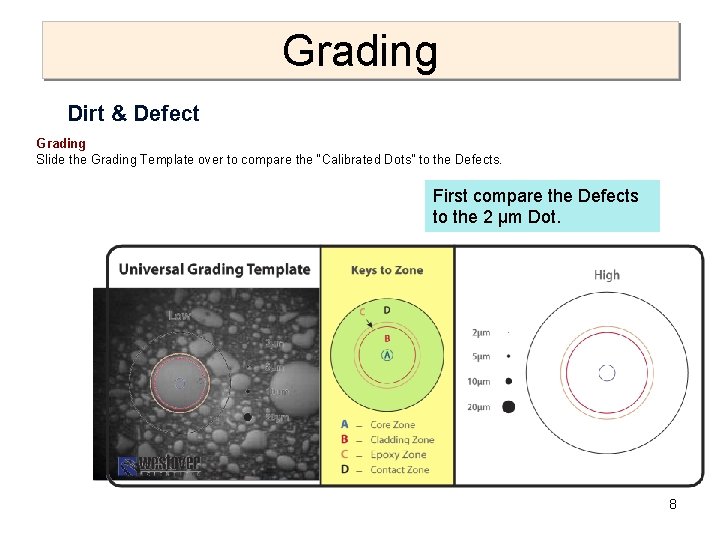
Grading Dirt & Defect Grading Slide the Grading Template over to compare the “Calibrated Dots” to the Defects. First compare the Defects to the 2 µm Dot. 8
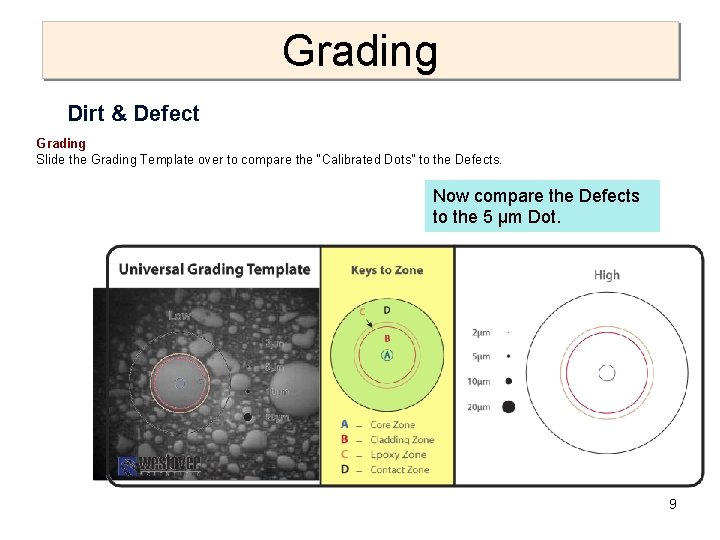
Grading Dirt & Defect Grading Slide the Grading Template over to compare the “Calibrated Dots” to the Defects. Now compare the Defects to the 5 µm Dot. 9
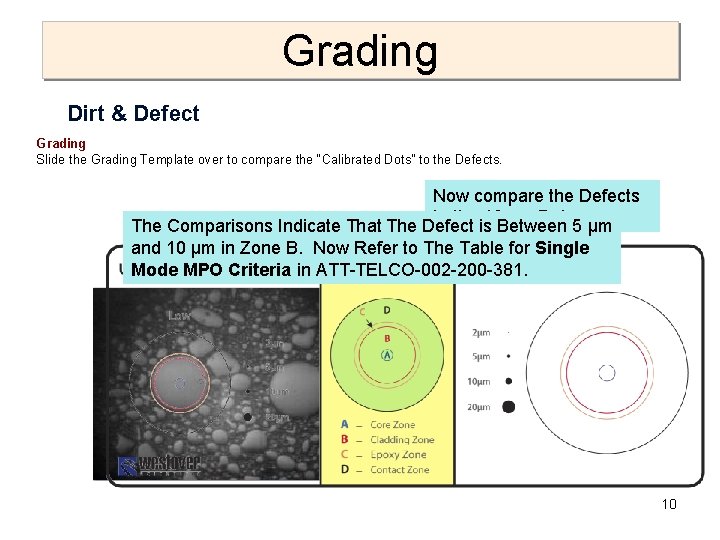
Grading Dirt & Defect Grading Slide the Grading Template over to compare the “Calibrated Dots” to the Defects. Now compare the Defects to the 10 µm Dot. The Comparisons Indicate That The Defect is Between 5 µm and 10 µm in Zone B. Now Refer to The Table for Single Mode MPO Criteria in ATT-TELCO-002 -200 -381. 10
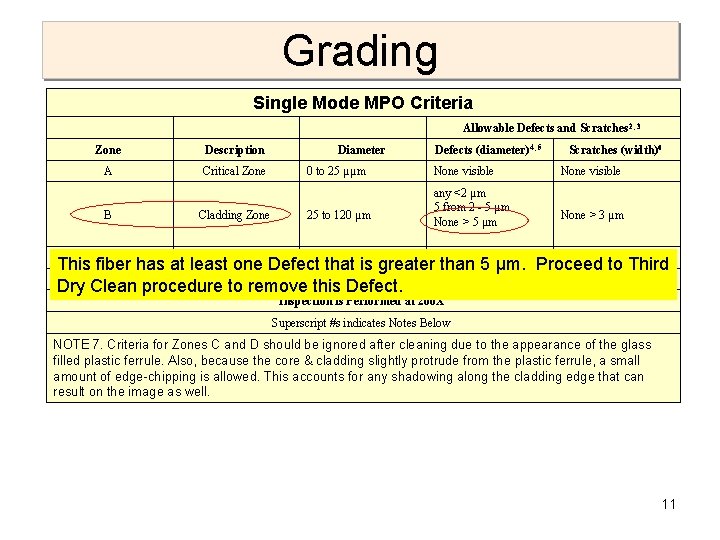
Grading Single Mode MPO Criteria Allowable Defects and Scratches 2, 3 Zone A B Description Diameter Defects (diameter)4, 5 Scratches (width)6 Critical Zone 0 between to 25 µµm 10 µm. None Our Defect measured andvisible 20 µm. The. None visible any <2 Table states that no Defects greater that 5µm µm are 5 from 2 - 5 µm to 120 µm allowed Cladding within. Zone B. 25 Proceed to Third Clean. None > 3 µm None. Dry > 5 µm C 120 to 130 µm NOTE 7 See NOTE 7 This fiber has at. Adhesive least. Zone Defect that is greater. See than 5 µm. Proceed to Third D Contact Zone 130 to 250 µm See NOTE 7 Dry Clean procedure to remove this Defect. Inspection is Performed at 200 X Superscript #s indicates Notes Below NOTE 7. Criteria for Zones C and D should be ignored after cleaning due to the appearance of the glass filled plastic ferrule. Also, because the core & cladding slightly protrude from the plastic ferrule, a small amount of edge-chipping is allowed. This accounts for any shadowing along the cladding edge that can result on the image as well. 11
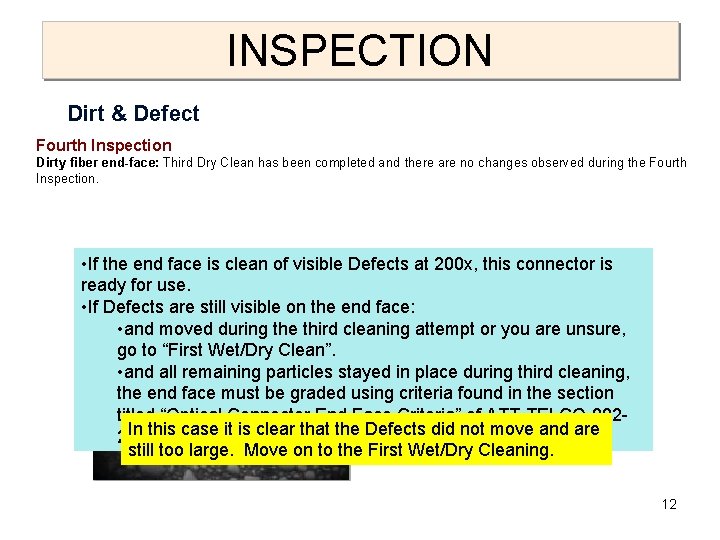
INSPECTION Dirt & Defect Fourth Inspection Dirty fiber end-face: Third Dry Clean has been completed and there are no changes observed during the Fourth Inspection. • If the end face is clean of visible Defects at 200 x, this connector is ready for use. • If Defects are still visible on the end face: • and moved during the third cleaning attempt or you are unsure, go to “First Wet/Dry Clean”. • and all remaining particles stayed in place during third cleaning, the end face must be graded using criteria found in the section titled “Optical Connector End Face Criteria” of ATT-TELCO-002 In this case it is clear that the Defects did not move and are 200 -381. still too large. Move on to the First Wet/Dry Cleaning. 12
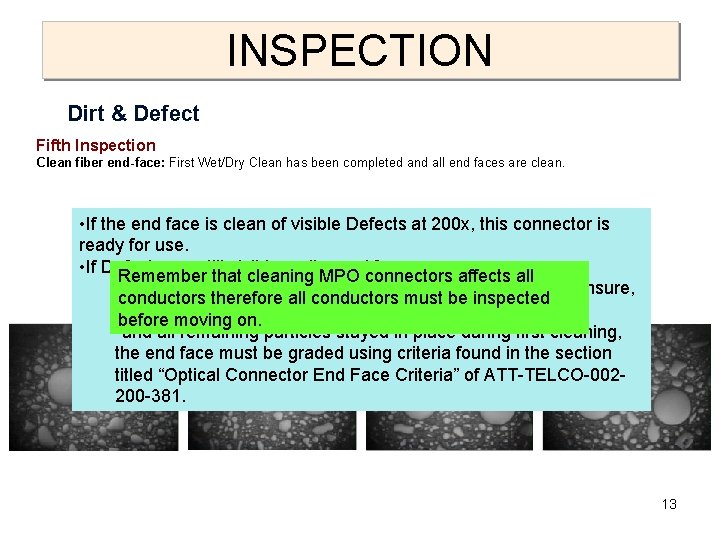
INSPECTION Dirt & Defect Fifth Inspection Clean fiber end-face: First Wet/Dry Clean has been completed and all end faces are clean. • If the end face is clean of visible Defects at 200 x, this connector is ready for use. • If Defects are still visible on the end face: Remember that cleaning MPO connectors affects all • and moved during the fourth cleaning attempt or you are unsure, conductors therefore all conductors must be inspected 1 go to “Second Wet/Dry 2 Clean”. 3 4 before moving on. • and all remaining particles stayed in place during first cleaning, the end face must be graded using criteria found in the section titled “Optical Connector End Face Criteria” of ATT-TELCO-002200 -381. 13
Review • Slide 4 Portrays the First Inspection and finds dirty fibers which requires a trip to the First Dry Clean. • Slide 5 picks up with the Second Inspection and reveals changing conditions of Fiber and requires a trip to the Second Dry Clean. • Slide 6 takes us through the Third Inspection and shows all clean except Fiber one in Frame one. None of the Defects on Fiber One moved so we must proceed with Grading. • Slide 7 guides us through the process of identifying which Zone or Zones that contain Defects. In this case our Defects lie within Zone B and possibly encroaching on Zone C. Zone B criteria will be applied to all. • Slides 8, 9 and 10 show us how to use the Calibrated Dots to measure the approximate size of the defects, between 5 µm and 10 µm, then sends us to the Single Mode Criteria table to determine the allowable defects in Zone B. • Slide 11, the Criteria table, tells us that we are not allowed any Defects over 5 µm, which means we must continue to Third Dry Clean. 14
Review • Slide 12 The Third Dry Clean is complete. Our Defects remain in place on Fiber One, Frame One. We must proceed to First Wet/Dry Clean. • Slide 13 The First Wet/Dry Clean is complete. Success, the Fifth Inspection shows that we now have a clean Fiber One in Frame One and all other Frames are clean as well. This connector is ready for mating with another Clean connector. 15