
Unit II Assembly language programming Processor Architecture and
Unit II Assembly language programming Processor Architecture and Interfacing 1 Dept. of Information Technology
Introduction to Assembly Language Programming • Learning any programming language involves mastering a number of common concepts: Variables: declaration/definition Assignment: assigning values to variables Input/Output: displaying messages, displaying variable values Control flow: if then Loops etc. Subprograms: definition and usage • Programming in assembly language involves mastering the same concepts and a few other issues. Processor Architecture and Interfacing 2 Dept. of Information Technology
• Variables • For the moment we will skip details of variable declaration and simply use the 8086 registers as the variables in our programs. • Registers have predefined names and do not need to be declared. • The 8086 has 14 registers. Each of these is a 16 bit register. • Initially, we will use four of them – the so called the general purpose registers: ax, bx, cx, dx • These four 16 bit registers can also be treated as eight 8 bit registers: ah, al, bh, bl, ch, cl, dh, dl Processor Architecture and Interfacing 3 Dept. of Information Technology
• The mov instruction carries out assignment which allows us to place a number in a register or in a memory • Example: Store the ASCII code for the letter A in register bx. mov bx, ‘A’ • The mov instruction also allows to copy the contents of one register into another register. • The Mov instruction takes two operands, representing the destination where data is to be placed and the source of that data. • General Form of Mov Instruction mov destination, source where destination must be either a register or memory location and source may be a constant, another register or a memory location. Processor Architecture and Interfacing 4 Dept. of Information Technology
• More 8086 Instructions e. g. add, inc, dec and sub instructions • The 8086 provides a variety of arithmetic instructions. For the moment, we only consider a few of them. • In assembly language you can only carry out a single arithmetic operation at a time. To evaluate an expression such as : z=x+y+w–v requires 3 assembly language instructions – one for each arithmetic operation. • The add instruction adds the source operand to the destination operand, leaving the result in the destination operand. • The inc instruction takes one operand adds 1 to it. Processor Architecture and Interfacing 5 Dept. of Information Technology
• The dec instruction like inc takes one operand subtracts 1 from it. • The sub instruction subtracts the source operand from the destination operand leaving the result in the destination operand. • Example: mov ax, 5; load 5 into ax add ax, 3; add 3 to the contents of ax, ax now contains 8 inc ax; add 1 to ax, ax now contains 9 dec ax; subtract 1 from ax, ax now contains 8 sub ax, 6; subtract 4 from ax, ax now contains 2 Processor Architecture and Interfacing 6 Dept. of Information Technology
• Implementing a loop e. g. jmp instruction • Example: • Label_X: add ax, 2 add bx, 3 jmp Label_X • The jmp instruction causes the program to start executing from the position in the program indicated by the label Label_X. This is an example of an endless loop. • We could implement a while loop using a conditional jump instruction such as JL which means jump if less than. It is used in combination with a comparison instruction – cmp. Processor Architecture and Interfacing 7 Dept. of Information Technology
• Example: mov ax, 0 Label_X: add ax, 2 add bx, 3 cmp ax, 10 jl Label_X • The above loop continues while the value of ax is less than 10. The cmp instruction compares ax to 10 and records the result. The jl instruction uses this result to determine whether to jump to the point indicated by Label_X. Processor Architecture and Interfacing 8 Dept. of Information Technology
Input/output • Each microprocessor provides instructions for I/O with the devices that are attached to it, e. g. the keyboard and screen. • The 8086 provides the instructions in for input and out for output. These instructions are quite complicated to use, so we usually use the operating system to do I/O for us instead. • In assembly language we must have a mechanism to call the operating system to carry out I/O. • In addition we must be able to tell the operating system what kind of I/O operation we wish to carry out, e. g. to read a character from the keyboard, to display a character or string on the screen or to do disk I/O. Processor Architecture and Interfacing 9 Dept. of Information Technology
• In 8086 assembly language, we do not call operating system subprograms by name, instead, we use a software interrupt mechanism. • An interrupt signals the processor to suspend its current activity (i. e. running your program) and to pass control to an interrupt service program (i. e. part of the operating system). • A software interrupt is one generated by a program (as opposed to one generated by hardware). • The 8086 int instruction generates a software interrupt. It uses a single operand which is a number indicating which MS DOS subprogram is to be invoked. Processor Architecture and Interfacing 10 Dept. of Information Technology
• For I/O and some other operations, the number used is 21 h. • Thus, the instruction int 21 h transfers control to the operating system, to a subprogram that handles I/O operations. • This subprogram handles a variety of I/O operations by calling appropriate subprograms. • This means that you must also specify which I/O operation (e. g. read a character, display a character) you wish to carry out. This is done by placing a specific number in a register. • The ah register is used to pass this information. Processor Architecture and Interfacing 11 Dept. of Information Technology
• For example, the subprogram to display a character is subprogram number 02 h. • When the I/O operation is finished, the interrupt service program terminates and our program will be resumed at the instruction following int. Processor Architecture and Interfacing 12 Dept. of Information Technology
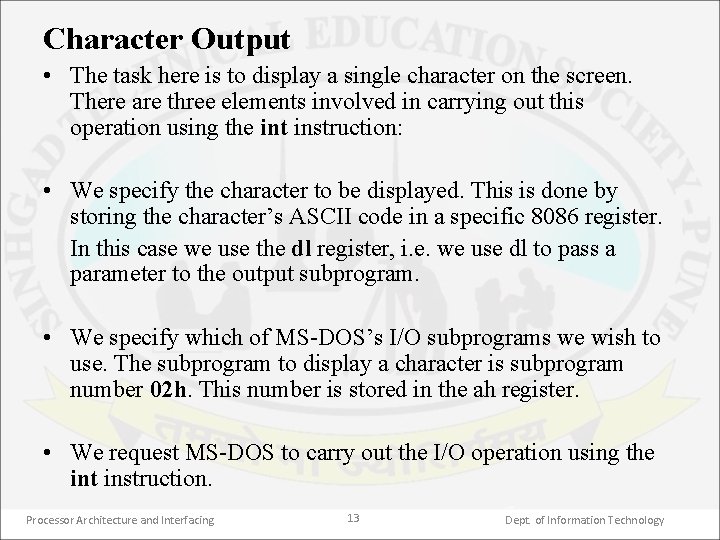
Character Output • The task here is to display a single character on the screen. There are three elements involved in carrying out this operation using the int instruction: • We specify the character to be displayed. This is done by storing the character’s ASCII code in a specific 8086 register. In this case we use the dl register, i. e. we use dl to pass a parameter to the output subprogram. • We specify which of MS DOS’s I/O subprograms we wish to use. The subprogram to display a character is subprogram number 02 h. This number is stored in the ah register. • We request MS DOS to carry out the I/O operation using the int instruction. Processor Architecture and Interfacing 13 Dept. of Information Technology
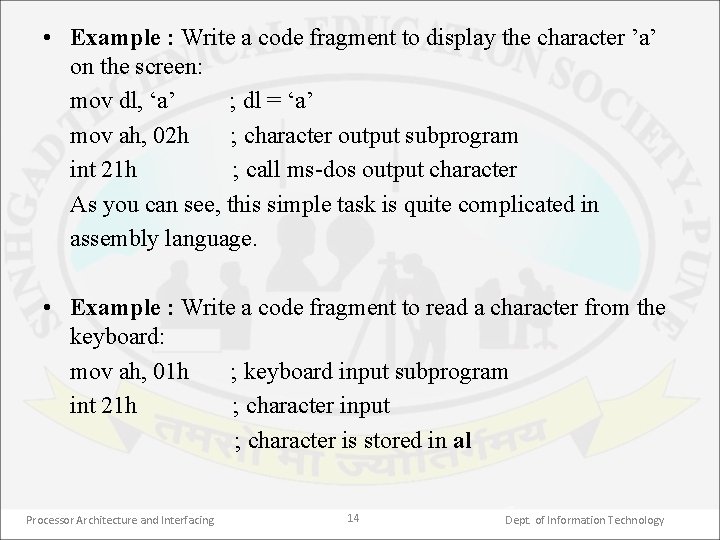
• Example : Write a code fragment to display the character ’a’ on the screen: mov dl, ‘a’ ; dl = ‘a’ mov ah, 02 h ; character output subprogram int 21 h ; call ms dos output character As you can see, this simple task is quite complicated in assembly language. • Example : Write a code fragment to read a character from the keyboard: mov ah, 01 h ; keyboard input subprogram int 21 h ; character input ; character is stored in al Processor Architecture and Interfacing 14 Dept. of Information Technology
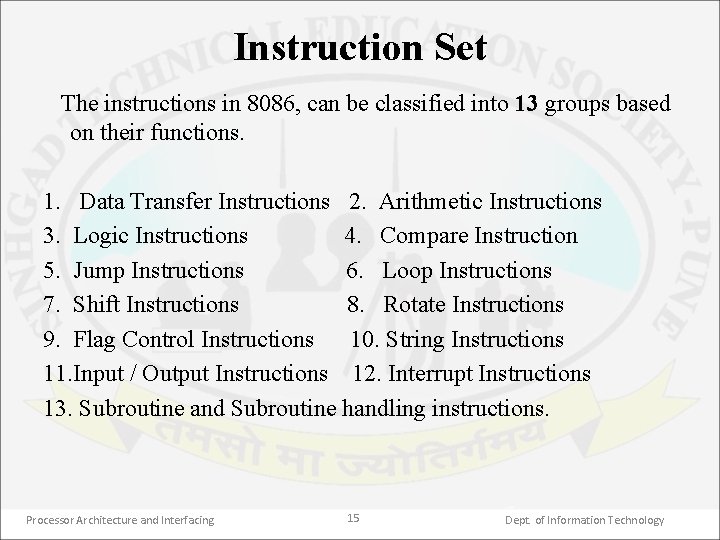
Instruction Set The instructions in 8086, can be classified into 13 groups based on their functions. 1. Data Transfer Instructions 2. Arithmetic Instructions 3. Logic Instructions 4. Compare Instruction 5. Jump Instructions 6. Loop Instructions 7. Shift Instructions 8. Rotate Instructions 9. Flag Control Instructions 10. String Instructions 11. Input / Output Instructions 12. Interrupt Instructions 13. Subroutine and Subroutine handling instructions. Processor Architecture and Interfacing 15 Dept. of Information Technology
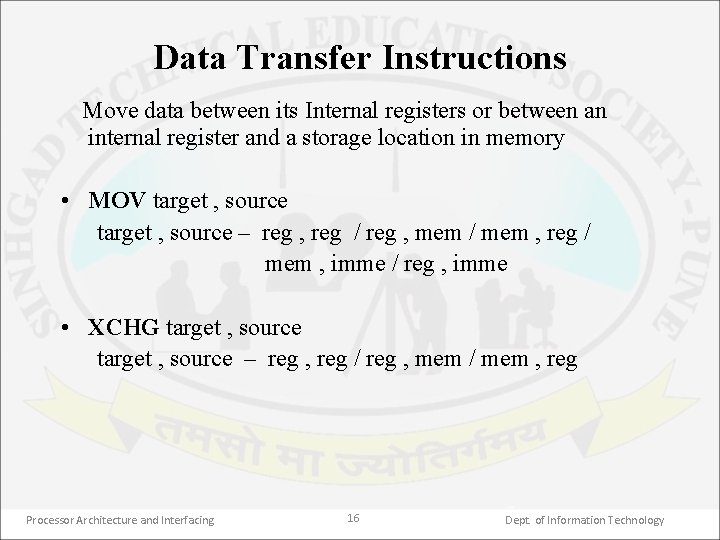
Data Transfer Instructions Move data between its Internal registers or between an internal register and a storage location in memory • MOV target , source – reg , reg / reg , mem / mem , reg / mem , imme / reg , imme • XCHG target , source – reg , reg / reg , mem / mem , reg Processor Architecture and Interfacing 16 Dept. of Information Technology
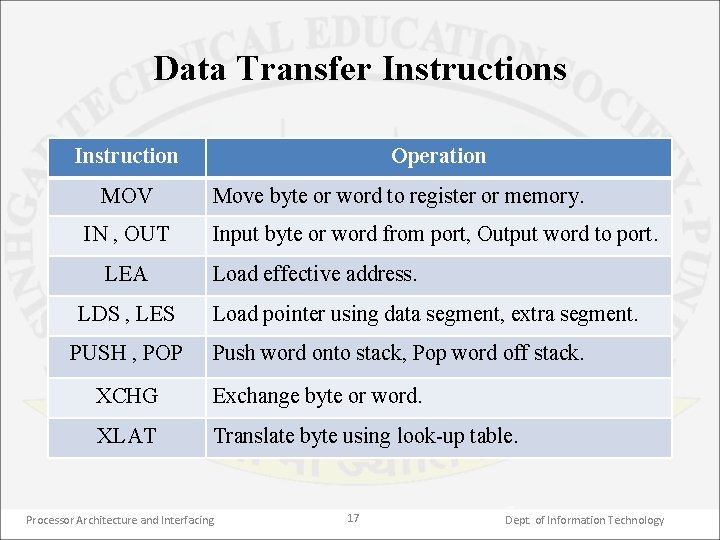
Data Transfer Instructions Instruction MOV IN , OUT LEA LDS , LES PUSH , POP Operation Move byte or word to register or memory. Input byte or word from port, Output word to port. Load effective address. Load pointer using data segment, extra segment. Push word onto stack, Pop word off stack. XCHG Exchange byte or word. XLAT Translate byte using look up table. Processor Architecture and Interfacing 17 Dept. of Information Technology
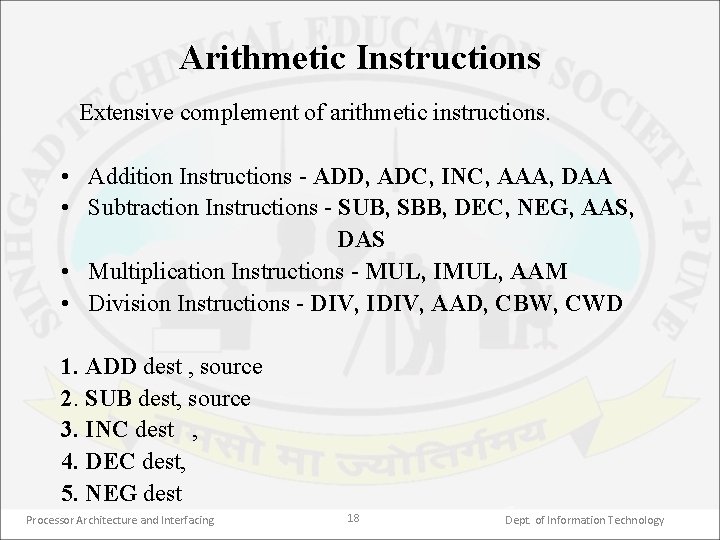
Arithmetic Instructions Extensive complement of arithmetic instructions. • Addition Instructions ADD, ADC, INC, AAA, DAA • Subtraction Instructions SUB, SBB, DEC, NEG, AAS, DAS • Multiplication Instructions MUL, IMUL, AAM • Division Instructions DIV, IDIV, AAD, CBW, CWD 1. ADD dest , source 2. SUB dest, source 3. INC dest , 4. DEC dest, 5. NEG dest Processor Architecture and Interfacing 18 Dept. of Information Technology
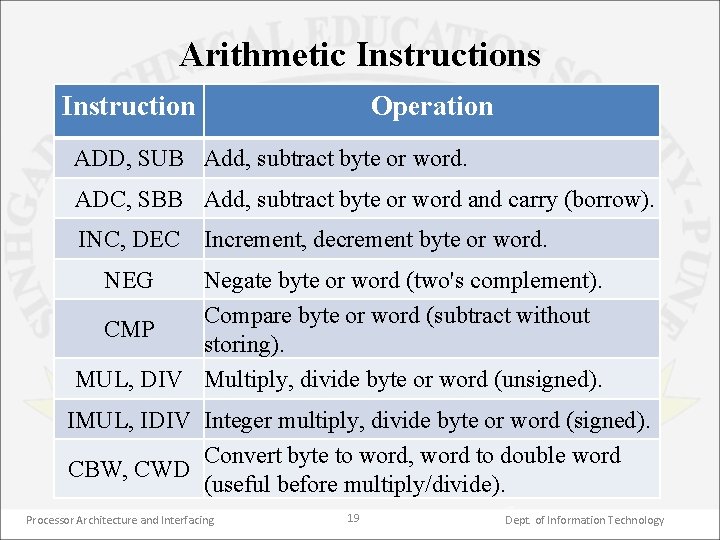
Arithmetic Instructions Instruction Operation ADD, SUB Add, subtract byte or word. ADC, SBB Add, subtract byte or word and carry (borrow). INC, DEC Increment, decrement byte or word. NEG Negate byte or word (two's complement). Compare byte or word (subtract without CMP storing). MUL, DIV Multiply, divide byte or word (unsigned). IMUL, IDIV Integer multiply, divide byte or word (signed). Convert byte to word, word to double word CBW, CWD (useful before multiply/divide). Processor Architecture and Interfacing 19 Dept. of Information Technology
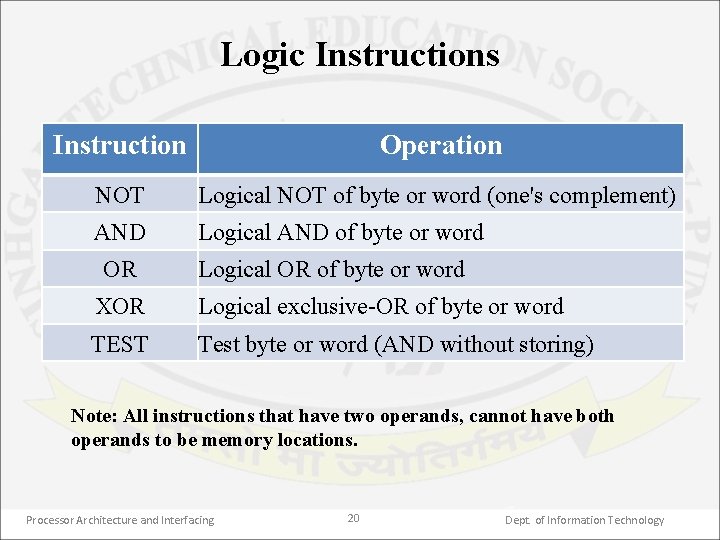
Logic Instructions Instruction Operation NOT Logical NOT of byte or word (one's complement) AND Logical AND of byte or word OR Logical OR of byte or word XOR Logical exclusive OR of byte or word TEST Test byte or word (AND without storing) Note: All instructions that have two operands, cannot have both operands to be memory locations. Processor Architecture and Interfacing 20 Dept. of Information Technology
Compare and Jump Instructions Compare Instructions: Instruction to compare two 8 bit or 16 bit numbers • CMP Jump Instructions: • Unconditional: JMP • Conditional: JC/JNC - JZ/JNZ - JE/JNE -JG/JB/JA Processor Architecture and Interfacing 21 Dept. of Information Technology
Loop and Input/Output Instructions Three instructions specifically designed for implementing loops. • LOOPE/LOOPZ • LOOPNE/LOOPNZ Input/output instructions • IN • OUT Processor Architecture and Interfacing 22 Dept. of Information Technology
Flag Control Instructions Flag control instructions either monitor the status of executing instructions or control options available in its operation. • • LAHF copy low byte of flag register to AH. SAHF copy AH register to low byte of flag register. CLC clear carry flag. STC set carry flag to 1. CMC complement the carry flag. CLI clear interrupt flag. STI set interrupt flag. Processor Architecture and Interfacing 23 Dept. of Information Technology
Interrupt Instructions Number of instructions for processing interrupts. • • CLI clear interrupt flag. STI set interrupt flag. INT interrupt program execution INT type. IRET interrupt return. INTO interrupt on overflow. HLT halt processing. WAIT wait for interrupt signal. Processor Architecture and Interfacing 24 Dept. of Information Technology
String Handling Instructions Equipped to handle string operations • • MOVS move string. MOVSB move string byte. MOVSW move string word. CMPS compare string byte/word. SCAS scan string byte/word. LODS load string byte/word. STOS store byte/word in string. Processor Architecture and Interfacing 25 Dept. of Information Technology
Rotate, Shift , Subroutine and Subroutine Handling Instructions 1. Shift Instructions: Logical shift SHL, SHR Arithmetic shift SAL, SAR 2. Rotate Instructions ROL, ROR, RCL, RCR 3. CALL and RET instructions. 4. PUSH and POP instructions. Processor Architecture and Interfacing 26 Dept. of Information Technology
Assembler • An assembler program is used to translate the assembly language mnemonics for the instructions to the corresponding binary codes. • When it is run, the assembler reads the. asm file. On the first pass through it, the assembler determines the offset addresses of variables, labels etc. & puts this information in the symbol table. • On the second pass through the program, the assembler produces the binary code for each instruction & inserts offset addresses that it calculated during the first pass. Processor Architecture and Interfacing 27 Dept. of Information Technology
• The assembler generates 2 file. The first file is object file with the extension. obj which contains the binary codes for the instructions & information about the addresses of the instructions. • The second file generated is the assembler list file with the extension. list which contains the assembly language statements, the binary codes for each instruction & the offset for each instruction. • The assembler listing also indicates any typing or syntax errors in the source program. Processor Architecture and Interfacing 28 Dept. of Information Technology
Linker • It is a program used to join several object files into one large object file. • When writing large programs, it is usually efficient to divide the large program into smaller modules. Each module can be individually written, tested & debugged. • Then, if all the modules work, their object modules can be linked together to form a large program. • The linker produces a link file which contains the binary codes for all combined modules. Processor Architecture and Interfacing 29 Dept. of Information Technology
• The linker also produces a link map file which contains the address information about the linked files. • The linkers which come with the TASM or MASM assemblers produce link files with the. exe extension. Processor Architecture and Interfacing 30 Dept. of Information Technology
Loader • When you request the system to load an. exe program from disk into memory for execution, the loader performs the following steps: 1. Accesses the. exe program from disk. 2. Constructs a 256 byte program segment prefix (PSP). 3. Stores the program in memory immediately following the PSP. 4. Loads the address of the PSP in the DS & the ES registers. Processor Architecture and Interfacing 31 Dept. of Information Technology
6. Loads the address of the code segment in the CS register & sets the IP register to the offset of the first instruction in the code segment. 7. In case of a. com program it loads the address of the stack in the SS register & sets the SP register to the size of the stack. 8. Transfers control to the program for execution, beginning with the first instruction in the code segment. Processor Architecture and Interfacing 32 Dept. of Information Technology
Far & Near Procedures • Whenever we need to use a group of instructions several times throughout a program, there are 2 ways to avoid writing the set of instructions again & again – Procedure & Macro. For Large no. of instruction Procedure is used. • We use CALL instruction to execute the procedure which directs microprocessor to the start of the procedure. • A RET instruction at the end of the procedure returns execution to the next instruction in the main program. • Besides transferring the execution control to the procedure, the CALL instruction also saves the return address on the stack. • The procedures are of 2 types – Near & Far Processor Architecture and Interfacing 33 Dept. of Information Technology
Macros • Advantage of writing a procedure is that the machine codes for the group of instructions in the procedure are put only once in the memory. • Disadvantage is that it needs stack & overhead time for calling the procedure & return to the calling program. • When a repeated group of instructions is too short or not appropriate to be written as procedure, we use a Macro. Processor Architecture and Interfacing 34 Dept. of Information Technology
• A macro is a group of instructions we bracket & give a name to at the start of program. Each time we call the macro in our program the assembler inserts the defined group of instructions in place of the call. • Thus the assembler generates machine codes for the group of instructions each time the macro is called. This is called as expanding the macro. • Therefore, using a macro avoids the overhead time in calling & returning from a procedure. • A disadvantage of generating in line code each time a macro is called that this will make the program take up more memory than using a procedure. Processor Architecture and Interfacing 35 Dept. of Information Technology
Macro without parameters • Example: suppose we are writing an 8086 program which has many complex procedures. At the start of each procedure, we want to save the flags & all the registers by pushing them on stack. • PUSH_ALL MACRO PUSHF PUSH AX PUSH BX PUSH CX PUSH DX PUSH BP PUSH SI PUSH DI ENDM Processor Architecture and Interfacing 36 Dept. of Information Technology
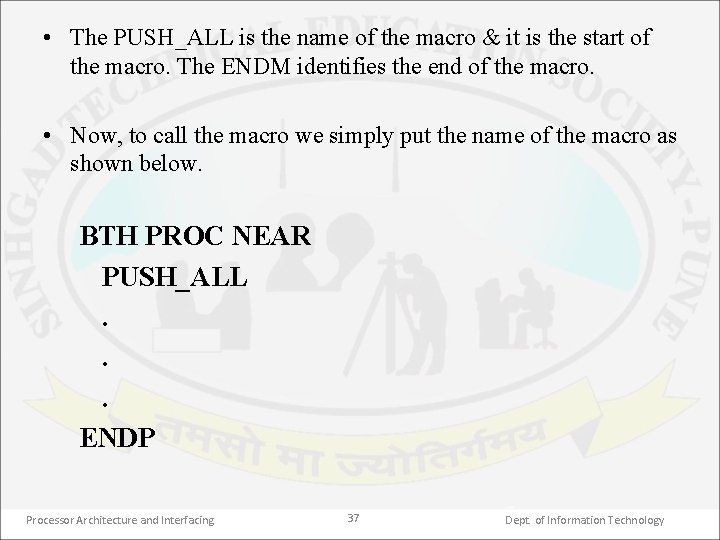
• The PUSH_ALL is the name of the macro & it is the start of the macro. The ENDM identifies the end of the macro. • Now, to call the macro we simply put the name of the macro as shown below. BTH PROC NEAR PUSH_ALL. . . ENDP Processor Architecture and Interfacing 37 Dept. of Information Technology
Timing & Delay loops • The rate at which 8086 instructions are executed is determined by a crystal controlled clock with a frequency of few megahertz. • Each instruction takes a certain number of clock cycles to execute. E. g. MOV requires 2, DAA requires 4, JNZ requires 16 if it does jump otherwise 4 etc. • For a 5 MHz clock, each clock cycle takes 1/(5 MHz) = 0. 2 µs. Thus, the MOV instruction requires 0. 4 µs time to execute. • A common programming problem is the need to introduce a delay between the execution of 2 instructions. E. g. it may be required to read a data from a port after 1 ms duration. Processor Architecture and Interfacing 38 Dept. of Information Technology
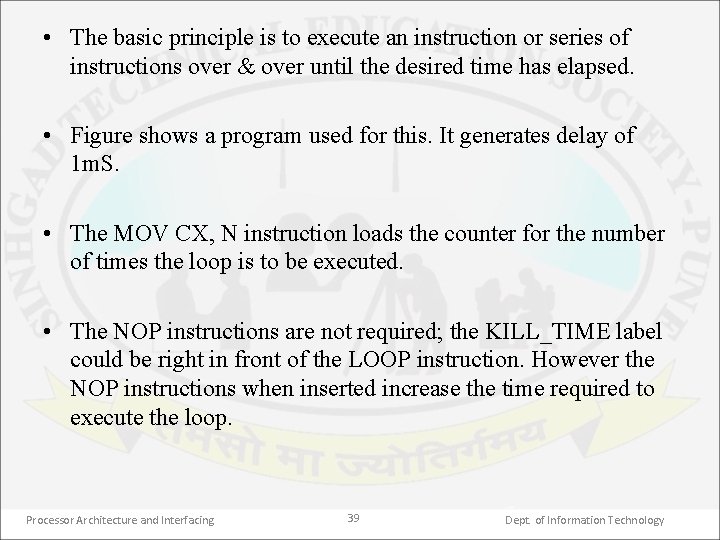
• The basic principle is to execute an instruction or series of instructions over & over until the desired time has elapsed. • Figure shows a program used for this. It generates delay of 1 m. S. • The MOV CX, N instruction loads the counter for the number of times the loop is to be executed. • The NOP instructions are not required; the KILL_TIME label could be right in front of the LOOP instruction. However the NOP instructions when inserted increase the time required to execute the loop. Processor Architecture and Interfacing 39 Dept. of Information Technology
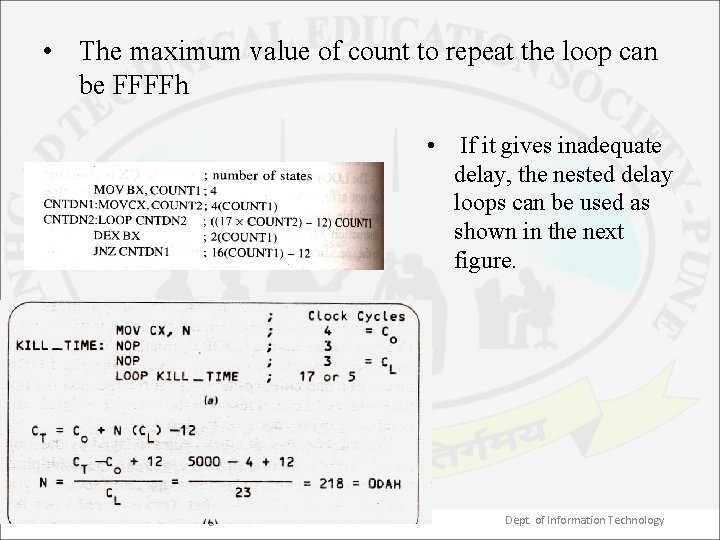
• The maximum value of count to repeat the loop can be FFFFh • If it gives inadequate delay, the nested delay loops can be used as shown in the next figure. Processor Architecture and Interfacing 40 Dept. of Information Technology
. exe &. com files • There are 2 types of executable programs –. exe &. com • A. com program uses 1 segment for both instructions & data which can be of maximum 64 k(65, 536 bytes) including the program segment prefix (PSP, Data structure used in DOS systems to store the state of a program. ) • The PSP is a 256 -byte block that the loader inserts immediately preceding. com &. exe programs when it loads them from the disk memory. • A. com program is always smaller than. exe program as PSP is included in the restricted size of 64 k. • A full. com program combines the PSP, stack, data & code segment into 1 segment. Processor Architecture and Interfacing 41 Dept. of Information Technology
. exe • A. exe programs has separate space for PSP. Also it can have separate segments of size 64 k for stack, data & code. • When the loader loads a. com program for execution, it automatically initializes CS, DS, SS & ES with the address of the PSP. • But in a. exe program only the CS gets initialized automatically. All others must be initialized by the programmer in the code. Processor Architecture and Interfacing 42 Dept. of Information Technology
• As the PSP is of size 100 h bytes, addressing for a. com program begins at an offset of 100 h bytes. • Therefore a assembler directive ORG 100 h must be written immediately after the. code. It tells the assembler to set its location counter at 100 h so that the object codes generated are stored at an offset of 100 h bytes past the start of PSP. • The ORG 100 h is not require for a. exe program. Processor Architecture and Interfacing 43 Dept. of Information Technology
. model directive • The assembler provides some shortcuts in defining segments. • To use them, programmer has to initialize the memory model before defining them. • The different models tell the assembler how to use segments, to provide enough space for the object code, & to ensure optimum execution speed. • The format is. model type • The various models along with the number of code & data segments is as shown in the table. Processor Architecture and Interfacing 44 Dept. of Information Technology
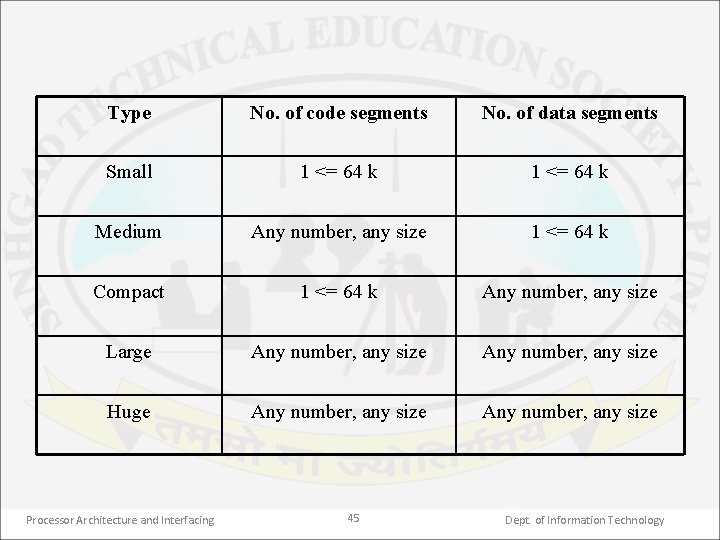
Type No. of code segments No. of data segments Small 1 <= 64 k Medium Any number, any size 1 <= 64 k Compact 1 <= 64 k Any number, any size Large Any number, any size Huge Any number, any size Processor Architecture and Interfacing 45 Dept. of Information Technology
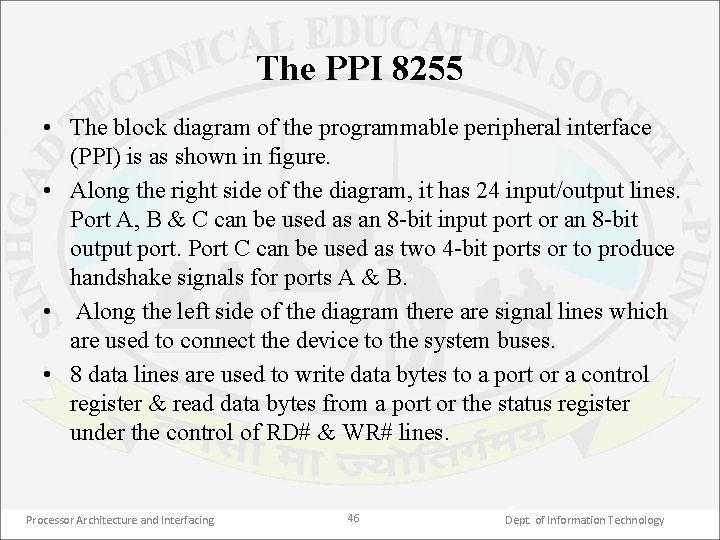
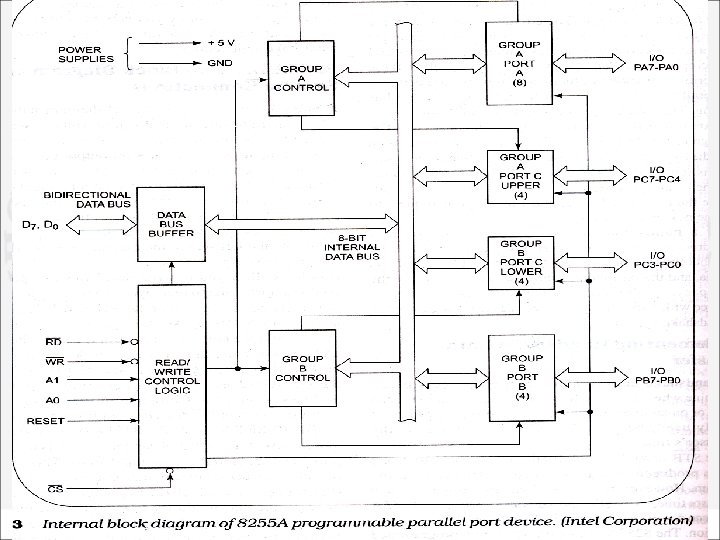
The PPI 8255 • The block diagram of the programmable peripheral interface (PPI) is as shown in figure. • Along the right side of the diagram, it has 24 input/output lines. Port A, B & C can be used as an 8 bit input port or an 8 bit output port. Port C can be used as two 4 bit ports or to produce handshake signals for ports A & B. • Along the left side of the diagram there are signal lines which are used to connect the device to the system buses. • 8 data lines are used to write data bytes to a port or a control register & read data bytes from a port or the status register under the control of RD# & WR# lines. Processor Architecture and Interfacing 46 Dept. of Information Technology
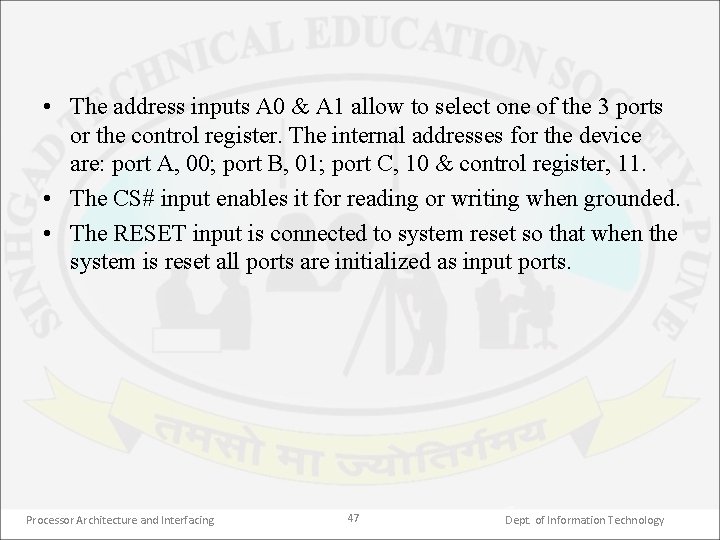
• The address inputs A 0 & A 1 allow to select one of the 3 ports or the control register. The internal addresses for the device are: port A, 00; port B, 01; port C, 10 & control register, 11. • The CS# input enables it for reading or writing when grounded. • The RESET input is connected to system reset so that when the system is reset all ports are initialized as input ports. Processor Architecture and Interfacing 47 Dept. of Information Technology
Processor Architecture and Interfacing 48 Dept. of Information Technology
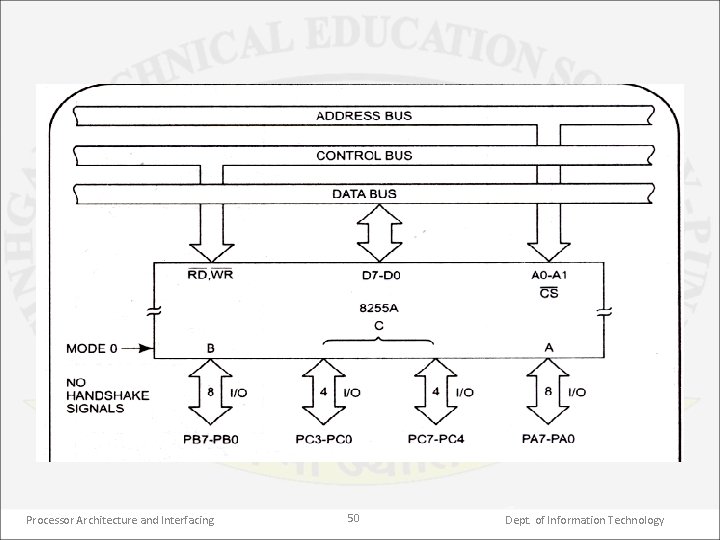
Operation modes of 8255 • The 8255 can be configured in mode 0, mode 1 or mode 2. • Mode 0: When the ports are to be used for simple input/output without handshaking, they must be initialized in mode 0. • When both port A & B are initialized in mode 0, the port C can be used as single 8 bit I/O port or two separate 4 bit ports. • When used as outputs, the port C lines can be individually set or reset by sending the bit set reset (BSR) control word (CW) to the control word register (CWR). Processor Architecture and Interfacing 49 Dept. of Information Technology
Processor Architecture and Interfacing 50 Dept. of Information Technology
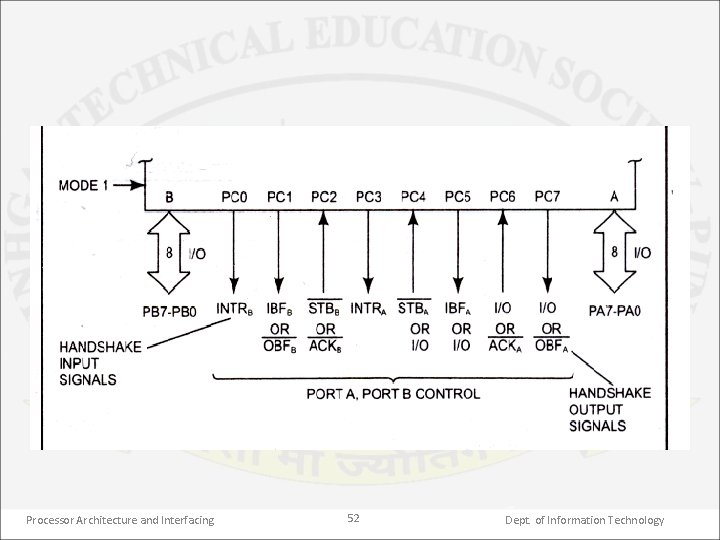
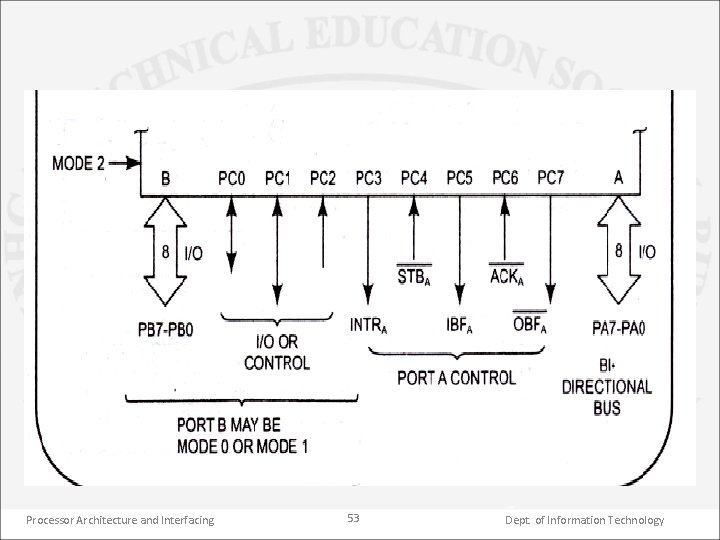
• Mode 1: when the port A or B is to be used for handshake I/O operation, they need to be initialized in mode 1. • In this mode the port C lines function as handshake lines. • Pins PC 0, PC 1 & PC 2 function as handshake lines for port B. • If port A is initialized as input port then pins PC 3, PC 4 & PC 5 function as handshake lines leaving the pins PC 6 & PC 7 for use as I/O lines. • If port A is initialized as output port then pins PC 3, PC 6 & PC 7 function as handshake lines leaving the pins PC 4 & PC 5 for use as I/O lines. • Mode 2: Only port A can be initialized in this mode where it can be used for bidirectional handshake data transfer. Processor Architecture and Interfacing 51 Dept. of Information Technology
Processor Architecture and Interfacing 52 Dept. of Information Technology
Processor Architecture and Interfacing 53 Dept. of Information Technology
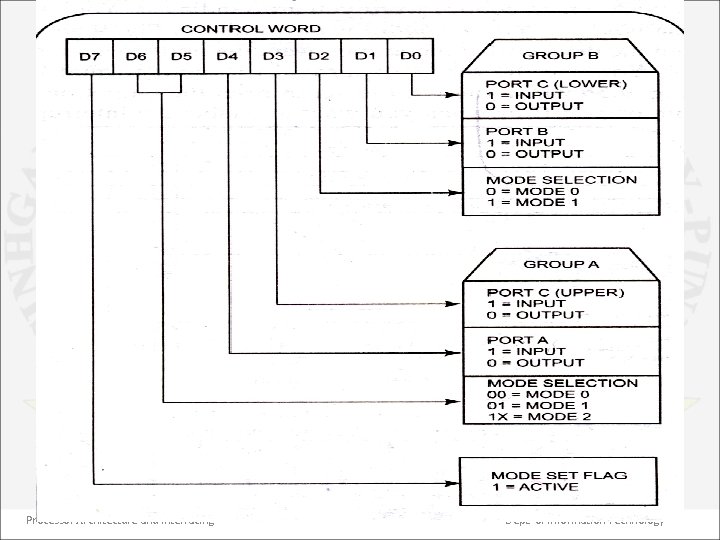
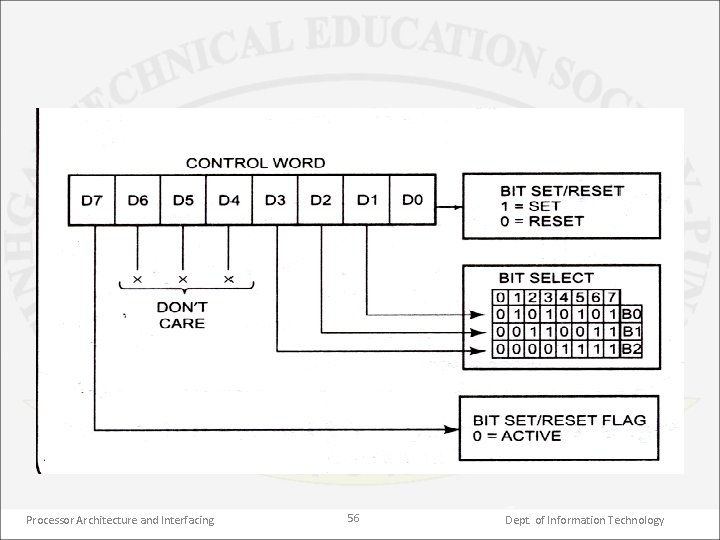
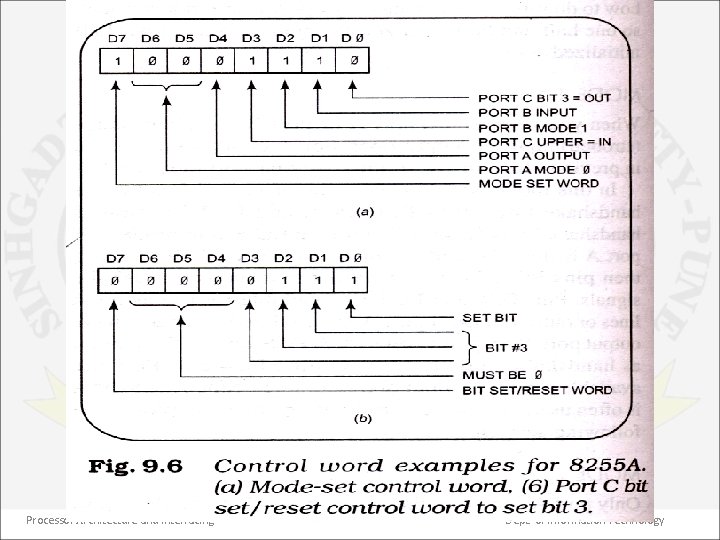
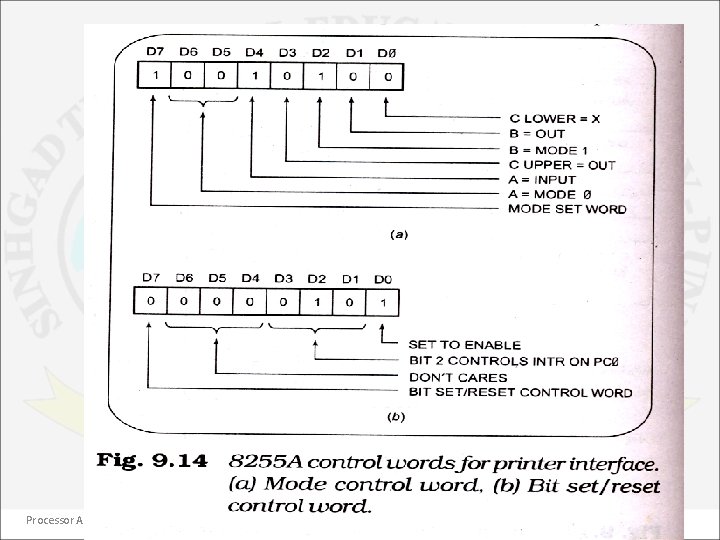
Control words of 8255 • The formats for the control words of 8255 are as shown in figure. • The MSB of the control word decides the type of control word for the 8255. • If the MSB is 1 then it is a mode definition control word. The format is as shown in figure. • If the MSB is 0 then it is a bit set reset (BSR) control word. The format is as shown in figure. • Both control words are sent to the control word register address of the 8255. Processor Architecture and Interfacing 54 Dept. of Information Technology
Processor Architecture and Interfacing 55 Dept. of Information Technology
Processor Architecture and Interfacing 56 Dept. of Information Technology
• For example suppose that you want to initialize the 8255 as follows: port B as mode 1 input port A as mode 0 output port C upper as input & port C lower as output. • The corresponding mode definition control word is as shown in figure. • Consider another example to output 1 to bit 3 port C, which was initialized as an output earlier. • The corresponding BSR control word is as shown in figure. Processor Architecture and Interfacing 57 Dept. of Information Technology
Processor Architecture and Interfacing 58 Dept. of Information Technology
Processor Architecture and Interfacing 59 Dept. of Information Technology
Processor Architecture and Interfacing 60 Dept. of Information Technology
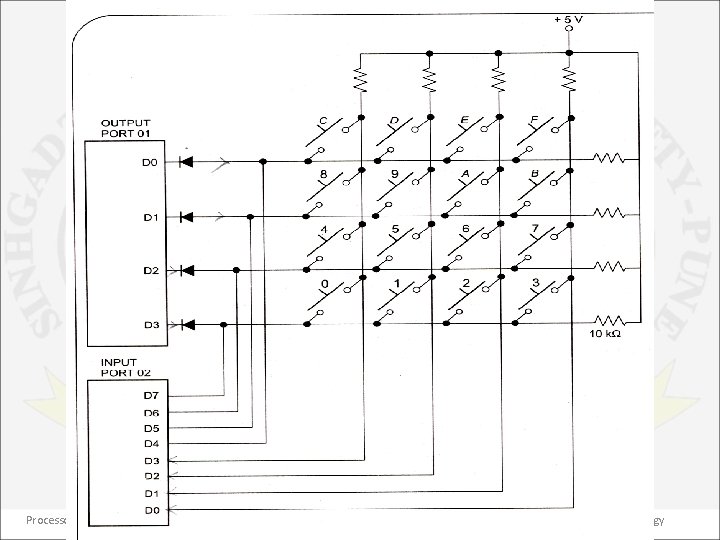
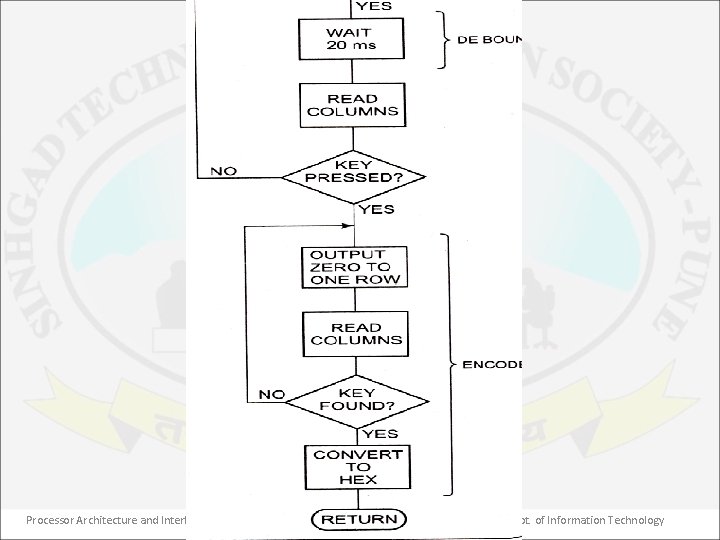
Keyboard interfacing • Figure shows a hex keyboard interfaced to 8086 through 8255. As shown, the rows of the matrix are connected to 4 output port lines & the columns of the matrix are connected to 4 input port lines. To make the program simpler, the rows are also connected to 4 input lines. • When no keys are pressed, the column lines are held high as shown in figure. Pressing a key connects a row to a column. If a low is output on a row & a key in that row is pressed, then the low will appear on the column which contains that key & can be detected on the input port. Processor Architecture and Interfacing 61 Dept. of Information Technology
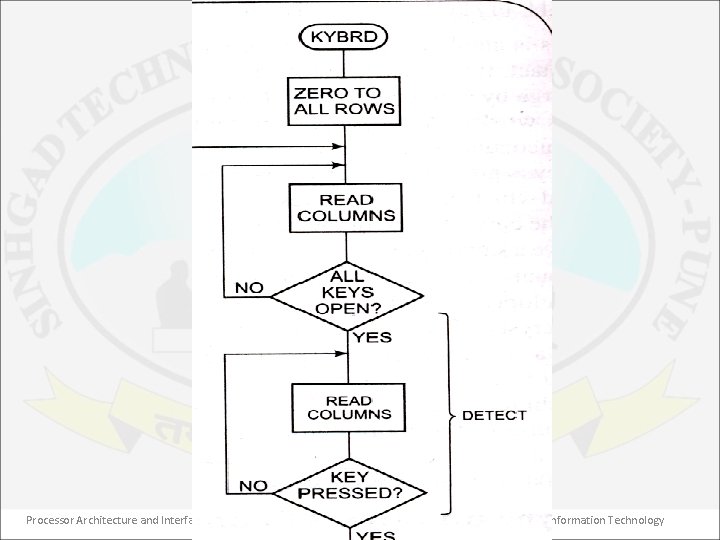
• If the row & the column of the pressed key are known, then it can easily converted into suitable code. • Next figure also shows the a flowchart for a procedure to detect, debounce & produce the hex code for a pressed key. Processor Architecture and Interfacing 62 Dept. of Information Technology
Processor Architecture and Interfacing 63 Dept. of Information Technology
Processor Architecture and Interfacing 64 Dept. of Information Technology
Processor Architecture and Interfacing 65 Dept. of Information Technology
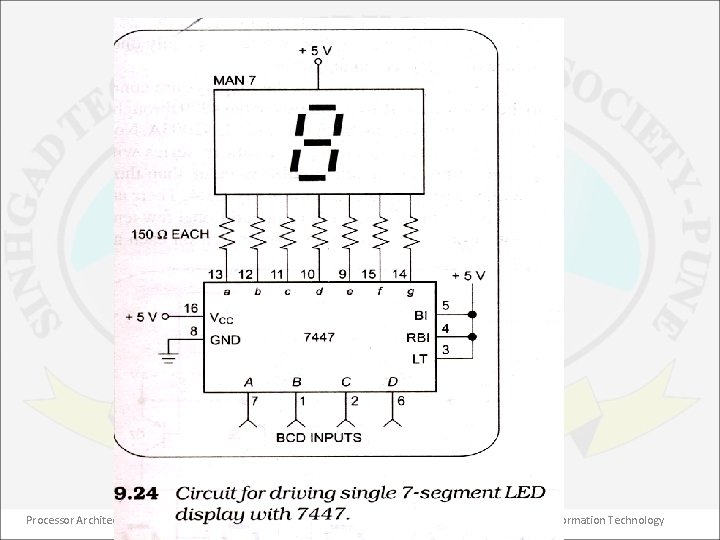
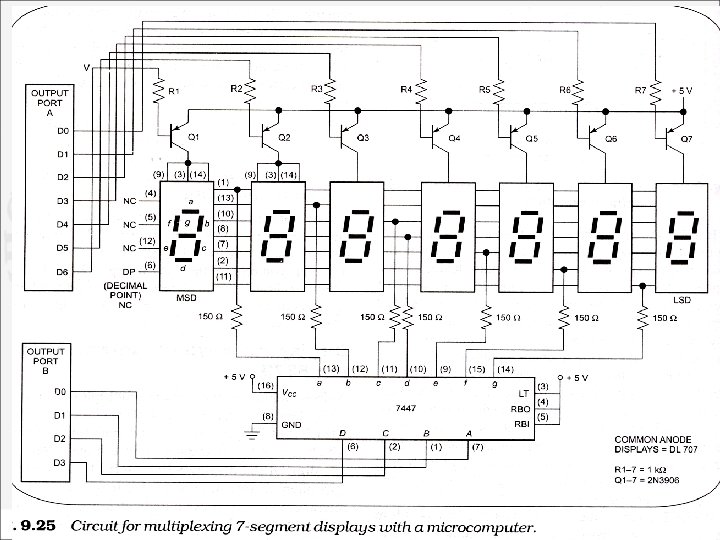
Display interfacing • Figure shows a single 7 segment, common anode display interfaced to 8086 through 8255 port. • The segment is turned on by applying a logic low to it. • The 7447 converts a BCD code into a pattern of lows required to display the number. • This circuit is known as static display as current is being passed through the display at all times. • Drawbacks of this method are more power consumption, more 7447 ICs required, 4 port lines are required per 7 segment display. Processor Architecture and Interfacing 66 Dept. of Information Technology
Processor Architecture and Interfacing 67 Dept. of Information Technology
• To overcome these problems, a multiplex method as shown in figure is used. • This circuit has only one 7447 & the segment outputs of the 7447 are bused in parallel to the segment inputs of all the digits. • The trick of multiplexing displays is that only one display digit is turned on at a time. The PNP transistor in series with the common anode of each digit acts as an on/off switch for that digit. Processor Architecture and Interfacing 68 Dept. of Information Technology
Processor Architecture and Interfacing 69 Dept. of Information Technology
- Slides: 69