
Unit 14 Task 1 RYAN EYRES Introduction In
- Slides: 8
Unit 14 Task 1 RYAN EYRES
Introduction In this task I will be talking about the benefits of installing and maintaining hardware in PC’s and laptops. I will also be talking about the impacts of upgrading and maintaining them for businesses taking into account cost, time spent, usability and compatibility.
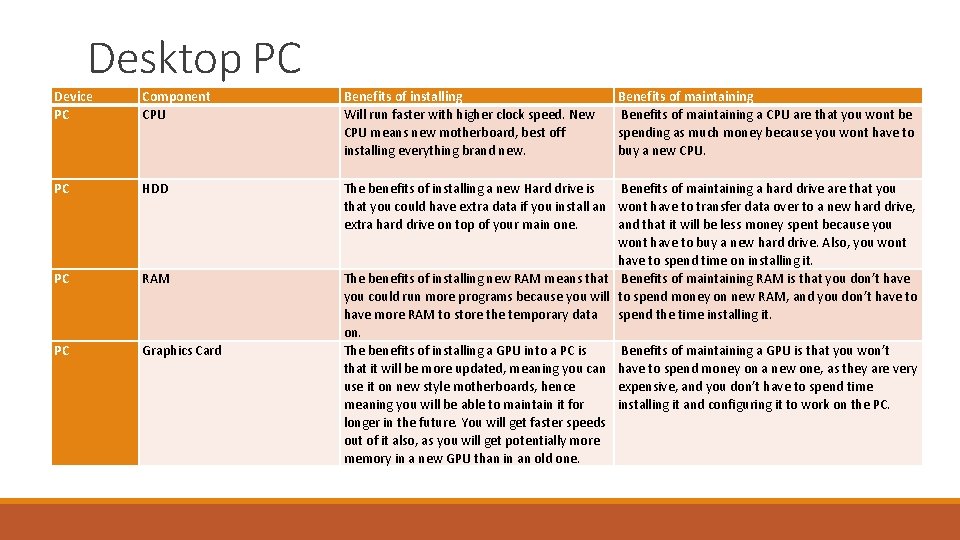
Desktop PC Device PC Component CPU Benefits of installing Will run faster with higher clock speed. New CPU means new motherboard, best off installing everything brand new. Benefits of maintaining a CPU are that you wont be spending as much money because you wont have to buy a new CPU. PC HDD PC RAM PC Graphics Card The benefits of installing a new Hard drive is Benefits of maintaining a hard drive are that you could have extra data if you install an wont have to transfer data over to a new hard drive, extra hard drive on top of your main one. and that it will be less money spent because you wont have to buy a new hard drive. Also, you wont have to spend time on installing it. The benefits of installing new RAM means that Benefits of maintaining RAM is that you don’t have you could run more programs because you will to spend money on new RAM, and you don’t have to have more RAM to store the temporary data spend the time installing it. on. The benefits of installing a GPU into a PC is Benefits of maintaining a GPU is that you won’t that it will be more updated, meaning you can have to spend money on a new one, as they are very use it on new style motherboards, hence expensive, and you don’t have to spend time meaning you will be able to maintain it for installing it and configuring it to work on the PC. longer in the future. You will get faster speeds out of it also, as you will get potentially more memory in a new GPU than in an old one.
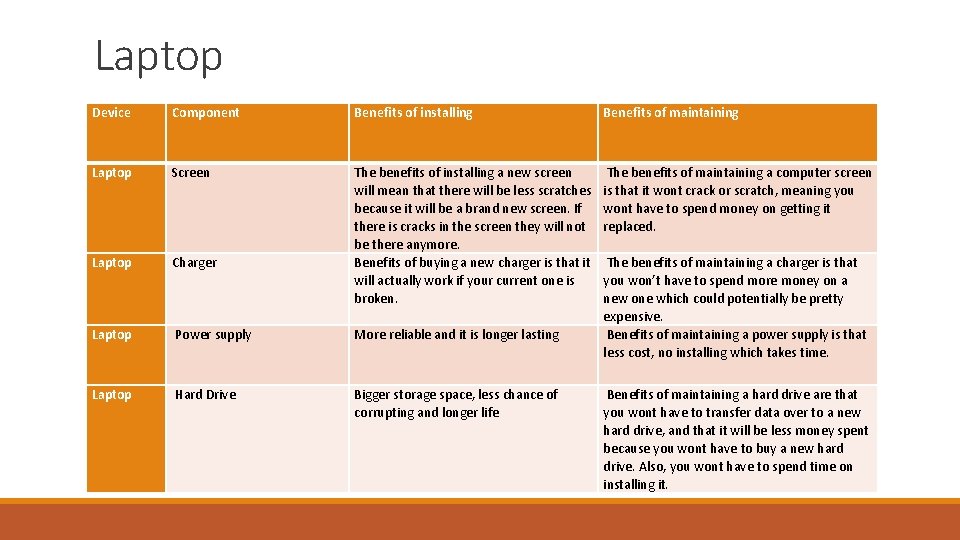
Laptop Device Component Benefits of installing Benefits of maintaining Laptop Screen The benefits of maintaining a computer screen is that it wont crack or scratch, meaning you wont have to spend money on getting it replaced. Laptop Charger The benefits of installing a new screen will mean that there will be less scratches because it will be a brand new screen. If there is cracks in the screen they will not be there anymore. Benefits of buying a new charger is that it will actually work if your current one is broken. Laptop Power supply More reliable and it is longer lasting Laptop Hard Drive Bigger storage space, less chance of corrupting and longer life The benefits of maintaining a charger is that you won’t have to spend more money on a new one which could potentially be pretty expensive. Benefits of maintaining a power supply is that less cost, no installing which takes time. Benefits of maintaining a hard drive are that you wont have to transfer data over to a new hard drive, and that it will be less money spent because you wont have to buy a new hard drive. Also, you wont have to spend time on installing it.
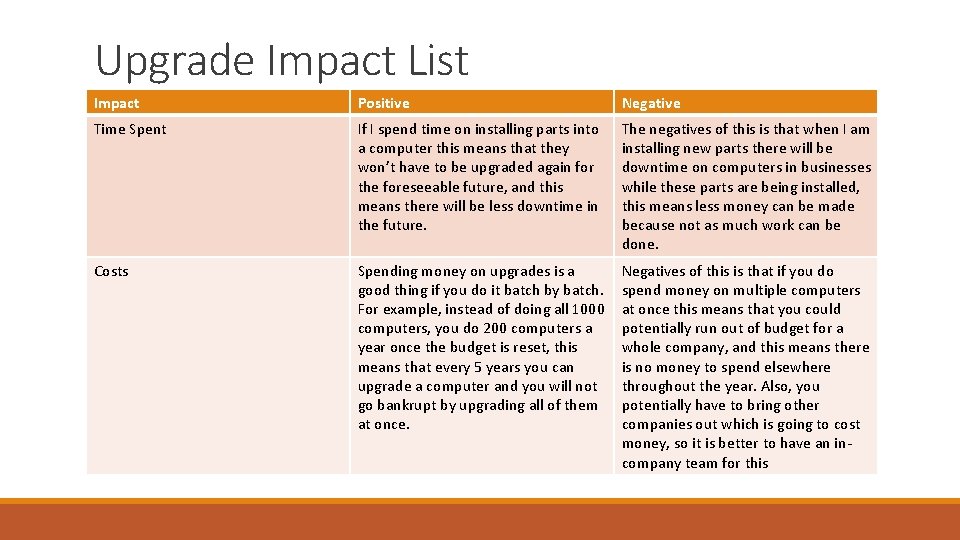
Upgrade Impact List Impact Positive Negative Time Spent If I spend time on installing parts into a computer this means that they won’t have to be upgraded again for the foreseeable future, and this means there will be less downtime in the future. The negatives of this is that when I am installing new parts there will be downtime on computers in businesses while these parts are being installed, this means less money can be made because not as much work can be done. Costs Spending money on upgrades is a good thing if you do it batch by batch. For example, instead of doing all 1000 computers, you do 200 computers a year once the budget is reset, this means that every 5 years you can upgrade a computer and you will not go bankrupt by upgrading all of them at once. Negatives of this is that if you do spend money on multiple computers at once this means that you could potentially run out of budget for a whole company, and this means there is no money to spend elsewhere throughout the year. Also, you potentially have to bring other companies out which is going to cost money, so it is better to have an incompany team for this
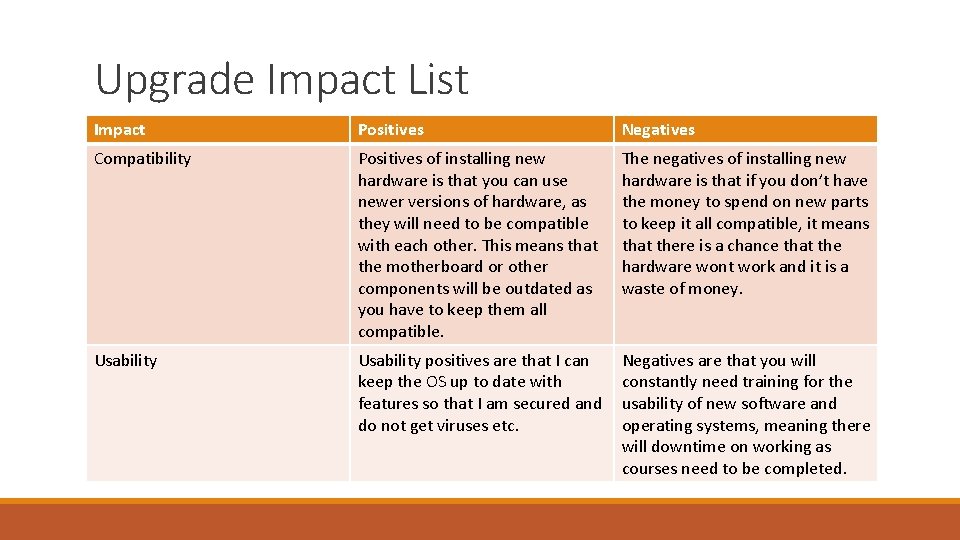
Upgrade Impact List Impact Positives Negatives Compatibility Positives of installing new hardware is that you can use newer versions of hardware, as they will need to be compatible with each other. This means that the motherboard or other components will be outdated as you have to keep them all compatible. The negatives of installing new hardware is that if you don’t have the money to spend on new parts to keep it all compatible, it means that there is a chance that the hardware wont work and it is a waste of money. Usability positives are that I can keep the OS up to date with features so that I am secured and do not get viruses etc. Negatives are that you will constantly need training for the usability of new software and operating systems, meaning there will downtime on working as courses need to be completed.
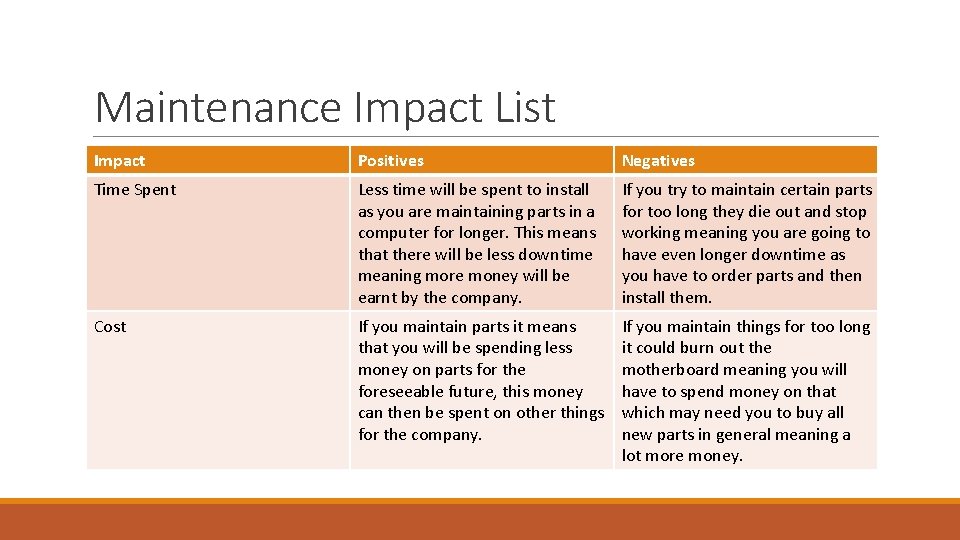
Maintenance Impact List Impact Positives Negatives Time Spent Less time will be spent to install as you are maintaining parts in a computer for longer. This means that there will be less downtime meaning more money will be earnt by the company. If you try to maintain certain parts for too long they die out and stop working meaning you are going to have even longer downtime as you have to order parts and then install them. Cost If you maintain parts it means that you will be spending less money on parts for the foreseeable future, this money can then be spent on other things for the company. If you maintain things for too long it could burn out the motherboard meaning you will have to spend money on that which may need you to buy all new parts in general meaning a lot more money.
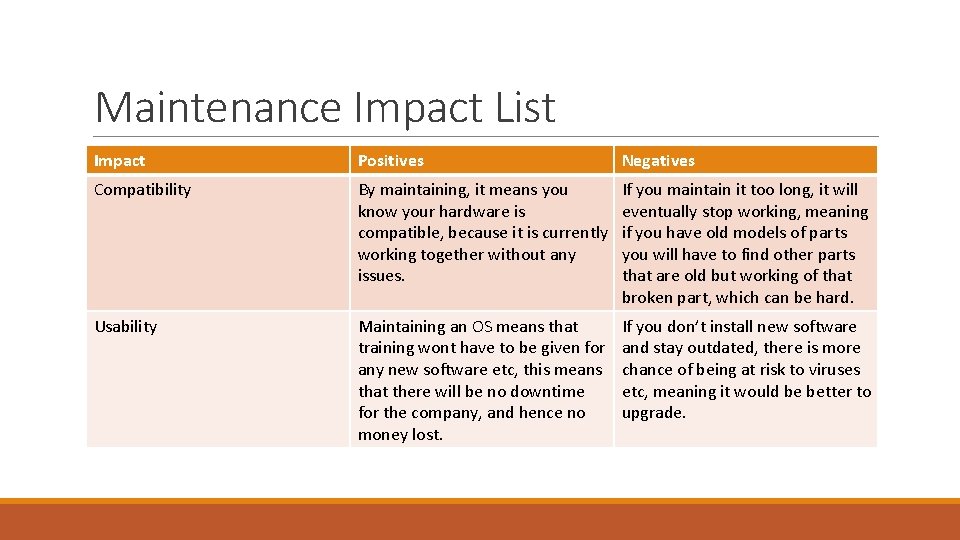
Maintenance Impact List Impact Positives Negatives Compatibility By maintaining, it means you know your hardware is compatible, because it is currently working together without any issues. If you maintain it too long, it will eventually stop working, meaning if you have old models of parts you will have to find other parts that are old but working of that broken part, which can be hard. Usability Maintaining an OS means that training wont have to be given for any new software etc, this means that there will be no downtime for the company, and hence no money lost. If you don’t install new software and stay outdated, there is more chance of being at risk to viruses etc, meaning it would be better to upgrade.