
Unit 1 Introductory concepts of DBMS Prof Firoz
Unit – 1 Introductory concepts of DBMS Prof. Firoz Sherasiya � 9879879861 �firoz. sherasiya@darshan. ac. in Database Management System (2130703) Darshan Institute of Engineering & Technology
Topics to be covered • • Introduction of DBMS Applications of DBMS Advantages of DBMS Three levels ANSI SPARC database system Mappings and data independence Database users and DBA Database system architecture Unit – 1: Introductory concepts of DBMS 2 Darshan Institute of Engineering & Technology
What is Database Management System (DBMS)? § Data - Fact that can be recorded or stored • e. g. Person Name, Age, Gender and Weight etc. § Database - Collection of logically related data • e. g. Books Database in Library, Student Database in University etc. § Management - Manipulation, Searching and Security of data • e. g. Viewing result in GTU website, Searching exam papers in GTU website § System - Programs or tools used to manage database • e. g. SQL Server Studio Express, Oracle § DBMS - A Database Management System is a software for creating and managing databases. § Database Management System (DBMS) is a software designed to define, manipulate, retrieve and manage data in a database. • e. g. MS SQL Server, Oracle, My SQL, SQLite, Mongo. DB etc. Unit – 1: Introductory concepts of DBMS 3 Darshan Institute of Engineering & Technology
Applications of DBMS Unit – 1: Introductory concepts of DBMS 4 Darshan Institute of Engineering & Technology
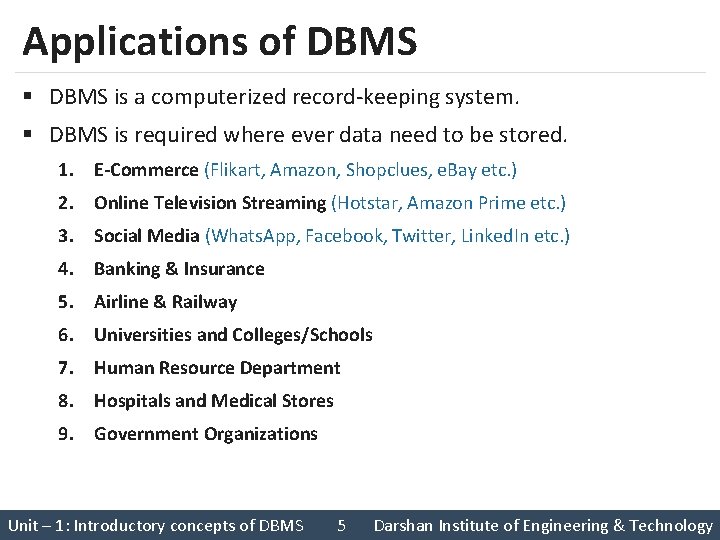
Applications of DBMS § DBMS is a computerized record-keeping system. § DBMS is required where ever data need to be stored. 1. E-Commerce (Flikart, Amazon, Shopclues, e. Bay etc. ) 2. Online Television Streaming (Hotstar, Amazon Prime etc. ) 3. Social Media (Whats. App, Facebook, Twitter, Linked. In etc. ) 4. Banking & Insurance 5. Airline & Railway 6. Universities and Colleges/Schools 7. Human Resource Department 8. Hospitals and Medical Stores 9. Government Organizations Unit – 1: Introductory concepts of DBMS 5 Darshan Institute of Engineering & Technology
Exercise 1. Write down any five applications of DBMS other than the previous slide. Unit – 1: Introductory concepts of DBMS 6 Darshan Institute of Engineering & Technology
Advantages of DBMS Unit – 1: Introductory concepts of DBMS 7 Darshan Institute of Engineering & Technology

Reduce data redundancy (duplication) Computer Civil Emp_Name Address Mob Subject Prof. Ajay Shah Rajkot 1234 CPU Emp_Name Address Mob Prof. Ajay Shah Rajkot 1234 CPU Database management system can remove such data redundancy by storing data centrally. Subject Same data is stored at four different places. Emp_Name Address Mob Subject Prof. Ajay Shah Rajkot 1234 CPU Electrical Unit – 1: Introductory concepts of DBMS Emp_Name Address Mob Subject Prof. Ajay Shah Rajkot 1234 CPU Mechanical 8 Darshan Institute of Engineering & Technology
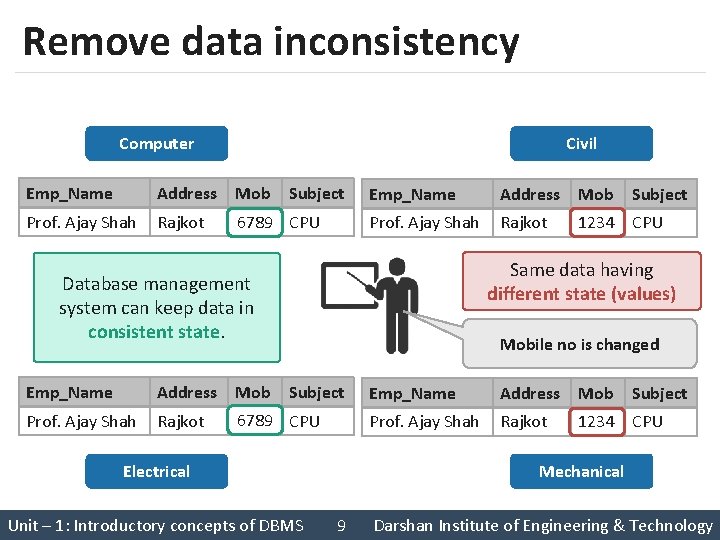
Remove data inconsistency Computer Civil Emp_Name Address Mob Subject Prof. Ajay Shah Rajkot 1234 6789 CPU Emp_Name Address Mob Subject Prof. Ajay Shah Rajkot 1234 CPU Same data having different state (values) Database management system can keep data in consistent state. Mobile no is changed Emp_Name Address Mob Subject Prof. Ajay Shah Rajkot 6789 CPU 1234 Electrical Unit – 1: Introductory concepts of DBMS Emp_Name Address Mob Subject Prof. Ajay Shah Rajkot 1234 CPU Mechanical 9 Darshan Institute of Engineering & Technology
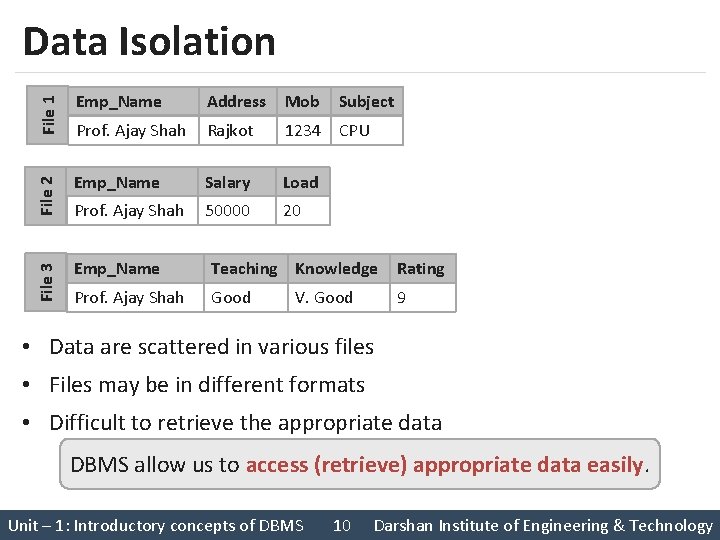
File 1 Emp_Name File 2 Emp_Name File 3 Data Isolation Address Mob Subject Prof. Ajay Shah Rajkot 1234 CPU Salary Load Prof. Ajay Shah 50000 20 Emp_Name Teaching Knowledge Rating Prof. Ajay Shah Good 9 V. Good • Data are scattered in various files • Files may be in different formats • Difficult to retrieve the appropriate data DBMS allow us to access (retrieve) appropriate data easily. Unit – 1: Introductory concepts of DBMS 10 Darshan Institute of Engineering & Technology
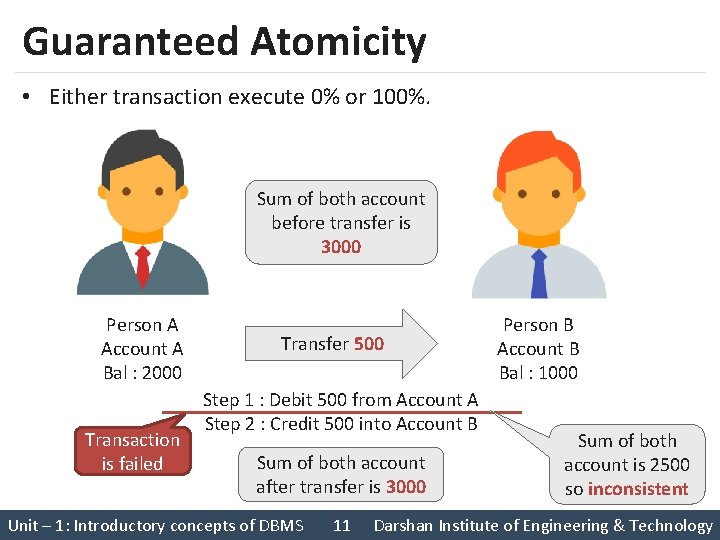
Guaranteed Atomicity • Either transaction execute 0% or 100%. Sum of both account before transfer is 3000 Person A Account A Bal : 2000 Transaction is failed Transfer 500 Step 1 : Debit 500 from Account A Step 2 : Credit 500 into Account B Sum of both account after transfer is 3000 Unit – 1: Introductory concepts of DBMS 11 Person B Account B Bal : 1000 Sum of both account is 2500 so inconsistent Darshan Institute of Engineering & Technology

Allow to implement integrity constraints Emp_Name Address Mobile Subject Prof. Ajay Shah Rajkot 98255 CPU Should contain exact 10 digits Stu_Name Branch Backlogs SPI Nirav Patel C. E. 8 2. 5 Should be between 0 to 10 DBMS allows us to implement such business rules in our database. Unit – 1: Introductory concepts of DBMS 12 Darshan Institute of Engineering & Technology
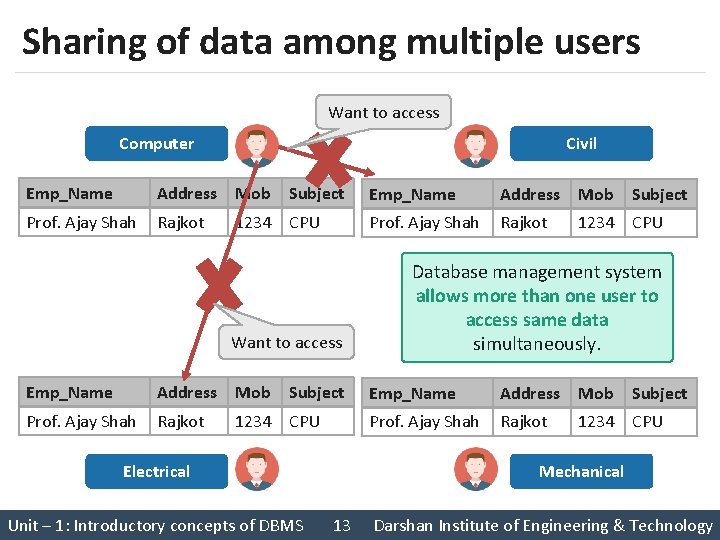
Sharing of data among multiple users Want to access Computer Civil Emp_Name Address Mob Subject Prof. Ajay Shah Rajkot 1234 CPU Want to access Emp_Name Address Mob Subject Prof. Ajay Shah Rajkot 1234 CPU Electrical Unit – 1: Introductory concepts of DBMS Emp_Name Address Mob Subject Prof. Ajay Shah Rajkot 1234 CPU Database management system allows more than one user to access same data simultaneously. Emp_Name Address Mob Subject Prof. Ajay Shah Rajkot 1234 CPU Mechanical 13 Darshan Institute of Engineering & Technology
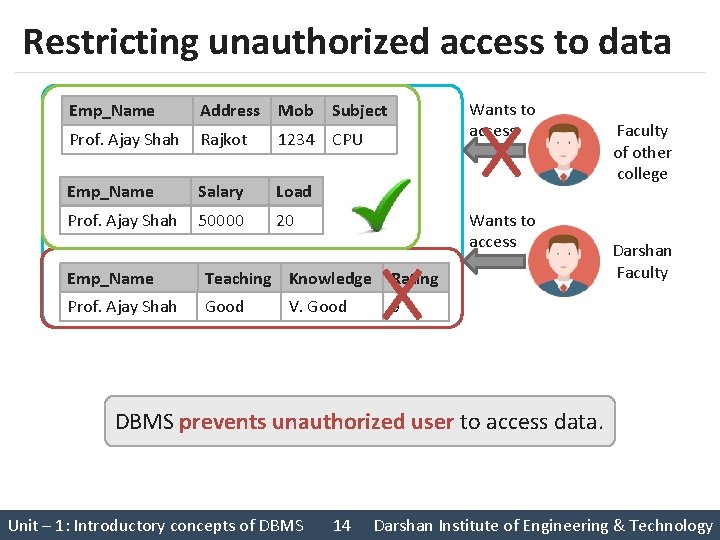
Restricting unauthorized access to data Emp_Name Address Mob Prof. Ajay Shah Rajkot 1234 CPU Emp_Name Salary Load Prof. Ajay Shah 50000 20 Wants to access Subject Wants to access Emp_Name Teaching Knowledge Rating Prof. Ajay Shah Good 9 V. Good Faculty of other college Darshan Faculty DBMS prevents unauthorized user to access data. Unit – 1: Introductory concepts of DBMS 14 Darshan Institute of Engineering & Technology
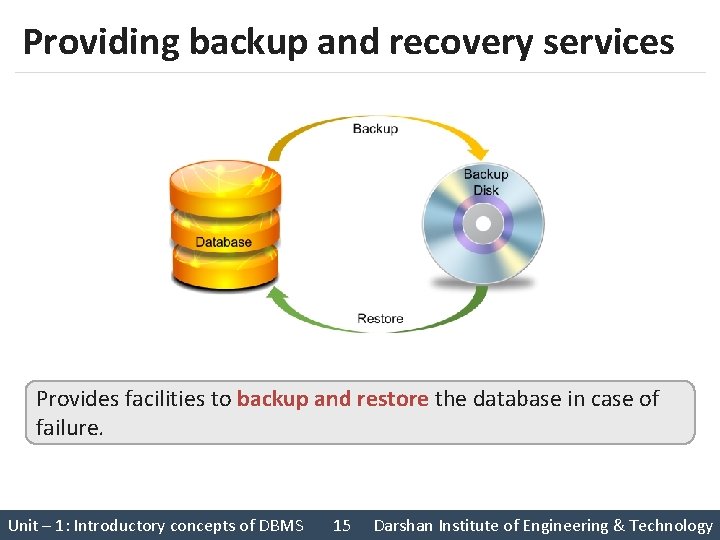
Providing backup and recovery services Provides facilities to backup and restore the database in case of failure. Unit – 1: Introductory concepts of DBMS 15 Darshan Institute of Engineering & Technology
Advantages of DBMS (Summary) 1. Reduce data redundancy (duplication) • Avoids unnecessary duplication of data by storing data centrally. 2. Remove data inconsistency • By eliminating redundancy, data inconsistency can be removed. 3. Data isolation • A user can easily retrieve proper data as per his/her requirement. 4. Guaranteed atomicity • Either transaction executes 0% or 100%. Unit – 1: Introductory concepts of DBMS 16 Darshan Institute of Engineering & Technology
Advantages of DBMS (Summary) 5. Allow implementing integrity constraints • Business rules can be implemented such as do not allow to store amount less than Rs. 0 in balance. 6. Sharing of data among multiple users • More than one users can access same data at the same time. 7. Restricting unauthorized access to data • A user can only access data which is authorized to him/her. 8. Providing backup and recovery services • Can take a regular auto or manual backup and use it to restore the database if it corrupts. Unit – 1: Introductory concepts of DBMS 17 Darshan Institute of Engineering & Technology
Basic Terms § Data • Data is raw, unorganized facts that need to be processed. • Example: Marks of students • Student_1 = 50/100, Student_2 = 25/100. § Information • When data is processed, organized, structured or presented in a given context so as to make it useful, it is called information. • Example: Result of students (Pass or Fail) • Student_1 = Pass, Student_2 = Fail. Unit – 1: Introductory concepts of DBMS 18 Darshan Institute of Engineering & Technology
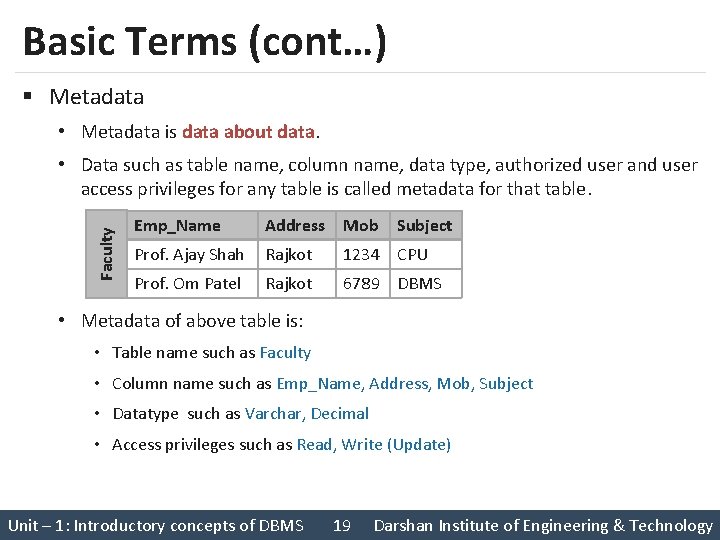
Basic Terms (cont…) § Metadata • Metadata is data about data. Faculty • Data such as table name, column name, data type, authorized user and user access privileges for any table is called metadata for that table. Emp_Name Address Mob Subject Prof. Ajay Shah Rajkot 1234 CPU Prof. Om Patel Rajkot 6789 DBMS • Metadata of above table is: • Table name such as Faculty • Column name such as Emp_Name, Address, Mob, Subject • Datatype such as Varchar, Decimal • Access privileges such as Read, Write (Update) Unit – 1: Introductory concepts of DBMS 19 Darshan Institute of Engineering & Technology
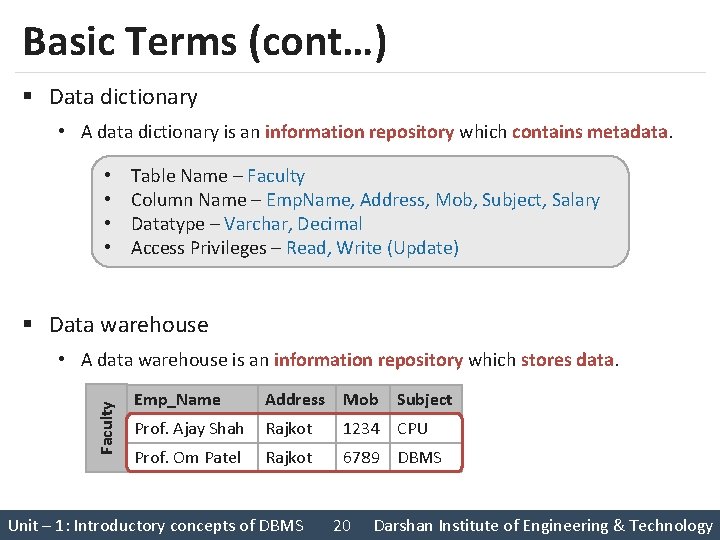
Basic Terms (cont…) § Data dictionary • A data dictionary is an information repository which contains metadata. • • Table Name – Faculty Column Name – Emp. Name, Address, Mob, Subject, Salary Datatype – Varchar, Decimal Access Privileges – Read, Write (Update) § Data warehouse Faculty • A data warehouse is an information repository which stores data. Emp_Name Address Mob Prof. Ajay Shah Rajkot 1234 CPU Prof. Om Patel Rajkot 6789 DBMS Unit – 1: Introductory concepts of DBMS 20 Subject Darshan Institute of Engineering & Technology
Exercise 1. Why data dictionary and data warehouse are stored in the different places? Unit – 1: Introductory concepts of DBMS 21 Darshan Institute of Engineering & Technology
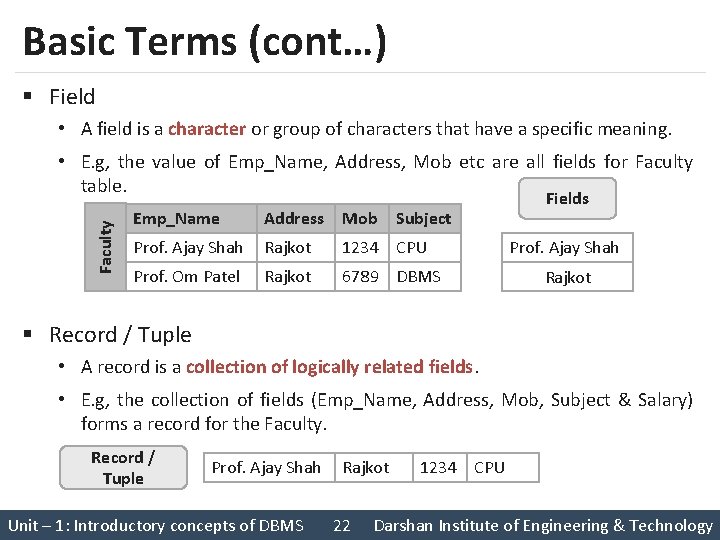
Basic Terms (cont…) § Field • A field is a character or group of characters that have a specific meaning. Faculty • E. g, the value of Emp_Name, Address, Mob etc are all fields for Faculty table. Emp_Name Address Mob Subject Prof. Ajay Shah Rajkot 1234 CPU Prof. Om Patel Rajkot 6789 DBMS Fields Prof. Ajay Shah Rajkot § Record / Tuple • A record is a collection of logically related fields. • E. g, the collection of fields (Emp_Name, Address, Mob, Subject & Salary) forms a record for the Faculty. Record / Tuple Prof. Ajay Shah Unit – 1: Introductory concepts of DBMS Rajkot 22 1234 CPU Darshan Institute of Engineering & Technology
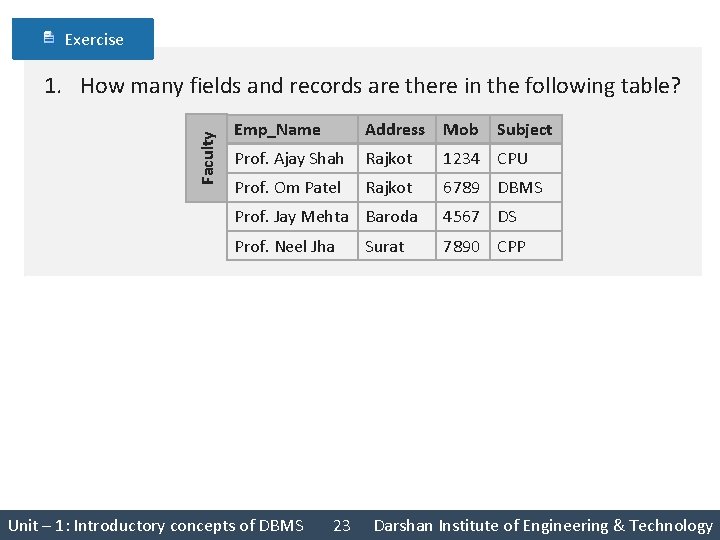
Exercise Faculty 1. How many fields and records are there in the following table? Emp_Name Address Mob Subject Prof. Ajay Shah Rajkot 1234 CPU Prof. Om Patel Rajkot 6789 DBMS Prof. Jay Mehta Baroda 4567 DS Prof. Neel Jha 7890 CPP Unit – 1: Introductory concepts of DBMS 23 Surat Darshan Institute of Engineering & Technology
3 Levels ANSI SPARC Database System Unit – 1: Introductory concepts of DBMS 24 Darshan Institute of Engineering & Technology
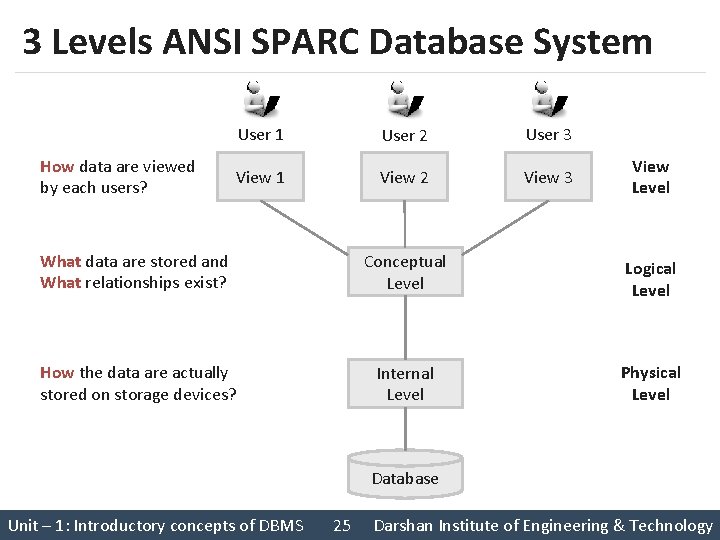
3 Levels ANSI SPARC Database System How data are viewed by each users? User 1 User 2 User 3 View 1 View 2 View 3 View Level What data are stored and What relationships exist? Conceptual Level Logical Level How the data are actually stored on storage devices? Internal Level Physical Level Database Unit – 1: Introductory concepts of DBMS 25 Darshan Institute of Engineering & Technology
Internal level (Physical level) § It describes how a data is stored on the storage device. § Deals with physical storage of data. • Structure of records on disk - files, pages, blocks • Indexes and ordering of records § Internal view is described by the internal schema. Unit – 1: Introductory concepts of DBMS 26 Darshan Institute of Engineering & Technology
Conceptual level (Logical level) § What data are stored and what relationships exist among those data? § It hides low level complexities of physical storage. § For Example, STUDENT database may contain STUDENT and COURSE tables which will be visible to users but users are unaware about their storage. § Database administrator works at this level to determine what data to keep in the database. Unit – 1: Introductory concepts of DBMS 27 Darshan Institute of Engineering & Technology
External level (View level) § It describes only part of the entire database that an end user concern or How data are viewed by each user. § End users need to access only part of the database rather than the entire database. § Different user needs different views of the database, so there can be many views in a view level abstraction of the database. § Used by end users and application programmers. Unit – 1: Introductory concepts of DBMS 28 Darshan Institute of Engineering & Technology
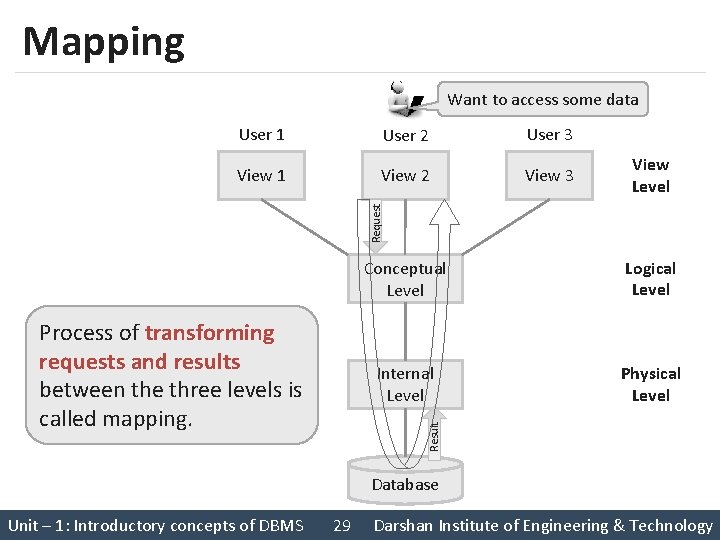
Mapping Want to access some data User 2 User 3 View 1 View 2 View 3 View Level Request User 1 Logical Level Internal Level Physical Level Result Process of transforming requests and results between the three levels is called mapping. Conceptual Level Database Unit – 1: Introductory concepts of DBMS 29 Darshan Institute of Engineering & Technology
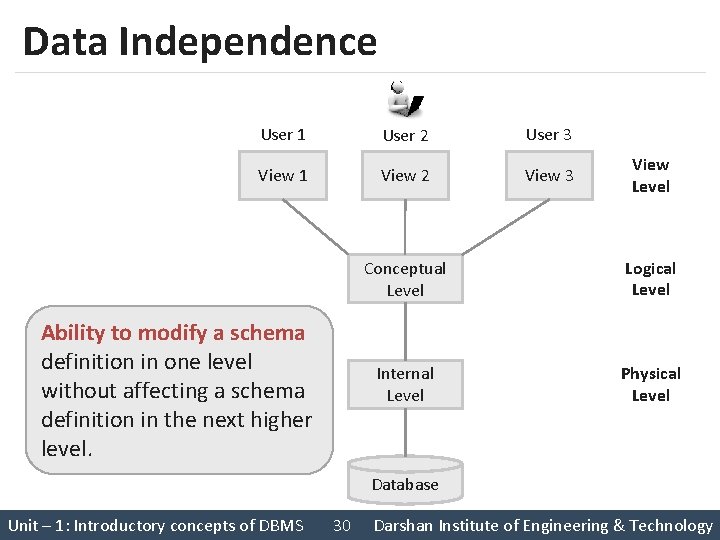
Data Independence User 1 User 2 User 3 View 1 View 2 View 3 Ability to modify a schema definition in one level without affecting a schema definition in the next higher level. View Level Conceptual Level Logical Level Internal Level Physical Level Database Unit – 1: Introductory concepts of DBMS 30 Darshan Institute of Engineering & Technology
Types of Data Independence 1. Physical Data Independence 2. Logical Data Independence Unit – 1: Introductory concepts of DBMS 31 Darshan Institute of Engineering & Technology
Physical Data Independence § Physical Data Independence is the ability to modify the physical schema without requiring any change in logical (conceptual) schema and application programs. § Modifications at the internal levels are occasionally necessary to improve performance. § Possible modifications at internal levels are changes in file structures, compression techniques, hashing algorithms, storage devices, etc. Unit – 1: Introductory concepts of DBMS 32 Darshan Institute of Engineering & Technology
Logical Data Independence § Logical data independence is the ability to modify the conceptual schema without requiring any change in application programs. § Modification at the logical levels is necessary whenever the logical structure of the database is changed. § Application programs are heavily dependent on logical structures of the data they access. So any change in logical structure also requires programs to change. Unit – 1: Introductory concepts of DBMS 33 Darshan Institute of Engineering & Technology
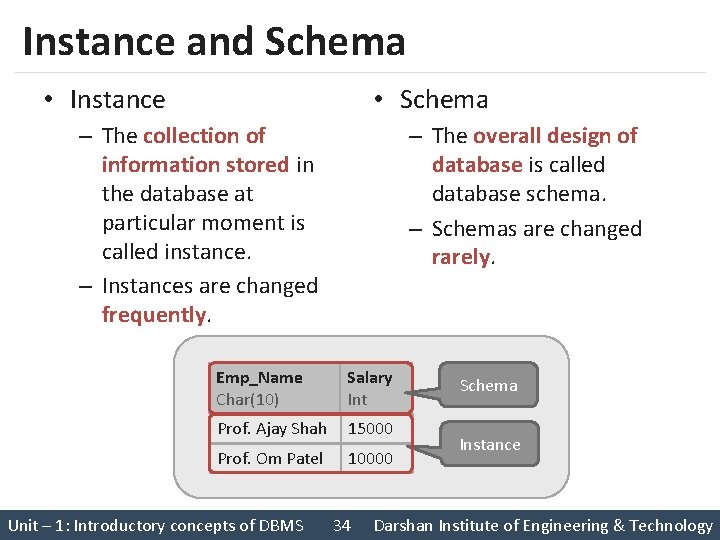
Instance and Schema • Instance • Schema – The collection of information stored in the database at particular moment is called instance. – Instances are changed frequently. – The overall design of database is called database schema. – Schemas are changed rarely. Emp_Name Char(10) Salary Int Prof. Ajay Shah 15000 Prof. Om Patel 10000 Unit – 1: Introductory concepts of DBMS 34 Schema Instance Darshan Institute of Engineering & Technology
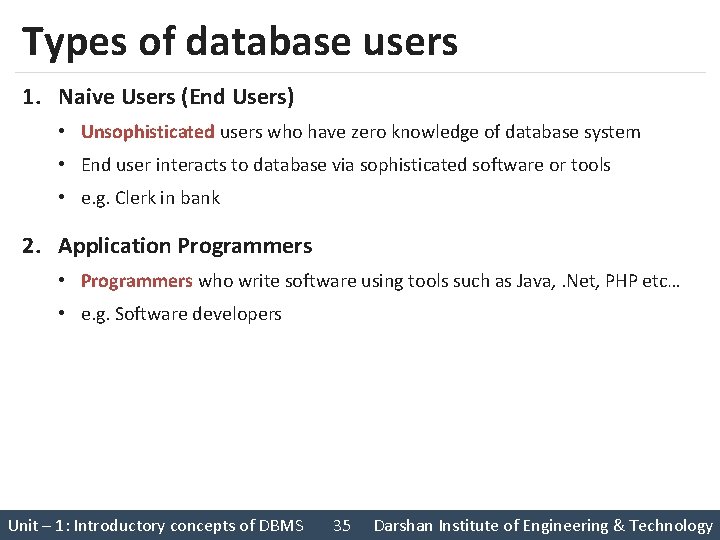
Types of database users 1. Naive Users (End Users) • Unsophisticated users who have zero knowledge of database system • End user interacts to database via sophisticated software or tools • e. g. Clerk in bank 2. Application Programmers • Programmers who write software using tools such as Java, . Net, PHP etc… • e. g. Software developers Unit – 1: Introductory concepts of DBMS 35 Darshan Institute of Engineering & Technology
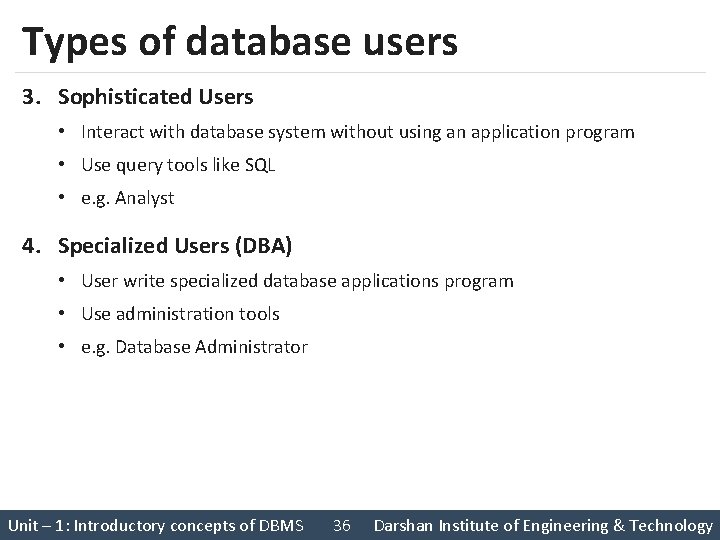
Types of database users 3. Sophisticated Users • Interact with database system without using an application program • Use query tools like SQL • e. g. Analyst 4. Specialized Users (DBA) • User write specialized database applications program • Use administration tools • e. g. Database Administrator Unit – 1: Introductory concepts of DBMS 36 Darshan Institute of Engineering & Technology
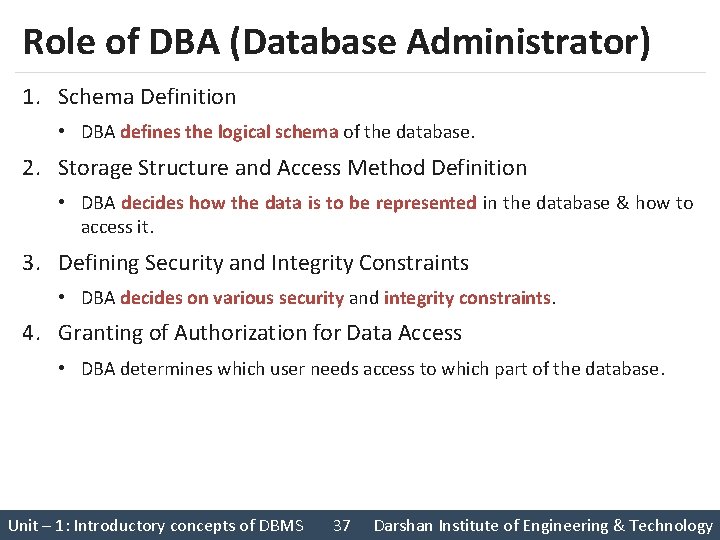
Role of DBA (Database Administrator) 1. Schema Definition • DBA defines the logical schema of the database. 2. Storage Structure and Access Method Definition • DBA decides how the data is to be represented in the database & how to access it. 3. Defining Security and Integrity Constraints • DBA decides on various security and integrity constraints. 4. Granting of Authorization for Data Access • DBA determines which user needs access to which part of the database. Unit – 1: Introductory concepts of DBMS 37 Darshan Institute of Engineering & Technology
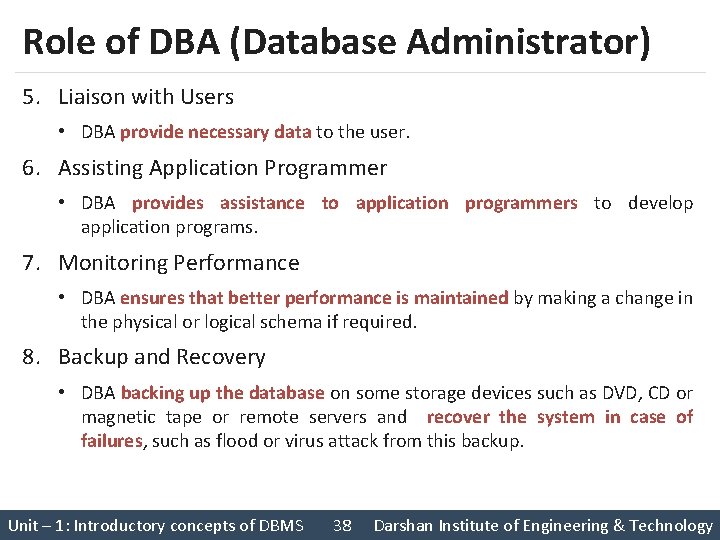
Role of DBA (Database Administrator) 5. Liaison with Users • DBA provide necessary data to the user. 6. Assisting Application Programmer • DBA provides assistance to application programmers to develop application programs. 7. Monitoring Performance • DBA ensures that better performance is maintained by making a change in the physical or logical schema if required. 8. Backup and Recovery • DBA backing up the database on some storage devices such as DVD, CD or magnetic tape or remote servers and recover the system in case of failures, such as flood or virus attack from this backup. Unit – 1: Introductory concepts of DBMS 38 Darshan Institute of Engineering & Technology
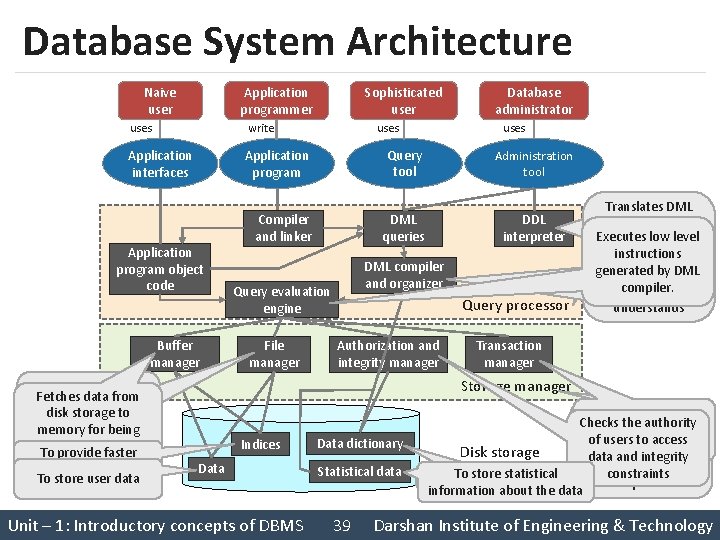
Database System Architecture Naive user Application programmer uses write Application interfaces Buffer manager access to data items To store user data uses Compiler and linker Administration tool DML queries DDL interpreter DML compiler and organizer Query evaluation engine File manager Database administrator uses Query tool Application program object code Manages allocation Fetches data from of space on disk storage to storage memory for being used faster To provide Sophisticated user Query processor Authorization and integrity manager Translates Interprets DML DDL statements intoa statements into Deals with Executes low level set of tables execution of instructions that containing DDL and DML generated by the query. DML metadata statements compiler. evaluation engine understands Transaction manager Storage manager Indices Data Unit – 1: Introductory concepts of DBMS Data dictionary Statistical data 39 Preserves atomicity Provides interface Checks the authority and controls between low-level of users to access concurrency data stored and Disk storage data and integrity application program constraints To store statistical To store metadata or queries information about the data Darshan Institute of Engineering & Technology
Questions asked in GTU 1. List and explain the advantages of DBMS. 2. Draw and explain 3 level architecture of DBMS. 3. List and explain categories of database users. 4. List and explain different tasks of DBA. 5. Explain DBMS architecture with block diagram. Unit – 1: Introductory concepts of DBMS 40 Darshan Institute of Engineering & Technology
- Slides: 40