
Unit 1 6 Systems security Lesson 4 OCR
- Slides: 20
Unit 1. 6 Systems security Lesson 4 © OCR 2017
This lesson covers the following from specification 1. 6 System Security: • • Forms of attack Threats posed to networks: – Malware – Phishing – People as the weak point in secure systems (social engineering) – Brute force attacks – DDOS – Data interception and theft – SQL injection – Poor network policy • Identifying and preventing vulnerabilities – Penetration testing – Network forensics – Network policies – Anti-malware software – Firewalls – User access levels – Passwords – Encryption © OCR 2017
Key Words • • • User access levels Passwords Encryption Cipher Key © OCR 2017
Big Picture • What are the benefits of encryption? • Why should passwords be kept secure? Discuss with a neighbour: What things can we do to make sure our passwords are secure? List as many things as you can think of. © OCR 2017
Learning Objectives • To understand the effects of user access levels on a system • To understand how and why passwords must be kept secure and the levels of complexity • To learn how encryption can have a negative effect on law enforcement and investigations • To understand how encryption works • To demonstrate a knowledge of a cypher and its’ key. © OCR 2017
Engagement Activity • What makes a secure password? • Build a list of suitable requirements for secure passwords • Create a list of rules for keeping a password secure • Explain why passwords should be kept secure in such a way. © OCR 2017
User access levels • Also known as system access rights • Comes under system access control • Allows a system administrator to set up a hierarchy of users • Lower level users would have access to limited information and settings • Higher level users can access the most sensitive data on the system © OCR 2017
Activity 1 • Complete Worksheet 1 • Define a set of user access levels for various groups. © OCR 2017
Passwords • Typically a string of characters used to gain access to a service or system • Discussion point: • Are there any alternatives to character password entry (eg. Biometrics? ) • Research the Samsung Galaxy 8 – what security features does this device have to replace passwords? © OCR 2017
Biometric security • Can be used in addition to ‘standard’ password entry (via a keyboard) • Examples include: • • Retina scan Fingerprint Voice Facial recognition • Benefits of using biometrics? © OCR 2017
Secure or Strong Passwords • 12 characters or more • The greater the characters, the stronger the password • Mixture of capitals, lower case letters, numbers and symbols Short Exercise: • Create some easy passwords that are NOT secure? • How would you make them stronger? • e. g. password 123 Passw 0 rd 123! © OCR 2017
Protecting password-based systems Systems that use passwords often prevent against people guessing passwords non-stop (brute force) by applying rules: • The time gap between entering one password another • e. g. mobile phones lock for 30 seconds after a number of incorrect attempts • Limits to the number of password guesses • After which the account becomes “locked” and needs Admin access • Complexity requirements of passwords • You can only use secure passwords when setting up your account • Try creating a new account on a website and many have “password strength” indicators • Password encryption • Password reset policies • You are forced to change your password at certain times (e. g. every 30 days) © OCR 2017
Activity 2 • Create an infographic to illustrate the importance of secure passwords • Explain the elements of a secure password • Piktochart. com © OCR 2017
Encryption • Where data is translated into code so that only authorised users, or users with the key can decrypt it • Users must need the key in order to decrypt the coded file © OCR 2017
Encrypted messages • Reading: https: //www. wired. com/2016/04/forgetapple-vs-fbi-whatsapp-just-switched-encryptionbillion-people/ • What effect would Whatsapp’s encryption policy have on British police and other security investigations? © OCR 2017
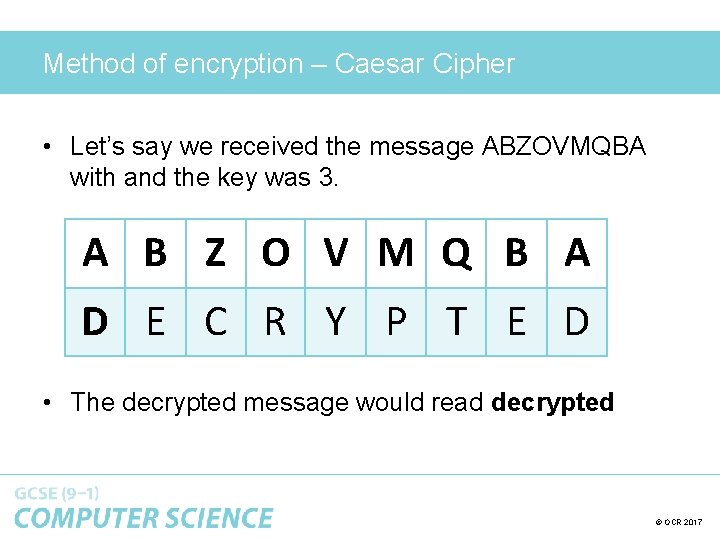
Method of encryption – Caesar Cipher • Cipher invented by Julius Caesar • Designed to keep his messages secret • Works by encrypting messages through movement of each letter a certain number of places to the left in the alphabet • Key tells us how many places to the left the letters have been moved. © OCR 2017
Method of encryption – Caesar Cipher • Let’s say we received the message ABZOVMQBA with and the key was 3. A B Z O V M Q B A D E C R Y P T E D • The decrypted message would read decrypted © OCR 2017
Activity 3 • Caesar Cipher • Use template in order to write a message • Swap with a partner to decrypt the message • Base the groups on ability – lower ability = smaller key shift, smaller messages. © OCR 2017
Plenary • Post-it activity (small groups / pairs) • Recall elements of a secure password in groups • Create a secure password and explain reasons for it being secure • Define user access levels for a librarian in a library • If time permits, set Ceaser Cipher group task with complex key shift © OCR 2017
OCR Resources: the small print OCR’s resources are provided to support the teaching of OCR specifications, but in no way constitute an endorsed teaching method that is required by the Board, and the decision to use them lies with the individual teacher. Whilst every effort is made to ensure the accuracy of the content, OCR cannot be held responsible for any errors or omissions within these resources. © OCR 2017 - This resource may be freely copied and distributed, as long as the OCR logo and this message remain intact and OCR is acknowledged as the originator of this work. OCR acknowledges the use of the following content: n/a Please get in touch if you want to discuss the accessibility of resources we offer to support delivery of our qualifications: resources. feedback@ocr. org. uk © OCR 2017