
Uni Innsbruck Informatik 1 Tutorial The ns2 Network
Uni Innsbruck Informatik - 1 Tutorial: The ns-2 Network Simulator Michael Welzl http: //www. welzl. at Institute of Computer Science University of Innsbruck, Austria
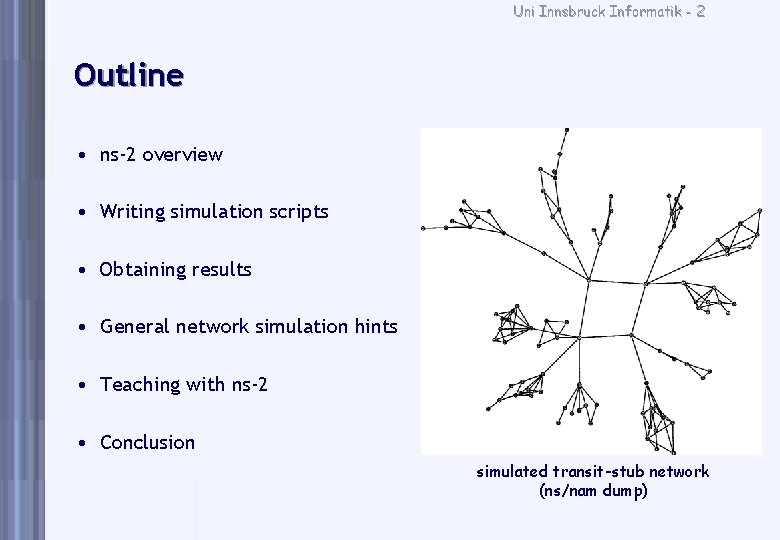
Uni Innsbruck Informatik - 2 Outline • ns-2 overview • Writing simulation scripts • Obtaining results • General network simulation hints • Teaching with ns-2 • Conclusion simulated transit-stub network (ns/nam dump)
Uni Innsbruck Informatik - 3 ns-2 overview
Uni Innsbruck Informatik - 4 Some thoughts about network simulation • Real-world experiments sometimes impossible • Mathematical modeling can be painful – Sometimes even painful and inaccurate! • Simulation cannot totally replace real-world experiments: – stack processing delay, buffering, timing, . . • and vice versa! – scaling, simulated vs. real time (long simulations), . . • Simulation sometimes misses the whole picture – focus on specific layers, wrong assumptions, . .
Uni Innsbruck Informatik - 5 ns-2 (ns version 2) overview • discrete event simulator (but does not strictly follow DEVS formalism) • OTcl and C++ – OTcl scripts, C++ mechanism implementations, timing critical code • de facto standard for Internet simulation • open source! advantages: – facilitates building upon other work – allows others to use your work • disadvantages: – huge and complicated code – partially missing, somewhat poor documentation
Uni Innsbruck Informatik - 6 What to use it for • Mainly research – Examining operational networks, e. g. with Cisco brand names: OPNET • Focus on Internet technology – the tool for TCP simulations • Not ideal for new link layer technologies etc. – typically neglects everything underneath layer 3 – there are special simulators for things like ATM • But: lots of features! – CSMA/CD, 802. 11 now available. . . if you really want it – Some things must be added manually (“Contributed Modules“)
Uni Innsbruck Informatik - 7 Some ns-2 features • Lots of TCP (and related) implementations • Mobility • Satellite nodes: specify longitude, latitude, altitude • Internet routing protocols • Various link loss models flexible, but hard to use; alternatives: NISTNet, Dummynet • Various traffic generators (e. g. , web, telnet, . . ) • Network emulation capability (real traffic traverses simulated net)
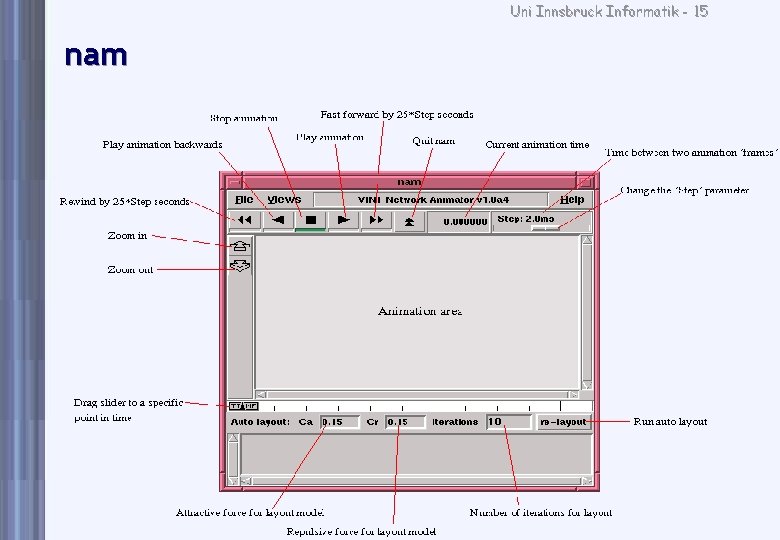
Uni Innsbruck Informatik - 8 Simulation process • Not interactive • Script describes scenario, event scheduling times • Typical last line: $ns run • ns generates output files • “Interactive simulation“: view. nam output file with network animator nam • . nam files can become huge!
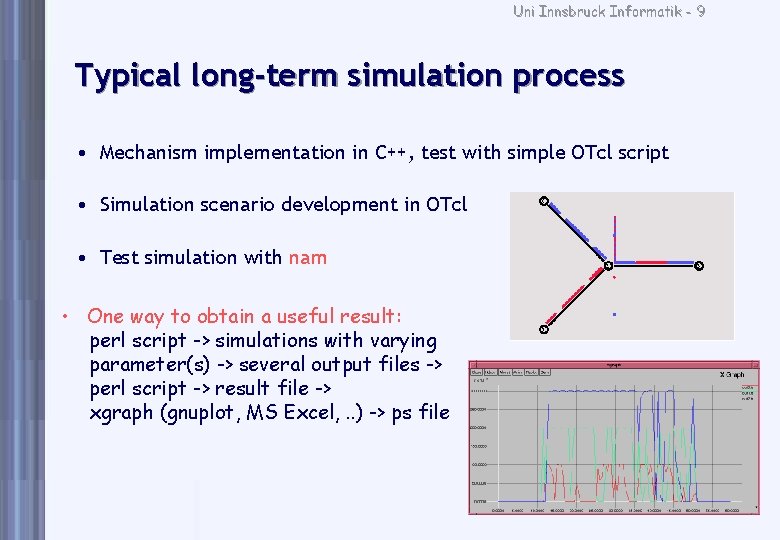
Uni Innsbruck Informatik - 9 Typical long-term simulation process • Mechanism implementation in C++, test with simple OTcl script • Simulation scenario development in OTcl • Test simulation with nam • One way to obtain a useful result: perl script -> simulations with varying parameter(s) -> several output files -> perl script -> result file -> xgraph (gnuplot, MS Excel, . . ) -> ps file
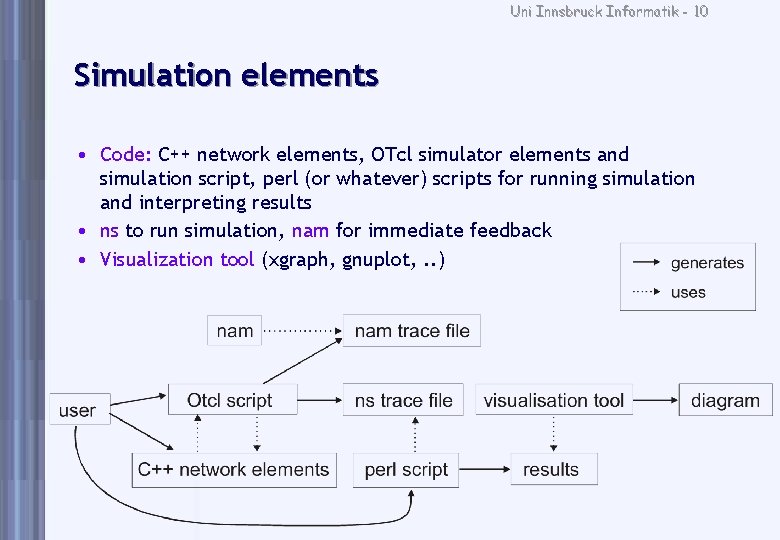
Uni Innsbruck Informatik - 10 Simulation elements • Code: C++ network elements, OTcl simulator elements and simulation script, perl (or whatever) scripts for running simulation and interpreting results • ns to run simulation, nam for immediate feedback • Visualization tool (xgraph, gnuplot, . . )
Uni Innsbruck Informatik - 11 Writing simulation scripts
Uni Innsbruck Informatik - 12 Writing simulation scripts • OTcl - what you require is some Tcl knowledge – not complicated, but troublesome: e. g. , line breaks can lead to syntax errors • Some peculiarities – variables not declared, generic type: set a 3 instead of a=3 – expressions must be explicit: set a [expr 3+4] set a 3+4 stores string “ 3+4“ in a – use “$“ to read from a variable: set a $b instead of set a b stores string “b“ in a • Write output: puts “hello world“ • OTcl objects: basically used like variables – method calls: $myobject method param 1 param 2 not (param 1, param 2) !
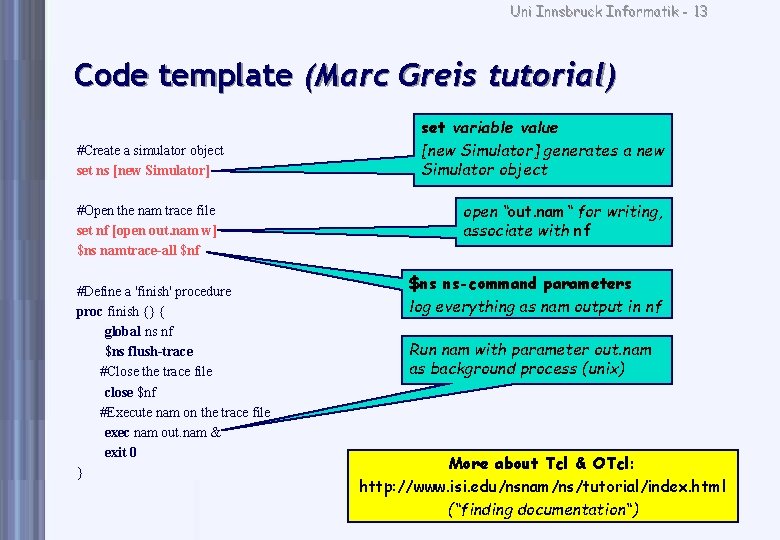
Uni Innsbruck Informatik - 13 Code template (Marc Greis tutorial) #Create a simulator object set ns [new Simulator] #Open the nam trace file set nf [open out. nam w] $ns namtrace-all $nf #Define a 'finish' procedure proc finish {} { global ns nf $ns flush-trace #Close the trace file close $nf #Execute nam on the trace file exec nam out. nam & exit 0 } set variable value [new Simulator] generates a new Simulator object open “out. nam“ for writing, associate with nf $ns ns-command parameters log everything as nam output in nf Run nam with parameter out. nam as background process (unix) More about Tcl & OTcl: http: //www. isi. edu/nsnam/ns/tutorial/index. html (“finding documentation“)
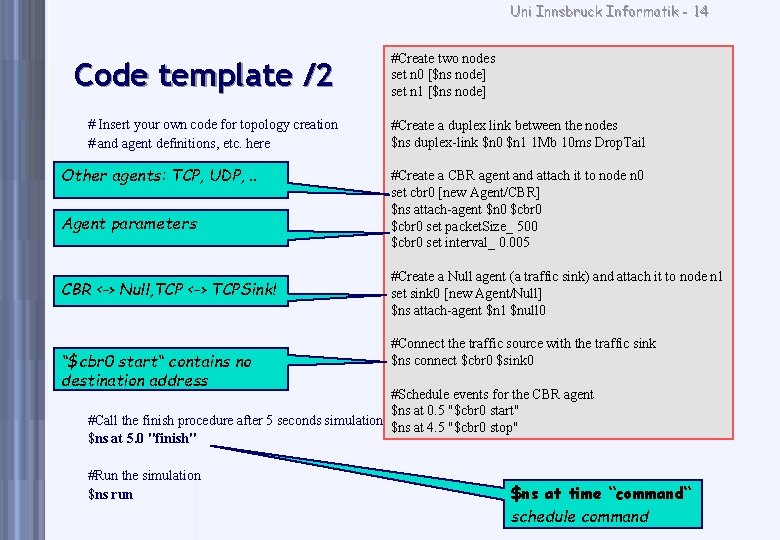
Uni Innsbruck Informatik - 14 Code template /2 # Insert your own code for topology creation # and agent definitions, etc. here Other agents: TCP, UDP, . . Agent parameters CBR <-> Null, TCP <-> TCPSink! “$cbr 0 start“ contains no destination address #Create two nodes set n 0 [$ns node] set n 1 [$ns node] #Create a duplex link between the nodes $ns duplex-link $n 0 $n 1 1 Mb 10 ms Drop. Tail #Create a CBR agent and attach it to node n 0 set cbr 0 [new Agent/CBR] $ns attach-agent $n 0 $cbr 0 set packet. Size_ 500 $cbr 0 set interval_ 0. 005 #Create a Null agent (a traffic sink) and attach it to node n 1 set sink 0 [new Agent/Null] $ns attach-agent $n 1 $null 0 #Connect the traffic source with the traffic sink $ns connect $cbr 0 $sink 0 #Schedule events for the CBR agent $ns at 0. 5 "$cbr 0 start" #Call the finish procedure after 5 seconds simulation time $ns at 4. 5 "$cbr 0 stop" $ns at 5. 0 "finish" #Run the simulation $ns run $ns at time “command“ schedule command
Uni Innsbruck Informatik - 15 nam
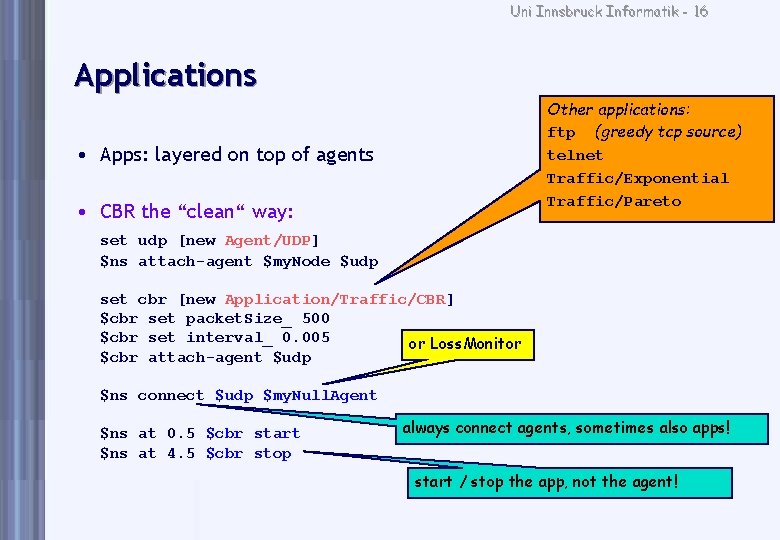
Uni Innsbruck Informatik - 16 Applications Other applications: ftp (greedy tcp source) telnet Traffic/Exponential Traffic/Pareto • Apps: layered on top of agents • CBR the “clean“ way: set udp [new Agent/UDP] $ns attach-agent $my. Node $udp set cbr [new Application/Traffic/CBR] $cbr set packet. Size_ 500 $cbr set interval_ 0. 005 or Loss. Monitor $cbr attach-agent $udp $ns connect $udp $my. Null. Agent $ns at 0. 5 $cbr start $ns at 4. 5 $cbr stop always connect agents, sometimes also apps! start / stop the app, not the agent!
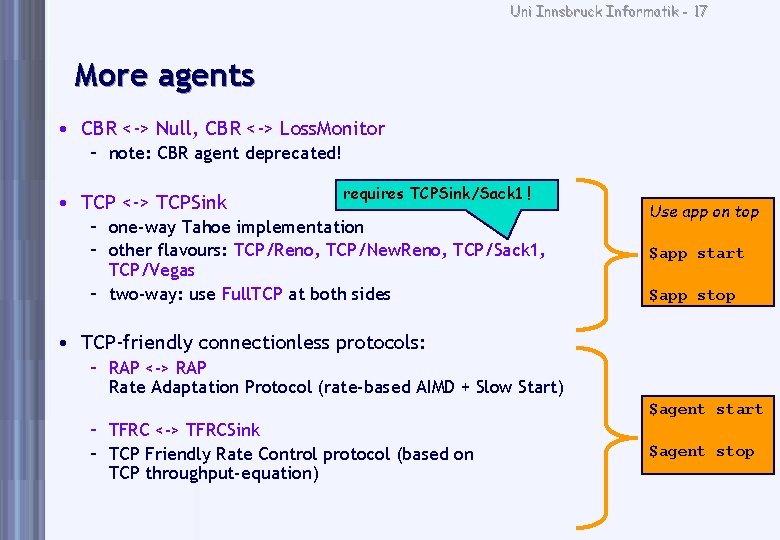
Uni Innsbruck Informatik - 17 More agents • CBR <-> Null, CBR <-> Loss. Monitor – note: CBR agent deprecated! • TCP <-> TCPSink requires TCPSink/Sack 1 ! – one-way Tahoe implementation – other flavours: TCP/Reno, TCP/New. Reno, TCP/Sack 1, TCP/Vegas – two-way: use Full. TCP at both sides Use app on top $app start $app stop • TCP-friendly connectionless protocols: – RAP <-> RAP Rate Adaptation Protocol (rate-based AIMD + Slow Start) $agent start – TFRC <-> TFRCSink – TCP Friendly Rate Control protocol (based on TCP throughput-equation) $agent stop
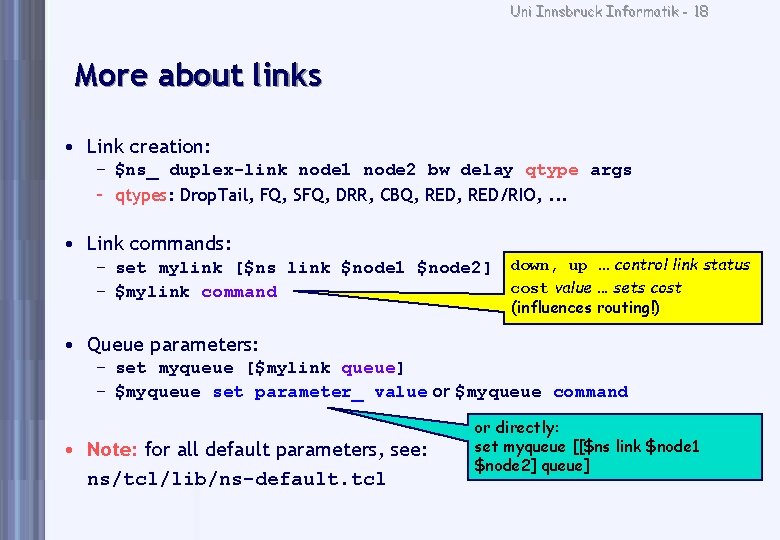
Uni Innsbruck Informatik - 18 More about links • Link creation: – $ns_ duplex-link node 1 node 2 bw delay qtype args – qtypes: Drop. Tail, FQ, SFQ, DRR, CBQ, RED/RIO, . . . • Link commands: – set mylink [$ns link $node 1 $node 2] – $mylink command down, up. . . control link status cost value. . . sets cost (influences routing!) • Queue parameters: – set myqueue [$mylink queue] – $myqueue set parameter_ value or $myqueue command • Note: for all default parameters, see: ns/tcl/lib/ns-default. tcl or directly: set myqueue [[$ns link $node 1 $node 2] queue]
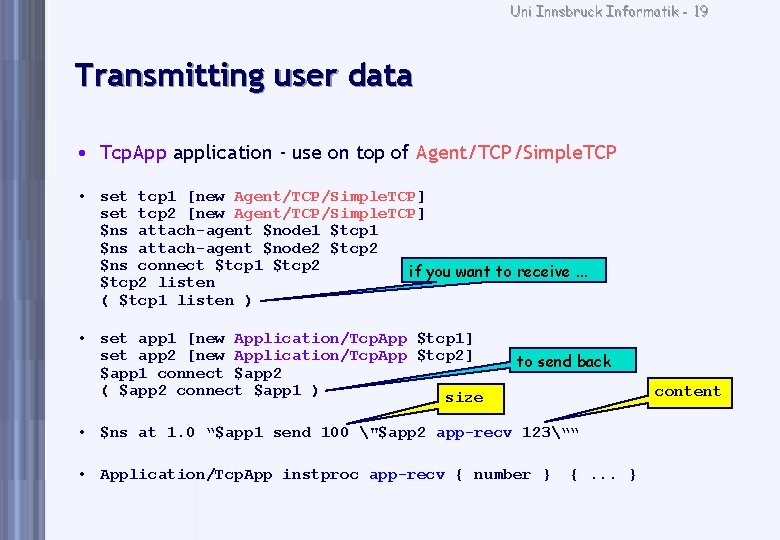
Uni Innsbruck Informatik - 19 Transmitting user data • Tcp. App application - use on top of Agent/TCP/Simple. TCP • set tcp 1 [new Agent/TCP/Simple. TCP] set tcp 2 [new Agent/TCP/Simple. TCP] $ns attach-agent $node 1 $tcp 1 $ns attach-agent $node 2 $tcp 2 $ns connect $tcp 1 $tcp 2 if you want to receive. . . $tcp 2 listen ( $tcp 1 listen ) • set app 1 [new Application/Tcp. App $tcp 1] set app 2 [new Application/Tcp. App $tcp 2] $app 1 connect $app 2 ( $app 2 connect $app 1 ) size to send back content • $ns at 1. 0 “$app 1 send 100 "$app 2 app-recv 123““ • Application/Tcp. App instproc app-recv { number } {. . . }
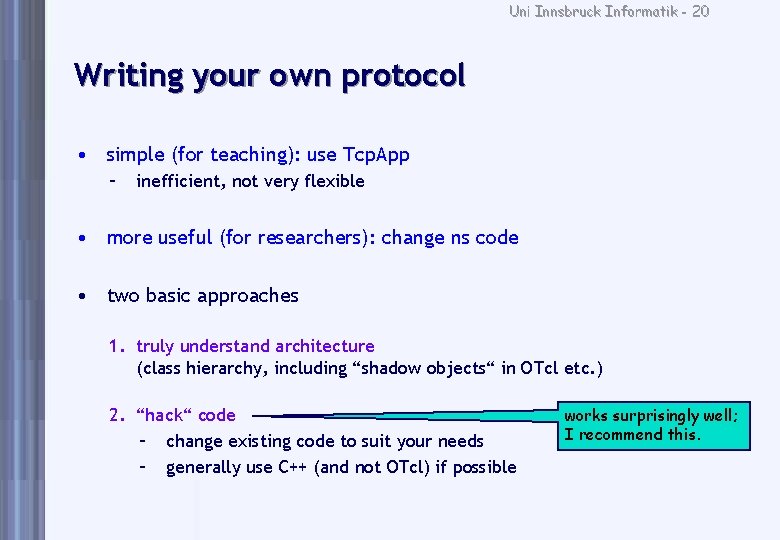
Uni Innsbruck Informatik - 20 Writing your own protocol • simple (for teaching): use Tcp. App – inefficient, not very flexible • more useful (for researchers): change ns code • two basic approaches 1. truly understand architecture (class hierarchy, including “shadow objects“ in OTcl etc. ) 2. “hack“ code – change existing code to suit your needs – generally use C++ (and not OTcl) if possible works surprisingly well; I recommend this.
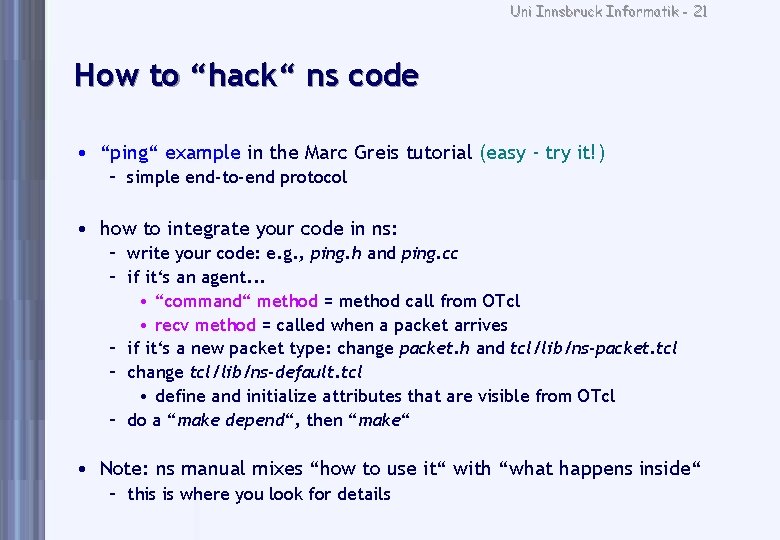
Uni Innsbruck Informatik - 21 How to “hack“ ns code • “ping“ example in the Marc Greis tutorial (easy - try it!) – simple end-to-end protocol • how to integrate your code in ns: – write your code: e. g. , ping. h and ping. cc – if it‘s an agent. . . • “command“ method = method call from OTcl • recv method = called when a packet arrives – if it‘s a new packet type: change packet. h and tcl/lib/ns-packet. tcl – change tcl/lib/ns-default. tcl • define and initialize attributes that are visible from OTcl – do a “make depend“, then “make“ • Note: ns manual mixes “how to use it“ with “what happens inside“ – this is where you look for details

Uni Innsbruck Informatik - 22 Obtaining results
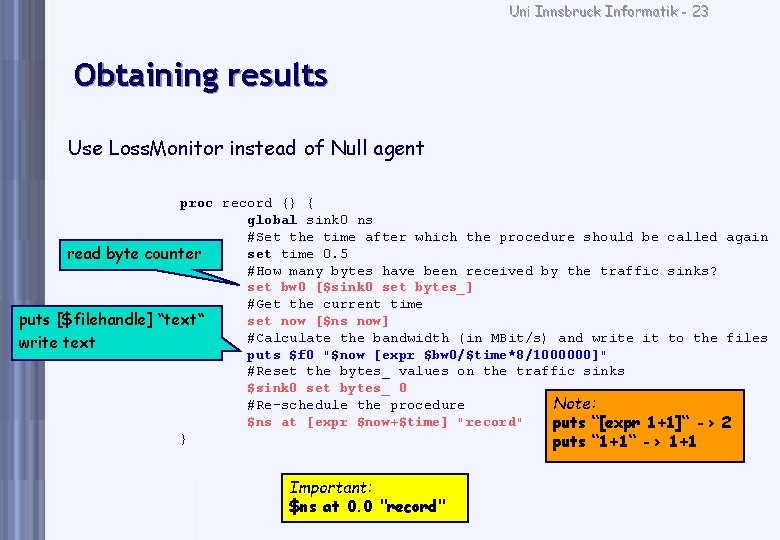
Uni Innsbruck Informatik - 23 Obtaining results Use Loss. Monitor instead of Null agent proc record {} { global sink 0 ns #Set the time after which the procedure should be called again set time 0. 5 read byte counter #How many bytes have been received by the traffic sinks? set bw 0 [$sink 0 set bytes_] #Get the current time puts [$filehandle] “text“ set now [$ns now] #Calculate the bandwidth (in MBit/s) and write it to the files write text puts $f 0 "$now [expr $bw 0/$time*8/1000000]" #Reset the bytes_ values on the traffic sinks $sink 0 set bytes_ 0 Note: #Re-schedule the procedure $ns at [expr $now+$time] "record" puts “[expr 1+1]“ -> 2 } puts “ 1+1“ -> 1+1 Important: $ns at 0. 0 "record"
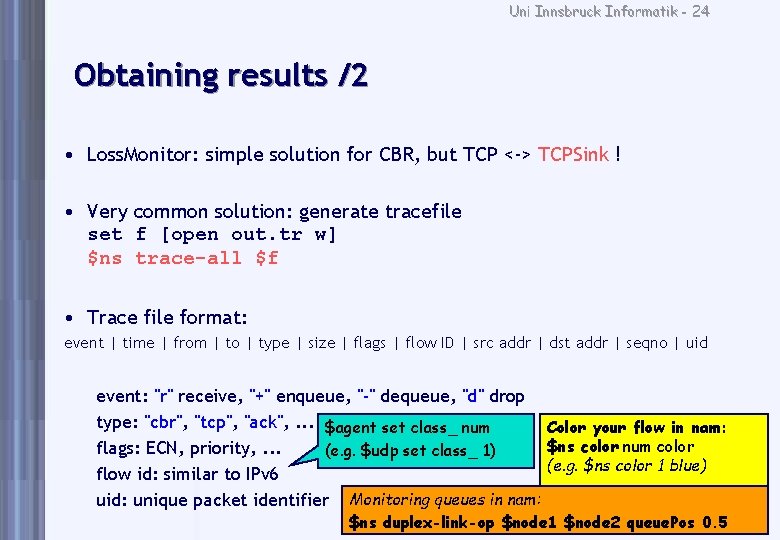
Uni Innsbruck Informatik - 24 Obtaining results /2 • Loss. Monitor: simple solution for CBR, but TCP <-> TCPSink ! • Very common solution: generate tracefile set f [open out. tr w] $ns trace-all $f • Trace file format: event | time | from | to | type | size | flags | flow ID | src addr | dst addr | seqno | uid event: "r" receive, "+" enqueue, "-" dequeue, "d" drop type: "cbr", "tcp", "ack", . . . $agent set class_ num Color your flow in nam: $ns color num color flags: ECN, priority, . . . (e. g. $udp set class_ 1) (e. g. $ns color 1 blue) flow id: similar to IPv 6 uid: unique packet identifier Monitoring queues in nam: $ns duplex-link-op $node 1 $node 2 queue. Pos 0. 5
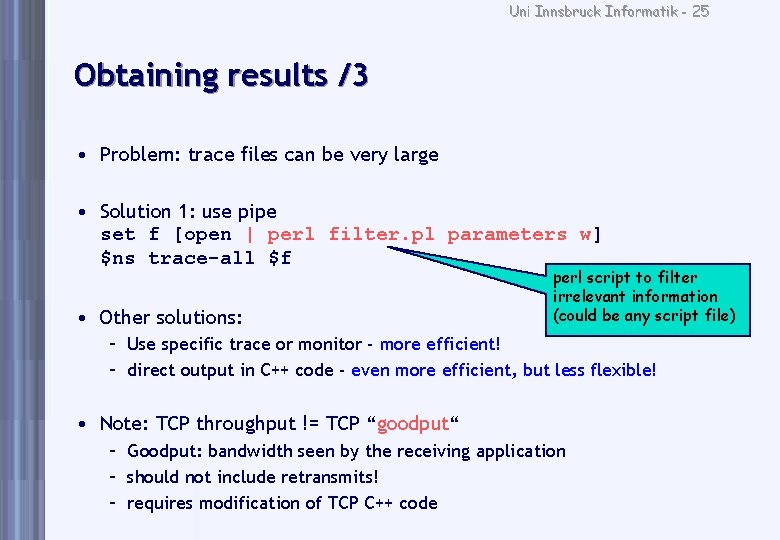
Uni Innsbruck Informatik - 25 Obtaining results /3 • Problem: trace files can be very large • Solution 1: use pipe set f [open | perl filter. pl parameters w] $ns trace-all $f • Other solutions: perl script to filter irrelevant information (could be any script file) – Use specific trace or monitor - more efficient! – direct output in C++ code - even more efficient, but less flexible! • Note: TCP throughput != TCP “goodput“ – Goodput: bandwidth seen by the receiving application – should not include retransmits! – requires modification of TCP C++ code
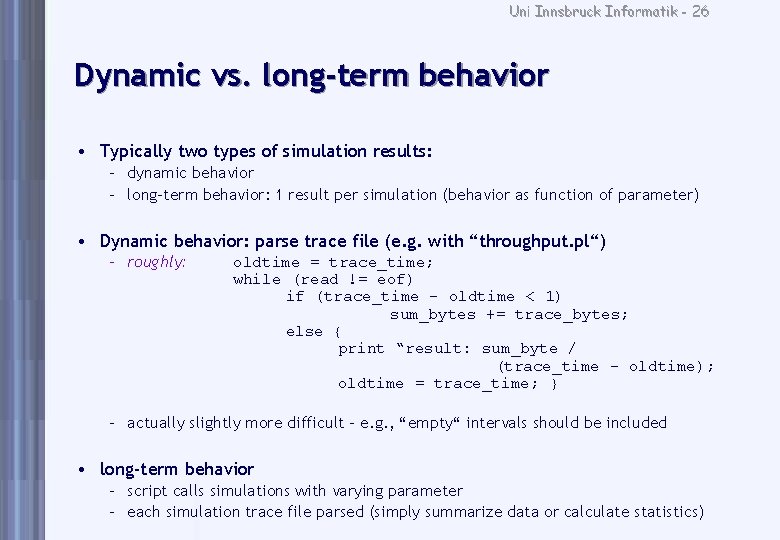
Uni Innsbruck Informatik - 26 Dynamic vs. long-term behavior • Typically two types of simulation results: – dynamic behavior – long-term behavior: 1 result per simulation (behavior as function of parameter) • Dynamic behavior: parse trace file (e. g. with “throughput. pl“) – roughly: oldtime = trace_time; while (read != eof) if (trace_time - oldtime < 1) sum_bytes += trace_bytes; else { print “result: sum_byte / (trace_time - oldtime); oldtime = trace_time; } – actually slightly more difficult - e. g. , “empty“ intervals should be included • long-term behavior – script calls simulations with varying parameter – each simulation trace file parsed (simply summarize data or calculate statistics)
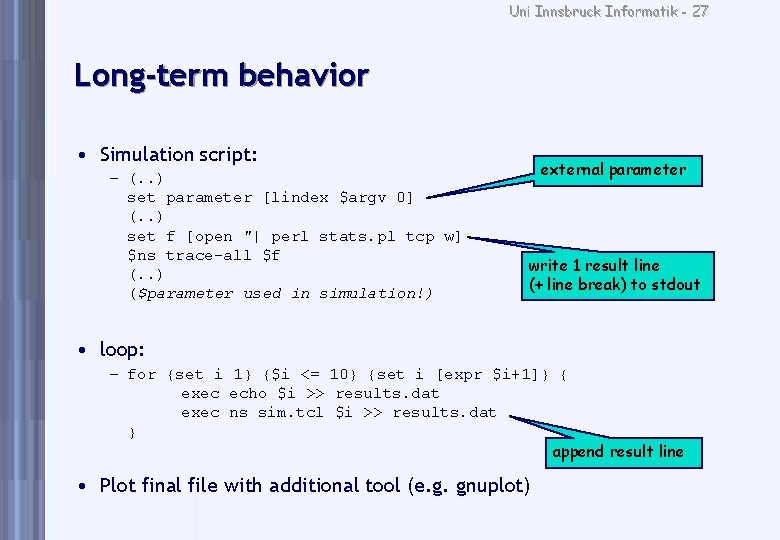
Uni Innsbruck Informatik - 27 Long-term behavior • Simulation script: – (. . ) set parameter [lindex $argv 0] (. . ) set f [open "| perl stats. pl tcp w] $ns trace-all $f (. . ) ($parameter used in simulation!) external parameter write 1 result line (+ line break) to stdout • loop: – for {set i 1} {$i <= 10} {set i [expr $i+1]} { exec echo $i >> results. dat exec ns sim. tcl $i >> results. dat } append result line • Plot final file with additional tool (e. g. gnuplot)
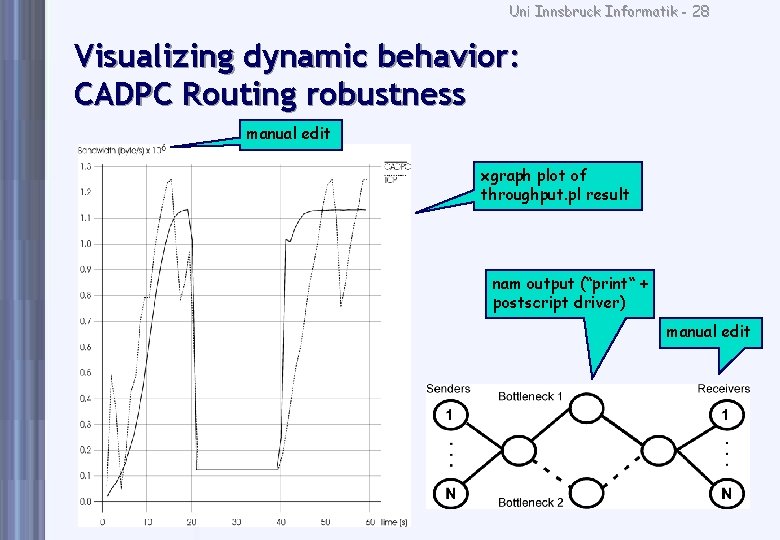
Uni Innsbruck Informatik - 28 Visualizing dynamic behavior: CADPC Routing robustness manual edit xgraph plot of throughput. pl result nam output (“print“ + postscript driver) manual edit
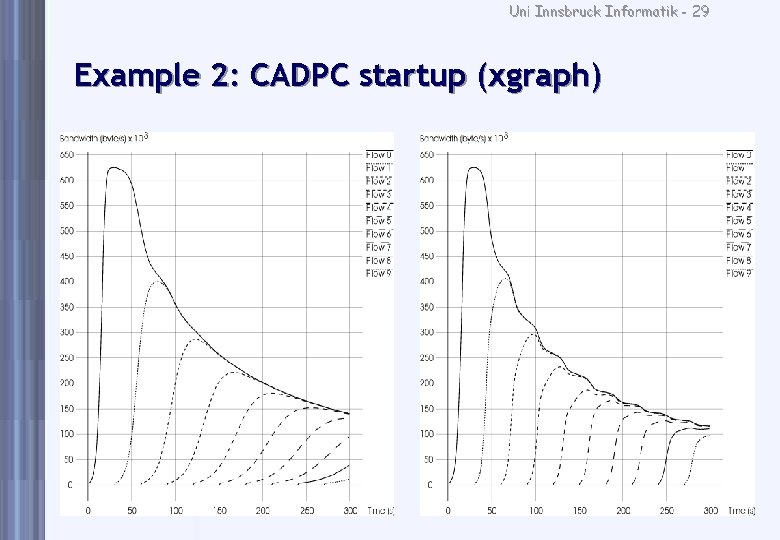
Uni Innsbruck Informatik - 29 Example 2: CADPC startup (xgraph)
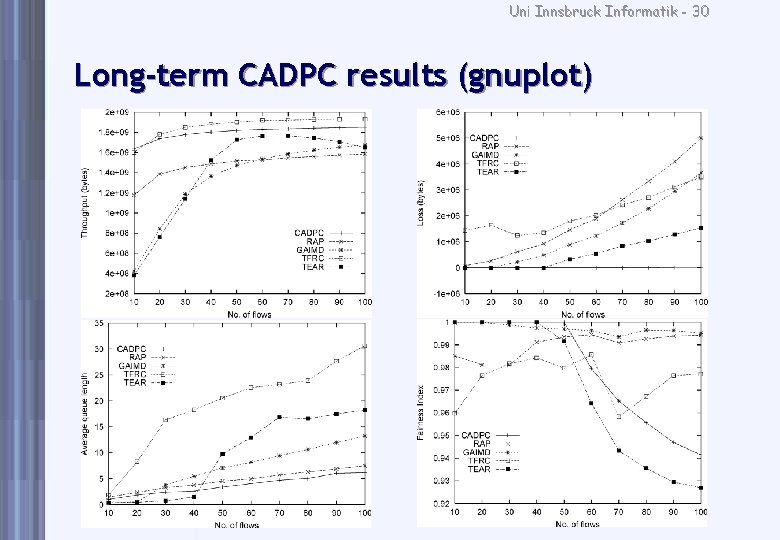
Uni Innsbruck Informatik - 30 Long-term CADPC results (gnuplot) Throughput Loss Avg. Queue Length Fairness

Uni Innsbruck Informatik - 31 Concluding remarks
Uni Innsbruck Informatik - 32 General simulation recommendations • Select parameters carefully – consider RTT: what is realistic? what is a reasonable simulation duration? – ideally, duration should depend on statistics • e. g. , until variance < threshold • not supported by ns • thus, just simulate long (realistic duration for, e. g. , ftp download) • Frequently ignored (but important) parameters: – – TCP maximum send window size (should not limit TCP behavior) TCP “flavor“ (should be a state-of-the-art variant like SACK) buffer length (should be bandwidth*delay) Active Queue Management parameters (RED = hard to tune!)
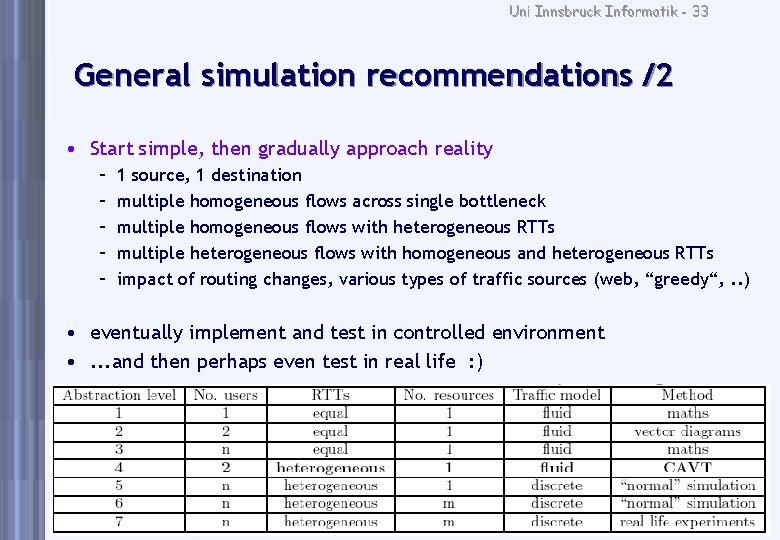
Uni Innsbruck Informatik - 33 General simulation recommendations /2 • Start simple, then gradually approach reality – – – 1 source, 1 destination multiple homogeneous flows across single bottleneck multiple homogeneous flows with heterogeneous RTTs multiple heterogeneous flows with homogeneous and heterogeneous RTTs impact of routing changes, various types of traffic sources (web, “greedy“, . . ) • eventually implement and test in controlled environment • . . . and then perhaps even test in real life : )
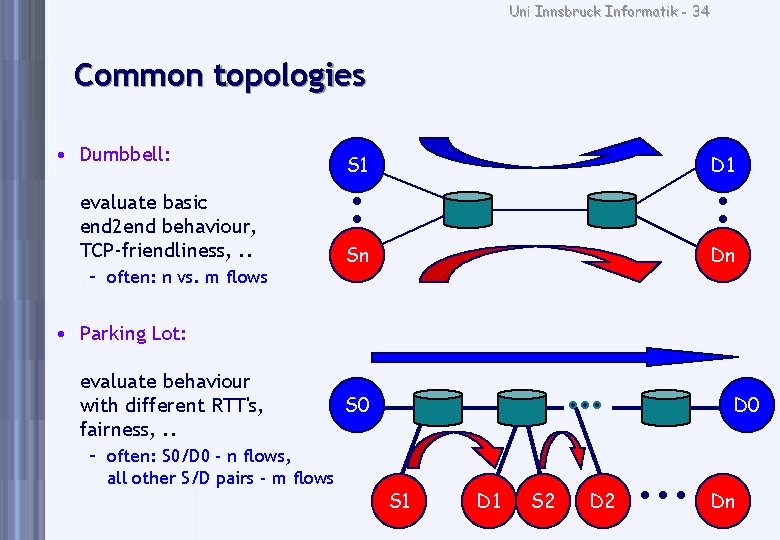
Uni Innsbruck Informatik - 34 Common topologies • Dumbbell: evaluate basic end 2 end behaviour, TCP-friendliness, . . – often: n vs. m flows S 1 D 1 Sn Dn • Parking Lot: evaluate behaviour with different RTT's, fairness, . . – often: S 0/D 0 - n flows, all other S/D pairs - m flows S 0 D 0 S 1 D 1 S 2 Dn
Uni Innsbruck Informatik - 35 Recommended papers (simulation method) • Krzysztof Pawlikowski, Hae-Duck Jeong, and Jong-Suk Ruth Lee, “On Credibility of Simulation Studies of Telecommunication Networks“, IEEE Communications Magazine, January 2002, pp. 132 -139. • Mark Allman, Aaron Falk, “On the Effective Evaluation of TCP“, ACM Computer Communication Review, 29(5), October 1999. http: //www. icir. org/mallman/papers/tcp-evaluation. pdf • Sally Floyd and Vern Paxson, “Difficulties in Simulating the Internet“, IEEE/ACM Transactions on Networking, Vol. 9, No. 4, pp. 392 -403. • Sally Floyd and Eddie Kohler, “Internet Research Needs Better Models“, ACM Hotnets-I, October 2002. • and this website: http: //www. icir. org/models/bettermodels. html
Uni Innsbruck Informatik - 36 Key links • Official website: http: //www. isi. edu/nsnam/ns – docs: “ns manual“, “Marc Greis‘ tutorial“, “ns by example“ • note: HTML version of “ns manual“ not always up-to-date – large number of “Contributed Modules“ • Personal ns website: http: //www. welzl. at/tools/ns – – “throughput“ and “stats“ scripts working versions of ns and nam Windows binaries German ns documentation (student work) these slides • LLoyd Wood‘s site: http: //www. ee. surrey. ac. uk/Personal/L. Wood/ns/ – additional links

Uni Innsbruck Informatik - 37 Good luck!
- Slides: 37