
Understanding your Pay Stub To Agency Employees March

Understanding your Pay Stub To Agency Employees March 2018 Page
This session will provide information on ØAccessing your pay stub online ØInterpreting your Phoenix pay stub ØComparing your CWA (Compensation Web Applications) pay stub with your Phoenix pay stub ØPay codes, acronyms and abbreviations ØPay stubs with a $0 value ØReporting errors in your pay ØDid you know… ØAnnex Page 2
ACCESSING YOUR PAY STUB ON-LINE Your pay stub can be accessed in one of 2 ways: Compensation Web Application (CWA) Ø View your pay stub archive (current year + previous year) Ø View pay cycle start and end dates Ø Conveniently print pay stubs Ø Access tax slips prior to Phoenix implementation Ø View earning details for overtime Ø View a breakdown of retroactive payments and periods of leave without pay • • On the Compensation Web applications page Select CWA pay stubs and archived tax slips Open a session in CWA Choose from the Pay stubs and/or archived tax slips list Page 3
ACCESSING YOUR PAY STUB ONLINE (CONTINUED) Phoenix Pay System Ø View the latest pay stub 2 days before the pay date (on Monday of pay week) Ø Access pay stub archives since early 2016 Ø Access Phoenix tax slips Ø View mass retroactive payments • • Select Main Menu>Self Service>Payroll and Compensation>View Paycheck Select Cheque Date for the date which you want to view your paycheque Remember that: § The language of your pay stub is driven by your language choice identified during § § the hire process If you were approved remote access to work from home, you will be able to access your pay stub at home (secure access to the internal network is required) Both online systems are password protected and require a my. KEY to log in Page 4
INTERPRETING YOUR PHOENIX PAY STUB OVERVIEW Ø The pay stubs do not indicate your annual salary - know your annual salary and regularly refer to your collective agreement • • hourly rate of pay: divide by 1956. 6 daily rate of pay: divide by 260. 88 weekly rate of pay: divide by 52. 176 rate of pay period: divide by 26. 088 Ø 50% of the monthly deductions is taken from each pay in months where there are 2 pays Ø When there are 3 pays in a month, deductions are taken from the 2 nd and 3 rd pays only, therefore the net pay for the 2 nd and 3 rd pays are equal while the 1 st pay is higher (the 1 st pay will still have the statutory deductions such as income tax, EI, CPP/QPP, Public Service Pension Plan) Ø Straightforward approach as the net pay continues to be the same each pay Page 5
INTERPRETING YOUR PHOENIX PAY STUB (CONTINUED) Ø Your gross pay is the combination of your regular hours of work, one-time payments owed to you (such as vacation cash-out), retroactive pay (such as salary revisions, promotions, acting pay) and overtime processed in the same period. It will be part of the same direct deposit for payday • Ex: overtime worked between February 8 th to 21 st, 2018 submitted and approved in Phoenix by February 26 th would be paid on March 7 th, 2018 with your regular pay (refer to Employee and Manager Time Entry Pay Calendar-2018) Ø To find details in Phoenix associated with the overtime payments on your pay stub: Ø Select Main menu>Self Service>Time Reporting>View Time>Payable Time Detail Ø The overtime payment has been issued if the status listed on your time sheet indicates either “Taken by Payroll” or “Distributed” Page 6
INTERPRETING YOUR PHOENIX PAY STUB (CONTINUED) DEDUCTIONS Ø Priority of deductions 1. 2. 3. 4. 5. 6. Canada Pension Plan (CPP)/Québec Pension Plan (QPP), Employment Insurance (EI) and Québec Parental Insurance Plan (QPIP) Canadian Income Tax (Federal/Provincial Income tax) Quebec Income Tax Superannuation/Death Benefit Overpayments Other (rent, advances, parking, other debts, etc. ) Page 7
INTERPRETING YOUR PHOENIX PAY STUB (CONTINUED) Ø CPP/QPP • Maximum pensionable earnings for 2018 is $55, 900 • CPP 2018 contribution rate is 4. 95% / max contributions of $2, 593. 80 • QPP 2018 contribution rate is 5. 4% / max contributions of $2, 829. 60 Ø EI • Maximum insurable earnings for 2018 is $51, 700 • 2018 contribution rate is 1. 66% / max contributions of $858. 22 • 2018 contribution rate (QC only) is 1. 3% / max contributions of $672. 10 Ø QPIP • • Maximum insurable earnings for 2018 is $74, 000 2018 contribution rate (QC only) is 0. 548% / max of $405. 52 Page 8
INTERPRETING YOUR PHOENIX PAY STUB (CONTINUED) Ø Superannuation (Public Service Pension Plan) Ø 2 sets of contribution rates • • 1. PSSA Low: contribute at lower rate on your salary up to the maximum annual earnings on which you make contributions to CPP or QPP • • 2. rate 1 - 9. 83% rate 2 - 8. 77% PSSA High: contribute at a higher rate on your salary above that maximum – when you attain your CPP/QPP max contributions • • 3. rate 1 - contributor 31/12/12 or prior rate 2 - contributor 01/01/13 or after rate 1 - 12. 13% rate 2 - 10. 46% RCA: in 2017 would contribute if earning salary > $163, 100 Page 9
INTERPRETING YOUR PHOENIX PAY STUB (CONTINUED) Ø Supplementary death benefit (SDB) • Lump sum benefit equal to 2 X your annual salary – if amount not a multiple of $1, 000 adjusted to next multiple of $1, 000 • Monthly cost: $0. 15 for every $1, 000 of coverage • If annual salary of $52, 450 • SDB = $105, 000 • Premium of $15. 75 per month ($0. 15 X 105) • Disability insurance (DI) Ø Provides a 70% income replacement when you are unable to work for long periods due to a totally disabling illness or injury Ø Cost shared between the plan member and the Government of Canada (employer pays 85% and employee 15%) Ø Monthly cost: $0. 29 for every $1, 000 of insured salary (eff. February 1, 2013) Page 10
INTERPRETING YOUR PHOENIX PAY STUB (CONTINUED) • Public Service Health Care Plan (PSHCP) Ø Optional health care plan (except for Québec residents) for employees and their dependants designed to supplement provincial/territorial health insurance plans Ø 3 levels of coverage: • Same coverage under extended health provision for all levels • 3 levels of coverage each providing a different maximum towards a semi-private or private hospital accommodation (level I - $60/day, level II - $140/day, level III $220/day) Ø Monthly cost: • level I – no cost • level II - $1. 10 (employee only) or $3. 53 (family) • level III - $5. 31 (employee only) or $10. 34 (family) Page 11
INTERPRETING YOUR PHOENIX PAY STUB (CONTINUED) • Public Service Dental Care Plan (PSDCP) Ø Dental services plan for employees and their eligible dependants for specific dental services and supplies not covered under a provincial/territorial health or dental care plan Ø The Government as the employer pays the full cost Page 12
COMPARING YOUR CWA PAY STUB WITH YOUR PHOENIX PAY STUB • Because the pay stub information displayed in “View Phoenix Pay Cheque” • • • in CWA is generated from the Phoenix Pay System, it is possible for you to compare the information displayed in “View Phoenix Pay Cheque” in CWA to the Phoenix ESS pay stub Some terminology used in Phoenix may differ from that found in CWA however the fields provide the same information Even though the descriptions displayed in Phoenix differ from that in CWA, the total “Gross”, “Deduction” and “Net” amounts will be the same on both pay stubs Both stubs have their advantages: Ø CWA provides more detail on the periods being paid and the number of hours Ø PHOENIX provides you with information about your employer paid benefits Page 13
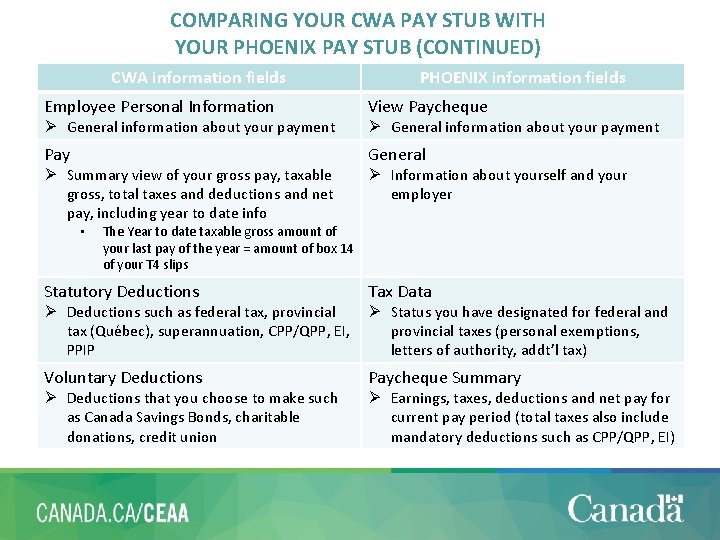
COMPARING YOUR CWA PAY STUB WITH YOUR PHOENIX PAY STUB (CONTINUED) CWA information fields PHOENIX information fields Employee Personal Information View Paycheque Pay General Ø General information about your payment Ø Summary view of your gross pay, taxable gross, total taxes and deductions and net pay, including year to date info • Ø General information about your payment Ø Information about yourself and your employer The Year to date taxable gross amount of your last pay of the year = amount of box 14 of your T 4 slips Statutory Deductions Tax Data Voluntary Deductions Paycheque Summary Ø Deductions such as federal tax, provincial tax (Québec), superannuation, CPP/QPP, EI, PPIP Ø Deductions that you choose to make such as Canada Savings Bonds, charitable donations, credit union Ø Status you have designated for federal and provincial taxes (personal exemptions, letters of authority, addt’l tax) Ø Earnings, taxes, deductions and net pay for current pay period (total taxes also include mandatory deductions such as CPP/QPP, EI) Page 14
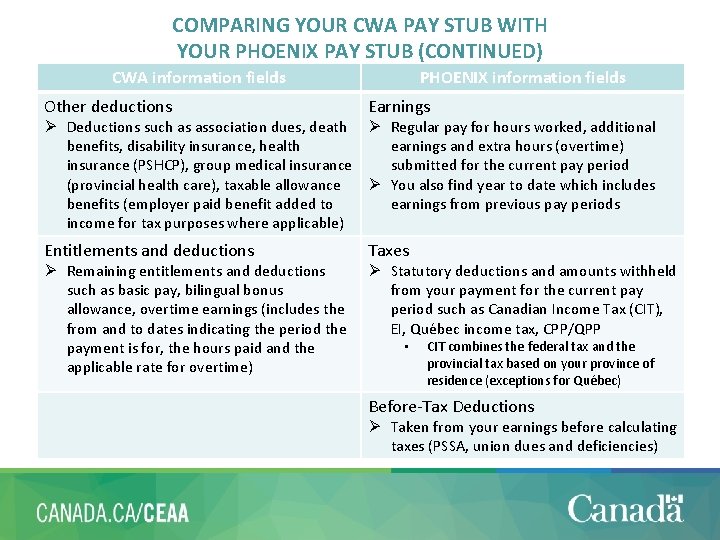
COMPARING YOUR CWA PAY STUB WITH YOUR PHOENIX PAY STUB (CONTINUED) CWA information fields PHOENIX information fields Other deductions Earnings Entitlements and deductions Taxes Ø Deductions such as association dues, death Ø Regular pay for hours worked, additional benefits, disability insurance, health earnings and extra hours (overtime) insurance (PSHCP), group medical insurance submitted for the current pay period (provincial health care), taxable allowance Ø You also find year to date which includes benefits (employer paid benefit added to earnings from previous pay periods income for tax purposes where applicable) Ø Remaining entitlements and deductions such as basic pay, bilingual bonus allowance, overtime earnings (includes the from and to dates indicating the period the payment is for, the hours paid and the applicable rate for overtime) Ø Statutory deductions and amounts withheld from your payment for the current pay period such as Canadian Income Tax (CIT), EI, Québec income tax, CPP/QPP • CIT combines the federal tax and the provincial tax based on your province of residence (exceptions for Québec) Before-Tax Deductions Ø Taken from your earnings before calculating taxes (PSSA, union dues and deficiencies) Page 15
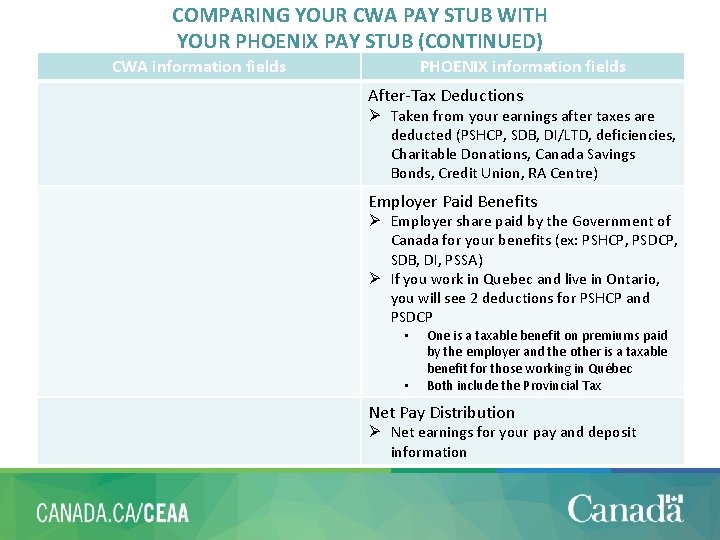
COMPARING YOUR CWA PAY STUB WITH YOUR PHOENIX PAY STUB (CONTINUED) CWA information fields PHOENIX information fields After-Tax Deductions Ø Taken from your earnings after taxes are deducted (PSHCP, SDB, DI/LTD, deficiencies, Charitable Donations, Canada Savings Bonds, Credit Union, RA Centre) Employer Paid Benefits Ø Employer share paid by the Government of Canada for your benefits (ex: PSHCP, PSDCP, SDB, DI, PSSA) Ø If you work in Quebec and live in Ontario, you will see 2 deductions for PSHCP and PSDCP • • One is a taxable benefit on premiums paid by the employer and the other is a taxable benefit for those working in Québec Both include the Provincial Tax Net Pay Distribution Ø Net earnings for your pay and deposit information Page 16
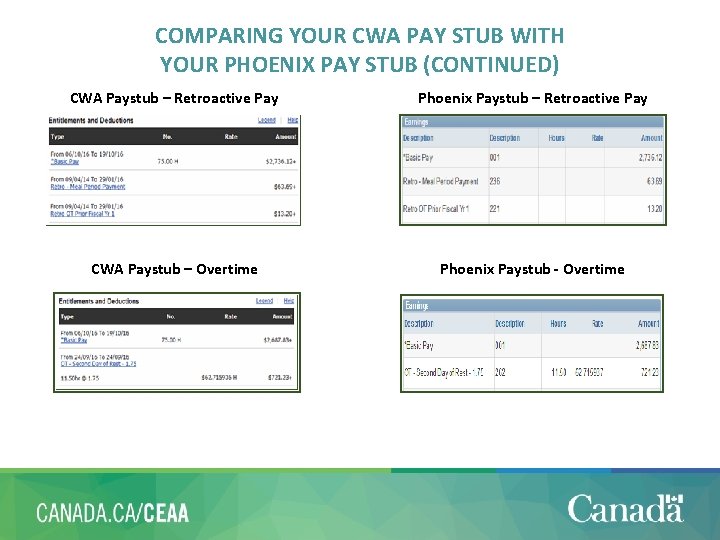
COMPARING YOUR CWA PAY STUB WITH YOUR PHOENIX PAY STUB (CONTINUED) CWA Paystub – Retroactive Pay Phoenix Paystub – Retroactive Pay CWA Paystub – Overtime Phoenix Paystub - Overtime Page 17
PAY CODES, ACRONYMS AND ABBREVIATIONS • To help you better understand the various deductions and entitlements • found on your pay stub, it is important to familiarize yourself with acronyms and/or abbreviations used in the pay system Earning and deduction codes are required for processing in the Phoenix Pay System however they do not all apply to your personal situation (some are specific to certain classifications and/or departments) Ø List of earnings and deductions abbreviations and acronyms Ø Details of earning codes for Phoenix Ø Details of deduction codes for Phoenix Page 18
PAY STUBS WITH A $0 VALUE • There are 3 situations where you may receive a $0 pay stub 1. You were overpaid, for a period in the past, in an amount that exceeds your usual pay (twice your pay or more) 2. You did not report any time worked in a given pay period • Applies to employees who usually complete a time sheet or submit their time in Phoenix (as and when required status, rehabilitation cases) 3. An acting assignment is entered in the HR system or the pay system after the fact (this is called a late acting) Page 19
PAY STUBS WITH A $0 VALUE • Past acting assignments – An enhancement to the late (past) actings process was made in Phoenix: Ø This enhancement includes calculation and issuance of the salary difference between what was paid and should have been paid during the acting period (this process also includes the calculation and issuance of additional payments) Ø Several exceptions are not included in the late actings automated process and require manual intervention by a Compensation Advisor • • An employee’s acting assignment is paid in hourly wages rather than salary The acting assignment does not have a termination date The effective date of the acting assignment occurs before the employee’s original Phoenix conversion date Both the original acting effective date AND termination date have changed Page 20
PAY STUBS WITH A $0 VALUE (CONTINUED) Ø Late (past) actings • Acting assignments that have been entered in the Phoenix Pay System with an effective date in the past • During that period, you would have been paid at your substantive level • Phoenix has a program that automates the process of adjusting the payment for the late (past) acting - it runs every 2 weeks and takes 2 pay cycles to complete • Prior to processing the late acting pay, the Phoenix Pay System needs to recover the basic pay already received for the acting period (1 st pay period) o This recovery is recorded as an administrative overpayment in Phoenix which results in a $0 pay stub o If there were multiple late (past) actings processed, all of the overpayments will be reflected in a single $0 pay stub o The CWA pay stub will however report a negative amount which represents the money owed for the recovery of the basic pay covering the late (past) acting period o You should receive 2 pay stubs Ø Regular pay stub - in the case of an ongoing acting, it should reflect your acting salary Ø $0 overpayment stub for the retroactive acting period Page 21
PAY STUBS WITH A $0 VALUE (CONTINUED) • Once the recovery is complete, Phoenix can process the late (past) acting payment and remove the overpayment recorded (2 nd pay period) o You should receive 2 pay stubs Ø Regular pay stub - in the case of an ongoing acting, it should reflect your acting salary Ø A pay stub covering the difference between the acting pay and basic pay for the retroactive period (acting salary owed less the overpayment) o At this stage of the process, you may also receive one or more $0 pay stubs if multiple late (past) actings have been processed. These pay stubs simply reflect the recovery of the overpayment. *You should review all pay stubs and verify the amounts owed Page 22
REPORTING ERRORS IN YOUR PAY ü Take time to review your pay stubs on a regular basis ü Be proactive – remember, you have access to your Phoenix pay stub 2 days before pay day (Monday of pay week) ü Flag any pay issues to the Agency generic compensation mailbox ØThe capacity of the Agency team to help you depends extensively on your capacity to flag with the team any of your pay issues as soon as you find out ØProvide as much detail as you can about your inquiry ØThe team will acknowledge receipt within 24 to 48 hours and will followup with a response as soon as possible thereafter v The longer you wait, the more problematic your compensation situation might become Page 23
DID YOU KNOW… • Some information you can change via Phoenix Self Serve which will reflect on your • pay stub Changes may take a few pay cycles to update depending on when they were made Ø Change direct deposit banking information • Main Menu>Self Service>Payroll and Compensation>Direct Deposit • Select the “Edit” button • On the Change Direct Deposit page, make your changes and select the “Submit” button • On the Submit Confirmation page, select the “OK” button to submit your amended direct deposit information • Do not close your old account until your pay is deposited in the new account Ø Start, stop and amend coverage for Public Service Health Care Plan • Main Menu>Self Service>Benefits>Self Service for PSHCP • A “You must apply for Coverage” message on the PSHCP Summary page means you have not applied and must do so in order to begin coverage. If you already have coverage, you can select the “Update” button to either amend or stop the coverage. Ø Start, stop and amend voluntary deductions • Main Menu>Self Service>Payroll and Compensation>Voluntary Deductions Page 24
Annex • Frequently Asked Questions – Employee Pay Stubs • Phoenix for employees (tools) Page 25 25
- Slides: 25