
Understanding Your OPAC Validation Report Includes an overview




- Slides: 42
Understanding Your OPAC Validation Report Includes an overview of how OPAC uses your own job experts to set effective and fair cutoff scores Click on the screen or press the right arrow key ( ) to view the next slide. Press the left arrow key ( ) to go back to the previous slide. 1 Copyright © 2007 Biddle Consulting Group, Inc.
This presentation is provided to OPAC System users as part of their OPAC Plus Service Plan Membership Please send comments or suggestions to info@opac. com OPAC® and Office Proficiency Assessment & Certification® are registered trademarks of Biddle Consulting Group, Inc. 800 -999 -0438 2
Welcome! • This presentation provides an overview of the OPAC Validation Report and how cutoff scores for OPAC tests are determined. We hope that you find this presentation helpful. • OPAC Validation Reports are produced by the OPAC System once an employer’s subject matter experts (also referred to as “job experts” in this presentation) have taken one or more tests in an Auto. Test Code while the Validation Wizard feature is turned “on. ” • Validation Reports are printed from the “Validation Report” link from the “Reporting” section of the OPAC Administrator’s program (see next slide). – Additional information about the Validation Wizard process may be found in the OPAC Administrator’s Manual. 3
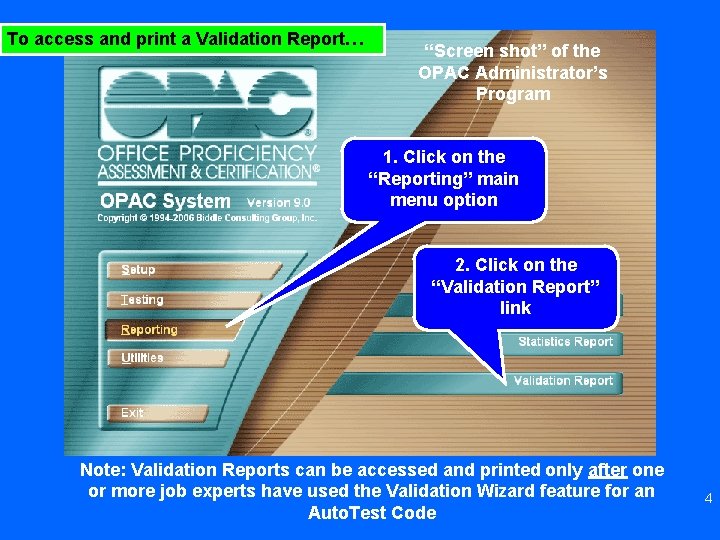
To access and print a Validation Report… “Screen shot” of the OPAC Administrator’s Program 1. Click on the “Reporting” main menu option 2. Click on the “Validation Report” link Note: Validation Reports can be accessed and printed only after one or more job experts have used the Validation Wizard feature for an Auto. Test Code 4
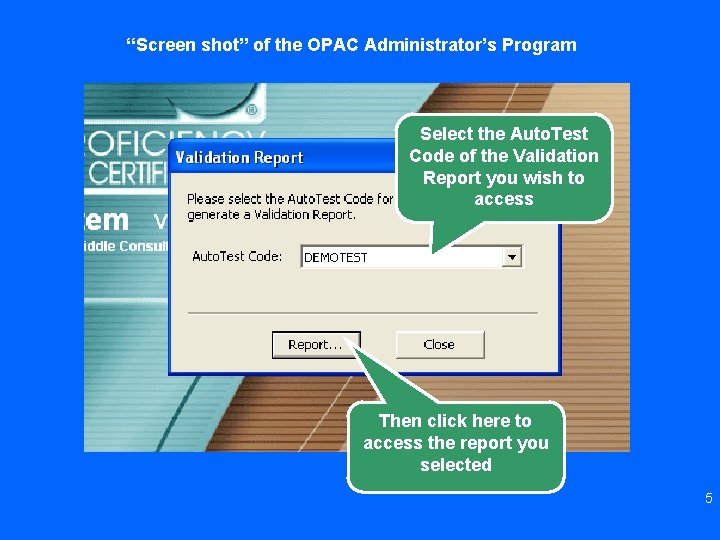
“Screen shot” of the OPAC Administrator’s Program Select the Auto. Test Code of the Validation Report you wish to access Then click here to access the report you selected 5
“Screen shot” of the OPAC Administrator’s Program This white area contains some of the information that will be found in the Summary portion of the Validation Report once it is printed Before printing a Validation Report from the Administrator’s Program, select both the Detail and Click Summary here to print the report options Validation Report 6
The Validation Report would then be printed by the OPAC System and ready for review 7
The following are a few notes that may help you during this presentation… • The term “Auto. Test Code” refers to a series of tests that a test administrator groups together for a single job prior to the Validation Wizard being used. • The term “SME” refers to the job experts who have responded to the Validation Wizard’s survey questions. – SMEs (or job experts) are current successful target job performers, and/or supervisors who have held the target job, and/or instructors or trainers for the targeted job classification. • The term “SEM” refers to the “standard error of measurement, ” a statistical term which will be explained in detail later in this presentation. 8
There are two sections to the Validation Report • Detailed section • Summary section – This presentation will focus on each section separately, starting with the detailed section 9
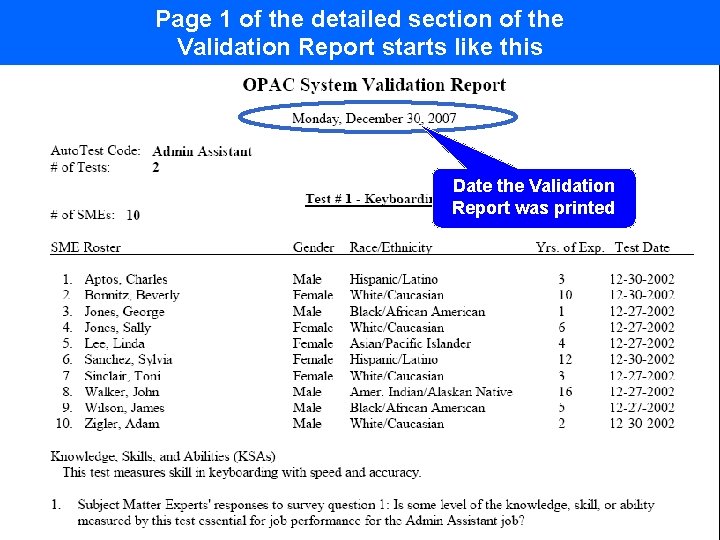
Page 1 of the detailed section of the Validation Report starts like this Date the Validation Report was printed 10
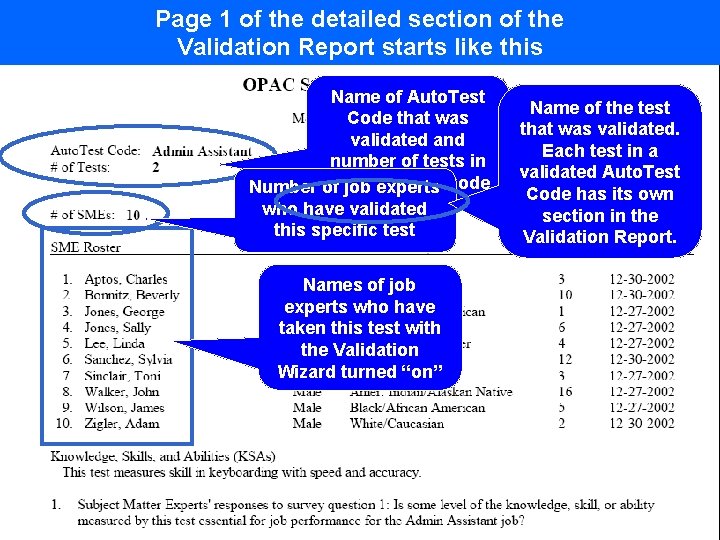
Page 1 of the detailed section of the Validation Report starts like this Name of Auto. Test Code that was validated and number of tests in this Number of job. Auto. Test experts Code who have validated this specific test Name of the test that was validated. Each test in a validated Auto. Test Code has its own section in the Validation Report. Names of job experts who have taken this test with the Validation Wizard turned “on” 11
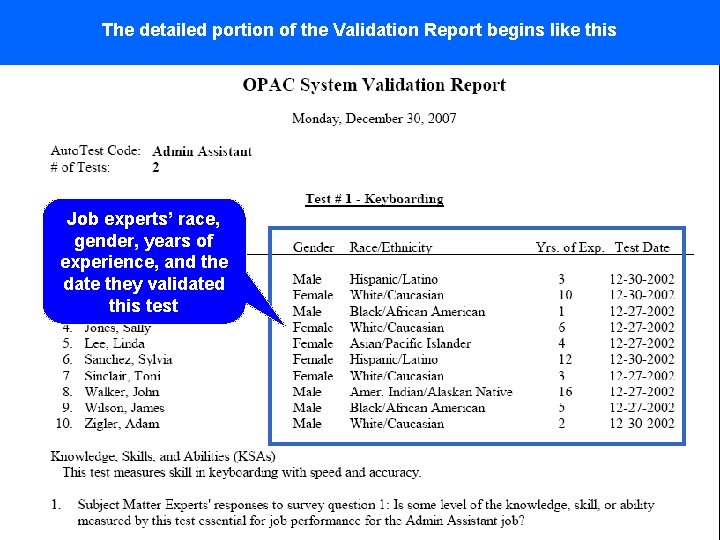
The detailed portion of the Validation Report begins like this Job experts’ race, gender, years of experience, and the date they validated this test 12
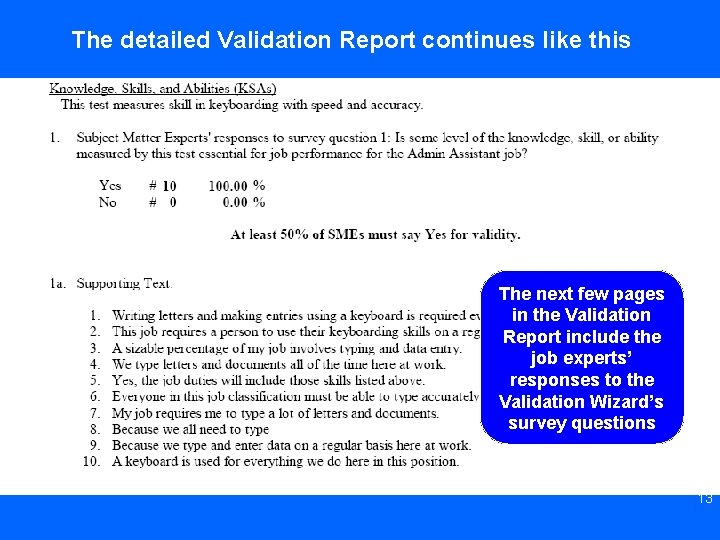
The detailed Validation Report continues like this The next few pages in the Validation Report include the job experts’ responses to the Validation Wizard’s survey questions 13
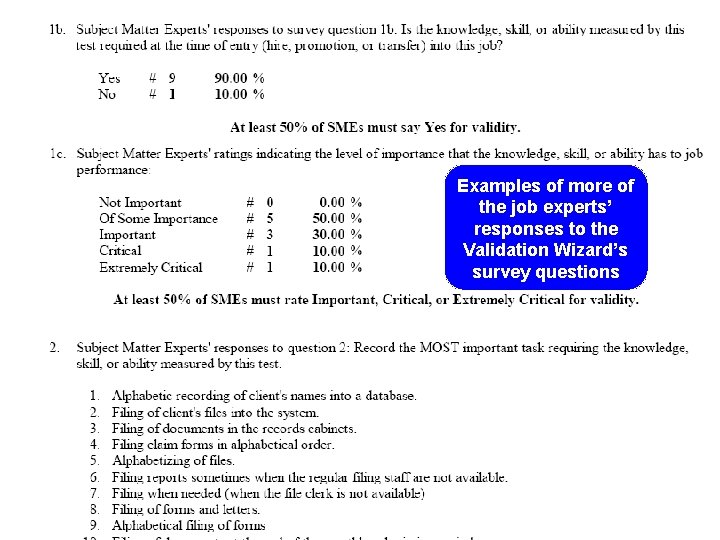
Examples of more of the job experts’ responses to the Validation Wizard’s survey questions 14
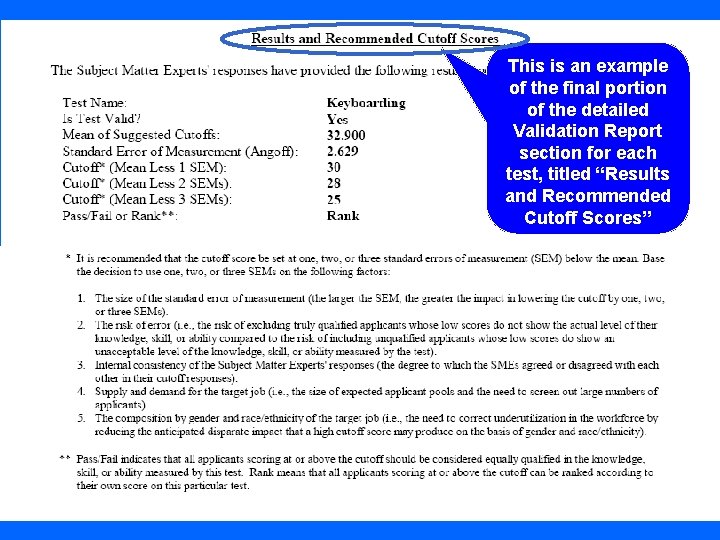
This is an example of the final portion of the detailed Validation Report section for each test, titled “Results and Recommended Cutoff Scores” 15
OPAC provides users with four possible cutoff scores to determine who “passes” or “fails” the test 16
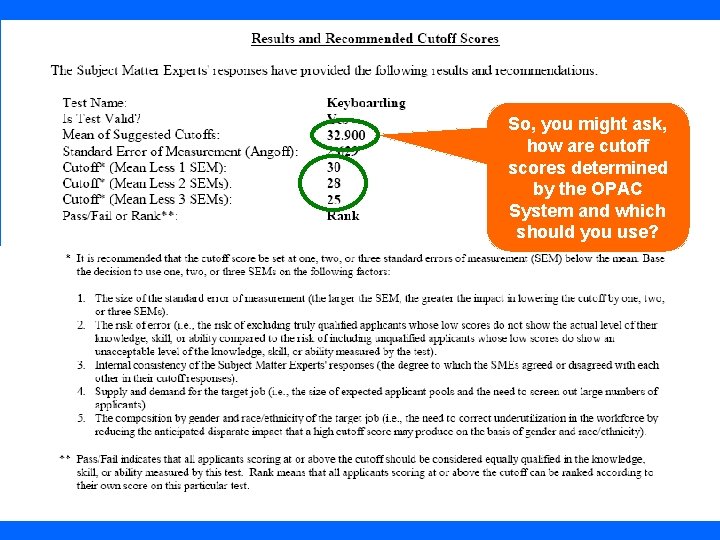
So, you might ask, how are cutoff scores determined by the OPAC System and which should you use? 17
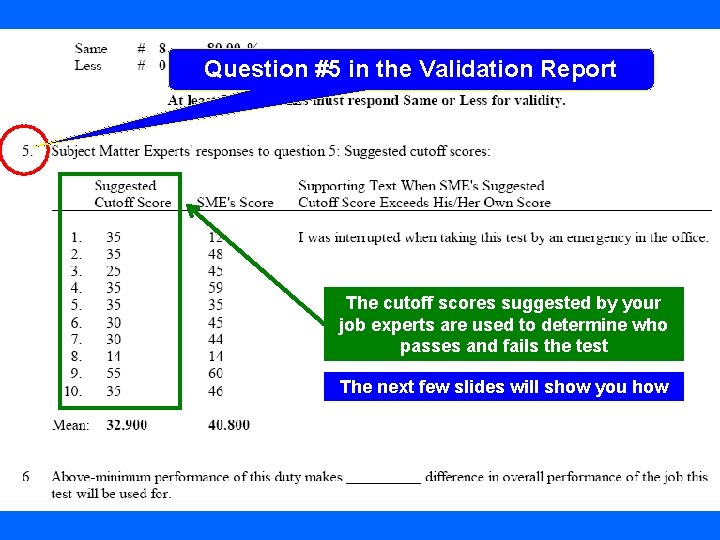
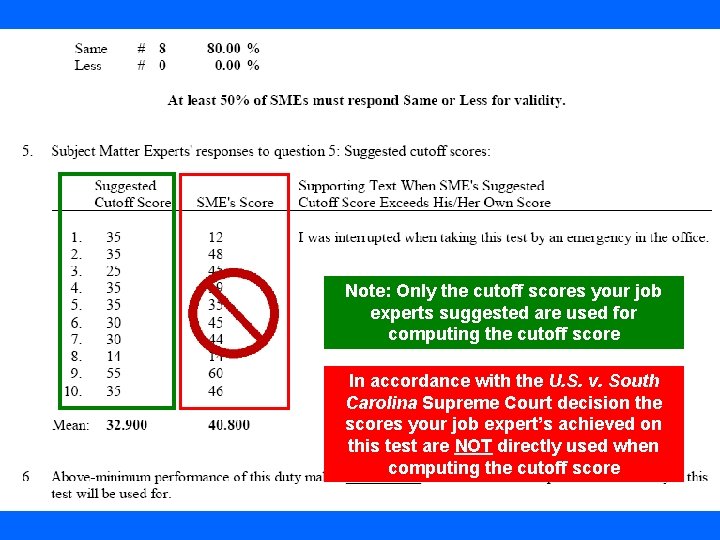
First we will examine how cutoff scores are determined by the OPAC system • Cutoff scores are determined by the OPAC system based on feedback from your own job experts who have used the Validation Wizard feature. • We would look to Question #5 in the Validation Report for each of the tests that have been validated using the Validation Wizard feature to understand how this is done. 18
Question #5 in the Validation Report The cutoff scores suggested by your job experts are used to determine who passes and fails the test The next few slides will show you how 19
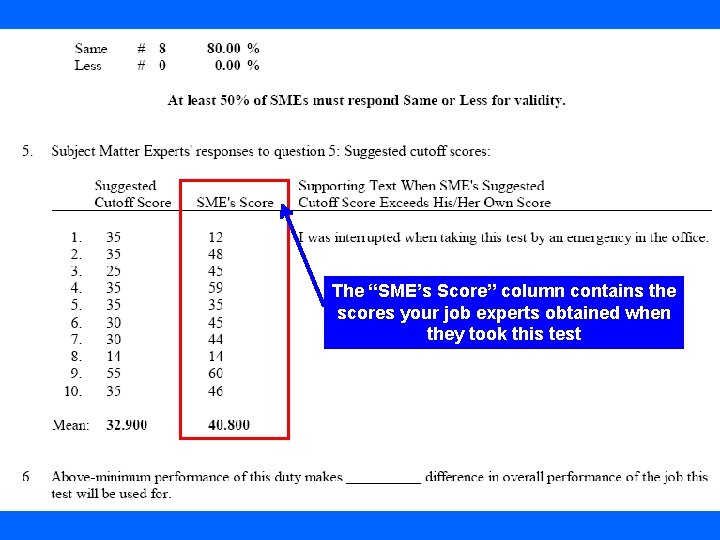
The “SME’s Score” column contains the scores your job experts obtained when they took this test 20
Note: Only the cutoff scores your job experts suggested are used for computing the cutoff score In accordance with the U. S. v. South Carolina Supreme Court decision the scores your job expert’s achieved on this test are NOT directly used when computing the cutoff score 21
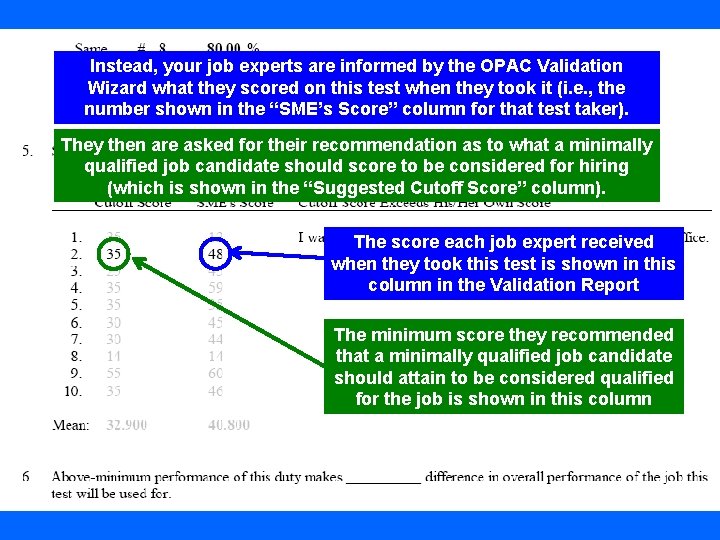
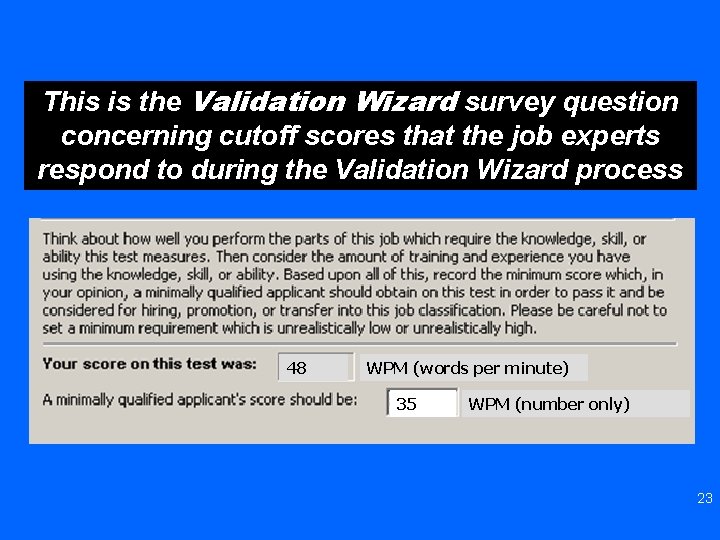
Instead, your job experts are informed by the OPAC Validation Wizard what they scored on this test when they took it (i. e. , the number shown in the “SME’s Score” column for that test taker). They then are asked for their recommendation as to what a minimally qualified job candidate should score to be considered for hiring (which is shown in the “Suggested Cutoff Score” column). The score each job expert received when they took this test is shown in this column in the Validation Report The minimum score they recommended that a minimally qualified job candidate should attain to be considered qualified for the job is shown in this column 22
This is the Validation Wizard survey question concerning cutoff scores that the job experts respond to during the Validation Wizard process 48 WPM (words per minute) 35 WPM (number only) 23
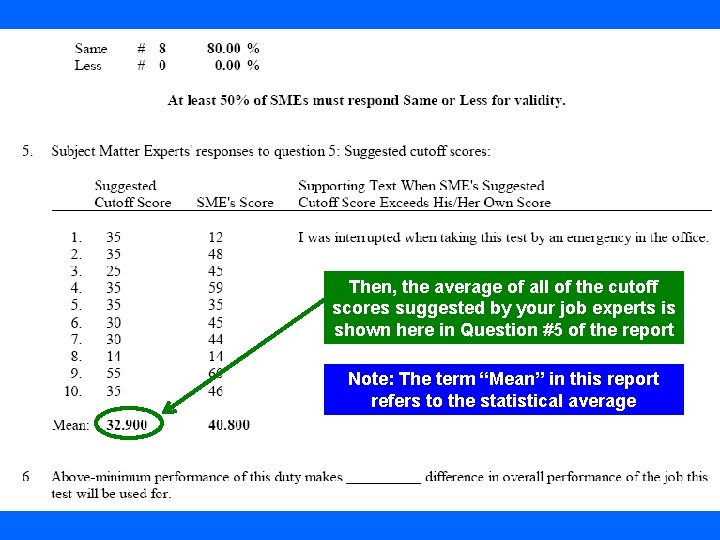
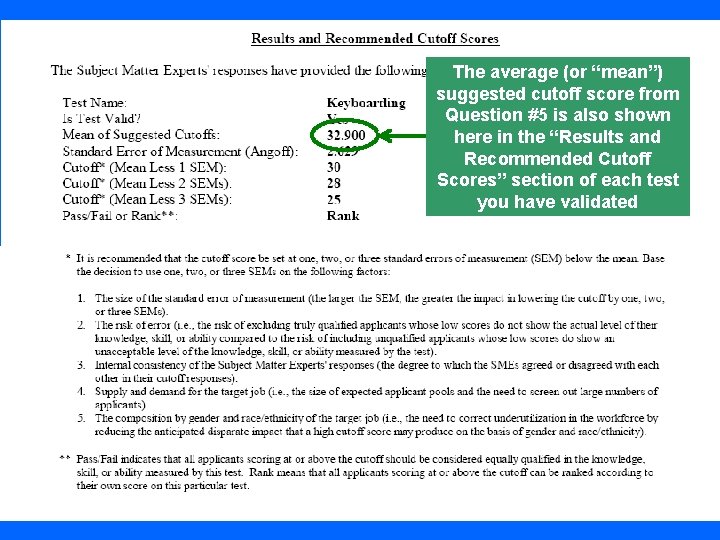
Then, the average of all of the cutoff scores suggested by your job experts is shown here in Question #5 of the report Note: The term “Mean” in this report refers to the statistical average 24
The average (or “mean”) suggested cutoff score from Question #5 is also shown here in the “Results and Recommended Cutoff Scores” section of each test you have validated 25
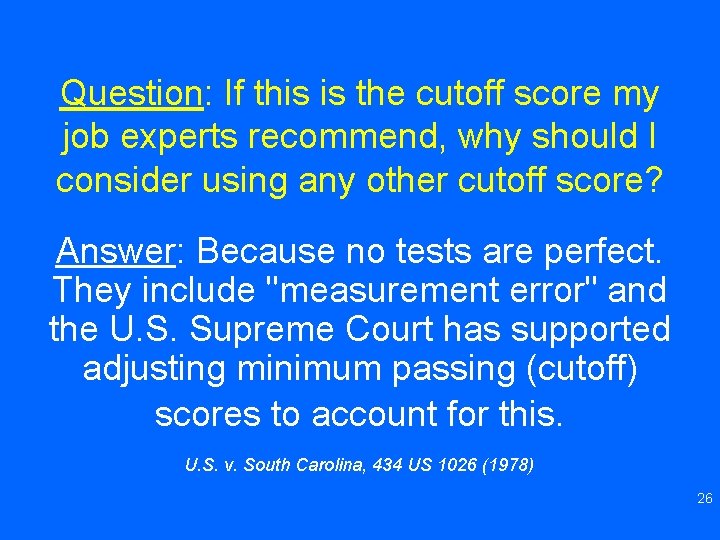
Question: If this is the cutoff score my job experts recommend, why should I consider using any other cutoff score? Answer: Because no tests are perfect. They include "measurement error" and the U. S. Supreme Court has supported adjusting minimum passing (cutoff) scores to account for this. U. S. v. South Carolina, 434 US 1026 (1978) 26
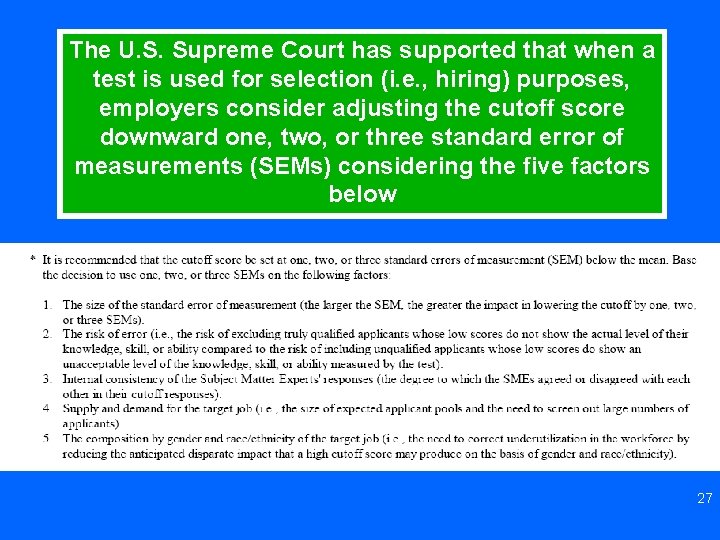
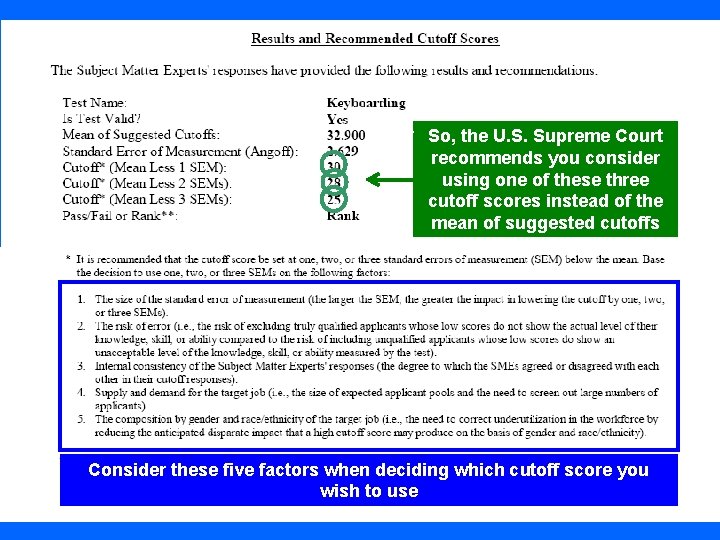
The U. S. Supreme Court has supported that when a test is used for selection (i. e. , hiring) purposes, employers consider adjusting the cutoff score downward one, two, or three standard error of measurements (SEMs) considering the five factors below 27
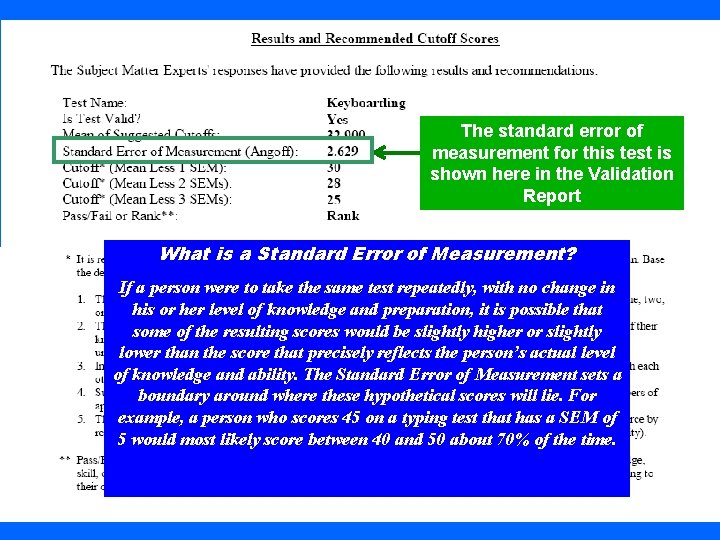
The standard error of measurement for this test is shown here in the Validation Report What is a Standard Error of Measurement? If a person were to take the same test repeatedly, with no change in his or her level of knowledge and preparation, it is possible that some of the resulting scores would be slightly higher or slightly lower than the score that precisely reflects the person’s actual level of knowledge and ability. The Standard Error of Measurement sets a boundary around where these hypothetical scores will lie. For example, a person who scores 45 on a typing test that has a SEM of 5 would most likely score between 40 and 50 about 70% of the time. 28
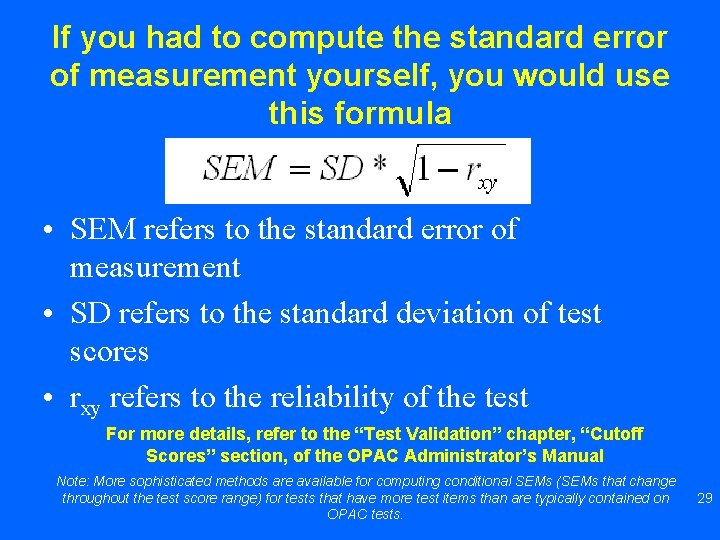
If you had to compute the standard error of measurement yourself, you would use this formula • SEM refers to the standard error of measurement • SD refers to the standard deviation of test scores • rxy refers to the reliability of the test For more details, refer to the “Test Validation” chapter, “Cutoff Scores” section, of the OPAC Administrator’s Manual Note: More sophisticated methods are available for computing conditional SEMs (SEMs that change throughout the test score range) for tests that have more test items than are typically contained on OPAC tests. 29
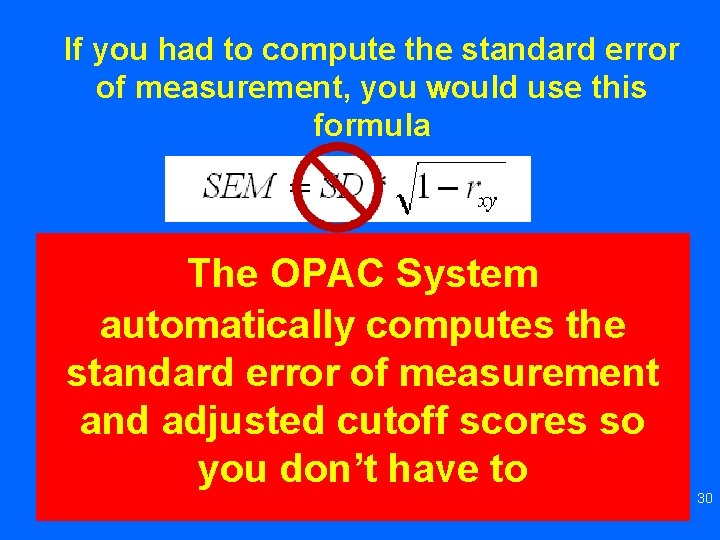
If you had to compute the standard error of measurement, you would use this formula • SEM refers to the standard error of The OPAC System measurement computes the • SDautomatically refers to the standard deviation of test scores standard error of measurement • rand to the reliability of the test xy refers adjusted cutoff scores so you don’t have to For more details, refer to the “Test Validation” chapter, “Cutoff Scores” section, of the OPAC Administrator’s Manual 30
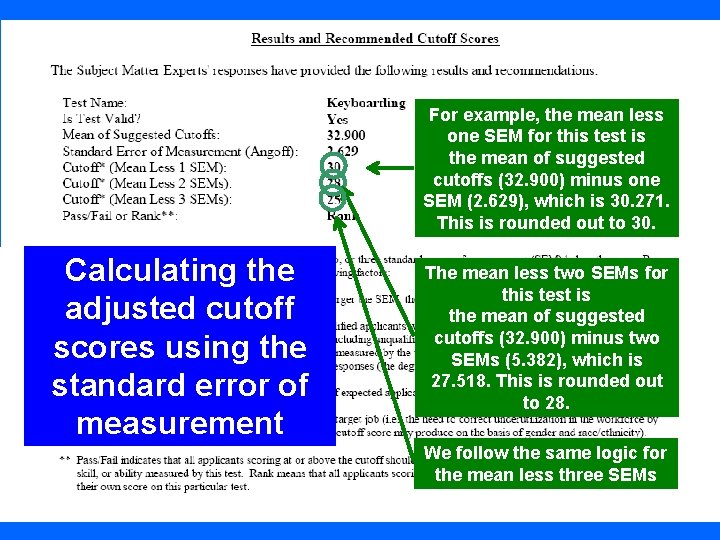
For example, the mean less one SEM for this test is the mean of suggested cutoffs (32. 900) minus one SEM (2. 629), which is 30. 271. This is rounded out to 30. Calculating the adjusted cutoff scores using the standard error of measurement The mean less two SEMs for this test is the mean of suggested cutoffs (32. 900) minus two SEMs (5. 382), which is 27. 518. This is rounded out to 28. We follow the same logic for the mean less three SEMs 31
So, the U. S. Supreme Court recommends you consider using one of these three cutoff scores instead of the mean of suggested cutoffs Consider these five factors when deciding which cutoff score you wish to use 32
Of those job candidates who passed* the test, can I hire those who scored the highest on the test rather than those who scored lower on the test? *“Passing” means that the test takers being considered have scored at or above the cutoff score you have determined to be appropriate for the target job 33
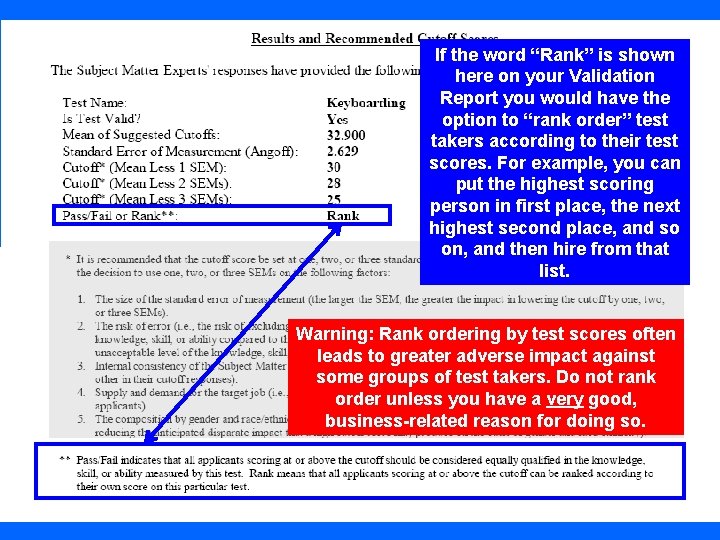
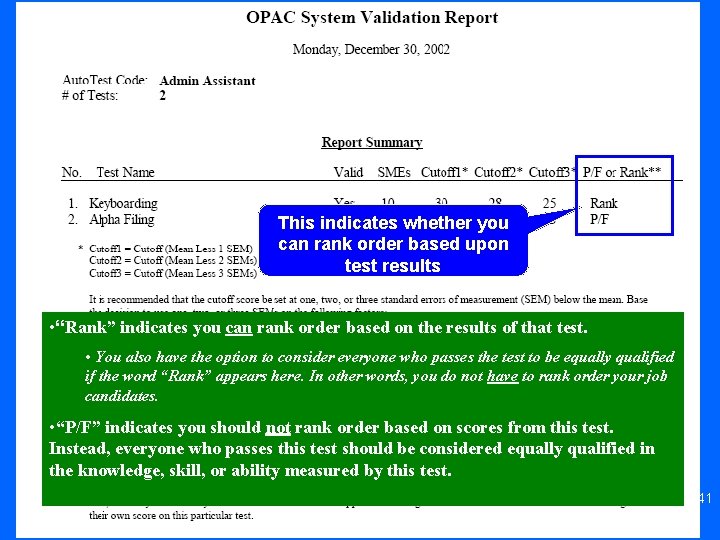
If the word “Rank” is shown here on your Validation Report you would have the option to “rank order” test takers according to their test scores. For example, you can put the highest scoring person in first place, the next highest second place, and so on, and then hire from that list. Warning: Rank ordering by test scores often leads to greater adverse impact against some groups of test takers. Do not rank order unless you have a very good, business-related reason for doing so. 34
• A rank ordering process should not be used for tests that measure knowledge, skills, or abilities that are only needed at some minimum levels on the job • Also, rank ordering is appropriate only for tests that distinguish between acceptable and above acceptable performance on the target job • There is potentially lower liability when considering everyone who passes the test to be equally qualified than when rank ordering by test scores • We advise that you consult with your legal advisor when making the determination whether to rank order test takers for the target job 35
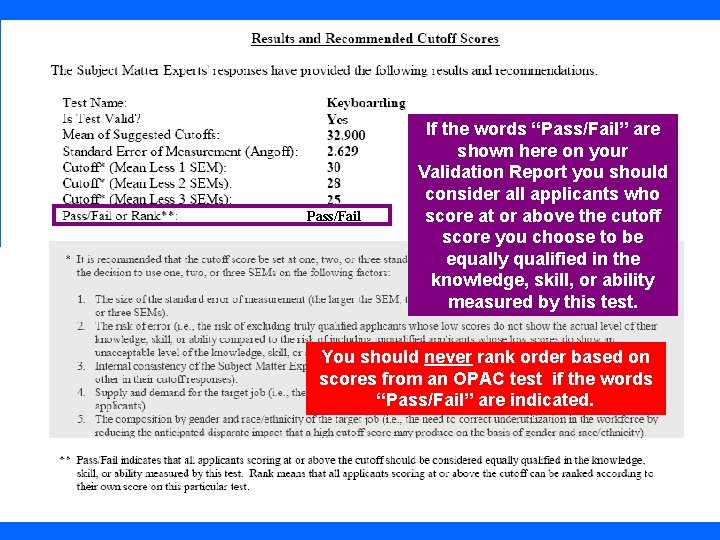
Pass/Fail If the words “Pass/Fail” are shown here on your Validation Report you should consider all applicants who score at or above the cutoff score you choose to be equally qualified in the knowledge, skill, or ability measured by this test. You should never rank order based on scores from an OPAC test if the words “Pass/Fail” are indicated. 36
The Summary Portion of the OPAC Validation Report 37
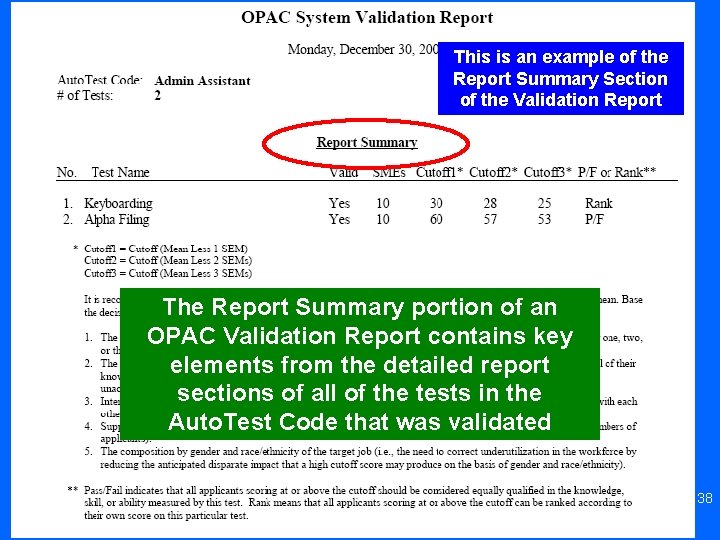
This is an example of the Report Summary Section of the Validation Report The Report Summary portion of an OPAC Validation Report contains key elements from the detailed report sections of all of the tests in the Auto. Test Code that was validated 38
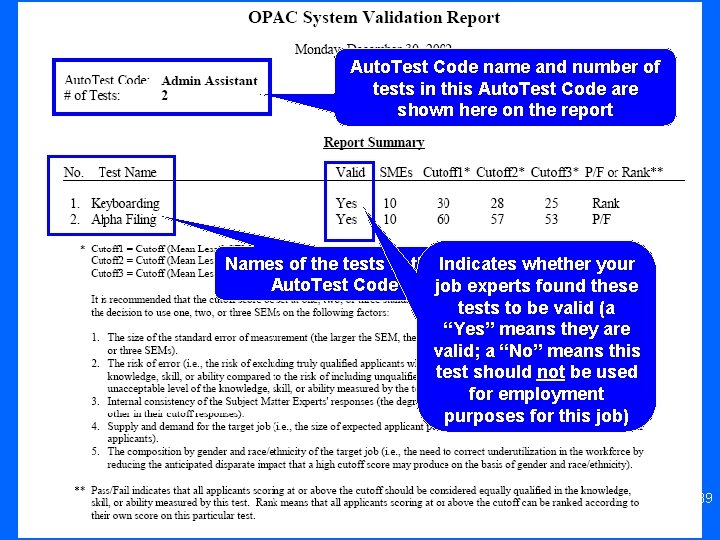
Auto. Test Code name and number of tests in this Auto. Test Code are shown here on the report Names of the tests in this. Indicates whether your Auto. Test Code job experts found these tests to be valid (a “Yes” means they are valid; a “No” means this test should not be used for employment purposes for this job) 39
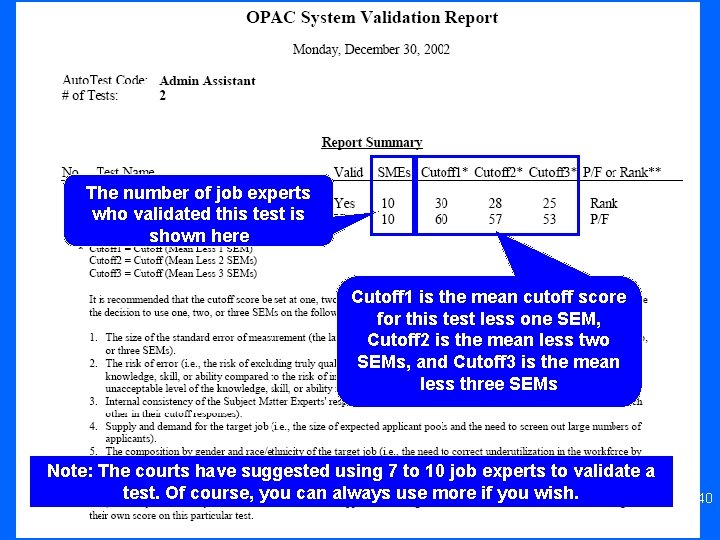
The number of job experts who validated this test is shown here Cutoff 1 is the mean cutoff score for this test less one SEM, Cutoff 2 is the mean less two SEMs, and Cutoff 3 is the mean less three SEMs Note: The courts have suggested using 7 to 10 job experts to validate a test. Of course, you can always use more if you wish. 40
This indicates whether you can rank order based upon test results • “Rank” indicates you can rank order based on the results of that test. • You also have the option to consider everyone who passes the test to be equally qualified if the word “Rank” appears here. In other words, you do not have to rank order your job candidates. • “P/F” indicates you should not rank order based on scores from this test. Instead, everyone who passes this test should be considered equally qualified in the knowledge, skill, or ability measured by this test. 41
We hope this presentation has been helpful to you! Please refer to your OPAC Administrator’s Manual for more details about the validation process when using the Validation Wizard feature Please send comments or suggestions to info@opac. com OPAC® and Office Proficiency Assessment & Certification® are registered trademarks of Biddle Consulting Group, Inc. 800 -999 -0438 42