
Understanding XML XPath Agenda Browser Settings XML Refresher

Understanding XML & XPath
Agenda • Browser Settings • XML Refresher • Let’s learn XPath! 2

Browser Settings
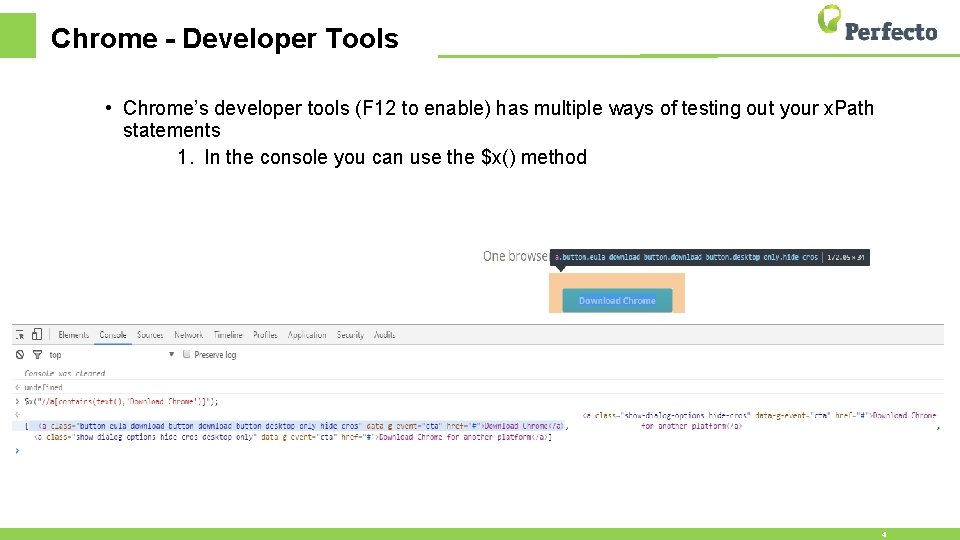
Chrome - Developer Tools • Chrome’s developer tools (F 12 to enable) has multiple ways of testing out your x. Path statements 1. In the console you can use the $x() method 4
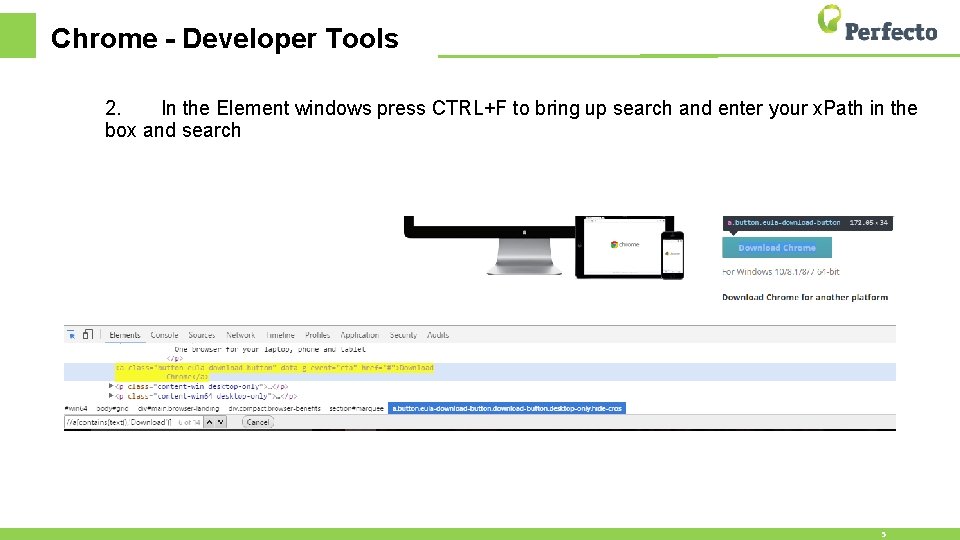
Chrome - Developer Tools 2. In the Element windows press CTRL+F to bring up search and enter your x. Path in the box and search 5

XML Refresher
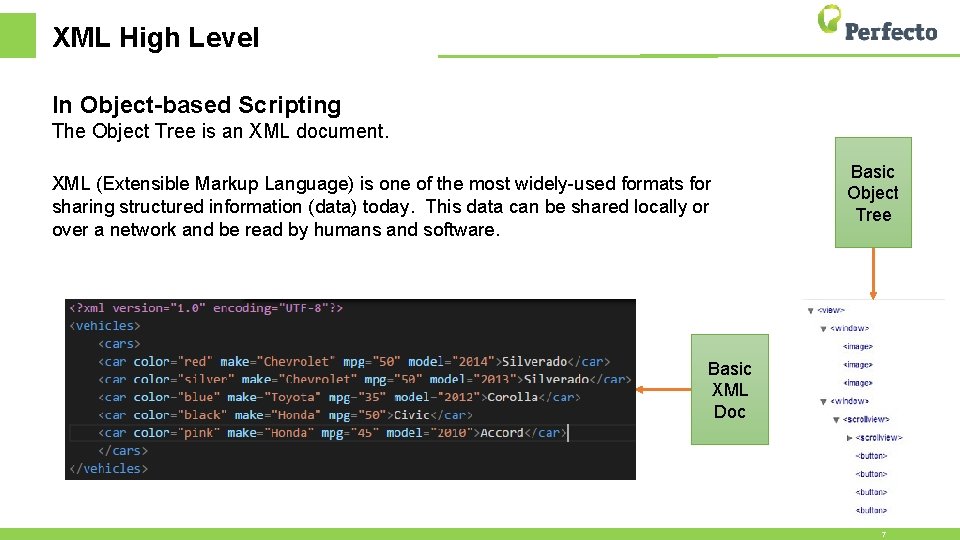
XML High Level In Object-based Scripting The Object Tree is an XML document. XML (Extensible Markup Language) is one of the most widely-used formats for sharing structured information (data) today. This data can be shared locally or over a network and be read by humans and software. Basic Object Tree Basic XML Doc 7
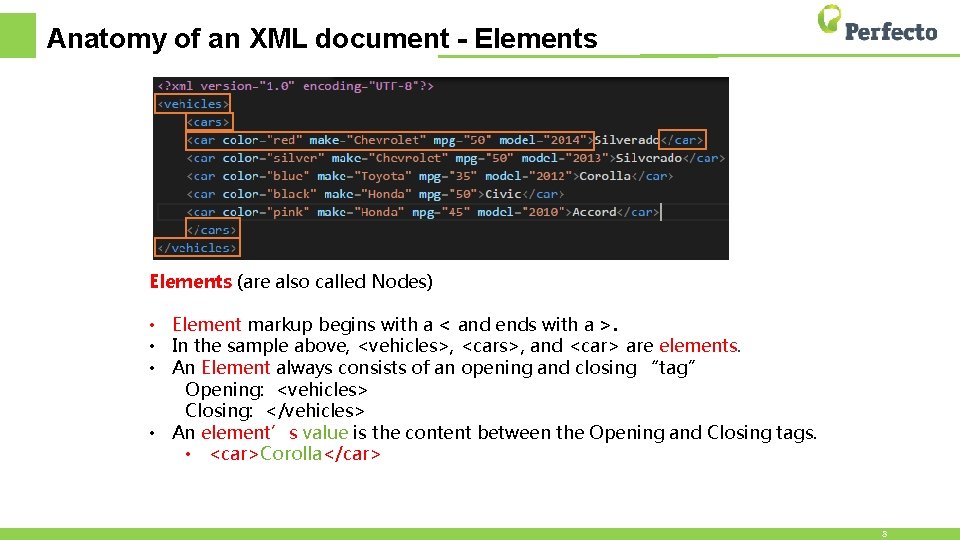
Anatomy of an XML document - Elements (are also called Nodes) • Element markup begins with a < and ends with a >. • In the sample above, <vehicles>, <cars>, and <car> are elements. • An Element always consists of an opening and closing “tag” Opening: <vehicles> Closing: </vehicles> • An element’s value is the content between the Opening and Closing tags. • <car>Corolla</car> 8
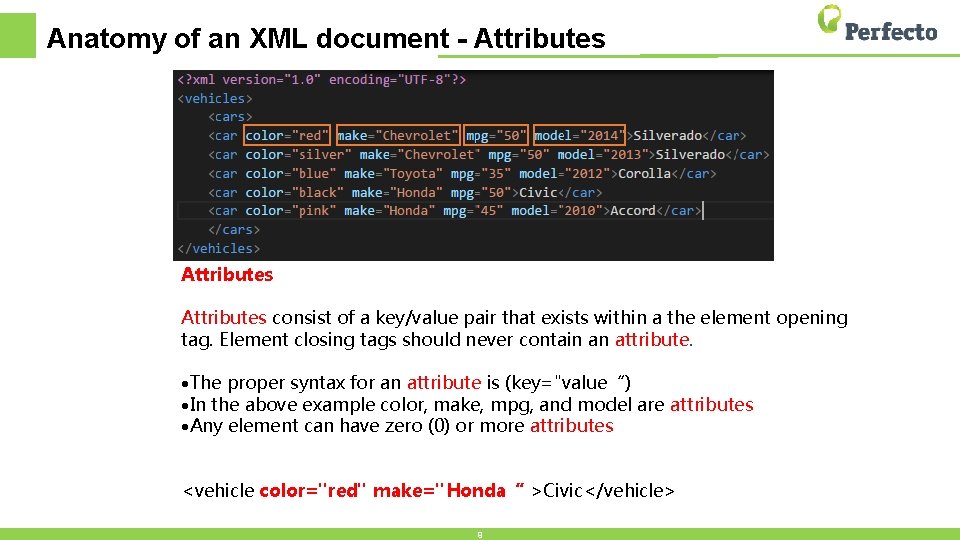
Anatomy of an XML document - Attributes consist of a key/value pair that exists within a the element opening tag. Element closing tags should never contain an attribute. ·The proper syntax for an attribute is (key="value“) ·In the above example color, make, mpg, and model are attributes ·Any element can have zero (0) or more attributes <vehicle color="red" make="Honda“ >Civic</vehicle> 9
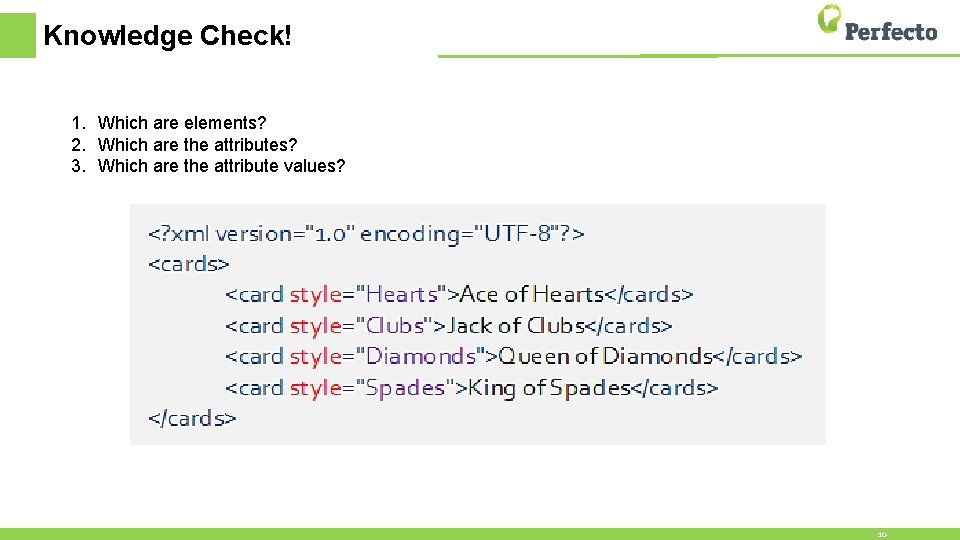
Knowledge Check! 1. Which are elements? 2. Which are the attributes? 3. Which are the attribute values? 10

XPath Basics Learning XPath
What is XPath? • XPath is • A query language used to find nodes (objects or elements) in an XML document • An industry standard • Similar to the concept of an SQL query and a database • Case sensitive • XPath can query based on • • Absolute and/or Relative location Element value and/or type Attribute value and/or type Relationship to other objects • XPath returns • An Element or array of Elements 12
![Anatomy of an x. Path expression //car[@color="red"] Values placed within the square brackets []](http://slidetodoc.com/presentation_image_h2/e47e27a530500be564e410c15d436c5d/image-13.jpg "Anatomy of an x. Path expression //car[@color=\"red\"] Values placed within the square brackets []")
Anatomy of an x. Path expression //car[@color="red"] Values placed within the square brackets [] indicates they “belong to” the node in the preceding text. Secondary use would be placing a numeric value in [] would represent an index. The @ symbol identifies Either the proceeding text as an • Element //car attribute name • Attribute //@color you are targeting In plain English the above expression says “Return all car objects Keeping with the SQL comparison this would be similar regardless of where they exist in the object tree where the to “select car from object. Tree where color=‘red’; ” object contain an attribute named color with a value of red”. The selection modifier • // for relative • / for absolute The SQL comparison is introduced here because its syntax is fairly close to plain English. Until you are an expert at constructing x. Path expressions you may want to write down exactly what you are trying to accomplish in English or SQL before constructing your x. Path. After its written you can introduce the x. Path syntax required to accomplish each task. 13
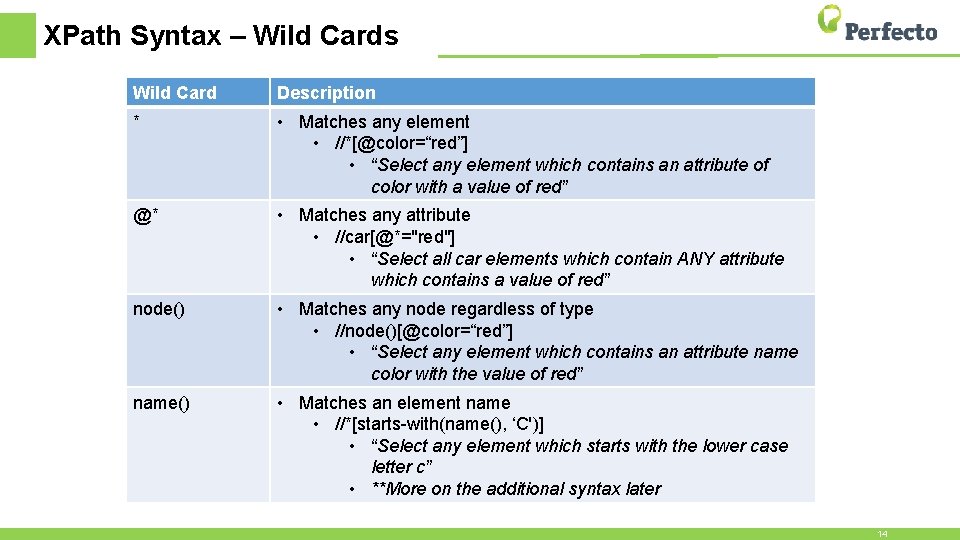
XPath Syntax – Wild Cards Wild Card Description * • Matches any element • //*[@color=“red”] • “Select any element which contains an attribute of color with a value of red” @* • Matches any attribute • //car[@*="red"] • “Select all car elements which contain ANY attribute which contains a value of red” node() • Matches any node regardless of type • //node()[@color=“red”] • “Select any element which contains an attribute name color with the value of red” name() • Matches an element name • //*[starts-with(name(), ‘C')] • “Select any element which starts with the lower case letter c” • **More on the additional syntax later 14
![XPath Syntax - Operators Operator Description [] • Children of the preceding element •](http://slidetodoc.com/presentation_image_h2/e47e27a530500be564e410c15d436c5d/image-15.jpg "XPath Syntax - Operators Operator Description [] • Children of the preceding element •")
XPath Syntax - Operators Operator Description [] • Children of the preceding element • Numeric values within [] represent an index | • Combine more than one x. Path expression. • //car[@color="red"]|//car[@color="blue"] • “Select all car elements which contain an attribute of color and have a value of either red or blue” Or, and • Boolean modifier • //car[@color="red" and (@make="Chevrolet" or @make="Mazda")] • “Select all car elements which contain and attribute of color where its value is red and contains an attribute of make where its value is either Chevrolet or Mazda” =, != • Boolean modifier • //car[@color="red" and @make!="Chevrolet"] • “Select all car elements which contain and attribute of color where its value is red and contains an attribute of make where its value is NOT Chevrolet” () • Logical grouping • See Or, and example above 15
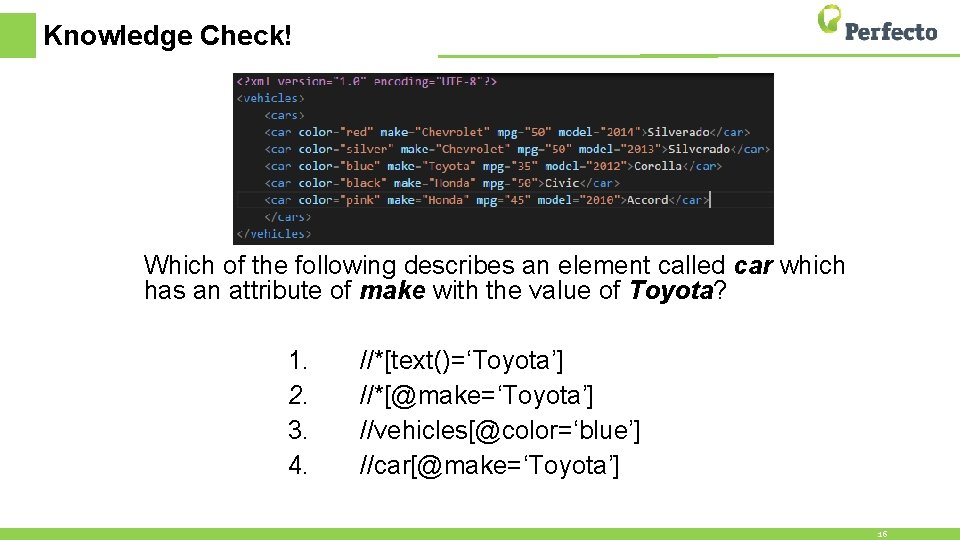
Knowledge Check! Which of the following describes an element called car which has an attribute of make with the value of Toyota? 1. 2. 3. 4. //*[text()=‘Toyota’] //*[@make=‘Toyota’] //vehicles[@color=‘blue’] //car[@make=‘Toyota’] 16
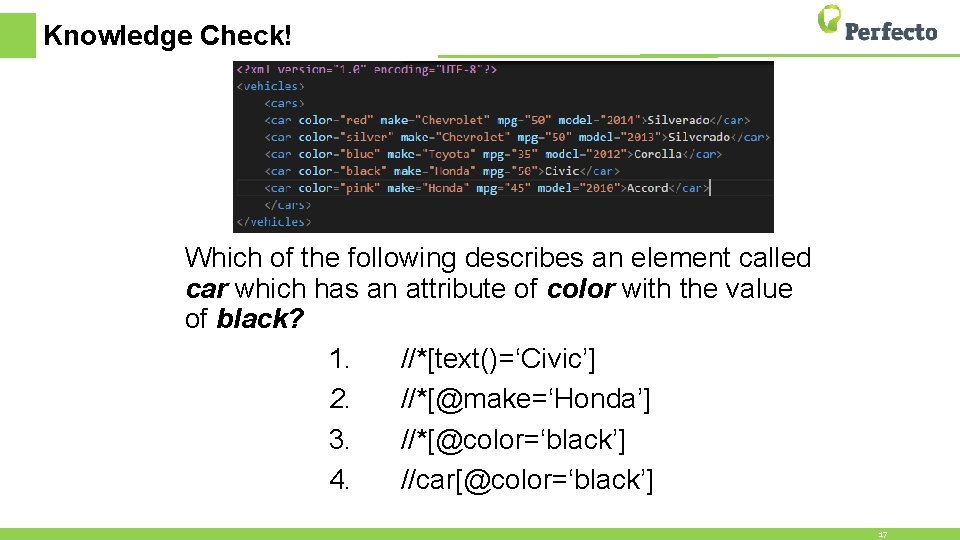
Knowledge Check! Which of the following describes an element called car which has an attribute of color with the value of black? 1. //*[text()=‘Civic’] 2. //*[@make=‘Honda’] 3. //*[@color=‘black’] 4. //car[@color=‘black’] 17
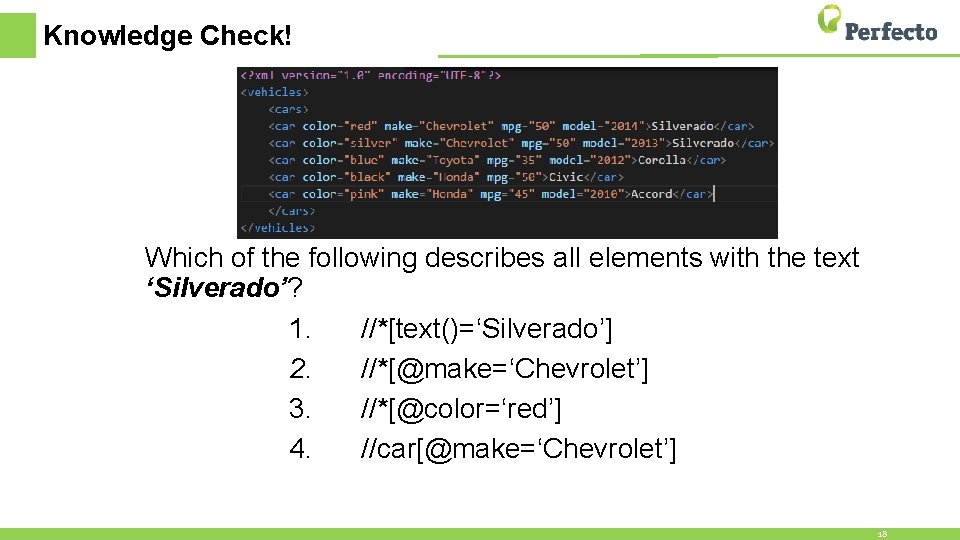
Knowledge Check! Which of the following describes all elements with the text ‘Silverado’? 1. //*[text()=‘Silverado’] 2. //*[@make=‘Chevrolet’] 3. //*[@color=‘red’] 4. //car[@make=‘Chevrolet’] 18
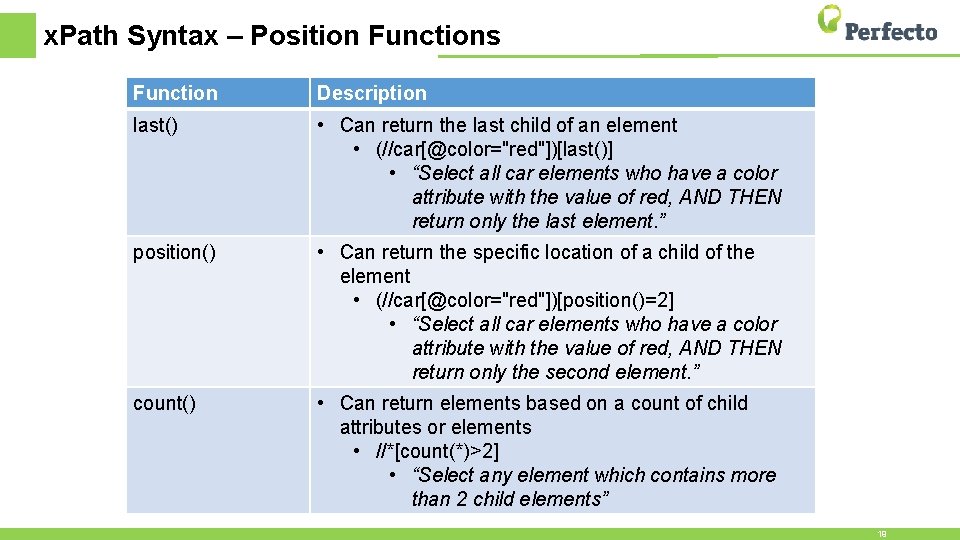
x. Path Syntax – Position Functions Function Description last() • Can return the last child of an element • (//car[@color="red"])[last()] • “Select all car elements who have a color attribute with the value of red, AND THEN return only the last element. ” position() • Can return the specific location of a child of the element • (//car[@color="red"])[position()=2] • “Select all car elements who have a color attribute with the value of red, AND THEN return only the second element. ” count() • Can return elements based on a count of child attributes or elements • //*[count(*)>2] • “Select any element which contains more than 2 child elements” 19
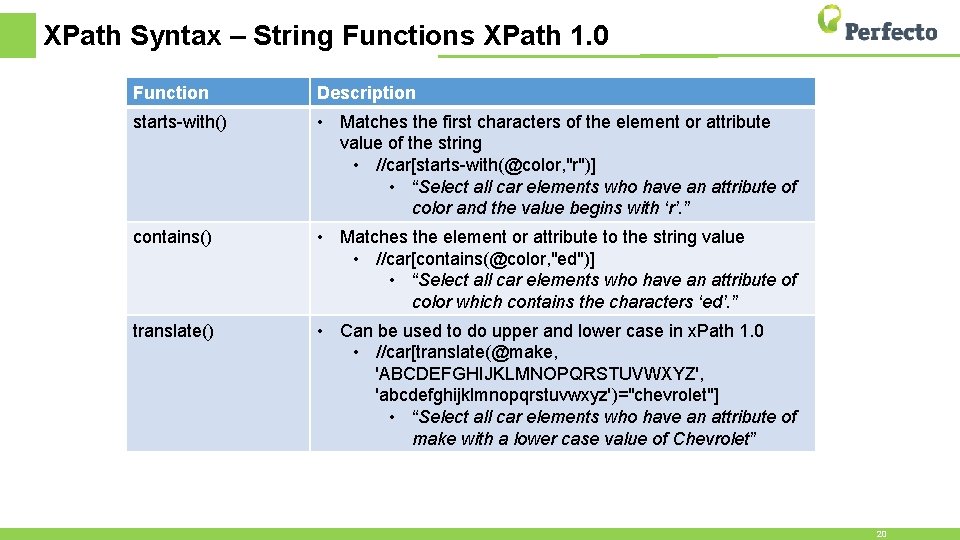
XPath Syntax – String Functions XPath 1. 0 Function Description starts-with() • Matches the first characters of the element or attribute value of the string • //car[starts-with(@color, "r")] • “Select all car elements who have an attribute of color and the value begins with ‘r’. ” contains() • Matches the element or attribute to the string value • //car[contains(@color, "ed")] • “Select all car elements who have an attribute of color which contains the characters ‘ed’. ” translate() • Can be used to do upper and lower case in x. Path 1. 0 • //car[translate(@make, 'ABCDEFGHIJKLMNOPQRSTUVWXYZ', 'abcdefghijklmnopqrstuvwxyz')="chevrolet"] • “Select all car elements who have an attribute of make with a lower case value of Chevrolet” 20
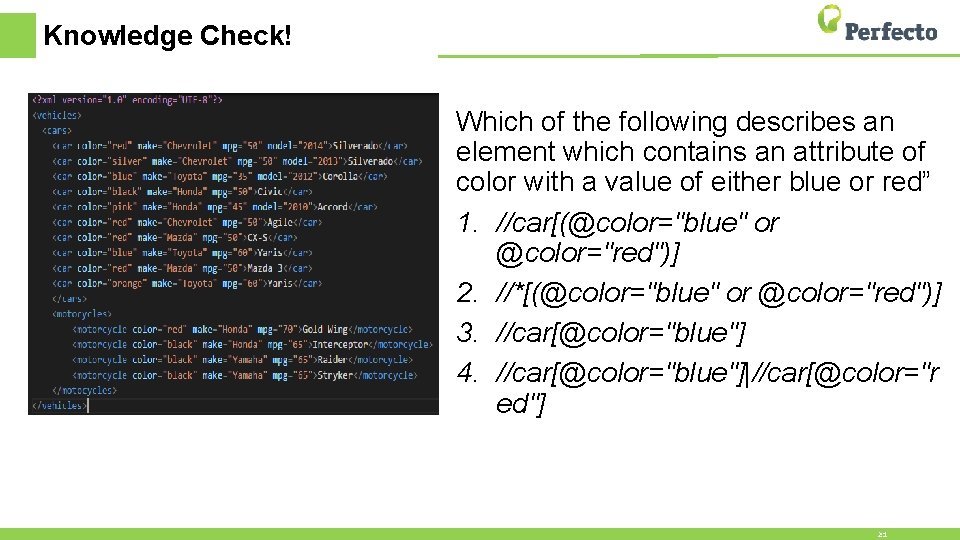
Knowledge Check! Which of the following describes an element which contains an attribute of color with a value of either blue or red” 1. //car[(@color="blue" or @color="red")] 2. //*[(@color="blue" or @color="red")] 3. //car[@color="blue"] 4. //car[@color="blue"]|//car[@color="r ed"] 21
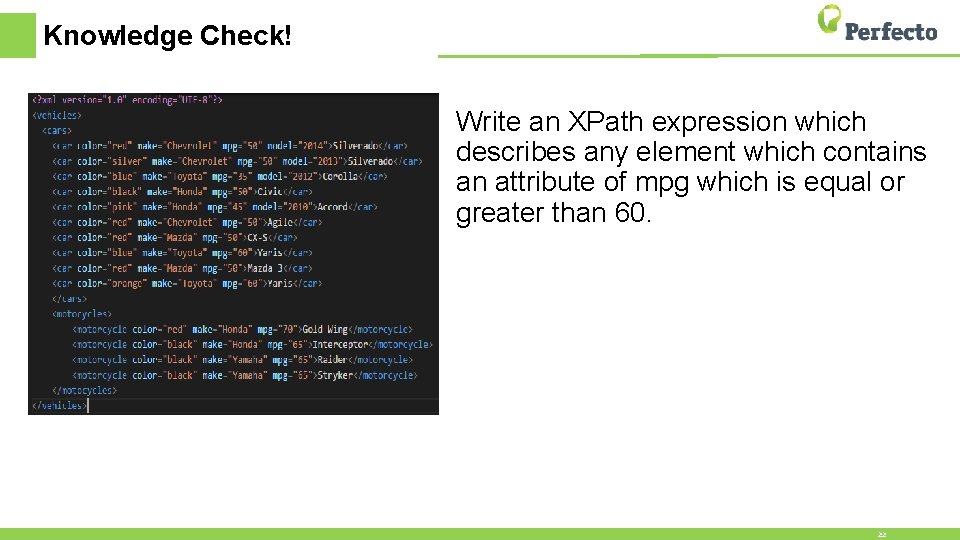
Knowledge Check! Write an XPath expression which describes any element which contains an attribute of mpg which is equal or greater than 60. 22
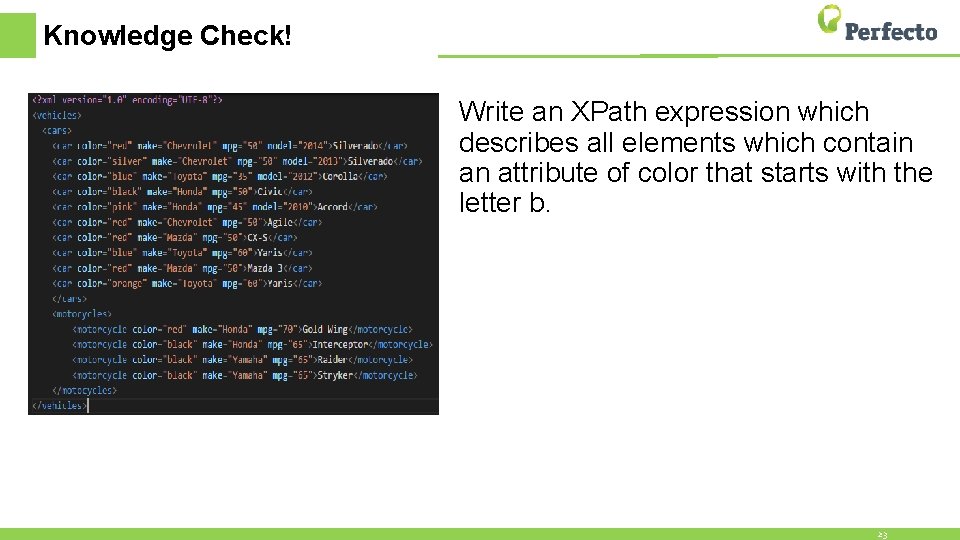
Knowledge Check! Write an XPath expression which describes all elements which contain an attribute of color that starts with the letter b. 23
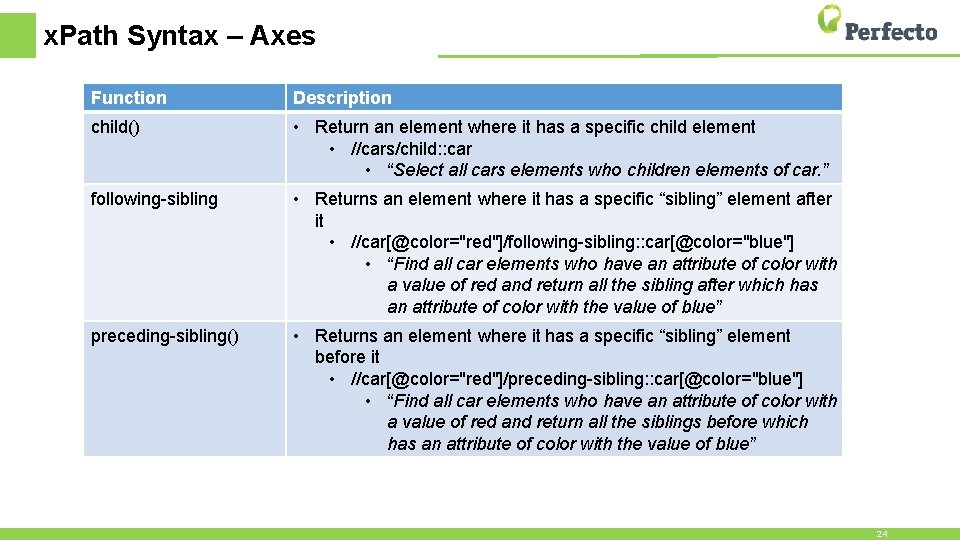
x. Path Syntax – Axes Function Description child() • Return an element where it has a specific child element • //cars/child: : car • “Select all cars elements who children elements of car. ” following-sibling • Returns an element where it has a specific “sibling” element after it • //car[@color="red"]/following-sibling: : car[@color="blue"] • “Find all car elements who have an attribute of color with a value of red and return all the sibling after which has an attribute of color with the value of blue” preceding-sibling() • Returns an element where it has a specific “sibling” element before it • //car[@color="red"]/preceding-sibling: : car[@color="blue"] • “Find all car elements who have an attribute of color with a value of red and return all the siblings before which has an attribute of color with the value of blue” 24
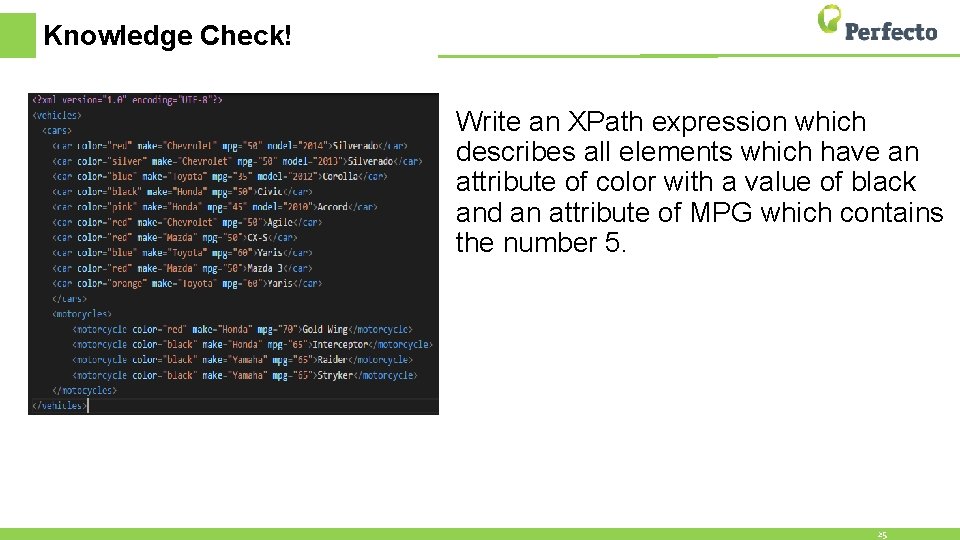
Knowledge Check! Write an XPath expression which describes all elements which have an attribute of color with a value of black and an attribute of MPG which contains the number 5. 25
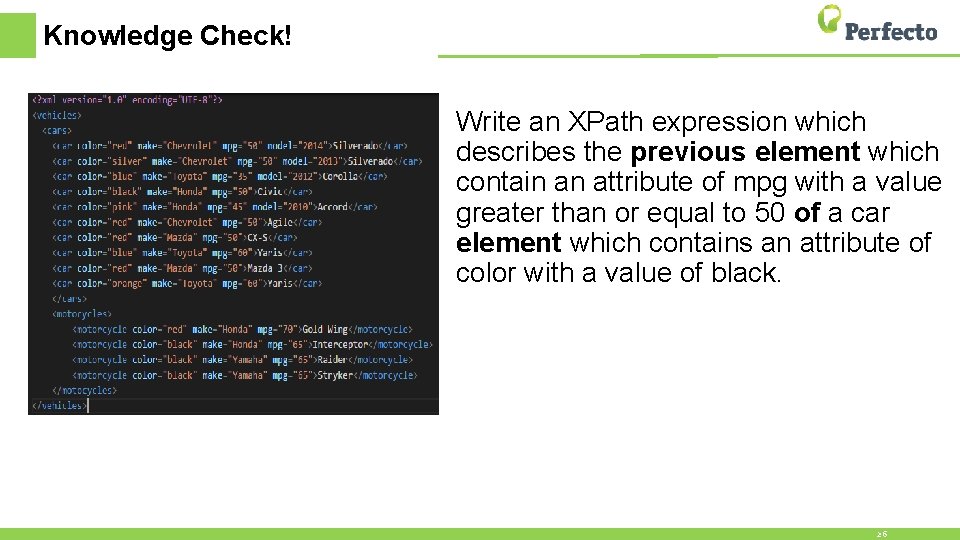
Knowledge Check! Write an XPath expression which describes the previous element which contain an attribute of mpg with a value greater than or equal to 50 of a car element which contains an attribute of color with a value of black. 26
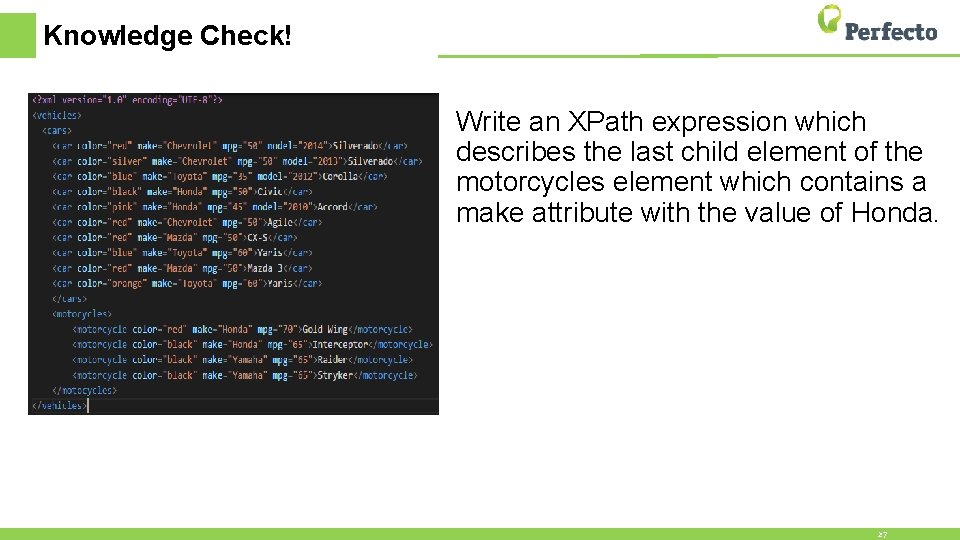
Knowledge Check! Write an XPath expression which describes the last child element of the motorcycles element which contains a make attribute with the value of Honda. 27
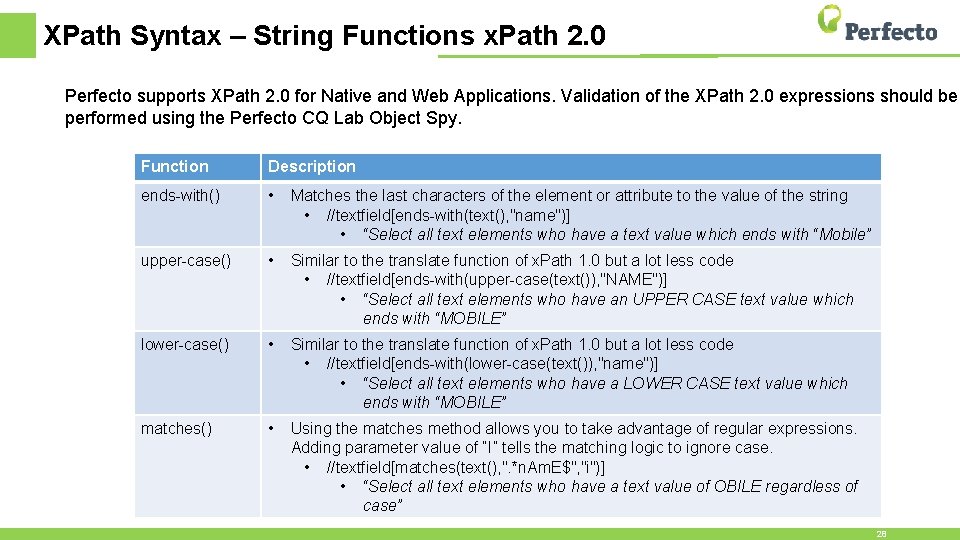
XPath Syntax – String Functions x. Path 2. 0 Perfecto supports XPath 2. 0 for Native and Web Applications. Validation of the XPath 2. 0 expressions should be performed using the Perfecto CQ Lab Object Spy. Function Description ends-with() • Matches the last characters of the element or attribute to the value of the string • //textfield[ends-with(text(), "name")] • “Select all text elements who have a text value which ends with “Mobile” upper-case() • Similar to the translate function of x. Path 1. 0 but a lot less code • //textfield[ends-with(upper-case(text()), "NAME")] • “Select all text elements who have an UPPER CASE text value which ends with “MOBILE” lower-case() • Similar to the translate function of x. Path 1. 0 but a lot less code • //textfield[ends-with(lower-case(text()), "name")] • “Select all text elements who have a LOWER CASE text value which ends with “MOBILE” matches() • Using the matches method allows you to take advantage of regular expressions. Adding parameter value of “I” tells the matching logic to ignore case. • //textfield[matches(text(), ". *n. Am. E$", "i")] • “Select all text elements who have a text value of OBILE regardless of case” 28
Summary • Throughout this session we have learned • • What is XML and XPath The anatomy of an XPath Expression How to use XPath wildcards, operators, positions and axes How to use XPath 1. 0 and 2. 0 String Functions • You should now have a firm understanding of how to use XPath effectively
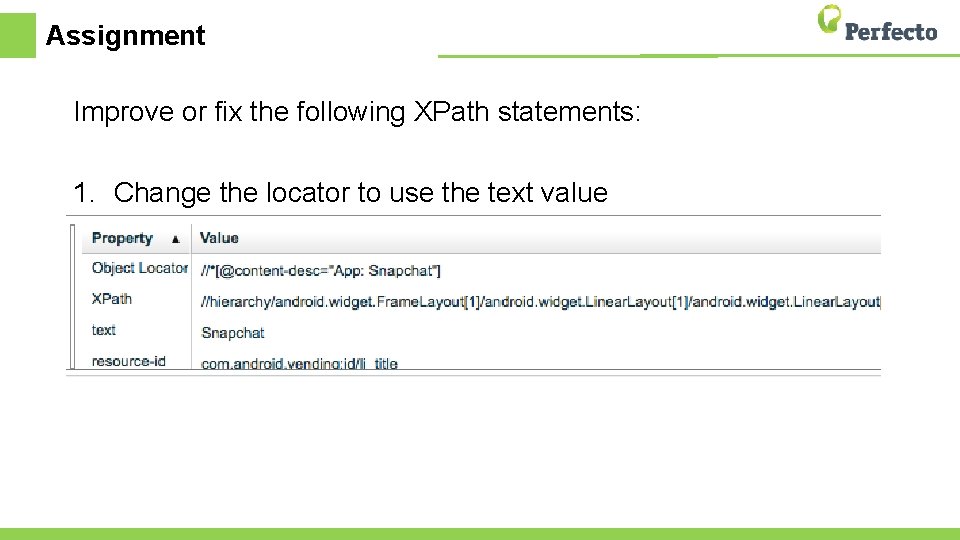
Assignment Improve or fix the following XPath statements: 1. Change the locator to use the text value
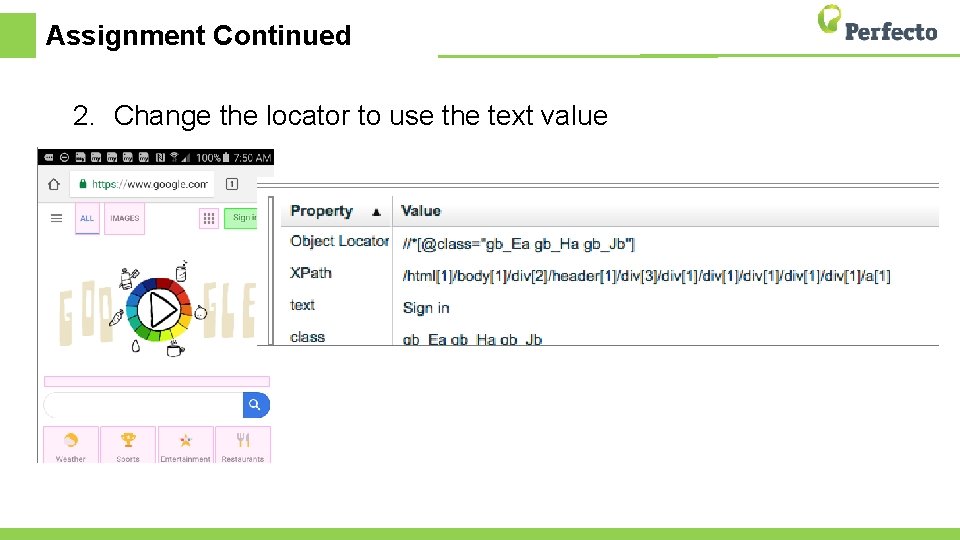
Assignment Continued 2. Change the locator to use the text value
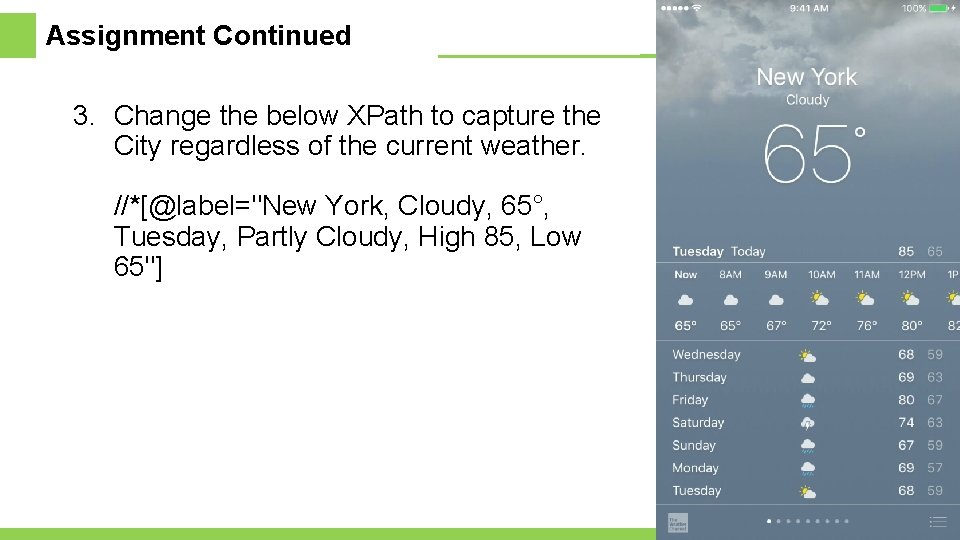
Assignment Continued 3. Change the below XPath to capture the City regardless of the current weather. //*[@label="New York, Cloudy, 65°, Tuesday, Partly Cloudy, High 85, Low 65"]
Assignment Continued 4. Select a blue Toyota Yaris <car color="blue" make="Toyota" mpg="60">Yaris</car> <car color="red" make="Mazda" mpg="50">Mazda 3</car> <car color="orange" make="Toyota" mpg="60">Yaris</car>
Assignment Continued 5. Select all the pink cars with mpg of 45. http: //nxc. co. il/demoaut/pages/x. Path. php
Resources • Sample site: • http: //nxc. co. il/demoaut/pages/x. Path. php • Example XML: • References • Working with Object Spy & x. Path • https: //community. perfectomobile. com/posts/914140 • XML Tutorial • http: //www. w 3 schools. com/xml/ • x. Path Tutorial • http: //www. w 3 schools. com/x. Path/ • x. Path 1. 0 • http: //docs. oracle. com/javase/tutorial/jaxp/xslt/x. Path. html • x. Path 2. 0 • http: //saxon. sourceforge. net/saxon 7. 4/functions. html • x. Path 2. 0 Tips • https: //developers. perfectomobile. com/display/TT/XPath+2. 0+Tips 35

Thank You
- Slides: 36