
Understanding the Application Data Sheet ADS Little Things


- Slides: 39
Understanding the Application Data Sheet (ADS): Little Things Make a Big Difference Office of Innovation Development Janice Tippett and Terry Dey Email questions to: inventorinfochat@uspto. gov 2
Office of Innovation Development • • In Person Assistance (by appointment) for Pro Se Applicants Assistance Hotline 1 -866 -767 -3848 Patent Email Support innovationdevelopment@uspto. gov PTRC Partnership for Patent Education Courses – Virtual Assistance Pilot Program • Inventor Outreach – Independent Inventor Conferences – Education for Inventor Organizations • http: //www. uspto. gov/inventors Email questions to: inventorinfochat@uspto. gov 3
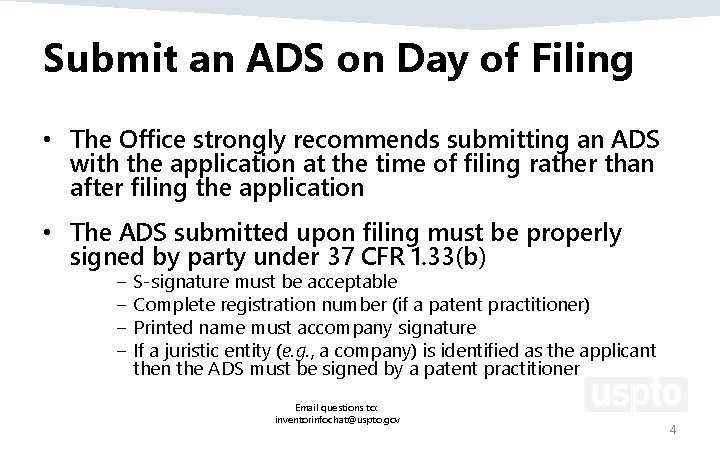
Submit an ADS on Day of Filing • The Office strongly recommends submitting an ADS with the application at the time of filing rather than after filing the application • The ADS submitted upon filing must be properly signed by party under 37 CFR 1. 33(b) − S-signature must be acceptable − Complete registration number (if a patent practitioner) − Printed name must accompany signature − If a juristic entity (e. g. , a company) is identified as the applicant then the ADS must be signed by a patent practitioner Email questions to: inventorinfochat@uspto. gov 4
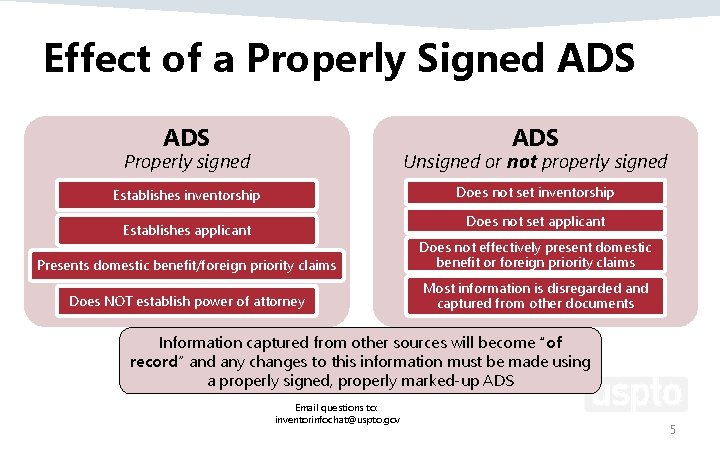
Effect of a Properly Signed ADS ADS Properly signed Unsigned or not properly signed Establishes inventorship Does not set applicant Establishes applicant Presents domestic benefit/foreign priority claims Does not effectively present domestic benefit or foreign priority claims Does NOT establish power of attorney Most information is disregarded and captured from other documents Information captured from other sources will become “of record” and any changes to this information must be made using a properly signed, properly marked-up ADS Email questions to: inventorinfochat@uspto. gov 5
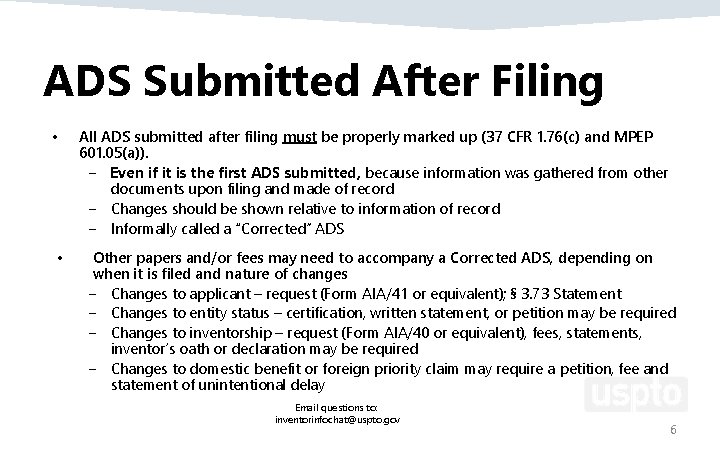
ADS Submitted After Filing • • All ADS submitted after filing must be properly marked up (37 CFR 1. 76(c) and MPEP 601. 05(a)). − Even if it is the first ADS submitted, because information was gathered from other documents upon filing and made of record − Changes should be shown relative to information of record − Informally called a “Corrected” ADS Other papers and/or fees may need to accompany a Corrected ADS, depending on when it is filed and nature of changes − Changes to applicant – request (Form AIA/41 or equivalent); § 3. 73 Statement − Changes to entity status – certification, written statement, or petition may be required − Changes to inventorship – request (Form AIA/40 or equivalent), fees, statements, inventor’s oath or declaration may be required − Changes to domestic benefit or foreign priority claim may require a petition, fee and statement of unintentional delay Email questions to: inventorinfochat@uspto. gov 6
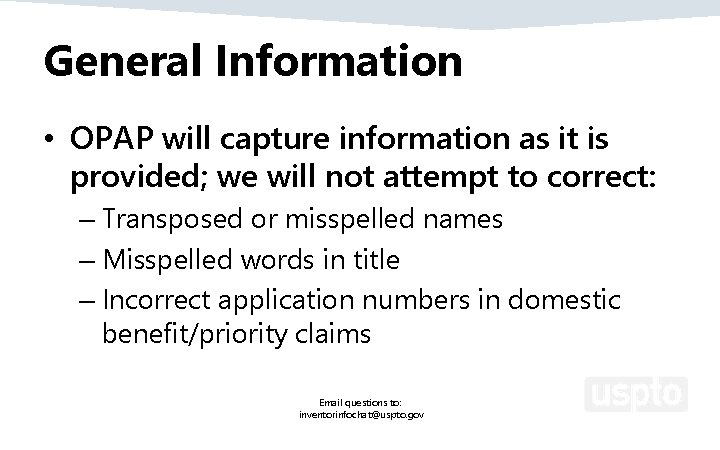
General Information • OPAP will capture information as it is provided; we will not attempt to correct: – Transposed or misspelled names – Misspelled words in title – Incorrect application numbers in domestic benefit/priority claims Email questions to: inventorinfochat@uspto. gov
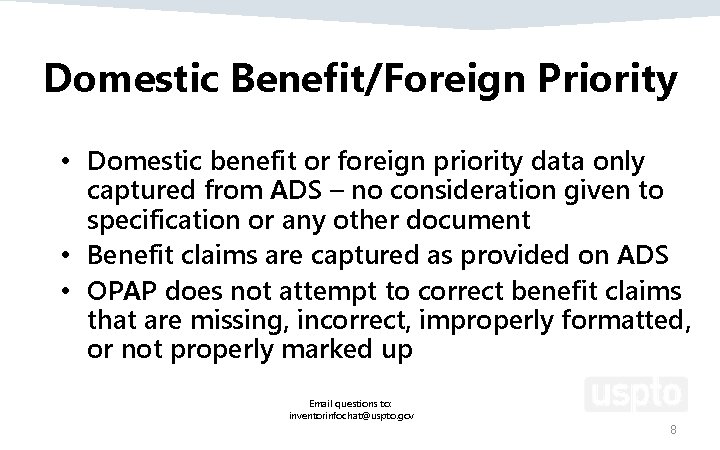
Domestic Benefit/Foreign Priority • Domestic benefit or foreign priority data only captured from ADS – no consideration given to specification or any other document • Benefit claims are captured as provided on ADS • OPAP does not attempt to correct benefit claims that are missing, incorrect, improperly formatted, or not properly marked up Email questions to: inventorinfochat@uspto. gov 8
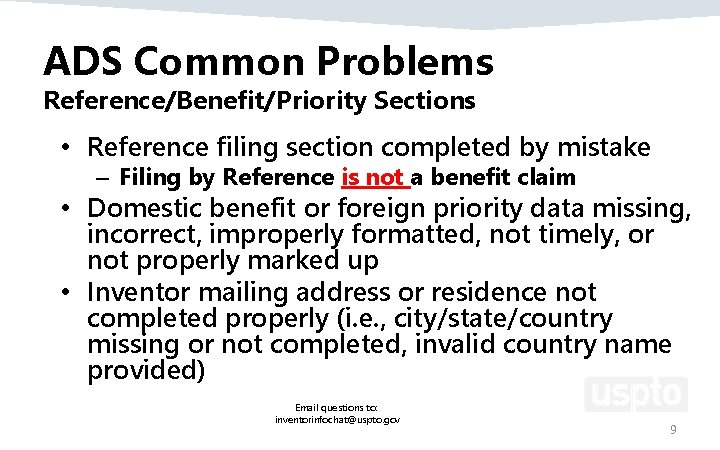
ADS Common Problems Reference/Benefit/Priority Sections • Reference filing section completed by mistake – Filing by Reference is not a benefit claim • Domestic benefit or foreign priority data missing, incorrect, improperly formatted, not timely, or not properly marked up • Inventor mailing address or residence not completed properly (i. e. , city/state/country missing or not completed, invalid country name provided) Email questions to: inventorinfochat@uspto. gov 9
ADS and Inventor’s Oath/Declaration • When the ADS sets inventorship, the name provided on the inventor’s oath or declaration must match the name set forth in the ADS – Both documents require legal name – If names do not match, new inventor’s oath or declaration or § 1. 48 request will be needed – Exception for character substitution for characters that cannot be entered on ADS (for example: ss for ß, ae for ä, oe for œ) Email questions to: inventorinfochat@uspto. gov 10
Corrected ADS in EFS-Web • Office form – almost always best option • Best way to avoid rejection due to improper markings • Will retrieve information of record, eliminating guesswork as to what has been captured and is “of record” with the Office • OPAP no longer captures non-established inventors; only “of record” info is recorded • Some info will be recorded, but not shown on the filing receipt – mailing address, phone/fax/email Email questions to: inventorinfochat@uspto. gov 11
Web-based ADS and Corrected ADS • Web-based ADS has a pre-population feature which can prepopulate inventor, benefit claim and foreign priority information • Quick Start Guide for Web-based ADS www. uspto. gov/sites/default/files/documents/Quick%20 Start %20 Guide%20 Web. ADS. pdf • Corrected Web-based ADS will pre-populate with information that the Office has of record and create the required markings • Quick Start Guide for Corrected (Web-based) ADS www. uspto. gov/sites/default/files/documents/Corrected. Web. ADS-QSG. pdf Email questions to: inventorinfochat@uspto. gov 12
Resources • How to get help – Application Assistance Unit, 571 -272 -4000 – Patents Ombudsman, 571 -272 -5555 or https: //www. uspto. gov/patent/ombudsman-program – Inventor Assistance Center, 571 -272 -1000 or https: //www. uspto. gov/learning-and-resources/supportcenters/inventors-assistance-center-iac Email questions to: inventorinfochat@uspto. gov 13
Tips for Application Data Sheets Office of Patent Legal Administration Office of the Deputy Commissioner for Patent Examination Policy
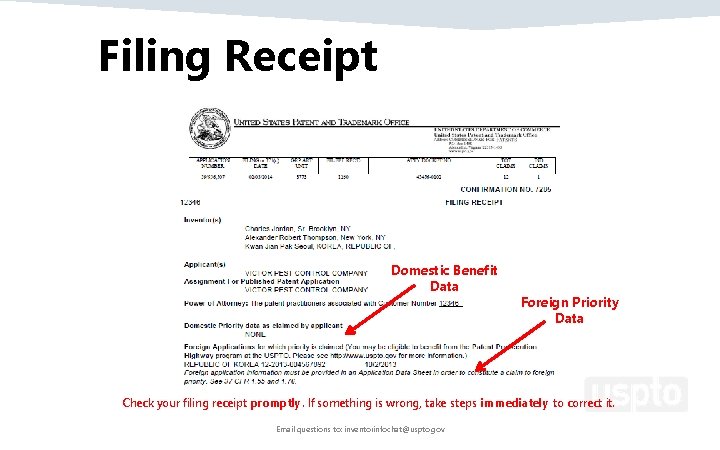
Filing Receipt Domestic Benefit Data Foreign Priority Data Check your filing receipt promptly. If something is wrong, take steps immediately to correct it. Email questions to: inventorinfochat@uspto. gov
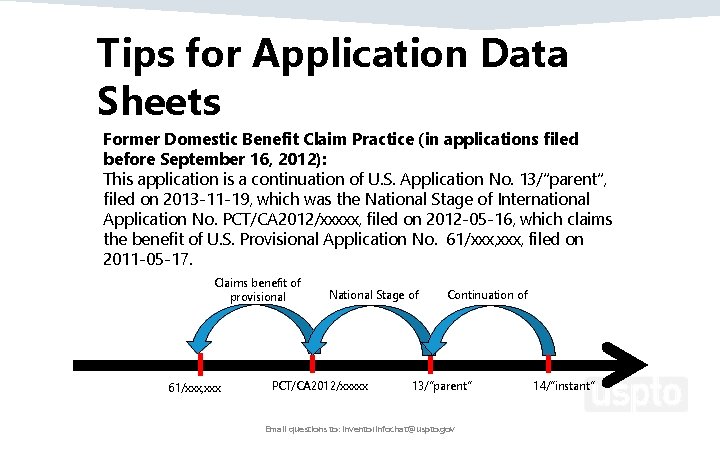
Tips for Application Data Sheets Former Domestic Benefit Claim Practice (in applications filed before September 16, 2012): This application is a continuation of U. S. Application No. 13/”parent”, filed on 2013 -11 -19, which was the National Stage of International Application No. PCT/CA 2012/xxxxx, filed on 2012 -05 -16, which claims the benefit of U. S. Provisional Application No. 61/xxx, filed on 2011 -05 -17. Claims benefit of provisional 61/xxx, xxx National Stage of PCT/CA 2012/xxxxx Continuation of 13/”parent” Email questions to: inventorinfochat@uspto. gov 14/”instant”
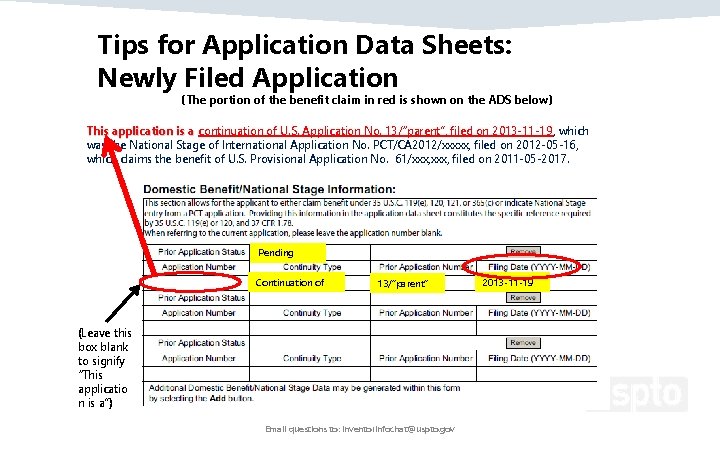
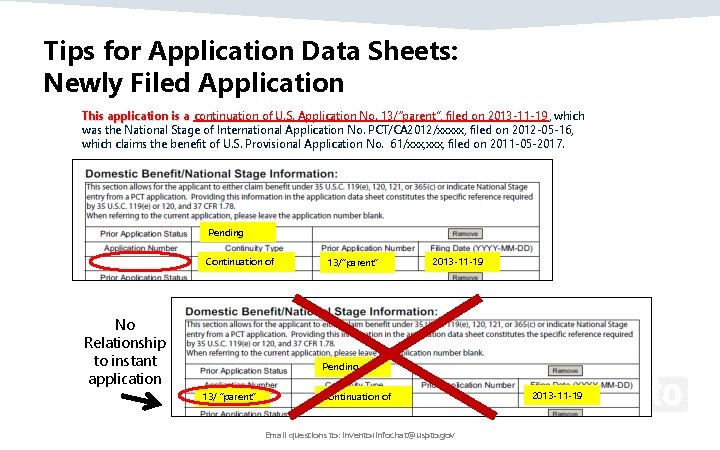
Tips for Application Data Sheets: Newly Filed Application (The portion of the benefit claim in red is shown on the ADS below) This application is a continuation of U. S. Application No. 13/“parent”, filed on 2013 -11 -19 , which was the National Stage of International Application No. PCT/CA 2012/xxxxx, filed on 2012 -05 -16, which claims the benefit of U. S. Provisional Application No. 61/xxx, filed on 2011 -05 -2017. Pending Continuation of 13/“parent” (Leave this box blank to signify “This applicatio n is a”) Email questions to: inventorinfochat@uspto. gov 2013 -11 -19
Tips for Application Data Sheets: Newly Filed Application This application is a continuation of U. S. Application No. 13/“parent”, filed on 2013 -11 -19 , which was the National Stage of International Application No. PCT/CA 2012/xxxxx, filed on 2012 -05 -16, which claims the benefit of U. S. Provisional Application No. 61/xxx, filed on 2011 -05 -2017. Pending Continuation of No Relationship to instant application 13/“parent” 2013 -11 -19 Pending 13/ “parent” Continuation of Email questions to: inventorinfochat@uspto. gov 2013 -11 -19
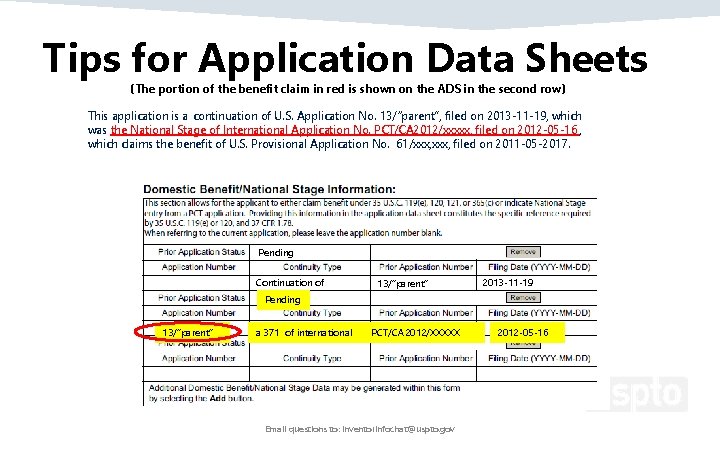
Tips for Application Data Sheets (The portion of the benefit claim in red is shown on the ADS in the second row) This application is a continuation of U. S. Application No. 13/“parent”, filed on 2013 -11 -19, which was the National Stage of International Application No. PCT/CA 2012/xxxxx, filed on 2012 -05 -16 , which claims the benefit of U. S. Provisional Application No. 61/xxx, filed on 2011 -05 -2017. Pending Continuation of 13/“parent” 2013 -11 -19 Pending 13/“parent” a 371 of international PCT/CA 2012/XXXXX Email questions to: inventorinfochat@uspto. gov 2012 -05 -16
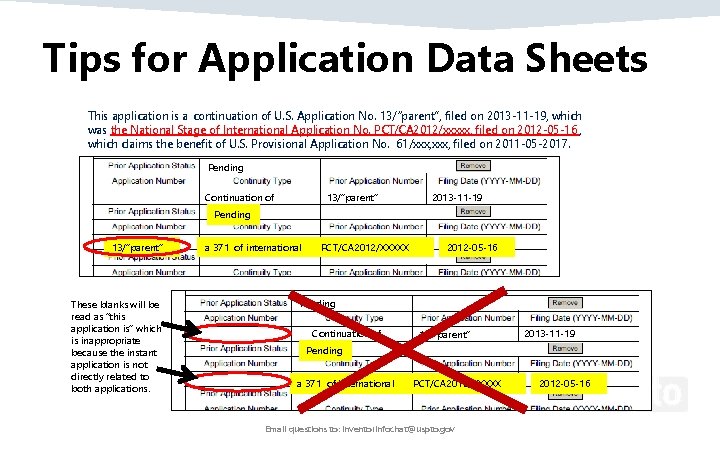
Tips for Application Data Sheets This application is a continuation of U. S. Application No. 13/“parent”, filed on 2013 -11 -19, which was the National Stage of International Application No. PCT/CA 2012/xxxxx, filed on 2012 -05 -16 , which claims the benefit of U. S. Provisional Application No. 61/xxx, filed on 2011 -05 -2017. Pending Continuation of 13/“parent” 2013 -11 -19 Pending 13/“parent” These blanks will be read as “this application is” which is inappropriate because the instant application is not directly related to both applications. a 371 of international PCT/CA 2012/XXXXX 2012 -05 -16 Pending Continuation of 13/”parent” 2013 -11 -19 Pending a 371 of international PCT/CA 2012/XXXXX Email questions to: inventorinfochat@uspto. gov 2012 -05 -16
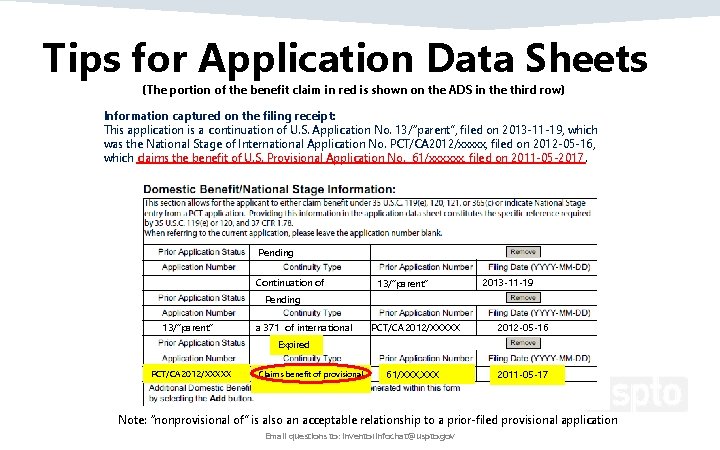
Tips for Application Data Sheets (The portion of the benefit claim in red is shown on the ADS in the third row) Information captured on the filing receipt: This application is a continuation of U. S. Application No. 13/“parent”, filed on 2013 -11 -19, which was the National Stage of International Application No. PCT/CA 2012/xxxxx, filed on 2012 -05 -16, which claims the benefit of U. S. Provisional Application No. 61/xxx, filed on 2011 -05 -2017. Pending Continuation of 13/“parent” 2013 -11 -19 Pending 13/“parent” a 371 of international PCT/CA 2012/XXXXX 2012 -05 -16 Expired PCT/CA 2012/XXXXX Claims benefit of provisional 61/XXX, XXX 2011 -05 -17 Note: “nonprovisional of” is also an acceptable relationship to a prior-filed provisional application Email questions to: inventorinfochat@uspto. gov
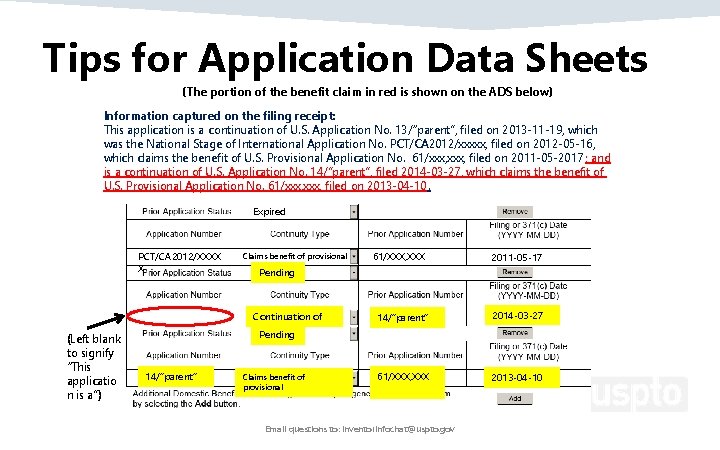
Tips for Application Data Sheets Where the application that you are filing includes more than one “chain” of domestic benefit claims, you can start a new chain by leaving the left box blank again to signify “This application is a. ” For example, the application that you are filing may be a continuation of two different earlier nonprovisional applications. The benefit claim information that is captured on the filing receipt would read as follows: Information captured on the filing receipt: This application is a continuation of U. S. Application No. 13/“parent”, filed on 2013 -11 -19, which was the National Stage of International Application No. PCT/CA 2012/xxxxx, filed on 2012 -05 -16, which claims the benefit of U. S. Provisional Application No. 61/xxx, filed on 2011 -05 -2017; and is a continuation of U. S. Application No. 14/”parent”, filed 2014 -03 -27, which claims the benefit of U. S. Provisional Application No. 61/xxx, filed on 2013 -04 -10. The next slide shows how the second benefit claim “chain” would be entered into the Application Data Sheet. Email questions to: inventorinfochat@uspto. gov
Tips for Application Data Sheets (The portion of the benefit claim in red is shown on the ADS below) Information captured on the filing receipt: This application is a continuation of U. S. Application No. 13/“parent”, filed on 2013 -11 -19, which was the National Stage of International Application No. PCT/CA 2012/xxxxx, filed on 2012 -05 -16, which claims the benefit of U. S. Provisional Application No. 61/xxx, filed on 2011 -05 -2017 ; and is a continuation of U. S. Application No. 14/”parent”, filed 2014 -03 -27, which claims the benefit of U. S. Provisional Application No. 61/xxx, filed on 2013 -04 -10. Expired PCT/CA 2012/XXXX X Claims benefit of provisional 2011 -05 -17 Pending Continuation of (Left blank to signify “This applicatio n is a”) 61/XXX, XXX 14/“parent” 2014 -03 -27 61/XXX, XXX 2013 -04 -10 Pending 14/“parent” Claims benefit of provisional Email questions to: inventorinfochat@uspto. gov
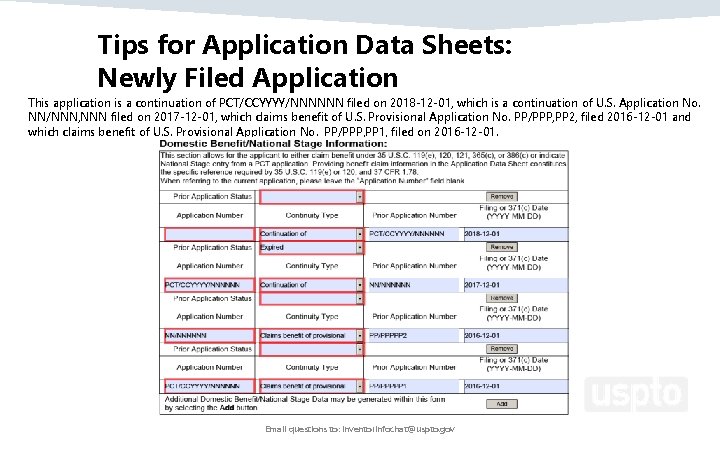
Tips for Application Data Sheets: Newly Filed Application This application is a continuation of PCT/CCYYYY/NNNNNN filed on 2018 -12 -01, which is a continuation of U. S. Application No. NN/NNN, NNN filed on 2017 -12 -01, which claims benefit of U. S. Provisional Application No. PP/PPP, PP 2, filed 2016 -12 -01 and which claims benefit of U. S. Provisional Application No. PP/PPP, PP 1, filed on 2016 -12 -01. Email questions to: inventorinfochat@uspto. gov
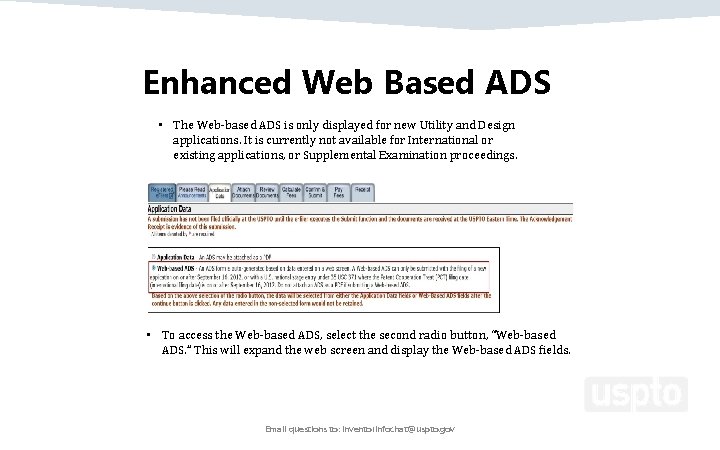
Enhanced Web Based ADS • The Web-based ADS is only displayed for new Utility and Design applications. It is currently not available for International or existing applications, or Supplemental Examination proceedings. • To access the Web-based ADS, select the second radio button, “Web-based ADS. ” This will expand the web screen and display the Web-based ADS fields. Email questions to: inventorinfochat@uspto. gov
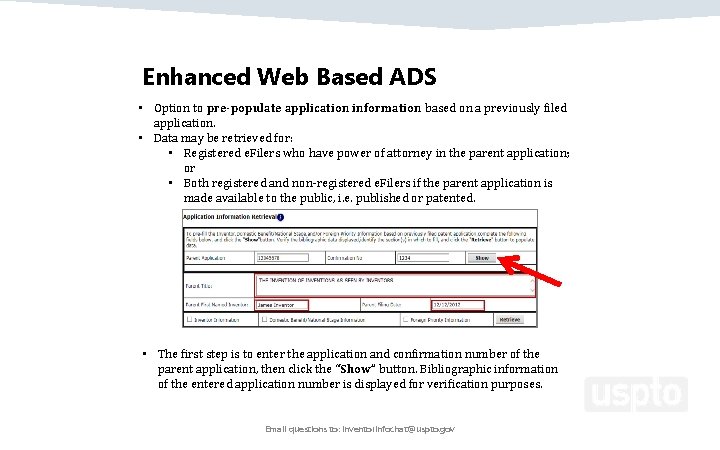
Enhanced Web Based ADS • Option to pre-populate application information based on a previously filed application. • Data may be retrieved for: • Registered e. Filers who have power of attorney in the parent application; or • Both registered and non-registered e. Filers if the parent application is made available to the public, i. e. published or patented. • The first step is to enter the application and confirmation number of the parent application, then click the “Show” button. Bibliographic information of the entered application number is displayed for verification purposes. Email questions to: inventorinfochat@uspto. gov
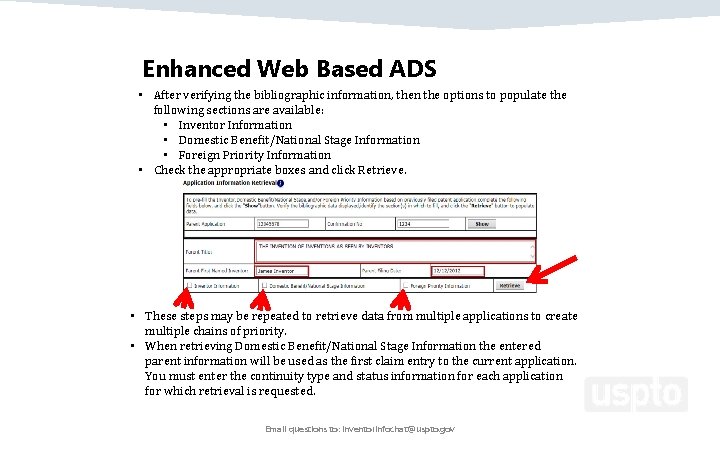
Enhanced Web Based ADS • After verifying the bibliographic information, then the options to populate the following sections are available: • Inventor Information • Domestic Benefit/National Stage Information • Foreign Priority Information • Check the appropriate boxes and click Retrieve. • These steps may be repeated to retrieve data from multiple applications to create multiple chains of priority. • When retrieving Domestic Benefit/National Stage Information the entered parent information will be used as the first claim entry to the current application. You must enter the continuity type and status information for each application for which retrieval is requested. Email questions to: inventorinfochat@uspto. gov
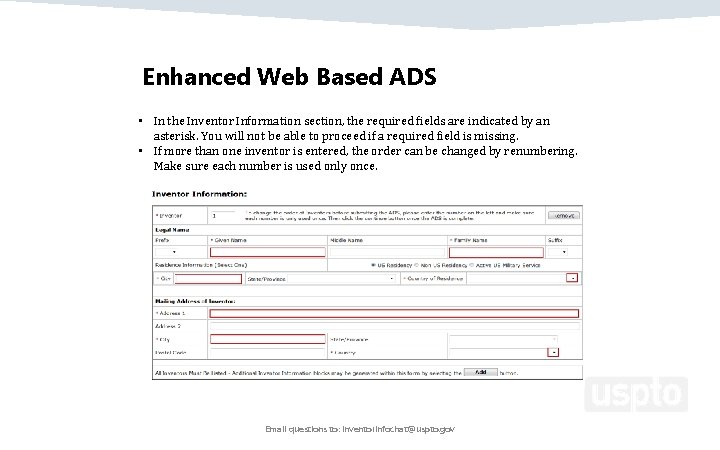
Enhanced Web Based ADS • In the Inventor Information section, the required fields are indicated by an asterisk. You will not be able to proceed if a required field is missing. • If more than one inventor is entered, the order can be changed by renumbering. Make sure each number is used only once. Email questions to: inventorinfochat@uspto. gov
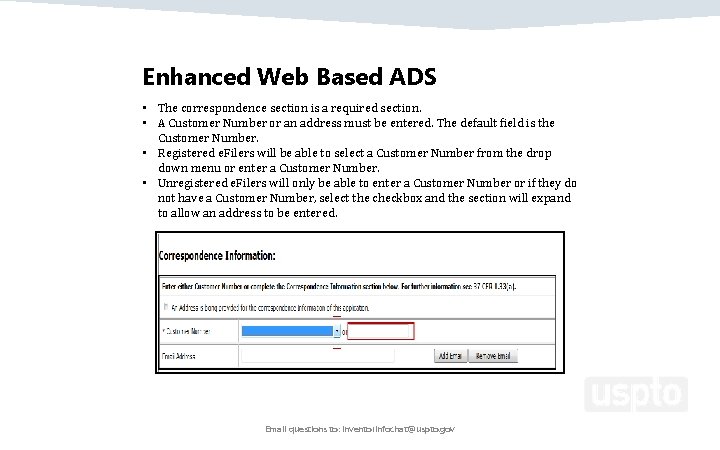
Enhanced Web Based ADS • The correspondence section is a required section. • A Customer Number or an address must be entered. The default field is the Customer Number. • Registered e. Filers will be able to select a Customer Number from the drop down menu or enter a Customer Number. • Unregistered e. Filers will only be able to enter a Customer Number or if they do not have a Customer Number, select the checkbox and the section will expand to allow an address to be entered. Email questions to: inventorinfochat@uspto. gov
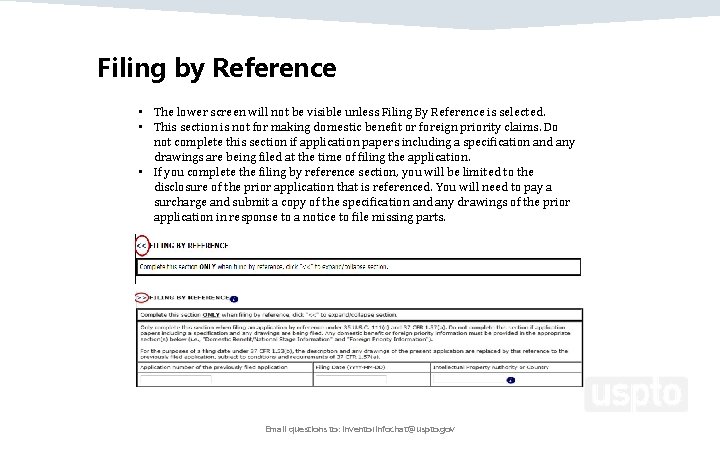
Filing by Reference • The lower screen will not be visible unless Filing By Reference is selected. • This section is not for making domestic benefit or foreign priority claims. Do not complete this section if application papers including a specification and any drawings are being filed at the time of filing the application. • If you complete the filing by reference section, you will be limited to the disclosure of the prior application that is referenced. You will need to pay a surcharge and submit a copy of the specification and any drawings of the prior application in response to a notice to file missing parts. Email questions to: inventorinfochat@uspto. gov
“Take Home” Ø Be sure to indicate the correct relationship and order of the domestic benefit applications listed on the ADS. If the order is incorrect, then the Office of Patent Application Processing (OPAP) may not accurately capture the entire benefit claim. ─ An example of an incorrect relationship is misidentifying a 111(a) CON as a 371 national stage entry of the PCT application, or vice versa ─ Another example is non-specific relationship identifiers (e. g. , “Continuing” is non-specific; must be Continuation, Divisional or CIP). Ø The order of the applications should be listed beginning from the instant application and continuing through the list of parents in reverse chronological order (newest to oldest). Email questions to: inventorinfochat@uspto. gov
“Take Home” Cont. Ø Do not the Filing by Reference section of the ADS unless you: ─ Absolutely intend to File by Reference, and ─ Are not filing a specification and drawings with your application papers. Ø Ensure that your ADS is properly signed. ─ If multiple inventors are the applicant, the ADS must be signed by all of them unless POA is given to one or more to sign for all (e. g. , PTO Form AIA/81) ─ If a juristic entity is named as the applicant in the Applicant Information section of the ADS, then the ADS must be signed by a patent practitioner. Email questions to: inventorinfochat@uspto. gov
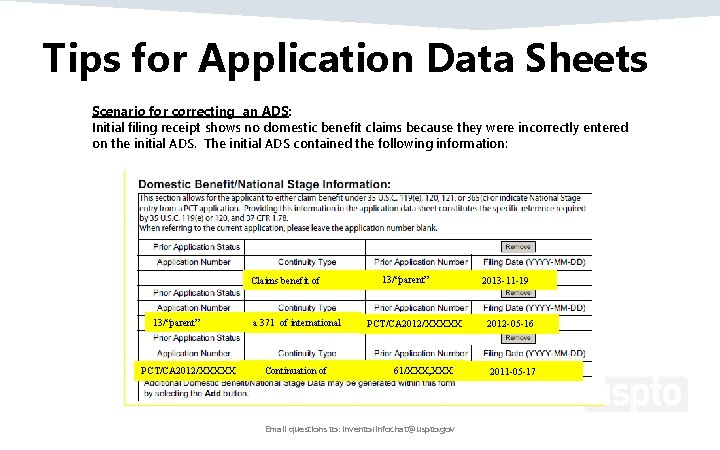
Tips for Application Data Sheets Scenario for correcting an ADS: Initial filing receipt shows no domestic benefit claims because they were incorrectly entered on the initial ADS. The initial ADS contained the following information: Claims benefit of 13/“parent” PCT/CA 2012/XXXXX a 371 of international Continuation of 13/“parent” PCT/CA 2012/XXXXX 61/XXX, XXX Email questions to: inventorinfochat@uspto. gov 2013 -11 -19 2012 -05 -16 2011 -05 -17
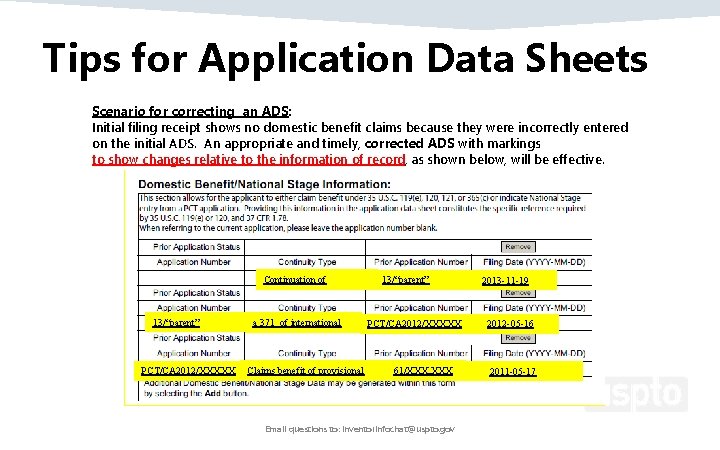
Tips for Application Data Sheets Scenario for correcting an ADS: Initial filing receipt shows no domestic benefit claims because they were incorrectly entered on the initial ADS. An appropriate and timely, corrected ADS with markings to show changes relative to the information of record, as shown below, will be effective. Continuation of 13/“parent” PCT/CA 2012/XXXXX a 371 of international Claims benefit of provisional 13/“parent” PCT/CA 2012/XXXXX 61/XXX, XXX Email questions to: inventorinfochat@uspto. gov 2013 -11 -19 2012 -05 -16 2011 -05 -17
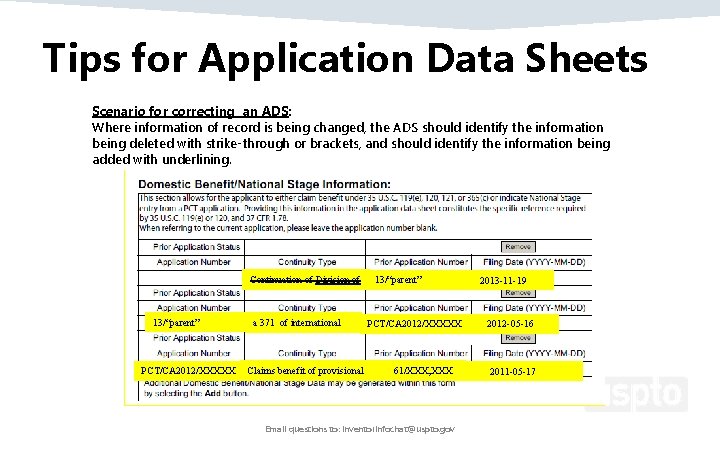
Tips for Application Data Sheets Scenario for correcting an ADS: Where information of record is being changed, the ADS should identify the information being deleted with strike-through or brackets, and should identify the information being added with underlining. Continuation of Division of 13/“parent” PCT/CA 2012/XXXXX a 371 of international Claims benefit of provisional 13/“parent” PCT/CA 2012/XXXXX 61/XXX, XXX Email questions to: inventorinfochat@uspto. gov 2013 -11 -19 2012 -05 -16 2011 -05 -17
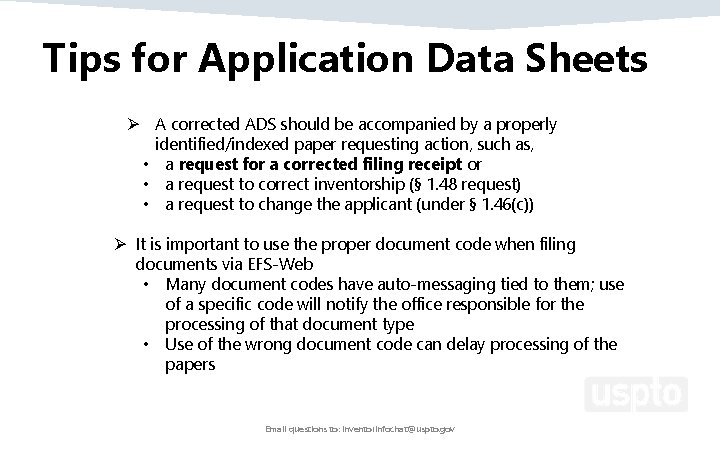
Tips for Application Data Sheets Ø A corrected ADS should be accompanied by a properly identified/indexed paper requesting action, such as, • a request for a corrected filing receipt or • a request to correct inventorship (§ 1. 48 request) • a request to change the applicant (under § 1. 46(c)) Ø It is important to use the proper document code when filing documents via EFS-Web • Many document codes have auto-messaging tied to them; use of a specific code will notify the office responsible for the processing of that document type • Use of the wrong document code can delay processing of the papers Email questions to: inventorinfochat@uspto. gov
Upcoming OID Events • July 19 – Inventor Info Chat: Options for Foreign Filing Including PCT • August 17 -18, 2018 – Invention Con – Concept to Commericalization • For more information or to register for any of the above events contact us at oidevents@uspto. gov https: //www. uspto. gov/patents-applicationprocess/inventor-info-chat Email questions to: inventorinfochat@uspto. gov 37
Thank You! Send your questions to: inventorinfochat@uspto. gov Presented By: To inquire about OID services please contact us at: Innovation. Development@uspto. gov 1. 866. 767. 3848 Janice Tippett and Terry Dey Office of Patent Application Processing (OPAP) Email questions to: inventorinfochat@uspto. gov 38