
Understanding Storage Systems and SQL Server Wes Brown
Understanding Storage Systems and SQL Server Wes Brown #58 HOUSTON
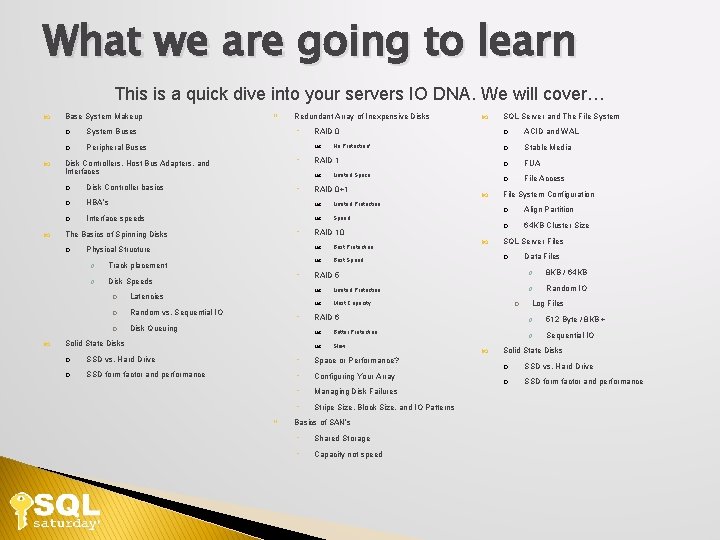
What we are going to learn This is a quick dive into your servers IO DNA. We will cover… Base System Makeup System Buses Peripheral Buses Disk Controllers, Host Bus Adapters, and Interfaces Redundant Array of Inexpensive Disks ACID and WAL Stable Media ◦ RAID 1 FUA File Access No Protection! Limited Space Disk Controller basics HBA’s Limited Protection Interface speeds Speed ◦ ◦ Physical Structure Track placement Disk Speeds Latencies Random vs. Sequential IO Disk Queuing ◦ ◦ Solid State Disks RAID 0+1 RAID 10 Best Protection Best Speed File System Configuration Align Partition 64 KB Cluster Size SQL Server Files Data Files RAID 5 8 KB / 64 KB Limited Protection Random IO Most Capacity RAID 6 Better Protection Slow SSD vs. Hard Drive ◦ Space or Performance? SSD form factor and performance ◦ Configuring Your Array ◦ Managing Disk Failures ◦ Stripe Size, Block Size, and IO Patterns SQL Server and The File System RAID 0 The Basics of Spinning Disks ◦ Basics of SAN’s ◦ Shared Storage ◦ Capacity not speed Log Files 512 Byte / 8 KB + Sequential IO Solid State Disks SSD vs. Hard Drive SSD form factor and performance
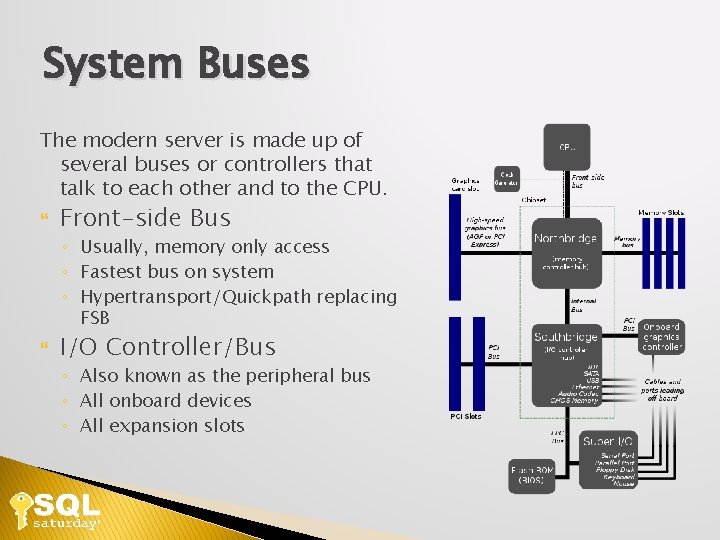
System Buses The modern server is made up of several buses or controllers that talk to each other and to the CPU. Front-side Bus ◦ Usually, memory only access ◦ Fastest bus on system ◦ Hypertransport/Quickpath replacing FSB I/O Controller/Bus ◦ Also known as the peripheral bus ◦ All onboard devices ◦ All expansion slots
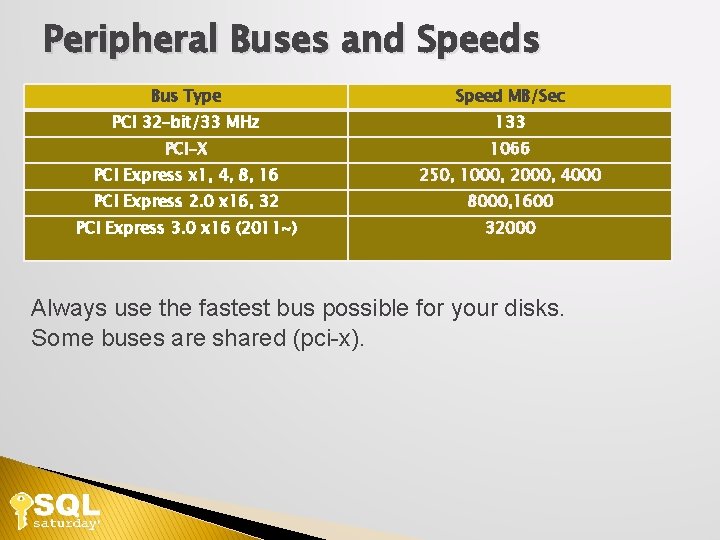
Peripheral Buses and Speeds Bus Type Speed MB/Sec PCI 32 -bit/33 MHz 133 PCI-X 1066 PCI Express x 1, 4, 8, 16 250, 1000, 2000, 4000 PCI Express 2. 0 x 16, 32 8000, 1600 PCI Express 3. 0 x 16 (2011~) 32000 Always use the fastest bus possible for your disks. Some buses are shared (pci-x).

Disk Controllers, Host Bus Adapters, and Interfaces ◦ ◦ Drive caches 2 MB to 64 MB+ Adaptive Segmentation Pre-Fetch RAID Host Bus Adapters Read caching Write caching !WARNING! Hardened writes Pay now or pay later Writes take precedence over reads 16 GB buffer pool vs. 256 MB IO cache, you do the math
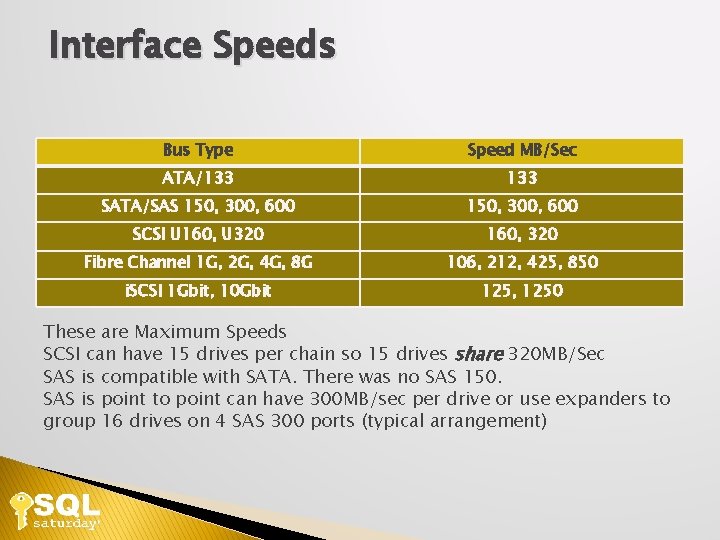
Interface Speeds Bus Type Speed MB/Sec ATA/133 SATA/SAS 150, 300, 600 SCSI U 160, U 320 160, 320 Fibre Channel 1 G, 2 G, 4 G, 8 G 106, 212, 425, 850 i. SCSI 1 Gbit, 10 Gbit 125, 1250 These are Maximum Speeds SCSI can have 15 drives per chain so 15 drives share 320 MB/Sec SAS is compatible with SATA. There was no SAS 150. SAS is point to point can have 300 MB/sec per drive or use expanders to group 16 drives on 4 SAS 300 ports (typical arrangement)

Hard Drives Six hard disk drives with cases opened showing platters and heads; 8, 5. 25, 3. 5, 2. 5, 1. 8, and 1 inch disk diameters are represented. Author Paul R. Potts
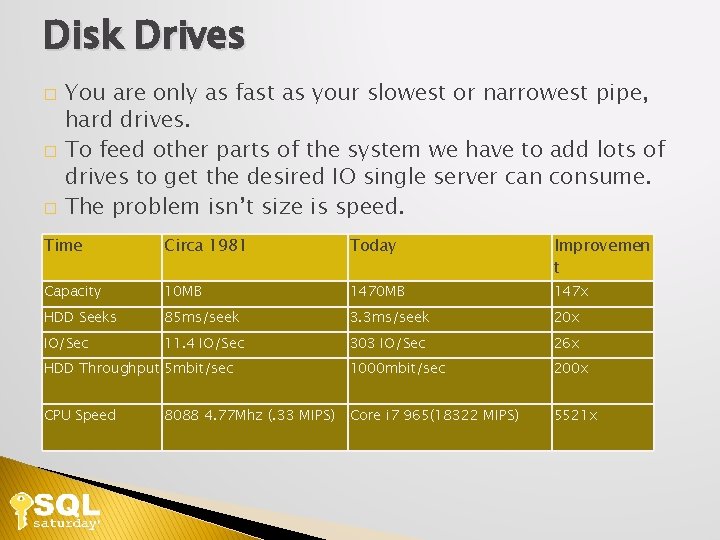
Disk Drives You are only as fast as your slowest or narrowest pipe, hard drives. � To feed other parts of the system we have to add lots of drives to get the desired IO single server can consume. � The problem isn’t size is speed. � Time Circa 1981 Today Improvemen t Capacity 10 MB 147 x HDD Seeks 85 ms/seek 3. 3 ms/seek 20 x IO/Sec 11. 4 IO/Sec 303 IO/Sec 26 x HDD Throughput 5 mbit/sec 1000 mbit/sec 200 x CPU Speed Core i 7 965(18322 MIPS) 5521 x 8088 4. 77 Mhz (. 33 MIPS)
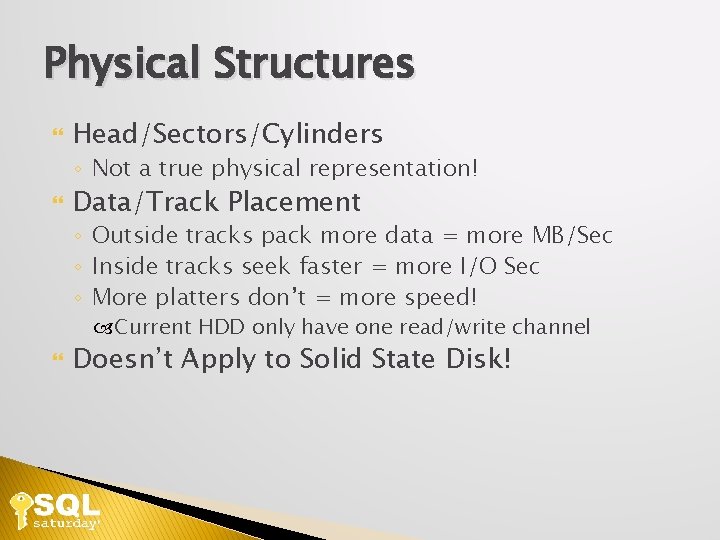
Physical Structures Head/Sectors/Cylinders ◦ Not a true physical representation! Data/Track Placement ◦ Outside tracks pack more data = more MB/Sec ◦ Inside tracks seek faster = more I/O Sec ◦ More platters don’t = more speed! Current HDD only have one read/write channel Doesn’t Apply to Solid State Disk!
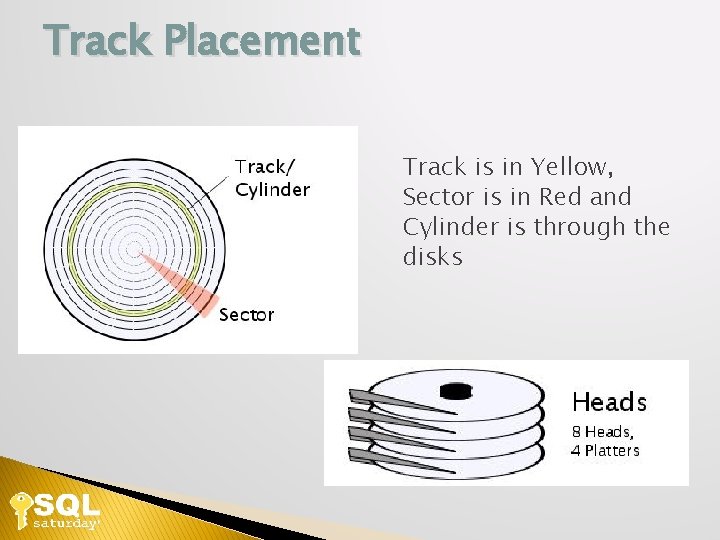
Track Placement Track is in Yellow, Sector is in Red and Cylinder is through the disks
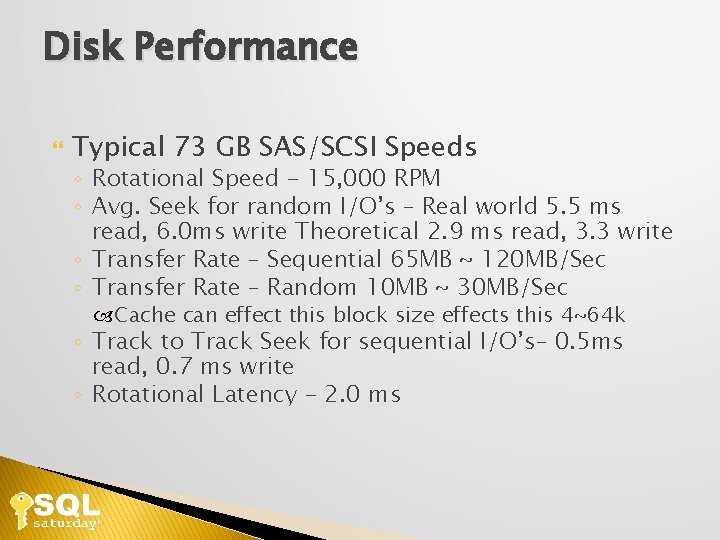
Disk Performance Typical 73 GB SAS/SCSI Speeds ◦ Rotational Speed - 15, 000 RPM ◦ Avg. Seek for random I/O’s – Real world 5. 5 ms read, 6. 0 ms write Theoretical 2. 9 ms read, 3. 3 write ◦ Transfer Rate – Sequential 65 MB ~ 120 MB/Sec ◦ Transfer Rate – Random 10 MB ~ 30 MB/Sec Cache can effect this block size effects this 4~64 k ◦ Track to Track Seek for sequential I/O’s– 0. 5 ms read, 0. 7 ms write ◦ Rotational Latency - 2. 0 ms
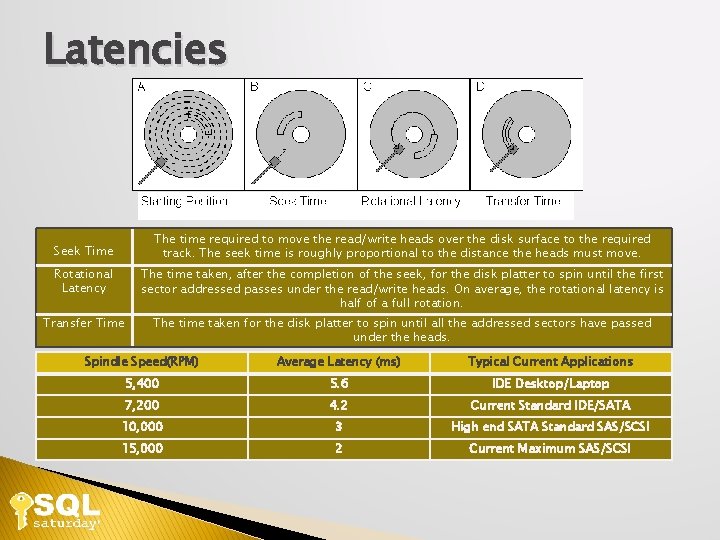
Latencies The time required to move the read/write heads over the disk surface to the required track. The seek time is roughly proportional to the distance the heads must move. Seek Time Rotational Latency The time taken, after the completion of the seek, for the disk platter to spin until the first sector addressed passes under the read/write heads. On average, the rotational latency is half of a full rotation. Transfer Time The time taken for the disk platter to spin until all the addressed sectors have passed under the heads. Spindle Speed(RPM) Average Latency (ms) Typical Current Applications 5, 400 5. 6 IDE Desktop/Laptop 7, 200 4. 2 Current Standard IDE/SATA 10, 000 3 High end SATA Standard SAS/SCSI 15, 000 2 Current Maximum SAS/SCSI
![Calculating Max Random Seeks/Sec Maximum Random Seeks / sec 1000 / (seek time[ms] +](http://slidetodoc.com/presentation_image_h2/db42d6a805d550bdd5a0e1a78539ee78/image-13.jpg "Calculating Max Random Seeks/Sec Maximum Random Seeks / sec 1000 / (seek time[ms] +")
Calculating Max Random Seeks/Sec Maximum Random Seeks / sec 1000 / (seek time[ms] + latency[ms])= IOps 1000 / (2. 9+2. 0) = 204 Reads/Sec 1000 /(3. 3+2. 0) = 188 Writes/Sec Queuing effects latency!
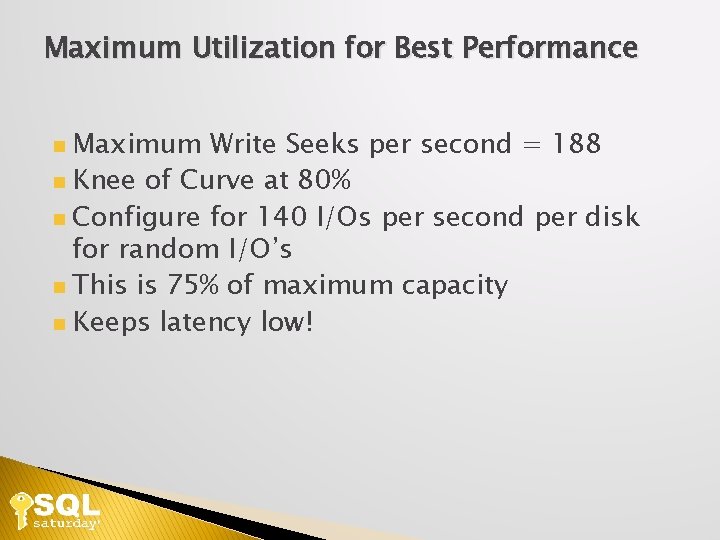
Maximum Utilization for Best Performance Maximum Write Seeks per second = 188 Knee of Curve at 80% Configure for 140 I/Os per second per disk for random I/O’s This is 75% of maximum capacity Keeps latency low!
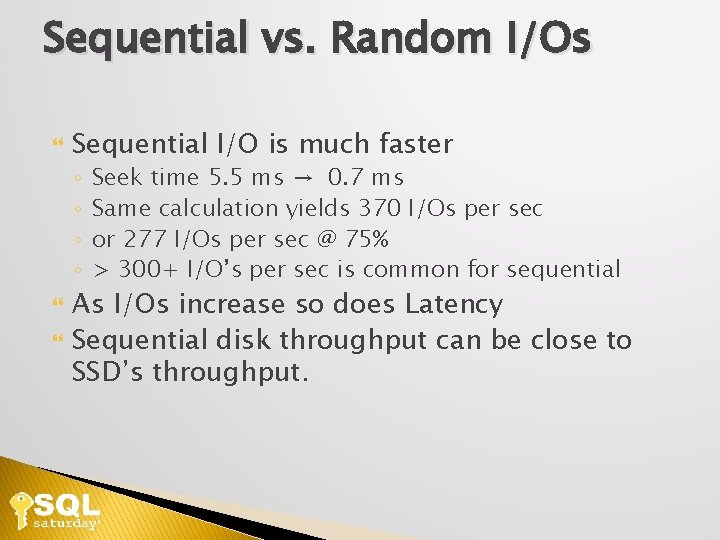
Sequential vs. Random I/Os Sequential I/O is much faster ◦ ◦ Seek time 5. 5 ms → 0. 7 ms Same calculation yields 370 I/Os per sec or 277 I/Os per sec @ 75% > 300+ I/O’s per sec is common for sequential As I/Os increase so does Latency Sequential disk throughput can be close to SSD’s throughput.
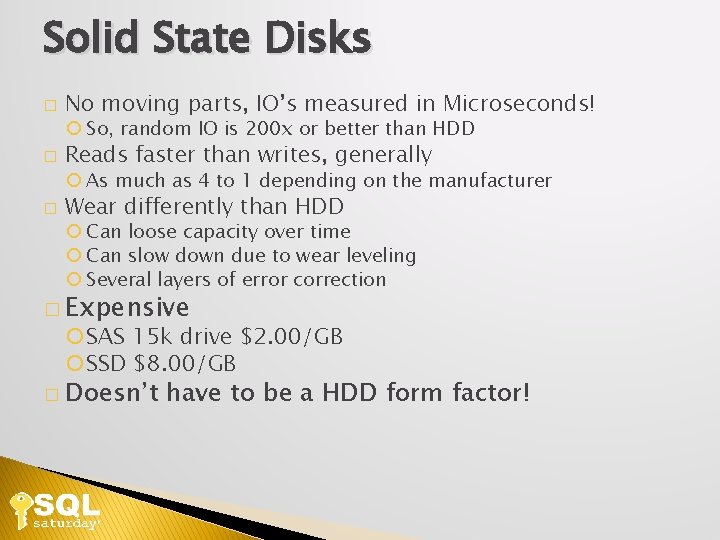
Solid State Disks � No moving parts, IO’s measured in Microseconds! So, random IO is 200 x or better than HDD � Reads faster than writes, generally As much as 4 to 1 depending on the manufacturer � Wear differently than HDD Can loose capacity over time Can slow down due to wear leveling Several layers of error correction � Expensive SAS 15 k drive $2. 00/GB SSD $8. 00/GB � Doesn’t have to be a HDD form factor!
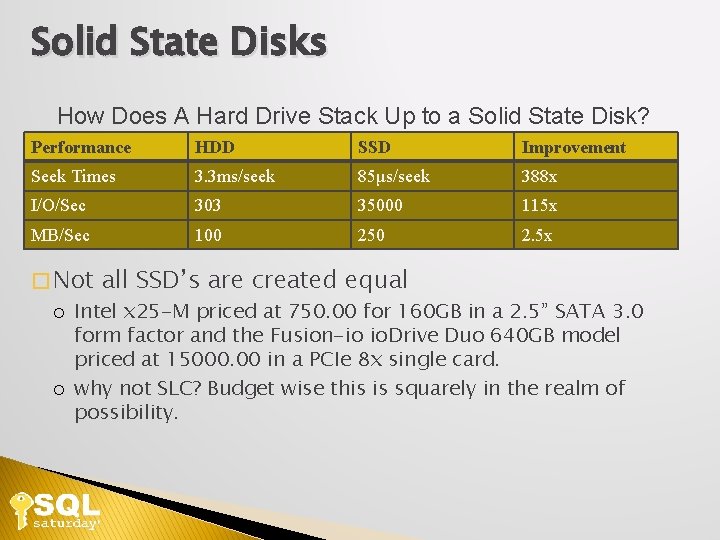
Solid State Disks How Does A Hard Drive Stack Up to a Solid State Disk? Performance HDD SSD Improvement Seek Times 3. 3 ms/seek 85μs/seek 388 x I/O/Sec 303 35000 115 x MB/Sec 100 250 2. 5 x � Not all SSD’s are created equal Intel x 25 -M priced at 750. 00 for 160 GB in a 2. 5” SATA 3. 0 form factor and the Fusion-io io. Drive Duo 640 GB model priced at 15000. 00 in a PCIe 8 x single card. why not SLC? Budget wise this is squarely in the realm of possibility.
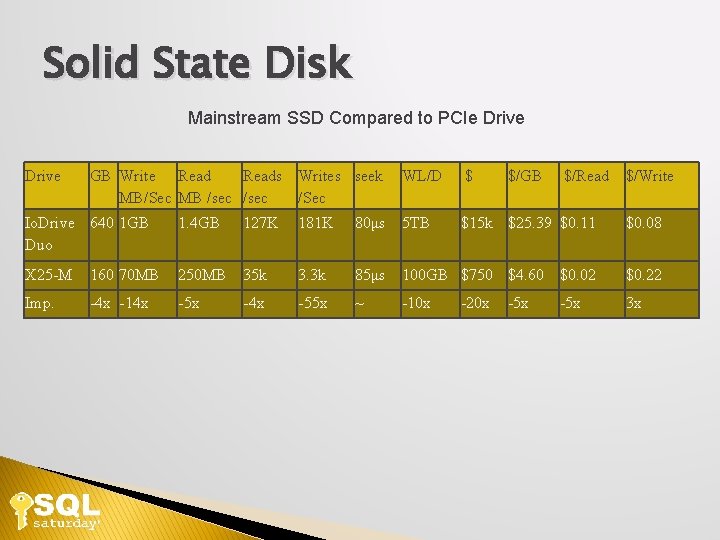
Solid State Disk Mainstream SSD Compared to PCIe Drive GB Write Reads Writes seek MB/Sec MB /sec /Sec WL/D $ $/GB $/Read $/Write Io. Drive 640 1 GB Duo 1. 4 GB 127 K 181 K 80μs 5 TB $15 k $25. 39 $0. 11 $0. 08 X 25 -M 160 70 MB 250 MB 35 k 3. 3 k 85μs 100 GB $750 $4. 60 $0. 02 $0. 22 Imp. -4 x -14 x -5 x -4 x -55 x ~ -10 x 3 x -20 x -5 x
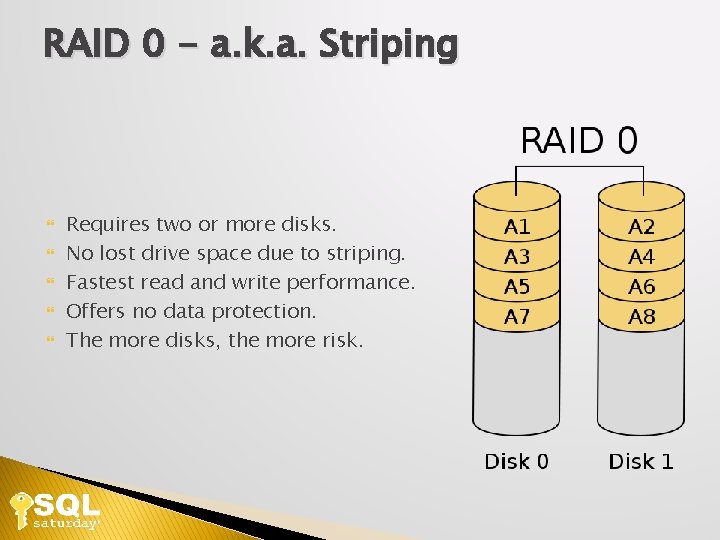
RAID 0 - a. k. a. Striping Requires two or more disks. No lost drive space due to striping. Fastest read and write performance. Offers no data protection. The more disks, the more risk.
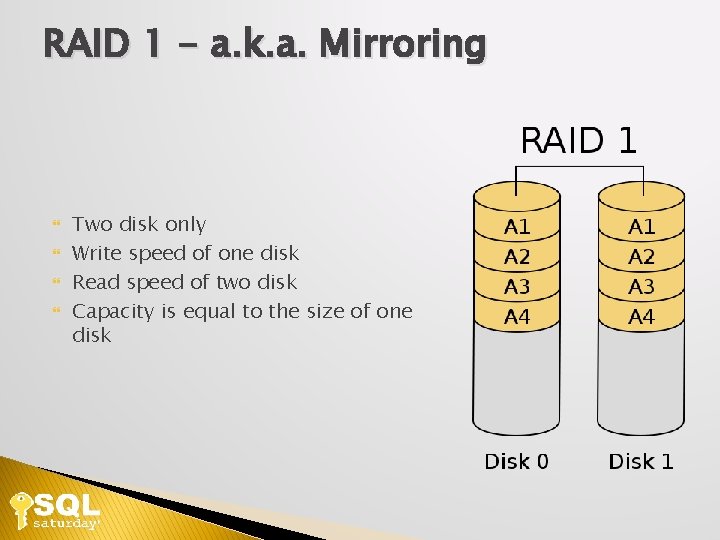
RAID 1 - a. k. a. Mirroring Two disk only Write speed of one disk Read speed of two disk Capacity is equal to the size of one disk
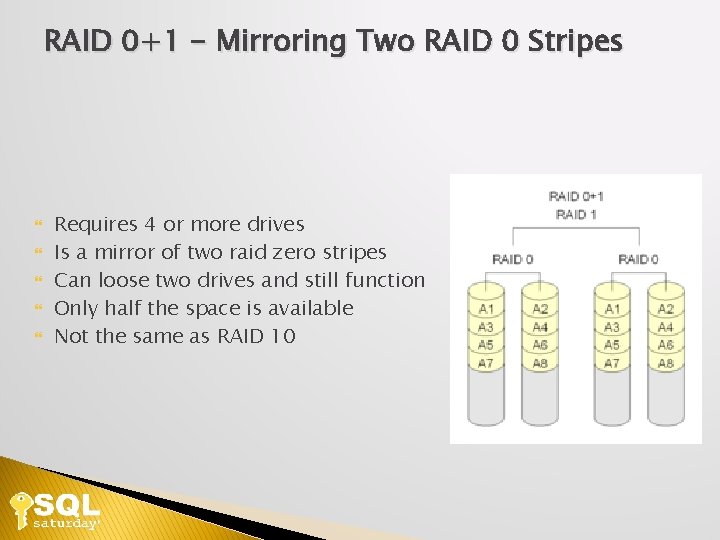
RAID 0+1 - Mirroring Two RAID 0 Stripes Requires 4 or more drives Is a mirror of two raid zero stripes Can loose two drives and still function Only half the space is available Not the same as RAID 10
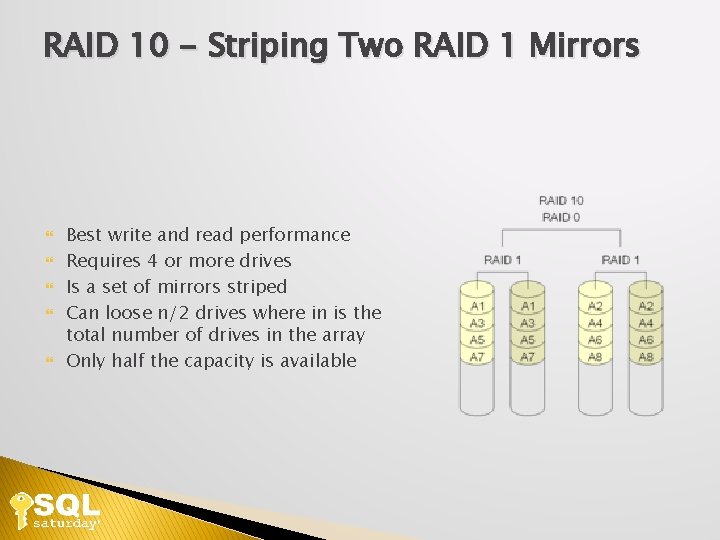
RAID 10 - Striping Two RAID 1 Mirrors Best write and read performance Requires 4 or more drives Is a set of mirrors striped Can loose n/2 drives where in is the total number of drives in the array Only half the capacity is available
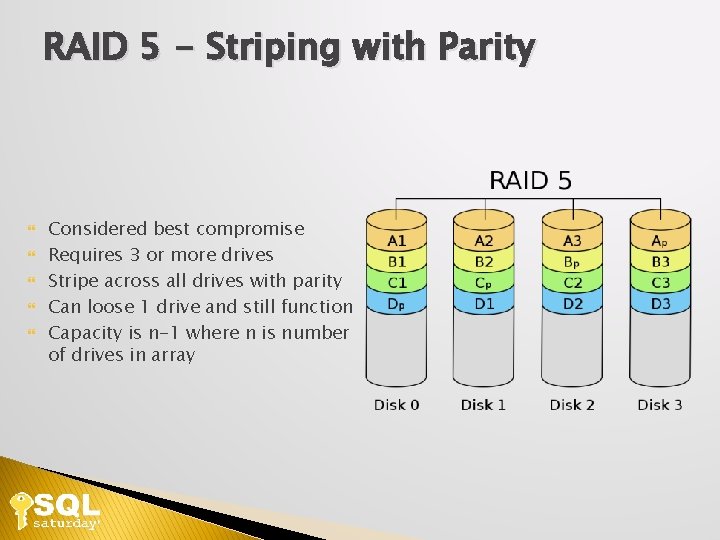
RAID 5 - Striping with Parity Considered best compromise Requires 3 or more drives Stripe across all drives with parity Can loose 1 drive and still function Capacity is n-1 where n is number of drives in array
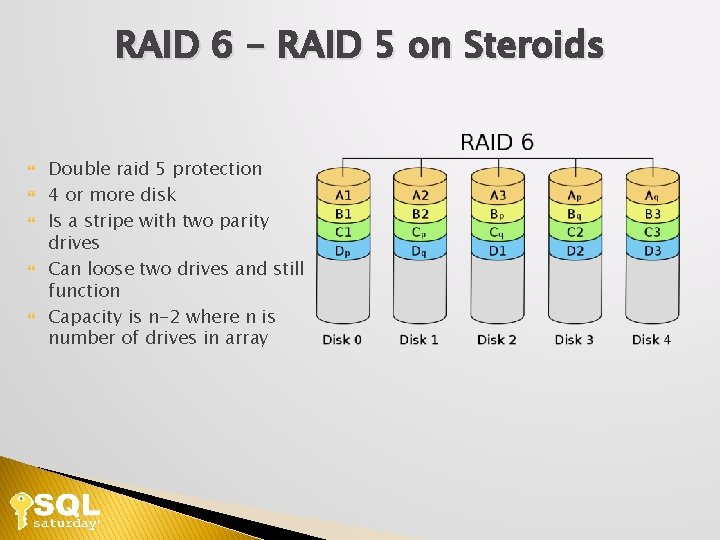
RAID 6 - RAID 5 on Steroids Double raid 5 protection 4 or more disk Is a stripe with two parity drives Can loose two drives and still function Capacity is n-2 where n is number of drives in array
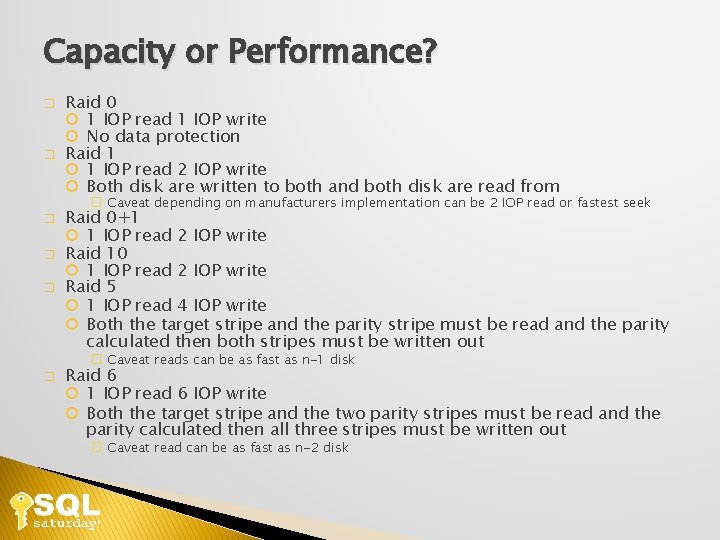
Capacity or Performance? � � � Raid 0 1 IOP read 1 IOP write No data protection Raid 1 1 IOP read 2 IOP write Both disk are written to both and both disk are read from � Caveat depending on manufacturers implementation can be 2 IOP read or fastest seek Raid 0+1 1 IOP read 2 IOP write Raid 10 1 IOP read 2 IOP write Raid 5 1 IOP read 4 IOP write Both the target stripe and the parity stripe must be read and the parity calculated then both stripes must be written out � Caveat reads can be as fast as n-1 disk � Raid 6 1 IOP read 6 IOP write Both the target stripe and the two parity stripes must be read and the parity calculated then all three stripes must be written out � Caveat read can be as fast as n-2 disk
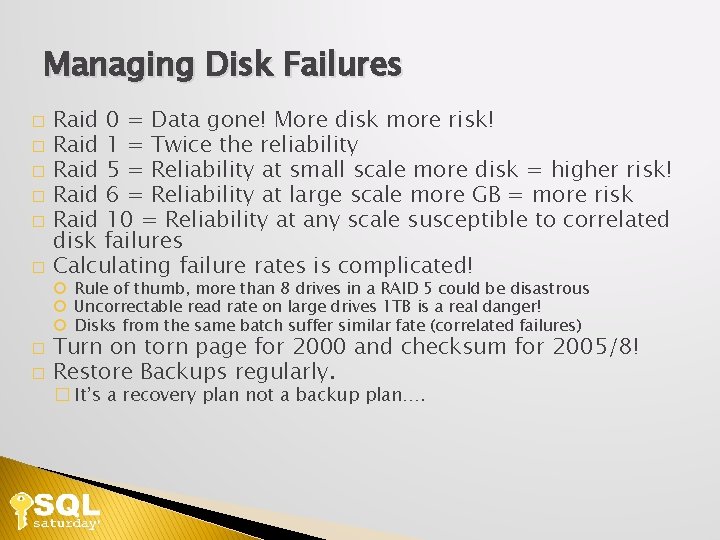
Managing Disk Failures Raid 0 = Data gone! More disk more risk! � Raid 1 = Twice the reliability � Raid 5 = Reliability at small scale more disk = higher risk! � Raid 6 = Reliability at large scale more GB = more risk � Raid 10 = Reliability at any scale susceptible to correlated disk failures � Calculating failure rates is complicated! � Rule of thumb, more than 8 drives in a RAID 5 could be disastrous Uncorrectable read rate on large drives 1 TB is a real danger! Disks from the same batch suffer similar fate (correlated failures) Turn on torn page for 2000 and checksum for 2005/8! � Restore Backups regularly. � � It’s a recovery plan not a backup plan….
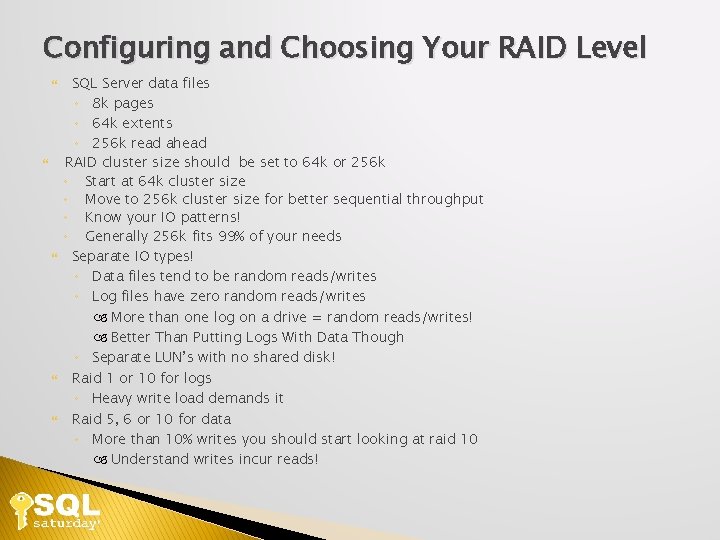
Configuring and Choosing Your RAID Level SQL Server data files ◦ 8 k pages ◦ 64 k extents ◦ 256 k read ahead RAID cluster size should be set to 64 k or 256 k ◦ Start at 64 k cluster size ◦ Move to 256 k cluster size for better sequential throughput ◦ Know your IO patterns! ◦ Generally 256 k fits 99% of your needs Separate IO types! ◦ Data files tend to be random reads/writes ◦ Log files have zero random reads/writes More than one log on a drive = random reads/writes! Better Than Putting Logs With Data Though ◦ Separate LUN’s with no shared disk! Raid 1 or 10 for logs ◦ Heavy write load demands it Raid 5, 6 or 10 for data ◦ More than 10% writes you should start looking at raid 10 Understand writes incur reads!
Stripe Size, Block Size, and IO Patterns Physical disk sectors 512, 4096 ◦ Can’t restore or attach larger sector size on a smaller sector size disk. 1024 can go on a 512 but not 512 on a 1024 ◦ Be aware of possible performance penalties It doesn’t add up ◦ 10 drives at 80 MB/sec != 800 MB/sec ◦ Rule of thumb 15 MB/sec per drive RAID Array Configuration ◦ Stripe size and IO request size determine throughput ◦ Small stripes + large IO request = split IO’s ◦ SQL Server works mostly in 8 K and 64 K blocks
SAN Basics Storage Area Network ◦ ◦ ◦ Essentially a specialized computer system Specialized network using Fibre Channel or Ethernet Great for redundancy or clustering Focused on storage consolidation not storage speed NAS is not a SAN! Internal Disk Configuration ◦ Disks are broken up into slices ◦ Slices are grouped into Logical Unit Numbers (LUNs) These are presented as volumes to your host ◦ Size for IO loads not disk space! ◦ Don’t share your disks with other applications like Exchange You and your Exchange admin will both be very sad ◦ Watch for hot spots
SQL Server and The File System � ACID and WAL ACID (Atomicity, Consistency, Isolation, and Durability) is what makes our database reliable. The ability to recover from a catastrophic failure is key to protecting your data. WAL (Write-Ahead Logging) is how ACID is achieved. Basically, the log record must be flushed to disk before the data file is modified. � Stable Media Stable media isn’t just the disk drive. A controller with a battery backed cache is also considered stable. � FUA (Forced Unit Access) FILE_FLAG_WRITETHROUGH tells the underlying OS not to use write caching that isn’t considered stable media. FILE_FLAG_NO_BUFFERING tells the OS not to buffer the file ether. At this point the only cache available will be the battery backed or other durable cached on the controller. � File Access SQL Server uses asynchronous access for data and log files. SQL Server will try and gather writes to the data file into bigger blocks but the log is always written to sequentially. All of these rules apply to everything but tempdb. Since tempdb is recreated at restart every time recoverability isn’t an issue.
SQL Server and The File System � � � Format data partitions to 64 k cluster size for performance. SQL Server reads in 64 k chunks if possible Sector alignment to prevent split I/O’s MBR occupies the first 63 sectors leaving your partition starting on the 64 th � Use diskpar (windows 2000/2003 pre sp 1) � Use diskpart (windows 2003 sp 1 or greater) � Windows 2008 aligns out of the box on 1 MB � Disk defrag will not fix this! � Full partition format will not fix this!
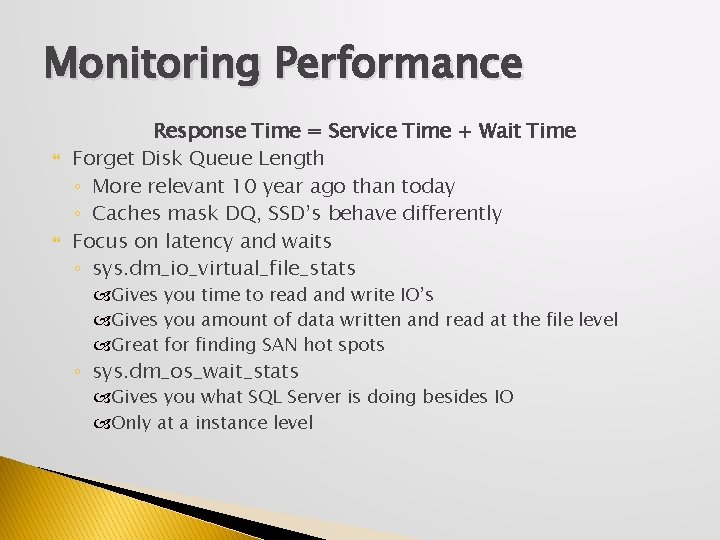
Monitoring Performance Response Time = Service Time + Wait Time Forget Disk Queue Length ◦ More relevant 10 year ago than today ◦ Caches mask DQ, SSD’s behave differently Focus on latency and waits ◦ sys. dm_io_virtual_file_stats Gives you time to read and write IO’s Gives you amount of data written and read at the file level Great for finding SAN hot spots ◦ sys. dm_os_wait_stats Gives you what SQL Server is doing besides IO Only at a instance level

QUESTIONS?
SQL Saturday #57 Houston Understanding Storage Systems and SQL Server Wesley Brown wes@planetarydb. com Twitter @Wes. Brown. SQL Blog http: //www. sqlserverio. com http: //www. wesworld. net/raidcalculator. html
- Slides: 34