
Understanding Mesh Ethernet Bridging What does it accomplish

Understanding Mesh Ethernet Bridging • • What does it accomplish? Allows bridging multiple wired ethernets together via Wireless Mesh backhaul links • • • Typical uses: Bridging a remote building’s wired network to a primary site’s Video cameras or surveillance devices (wired) connected directly to Maps’ ethernet ports Key Terms: • Backhaul: Path toward the WLC. May be wired (in the case of a Rap) or wireless (in the case of a Map) • Rap: Root Access Point, wired connection with path to WLC (backhaul) • Map: Mesh Access Point, no wired connection with path to WLC (backhaul). May optionally have wired connection to end node (such as a video camera) or remote switch (‘remote’ with respect to the backhaul path to the WLC • Vlan Transparent: ‘Legacy’ method for ethernet bridging. VLAN tags are not handled and packets are bridged as untagged packets. This is typically not used. Is enabled by default for backward compatibility • Ethernet Vlan Tagging: Ethernet bridging with vlan tagging functionality. Useful for trunking multiple vlans to remote switches connected to Maps’ ethernet ports. • Native Vlan: Untagged vlan on a trunk. Vlan 1 by default on Cisco switches.

Mesh Ethernet Bridging Configuration Steps and Notes 1) Configure Rap’s and Maps, verify Mesh adjacencies We won’t go into much detail as the focus of this document is Mesh Ethernet Bridging. Refer to these documents for basic mesh configuration reference: 7. 0. 116 Mesh Config Guide: http: //www. cisco. com/en/US/docs/wireless/controller/7. 0 MR 1/configuration/guide/cg_mesh. html 7. 0 Mesh Deployment Guide: http: //www. cisco. com/en/US/docs/wireless/technology/mesh/7. 0/design/guide/Mesh. AP_70. html 2) Decide if Vlan Transparent or Vlan Tagging is more appropriate If there is no need to pass multiple vlans over the mesh backhaul, keep it simple. Use Vlan Transparent. The only additional configuration needed is to confirm that Vlan Transparent is enabled (which it is by default), then enable Ethernet Bridging on all of the Rap’s and Map’s in the sector. In most deployments there is a need to pass multiple vlans over the mesh backhaul, so Vlan Tagging should be chosen.

Mesh Ethernet Bridging Configuration Steps and Notes 3 a) Vlan Transparent Verify that Vlan Transparent is enabled: Enable Ethernet Bridging on all relevant Rap’s and Map’s: With simply the above configs, whatever untagged traffic is received on the Rap’s or Map’s ports will be bridged across the backhaul. For example, if both the Rap’s and Map’s switch ports are assigned to access mode vlan 1, all traffic will be bridged. Assuming that both switches have vlan 1 interfaces, you should be able to ping between the two.
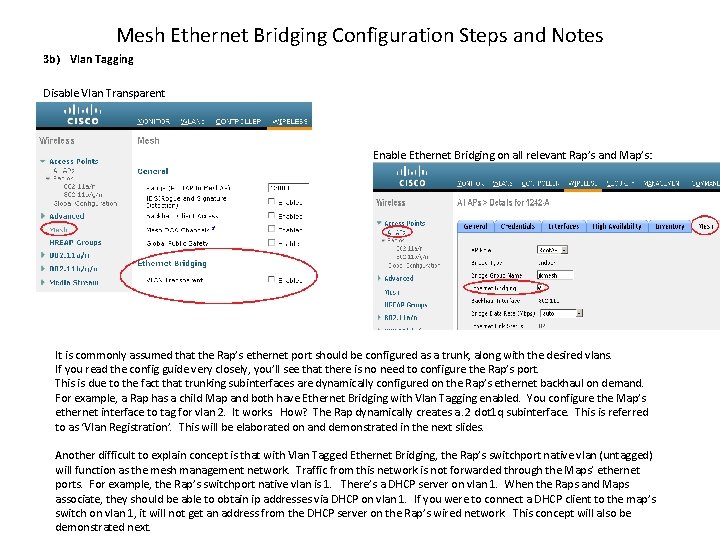
Mesh Ethernet Bridging Configuration Steps and Notes 3 b) Vlan Tagging Disable Vlan Transparent Enable Ethernet Bridging on all relevant Rap’s and Map’s: It is commonly assumed that the Rap’s ethernet port should be configured as a trunk, along with the desired vlans. If you read the config guide very closely, you’ll see that there is no need to configure the Rap’s port. This is due to the fact that trunking subinterfaces are dynamically configured on the Rap’s ethernet backhaul on demand. For example, a Rap has a child Map and both have Ethernet Bridging with Vlan Tagging enabled. You configure the Map’s ethernet interface to tag for vlan 2. It works. How? The Rap dynamically creates a. 2 dot 1 q subinterface. This is referred to as ‘Vlan Registration’. This will be elaborated on and demonstrated in the next slides. Another difficult to explain concept is that with Vlan Tagged Ethernet Bridging, the Rap’s switchport native vlan (untagged) will function as the mesh management network. Traffic from this network is not forwarded through the Maps’ ethernet ports. For example, the Rap’s switchport native vlan is 1. There’s a DHCP server on vlan 1. When the Raps and Maps associate, they should be able to obtain ip addresses via DHCP on vlan 1. If you were to connect a DHCP client to the map’s switch on vlan 1, it will not get an address from the DHCP server on the Rap’s wired network. This concept will also be demonstrated next.

Working Mesh Ethernet Bridging Configuration and Verification 802. 11 a 5 Ghz radio RAP Jk 1242 -1 1. 1. 1. 66 Jk 1242 -2 1. 1. 1. 64 Fas 0 001 d. a 1 cd. db 98 Fas 0 001 d. a 1 cd. daf 0 interface Fast. Ethernet 0/8 switchport trunk encap dot 1 q switchport trunk allowed vlan 1 -3 switchport mode trunk Fas 0/8 Vlan 1 1. 11 Vlan 2 2. 2. 2. 11 Vlan 3 3. 3. 3. 11 Jk-3650 -1 (DHCP Server) interface Fast. Ethernet 0/1 switchport trunk encap dot 1 q switchport trunk allowed vlan 1 -3 switchport mode trunk Mgmt 1. 111 WLC-2106 Tested with 5. 2. 193 And 6. 0. 199. 4 Client traffic can’t use RAP’s Switchport native vlan Gig 0/9 jk-3560 -1#show interfaces trunk Port Mode Encap Native vlan Fa 0/1 on 802. 1 q 1 Fa 0/8 on 802. 1 q 1 Fas 0/1 Port 1 MAP Jk-3650 -2 Gig 0/24 Vlan 2 2. 2. 2. 16 interface Gigabit. Ethernet 0/9 switchport trunk encap dot 1 q switchport trunk native vlan 2 switchport trunk allowed vlan 2 -3 switchport mode trunk Gig 0/23 Vlan 3 3. 3. 3. 2
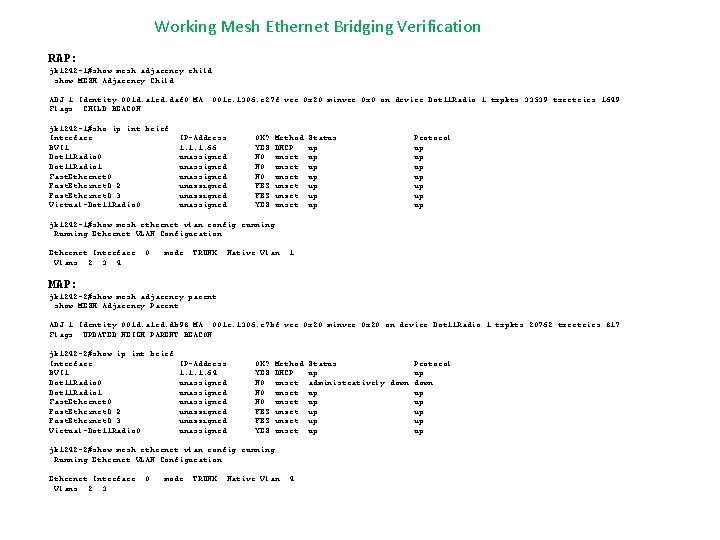
Working Mesh Ethernet Bridging Verification RAP: jk 1242 -1#show mesh adjacency child show MESH Adjacency Child ADJ 1 Identity 001 d. a 1 cd. daf 0 MA: 001 e. 1306. e 27 f ver 0 x 20 minver 0 x 0 on device Dot 11 Radio: 1 txpkts 33539 txretries 1649 Flags: CHILD BEACON jk 1242 -1#sho ip int brief Interface BVI 1 Dot 11 Radio 0 Dot 11 Radio 1 Fast. Ethernet 0. 2 Fast. Ethernet 0. 3 Virtual-Dot 11 Radio 0 IP-Address 1. 1. 1. 66 unassigned unassigned OK? YES NO NO NO YES YES Method DHCP unset unset Status up up Protocol up up jk 1242 -1#show mesh ethernet vlan config running Running Ethernet VLAN Configuration Ethernet Interface: 0 Vlans: 2 3 4 mode: TRUNK Native Vlan: 1 MAP: jk 1242 -2#show mesh adjacency parent show MESH Adjacency Parent ADJ 1 Identity 001 d. a 1 cd. db 98 MA: 001 e. 1306. e 7 bf ver 0 x 20 minver 0 x 20 on device Dot 11 Radio: 1 txpkts 20762 txretries 817 Flags: UPDATED NEIGH PARENT BEACON jk 1242 -2#show ip int brief Interface IP-Address BVI 1 1. 1. 1. 64 Dot 11 Radio 0 unassigned Dot 11 Radio 1 unassigned Fast. Ethernet 0. 2 unassigned Fast. Ethernet 0. 3 unassigned Virtual-Dot 11 Radio 0 unassigned OK? YES NO NO NO YES YES Method DHCP unset unset jk 1242 -2#show mesh ethernet vlan config running Running Ethernet VLAN Configuration Ethernet Interface: 0 Vlans: 2 3 mode: TRUNK Native Vlan: 4 Status Protocol up up administratively down up up up
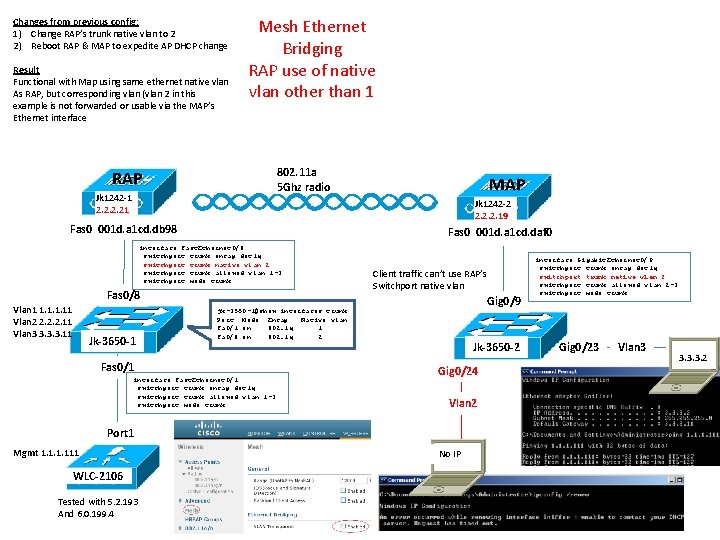
Changes from previous config: 1) Change RAP’s trunk native vlan to 2 2) Reboot RAP & MAP to expedite AP DHCP change Result Functional with Map using same ethernet native vlan As RAP, but corresponding vlan (vlan 2 in this example is not forwarded or usable via the MAP’s Ethernet interface Mesh Ethernet Bridging RAP use of native vlan other than 1 802. 11 a 5 Ghz radio RAP Jk 1242 -1 2. 21 Jk 1242 -2 2. 2. 2. 19 Fas 0 001 d. a 1 cd. db 98 Fas 0 001 d. a 1 cd. daf 0 interface Fast. Ethernet 0/8 switchport trunk encap dot 1 q switchport trunk native vlan 2 switchport trunk allowed vlan 1 -3 switchport mode trunk Fas 0/8 Vlan 1 1. 11 Vlan 2 2. 2. 2. 11 Vlan 3 3. 3. 3. 11 Jk-3650 -1 MAP Client traffic can’t use RAP’s Switchport native vlan Gig 0/9 jk-3560 -1#show interfaces trunk Port Mode Encap Native vlan Fa 0/1 on 802. 1 q 1 Fa 0/8 on 802. 1 q 2 Fas 0/1 interface Fast. Ethernet 0/1 switchport trunk encap dot 1 q switchport trunk allowed vlan 1 -3 switchport mode trunk Jk-3650 -2 Gig 0/24 Vlan 2 Port 1 Mgmt 1. 111 WLC-2106 Tested with 5. 2. 193 And 6. 0. 199. 4 No IP interface Gigabit. Ethernet 0/9 switchport trunk encap dot 1 q switchport trunk native vlan 2 switchport trunk allowed vlan 2 -3 switchport mode trunk Gig 0/23 Vlan 3 3. 3. 3. 2

Mesh Ethernet Bridging RAP use of native vlan other than 1 Verification RAP: jk 1242 -1#show mesh adjacency child show MESH Adjacency Child ADJ 2 Identity 001 d. a 1 cd. daf 0 MA: 001 e. 1306. e 27 f version 0 x 20 minor version 0 x 20 txpkts 165826 txretries 620 Flags: UPDATED CHILD BEACON jk 1242 -1#ping 2. 2. 2. 19 Type escape sequence to abort. Sending 5, 100 -byte ICMP Echos to 2. 2. 2. 19, timeout is 2 seconds: . !!!! Success rate is 80 percent (4/5), round-trip min/avg/max = 1/1/2 ms jk 1242 -1#sho ip int brief Interface BVI 1 Dot 11 Radio 0 Dot 11 Radio 1 Fast. Ethernet 0. 2 Fast. Ethernet 0. 3 Virtual-Dot 11 Radio 0 IP-Address 2. 21 unassigned unassigned OK? YES NO NO NO YES YES Method DHCP unset unset Status up up Protocol up up jk 1242 -1#show mesh ethernet vlan config running Running Ethernet VLAN Configuration Ethernet Interface: 0 mode: TRUNK Native Vlan: 1 Vlans: 2 3 MAP: jk 1242 -2#sho mesh adjacency parent show MESH Adjacency Parent ADJ 1 Identity 001 d. a 1 cd. db 98 MA: 001 e. 1306. e 7 bf version 0 x 20 minor version 0 x 20 txpkts 190501 txretries 963 Flags: UPDATED NEIGH PARENT BEACON jk 1242 -2#ping 2. 21 Type escape sequence to abort. Sending 5, 100 -byte ICMP Echos to 2. 21, timeout is 2 seconds: !!!!! Success rate is 100 percent (5/5), round-trip min/avg/max = 1/1/2 ms jk 1242 -2#sho ip int brief Interface BVI 1 Dot 11 Radio 0 Dot 11 Radio 1 Fast. Ethernet 0. 2 Fast. Ethernet 0. 3 Virtual-Dot 11 Radio 0 IP-Address 2. 2. 2. 19 unassigned unassigned OK? YES NO NO NO YES YES Method DHCP unset unset jk 1242 -2#show mesh ethernet vlan config running Running Ethernet VLAN Configuration Ethernet Interface: 0 mode: TRUNK Native Vlan: 2 Vlans: 3 Status Protocol up up administratively down up up up
- Slides: 8