
Understanding Computers Today and Tomorrow 13 th Edition



- Slides: 44
Understanding Computers: Today and Tomorrow, 13 th Edition Chapter 16: Intellectual Property Rights, Ethics, Health, Access, and the Environment
Overview • This chapter covers: – Various types of intellectual property rights – A discussion of ethics, including ethical use of copyrighted material, resources and information, unethical use of digital manipulation, and ethical business practices – The impact of computers on our physical and emotional health – Issues related to the access of technology – The impact of computers on our environment – A look at legislation related to these issues Understanding Computers: Today and Tomorrow, 13 th Edition 2
Intellectual Property Rights • Intellectual property rights: Rights to which creators of original creative works are entitled • Copyrights: Form of protection available to the creator of original artistic or literary works – Last until 70 years after creator’s death – For corporate copyrights or anonymous works, last 95 years from date of publication or 120 years from date of creation, whichever is shorter – Can be registered with U. S. Copyright Office Understanding Computers: Today and Tomorrow, 13 th Edition 3
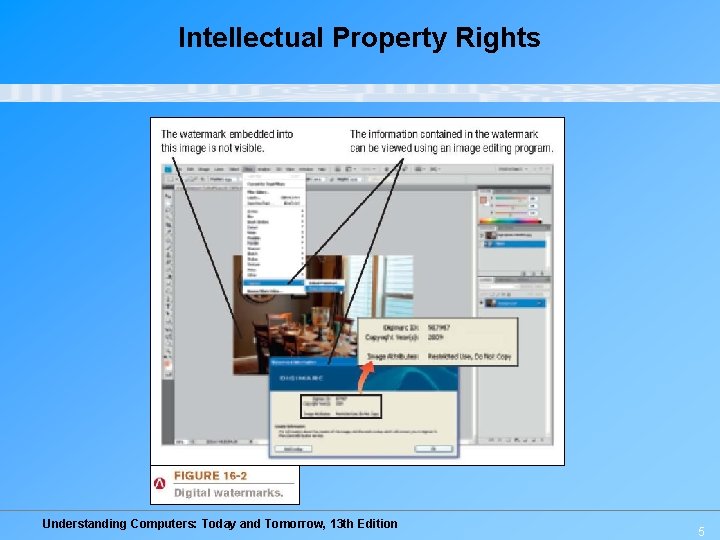
Intellectual Property Rights – To protect rights, can use: • Digital watermarks: Subtle alteration of digital content that is noticeable but that can identify the copyright holder • Digital rights management (DRM) software: Controls use of the copyrighted work – Can limit who can view, print or copy a document – Can control use of downloaded content (number of devices a file can be copied to, expiration of VOD movie, etc. ) Understanding Computers: Today and Tomorrow, 13 th Edition 4
Intellectual Property Rights Understanding Computers: Today and Tomorrow, 13 th Edition 5
Intellectual Property Rights • Trademark: A word, phrase, symbol, or design that identifies goods or services – Includes protection for domain names (cybersquatting and typosquatting) – Domain name disputes can be brought to the World Intellectual Property Organization (WIPO) Understanding Computers: Today and Tomorrow, 13 th Edition 6
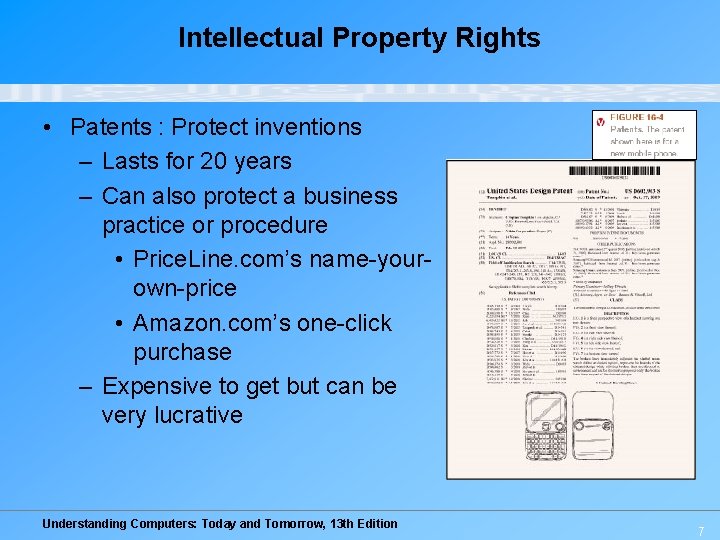
Intellectual Property Rights • Patents : Protect inventions – Lasts for 20 years – Can also protect a business practice or procedure • Price. Line. com’s name-yourown-price • Amazon. com’s one-click purchase – Expensive to get but can be very lucrative Understanding Computers: Today and Tomorrow, 13 th Edition 7
Quick Quiz 1. Copyrights are valid for _______. a. 70 years after the creation of the work b. 70 years after the publication of the work c. 70 years after the death of the creator 2. True or False: Logos cannot be trademarked, just the names of companies or products. 3. ___________ are used to protect inventions. Answers: 1) c; 2) False; 3) Patents Understanding Computers: Today and Tomorrow, 13 th Edition 8
Ethics • Ethics: Overall standards of moral conduct – Can vary with individual and religious beliefs, country, race, or culture – Personal ethics: Guide an individual’s personal behavior – Business ethics: Guide a business’s policies, decisions, and actions – Computer ethics: Concern moral conduct related to computer use – Individuals and businesses need to make ethical decisions every day Understanding Computers: Today and Tomorrow, 13 th Edition 9
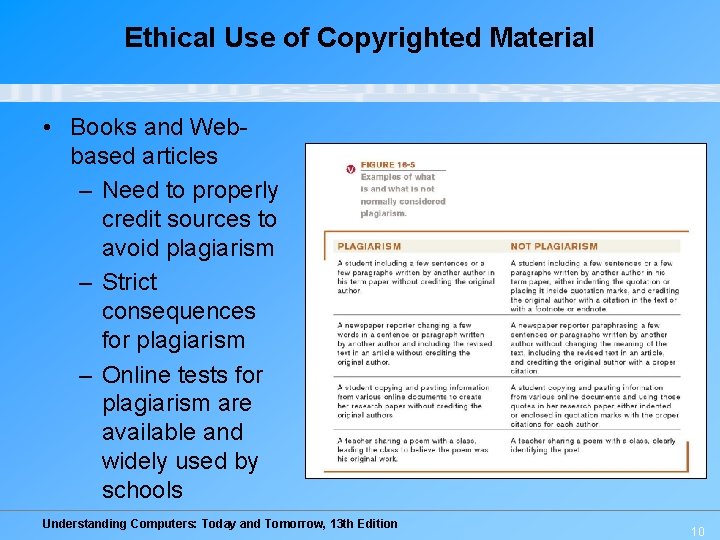
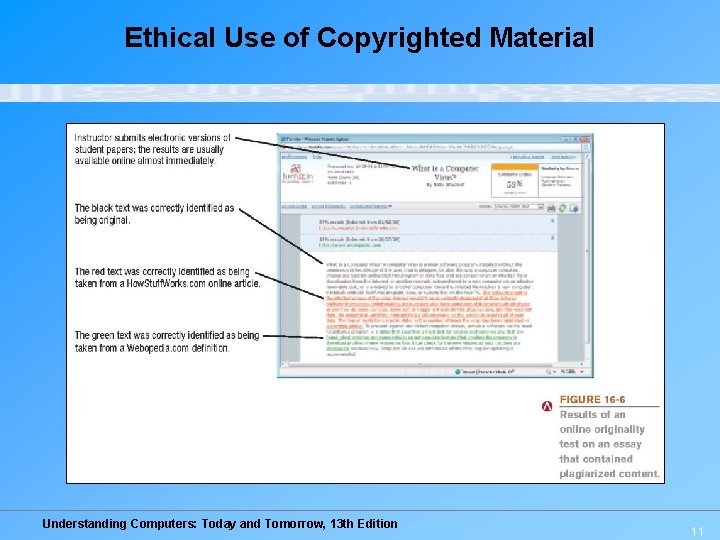
Ethical Use of Copyrighted Material • Books and Webbased articles – Need to properly credit sources to avoid plagiarism – Strict consequences for plagiarism – Online tests for plagiarism are available and widely used by schools Understanding Computers: Today and Tomorrow, 13 th Edition 10
Ethical Use of Copyrighted Material Understanding Computers: Today and Tomorrow, 13 th Edition 11
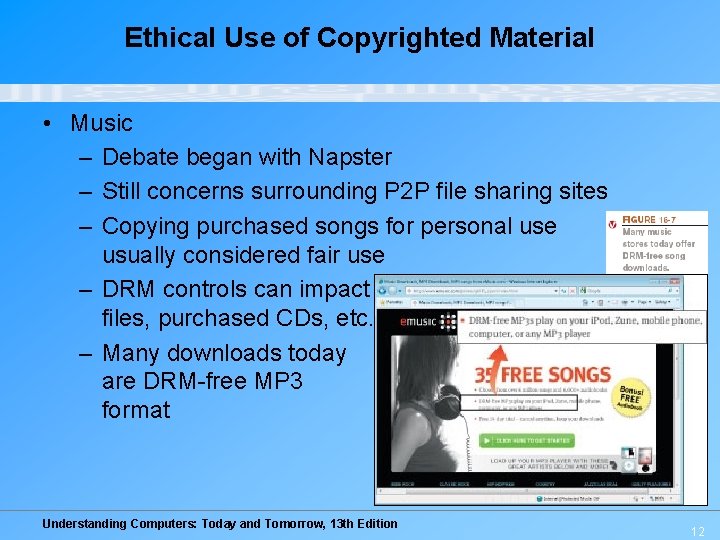
Ethical Use of Copyrighted Material • Music – Debate began with Napster – Still concerns surrounding P 2 P file sharing sites – Copying purchased songs for personal use usually considered fair use – DRM controls can impact downloaded files, purchased CDs, etc. – Many downloads today are DRM-free MP 3 format Understanding Computers: Today and Tomorrow, 13 th Edition 12
Ethical Use of Copyrighted Material • Movies – Movie piracy is high (illegal copies, recording prerelease movies to create DVDs, etc. ) – Distributing bootleg copies of movies is illegal and unethical – DRM controls on downloaded movies can slow piracy – Legal prosecution for copyright violations for both music and movies is increasing Understanding Computers: Today and Tomorrow, 13 th Edition 13
Ethical Use of Resources and Information • School or company resources – Code of conduct: Policy that specifies allowable use of resources by students or employees • Students and employees should be familiar with what is considered acceptable use of resources – Code of ethics: Policy, typically for an industry or organization, that specifies overall moral guidelines adopted by that industry or organization Understanding Computers: Today and Tomorrow, 13 th Edition 14
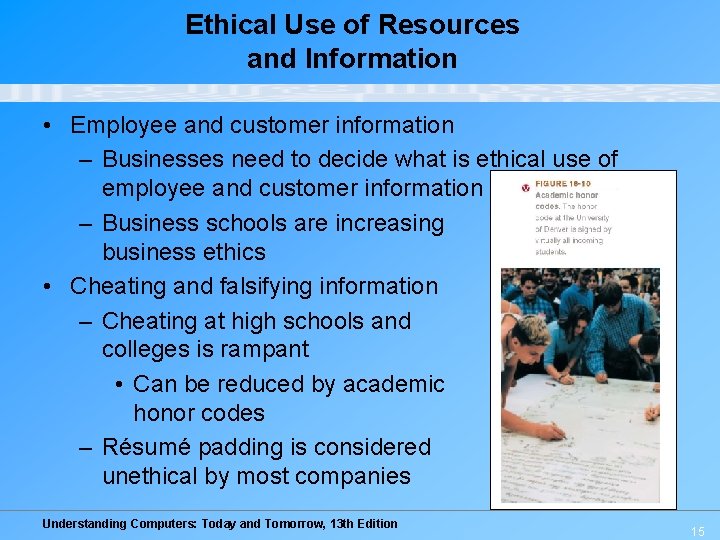
Ethical Use of Resources and Information • Employee and customer information – Businesses need to decide what is ethical use of employee and customer information – Business schools are increasing business ethics • Cheating and falsifying information – Cheating at high schools and colleges is rampant • Can be reduced by academic honor codes – Résumé padding is considered unethical by most companies Understanding Computers: Today and Tomorrow, 13 th Edition 15
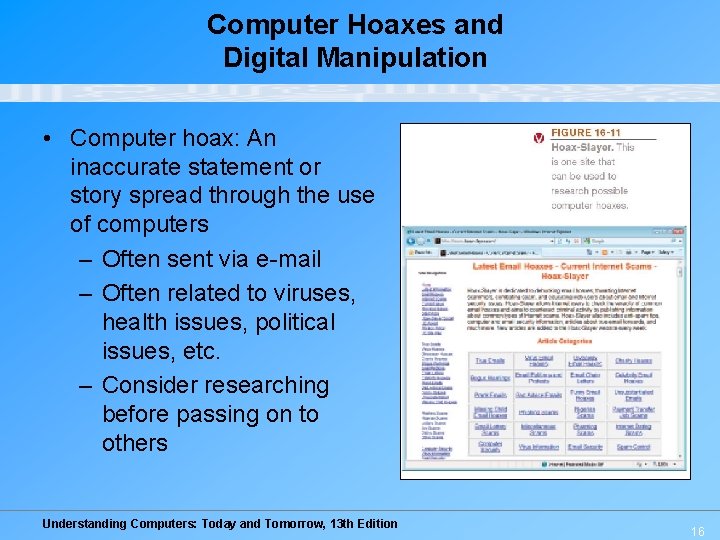
Computer Hoaxes and Digital Manipulation • Computer hoax: An inaccurate statement or story spread through the use of computers – Often sent via e-mail – Often related to viruses, health issues, political issues, etc. – Consider researching before passing on to others Understanding Computers: Today and Tomorrow, 13 th Edition 16
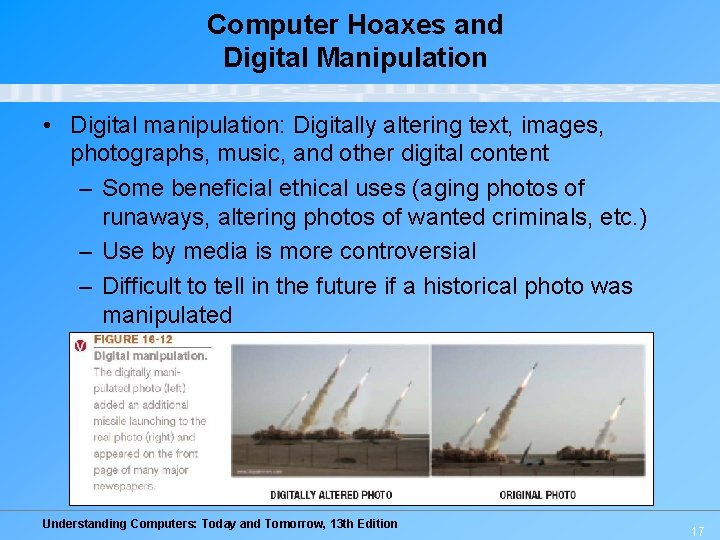
Computer Hoaxes and Digital Manipulation • Digital manipulation: Digitally altering text, images, photographs, music, and other digital content – Some beneficial ethical uses (aging photos of runaways, altering photos of wanted criminals, etc. ) – Use by media is more controversial – Difficult to tell in the future if a historical photo was manipulated Understanding Computers: Today and Tomorrow, 13 th Edition 17
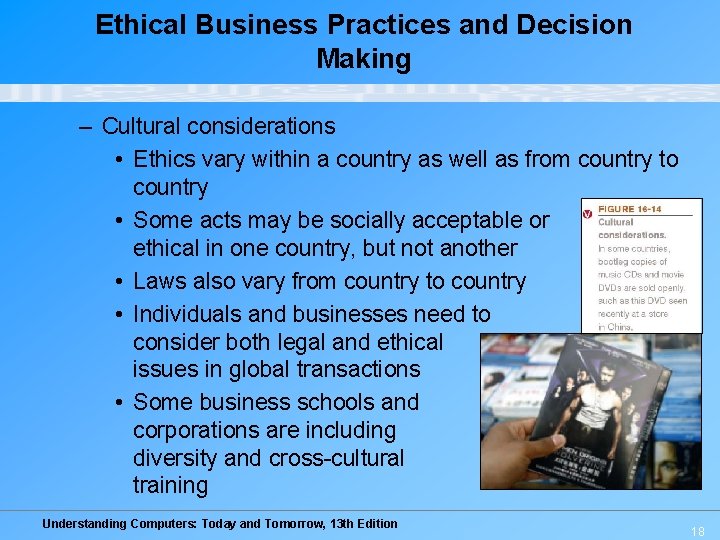
Ethical Business Practices and Decision Making – Cultural considerations • Ethics vary within a country as well as from country to country • Some acts may be socially acceptable or ethical in one country, but not another • Laws also vary from country to country • Individuals and businesses need to consider both legal and ethical issues in global transactions • Some business schools and corporations are including diversity and cross-cultural training Understanding Computers: Today and Tomorrow, 13 th Edition 18
Quick Quiz 1. An inaccurate statement or story spread though the use of computers is referred to as _______. a. digital manipulation b. code of ethics c. computer hoax 2. True or False: Most legal experts agree that it’s okay for someone who has legally obtained an audio CD to transfer those songs to a CD-R disc for personal use. 3. Software and hardware products that have been announced and advertised, but which are not yet available are considered ___________. Answers: 1) c; 2) True; 3) vaporware Understanding Computers: Today and Tomorrow, 13 th Edition 19
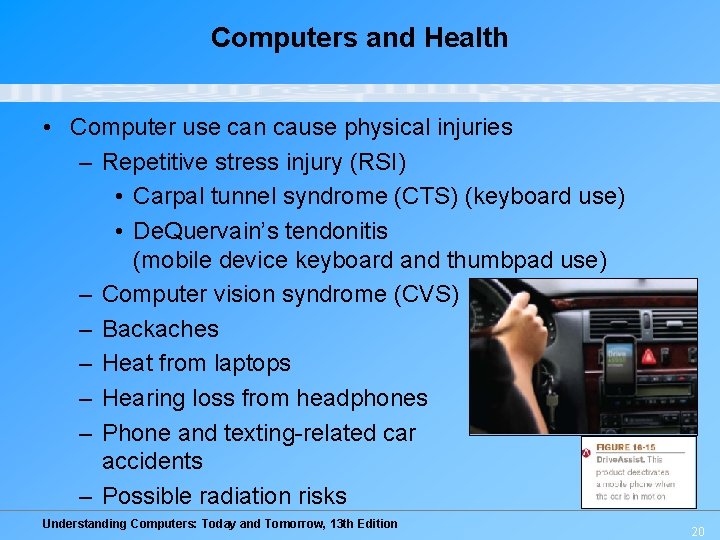
Computers and Health • Computer use can cause physical injuries – Repetitive stress injury (RSI) • Carpal tunnel syndrome (CTS) (keyboard use) • De. Quervain’s tendonitis (mobile device keyboard and thumbpad use) – Computer vision syndrome (CVS) – Backaches – Heat from laptops – Hearing loss from headphones – Phone and texting-related car accidents – Possible radiation risks Understanding Computers: Today and Tomorrow, 13 th Edition 20
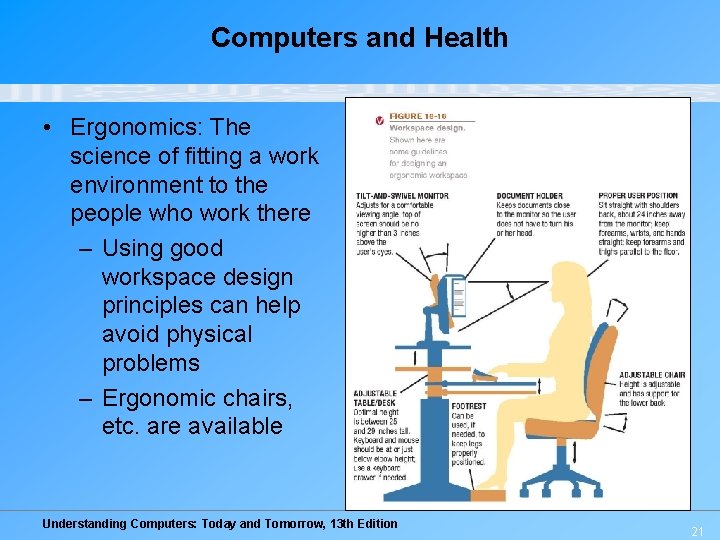
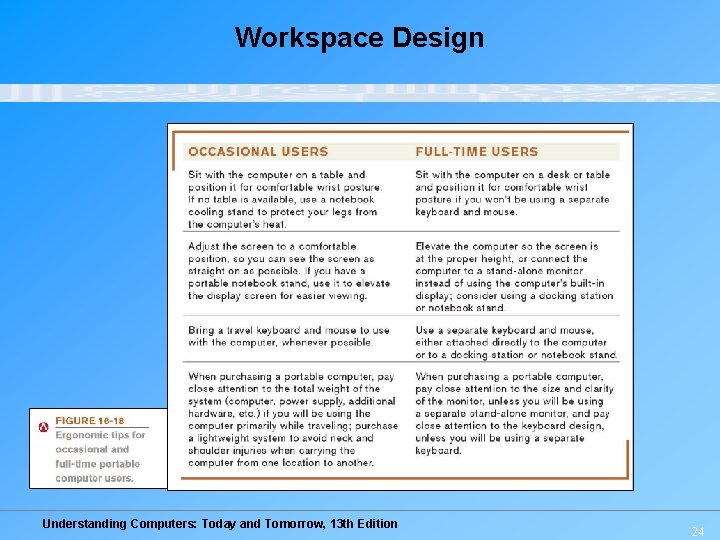
Computers and Health • Ergonomics: The science of fitting a work environment to the people who work there – Using good workspace design principles can help avoid physical problems – Ergonomic chairs, etc. are available Understanding Computers: Today and Tomorrow, 13 th Edition 21
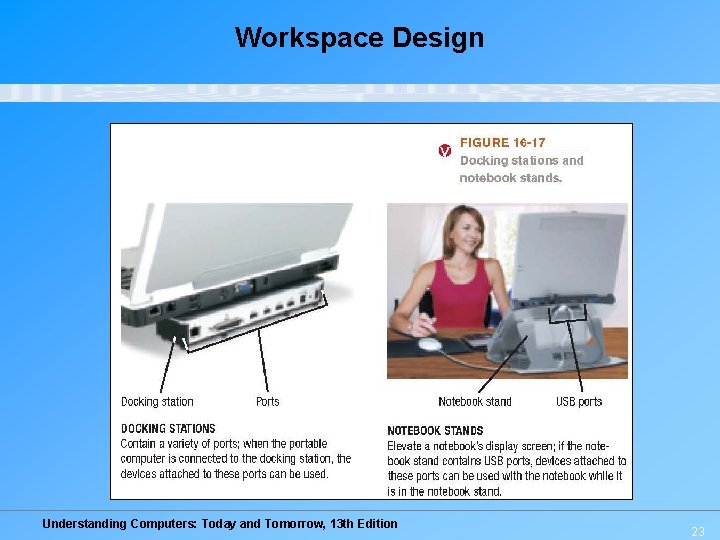
Computers and Health – More difficult with portable computers and mobile devices, but possible to improve work environment • Travel mice and travel keyboards can help while on the go • Docking stations or notebook stands can be used with portable computer at home or in the office – Docking station connects the computer to permanent hardware, such as a keyboard, mouse, monitor, etc. – Notebook stand raises a notebook up to a better height Understanding Computers: Today and Tomorrow, 13 th Edition 22
Workspace Design Understanding Computers: Today and Tomorrow, 13 th Edition 23
Workspace Design Understanding Computers: Today and Tomorrow, 13 th Edition 24
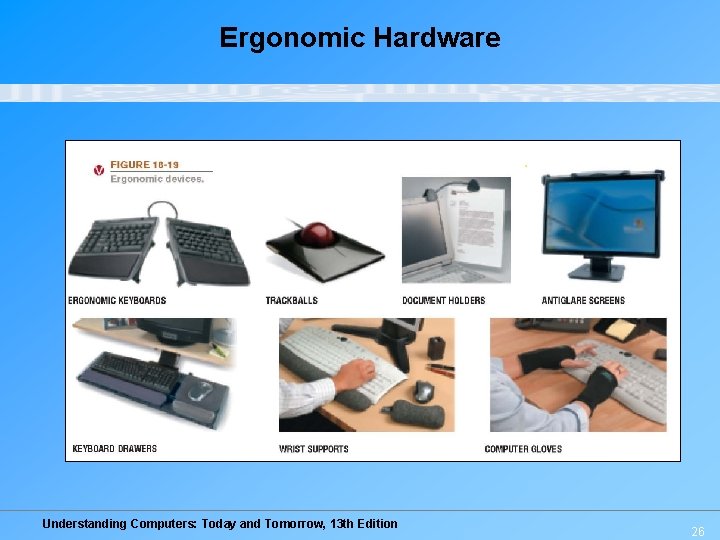
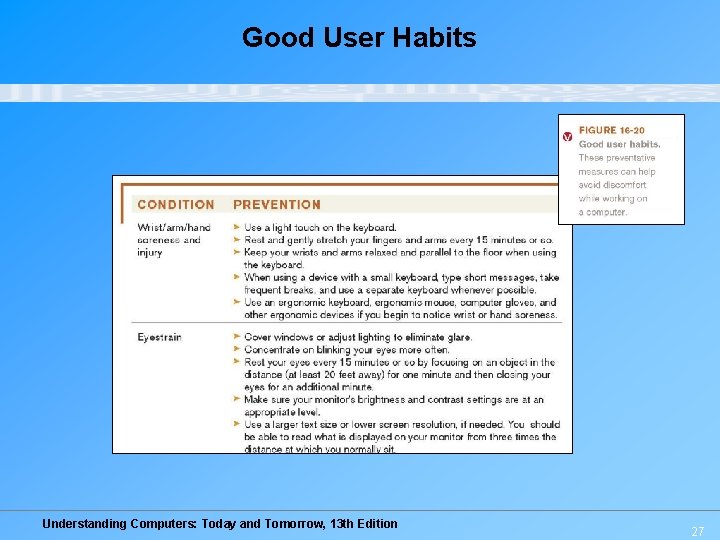
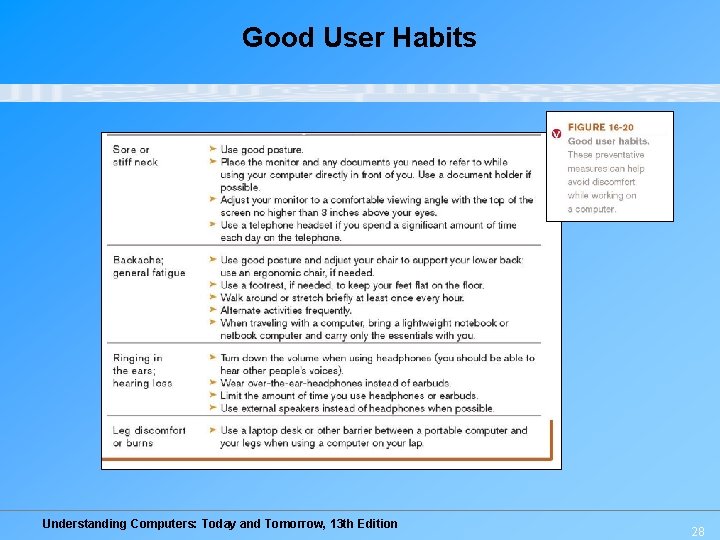
Ergonomic Hardware – A variety of devices available that are designed to avoid physical problems due to the use of a computer • Ergonomic keyboards and trackballs • Document holders • Antiglare screens • Keyboard drawers • Wrist supports • Computer gloves Good user habits can also help avoid problems Understanding Computers: Today and Tomorrow, 13 th Edition 25
Ergonomic Hardware Understanding Computers: Today and Tomorrow, 13 th Edition 26
Good User Habits Understanding Computers: Today and Tomorrow, 13 th Edition 27
Good User Habits Understanding Computers: Today and Tomorrow, 13 th Edition 28
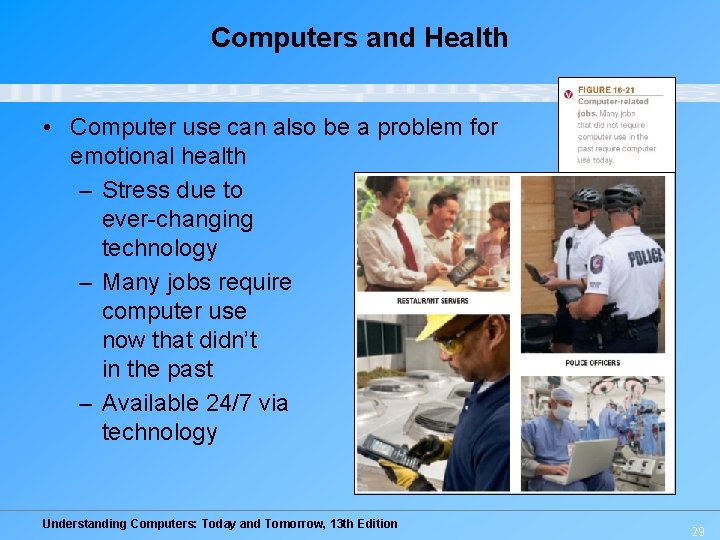
Computers and Health • Computer use can also be a problem for emotional health – Stress due to ever-changing technology – Many jobs require computer use now that didn’t in the past – Available 24/7 via technology Understanding Computers: Today and Tomorrow, 13 th Edition 29
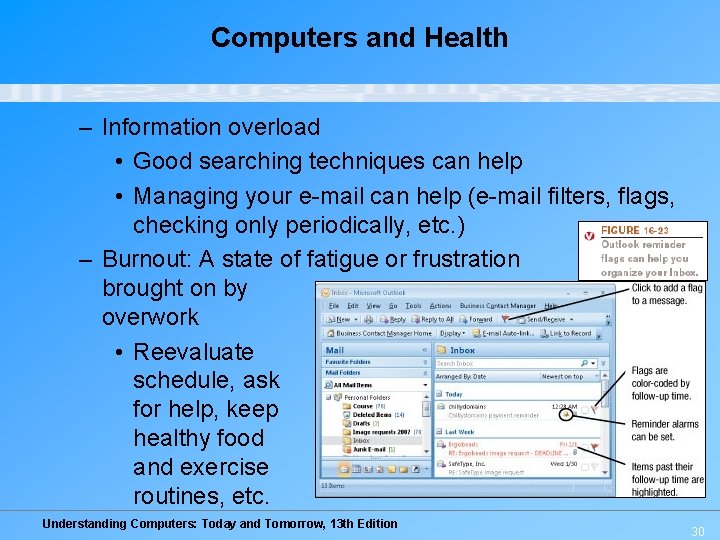
Computers and Health – Information overload • Good searching techniques can help • Managing your e-mail can help (e-mail filters, flags, checking only periodically, etc. ) – Burnout: A state of fatigue or frustration brought on by overwork • Reevaluate schedule, ask for help, keep healthy food and exercise routines, etc. Understanding Computers: Today and Tomorrow, 13 th Edition 30
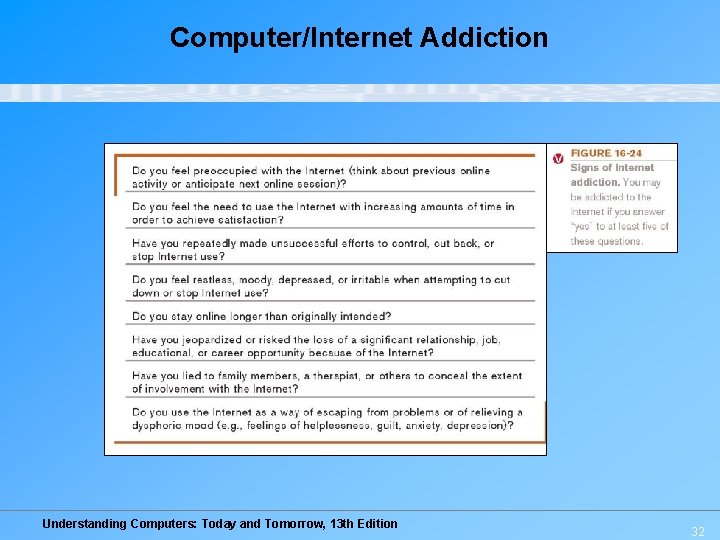
Computers and Health – Internet addiction: The problem of overusing, or being unable to stop using, a computer or the Internet • Growing problem in many countries • Often related to e-mail, IM, shopping, gaming, social networking, and pornography • Can be addicted to other types of technology (video games, etc. ) • Can result in loss of relationships, job loss, academic failure, health problems, financial consequences, child custody, suicide, and more • Can be treated similar to other addictions Understanding Computers: Today and Tomorrow, 13 th Edition 31
Computer/Internet Addiction Understanding Computers: Today and Tomorrow, 13 th Edition 32
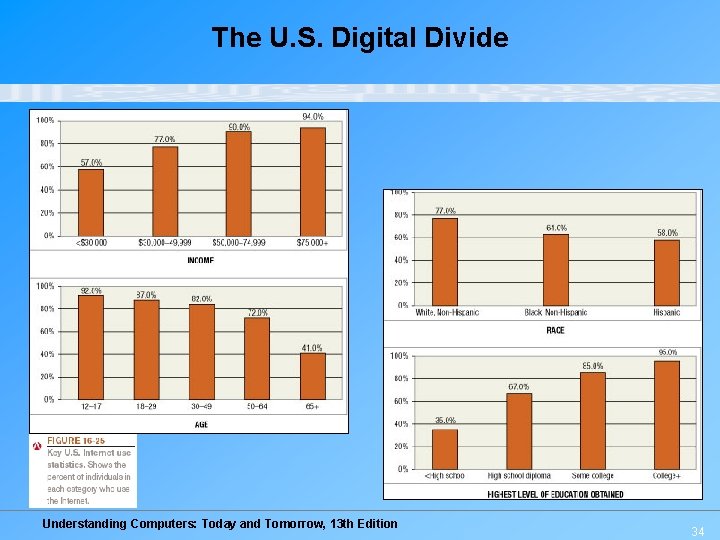
Access to Technology • Digital divide: The gap between those who have access to technology and those who don’t • Can have digital divide within a country, as well as between countries • U. S. digital divide: Differences in technology use by income, race, geographical area, education, broadband Internet use, etc. – Reducing the U. S. digital divide is important to ensure all citizens have an equal chance of being successful – Some people choose not to use technology Understanding Computers: Today and Tomorrow, 13 th Edition 33
The U. S. Digital Divide Understanding Computers: Today and Tomorrow, 13 th Edition 34
Online Video “Intel World Ahead Program” (click below to start video) Reproduced with permission from Intel Corporation Reminder: The complete set of online videos and video podcasts are available at: www. cengage. com/computerconcepts/np/uc 13 Understanding Computers: Today and Tomorrow, 13 th Edition 35
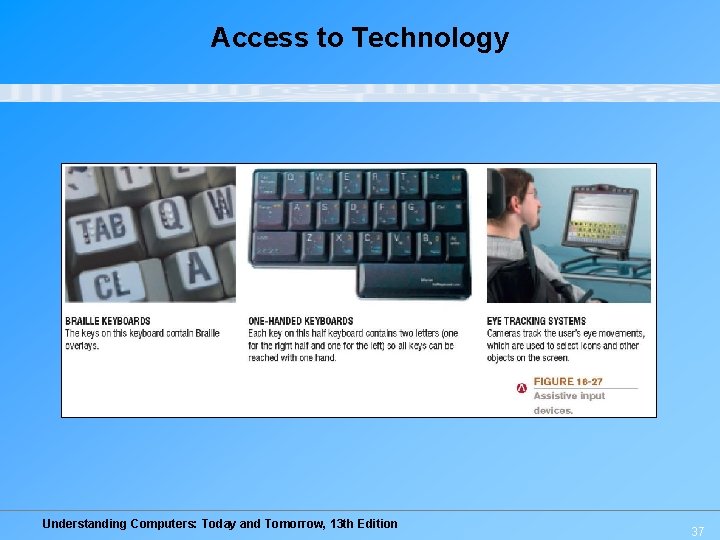
Access to Technology • Assistive technology: Hardware and software designed for use by individuals with physical disabilities – Assistive input devices include: • Braille keyboards, keyguards, one-handed keyboards • Voice input systems • Assistive pointing systems (switches, feet mice, head pointing systems, eye pointing systems, etc. ) • Can also be used by general population as desired Understanding Computers: Today and Tomorrow, 13 th Edition 36
Access to Technology Understanding Computers: Today and Tomorrow, 13 th Edition 37
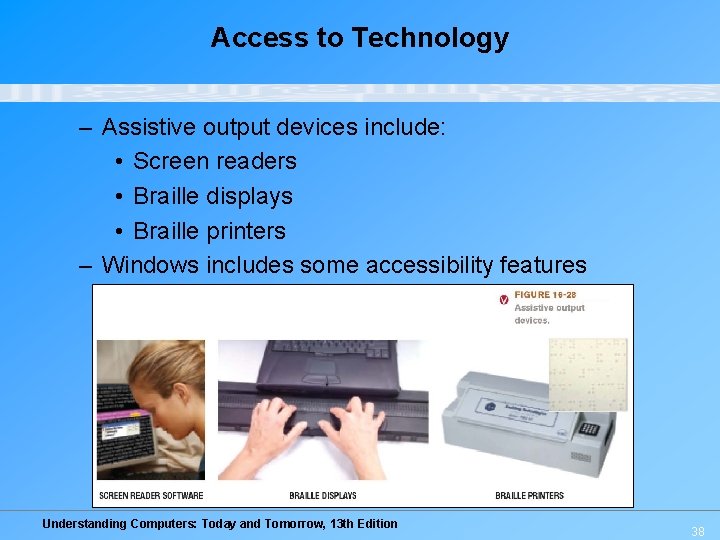
Access to Technology – Assistive output devices include: • Screen readers • Braille displays • Braille printers – Windows includes some accessibility features Understanding Computers: Today and Tomorrow, 13 th Edition 38
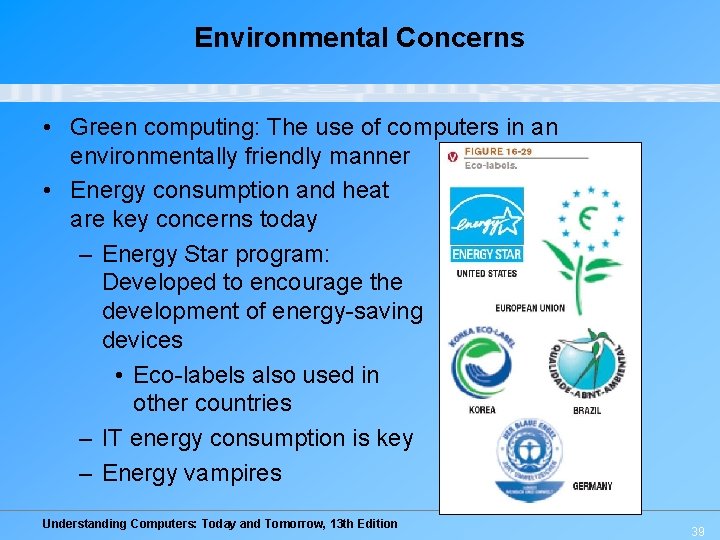
Environmental Concerns • Green computing: The use of computers in an environmentally friendly manner • Energy consumption and heat are key concerns today – Energy Star program: Developed to encourage the development of energy-saving devices • Eco-labels also used in other countries – IT energy consumption is key – Energy vampires Understanding Computers: Today and Tomorrow, 13 th Edition 39
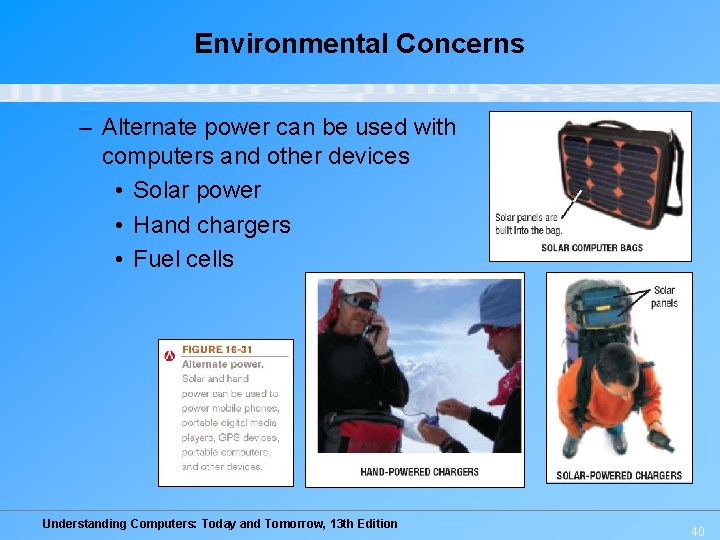
Environmental Concerns – Alternate power can be used with computers and other devices • Solar power • Hand chargers • Fuel cells Understanding Computers: Today and Tomorrow, 13 th Edition 40
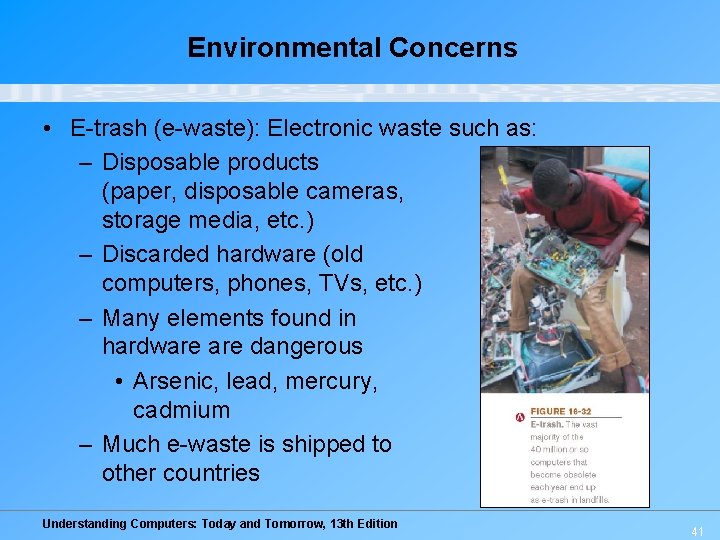
Environmental Concerns • E-trash (e-waste): Electronic waste such as: – Disposable products (paper, disposable cameras, storage media, etc. ) – Discarded hardware (old computers, phones, TVs, etc. ) – Many elements found in hardware dangerous • Arsenic, lead, mercury, cadmium – Much e-waste is shipped to other countries Understanding Computers: Today and Tomorrow, 13 th Edition 41
Environmental Concerns • Green computing methods – Recycling • Many devices, media, etc. can be recycled • Some states are implementing disposal fees for new hardware to ensure they are disposed of properly – Donate obsolete equipment to schools and other organizations • Data needs to be completely removed for security and privacy reasons – Reuse (recharged toner cartridges, new purpose for computers, etc. ) Understanding Computers: Today and Tomorrow, 13 th Edition 42
Quick Quiz 1. Which of the following is NOT an assistive input device? a. Braille display b. Head-pointing system c. One-handed keyboard 2. True or False: E-trash is no longer a concern today since modern computers contain very few toxic materials. 3. A device designed to connect a portable computer to conventional hardware such as a keyboard, mouse, and printer is called a(n) ___________. Answers: 1) a; 2) False; 3) docking station Understanding Computers: Today and Tomorrow, 13 th Edition 43
Summary • • • Intellectual Property Rights Ethics Computers and Health Access to Technology Environmental Concerns Related Legislation Understanding Computers: Today and Tomorrow, 13 th Edition 44