
Understanding All Fusion 2 E Database Relations Darryl
Understanding All. Fusion® 2 E Database Relations Darryl Millington Hawk. Bridge Pty Ltd Hampton, Victoria, Australia Session 2 G
Session Abstract § An All. Fusion 2 E developer needs to understand the All. Fusion 2 E database relations before commencing any development work. § This presentation will cover the basic details of database relations, how file entries are resolved from database relations, and their relationship to traditional ERD diagrams and data modeling. § At the end of this presentation you should be more confident in using the All. Fusion 2 E database relations to build All. Fusion 2 E access paths and functions. § We’ll also introduce a tool that can assist you in understanding database relations from a visual perspective.

Speaker Bio § Darryl has worked as an All. Fusion 2 E developer since 1988 and has traveled extensively as an independent consultant working on a number of user sites throughout Australia, New Zealand, the USA, the UK and Asia. § He is a regular speaker at EDGE and CA conferences and has been speaking on All. Fusion 2 E-related topics since 1991. § Darryl. Millington@Hawk. Bridge. com
About Hawk. Bridge § Focused on enabling clients to create business advantage through use of quality systems to enhance business capabilities § Fostered strong relationships with Computer Associates § Consultancy and Application Development § Education and Mentoring § Application Support and Delivery § Freedom Productivity and Enablement Tools: Freedom/ERwin Freedom/Plex Freedom/Visio Freedom/EJB § http: //www. Hawk. Bridge. com Freedom/Help Freedom/CGI Freedom/Doc Freedom/Array
Agenda § § § Database Relationship Types Database Relation Entries File Entries Visualising Database Relations Generate XML File Transfer XML File to PC Open XML File in All. Fusion Erwin Future Enhancements Other Related Freedom Tools Session Summary Question & Answer
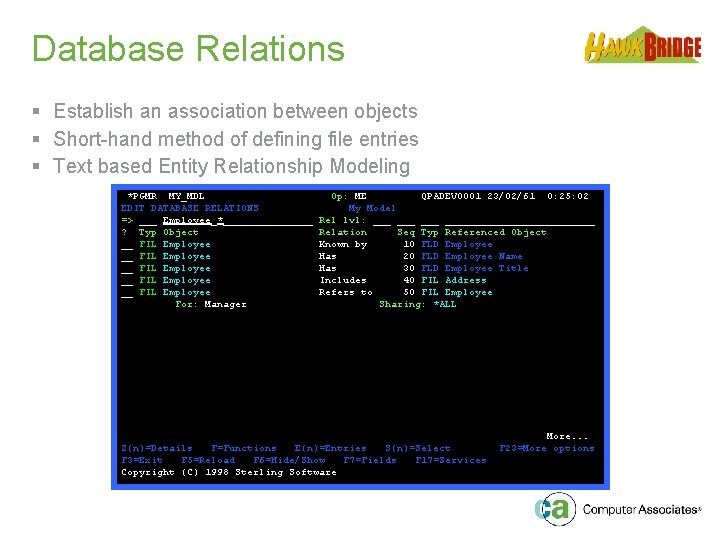
Database Relations § Establish an association between objects § Short-hand method of defining file entries § Text based Entity Relationship Modeling *PGMR MY_MDL EDIT DATABASE RELATIONS => ___ Employee_*________ ? Typ Object __ FIL Employee __ FIL Employee For: Manager Op: ME QPADEV 0001 23/02/61 0: 25: 02 My Model Rel lvl: ___ ______________ Relation Seq Typ Referenced Object Known by 10 FLD Employee Has 20 FLD Employee Name Has 30 FLD Employee Title Includes 40 FIL Address Refers to 50 FIL Employee Sharing: *ALL Z(n)=Details F=Functions E(n)=Entries S(n)=Select F 3=Exit F 5=Reload F 6=Hide/Show F 7=Fields F 17=Services Copyright (C) 1998 Sterling Software More. . . F 23=More options
Relationship Types § Defined as § Owned by § Refers to § Extended by § Includes § Known by § Qualified by § Has
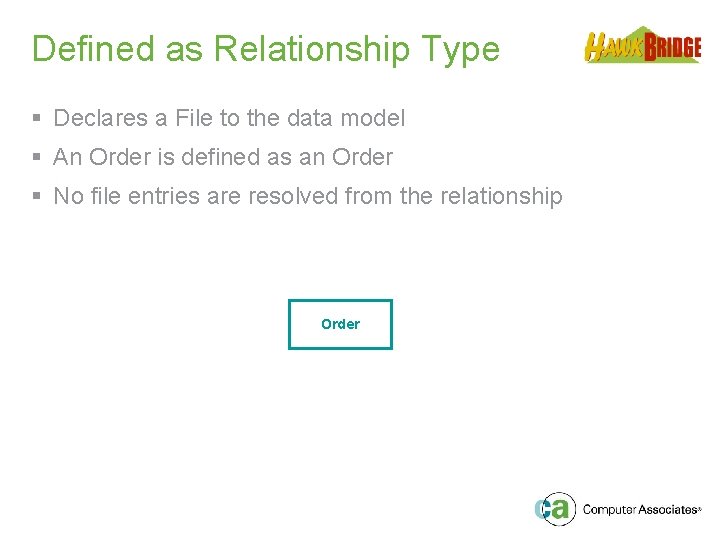
Defined as Relationship Type § Declares a File to the data model § An Order is defined as an Order § No file entries are resolved from the relationship Order
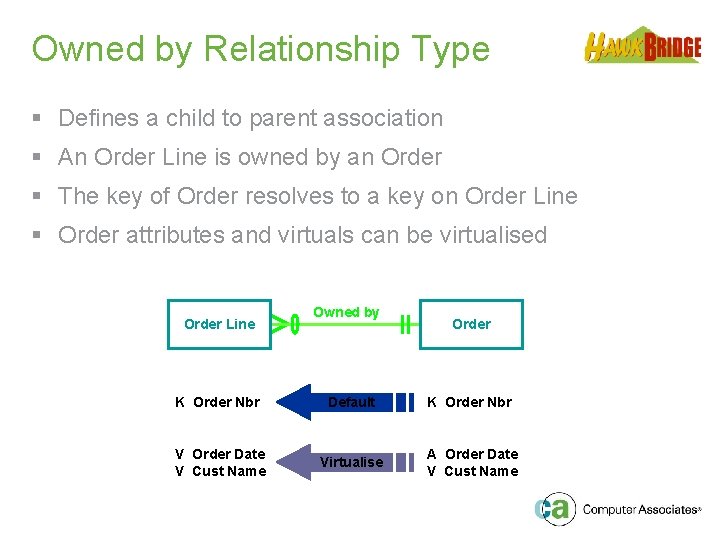
Owned by Relationship Type § Defines a child to parent association § An Order Line is owned by an Order § The key of Order resolves to a key on Order Line § Order attributes and virtuals can be virtualised Order Line Owned by Order K Order Nbr Default K Order Nbr V Order Date V Cust Name Virtualise A Order Date V Cust Name
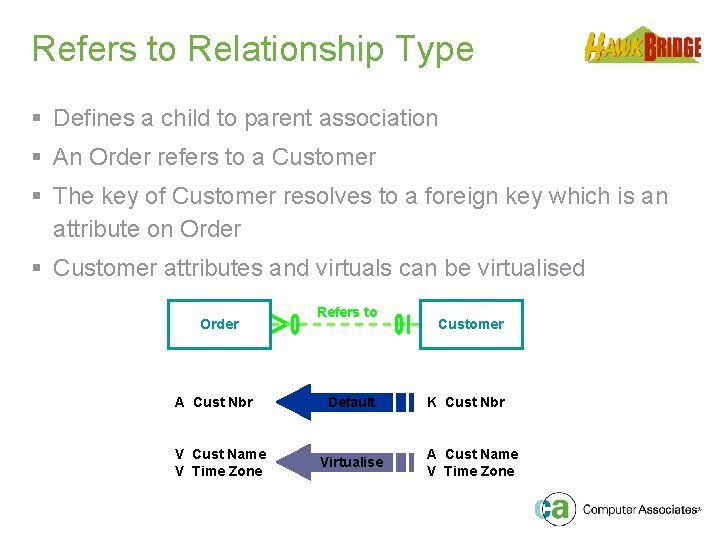
Refers to Relationship Type § Defines a child to parent association § An Order refers to a Customer § The key of Customer resolves to a foreign key which is an attribute on Order § Customer attributes and virtuals can be virtualised Order A Cust Nbr V Cust Name V Time Zone Refers to Default Virtualise Customer K Cust Nbr A Cust Name V Time Zone
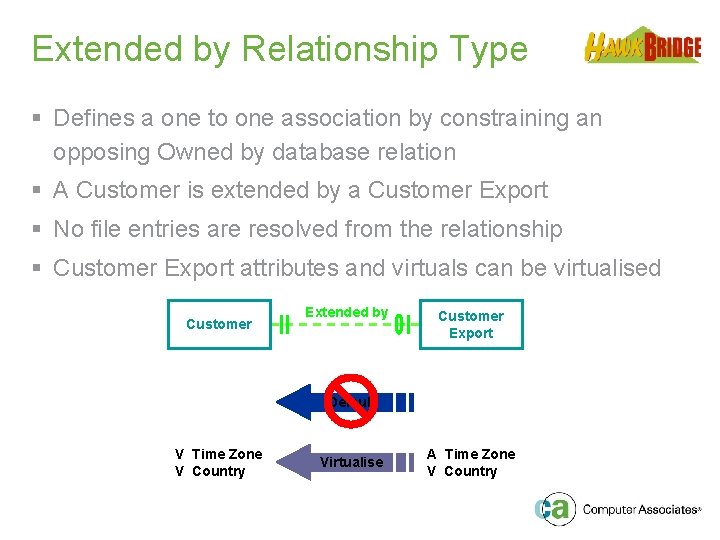
Extended by Relationship Type § Defines a one to one association by constraining an opposing Owned by database relation § A Customer is extended by a Customer Export § No file entries are resolved from the relationship § Customer Export attributes and virtuals can be virtualised Customer Extended by Customer Export Default V Time Zone V Country Virtualise A Time Zone V Country
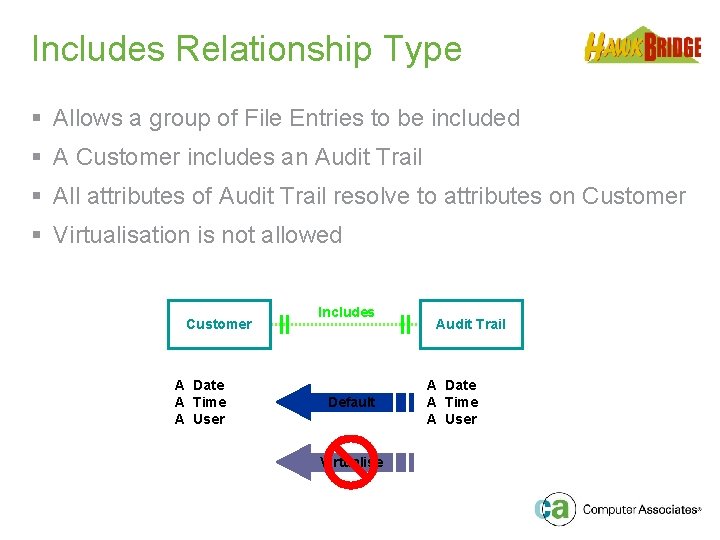
Includes Relationship Type § Allows a group of File Entries to be included § A Customer includes an Audit Trail § All attributes of Audit Trail resolve to attributes on Customer § Virtualisation is not allowed Customer A Date A Time A User Includes Default Virtualise Audit Trail A Date A Time A User
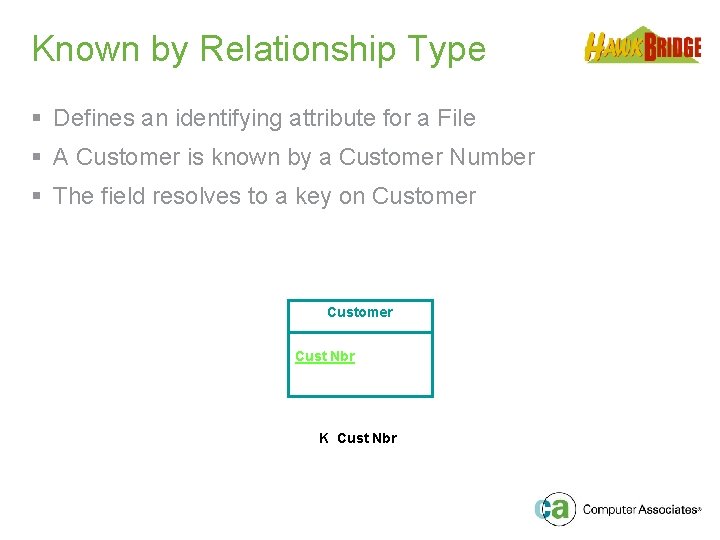
Known by Relationship Type § Defines an identifying attribute for a File § A Customer is known by a Customer Number § The field resolves to a key on Customer Cust Nbr K Cust Nbr
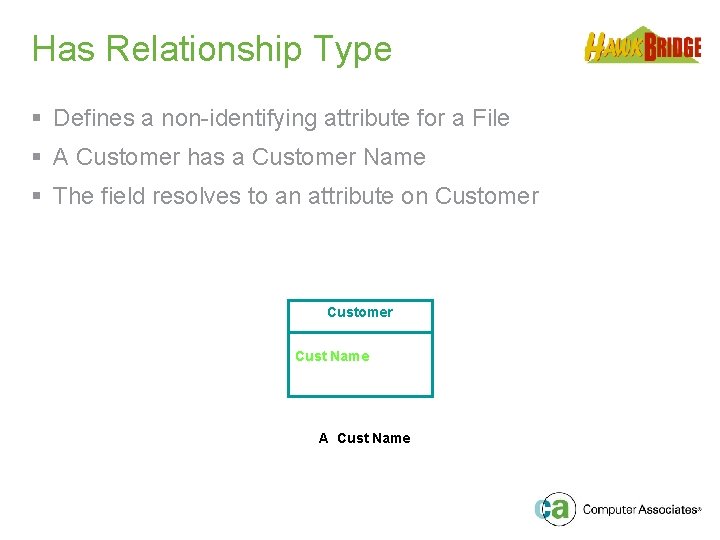
Has Relationship Type § Defines a non-identifying attribute for a File § A Customer has a Customer Name § The field resolves to an attribute on Customer Cust Name A Cust Name
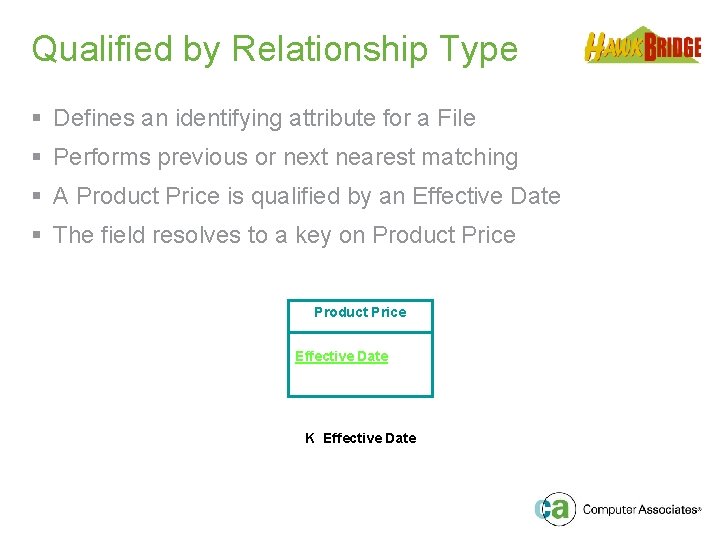
Qualified by Relationship Type § Defines an identifying attribute for a File § Performs previous or next nearest matching § A Product Price is qualified by an Effective Date § The field resolves to a key on Product Price Effective Date K Effective Date
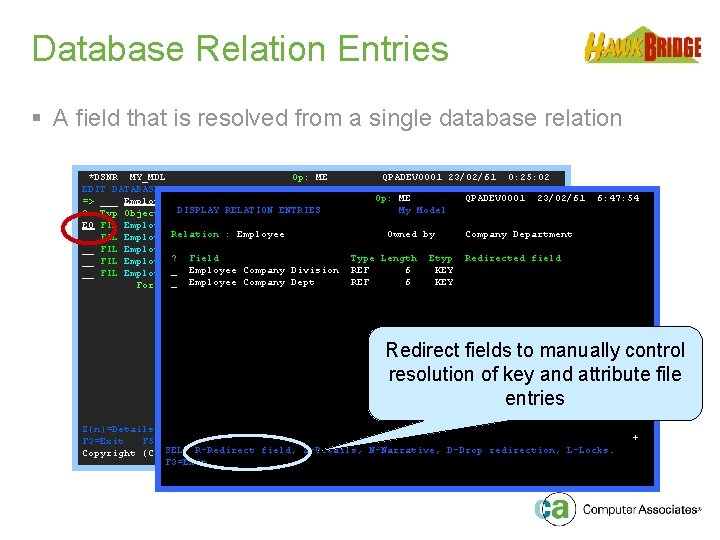
Database Relation Entries § A field that is resolved from a single database relation *DSNR MY_MDL Op: ME QPADEV 0001 23/02/61 0: 25: 02 EDIT DATABASE RELATIONS My Model QPADEV 0001 23/02/61 => ___ Employee_*________ Rel lvl: ___Op: ___ME_____________ DISPLAY RELATION ENTRIES My Model ? Typ Object Relation Seq Typ Referenced Object E 0 FIL Employee Known by 10 FLD Employee Owned by Company Department __ FIL Employee. Relation : Employee. Has 20 FLD Employee Name __ FIL Employee Has 30 FLD Employee Title Type Etyp Redirected field __ FIL Employee? Field Includes 40 Length FIL Address _ Employee Company Division REF 6 KEY __ FIL Employee Refers to 50 FIL Employee _ Employee Company Dept REF 6 KEY For: Manager Sharing: *ALL 6: 47: 54 Redirect fields to manually control resolution of key and attribute file entries More. . . Z(n)=Details F=Functions E(n)=Entries S(n)=Select F 23=More options F 3=Exit F 5=Reload F 6=Hide/Show F 7=Fields F 17=Services field, Z-Details, N-Narrative, D-Drop redirection, L-Locks. Copyright (C) SEL: 1998 R-Redirect Sterling Software F 3=Exit +
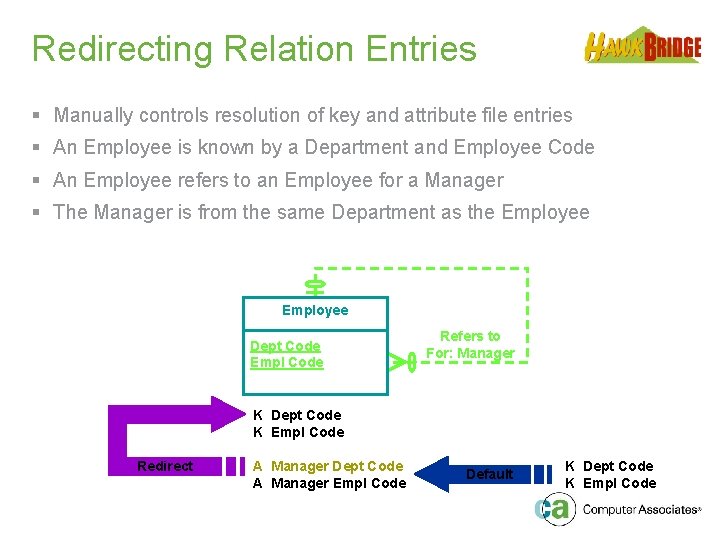
Redirecting Relation Entries § Manually controls resolution of key and attribute file entries § An Employee is known by a Department and Employee Code § An Employee refers to an Employee for a Manager § The Manager is from the same Department as the Employee Dept Code Empl Code Refers to For: Manager K Dept Code K Empl Code Redirect A Manager Dept Code A Manager Empl Code Default K Dept Code K Empl Code
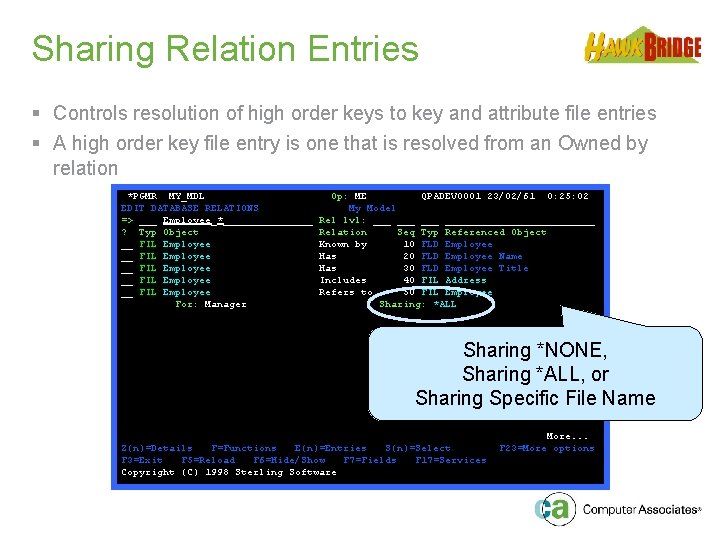
Sharing Relation Entries § Controls resolution of high order keys to key and attribute file entries § A high order key file entry is one that is resolved from an Owned by relation *PGMR MY_MDL EDIT DATABASE RELATIONS => ___ Employee_*________ ? Typ Object __ FIL Employee __ FIL Employee For: Manager Op: ME QPADEV 0001 23/02/61 0: 25: 02 My Model Rel lvl: ___ ______________ Relation Seq Typ Referenced Object Known by 10 FLD Employee Has 20 FLD Employee Name Has 30 FLD Employee Title Includes 40 FIL Address Refers to 50 FIL Employee Sharing: *ALL Sharing *NONE, Sharing *ALL, or Sharing Specific File Name Z(n)=Details F=Functions E(n)=Entries S(n)=Select F 3=Exit F 5=Reload F 6=Hide/Show F 7=Fields F 17=Services Copyright (C) 1998 Sterling Software More. . . F 23=More options
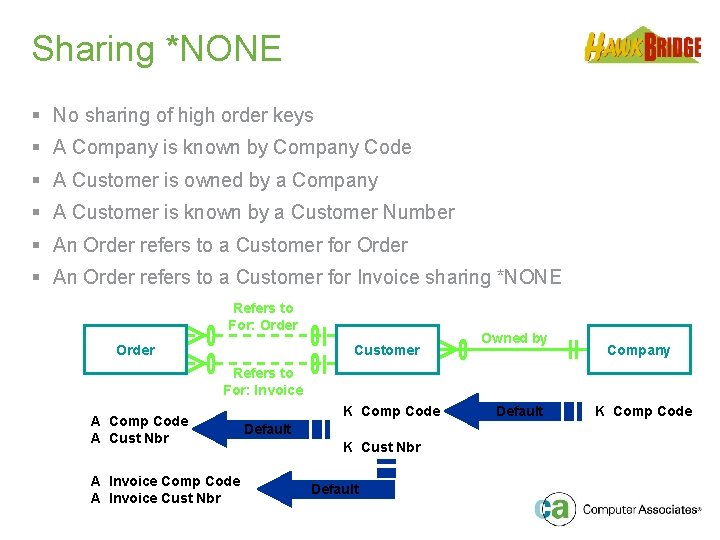
Sharing *NONE § No sharing of high order keys § A Company is known by Company Code § A Customer is owned by a Company § A Customer is known by a Customer Number § An Order refers to a Customer for Order § An Order refers to a Customer for Invoice sharing *NONE Refers to For: Order Customer Owned by Company Refers to For: Invoice A Comp Code A Cust Nbr A Invoice Comp Code A Invoice Cust Nbr K Comp Code Default K Cust Nbr Default K Comp Code
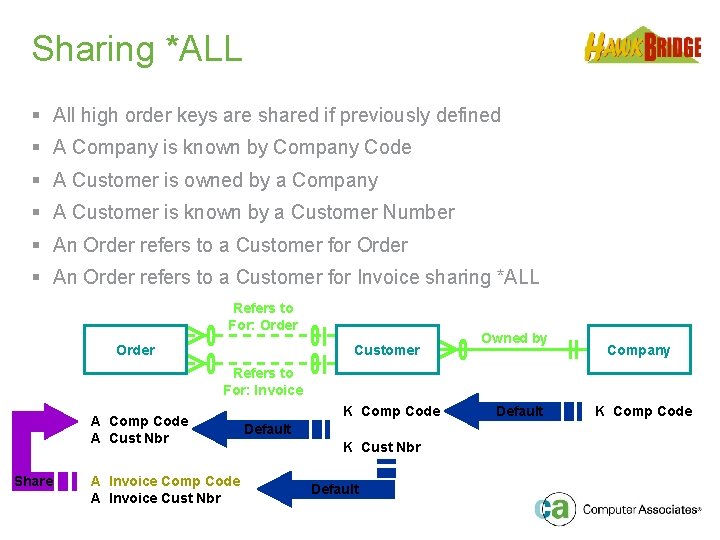
Sharing *ALL § All high order keys are shared if previously defined § A Company is known by Company Code § A Customer is owned by a Company § A Customer is known by a Customer Number § An Order refers to a Customer for Order § An Order refers to a Customer for Invoice sharing *ALL Refers to For: Order Customer Owned by Company Refers to For: Invoice A Comp Code A Cust Nbr Share A Invoice Comp Code A Invoice Cust Nbr K Comp Code Default K Cust Nbr Default K Comp Code
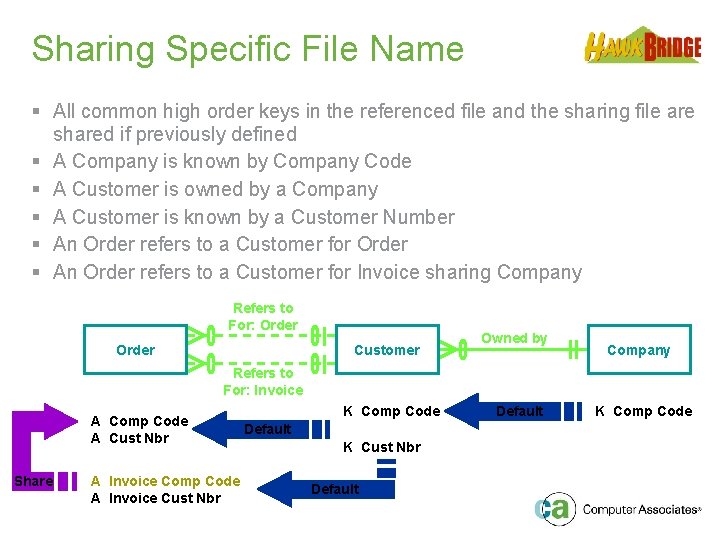
Sharing Specific File Name § All common high order keys in the referenced file and the sharing file are shared if previously defined § A Company is known by Company Code § A Customer is owned by a Company § A Customer is known by a Customer Number § An Order refers to a Customer for Order § An Order refers to a Customer for Invoice sharing Company Refers to For: Order Customer Owned by Company Refers to For: Invoice A Comp Code A Cust Nbr Share A Invoice Comp Code A Invoice Cust Nbr K Comp Code Default K Cust Nbr Default K Comp Code
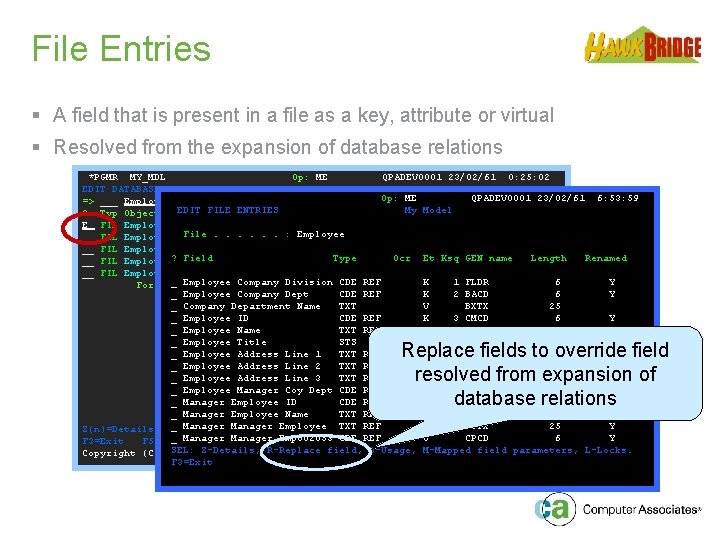
File Entries § A field that is present in a file as a key, attribute or virtual § Resolved from the expansion of database relations *PGMR MY_MDL Op: ME QPADEV 0001 23/02/61 0: 25: 02 EDIT DATABASE RELATIONS My Model QPADEV 0001 23/02/61 6: 53: 59 => ___ Employee_*________ Rel lvl: ___ Op: ___ ME _____________ EDIT FILE ENTRIES My Model ? Typ Object Relation Seq Typ Referenced Object E FIL Employee Known by 10 FLD Employee : Employee __ FIL Employee File. . . Has 20 FLD Employee Name __ FIL Employee Has 30 FLD Employee Title Ocr. Address Et Ksq GEN name Length Renamed __ FIL Employee? Field Includes Type 40 FIL __ FIL Employee Refers to 50 FIL Employee _ Employee Company Division CDE REF *ALL K 1 FLDR 6 Y For: Manager Sharing: _ Employee Company Dept CDE REF K 2 BACD 6 Y _ Company Department Name TXT V BXTX 25 _ Employee ID CDE REF K 3 CMCD 6 Y _ Employee Name TXT REF A BSTX 25 Y _ Employee Title STS A A 2 ST 1 _ Employee Address Line 1 TXT REF A BTTX 25 Y _ Employee Address Line 2 TXT REF A BUTX 25 Y _ Employee Address Line 3 TXT REF A BVTX 25 Y _ Employee Manager Coy Dept CDE REF A A 5 CD 6 Y _ Manager Employee ID CDE REF A CNCD 6 _ Manager Employee Name TXT REF V CTTX Y More. . . 25 _ Manager Employee TXT REF V CVTX 25 Y Z(n)=Details F=Functions E(n)=Entries S(n)=Select F 23=More options _ Manager Emp 002053 CDE REF V CPCD 6 Y F 3=Exit F 5=Reload F 6=Hide/Show F 7=Fields F 17=Services SEL: Z-Details, R-Replace field, U-Usage, M-Mapped field parameters, L-Locks. Copyright (C) 1998 Sterling Software F 3=Exit Replace fields to override field resolved from expansion of database relations
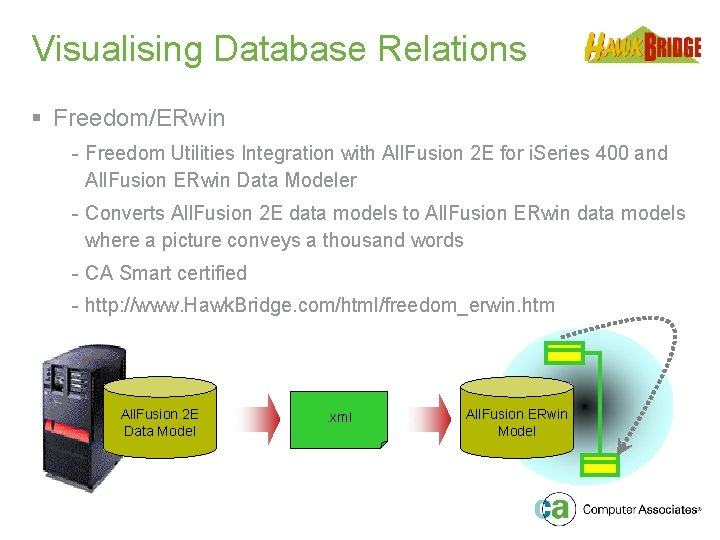
Visualising Database Relations § Freedom/ERwin - Freedom Utilities Integration with All. Fusion 2 E for i. Series 400 and All. Fusion ERwin Data Modeler - Converts All. Fusion 2 E data models to All. Fusion ERwin data models where a picture conveys a thousand words - CA Smart certified - http: //www. Hawk. Bridge. com/html/freedom_erwin. htm All. Fusion 2 E Data Model . xml All. Fusion ERwin Model
Visualising Database Relations § Freedom/ERwin Benefits - Industry Leading Solution Logical and Physical Data Models Export of Implementation Details Generate Databases Scaleable Enterprise Solution Single Non-Tier Based Licence Value for Money Saves Time Flexible Command Interface Visualise All Database Relations Uses All. Fusion ERwin XML Import
Industry Leading Solution § All. Fusion ERwin provides a powerful tool for designing databases that is the leading industry solution for logical and physical data modeling. § All. Fusion ERwin data models help you visualize data structures to facilitate the organization, management and moderation of data complexities, database technologies and the deployment environment.
Logical and Physical Data Models § All. Fusion ERwin supports both logical and physical data models. § Freedom/ERwin will export the long 25 character names for the logical data model and the implementation names for the physical data model. § Switching between the two within All. Fusion ERwin is as simple as clicking a button on the toolbar.
Export of Implementation Details § Freedom/ERwin allows the export of the implementation names of files and fields into the physical data model within All. Fusion ERwin.
Generate Databases § All. Fusion ERwin is not only a design tool, it is a powerful database development tool providing automatic generation of tables, stored procedures and trigger code for leading databases. § For those organisations that have developed their own datawarehouse, then this tool could provide the link between your OLTP and OLAP database applications.
Scalable Enterprise Solution § All. Fusion ERwin provides model management features that allow for the sharing of design information across your organisation thereby maximising your development productivity.
Single Non-Tier Based Licence § Freedom/ERwin only requires a single non-tier based licence that is installed on the IBM i. Series. § There are NO PC client side licence fees which means a single purchase for an IBM i. Series can be used by any number of developers.
Value for Money § Freedom/ERwin is very competitively priced with a single flat fee for any model IBM i. Series server.
Saves Time § Freedom/ERwin converts All. Fusion 2 E data models into All. Fusion ERwin data models in three simple steps: - Run the Create ERwin ERD (HCRTERWERD) command to generate a physical file containing the exported XML, - Transfer the physical file to the IFS or your PC, and - Open the XML file directly in All. Fusion ERwin without the need to use any other intermediate tools.
Flexible Command Interface § Freedom/Erwin is IBM i. Series command based providing the flexibility for it to be: - Submitted to batch, - Run interactively, - Included on your own menus, or - Run as part of your normal change management procedures.
Visualise All Database Relations § Freedom/ERwin reads and processes the internal All. Fusion 2 E data model files to build the XML export file. § This ensures that all relationship types, entries and redirections are included in the XML export file. § Other techniques and tools that use the OS/400 compiled physical and logical files fail to provide all the relationship details defined in All. Fusion 2 E - such as the "For" text on certain relationship types or redirected relationship entries.
Uses All. Fusion ERwin XML Import § Freedom/ERwin uses the XML import facility of All. Fusion ERwin. § This interface provides the greatest flexibility and versatility in the development of the Freedom/ERwin product. § This also helps keep the price of Freedom/ERwin down as we have less code to manage and support.
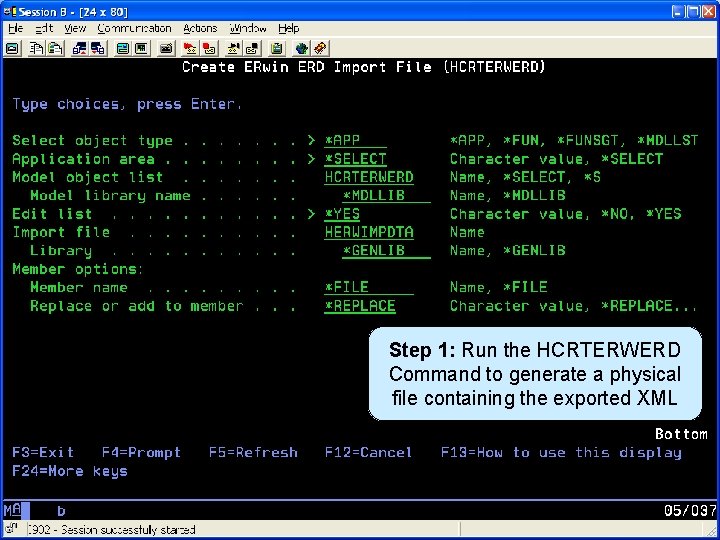
Generate XML File Step 1: Run the HCRTERWERD Command to generate a physical file containing the exported XML
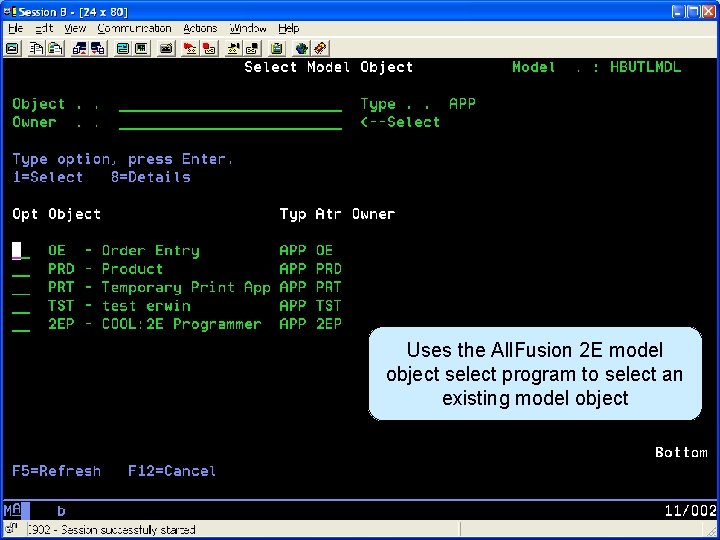
Generate XML File Uses the All. Fusion 2 E model object select program to select an existing model object
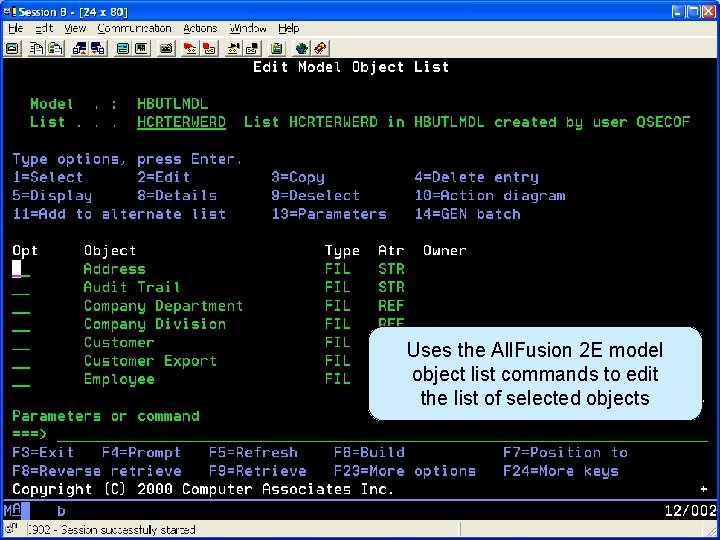
Generate XML File Uses the All. Fusion 2 E model object list commands to edit the list of selected objects
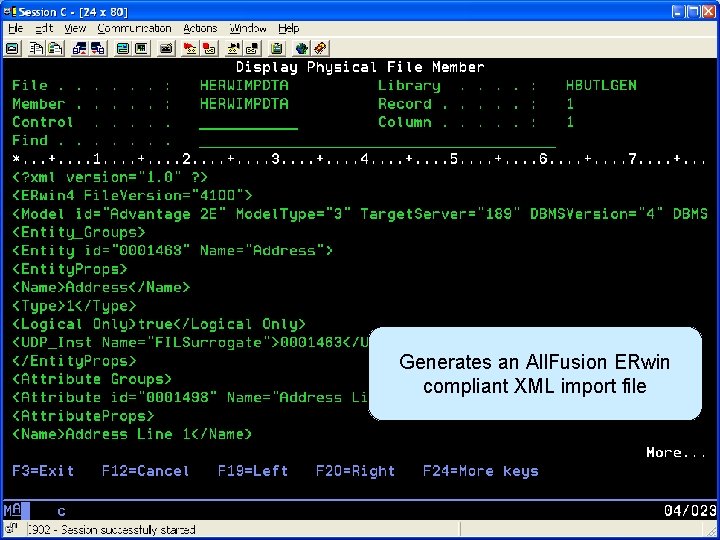
Generate XML File Generates an All. Fusion ERwin compliant XML import file
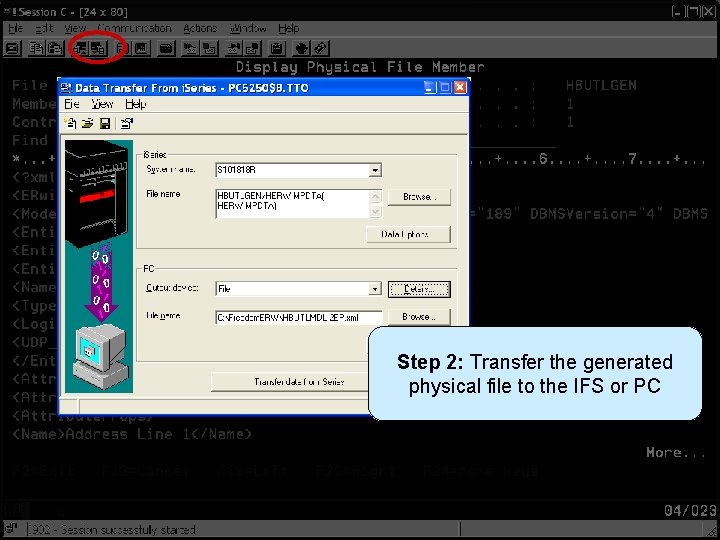
Transfer XML File to PC Step 2: Transfer the generated physical file to the IFS or PC
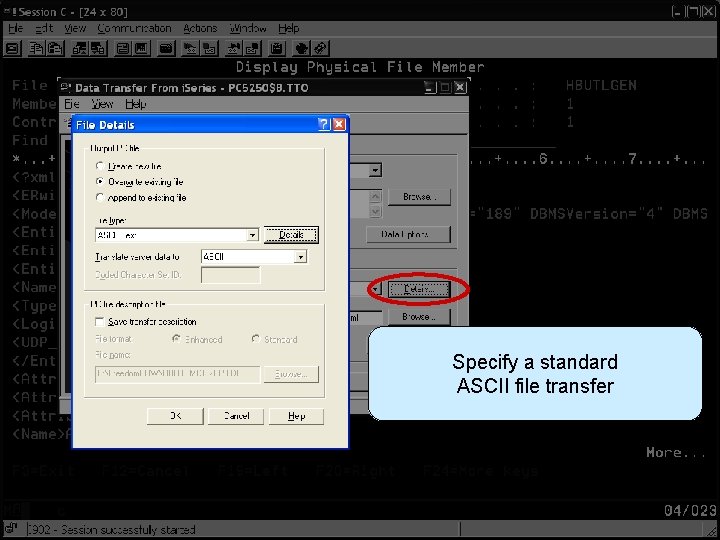
Transfer XML File to PC Specify a standard ASCII file transfer
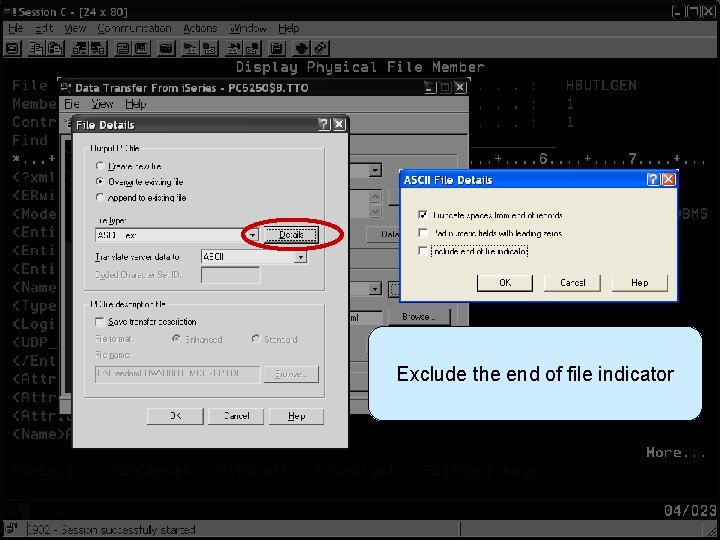
Transfer XML File to PC Exclude the end of file indicator
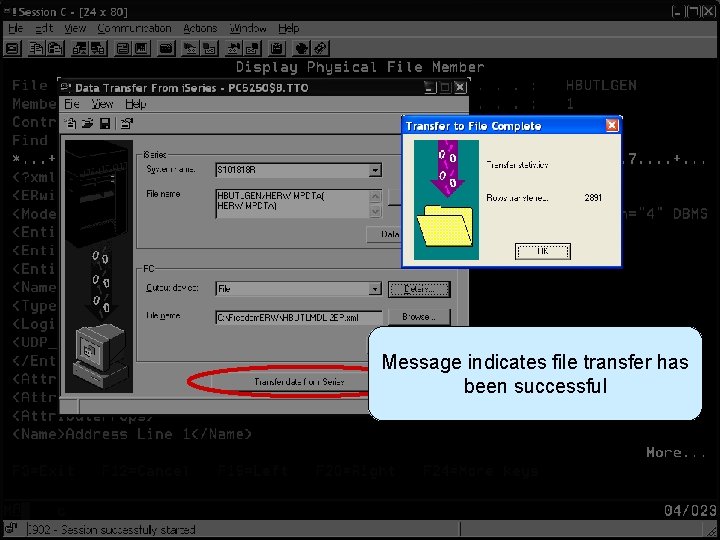
Transfer XML File to PC Message indicates file transfer has been successful
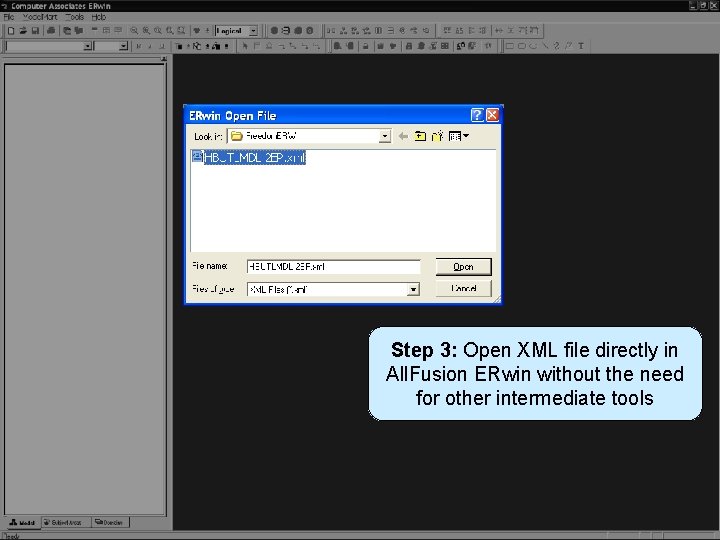
Open XML File in All. Fusion ERwin Step 3: Open XML file directly in All. Fusion ERwin without the need for other intermediate tools
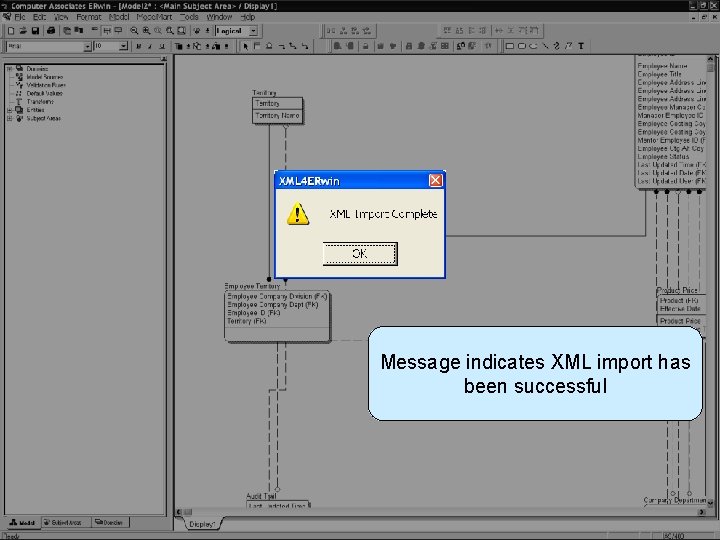
Open XML File in All. Fusion ERwin Message indicates XML import has been successful
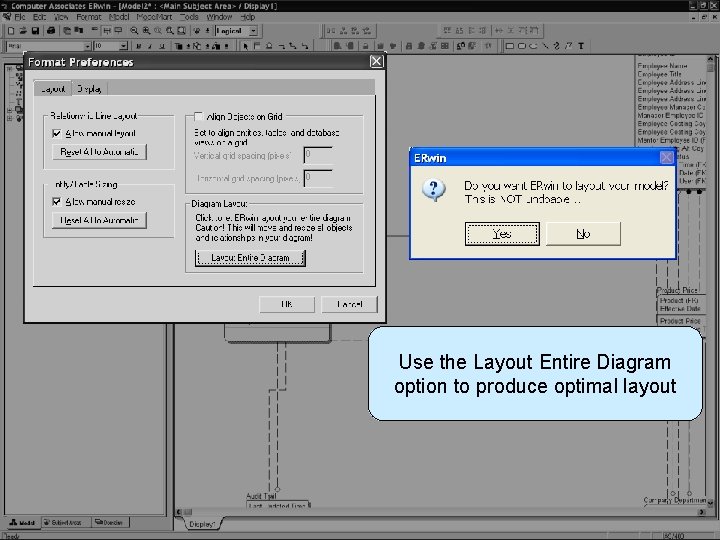
Open XML File in All. Fusion ERwin Use the Layout Entire Diagram option to produce optimal layout
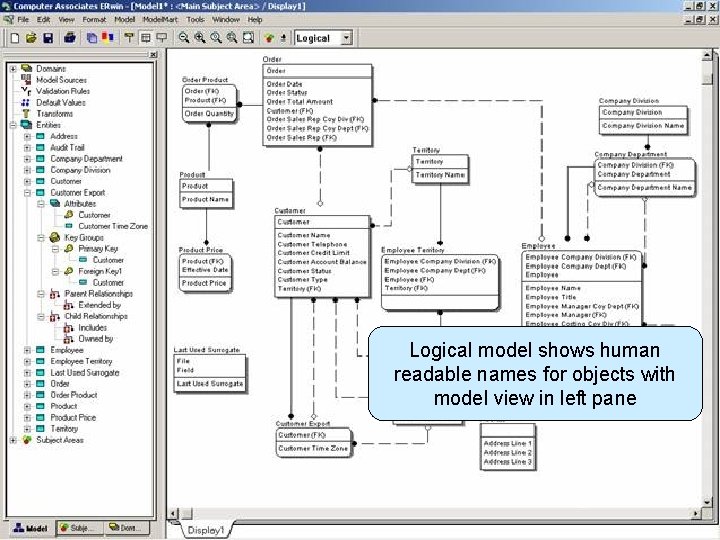
Open XML File in All. Fusion ERwin Logical model shows human readable names for objects with model view in left pane
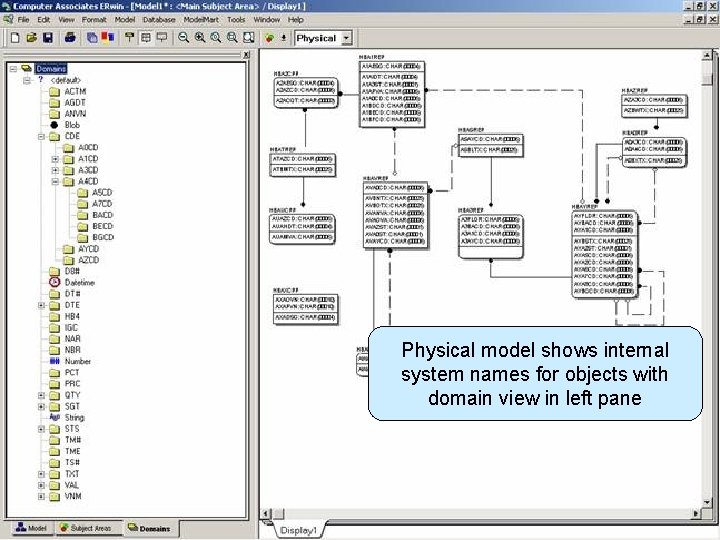
Open XML File in All. Fusion ERwin Physical model shows internal system names for objects with domain view in left pane
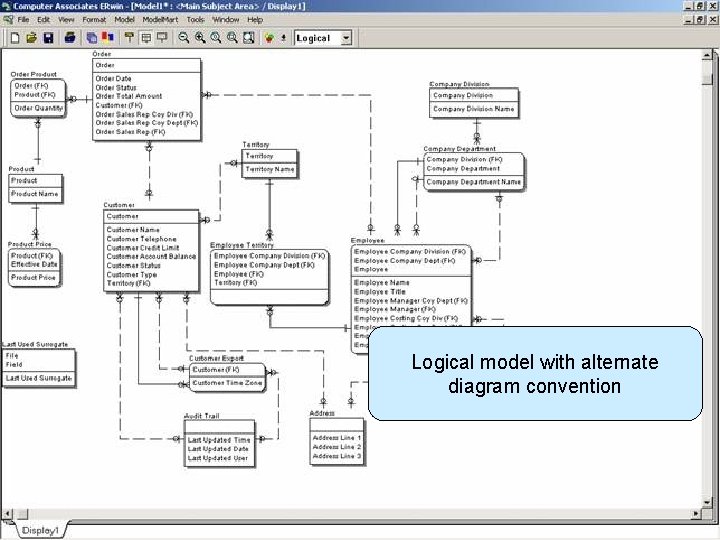
Open XML File in All. Fusion ERwin Logical model with alternate diagram convention
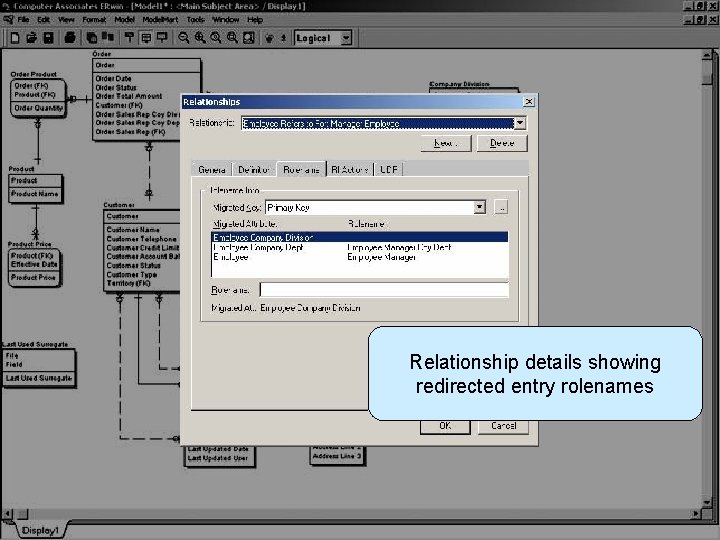
Open XML File in All. Fusion ERwin Relationship details showing redirected entry rolenames
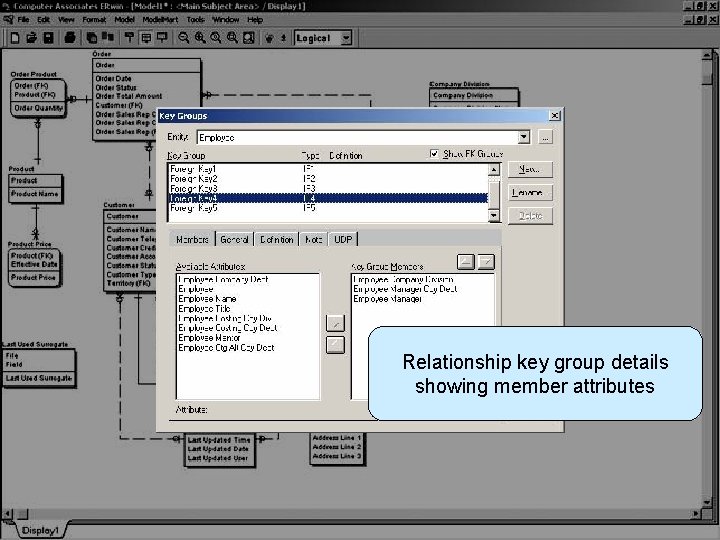
Open XML File in All. Fusion ERwin Relationship key group details showing member attributes
Future Enhancements § Export additional All. Fusion 2 E model objects - Access Paths and Triggers § Bi-directional Interface - Allow changes to re-imported back into All. Fusion 2 E § Any other suggestions?
Other Related Freedom Tools § Freedom/Visio - Generates Visio diagrams to represent ERD’s and PDD’s - http: //www. hawkbridge. com/html/freedom_visio. htm § Freedom/Doc - Generates documentation for All. Fusion 2 E data model objects - http: //www. hawkbridge. com/html/freedom_doc. htm
Session Summary § Text based modeling language of All. Fusion 2 E for defining database relations is quite powerful § In large data models it can become difficult to appreciate and understand object relationships § Conversion to a graphical data model such as All. Fusion ERwin where a picture can convey a thousand words increases developer productivity § Contact sales@Hawk. Bridge. com for further details and to request a free demonstration copy
Questions & Answers
- Slides: 55