
UML Unified Modeling Language Based on UML Distilled
UML Unified Modeling Language Based on: UML Distilled Martin Fowler

What is UML ? § § Modeling language, not a method Mainly graphical notation used to express the design Proposed OMG standard Several techniques: ð iterative development ð patterns : to describe the key ideas ð class diagrams : what kind of abstractions were made ð interaction diagrams : key behaviors of the system ð use cases : communication with the domain experts • snapshot of one aspect of your system • sum of all use cases is the external picture of your system ð activity diagrams
Development Process
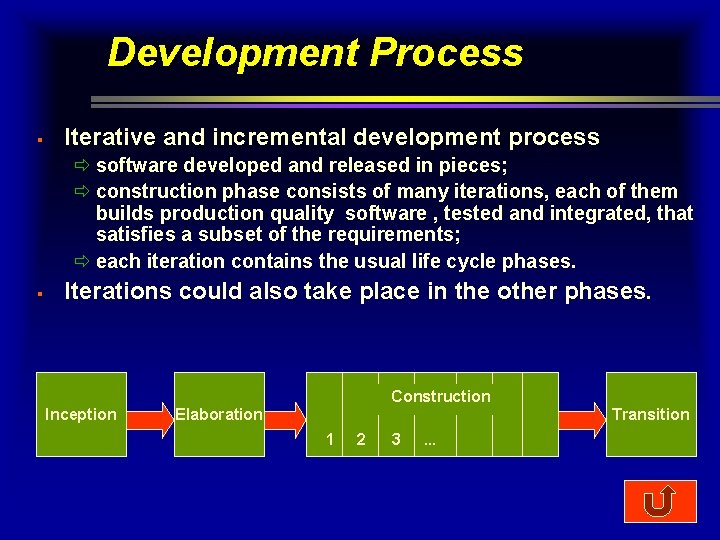
Development Process § Iterative and incremental development process ð software developed and released in pieces; ð construction phase consists of many iterations, each of them builds production quality software , tested and integrated, that satisfies a subset of the requirements; ð each iteration contains the usual life cycle phases. § Iterations could also take place in the other phases. Construction Inception Elaboration Transition 1 2 3 . . .
1. Inception § Can be short or can take months ð vague idea of functional specifications and feasibility study ð e. g. we are going to build the next-generation customer support system for our company. We intend to use object-oriented technology to build a more flexible system that is more customer-oriented, specifically , one that will support consolidated customer bills. § Roughly work out the business case for the project. ð Cost/benefit analysis ð get a sense of the project’s scope ð estimation of the size § In most cases a few days work.

2. Elaboration Construction Inception Elaboration Transition 1 § 2 3 . . . Better understanding of the problem ð What are you actually going to build? ð How are you going to build it? ð What technology are you going to use? § Risk management ð Requirements risks: build the right system ð Technological risks: experience with the used technology ð Skills risks: is the required staff available? ð Political risks
Requirement Risks § Tools for requirement gathering ð use cases: basis of communication between sponsors and developers in planning the project ð conceptual domain model: the world that the computer system is supporting (functions, vocabulary, … ), high level, no details ð analysis model: only in larger projects, to explore the consequences of the external requirements ð design model: realization of the information in the domain objects and the behavior in the use cases • adds classes to actually do the work • provides a reusable architecture for future extensions § Incremental ( no waterfall approach) ð class diagrams: to capture the business language ð activity diagrams: describing the workflow of the business ð interaction diagrams
Technological Risks § Build prototypes that try out the pieces of technology you planned to use ð fast evolving technology ð high risk in linking the components of a design together ð architectural design decisions ð special attention to distributed systems § Risks ð What happens if a piece of technology doesn’t work ? ð What if we can’t connect two pieces of the puzzle ? ð What is the likelihood of something going wrong ? § Used techniques ð Class diagrams, package diagrams, deployment diagrams
Skills Risks § Lack of experience and training § Apply immediately by building prototypes § Organize project discussions § Pattern community http: //stwww. cs. uiuc. edu/users/patterns. html
Baseline Architecture Result of the Elaboration (± 20% of total project time) § § § List of use cases domain model technology platform Planning § Users: level of priority for each use case § Developers: consider architectural risk for each use case § Developers: commitment schedule
3. Construction builds the system in a number of iterations ð each iteration is a mini-project ð analysis, design, coding, testing and integration for each use case assigned to the iteration § testing is a continuous process ð no code should be written before you know how to test it ð write the test immediately ð keep test code forever ð unit tests (white box) and system tests(black box) § Iterations are both incremental and iterative ð incremental in function ð iterative in terms of the code base: refactoring (to avoid code degeneration)
Refactoring § Software entropy ð original structure disappears after subsequent modifications ð redesign cause short-term pain for longer-term gain § Refactoring ð is a term to describe redesign techniques ð will not change the functionality of your program ð it changes the internal structure to make it better understandable ð changes are small steps (rename a method, move a field, …)
Refactoring § Refactoring is made easier by the following steps: ð do not refactor and add functionality at the same time ð prepare good tests before you start refactoring ð keep the steps small § You should refactor when: ð if it seems difficult to add new functionality ð when you have difficulties in understanding the code
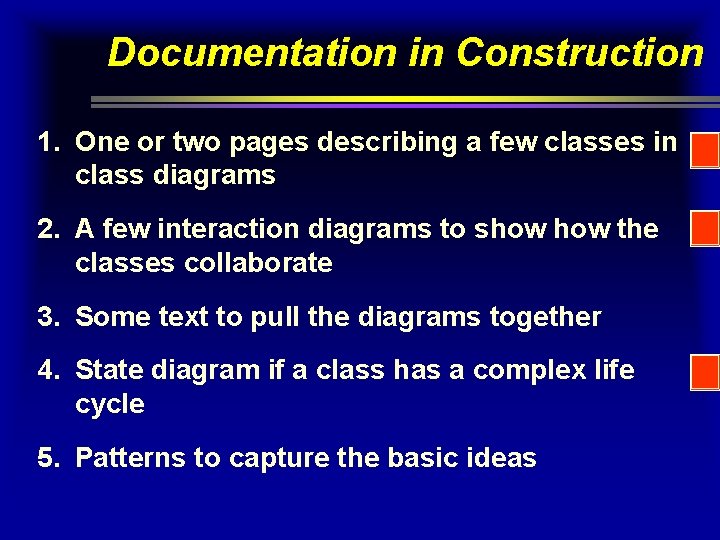
Documentation in Construction 1. One or two pages describing a few classes in class diagrams 2. A few interaction diagrams to show the classes collaborate 3. Some text to pull the diagrams together 4. State diagram if a class has a complex life cycle 5. Patterns to capture the basic ideas
Patterns § § § Look at the result of the process They describe common ways of doing things It is much more than a model ð it must include the reason why it is the way it is ð it is a solution to a problem ð patterns must make the problem clear ð explain why it solves the problem ð explain under what circumstances it solves the problem § Information about patterns ð http: //st-www. cs. uiuc. edu/users/patterns. html ð http: //c 2. com/ppr/index. html
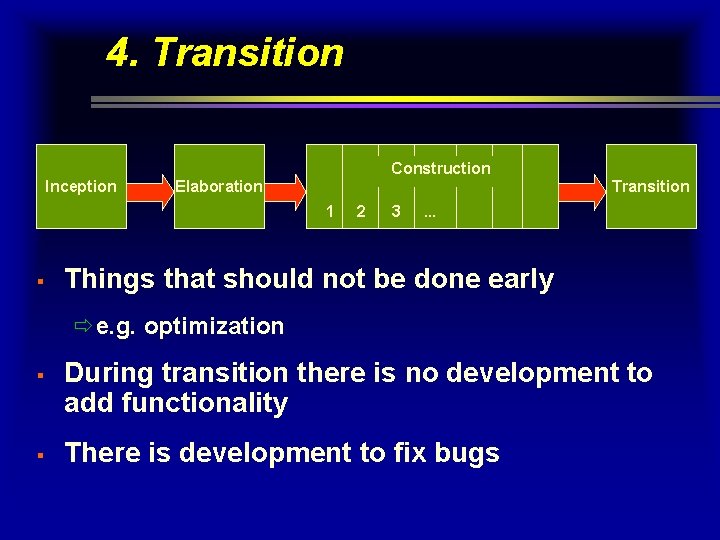
4. Transition Construction Inception Elaboration Transition 1 § 2 3 . . . Things that should not be done early ðe. g. optimization § § During transition there is no development to add functionality There is development to fix bugs

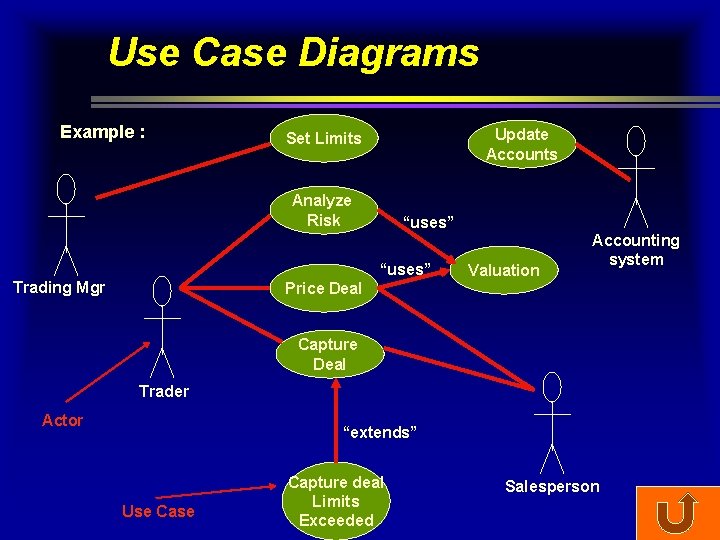
Use Case Diagrams Example : Update Accounts Set Limits Analyze Risk “uses” Trading Mgr Valuation Accounting system Price Deal Capture Deal Trader Actor “extends” Use Capture deal Limits Exceeded Salesperson
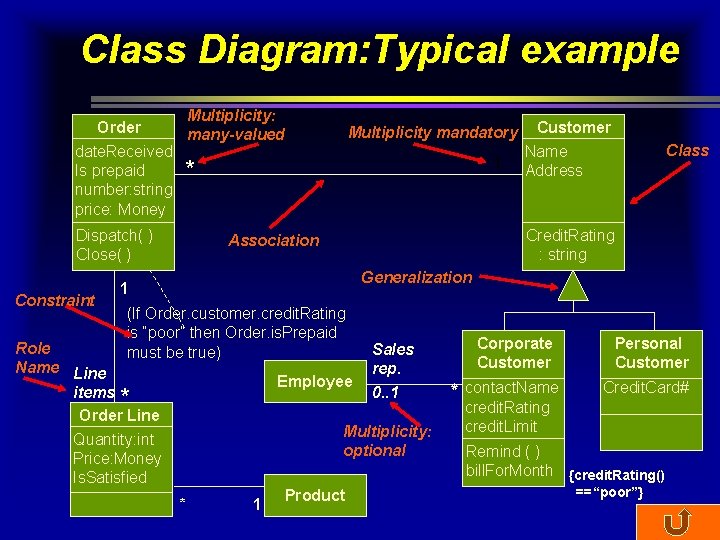
Class Diagram: Typical example Multiplicity: Order many-valued date. Received Is prepaid * number: string price: Money Dispatch( ) Close( ) Constraint Multiplicity mandatory 1 Customer Name Address Class Credit. Rating : string Association Generalization 1 (If Order. customer. credit. Rating is “poor” then Order. is. Prepaid must be true) Role Name Line items * Order Line Quantity: int Price: Money Is. Satisfied Employee Sales rep. 0. . 1 Multiplicity: optional * 1 Product Corporate Customer * contact. Name credit. Rating credit. Limit Personal Customer Credit. Card# Remind ( ) bill. For. Month {credit. Rating() ==“poor”}
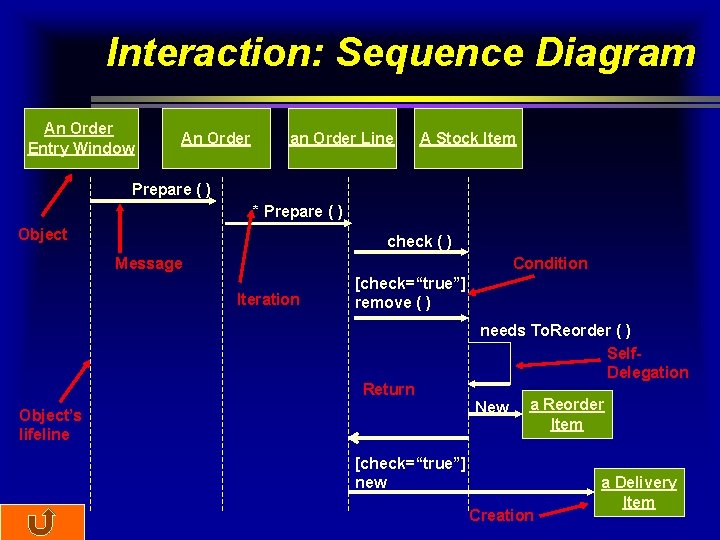
Interaction: Sequence Diagram An Order Entry Window An Order an Order Line A Stock Item Prepare ( ) * Prepare ( ) Object check ( ) Message Condition Iteration [check=“true”] remove ( ) Return needs To. Reorder ( ) Self. Delegation New Object’s lifeline a Reorder Item [check=“true”] new Creation a Delivery Item
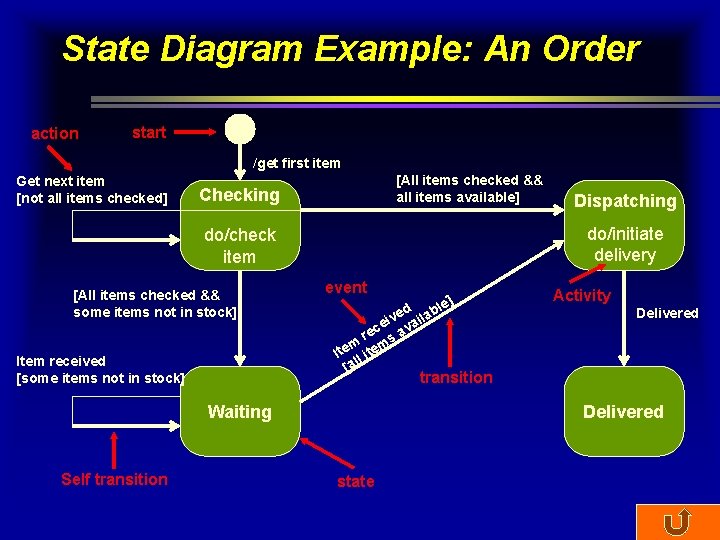
State Diagram Example: An Order action start /get first item Get next item [not all items checked] [All items checked && all items available] Checking do/initiate delivery do/check item [All items checked && some items not in stock] Item received [some items not in stock] event ] d able e v ei vail c re s a m m Ite l ite [al Activity Delivered transition Waiting Self transition Dispatching Delivered state
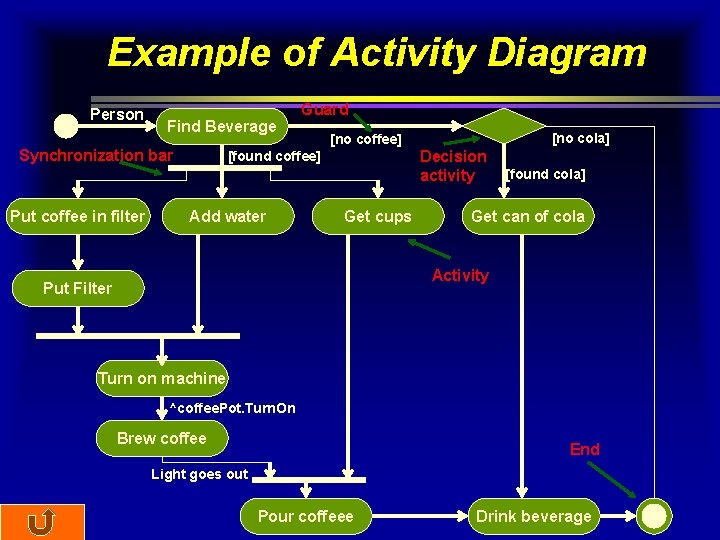
Example of Activity Diagram Person Find Beverage Synchronization bar Put coffee in filter Guard Decision activity [found coffee] Add water [no cola] [no coffee] Get cups [found cola] Get can of cola Activity Put Filter Turn on machine ^coffee. Pot. Turn. On Brew coffee End Light goes out Pour coffeee Drink beverage
- Slides: 23