
Twitter for Business How to use Twitter effectively
Twitter for Business How to use Twitter effectively for business Presentation by: Angela West, Working Web Copy http: //www. workingwebcopy. com
Why Use Twitter for Business The best way to influence the conversation is to be a part of it. Proactive, not reactive. Shows that your company is forward-thinking Especially important for businesses selling products geared towards younger adults, you need to be where they are
Pew Research, June 2011 Twitter Demographics As of June 2011 13% of online adults were on Twitter 18% were 18 -29, 14% 30 -49, percentages fall off over 49 42% have incomes over $30, 000 27% have incomes over $50, 000, 15% over $75, 000 16% are college graduates Reference: http: //pewresearch. org/pubs/2007/twitterusers-cellphone-2011 -demographics
When You Don’t Need Twitter If you are selling products or services targeted specifically to seniors, no Twitter presence needed for the moment Incorporate Twitter into a five year social media plan, as adoption of the service continues to climb and current users age. Otherwise, get on Twitter.
Using Twitter as a Professional Covering two streams here, using Twitter as an HR professional and as a business. Important to represent yourself just as you would a business on Twitter. If you want a personal account, create one unassociated with your real name. This way tweets about politics, religion, etc. stay off your feed. From now on, consider yourself a business rather than an individual and think before you post. More on etiquette later. Let’s get started with a profile…
Signing up for Twitter If you are a business, choose a user name closest to your business name. If you are an individual, grab your own name if you can, if you can’t put an underscore between your first and last name (angela_west). Go to https: //twitter. com/account/new and follow the steps there. Twitter lets you use easy passwords; don’t do this for a business account. Choose something long with letters, numbers, and preferably symbols as well.
Twitter Business Profile To edit your profile, go to https: //twitter. com/settings/profile after signing in. For your picture that will appear each time you use a tweet, upload a picture under the profile tab. Max 700 k. Logos are best here, or artwork incorporating a logo. If you are signing up as a professional, go to a professional photographer and have some headshots taken. Use these here. Very important to look polished.
Twitter Business Profile The bio is important; if you don’t already have a onesentence pitch for what your business is about, spend some time with this and get it right. Only post Tweets to Facebook if you have a Facebook business page. Check it manually as this feature is buggy.
Twitter Background If you are a business, a custom Twitter background is strongly recommended. If you are a professional, not necessary but “nice to have”. If you aren’t good with Photoshop or other graphic design programs, hire a graphic designer to do a good one for you. Great background here: https: //twitter. com/lruettimann Upload it or change your background at https: //twitter. com/settings/design There apps to create your own Twitter background, but none of them look as professional as having one done by a designer. Find a designer at http: //designers. designcrowd. com/ or search locally.
Tools for Twitter Use Hootsuite (hootsuite. com) only tool you really need. You can use it to schedule tweets and post to other services like Facebook and Linked. In profiles (not company pages) as well. While Hootsuite is available for all mobile platforms, Twitter’s own app is very good as well with recent improvements, including the ability to manage multiple accounts. Recommend installing both on mobile devices as they each have their strengths.
Gaining Followers on Twitter Add your Twitter name and URL to company collateral, business cards, email signatures, and your website. Follow people who are influencers in your industry. You can find them by searching for your topic on Twitter or on Klout. Take a few minutes a day to follow people, and they’ll follow you back. Make sure you always follow people back, unless they look spammy. Do not use services that claim to get you followers. They will not be engaged, they are usually just random people. Never, ever pay for followers as this practice is against the Twitter terms of service. If you do it right, followers will naturally accrue.
Measuring Performance Set a goal for what you want Twitter to do for your business. Increase sales? Improve brand image? Bring in foot traffic? Write out a plan for what you are going to do to meet these goals, then measure results. You should be using Twitter partially to drive traffic to your website or blog. Make sure Google Analytics is installed on both to ensure you can track where traffic is coming from. Klout will help you measure your performance on Twitter and offers practical suggestions for improving performance. Go to klout. com to sign up.
Best Practices: Business Reply to all tweets sent to your account, negative or positive. Try to take negative tweets offline to email, phone, any other private means of communication. Use hashtags to make your topics searchable, don’t need to do this for every tweet Research relevant blog posts and news articles for your industry, tweet those. Build in some original content, 2 -3 blog posts a week is a good number, but whatever you can manage.
Best Practices: Business Always remember that you are tweeting as the face of the business. Consider outsourcing to PR firm, web design firm, or social media management business if you are too busy to manage Twitter or assign resources to do so. While it is ideal for businesses to be doing the job themselves (quicker reaction time, more subject matter knowledge, etc. ) many businesses outsource.
Twitter Etiquette Use hashtags where it is helpful to people, it will help them find you. Always answer people and thank people for retweets where you can. Spend a bit of time every day looking at what your followers are saying and respond to questions, even if they aren’t asking you.
Business Case Study: Fairmont http: //twitter. com/Fairmont. Hotels Fairmont not only has a gorgeous background, a great bio, and lovely images with their tweets, but a great sense of interaction with their audience. They constantly engage with other Tweeters and seamlessly slide in promotion with engagement without sounding “over the top”. Spend some time following them, watch what they do, copy them. Great example of using pictures in tweets.
Business Case Studies: Top 40 “ 40 of the Best Twitter Brands and the People Behind Them” by Jennifer Van Grove for Mashable A must-read and study for anyone getting into Tweeting for themselves or a business. Long but worth it. Intuit, The Home Depot, and Whole Foods are three of my favourites mentioned in this piece. All of these brands large enough to assign staff, usually senior-level communications or marketing, to the Twitter account. May not be possible for a smaller business with less resources, in this case consider outsourcing. Where possible, tweet from inside the company. This will always get you best results. If you are unsure, hire a social media expert to come in and train your staff. Source: http: //mashable. com/2009/01/21/best-twitter-brands/
What Not to Do on Twitter Don’t reply to users with personal information like reference numbers, like Target does on its Twitter account. Personalized answers should be direct messaged to customers. https: //twitter. com/Target Never, never get personal. Check out what happened when a tech reporter from the National Post lost it on a PR person who didn’t return a telephone call. http: //gawker. com/5152016/? tag=television Avoid swearing, cursing, and “hot button” topics like politics and religion at all costs. If someone says something that makes you angry, take a step back and ask someone else to take over the conversation or politely ask them to take the conversation private to email or phone. Source: 5 Scary Social Media Horror Stories, by me for PC World http: //www. computerworlduk. com/advice/it-business/3314564/five-scary-social-media-horrorstories/
Best Practices: HR Professionals Provide link to your website or, if you have no website, your Linked. In profile address. Keep unrelated topics such as politics, religion, dating off your feed. Tweet at least once each weekday, not necessary over the weekend. Follow these examples: http: //www. talenthq. com/2010/01/the-top-25 -hr-proson-twitter/
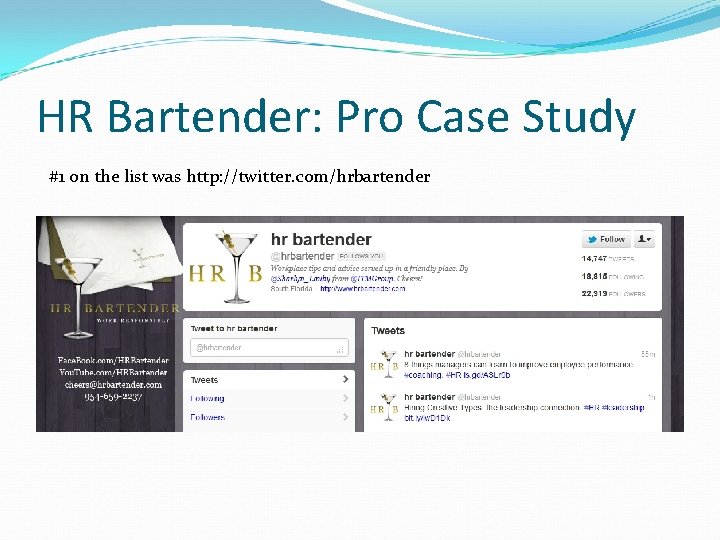
HR Bartender: Pro Case Study #1 on the list was http: //twitter. com/hrbartender
HR Bartender: Pro Case Study Uses hashtags regularly. Important because this is one way people find topics they are interested in on Twitter. Very frequent poster, once an hour in some cases. You can schedule tweets so you aren’t constantly on Twitter using Hootsuite (Hootsuite. com). Retweets interesting tweets from other users. Participating in conversation, not just blasting everyone with their brand.
More Resources I’m happy to answer any questions you’ve got. Email me at info@workingwebcopy. com if I don’t get to you during the event. Highly recommend skimming the Ultimate Guide to Everything Twitter for more. The Ultimate Guide to Everything Twitter by Me http: //www. webdesignerdepot. com/2009/03/theultimate-guide-for-everything-twitter/
- Slides: 22