
Tutorial 4 Creating Special Effects with CSS Objectives
Tutorial 4 Creating Special Effects with CSS
Objectives • Work with CSS selectors • Create - styles for lists – apply class styles – a rollover effect – a drop cap using a pseudo-element • Manage page layout with CSS and Work with overflow and clipping styles • Create stacked objects and apply styles to various media • Hide elements from printing and create/apply printer styles • Create and prohibit page breaks for printing New Perspectives on HTML, XHTML, and XML, Comprehensive, 3 rd Edition New Perspectives on HTML and XHTML, Comprehensive 2
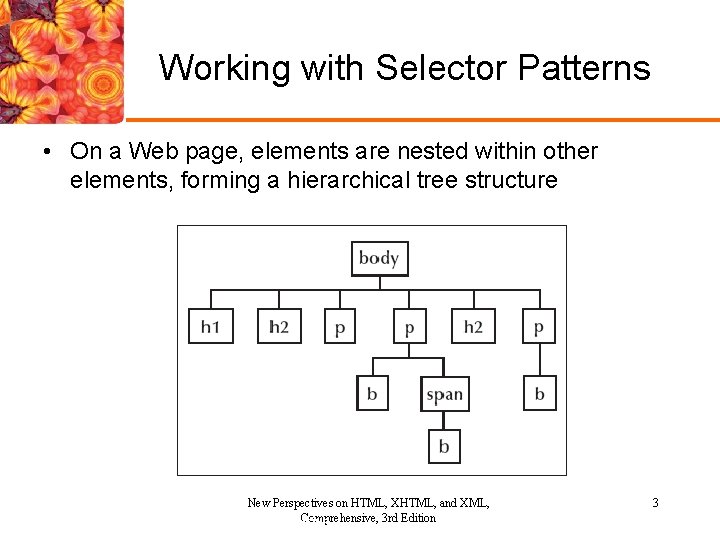
Working with Selector Patterns • On a Web page, elements are nested within other elements, forming a hierarchical tree structure New Perspectives on HTML, XHTML, and XML, Comprehensive, 3 rd Edition New Perspectives on HTML and XHTML, Comprehensive 3
Working with Selector Patterns • To take advantage of this tree structure, CSS allows you to create contextual selectors that express the location of an element within the hierarchy of elements parent descendant {styles} li b {color: blue} li b, h 2 {color: blue} #notes b {color: blue} * {color: blue} p > b {color: blue} New Perspectives on HTML, XHTML, and XML, Comprehensive, 3 rd Edition New Perspectives on HTML and XHTML, Comprehensive 4
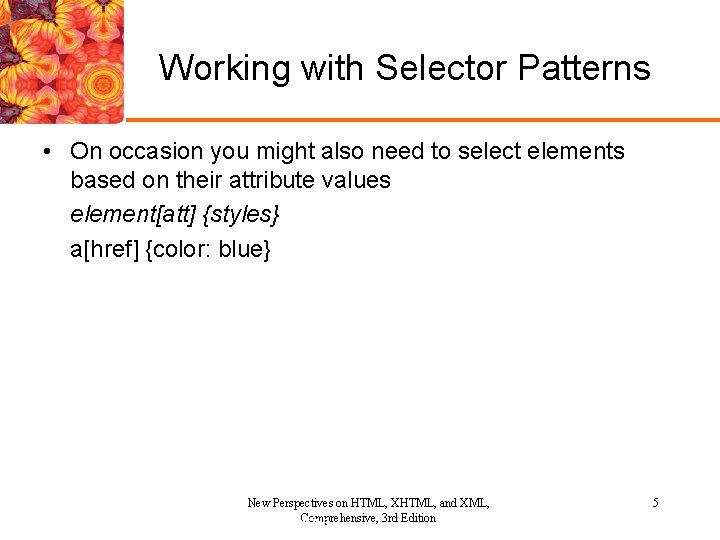
Working with Selector Patterns • On occasion you might also need to select elements based on their attribute values element[att] {styles} a[href] {color: blue} New Perspectives on HTML, XHTML, and XML, Comprehensive, 3 rd Edition New Perspectives on HTML and XHTML, Comprehensive 5
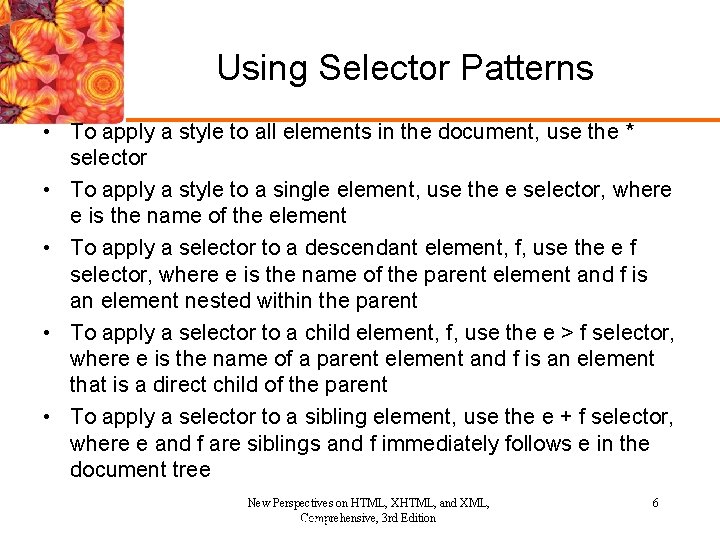
Using Selector Patterns • To apply a style to all elements in the document, use the * selector • To apply a style to a single element, use the e selector, where e is the name of the element • To apply a selector to a descendant element, f, use the e f selector, where e is the name of the parent element and f is an element nested within the parent • To apply a selector to a child element, f, use the e > f selector, where e is the name of a parent element and f is an element that is a direct child of the parent • To apply a selector to a sibling element, use the e + f selector, where e and f are siblings and f immediately follows e in the document tree New Perspectives on HTML, XHTML, and XML, Comprehensive, 3 rd Edition New Perspectives on HTML and XHTML, Comprehensive 6
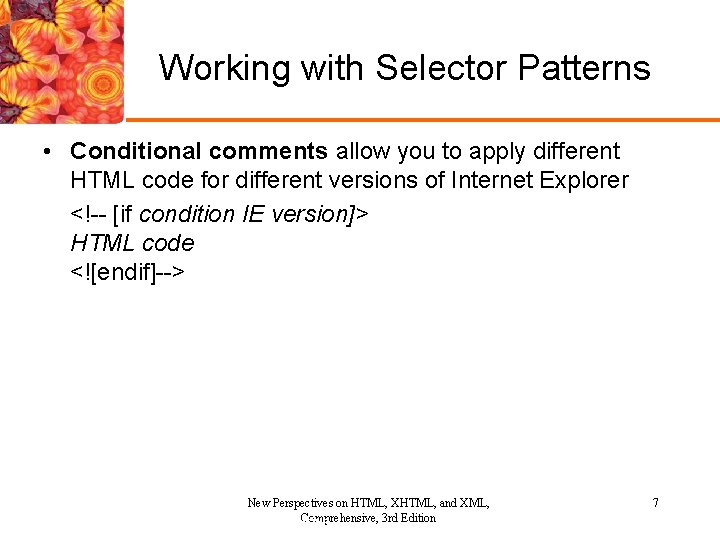
Working with Selector Patterns • Conditional comments allow you to apply different HTML code for different versions of Internet Explorer <!-- [if condition IE version]> HTML code <![endif]--> New Perspectives on HTML, XHTML, and XML, Comprehensive, 3 rd Edition New Perspectives on HTML and XHTML, Comprehensive 7
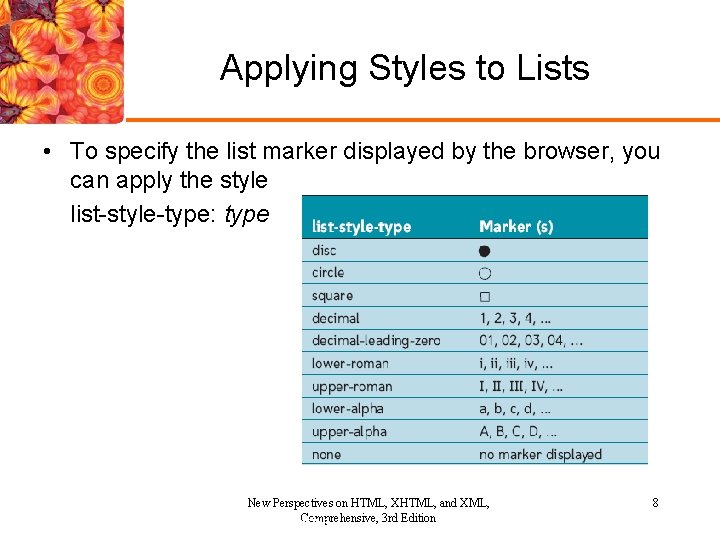
Applying Styles to Lists • To specify the list marker displayed by the browser, you can apply the style list-style-type: type New Perspectives on HTML, XHTML, and XML, Comprehensive, 3 rd Edition New Perspectives on HTML and XHTML, Comprehensive 8
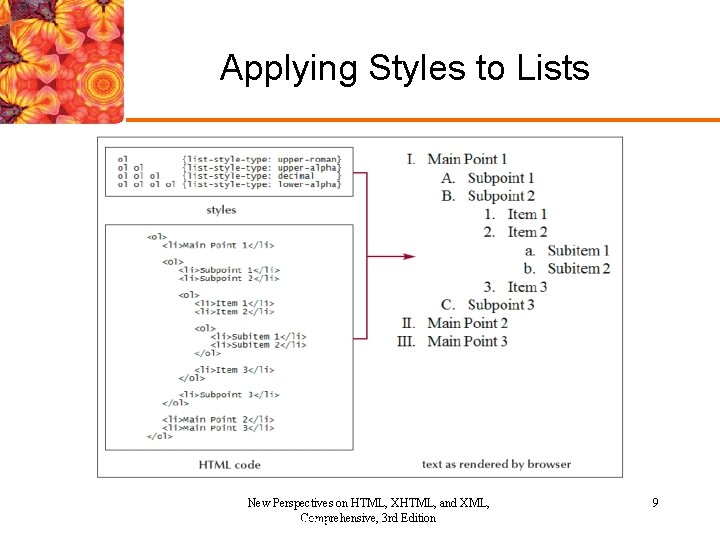
Applying Styles to Lists New Perspectives on HTML, XHTML, and XML, Comprehensive, 3 rd Edition New Perspectives on HTML and XHTML, Comprehensive 9
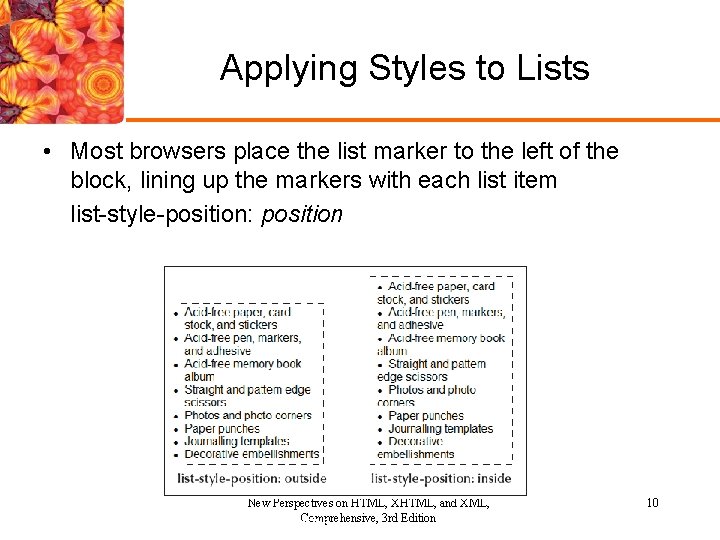
Applying Styles to Lists • Most browsers place the list marker to the left of the block, lining up the markers with each list item list-style-position: position New Perspectives on HTML, XHTML, and XML, Comprehensive, 3 rd Edition New Perspectives on HTML and XHTML, Comprehensive 10
Working with Classes • The class attribute is used when you want to identify elements that share a common characteristic <elem class="class">. . . </elem> • You can use the class attribute to assign the same style to multiple elements sharing the same class value. class {styles} New Perspectives on HTML, XHTML, and XML, Comprehensive, 3 rd Edition New Perspectives on HTML and XHTML, Comprehensive 11
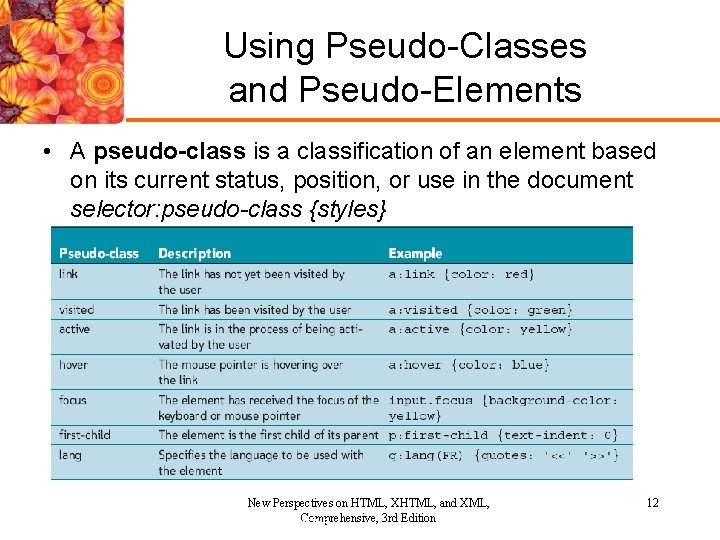
Using Pseudo-Classes and Pseudo-Elements • A pseudo-class is a classification of an element based on its current status, position, or use in the document selector: pseudo-class {styles} New Perspectives on HTML, XHTML, and XML, Comprehensive, 3 rd Edition New Perspectives on HTML and XHTML, Comprehensive 12
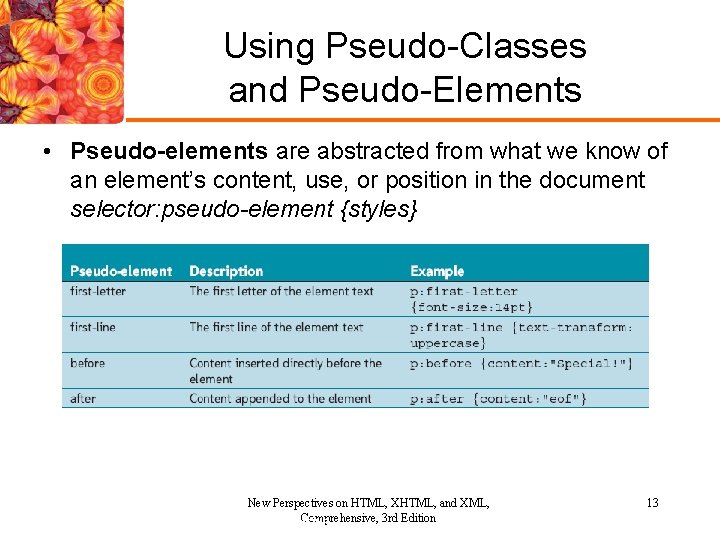
Using Pseudo-Classes and Pseudo-Elements • Pseudo-elements are abstracted from what we know of an element’s content, use, or position in the document selector: pseudo-element {styles} New Perspectives on HTML, XHTML, and XML, Comprehensive, 3 rd Edition New Perspectives on HTML and XHTML, Comprehensive 13
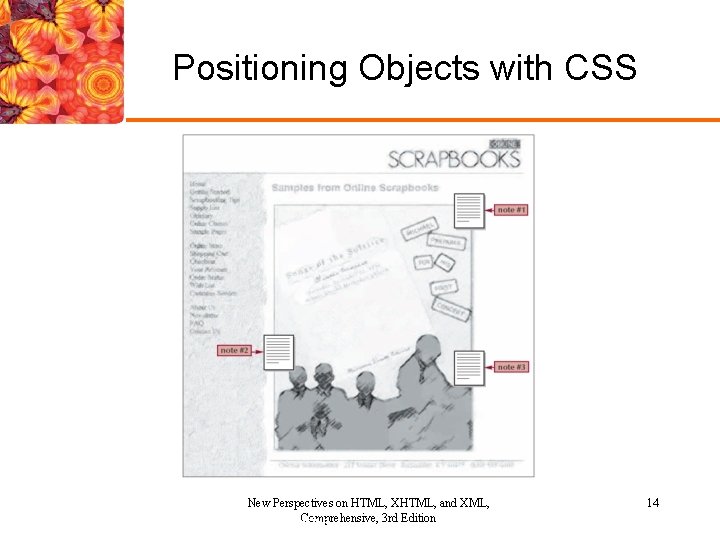
Positioning Objects with CSS New Perspectives on HTML, XHTML, and XML, Comprehensive, 3 rd Edition New Perspectives on HTML and XHTML, Comprehensive 14
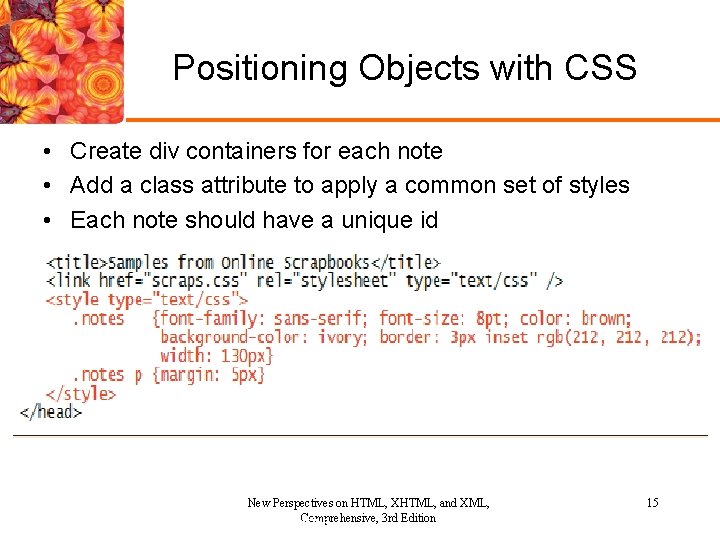
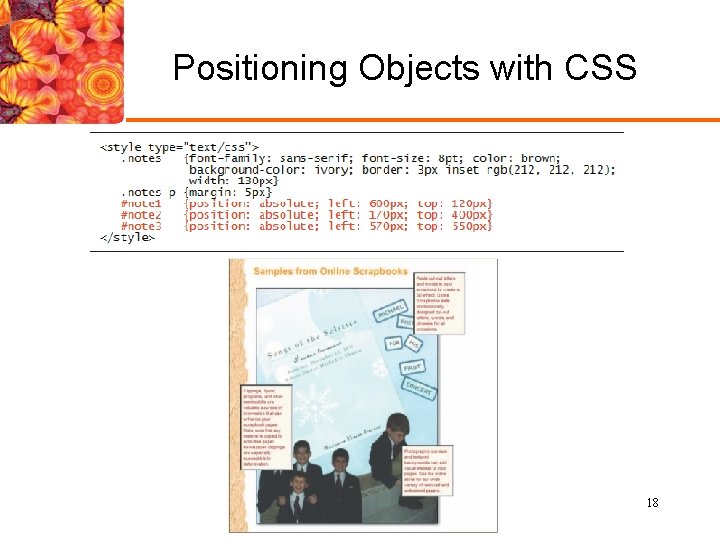
Positioning Objects with CSS • Create div containers for each note • Add a class attribute to apply a common set of styles • Each note should have a unique id New Perspectives on HTML, XHTML, and XML, Comprehensive, 3 rd Edition New Perspectives on HTML and XHTML, Comprehensive 15
Positioning Objects with CSS • CSS-P (CSS-Positioning) became part of the specification for CSS 2, and positioning styles were some of the first CSS 2 styles to be adopted by browsers position: type; top: value; right: value; bottom: value; left: value; • Absolute positioning enables you to place an element at specific coordinates either on a page or within a containing element position: absolute; left: 100 px; top: 50 px New Perspectives on HTML, XHTML, and XML, Comprehensive, 3 rd Edition New Perspectives on HTML and XHTML, Comprehensive 16
Positioning Objects with CSS • Relative positioning is used to move an element relative to its default position on the page position: relative; left: 100 px; top: 50 px • You can fix an element at a specific spot in the document window while the rest of the page scrolls by setting the value of the position style to fixed • You can assign the inherit position style to an element so that it inherits the position value of its parent element New Perspectives on HTML, XHTML, and XML, Comprehensive, 3 rd Edition New Perspectives on HTML and XHTML, Comprehensive 17
Positioning Objects with CSS New Perspectives on HTML, XHTML, and XML, Comprehensive, 3 rd Edition New Perspectives on HTML and XHTML, Comprehensive 18
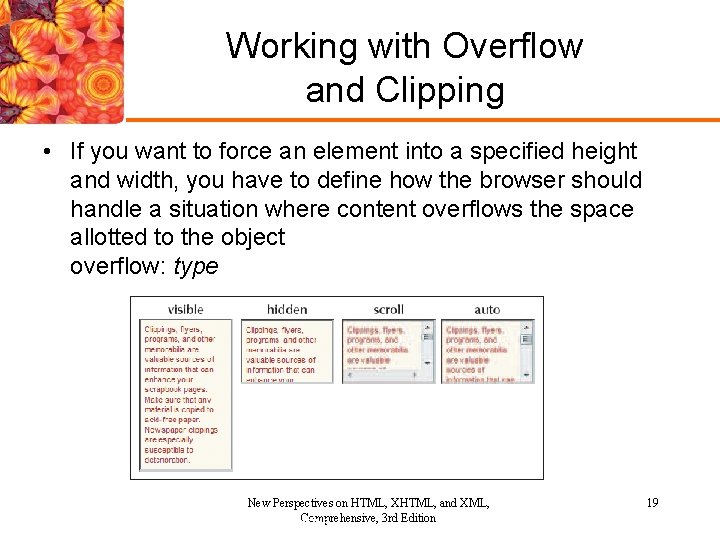
Working with Overflow and Clipping • If you want to force an element into a specified height and width, you have to define how the browser should handle a situation where content overflows the space allotted to the object overflow: type New Perspectives on HTML, XHTML, and XML, Comprehensive, 3 rd Edition New Perspectives on HTML and XHTML, Comprehensive 19
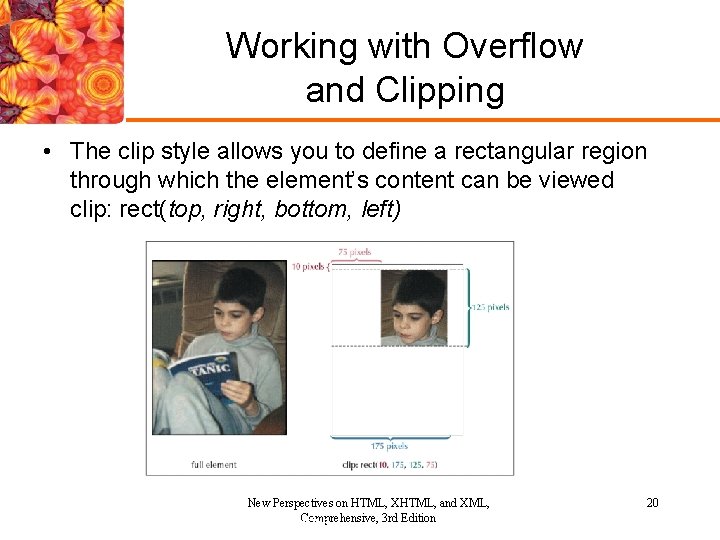
Working with Overflow and Clipping • The clip style allows you to define a rectangular region through which the element’s content can be viewed clip: rect(top, right, bottom, left) New Perspectives on HTML, XHTML, and XML, Comprehensive, 3 rd Edition New Perspectives on HTML and XHTML, Comprehensive 20
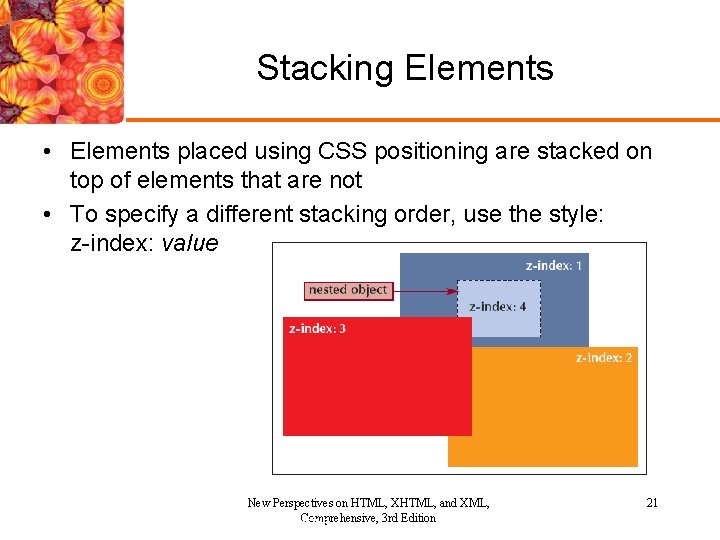
Stacking Elements • Elements placed using CSS positioning are stacked on top of elements that are not • To specify a different stacking order, use the style: z-index: value New Perspectives on HTML, XHTML, and XML, Comprehensive, 3 rd Edition New Perspectives on HTML and XHTML, Comprehensive 21
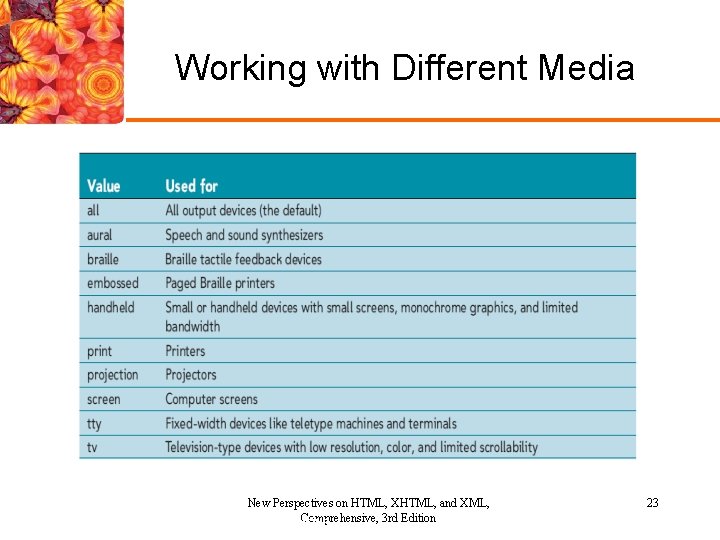
Working with Different Media • By default, a style sheet is applied to all devices, and each device must determine how best to match the styles to its own requirements <style type="text/css" media="type">. . . </style> or <link href="url" type="text/css" media="type". . . /> New Perspectives on HTML, XHTML, and XML, Comprehensive, 3 rd Edition New Perspectives on HTML and XHTML, Comprehensive 22
Working with Different Media New Perspectives on HTML, XHTML, and XML, Comprehensive, 3 rd Edition New Perspectives on HTML and XHTML, Comprehensive 23
Working with Different Media • You can use a single style sheet broken down into different sections for each media type @media screen { body {font-size: 1 em} h 1 {font-size: 2 em} } @media print { body {font-size: 12 pt} h 1 {font-size: 16 pt} } @media handheld { body {font-size: 8 pt} h 1 {font-size: 12 pt} } @media tv { body {font-size: 16 pt} h 1 {font-size: 24 pt} } New Perspectives on HTML, XHTML, and XML, Comprehensive, 3 rd Edition New Perspectives on HTML and XHTML, Comprehensive 24
Working with Different Media • CSS uses media groups to describe how different media devices render content – Continuous or paged – Visual, aural, or tactile – Grid (for character grid devices) or bitmap – Interactive (for devices that allow user interaction) or static (for devices that allow no interaction) New Perspectives on HTML, XHTML, and XML, Comprehensive, 3 rd Edition New Perspectives on HTML and XHTML, Comprehensive 25
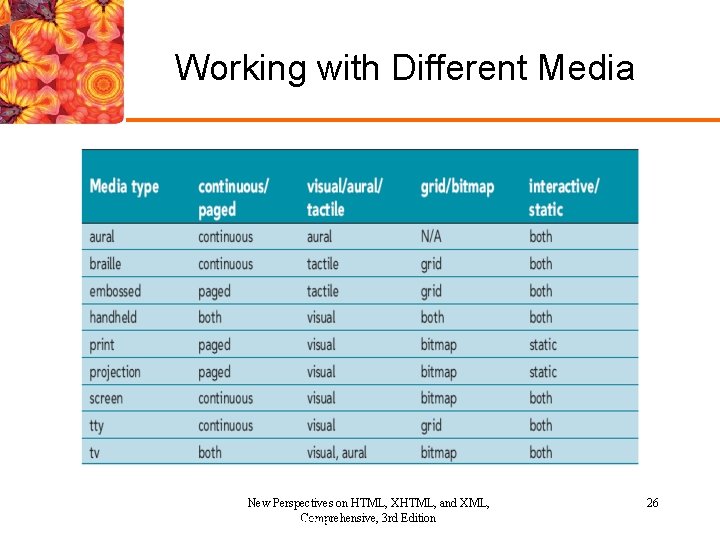
Working with Different Media New Perspectives on HTML, XHTML, and XML, Comprehensive, 3 rd Edition New Perspectives on HTML and XHTML, Comprehensive 26
Hiding Elements • CSS has two styles that you can use to keep an element from being displayed in the output: the display style and the visibility style visibility: type • The type attribute can be set to visible, hidden, collapse, or inherit New Perspectives on HTML, XHTML, and XML, Comprehensive, 3 rd Edition New Perspectives on HTML and XHTML, Comprehensive 27
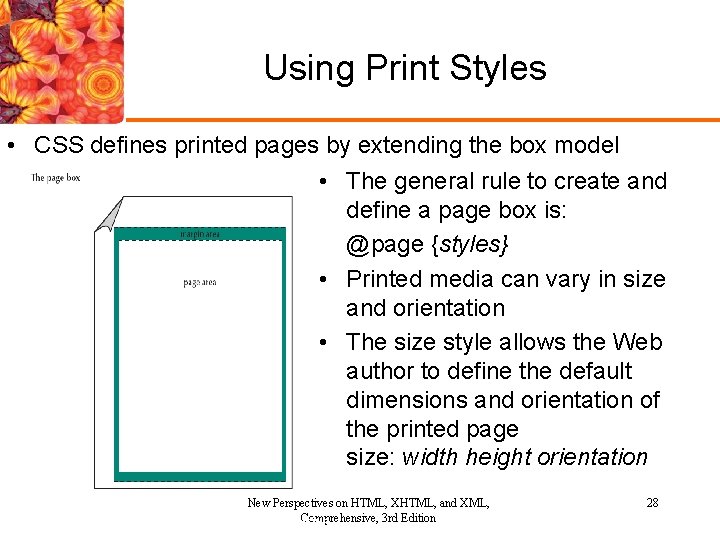
Using Print Styles • CSS defines printed pages by extending the box model • The general rule to create and define a page box is: @page {styles} • Printed media can vary in size and orientation • The size style allows the Web author to define the default dimensions and orientation of the printed page size: width height orientation New Perspectives on HTML, XHTML, and XML, Comprehensive, 3 rd Edition New Perspectives on HTML and XHTML, Comprehensive 28
Working with Page Breaks • When a document is sent to the printer, the printer decides the location of the page breaks unless that information is included as part of the print style page-break-before: type page-break-after: type • The type style attribute has the following values: – Always, Avoid, Left , Right – Auto, or Inherit New Perspectives on HTML, XHTML, and XML, Comprehensive, 3 rd Edition New Perspectives on HTML and XHTML, Comprehensive 29
Working with Page Breaks • A widow occurs when only a few ending lines of an element appear at the top of a page • An orphan is just the opposite: it occurs when only a few beginning lines of an element appear at the bottom of a page • The styles to control the appearance of widows and orphans in the printout are: widow: value orphan: value New Perspectives on HTML, XHTML, and XML, Comprehensive, 3 rd Edition New Perspectives on HTML and XHTML, Comprehensive 30
Summary • We worked with CSS selectors and – Created styles for lists, applied class styles – Created a rollover effect & a drop cap using a pseudoelement – Managed page layout with CSS, worked with overflow and clipping styles – Created stacked objects – Applied styles to various media – ex. Mobile devices – Hid elements from printing – Created and applied printer styles and created/prohibited page breaks for printing New Perspectives on HTML, XHTML, and XML, Comprehensive, 3 rd Edition 31
- Slides: 31