
TUTORIAL 10 XP WORKING WITH THE DOCUMENT OBJECT
TUTORIAL 10 XP WORKING WITH THE DOCUMENT OBJECT MODEL New Perspectives on XML, 2 nd Edition Tutorial 10 1
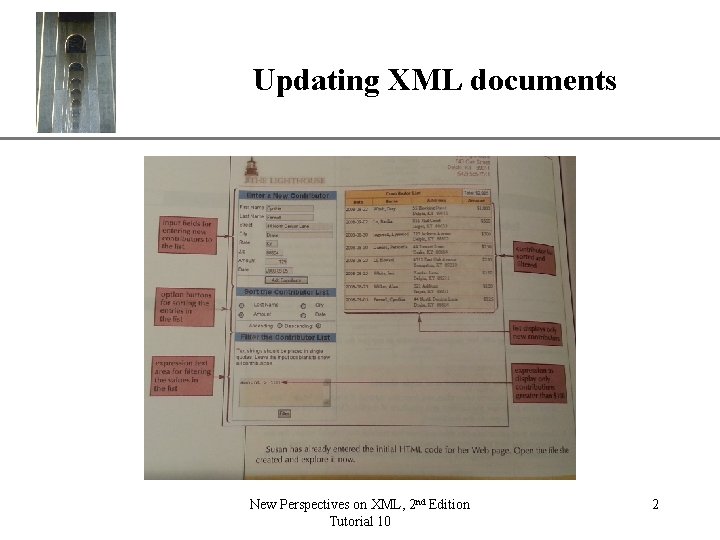
Updating XML documents New Perspectives on XML, 2 nd Edition Tutorial 10 XP 2
XML API XP • XML and XSLT are a markup languages – Describe how things are arranged and how things look • API – Collection of prewritten procedures – Enables processing of XML • Two APIs for use with XML – W 3 C DOM (Document Object Model) • Requires entire XML document be held in memory; memory intensive – SAX (Simple API for XML) • Can be used on a stream of XML which need not be held entirely in memory • Developed by XML-DEV mailing list New Perspectives on XML, 2 nd Edition Tutorial 10 3
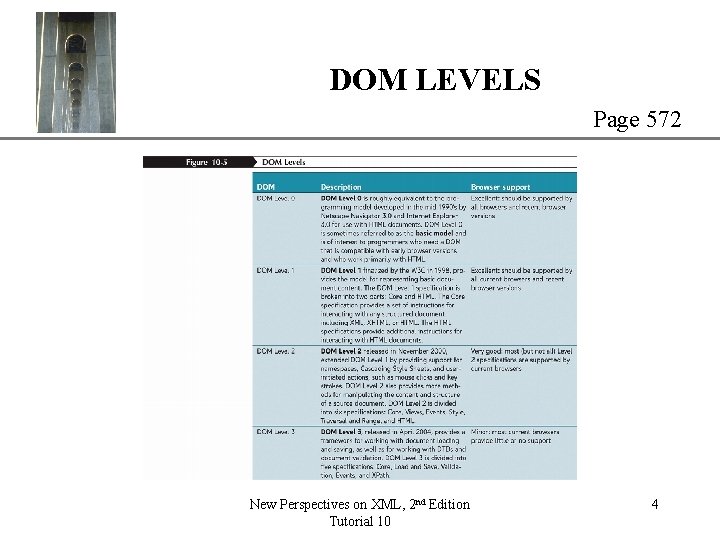
DOM LEVELS XP Page 572 New Perspectives on XML, 2 nd Edition Tutorial 10 4
General approach 1. 2. 3. 4. 5. XP Determine which browser is being used Create document object Load a file into the document object Transform the document object using XSLT Display the transformed document New Perspectives on XML, 2 nd Edition Tutorial 10 5
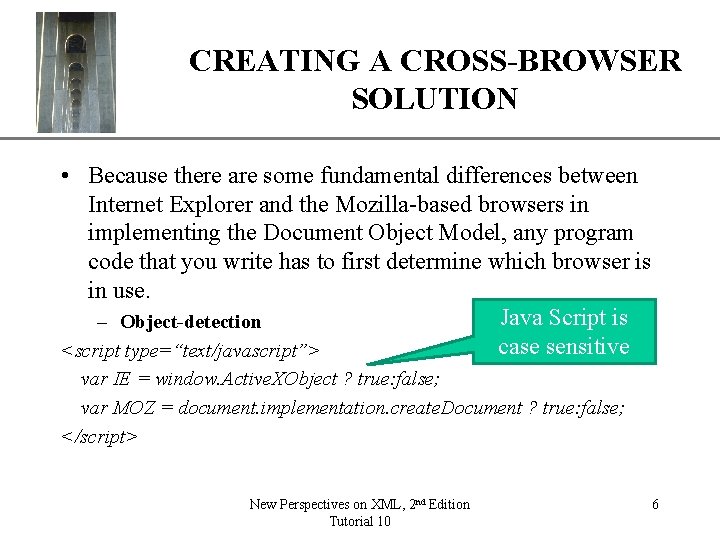
XP CREATING A CROSS-BROWSER SOLUTION • Because there are some fundamental differences between Internet Explorer and the Mozilla-based browsers in implementing the Document Object Model, any program code that you write has to first determine which browser is in use. Java Script is – Object-detection case sensitive <script type=“text/javascript”> var IE = window. Active. XObject ? true: false; var MOZ = document. implementation. create. Document ? true: false; </script> New Perspectives on XML, 2 nd Edition Tutorial 10 6
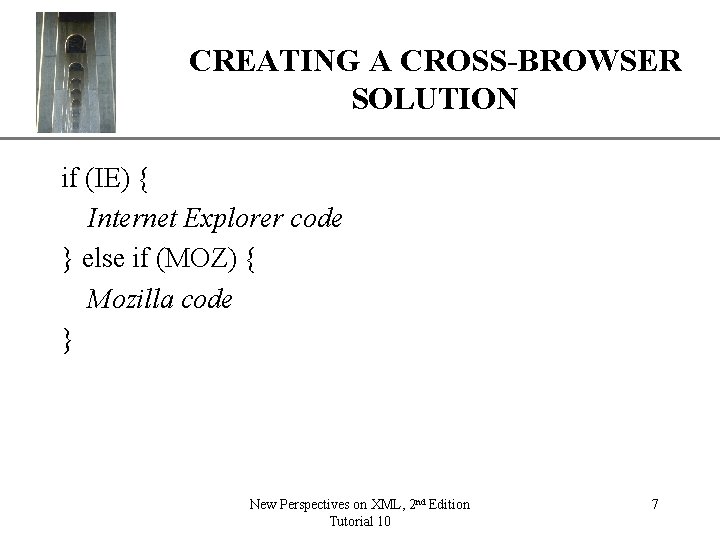
XP CREATING A CROSS-BROWSER SOLUTION if (IE) { Internet Explorer code } else if (MOZ) { Mozilla code } New Perspectives on XML, 2 nd Edition Tutorial 10 7
General approach 1. 2. 3. 4. 5. XP Determine which browser is being used Create document object Load a file into the document object Transform the document object using XSLT Display the transformed document New Perspectives on XML, 2 nd Edition Tutorial 10 8
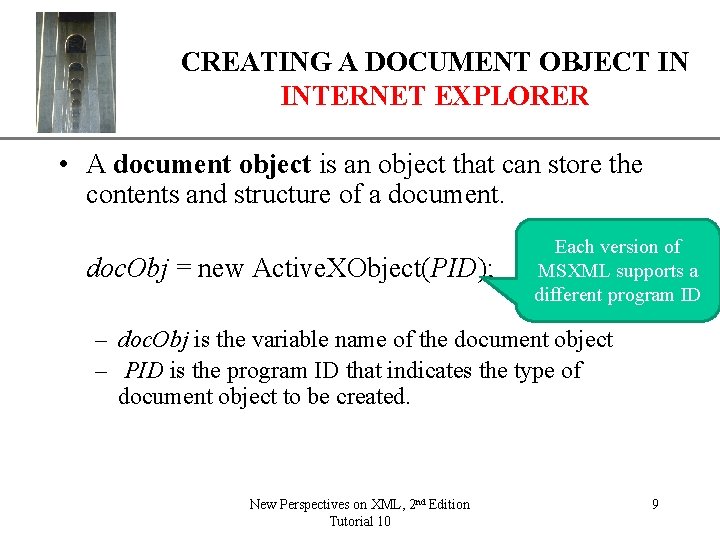
XP CREATING A DOCUMENT OBJECT IN INTERNET EXPLORER • A document object is an object that can store the contents and structure of a document. doc. Obj = new Active. XObject(PID); Each version of MSXML supports a different program ID – doc. Obj is the variable name of the document object – PID is the program ID that indicates the type of document object to be created. New Perspectives on XML, 2 nd Edition Tutorial 10 9
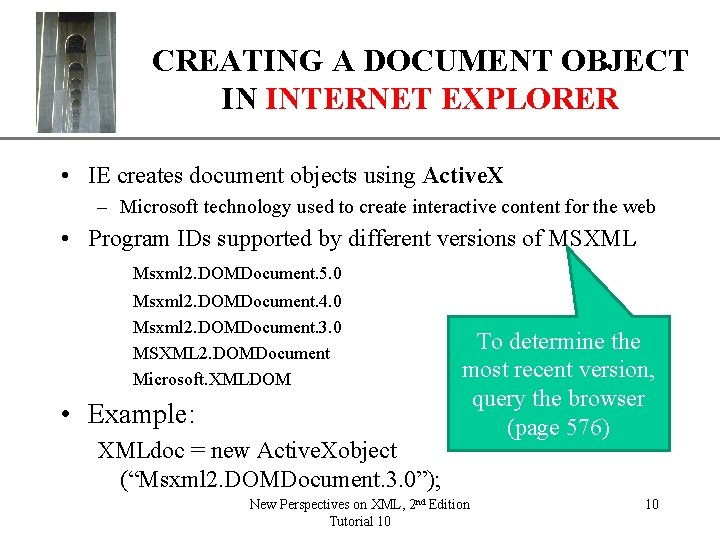
XP CREATING A DOCUMENT OBJECT IN INTERNET EXPLORER • IE creates document objects using Active. X – Microsoft technology used to create interactive content for the web • Program IDs supported by different versions of MSXML Msxml 2. DOMDocument. 5. 0 Msxml 2. DOMDocument. 4. 0 Msxml 2. DOMDocument. 3. 0 MSXML 2. DOMDocument Microsoft. XMLDOM • Example: XMLdoc = new Active. Xobject (“Msxml 2. DOMDocument. 3. 0”); To determine the most recent version, query the browser (page 576) New Perspectives on XML, 2 nd Edition Tutorial 10 10
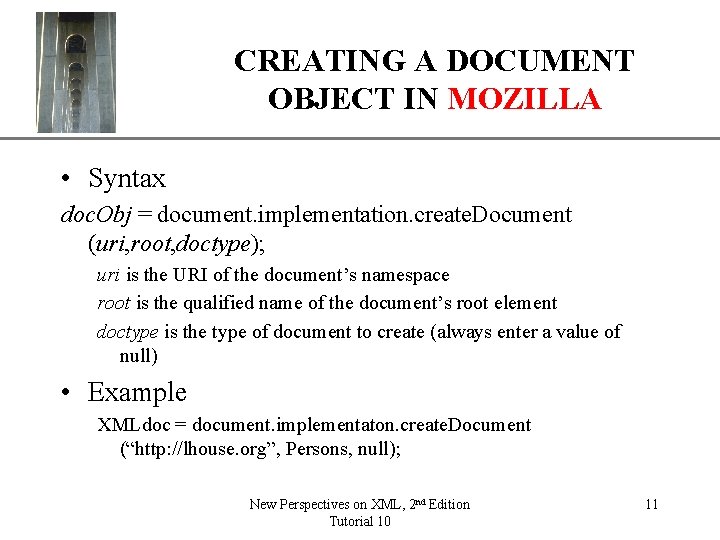
CREATING A DOCUMENT OBJECT IN MOZILLA XP • Syntax doc. Obj = document. implementation. create. Document (uri, root, doctype); uri is the URI of the document’s namespace root is the qualified name of the document’s root element doctype is the type of document to create (always enter a value of null) • Example XMLdoc = document. implementaton. create. Document (“http: //lhouse. org”, Persons, null); New Perspectives on XML, 2 nd Edition Tutorial 10 11
General approach 1. 2. 3. 4. 5. XP Determine which browser is being used Create document object Load a file into the document object Transform the document object using XSLT Display the transformed document New Perspectives on XML, 2 nd Edition Tutorial 10 12
LOADING A FILE INTO A DOCUMENT OBJECT • First choose load strategy: XP Default – An asynchronous load does not require the application loading the file to wait for it to finish loading before proceeding through the lines in the program code – A synchronous load causes the application to stop until the file is completely loaded. • Example: choose synchronous load doc. Obj. async=false; • Example load: Use for large files or retrieving files through a slow internet connection doc. Obj. load(url) New Perspectives on XML, 2 nd Edition Tutorial 10 13
General approach 1. 2. 3. 4. 5. XP Determine which browser is being used Create document object Load a file into the document object Transform the document object using XSLT Display the transformed document New Perspectives on XML, 2 nd Edition Tutorial 10 14
Transforming a Document Using XSLT (Internet Explorer) XP • Because XSLT style sheets are also XML documents, you need to create a document object using Active. X for the style sheet Preferable for – Rental-threaded model efficiency reasons • Content is accessed by the XML processor using a single sequence of instructions – Free-threaded model • Content is access by the processor through multiple input threads New Perspectives on XML, 2 nd Edition Tutorial 10 15
Transforming a Document Using XSLT (Internet Explorer) XP • Once a style sheet is loaded, IE applies the style sheet to the source document using either of two methods: Simple – transform. Node() • Creates a text string containing the code for the result document – transform. Noteto. Object() • Stores the result lin another document object • Either method can be drag on resources Can write code to further manipulate the contents – Create a template Object and Processor Object… New Perspectives on XML, 2 nd Edition Tutorial 10 16
Template and Processor Objects. XP (Internet Explorer) • Template object – Uses a large and complicated style sheet or for programs that need to run several transformations, – Increases the efficiency of the program because the cached style sheet can be accessed repeatedly without being recompiled • Processor object – Processes the template object to produce the result object • Display the result object New Perspectives on XML, 2 nd Edition Tutorial 10 17
Creating a Template Object (Internet Explorer) XP • Processor must compile the style sheet object each time the transformation is run. • For large and complicated style sheets or programs that need to run several transformations, store the style sheet in a template object and use the free-threaded model • Store the program IDs in an array: Var Free. Thread. PID = [“Msxm 1. Free. Threaded. Document. 5. 0”, “Msxm 1. Free. Threaded. Document. 4. 0”, “Msxm 1. Free. Threaded. Document. 3. 0”]; • Create document object for the style sheet XSLTdoc=New Active Xobject (get. PID (Free. Thread. PID) ); New Perspectives on XML, 2 nd Edition Tutorial 10 18
Using a processor object (Internet Explorer) • XP Steps for creating and using a processor object 1. 2. 3. 4. Insert a free-threaded style sheet into the template object Create an XSLT processor based on the template Specify an input source document for the processor Transform the source document based on the style sheet Example function do. Transform() { var cont. Table = document. get. Element. By. Id(“ctabale”)” If (IE) { XSLTemp. stylesheet=XSLTdoc: XSLTProc=XSLTemp. createprocessor(); XSLTProc. input=XMLdoc; XSLTLProc. transform()XSLTproc. out; } } See pages 584 -587 for details New Perspectives on XML, 2 nd Edition Tutorial 10 19
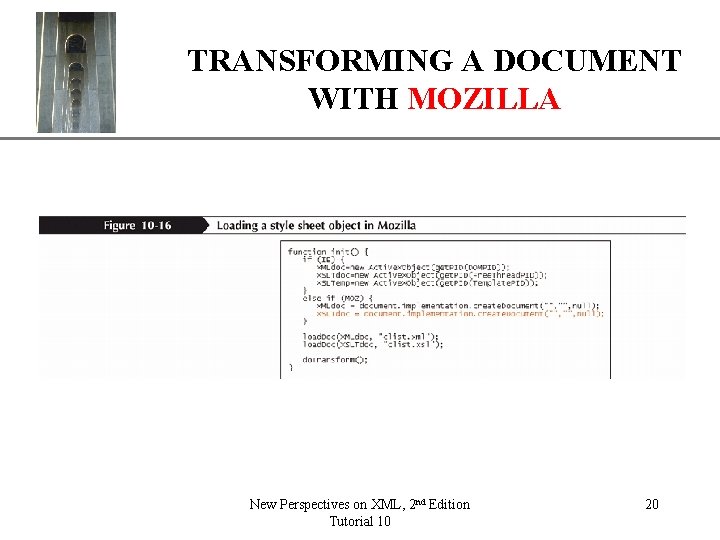
XP TRANSFORMING A DOCUMENT WITH MOZILLA New Perspectives on XML, 2 nd Edition Tutorial 10 20
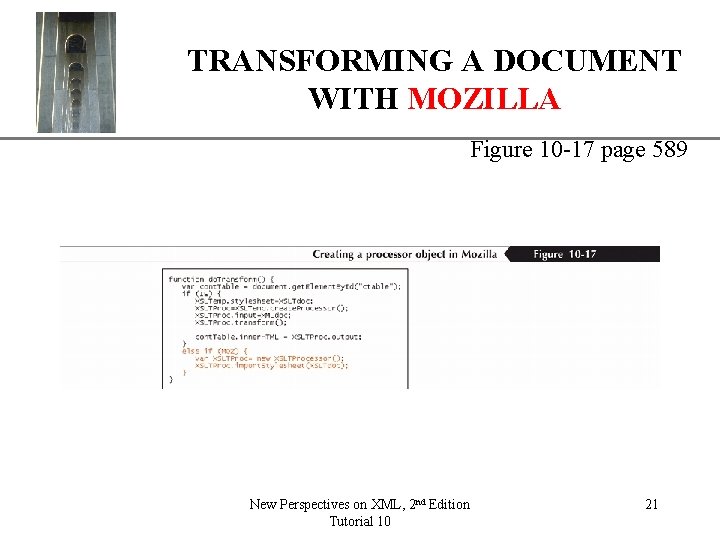
XP TRANSFORMING A DOCUMENT WITH MOZILLA Figure 10 -17 page 589 New Perspectives on XML, 2 nd Edition Tutorial 10 21
CONVERTING A DOCUMENT OBJECT XP OR FRAGMENT TO A TEXT STRING WITH MOZILLA • To convert a document object or a fragment to a text string in Mozilla, you create a serializer object, which contains a textual representation of the contents of a document object or fragment serial. Obj = new XMLSerializer(); Where serial. Obj is the serializer object that will contain the text of the document object or fragment. New Perspectives on XML, 2 nd Edition Tutorial 10 22
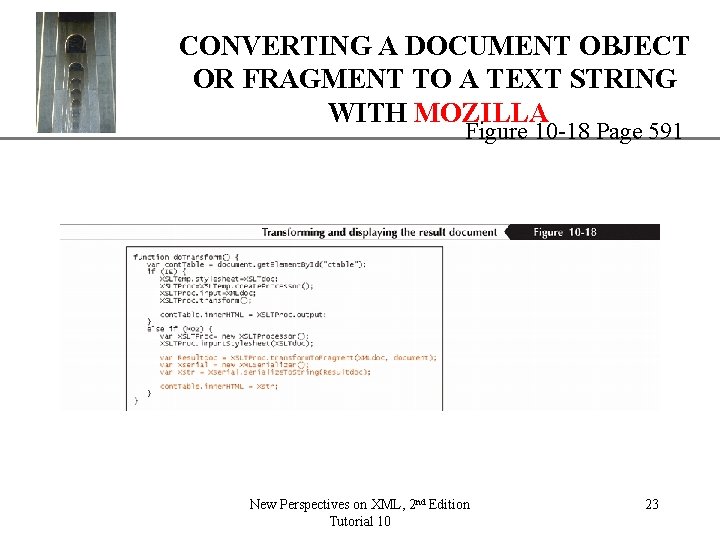
CONVERTING A DOCUMENT OBJECT XP OR FRAGMENT TO A TEXT STRING WITH MOZILLA Figure 10 -18 Page 591 New Perspectives on XML, 2 nd Edition Tutorial 10 23
General approach 1. 2. 3. 4. 5. XP Determine which browser is being used Create document object Load a file into the document object Transform the document object using XSLT Display the transformed document New Perspectives on XML, 2 nd Edition Tutorial 10 24
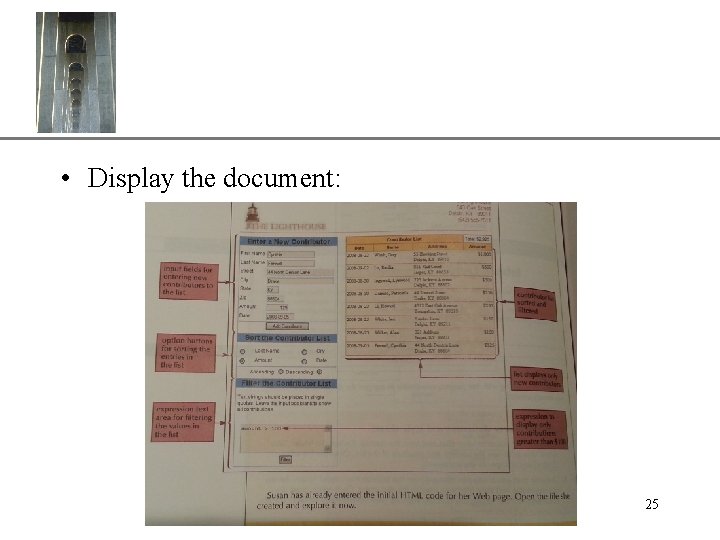
XP • Display the document: New Perspectives on XML, 2 nd Edition Tutorial 10 25
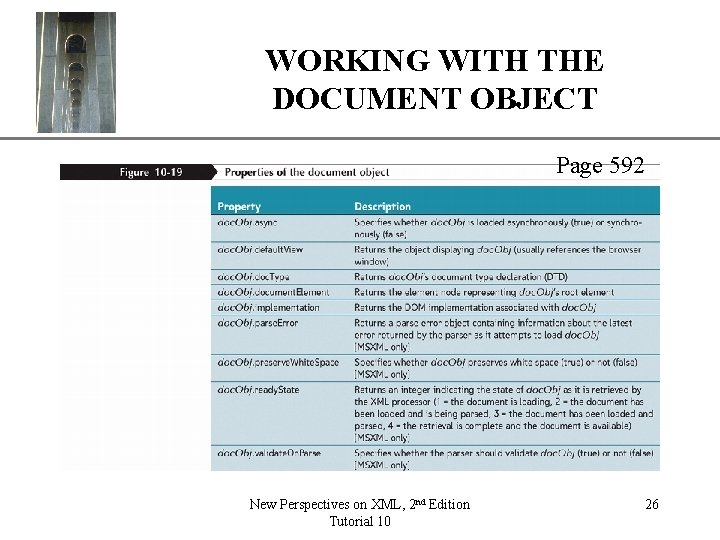
XP WORKING WITH THE DOCUMENT OBJECT Page 592 New Perspectives on XML, 2 nd Edition Tutorial 10 26
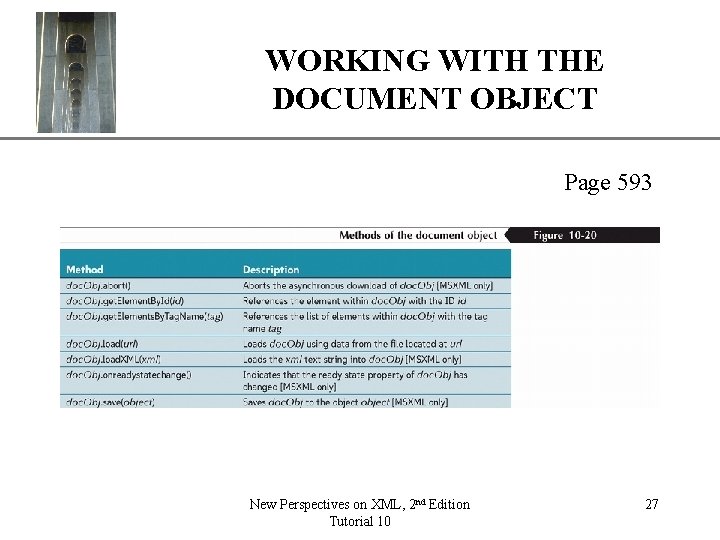
XP WORKING WITH THE DOCUMENT OBJECT Page 593 New Perspectives on XML, 2 nd Edition Tutorial 10 27
VIEWING THE NODE TREE XP • • A node that contains other nodes is a parent node, and the nodes it contains are child nodes. Nodes that share the same parent are sibling nodes. Nodes can contain different types of content. For example, element nodes refer to elements from the Document Object Model, and text nodes refer to the actual text content of element nodes. • Attribute nodes refer to the attributes contained within elements or processing instructions. New Perspectives on XML, 2 nd Edition Tutorial 10 28
XP ACCESSING ELEMENTS BY TAG NAME doc. Obj. get. Elements. By. Tag. Name(tag) Where doc. Obj is the document object and tag is the element’s tag name. Example: XMLdoc. get. Elements. By. Tag. Name("person") New Perspectives on XML, 2 nd Edition Tutorial 10 29
XP USING FAMILIAL RELATIONS • Each node in a node tree can also be treated as a node object with its own collection of properties and methods node. Obj. first. Child Where node. Obj is a node from the document’s node tree. New Perspectives on XML, 2 nd Edition Tutorial 10 30
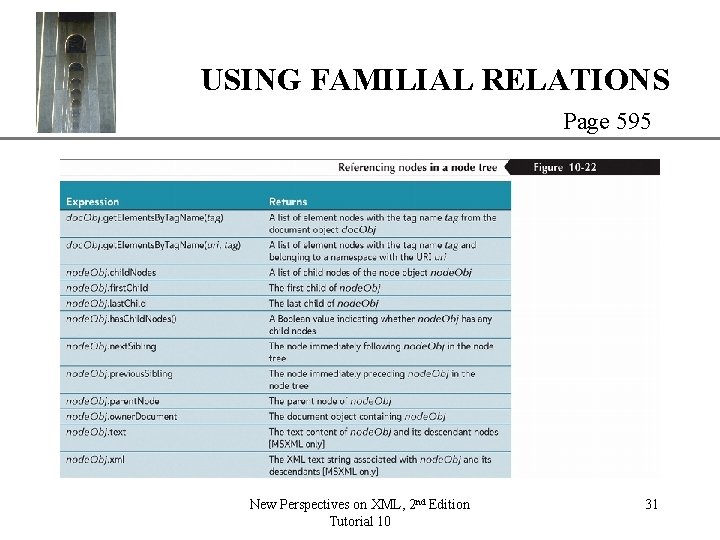
XP USING FAMILIAL RELATIONS Page 595 New Perspectives on XML, 2 nd Edition Tutorial 10 31
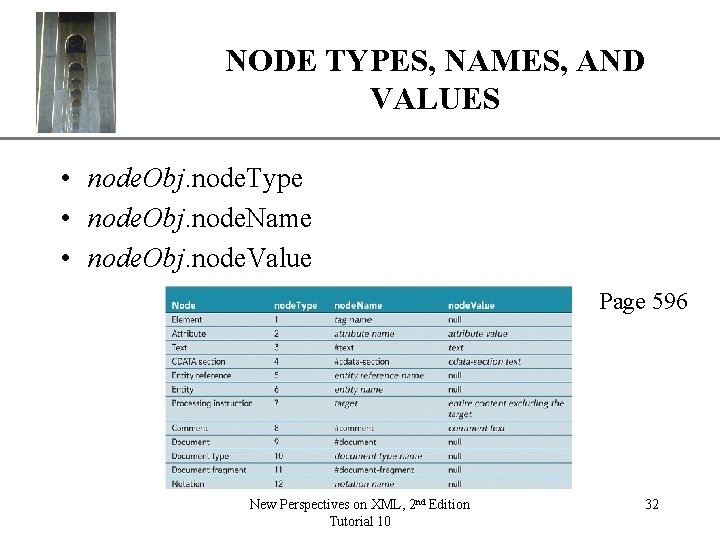
NODE TYPES, NAMES, AND VALUES XP • node. Obj. node. Type • node. Obj. node. Name • node. Obj. node. Value Page 596 New Perspectives on XML, 2 nd Edition Tutorial 10 32
XP ADDING AND REMOVING NODES node. Obj = doc. Obj. create. Element(tag); Where – node. Obj is the new element node – doc. Obj is the document object containing the new node – tag is the tag name associated with the element New Perspectives on XML, 2 nd Edition Tutorial 10 33
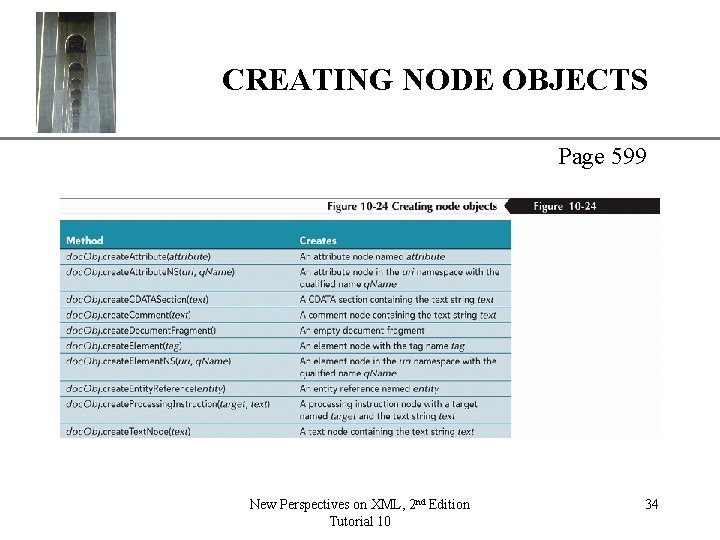
CREATING NODE OBJECTS XP Page 599 New Perspectives on XML, 2 nd Edition Tutorial 10 34
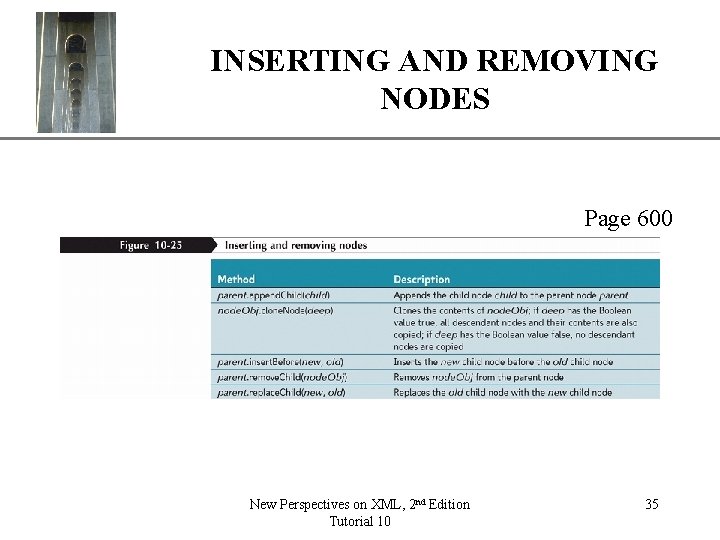
INSERTING AND REMOVINGXP NODES Page 600 New Perspectives on XML, 2 nd Edition Tutorial 10 35
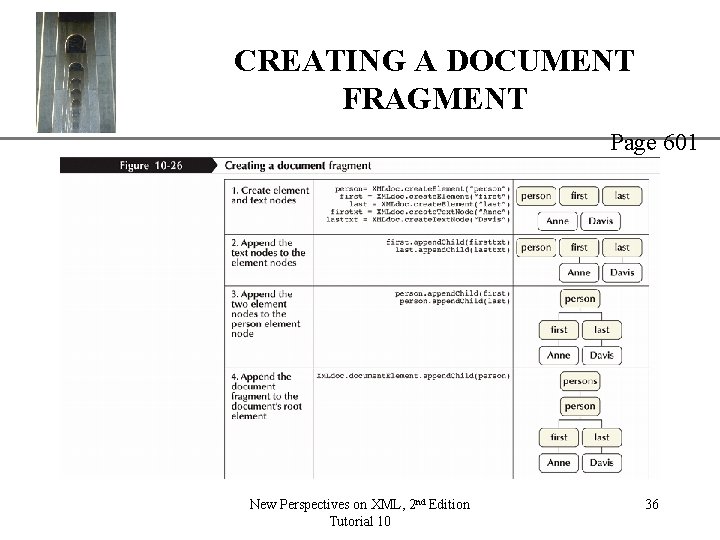
CREATING A DOCUMENT FRAGMENT XP Page 601 New Perspectives on XML, 2 nd Edition Tutorial 10 36
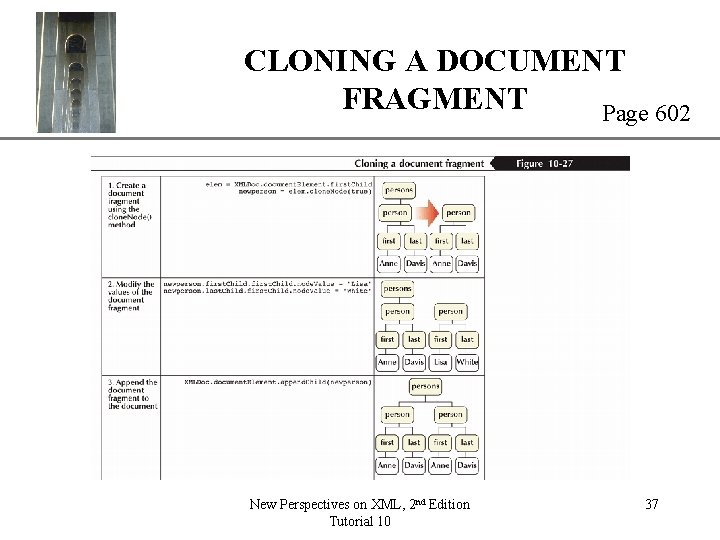
CLONING A DOCUMENT XP FRAGMENT Page 602 New Perspectives on XML, 2 nd Edition Tutorial 10 37
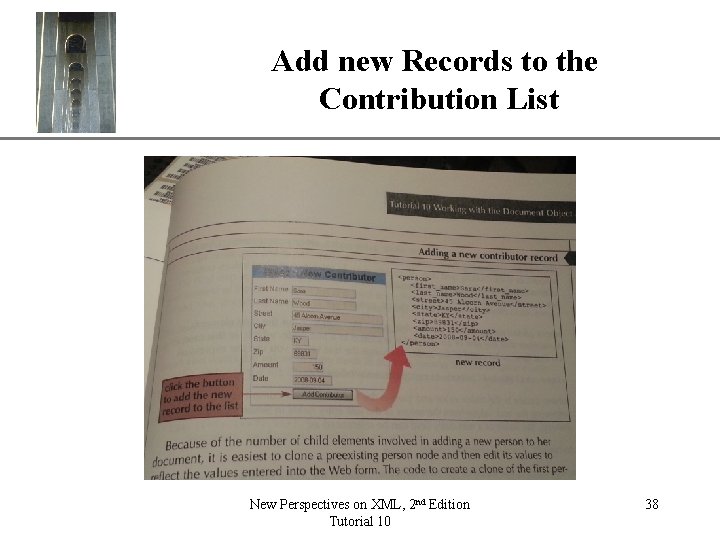
Add new Records to the Contribution List New Perspectives on XML, 2 nd Edition Tutorial 10 XP 38
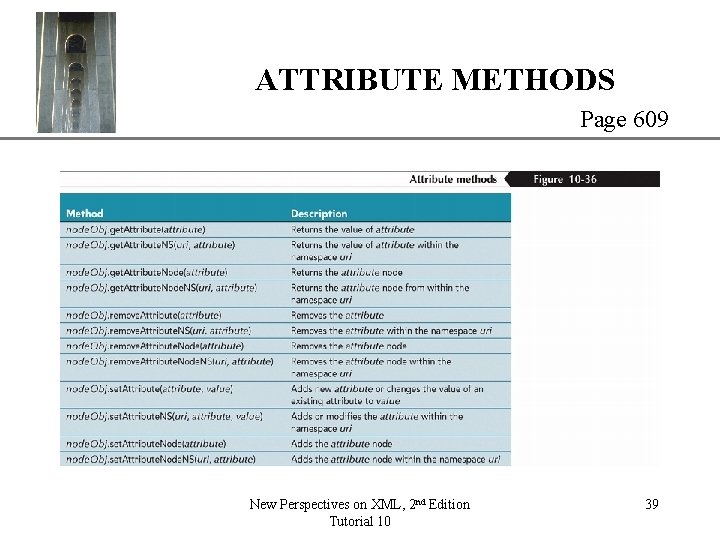
ATTRIBUTE METHODS XP Page 609 New Perspectives on XML, 2 nd Edition Tutorial 10 39
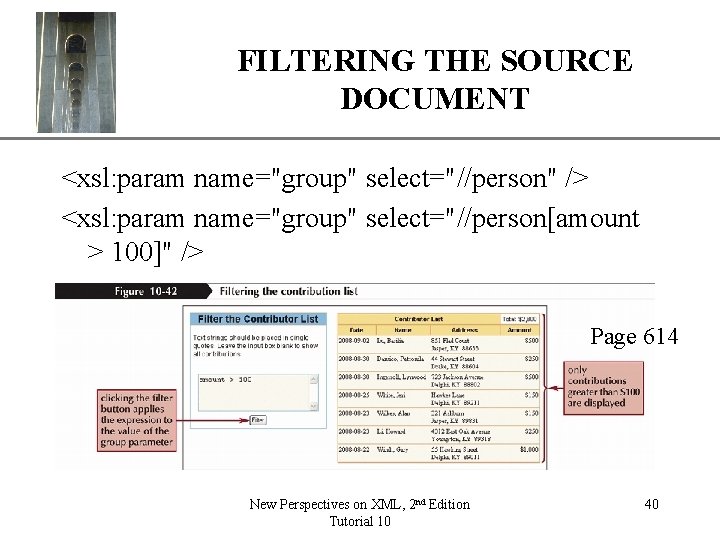
FILTERING THE SOURCE DOCUMENT XP <xsl: param name="group" select="//person" /> <xsl: param name="group" select="//person[amount > 100]" /> Page 614 New Perspectives on XML, 2 nd Edition Tutorial 10 40
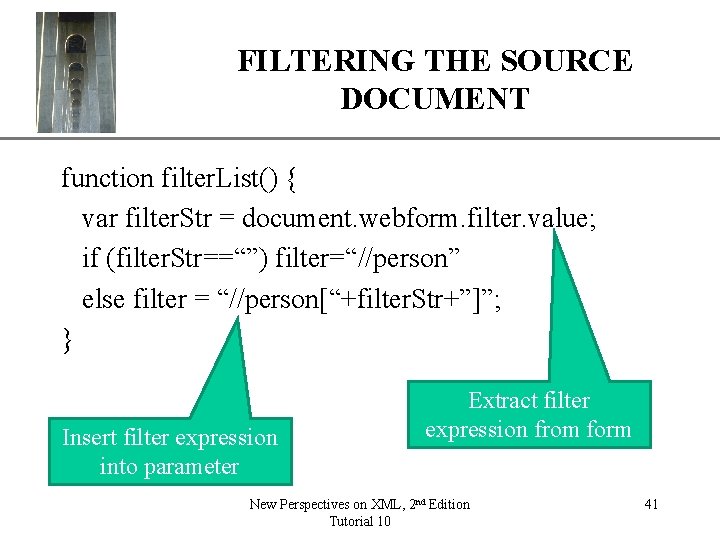
FILTERING THE SOURCE DOCUMENT XP function filter. List() { var filter. Str = document. webform. filter. value; if (filter. Str==“”) filter=“//person” else filter = “//person[“+filter. Str+”]”; } Insert filter expression into parameter Extract filter expression from form New Perspectives on XML, 2 nd Edition Tutorial 10 41
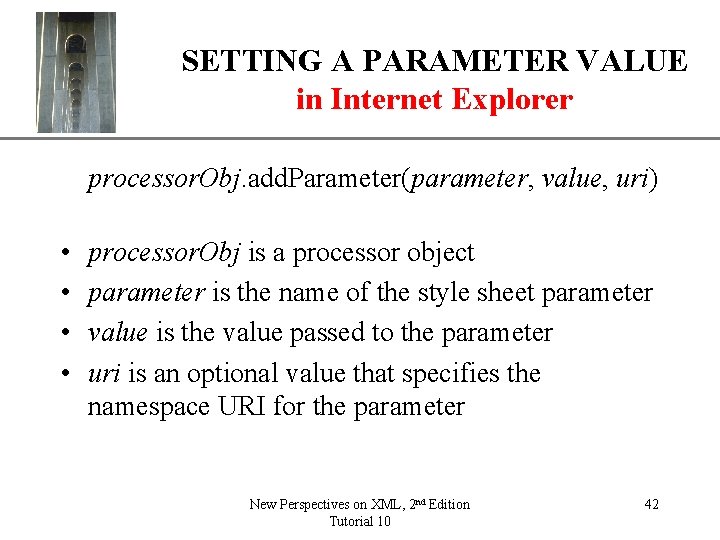
XP SETTING A PARAMETER VALUE in Internet Explorer processor. Obj. add. Parameter(parameter, value, uri) • • processor. Obj is a processor object parameter is the name of the style sheet parameter value is the value passed to the parameter uri is an optional value that specifies the namespace URI for the parameter New Perspectives on XML, 2 nd Edition Tutorial 10 42
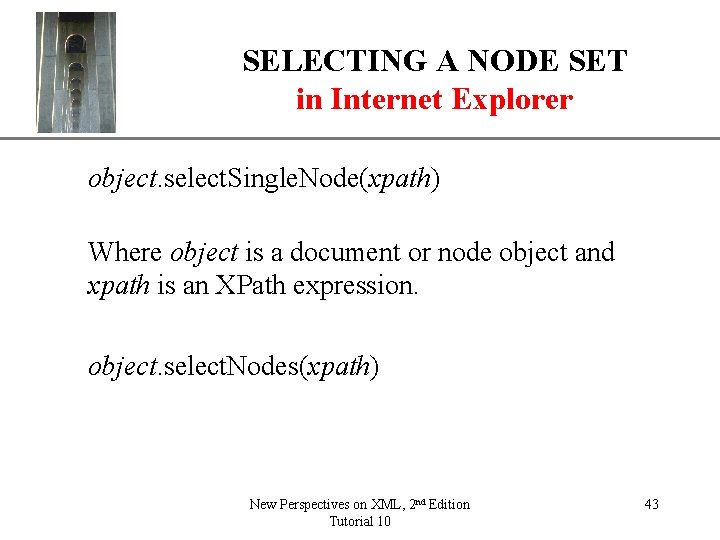
SELECTING A NODE SET in Internet Explorer XP object. select. Single. Node(xpath) Where object is a document or node object and xpath is an XPath expression. object. select. Nodes(xpath) New Perspectives on XML, 2 nd Edition Tutorial 10 43
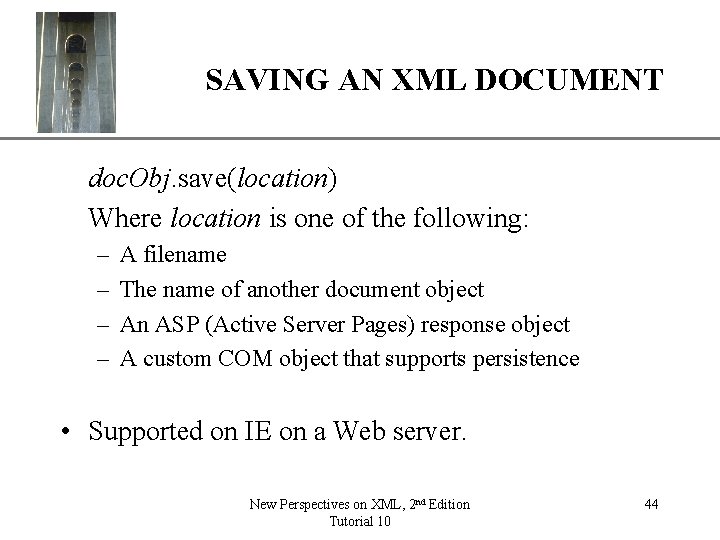
XP SAVING AN XML DOCUMENT doc. Obj. save(location) Where location is one of the following: – – A filename The name of another document object An ASP (Active Server Pages) response object A custom COM object that supports persistence • Supported on IE on a Web server. New Perspectives on XML, 2 nd Edition Tutorial 10 44
XP WORKING WITH AJAX • AJAX, or Asynchronous Java. Script and XML, refers to the use of HTML, XSLT, and Java. Script to enable fast, efficient communication between applications running on a user’s browser and data stored and updated on a secure Web server. • In the classic Web application model, a user interacts with a Web server through a Web page running on their browser. New Perspectives on XML, 2 nd Edition Tutorial 10 45
WORKING WITH AJAX XP • The AJAX Web application model adds an intermediary between the user and the server-side system, which is called an AJAX engine. • The AJAX engine is responsible for communicating with the server and for relaying any information from the server to the user interface. New Perspectives on XML, 2 nd Edition Tutorial 10 46

WORKING WITH AJAX XP Ajax engine: • Written in Java. Script • Ajax uses HTTP to communicate with Web server • Client uses Java. Script call functions to communicate with Ajax engine • Ajax engine placed within Web page • Enables asynchronous rather than synchronous communication New Perspectives on XML, 2 nd Edition Tutorial 10 47
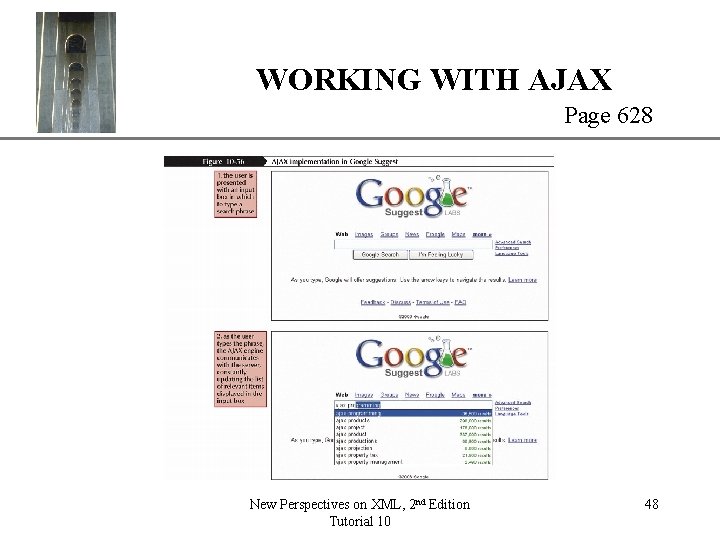
XP WORKING WITH AJAX Page 628 New Perspectives on XML, 2 nd Edition Tutorial 10 48
XP THE XMLHttp. Request OBJECT Ajax engine • Internet Explorer – To create an XMLHttp. Request object, use req. Obj = new Active. XObject(prog. ID); Where req. Obj is the XMLHttp. Request object and prog. ID is an Active. X program ID for XMLHttp. Request objects. Ajax engine • Mozilla and Safari – To create an XMLHttp. Request object, use req. Obj = new XMLHttp. Request(); New Perspectives on XML, 2 nd Edition Tutorial 10 49
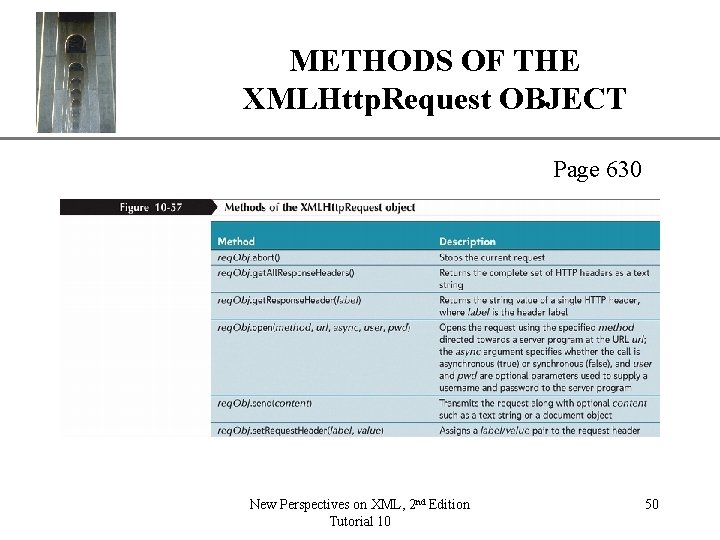
METHODS OF THE XMLHttp. Request OBJECT XP Page 630 New Perspectives on XML, 2 nd Edition Tutorial 10 50
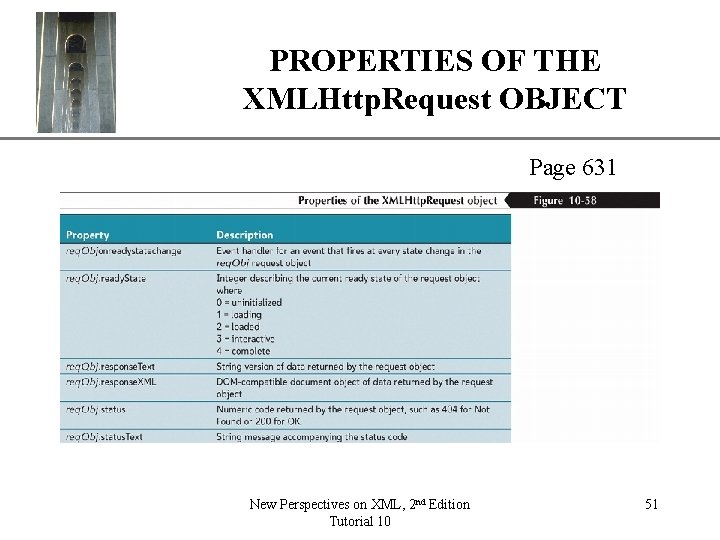
PROPERTIES OF THE XMLHttp. Request OBJECT XP Page 631 New Perspectives on XML, 2 nd Edition Tutorial 10 51
- Slides: 51