
Trust and Semantic Attacks Phishing Hassan Takabi hatakabisis
Trust and Semantic Attacks. Phishing Hassan Takabi hatakabi@sis. pitt. edu October 20, 2009
Outline • Phishing Attacks as Semantic Attack – Definition, Anatomy, … • Attack Techniques • Why phishing works? – User mental model • Defenses against phishing attacks – @ user interface – anti-phishing tools – dynamic security skin • Effectiveness of defenses – User studies 2/46
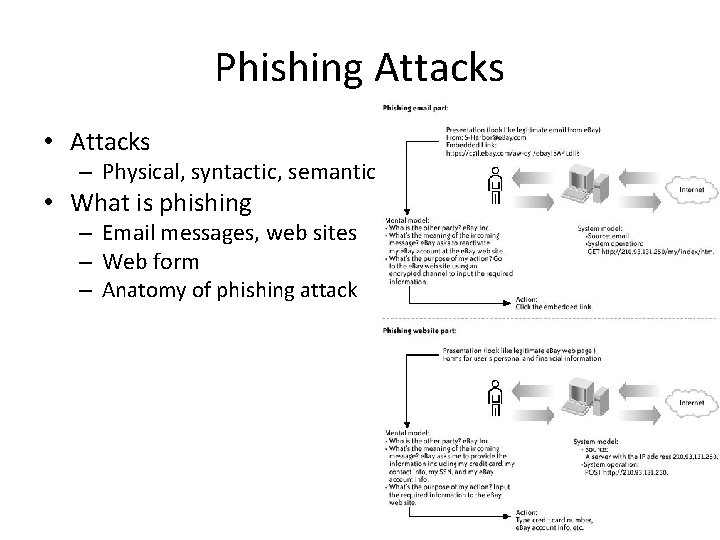
Phishing Attacks • Attacks – Physical, syntactic, semantic • What is phishing – Email messages, web sites – Web form – Anatomy of phishing attack 3/46
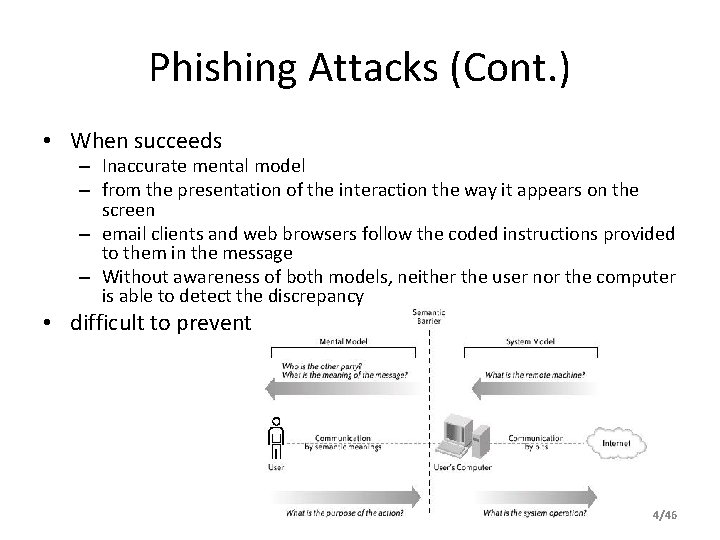
Phishing Attacks (Cont. ) • When succeeds – Inaccurate mental model – from the presentation of the interaction the way it appears on the screen – email clients and web browsers follow the coded instructions provided to them in the message – Without awareness of both models, neither the user nor the computer is able to detect the discrepancy • difficult to prevent 4/46
Attack techniques • • • Copying images and page designs Similar domain names URL hiding IP addresses Deceptive hyperlinks Obscuring cues Pop-up windows Social engineering Properties: Short duration, Sloppy language 5/46
Why Phishing works? • What makes a web site credible? • what makes a bogus website credible? • to understand which attack strategies are successful, and what proportion of users they fool • Analyze a set of captured phishing attacks – a set of hypotheses • a cognitive walkthrough on the approximately 200 sample attacks 6/46
Why Phishing works? (Cont. ) • Lack of Knowledge – Lack of computer system knowledge – Lack of knowledge of security and security indicators • Visual Deception – – Visually deceptive text Images masking underlying text Windows masking underlying windows Deceptive look and feel • Bounded Attention – Lack of attention to security indicators – Lack of attention to the absence of security indicators 7/46
Study: Distinguishing Legitimate Websites • Collection and Selection of Phishing Websites – 200 phishing websites, including all related links, images and web pages up to three levels deep – nine phishing attacks, representative in the types of targeted brands, the types of spoofing techniques, and the types of requested information • 20 websites; the first 19 were in random order: – – 7 legitimate websites 9 representative phishing websites 3 phishing websites constructed by the authors 1 website requiring users to accept a self-signed SSL certificate • The archived phishing web pages were hosted on an Apache web server • Encourage participants to talk out loud about their decision process 8/46
Website Legitimacy • Strategies for Determining Website Legitimacy – Security indicators in website content only – Content and domain name only – Content and address, plus HTTPS – All of the above, plus padlock icon – All of above, plus certificates 9/46
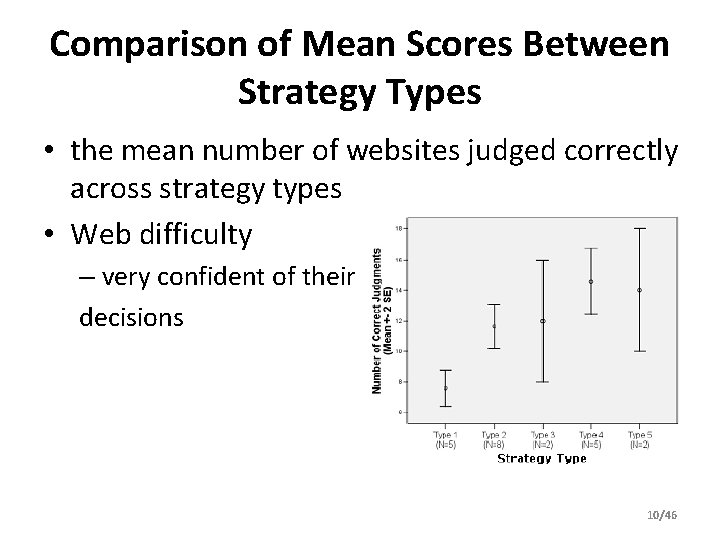
Comparison of Mean Scores Between Strategy Types • the mean number of websites judged correctly across strategy types • Web difficulty – very confident of their decisions 10/46
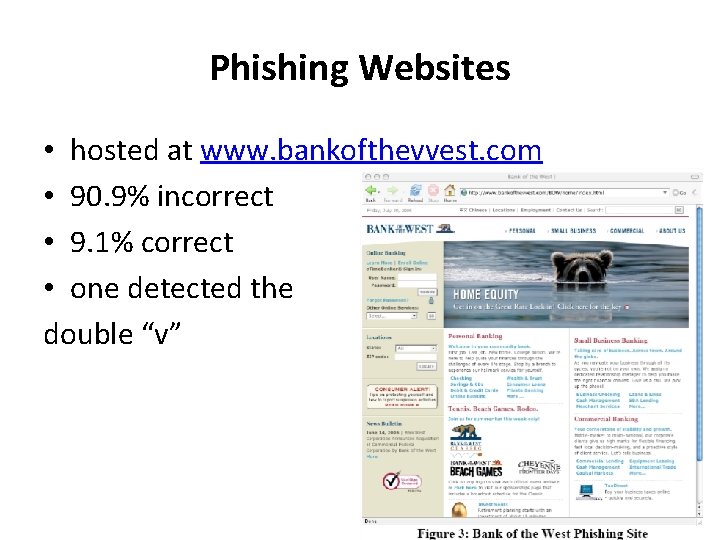
Phishing Websites • hosted at www. bankofthevvest. com • 90. 9% incorrect • 9. 1% correct • one detected the double “v” 11/46
Knowledge of Phishing and Security • semi-structured interview – – Knowledge and Experience with Phishing Knowledge and Use of Padlock Icon and HTTPS Knowledge and Use of Firefox SSL indicators Knowledge and Use of Certificates • Hypotheses – Participants made incorrect judgments because they lacked knowledge – Lack of knowledge of web fraud – Erroneous security knowledge 12/46
Results • Key findings – Good phishing websites fooled 90% of participants – Existing anti-phishing browsing cues are ineffective • 23% of participants in the study did not look at the address bar, status bar, or the security indicators – On average, participant group made mistakes on the test set 40% of the time. – Popup warnings about fraudulent certificates were ineffective: 15 out of 22 participants proceeded without hesitation when presented with warnings. – Participants proved vulnerable across the board to phishing attacks • neither education, age, sex, previous experience, nor hours of computer use showed a statistically significant correlation 13/46
Decision Strategies • mental models interview study conducted with 20 non-expert Internet users – the email and web role-play section – the security and trust decisions section • Pat Jones – Females given a woman’s wallet with identification for Patricia Jones – males were given a man’s wallet with identification for Patrick Jones • Participants viewed eight emails in Pat’s inbox 14/46
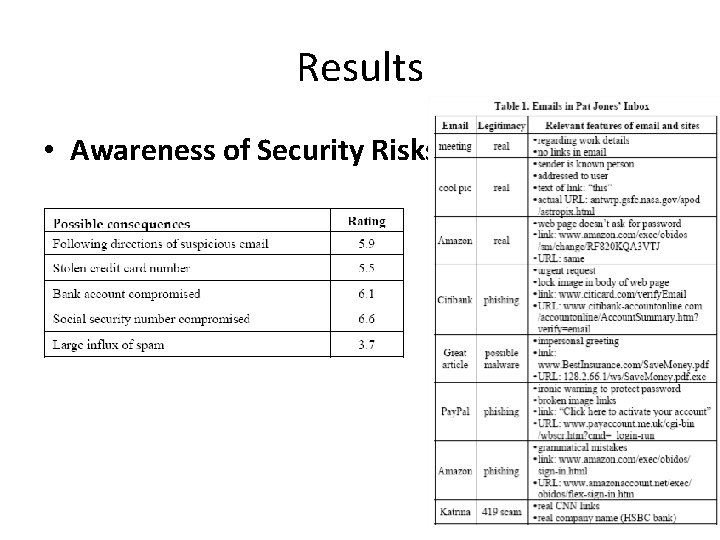
Results • Awareness of Security Risks 15/46
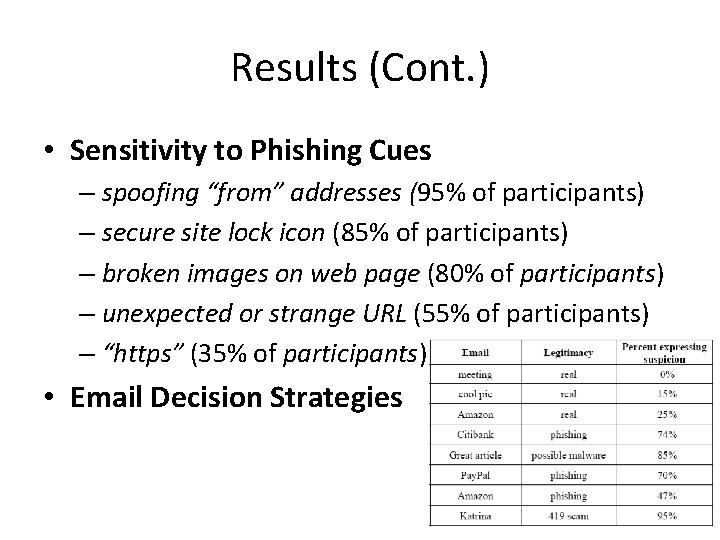
Results (Cont. ) • Sensitivity to Phishing Cues – spoofing “from” addresses (95% of participants) – secure site lock icon (85% of participants) – broken images on web page (80% of participants) – unexpected or strange URL (55% of participants) – “https” (35% of participants) • Email Decision Strategies 16/46
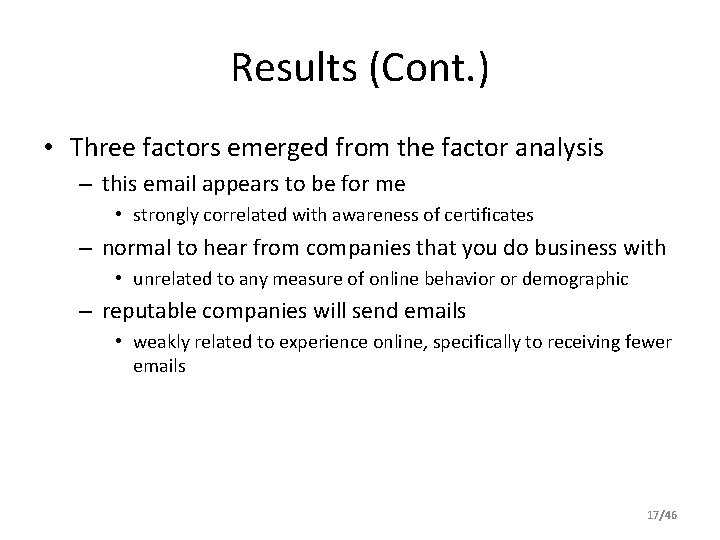
Results (Cont. ) • Three factors emerged from the factor analysis – this email appears to be for me • strongly correlated with awareness of certificates – normal to hear from companies that you do business with • unrelated to any measure of online behavior or demographic – reputable companies will send emails • weakly related to experience online, specifically to receiving fewer emails 17/46
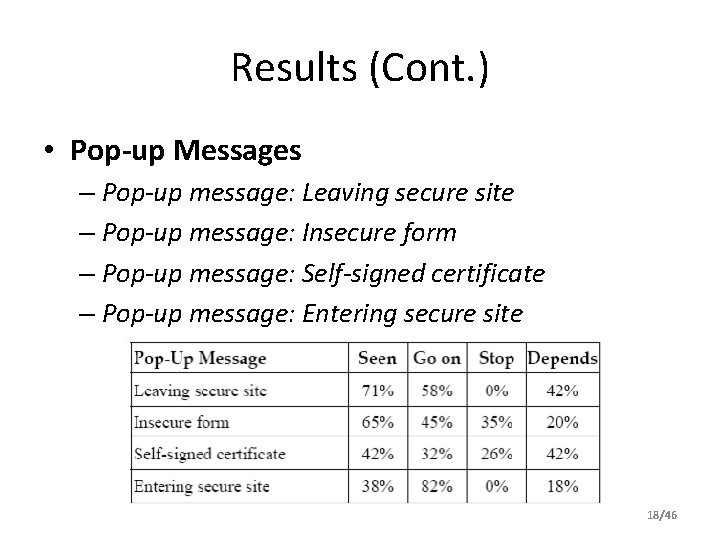
Results (Cont. ) • Pop-up Messages – Pop-up message: Leaving secure site – Pop-up message: Insecure form – Pop-up message: Self-signed certificate – Pop-up message: Entering secure site 18/46
• merely being aware of phishing or of cues is not enough to protect people from scams, especially new ones 19/46
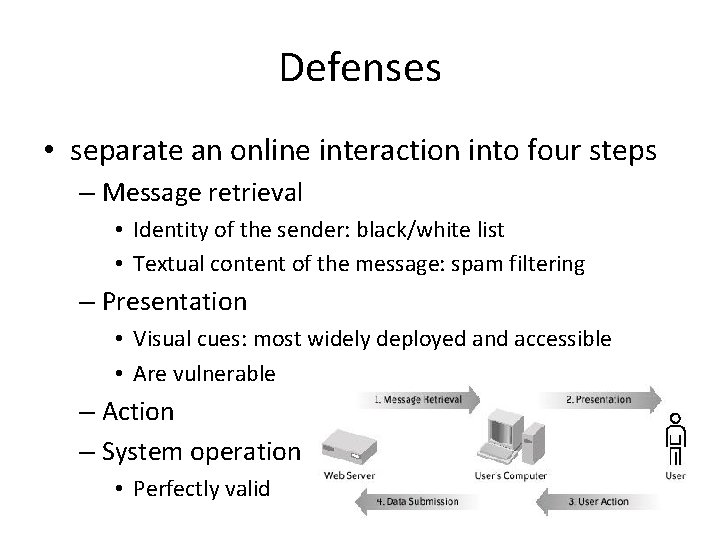
Defenses • separate an online interaction into four steps – Message retrieval • Identity of the sender: black/white list • Textual content of the message: spam filtering – Presentation • Visual cues: most widely deployed and accessible • Are vulnerable – Action – System operation • Perfectly valid 20/46
Case Study: Spoof. Guard • stopping phishing at the user interface • addresses three of the four steps • At message retrieval time, calculates a total spoof score – based on common characteristics of known phishing attacks • At presentation time, translates the spoof score into a traffic light (red, yellow, or green) displayed in a dedicated toolbar • In the system operation step, evaluates posted data before it is submitted to a remote server – depends on some assumptions that may not be valid for sophisticated attacks 21/46
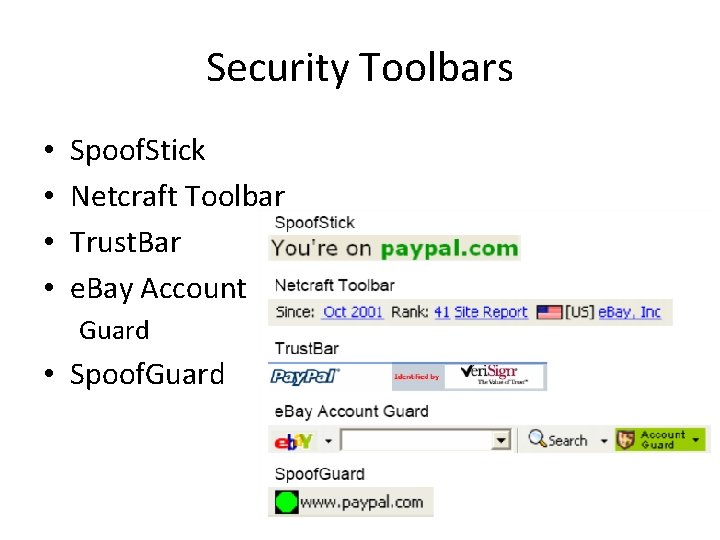
Security Toolbars • • Spoof. Stick Netcraft Toolbar Trust. Bar e. Bay Account Guard • Spoof. Guard 22/46
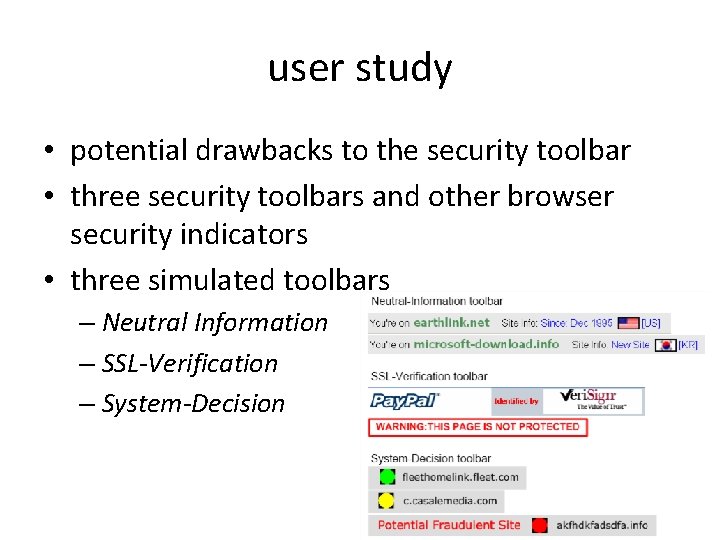
user study • potential drawbacks to the security toolbar • three security toolbars and other browser security indicators • three simulated toolbars – Neutral Information – SSL-Verification – System-Decision 23/46
Study Scenario • Simulate ideal phishing attacks • The main frame in browser always connected to the real website • the secondary goal property – scenario which gave the subjects tasks to attend to other than security – Dummy accounts in the name of “John Smith” – the role of John Smith’s personal assistant 24/46
Study Scenario (Cont. ) • process 20 email messages, – most requests by John to handle a forwarded message from an e-commerce site – Five of the 20 forwarded emails were attacks – 4 wish-list attacks • • Similar-name attack IP-address attack Hijacked-server attack Popup-window attack – 1 Pay. Pal attack 25/46
Study Scenario (Cont. ) • • the tutorial as part of the scenario The tutorial as the 11 th of the 20 emails The Pay. Pal attack was the 10 th Hypotheses – the spoof rates of all three toolbars would be substantially greater than 0 – some toolbars would have better spoof rates than others 26/46
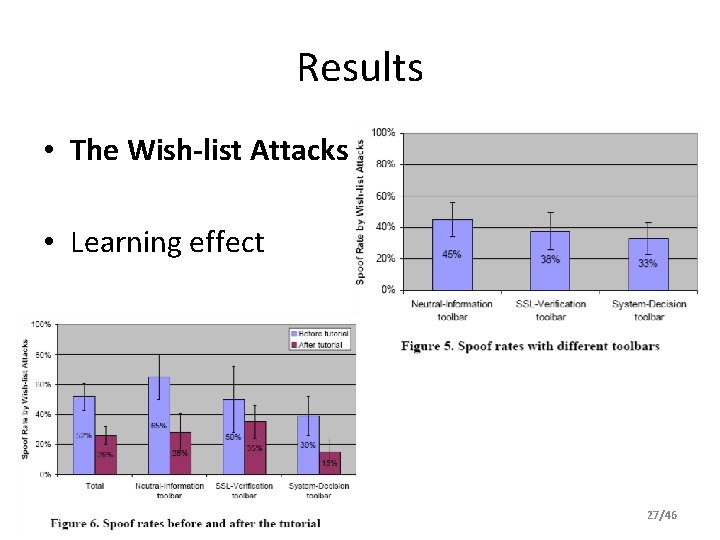
Results • The Wish-list Attacks • Learning effect 27/46
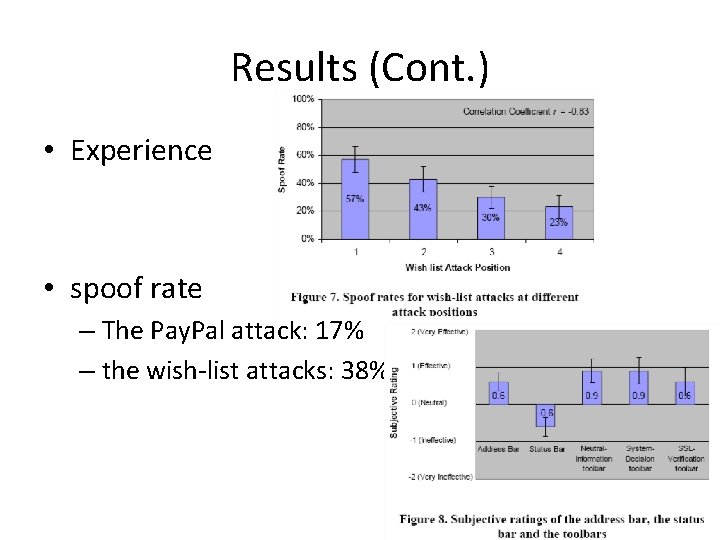
Results (Cont. ) • Experience • spoof rate – The Pay. Pal attack: 17% – the wish-list attacks: 38% 28/46
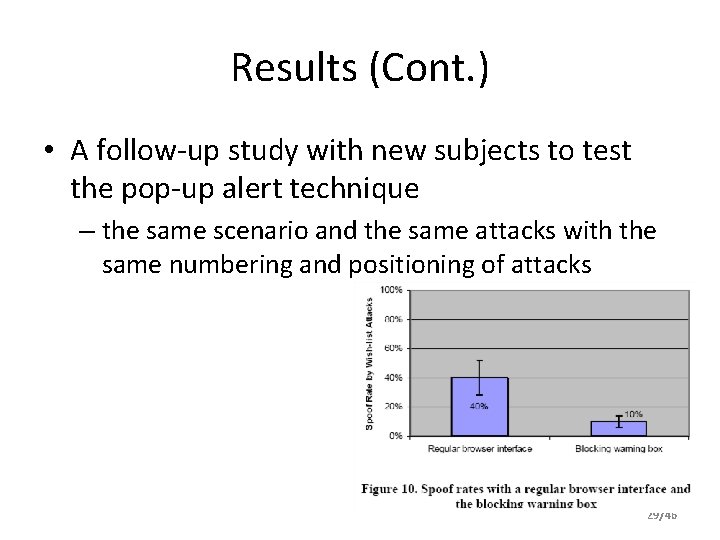
Results (Cont. ) • A follow-up study with new subjects to test the pop-up alert technique – the same scenario and the same attacks with the same numbering and positioning of attacks 29/46
Recommendations • active interruption like the popup warnings is far more effective than the passive warnings • it should always appear at the right time with the right warning message • interrupt the user only for a dangerous action • User intentions should be respected • integrate the security concerns into the critical path of the users’ tasks 30/46
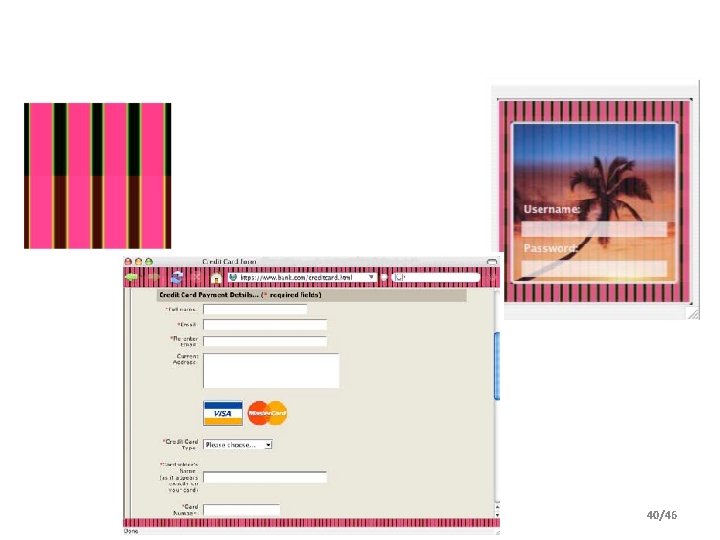
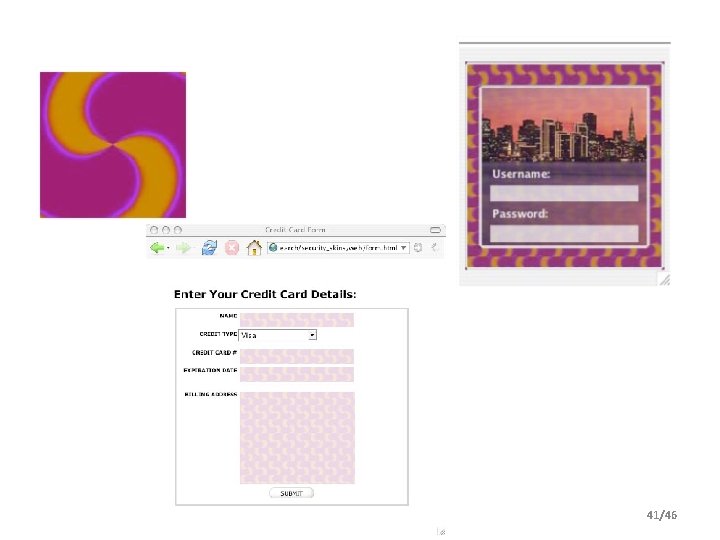
Dynamic security skin • two novel interaction techniques to prevent spoofing – browser extension provides a trusted window in the browser dedicated to username and password entry – the remote server to generate a unique abstract image for each user and each transaction 31/46
Security Properties • Why is security design for phishing hard? – The limited human skills property – The general purpose graphics property – The golden arches property – The unmotivated user property – The barn door property 32/46
Task Analysis • task analysis of the methods and necessary skills – Users can not reliably correctly determine sender identity in email messages. – Users can not reliably distinguish legitimate email and website content from illegitimate content that has the same “look and feel” – Users can not reliably parse domain names – Users can not reliably distinguish actual hyperlinks from images of hyperlinks – Users can not reliably distinguish browser chrome from web page content – Users can not reliably distinguish actual security indicators from images of those indicators – Users do not understand the meaning of the SSL lock icon – Users do not reliably notice the absence of a security indicator – Users can not reliably distinguish multiple windows and their attributes – Users do not reliably understand SSL certificates 33/46
Design Requirements • minimize user memory requirements. – the user has to recognize only one image – remember one low entropy password – the user only needs to perform one visual matching operation to compare two images to authenticate content. – hard to spoof the indicators of a successful authentication for an attacker. • underlying authentication protocol : – At the end of an interaction, the server authenticates the user, and the user authenticates the server. – No personally identifiable information is sent over the network. – An attacker can not masquerade as the user or the server, even after observing any number of successful authentications. 34/46
Overview • an extension for the Mozilla Firefox • a trusted password window – establish a trusted path between the user and this window • Distinguish authenticated web pages from “insecure” or “spoofed” – the remote server generates an abstract image that is unique for each user and each transaction. – This image is used to create a “skin”, which customizes the appearance of the server’s web page • Use the secure Remote Password Protocol (SRP), a verifier-based protocol to achieve mutual authentication of the user and the server 35/46
Trusted Path the user shares a secret with the display Can not be known or predicted by any third party based on window customization assigning each user a random photographic image that will always appear in that window. • the security of this scheme will depend on the number of image choices that are available • The choice of window style will also have an impact on security • • 36/46
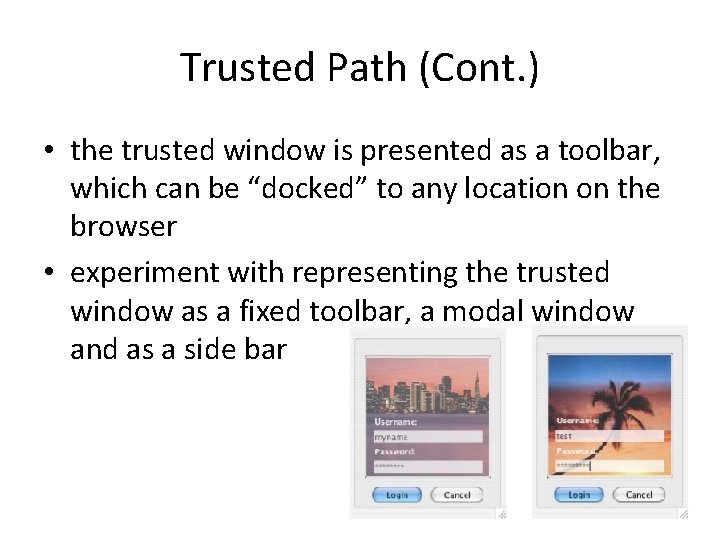
Trusted Path (Cont. ) • the trusted window is presented as a toolbar, which can be “docked” to any location on the browser • experiment with representing the trusted window as a fixed toolbar, a modal window and as a side bar 37/46
Verifier Based Protocols • authentication of the user and the server – without significantly altering user password behavior – or increasing user memory burden • verifier-based protocol – – the user chooses a secret password applies a one-way function to that secret to generate a verifier The verifier is exchanged once with the other party. After the first exchange, the user and the server must only engage in a series of steps that prove to each other that they hold the verifier, without needing to reveal it • The protocol resists dictionary attacks on the verifier from both passive and active attackers, which allows users to use weak passwords safely 38/46
Dynamic Security Skins • • How can user distinguish? Static Security Indicators Customized Security Indicators Automated Custom Security Indicators – Browser-Generated Random Images • randomly generate images using visual hashes • There are some weaknesses: override, remote XUL – Server-Generated Random Images • SRP protocol 39/46
40/46
41/46
Security Analysis • • • Leak of the Verifier Leak of the Images Man-in-the-Middle Attacks Spoofing the Trusted Window Spoofing the Visual Hashes Public Terminals and Malware 42/46
• D. K. Mc. Grath, A. Kalafut, and Minaxi Gupta, Phishing Infrastructure Fluxes All the Way, IEEE Security & Privacy, SEP/OCT 2009 • Fast flux is a DNS technique used by botnets to hide phishing and malware delivery sites behind an ever-changing network of compromised hosts acting as proxies. – Single-flux – double-flux 43/46
• Goal: identify the characteristics of flux in phishing data • Data: Mark. Monitor, Phish. Tank, APWG • Methodology: Support Vector Machines (SVM) • Training parameters – – – Number of IP addresses Number of associated ASNs Number of associated countries Number of DNS servers corresponding to web servers Short time to live (TTL) 44/46
Flux prevalence in Phishing • How prevalent are fast flux, DNS flux, and double flux? – 11. 4% of phishing website names corresponded to 45. 5% in the phishing IP addresses – 61. 7% of DNS servers exhibited DNS flux – 77. 6% of the fluxing web servers were part of a double flux network 45/46
• Flux and Fraud Longevity – Does flux help with the longevity of fraud campaigns? • Fighting Flux – DNS modification – Flux detection 46/46
![References • • • [Miller 05] R. Miller and M. Wu, Fighting Phishing at](http://slidetodoc.com/presentation_image_h/9af3ae6ce32f3801f63b5d2696f8e37b/image-47.jpg "References • • • [Miller 05] R. Miller and M. Wu, Fighting Phishing at")
References • • • [Miller 05] R. Miller and M. Wu, Fighting Phishing at the User Interface [Wu 06] M. Wu, R. Miller, and S. Garfinkel. Do Security Toolbars Actually Prevent Phishing Attacks? In Proc. of CHI 2006, Canada, 2006. [Dhamija 05] R. Dhamija and J. D. Tygar, The Battle Against Phishing: Dynamic Security Skins. In Proc. of the SOUPS’ 05, Pittsburgh, PA, 2005. [Dhamija 06] R. Dhamija, J. D. Tygar, and M. Hearst. Why Phishing Works. In Proc. of CHI 2006, Canada, 2006. [Downs 06] J. Downs, M. Holbrook, and L. Cranor. Decision Strategies and Susceptibility to Phishing. In Proc. of the SOUPS’ 06, Pittsburgh, PA, 2006. [Jagatic 05] Jagatic, T. , Johnson, N. , Jakobsson, M. , Menczer, F. Social Phishing. Communication of ACM.
Questions?
- Slides: 48