
Troubleshooting Digital Circuit Review of logic functions l
Troubleshooting Digital Circuit

Review of logic functions l AND logic:

Review of logic functions l OR logic:
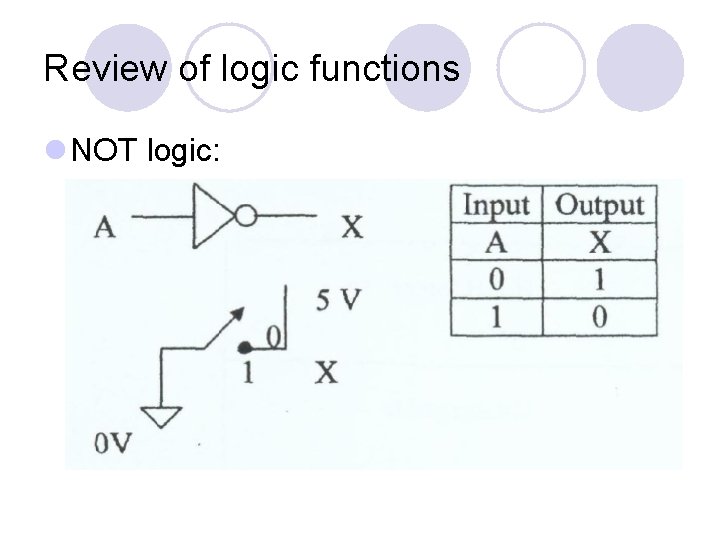
Review of logic functions l NOT logic:
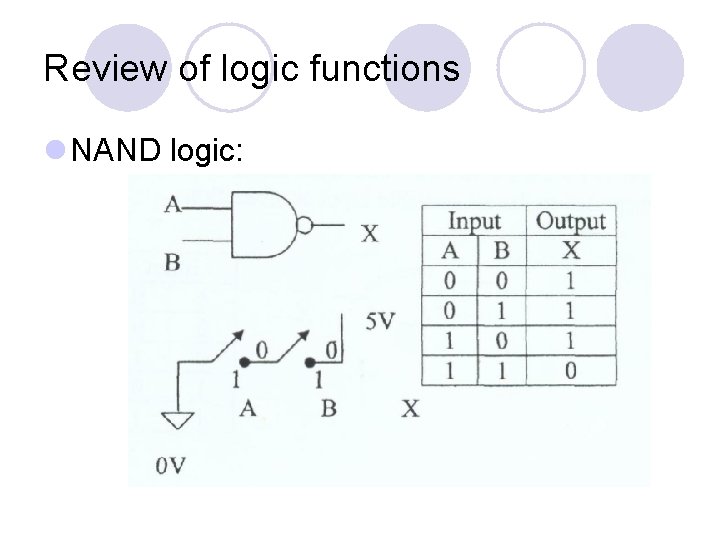
Review of logic functions l NAND logic:
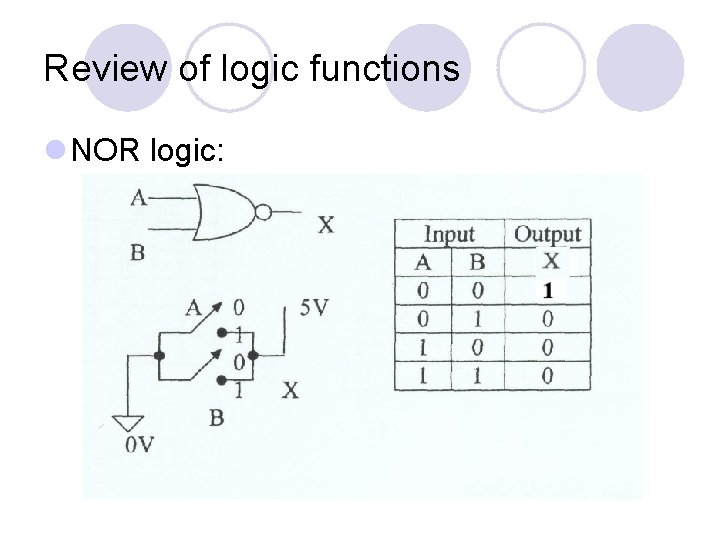
Review of logic functions l NOR logic:
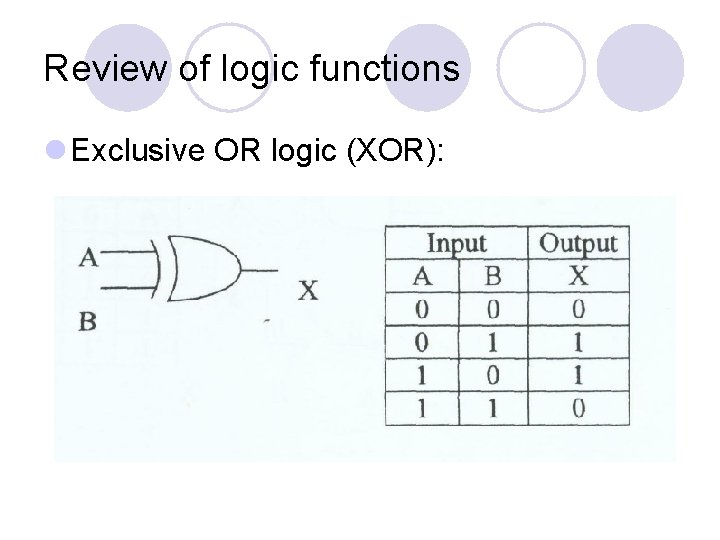
Review of logic functions l Exclusive OR logic (XOR):
Digital logic families l TTL (transistor-transistor logic) ¡ Prefix 74 on the part number l 7400 – quad 2 -input NAND gate l 7404 – hexadecimal inverter l 74 H – high-speed series l 74 L – low-power series l 74 S – Schottky transistors series, for switch on and off faster l 74 LS – low-power and schottky series, e. g 74 LS 00 l 74 AS – advanced schottky series l 74 ALS – advanced low-power schottky series l 74 F – fast series
Digital logic families l TTL (transistor-transistor logic) ¡Nominal Vcc is always 5 V ¡TTL outputs are normally less than 4 V, often less than 3. 5 V – TTL totem pole output. ¡Other types of output circuits used in TTL devices are called open-collector and tristate outputs.
Digital logic families l CMOS (complementary metal-oxide semiconductor) ¡Complementary – l 2 types of transistors in any CMOS device • n-type MOSFET: switched on (shorted from drain to source) when a positive voltage is applied to its gate • p-type MOSFET: switched on when 0 V is applied to its gate input l. Draw very little current from the power supply • Output is shorted to Vdd when HIGH • Output is shorted to Vss when LOW
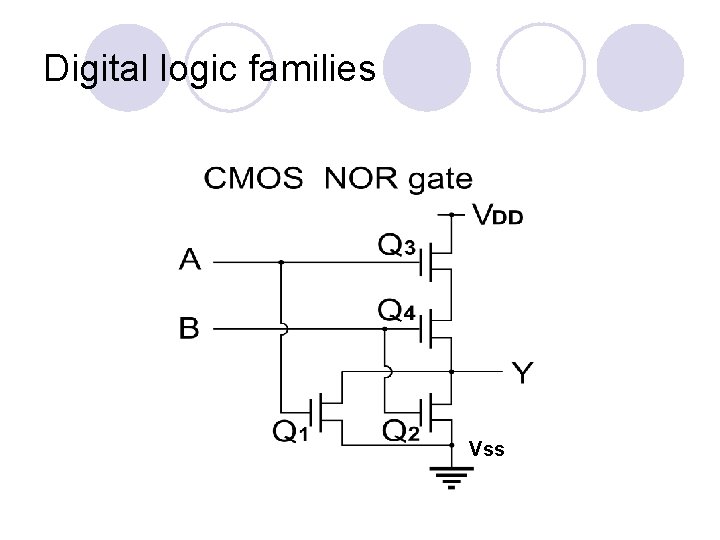
Digital logic families Vss
Digital logic families l CMOS (complementary metal-oxide semiconductor) ¡ Logic ICs with 4000 series l 4011 for quad 2 -input NAND gate chip l Motorola start with a 1 which is 14011 ¡ Logic HIGH input – any value greater than 2/3 of the Vdd supply voltage ¡ Logic LOW input – any value less than 1/3 of Vdd ¡ Example: if a 5 V supply is used for Vdd and Vss is ground, l Valid inputs are 0 to 1. 7 V for a LOW and 3. 33 to 5. 0 V for a HIGH l If TTL outputs are used to drive CMOS, a pull-up resistor is often added to the TTL outputs. l TTL only outputs 2. 4 V as HIGH but CMOS requires at least 3. 3 V to consider it as a HIGH input signal.
Digital logic families l ECL (Emitter-coupled logic) ¡Bias all transistors in such a way to keep them between cutoff and saturation. l. Very fast logic device, thus used only for extremely fast operation ¡TTL and CMOS use transistors either in complete saturation or complete cutoff l. Takes longer to switch a transistor out of hard saturation
Digital logic families l PLDs (programmable logic devices) ¡ To create a logic function, an engineer specifies the input-output relationship as follows: 1. Write logic equations relating inputs to outputs 2. Draw the desired circuit using a CAD program 3. Define truth tables which relate inputs to outputs 4. Describe the circuit’s operation using a hardware description language (HDL)
Digital logic families l PLDs (programmable logic devices) ¡ A circuit board using TTL or CMOS logic chips can often be implemented in a single PLD ¡ Unfortunately manufacturers do not document the relationship between the inputs and outputs of a PLD. ¡ Undocumented PLD is impossible to troubleshoot since it is programmed by the manufacturer.
Digital logic families l PLDs (programmable logic devices) ¡ Some common categories: l Programmable array logic (PAL) – 1 time programmable l Generic array logic (GAL) – erasable and can be reprogrammable ¡ More sophisticated PLDs: (more logic gates and flip-flops) l Field programmable gate arrays (FPGAs) l Complex PLDs (CPLDs)
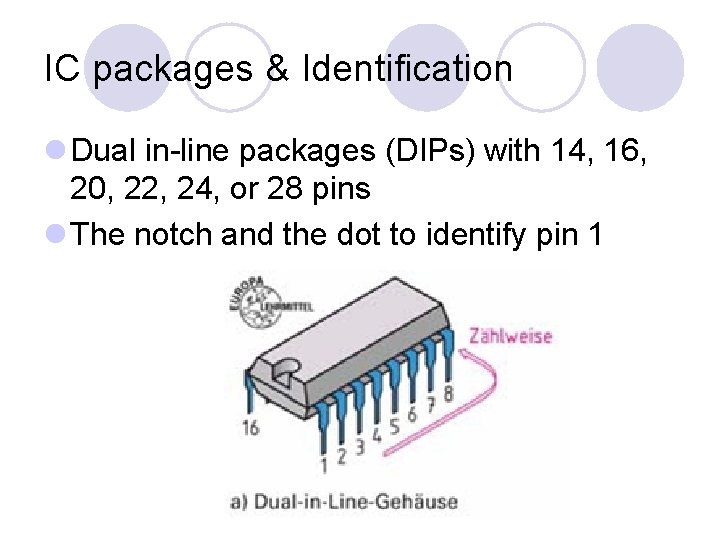
IC packages & Identification l Dual in-line packages (DIPs) with 14, 16, 20, 22, 24, or 28 pins l The notch and the dot to identify pin 1
IC packages & Identification l General method of labeling: ¡Manufacturer ID, part number, special designation, package type. ¡E. g SN 74 LS 00 N – Texas instrument (SN), TTL (74), low-power Schottky (LS), quad 2 -input NAND (00), plastic DIP(N).
Nature of failures l Digital circuits are primarily made up of transistors. Transistors tend to fail either in open up or short out. ¡ Open circuits – intended current flow path has been interrupted. l Too much current may have destroyed the silicon that makes up the transistor, or poor connections in IC sockets, cold solder joints, cracked PCB traces, and bent pins on the IC chip. l TTL open input: behave as logic 1 (HIGH). l TTL open output: all inputs considered as as a constant HIGH l CMOS open inputs: not respond to any input signal. l CMOS open output: at first consider as LOW, then HIGH after some time due to extraneous noise coupled to the input and build up a charge. Other possibility, floating input cause wild oscillation, draw more current and heat up.
Nature of failures l Digital circuits are primarily made up of transistors. Transistors tend to fail either in open up or short out. ¡short circuits – abnormal connection of relatively low resistance between 2 points of a circuit resulting in the flow of excess current between these points. l. TTL shorted input: circuit operate as a pull-up resistor l. TTL shorted output: constant LOW at the output l. CMOS short circuits: the result maybe a constant HIGH or LOW, or invalid logic state.
Nature of failures l Faulty peripheral components ¡Numerous ICs require peripheral components in order to operate. ¡At some point, digital logic ICs are connected to input and output circuitry such as switches, resistors, and LEDs.
Potential causes of failures l Heat-related stress ¡ Do not stack things on top of a vented chassis ¡ Do not block side vents ¡ Make sure the ventilation fans are operating ¡ Keep air filter elements clean l High-level transient ¡ Voltage spikes and current surges l SCR latch-up : destroy CMOS technology circuits ¡ To prevent: CMOS inputs and outputs should never have voltage greater than Vdd or less than Vss
Reading digital schematics l Schematics vary depending on the manufacturer l Few logic gates are physically located on a same chip but electrically distributed throughout the circuit. ¡ Each gates carry the same IC number with a suffix letter indicating which gate it is. ¡ Numbers on the inputs and outputs identify the pin on the IC ¡ IC pins are named and numbered l A bubble is used on a logic symbol to indicate active. LOW inputs or outputs. A bar over a signal name indicates active-LOW
Troubleshooting and fault isolation l Requires a complete technical manual which includes operational procedures, block diagrams, circuit theory of operation, diagnostic troubleshooting flowcharts, and specifications. l Familiarize and understand the circuitry operation ¡ Identify and isolate faulty sections ¡ Use troubleshooting flowchart (if available) or start to troubleshoot by examining the block diagram of the entire system
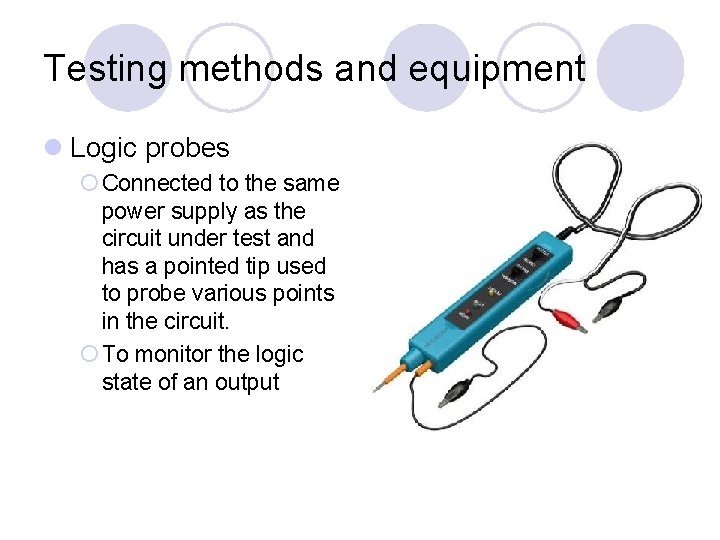
Testing methods and equipment l Logic probes ¡ Connected to the same power supply as the circuit under test and has a pointed tip used to probe various points in the circuit. ¡ To monitor the logic state of an output
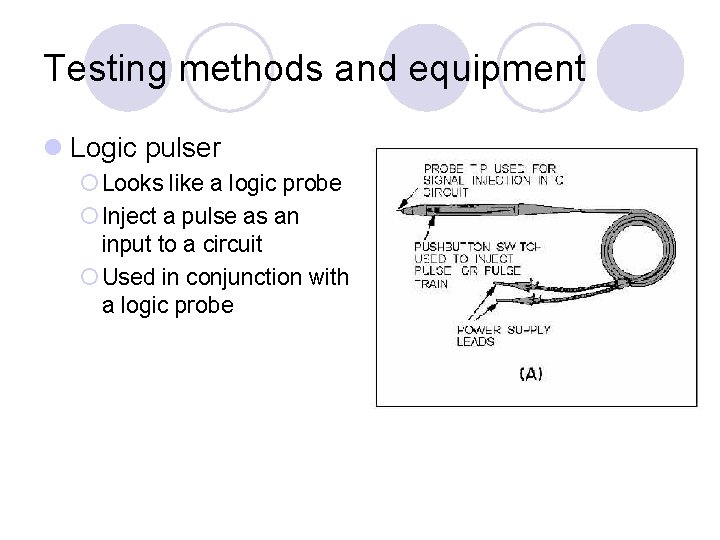
Testing methods and equipment l Logic pulser ¡ Looks like a logic probe ¡ Inject a pulse as an input to a circuit ¡ Used in conjunction with a logic probe
Testing methods and equipment l Logic analyzers ¡Relationship between many different signals in a complex digital circuitry ¡Acquire and store many channels (often 48 or more) of logic input values simultaneously l. Samples are taken at regular intervals determined by internal or external clock source in the circuit under test
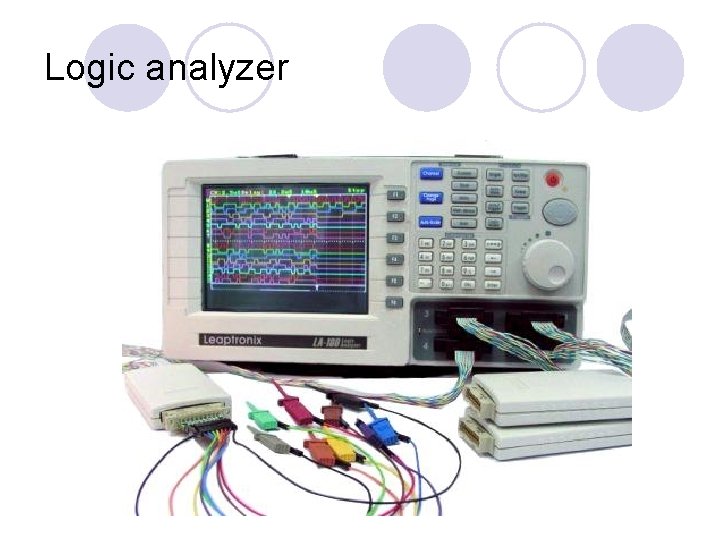
Logic analyzer
Testing methods and equipment l Oscilloscopes ¡Display timing relationship between two or more logic signals ¡Observe shape of two (or more) independent signals
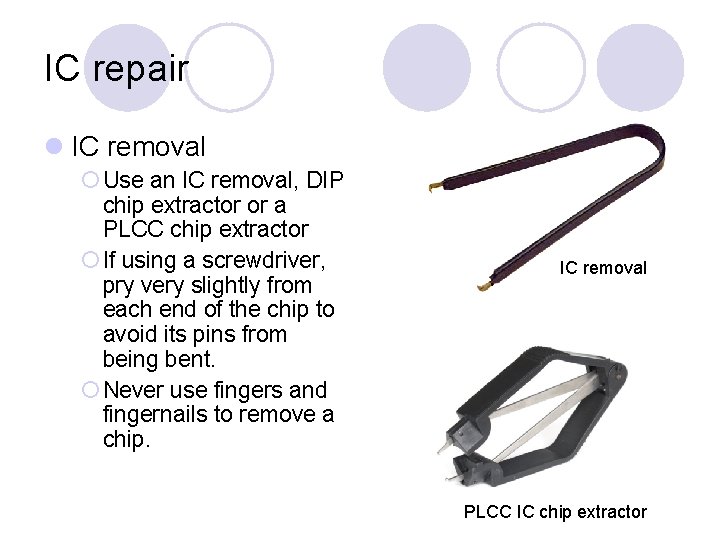
IC repair l IC removal ¡ Use an IC removal, DIP chip extractor or a PLCC chip extractor ¡ If using a screwdriver, pry very slightly from each end of the chip to avoid its pins from being bent. ¡ Never use fingers and fingernails to remove a chip. IC removal PLCC IC chip extractor
IC repair l IC removal ¡Remove solder from each pin or all solder joints must be heated simultaneously before removing the IC chip l. Never applied too much heat for too long – damage to the circuit board l. Never use a soldering iron of more than 25 W. A 12 W pencil iron with a fine point is best for IC work. Keep the tip clean and properly tinned l. Use a desoldering tool (solder sucker). Remove the remaining solder by using desoldering braid. l. Desoldering braid: braided copper or alloy ribbon
IC repair l IC removal ¡Most circuit boards cannot take a second desoldering without being damaged
IC repair l IC insertion ¡Use an IC insertion tool ¡Attempts to bend the pins and insertion by hand may cause static damage to the chip, and the pins may be curled up under the IC during insertion ¡Before resolder a chip, make sure any damage to the circuit board has been repaired. ¡Use solder sparingly and watch for bridges between pins

TOMORROW 9: 00 – 11: 00 : TEST 11: 00 – 5: 00 : Report writing

THANK YOU
- Slides: 35