
Troubleshooting Charts TC 02 Restart Testing Yes Not
Troubleshooting Charts TC 02
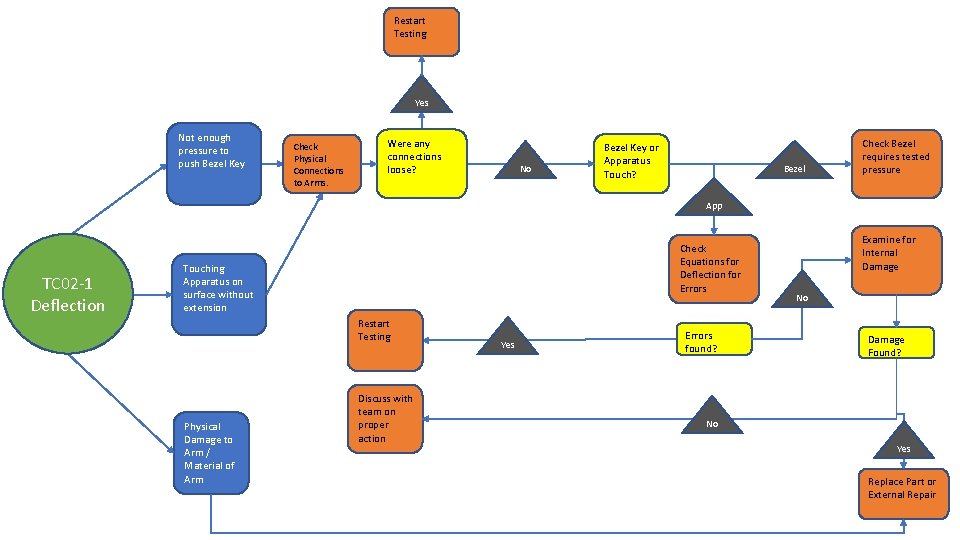
Restart Testing Yes Not enough pressure to push Bezel Key Check Physical Connections to Arms. Were any connections loose? No Bezel Key or Apparatus Touch? Bezel Check Bezel requires tested pressure App TC 02 -1 Deflection Check Equations for Deflection for Errors Touching Apparatus on surface without extension Restart Testing Physical Damage to Arm / Material of Arm Discuss with team on proper action Yes Errors found? Examine for Internal Damage No Damage Found? No Yes Replace Part or External Repair
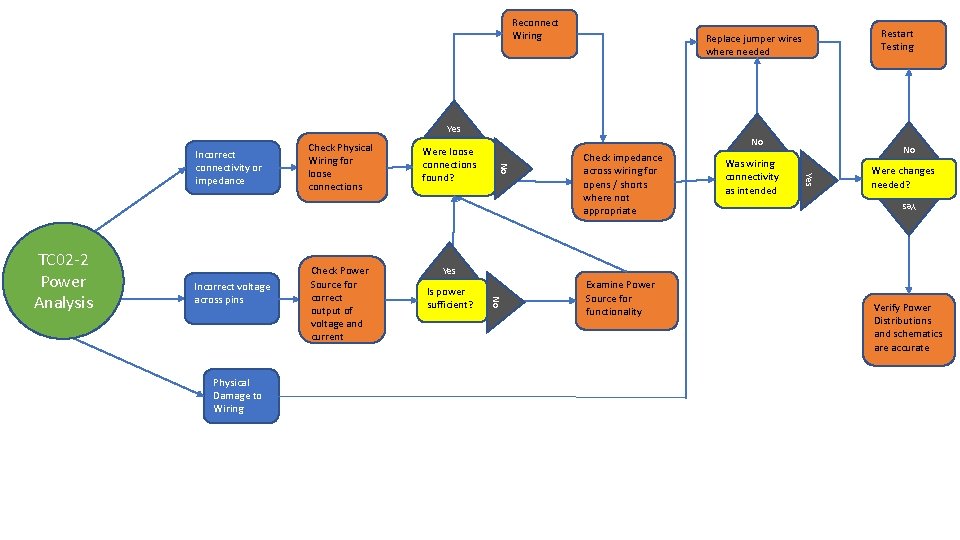
Reconnect Wiring Restart Testing Replace jumper wires where needed Yes Is power sufficient? Check impedance across wiring for opens / shorts where not appropriate Examine Power Source for functionality Was wiring connectivity as intended No Were changes needed? Yes Physical Damage to Wiring Check Power Source for correct output of voltage and current No Yes Incorrect voltage across pins Were loose connections found? No TC 02 -2 Power Analysis Check Physical Wiring for loose connections No Incorrect connectivity or impedance Verify Power Distributions and schematics are accurate
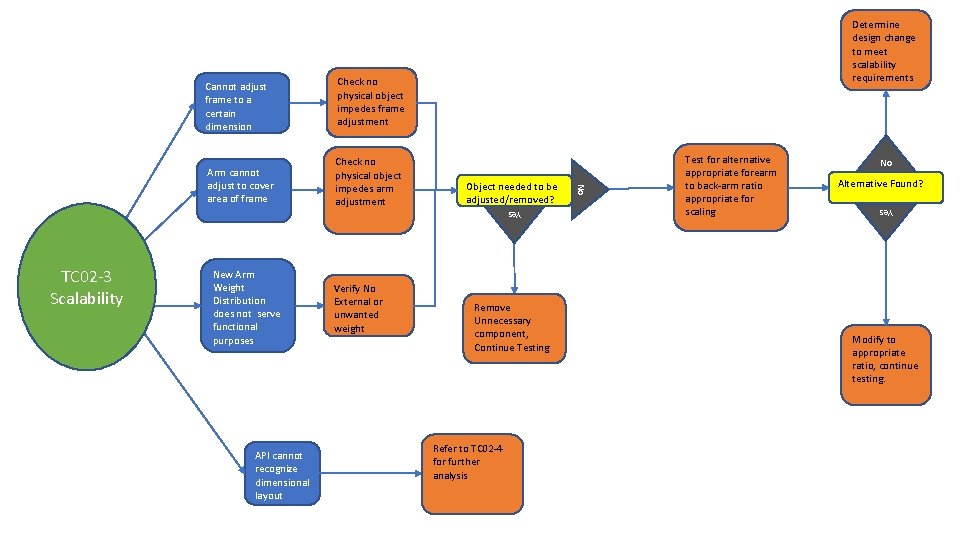
Arm cannot adjust to cover area of frame Check no physical object impedes arm adjustment Object needed to be adjusted/removed? Yes TC 02 -3 Scalability New Arm Weight Distribution does not serve functional purposes API cannot recognize dimensional layout Verify No External or unwanted weight Remove Unnecessary component, Continue Testing Refer to TC 02 -4 for further analysis Test for alternative appropriate forearm to back-arm ratio appropriate for scaling No Alternative Found? Yes Check no physical object impedes frame adjustment No Cannot adjust frame to a certain dimension Determine design change to meet scalability requirements Modify to appropriate ratio, continue testing.
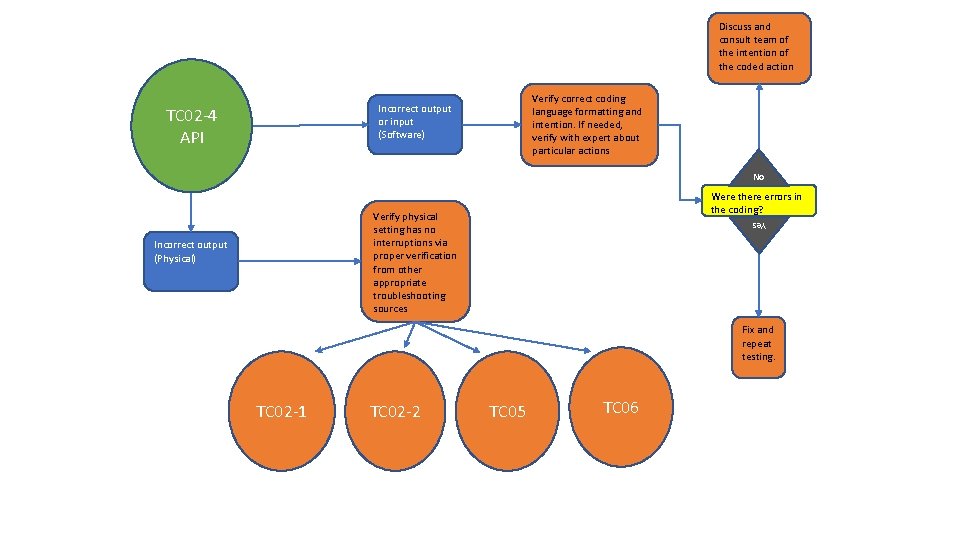
Discuss and consult team of the intention of the coded action Verify correct coding language formatting and intention. If needed, verify with expert about particular actions Incorrect output or input (Software) TC 02 -4 API No Were there errors in the coding? Verify physical setting has no interruptions via proper verification from other appropriate troubleshooting sources Yes Incorrect output (Physical) Fix and repeat testing. TC 02 -1 TC 02 -2 TC 05 TC 06
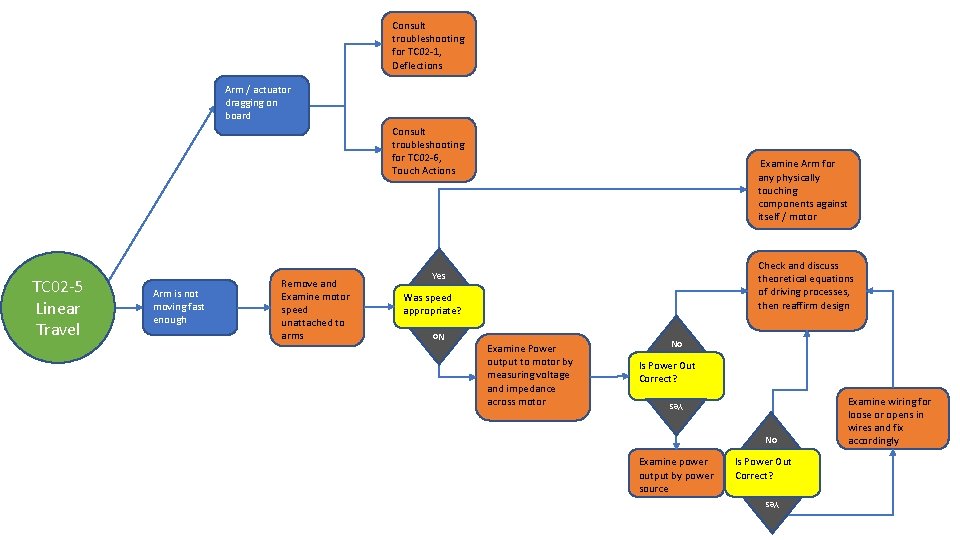
Consult troubleshooting for TC 02 -1, Deflections Arm / actuator dragging on board Consult troubleshooting for TC 02 -6, Touch Actions Was speed appropriate? Examine Power output to motor by measuring voltage and impedance across motor No Is Power Out Correct? No Examine power output by power source Is Power Out Correct? Yes Remove and Examine motor speed unattached to arms Yes Arm is not moving fast enough Check and discuss theoretical equations of driving processes, then reaffirm design Yes No TC 02 -5 Linear Travel Examine Arm for any physically touching components against itself / motor Examine wiring for loose or opens in wires and fix accordingly
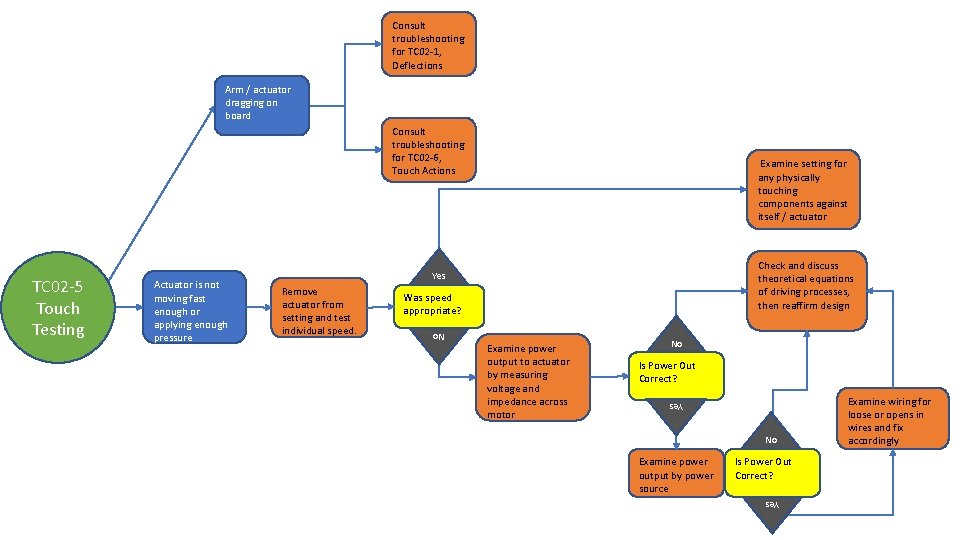
Consult troubleshooting for TC 02 -1, Deflections Arm / actuator dragging on board Consult troubleshooting for TC 02 -6, Touch Actions Was speed appropriate? Examine power output to actuator by measuring voltage and impedance across motor No Is Power Out Correct? No Examine power output by power source Is Power Out Correct? Yes Remove actuator from setting and test individual speed. Yes Actuator is not moving fast enough or applying enough pressure Check and discuss theoretical equations of driving processes, then reaffirm design Yes No TC 02 -5 Touch Testing Examine setting for any physically touching components against itself / actuator Examine wiring for loose or opens in wires and fix accordingly
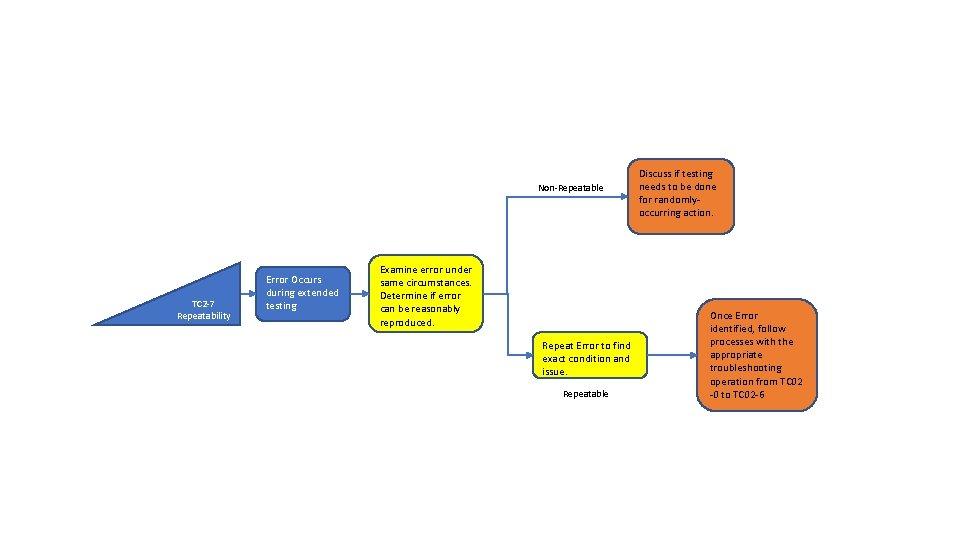
Non-Repeatable TC 2 -7 Repeatability Error Occurs during extended testing Examine error under same circumstances. Determine if error can be reasonably reproduced. Repeat Error to find exact condition and issue. Repeatable Discuss if testing needs to be done for randomlyoccurring action. Once Error identified, follow processes with the appropriate troubleshooting operation from TC 02 -0 to TC 02 -6
- Slides: 8