
TRIRIGA Perceptive Workplace Services Paul Lacey Offering Manager

- Slides: 37
TRIRIGA Perceptive Workplace Services Paul Lacey, Offering Manager, IBM TRIRIGA © 2018 IBM Corporation January 22, 2018
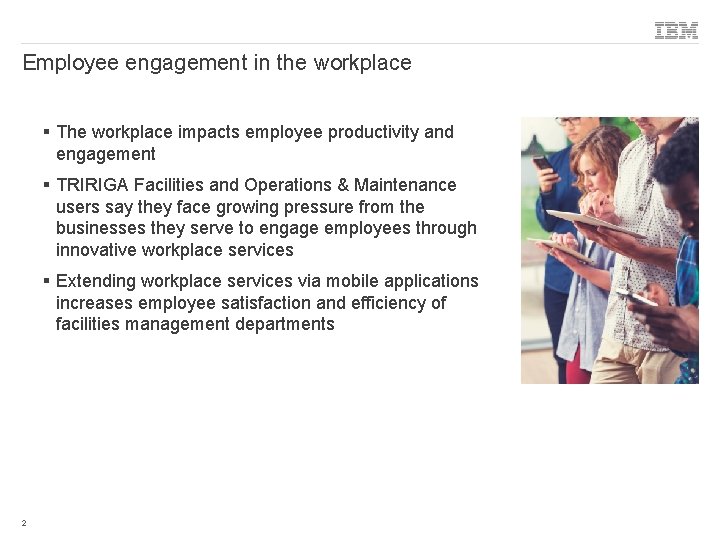
Employee engagement in the workplace § The workplace impacts employee productivity and engagement § TRIRIGA Facilities and Operations & Maintenance users say they face growing pressure from the businesses they serve to engage employees through innovative workplace services § Extending workplace services via mobile applications increases employee satisfaction and efficiency of facilities management departments 2
TRIRIGA Perceptive apps drive user engagement Perceptive web apps, built on the UX Framework, provide: § Innovative ways to achieve business goals - Task-centric designs - Greater involvement of entire business § Simplification of the end-user experience - Web app delivery – no app to install - Responsive web design § Accelerated time-to-productivity - Reduced user training time and support requirements - Intuitive ways of managing tasks 3
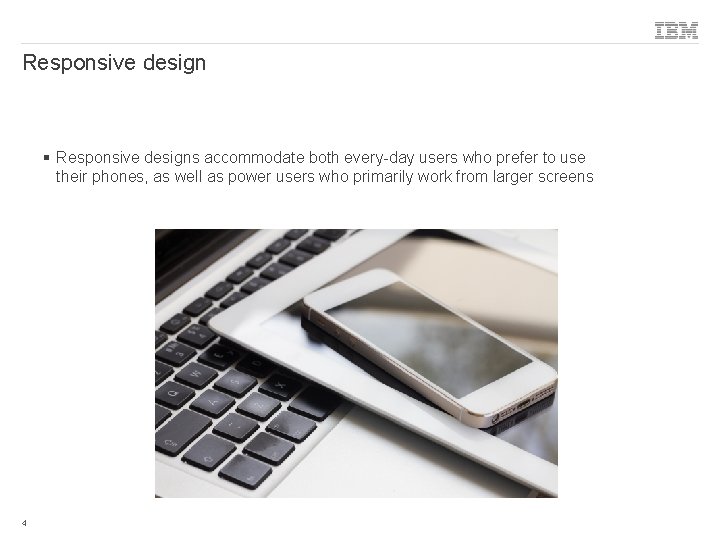
Responsive design § Responsive designs accommodate both every-day users who prefer to use their phones, as well as power users who primarily work from larger screens 4
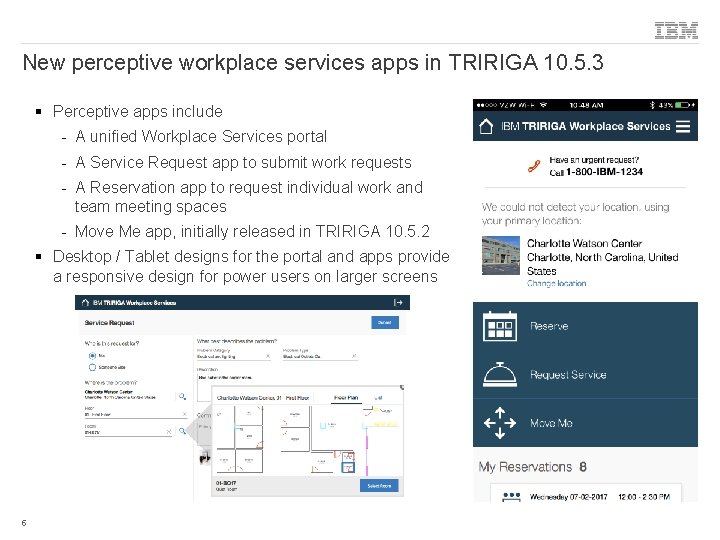
New perceptive workplace services apps in TRIRIGA 10. 5. 3 § Perceptive apps include - A unified Workplace Services portal - A Service Request app to submit work requests - A Reservation app to request individual work and team meeting spaces - Move Me app, initially released in TRIRIGA 10. 5. 2 § Desktop / Tablet designs for the portal and apps provide a responsive design for power users on larger screens 5
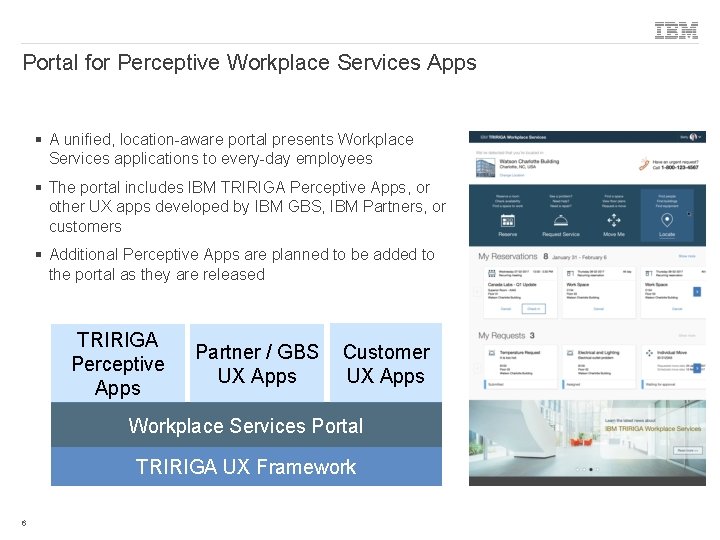
Portal for Perceptive Workplace Services Apps § A unified, location-aware portal presents Workplace Services applications to every-day employees § The portal includes IBM TRIRIGA Perceptive Apps, or other UX apps developed by IBM GBS, IBM Partners, or customers § Additional Perceptive Apps are planned to be added to the portal as they are released TRIRIGA Perceptive Apps Partner / GBS UX Apps Customer UX Apps Workplace Services Portal TRIRIGA UX Framework 6
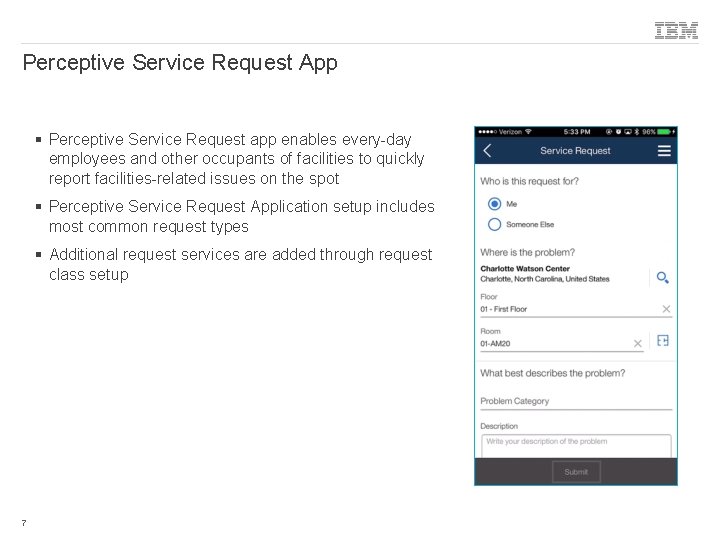
Perceptive Service Request App § Perceptive Service Request app enables every-day employees and other occupants of facilities to quickly report facilities-related issues on the spot § Perceptive Service Request Application setup includes most common request types § Additional request services are added through request class setup 7
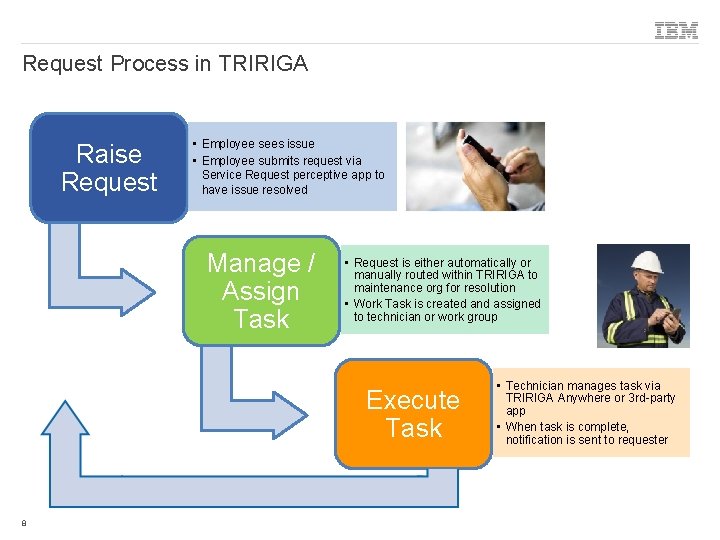
Request Process in TRIRIGA Raise Request • Employee sees issue • Employee submits request via Service Request perceptive app to have issue resolved Manage / Assign Task • Request is either automatically or manually routed within TRIRIGA to maintenance org for resolution • Work Task is created and assigned to technician or work group Execute Task 8 • Technician manages task via TRIRIGA Anywhere or 3 rd-party app • When task is complete, notification is sent to requester
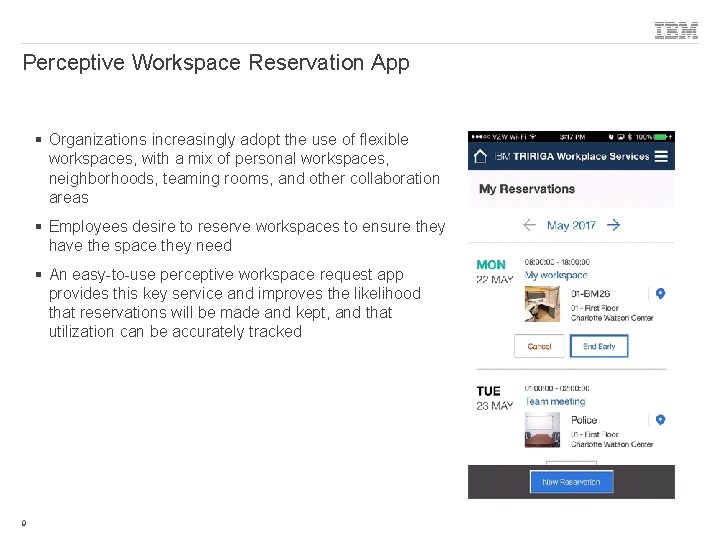
Perceptive Workspace Reservation App § Organizations increasingly adopt the use of flexible workspaces, with a mix of personal workspaces, neighborhoods, teaming rooms, and other collaboration areas § Employees desire to reserve workspaces to ensure they have the space they need § An easy-to-use perceptive workspace request app provides this key service and improves the likelihood that reservations will be made and kept, and that utilization can be accurately tracked 9
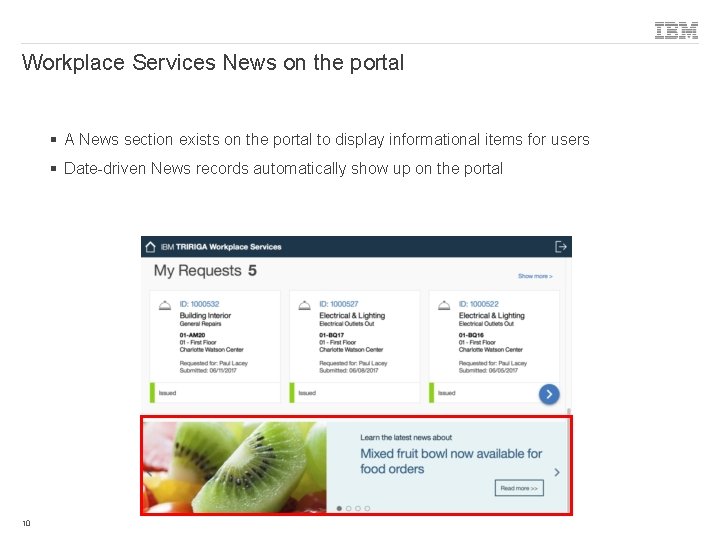
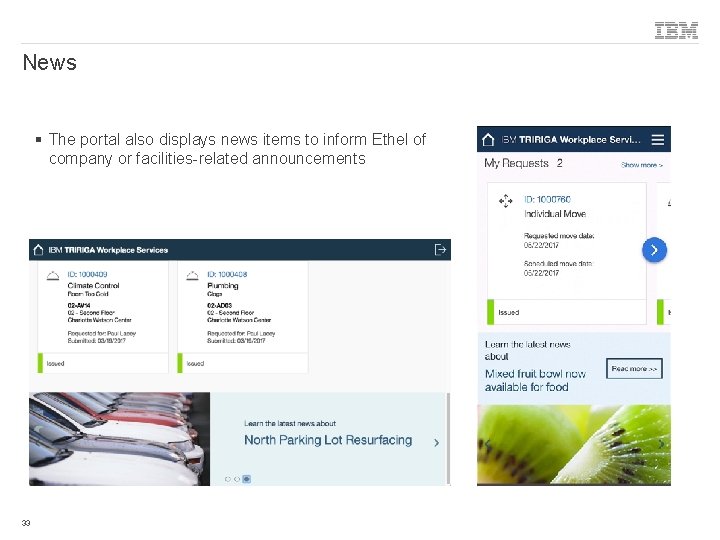
Workplace Services News on the portal § A News section exists on the portal to display informational items for users § Date-driven News records automatically show up on the portal 10
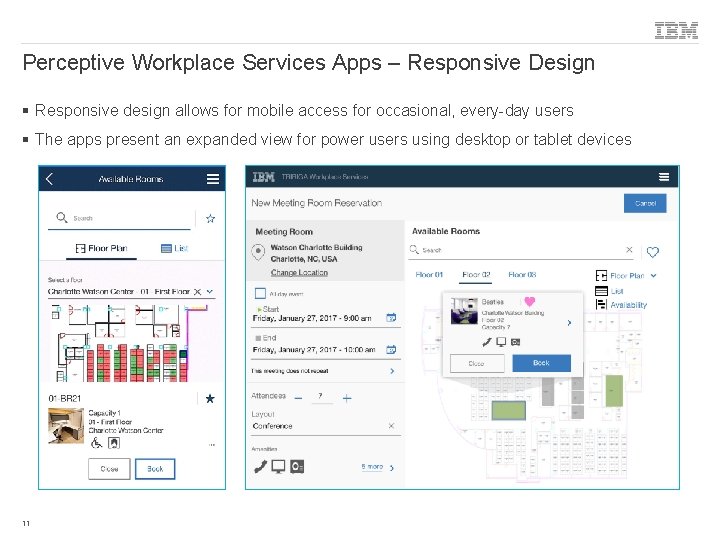
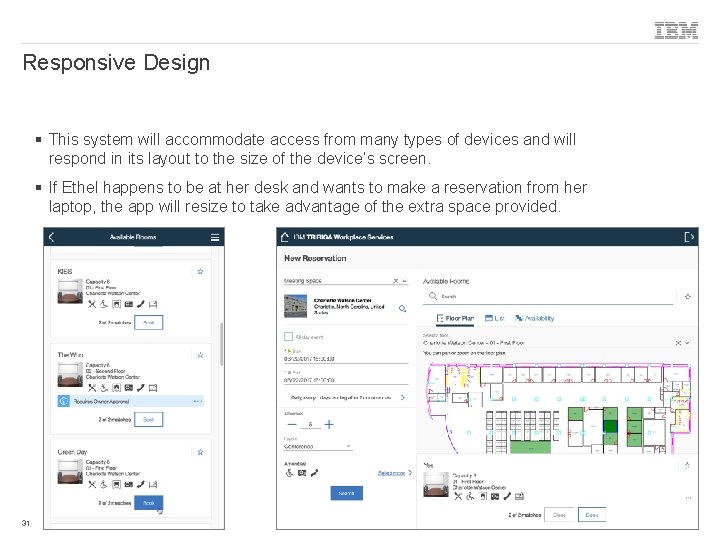
Perceptive Workplace Services Apps – Responsive Design § Responsive design allows for mobile access for occasional, every-day users § The apps present an expanded view for power users using desktop or tablet devices 11
Demo © 2018 IBM Corporation
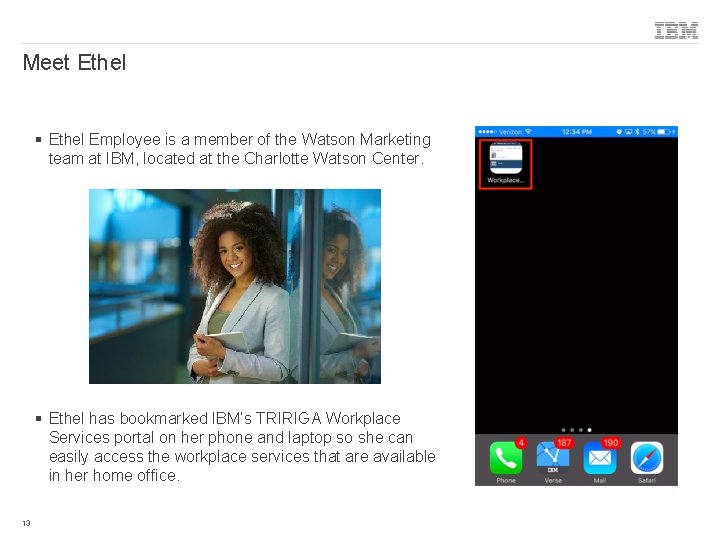
Meet Ethel § Ethel Employee is a member of the Watson Marketing team at IBM, located at the Charlotte Watson Center. § Ethel has bookmarked IBM’s TRIRIGA Workplace Services portal on her phone and laptop so she can easily access the workplace services that are available in her home office. 13
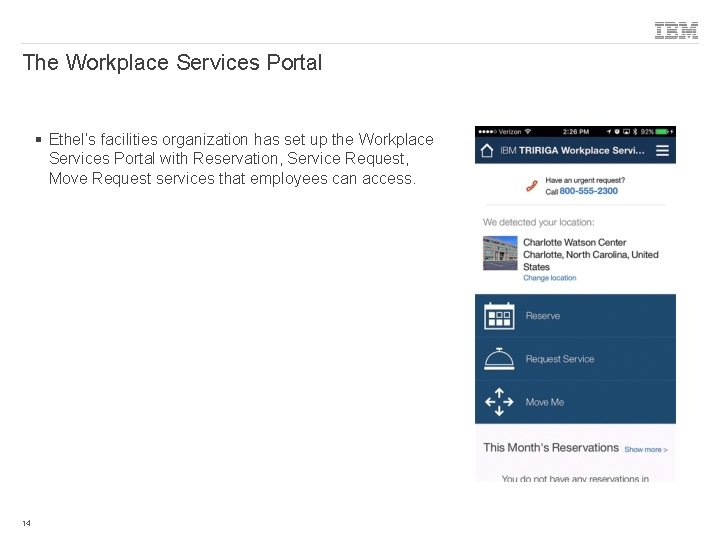
The Workplace Services Portal § Ethel’s facilities organization has set up the Workplace Services Portal with Reservation, Service Request, Move Request services that employees can access. 14
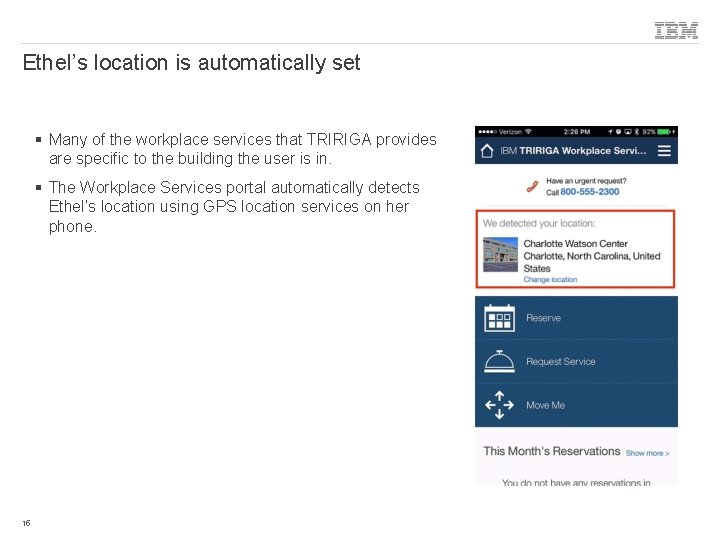
Ethel’s location is automatically set § Many of the workplace services that TRIRIGA provides are specific to the building the user is in. § The Workplace Services portal automatically detects Ethel’s location using GPS location services on her phone. 15
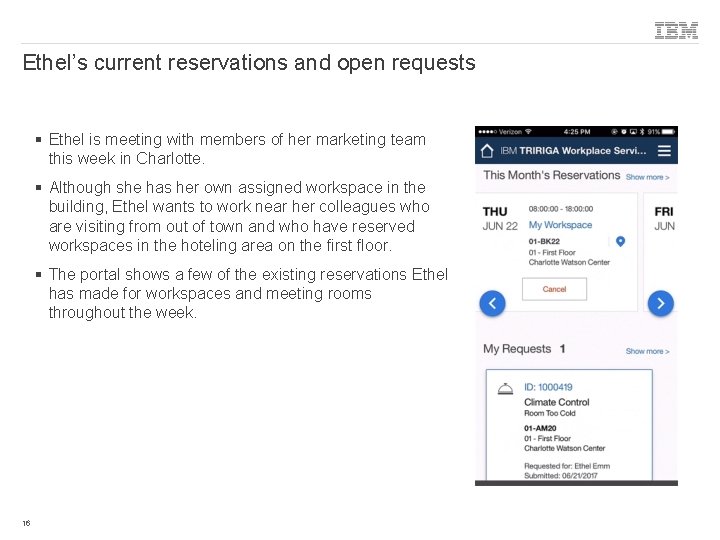
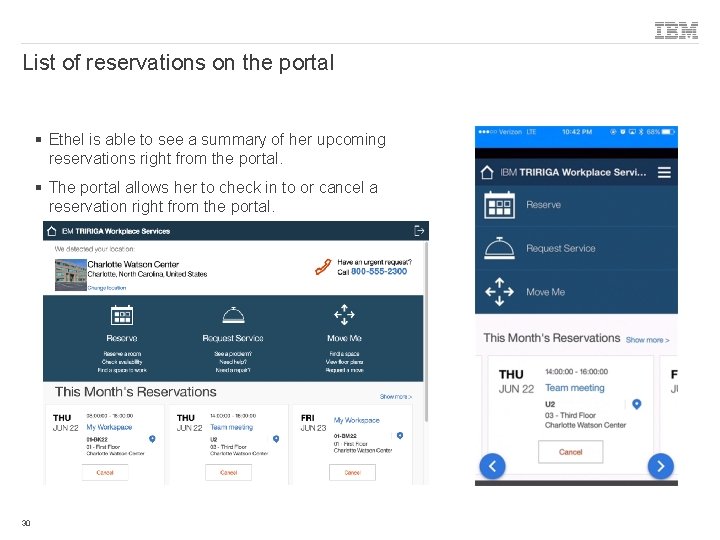
Ethel’s current reservations and open requests § Ethel is meeting with members of her marketing team this week in Charlotte. § Although she has her own assigned workspace in the building, Ethel wants to work near her colleagues who are visiting from out of town and who have reserved workspaces in the hoteling area on the first floor. § The portal shows a few of the existing reservations Ethel has made for workspaces and meeting rooms throughout the week. 16
Service Requests © 2018 IBM Corporation
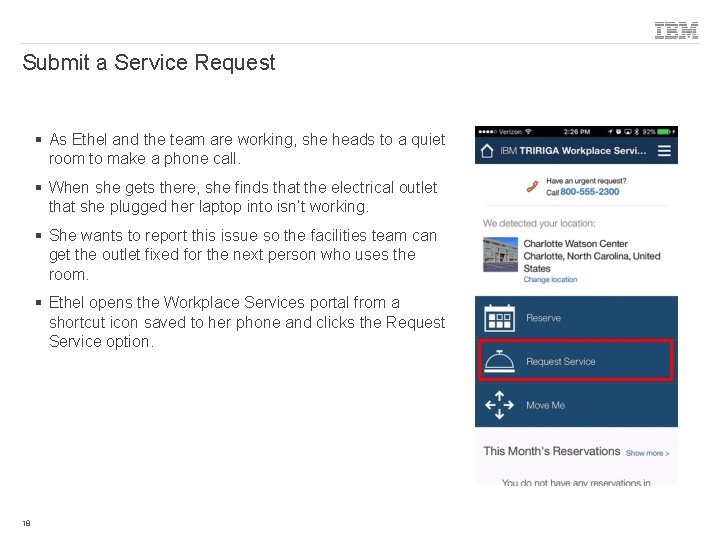
Submit a Service Request § As Ethel and the team are working, she heads to a quiet room to make a phone call. § When she gets there, she finds that the electrical outlet that she plugged her laptop into isn’t working. § She wants to report this issue so the facilities team can get the outlet fixed for the next person who uses the room. § Ethel opens the Workplace Services portal from a shortcut icon saved to her phone and clicks the Request Service option. 18
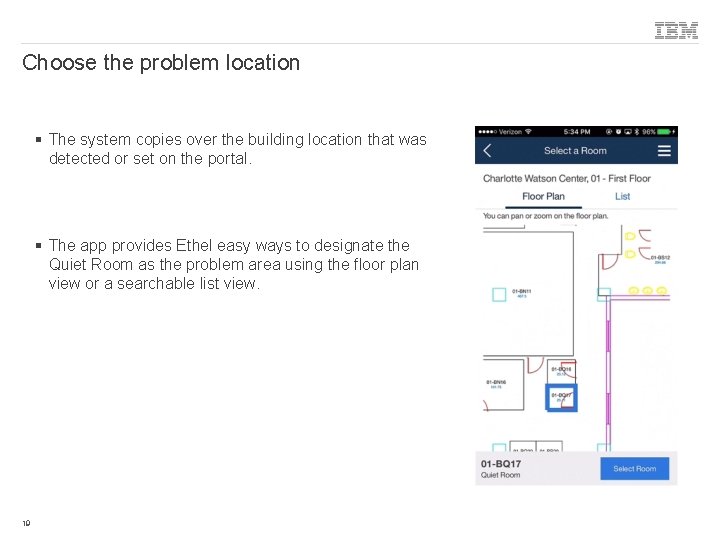
Choose the problem location § The system copies over the building location that was detected or set on the portal. § The app provides Ethel easy ways to designate the Quiet Room as the problem area using the floor plan view or a searchable list view. 19
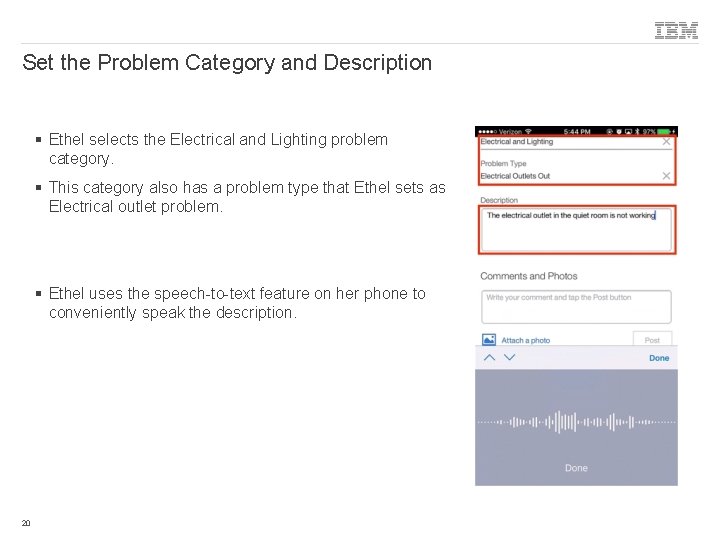
Set the Problem Category and Description § Ethel selects the Electrical and Lighting problem category. § This category also has a problem type that Ethel sets as Electrical outlet problem. § Ethel uses the speech-to-text feature on her phone to conveniently speak the description. 20
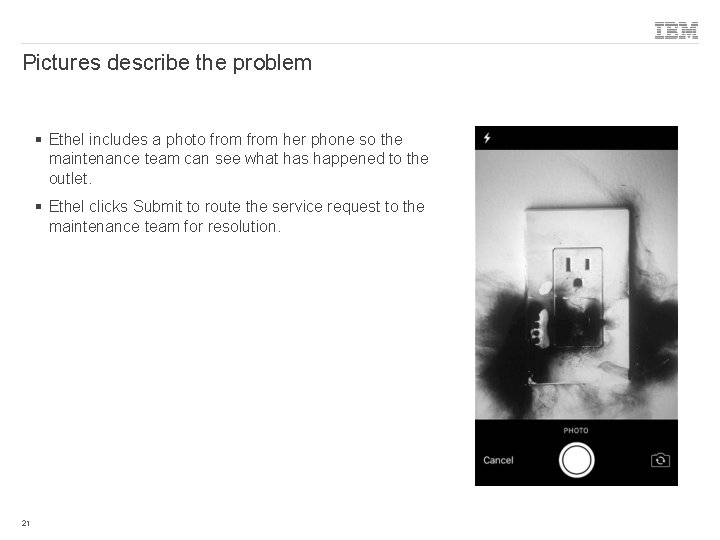
Pictures describe the problem § Ethel includes a photo from her phone so the maintenance team can see what has happened to the outlet. § Ethel clicks Submit to route the service request to the maintenance team for resolution. 21
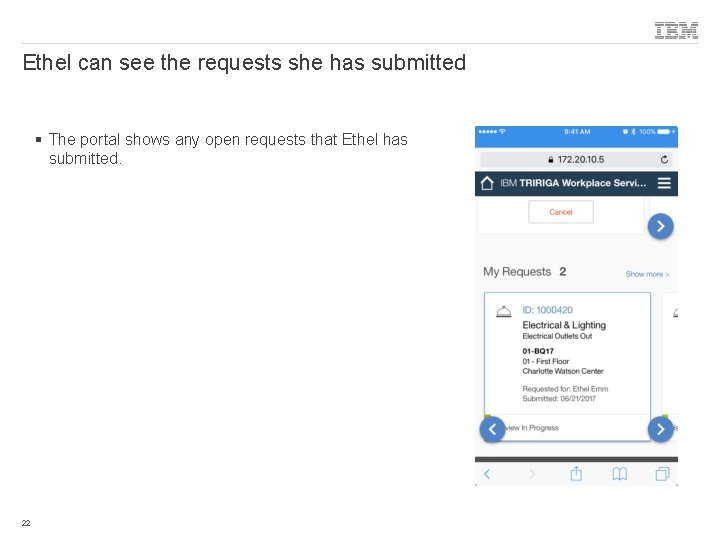
Ethel can see the requests she has submitted § The portal shows any open requests that Ethel has submitted. 22
Reservations © 2018 IBM Corporation
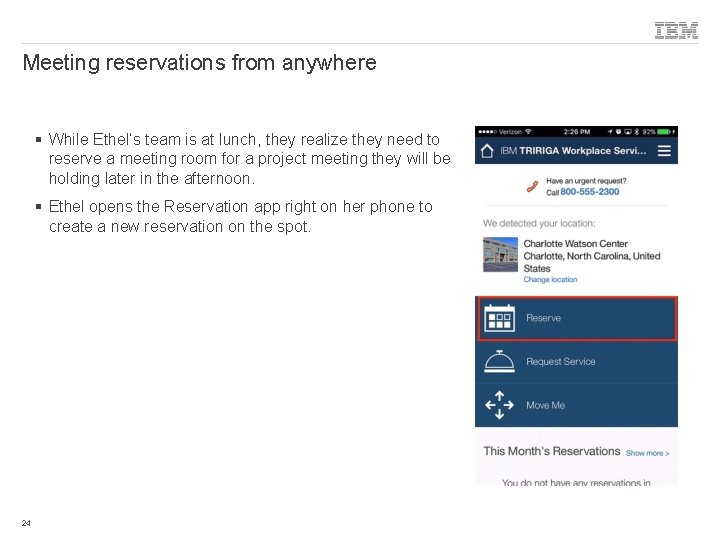
Meeting reservations from anywhere § While Ethel’s team is at lunch, they realize they need to reserve a meeting room for a project meeting they will be holding later in the afternoon. § Ethel opens the Reservation app right on her phone to create a new reservation on the spot. 24
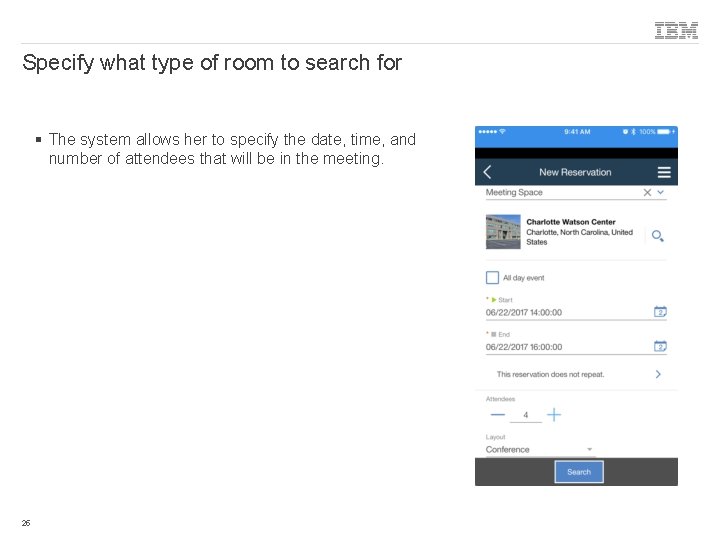
Specify what type of room to search for § The system allows her to specify the date, time, and number of attendees that will be in the meeting. 25
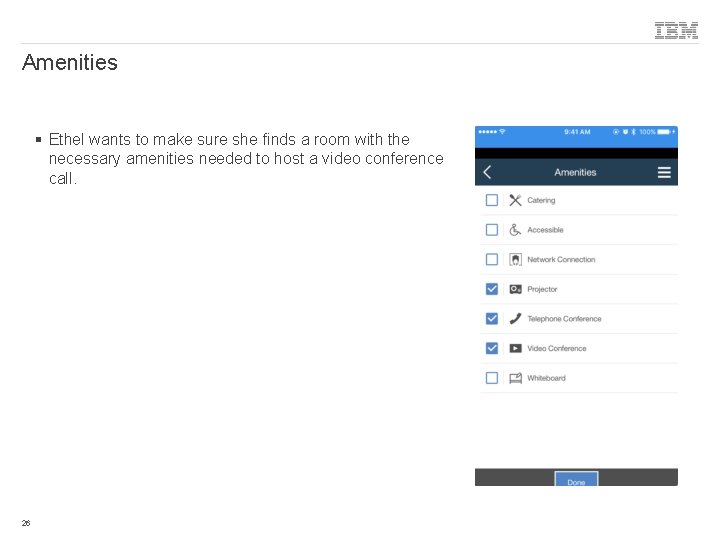
Amenities § Ethel wants to make sure she finds a room with the necessary amenities needed to host a video conference call. 26
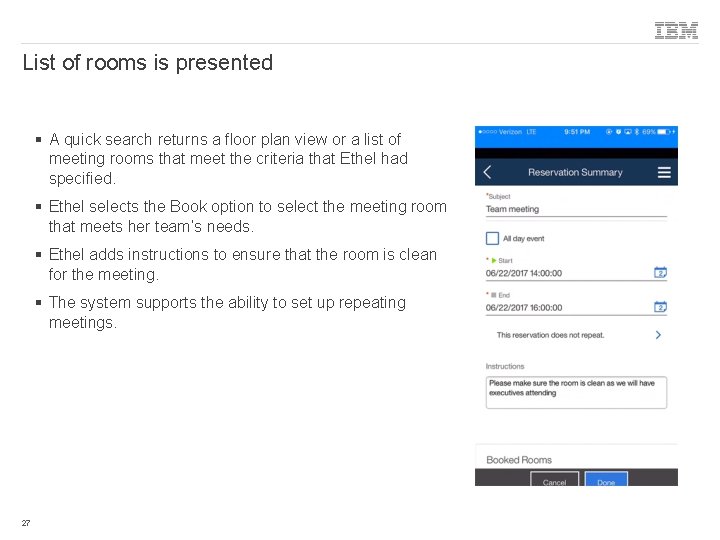
List of rooms is presented § A quick search returns a floor plan view or a list of meeting rooms that meet the criteria that Ethel had specified. § Ethel selects the Book option to select the meeting room that meets her team’s needs. § Ethel adds instructions to ensure that the room is clean for the meeting. § The system supports the ability to set up repeating meetings. 27
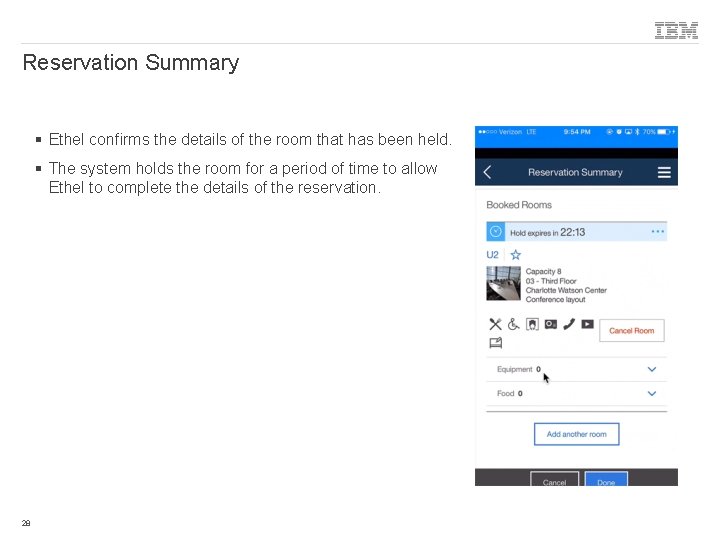
Reservation Summary § Ethel confirms the details of the room that has been held. § The system holds the room for a period of time to allow Ethel to complete the details of the reservation. 28
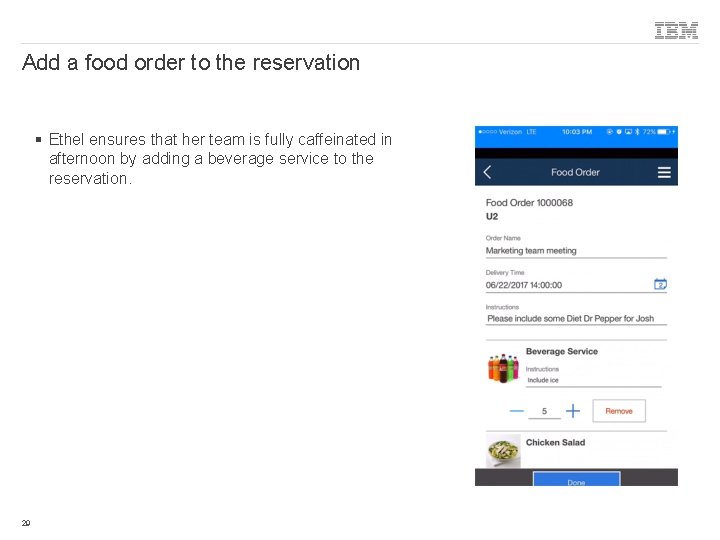
Add a food order to the reservation § Ethel ensures that her team is fully caffeinated in afternoon by adding a beverage service to the reservation. 29
List of reservations on the portal § Ethel is able to see a summary of her upcoming reservations right from the portal. § The portal allows her to check in to or cancel a reservation right from the portal. 30
Responsive Design § This system will accommodate access from many types of devices and will respond in its layout to the size of the device’s screen. § If Ethel happens to be at her desk and wants to make a reservation from her laptop, the app will resize to take advantage of the extra space provided. 31
News and Moves 32 © 2018 IBM Corporation
News § The portal also displays news items to inform Ethel of company or facilities-related announcements 33
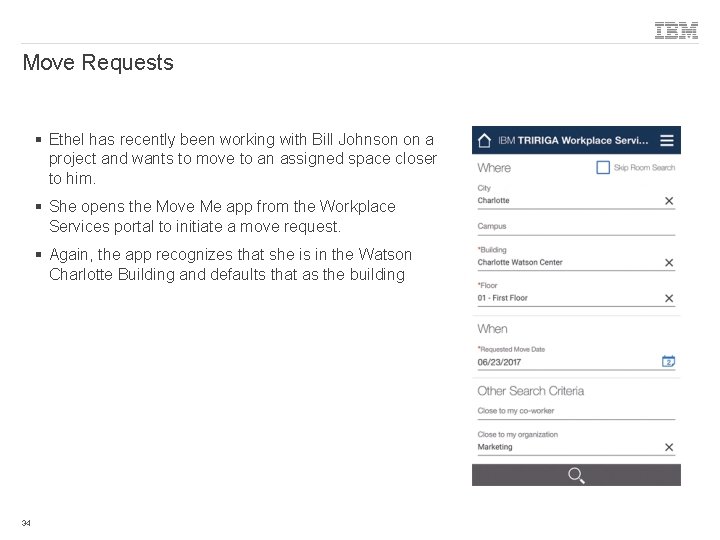
Move Requests § Ethel has recently been working with Bill Johnson on a project and wants to move to an assigned space closer to him. § She opens the Move Me app from the Workplace Services portal to initiate a move request. § Again, the app recognizes that she is in the Watson Charlotte Building and defaults that as the building 34
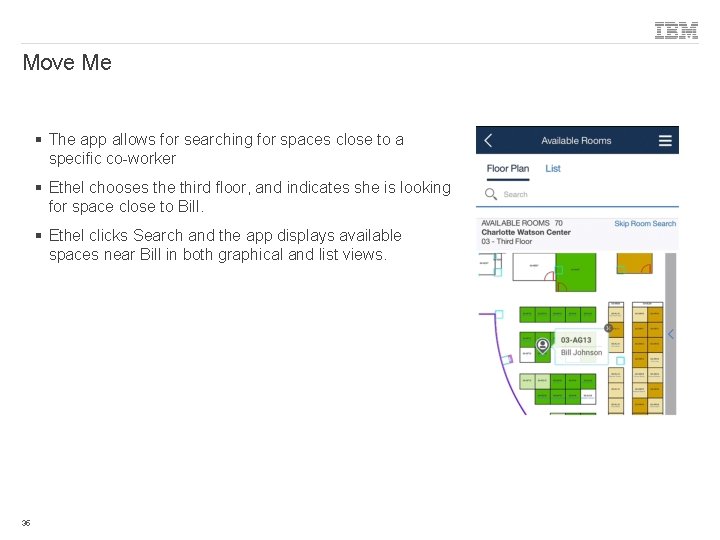
Move Me § The app allows for searching for spaces close to a specific co-worker § Ethel chooses the third floor, and indicates she is looking for space close to Bill. § Ethel clicks Search and the app displays available spaces near Bill in both graphical and list views. 35
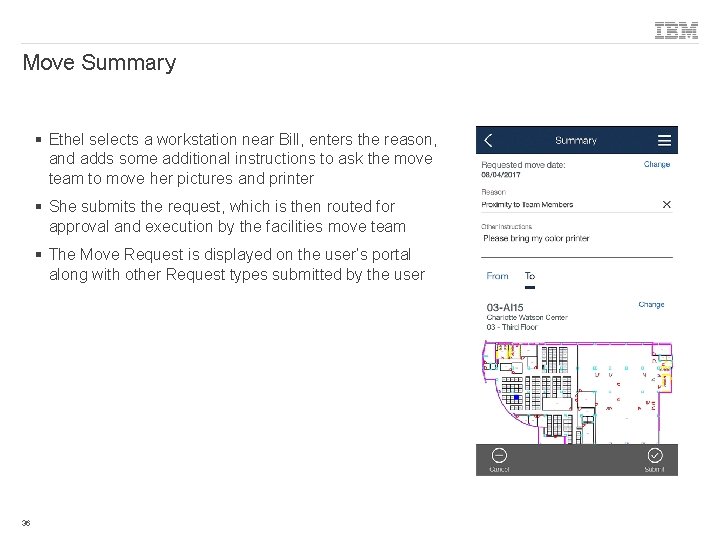
Move Summary § Ethel selects a workstation near Bill, enters the reason, and adds some additional instructions to ask the move team to move her pictures and printer § She submits the request, which is then routed for approval and execution by the facilities move team § The Move Request is displayed on the user’s portal along with other Request types submitted by the user 36
Thank you! Paul Lacey Offering Manager, IBM TRIRIGA placey@us. ibm. com 37 © 2018 IBM Corporation