
Trident Scientific Workflow Workbench e Science 08 Tutorial
Trident Scientific Workflow Workbench e. Science’ 08 Tutorial Nelson Araujo, Roger Barga, Dean Guo, Jared Jackson Yogesh Simmhan, Catharine van Ingen, Nitin Gautam Microsoft Research Joby Thomas and the development team Aditi Technologies
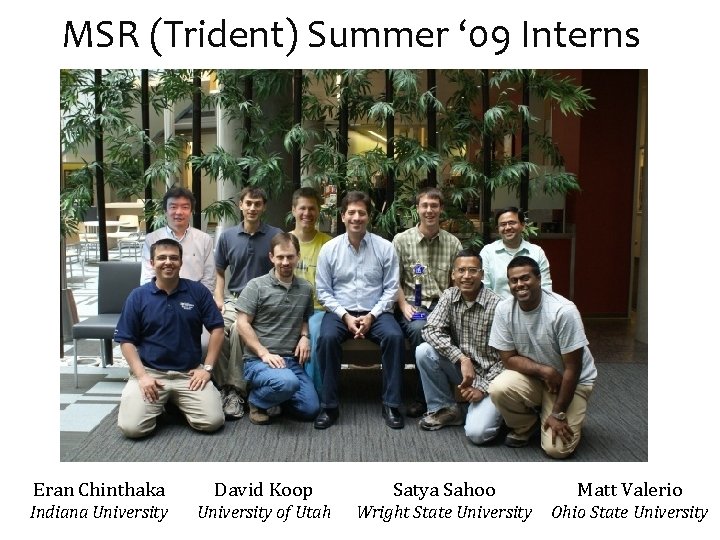
MSR (Trident) Summer ‘ 09 Interns Eran Chinthaka David Koop Satya Sahoo Matt Valerio Indiana University of Utah Wright State University Ohio State University
Overview of our presentation today Technical Content • • Introduction Feature Overview and Logical Architecture Deep(er) dive into select features with demos Roadmap to delivery Design Philosophy and Exit Strategy • • Leverage COTS WFMS, build only what is required Extensible and open, integrate with community tools Drive development from actual e. Science requirements Deliver as open source accelerator to the community
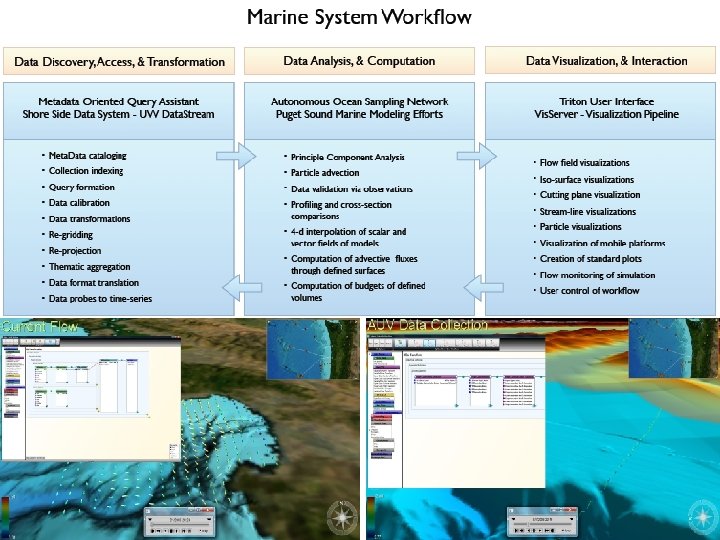
Ocean Observing Initiative (OOI) Formerly the NEPTUNE project Workflow for Ocean Observatories, part of an “oceanographer’s workbench” Jim Gray Collaboration with Univ. of Wash & MBARI
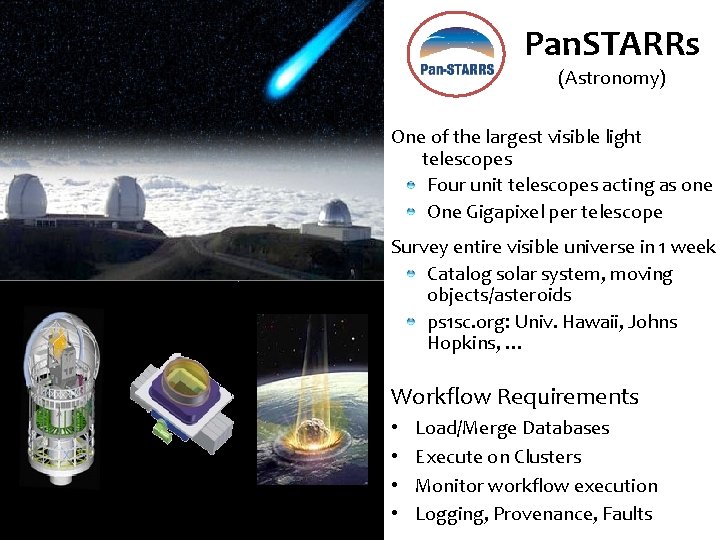
Pan. STARRs (Astronomy) One of the largest visible light telescopes Four unit telescopes acting as one One Gigapixel per telescope Survey entire visible universe in 1 week Catalog solar system, moving objects/asteroids ps 1 sc. org: Univ. Hawaii, Johns Hopkins, … Workflow Requirements • • Load/Merge Databases Execute on Clusters Monitor workflow execution Logging, Provenance, Faults
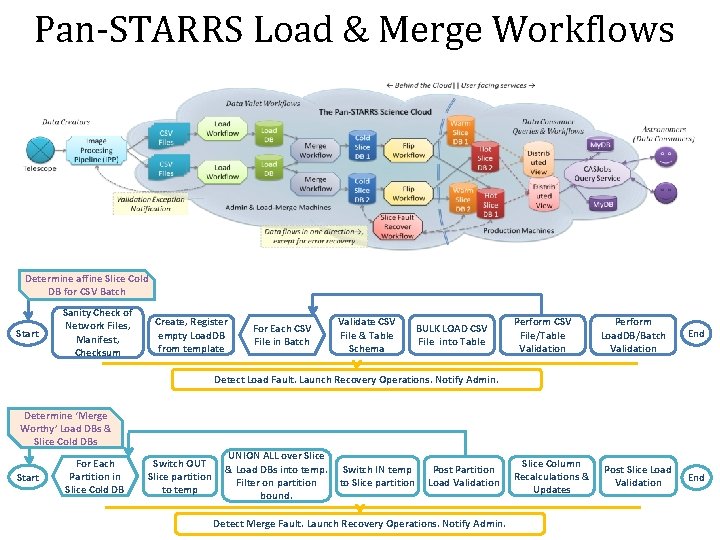
Pan-STARRS Load & Merge Workflows Determine affine Slice Cold DB for CSV Batch Start Sanity Check of Network Files, Manifest, Checksum Create, Register empty Load. DB from template For Each CSV File in Batch Validate CSV File & Table Schema BULK LOAD CSV File into Table Perform CSV File/Table Validation Perform Load. DB/Batch Validation End Detect Load Fault. Launch Recovery Operations. Notify Admin. Determine ‘Merge Worthy’ Load DBs & Slice Cold DBs Start For Each Partition in Slice Cold DB Switch OUT Slice partition to temp UNION ALL over Slice & Load DBs into temp. Filter on partition bound. Switch IN temp to Slice partition Post Partition Load Validation Detect Merge Fault. Launch Recovery Operations. Notify Admin. Slice Column Recalculations & Updates Post Slice Load Validation End
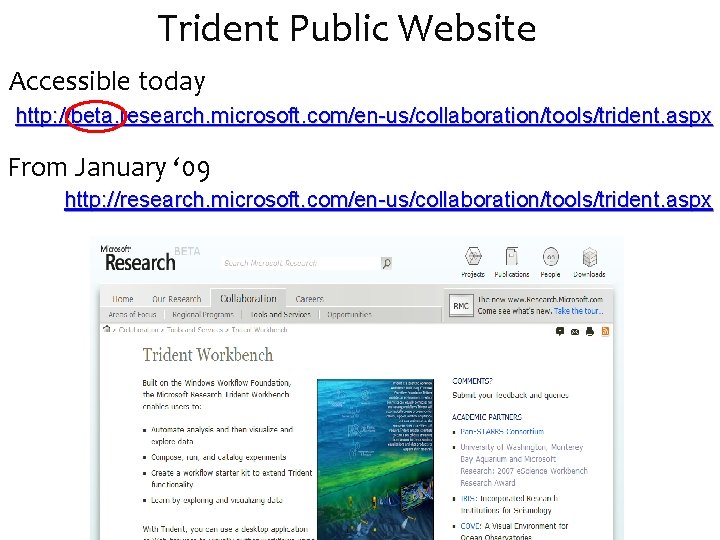
Trident Public Website Accessible today http: //beta. research. microsoft. com/en-us/collaboration/tools/trident. aspx From January ‘ 09 http: //research. microsoft. com/en-us/collaboration/tools/trident. aspx
Logical Architecture Features Building on Windows Workflow 9
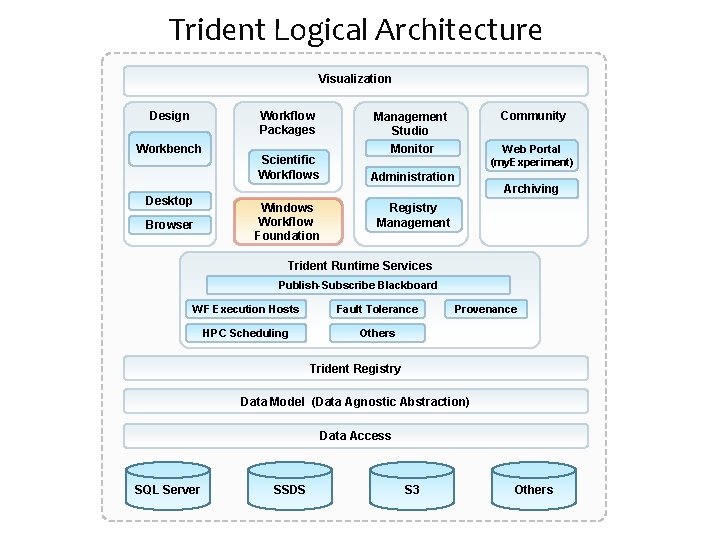
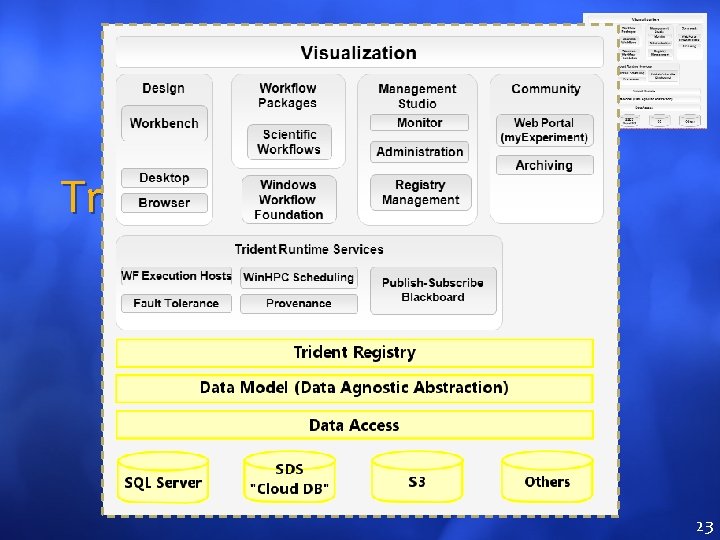
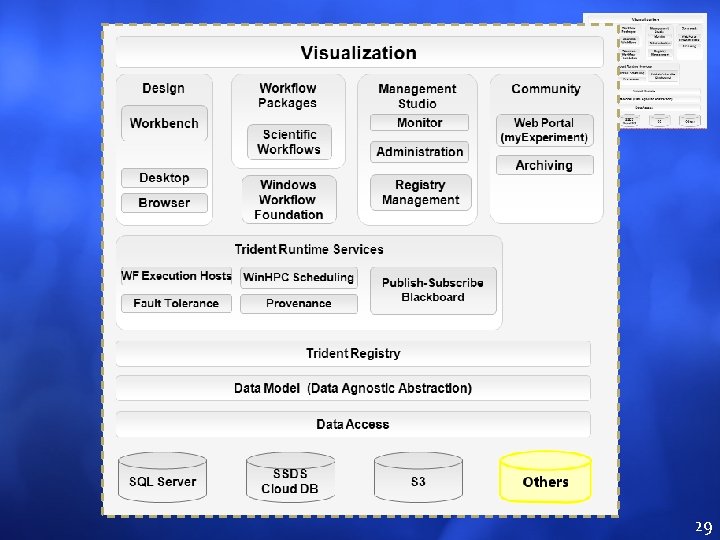
Trident Logical Architecture Visualization Workflow Packages Design Workbench Desktop Browser Community Management Studio Monitor Scientific Workflows Web Portal (my. Experiment) Administration Windows Workflow Foundation Archiving Registry Management Trident Runtime Services Publish-Subscribe Blackboard WF Execution Hosts Fault Tolerance HPC Scheduling Others Provenance Trident Registry Data Model (Data Agnostic Abstraction) Data Access SQL Server SSDS S 3 Others

Trident Features Libraries of activities, services, and workflows – Prepackaged activities and workflows out of the box and custom libraries – Registry with rich sets of workflow meta data – Versions – Workflow packages – Social annotations (my. Experiment)

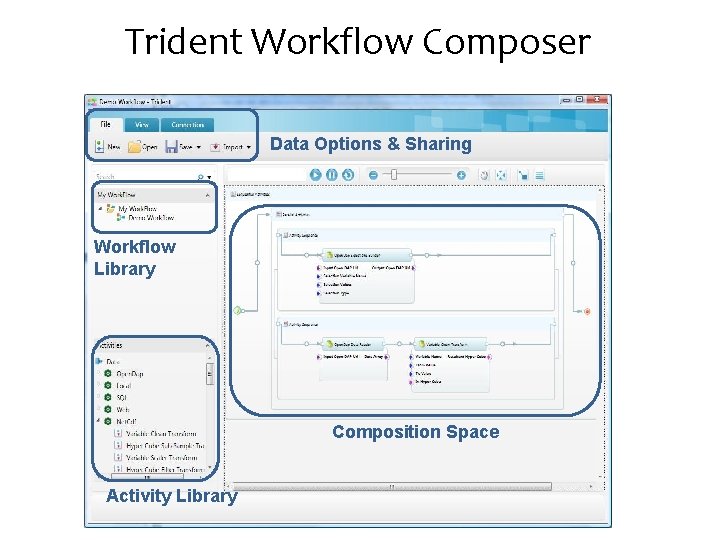
Trident Features Two programming interfaces to Trident • Use Visual Studio to develop custom activities and workflows and import them to Trident • Visually Compose Workflows – No programming and scripting is required – Drag and drop a workflow or an activity – Subsections
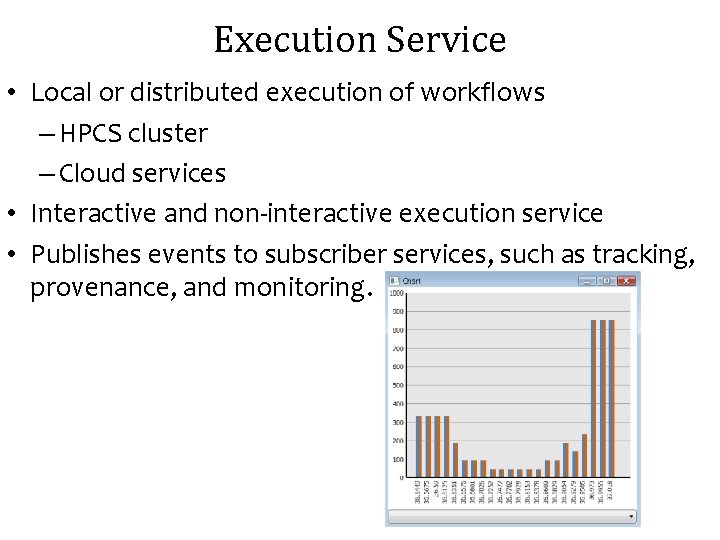
Execution Service • Local or distributed execution of workflows – HPCS cluster – Cloud services • Interactive and non-interactive execution service • Publishes events to subscriber services, such as tracking, provenance, and monitoring.
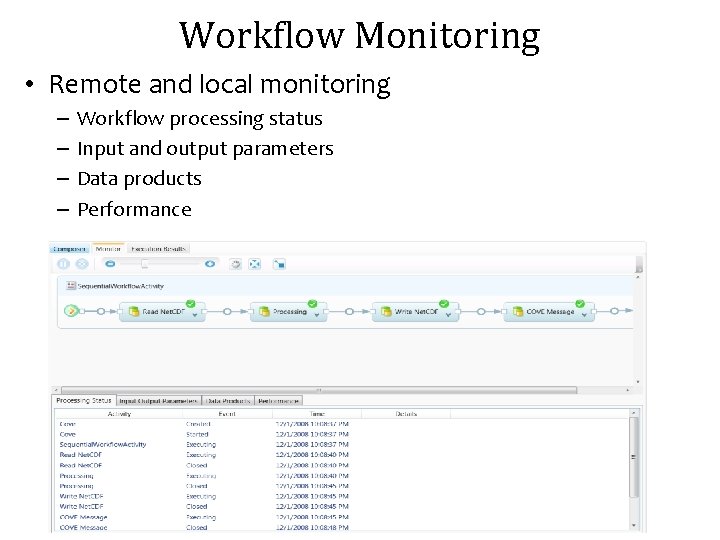
Workflow Monitoring • Remote and local monitoring – – Workflow processing status Input and output parameters Data products Performance
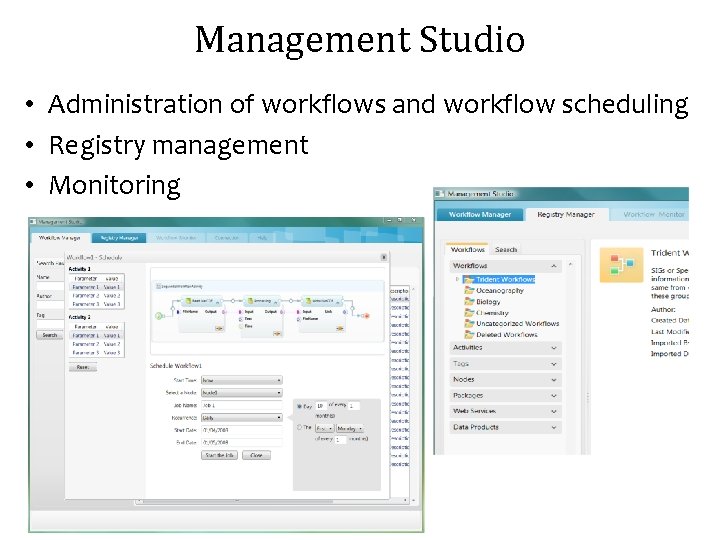
Management Studio • Administration of workflows and workflow scheduling • Registry management • Monitoring
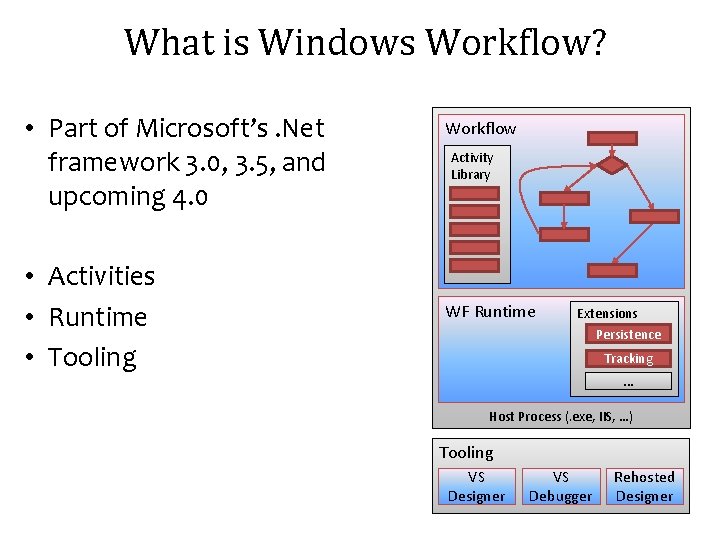
What is Windows Workflow? • Part of Microsoft’s. Net framework 3. 0, 3. 5, and upcoming 4. 0 • Activities • Runtime • Tooling Workflow Activity Library WF Runtime Extensions Persistence Tracking … Host Process (. exe, IIS, …) Tooling VS Designer VS Debugger Rehosted Designer
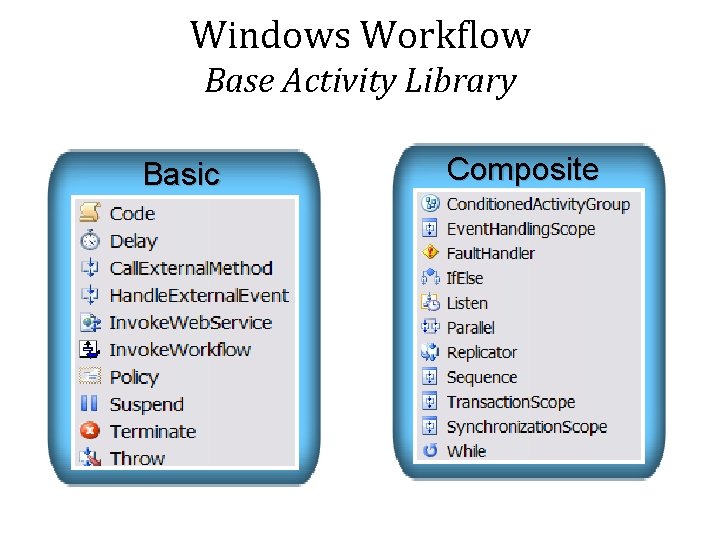
Windows Workflow Base Activity Library Basic Composite
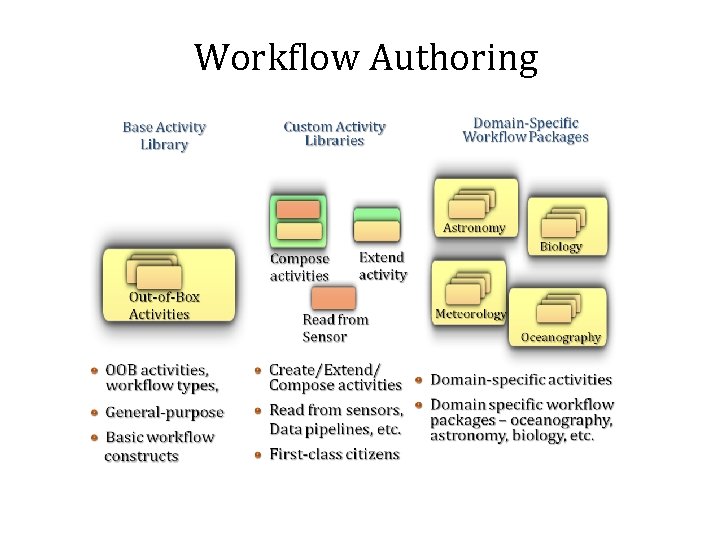
Workflow Authoring
Trident Workflow Composer An End User Application for Editing, Executing, and Monitoring Scientific Workflows 19
What Differentiates Scientific Workflow? Composition goes through many iterations Data flow is a first class citizen Need an easy way to publish and share Provenance • Runtime • Evolutionary • Adaptable to different computing environments • •
Trident Workflow Composer Data Options & Sharing Workflow Library Composition Space Activity Library

Composer Demo 22
Trident Registry Flexible Data Store And Some More 23
Trident Registry Motivation: Why a new registry system? • Single “point of truth” of the system – Facilitates state synchronization actions – Catalog keeps track of computing resources and state • Flexible Storage – What is it? • Flexible store mechanism • Supports Microsoft and non-Microsoft store providers • Supports local, client-server and cloud architectures – Non goals • Replacement for LINQ or ER Framework • Reference Catalog – Unified view of the resources – Stores references to internal and external resources – Flexible provider mechanism to abstract access to external resources
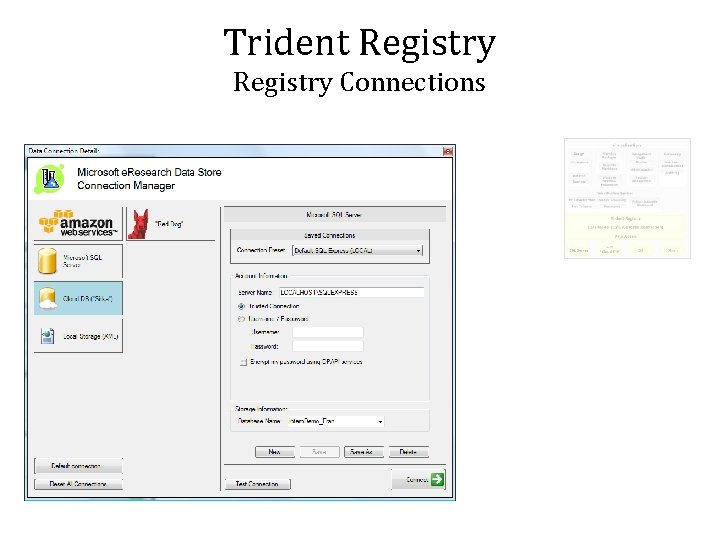
Trident Registry Connections
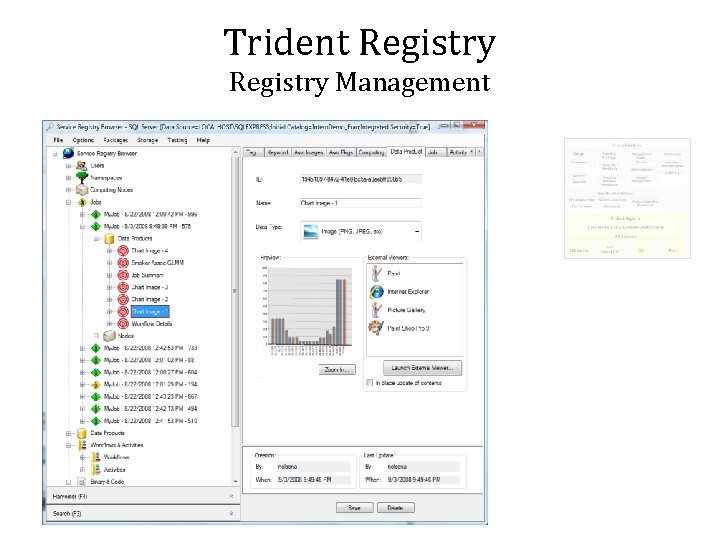
Trident Registry Management
Trident Registry Data Providers: Abstracting “What’s out there” • Storage providers – Provides abstraction to data structures stored in the backend – No assumptions on how data was stored and related Implemented using “verbs” and “subjects” actions • “Store object user with these properties” • “Relate this user object with this service as its owner” • “Delete namespace object” • Data abstraction layer and code generation – C# generated code provides shield and programming API – C# code generator generates SQL catalog for perfect data code match
Trident Registry Data Providers: Abstracting “What’s out there” • Creating new providers – Why would I create a new storage provider? • Enable Trident to store / retrieve state from other platforms • Enable Trident to store / retrieve state on other systems • Enhance existing providers with new features and abstractions – What it takes to create a new provider • Create a new assembly (or add to an existing provider assembly) • Create a new class derived from Microsoft. Research. e. Research. Connection • Drop our new DLL into Trident folder
Creating a new Registry Provider DEMO 29
Trident Registry Storage vs References • Use Cases – Object Tracking – Data and Process Discovery • All workflow aspects are exposed in the storage schema • Allows rich query of data, activities, parameters, etc • Data Providers – Abstraction layer to external references (similar to registry data storage) • • Enables user applications to benefit from unified model Simplifies development Enables fault tolerance for external resources Not every workflow need to worry about these details – All data provider knowledge resides in the registry – Pluggable and flexible
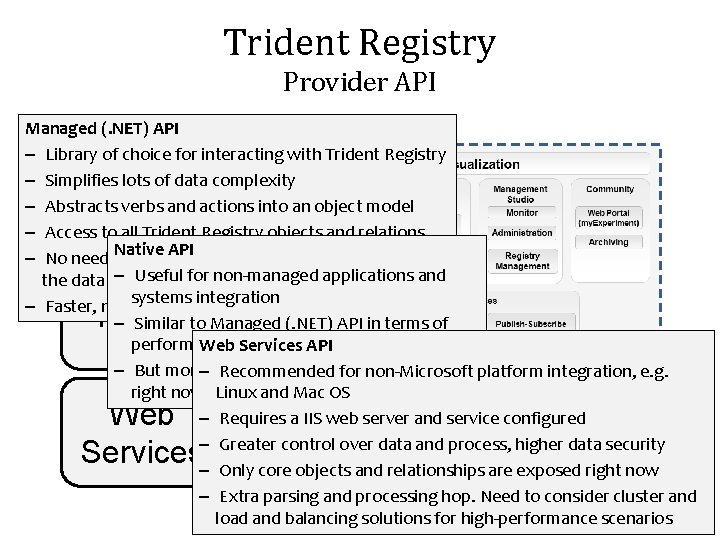
Trident Registry Provider API Managed (. NET) API – Library of choice for interacting with Trident Registry – Simplifies lots of data complexity – Abstracts verbs and actions into an object model – Access to all Trident Registry objects and relations Native API and services to operate (access – No need for servers – Usefuldirectly) for non-managed applications and the data backend systems integration – Faster, no extra hops. Direct data access. – Similar to Managed (. NET) API in terms of performance requirements Weband Services API – But more–limited (not a 100% match platform integration, e. g. Recommended forfeature non-Microsoft right now) Linux and Mac OS – Requires a IIS web server and service configured – Greater control over data and process, higher data security – Only core objects and relationships are exposed right now – Extra parsing and processing hop. Need to consider cluster and load and balancing solutions for high-performance scenarios Managed Native Web Services A PI
Trident Blackboard A Distributed Eventing Model For Workflow 32
The Workflow Runtime and Tracking Services • WF workflows launch in a runtime context – Runtime thread controls WF related threads • Execution thread • Built-in services • Custom services • Built-in services track workflow execution – Workflow events – Individual activity events – Data updates
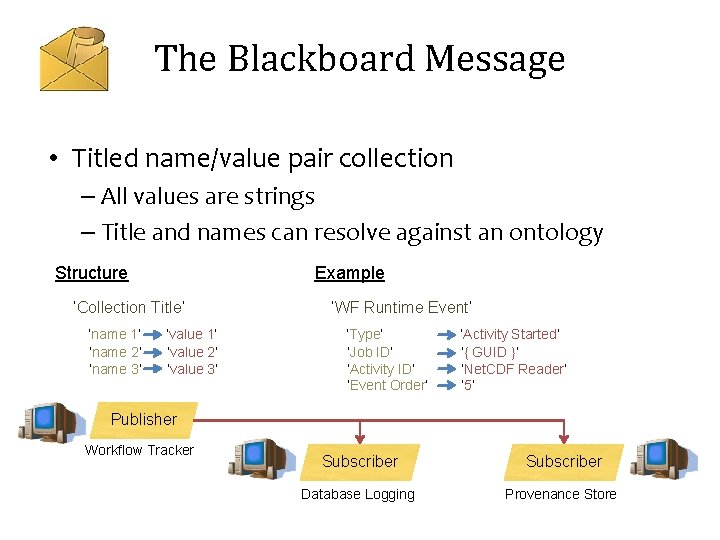
Trident Blackboard • A distributed Pub/Sub model for workflow eventing • Why? – Tracking information needs to be shared across compute nodes – Workflows are evolutionary and thus messengers require a pluggable interface – Large message volume means that the message broker needs to be light-weight and fast
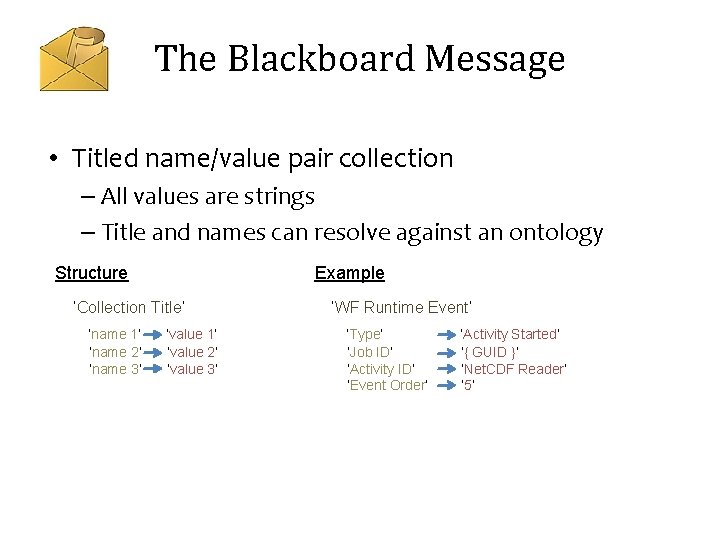
The Blackboard Message • Titled name/value pair collection – All values are strings – Title and names can resolve against an ontology Structure Example ‘Collection Title’ ‘name 1’ ‘name 2’ ‘name 3’ ‘value 1’ ‘value 2’ ‘value 3’ ‘WF Runtime Event’ ‘Type’ ‘Job ID’ ‘Activity ID’ ‘Event Order’ ‘Activity Started’ ‘{ GUID }’ ‘Net. CDF Reader’ ‘ 5’
The Blackboard Message • Titled name/value pair collection – All values are strings – Title and names can resolve against an ontology Structure Example ‘Collection Title’ ‘name 1’ ‘name 2’ ‘name 3’ ‘value 1’ ‘value 2’ ‘value 3’ ‘WF Runtime Event’ ‘Type’ ‘Job ID’ ‘Activity ID’ ‘Event Order’ ‘Activity Started’ ‘{ GUID }’ ‘Net. CDF Reader’ ‘ 5’ Publisher Workflow Tracker Subscriber Database Logging Provenance Store
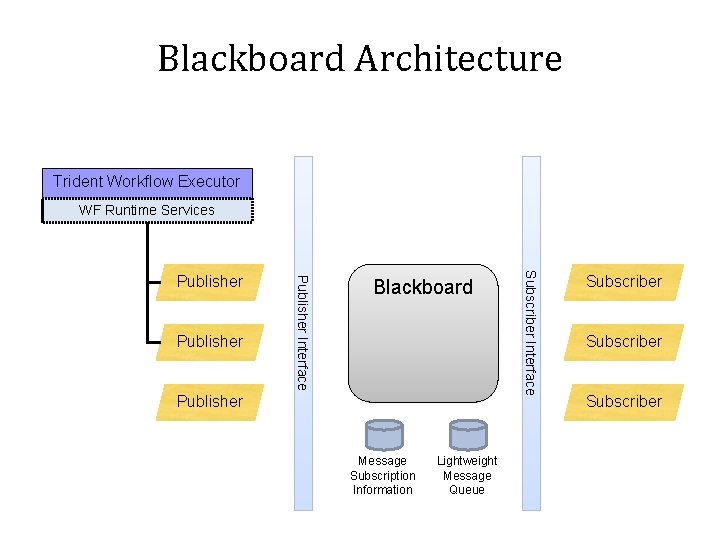
Blackboard Architecture Trident Workflow Executor WF Runtime Services Blackboard Publisher Message Subscription Information Lightweight Message Queue Subscriber Interface Publisher Subscriber
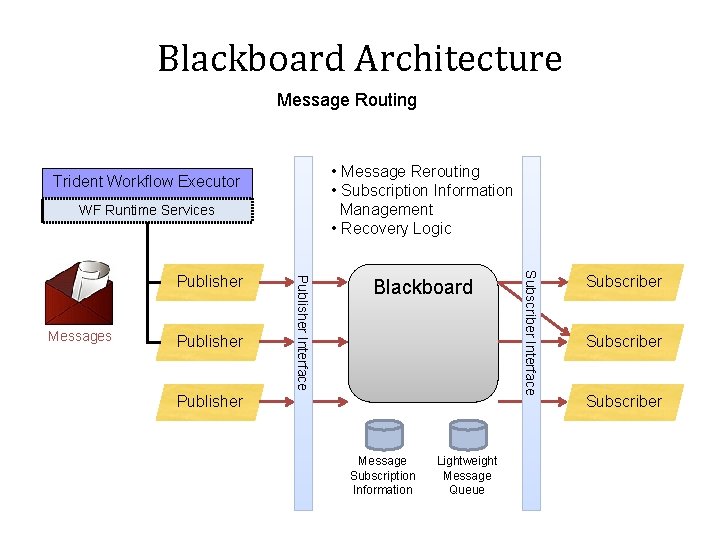
Blackboard Architecture Message Routing • Message Rerouting • Subscription Information Management • Recovery Logic Trident Workflow Executor WF Runtime Services Publisher Blackboard Publisher Message Subscription Information Lightweight Message Queue Subscriber Interface Messages Publisher Interface Publisher Subscriber
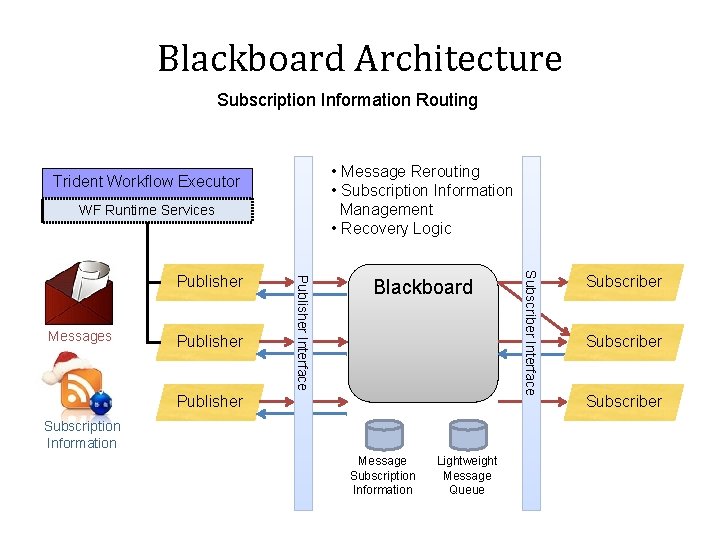
Blackboard Architecture Subscription Information Routing • Message Rerouting • Subscription Information Management • Recovery Logic Trident Workflow Executor WF Runtime Services Publisher Blackboard Publisher Subscription Information Message Subscription Information Lightweight Message Queue Subscriber Interface Messages Publisher Interface Publisher Subscriber
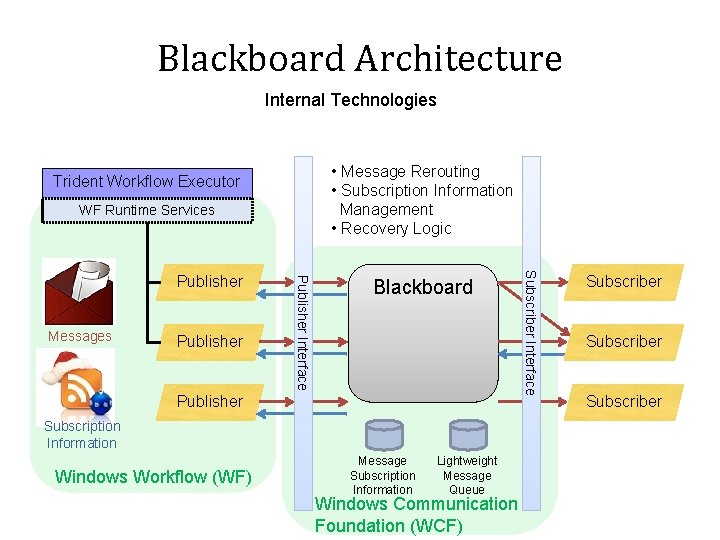
Blackboard Architecture Internal Technologies • Message Rerouting • Subscription Information Management • Recovery Logic Trident Workflow Executor WF Runtime Services Publisher Blackboard Publisher Subscription Information Windows Workflow (WF) Message Subscription Information Lightweight Message Queue Windows Communication Foundation (WCF) Subscriber Interface Messages Publisher Interface Publisher Subscriber
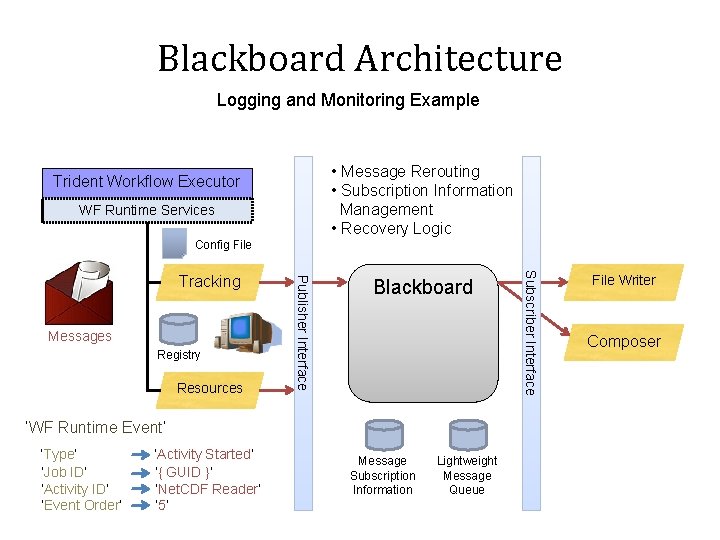
Blackboard Architecture Logging and Monitoring Example • Message Rerouting • Subscription Information Management • Recovery Logic Trident Workflow Executor WF Runtime Services Config File Registry Resources Blackboard ‘WF Runtime Event’ ‘Type’ ‘Job ID’ ‘Activity ID’ ‘Event Order’ ‘Activity Started’ ‘{ GUID }’ ‘Net. CDF Reader’ ‘ 5’ Message Subscription Information Lightweight Message Queue Subscriber Interface Messages Publisher Interface Tracking File Writer Composer
Blackboard Demo 42

Trident Tips and Tricks 43
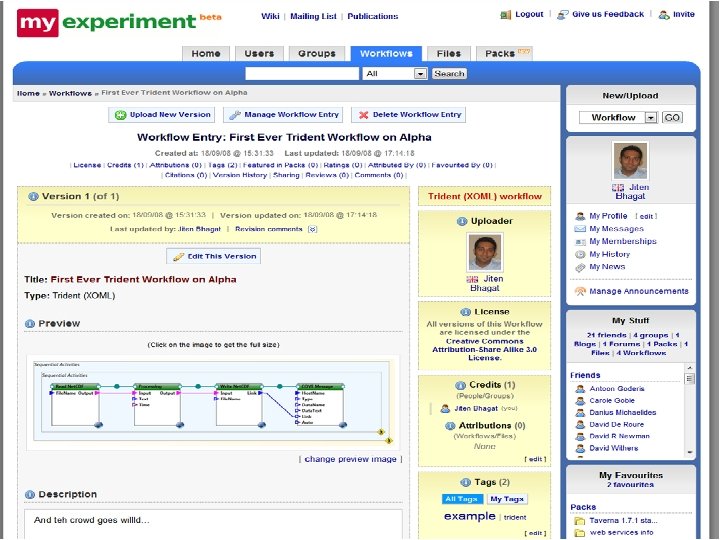
Interoperability Story • Silverlight execution environment – Web frontend for management and execution – Allows non-Microsoft operating system to use and admister Trident • Interface with other systems – Cove – my. Experiment
Interface Trident Other Systems Integration with UW COVE system DEMO 45
Trident Tips and Tricks • Productivity Tools – Database ready activities • Simplifies development of database aware workflows • Code generator improves development productivity – Data visualization and charting activities – Web Service ready activities • Simplifies development of web service aware workflows • Code generator improves development productivity

Trident Roadmap to Release 48
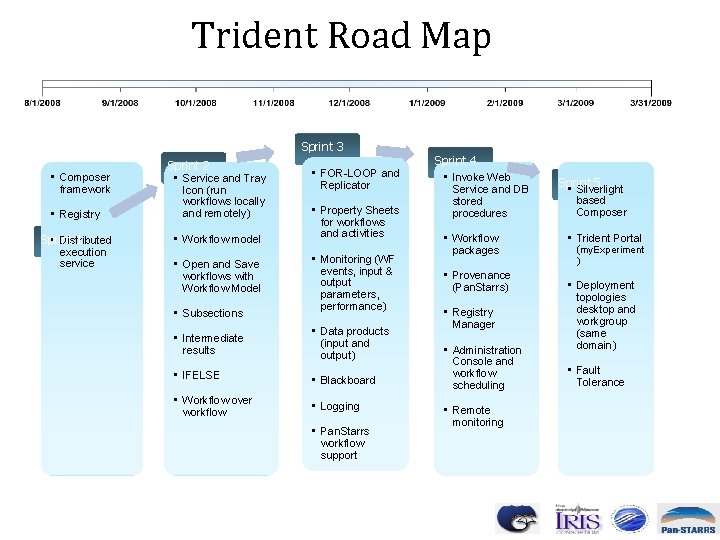
Trident Road Map Sprint 3 • Composer framework • Registry Sprint 1 • Distributed execution service Sprint 2 • Service and Tray Icon (run workflows locally and remotely) • Workflow model • Open and Save workflows with Workflow Model • Subsections • FOR-LOOP and Replicator • Property Sheets for workflows and activities • Monitoring (WF events, input & output parameters, performance) • Intermediate results • Data products (input and output) • IFELSE • Blackboard • Workflow over workflow • Logging • Pan. Starrs workflow support Sprint 4 • Invoke Web Service and DB stored procedures • Workflow packages • Provenance (Pan. Starrs) • Registry Manager • Administration Console and workflow scheduling • Remote monitoring Sprint 5 • Silverlight based Composer • Trident Portal (my. Experiment ) • Deployment topologies desktop and workgroup (same domain) • Fault Tolerance
- Slides: 49