
TRIAX Solutions TV HEADEND ETHERNET OVER COAX TRIAX
- Slides: 20
TRIAX Solutions TV HEADEND ETHERNET OVER COAX TRIAX IN TOUCH COMMITTED PARTNER CONCEPT 2017, © TRIAX A/S
Ethernet over Coax with Wi. Fi 2017, © TRIAX A/S
Why use Ethernet over Coax with Wi. Fi? 2017, © TRIAX A/S
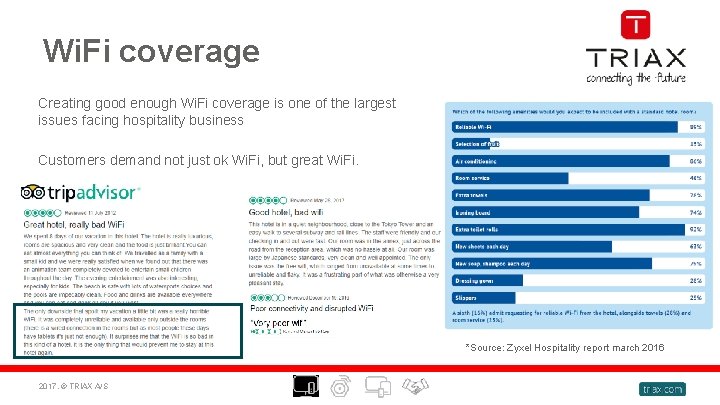
Wi. Fi coverage Creating good enough Wi. Fi coverage is one of the largest issues facing hospitality business Customers demand not just ok Wi. Fi, but great Wi. Fi. *Source: Zyxel Hospitality report march 2016 2017, © TRIAX A/S
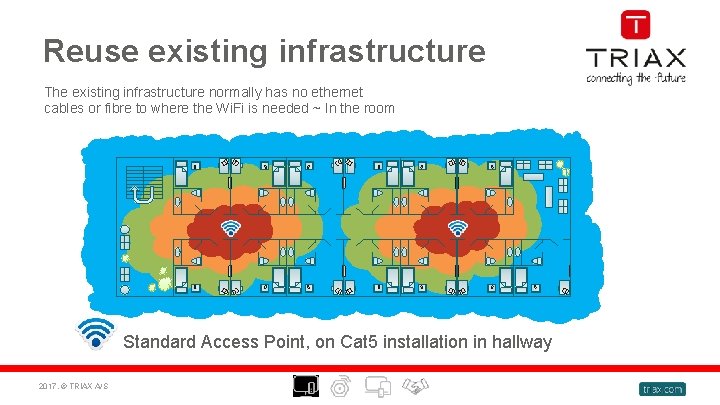
Reuse existing infrastructure The existing infrastructure normally has no ethernet cables or fibre to where the Wi. Fi is needed ~ In the room Standard Access Point, on Cat 5 installation in hallway 2017, © TRIAX A/S
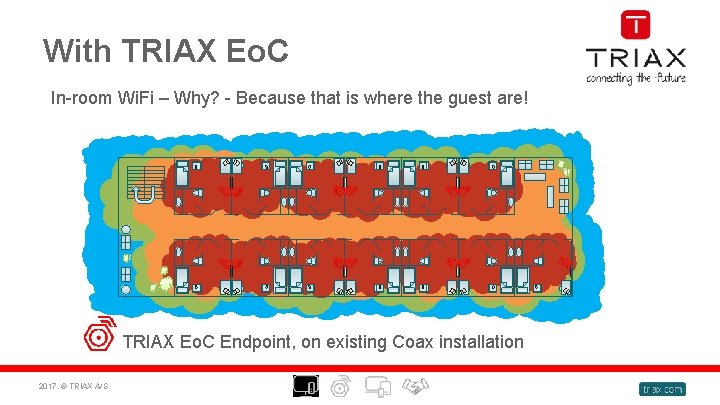
With TRIAX Eo. C In-room Wi. Fi – Why? - Because that is where the guest are! TRIAX Eo. C Endpoint, on existing Coax installation 2017, © TRIAX A/S
What is Ethernet over Coax with Wi. Fi? 2017, © TRIAX A/S
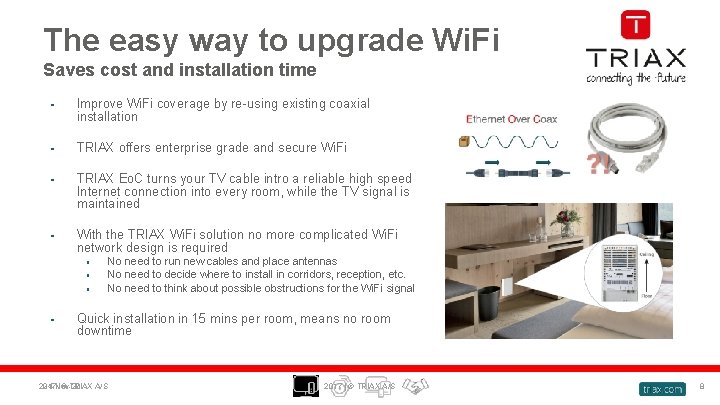
The easy way to upgrade Wi. Fi Saves cost and installation time • Improve Wi. Fi coverage by re-using existing coaxial installation • TRIAX offers enterprise grade and secure Wi. Fi • TRIAX Eo. C turns your TV cable intro a reliable high speed Internet connection into every room, while the TV signal is maintained • With the TRIAX Wi. Fi solution no more complicated Wi. Fi network design is required • • No need to run new cables and place antennas No need to decide where to install in corridors, reception, etc. No need to think about possible obstructions for the Wi. Fi signal Quick installation in 15 mins per room, means no room downtime 2017, 24 -Nov-20 © TRIAX A/S 2017 | © TRIAX A/S 8
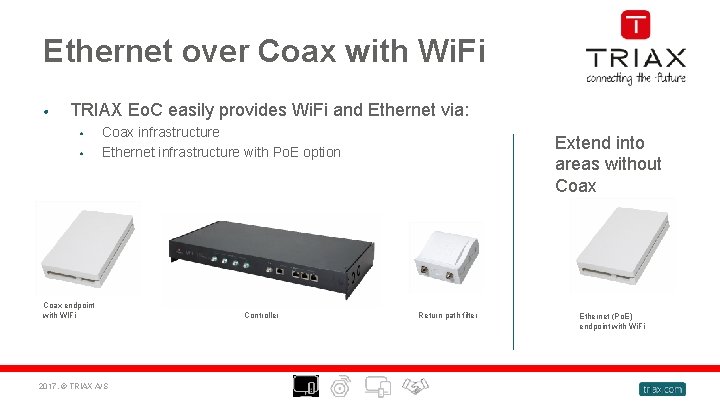
Ethernet over Coax with Wi. Fi • TRIAX Eo. C easily provides Wi. Fi and Ethernet via: • • Coax infrastructure Ethernet infrastructure with Po. E option Coax endpoint with WIFi 2017, © TRIAX A/S Controller Extend into areas without Coax Return path filter Ethernet (Po. E) endpoint with Wi. Fi
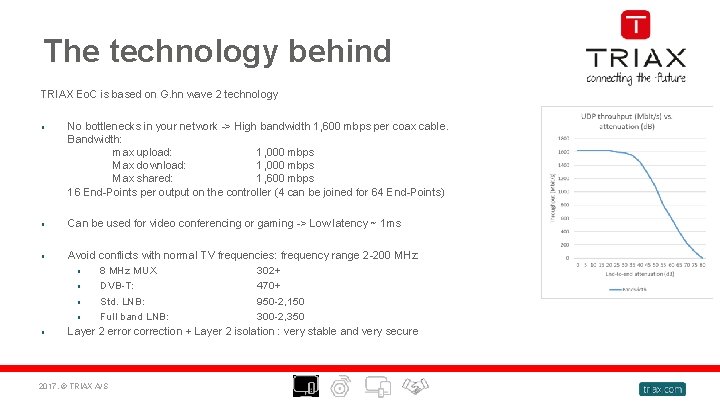
The technology behind TRIAX Eo. C is based on G. hn wave 2 technology • No bottlenecks in your network -> High bandwidth 1, 600 mbps per coax cable. Bandwidth: max upload: 1, 000 mbps Max download: 1, 000 mbps Max shared: 1, 600 mbps 16 End-Points per output on the controller (4 can be joined for 64 End-Points) • Can be used for video conferencing or gaming -> Low latency ~ 1 ms • Avoid conflicts with normal TV frequencies: frequency range 2 -200 MHz: • 8 MHz MUX 302+ • DVB-T: 470+ • Std. LNB: 950 -2, 150 • Full band LNB: 300 -2, 350 Layer 2 error correction + Layer 2 isolation : very stable and very secure • 2017, © TRIAX A/S
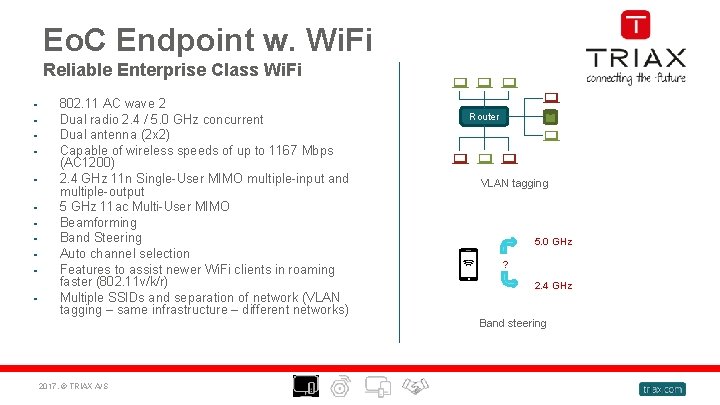
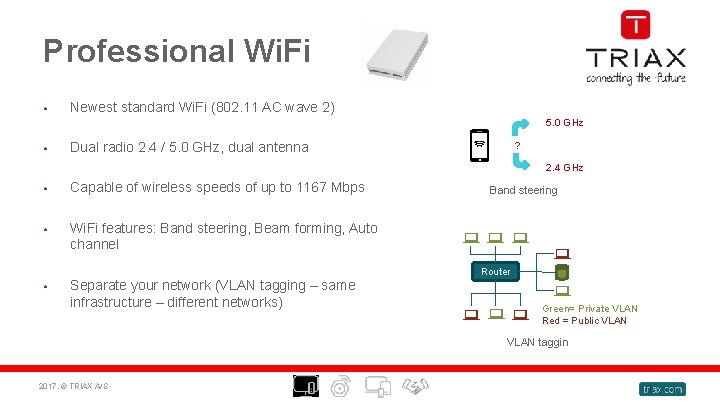
Eo. C Endpoint w. Wi. Fi Reliable Enterprise Class Wi. Fi • • • 802. 11 AC wave 2 Dual radio 2. 4 / 5. 0 GHz concurrent Dual antenna (2 x 2) Capable of wireless speeds of up to 1167 Mbps (AC 1200) 2. 4 GHz 11 n Single-User MIMO multiple-input and multiple-output 5 GHz 11 ac Multi-User MIMO Beamforming Band Steering Auto channel selection Features to assist newer Wi. Fi clients in roaming faster (802. 11 v/k/r) Multiple SSIDs and separation of network (VLAN tagging – same infrastructure – different networks) 2017, © TRIAX A/S Router VLAN tagging 5. 0 GHz ? 2. 4 GHz Band steering
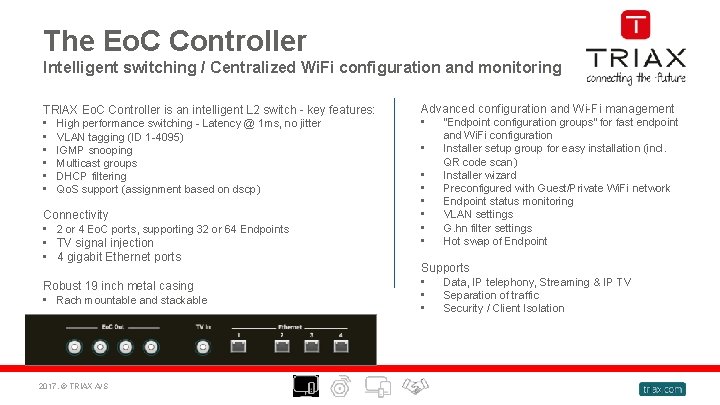
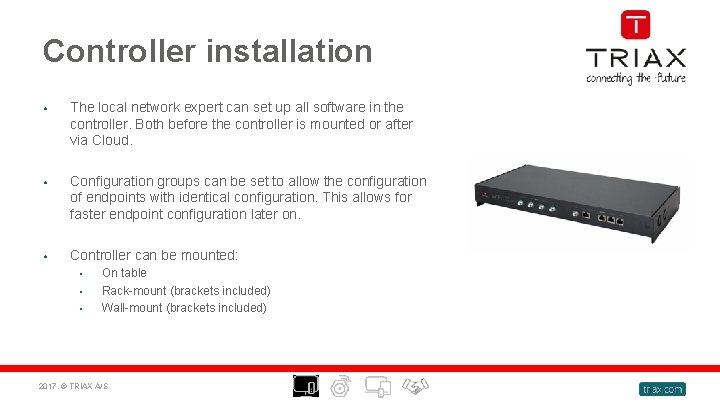
The Eo. C Controller Intelligent switching / Centralized Wi. Fi configuration and monitoring TRIAX Eo. C Controller is an intelligent L 2 switch - key features: • High performance switching - Latency @ 1 ms, no jitter • VLAN tagging (ID 1 -4095) • IGMP snooping • Multicast groups • DHCP filtering • Qo. S support (assignment based on dscp) Connectivity • 2 or 4 Eo. C ports, supporting 32 or 64 Endpoints • TV signal injection • 4 gigabit Ethernet ports Robust 19 inch metal casing • Rach mountable and stackable 2017, © TRIAX A/S Advanced configuration and Wi-Fi management • “Endpoint configuration groups” for fast endpoint • • and Wi. Fi configuration Installer setup group for easy installation (incl. QR code scan) Installer wizard Preconfigured with Guest/Private Wi. Fi network Endpoint status monitoring VLAN settings G. hn filter settings Hot swap of Endpoint Supports • Data, IP telephony, Streaming & IP TV • Separation of traffic • Security / Client Isolation
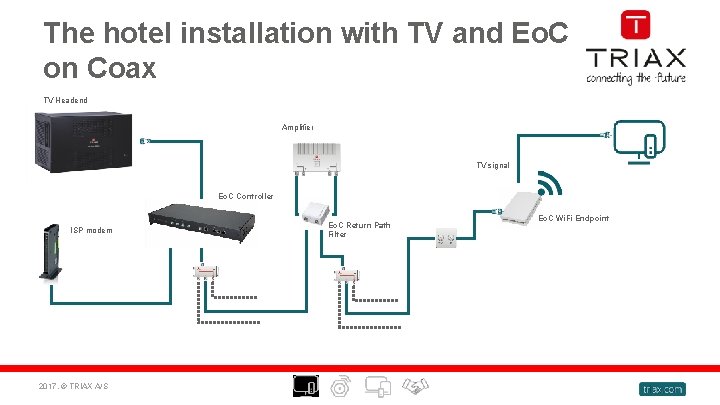
The hotel installation with TV and Eo. C on Coax TV Headend Amplifier TV signal Eo. C Controller ISP modem 2017, © TRIAX A/S Eo. C Return Path Filter Eo. C Wi. Fi Endpoint
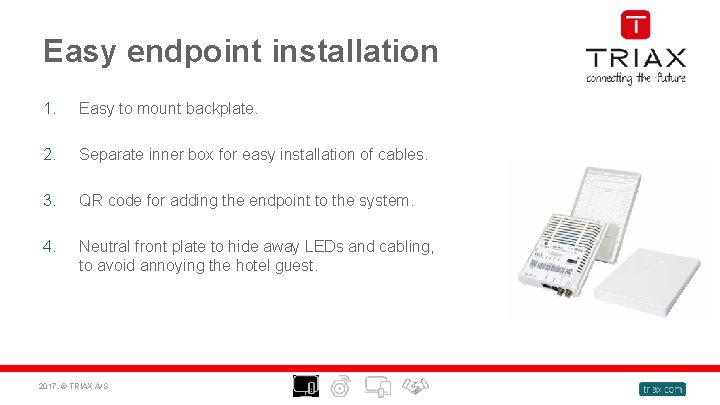
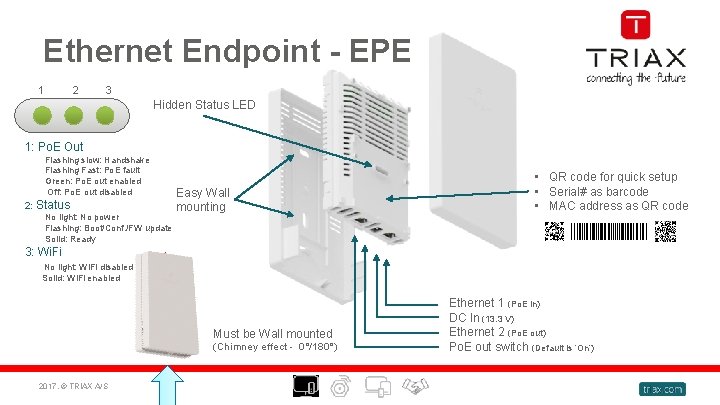
Easy endpoint installation 1. Easy to mount backplate. 2. Separate inner box for easy installation of cables. 3. QR code for adding the endpoint to the system. 4. Neutral front plate to hide away LEDs and cabling, to avoid annoying the hotel guest. 2017, © TRIAX A/S
Controller installation • The local network expert can set up all software in the controller. Both before the controller is mounted or after via Cloud. • Configuration groups can be set to allow the configuration of endpoints with identical configuration. This allows for faster endpoint configuration later on. • Controller can be mounted: • • • On table Rack-mount (brackets included) Wall-mount (brackets included) 2017, © TRIAX A/S
Professional Wi. Fi • Newest standard Wi. Fi (802. 11 AC wave 2) • Dual radio 2. 4 / 5. 0 GHz, dual antenna • Capable of wireless speeds of up to 1167 Mbps • Wi. Fi features: Band steering, Beam forming, Auto channel • 5. 0 GHz ? 2. 4 GHz Separate your network (VLAN tagging – same infrastructure – different networks) Band steering Router Green= Private VLAN Red = Public VLAN taggin 2017, © TRIAX A/S
Ethernet Endpoint - EPE 1 2 3 Hidden Status LED 1: Po. E Out Flashing slow: Handshake Flashing Fast: Po. E fault Green: Po. E out enabled Off: Po. E out disabled 2: Status No light: No power Flashing: Boot/Conf. /FW update Solid: Ready Easy Wall mounting • QR code for quick setup • Serial# as barcode • MAC address as QR code 3: Wi. Fi No light: Wi. Fi disabled Solid: Wi. Fi enabled Must be Wall mounted (Chimney effect - 0°/180°) 2017, © TRIAX A/S Ethernet 1 (Po. E in) DC In (13. 3 V) Ethernet 2 (Po. E out) Po. E out switch (Default is ‘On’)
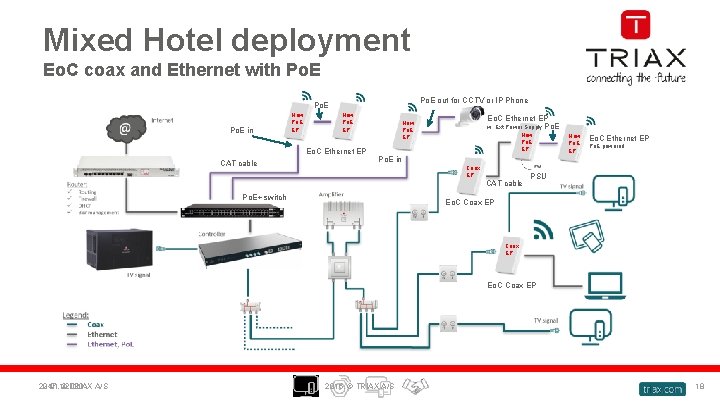
Mixed Hotel deployment Eo. C coax and Ethernet with Po. E out for CCTV or IP Phone Po. E in New Po. E EP Eo. C Ethernet EP CAT cable Eo. C Ethernet EP w. Ext Power Supply Po. E New Po. E EP Eo. C Ethernet EP Po. E powered Po. E in Coax EP CAT cable Po. E+ switch PSU Eo. C Coax EP 2017, 24/11/2020 © TRIAX A/S 2016, © TRIAX A/S 18
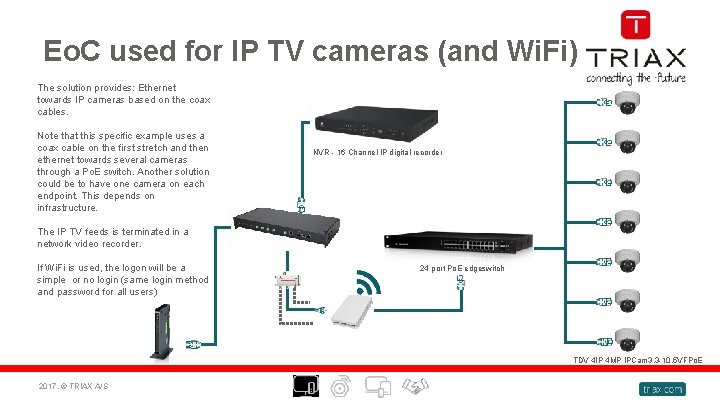
Eo. C used for IP TV cameras (and Wi. Fi) The solution provides: Ethernet towards IP cameras based on the coax cables. Note that this specific example uses a coax cable on the first stretch and then ethernet towards several cameras through a Po. E switch. Another solution could be to have one camera on each endpoint. This depends on infrastructure. NVR - 16 Channel IP digital recorder The IP TV feeds is terminated in a network video recorder. If Wi. Fi is used, the logon will be a simple or no login (same login method and password for all users) 24 port Po. E edgeswitch TDV 4 IP 4 MP IPCam 3. 3 -10. 5 VFPo. E 2017, © TRIAX A/S
Copyright © 2017® TRIAX. All rights reserved. The TRIAX Logo and TRIAX Multimedia are registered trademarks or trademarks of the TRIAX Company or its affiliates. All information in this presentation are subject to change without further notice and may only be distributed after agreement with TRIAX. THANK YOU FOR LISTENING 2017, © TRIAX A/S