
TRAVEL PILOT WORKSTATIONDEVICE REQUIREMENTS Standard Web Browser Requirements
TRAVEL PILOT WORKSTATION/DEVICE REQUIREMENTS
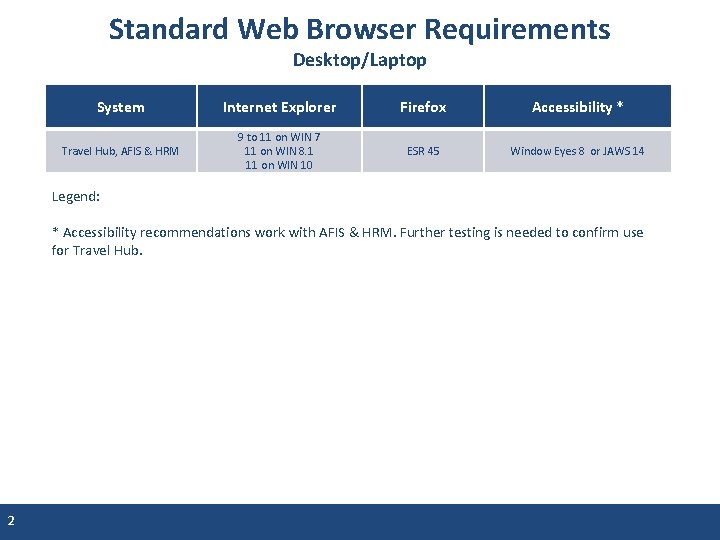
Standard Web Browser Requirements Desktop/Laptop System Internet Explorer Firefox Accessibility * Travel Hub, AFIS & HRM 9 to 11 on WIN 7 11 on WIN 8. 1 11 on WIN 10 ESR 45 Window Eyes 8 or JAWS 14 Legend: * Accessibility recommendations work with AFIS & HRM. Further testing is needed to confirm use for Travel Hub. 2
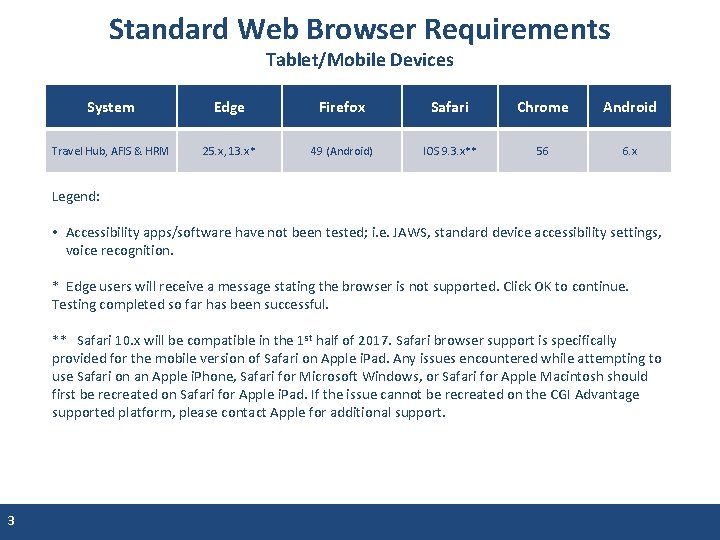
Standard Web Browser Requirements Tablet/Mobile Devices System Edge Firefox Safari Chrome Android Travel Hub, AFIS & HRM 25. x, 13. x* 49 (Android) IOS 9. 3. x** 56 6. x Legend: • Accessibility apps/software have not been tested; i. e. JAWS, standard device accessibility settings, voice recognition. * Edge users will receive a message stating the browser is not supported. Click OK to continue. Testing completed so far has been successful. ** Safari 10. x will be compatible in the 1 st half of 2017. Safari browser support is specifically provided for the mobile version of Safari on Apple i. Pad. Any issues encountered while attempting to use Safari on an Apple i. Phone, Safari for Microsoft Windows, or Safari for Apple Macintosh should first be recreated on Safari for Apple i. Pad. If the issue cannot be recreated on the CGI Advantage supported platform, please contact Apple for additional support. 3
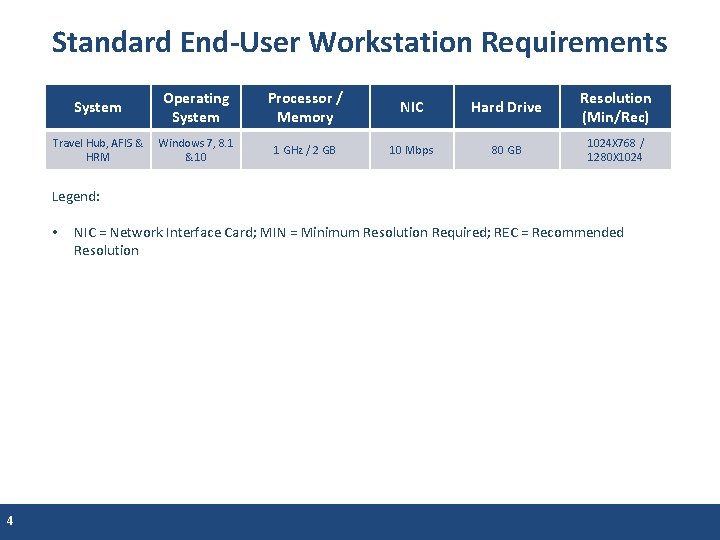
Standard End-User Workstation Requirements System Operating System Processor / Memory NIC Hard Drive Resolution (Min/Rec) Travel Hub, AFIS & HRM Windows 7, 8. 1 & 10 1 GHz / 2 GB 10 Mbps 80 GB 1024 X 768 / 1280 X 1024 Legend: • 4 NIC = Network Interface Card; MIN = Minimum Resolution Required; REC = Recommended Resolution
Standard Connectivity Requirements • Travel Hub is web based and can be accessed from any internet connection • AFIS & HRM are web based and must be accessed from a State Network Connection – You may need to request VPN access if needing to connect to AFIS or HRM from a location outside of the Arizona State Network 5
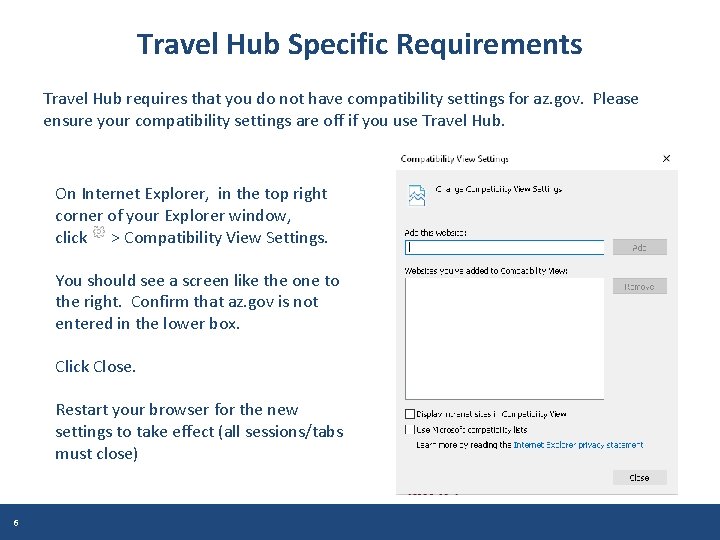
Travel Hub Specific Requirements Travel Hub requires that you do not have compatibility settings for az. gov. Please ensure your compatibility settings are off if you use Travel Hub. On Internet Explorer, in the top right corner of your Explorer window, click > Compatibility View Settings. You should see a screen like the one to the right. Confirm that az. gov is not entered in the lower box. Click Close. Restart your browser for the new settings to take effect (all sessions/tabs must close) 6
- Slides: 6