
Transitioning to the ESXi Hypervisor Architecture What Customers
- Slides: 50
Transitioning to the ESXi Hypervisor Architecture – What Customers Need to Know VMware, February 2011 © 2009 VMware Inc. All rights reserved
Agenda § ESXi Convergence and ESXi Value Proposition § Hardware Monitoring and System Management with ESXi § Security and Deployment Options § Command Line Interfaces § Diagnostics and troubleshooting § Answering common questions § Resources and call to action 2
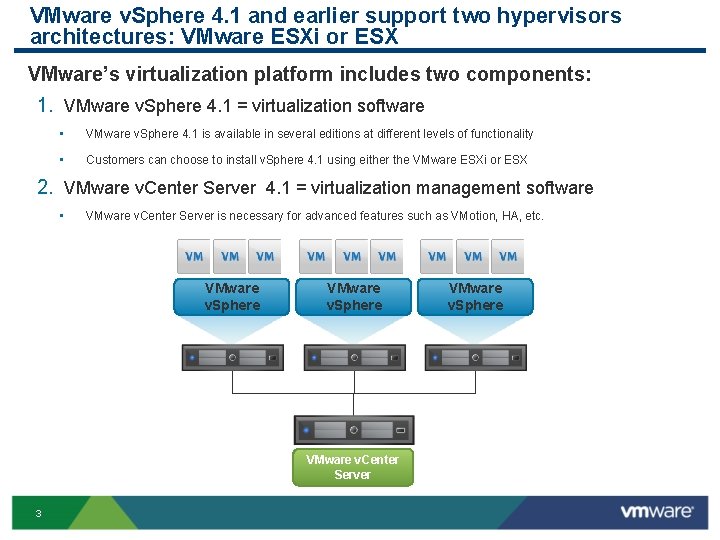
VMware v. Sphere 4. 1 and earlier support two hypervisors architectures: VMware ESXi or ESX VMware’s virtualization platform includes two components: 1. VMware v. Sphere 4. 1 = virtualization software • VMware v. Sphere 4. 1 is available in several editions at different levels of functionality • Customers can choose to install v. Sphere 4. 1 using either the VMware ESXi or ESX 2. VMware v. Center Server 4. 1 = virtualization management software • VMware v. Center Server is necessary for advanced features such as VMotion, HA, etc. VMware v. Sphere VMware v. Center Server 3 VMware v. Sphere
Converging to ESXi with the next v. Sphere release § With the GA of v. Sphere 4. 1 in July 2010 VMware officially announced that starting with the next v. Sphere our hypervisor architecture will converge to ESXi § From the release note: VMware v. Sphere 4. 1 and its subsequent update and patch releases are the last releases to include both ESX and ESXi hypervisor architectures. Future major releases of VMware v. Sphere will include only the VMware ESXi architecture. • VMware recommends that customers start transitioning to the ESXi architecture when deploying VMware v. Sphere 4. 1. • VMware will continue to provide technical support for VMware ESX according to the VMware v. Sphere support policy on the VMware Enterprise Infrastructure Support page. • To learn more about the ESXi architecture and how to migrate from ESX to ESXi, go to the VMware ESXi and ESX Info. Center. 4
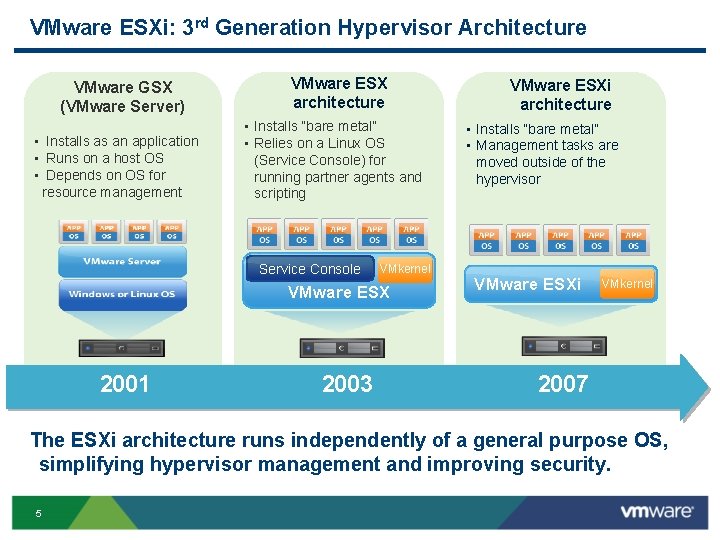
VMware ESXi: 3 rd Generation Hypervisor Architecture VMware GSX (VMware Server) • Installs as an application • Runs on a host OS • Depends on OS for resource management VMware ESX architecture • Installs “bare metal” • Relies on a Linux OS (Service Console) for running partner agents and scripting Service Console VMkernel VMware ESX 2001 2003 VMware ESXi architecture • Installs “bare metal” • Management tasks are moved outside of the hypervisor VMware ESXi VMkernel 2007 The ESXi architecture runs independently of a general purpose OS, simplifying hypervisor management and improving security. 5
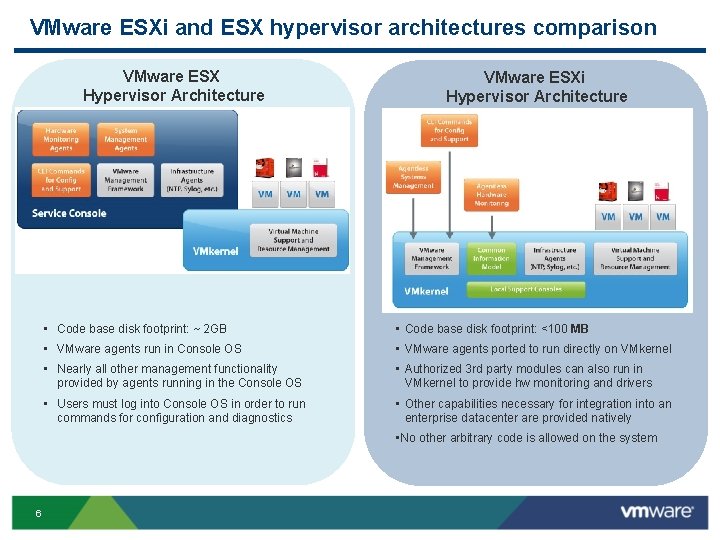
VMware ESXi and ESX hypervisor architectures comparison VMware ESX Hypervisor Architecture VMware ESXi Hypervisor Architecture • Code base disk footprint: ~ 2 GB • Code base disk footprint: <100 MB • VMware agents run in Console OS • VMware agents ported to run directly on VMkernel • Nearly all other management functionality provided by agents running in the Console OS • Authorized 3 rd party modules can also run in VMkernel to provide hw monitoring and drivers • Users must log into Console OS in order to run commands for configuration and diagnostics • Other capabilities necessary for integration into an enterprise datacenter are provided natively • No other arbitrary code is allowed on the system 6
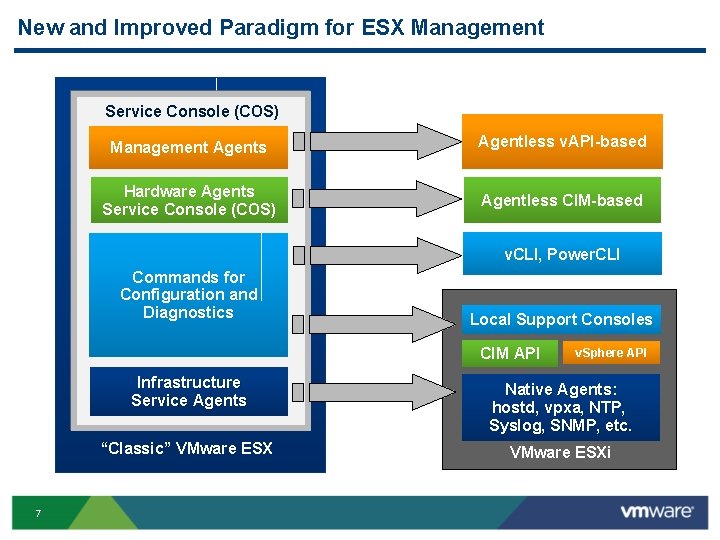
New and Improved Paradigm for ESX Management Service Console (COS) Management Agents Agentless v. API-based Hardware Agents Service Console (COS) Agentless CIM-based v. CLI, Power. CLI Commands for Configuration and Diagnostics Local Support Consoles CIM API 7 v. Sphere API Infrastructure Service Agents Native Agents: hostd, vpxa, NTP, Syslog, SNMP, etc. “Classic” VMware ESXi
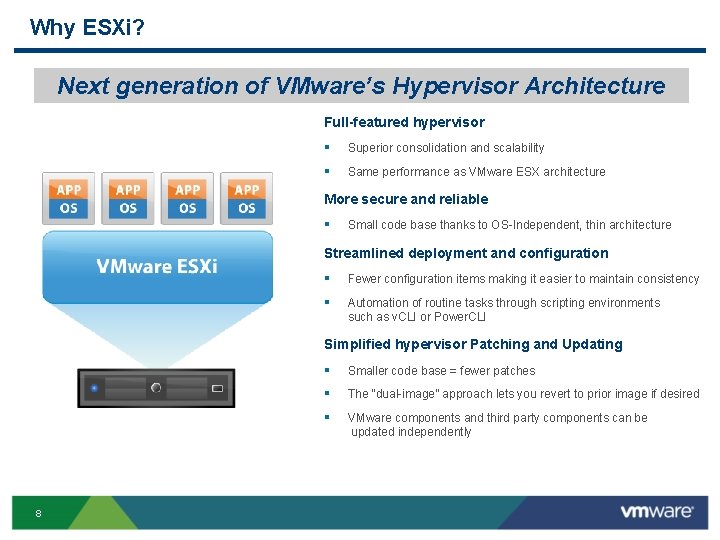
Why ESXi? Next generation of VMware’s Hypervisor Architecture Full-featured hypervisor § Superior consolidation and scalability § Same performance as VMware ESX architecture More secure and reliable § Small code base thanks to OS Independent, thin architecture Streamlined deployment and configuration § Fewer configuration items making it easier to maintain consistency § Automation of routine tasks through scripting environments such as v. CLI or Power. CLI Simplified hypervisor Patching and Updating 8 § Smaller code base = fewer patches § The “dual image” approach lets you revert to prior image if desired § VMware components and third party components can be updated independently
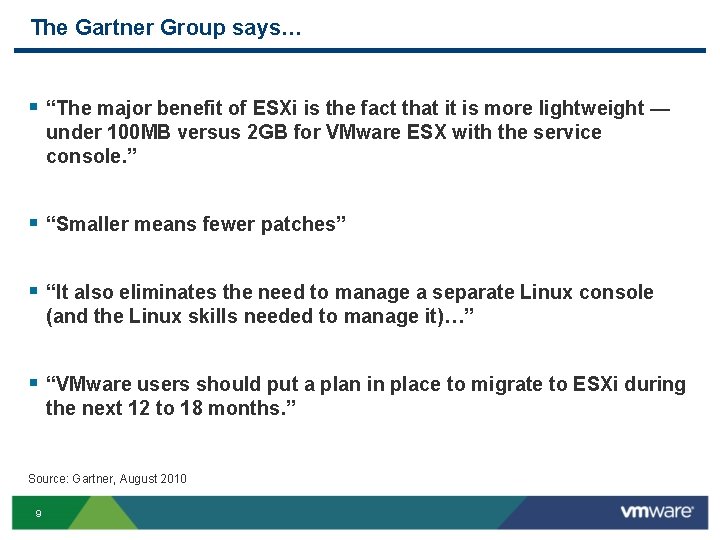
The Gartner Group says… § “The major benefit of ESXi is the fact that it is more lightweight — under 100 MB versus 2 GB for VMware ESX with the service console. ” § “Smaller means fewer patches” § “It also eliminates the need to manage a separate Linux console (and the Linux skills needed to manage it)…” § “VMware users should put a plan in place to migrate to ESXi during the next 12 to 18 months. ” Source: Gartner, August 2010 9
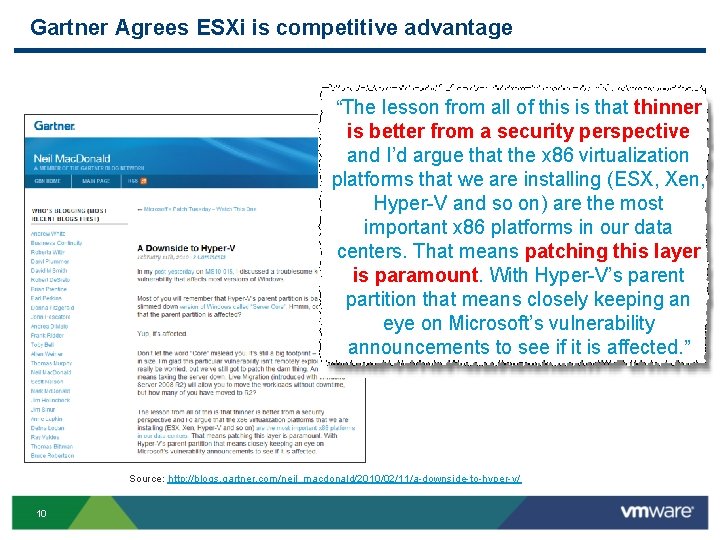
Gartner Agrees ESXi is competitive advantage “The lesson from all of this is that thinner is better from a security perspective and I’d argue that the x 86 virtualization platforms that we are installing (ESX, Xen, Hyper V and so on) are the most important x 86 platforms in our data centers. That means patching this layer is paramount. With Hyper V’s parent partition that means closely keeping an eye on Microsoft’s vulnerability announcements to see if it is affected. ” Source: http: //blogs. gartner. com/neil_macdonald/2010/02/11/a downside to hyper v/ 10
Agenda § ESXi Convergence and ESXi Value Proposition § Hardware Monitoring and System Management with ESXi § Security and Deployment Options § Command Line Interfaces § Diagnostics and troubleshooting § Answering common questions § Resources and call to action 11
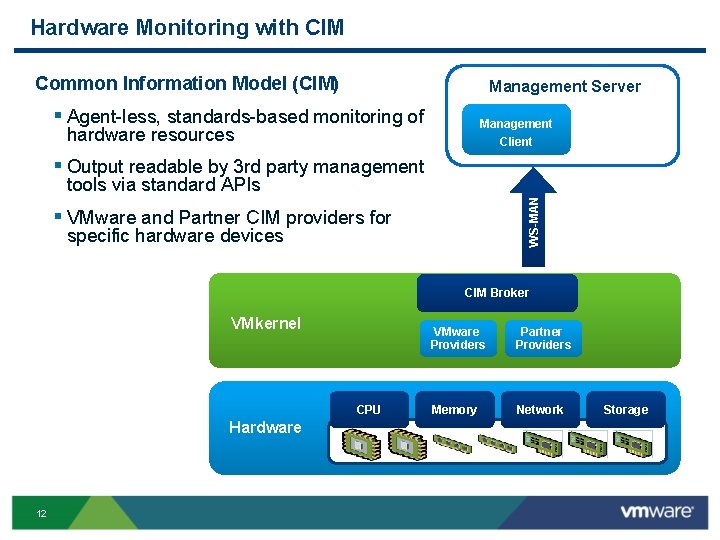
Hardware Monitoring with CIM Common Information Model (CIM) Management Server § Agent less, standards based monitoring of Management hardware resources Client § Output readable by 3 rd party management WS-MAN tools via standard APIs § VMware and Partner CIM providers for specific hardware devices CIM Broker VMkernel Platform CPU Hardware 12 VMware Providers Partner Providers Memory Network Storage
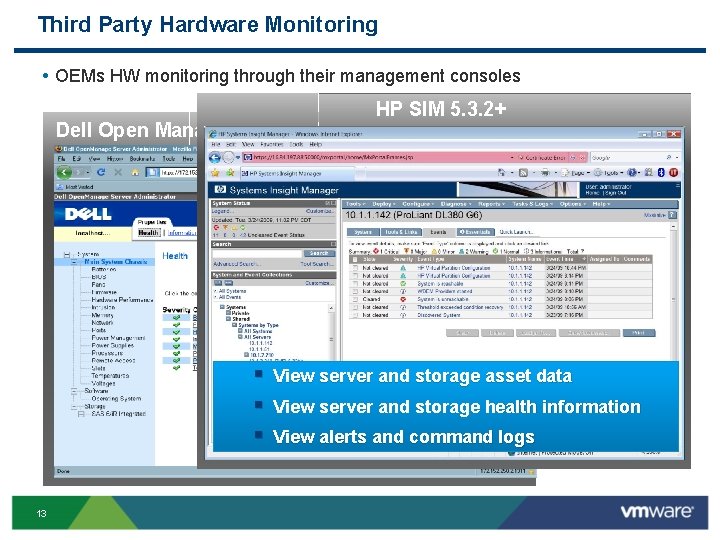
Third Party Hardware Monitoring • OEMs HW monitoring through their management consoles HP SIM 5. 3. 2+ Dell Open Manager Server Administrator 6. 1 § View server and storage asset data § View server and storage health information § View alerts and command logs 13
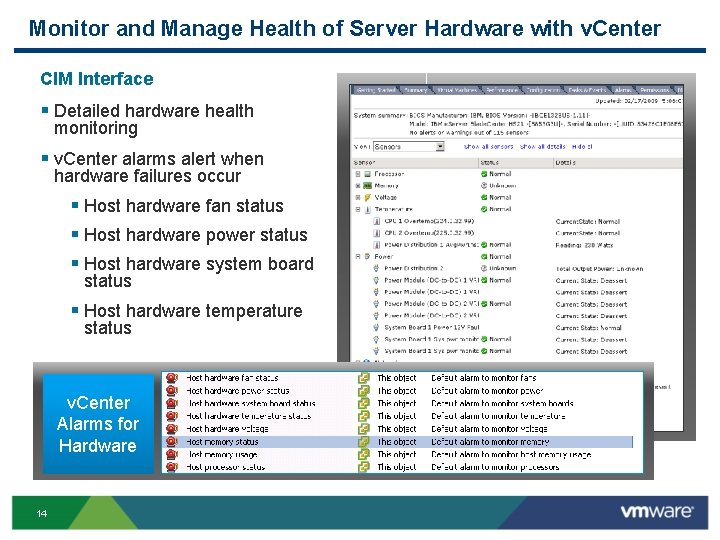
Monitor and Manage Health of Server Hardware with v. Center CIM Interface § Detailed hardware health monitoring § v. Center alarms alert when hardware failures occur § Host hardware fan status § Host hardware power status § Host hardware system board status § Host hardware temperature status v. Center Alarms for Hardware 14 4256413507
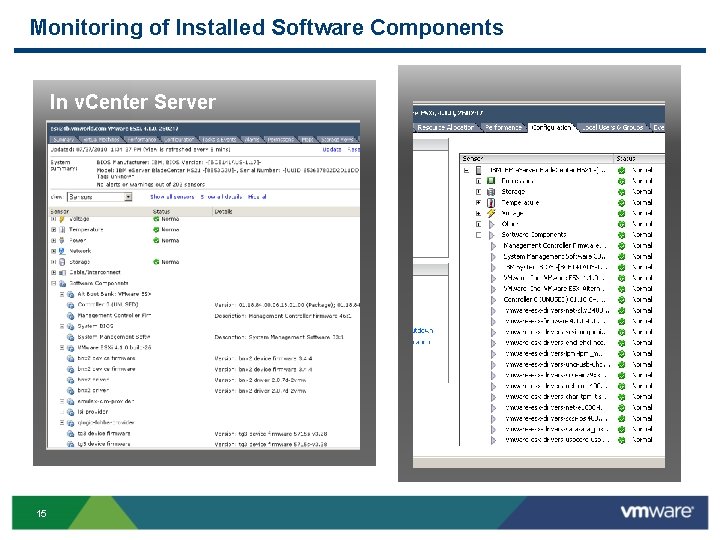
Monitoring of Installed Software Components In v. Center Server 15 In ESXi 4. 1 Directly
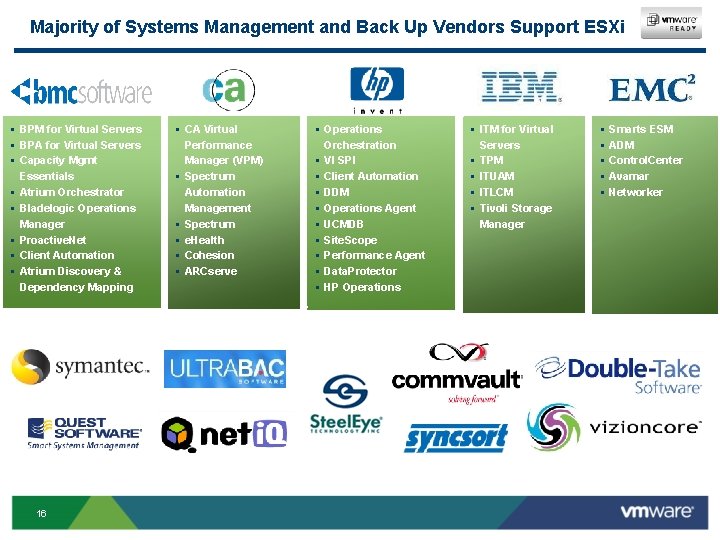
Majority of Systems Management and Back Up Vendors Support ESXi § BPM for Virtual Servers § BPA for Virtual Servers § Capacity Mgmt Essentials § Atrium Orchestrator § Bladelogic Operations Manager § Proactive. Net § Client Automation § Atrium Discovery & Dependency Mapping 16 § CA Virtual Performance Manager (VPM) § Spectrum Automation Management § Spectrum § e. Health § Cohesion § ARCserve § Operations Orchestration § VI SPI § Client Automation § DDM § Operations Agent § UCMDB § Site. Scope § Performance Agent § Data. Protector § HP Operations § ITM for Virtual Servers § TPM § ITUAM § ITLCM § Tivoli Storage Manager § § § Smarts ESM ADM Control. Center Avamar Networker
Agenda § ESXi Convergence and ESXi Value Proposition § Hardware Monitoring and System Management with ESXi § Security and Deployment Options § Command Line Interfaces § Diagnostics and troubleshooting § Answering common questions § Resources and call to action 17
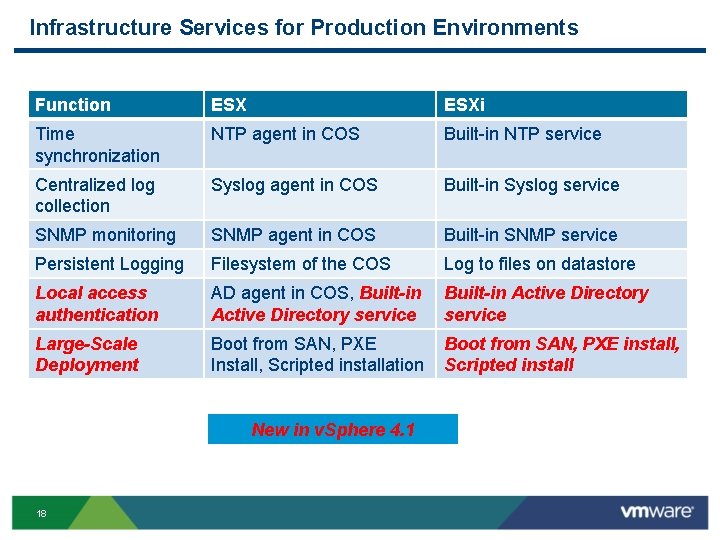
Infrastructure Services for Production Environments Function ESXi Time synchronization NTP agent in COS Built in NTP service Centralized log collection Syslog agent in COS Built in Syslog service SNMP monitoring SNMP agent in COS Built in SNMP service Persistent Logging Filesystem of the COS Log to files on datastore Local access authentication AD agent in COS, Built-in Active Directory service Large-Scale Deployment Boot from SAN, PXE Install, Scripted installation Boot from SAN, PXE install, Scripted install New in v. Sphere 4. 1 18
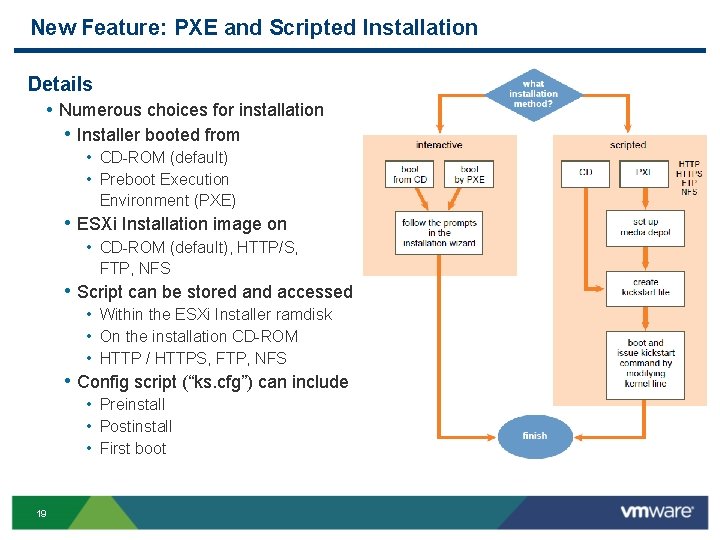
New Feature: PXE and Scripted Installation Details • Numerous choices for installation • Installer booted from • CD ROM (default) • Preboot Execution Environment (PXE) • ESXi Installation image on • CD ROM (default), HTTP/S, FTP, NFS • Script can be stored and accessed • Within the ESXi Installer ramdisk • On the installation CD ROM • HTTP / HTTPS, FTP, NFS • Config script (“ks. cfg”) can include • Preinstall • Postinstall • First boot 19
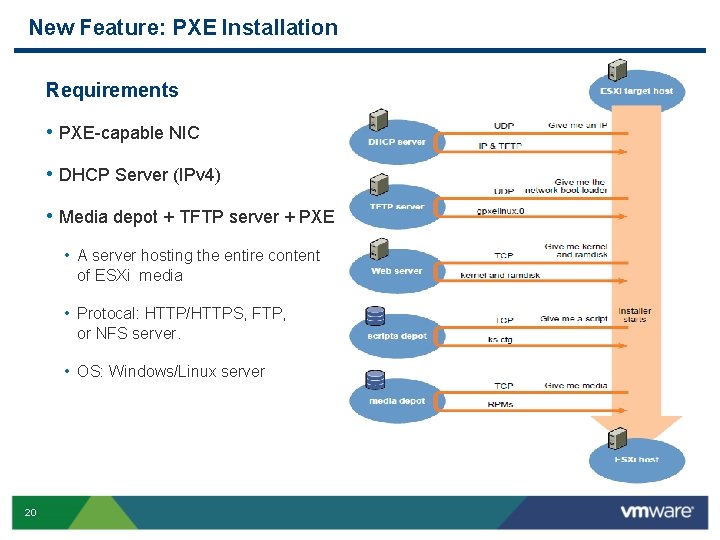
New Feature: PXE Installation Requirements • PXE capable NIC • DHCP Server (IPv 4) • Media depot + TFTP server + PXE • A server hosting the entire content of ESXi media • Protocal: HTTP/HTTPS, FTP, or NFS server. • OS: Windows/Linux server 20
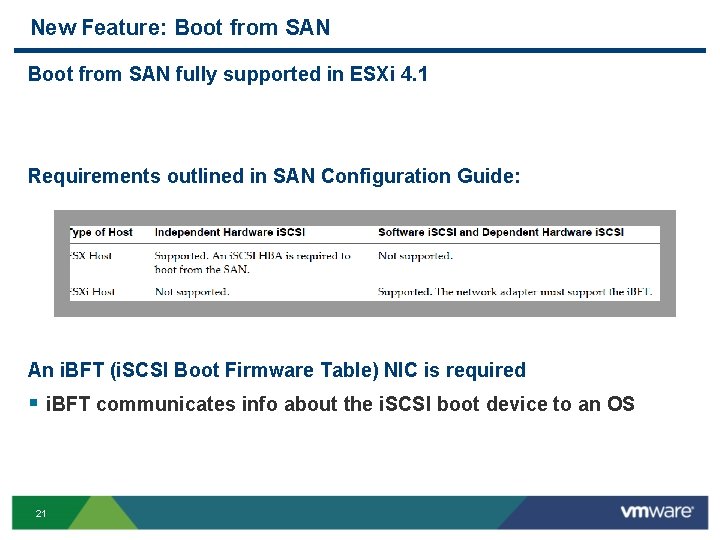
New Feature: Boot from SAN fully supported in ESXi 4. 1 Requirements outlined in SAN Configuration Guide: An i. BFT (i. SCSI Boot Firmware Table) NIC is required § i. BFT communicates info about the i. SCSI boot device to an OS 21
Active Directory Integration Provides authentication for all local services § Remote access based on v. Sphere API, v. Sphere Client, Power. CLI, etc § Works with Active Directory users as well as groups § Can grant varying levels of privileges, e. g. full administrative, read-only or custom § AD Group “ESX Admins” will be granted Administrator role 22
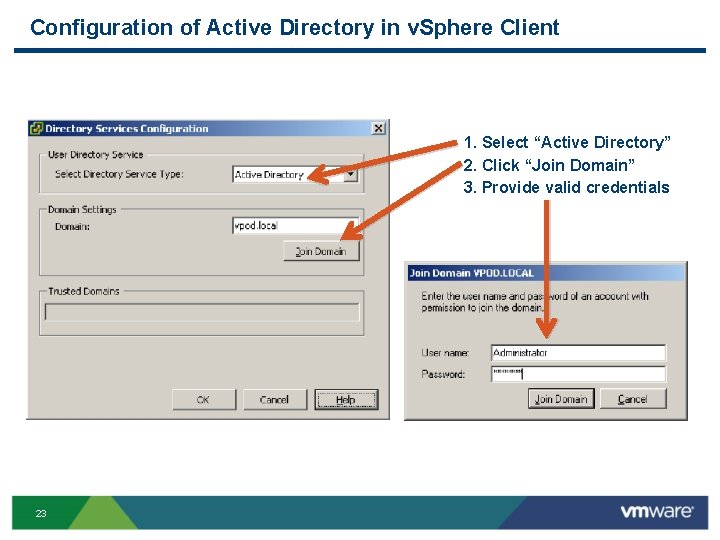
Configuration of Active Directory in v. Sphere Client 1. Select “Active Directory” 2. Click “Join Domain” 3. Provide valid credentials 23
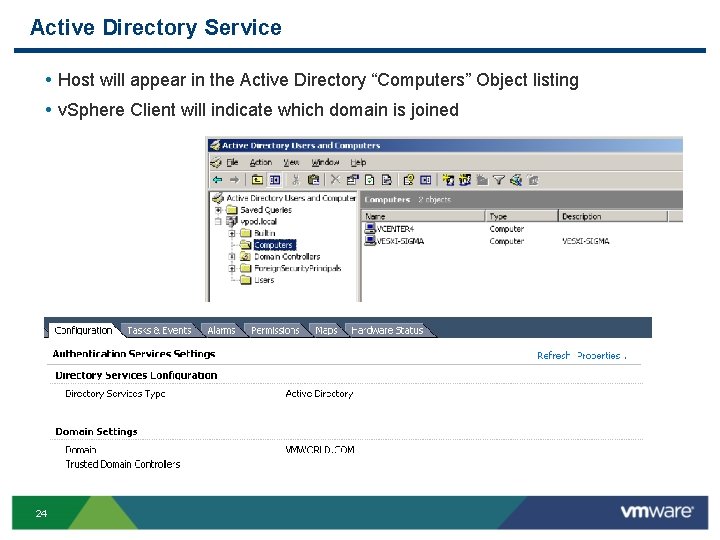
Active Directory Service • Host will appear in the Active Directory “Computers” Object listing • v. Sphere Client will indicate which domain is joined 24
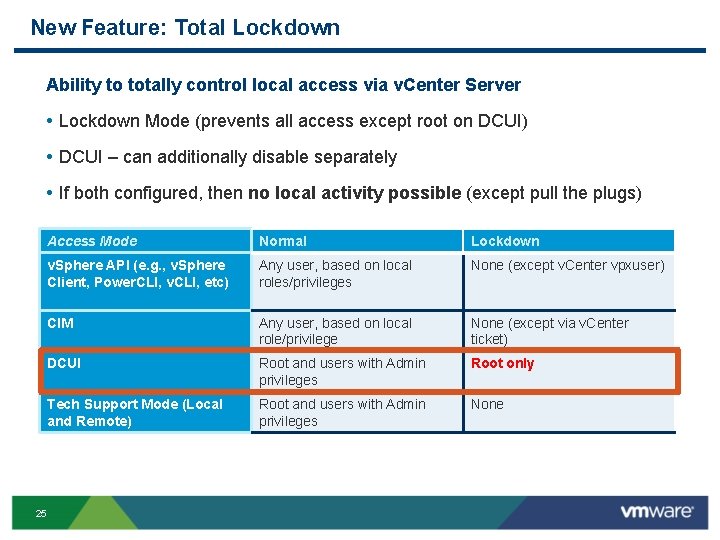
New Feature: Total Lockdown Ability to totally control local access via v. Center Server • Lockdown Mode (prevents all access except root on DCUI) • DCUI – can additionally disable separately • If both configured, then no local activity possible (except pull the plugs) 25 Access Mode Normal Lockdown v. Sphere API (e. g. , v. Sphere Client, Power. CLI, v. CLI, etc) Any user, based on local roles/privileges None (except v. Center vpxuser) CIM Any user, based on local role/privilege None (except via v. Center ticket) DCUI Root and users with Admin privileges Root only Tech Support Mode (Local and Remote) Root and users with Admin privileges None
Agenda § ESXi Convergence and ESXi Value Proposition § Hardware Monitoring and System Management with ESXi § Security and Deployment Options § Command Line Interfaces § Diagnostics and troubleshooting § Answering common questions § Resources and call to action 26
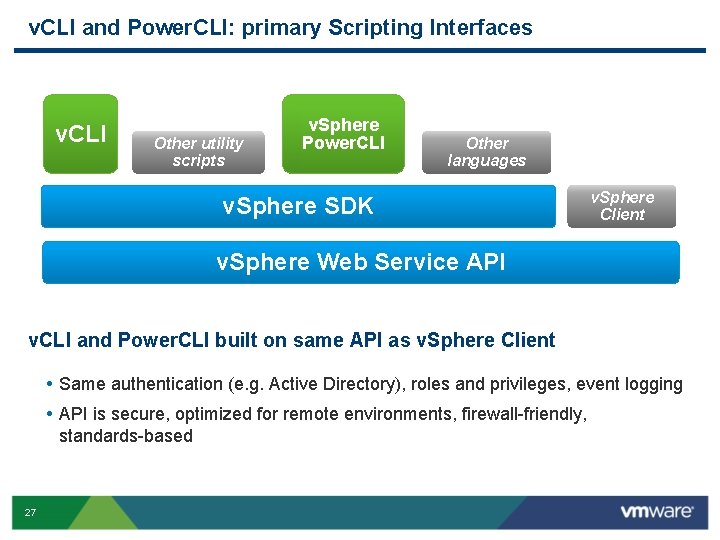
v. CLI and Power. CLI: primary Scripting Interfaces v. CLI Other utility scripts v. Sphere Power. CLI Other languages v. Sphere SDK v. Sphere Client v. Sphere Web Service API v. CLI and Power. CLI built on same API as v. Sphere Client • Same authentication (e. g. Active Directory), roles and privileges, event logging • API is secure, optimized for remote environments, firewall friendly, standards based 27
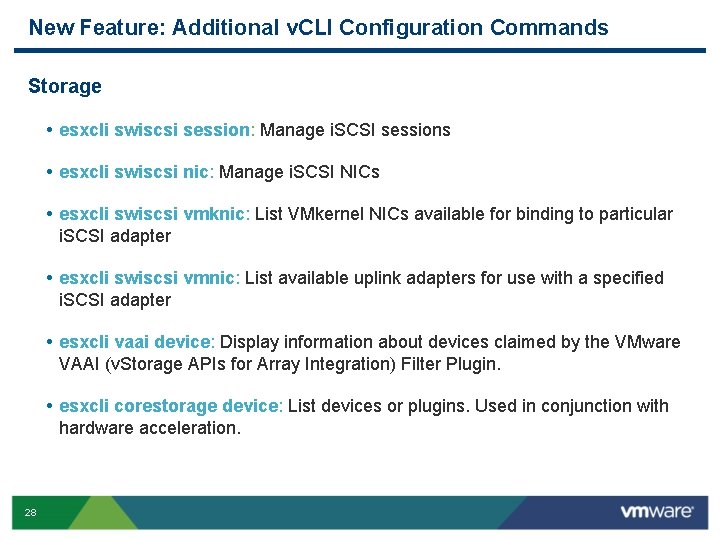
New Feature: Additional v. CLI Configuration Commands Storage • esxcli swiscsi session: Manage i. SCSI sessions • esxcli swiscsi nic: Manage i. SCSI NICs • esxcli swiscsi vmknic: List VMkernel NICs available for binding to particular i. SCSI adapter • esxcli swiscsi vmnic: List available uplink adapters for use with a specified i. SCSI adapter • esxcli vaai device: Display information about devices claimed by the VMware VAAI (v. Storage APIs for Array Integration) Filter Plugin. • esxcli corestorage device: List devices or plugins. Used in conjunction with hardware acceleration. 28
Agenda § ESXi Convergence and ESXi Value Proposition § Hardware Monitoring and System Management with ESXi § Security and Deployment Options § Command Line Interfaces § Diagnostics and troubleshooting § Answering common questions § Resources and call to action 29
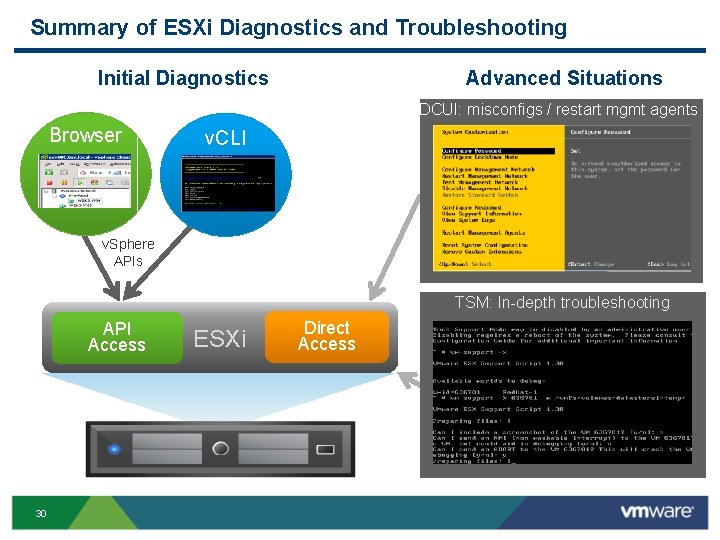
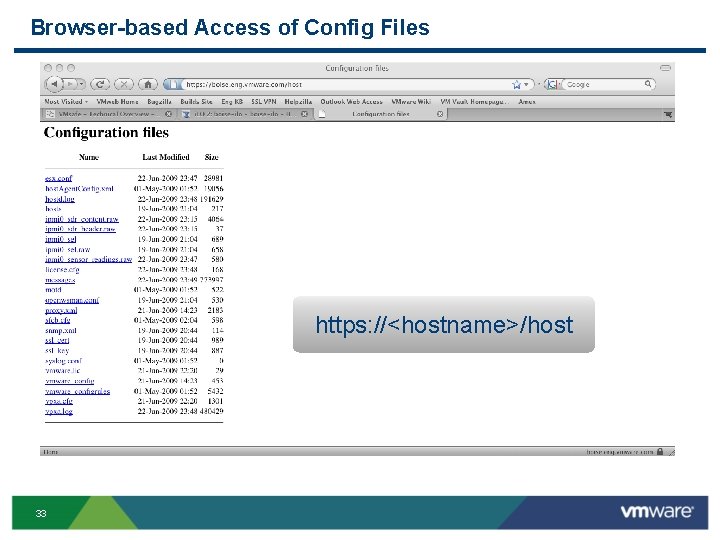
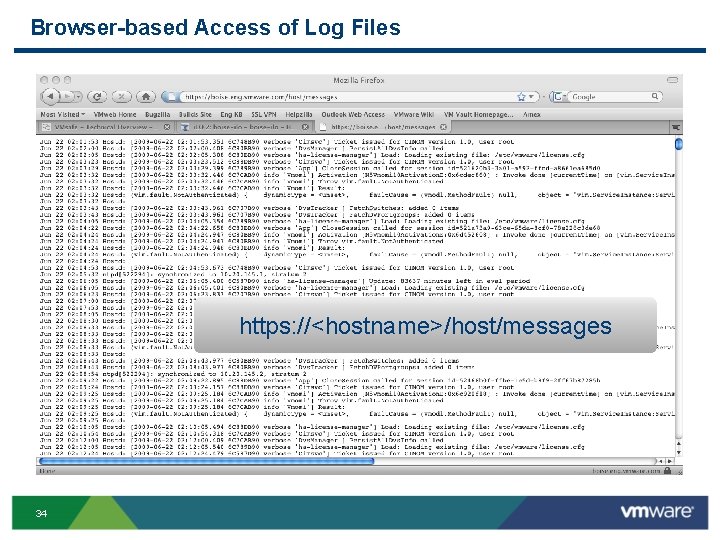
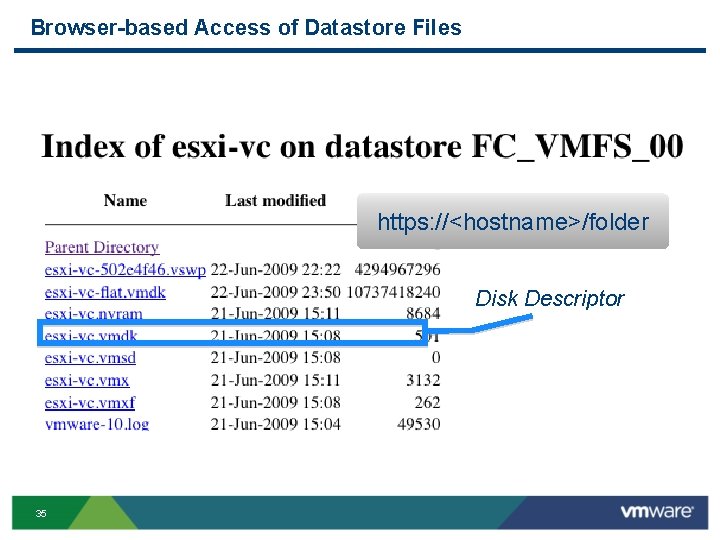
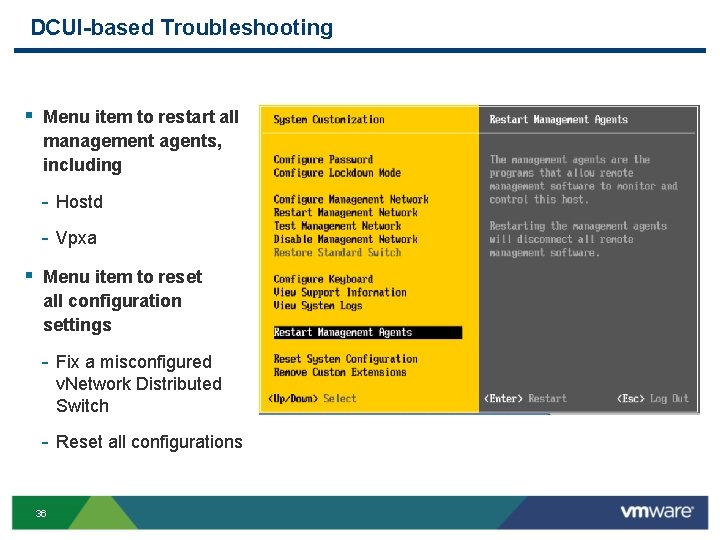
Summary of ESXi Diagnostics and Troubleshooting Initial Diagnostics Advanced Situations DCUI: misconfigs / restart mgmt agents Browser v. CLI v. Sphere APIs TSM: In depth troubleshooting API Access 30 ESXi Direct Access
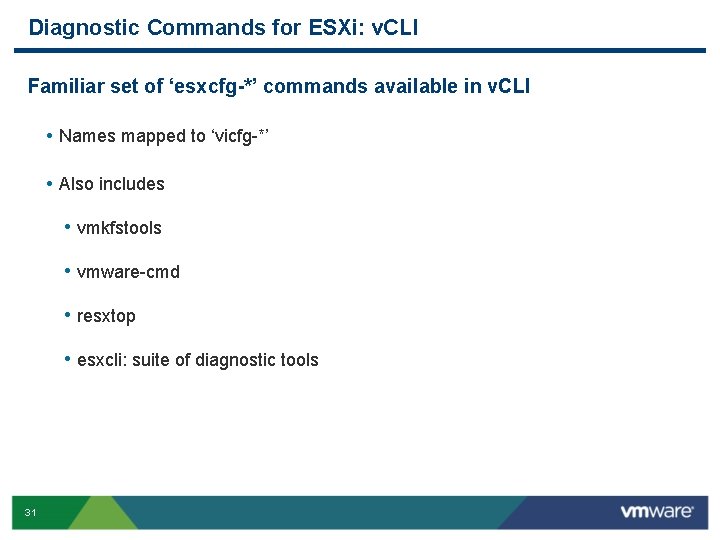
Diagnostic Commands for ESXi: v. CLI Familiar set of ‘esxcfg-*’ commands available in v. CLI • Names mapped to ‘vicfg *’ • Also includes • vmkfstools • vmware cmd • resxtop • esxcli: suite of diagnostic tools 31
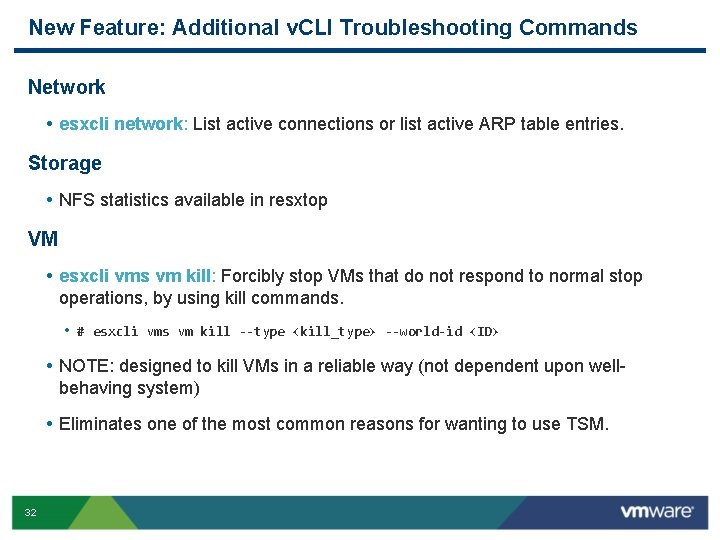
New Feature: Additional v. CLI Troubleshooting Commands Network • esxcli network: List active connections or list active ARP table entries. Storage • NFS statistics available in resxtop VM • esxcli vms vm kill: Forcibly stop VMs that do not respond to normal stop operations, by using kill commands. • # esxcli vms vm kill --type <kill_type> --world-id <ID> • NOTE: designed to kill VMs in a reliable way (not dependent upon well behaving system) • Eliminates one of the most common reasons for wanting to use TSM. 32
Browser-based Access of Config Files https: //<hostname>/host 33
Browser-based Access of Log Files https: //<hostname>/host/messages 34
Browser-based Access of Datastore Files https: //<hostname>/folder Disk Descriptor 35
DCUI-based Troubleshooting § Menu item to restart all management agents, including Hostd Vpxa § Menu item to reset all configuration settings Fix a misconfigured v. Network Distributed Switch Reset all configurations 36
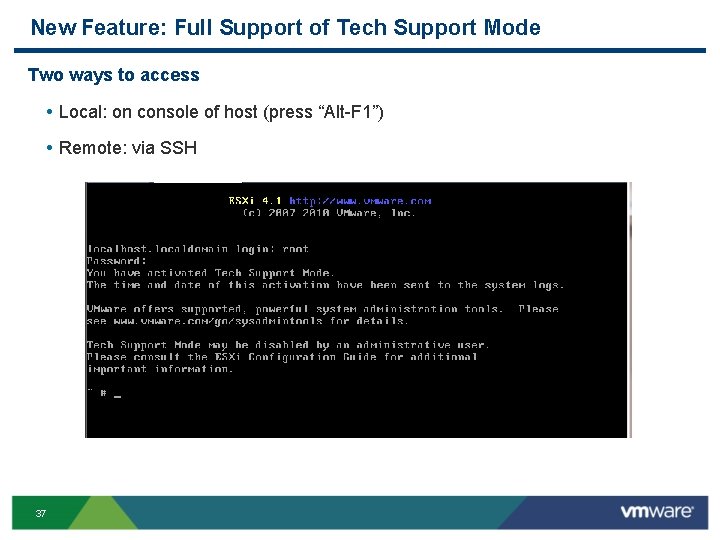
New Feature: Full Support of Tech Support Mode Two ways to access • Local: on console of host (press “Alt F 1”) • Remote: via SSH 37
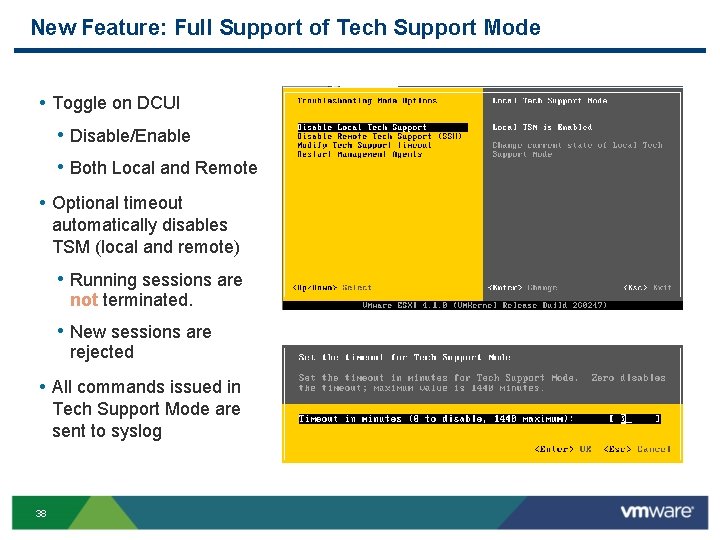
New Feature: Full Support of Tech Support Mode • Toggle on DCUI • Disable/Enable • Both Local and Remote • Optional timeout automatically disables TSM (local and remote) • Running sessions are not terminated. • New sessions are rejected • All commands issued in Tech Support Mode are sent to syslog 38
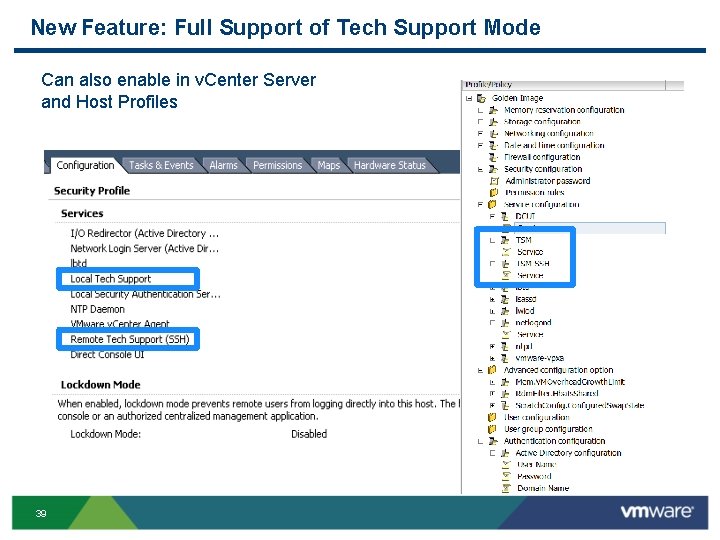
New Feature: Full Support of Tech Support Mode Can also enable in v. Center Server and Host Profiles 39
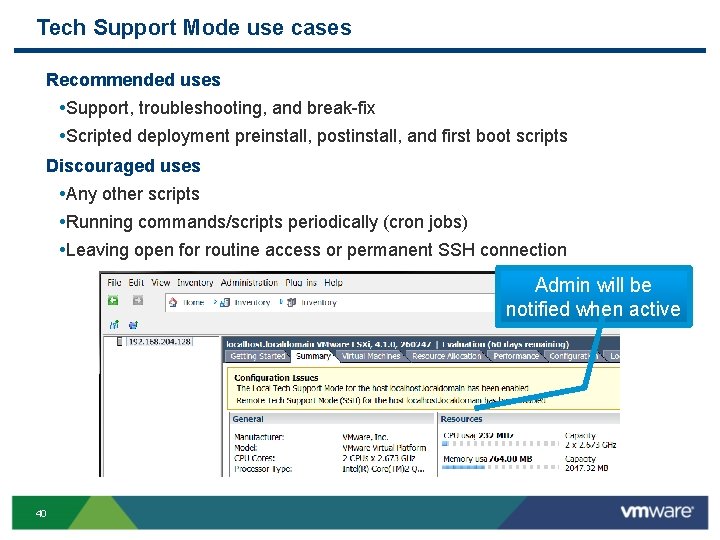
Tech Support Mode use cases Recommended uses • Support, troubleshooting, and break fix • Scripted deployment preinstall, postinstall, and first boot scripts Discouraged uses • Any other scripts • Running commands/scripts periodically (cron jobs) • Leaving open for routine access or permanent SSH connection Admin will be notified when active 40
New Feature: Additional Commands in Tech Support Mode Additional commands for troubleshooting • vscsi. Stat • nc (netcat) • tcpdump uw 41
Agenda § ESXi Convergence and ESXi Value Proposition § Hardware Monitoring and System Management with ESXi § Security and Deployment Options § Command Line Interfaces § Diagnostics and troubleshooting § Answering common questions § Resources and call to action 42
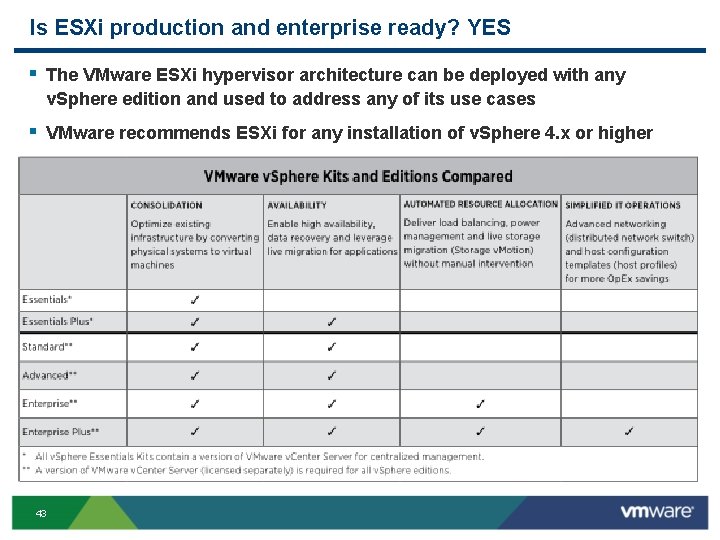
Is ESXi production and enterprise ready? YES § The VMware ESXi hypervisor architecture can be deployed with any v. Sphere edition and used to address any of its use cases § VMware recommends ESXi for any installation of v. Sphere 4. x or higher 43
What is the VMware v. Sphere Hypervisor? § VMware v. Sphere Hypervisor is the new name for what was formerly known as VMware ESXi Single Server or free ESXi (often abbreviated to simply “VMware ESXi”). § VMware v. Sphere Hypervisor is the free edition of the v. Sphere product line. It is licensed to only unlock the hypervisor functionality of v. Sphere, but it can be seamlessly upgraded to more advanced offerings of VMware v. Sphere. § v. Sphere Hypervisor is based only on the ESXi hypervisor § v. Sphere Hypervisor is target to virtualization first time users 44
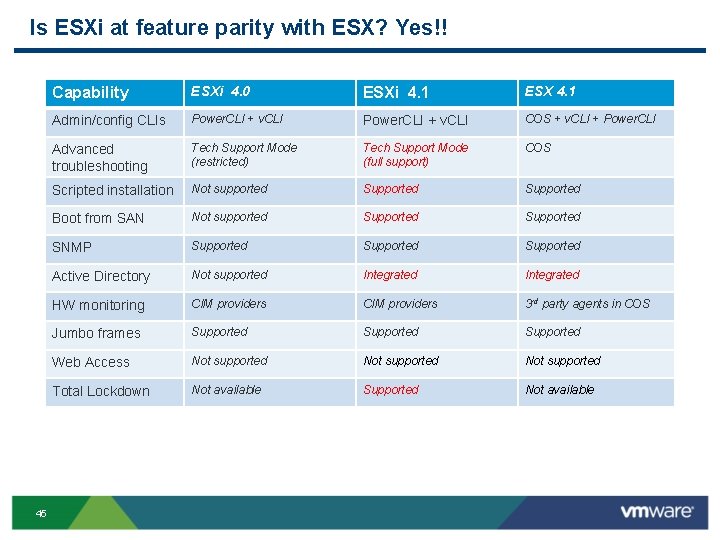
Is ESXi at feature parity with ESX? Yes!! 45 Capability ESXi 4. 0 ESXi 4. 1 ESX 4. 1 Admin/config CLIs Power. CLI + v. CLI COS + v. CLI + Power. CLI Advanced troubleshooting Tech Support Mode (restricted) Tech Support Mode (full support) COS Scripted installation Not supported Supported Boot from SAN Not supported Supported SNMP Supported Active Directory Not supported Integrated HW monitoring CIM providers 3 rd party agents in COS Jumbo frames Supported Web Access Not supported Total Lockdown Not available Supported Not available
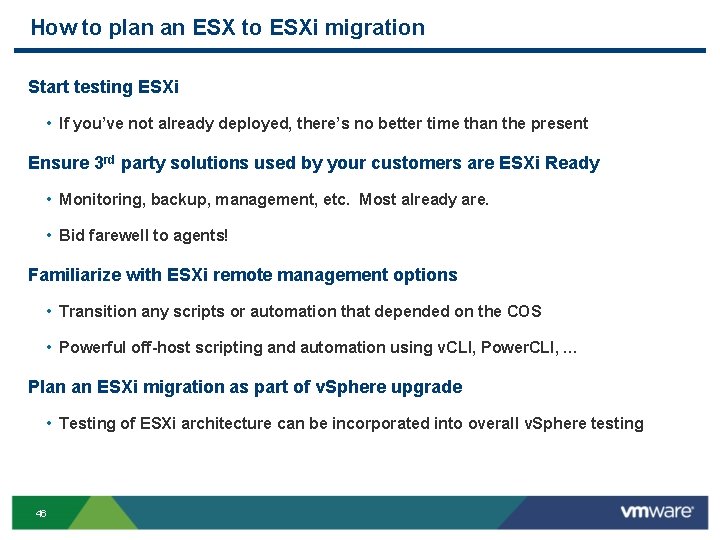
How to plan an ESX to ESXi migration Start testing ESXi • If you’ve not already deployed, there’s no better time than the present Ensure 3 rd party solutions used by your customers are ESXi Ready • Monitoring, backup, management, etc. Most already are. • Bid farewell to agents! Familiarize with ESXi remote management options • Transition any scripts or automation that depended on the COS • Powerful off-host scripting and automation using v. CLI, Power. CLI, … Plan an ESXi migration as part of v. Sphere upgrade • Testing of ESXi architecture can be incorporated into overall v. Sphere testing 46
Agenda § ESXi Convergence and ESXi Value Proposition § Hardware Monitoring and System Management with ESXi § Security and Deployment Options § Command Line Interfaces § Diagnostics and troubleshooting § Answering common questions § Resources and call to action 47
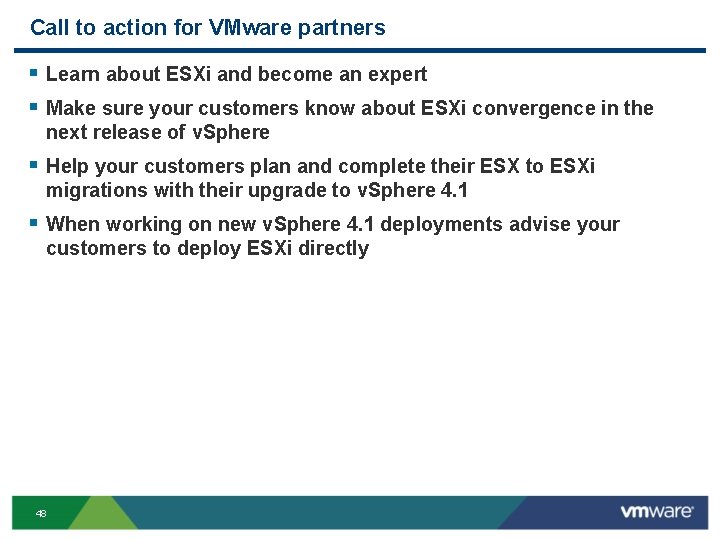
Call to action for VMware partners § Learn about ESXi and become an expert § Make sure your customers know about ESXi convergence in the next release of v. Sphere § Help your customers plan and complete their ESX to ESXi migrations with their upgrade to v. Sphere 4. 1 § When working on new v. Sphere 4. 1 deployments advise your customers to deploy ESXi directly 48
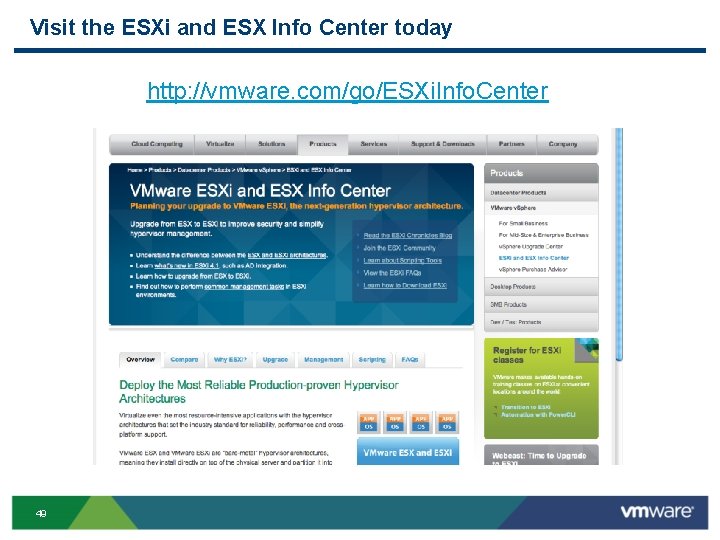
Visit the ESXi and ESX Info Center today http: //vmware. com/go/ESXi. Info. Center 49
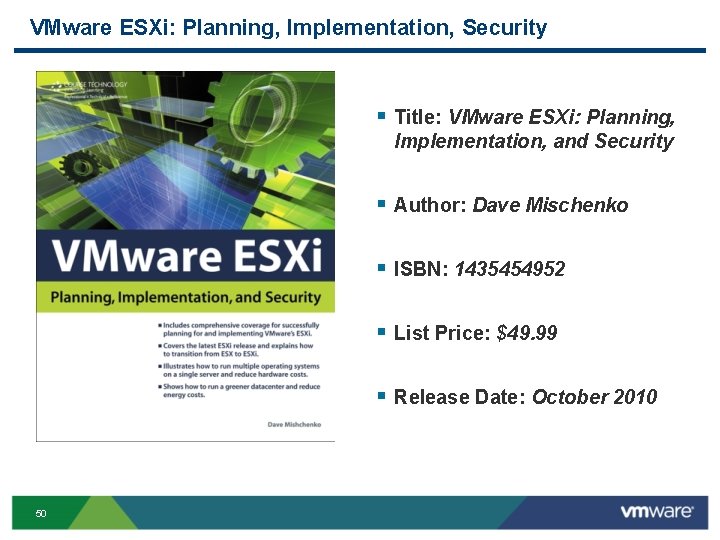
VMware ESXi: Planning, Implementation, Security § Title: VMware ESXi: Planning, Implementation, and Security § Author: Dave Mischenko § ISBN: 1435454952 § List Price: $49. 99 § Release Date: October 2010 50