
Transaction Based SHG Accounting System 2018 1 Why
Transaction Based SHG Accounting System 2018 1
Why e. SHG? §Bring all SHGs to a single database with a unique identity of SHG and its members §Avoid duplicate membership in multiple SHGs §Directly access financial services/assistance from government. Velocis Systems Pvt. Ltd. 2
Why e. Transactions? §To instant capture of transactions made by SHG and its members. §To maintain fair and correct manual books of records §Grading the SHG to access financial services from formal Financial Institutions and assistance from Government. §Monitoring and Rating the SHG by higher level community institutions on regular interval §To show ability/capability of a poor women towards thrift and credit and facilitate access of financial services by sharing transactions with Credit Bureau. §To perform e. Audit and reconcile of books of records. Velocis Systems Pvt. Ltd. 3
How to perform the e. Transactions? §Through My SHG App §Through Online Application §Through desktop based Application (offline) Contd…. . Velocis Systems Pvt. Ltd. 4

How to perform e. Transactions? §Through My SHG App §Capture transactions of SHG after the meeting through Tablet/Mobile at meeting site §Capture by a trained Tablet/Mobile user §Capture in offline mode and sync to live system §Tablet/Mobile may be connected to a desktop to sync the data in case of non-availability of internet in Tablet/Mobile Contd…. . Velocis Systems Pvt. Ltd. 5
How to perform e. Transactions? §Through Online Application § A transaction sheet of each SHG needs to be brought to data entry point where system and connectivity are available § Trained Data Entry Operators/Cadres need to enter the transactions of each SHG into online application §Through desktop based Application (offline) § A transaction sheet of each SHG needs to be brought to data entry point where desktop/laptop are available § Trained Data Entry Operators/Cadres need to be placed for transactions entry of each SHG into offline application § Sync the data into online application by generating backup file after all transaction entry or send the back-up to any MMU for uploading into live system Velocis Systems Pvt. Ltd. 6
Mode of capture? §Meeting Mode §Transactions of each meeting needs to be captured at the meeting place or at the data entry point, whether meeting frequency is Weekly, Fortnightly or Monthly. §Monthly Mode §Needs to prepare a consolidated statement of transactions made in all meetings during the month and captured into system. Velocis Systems Pvt. Ltd. 7
Preparation Velocis Systems Pvt. Ltd. 8
Preparation for rollout • A transaction sheet needs to be prepared for each meeting or a consolidated transaction sheet for all meetings that take place in a month. • A cut-off sheet for SHG older than 3 months needs to prepare and upload to capture current transactions. • Use of Community Cadres § Create a community cadre or identify an existing cadre to act as Tablet-CRP/e. CRP to prepare & submit SHG Transaction sheet at data entry point. § Such cadre should have minimum qualification with basic arithmetic skills and be active. • Training plan for Capacity Building of Cadres/DEOs § 10 -15 days of training required to use Tablet and “My SHG App” and the training may be used in 2 -3 phases Velocis Systems Pvt. Ltd. 9
Preparation for rollout • The VOs/CLFs should be encouraged to use the information and reports generated by the system for monitoring the SHGs. • System will generate the performance report of all SHGs under a particular VO/CLF • Grading sheet of SHG can be generated from system and recommend for Bank linkage Velocis Systems Pvt. Ltd. 10
Preparation for rollout §All formats may be converted to local language and sample copy of formats may be provided to all participants during training at block level. §Required number of printed formats need to provide community cadres after the training at block level to collect cut off and transaction sheet of a month for each SHG. §Mar month cut off and transaction sheet for Apr may be collected to start data entry from May. §All intensive blocks should start with all Gram Panchayats/Villages and SHGs. Velocis Systems Pvt. Ltd. 11
Preparation for rollout § One day orientation (on formats and screen) for 1 - 2 members from identified blocks and one member from concerned district at state level. § Two days training for remaining block team members and community cadres may be conducted at respective block level. One day for classroom and one day for preparation of cut off and transaction sheet of sample SHGs in groups. § Additional one day training is required at block level for the cadres/DEOs who will enter the data into online system. § SHG Book keeper may be prepared the transaction sheet and submit to VO Book keeper/VO Assistant for verification. § Cut off sheet may be prepared by VO Book keeper/VO Assistant and verified by one block team member. § There must be a mechanism for verification of Transaction Sheets before submitting to data entry point. (for online app) Velocis Systems Pvt. Ltd. 12
Demo version for training and practice • Demo version of applications is available in the link http: //cbotrans. nrlm. gov. in Demo • User ID “Block ID” (with Admin role) and password “nrlm@123” should use for login. • Create a data entry user using own mobile number and map few SHGs to data entry user. • Mobile number is the user ID and password is first 3 digit @last 3 digit of mobile number for data entry user • Demo version of android application (apk) for Tablet/Mobile can download from home page of demo site. • Prepare and enter cut-off and transaction sheet of few SHGs for hands-on in demo site and sync the data. Velocis Systems Pvt. Ltd. 13
Online System for Demo http: //cbotrans. nrlm. gov. in (Moves to Demo) Block Admin User ID: Block ID (with Admin Role) Password: nrlm@123 Data Entry User ID: Mobile Number Password: ###@### Velocis Systems Pvt. Ltd. 14
Process Velocis Systems Pvt. Ltd. 15
Process………. Step-1 • Block Admin User § State MIS Nodal Officer needs to create a Block Admin User for each block or assign the Admin Role to a existing user. § The “Block Admin Role for Transaction System” can be assigned to one block level user only. Step-2 • Role of Block Admin User § To Create of Tablet/Mobile user and Data Entry user for online and offline system. § Modify user details (like Mobile Number, device ID etc) created by admin user § Mapping SHGs and VOs to Tablet/Mobile user and Data Entry user. § One SHG can map with one user only and provision to unmap from one user and map with another user. Velocis Systems Pvt. Ltd. 16
My SHG App……… Step-3 • Where to download My SHG App? § Connect with internet to download “My SHG App” § Download App from Google Play store § Install the App in Tablet/Mobile • First login to My SHG App? § First login needs to be done using internet § Login with the User ID and Password provided to respective Tablet user § On first login all mapped SHGs and VOs will be downloaded to Tablet/Mobile § Device ID will fetch and store against each Tablet user. § Tablet user can login in online system after removal of device ID Velocis Systems Pvt. Ltd. 17
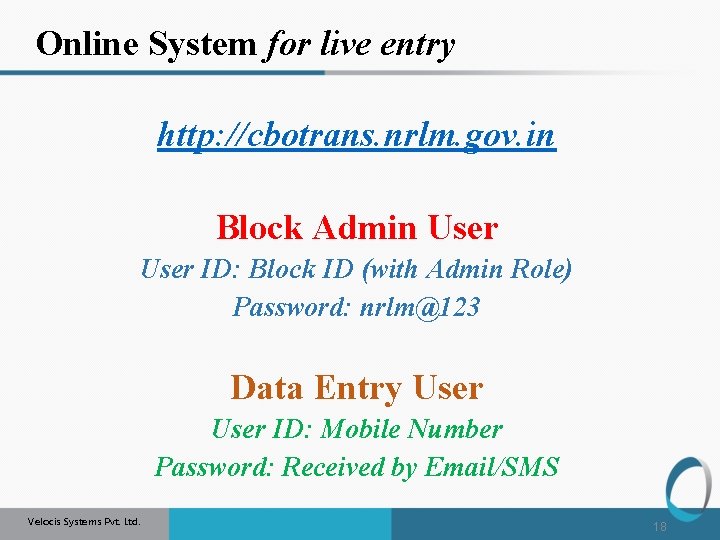
Online System for live entry http: //cbotrans. nrlm. gov. in Block Admin User ID: Block ID (with Admin Role) Password: nrlm@123 Data Entry User ID: Mobile Number Password: Received by Email/SMS Velocis Systems Pvt. Ltd. 18
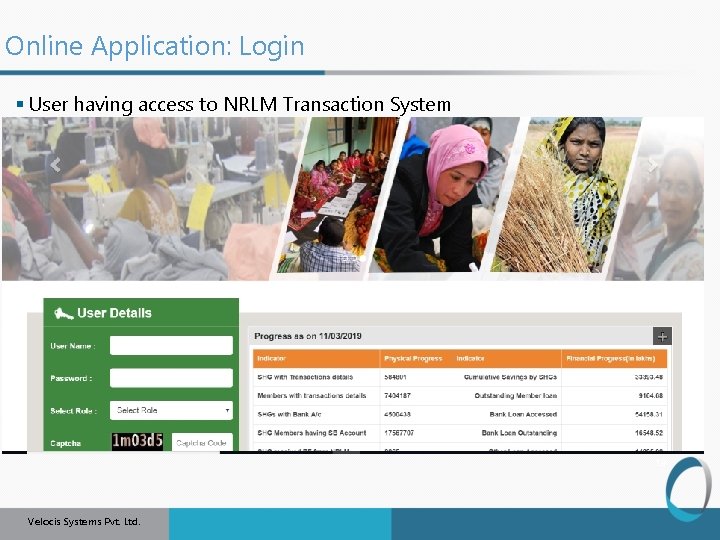
Online Application: Login § User having access to NRLM Transaction System 19 Velocis Systems Pvt. Ltd.
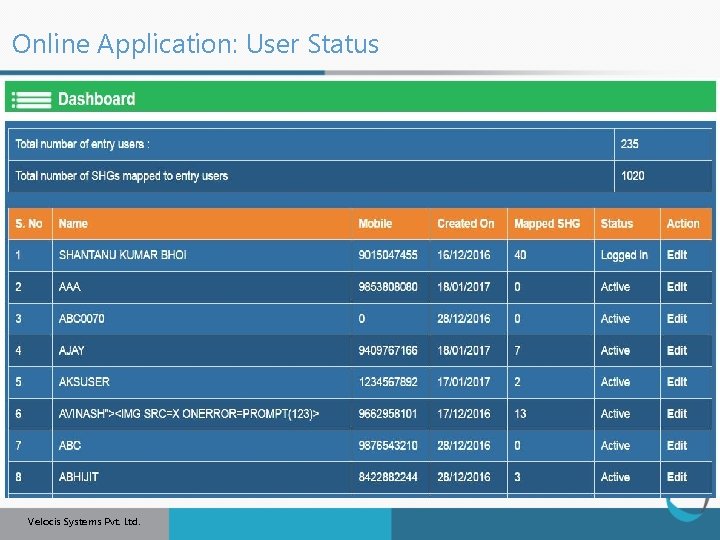
Online Application: User Status 20 Velocis Systems Pvt. Ltd.
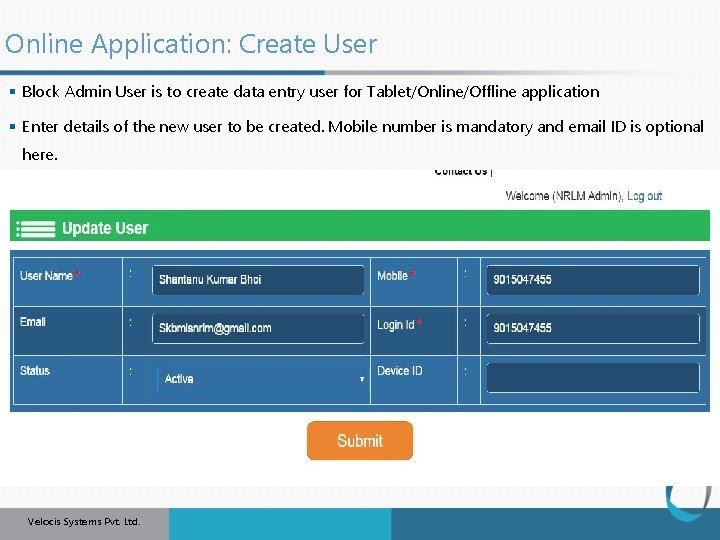
Online Application: Create User § Block Admin User is to create data entry user for Tablet/Online/Offline application § Enter details of the new user to be created. Mobile number is mandatory and email ID is optional here. 21 Velocis Systems Pvt. Ltd.
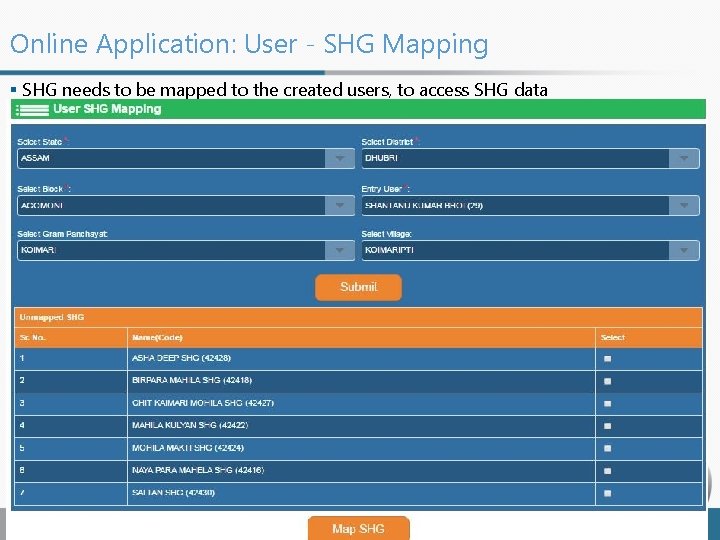
Online Application: User - SHG Mapping § SHG needs to be mapped to the created users, to access SHG data 22 Velocis Systems Pvt. Ltd.
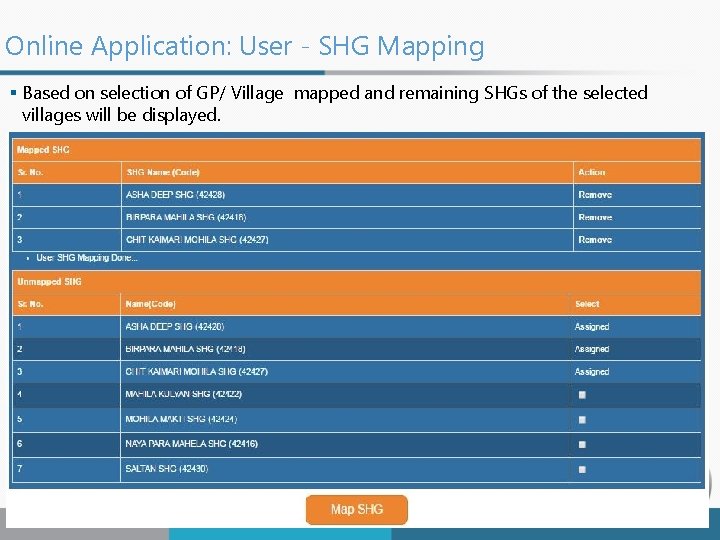
Online Application: User - SHG Mapping § Based on selection of GP/ Village mapped and remaining SHGs of the selected villages will be displayed. Velocis Systems Pvt. Ltd.
Online System for live entry http: //cbotrans. nrlm. gov. in Data Entry User ID: Mobile Number Password: Received by Email/SMS Velocis Systems Pvt. Ltd. 24
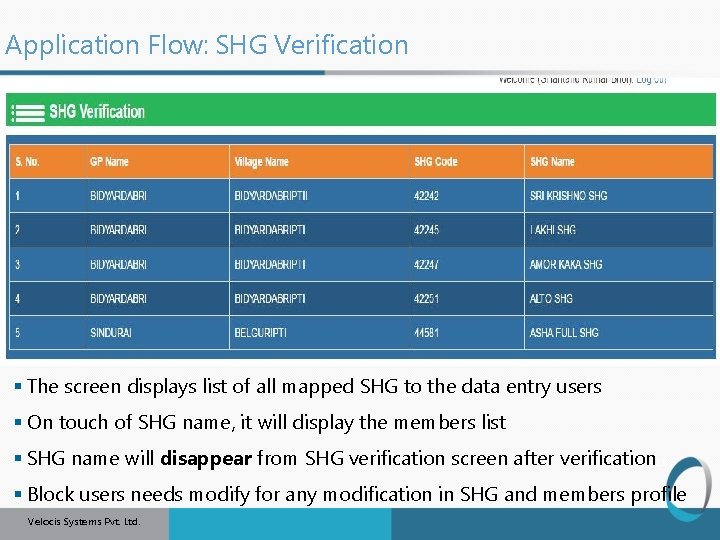
Application Flow: SHG Verification § The screen displays list of all mapped SHG to the data entry users § On touch of SHG name, it will display the members list § SHG name will disappear from SHG verification screen after verification 25 § Block users needs modify for any modification in SHG and members profile Velocis Systems Pvt. Ltd.
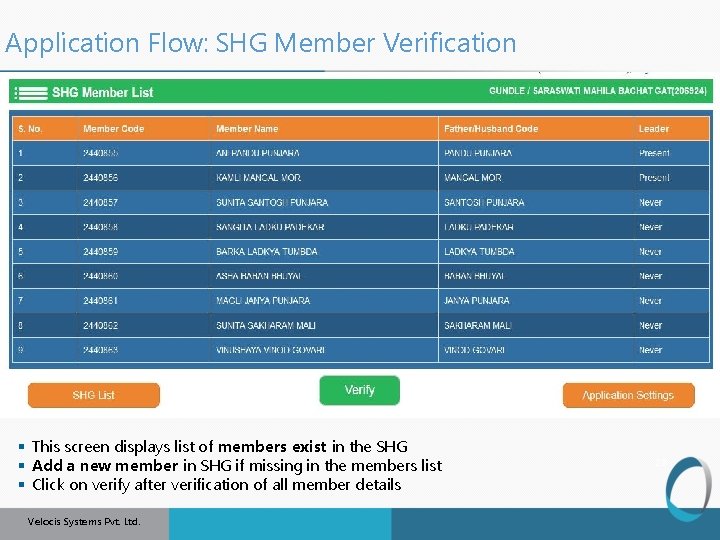
Application Flow: SHG Member Verification § This screen displays list of members exist in the SHG § Add a new member in SHG if missing in the members list § Click on verify after verification of all member details Velocis Systems Pvt. Ltd. 26
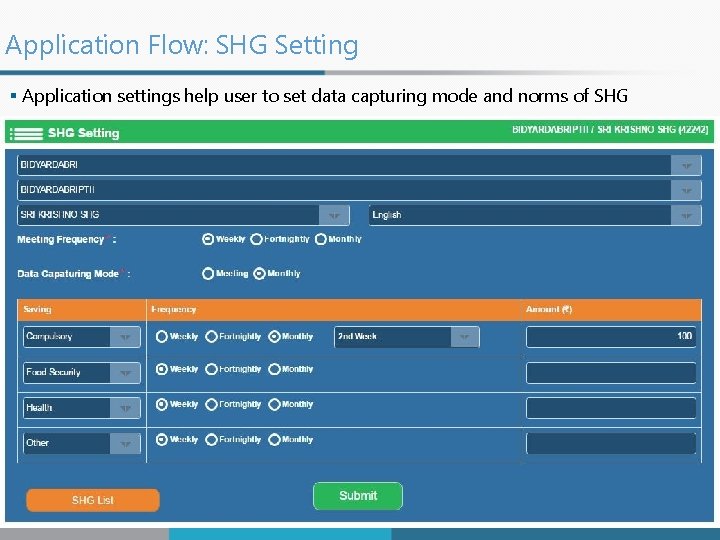
Application Flow: SHG Setting § Application settings help user to set data capturing mode and norms of SHG 27 Velocis Systems Pvt. Ltd.
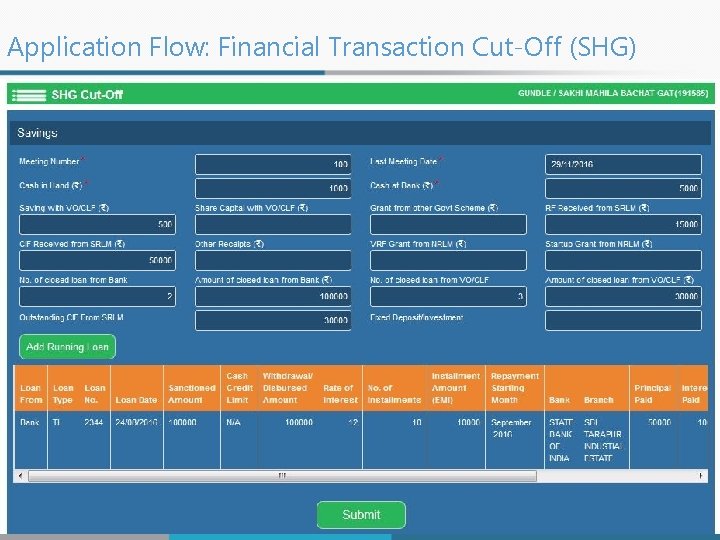
Application Flow: Financial Transaction Cut-Off (SHG) § For adding savings done by SHG till date before recording on tablet § For adding loan details taken by SHG before recording on tablet Velocis Systems Pvt. Ltd. 28
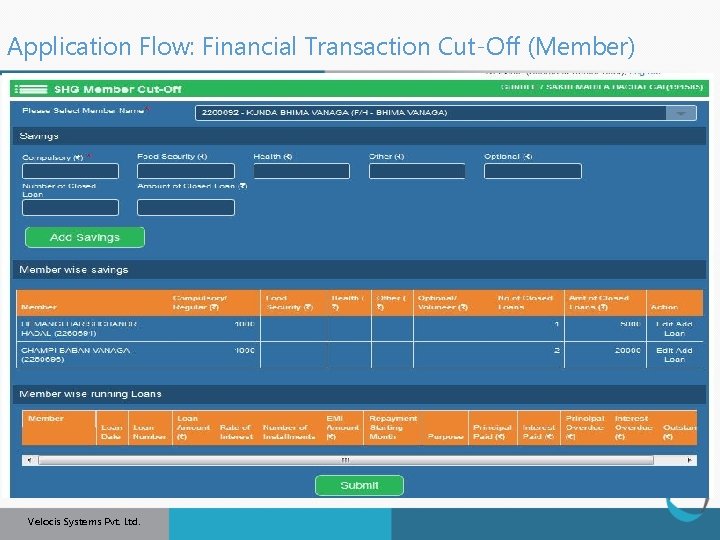
Application Flow: Financial Transaction Cut-Off (Member) § For adding savings done by member till date before recording on tablet § For adding loan details taken by members before recording on tablet Velocis Systems Pvt. Ltd. 29
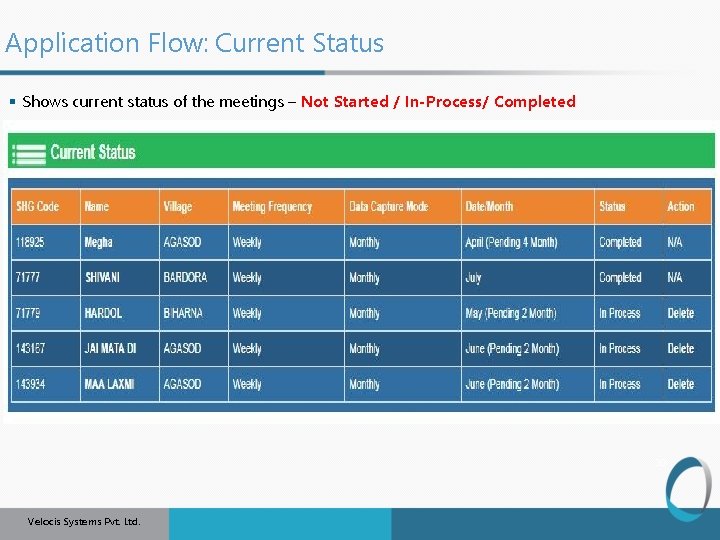
Application Flow: Current Status § Shows current status of the meetings – Not Started / In-Process/ Completed 30 Velocis Systems Pvt. Ltd.
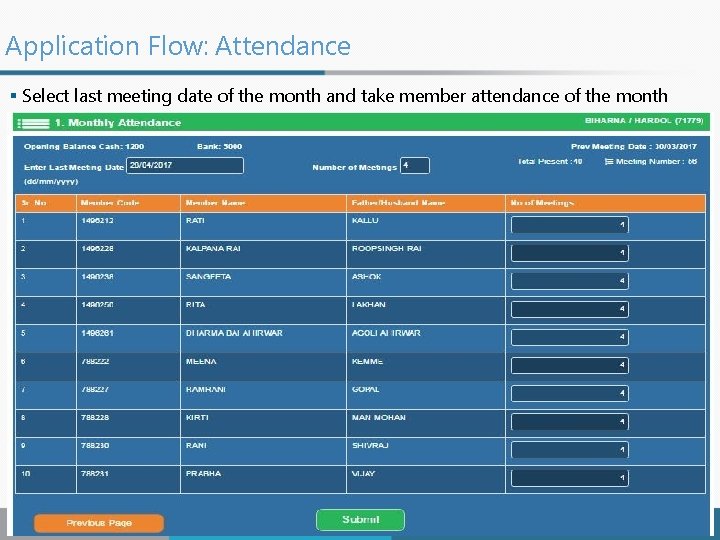
Application Flow: Attendance § Select last meeting date of the month and take member attendance of the month 31 Velocis Systems Pvt. Ltd.
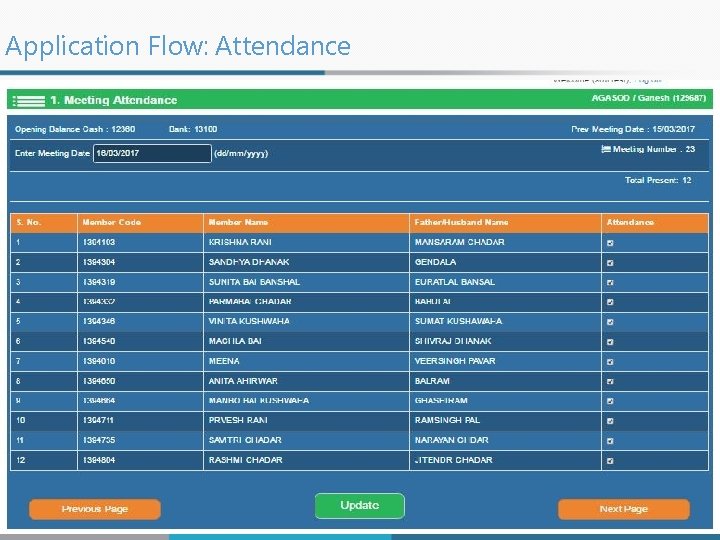
Application Flow: Attendance § Select date of meeting and mark member attendance in the meeting 32 Velocis Systems Pvt. Ltd.
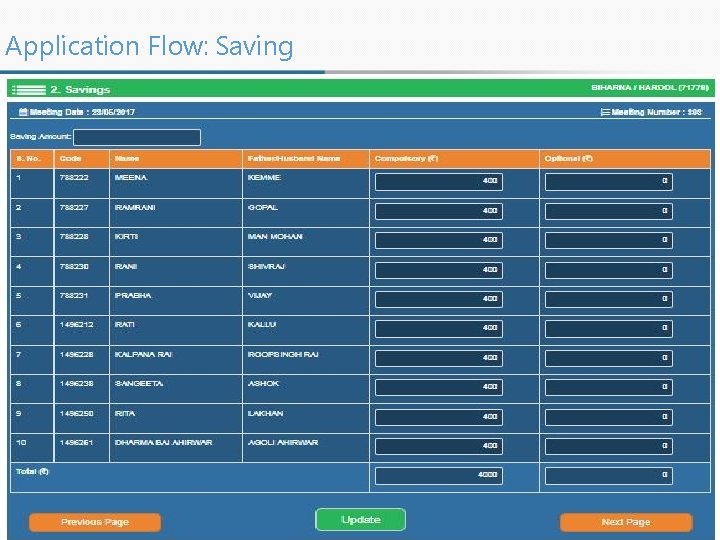
Application Flow: Saving § Records all type of savings with SHG by member § Type of Saving displayed as per settings 33 Velocis Systems Pvt. Ltd.
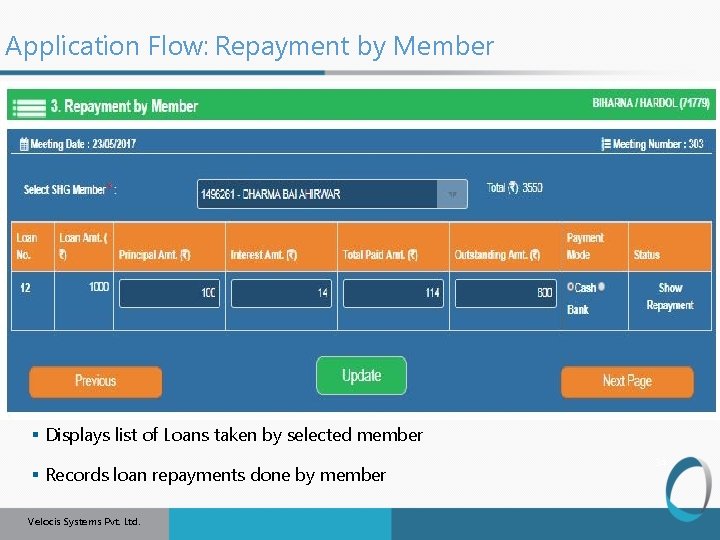
Application Flow: Repayment by Member § Displays list of Loans taken by selected member § Records loan repayments done by member Velocis Systems Pvt. Ltd. 34
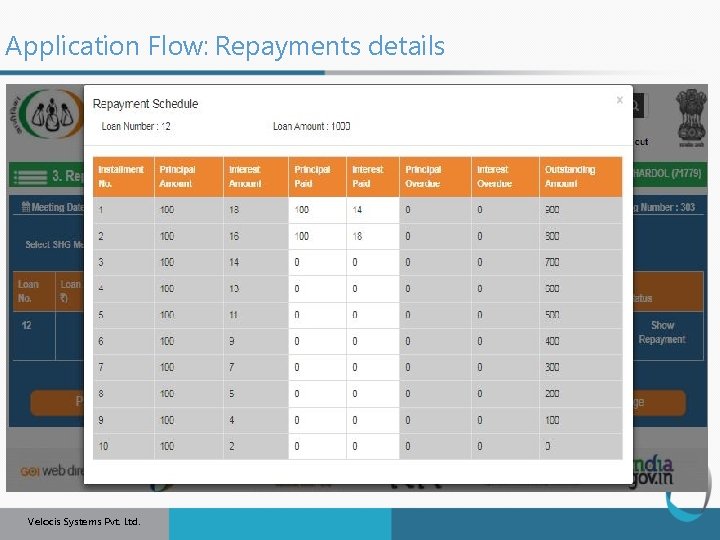
Application Flow: Repayments details 35 Velocis Systems Pvt. Ltd.
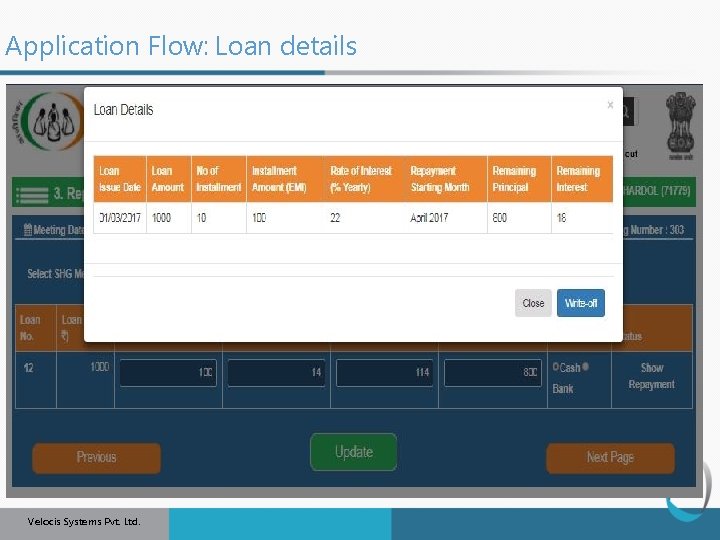
Application Flow: Loan details 36 Velocis Systems Pvt. Ltd.
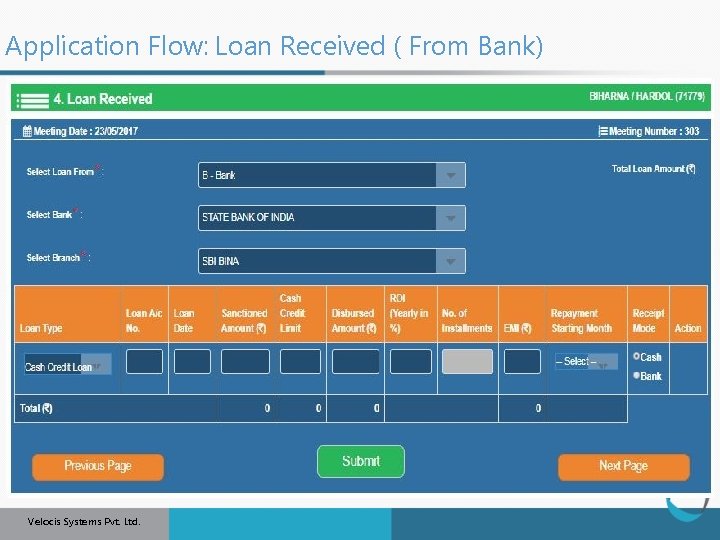
Application Flow: Loan Received ( From Bank) § Records loan received by SHG from Bank 37 Velocis Systems Pvt. Ltd.
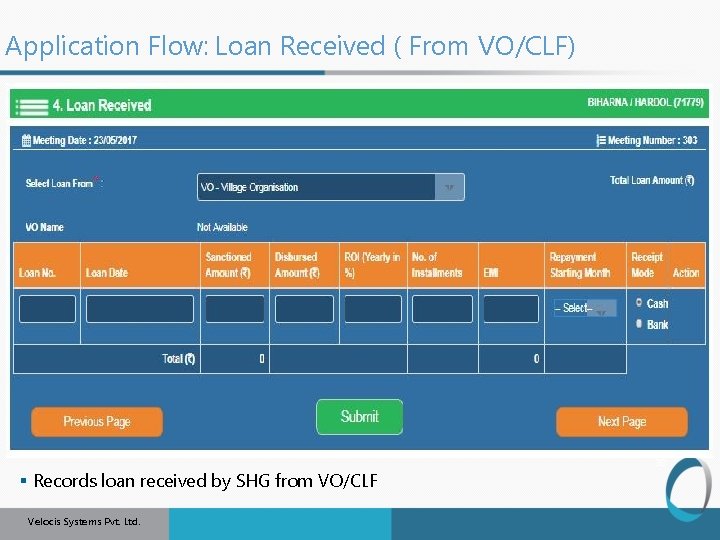
Application Flow: Loan Received ( From VO/CLF) § Records loan received by SHG from VO/CLF Velocis Systems Pvt. Ltd. 38
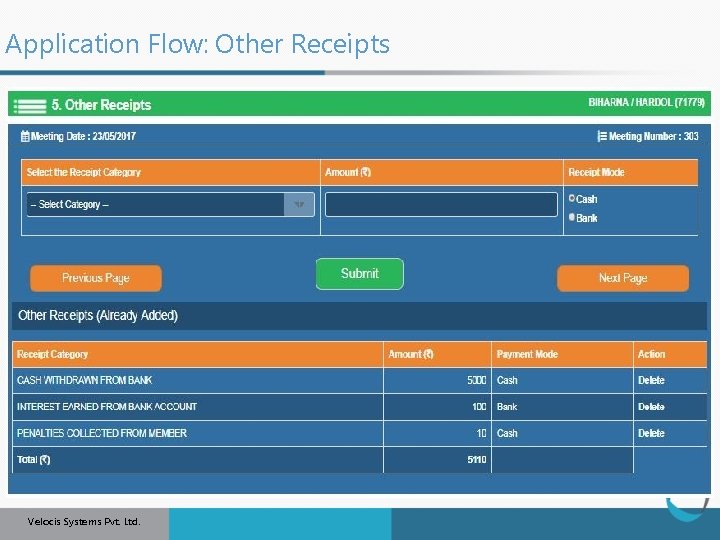
Application Flow: Other Receipts § Records other amount received by SHG 39 Velocis Systems Pvt. Ltd.
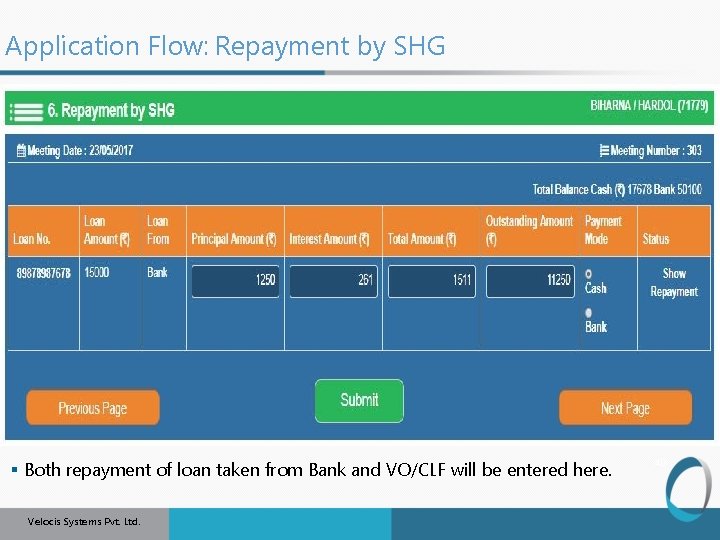
Application Flow: Repayment by SHG § Both repayment of loan taken from Bank and VO/CLF will be entered here. Velocis Systems Pvt. Ltd. 40
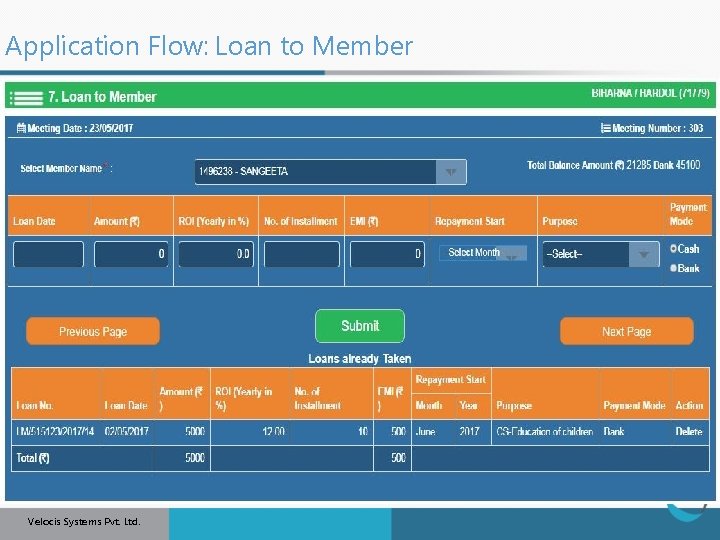
Application Flow: Loan to Member § Records loans given to members by SHG 41 Velocis Systems Pvt. Ltd.
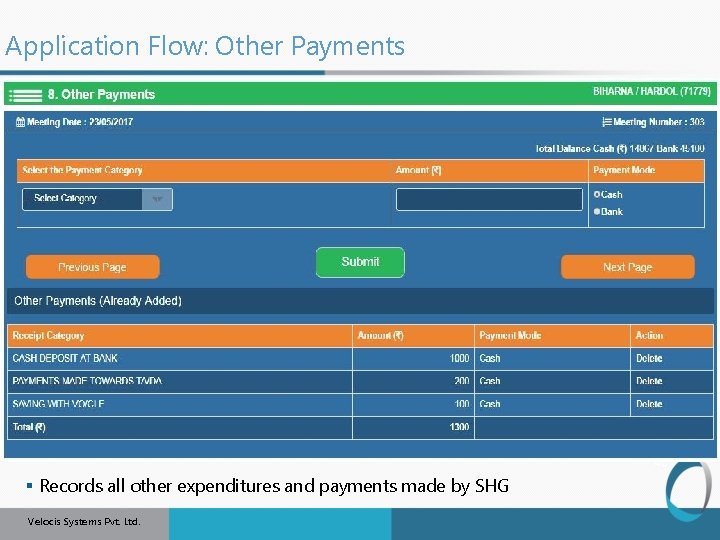
Application Flow: Other Payments 42 § Records all other expenditures and payments made by SHG Velocis Systems Pvt. Ltd.
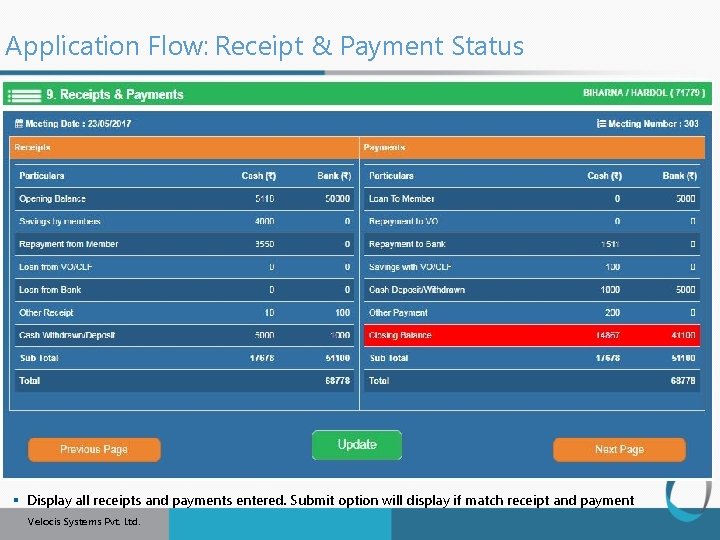
Application Flow: Receipt & Payment Status 43 § Display all receipts and payments entered. Submit option will display if match receipt and payment Velocis Systems Pvt. Ltd.
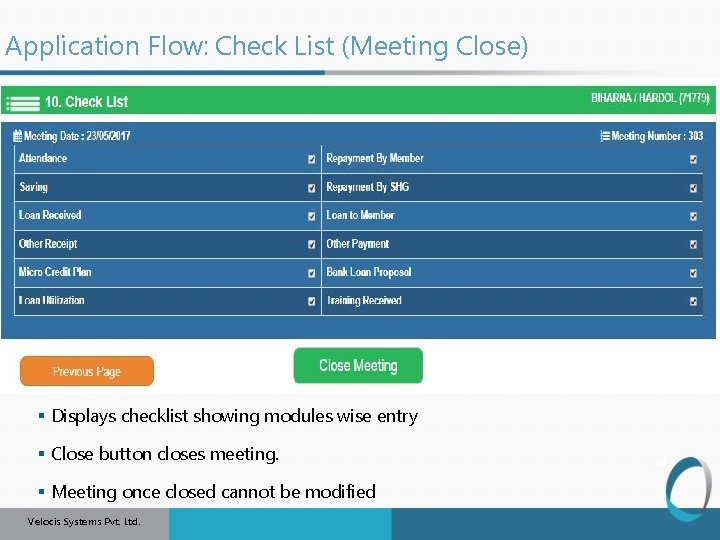
Application Flow: Check List (Meeting Close) § Displays checklist showing modules wise entry § Close button closes meeting. § Meeting once closed cannot be modified Velocis Systems Pvt. Ltd. 44
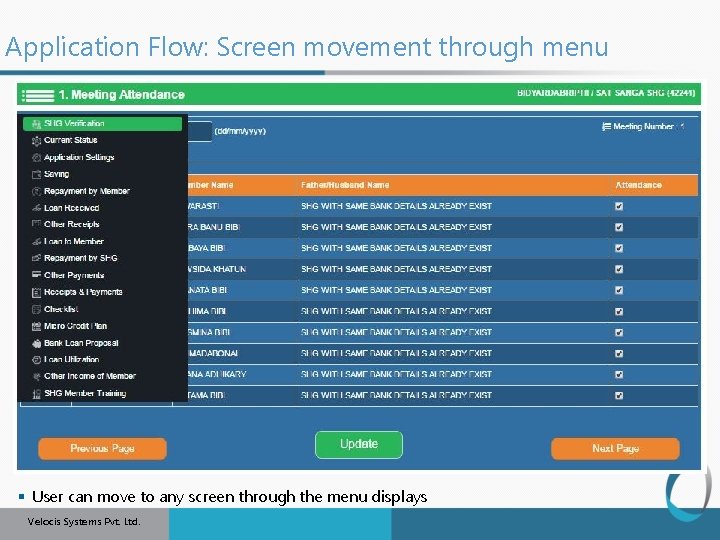
Application Flow: Screen movement through menu 45 § User can move to any screen through the menu displays Velocis Systems Pvt. Ltd.
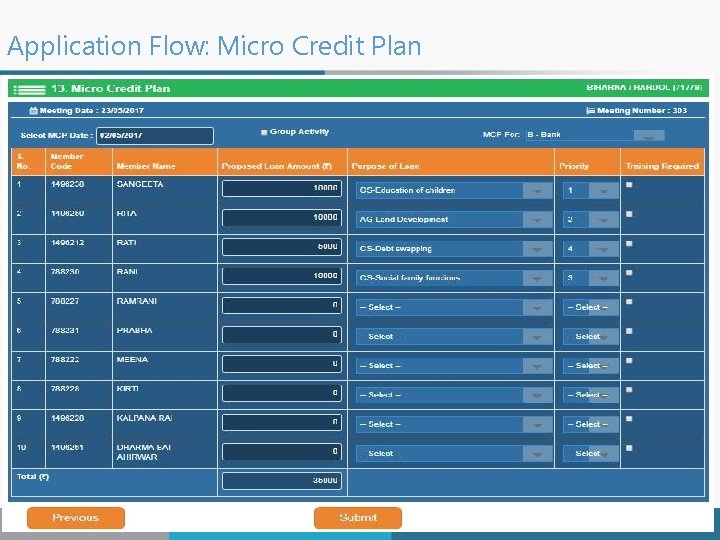
Application Flow: Micro Credit Plan 46 Velocis Systems Pvt. Ltd.
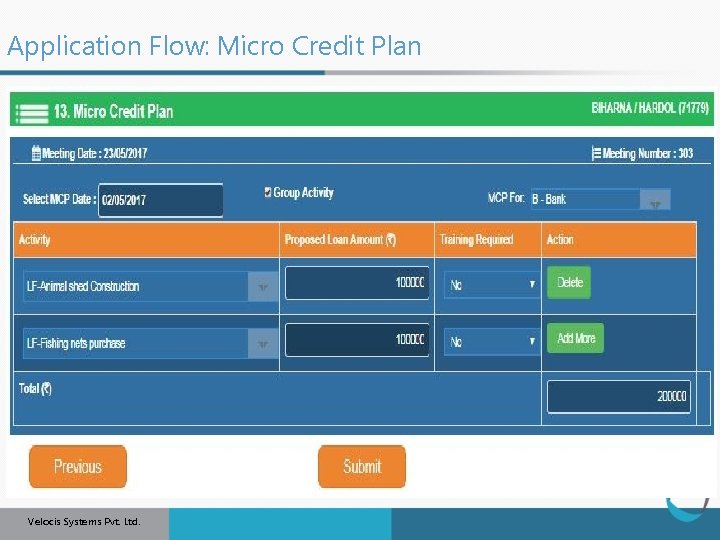
Application Flow: Micro Credit Plan 47 Velocis Systems Pvt. Ltd.
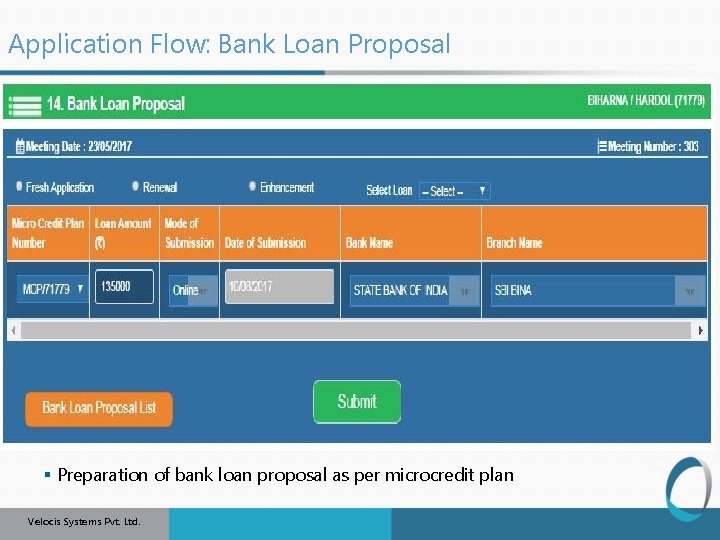
Application Flow: Bank Loan Proposal § Preparation of bank loan proposal as per microcredit plan Velocis Systems Pvt. Ltd. 48
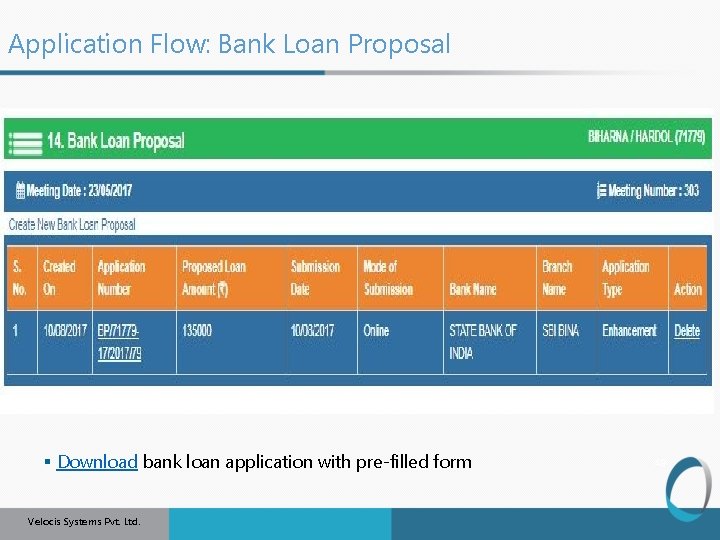
Application Flow: Bank Loan Proposal § Download bank loan application with pre-filled form Velocis Systems Pvt. Ltd. 49
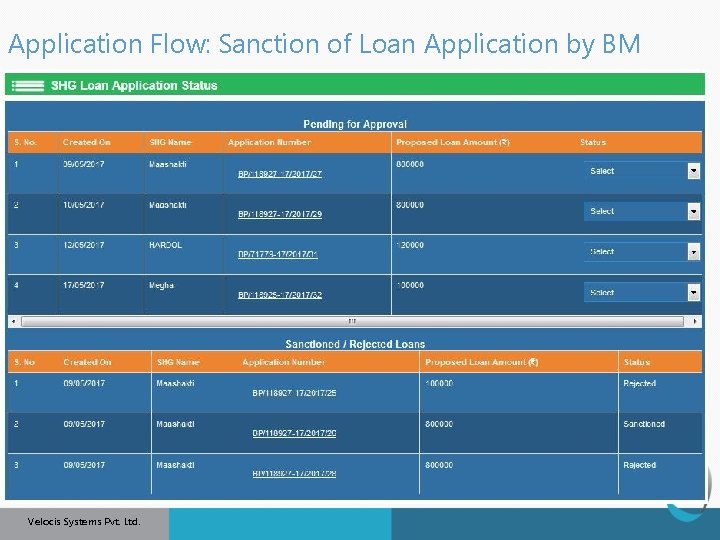
Application Flow: Sanction of Loan Application by BM § Download bank loan application with pre-filled form Velocis Systems Pvt. Ltd. 50
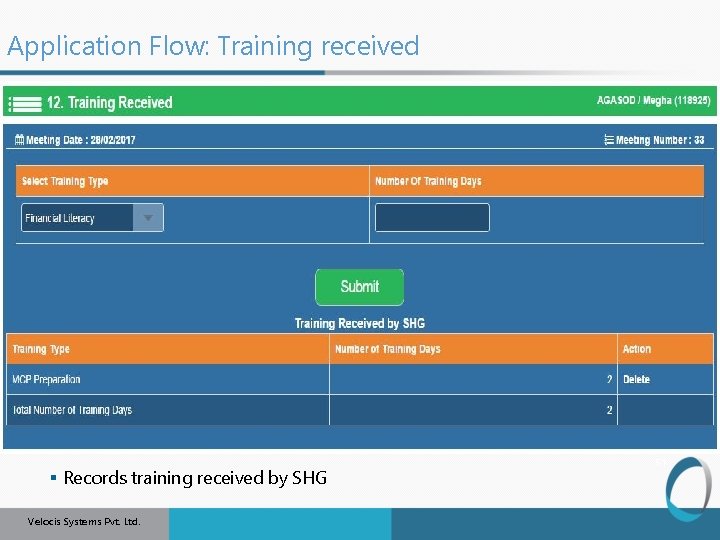
Application Flow: Training received § Records training received by SHG Velocis Systems Pvt. Ltd. 51
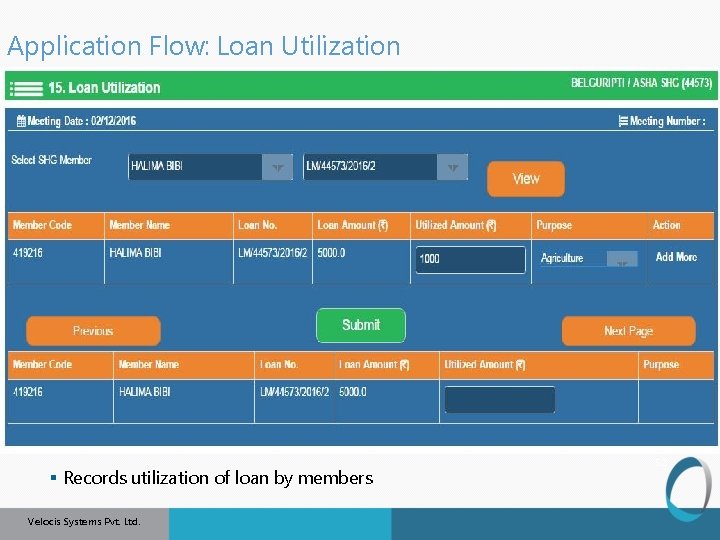
Application Flow: Loan Utilization § Records utilization of loan by members Velocis Systems Pvt. Ltd. 52
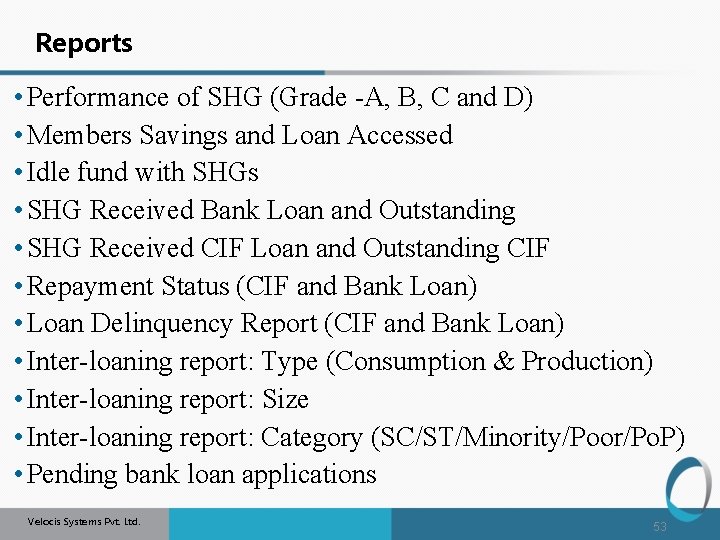
Reports • Performance of SHG (Grade -A, B, C and D) • Members Savings and Loan Accessed • Idle fund with SHGs • SHG Received Bank Loan and Outstanding • SHG Received CIF Loan and Outstanding CIF • Repayment Status (CIF and Bank Loan) • Loan Delinquency Report (CIF and Bank Loan) • Inter-loaning report: Type (Consumption & Production) • Inter-loaning report: Size • Inter-loaning report: Category (SC/ST/Minority/Poor/Po. P) • Pending bank loan applications Velocis Systems Pvt. Ltd. 53
Contact details Shantanu Kumar Bhoi National Mission Manager (MIS) Mob: 9015047455/7982749033 skbmisnrlm@gmail. com Atul Sharma Mission Manager (MIS) Mob: 9871820474 atul. sharma. infotech@gmail. com Mr Neeraj Kumar 7042032135 Velocis Systems Pvt. Ltd. 54

Thank you Thank You
- Slides: 55