
Towards supporting the user interfaces design using composition

![Proposition Choice of a formalism • TAX: Tree Algebra for XML [Jagadish, 2001] –](https://slidetodoc.com/presentation_image/4e67dc3dedc9afc1fb251f6dadf6e2ac/image-7.jpg "Proposition Choice of a formalism • TAX: Tree Algebra for XML [Jagadish, 2001] –")

- Slides: 21
Towards supporting the user interfaces design using composition rules Sophie Lepreux, Jean Vanderdonckt {lepreux, vanderdonckt}@isys. ucl. ac. be Sophie. lepreux@univ-valenciennes. fr 1
Contents • Introduction • Proposition – Choice of a formalism – Operator definitions • Preliminary evaluations – The GOMs model – Case studies • Conclusion et future works 2
Introduction • The design step takes a long time – Specification, mock-up, prototype – Validation => modifications: • Minor, e. g. add a field with a new information • Major, e. g. displace a part of an interface into another one • Goal: adaptation of the environment to facilitate the major modifications • Issue: composition of the HCI at the upper level as the other existing work • Means: – Operators – UIDL (User Interface Description Language) 3
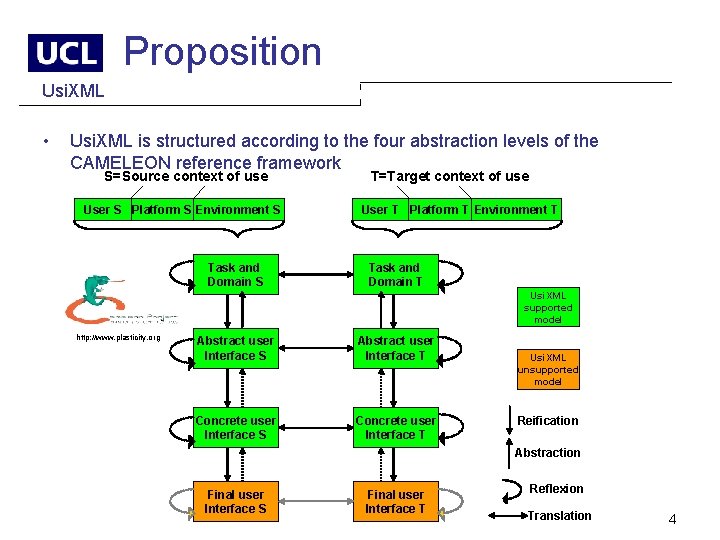
Proposition Usi. XML • Usi. XML is structured according to the four abstraction levels of the CAMELEON reference framework S=Source context of use User S Platform S Environment S Task and Domain S T=Target context of use User T Platform T Environment T Task and Domain T Usi. XML supported model http: //www. plasticity. org Abstract user Interface S Abstract user Interface T Concrete user Interface S Concrete user Interface T Usi. XML unsupported model Reification Abstraction Final user Interface S Final user Interface T Reflexion Translation 4
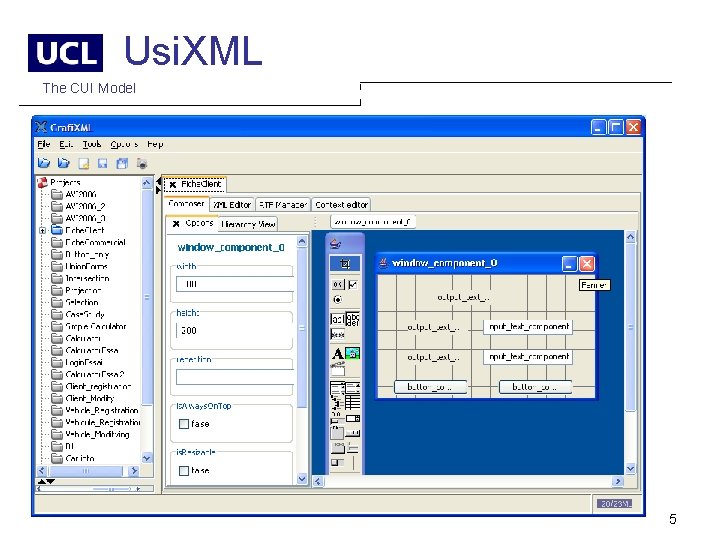
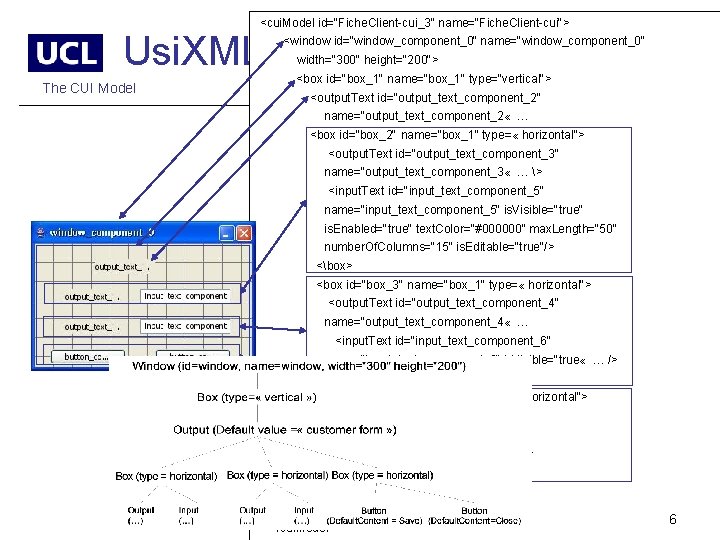
Usi. XML The CUI Model 5
<cui. Model id="Fiche. Client-cui_3" name="Fiche. Client-cui"> Usi. XML <window id="window_component_0" name="window_component_0" width="300" height="200"> The CUI Model <box id="box_1" name="box_1" type="vertical"> <output. Text id="output_text_component_2" name="output_text_component_2 « … <box id="box_2" name="box_1" type= « horizontal"> <output. Text id="output_text_component_3" name="output_text_component_3 « … > <input. Text id="input_text_component_5" name="input_text_component_5" is. Visible="true" is. Enabled="true" text. Color="#000000" max. Length="50" number. Of. Columns="15" is. Editable="true"/> <box> <box id="box_3" name="box_1" type= « horizontal"> <output. Text id="output_text_component_4" name="output_text_component_4 « … <input. Text id="input_text_component_6" name="input_text_component_6" is. Visible="true « … /> <box> <box id="box_4" name="box_1" type= « horizontal"> <button id="button_component_7" name="button_component_7"/> <button id="button_component_8" …/> <box> </window> </cui. Model> 6
Proposition Choice of a formalism • TAX: Tree Algebra for XML [Jagadish, 2001] – A data tree is a rooted, ordered tree, such that each node carries data (its label) in the form of a set of attribute-value pairs. – Each node has a special, single valued attribute called tag whose value indicates the type of element. – A node may have a content attribute representing its atomic value. – Each node has a virtual attribute called pedigree drawn from an ordered domain. The pedigree carries the history of “where it came from”. Pedigree plays a central role in grouping, sorting and duplicate elimination. • Operators are adapted to Databases => Adaptation to HCI 7
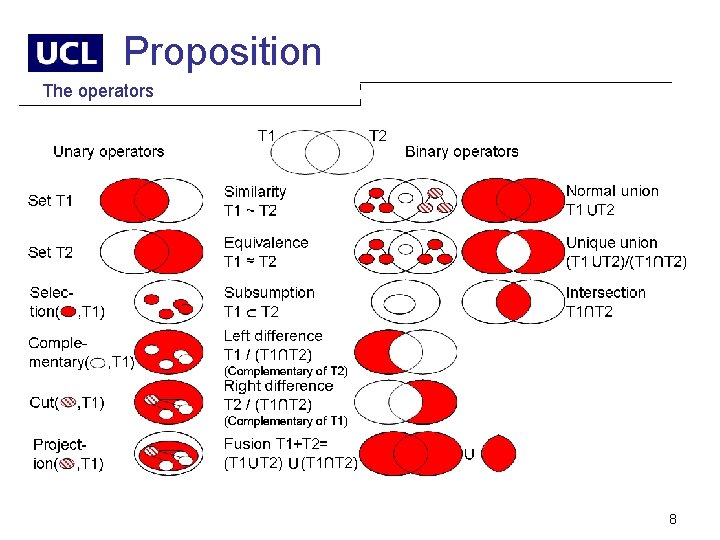
Proposition The operators 8
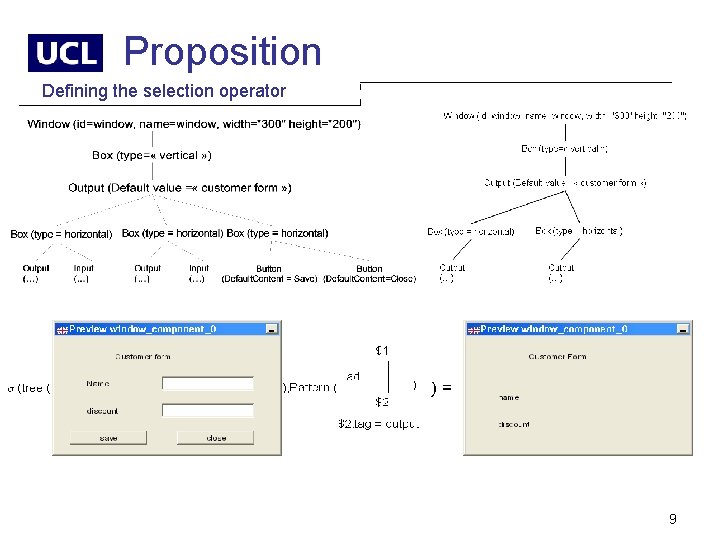
Proposition Defining the selection operator 9
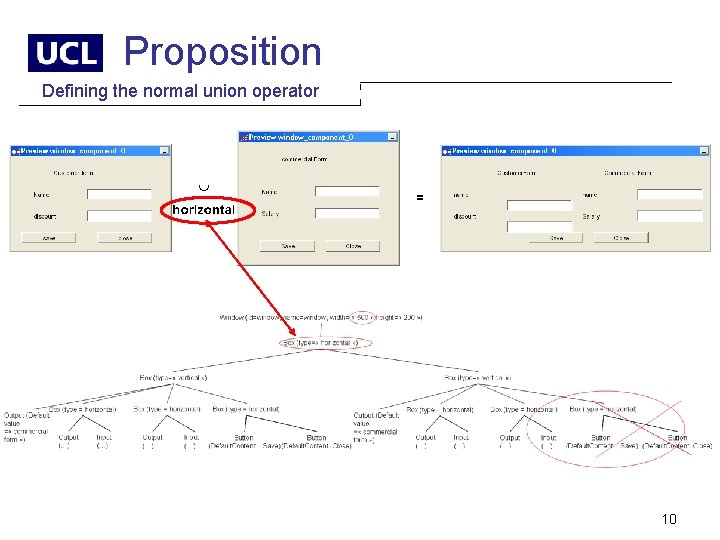
Proposition Defining the normal union operator 10
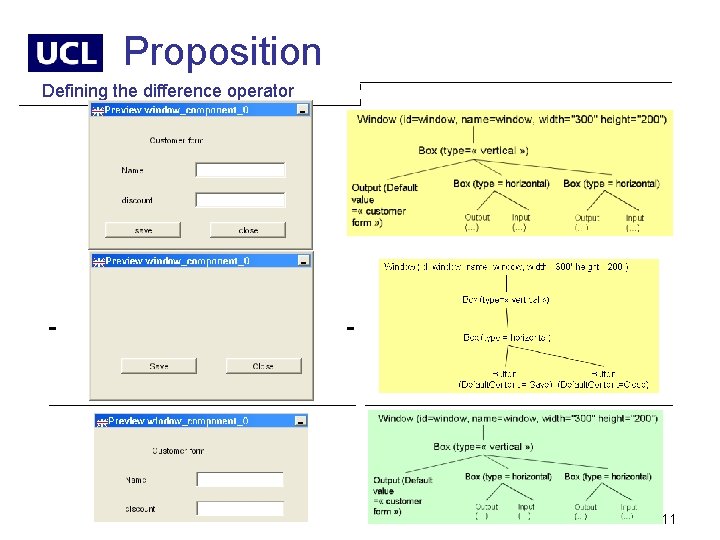
Proposition Defining the difference operator - - 11
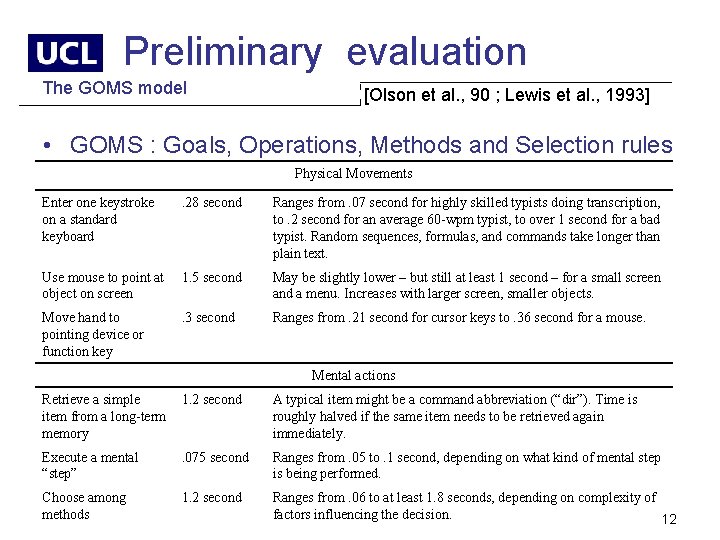
Preliminary evaluation The GOMS model [Olson et al. , 90 ; Lewis et al. , 1993] • GOMS : Goals, Operations, Methods and Selection rules Physical Movements Enter one keystroke on a standard keyboard . 28 second Ranges from. 07 second for highly skilled typists doing transcription, to. 2 second for an average 60 -wpm typist, to over 1 second for a bad typist. Random sequences, formulas, and commands take longer than plain text. Use mouse to point at object on screen 1. 5 second May be slightly lower – but still at least 1 second – for a small screen and a menu. Increases with larger screen, smaller objects. Move hand to pointing device or function key . 3 second Ranges from. 21 second for cursor keys to. 36 second for a mouse. Mental actions Retrieve a simple item from a long-term memory 1. 2 second A typical item might be a command abbreviation (“dir”). Time is roughly halved if the same item needs to be retrieved again immediately. Execute a mental “step” . 075 second Ranges from. 05 to. 1 second, depending on what kind of mental step is being performed. Choose among methods 1. 2 second Ranges from. 06 to at least 1. 8 seconds, depending on complexity of factors influencing the decision. 12
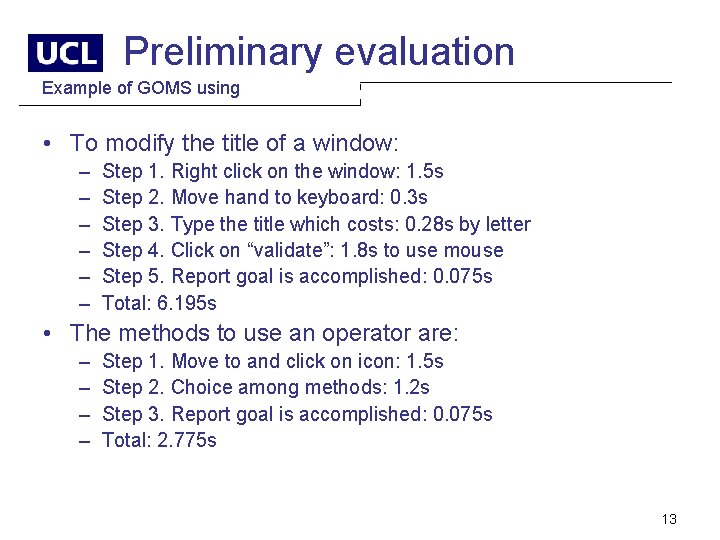
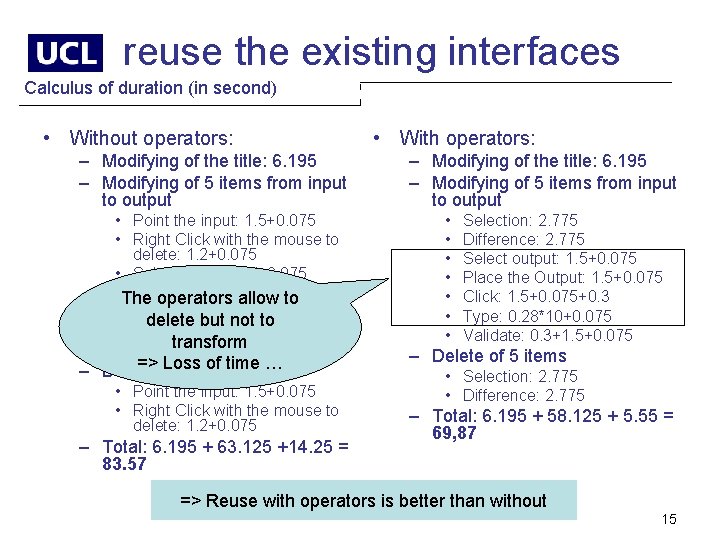
Preliminary evaluation Example of GOMS using • To modify the title of a window: – – – Step 1. Right click on the window: 1. 5 s Step 2. Move hand to keyboard: 0. 3 s Step 3. Type the title which costs: 0. 28 s by letter Step 4. Click on “validate”: 1. 8 s to use mouse Step 5. Report goal is accomplished: 0. 075 s Total: 6. 195 s • The methods to use an operator are: – – Step 1. Move to and click on icon: 1. 5 s Step 2. Choice among methods: 1. 2 s Step 3. Report goal is accomplished: 0. 075 s Total: 2. 775 s 13
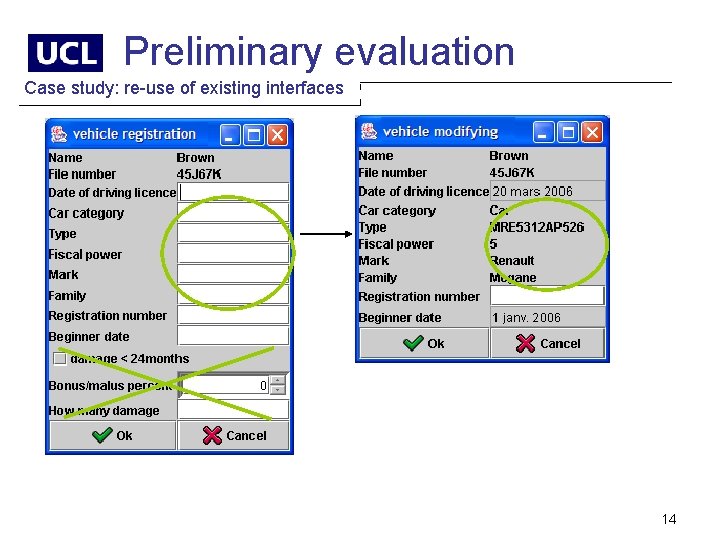
Preliminary evaluation Case study: re-use of existing interfaces 14
reuse the existing interfaces Calculus of duration (in second) • Without operators: – Modifying of the title: 6. 195 – Modifying of 5 items from input to output • Point the input: 1. 5+0. 075 • Right Click with the mouse to delete: 1. 2+0. 075 • Select output: 1. 5+0. 075 • The operators allow to Place the Output: 1. 5+0. 075 • Click: 1. 5+0. 075+0. 3 delete but not to • Type: 0. 28*10+0. 075 transform • Validate: 0. 3+1. 5+0. 075 => Loss of time … – Delete of 5 items • Point the input: 1. 5+0. 075 • Right Click with the mouse to delete: 1. 2+0. 075 – Total: 6. 195 + 63. 125 +14. 25 = 83. 57 • With operators: – Modifying of the title: 6. 195 – Modifying of 5 items from input to output • • Selection: 2. 775 Difference: 2. 775 Select output: 1. 5+0. 075 Place the Output: 1. 5+0. 075 Click: 1. 5+0. 075+0. 3 Type: 0. 28*10+0. 075 Validate: 0. 3+1. 5+0. 075 – Delete of 5 items • Selection: 2. 775 • Difference: 2. 775 – Total: 6. 195 + 58. 125 + 5. 55 = 69, 87 => Reuse with operators is better than without 15
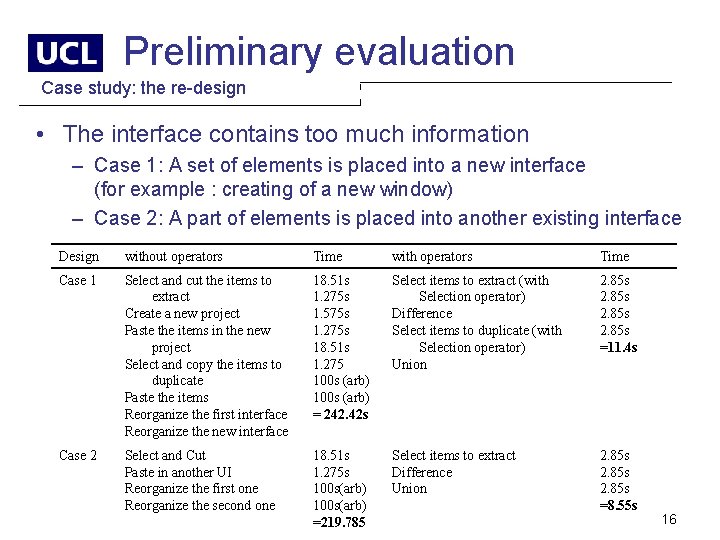
Preliminary evaluation Case study: the re-design • The interface contains too much information – Case 1: A set of elements is placed into a new interface (for example : creating of a new window) – Case 2: A part of elements is placed into another existing interface Design without operators Time with operators Time Case 1 Select and cut the items to extract Create a new project Paste the items in the new project Select and copy the items to duplicate Paste the items Reorganize the first interface Reorganize the new interface 18. 51 s 1. 275 s 1. 575 s 1. 275 s 18. 51 s 1. 275 100 s (arb) = 242. 42 s Select items to extract (with Selection operator) Difference Select items to duplicate (with Selection operator) Union 2. 85 s =11. 4 s Case 2 Select and Cut Paste in another UI Reorganize the first one Reorganize the second one 18. 51 s 1. 275 s 100 s(arb) =219. 785 Select items to extract Difference Union 2. 85 s =8. 55 s 16
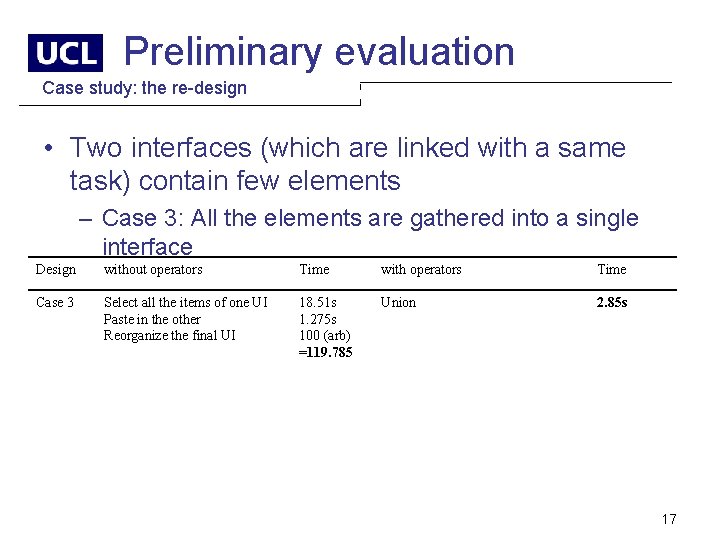
Preliminary evaluation Case study: the re-design • Two interfaces (which are linked with a same task) contain few elements – Case 3: All the elements are gathered into a single interface Design without operators Time with operators Time Case 3 Select all the items of one UI Paste in the other Reorganize the final UI 18. 51 s 1. 275 s 100 (arb) =119. 785 Union 2. 85 s 17
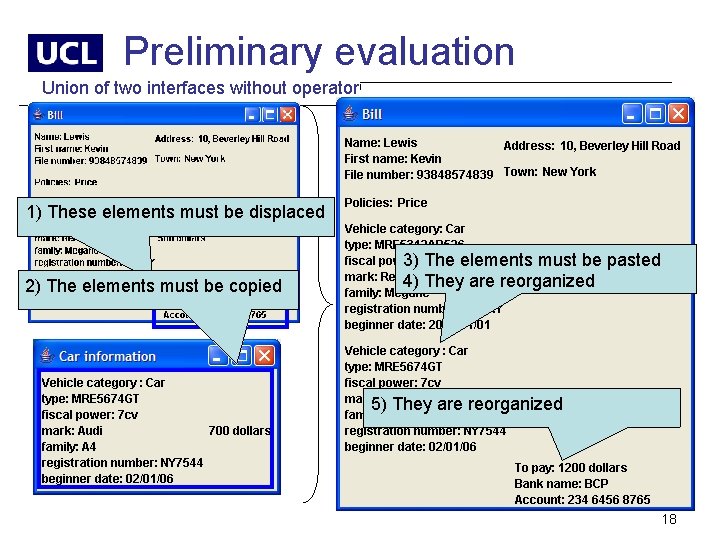
Preliminary evaluation Union of two interfaces without operator 1) These elements must be displaced 2) The elements must be copied 3) The elements must be pasted 4) They are reorganized 5) They are reorganized 18
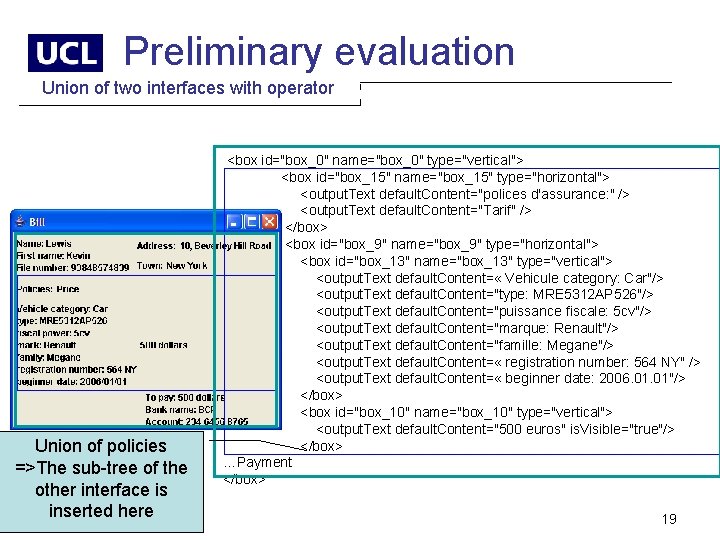
Preliminary evaluation Union of two interfaces with operator Union of policies =>The sub-tree of the other interface is inserted here <box id="box_0" name="box_0" type="vertical"> <box id="box_15" name="box_15" type="horizontal"> <output. Text default. Content="polices d'assurance: " /> <output. Text default. Content="Tarif" /> </box> <box id="box_9" name="box_9" type="horizontal"> <box id="box_13" name="box_13" type="vertical"> <output. Text default. Content= « Vehicule category: Car"/> <output. Text default. Content="type: MRE 5312 AP 526"/> <output. Text default. Content="puissance fiscale: 5 cv"/> <output. Text default. Content="marque: Renault"/> <output. Text default. Content="famille: Megane"/> <output. Text default. Content= « registration number: 564 NY" /> <output. Text default. Content= « beginner date: 2006. 01"/> </box> <box id="box_10" name="box_10" type="vertical"> <output. Text default. Content="500 euros" is. Visible="true"/> </box> …Payment </box> 19
Conclusion et future work • Tree algebra is an asset to manipulate a UI when the work granularity is – at a upper level of a coherent set of elements (i. e. at the container level) – at the leaf level if the set of leaf elements is not logically linked together (e. g. all the buttons…) • But the tree algebra is not adapted to – manipulate leaf elements that are independent – transform elements • So the operators can be separated into two groups coming from: – the tree algebra to manipulate the structures and set of elements – the set theory to manipulate the leaf elements (future work) • The composi. XML plug-in will be added to Grafi. XML: http: //www. usixml. org/ 20
Thank you for your attention! Sophie Lepreux, Jean Vanderdonckt http: //www. usixml. org/ {lepreux, vanderdonckt}@isys. ucl. ac. be Sophie. lepreux@univ-valenciennes. fr 21