
TopDown Network Design Chapter Four Characterizing Network Traffic


- Slides: 40
Top-Down Network Design Chapter Four Characterizing Network Traffic Oppenheimer
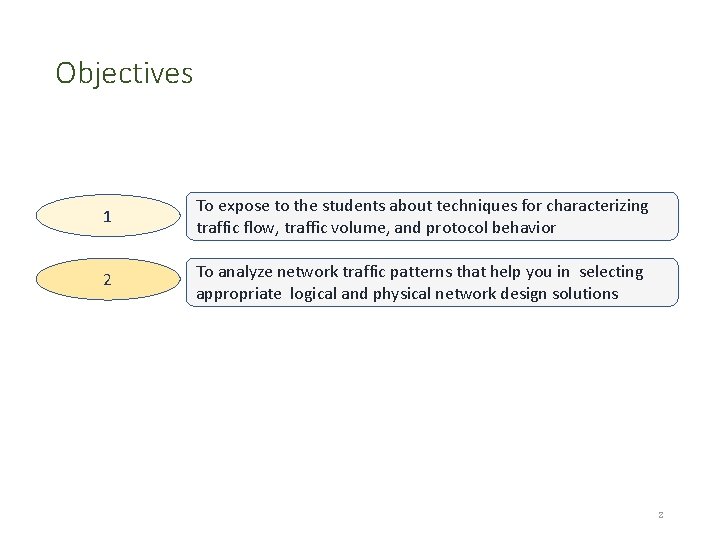
Objectives 1 To expose to the students about techniques for characterizing traffic flow, traffic volume, and protocol behavior 2 To analyze network traffic patterns that help you in selecting appropriate logical and physical network design solutions 2
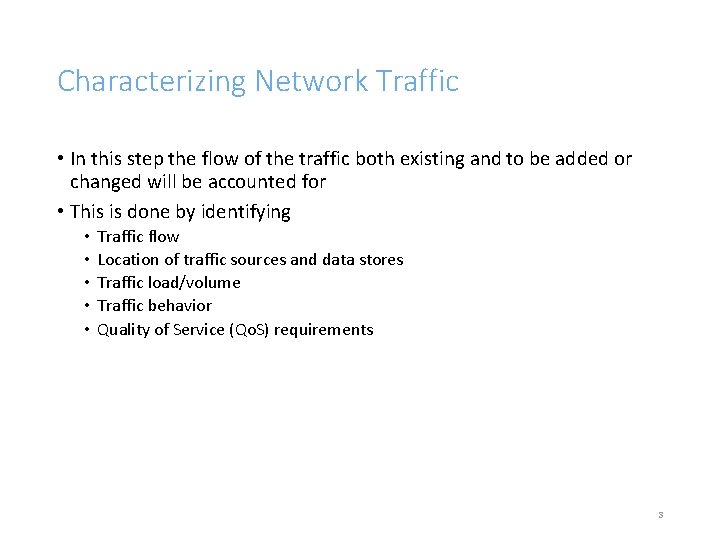
Characterizing Network Traffic • In this step the flow of the traffic both existing and to be added or changed will be accounted for • This is done by identifying • • • Traffic flow Location of traffic sources and data stores Traffic load/volume Traffic behavior Quality of Service (Qo. S) requirements 3
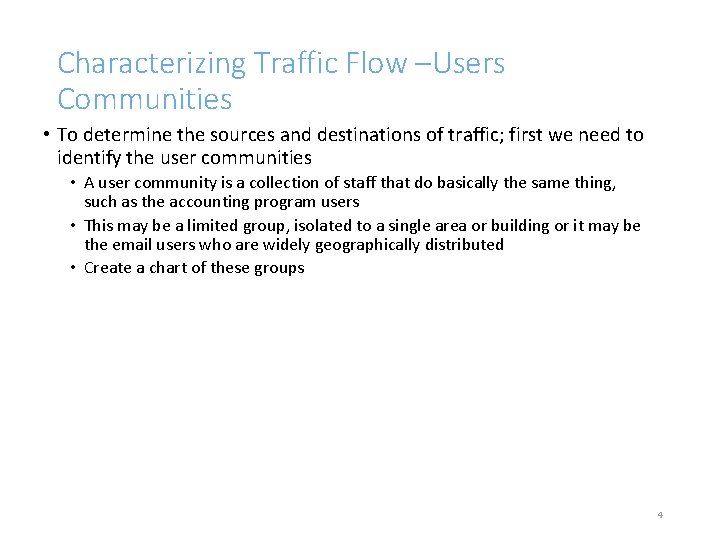
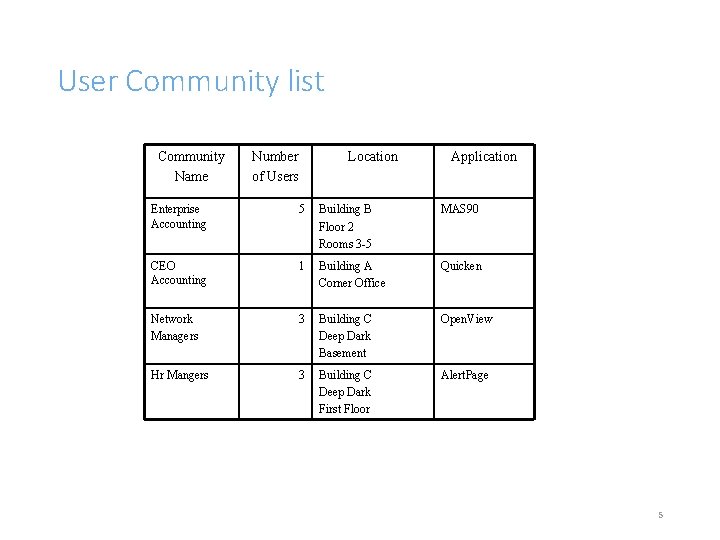
Characterizing Traffic Flow –Users Communities • To determine the sources and destinations of traffic; first we need to identify the user communities • A user community is a collection of staff that do basically the same thing, such as the accounting program users • This may be a limited group, isolated to a single area or building or it may be the email users who are widely geographically distributed • Create a chart of these groups 4
User Community list Community Name Number of Users Location Application Enterprise Accounting 5 Building B Floor 2 Rooms 3 -5 MAS 90 CEO Accounting 1 Building A Corner Office Quicken Network Managers 3 Building C Deep Dark Basement Open. View Hr Mangers 3 Building C Deep Dark First Floor Alert. Page 5
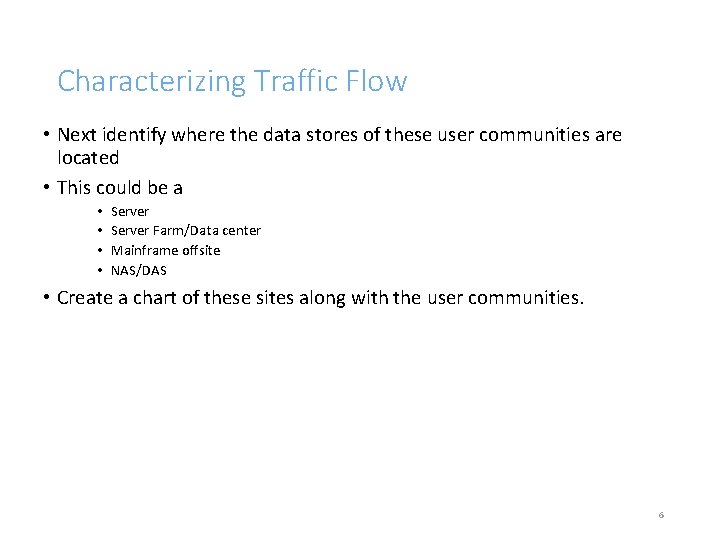
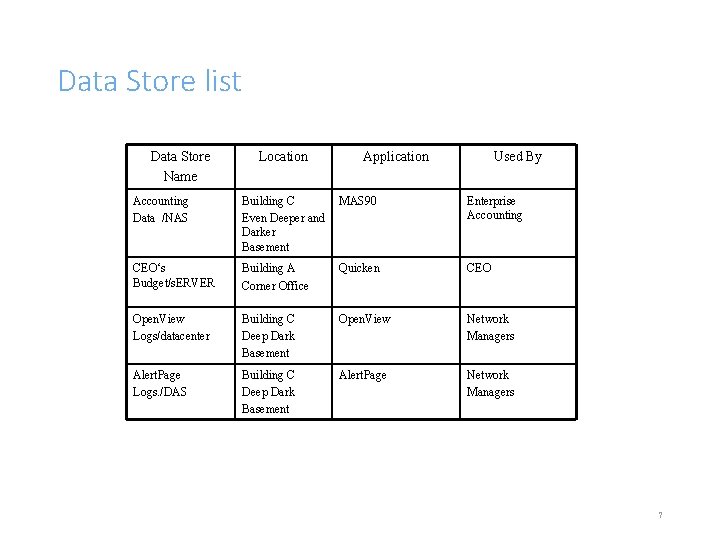
Characterizing Traffic Flow • Next identify where the data stores of these user communities are located • This could be a • • Server Farm/Data center Mainframe offsite NAS/DAS • Create a chart of these sites along with the user communities. 6
Data Store list Data Store Name Location Application Used By Accounting Data /NAS Building C Even Deeper and Darker Basement MAS 90 Enterprise Accounting CEO‘s Budget/s. ERVER Building A Corner Office Quicken CEO Open. View Logs/datacenter Building C Deep Dark Basement Open. View Network Managers Alert. Page Logs. /DAS Building C Deep Dark Basement Alert. Page Network Managers 7
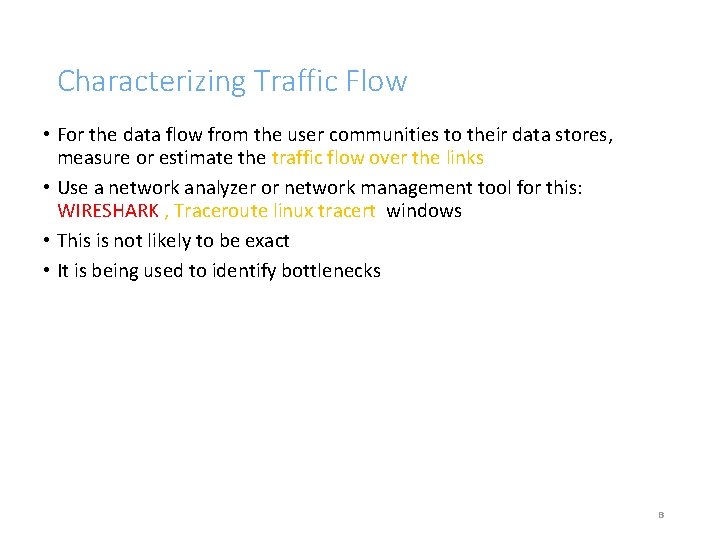
Characterizing Traffic Flow • For the data flow from the user communities to their data stores, measure or estimate the traffic flow over the links • Use a network analyzer or network management tool for this: WIRESHARK , Traceroute linux tracert windows • This is not likely to be exact • It is being used to identify bottlenecks 8
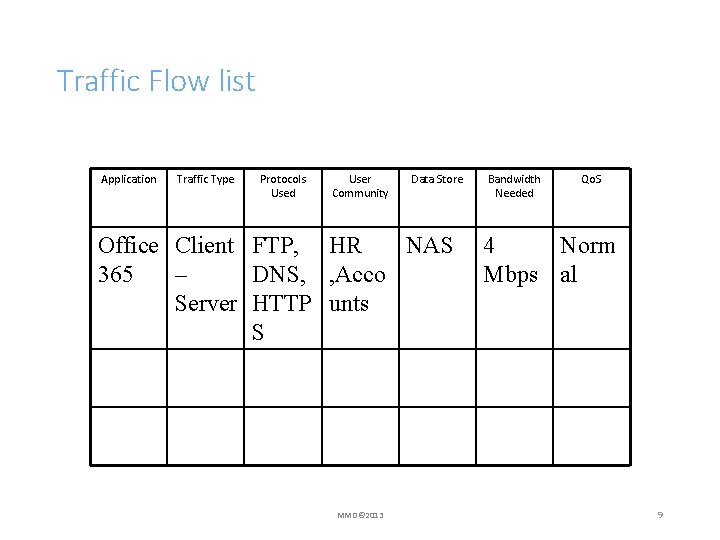
Traffic Flow list Application Traffic Type Protocols Used User Community Data Store Office Client FTP, HR NAS 365 – DNS, , Acco Server HTTP unts S MMD© 2013 Bandwidth Needed Qo. S 4 Norm Mbps al 9
Characterizing Traffic Flow • The type of traffic is important • This will influence the type of link required • At this stage the Qo. S is important as well since it will affect the type of link • Only some link types can support Qo. S • Again a chart is used to collect this information 10
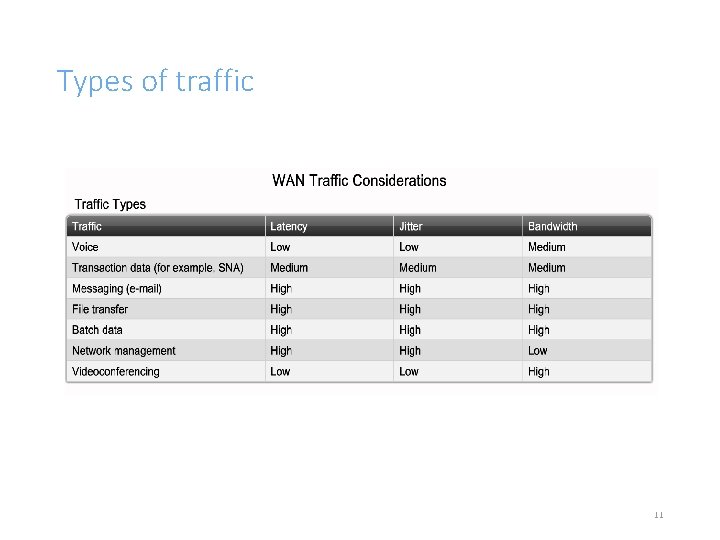
Types of traffic 11
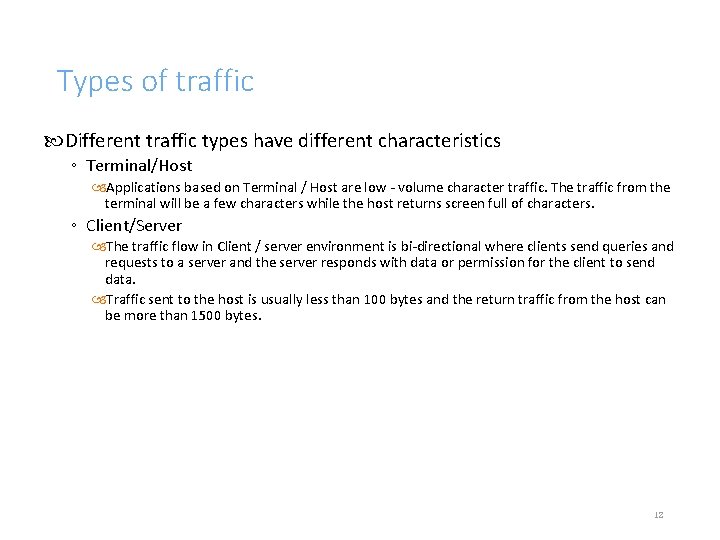
Types of traffic Different traffic types have different characteristics ◦ Terminal/Host Applications based on Terminal / Host are low - volume character traffic. The traffic from the terminal will be a few characters while the host returns screen full of characters. ◦ Client/Server The traffic flow in Client / server environment is bi-directional where clients send queries and requests to a server and the server responds with data or permission for the client to send data. Traffic sent to the host is usually less than 100 bytes and the return traffic from the host can be more than 1500 bytes. 12
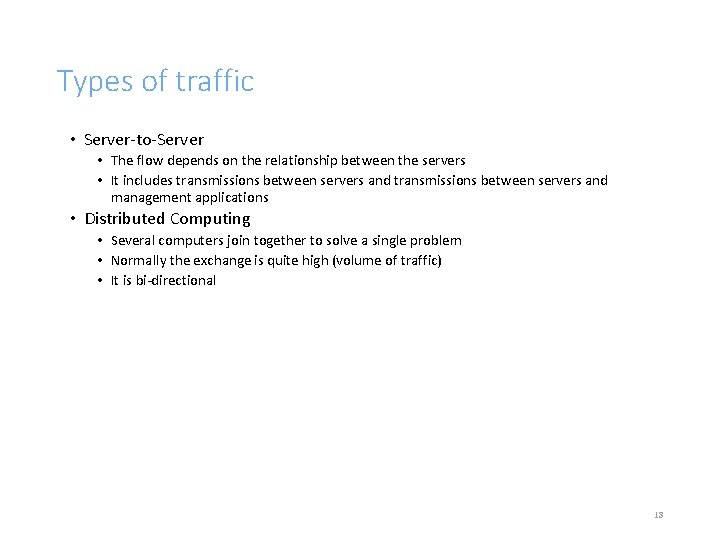
Types of traffic • Server-to-Server • The flow depends on the relationship between the servers • It includes transmissions between servers and management applications • Distributed Computing • Several computers join together to solve a single problem • Normally the exchange is quite high (volume of traffic) • It is bi-directional 13
Types of traffic • Peer-to-peer • The flow is usually bi-directional. Communicating entities transmit approximately equal amounts of information. • Thin-client: • It is a computer or a computer program which depends heavily on some other computer (its server) to fulfill its traditional computational roles. 14
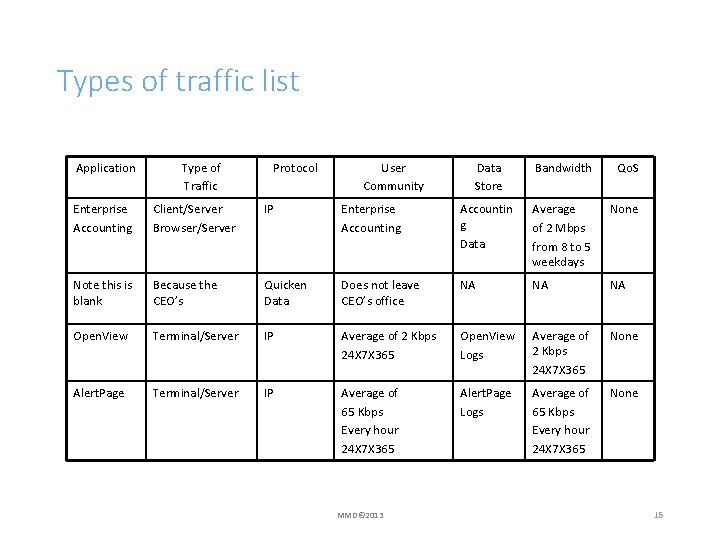
Types of traffic list Application Type of Traffic Protocol User Community Data Store Bandwidth Qo. S Enterprise Accounting Client/Server Browser/Server IP Enterprise Accounting Accountin g Data Average of 2 Mbps from 8 to 5 weekdays None Note this is blank Because the CEO’s Quicken Data Does not leave CEO’s office NA NA NA Open. View Terminal/Server IP Average of 2 Kbps 24 X 7 X 365 Open. View Logs Average of 2 Kbps 24 X 7 X 365 None Alert. Page Terminal/Server IP Average of 65 Kbps Every hour 24 X 7 X 365 Alert. Page Logs Average of 65 Kbps Every hour 24 X 7 X 365 None MMD© 2013 15
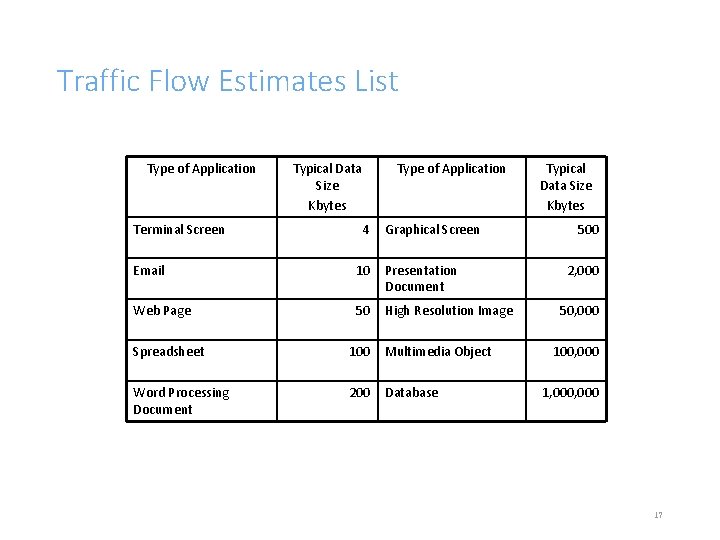
Types of Traffic • A quick estimate of traffic flow can be made by using the following table • This table shows the average flows for the different types of data • In many cases, especially when tools such as a base-lining tool or protocol analyzer are not available, this is the best that can be done 16
Traffic Flow Estimates List Type of Application Terminal Screen Typical Data Size Kbytes Type of Application 4 Graphical Screen Email 10 Presentation Document Web Page 50 High Resolution Image Spreadsheet 100 Multimedia Object Word Processing Document 200 Database Typical Data Size Kbytes 500 2, 000 50, 000 100, 000 1, 000 17
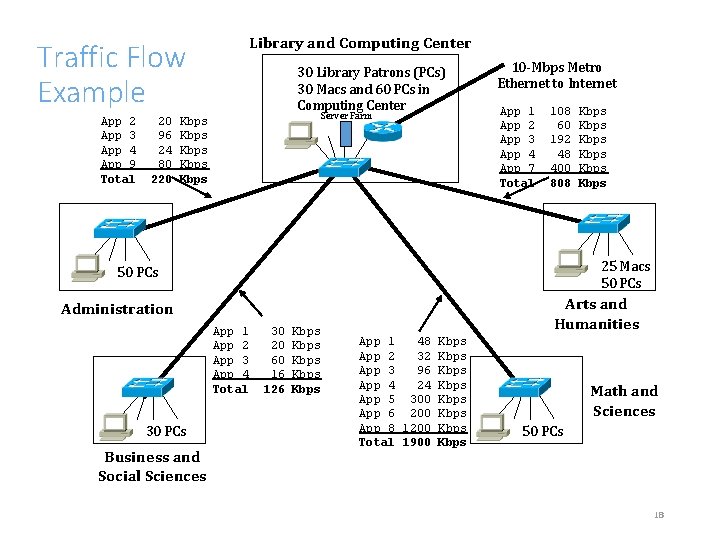
Traffic Flow Example App 2 App 3 App 4 App 9 Total 20 96 24 80 220 Library and Computing Center 30 Library Patrons (PCs) 30 Macs and 60 PCs in Computing Center Server Farm Kbps Kbps 10 -Mbps Metro Ethernet to Internet App 1 App 2 App 3 App 4 App 7 Total 108 60 192 48 400 808 25 Macs 50 PCs Arts and Humanities Administration App 1 App 2 App 3 App 4 Total 30 PCs Business and Social Sciences Kbps Kbps 30 20 60 16 126 Kbps Kbps App 1 48 Kbps App 2 32 Kbps App 3 96 Kbps App 4 24 Kbps App 5 300 Kbps App 6 200 Kbps App 8 1200 Kbps Total 1900 Kbps Math and Sciences 50 PCs 18
Characterizing Traffic Load Purpose: • To avoid a design with any critical bottleneck. • To avoid bottleneck: • Research for application usage patterns, idle times between packets and sessions, frame sizes, and other traffic behavioral patterns for application and system approach. • Give large amounts of bandwidth at a problem. • LAN bandwidth is extremely cheap, Gigabit Ethernet also most organizations can afford. 19
Characterizing Traffic Load: Steps 1. Calculating Theoretical Traffic Load ◦ To calculate whether capacity is sufficient, you should know: ◦ The number of stations ◦ The average time that a station is idle between sending frames ◦ The time required to transmit a message once medium access is gained 2. Documenting Application-Usage Patterns ◦ Few data obtained during characterizing traffic flow user communities, number of users in communities, and the applications that users employ. ◦ Additional information required: ◦ The frequency of application sessions (number of session per day, week, month, or whatever time period is appropriate. ◦ The length of an average application session ◦ The number of simultaneous users of an application 20
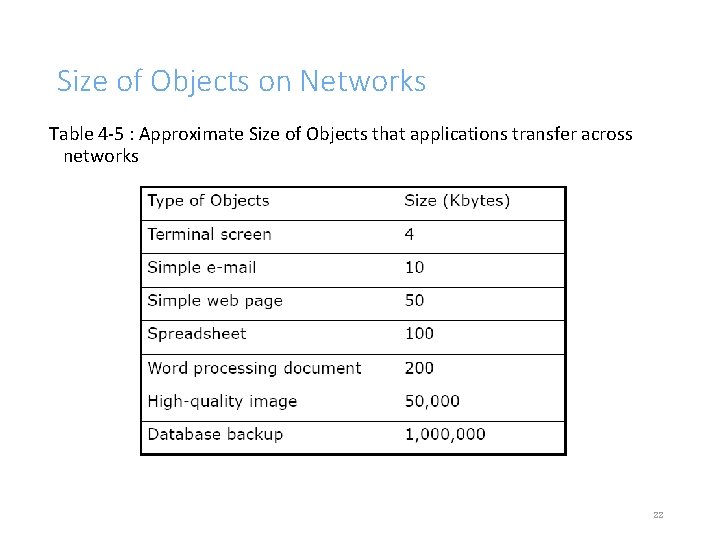
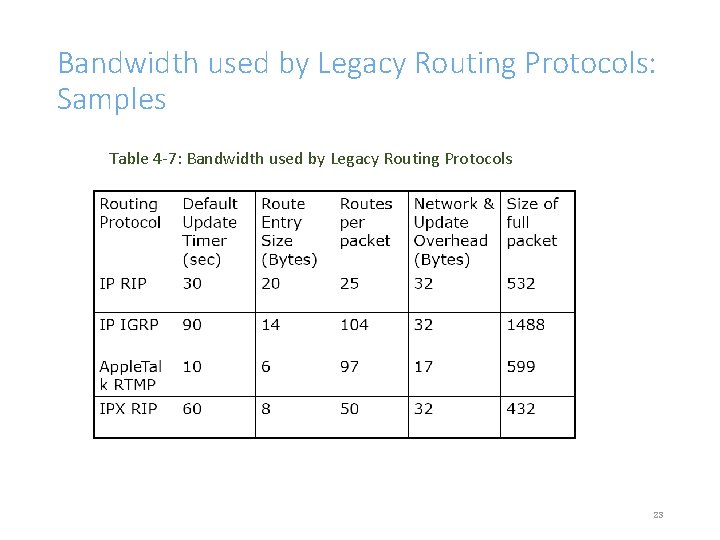
Characterizing Traffic Load: Steps 3. Refining Estimates of Traffic Load Caused by Applications • Need to research the size of data objects sent by applications, the overhead caused by protocol layers, and any additional load caused by application initialization. • Table 4 -5 shows some estimates for object sizes 4. Estimating Traffic Load Caused by Routing Protocols • At this point of designing process, you might not have selected routing protocols for new network but you should have identified routing protocols running on the existing network. • Use table 4 -7 as guidance that shows the amount of legacy distancevector routing protocols. 21
Size of Objects on Networks Table 4 -5 : Approximate Size of Objects that applications transfer across networks 22
Bandwidth used by Legacy Routing Protocols: Samples Table 4 -7: Bandwidth used by Legacy Routing Protocols 23
Measuring Traffic Flow and Load • How do you actually determine what size data lines are required • This is often difficult and inexact • Formulas are available as discussed below, but often the best way is to send the normal files over a controlled circuit and time it MMD© 2013 24
Measuring Traffic Flow and Load • The file isn't going to cross the network in one big monolithic package • It will be divided into packets • Each packet will have a size, hopefully as big as 1500 bytes, but that depends on the protocol, configuration settings, application, operating system, and so on 25
Measuring Traffic Flow and Load • Each 1500 byte packet will be encapsulated in the Frame Relay header and followed by the 2 -byte Frame Check Sequence • Also, Frame Relay packets are encapsulated in a 1 -byte Flag field at the beginning and end • You have to take those bytes into account for each packet • That 1500 bytes won't all be data from the file, however 26
Measuring Traffic Flow and Load • Some of the bytes will be used by • A network-layer header • A transport-layer header • One, or more upper-layer headers • The packets will undoubtedly be acknowledged at one or more layers • Those ACKs use bytes and time 27
Measuring Traffic Flow and Load • Will you be using a protocol that allows for a sliding window and can send many packets without waiting for an ACK until the send window slides closed • If so, how big is the send window by default • This usually depends on the recipient's receive window • Does the window tend to slide closed a lot • Or will you use a ping pong protocol that requires an ACK for each packet 28
Measuring Traffic Flow and Load • Does the recipient tend to store the data in RAM and ACK quickly or does it write to disk, a slow mechanical process, and then ACK • This may depend on the state of the receive window, the amount of RAM available, and so forth • What sort of negotiation happens before the data can be sent • Any transport or session layer establishment, such as a TCP 3 -way handshake 29
Measuring Traffic Flow and Load • How about at the upper layers • Before file bytes are sent, are there negotiations and packets related to file size, file name, file access rights • Is a user name and password sent • Are these challenged with some sort of security feature, adding bytes and time to your calculation 30
Measuring Traffic Flow and Load • • • Are you using any sort of encryption or compression Is this a VPN or IPSec or other tunnel that adds even more bytes to each packet What about the error rate Do some packets get dropped due to an error and have to be retransmitted That adds bytes and time 31
Measuring Traffic Flow and Load • And how about queuing delay at the local routers and any Frame Relay switches inside the provider's network • And processing delay • How quickly does the recipient process the packets and send ACKs • What is the turnaround time at the sender • How quickly does it prepare and output the next set of packets after an ACK is received 32
Measuring Traffic Flow and Load • So, in summary, a formula may be mathematically correct • But if it is not based on how data is sent on a network, then it will not produce accurate answers • So you need to get answers about which protocols and application are sending this data 33
Characterizing Traffic Behavior 1. Broadcast/Multicast Behavior Broadcasts ◦ Broadcast frame = frame that goes to all network stations on a LAN ◦ All 1 s in binary data-link layer destination address ◦ FF: FF: FF: FF ◦ Doesn’t necessarily use huge amounts of bandwidth ◦ But does disturb every CPU in the broadcast domain Multicasts ◦ Multicast frame = frame that goes to a subset of stations. ◦ First bit sent is a one ◦ 01: 00: 0 C: CC: CC (Cisco Discovery Protocol) ◦ Should just disturb NICs that have registered to receive it ◦ Requires multicast routing protocol on internetworks 34
Characterizing Traffic Behavior 2. Network Efficiency • Efficiency refers to whether applications and protocols use bandwidth effectively. Efficiency is affected by: • • Frame size Protocol interaction (refer to page 114 of text book for examples) Windowing and flow control Error-recovery mechanisms 35
Characterizing Qo. S Requirements Besides information about load, you also need to know if the requirements is flexible or inflexible. Two techniques in analyzing Qo. S requirements: (you might need to read your text pg 119 – 126) 1. ATM service specifications Constant bit rate (CBR) Realtime variable bit rate (rt-VBR) Non-realtime variable bit rate (nrt-VBR) Unspecified bit rate (UBR) Available bit rate (ABR) Guaranteed frame rate (GFR) 36
Qo. S Requirements 2. IETF integrated services working group specifications ◦ Controlled load service Provides client data flow with a Qo. S closely approximating the Qo. S that same flow would receive on an unloaded network ◦ Guaranteed service Provides firm (mathematically provable) bounds on end-to-end packet-queuing delays 37
Qo. S Requirements • IETF differentiated services working group specifications • RFC 2475 • IP packets can be marked with a differentiated services codepoint (DSCP) to influence queuing and packet-dropping decisions for IP datagrams on an output interface of a router • Grade of Service Requirements for Voice Applications • Documenting Qo. S Requirements • Work closely with your customer and fill in the Qo. S Requirements column of table 4 -4. MMD© 2013 38
Summary • Continue to use a systematic, top-down approach • Don’t select products until you understand network traffic in terms of: • • Flow Load Behavior Qo. S requirements – most technical part 39
40