
Tool Visual agile planning board Tool Visual agile

Tool: Visual agile planning board
Tool: Visual agile planning board Purpose and yield • The visual planning board must ensure: • that everyone in the project has the same overview and thus creates commitment and shared focus • that everyone has the opportunity to participate with input and knowledge • establishment of short feedback loop so that new knowledge quickly comes into play in the project • to support the facilitation of short follow-up meetings in the project team When is it used in the project? • The board is used for the daily work planning in the project team or work groups • The planning is based on the overall milestone plan that some may call the master plan • The team is planning the work of the week standing by the planning board • Every morning, a short follow-up meeting is carried out by the plan Pitfalls and restrictions • The planning board should be of such a size that the team can actually stand by the board and everyone can see and participate. • Using the board requires discipline. Everyone must be present during the planning work and at the short morning meetings. • If the project participants are not placed together, or very close to the board, it is difficult to use the board as intended. • For the planning to work, the participants must be allocated more than 50% to the task during the planning period. • Project owner or the overall project manager must invest time in a weekly meeting concerning result follow-up with the team by the board. • If the described approach is not used the board has no effect Who should participate? • The project manager or team leader plans the work of the week together with the team. • Every morning a follow-up meeting is carried out in the project team. The meeting is facilitated by the project manager or team leader. • When the week is over, the result of the week is assessed and next week is planned. The team, project manager and possibly team leader participate together with project owner or the general project manager.
Approach How to do • The planning board is structured in three main sections. The left side describes the target group and the project's objective, the actual work plan for the coming week is in the middle and to the right we find the stakeholder and risk analysis. • The planning boards are available in two formats: Poster format, standard 4: 3. Poster format, widescreen 16: 9 The left side describes the target group and the project objectives • The left-hand column of the planning board represents the project description in keywords, which contains: • The project name and the list of participants in the project team or work group concerned • The target group for the project and the key stakeholders • The purpose of the project and the desired impacts • The success criteria that the project must achieve • Project deliverables • The board also exists in a variant that contains a description of the necessary behavioral changes The middle part is the plan • The plan is in the middle of the board. It consists of a line per employee and columns for the work of the day or week, depending on the time frame of this board. The deliverables of the work during the planning period or the sprint is defined in the overall milestone plan. • The plan is drawn up by the team, where the individual employee notes their own work per day on post-it notes. It may be a good idea to define that the activities should be broken down in enough detail. So much that they can last no more than one day or half a day. This means that there must be one or two post-it notes per day per participant. • A brief meeting is held daily as a pit stop in the project group. Everyone has the opportunity to come up with their concerns and ideas for solutions. The right side contains the stakeholder and risk analysis • In the right column the stakeholder and risk analyses are described. There is also room to put post-it notes with outstanding tasks that have not yet been planned. At the bottom there is a field where various activities can be assigned to the individual project participants before they are put into the plan. • If a project participant thinks of deficiencies or discovers a new risk, he or she can immediately write it on a post-it note and put it in the field: Activities, who does what and when? This new task will then be assessed by the entire team the next morning.
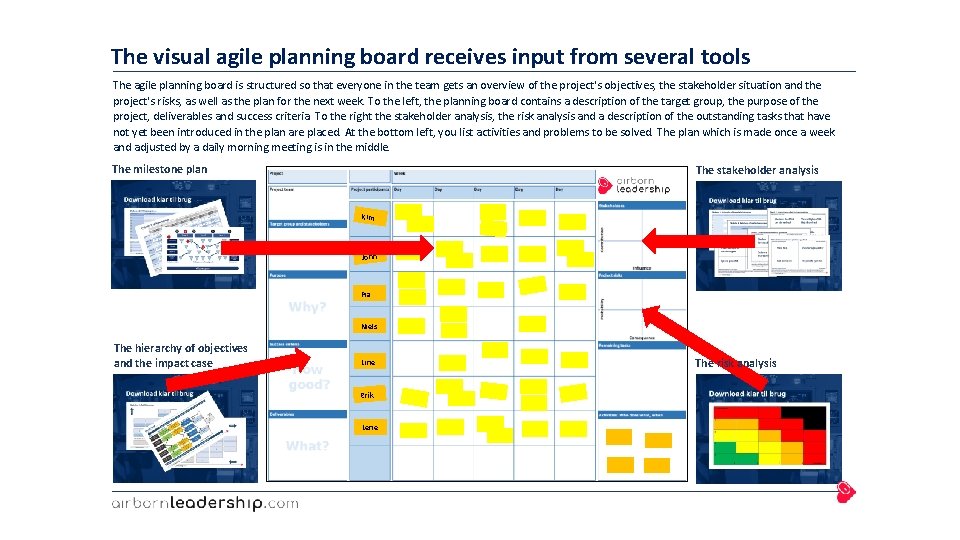
The visual agile planning board receives input from several tools The agile planning board is structured so that everyone in the team gets an overview of the project's objectives, the stakeholder situation and the project's risks, as well as the plan for the next week. To the left, the planning board contains a description of the target group, the purpose of the project, deliverables and success criteria. To the right the stakeholder analysis, the risk analysis and a description of the outstanding tasks that have not yet been introduced in the plan are placed. At the bottom left, you list activities and problems to be solved. The plan which is made once a week and adjusted by a daily morning meeting is in the middle. The milestone plan The stakeholder analysis Kim John Pia Niels The hierarchy of objectives and the impact case Line Erik Lene The risk analysis
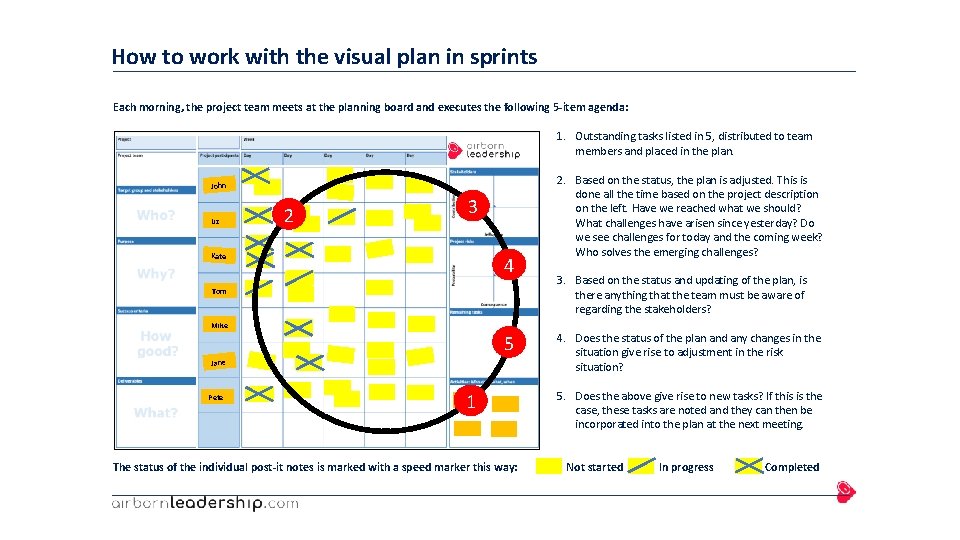
How to work with the visual plan in sprints Each morning, the project team meets at the planning board and executes the following 5 -item agenda: 1. Outstanding tasks listed in 5, distributed to team members and placed in the plan. John Liz 2 3 Kate 4 Tom Mike 5 Jane Pete 1 The status of the individual post-it notes is marked with a speed marker this way: 2. Based on the status, the plan is adjusted. This is done all the time based on the project description on the left. Have we reached what we should? What challenges have arisen since yesterday? Do we see challenges for today and the coming week? Who solves the emerging challenges? 3. Based on the status and updating of the plan, is there anything that the team must be aware of regarding the stakeholders? 4. Does the status of the plan and any changes in the situation give rise to adjustment in the risk situation? 5. Does the above give rise to new tasks? If this is the case, these tasks are noted and they can then be incorporated into the plan at the next meeting. Not started In progress Completed

Template 1: Agile planning board with project description The agile planning board with project description is available in several variants. Partly in different formats adapted to different poster size. Standard 4: 3 and Widescreen 16: 9. The pictures below are in standard format 4: 3. They are also available in a version adapted to the hierarchy of objectives and another customized impact case. 1 2 1. Is the traditional structure similar to the hierarchy of objectives covering purpose, success criteria and deliverables. 2. Is adapted to the impact case, where impacts and success criteria are described. In addition, the objectives of the necessary behavioral changes and deliverables are described.
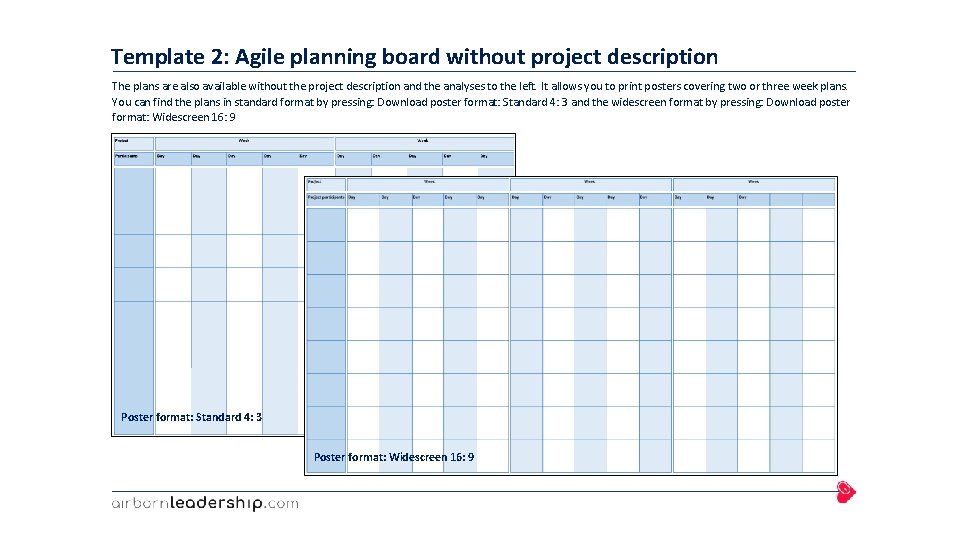
Template 2: Agile planning board without project description The plans are also available without the project description and the analyses to the left. It allows you to print posters covering two or three week plans. You can find the plans in standard format by pressing: Download poster format: Standard 4: 3 and the widescreen format by pressing: Download poster format: Widescreen 16: 9 Poster format: Standard 4: 3 Poster format: Widescreen 16: 9
References and links Connection to other tools • Project organization: The organization will specify who the project team participants are, and who is responsible for the different workstreams. If the project is so large that there are working groups for the individual workstreams, the project description will show who is working in the different groups. It will then be relevant to have a plan board for each working group. • The hierarchy of objectives and impact case: The hierarchy or impact case describes the project's objective, including deliverables, necessary behavioral changes, different impact objectives and success criteria. The tool provides input to the left side of the plan board. • The Milestone Plan: The Milestone Plan defines the order and times of the milestones. The weekly plan describes the team's work up to one of these milestones. The milestone plan provides input to the activities to be planned. • The stakeholder analysis: The analysis describes which stakeholders are important to involve in the development of the project. It will often be some of these target groups that assist in the approval of the milestones, for example employee groups, managers, users and customers. The tool provides input to the right column of the planning board. • Risk analysis: The analysis describes the risks that the project team must take into account in their work. The analysis provides input to the right column of the planning board. Links References • The book: Power in projects, programs and portfolio, 1 st edition, Djoef Publishing 2015 • The Book: Half Double, 2 nd edition, Implement Press 2019

Find other tools and other useful knowledge in theories, videos, books or through our e-learning modules Unleash your potential
- Slides: 9