
Today Naming Names are used to share resources

- Slides: 19
Today: Naming • Names are used to share resources, uniquely identify entities and refer to locations • Need to map from name to the entity it refers to – E. g. , Browser access to www. cnn. com – Use name resolution • Differences in naming in distributed and non-distributed systems – Distributed systems: naming systems is itself distributed • How to name mobile entities? Computer Science CS 677: Distributed OS Lecture 9, page 1
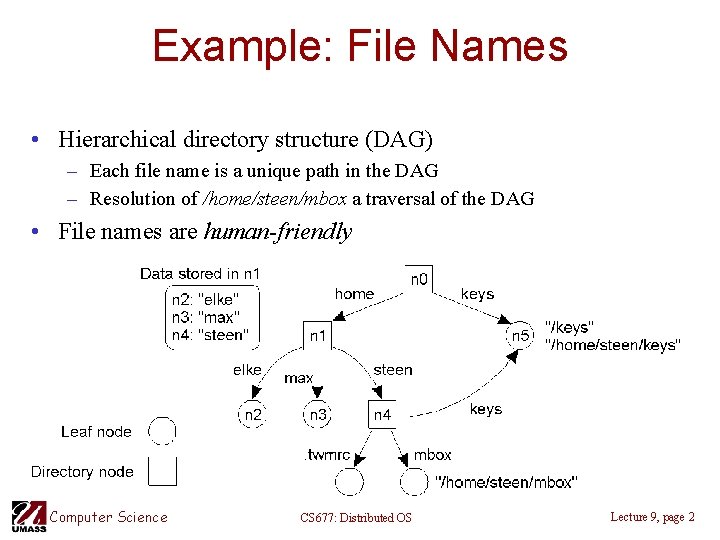
Example: File Names • Hierarchical directory structure (DAG) – Each file name is a unique path in the DAG – Resolution of /home/steen/mbox a traversal of the DAG • File names are human-friendly Computer Science CS 677: Distributed OS Lecture 9, page 2
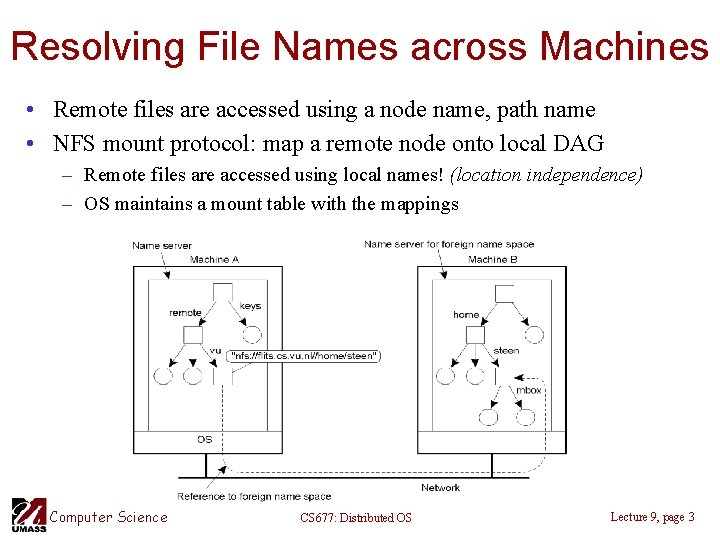
Resolving File Names across Machines • Remote files are accessed using a node name, path name • NFS mount protocol: map a remote node onto local DAG – Remote files are accessed using local names! (location independence) – OS maintains a mount table with the mappings Computer Science CS 677: Distributed OS Lecture 9, page 3
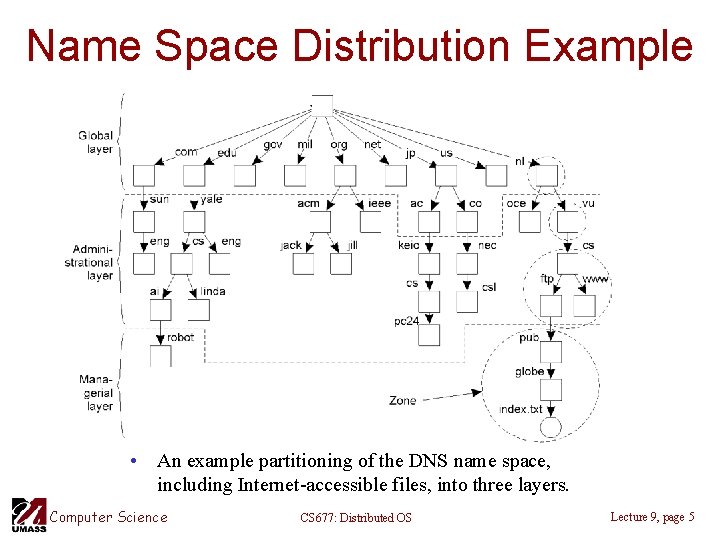
Name Space Distribution • Naming in large distributed systems – System may be global in scope (e. g. , Internet, WWW) • Name space is organized hierarchically – Single root node (like naming files) • Name space is distributed and has three logical layers – Global layer: highest level nodes (root and a few children) • Represent groups of organizations, rare changes – Administrational layer: nodes managed by a single organization • Typically one node per department, infrequent changes – Managerial layer: actual nodes • Frequent changes – Zone: part of the name space managed by a separate name server Computer Science CS 677: Distributed OS Lecture 9, page 4
Name Space Distribution Example • An example partitioning of the DNS name space, including Internet-accessible files, into three layers. Computer Science CS 677: Distributed OS Lecture 9, page 5
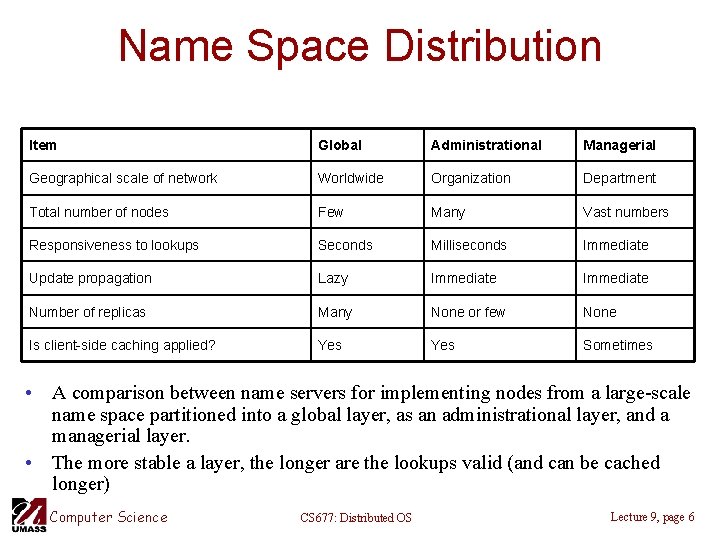
Name Space Distribution Item Global Administrational Managerial Geographical scale of network Worldwide Organization Department Total number of nodes Few Many Vast numbers Responsiveness to lookups Seconds Milliseconds Immediate Update propagation Lazy Immediate Number of replicas Many None or few None Is client-side caching applied? Yes Sometimes • A comparison between name servers for implementing nodes from a large-scale name space partitioned into a global layer, as an administrational layer, and a managerial layer. • The more stable a layer, the longer are the lookups valid (and can be cached longer) Computer Science CS 677: Distributed OS Lecture 9, page 6
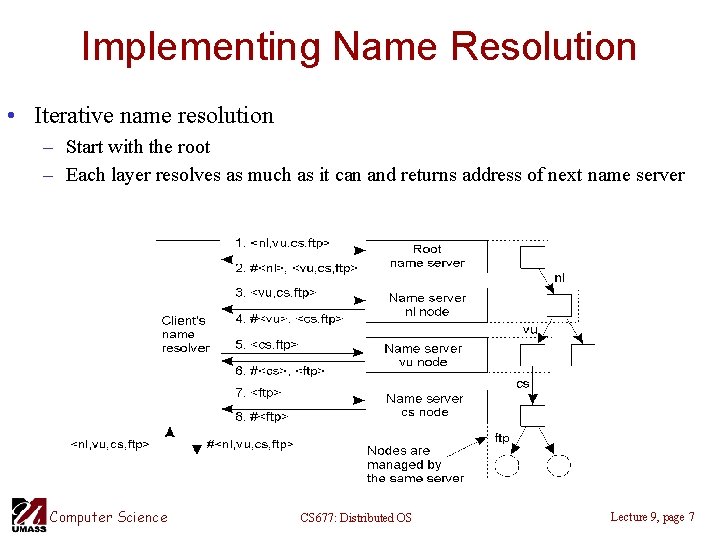
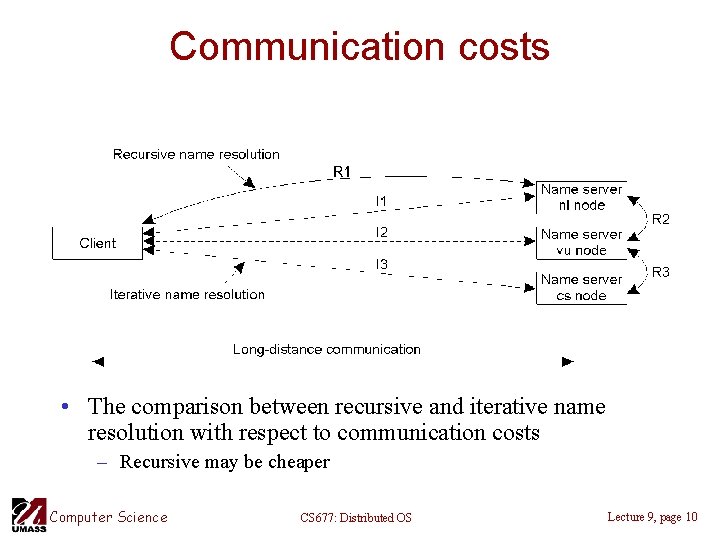
Implementing Name Resolution • Iterative name resolution – Start with the root – Each layer resolves as much as it can and returns address of next name server Computer Science CS 677: Distributed OS Lecture 9, page 7
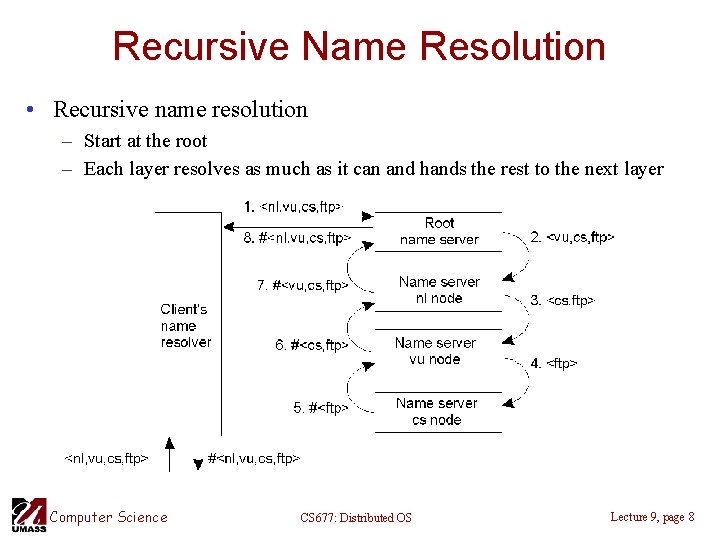
Recursive Name Resolution • Recursive name resolution – Start at the root – Each layer resolves as much as it can and hands the rest to the next layer Computer Science CS 677: Distributed OS Lecture 9, page 8
Which is better? • Recursive name resolution puts heavy burden on gobal layer nodes – Burden is heavy => typically support only iterative resolution • Advantages of recursive name resolution – Caching possible at name servers (gradually learn about others) • Caching improves performance • Use time-to-live values to impose limits on caching duration • Results from higher layers can be cached for longer periods • Iterative: only caching at client possible Computer Science CS 677: Distributed OS Lecture 9, page 9
Communication costs • The comparison between recursive and iterative name resolution with respect to communication costs – Recursive may be cheaper Computer Science CS 677: Distributed OS Lecture 9, page 10
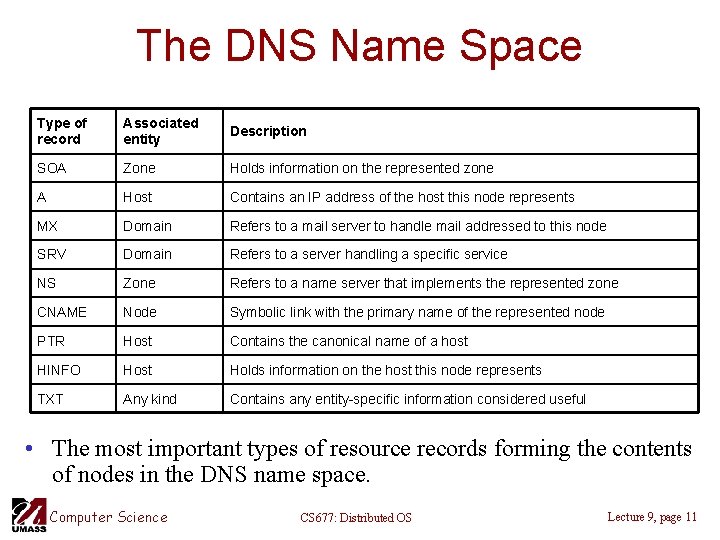
The DNS Name Space Type of record Associated entity Description SOA Zone Holds information on the represented zone A Host Contains an IP address of the host this node represents MX Domain Refers to a mail server to handle mail addressed to this node SRV Domain Refers to a server handling a specific service NS Zone Refers to a name server that implements the represented zone CNAME Node Symbolic link with the primary name of the represented node PTR Host Contains the canonical name of a host HINFO Host Holds information on the host this node represents TXT Any kind Contains any entity-specific information considered useful • The most important types of resource records forming the contents of nodes in the DNS name space. Computer Science CS 677: Distributed OS Lecture 9, page 11
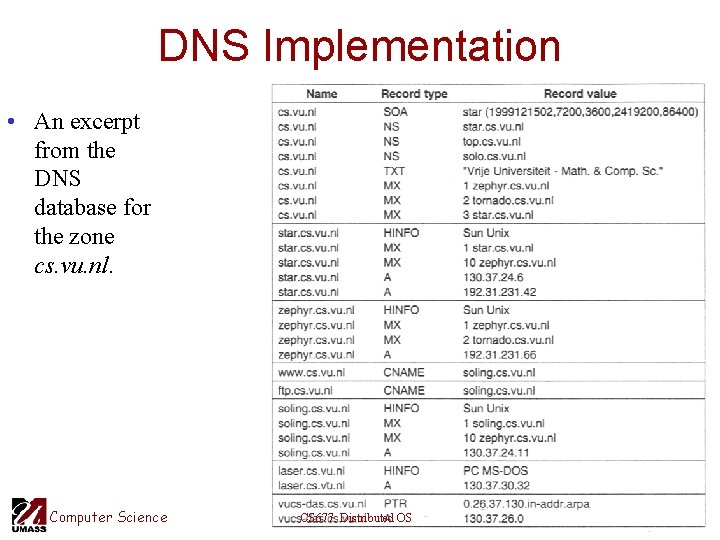
DNS Implementation • An excerpt from the DNS database for the zone cs. vu. nl. Computer Science CS 677: Distributed OS Lecture 9, page 12
X. 500 Directory Service • OSI Standard • Directory service: special kind of naming service where: – Clients can lookup entities based on attributes instead of full name – Real-world example: Yellow pages: look for a plumber Computer Science CS 677: Distributed OS Lecture 9, page 13
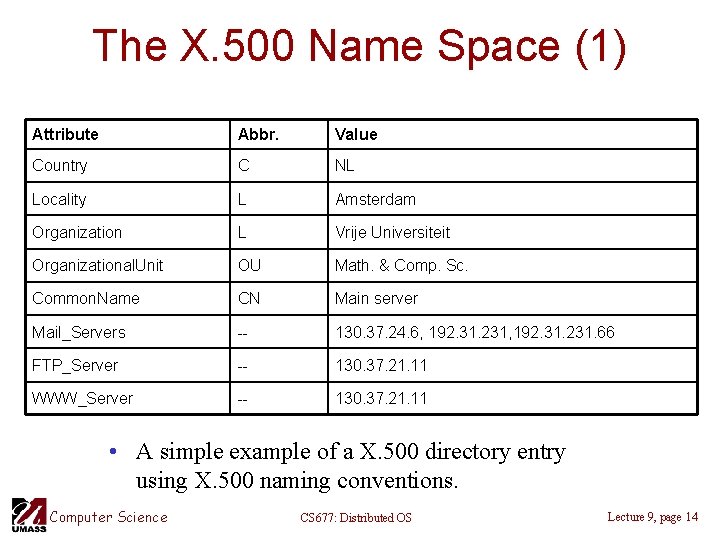
The X. 500 Name Space (1) Attribute Abbr. Value Country C NL Locality L Amsterdam Organization L Vrije Universiteit Organizational. Unit OU Math. & Comp. Sc. Common. Name CN Main server Mail_Servers -- 130. 37. 24. 6, 192. 31. 231. 66 FTP_Server -- 130. 37. 21. 11 WWW_Server -- 130. 37. 21. 11 • A simple example of a X. 500 directory entry using X. 500 naming conventions. Computer Science CS 677: Distributed OS Lecture 9, page 14
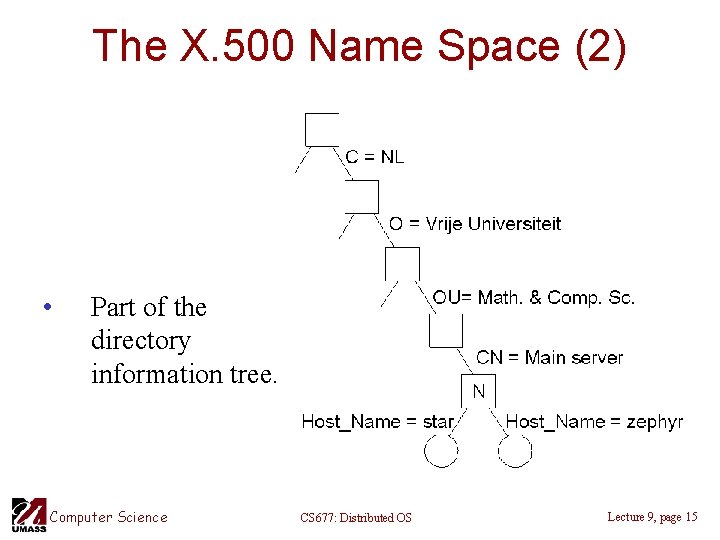
The X. 500 Name Space (2) • Part of the directory information tree. Computer Science CS 677: Distributed OS Lecture 9, page 15
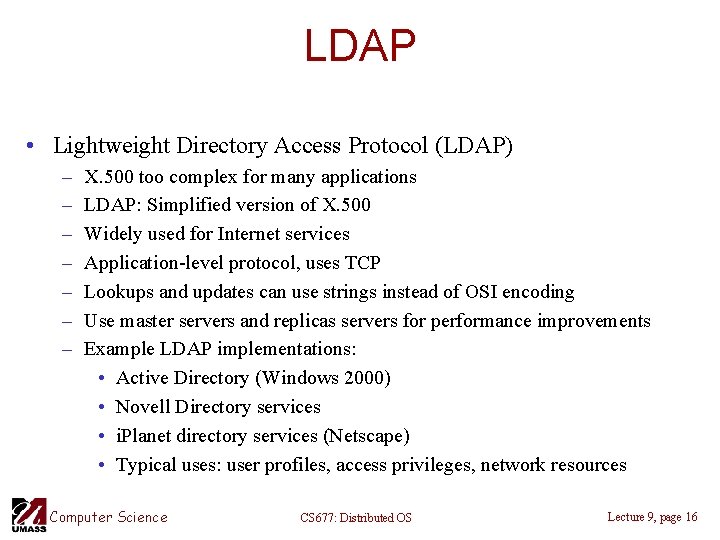
LDAP • Lightweight Directory Access Protocol (LDAP) – – – – X. 500 too complex for many applications LDAP: Simplified version of X. 500 Widely used for Internet services Application-level protocol, uses TCP Lookups and updates can use strings instead of OSI encoding Use master servers and replicas servers for performance improvements Example LDAP implementations: • Active Directory (Windows 2000) • Novell Directory services • i. Planet directory services (Netscape) • Typical uses: user profiles, access privileges, network resources Computer Science CS 677: Distributed OS Lecture 9, page 16
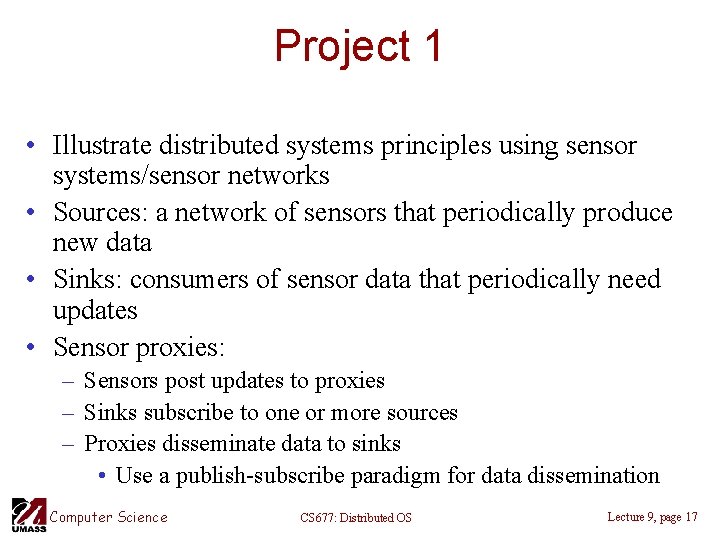
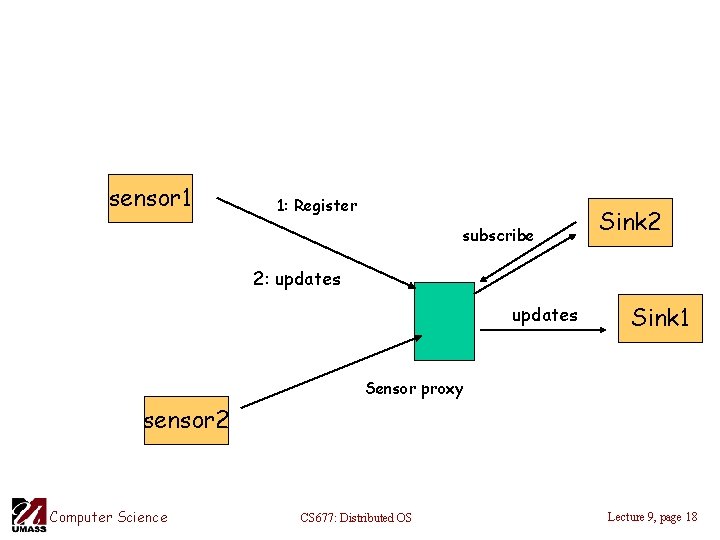
Project 1 • Illustrate distributed systems principles using sensor systems/sensor networks • Sources: a network of sensors that periodically produce new data • Sinks: consumers of sensor data that periodically need updates • Sensor proxies: – Sensors post updates to proxies – Sinks subscribe to one or more sources – Proxies disseminate data to sinks • Use a publish-subscribe paradigm for data dissemination Computer Science CS 677: Distributed OS Lecture 9, page 17
sensor 1 1: Register subscribe Sink 2 2: updates Sink 1 Sensor proxy sensor 2 Computer Science CS 677: Distributed OS Lecture 9, page 18
Project 1 details • Proxy should be multi-threaded to service arbitrary number of sources and sinks – Sources, sinks and the proxy can reside on different machines • Proxy should employ synchronization – Proxies may process data from multiple sources and disseminate it to a sink • Example: disseminate sum(sensor 1, sensor 2) -> source 1 Computer Science CS 677: Distributed OS Lecture 9, page 19