
TMS User Guide Standard Workflow 7 Core Operation
- Slides: 10
TMS+ User Guide
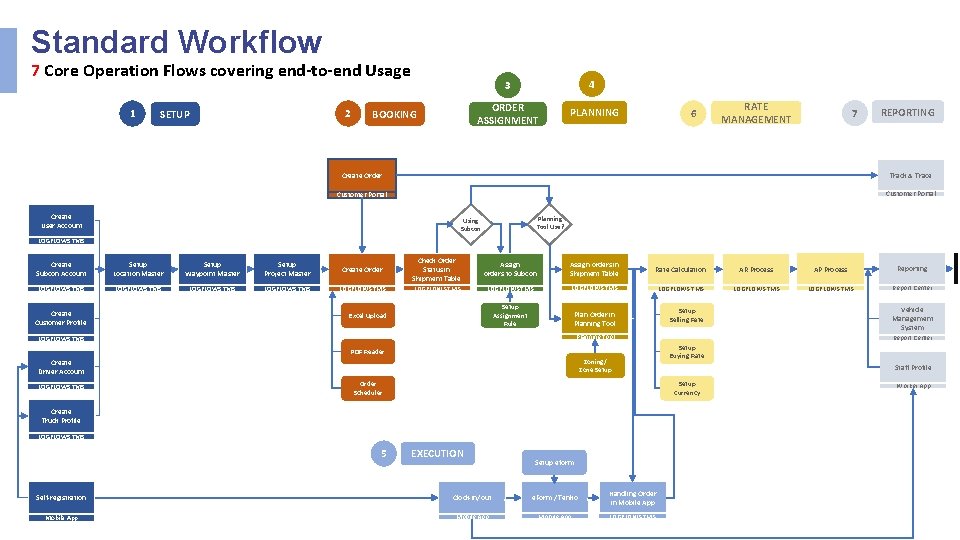
Standard Workflow 7 Core Operation Flows covering end-to-end Usage 1 2 SETUP BOOKING 3 4 ORDER ASSIGNMENT PLANNING 6 RATE MANAGEMENT 7 REPORTING Create Order Track & Trace Customer Portal Create User Account Planning Tool Use? Using Subcon LOGFLOWS TMS Create Subcon Account Setup Location Master Setup Waypoint Master Setup Project Master Create Order Check Order Status in Shipment Table Assign orders to Subcon Assign orders in Shipment Table Rate Calculation AR Process AP Process Reporting LOGFLOWS TMS LOGFLOWS TMS LOGFLOWS TMS Report Center Setup Assignment Rule Plan Order in Planning Tool Setup Selling Rate Create Customer Profile Excel Upload Planning Tool LOGFLOWS TMS PDF Reader Zoning/ Zone Setup Create Driver Account LOGFLOWS TMS Create Truck Profile LOGFLOWS TMS 5 Report Center Setup Buying Rate Staff Profile Setup Currency Order Scheduler EXECUTION Setup eform Self-registration Clock-in/out e. Form / Tenko Handling Order in Mobile App LOGFLOWS TMS Vehicle Management System Worker App
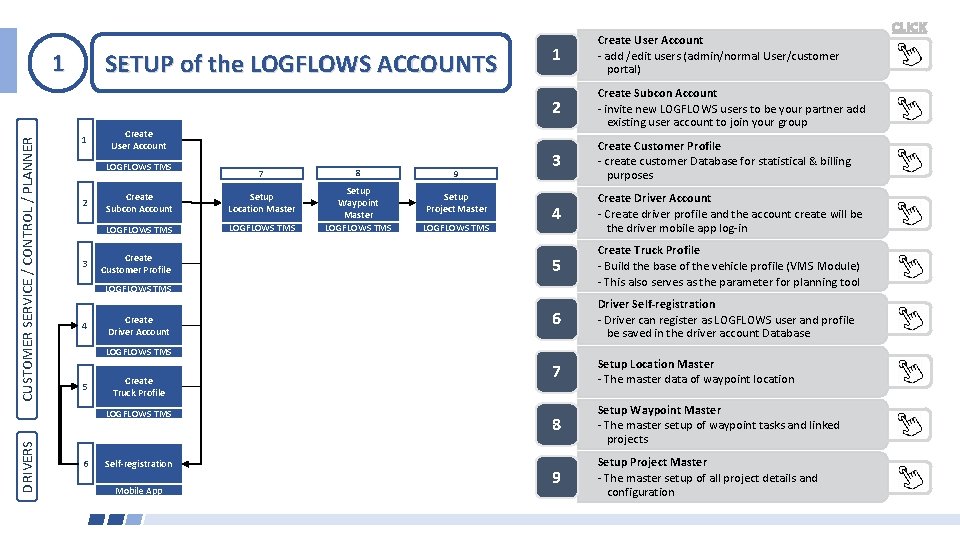
SETUP of the LOGFLOWS ACCOUNTS CUSTOMER SERVICE / CONTROL / PLANNER 1 1 Create User Account LOGFLOWS TMS 2 3 Create Subcon Account Setup Location Master LOGFLOWS TMS Create Customer Profile 8 Setup Waypoint Master LOGFLOWS TMS 9 Setup Project Master LOGFLOWS TMS 2 Create Subcon Account invite new LOGFLOWS users to be your partner add existing user account to join your group 3 Create Customer Profile create customer Database for statistical & billing purposes 4 Create Driver Account Create driver profile and the account create will be the driver mobile app log in 5 Create Truck Profile Build the base of the vehicle profile (VMS Module) This also serves as the parameter for planning tool 6 Driver Self-registration Driver can register as LOGFLOWS user and profile be saved in the driver account Database 7 Setup Location Master The master data of waypoint location 8 Setup Waypoint Master The master setup of waypoint tasks and linked projects 9 Setup Project Master The master setup of all project details and configuration LOGFLOWS TMS 4 Create Driver Account LOGFLOWS TMS 5 Create Truck Profile LOGFLOWS TMS DRIVERS 7 1 Create User Account add /edit users (admin/normal User/customer portal) 6 Self-registration Mobile App CLICK
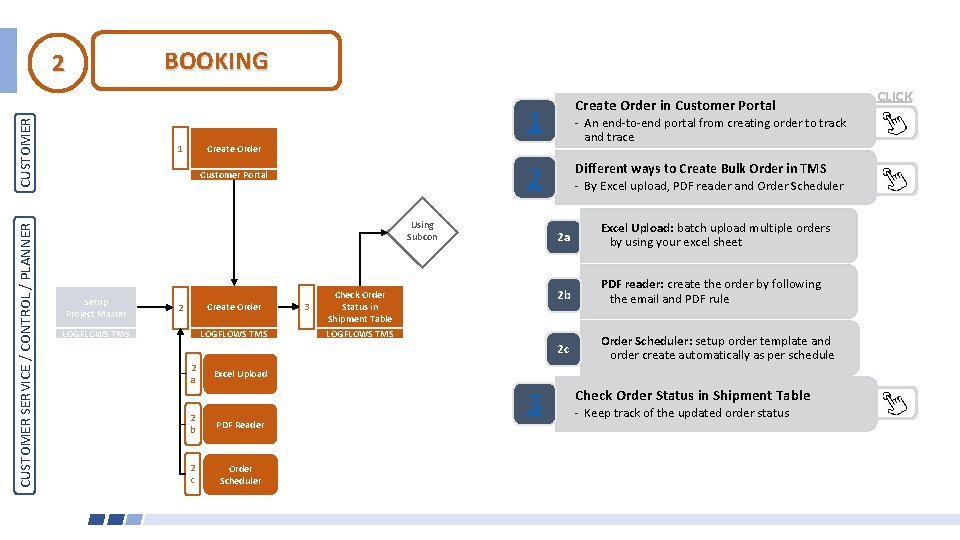
BOOKING 2 1 CUSTOMER SERVICE / CONTROL / PLANNER Create Order in Customer Portal 1 Create Order 2 Customer Portal Using Subcon Setup Project Master An end to end portal from creating order to track and trace Create Order 2 LOGFLOWS TMS 2 a 3 Check Order Status in Shipment Table LOGFLOWS TMS Different ways to Create Bulk Order in TMS By Excel upload, PDF reader and Order Scheduler 2 a Excel Upload: batch upload multiple orders by using your excel sheet 2 b PDF reader: create the order by following the email and PDF rule 2 c Order Scheduler: setup order template and order create automatically as per schedule Excel Upload 2 b PDF Reader 2 c Order Scheduler 3 Check Order Status in Shipment Table Keep track of the updated order status CLICK
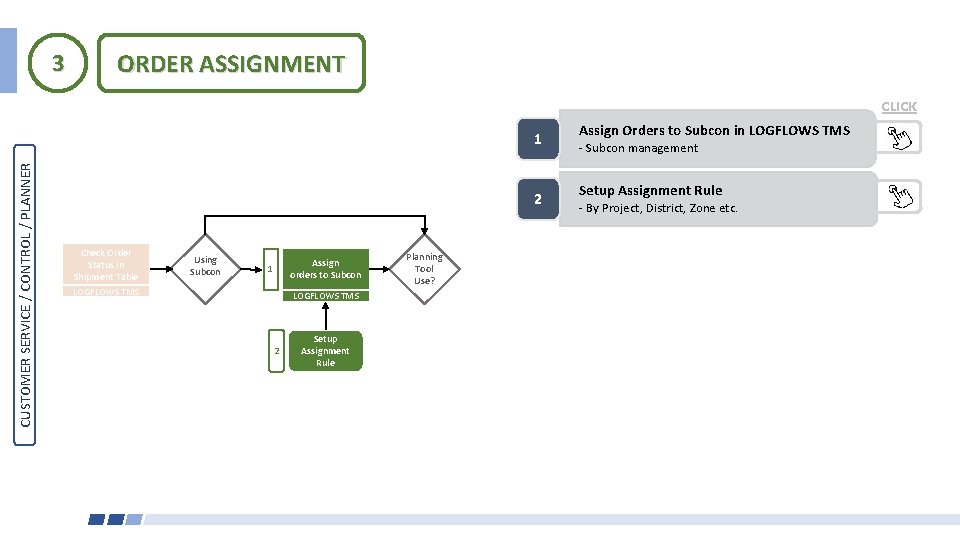
3 ORDER ASSIGNMENT CLICK CUSTOMER SERVICE / CONTROL / PLANNER 1 2 Check Order Status in Shipment Table LOGFLOWS TMS Using Subcon Assign orders to Subcon 1 LOGFLOWS TMS 2 Setup Assignment Rule Planning Tool Use? Assign Orders to Subcon in LOGFLOWS TMS Subcon management Setup Assignment Rule By Project, District, Zone etc.
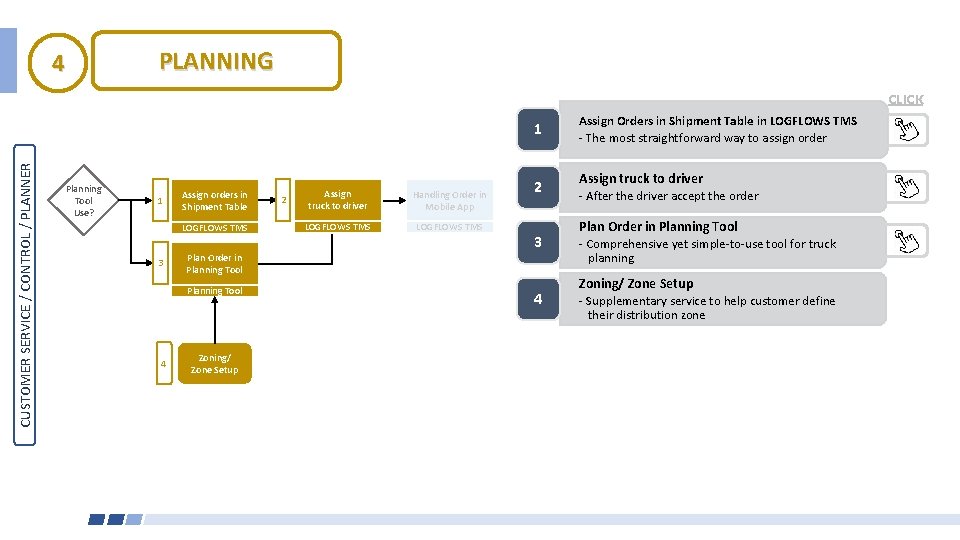
PLANNING 4 CLICK CUSTOMER SERVICE / CONTROL / PLANNER 1 Planning Tool Use? 1 Assign orders in Shipment Table LOGFLOWS TMS 3 Plan Order in Planning Tool 4 Zoning/ Zone Setup 2 Assign truck to driver Handling Order in Mobile App LOGFLOWS TMS 2 3 4 Assign Orders in Shipment Table in LOGFLOWS TMS The most straightforward way to assign order Assign truck to driver After the driver accept the order Plan Order in Planning Tool Comprehensive yet simple to use tool for truck planning Zoning/ Zone Setup Supplementary service to help customer define their distribution zone
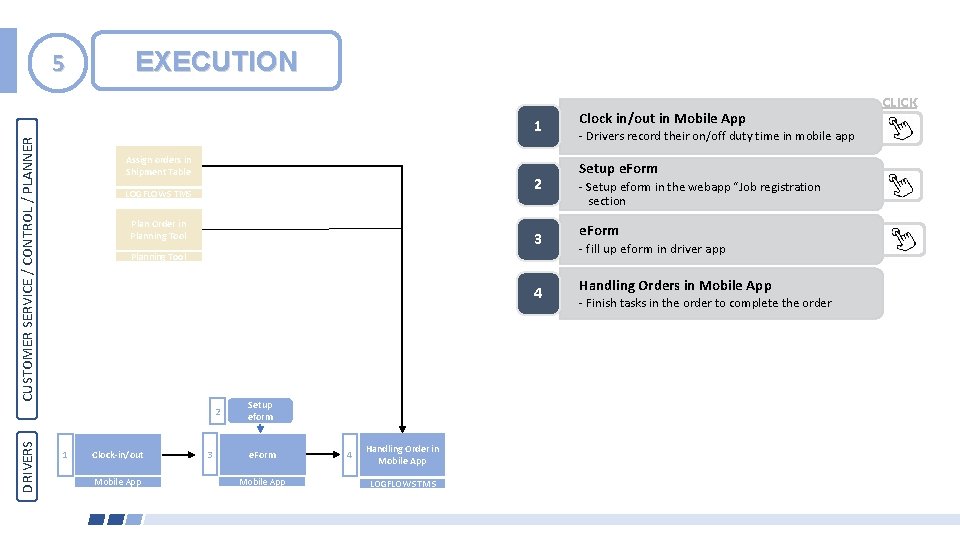
5 EXECUTION CUSTOMER SERVICE / CONTROL / PLANNER 1 Assign orders in Shipment Table 2 LOGFLOWS TMS Plan Order in Planning Tool 3 Planning Tool 4 DRIVERS 2 1 Clock-in/out Mobile App 3 Setup eform e. Form Mobile App 4 Handling Order in Mobile App LOGFLOWS TMS Clock in/out in Mobile App Drivers record their on/off duty time in mobile app Setup e. Form Setup eform in the webapp “Job registration section e. Form - fill up eform in driver app Handling Orders in Mobile App Finish tasks in the order to complete the order CLICK
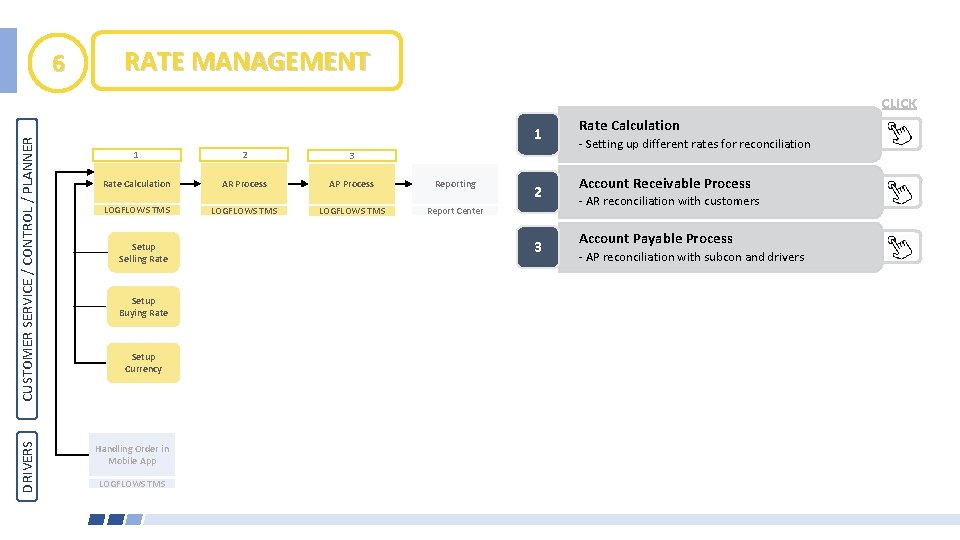
6 RATE MANAGEMENT DRIVERS CUSTOMER SERVICE / CONTROL / PLANNER CLICK 1 1 2 3 Rate Calculation AR Process AP Process Reporting LOGFLOWS TMS Report Center Setup Selling Rate Setup Buying Rate Setup Currency Handling Order in Mobile App LOGFLOWS TMS 2 3 Rate Calculation Setting up different rates for reconciliation Account Receivable Process AR reconciliation with customers Account Payable Process AP reconciliation with subcon and drivers
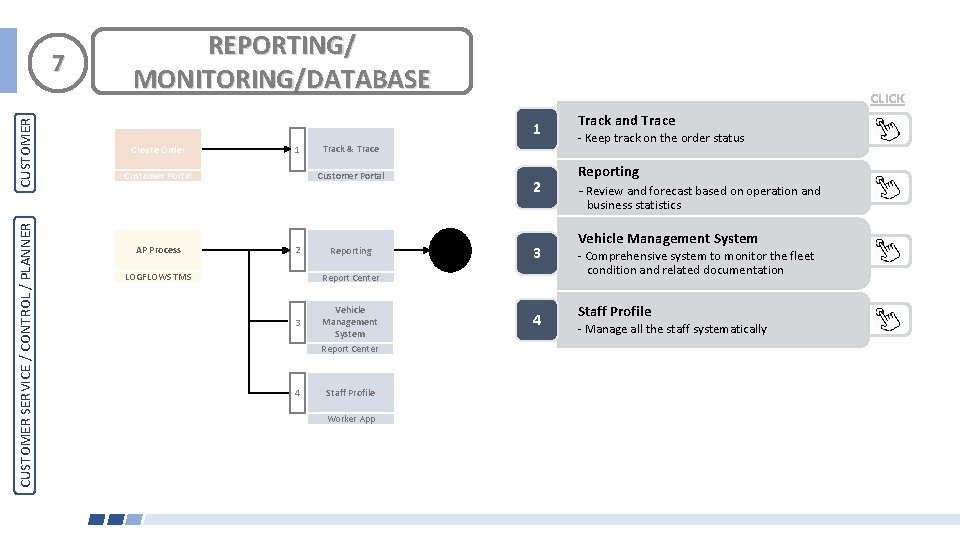
CUSTOMER SERVICE / CONTROL / PLANNER CUSTOMER 7 REPORTING/ MONITORING/DATABASE CLICK 1 Create Order 1 Customer Portal AP Process Track & Trace 2 LOGFLOWS TMS Reporting 2 3 Report Center 3 Vehicle Management System Report Center 4 Staff Profile Worker App 4 Track and Trace Keep track on the order status Reporting Review and forecast based on operation and business statistics Vehicle Management System Comprehensive system to monitor the fleet condition and related documentation Staff Profile Manage all the staff systematically
Simplify Workflow. Link Logistics Business