
TK 2123 COMPUTER ORGANISATION ARCHITECTURE Lecture 5 CPU
- Slides: 72
TK 2123 COMPUTER ORGANISATION & ARCHITECTURE Lecture 5: CPU and Memory Dr Masri Ayob Room: E-3 -31 Phone: 03 -8921 6726 masri@ftsm. ukm. my Prepared by: Dr Masri Ayob
Contents l This lecture will discuss: l Computer Systems Organisation. l Instruction Execution. l Design Principles for Modern Computers. Prepared by: Dr Masri Ayob - TK 2123 2
Program Concept Hardwired systems are inflexible l General purpose hardware can do different tasks, given correct control signals l Instead of re-wiring, supply a new set of control signals l Prepared by: Dr Masri Ayob - TK 2123 3
What is a program? A sequence of steps l For each step, an arithmetic or logical operation is done l For each operation, a different set of control signals is needed l Prepared by: Dr Masri Ayob - TK 2123 4
Function of Control Unit l For each operation a unique code is provided l e. g. l ADD, MOVE A hardware segment accepts the code and issues the control signals l We have a computer! Prepared by: Dr Masri Ayob - TK 2123 5
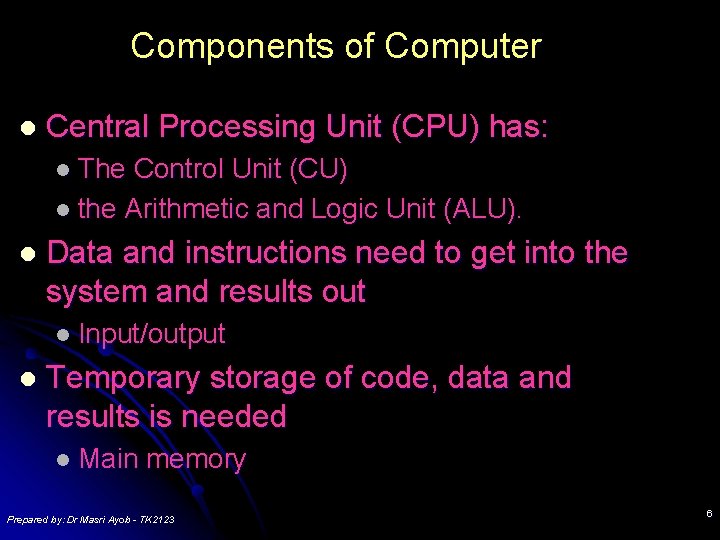
Components of Computer l Central Processing Unit (CPU) has: l The Control Unit (CU) l the Arithmetic and Logic Unit (ALU). l Data and instructions need to get into the system and results out l Input/output l Temporary storage of code, data and results is needed l Main memory Prepared by: Dr Masri Ayob - TK 2123 6
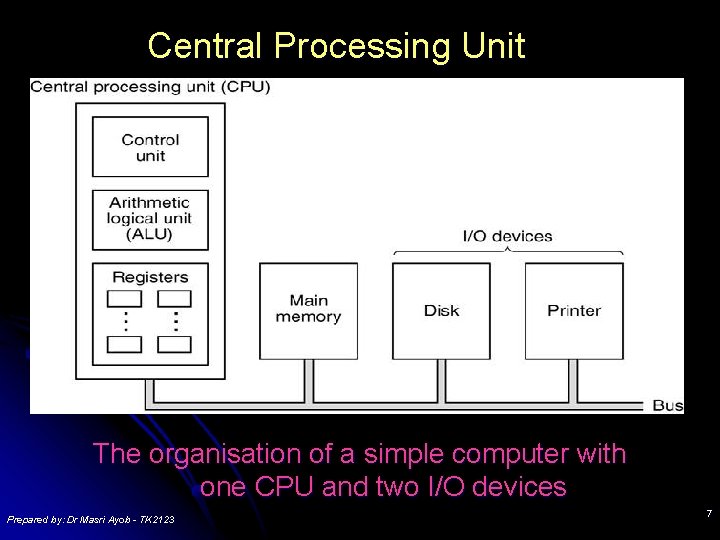
Central Processing Unit The organisation of a simple computer with one CPU and two I/O devices Prepared by: Dr Masri Ayob - TK 2123 7
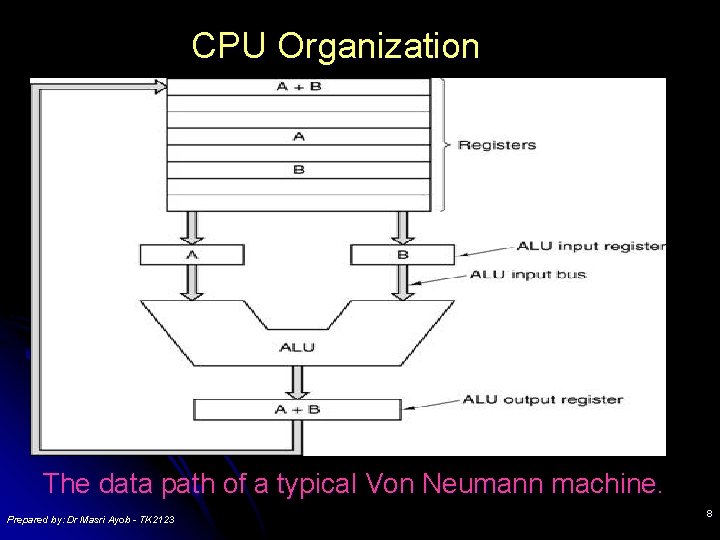
CPU Organization The data path of a typical Von Neumann machine. Prepared by: Dr Masri Ayob - TK 2123 8
Components of the CPU l l l The arithmetic/logic unit is the component of the CPU where data is held temporarily and where calculations take place. The control unit controls and interprets the execution of instructions. The control unit determines the particular instruction to be executed by reading the contents of a program counter (PC), sometimes called an instruction pointer, which is a part of the control unit. Prepared by: Dr Masri Ayob - TK 2123 9
Components of the CPU l Normally, instructions are executed sequentially. l The sequence of instructions is modified by executing instructions that change the contents of the program counter. l A Memory Management Unit within the control unit supervises the fetching of instructions and data from memory. Prepared by: Dr Masri Ayob - TK 2123 10
The Concept Of Registers l l l A register is a single, permanent storage location within the CPU used for a particular, defined purpose. A register is used to hold a binary value temporarily for storage, for manipulation, and/or for simple calculations. Each register is wired within the CPU to perform its specific role. l each register serves a particular purpose. l The register’s size, the way it is wired, and even the operations that take place in the register reflect the specific function that the register performs in the computer. Prepared by: Dr Masri Ayob - TK 2123 11
The Concept Of Registers l l l They are not addressed as a memory location, but instead are manipulated directly by the control unit during the execution of instructions. They may be as small as a single bit or as wide as several bytes, ranging usually from one to 128 bits. A register may hold: l l l data being processed, an instruction being executed, a memory or I/O address to be accessed, or even special binary codes used for some other purpose. Some registers serve many different purposes, while others are designed to perform a single, specialised task. Prepared by: Dr Masri Ayob - TK 2123 12
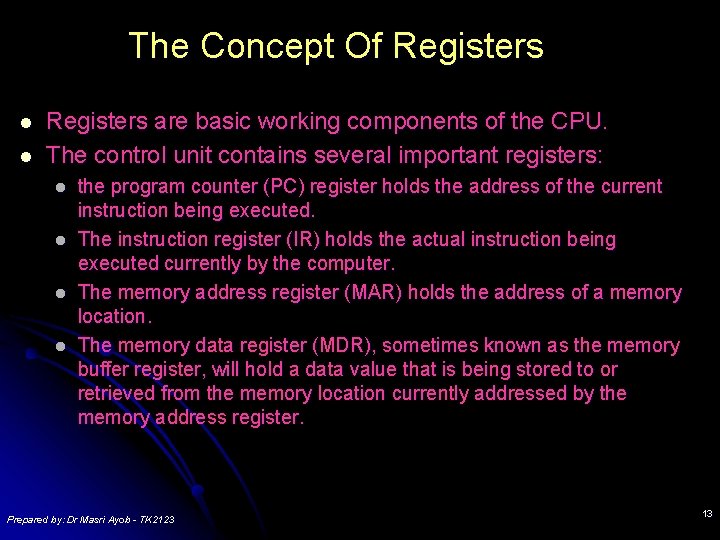
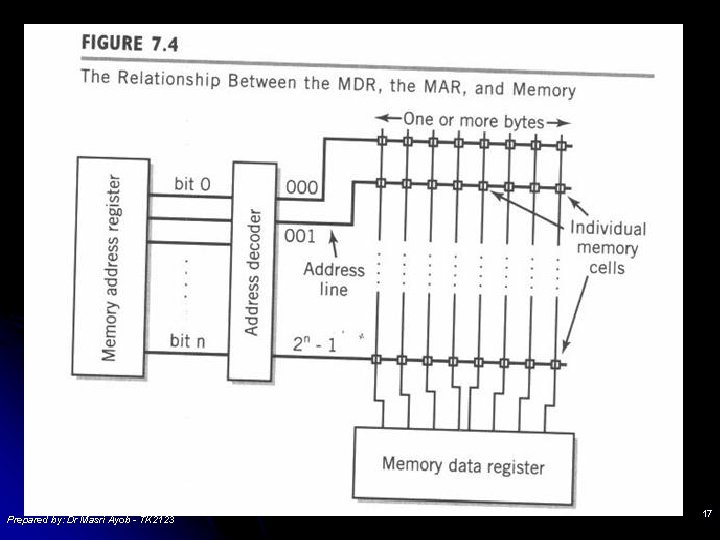
The Concept Of Registers l l Registers are basic working components of the CPU. The control unit contains several important registers: l l the program counter (PC) register holds the address of the current instruction being executed. The instruction register (IR) holds the actual instruction being executed currently by the computer. The memory address register (MAR) holds the address of a memory location. The memory data register (MDR), sometimes known as the memory buffer register, will hold a data value that is being stored to or retrieved from the memory location currently addressed by the memory address register. Prepared by: Dr Masri Ayob - TK 2123 13
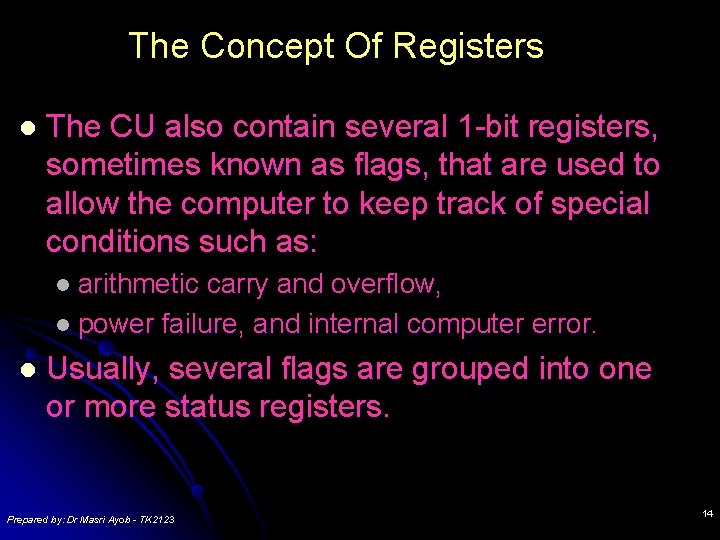
The Concept Of Registers l The CU also contain several 1 -bit registers, sometimes known as flags, that are used to allow the computer to keep track of special conditions such as: l arithmetic carry and overflow, l power failure, and internal computer error. l Usually, several flags are grouped into one or more status registers. Prepared by: Dr Masri Ayob - TK 2123 14
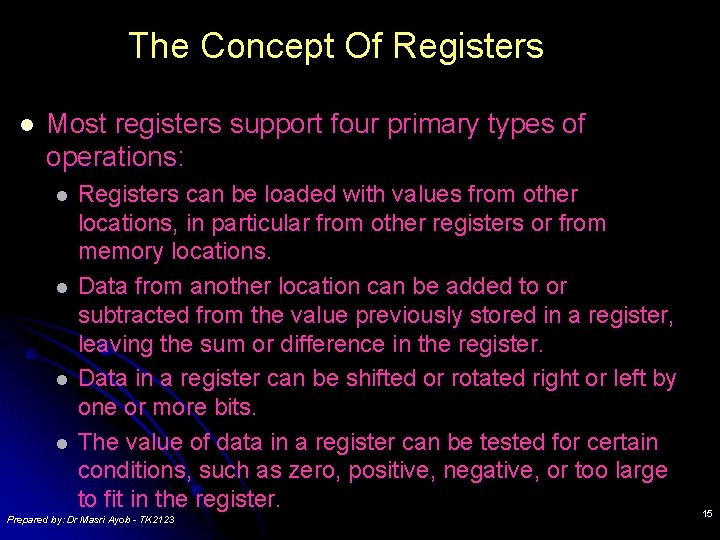
The Concept Of Registers l Most registers support four primary types of operations: l l Registers can be loaded with values from other locations, in particular from other registers or from memory locations. Data from another location can be added to or subtracted from the value previously stored in a register, leaving the sum or difference in the register. Data in a register can be shifted or rotated right or left by one or more bits. The value of data in a register can be tested for certain conditions, such as zero, positive, negative, or too large to fit in the register. Prepared by: Dr Masri Ayob - TK 2123 15
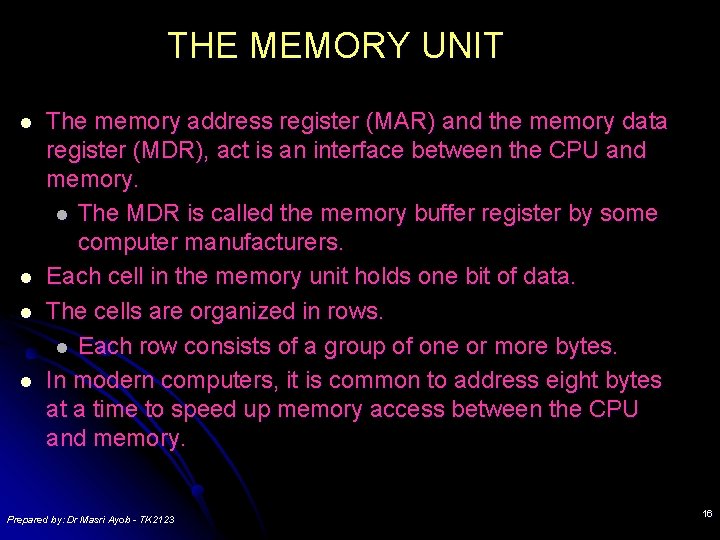
THE MEMORY UNIT l l The memory address register (MAR) and the memory data register (MDR), act is an interface between the CPU and memory. l The MDR is called the memory buffer register by some computer manufacturers. Each cell in the memory unit holds one bit of data. The cells are organized in rows. l Each row consists of a group of one or more bytes. In modern computers, it is common to address eight bytes at a time to speed up memory access between the CPU and memory. Prepared by: Dr Masri Ayob - TK 2123 16
Prepared by: Dr Masri Ayob - TK 2123 17
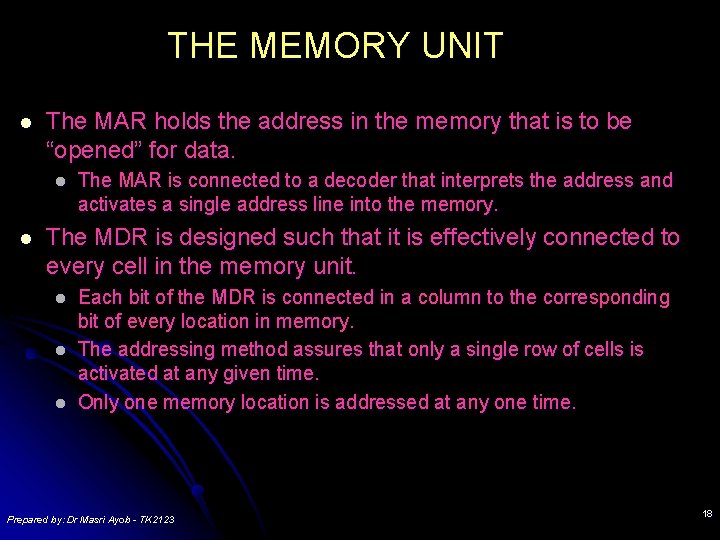
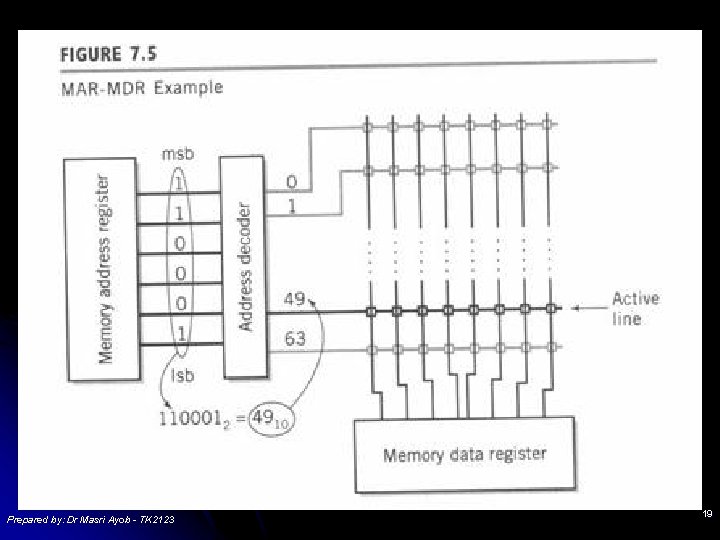
THE MEMORY UNIT l The MAR holds the address in the memory that is to be “opened” for data. l l The MAR is connected to a decoder that interprets the address and activates a single address line into the memory. The MDR is designed such that it is effectively connected to every cell in the memory unit. l l l Each bit of the MDR is connected in a column to the corresponding bit of every location in memory. The addressing method assures that only a single row of cells is activated at any given time. Only one memory location is addressed at any one time. Prepared by: Dr Masri Ayob - TK 2123 18
l Prepared by: Dr Masri Ayob - TK 2123 19
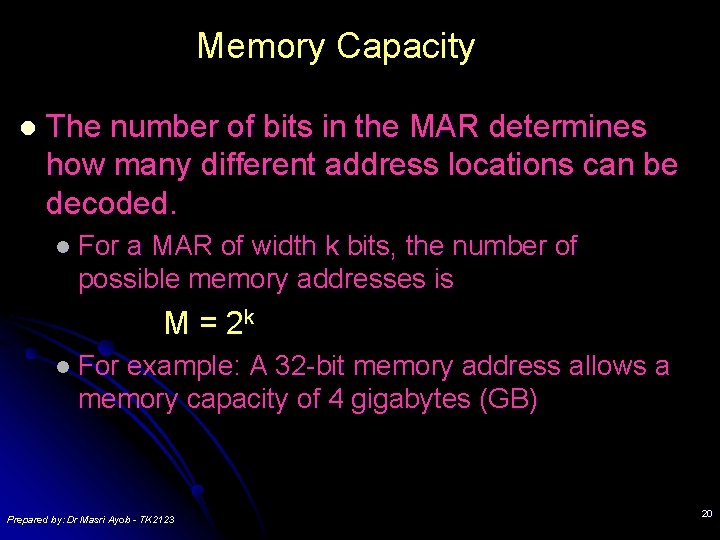
Memory Capacity l The number of bits in the MAR determines how many different address locations can be decoded. l For a MAR of width k bits, the number of possible memory addresses is M = 2 k l For example: A 32 -bit memory address allows a memory capacity of 4 gigabytes (GB) Prepared by: Dr Masri Ayob - TK 2123 20
Memory Capacity l The size of the word to be retrieved or stored in a single operation is determined by the size of the MDR and by the width of the bus connecting memory to the CPU. l In most modern computers, data and instructions found in memory are addressed in multiples of 8 -bit bytes. l the MDR is usually designed to retrieve the data or instruction(s) from a sequence of several successive addresses all at once, and the MDR will be several bytes wide. Prepared by: Dr Masri Ayob - TK 2123 21
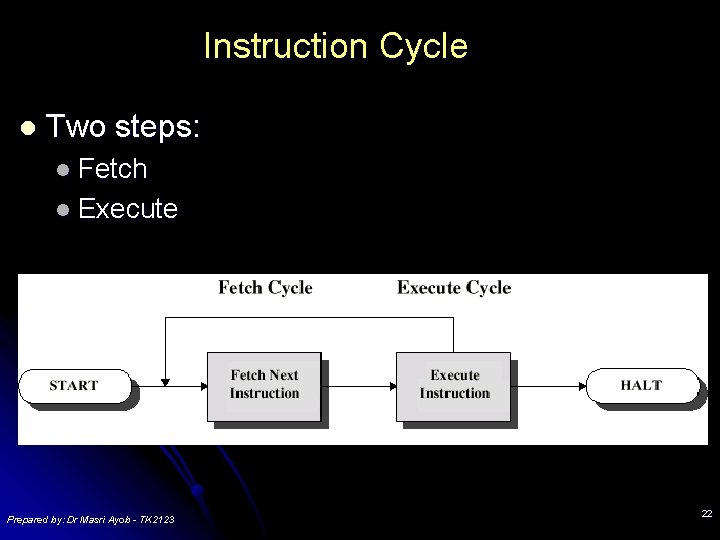
Instruction Cycle l Two steps: l Fetch l Execute Prepared by: Dr Masri Ayob - TK 2123 22
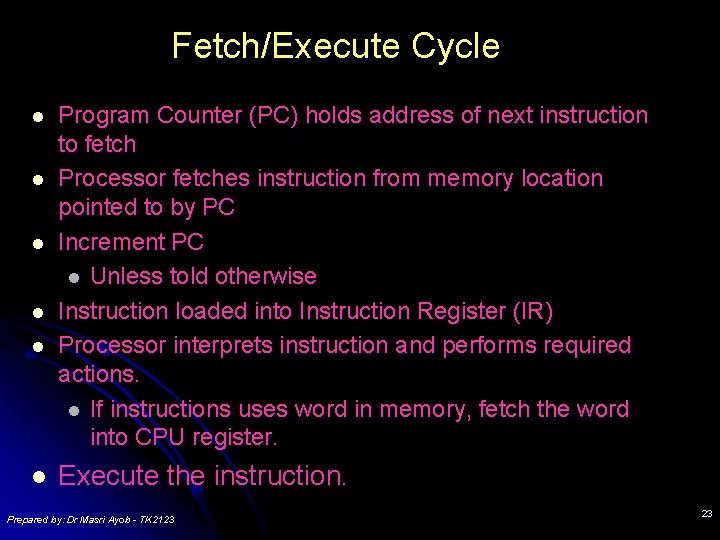
Fetch/Execute Cycle l l l Program Counter (PC) holds address of next instruction to fetch Processor fetches instruction from memory location pointed to by PC Increment PC l Unless told otherwise Instruction loaded into Instruction Register (IR) Processor interprets instruction and performs required actions. l If instructions uses word in memory, fetch the word into CPU register. Execute the instruction. Prepared by: Dr Masri Ayob - TK 2123 23
Execute Cycle l l l Processor-memory l data transfer between CPU and main memory Processor I/O l Data transfer between CPU and I/O module Data processing l Some arithmetic or logical operation on data Control l Alteration of sequence of operations l e. g. jump Combination of above Prepared by: Dr Masri Ayob - TK 2123 24
Design Principles for Modern Computers • • • All instructions directly executed by hardware Maximise rate at which instructions are issued Instructions should be easy to decode Only loads, stores should reference memory Provide plenty of registers Prepared by: Dr Masri Ayob - TK 2123 25
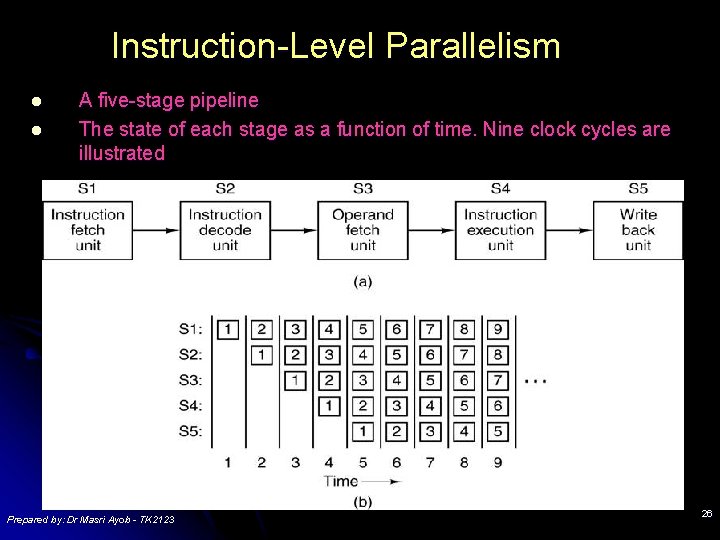
Instruction-Level Parallelism l l A five-stage pipeline The state of each stage as a function of time. Nine clock cycles are illustrated Prepared by: Dr Masri Ayob - TK 2123 26
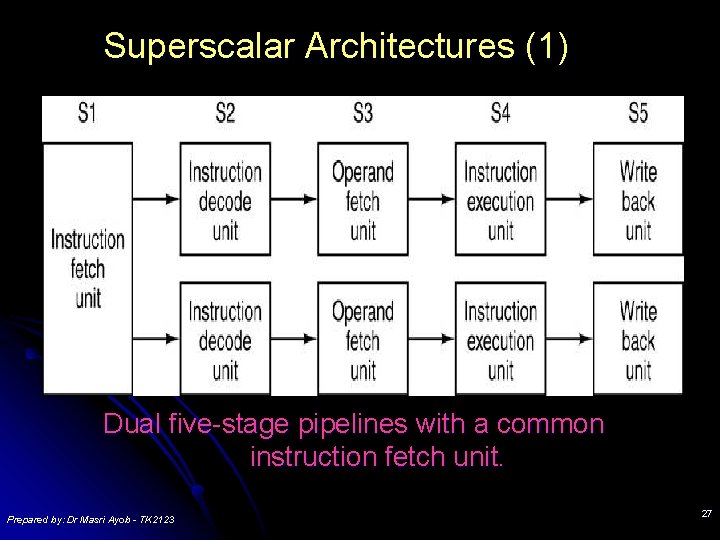
Superscalar Architectures (1) Dual five-stage pipelines with a common instruction fetch unit. Prepared by: Dr Masri Ayob - TK 2123 27
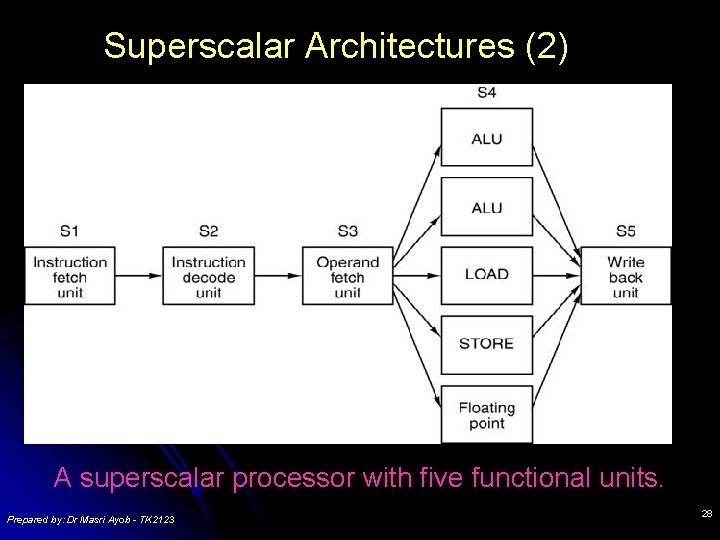
Superscalar Architectures (2) A superscalar processor with five functional units. Prepared by: Dr Masri Ayob - TK 2123 28
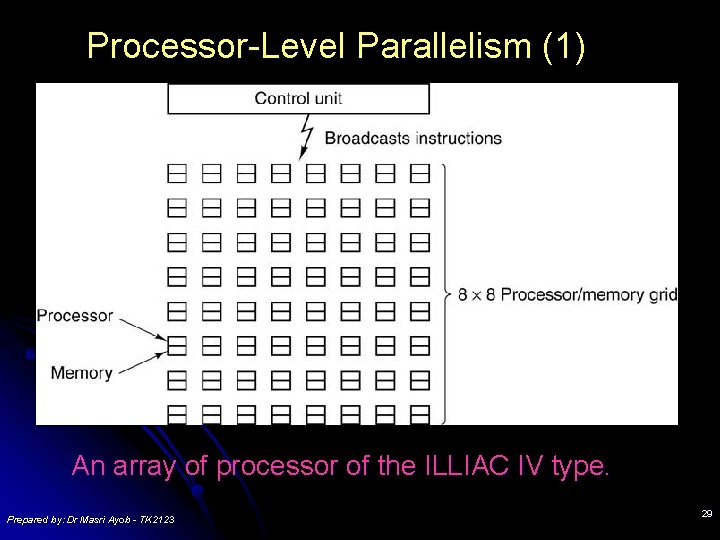
Processor-Level Parallelism (1) An array of processor of the ILLIAC IV type. Prepared by: Dr Masri Ayob - TK 2123 29
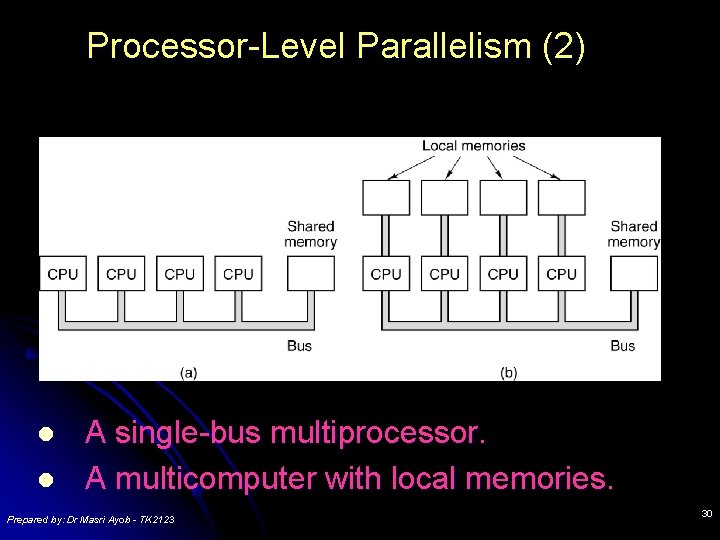
Processor-Level Parallelism (2) l l A single-bus multiprocessor. A multicomputer with local memories. Prepared by: Dr Masri Ayob - TK 2123 30
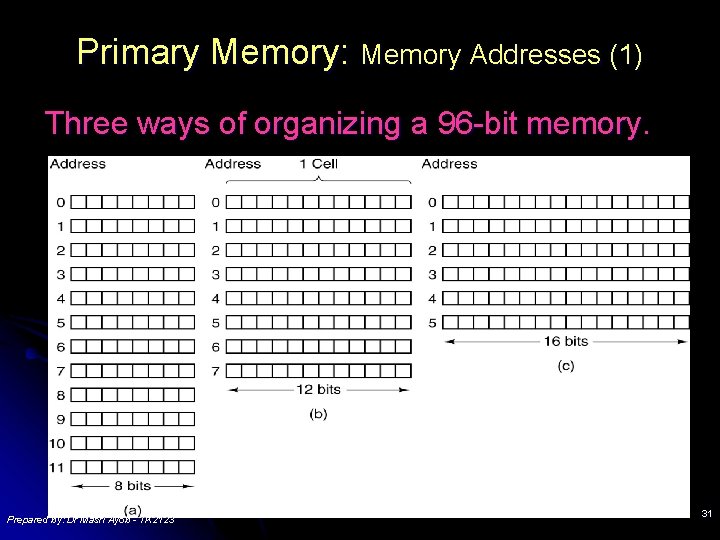
Primary Memory: Memory Addresses (1) Three ways of organizing a 96 -bit memory. Prepared by: Dr Masri Ayob - TK 2123 31
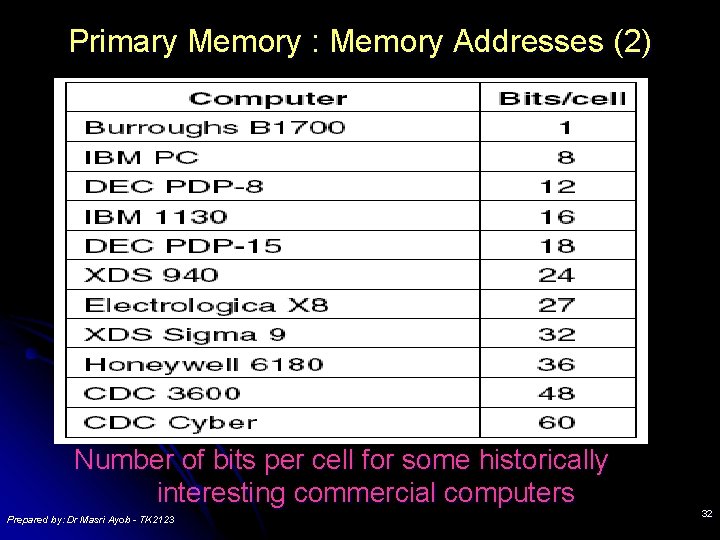
Primary Memory : Memory Addresses (2) Number of bits per cell for some historically interesting commercial computers Prepared by: Dr Masri Ayob - TK 2123 32
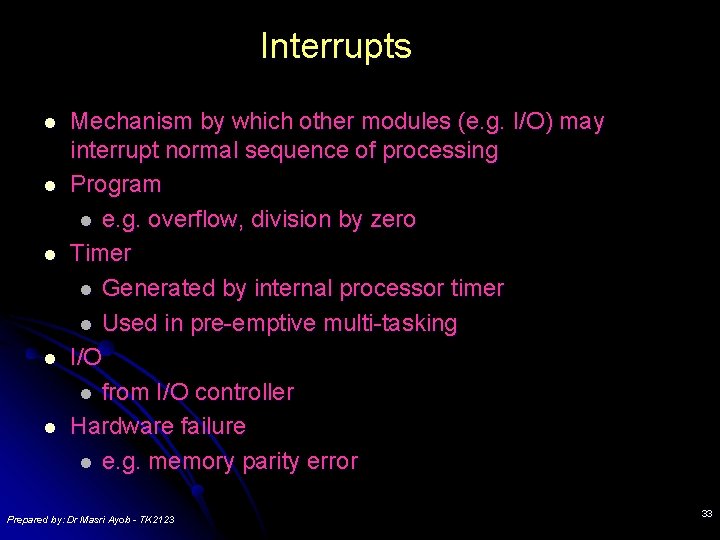
Interrupts l l l Mechanism by which other modules (e. g. I/O) may interrupt normal sequence of processing Program l e. g. overflow, division by zero Timer l Generated by internal processor timer l Used in pre-emptive multi-tasking I/O l from I/O controller Hardware failure l e. g. memory parity error Prepared by: Dr Masri Ayob - TK 2123 33
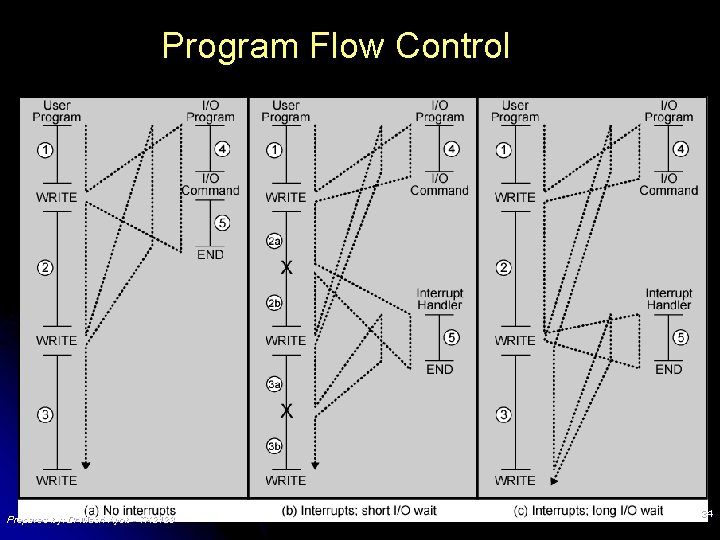
Program Flow Control Prepared by: Dr Masri Ayob - TK 2123 34
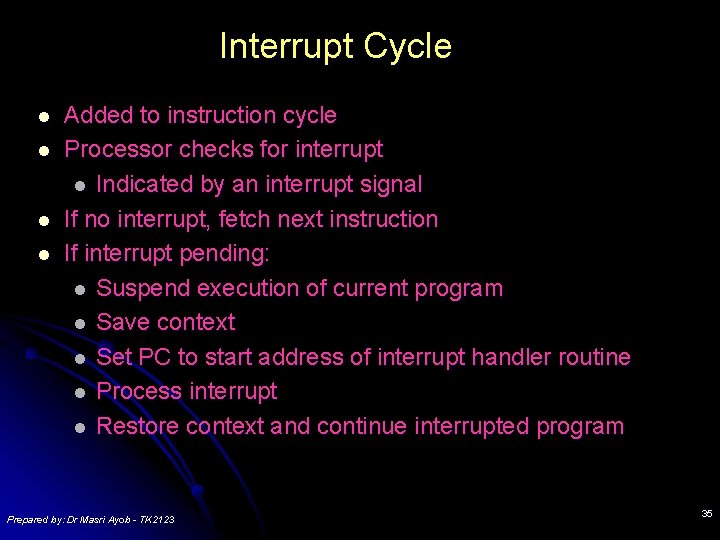
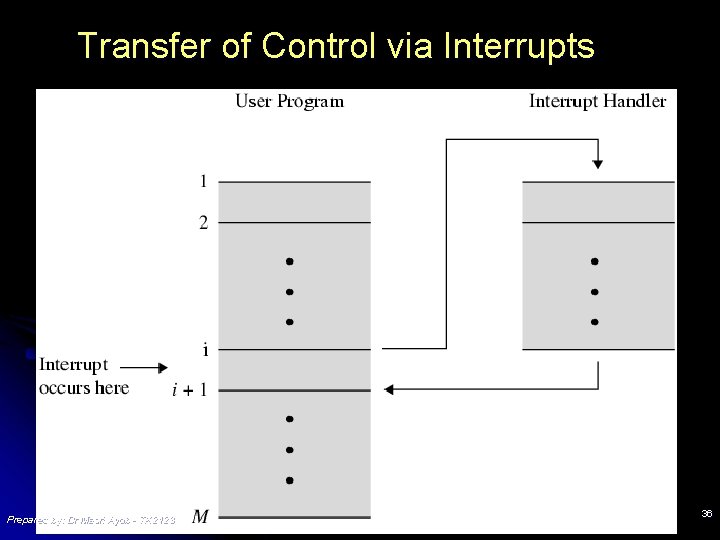
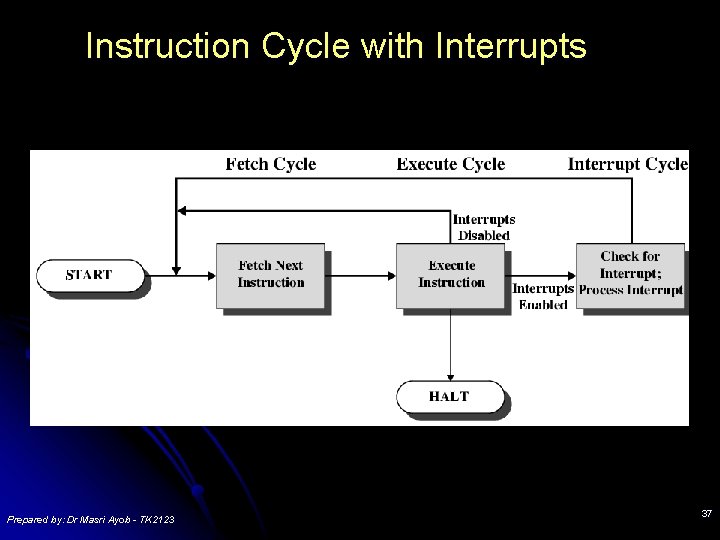
Interrupt Cycle l l Added to instruction cycle Processor checks for interrupt l Indicated by an interrupt signal If no interrupt, fetch next instruction If interrupt pending: l Suspend execution of current program l Save context l Set PC to start address of interrupt handler routine l Process interrupt l Restore context and continue interrupted program Prepared by: Dr Masri Ayob - TK 2123 35
Transfer of Control via Interrupts Prepared by: Dr Masri Ayob - TK 2123 36
Instruction Cycle with Interrupts Prepared by: Dr Masri Ayob - TK 2123 37
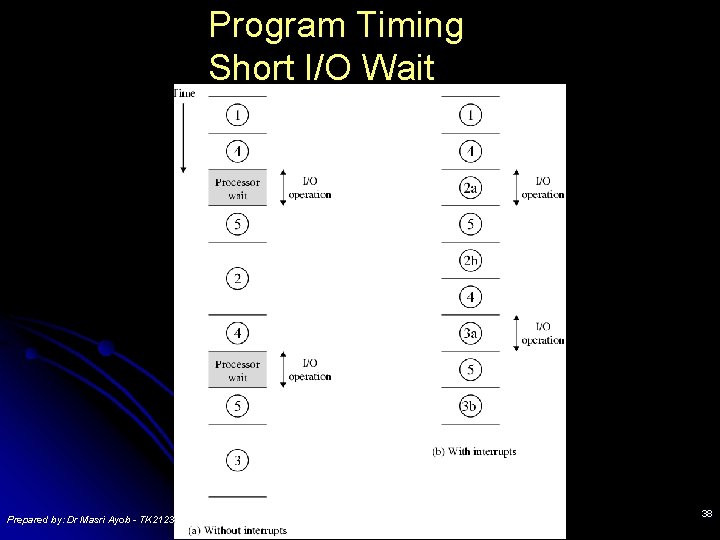
Program Timing Short I/O Wait Prepared by: Dr Masri Ayob - TK 2123 38
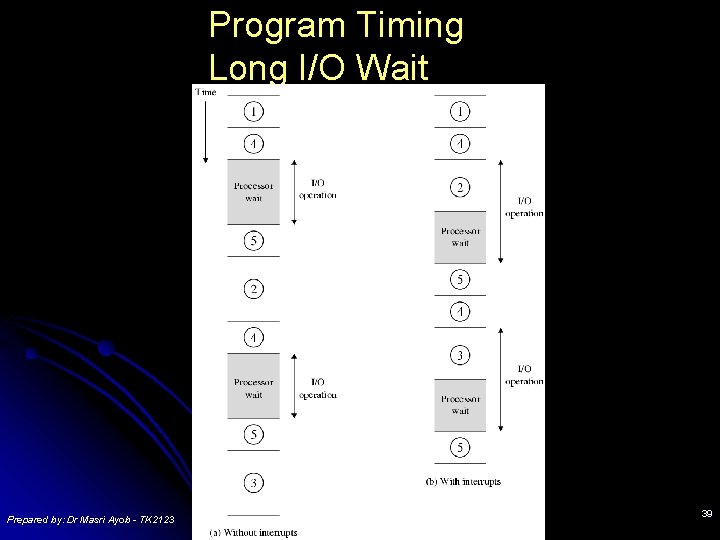
Program Timing Long I/O Wait Prepared by: Dr Masri Ayob - TK 2123 39
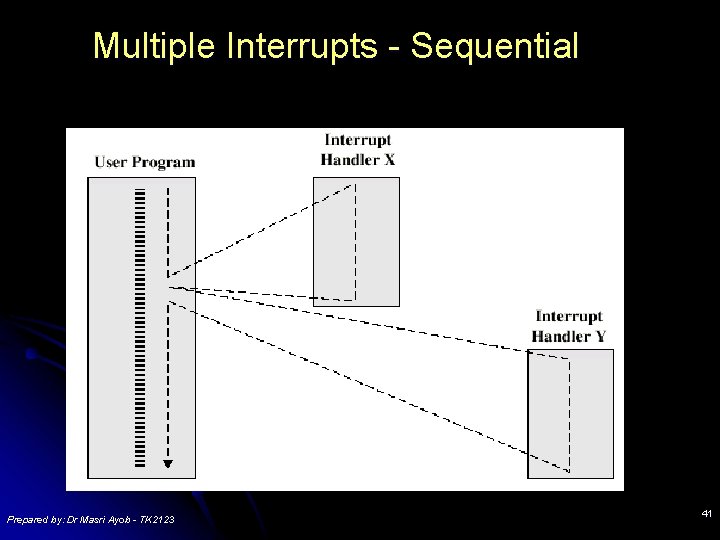
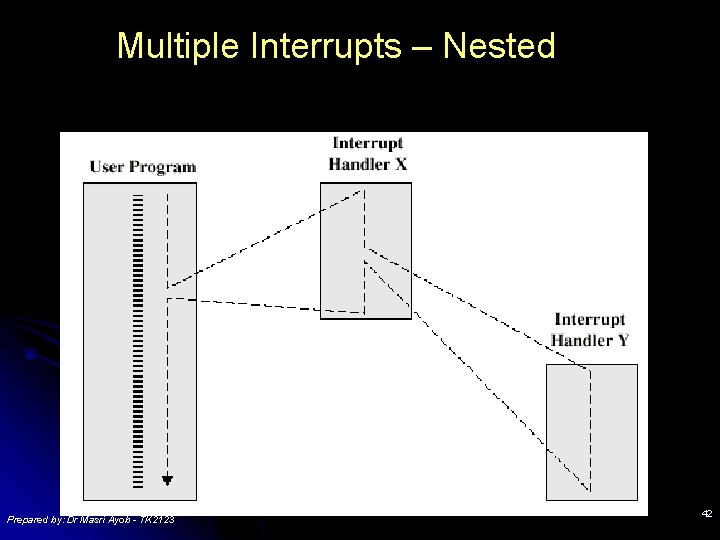
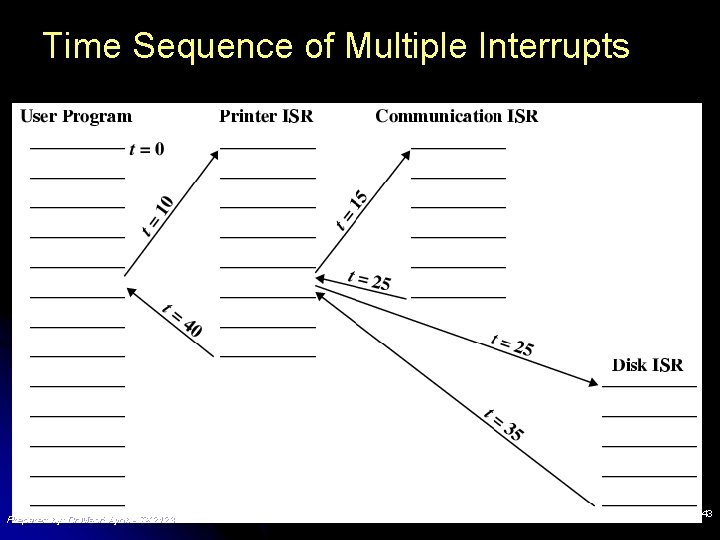
Multiple Interrupts l l Disable interrupts l Processor will ignore further interrupts whilst processing one interrupt l Interrupts remain pending and are checked after first interrupt has been processed l Interrupts handled in sequence as they occur Define priorities l Low priority interrupts can be interrupted by higher priority interrupts l When higher priority interrupt has been processed, processor returns to previous interrupt Prepared by: Dr Masri Ayob - TK 2123 40
Multiple Interrupts - Sequential Prepared by: Dr Masri Ayob - TK 2123 41
Multiple Interrupts – Nested Prepared by: Dr Masri Ayob - TK 2123 42
Time Sequence of Multiple Interrupts Prepared by: Dr Masri Ayob - TK 2123 43
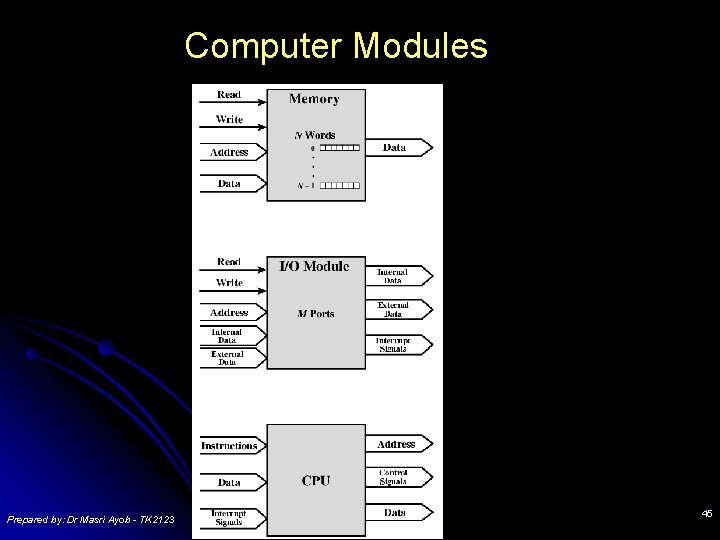
Connecting All the units must be connected l Different type of connection for different type of unit l l Memory l Input/Output l CPU Prepared by: Dr Masri Ayob - TK 2123 44
Computer Modules Prepared by: Dr Masri Ayob - TK 2123 45
Memory Connection Receives and sends data l Receives addresses (of locations) l Receives control signals l l Read l Write l Timing Prepared by: Dr Masri Ayob - TK 2123 46
Input/Output Connection(1) Similar to memory from computer’s viewpoint l Output l l Receive data from computer l Send data to peripheral l Input l Receive data from peripheral l Send data to computer Prepared by: Dr Masri Ayob - TK 2123 47
Input/Output Connection(2) Receive control signals from computer l Send control signals to peripherals l l e. g. l Receive addresses from computer l e. g. l spin disk port number to identify peripheral Send interrupt signals (control) Prepared by: Dr Masri Ayob - TK 2123 48
CPU Connection Reads instruction and data l Writes out data (after processing) l Sends control signals to other units l Receives (& acts on) interrupts l Prepared by: Dr Masri Ayob - TK 2123 49
Buses There a number of possible interconnection systems l Single and multiple BUS structures are most common l e. g. Control/Address/Data bus (PC) l e. g. Unibus (DEC-PDP) l Prepared by: Dr Masri Ayob - TK 2123 50
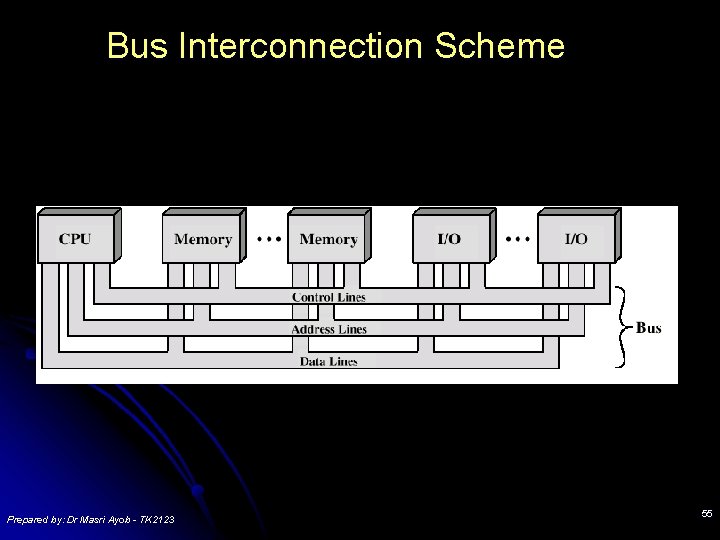
What is a Bus? A communication pathway connecting two or more devices l Usually broadcast l Often grouped l l. A number of channels in one bus l e. g. 32 bit data bus is 32 separate single bit channels l Power lines may not be shown Prepared by: Dr Masri Ayob - TK 2123 51
Data Bus l Carries data l Remember that there is no difference between “data” and “instruction” at this level l Width is a key determinant of performance l 8, 16, 32, 64 bit Prepared by: Dr Masri Ayob - TK 2123 52
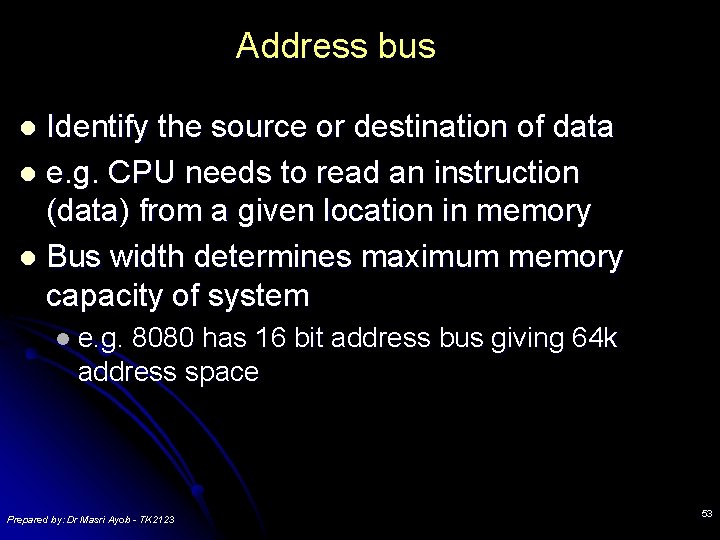
Address bus Identify the source or destination of data l e. g. CPU needs to read an instruction (data) from a given location in memory l Bus width determines maximum memory capacity of system l l e. g. 8080 has 16 bit address bus giving 64 k address space Prepared by: Dr Masri Ayob - TK 2123 53
Control Bus l Control and timing information l Memory read/write signal l Interrupt request l Clock signals Prepared by: Dr Masri Ayob - TK 2123 54
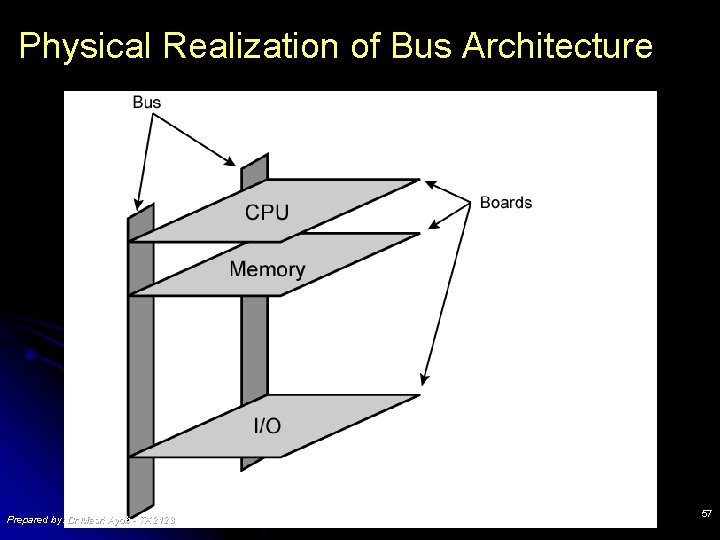
Bus Interconnection Scheme Prepared by: Dr Masri Ayob - TK 2123 55
Big and Yellow? l What do buses look like? l Parallel lines on circuit boards l Ribbon cables l Strip connectors on mother boards l e. g. l Sets PCI of wires Prepared by: Dr Masri Ayob - TK 2123 56
Physical Realization of Bus Architecture Prepared by: Dr Masri Ayob - TK 2123 57
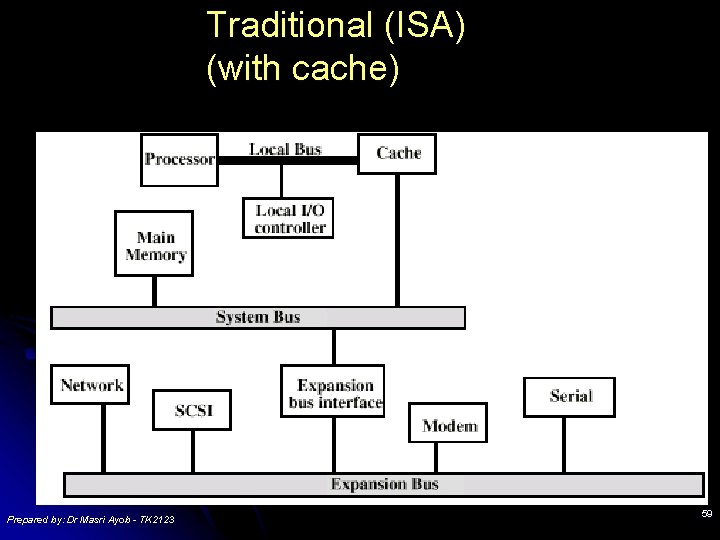
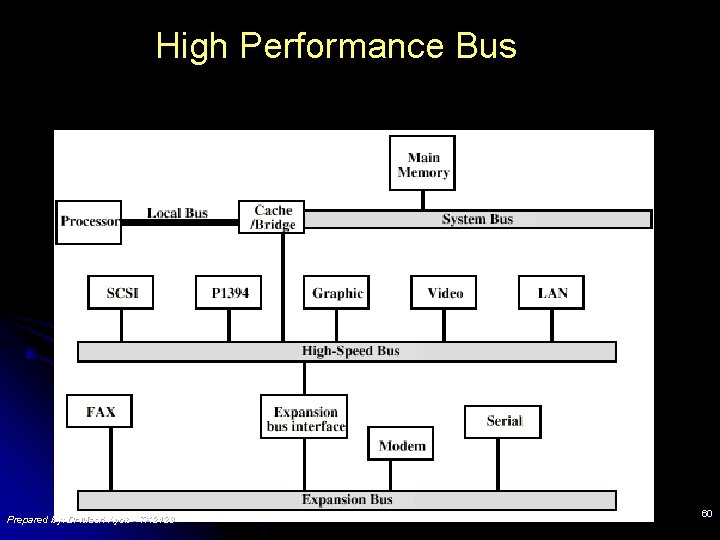
Single Bus Problems l Lots of devices on one bus leads to: l Propagation delays l Long data paths mean that co-ordination of bus use can adversely affect performance l If aggregate data transfer approaches bus capacity l Most systems use multiple buses to overcome these problems Prepared by: Dr Masri Ayob - TK 2123 58
Traditional (ISA) (with cache) Prepared by: Dr Masri Ayob - TK 2123 59
High Performance Bus Prepared by: Dr Masri Ayob - TK 2123 60
Bus Types l Dedicated l Separate l data & address lines Multiplexed l Shared lines l Address valid or data valid control line l Advantage - fewer lines l Disadvantages l More complex control l Ultimate performance Prepared by: Dr Masri Ayob - TK 2123 61
Bus Arbitration More than one module controlling the bus l e. g. CPU and DMA controller l Only one module may control bus at one time l Arbitration may be centralised or distributed l Prepared by: Dr Masri Ayob - TK 2123 62
Centralised or Distributed Arbitration l Centralised l Single hardware device controlling bus access l Bus Controller l Arbiter l May l be part of CPU or separate Distributed l Each module may claim the bus l Control logic on all modules Prepared by: Dr Masri Ayob - TK 2123 63
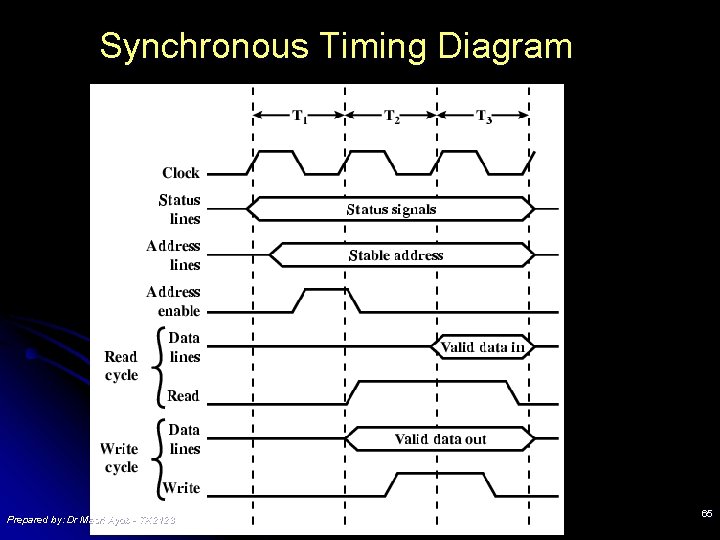
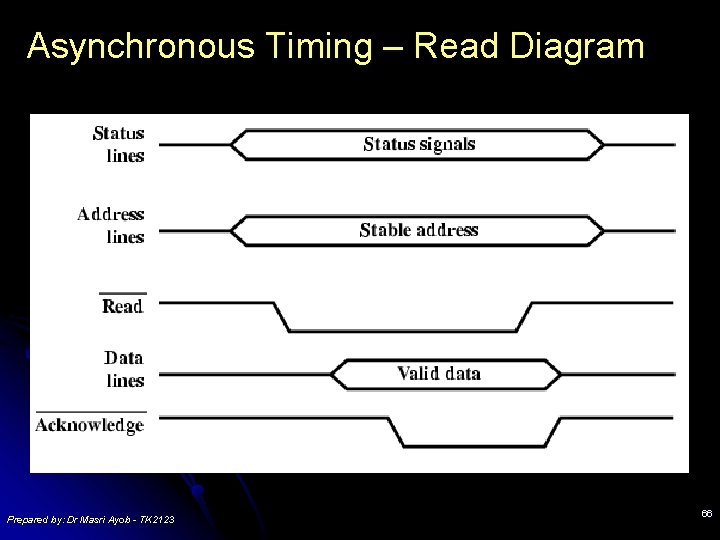
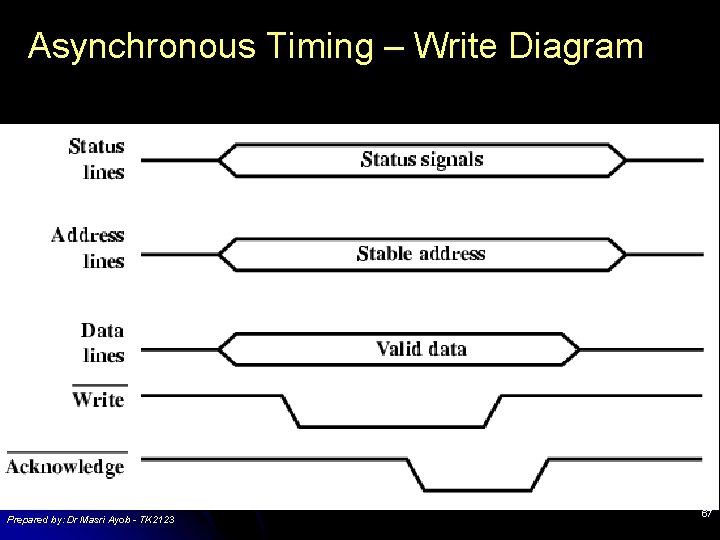
Timing Co-ordination of events on bus l Synchronous l l Events determined by clock signals l Control Bus includes clock line l A single 1 -0 is a bus cycle l All devices can read clock line l Usually sync on leading edge l Usually a single cycle for an event Prepared by: Dr Masri Ayob - TK 2123 64
Synchronous Timing Diagram Prepared by: Dr Masri Ayob - TK 2123 65
Asynchronous Timing – Read Diagram Prepared by: Dr Masri Ayob - TK 2123 66
Asynchronous Timing – Write Diagram Prepared by: Dr Masri Ayob - TK 2123 67
PCI Bus Peripheral Component Interconnection l Intel released to public domain l 32 or 64 bit l 50 lines l Prepared by: Dr Masri Ayob - TK 2123 68
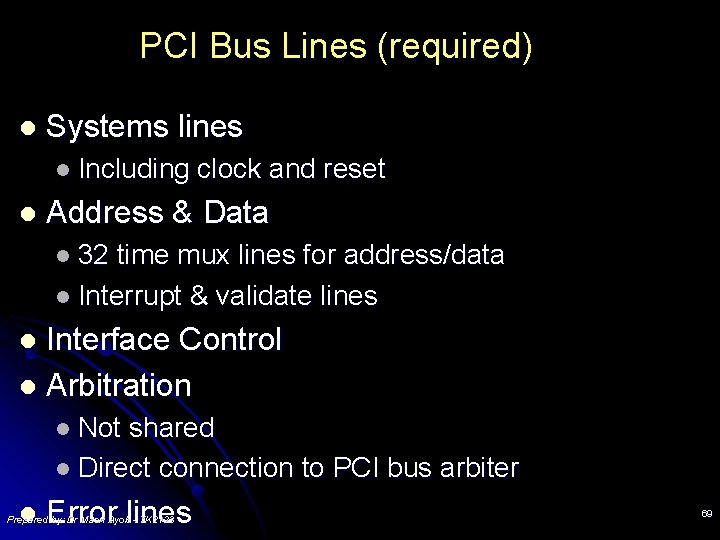
PCI Bus Lines (required) l Systems lines l Including l clock and reset Address & Data l 32 time mux lines for address/data l Interrupt & validate lines Interface Control l Arbitration l l Not shared l Direct connection to PCI bus arbiter l Error lines Prepared by: Dr Masri Ayob - TK 2123 69
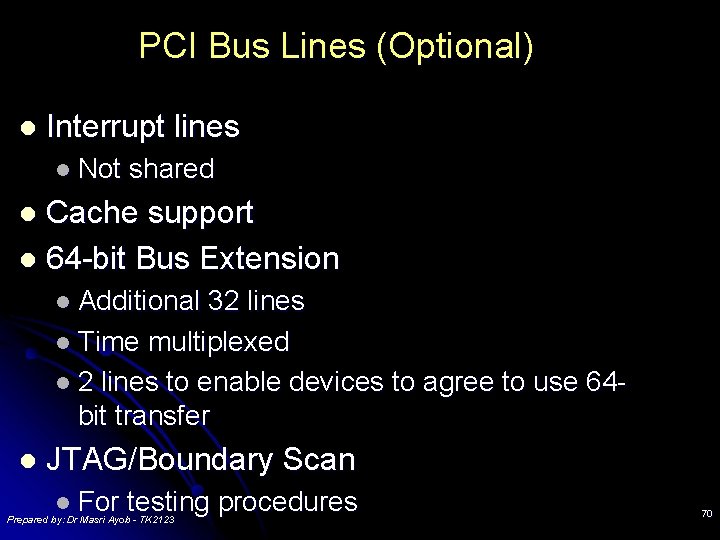
PCI Bus Lines (Optional) l Interrupt lines l Not shared Cache support l 64 -bit Bus Extension l l Additional 32 lines l Time multiplexed l 2 lines to enable devices to agree to use 64 bit transfer l JTAG/Boundary Scan l For testing procedures Prepared by: Dr Masri Ayob - TK 2123 70
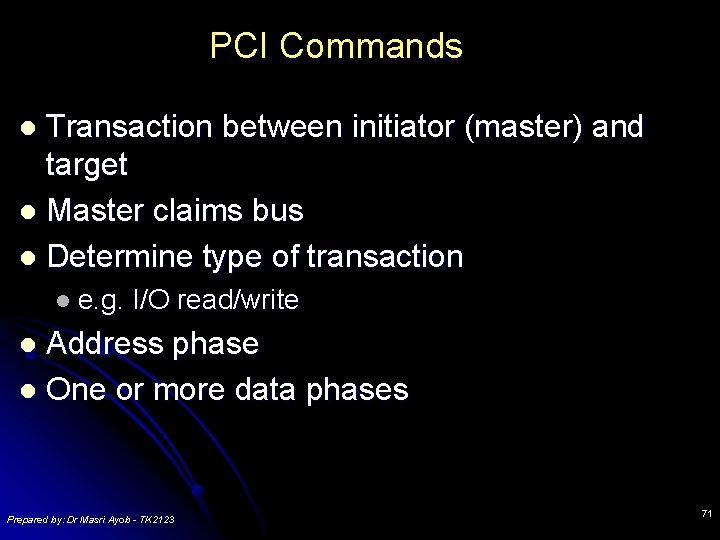
PCI Commands Transaction between initiator (master) and target l Master claims bus l Determine type of transaction l l e. g. I/O read/write Address phase l One or more data phases l Prepared by: Dr Masri Ayob - TK 2123 71
Thank you Q&A Prepared by: Dr Masri Ayob - TK 2123 72