
This is VISUAL a guide to the VISUAL




- Slides: 43
This is VISUAL - a guide to the VISUAL language SINTEF ICT January 2015 VISUAL This work by the VISUAL project is licensed under a Creative Commons Attribution-Non. Commercial 4. 0 International License.
Content • About VISUAL – Who can use this material? – How to make diagrams? • Introduction – Perspective on service delivery – Customer journeys and main terminology • • Visual elements and syntax Symbols Diagrams More advanced use of VISUAL
About VISUAL • • • VISUAL is the name of a project financed by The Research Council of Norway VISUAL is also the name of a visual language that has been developed in this project The visual language supports specification and analysis of services. It consists of – – • • • terminology graphical elements diagrams methods and tools The main components of the visual language have been made publicly available through these slides and the accompanying Visio stencils VISUAL is currently under development and new versions of the language will come Read more about the project and download the Visio stencils here: www. visualproject. org VISUAL
Who can use this material? • Everyone can use this material under the following conditions: • It is licensed under the Common Creative license CC-BY-NC Creative Commons Attribution-Non. Commercial 4. 0 International License. – In short, this means that you must refer to the VISUAL project if you use our material, and it is only for non-commercial use – See the above link for how to attribute correctly • Please provide us with feedback – We appreciate constructive comments and suggestions – You can find our contact details here: www. visualproject. org • We do not offer any support. . –. . but we will strive to assist you – Feel free to contact us through this web form: http: //visualproject. org/visual-for-microsoft-visio/ VISUAL
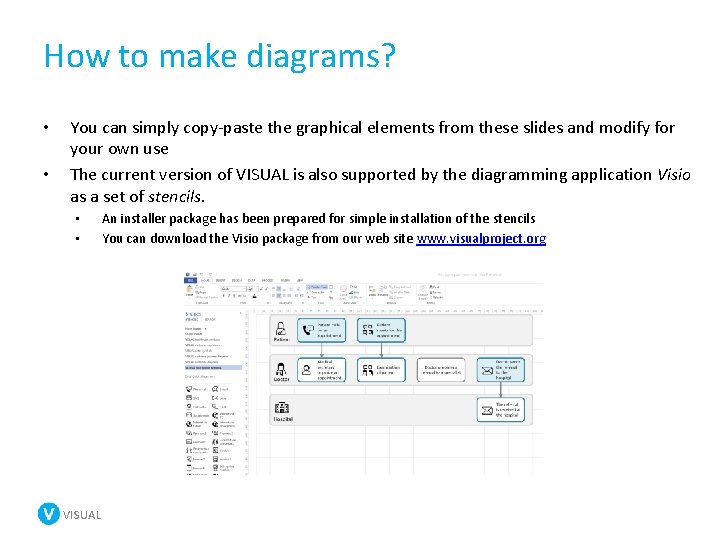
How to make diagrams? • • You can simply copy-paste the graphical elements from these slides and modify for your own use The current version of VISUAL is also supported by the diagramming application Visio as a set of stencils. • • VISUAL An installer package has been prepared for simple installation of the stencils You can download the Visio package from our web site www. visualproject. org
Introduction VISUAL
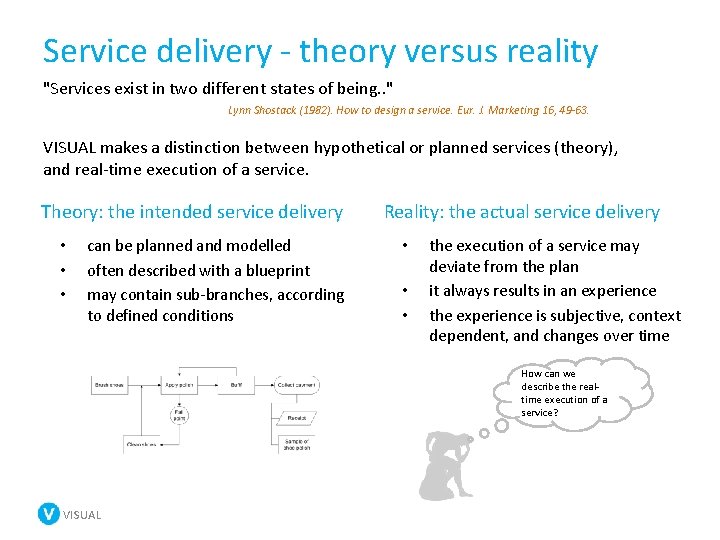
Service delivery - theory versus reality "Services exist in two different states of being. . " Lynn Shostack (1982). How to design a service. Eur. J. Marketing 16, 49 -63. VISUAL makes a distinction between hypothetical or planned services (theory), and real-time execution of a service. Theory: the intended service delivery • • • can be planned and modelled often described with a blueprint may contain sub-branches, according to defined conditions Reality: the actual service delivery • • • the execution of a service may deviate from the plan it always results in an experience the experience is subjective, context dependent, and changes over time How can we describe the realtime execution of a service? VISUAL
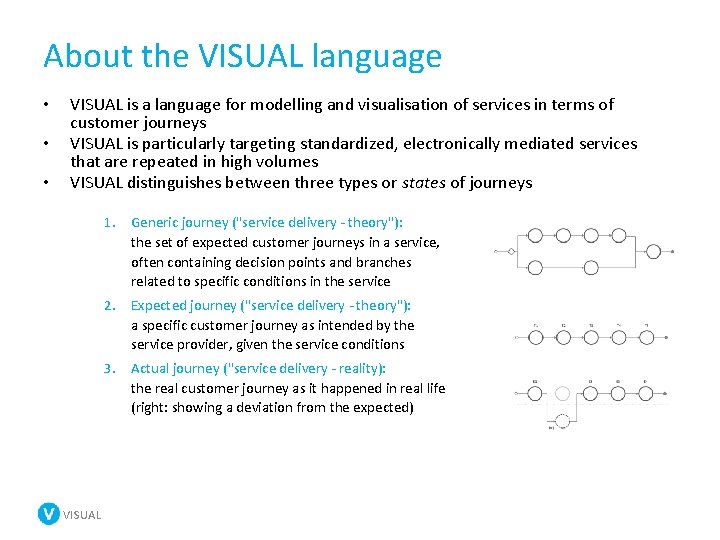
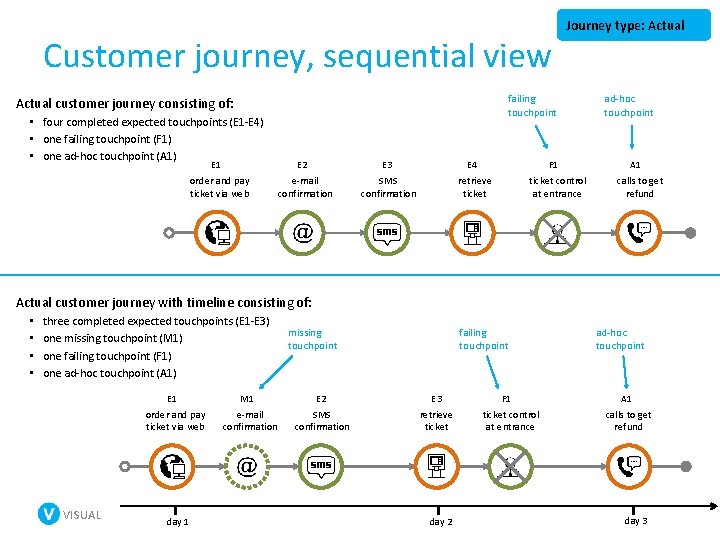
About the VISUAL language • • • VISUAL is a language for modelling and visualisation of services in terms of customer journeys VISUAL is particularly targeting standardized, electronically mediated services that are repeated in high volumes VISUAL distinguishes between three types or states of journeys 1. Generic journey ("service delivery - theory"): the set of expected customer journeys in a service, often containing decision points and branches related to specific conditions in the service 2. Expected journey ("service delivery - theory"): a specific customer journey as intended by the service provider, given the service conditions 3. Actual journey ("service delivery - reality): the real customer journey as it happened in real life (right: showing a deviation from the expected) VISUAL
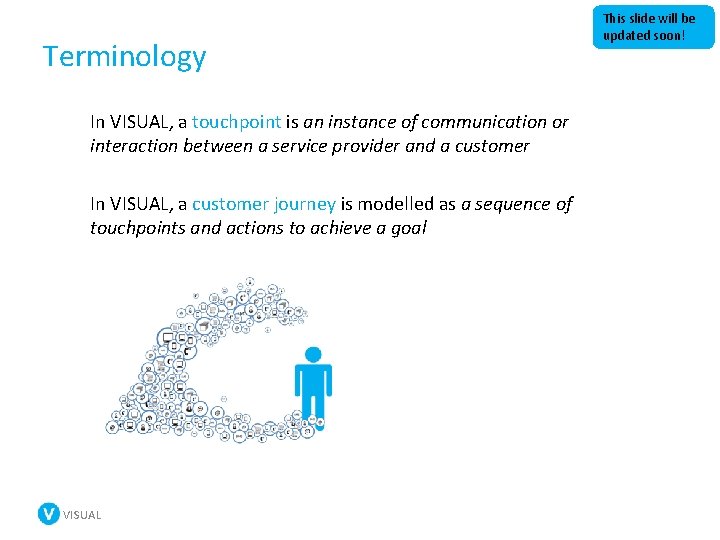
Terminology In VISUAL, a touchpoint is an instance of communication or interaction between a service provider and a customer In VISUAL, a customer journey is modelled as a sequence of touchpoints and actions to achieve a goal VISUAL This slide will be updated soon!
Visual elements and syntax Customer journeys VISUAL
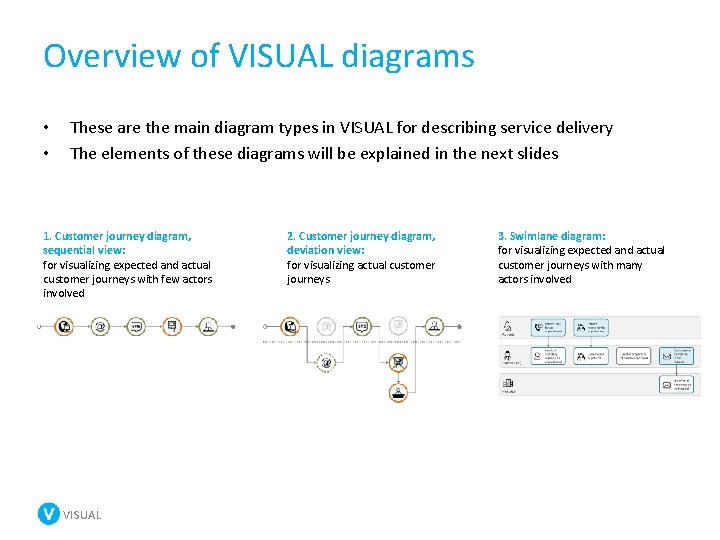
Overview of VISUAL diagrams • • These are the main diagram types in VISUAL for describing service delivery The elements of these diagrams will be explained in the next slides 1. Customer journey diagram, sequential view: for visualizing expected and actual customer journeys with few actors involved VISUAL 2. Customer journey diagram, deviation view: for visualizing actual customer journeys 3. Swimlane diagram: for visualizing expected and actual customer journeys with many actors involved
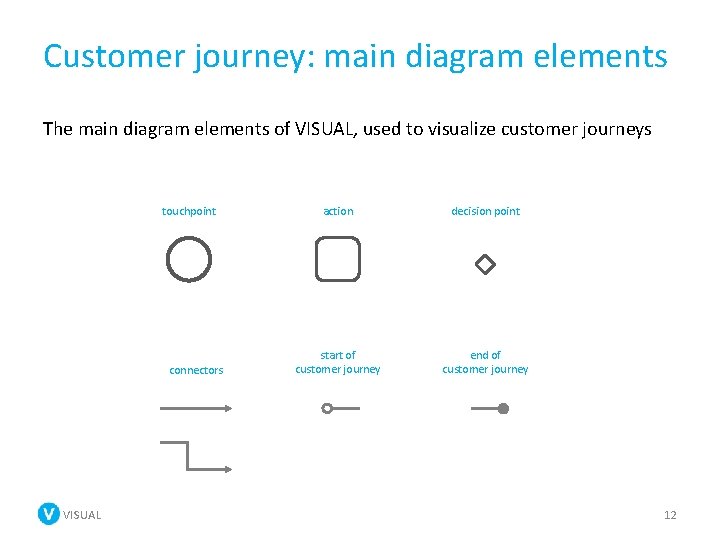
Customer journey: main diagram elements The main diagram elements of VISUAL, used to visualize customer journeys touchpoint connectors VISUAL action decision point start of customer journey end of customer journey 12
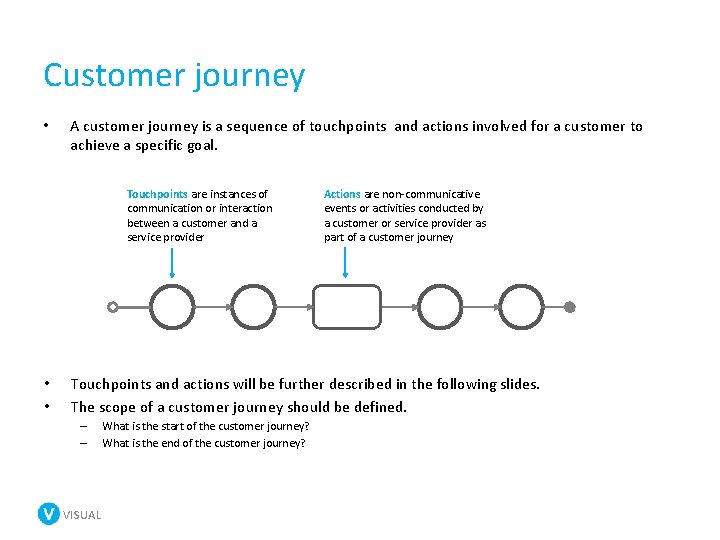
Customer journey • A customer journey is a sequence of touchpoints and actions involved for a customer to achieve a specific goal. Touchpoints are instances of communication or interaction between a customer and a service provider • • Actions are non-communicative events or activities conducted by a customer or service provider as part of a customer journey Touchpoints and actions will be further described in the following slides. The scope of a customer journey should be defined. – – VISUAL What is the start of the customer journey? What is the end of the customer journey?
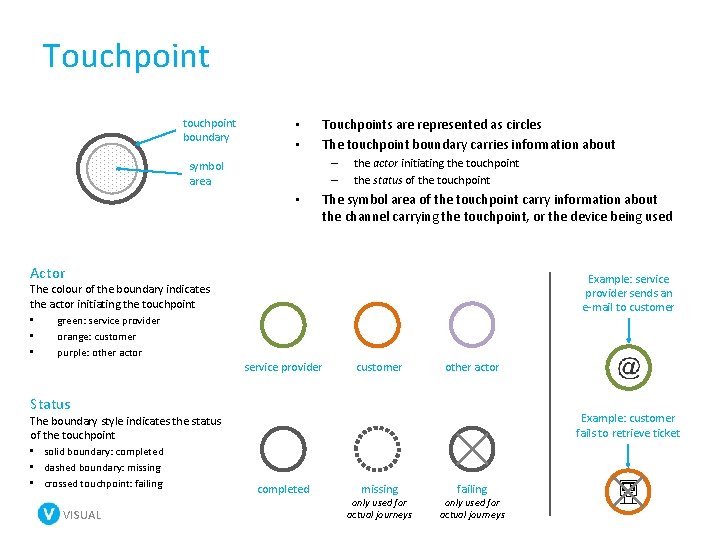
Touchpoint touchpoint boundary • • Touchpoints are represented as circles The touchpoint boundary carries information about – – symbol area • the actor initiating the touchpoint the status of the touchpoint The symbol area of the touchpoint carry information about the channel carrying the touchpoint, or the device being used Actor Example: service provider sends an e-mail to customer The colour of the boundary indicates the actor initiating the touchpoint • green: service provider • orange: customer • purple: other actor service provider customer other actor Status The boundary style indicates the status of the touchpoint • solid boundary: completed • dashed boundary: missing • crossed touchpoint: failing VISUAL Example: customer fails to retrieve ticket completed missing only used for actual journeys failing only used for actual journeys
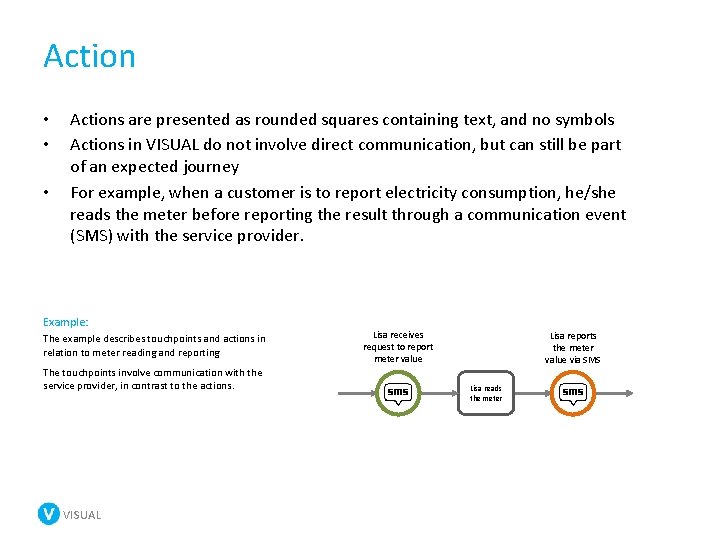
Action • • • Actions are presented as rounded squares containing text, and no symbols Actions in VISUAL do not involve direct communication, but can still be part of an expected journey For example, when a customer is to report electricity consumption, he/she reads the meter before reporting the result through a communication event (SMS) with the service provider. Example: The example describes touchpoints and actions in relation to meter reading and reporting The touchpoints involve communication with the service provider, in contrast to the actions. VISUAL Lisa receives request to report meter value Lisa reports the meter value via SMS Lisa reads the meter
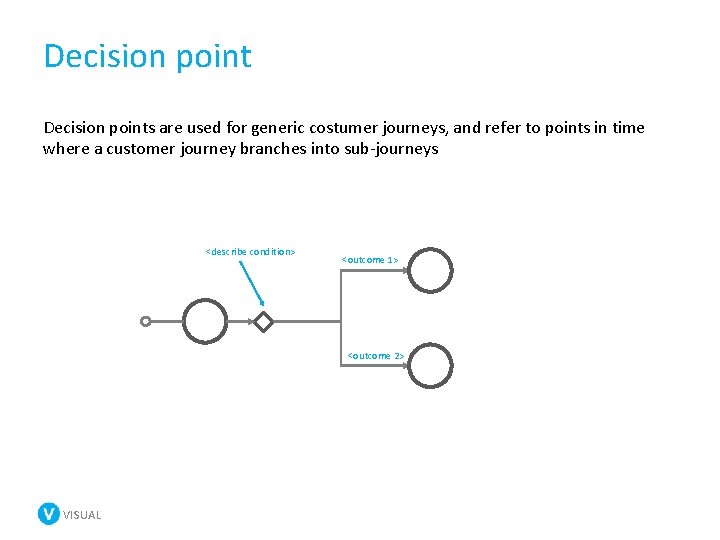
Decision points are used for generic costumer journeys, and refer to points in time where a customer journey branches into sub-journeys <describe condition> <outcome 1> <outcome 2> VISUAL
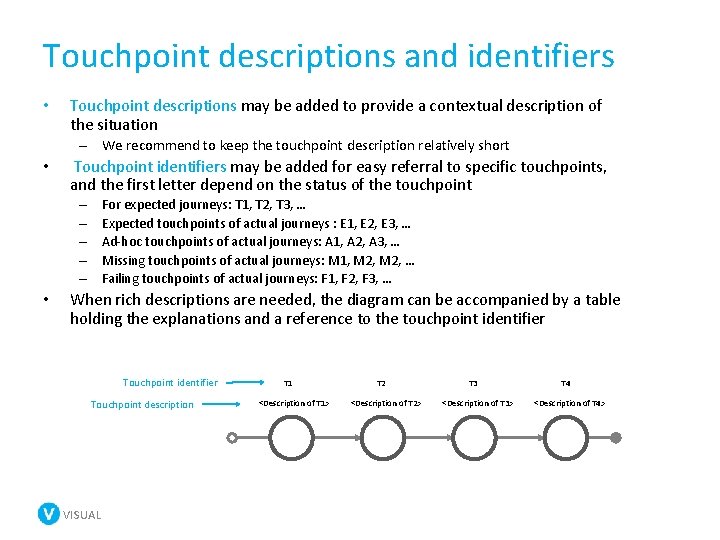
Touchpoint descriptions and identifiers • Touchpoint descriptions may be added to provide a contextual description of the situation – We recommend to keep the touchpoint description relatively short • Touchpoint identifiers may be added for easy referral to specific touchpoints, and the first letter depend on the status of the touchpoint For expected journeys: T 1, T 2, T 3, … Expected touchpoints of actual journeys : E 1, E 2, E 3, … Ad-hoc touchpoints of actual journeys: A 1, A 2, A 3, … Missing touchpoints of actual journeys: M 1, M 2, … Failing touchpoints of actual journeys: F 1, F 2, F 3, … – – – • When rich descriptions are needed, the diagram can be accompanied by a table holding the explanations and a reference to the touchpoint identifier Touchpoint description VISUAL T 1 <Description of T 1> T 2 <Description of T 2> T 3 <Description of T 3> T 4 <Description of T 4>
Symbols VISUAL
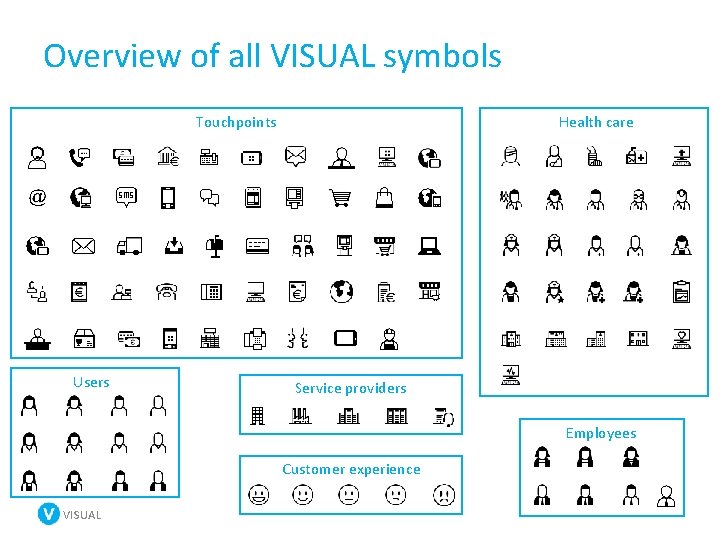
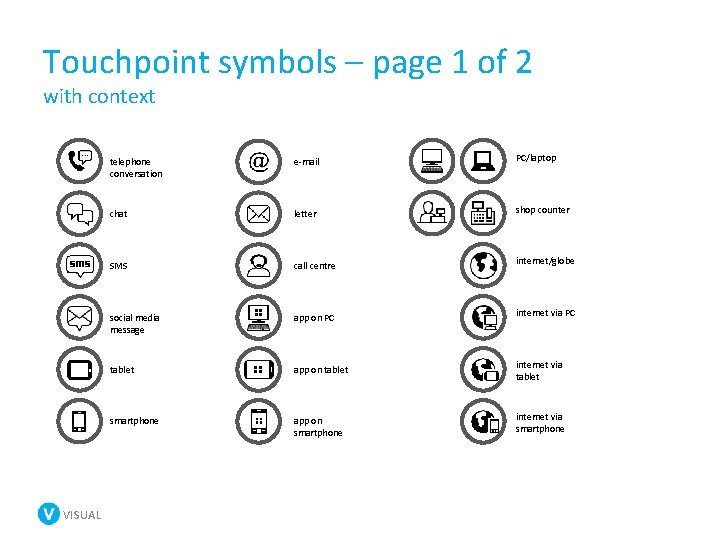
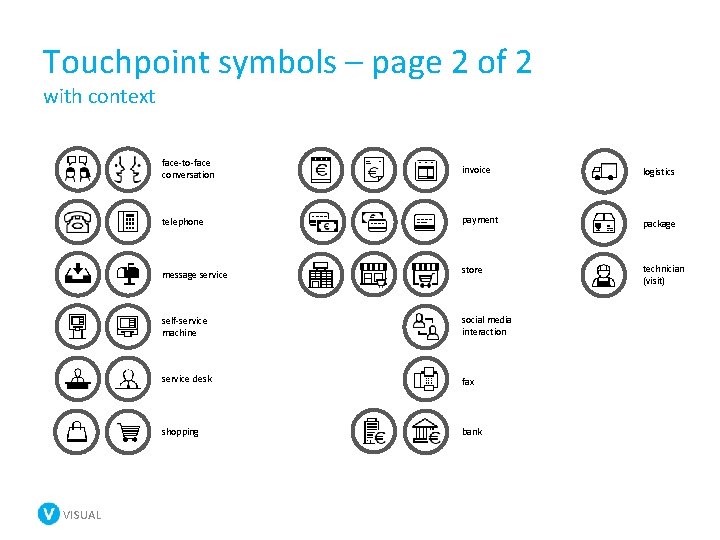
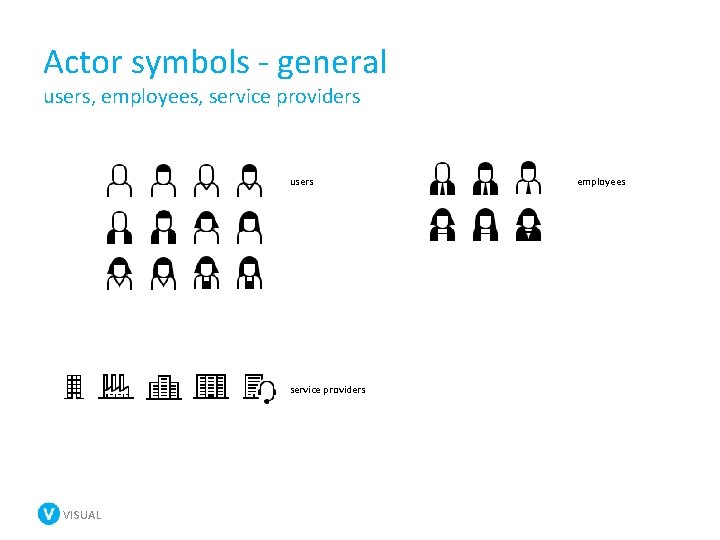
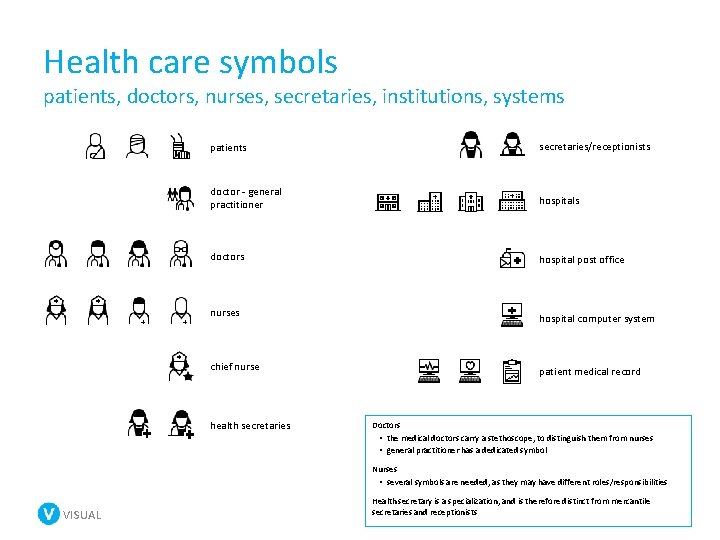
About the VISUAL symbols • The symbols of VISUAL serve different purposes. – Touchpoint symbols communicate the channel or device that carries the touchpoint. – Actor symbols represent the actors in a customer journey (customers, employees, service providers) – Health care symbols are currently a mix of both touchpoint and actor symbols related to the health domain – Customer experience symbols represents the customer's subjective experience of a touchpoint VISUAL
Overview of all VISUAL symbols Touchpoints Users Health care Service providers Employees Customer experience VISUAL
Touchpoint symbols – page 1 of 2 with context VISUAL telephone conversation e-mail PC/laptop chat letter shop counter SMS call centre internet/globe social media message app on PC internet via PC tablet app on tablet internet via tablet smartphone app on smartphone internet via smartphone
Touchpoint symbols – page 2 of 2 with context VISUAL face-to-face conversation invoice logistics telephone payment package message service store technician (visit) self-service machine social media interaction service desk fax shopping bank
Actor symbols - general users, employees, service providers users service providers VISUAL employees
Health care symbols patients, doctors, nurses, secretaries, institutions, systems patients secretaries/receptionists doctor - general practitioner hospitals doctors hospital post office nurses hospital computer system chief nurse patient medical record health secretaries Doctors • the medical doctors carry a stethoscope, to distinguish them from nurses • general practitioner has a dedicated symbol Nurses • several symbols are needed, as they may have different roles/responsibilities VISUAL Health secretary is a specialization, and is therefore distinct from mercantile secretaries and receptionists
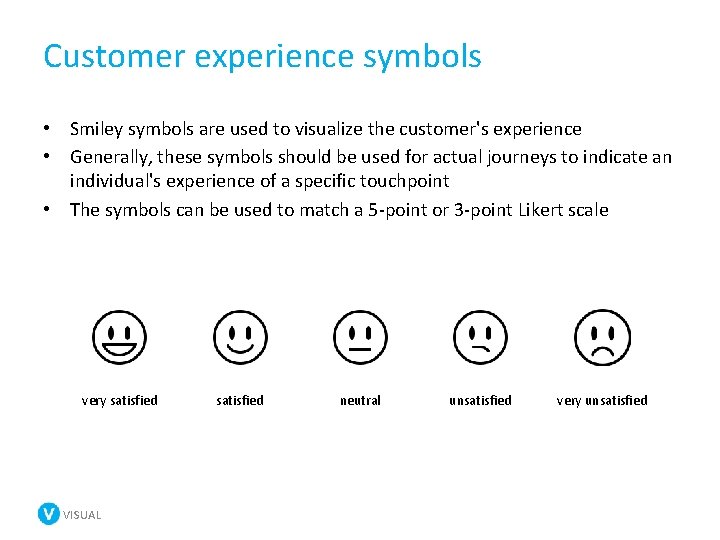
Customer experience symbols • Smiley symbols are used to visualize the customer's experience • Generally, these symbols should be used for actual journeys to indicate an individual's experience of a specific touchpoint • The symbols can be used to match a 5 -point or 3 -point Likert scale very satisfied VISUAL satisfied neutral unsatisfied very unsatisfied
Diagrams VISUAL
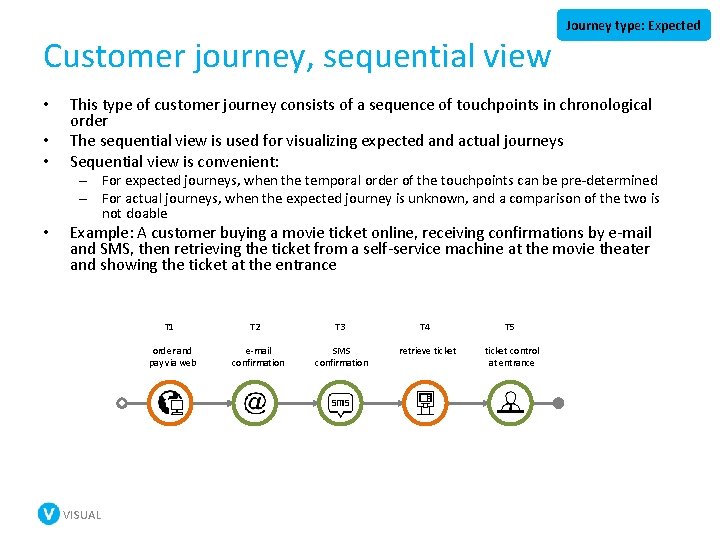
Customer journey, sequential view • • • Journey type: Expected This type of customer journey consists of a sequence of touchpoints in chronological order The sequential view is used for visualizing expected and actual journeys Sequential view is convenient: – For expected journeys, when the temporal order of the touchpoints can be pre-determined – For actual journeys, when the expected journey is unknown, and a comparison of the two is not doable • Example: A customer buying a movie ticket online, receiving confirmations by e-mail and SMS, then retrieving the ticket from a self-service machine at the movie theater and showing the ticket at the entrance T 1 order and pay via web VISUAL T 2 e-mail confirmation T 3 T 4 T 5 SMS confirmation retrieve ticket control at entrance
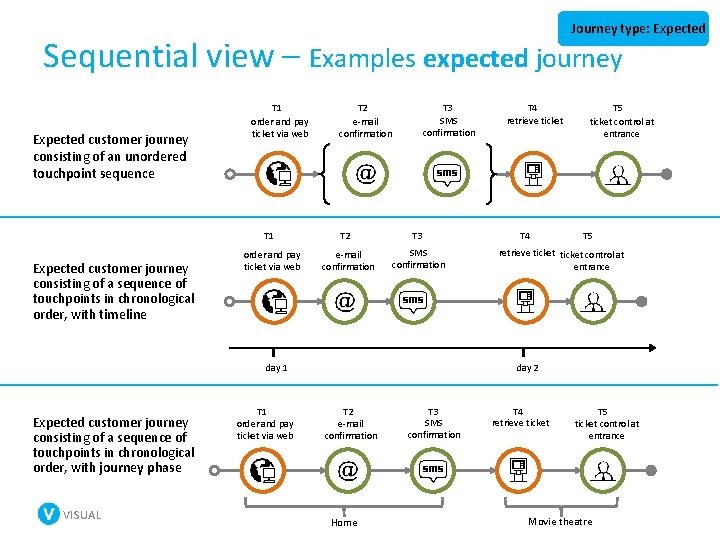
Journey type: Expected Sequential view – Examples expected journey Expected customer journey consisting of an unordered touchpoint sequence T 1 order and pay ticket via web T 1 Expected customer journey consisting of a sequence of touchpoints in chronological order, with timeline order and pay ticket via web T 2 e-mail confirmation T 3 SMS confirmation VISUAL T 1 order and pay ticket via web T 4 T 5 ticket control at entrance T 5 retrieve ticket control at entrance day 2 day 1 Expected customer journey consisting of a sequence of touchpoints in chronological order, with journey phase T 4 retrieve ticket T 2 e-mail confirmation Home T 3 SMS confirmation T 4 retrieve ticket T 5 ticket control at entrance Movie theatre
Customer journey, sequential view failing touchpoint Actual customer journey consisting of: • four completed expected touchpoints (E 1 -E 4) • one failing touchpoint (F 1) • one ad-hoc touchpoint (A 1) E 1 order and pay ticket via web Journey type: Actual E 2 e-mail confirmation E 4 retrieve ticket E 3 SMS confirmation F 1 ticket control at entrance ad-hoc touchpoint A 1 calls to get refund Actual customer journey with timeline consisting of: • • three completed expected touchpoints (E 1 -E 3) one missing touchpoint (M 1) one failing touchpoint (F 1) one ad-hoc touchpoint (A 1) E 1 order and pay ticket via web VISUAL day 1 M 1 e-mail confirmation missing touchpoint E 2 SMS confirmation failing touchpoint E 3 retrieve ticket day 2 F 1 ticket control at entrance ad-hoc touchpoint A 1 calls to get refund day 3
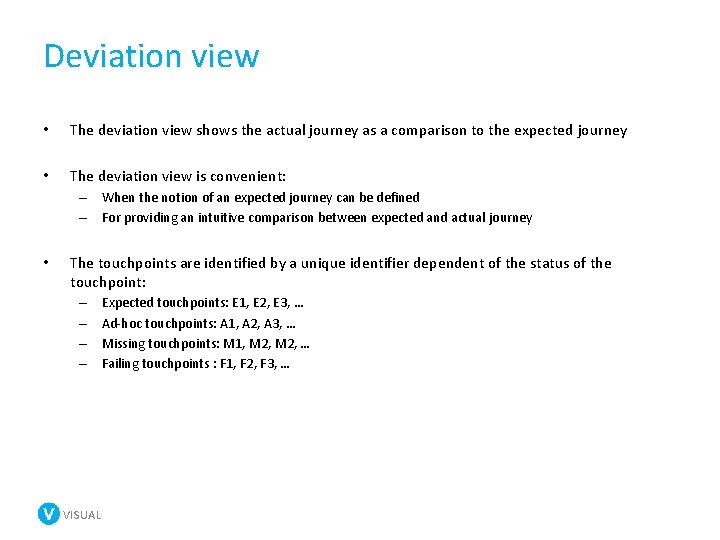
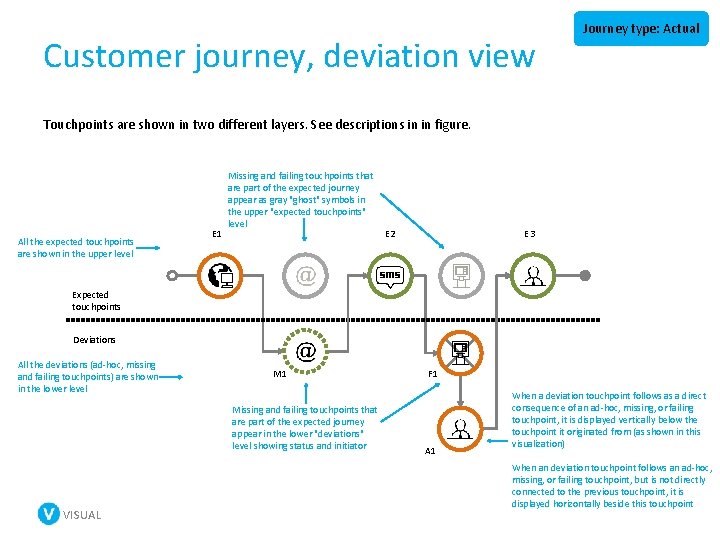
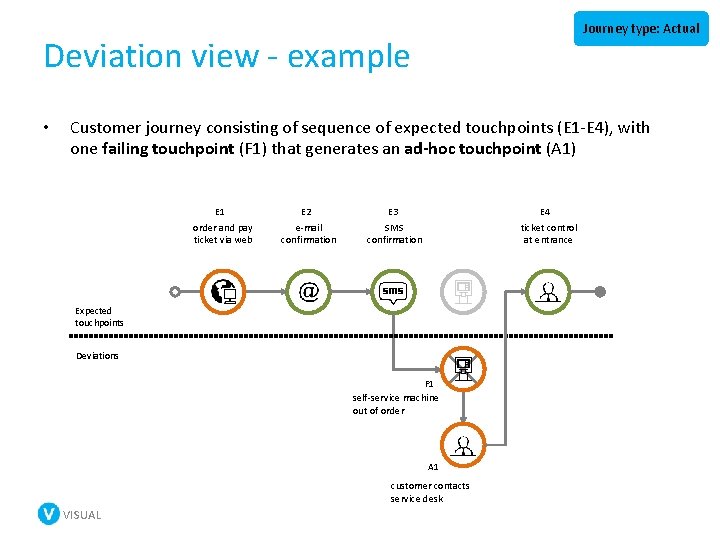
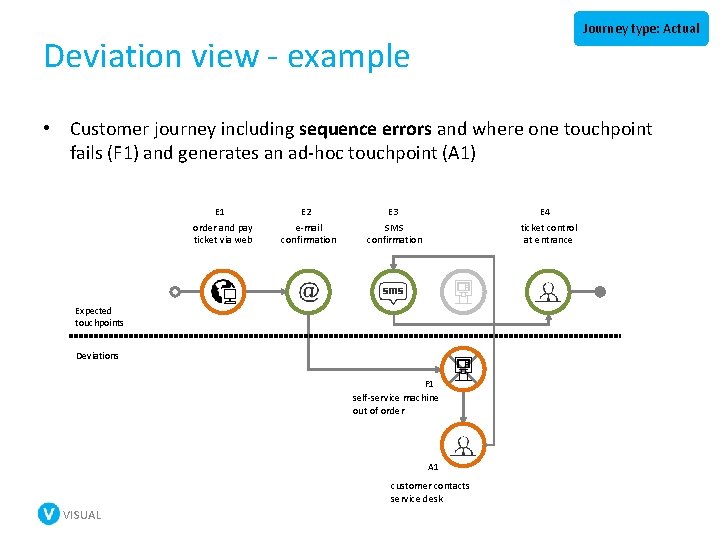
Deviation view • The deviation view shows the actual journey as a comparison to the expected journey • The deviation view is convenient: – When the notion of an expected journey can be defined – For providing an intuitive comparison between expected and actual journey • The touchpoints are identified by a unique identifier dependent of the status of the touchpoint: – – VISUAL Expected touchpoints: E 1, E 2, E 3, … Ad-hoc touchpoints: A 1, A 2, A 3, … Missing touchpoints: M 1, M 2, … Failing touchpoints : F 1, F 2, F 3, …
Customer journey, deviation view Journey type: Actual Touchpoints are shown in two different layers. See descriptions in in figure. All the expected touchpoints are shown in the upper level E 1 Missing and failing touchpoints that are part of the expected journey appear as gray "ghost" symbols in the upper "expected touchpoints" level E 3 E 2 Expected touchpoints Deviations All the deviations (ad-hoc, missing and failing touchpoints) are shown in the lower level M 1 Missing and failing touchpoints that are part of the expected journey appear in the lower "deviations" level showing status and initiator VISUAL F 1 A 1 When a deviation touchpoint follows as a direct consequence of an ad-hoc, missing, or failing touchpoint, it is displayed vertically below the touchpoint it originated from (as shown in this visualization) When an deviation touchpoint follows an ad-hoc, missing, or failing touchpoint, but is not directly connected to the previous touchpoint, it is displayed horizontally beside this touchpoint
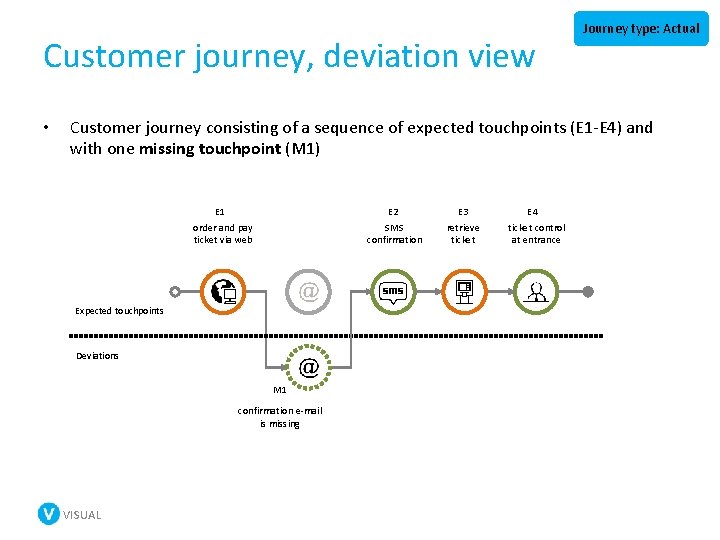
Customer journey, deviation view • Journey type: Actual Customer journey consisting of a sequence of expected touchpoints (E 1 -E 4) and with one missing touchpoint (M 1) E 1 order and pay ticket via web E 2 SMS confirmation Expected touchpoints Deviations M 1 confirmation e-mail is missing VISUAL E 3 retrieve ticket E 4 ticket control at entrance
Journey type: Actual Deviation view - example • Customer journey consisting of sequence of expected touchpoints (E 1 -E 4), with one failing touchpoint (F 1) that generates an ad-hoc touchpoint (A 1) E 1 order and pay ticket via web E 2 e-mail confirmation E 4 ticket control at entrance E 3 SMS confirmation Expected touchpoints Deviations F 1 self-service machine out of order A 1 customer contacts service desk VISUAL
Journey type: Actual Deviation view - example • Customer journey including sequence errors and where one touchpoint fails (F 1) and generates an ad-hoc touchpoint (A 1) E 1 order and pay ticket via web E 2 e-mail confirmation E 4 ticket control at entrance E 3 SMS confirmation Expected touchpoints Deviations F 1 self-service machine out of order A 1 customer contacts service desk VISUAL
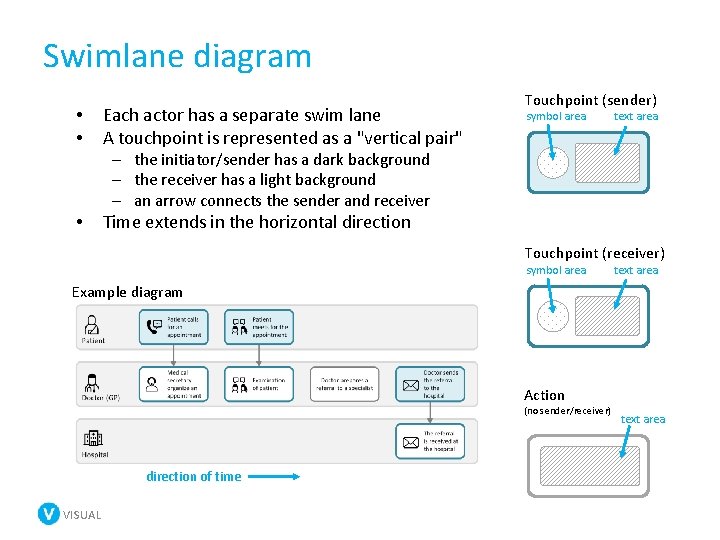
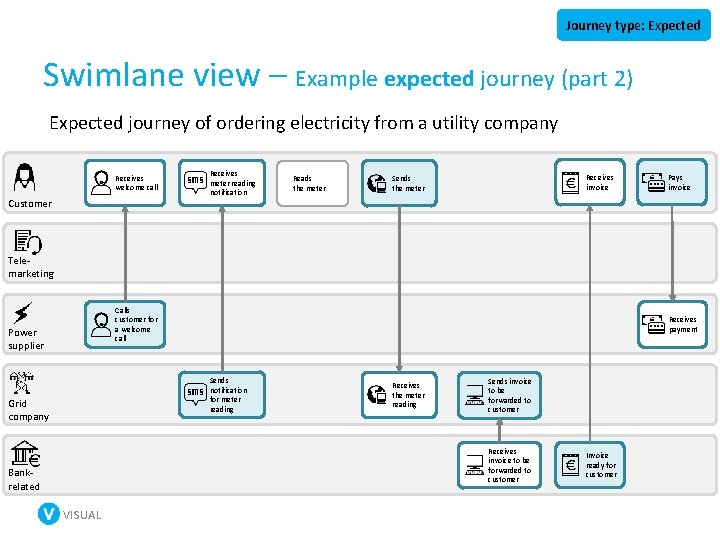
Swimlane diagram • • Each actor has a separate swim lane A touchpoint is represented as a "vertical pair" Touchpoint (sender) symbol area text area – the initiator/sender has a dark background – the receiver has a light background – an arrow connects the sender and receiver • Time extends in the horizontal direction Touchpoint (receiver) symbol area text area Example diagram Action (no sender/receiver) direction of time VISUAL text area
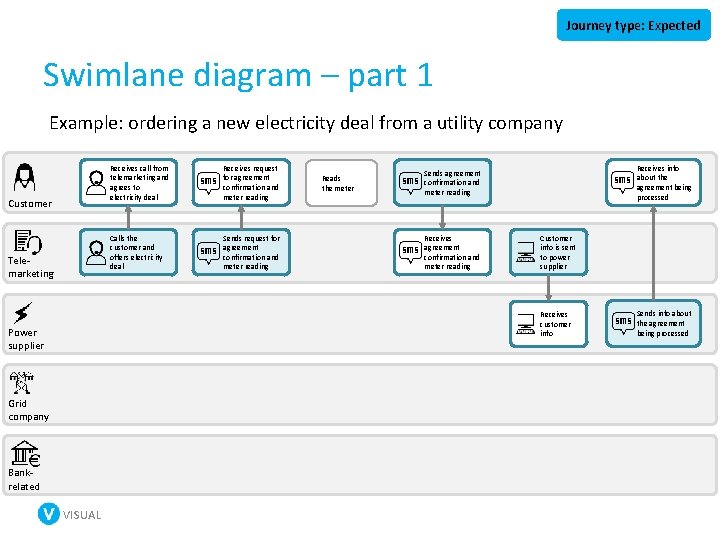
Journey type: Expected Swimlane diagram – part 1 Example: ordering a new electricity deal from a utility company Customer Telemarketing Receives call from telemarketing and agrees to electricity deal Receives request for agreement confirmation and meter reading Calls the customer and offers electricity deal Sends request for agreement confirmation and meter reading Reads the meter Receives info about the agreement being processed Sends agreement confirmation and meter reading Receives agreement confirmation and meter reading Customer info is sent to power supplier Receives customer info Power supplier Grid company Bankrelated VISUAL Sends info about the agreement being processed
Journey type: Expected Swimlane view – Example expected journey (part 2) Expected journey of ordering electricity from a utility company Receives welcome call Customer Receives meter reading notification Reads the meter Receives invoice Sends the meter Pays invoice Telemarketing Calls customer for a welcome call Power supplier Receives payment Sends notification for meter reading Grid company Receives the meter reading Sends invoice to be forwarded to customer Receives invoice to be forwarded to customer Bankrelated VISUAL Invoice ready for customer
More advanced use of VISUAL
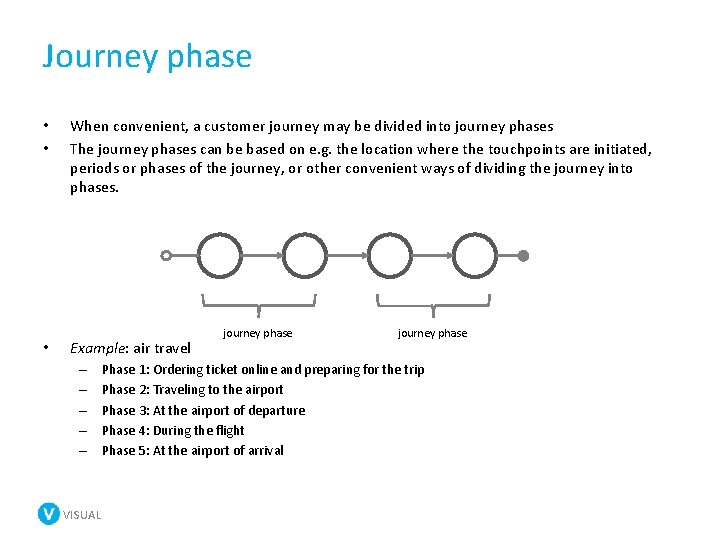
Journey phase • • • When convenient, a customer journey may be divided into journey phases The journey phases can be based on e. g. the location where the touchpoints are initiated, periods or phases of the journey, or other convenient ways of dividing the journey into phases. Example: air travel – – – VISUAL journey phase Phase 1: Ordering ticket online and preparing for the trip Phase 2: Traveling to the airport Phase 3: At the airport of departure Phase 4: During the flight Phase 5: At the airport of arrival
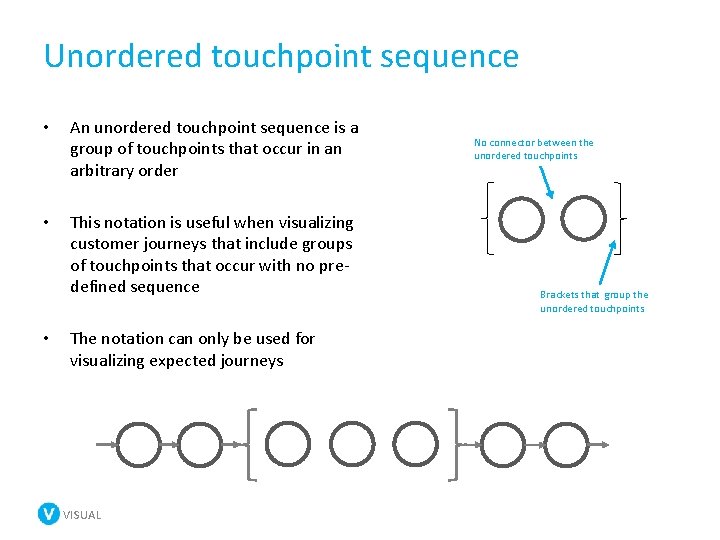
Unordered touchpoint sequence • An unordered touchpoint sequence is a group of touchpoints that occur in an arbitrary order • This notation is useful when visualizing customer journeys that include groups of touchpoints that occur with no predefined sequence • The notation can only be used for visualizing expected journeys VISUAL No connector between the unordered touchpoints Brackets that group the unordered touchpoints
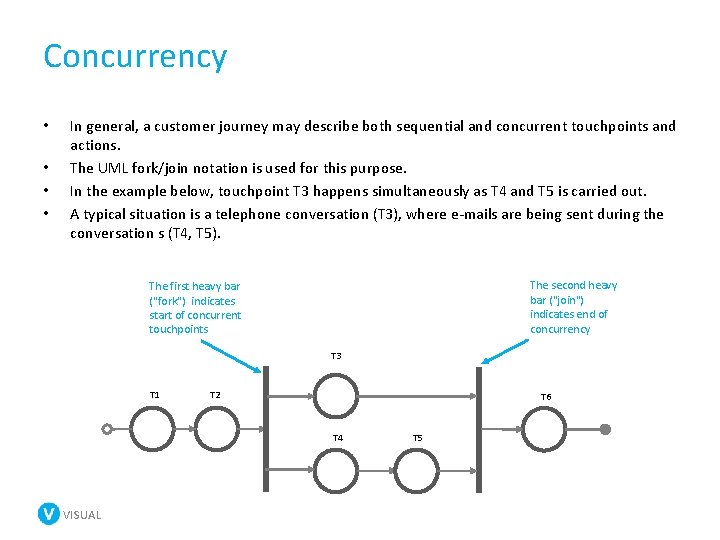
Concurrency • • In general, a customer journey may describe both sequential and concurrent touchpoints and actions. The UML fork/join notation is used for this purpose. In the example below, touchpoint T 3 happens simultaneously as T 4 and T 5 is carried out. A typical situation is a telephone conversation (T 3), where e-mails are being sent during the conversation s (T 4, T 5). The second heavy bar ("join") indicates end of concurrency The first heavy bar ("fork") indicates start of concurrent touchpoints T 3 T 1 T 2 T 6 T 4 VISUAL T 5
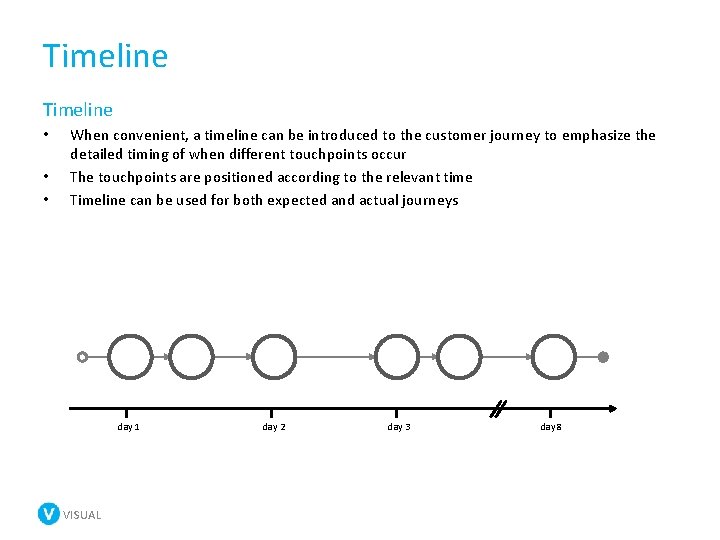
Timeline • • • When convenient, a timeline can be introduced to the customer journey to emphasize the detailed timing of when different touchpoints occur The touchpoints are positioned according to the relevant time Timeline can be used for both expected and actual journeys day 1 VISUAL day 2 day 3 day 8
The VISUAL project Please follow us here: http: //www. visualproject. org/ Halogen SINTEF Service Design consultancy Research Project management University of Linköping Research Industry partners Energy supplier VISUAL Digital market An innovation project funded by the research council of Norway e. Health services