
Thin Manager Architecture and Best Practices 2020 Roadshow

Thin. Manager Architecture and Best Practices 2020 Roadshow PUBLIC | Copyright © 2020 Rockwell Automation, Inc. | #ROKLive | 1
Agenda 1 5 Architecting Thin. Manager and Overview 2 Licensing 3 Tips and Tricks PUBLIC | Copyright © 2020 Rockwell Automation, Inc. | #ROKLive | 2 Architecting a Managed Solution 4 Security and Networking
Architecting Thin. Manager and Overview PUBLIC | Copyright © 2020 Rockwell Automation, Inc. | #ROKLive | 3
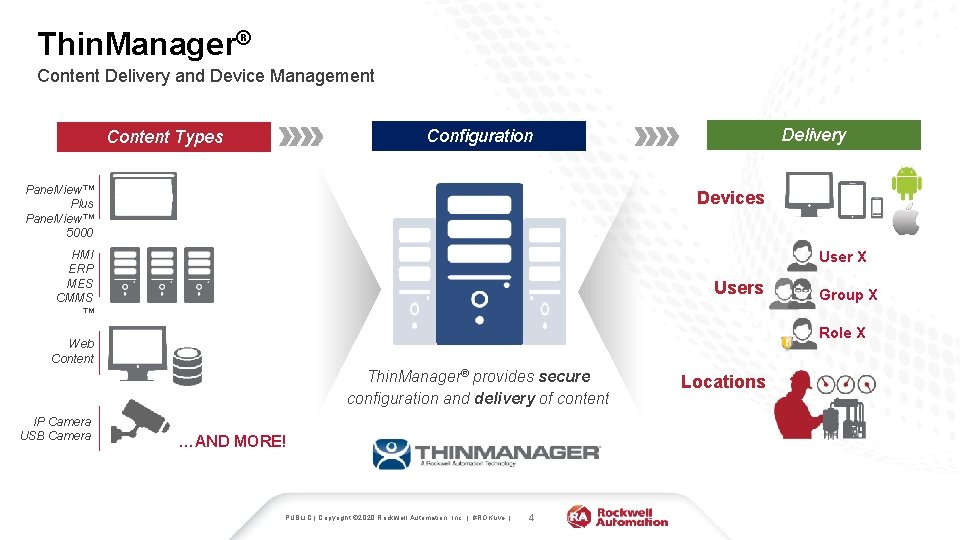
Thin. Manager® Content Delivery and Device Management Delivery Configuration Content Types Panel. View™ Plus Panel. View™ 5000 Devices HMI ERP MES CMMS ™ User X Users Role X Web Content Thin. Manager® provides secure configuration and delivery of content IP Camera USB Camera Group X …AND MORE! PUBLIC | Copyright © 2020 Rockwell Automation, Inc. | #ROKLive | 4 Locations
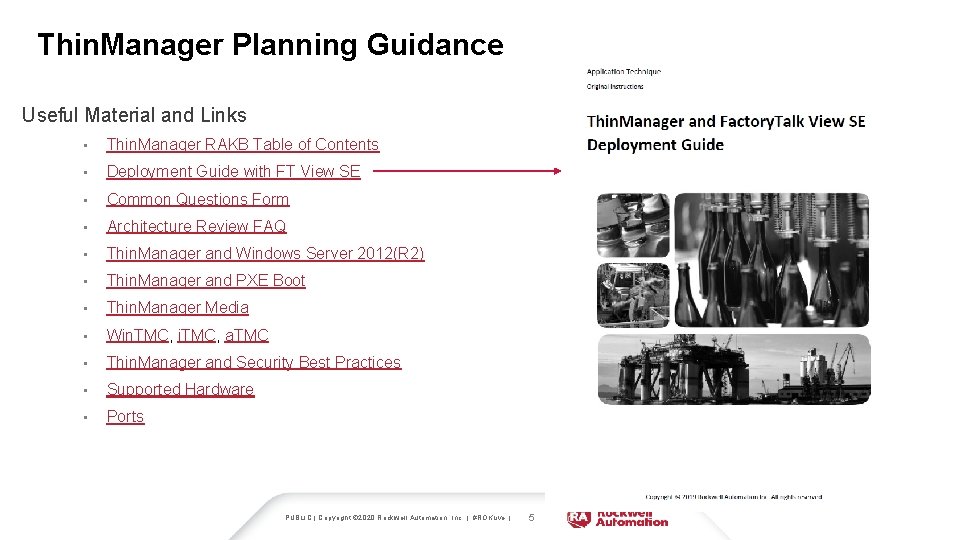
Thin. Manager Planning Guidance Useful Material and Links • Thin. Manager RAKB Table of Contents • Deployment Guide with FT View SE • Common Questions Form • Architecture Review FAQ • Thin. Manager and Windows Server 2012(R 2) • Thin. Manager and PXE Boot • Thin. Manager Media • Win. TMC, i. TMC, a. TMC • Thin. Manager and Security Best Practices • Supported Hardware • Ports PUBLIC | Copyright © 2020 Rockwell Automation, Inc. | #ROKLive | 5
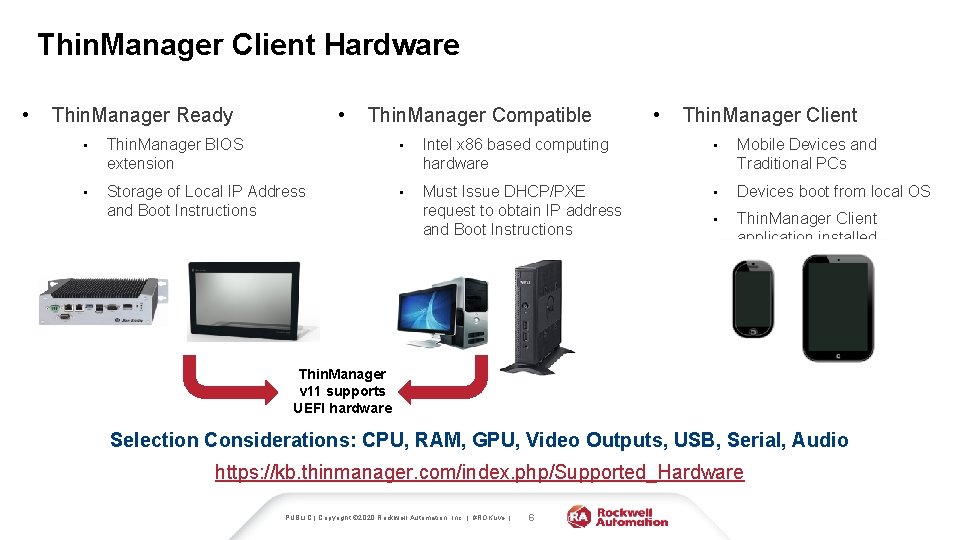
Thin. Manager Client Hardware • • Thin. Manager Ready Thin. Manager Compatible • Thin. Manager Client • Thin. Manager BIOS extension • Intel x 86 based computing hardware • Mobile Devices and Traditional PCs • Storage of Local IP Address and Boot Instructions • Must Issue DHCP/PXE request to obtain IP address and Boot Instructions • Devices boot from local OS • Thin. Manager Client application installed Thin. Manager v 11 supports UEFI hardware Selection Considerations: CPU, RAM, GPU, Video Outputs, USB, Serial, Audio https: //kb. thinmanager. com/index. php/Supported_Hardware PUBLIC | Copyright © 2020 Rockwell Automation, Inc. | #ROKLive | 6
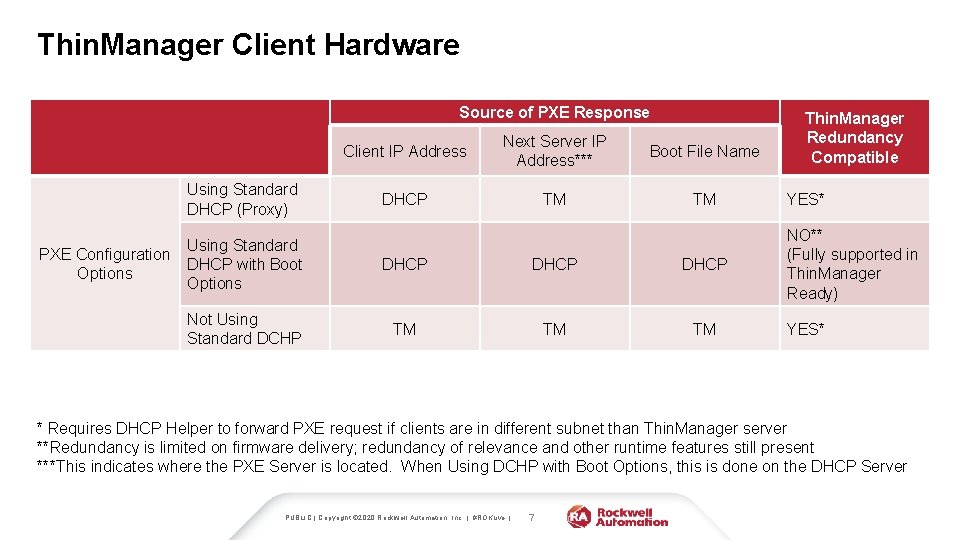
Thin. Manager Client Hardware Source of PXE Response Using Standard DHCP (Proxy) Using Standard PXE Configuration DHCP with Boot Options Not Using Standard DCHP Client IP Address Next Server IP Address*** Boot File Name DHCP TM TM DHCP TM TM TM Thin. Manager Redundancy Compatible YES* NO** (Fully supported in Thin. Manager Ready) YES* * Requires DHCP Helper to forward PXE request if clients are in different subnet than Thin. Manager server **Redundancy is limited on firmware delivery; redundancy of relevance and other runtime features still present ***This indicates where the PXE Server is located. When Using DCHP with Boot Options, this is done on the DHCP Server PUBLIC | Copyright © 2020 Rockwell Automation, Inc. | #ROKLive | 7
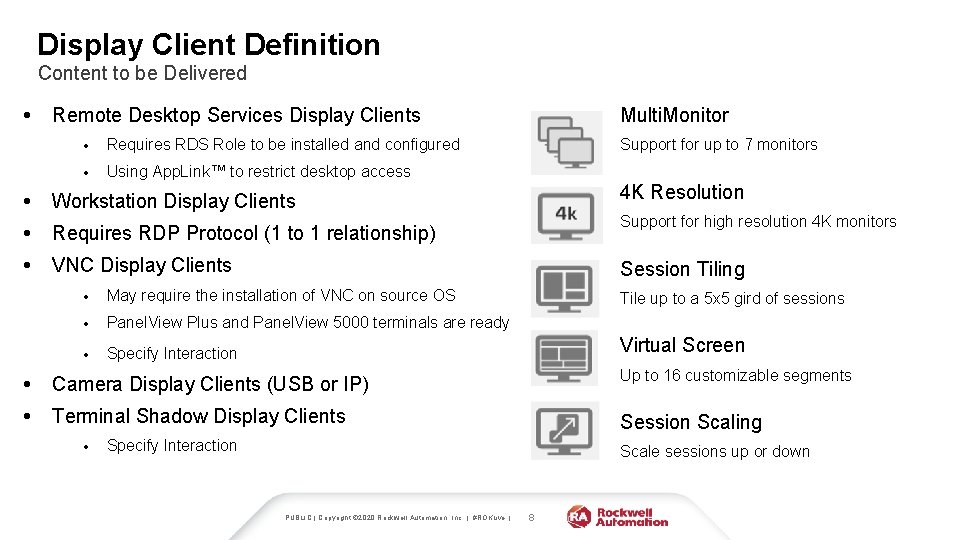
Display Client Definition Content to be Delivered • Multi. Monitor Remote Desktop Services Display Clients • Requires RDS Role to be installed and configured • Using App. Link™ to restrict desktop access • Workstation Display Clients • Requires RDP Protocol (1 to 1 relationship) • VNC Display Clients Support for up to 7 monitors 4 K Resolution Support for high resolution 4 K monitors Session Tiling • May require the installation of VNC on source OS • Panel. View Plus and Panel. View 5000 terminals are ready • Specify Interaction Tile up to a 5 x 5 gird of sessions Virtual Screen • Camera Display Clients (USB or IP) Up to 16 customizable segments • Terminal Shadow Display Clients Session Scaling • Specify Interaction Scale sessions up or down PUBLIC | Copyright © 2020 Rockwell Automation, Inc. | #ROKLive | 8
Licensing
Thin. Manager V-FLEX Licensing Overview Users now can purchase single Thin. Manager connection licenses that have no network or location restrictions and provide for bulk purchase discounts. ADVANTAGES OF V-FLEX LICENSING: Deliver Thin. Manager client connections with maximum flexibility on an as-needed basis to any of your facilities around the world. Thin. Manager V-FLEX licensing is a single Thin. Manager XLr individual terminal connection license that can be purchased one-at-a-time in any quantity. They can be deployed over an unlimited number of Thin. Server pairs (primary/backup) at an unlimited number of locations on multiple networks. PUBLIC | Copyright © 2020 Rockwell Automation, Inc. | #ROKLive | • Central management of Thin. Manager client connections. • Use across multiple facilities—no limitations on the number of locations, networks and servers. • Ability to purchase and additional licenses only when and where they are needed with volume discount pricing. • Access to a private Thin. Manager license server portal for creating and distributing licenses for use. 10
Thin. Manager V-FLEX Licensing Overview Both FTA and TMA are available in two formats: Perpetual+Maintenance Subscription exclusively through the software portal. Activation V-FLEX TMA is activated through the licensing. thinmanager. com Thin. Manager Licensing Website. V-FLEX FTA is activated either through Factory. Talk Activation Manager or the activate. rockwellautomation. com FTA Website. Redundancy This Redundancy Companion license is sold separately and cannot function independently since it is sold for a 50% reduced cost. PUBLIC | Copyright © 2020 Rockwell Automation, Inc. | #ROKLive | 11
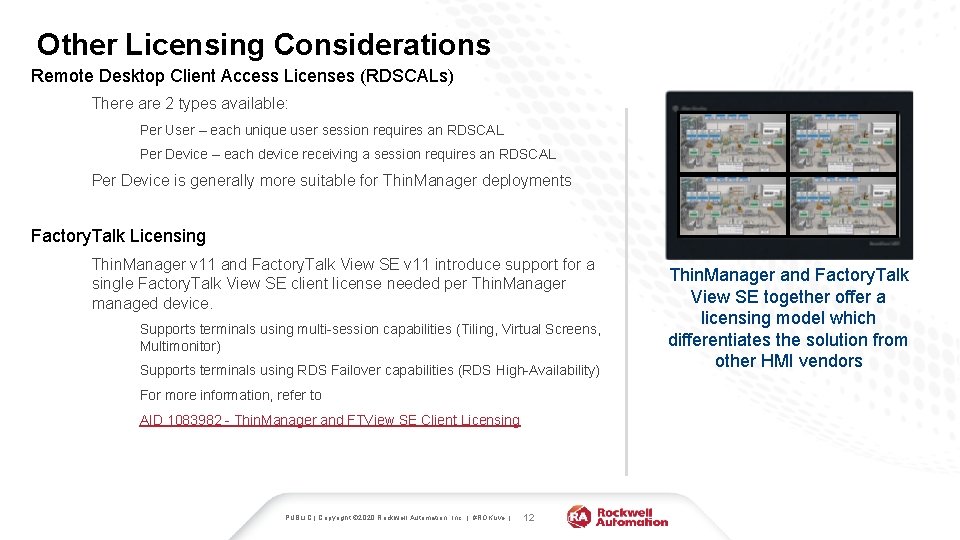
Other Licensing Considerations Remote Desktop Client Access Licenses (RDSCALs) There are 2 types available: Per User – each unique user session requires an RDSCAL Per Device – each device receiving a session requires an RDSCAL Per Device is generally more suitable for Thin. Manager deployments Factory. Talk Licensing Thin. Manager v 11 and Factory. Talk View SE v 11 introduce support for a single Factory. Talk View SE client license needed per Thin. Manager managed device. Supports terminals using multi-session capabilities (Tiling, Virtual Screens, Multimonitor) Supports terminals using RDS Failover capabilities (RDS High-Availability) For more information, refer to AID 1083982 - Thin. Manager and FTView SE Client Licensing PUBLIC | Copyright © 2020 Rockwell Automation, Inc. | #ROKLive | 12 Thin. Manager and Factory. Talk View SE together offer a licensing model which differentiates the solution from other HMI vendors
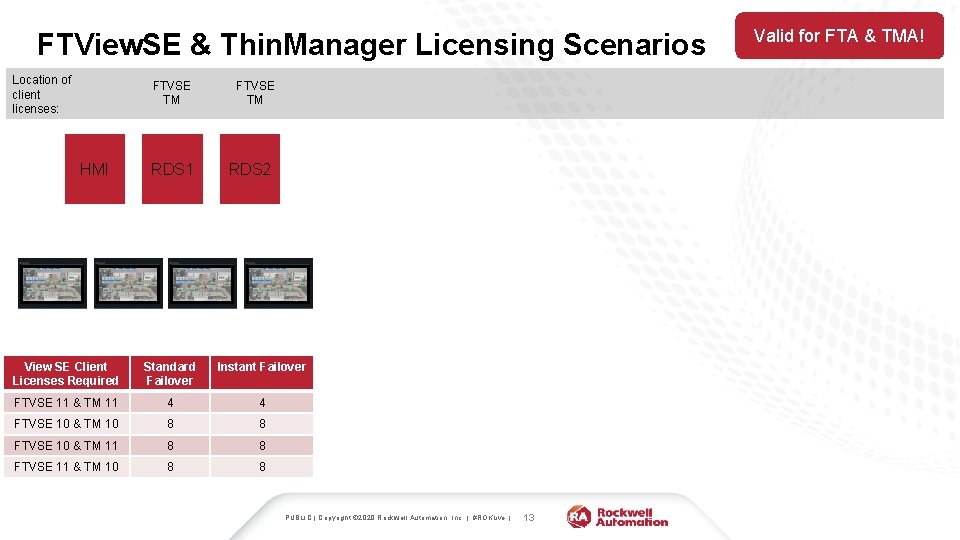
FTView. SE & Thin. Manager Licensing Scenarios Location of client licenses: FTVSE TM HMI RDS 1 FTVSE TM RDS 2 View SE Client Licenses Required Standard Failover Instant Failover FTVSE 11 & TM 11 4 4 FTVSE 10 & TM 10 8 8 FTVSE 10 & TM 11 8 8 FTVSE 11 & TM 10 8 8 PUBLIC | Copyright © 2020 Rockwell Automation, Inc. | #ROKLive | 13 Valid for FTA & TMA!
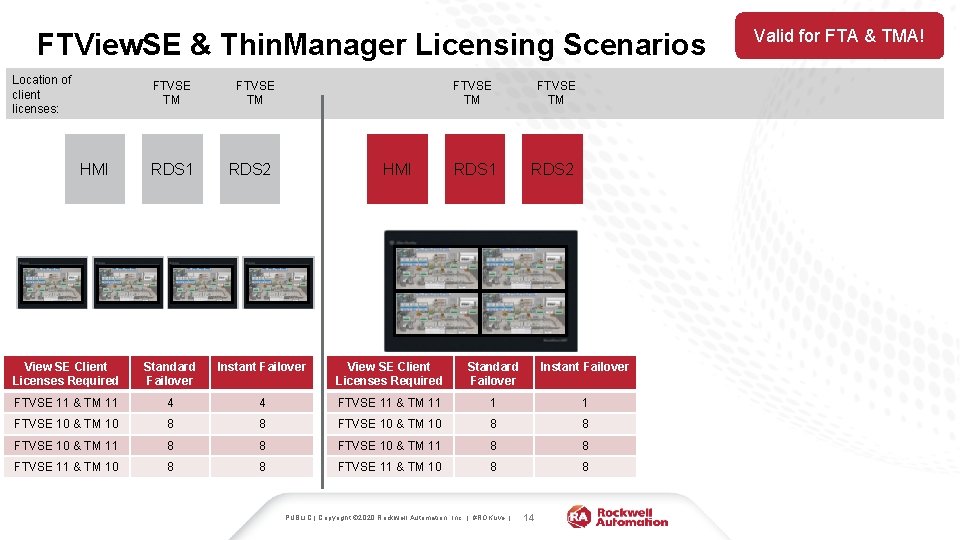
FTView. SE & Thin. Manager Licensing Scenarios Location of client licenses: FTVSE TM HMI RDS 1 FTVSE TM RDS 2 View SE Client Licenses Required Standard Failover Instant Failover FTVSE 11 & TM 11 4 4 FTVSE 11 & TM 11 1 1 FTVSE 10 & TM 10 8 8 FTVSE 10 & TM 11 8 8 FTVSE 11 & TM 10 8 8 PUBLIC | Copyright © 2020 Rockwell Automation, Inc. | #ROKLive | 14 Valid for FTA & TMA!
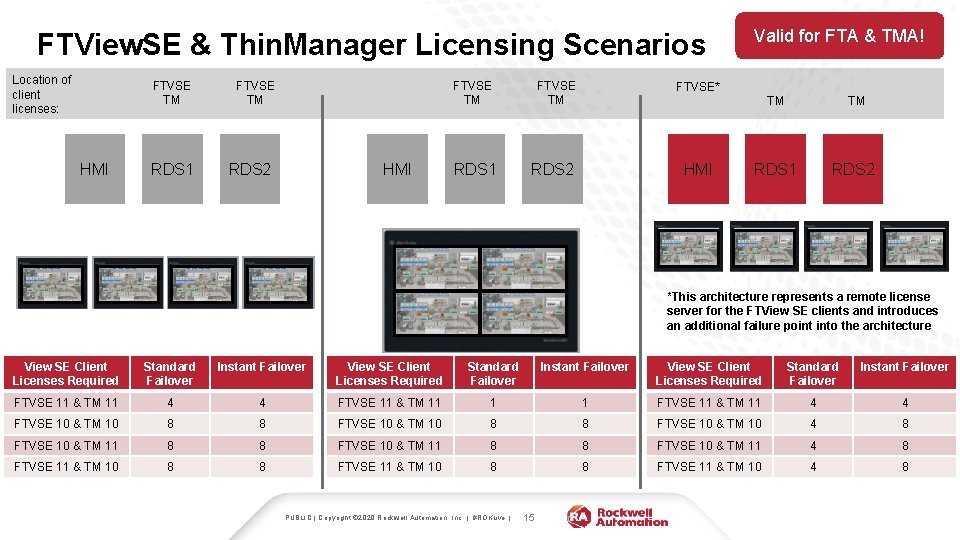
FTView. SE & Thin. Manager Licensing Scenarios Location of client licenses: FTVSE TM HMI RDS 1 FTVSE TM RDS 2 HMI RDS 1 FTVSE TM Valid for FTA & TMA! FTVSE* RDS 2 HMI TM TM RDS 1 RDS 2 *This architecture represents a remote license server for the FTView SE clients and introduces an additional failure point into the architecture View SE Client Licenses Required Standard Failover Instant Failover FTVSE 11 & TM 11 4 4 FTVSE 11 & TM 11 1 1 FTVSE 11 & TM 11 4 4 FTVSE 10 & TM 10 8 8 FTVSE 10 & TM 10 4 8 FTVSE 10 & TM 11 8 8 FTVSE 10 & TM 11 4 8 FTVSE 11 & TM 10 8 8 FTVSE 11 & TM 10 4 8 PUBLIC | Copyright © 2020 Rockwell Automation, Inc. | #ROKLive | 15
Architecting a Managed Solution PUBLIC | Copyright © 2020 Rockwell Automation, Inc. | #ROKLive | 16
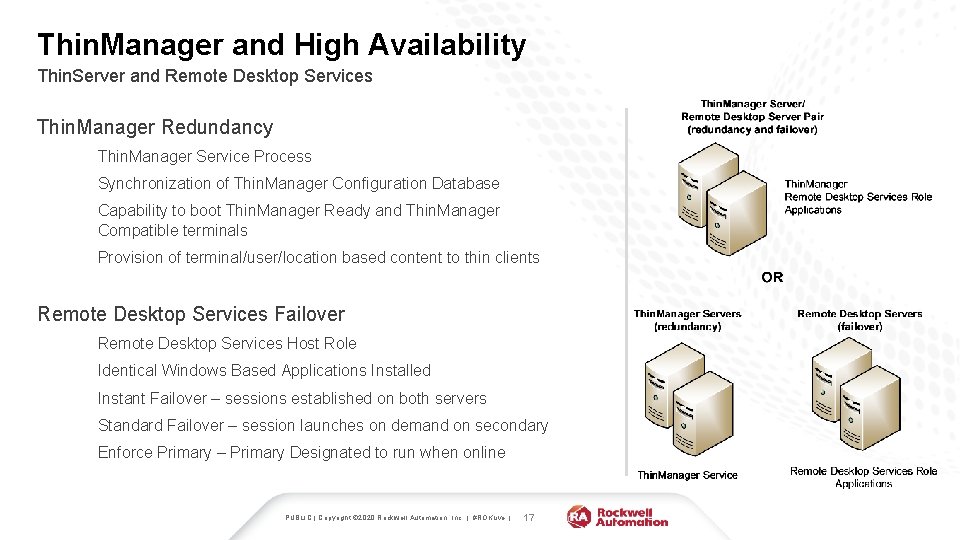
Thin. Manager and High Availability Thin. Server and Remote Desktop Services Thin. Manager Redundancy Thin. Manager Service Process Synchronization of Thin. Manager Configuration Database Capability to boot Thin. Manager Ready and Thin. Manager Compatible terminals Provision of terminal/user/location based content to thin clients Remote Desktop Services Failover Remote Desktop Services Host Role Identical Windows Based Applications Installed Instant Failover – sessions established on both servers Standard Failover – session launches on demand on secondary Enforce Primary – Primary Designated to run when online PUBLIC | Copyright © 2020 Rockwell Automation, Inc. | #ROKLive | 17
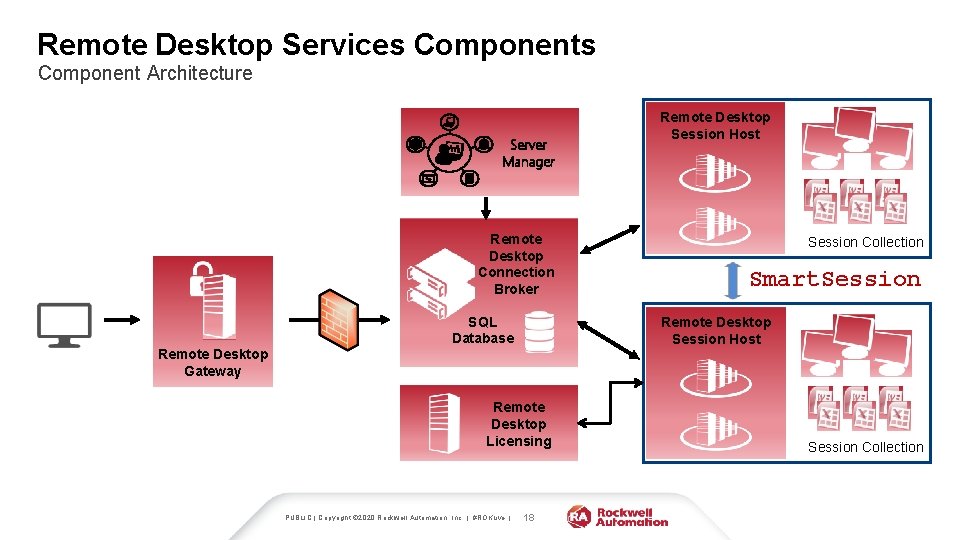
Remote Desktop Services Component Architecture Server Manager Remote Desktop Connection Broker SQL Database Session Collection Smart. Session Remote Desktop Session Host Remote Desktop Gateway Remote Desktop Licensing PUBLIC | Copyright © 2020 Rockwell Automation, Inc. | #ROKLive | Remote Desktop Session Host 18 Session Collection
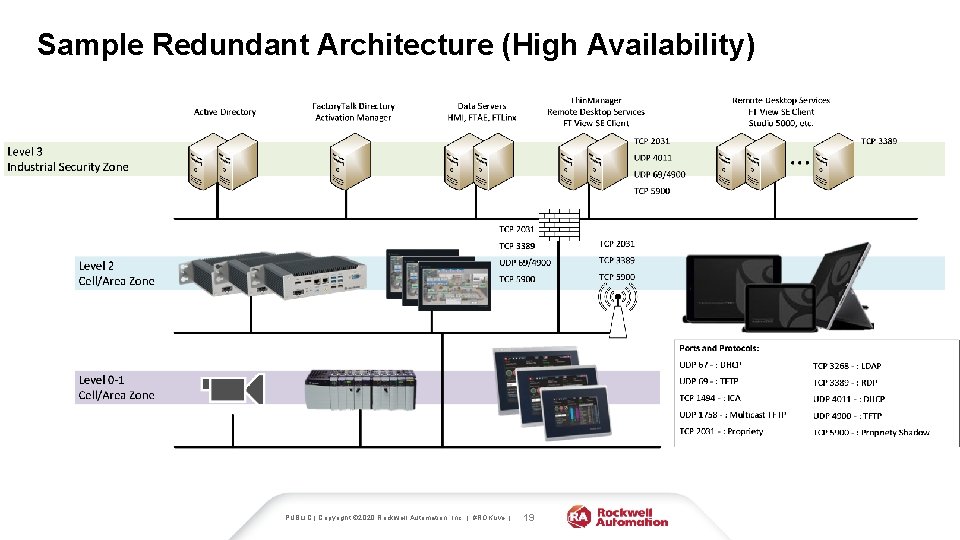
Sample Redundant Architecture (High Availability) PUBLIC | Copyright © 2020 Rockwell Automation, Inc. | #ROKLive | 19
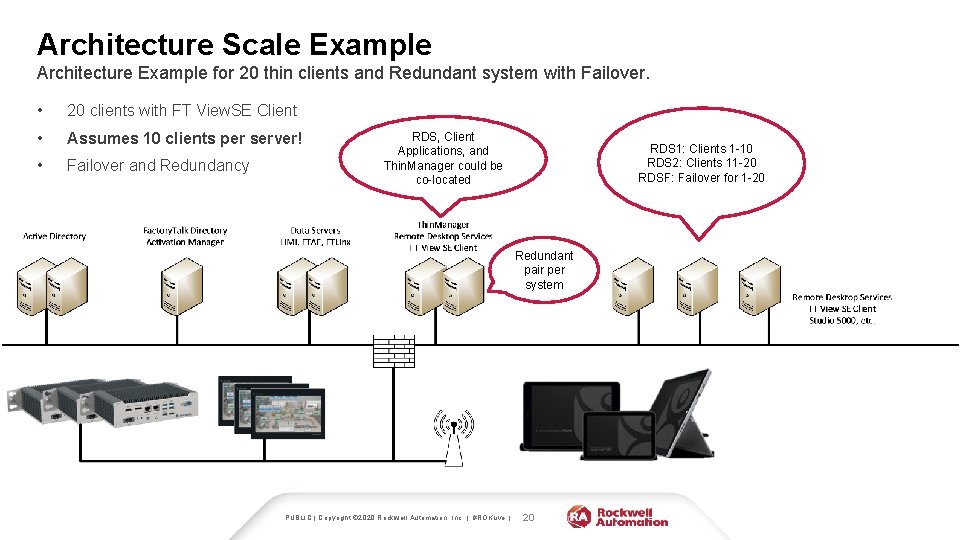
Architecture Scale Example Architecture Example for 20 thin clients and Redundant system with Failover. • 20 clients with FT View. SE Client • Assumes 10 clients per server! • Failover and Redundancy RDS, Client Applications, and Thin. Manager could be co-located RDS 1: Clients 1 -10 RDS 2: Clients 11 -20 RDSF: Failover for 1 -20 Redundant pair per system PUBLIC | Copyright © 2020 Rockwell Automation, Inc. | #ROKLive | 20
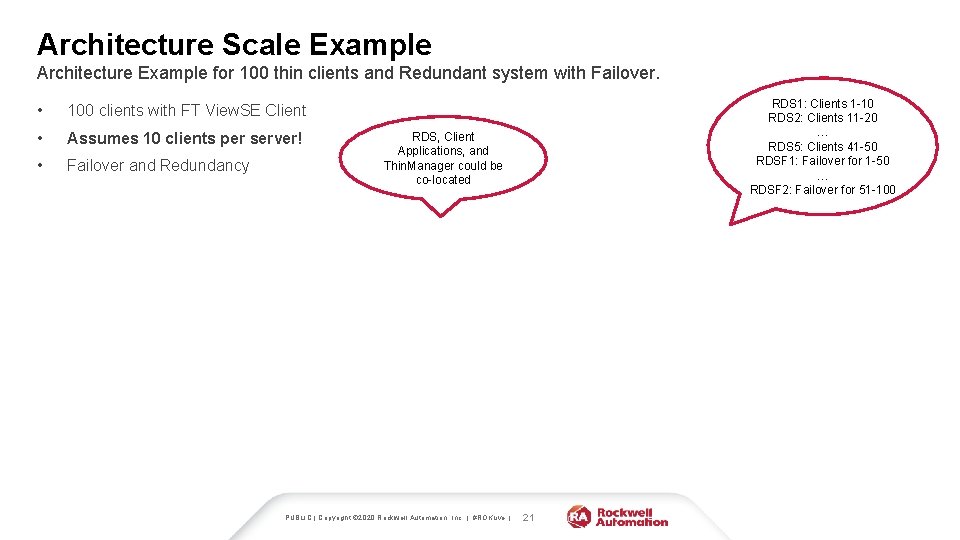
Architecture Scale Example Architecture Example for 100 thin clients and Redundant system with Failover. • 100 clients with FT View. SE Client • Assumes 10 clients per server! • Failover and Redundancy RDS 1: Clients 1 -10 RDS 2: Clients 11 -20 … RDS 5: Clients 41 -50 RDSF 1: Failover for 1 -50 … RDSF 2: Failover for 51 -100 RDS, Client Applications, and Thin. Manager could be co-located PUBLIC | Copyright © 2020 Rockwell Automation, Inc. | #ROKLive | 21
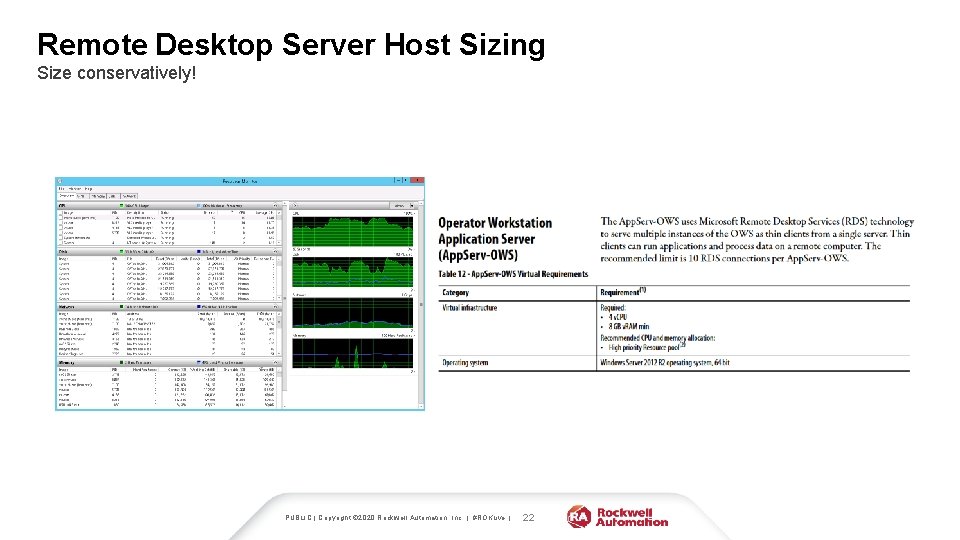
Remote Desktop Server Host Sizing Size conservatively! PUBLIC | Copyright © 2020 Rockwell Automation, Inc. | #ROKLive | 22
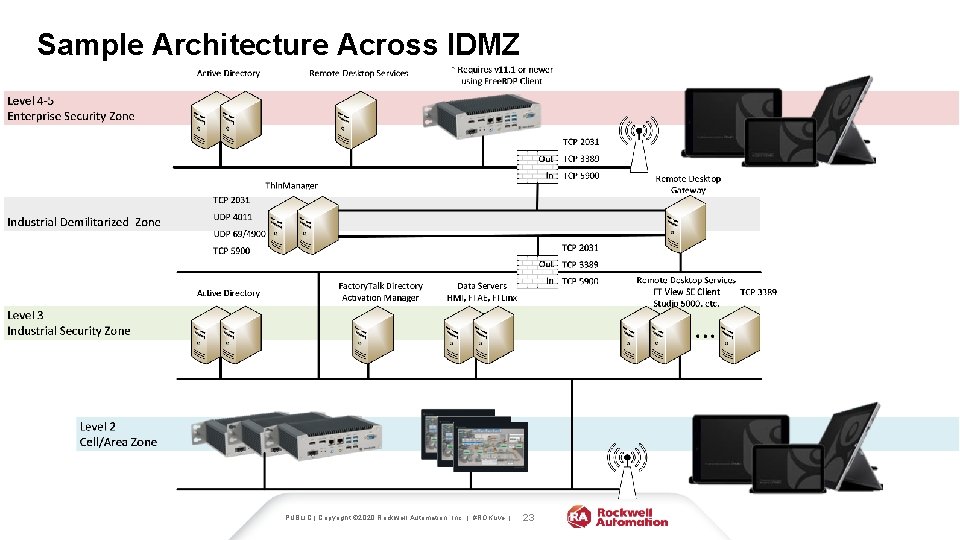
Sample Architecture Across IDMZ PUBLIC | Copyright © 2020 Rockwell Automation, Inc. | #ROKLive | 23
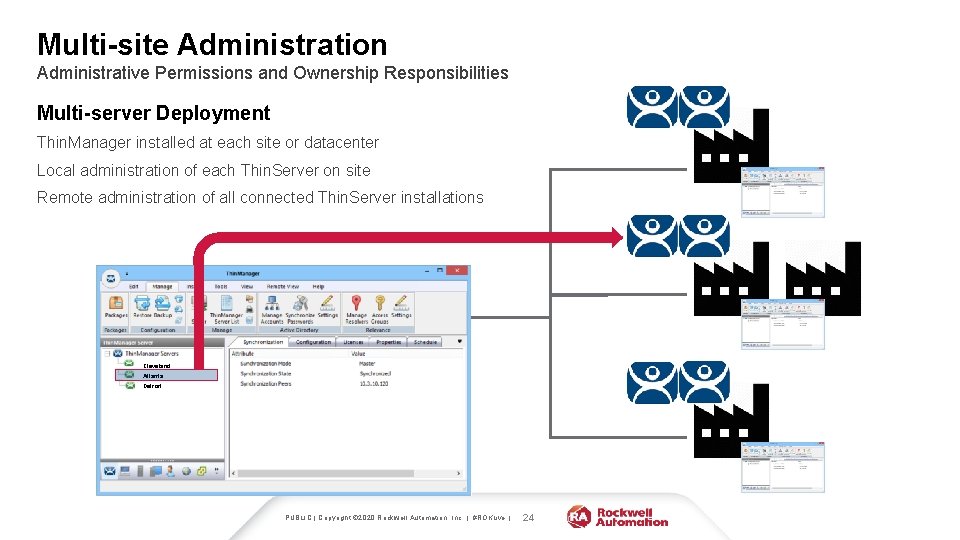
Multi-site Administration Administrative Permissions and Ownership Responsibilities Multi-server Deployment Thin. Manager installed at each site or datacenter Local administration of each Thin. Server on site Remote administration of all connected Thin. Server installations Cleveland Atlanta Detroit PUBLIC | Copyright © 2020 Rockwell Automation, Inc. | #ROKLive | 24
Security and Networking PUBLIC | Copyright © 2020 Rockwell Automation, Inc. | #ROKLive | 25
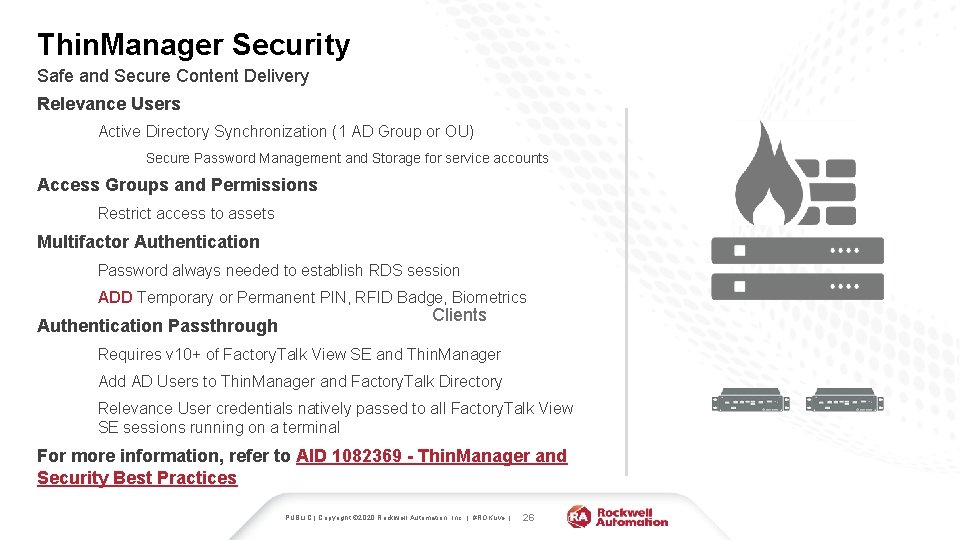
Thin. Manager Security Safe and Secure Content Delivery Relevance Users Active Directory Synchronization (1 AD Group or OU) Secure Password Management and Storage for service accounts Access Groups and Permissions Restrict access to assets Multifactor Authentication Password always needed to establish RDS session ADD Temporary or Permanent PIN, RFID Badge, Biometrics Authentication Passthrough Clients Requires v 10+ of Factory. Talk View SE and Thin. Manager Add AD Users to Thin. Manager and Factory. Talk Directory Relevance User credentials natively passed to all Factory. Talk View SE sessions running on a terminal For more information, refer to AID 1082369 - Thin. Manager and Security Best Practices PUBLIC | Copyright © 2020 Rockwell Automation, Inc. | #ROKLive | 26
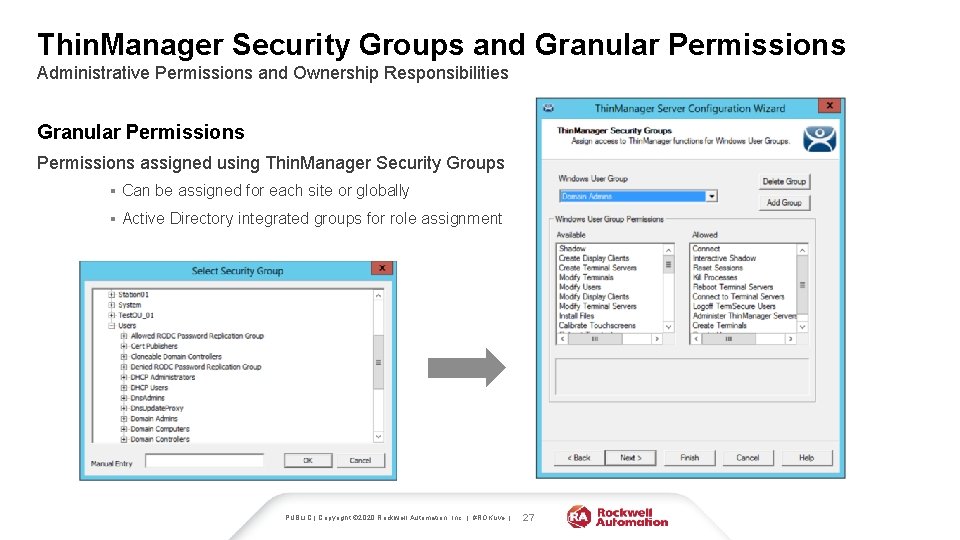
Thin. Manager Security Groups and Granular Permissions Administrative Permissions and Ownership Responsibilities Granular Permissions assigned using Thin. Manager Security Groups § Can be assigned for each site or globally § Active Directory integrated groups for role assignment PUBLIC | Copyright © 2020 Rockwell Automation, Inc. | #ROKLive | 27

Enhance and Simplify Security Initiatives Reducing the Attack Surface Using thin clients with Thin. Manager • The firmware – Extremely lightweight OS with only the necessary processes running • Only a means of connecting to content (no local data or storage) • USB/CD/DVD/floppy – external devices not enabled by default Clients Servers Thin. Manager user terminals do not store local data and reduce your plant floor attack surface PUBLIC | Copyright © 2020 Rockwell Automation, Inc. | #ROKLive | 28
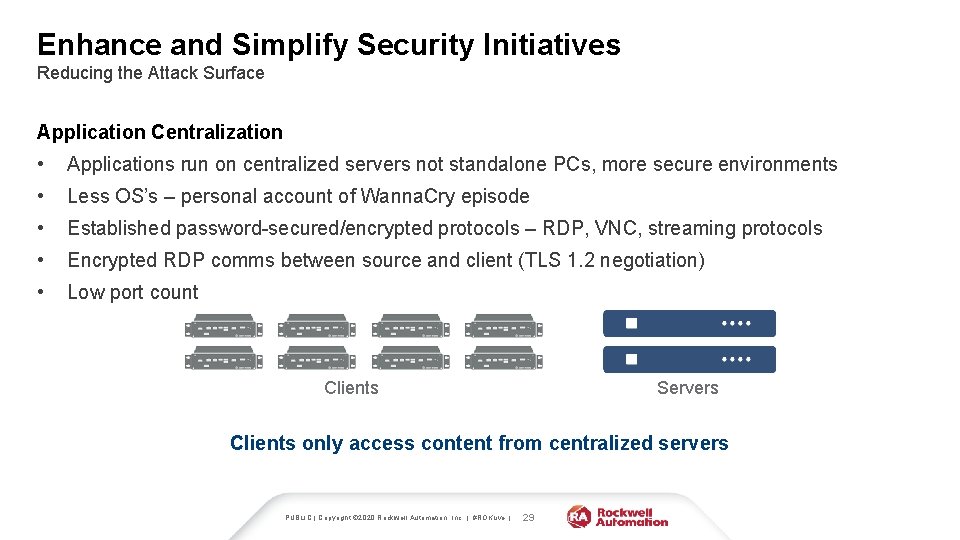
Enhance and Simplify Security Initiatives Reducing the Attack Surface Application Centralization • Applications run on centralized servers not standalone PCs, more secure environments • Less OS’s – personal account of Wanna. Cry episode • Established password-secured/encrypted protocols – RDP, VNC, streaming protocols • Encrypted RDP comms between source and client (TLS 1. 2 negotiation) • Low port count Clients Servers Clients only access content from centralized servers PUBLIC | Copyright © 2020 Rockwell Automation, Inc. | #ROKLive | 29
Thin. Manager Communication Ports Communication from Server to Client and Server to Server Ports Used in a Thin. Manager deployment • UDP 67 – DHCP, IP address delivery, Thin. Manager Compatible terminals • UDP 69 – TFTP, firmware delivery, Thin. Manager Compatible terminals • TCP 1758 – Multicast port, firmware delivery • TCP 2031 – Profile delivery, monitor connection, Thin. Server synchronization • TCP 3389 – RDP, session communications • UDP 4900 – TFTP, firmware delivery, Thin. Manager Ready terminals • TCP 5900 – Shadowing port PUBLIC | Copyright © 2020 Rockwell Automation, Inc. | #ROKLive | 30 Network issues are a great place to start troubleshooting in a Thin. Manager deployment
Tips and Tricks PUBLIC | Copyright © 2020 Rockwell Automation, Inc. | #ROKLive | 31
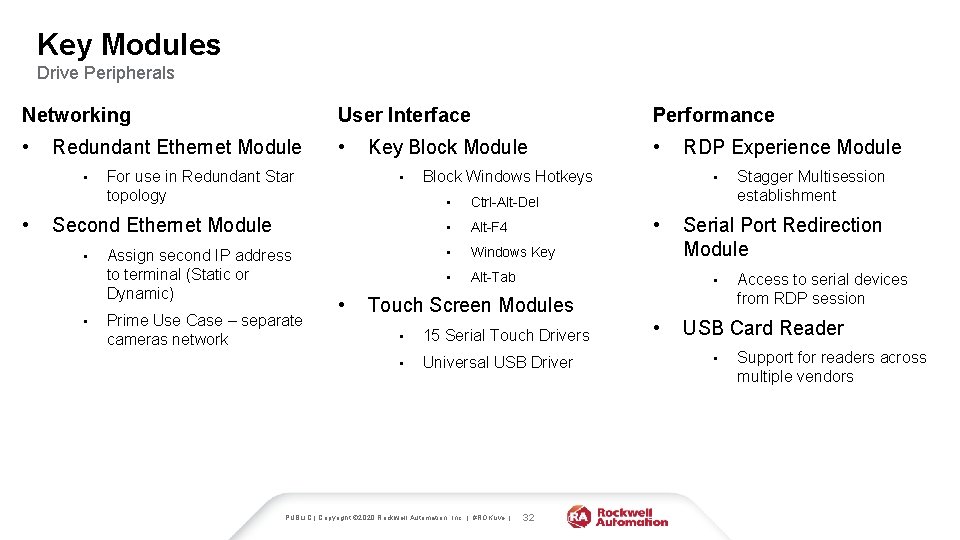
Key Modules Drive Peripherals Networking User Interface Performance • • • Redundant Ethernet Module • • For use in Redundant Star topology Key Block Module • Second Ethernet Module • • Assign second IP address to terminal (Static or Dynamic) Prime Use Case – separate cameras network • Block Windows Hotkeys • Ctrl-Alt-Del • Alt-F 4 • Windows Key • Alt-Tab • • • 15 Serial Touch Drivers • Universal USB Driver 32 • Stagger Multisession establishment Serial Port Redirection Module • Touch Screen Modules PUBLIC | Copyright © 2020 Rockwell Automation, Inc. | #ROKLive | RDP Experience Module Access to serial devices from RDP session USB Card Reader • Support for readers across multiple vendors
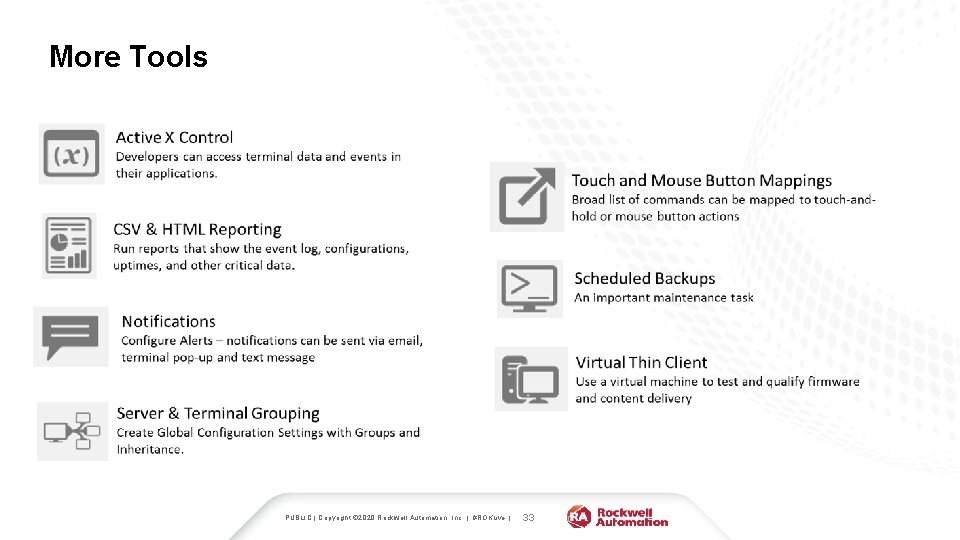
More Tools PUBLIC | Copyright © 2020 Rockwell Automation, Inc. | #ROKLive | 33
- Slides: 33