
THE UNIVERSITY OF BRITISH COLUMBIA Modeling software behavior
THE UNIVERSITY OF BRITISH COLUMBIA Modeling software behavior UML Acknowledgement: some slides from Philippe Kruchten, Steve Easterbrook 1
What is a model? § A representation of a system that allows for investigation of the properties of the system. 2
Why build one? § A model can guide your exploration: • It can help you figure out what questions to ask • It can help to reveal key design decisions • It can help you to uncover problems • e. g. conflicting or infeasible requirements, confusion over terminology, scope, etc § Can help you check your understanding • Reason about the model to understand its consequences • Does it have the properties you expect? • Animate the model to help us visualize/validate requirements § Can help you communicate • Provides useful abstracts that focus on the point you want to make • …without overwhelming people with detail § Throw away modeling? • The exercise of modeling is more important than the model itself • Time spent perfecting the models might be time wasted… 3
What is UML? § Modeling language What UML is not § Not a method in itself • A notation designed to support various methods for requirement analysis and software design • E. g. , (IBM) Rational Unified Process (RUP) 4
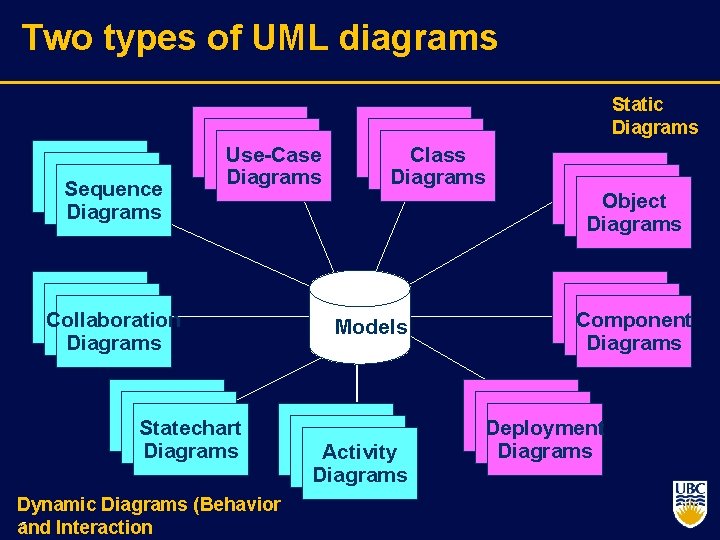
Two types of UML diagrams Static Diagrams Sequence Diagrams Use-Case Diagrams Collaboration Diagrams Statechart Diagrams Dynamic Diagrams (Behavior 5 and Interaction Class Diagrams Object Diagrams Models Activity Diagrams Component Diagrams Deployment Diagrams
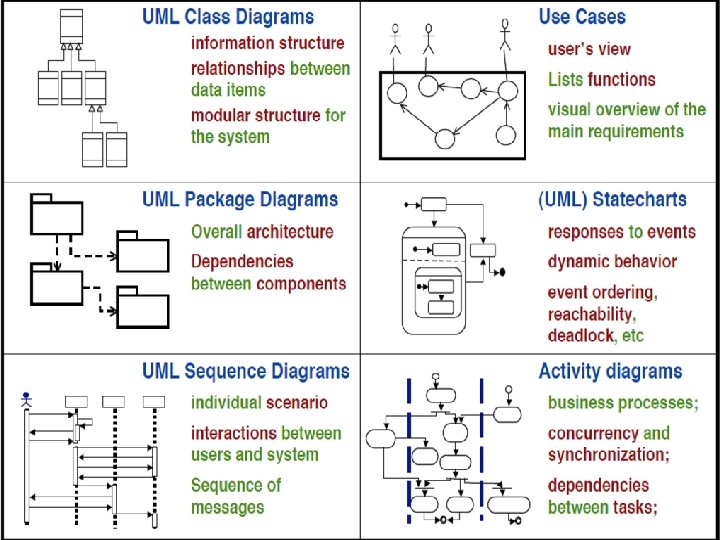
Visual modeling of a software system Use-Case Diagram State Diagram Class Diagram Document. List Use Case 1 File. Mgr Actor A Actor B Document add( ) delete( ) fetch. Doc( ) sort. By. Name( ) name : int docid : int num. Field : int get( ) open( ) close( ) read( ) sort. File. List( ) create( ) fill. Document( ) Use Case 2 File. List f. List add( ) delete( ) read() fill the code. . 1 Use Case 3 rep Repository (from Persistence) File read( ) Grp. File name : char * = 0 read. Doc( ) read. File( ) Collaboration Diagram 9: sort. By. Name ( ) Repository main. Wnd : Main. Wnd 1: Doc view request ( ) read( ) open( ) create( ) fill. File( ) Document. List Deployment Diagram Windows 95 Window 95 File. Manager Windows 95 L 2: fetch. Doc( ) Document g. File : Grp. File 4: create ( ) ¹®¼ °ü¸® Ŭ¶óÀ̾ðÆ®. EXE ¹®¼ °ü¸® ¾ÖÇø´ 8: fill. File ( ) Windows NT user : Clerk Solaris file. Mgr : File. Mgr ¹®¼ °ü¸® ¿£Áø. EXE Graphic. File 3: create ( ) Alpha UNIX ÀÀ¿ë¼ ¹ö. EXE 6: fill. Document ( ) File. List Windows NT IBM Mainframe 7: read. File ( ) 5: read. Doc ( ) document : Document repository : Repository µ¥ÀÌŸº£À̽º¼ ¹ö main. Wnd user ƯÁ¤¹®¼ ¿¡ ´ëÇÑ º¸±â¸¦ » ç¿ëÀÚ°¡ ¿äû ÇÑ´Ù. file. Mgr : File. Mgr document : Document 1: Doc view request ( ) 2: fetch. Doc( ) g. File repository Component Diagram 3: create ( ) 4: create ( ) 5: read. Doc ( ) È ÀÏ°ü¸®ÀÚ´ ÀÐ¾î¿ ¹®¼ ÀÇ Á¤º¸¸¦ ÇØ´ç ¹®¼ °´Ã¼¿¡ ¼³Á¤À» ¿äû ÇÑ´Ù. 6: fill. Document ( ) 7: read. File ( ) 8: fill. File ( ) È ¸é °´Ã¼´ ÀоîµéÀÎ °´Ã¼µé¿¡ ´ëÇØ À̸§º°·Î Á¤·ÄÀ» ½ÃÄÑ È ¸é¿¡ º¸¿©ÁØ´Ù. 9: sort. By. Name ( ) Sequence Diagram 6 Forward and Reverse Engineering
Elements of UML Diagrams § § 7 Elements Connectors Adornments Annotations
Reminder: Class § A description of a set of objects that share the same attributes, operations, methods, relationships, and semantics. § A class may use a set of interfaces to specify collections of operations it provides to its environment 8
Reminder: Object § An entity with a well defined boundary and identity that encapsulates state and behavior. • State is represented by attributes and relationships; • Behavior is represented by operations, methods, and state machines. § An object is an instance of a class. 9
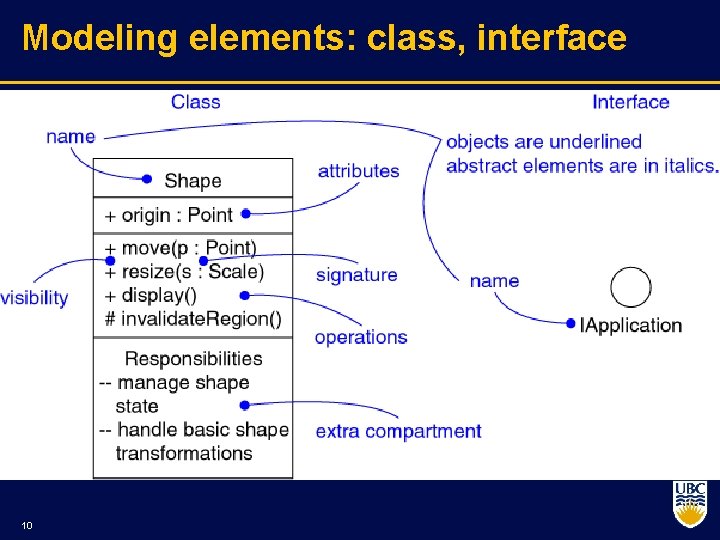
Modeling elements: class, interface 10
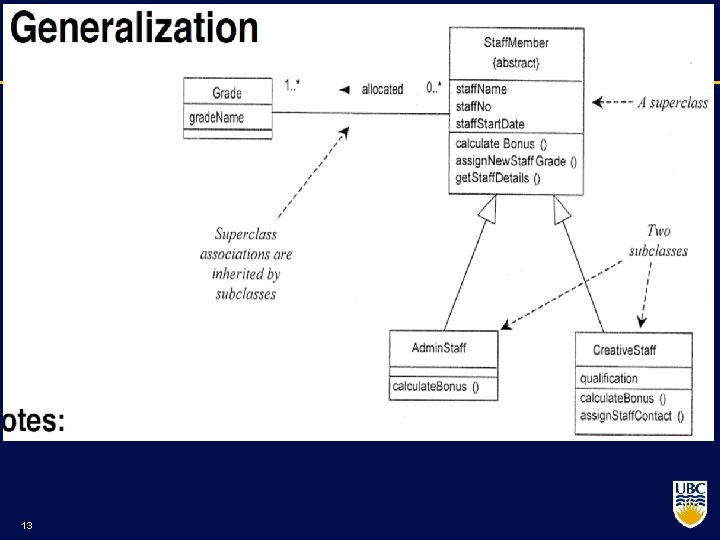
Types of relationships in class diagrams § Class level: • Dependency: • x depends on y (for implementation, for example) • A dependency exists between two defined elements if a change to the definition of one would result in a change to the other. • Generalization (& specialization): • x is a kind of y (taxonomy, subclassing) § Instance level • Association: 11 • x is a part of y
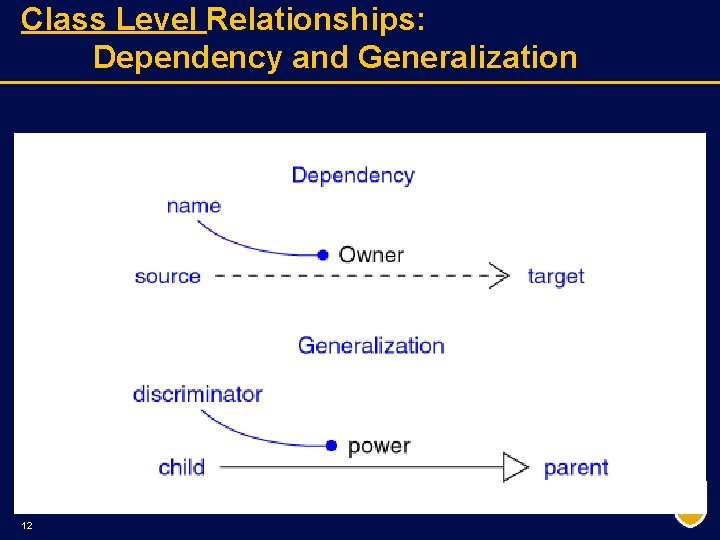
Class Level Relationships: Dependency and Generalization 12
13
Types of relationships in class diagrams § Class level: • Dependency: • x depends on y (for implementation, for example) • A dependency exists between two defined elements if a change to the definition of one would result in a change to the other. • Generalization (& specialization): • x is a kind of y (taxonomy, subclassing) § Instance level • Association: 14 • x is a part of y
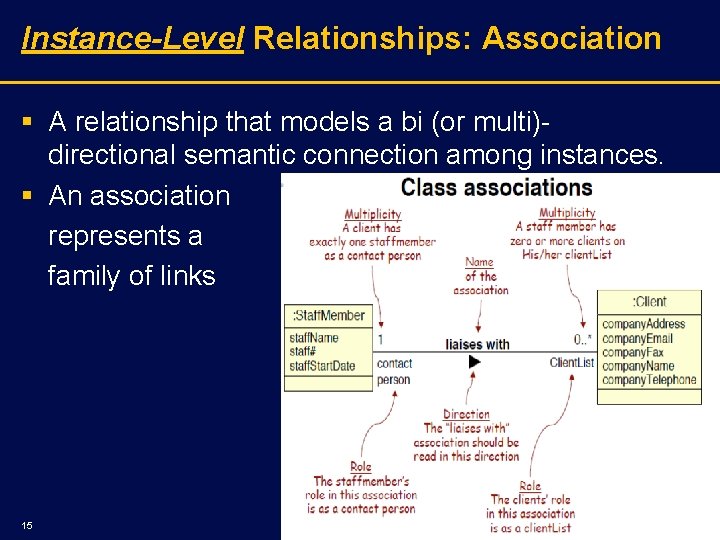
Instance-Level Relationships: Association § A relationship that models a bi (or multi) directional semantic connection among instances. § An association represents a family of links 15
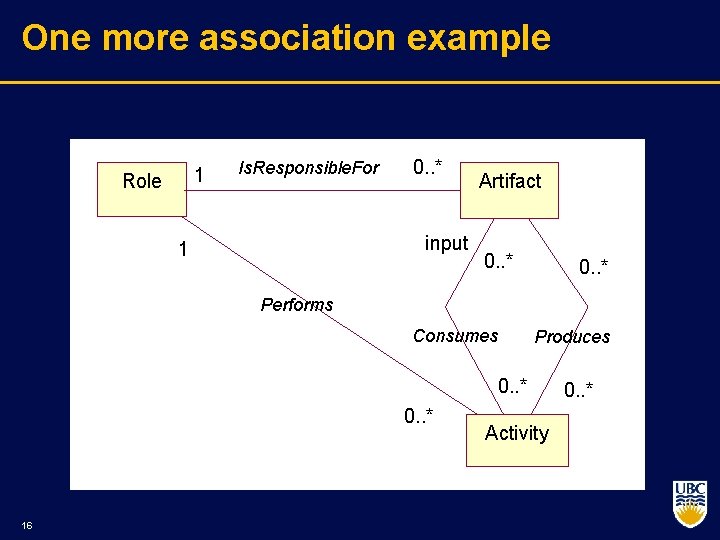
One more association example 1 Role Is. Responsible. For 0. . * input 1 Artifact 0. . * Performs Consumes Produces 0. . * 16 Activity 0. . *
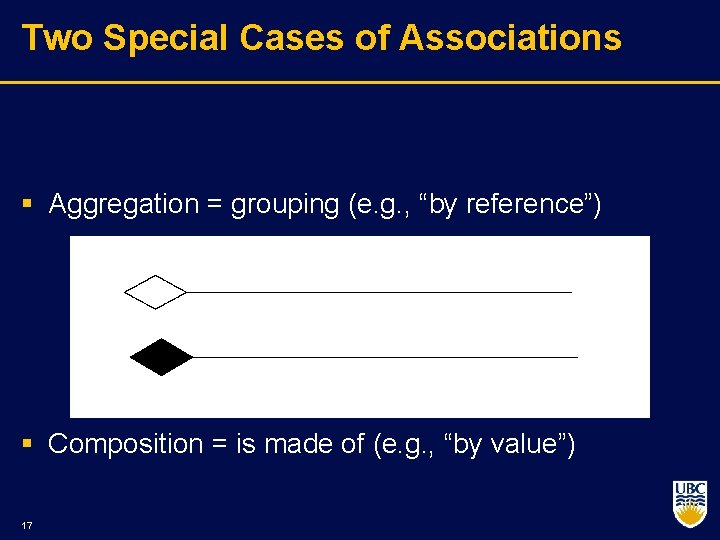
Two Special Cases of Associations § Aggregation = grouping (e. g. , “by reference”) § Composition = is made of (e. g. , “by value”) 17
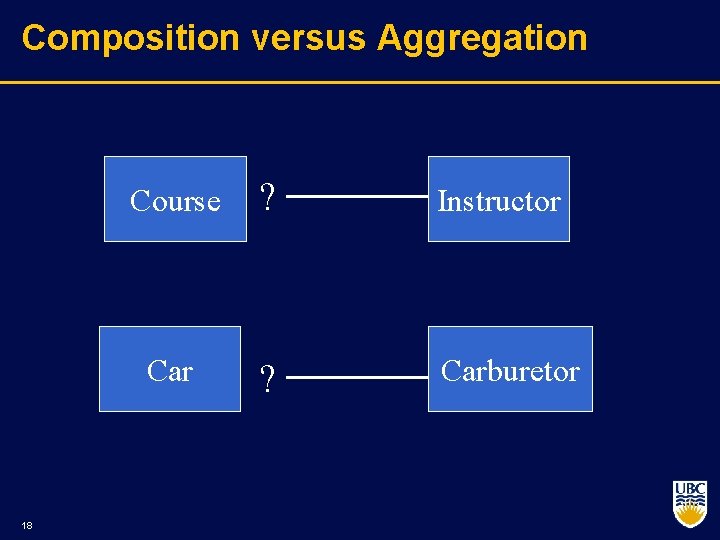
Composition versus Aggregation 18 Course ? Instructor Car ? Carburetor
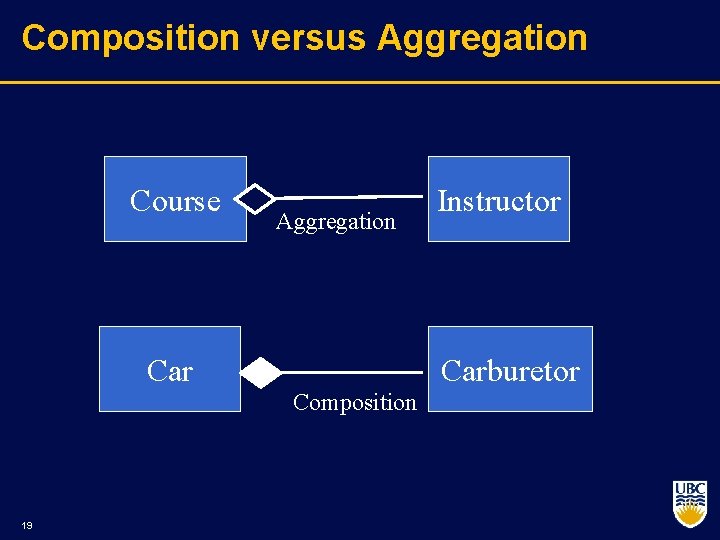
Composition versus Aggregation Course Aggregation Carburetor Composition 19 Instructor
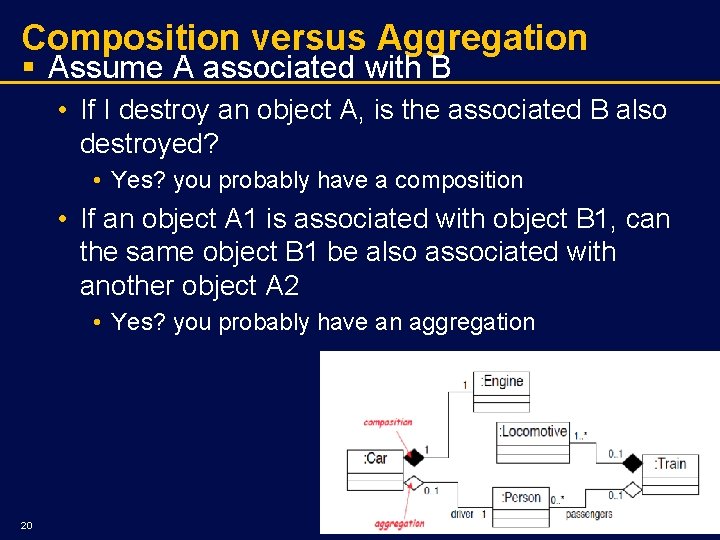
Composition versus Aggregation § Assume A associated with B • If I destroy an object A, is the associated B also destroyed? • Yes? you probably have a composition • If an object A 1 is associated with object B 1, can the same object B 1 be also associated with another object A 2 • Yes? you probably have an aggregation 20
Composition vs. Aggregation § The whole of a composition must have a multiplicity of 0. . 1 or 1, indicating that a part must be for only one whole. • The whole of an aggregation may have any multiplicity. § Example: • represent real world whole part relationships, • e. g. , an engine is part of a car, • the composition relationship is most appropriate. • represent database relationship, • e. g. , car model engine ENG 01 is part of a car model CM 01, • an aggregation relationship is best, (as the engine, ENG 01 may be also part of a different car model) 21
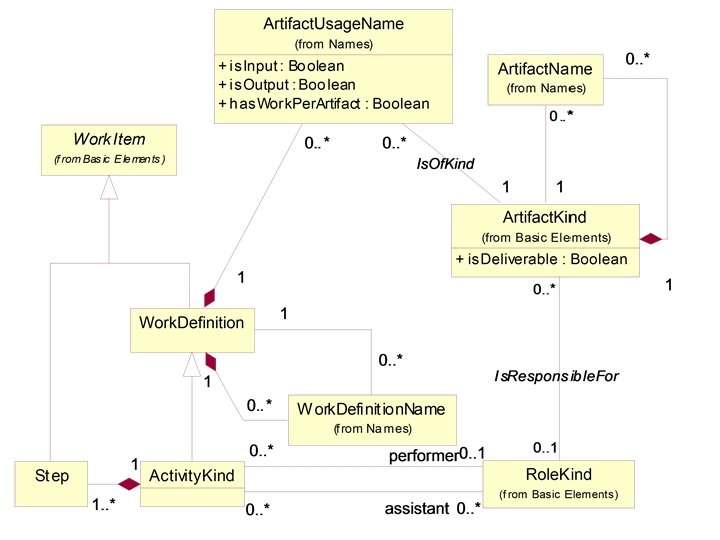
Class Diagram (2) 22
Exercise § A system requires representation of folders and files. Both folders and files have names, creation date, and size. Files must be contained in folders and folders may contain files and other folders. § Draw the class diagram § Now add symbolic links 23
One more … A company consists of departments. Departments themselves can be made of other sub departments. Departments are located in one or more offices. One office acts as the company headquarter. Each department has a manager who is recruited from the set of employees of that department. An employee is associated with one or more departments but it has one ‘home’ department. Your task is to model the system for the company. § Draw a class diagram with the classes in your system their attributes, operations and relationships, multiplicity specifications, and other model elements that you find appropriate. 24
Summary so far: What UML class diagrams can show? § Division of Responsibility • Operations that objects are responsible for providing § Subclassing • Inheritance, generalization § Navigability / Visibility • When objects need to know about other objects to call their operations § Aggregation / Composition • When objects are part of other objects § Dependencies • When changing the design of a class will affect other classes § Interfaces 25 • Used to reduce coupling between objects
Uses of UML § As a sketch • Very selective informal and dynamic • Forward engineering: describe some concept to implement • Reverse engineering: explain how some part of the program works § As a blueprint • • Emphasis on completeness Forward engineering: model as a detailed spec for the programmer Reverse engineering: model as a code browser Roundtrip: tools provide both forward and reverse engineering to move back and forth between program and code § As a programming language • UML models are automatically compiled into working code • Requires sophisticated tools • “tripless” the model is the code 26
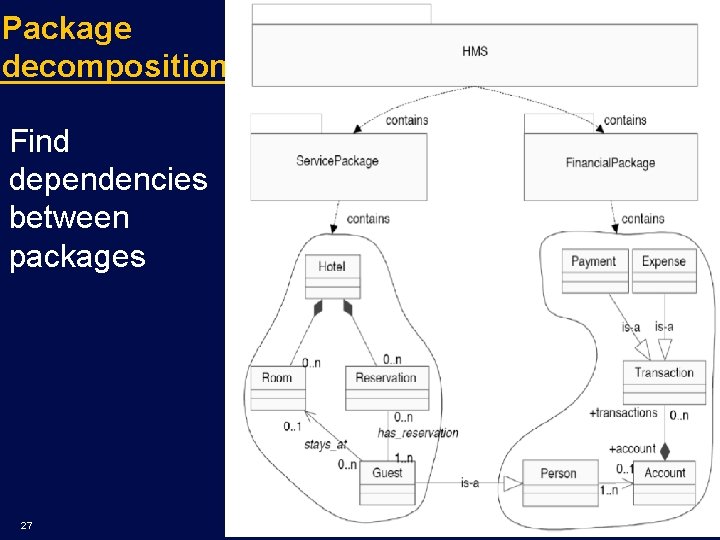
Package decomposition Find dependencies between packages 27
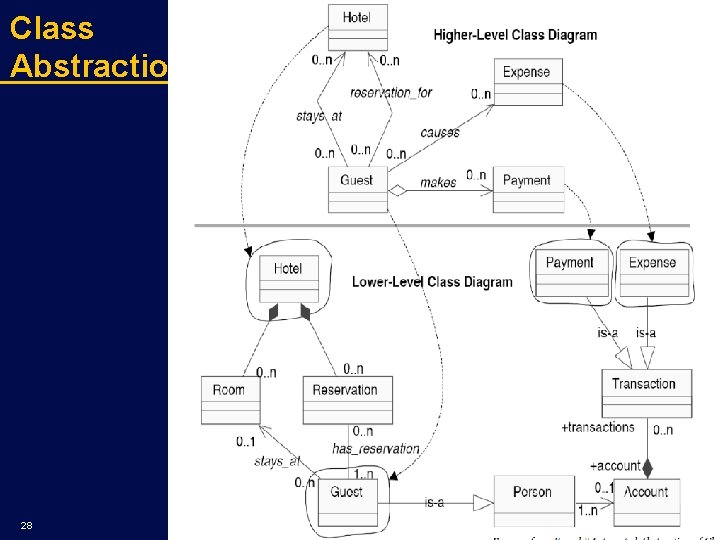
Class Abstraction 28
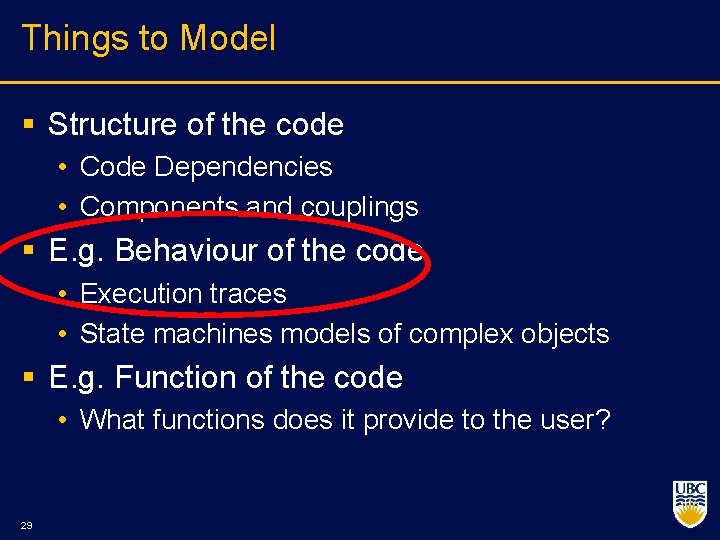
Things to Model § Structure of the code • Code Dependencies • Components and couplings § E. g. Behaviour of the code • Execution traces • State machines models of complex objects § E. g. Function of the code • What functions does it provide to the user? 29
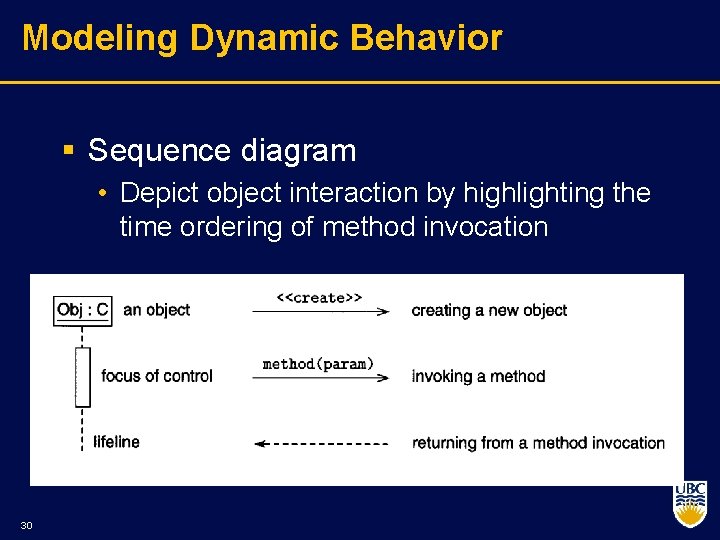
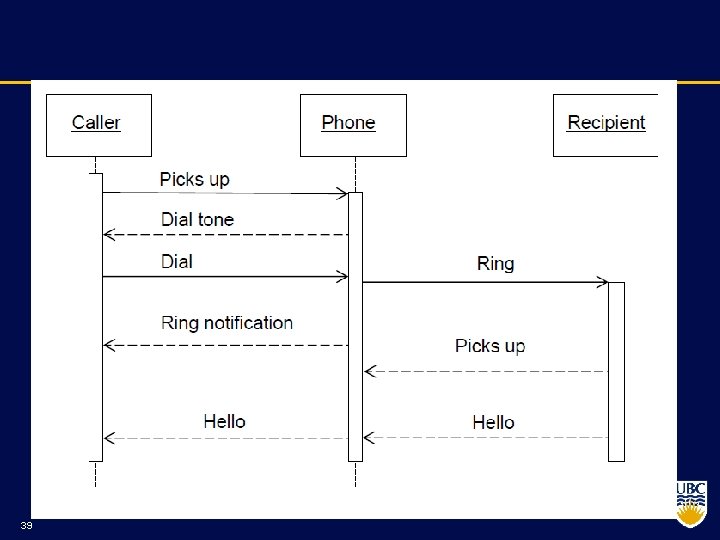
Modeling Dynamic Behavior § Sequence diagram • Depict object interaction by highlighting the time ordering of method invocation 30
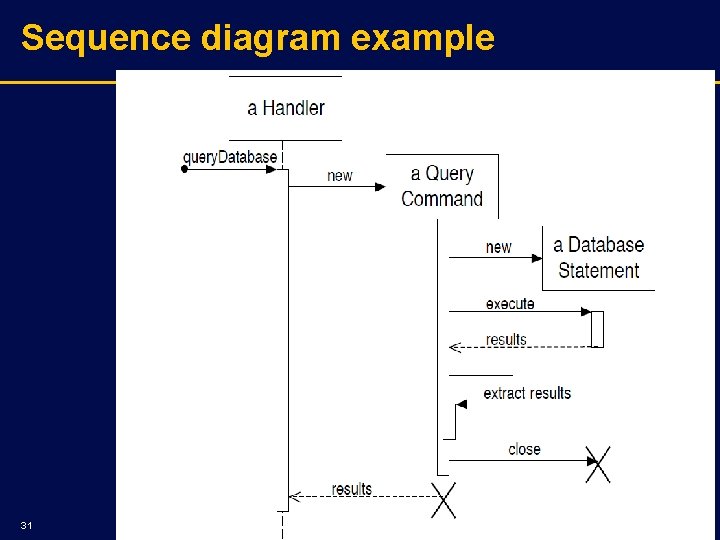
Sequence diagram example 31
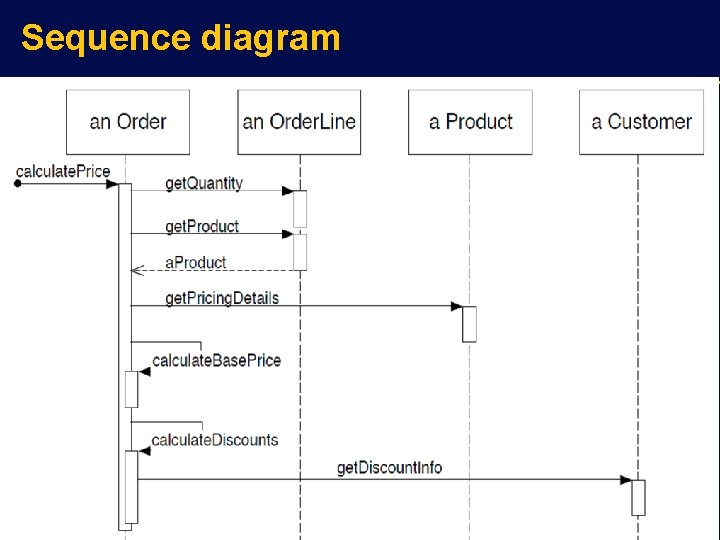
Sequence diagram 32

Interaction Frames 33
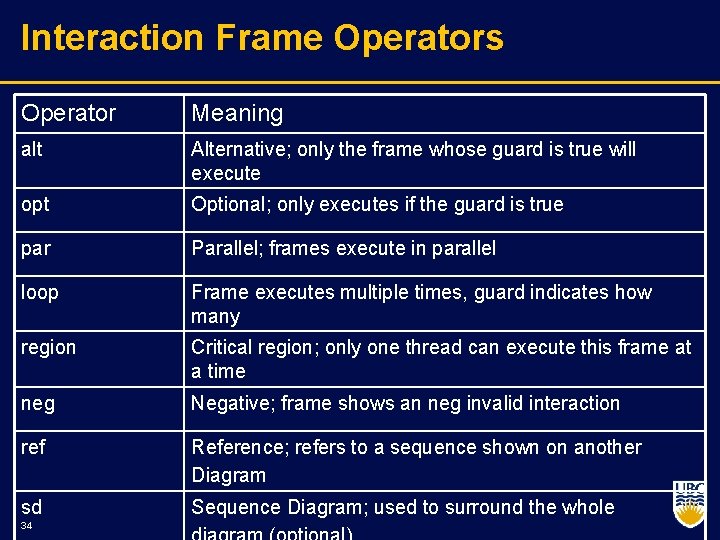
Interaction Frame Operators Operator Meaning alt Alternative; only the frame whose guard is true will execute opt Optional; only executes if the guard is true par Parallel; frames execute in parallel loop Frame executes multiple times, guard indicates how many region Critical region; only one thread can execute this frame at a time neg Negative; frame shows an neg invalid interaction ref Reference; refers to a sequence shown on another Diagram sd Sequence Diagram; used to surround the whole 34
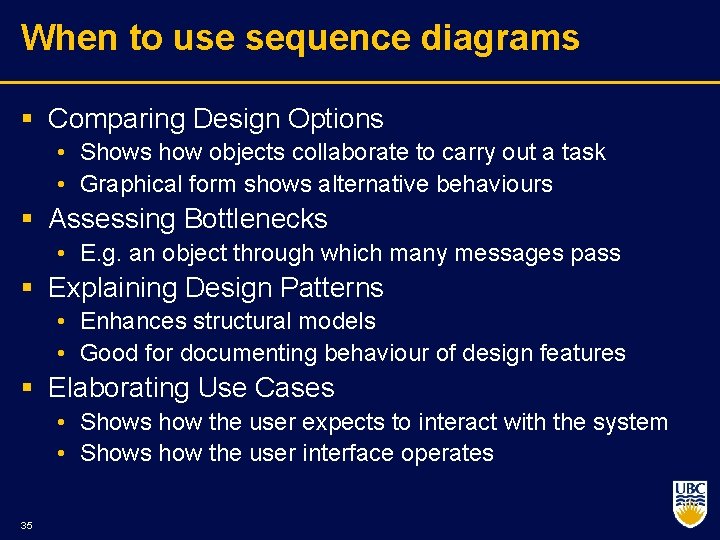
When to use sequence diagrams § Comparing Design Options • Shows how objects collaborate to carry out a task • Graphical form shows alternative behaviours § Assessing Bottlenecks • E. g. an object through which many messages pass § Explaining Design Patterns • Enhances structural models • Good for documenting behaviour of design features § Elaborating Use Cases • Shows how the user expects to interact with the system • Shows how the user interface operates 35
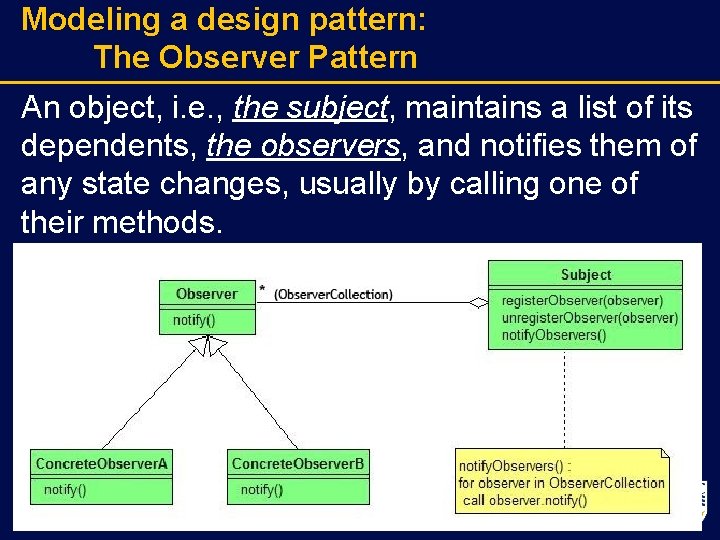
Modeling a design pattern: The Observer Pattern An object, i. e. , the subject, maintains a list of its dependents, the observers, and notifies them of any state changes, usually by calling one of their methods.
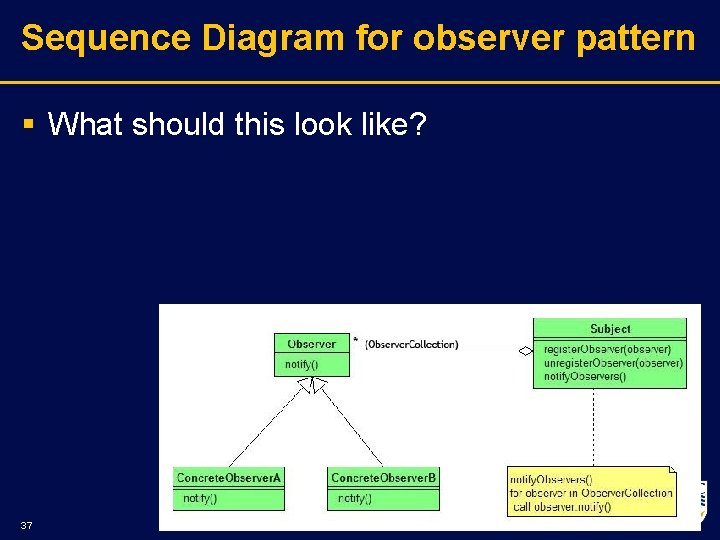
Sequence Diagram for observer pattern § What should this look like? 37
39
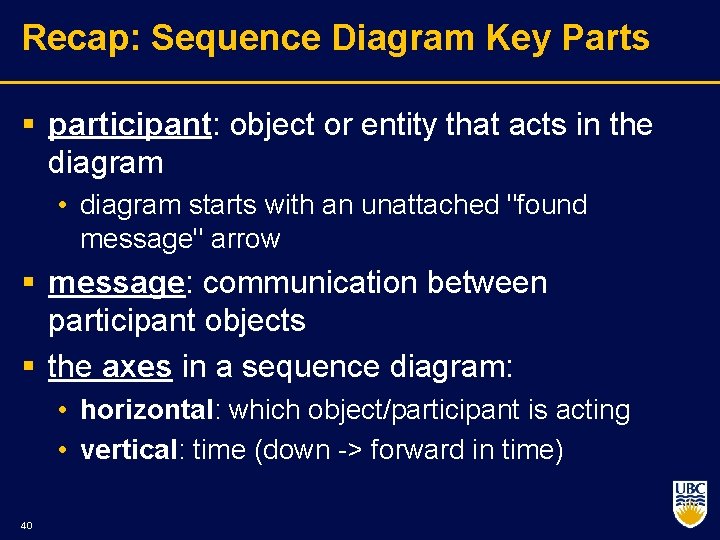
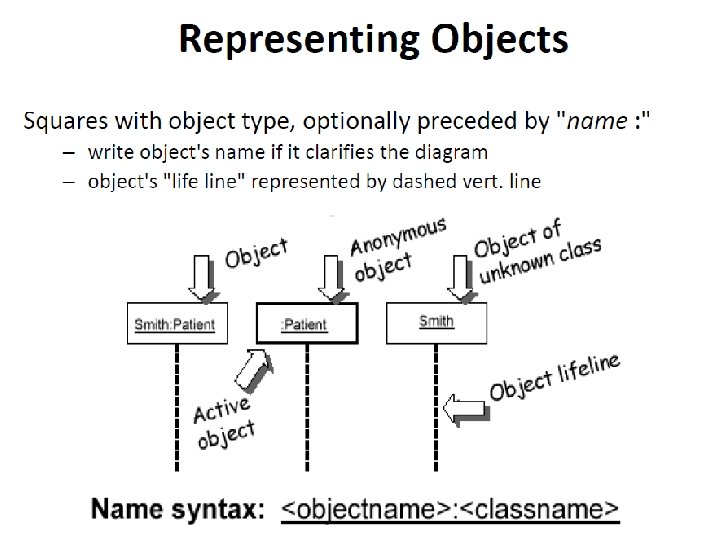
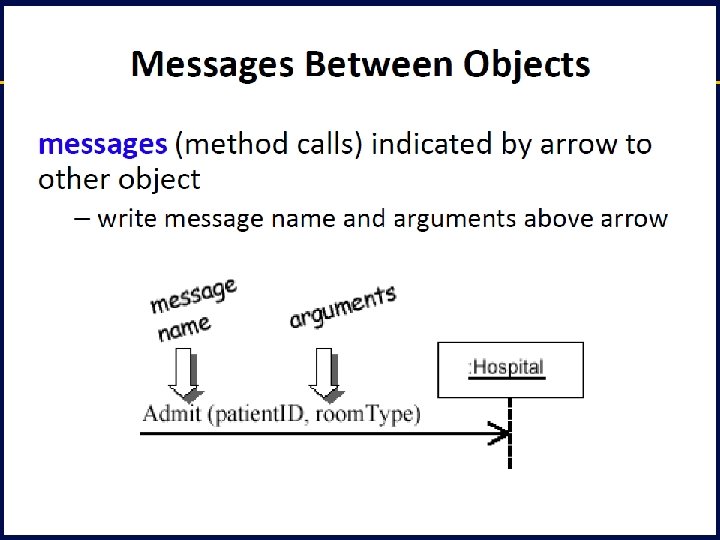
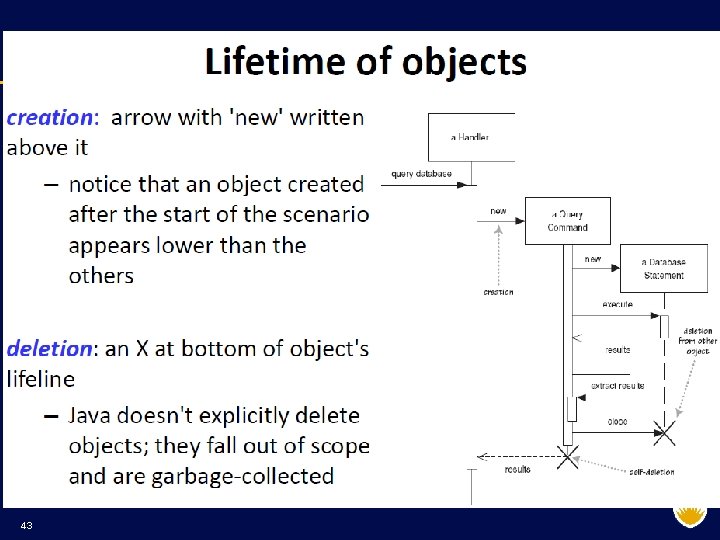
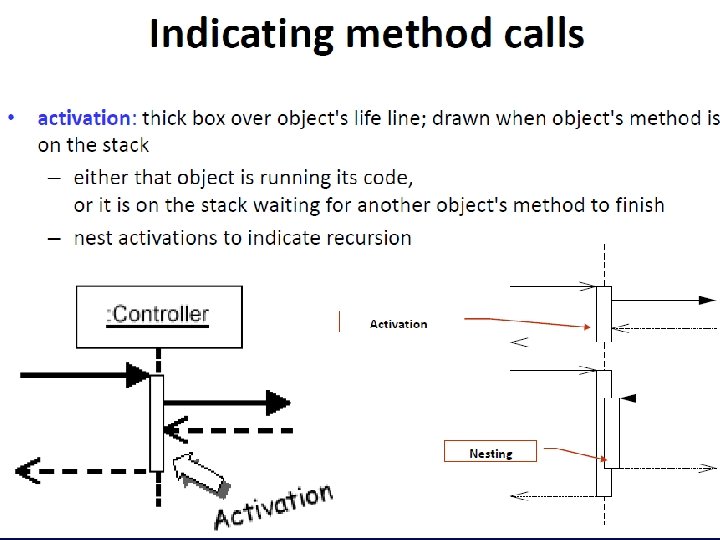
Recap: Sequence Diagram Key Parts § participant: object or entity that acts in the diagram • diagram starts with an unattached "found message" arrow § message: communication between participant objects § the axes in a sequence diagram: • horizontal: which object/participant is acting • vertical: time (down > forward in time) 40
41
42
43
44
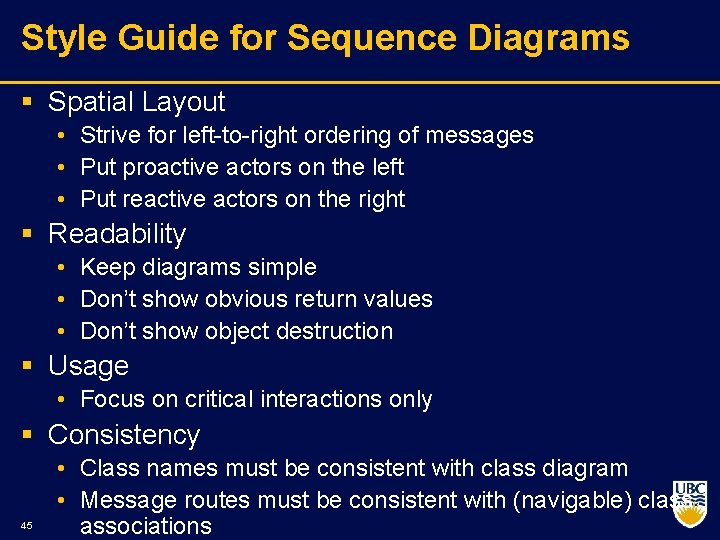
Style Guide for Sequence Diagrams § Spatial Layout • Strive for left to right ordering of messages • Put proactive actors on the left • Put reactive actors on the right § Readability • Keep diagrams simple • Don’t show obvious return values • Don’t show object destruction § Usage • Focus on critical interactions only § Consistency 45 • Class names must be consistent with class diagram • Message routes must be consistent with (navigable) class associations
Draw a sequence diagram for: Netflix process to deal with returned DVDs • When a return comes in a person scan’s it in, the S/W detects that and goes through a sequence of steps to send a new movie to a customer. • Think of the different classes that would be involved: Queue, Shipping, Inventory, User. Account, other classes? ? Coming up: In class
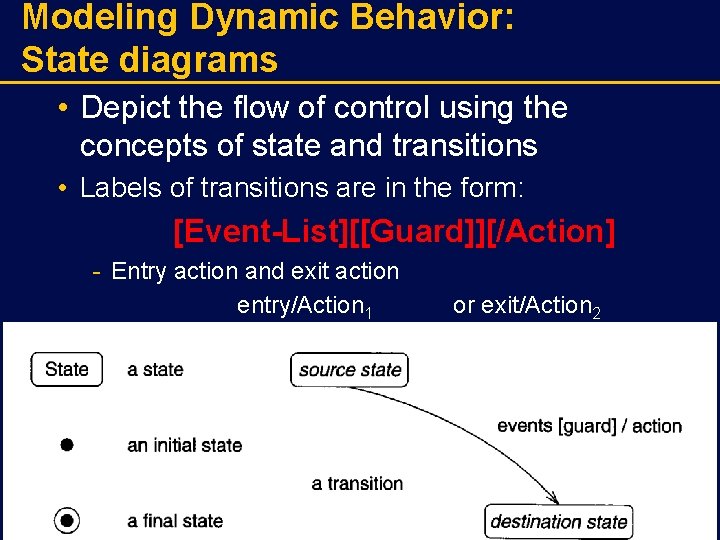
Modeling Dynamic Behavior: State diagrams • Depict the flow of control using the concepts of state and transitions • Labels of transitions are in the form: [Event-List][[Guard]][/Action] Entry action and exit action entry/Action 1 47 or exit/Action 2
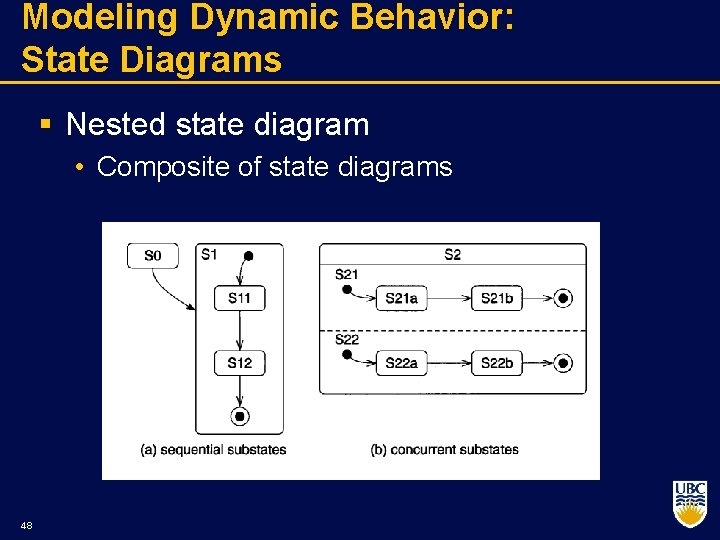
Modeling Dynamic Behavior: State Diagrams § Nested state diagram • Composite of state diagrams 48
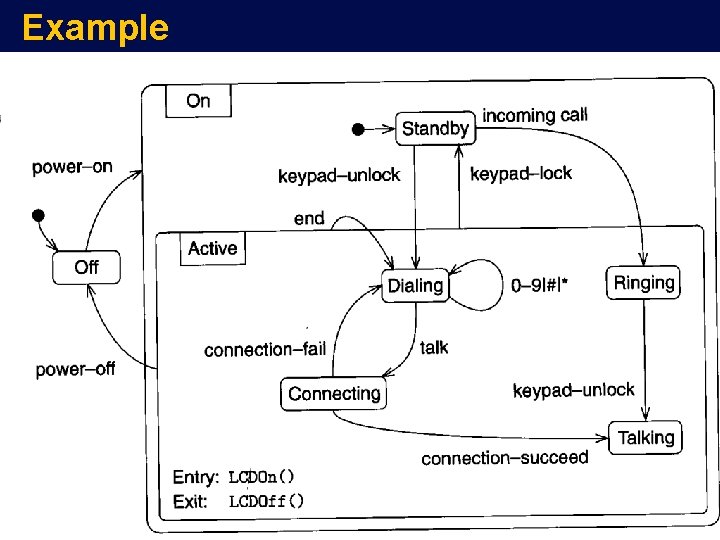
Example 49
Exercise § Reservations are made for repairs of vehicles (if space is available, otherwise they are added to a waiting list). The vehicle is delivered and waits in the dock until repair can commence. Repair can commence at any time. During repair new parts may be needed and the vehicle may have to wait for the parts to arrive. When repairs are completed a test drive is organized. Following the test, more repairs may be needed, or the vehicle will become ready to be picked up. Eventually the vehicle is picked up by its owner. 50
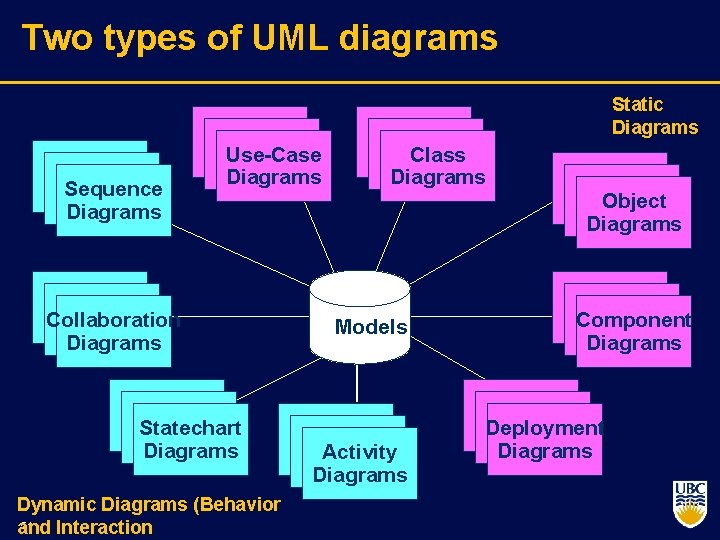
Two types of UML diagrams Static Diagrams Sequence Diagrams Use-Case Diagrams Collaboration Diagrams Statechart Diagrams Dynamic Diagrams (Behavior 51 and Interaction Class Diagrams Object Diagrams Models Activity Diagrams Component Diagrams Deployment Diagrams
Design Patterns “Each pattern describes a problem which occurs over and over again in our environment, and then describes the core of the solution to that problem, in such a way that you can use this solution a million times over, without ever doing it the same way twice”. Christopher Alexander, 1977 This was in describing patterns in buildings and towns. In SE, design patterns are in terms of objects and interfaces, not walls and doors. The manner in which a collection of interacting objects collaborate to accomplish a specific task or provide some specific functionality. 52
Architecture vs. Design Patterns Architecture p Key decisions …. Design Patterns p p Lower level than architectures (Sometimes, called micro-architecture) Reusable collaborations that solve subproblems within an application n how can I decouple subsystem X from subsystem Y? Why Design Patterns? p p Design patterns support object-oriented reuse at a high level of abstraction Design patterns provide a “framework” that guides and constrains object oriented implementation 53
What is a Design Pattern? A design pattern is a general reusable solution to a commonly occurring problem A design pattern is not a finished design that can be transformed directly into code. It is a description or template for how to solve a problem that can be used in many different situations. Object oriented design patterns typically show relationships and interactions between classes or objects, without specifying the final application classes or objects that are involved. 54
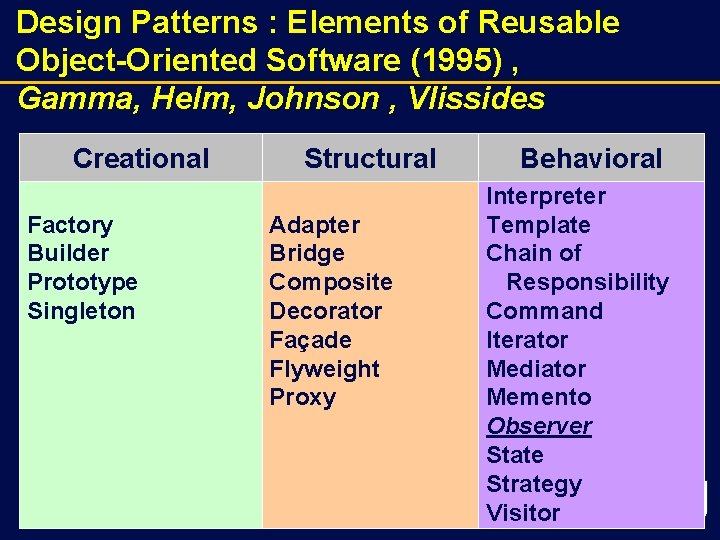
Design Patterns : Elements of Reusable Object-Oriented Software (1995) , Gamma, Helm, Johnson , Vlissides Creational Factory Builder Prototype Singleton 55 Structural Adapter Bridge Composite Decorator Façade Flyweight Proxy Behavioral Interpreter Template Chain of Responsibility Command Iterator Mediator Memento Observer State Strategy 55 Visitor
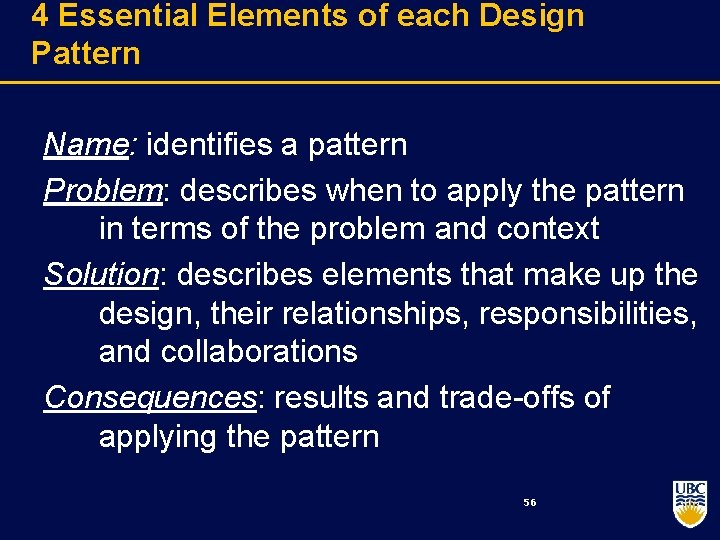
4 Essential Elements of each Design Pattern Name: identifies a pattern Problem: describes when to apply the pattern in terms of the problem and context Solution: describes elements that make up the design, their relationships, responsibilities, and collaborations Consequences: results and trade offs of applying the pattern 56
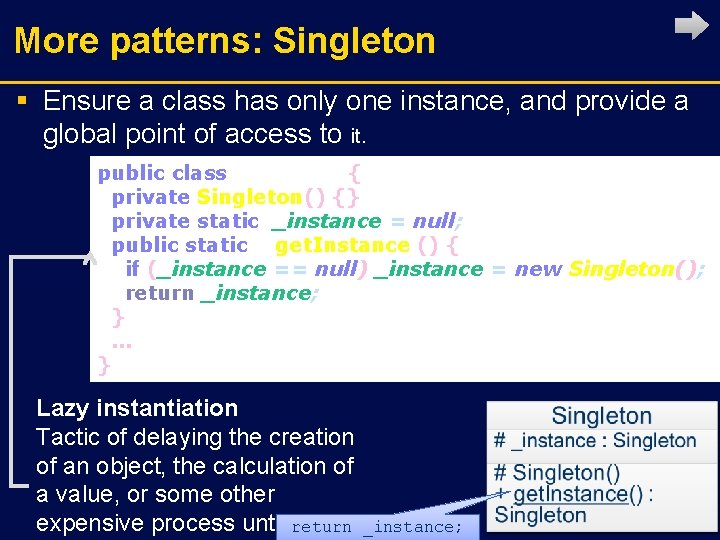
More patterns: Singleton § Ensure a class has only one instance, and provide a global point of access to it. public class Singleton { private Singleton() {} private static _instance = null; public static S get. Instance () { if (_instance == null) _instance = new Singleton(); return _instance; }. . . } Lazy instantiation Tactic of delaying the creation of an object, the calculation of a value, or some other expensive process until the first return _instance; 57
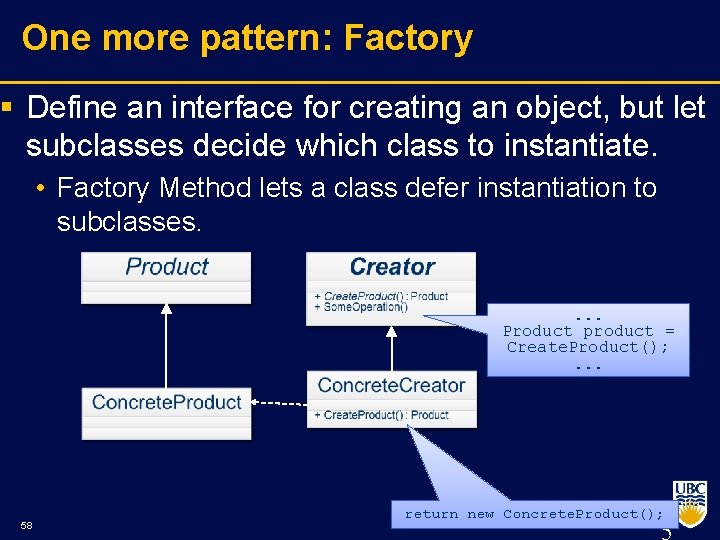
One more pattern: Factory § Define an interface for creating an object, but let subclasses decide which class to instantiate. • Factory Method lets a class defer instantiation to subclasses. . Product product = Create. Product(); . . . 58 return new Concrete. Product();
59
- Slides: 58