
The Snake Game A Proposed Solution 1 User
- Slides: 17
The Snake Game A Proposed Solution 1
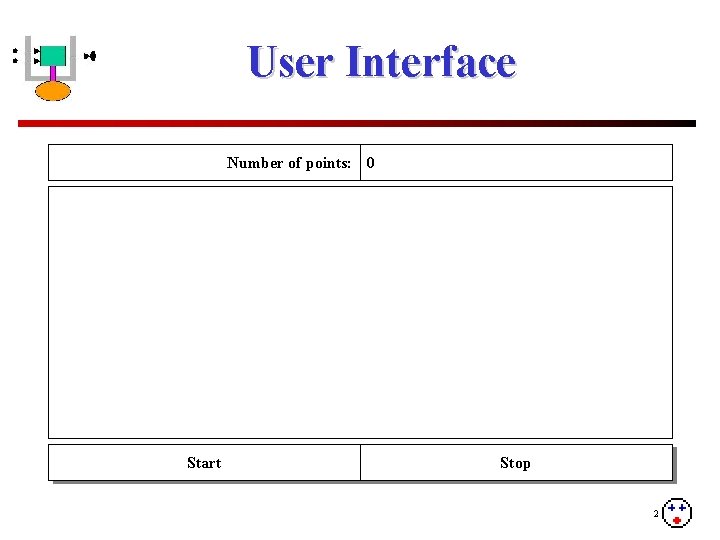
User Interface Number of points: 0 Start Stop 2
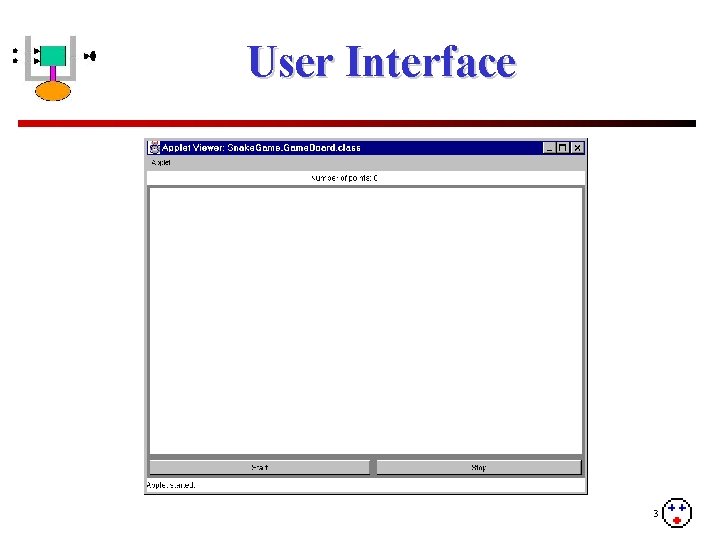
User Interface 3
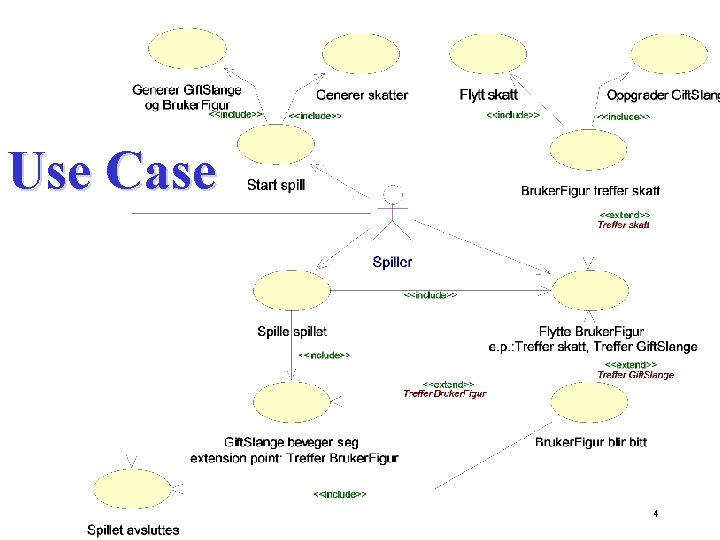
Use Case 4
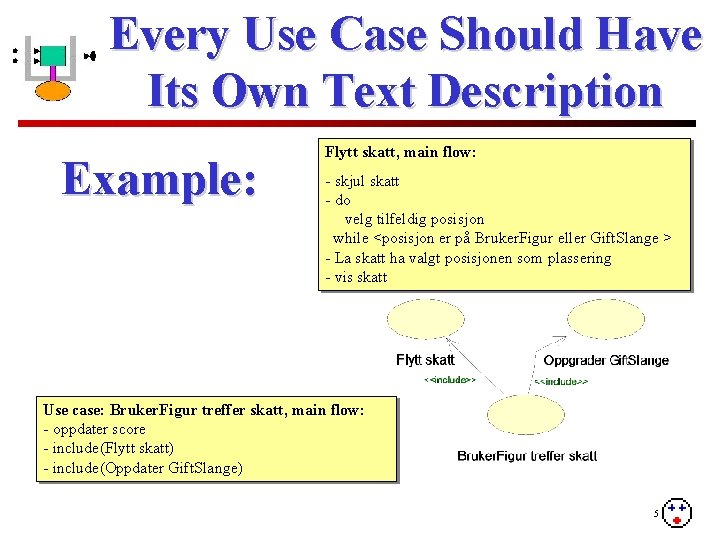
Every Use Case Should Have Its Own Text Description Example: Flytt skatt, main flow: - skjul skatt - do velg tilfeldig posisjon while <posisjon er på Bruker. Figur eller Gift. Slange > - La skatt ha valgt posisjonen som plassering - vis skatt Use case: Bruker. Figur treffer skatt, main flow: - oppdater score - include(Flytt skatt) - include(Oppdater Gift. Slange) 5
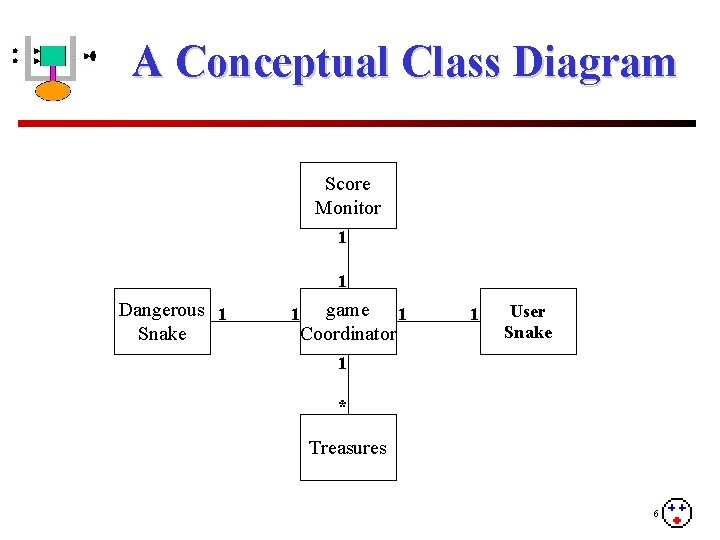
A Conceptual Class Diagram Score Monitor 1 1 Dangerous 1 Snake 1 game 1 Coordinator 1 User Snake 1 * Treasures 6
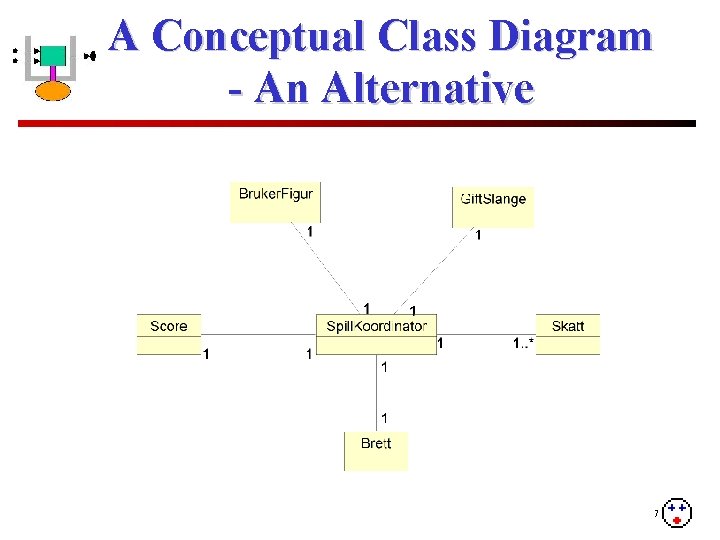
A Conceptual Class Diagram - An Alternative 7
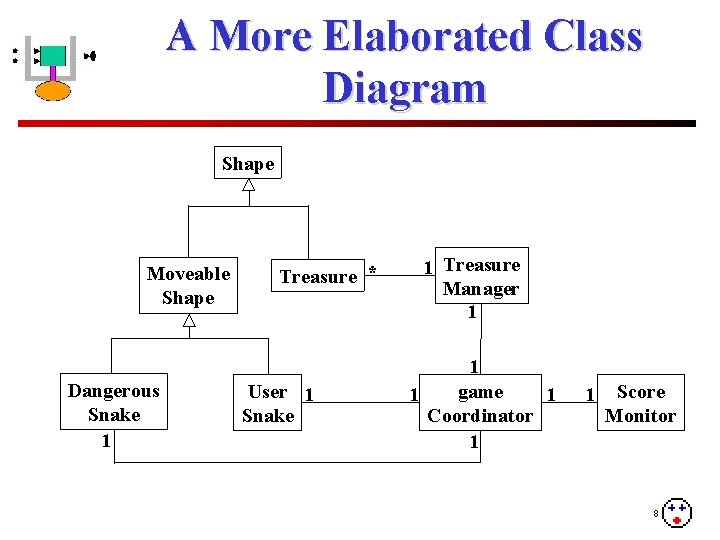
A More Elaborated Class Diagram Shape Moveable Shape Dangerous Snake 1 Treasure * User 1 Snake 1 Treasure Manager 1 1 game 1 1 Coordinator 1 1 Score Monitor 8
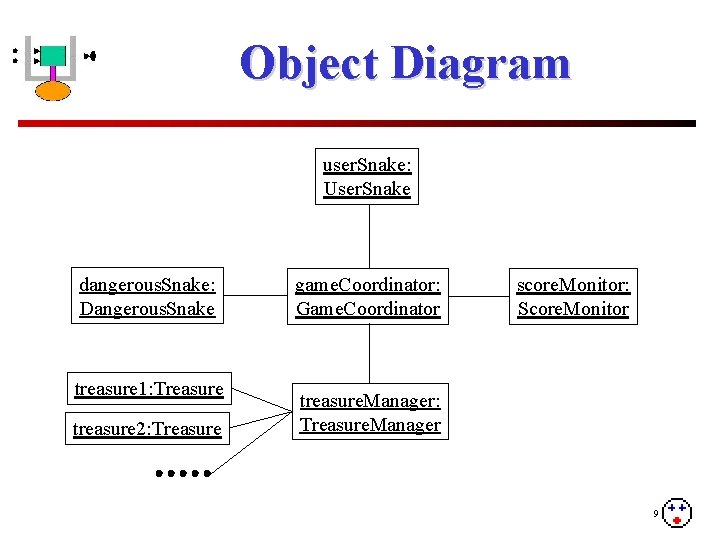
Object Diagram user. Snake: User. Snake dangerous. Snake: Dangerous. Snake treasure 1: Treasure treasure 2: Treasure game. Coordinator: Game. Coordinator score. Monitor: Score. Monitor treasure. Manager: Treasure. Manager 9
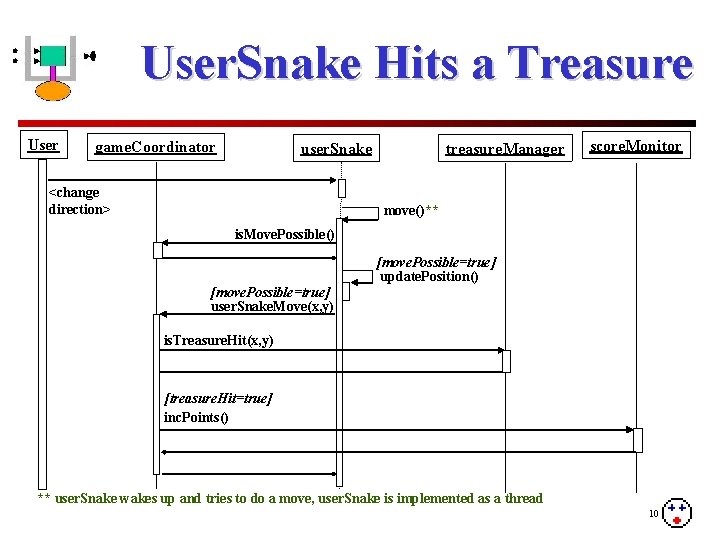
User. Snake Hits a Treasure User game. Coordinator user. Snake <change direction> treasure. Manager score. Monitor move()** is. Move. Possible() [move. Possible=true] update. Position() [move. Possible=true] user. Snake. Move(x, y) is. Treasure. Hit(x, y) [treasure. Hit=true] inc. Points() ** user. Snake wakes up and tries to do a move, user. Snake is implemented as a thread 10
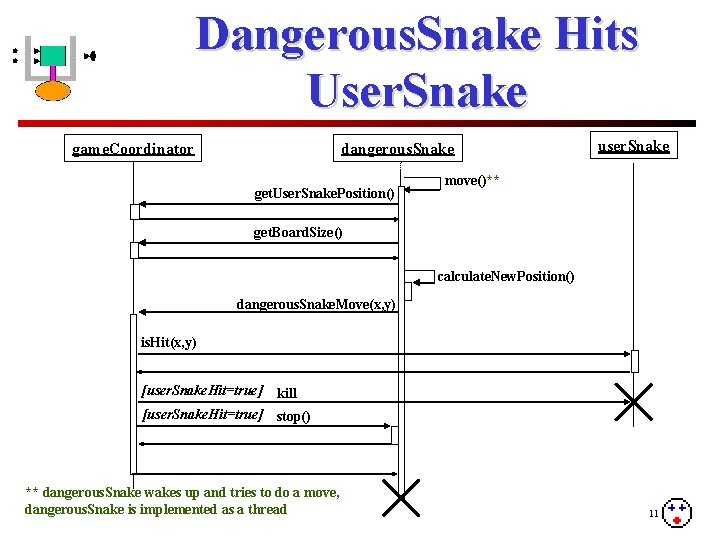
Dangerous. Snake Hits User. Snake game. Coordinator dangerous. Snake get. User. Snake. Position() user. Snake move()** get. Board. Size() calculate. New. Position() dangerous. Snake. Move(x, y) is. Hit(x, y) [user. Snake. Hit=true] kill [user. Snake. Hit=true] stop() ** dangerous. Snake wakes up and tries to do a move, dangerous. Snake is implemented as a thread 11
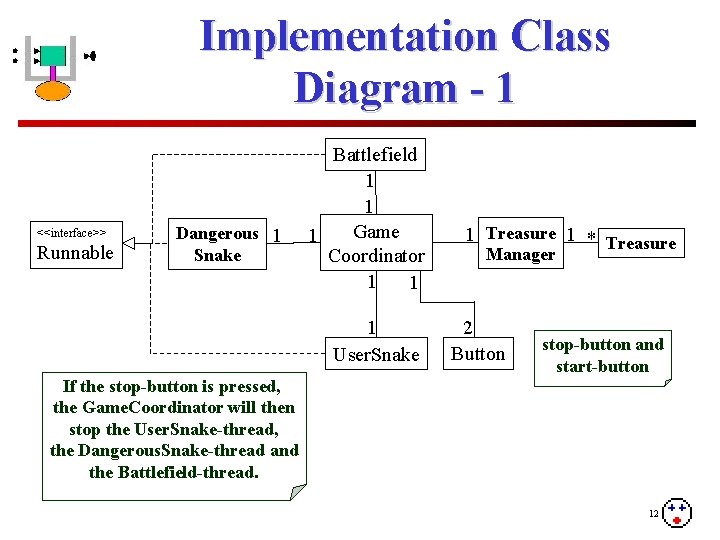
Implementation Class Diagram - 1 <<interface>> Runnable Dangerous 1 Snake Battlefield 1 1 Game 1 1 Coordinator 1 1 User. Snake If the stop-button is pressed, the Game. Coordinator will then stop the User. Snake-thread, the Dangerous. Snake-thread and the Battlefield-thread. 1 Treasure 1 * Treasure Manager 2 Button stop-button and start-button 12
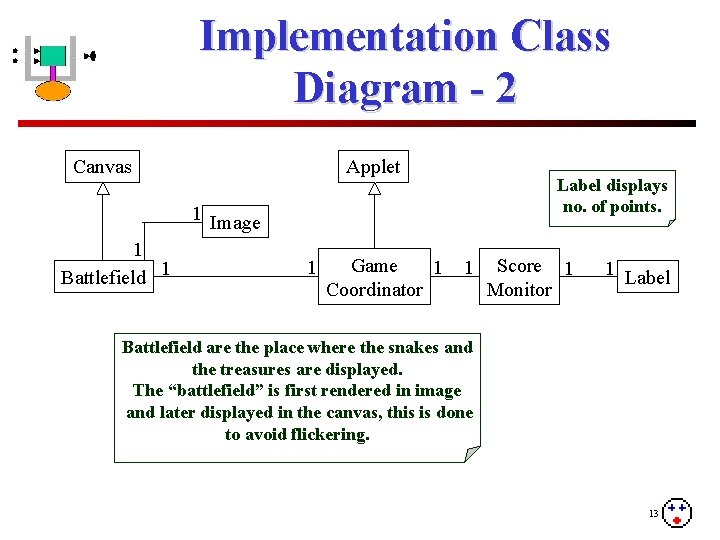
Implementation Class Diagram - 2 Canvas Applet Label displays no. of points. 1 Image 1 Battlefield 1 1 Game 1 Coordinator 1 Score 1 Monitor 1 Label Battlefield are the place where the snakes and the treasures are displayed. The “battlefield” is first rendered in image and later displayed in the canvas, this is done to avoid flickering. 13
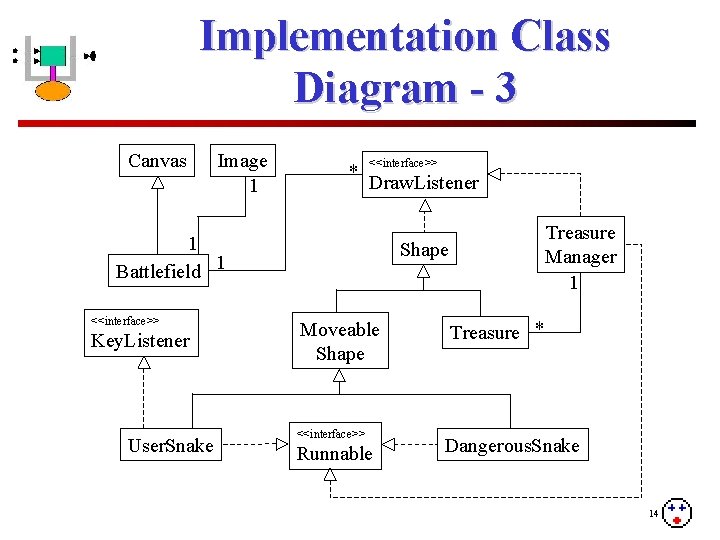
Implementation Class Diagram - 3 Canvas Image 1 * <<interface>> Draw. Listener 1 Battlefield 1 <<interface>> Key. Listener User. Snake Treasure Manager 1 Shape Moveable Shape <<interface>> Runnable Treasure * Dangerous. Snake 14
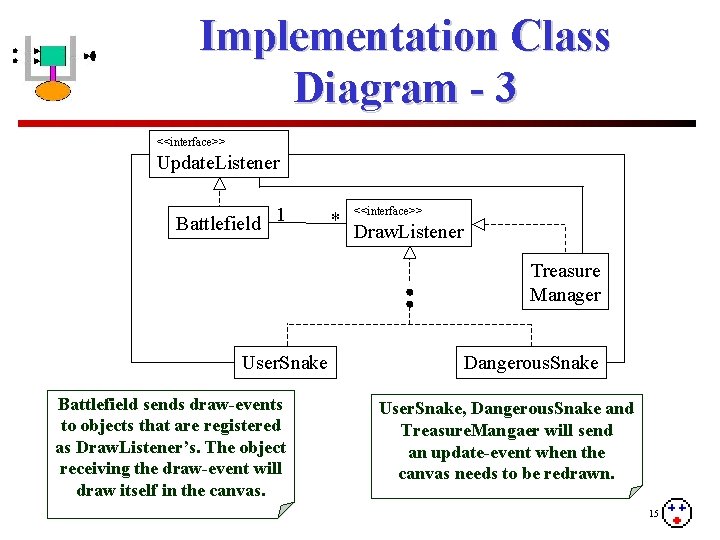
Implementation Class Diagram - 3 <<interface>> Update. Listener Battlefield 1 * <<interface>> Draw. Listener Treasure Manager User. Snake Battlefield sends draw-events to objects that are registered as Draw. Listener’s. The object receiving the draw-event will draw itself in the canvas. Dangerous. Snake User. Snake, Dangerous. Snake and Treasure. Mangaer will send an update-event when the canvas needs to be redrawn. 15
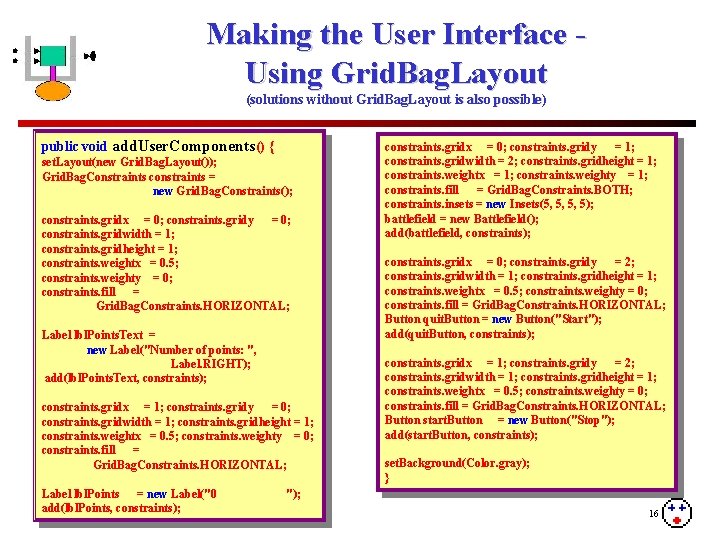
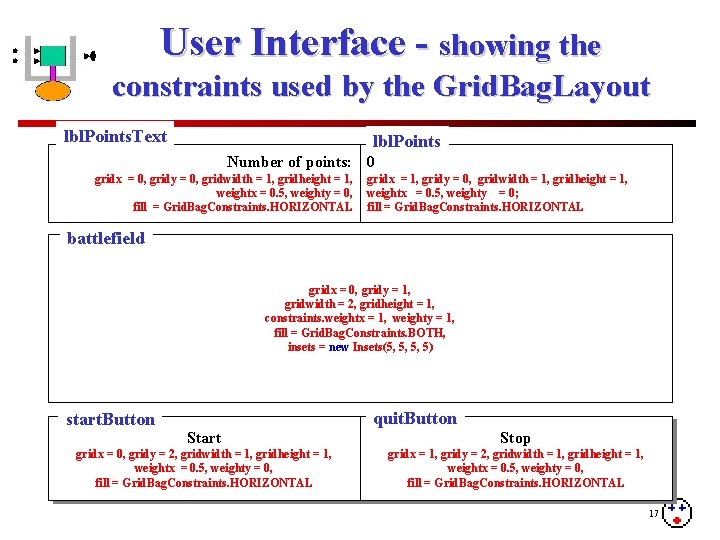
Making the User Interface Using Grid. Bag. Layout (solutions without Grid. Bag. Layout is also possible) public void add. User. Components() { set. Layout(new Grid. Bag. Layout()); Grid. Bag. Constraints constraints = new Grid. Bag. Constraints(); constraints. gridx = 0; constraints. gridy = 0; constraints. gridwidth = 1; constraints. gridheight = 1; constraints. weightx = 0. 5; constraints. weighty = 0; constraints. fill = Grid. Bag. Constraints. HORIZONTAL; Label lbl. Points. Text = new Label("Number of points: ", Label. RIGHT); add(lbl. Points. Text, constraints); constraints. gridx = 1; constraints. gridy = 0; constraints. gridwidth = 1; constraints. gridheight = 1; constraints. weightx = 0. 5; constraints. weighty = 0; constraints. fill = Grid. Bag. Constraints. HORIZONTAL; Label lbl. Points = new Label("0 add(lbl. Points, constraints); constraints. gridx = 0; constraints. gridy = 1; constraints. gridwidth = 2; constraints. gridheight = 1; constraints. weightx = 1; constraints. weighty = 1; constraints. fill = Grid. Bag. Constraints. BOTH; constraints. insets = new Insets(5, 5, 5, 5); battlefield = new Battlefield(); add(battlefield, constraints); constraints. gridx = 0; constraints. gridy = 2; constraints. gridwidth = 1; constraints. gridheight = 1; constraints. weightx = 0. 5; constraints. weighty = 0; constraints. fill = Grid. Bag. Constraints. HORIZONTAL; Button quit. Button = new Button("Start"); add(quit. Button, constraints); constraints. gridx = 1; constraints. gridy = 2; constraints. gridwidth = 1; constraints. gridheight = 1; constraints. weightx = 0. 5; constraints. weighty = 0; constraints. fill = Grid. Bag. Constraints. HORIZONTAL; Button start. Button = new Button("Stop"); add(start. Button, constraints); set. Background(Color. gray); } "); 16
User Interface - showing the constraints used by the Grid. Bag. Layout lbl. Points. Text lbl. Points Number of points: 0 gridx = 0, gridy = 0, gridwidth = 1, gridheight = 1, weightx = 0. 5, weighty = 0, fill = Grid. Bag. Constraints. HORIZONTAL gridx = 1, gridy = 0, gridwidth = 1, gridheight = 1, weightx = 0. 5, weighty = 0; fill = Grid. Bag. Constraints. HORIZONTAL battlefield gridx = 0, gridy = 1, gridwidth = 2, gridheight = 1, constraints. weightx = 1, weighty = 1, fill = Grid. Bag. Constraints. BOTH, insets = new Insets(5, 5, 5, 5) start. Button quit. Button Start Stop gridx = 0, gridy = 2, gridwidth = 1, gridheight = 1, weightx = 0. 5, weighty = 0, fill = Grid. Bag. Constraints. HORIZONTAL gridx = 1, gridy = 2, gridwidth = 1, gridheight = 1, weightx = 0. 5, weighty = 0, fill = Grid. Bag. Constraints. HORIZONTAL 17