
THE REGION my code is 805 Load Balancing

THE REGION: my code is 805 Load Balancing and Scaling your WCF Services Today and Tomorrow Michele Leroux Bustamante, Chief Architect IDesign SOA 309
Michele Leroux Bustamante Chief Architect IDesign: www. idesign. net Microsoft Regional Director, MVP Connected Systems Published Author: ASP. NET Pro (WCF Column), MSDN, Co. De Learning WCF (O’Reilly 2007/2008/2009) Speaker: Tech Ed, PDC, Dev Connections, other international events Blogs: www. dasblonde. net (main) www. thatindigogirl. com (book)
Agenda Scalability, throughput, and performance Hosting and threading model Throttling requests Asynchronous models Channel creation overhead and caching options Session expiry Number of service hops Load balancing and failover SSL processing routers Related “Dublin” features

Performance, Throughput, and Scalability Performance: Time to complete a request Execution time, response time Throughput: Concurrent request processing Requests per unit of time (usually/second) Scalability: Ability to handle overall system load Ability to perform as resources are added Influenced by: Server resources Communication overhead Application design, server affinity
WCF Considerations Hosting and threading model Throttling requests Asynchronous models Channel creation overhead and caching options Session expiry Number of service hops Load balancing and failover SSL processing routers
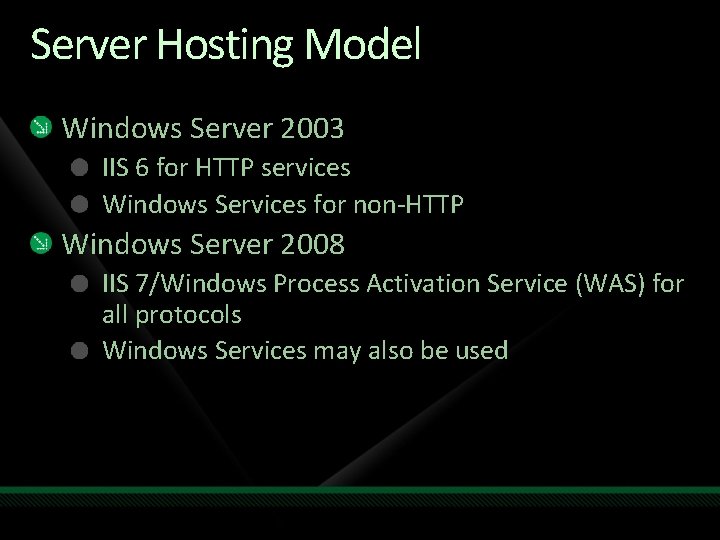
Server Hosting Model Windows Server 2003 IIS 6 for HTTP services Windows Services for non-HTTP Windows Server 2008 IIS 7/Windows Process Activation Service (WAS) for all protocols Windows Services may also be used
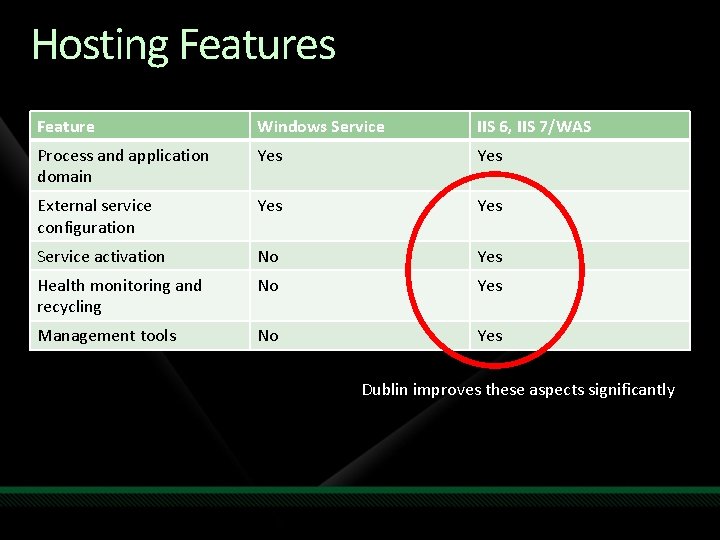
Hosting Features Feature Windows Service IIS 6, IIS 7/WAS Process and application domain Yes External service configuration Yes Service activation No Yes Health monitoring and recycling No Yes Management tools No Yes Dublin improves these aspects significantly
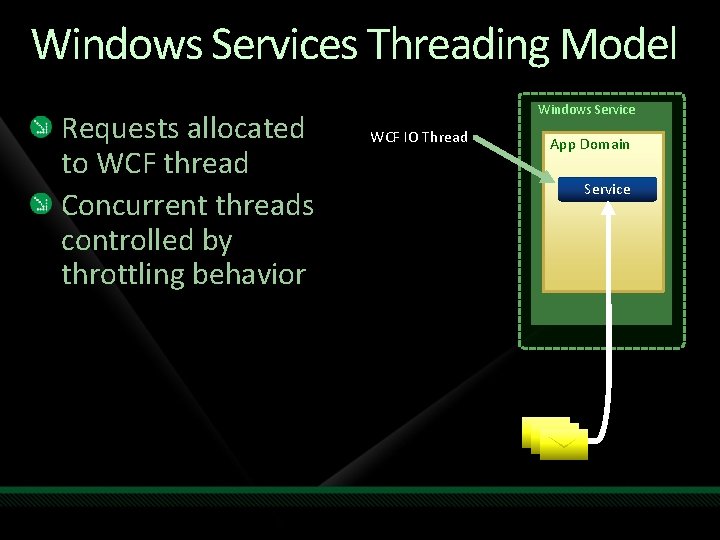
Windows Services Threading Model Requests allocated to WCF thread Concurrent threads controlled by throttling behavior Windows Service WCF IO Thread App Domain Service
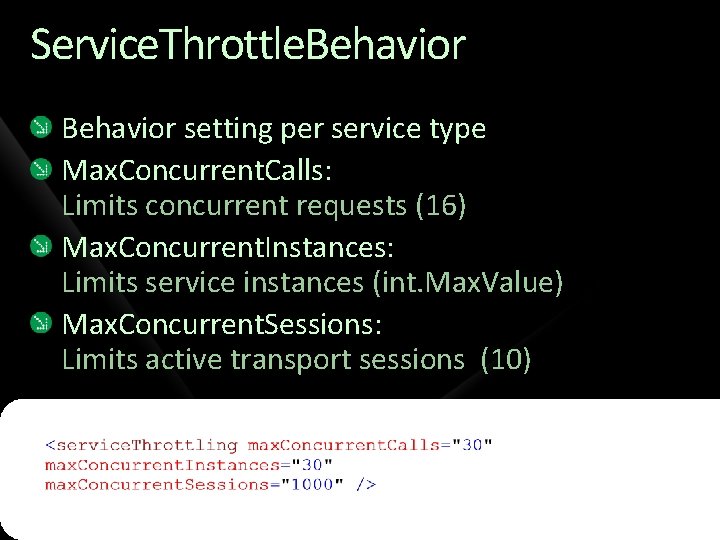
Service. Throttle. Behavior setting per service type Max. Concurrent. Calls: Limits concurrent requests (16) Max. Concurrent. Instances: Limits service instances (int. Max. Value) Max. Concurrent. Sessions: Limits active transport sessions (10)
demo Service Throttling
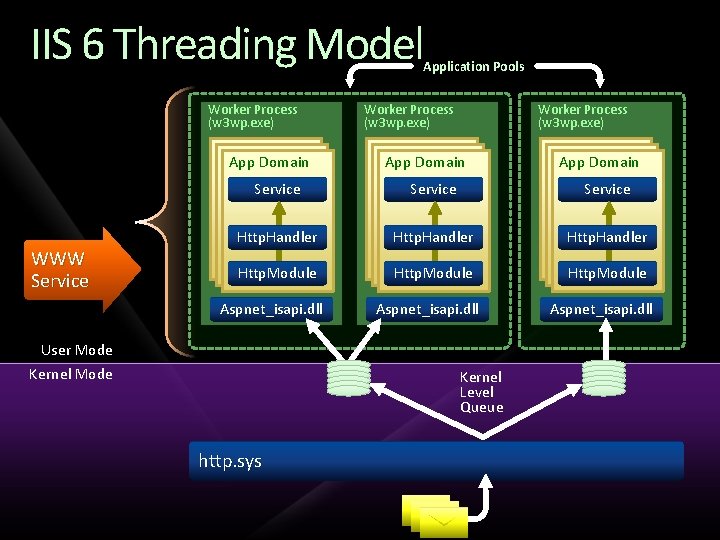
IIS 6 Threading Model Application Pools Worker Process (w 3 wp. exe) App Domain WWW Service Worker Process (w 3 wp. exe) App Domain Service Http. Handler Http. Module Aspnet_isapi. dll User Mode Kernel Mode Aspnet_isapi. dll Kernel Level Queue http. sys Aspnet_isapi. dll
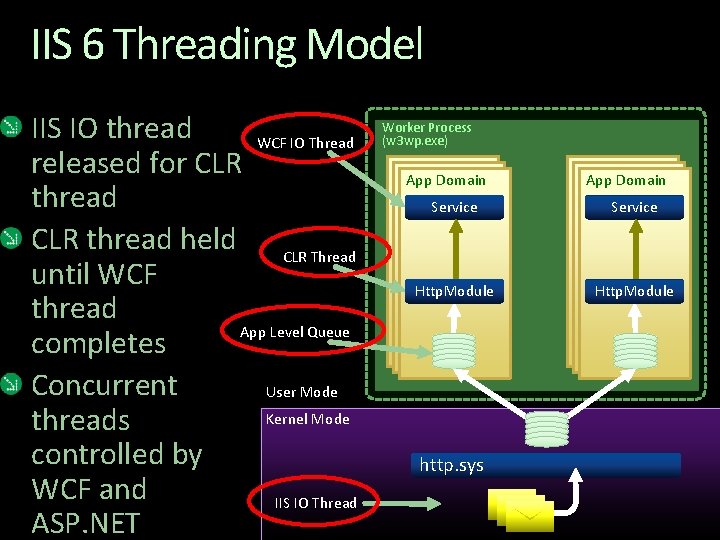
IIS 6 Threading Model IIS IO thread WCF IO Thread released for CLR thread held CLR Thread until WCF thread App Level Queue completes Concurrent User Mode Kernel Mode threads controlled by WCF and IIS IO Thread ASP. NET Worker Process (w 3 wp. exe) App Domain Service Http. Module http. sys
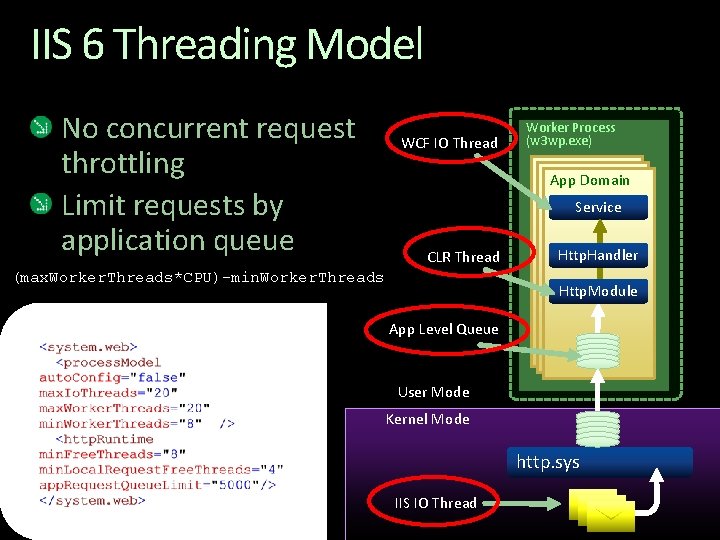
IIS 6 Threading Model No concurrent request throttling Limit requests by application queue WCF IO Thread Worker Process (w 3 wp. exe) App Domain Service CLR Thread (max. Worker. Threads*CPU)-min. Worker. Threads Http. Handler Http. Module App Level Queue User Mode Kernel Mode http. sys IIS IO Thread
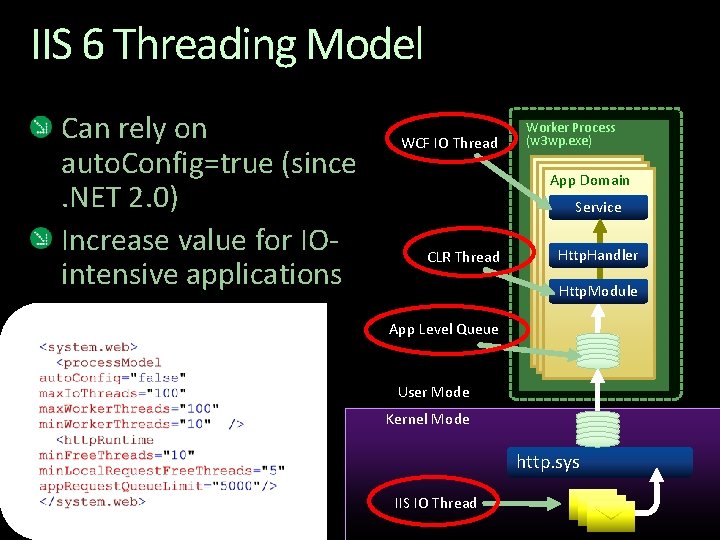
IIS 6 Threading Model Can rely on auto. Config=true (since. NET 2. 0) Increase value for IOintensive applications WCF IO Thread Worker Process (w 3 wp. exe) App Domain Service CLR Thread Http. Handler Http. Module App Level Queue User Mode Kernel Mode http. sys IIS IO Thread
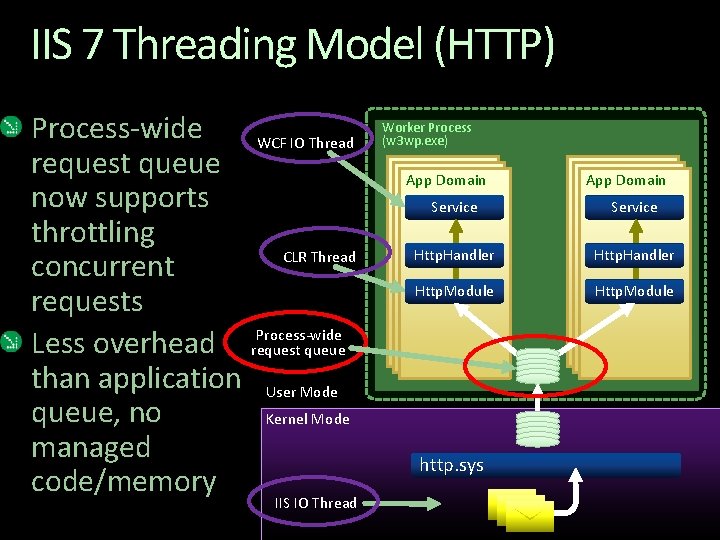
IIS 7 Threading Model (HTTP) Process-wide WCF IO Thread request queue now supports throttling CLR Thread concurrent requests Process-wide Less overhead request queue than application User Mode queue, no Kernel Mode managed code/memory IIS IO Thread Worker Process (w 3 wp. exe) App Domain Service Http. Handler Http. Module http. sys
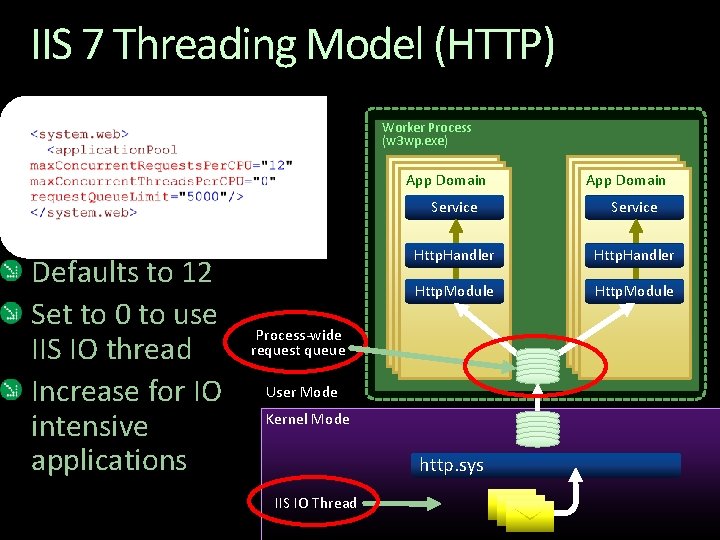
IIS 7 Threading Model (HTTP) Worker Process (w 3 wp. exe) App Domain Defaults to 12 Set to 0 to use IIS IO thread Increase for IO intensive applications Service Http. Handler Http. Module Process-wide request queue User Mode Kernel Mode http. sys IIS IO Thread App Domain
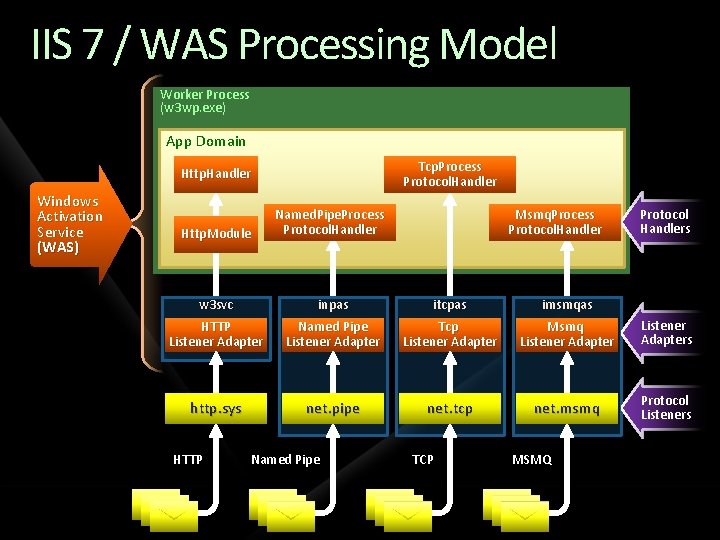
IIS 7 / WAS Processing Model Worker Process (w 3 wp. exe) App Domain Tcp. Process Protocol. Handler Http. Handler Windows Activation Service (WAS) Http. Module Named. Pipe. Process Protocol. Handler w 3 svc inpas itcpas imsmqas HTTP Listener Adapter Named Pipe Listener Adapter Tcp Listener Adapter Msmq Listener Adapters http. sys net. pipe net. tcp net. msmq Protocol Listeners HTTP Named Pipe Msmq. Process Protocol. Handler TCP MSMQ Protocol Handlers
Asynchronous Operations WCF supports an asynchronous pattern for service operations Required asynchronous module and handler Synchronous operations are invoked if present Begin operation should behave asynchronously
Asynchronous Pipeline By default ASP. NET throttles requests to WCF via thread pool or concurrent request limits Synchronous Http. Module and Http. Handler Best configuration for IIS 6 Can configure asynchronous pipeline Service. Http. Module and Service. Http. Handler/Factory Rely on ASP. NET request throttle in IIS 7 Optimize calls to WCF service with IO-intensive and high latency operations Set up handler with Wcf. Async. Web. Util. exe
Channel Overhead Channel construction takes time Affects client-server architecture where multithreading applies Caching channel can help Primarily affects server-server architecture Caching channel factory can help May not be able to, depending on factory initialization requirements
Client-Server Architecture Can return to the same machine for session, and scale Can use the same client channel Cache the channel factory and channel (or, the proxy) Proxy must handle faulted channels and recreate session May be a new machine
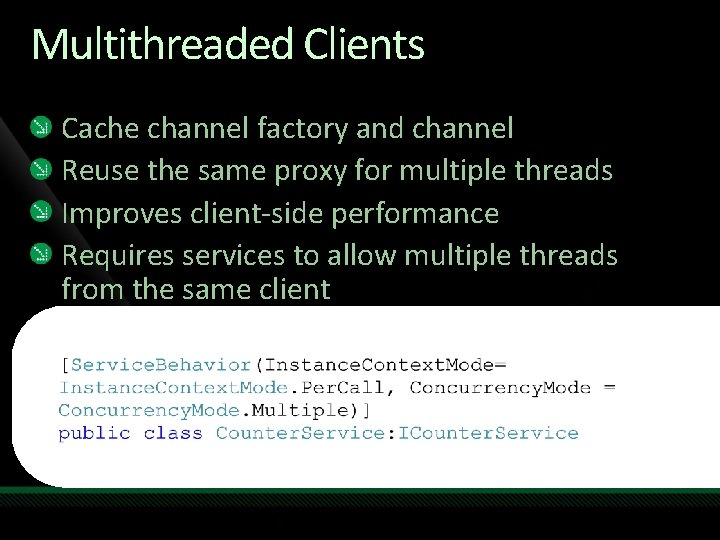
Multithreaded Clients Cache channel factory and channel Reuse the same proxy for multiple threads Improves client-side performance Requires services to allow multiple threads from the same client
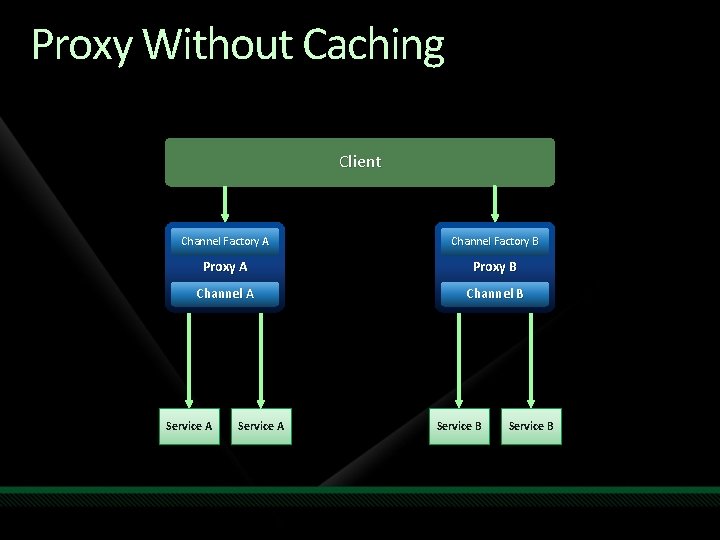
Proxy Without Caching Client Channel Factory A Channel Factory B Proxy A Proxy B Channel A Channel B Service A Service B
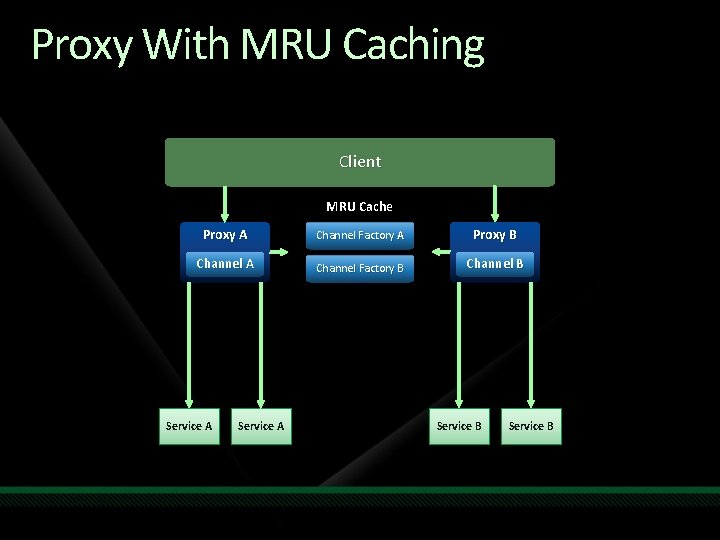
Proxy With MRU Caching Client MRU Cache Proxy A Channel Factory A Proxy B Channel A Channel Factory B Channel B Service A Service B
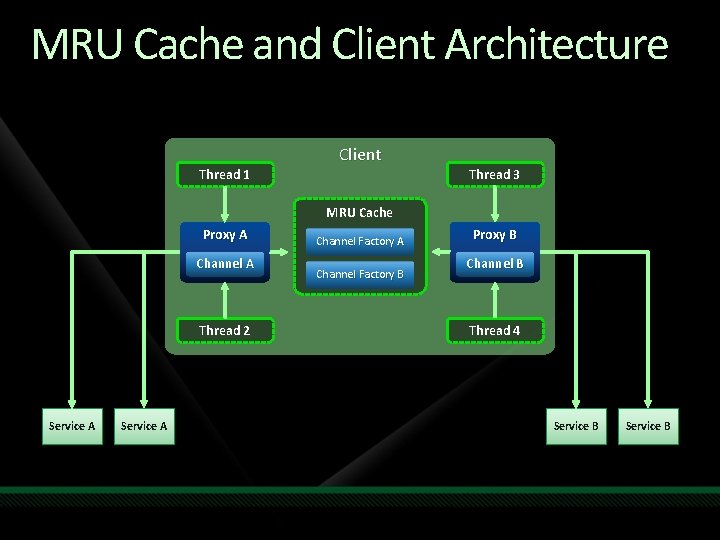
MRU Cache and Client Architecture Thread 1 Client Thread 3 MRU Cache Proxy A Channel A Thread 2 Service A Channel Factory B Proxy B Channel B Thread 4 Service B
demo Clients and Proxy Caching
Session Expiry Primarily affects client-server architecture Sessions can time out, or be faulted by uncaught exceptions Service channel is torn down Session is lost Client channel must be recreated User may not need to know Proxy wrapper can help
demo Handling Session Expiry
Server-Server Architecture ASP. NET or another service as client Must scale across distributed boundaries Avoid sticky IP/session Should not use the same client channel MAY be able to cache the channel factory Don’t cache the channel Session expiry not an issue New channel for each call
Downstream Services Behind the firewall, multiple concurrent threads execute at the service Calls to downstream services require a proxy, thus channel creation overhead Caching channel factory and channel Illusion of throughput, will choke with load Caching channel factory Improved throughput, still allows distribution among available connections
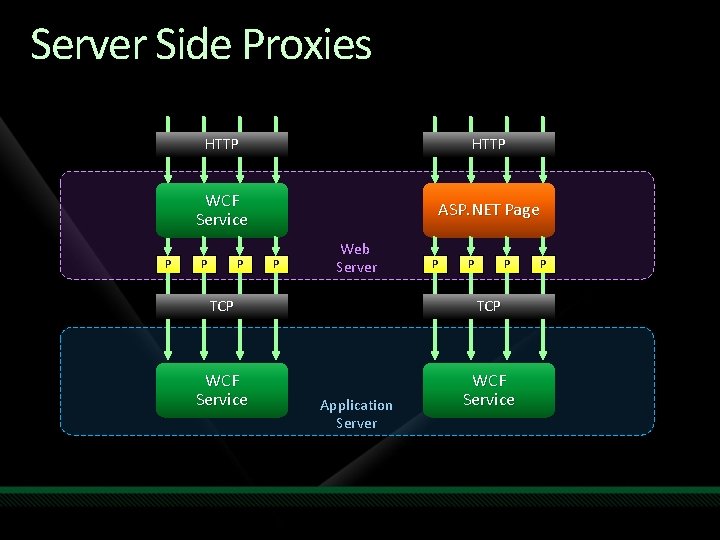
Server Side Proxies P HTTP WCF Service ASP. NET Page P P P Web Server P P P TCP WCF Service Application Server P
Limiting Service Hops Crossing process and machine boundaries requires WCF Essential to distribution of functionality and application scalability Service-oriented design implies reuse via services, even if invoked in-process Some applications can’t withstand >2 service hops in a single request Must benchmark the application
Load Balancing and Failover Scalability is impacted by ability to balance load across server machines Sessions influence load balancing Without sessions, requests can be directed to any machine Transport session like TCP, requires sticky IP With reliable and secure sessions, or application sessions, requires sticky sessions Application sessions can be durable Failover not supported by default
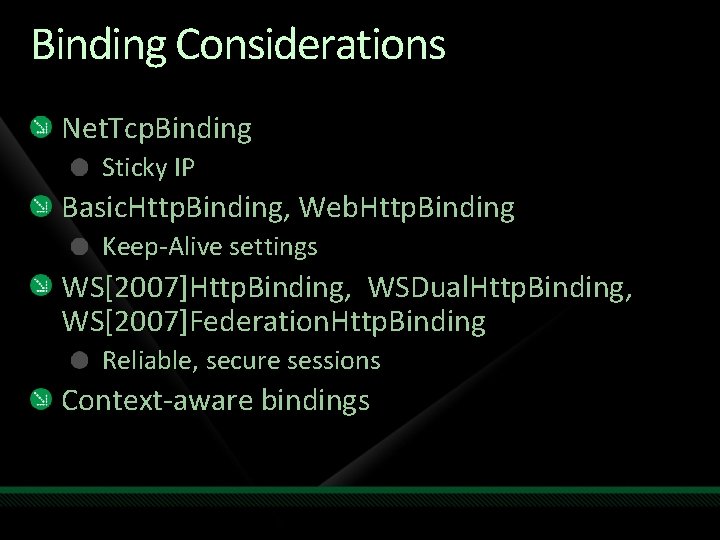
Binding Considerations Net. Tcp. Binding Sticky IP Basic. Http. Binding, Web. Http. Binding Keep-Alive settings WS[2007]Http. Binding, WSDual. Http. Binding, WS[2007]Federation. Http. Binding Reliable, secure sessions Context-aware bindings
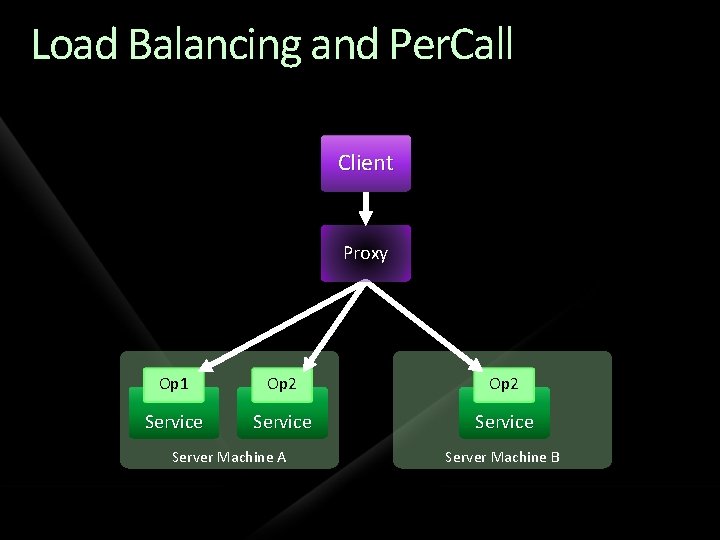
Load Balancing and Per. Call Client Proxy Op 1 Op 2 Service Server Machine A Server Machine B

Load Balancing and Per. Session Client Proxy Op 1 Op 2 Service Session A Server Machine A Op 1 State Op 2 Service Session B Server Machine B State
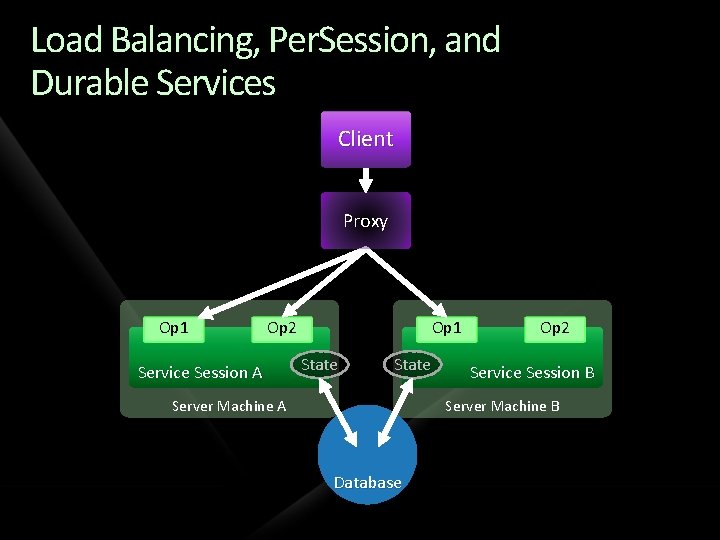
Load Balancing, Per. Session, and Durable Services Client Proxy Op 1 Op 2 Service Session A Op 1 State Server Machine A Op 2 Service Session B Server Machine B Database
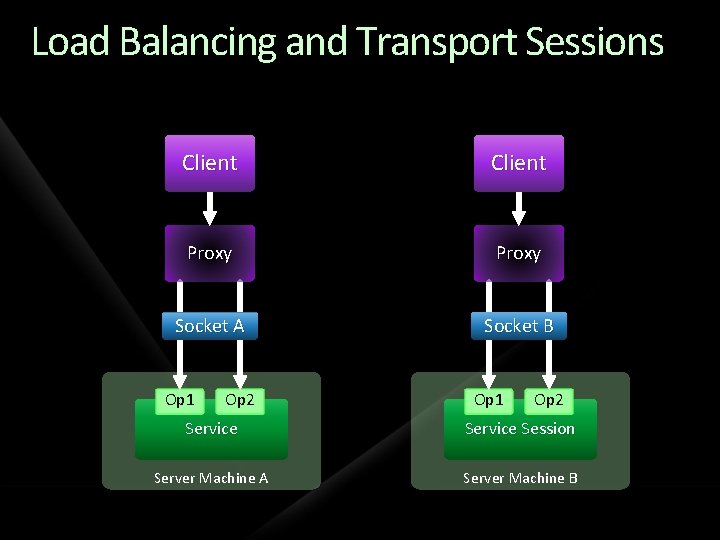
Load Balancing and Transport Sessions Client Proxy Socket A Socket B Op 1 Op 2 Service Session Server Machine A Server Machine B
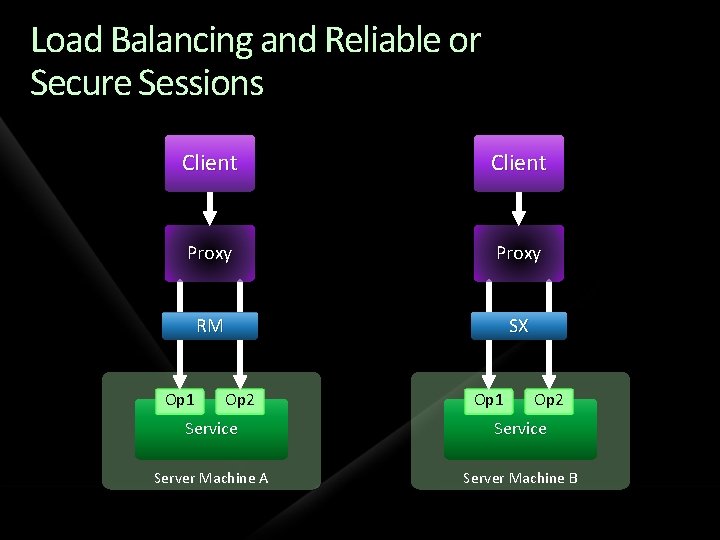
Load Balancing and Reliable or Secure Sessions Client Proxy RM SX Op 1 Op 2 Service Server Machine A Server Machine B
SSL Processing Load Balancer Process SSL and forward F 5 Big. IP a typical scenario Service must accept unencrypted messages (including security tokens!) Not supported by default Can override default token authentication behavior to support this scenario
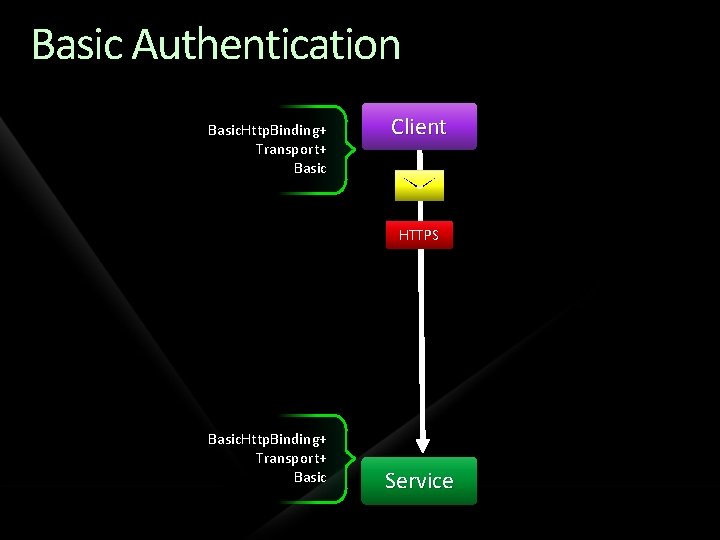
Basic Authentication Basic. Http. Binding+ Transport+ Basic Client HTTPS Basic. Http. Binding+ Transport+ Basic Service
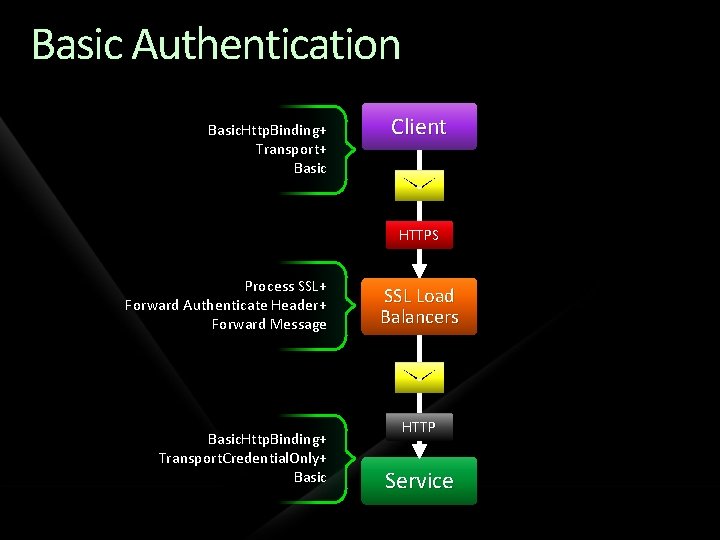
Basic Authentication Basic. Http. Binding+ Transport+ Basic Client HTTPS Process SSL+ Forward Authenticate Header+ Forward Message Basic. Http. Binding+ Transport. Credential. Only+ Basic SSL Load Balancers HTTP Service
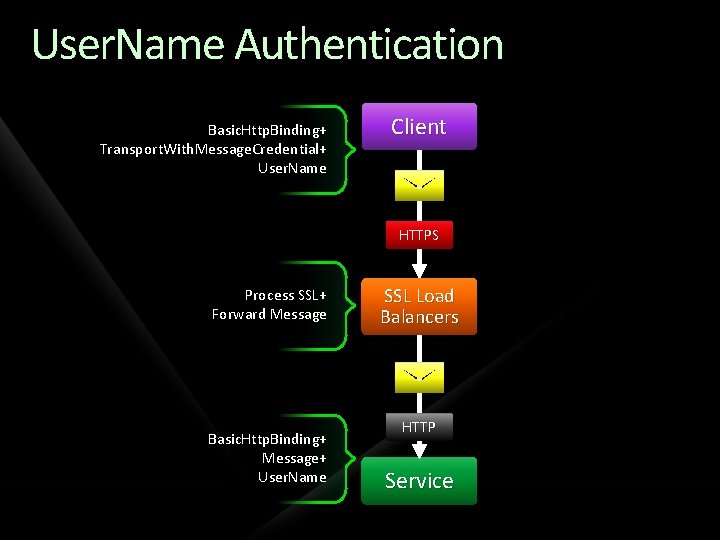
User. Name Authentication Basic. Http. Binding+ Transport. With. Message. Credential+ User. Name Client HTTPS Process SSL+ Forward Message Basic. Http. Binding+ Message+ User. Name SSL Load Balancers HTTP Service
demo Supporting SSL Processing Load Balancers
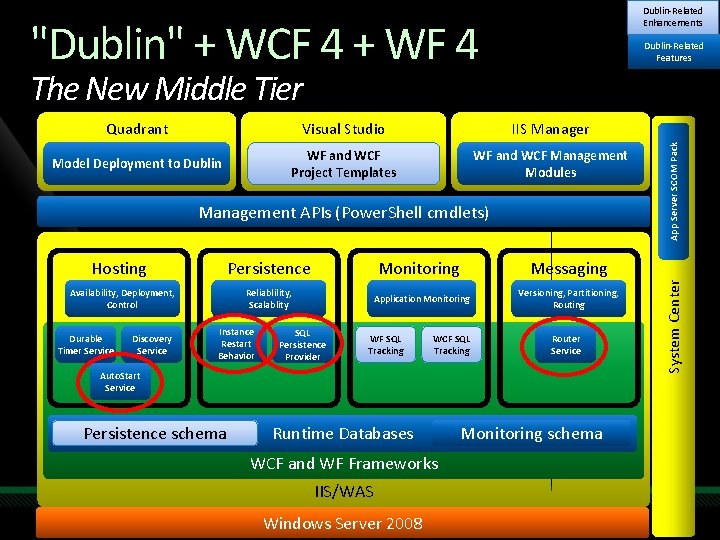
Dublin-Related Enhancements "Dublin" + WCF 4 + WF 4 Dublin-Related Features Visual Studio IIS Manager Model Deployment to Dublin WF and WCF Project Templates WF and WCF Management Modules Management APIs (Power. Shell cmdlets) Hosting Availability, Deployment, Control Durable Timer Service Discovery Service Persistence Monitoring Messaging Reliablility, Scalablity Application Monitoring Versioning, Partitioning, Routing Instance Restart Behavior SQL Persistence Provider WF SQL Tracking WCF SQL Tracking Router Service Auto. Start Service Persistence schema Runtime Databases WCF and WF Frameworks IIS/WAS Microsoft Confidential Windows Server 2008 Monitoring schema System Center Quadrant App Server SCOM Pack The New Middle Tier
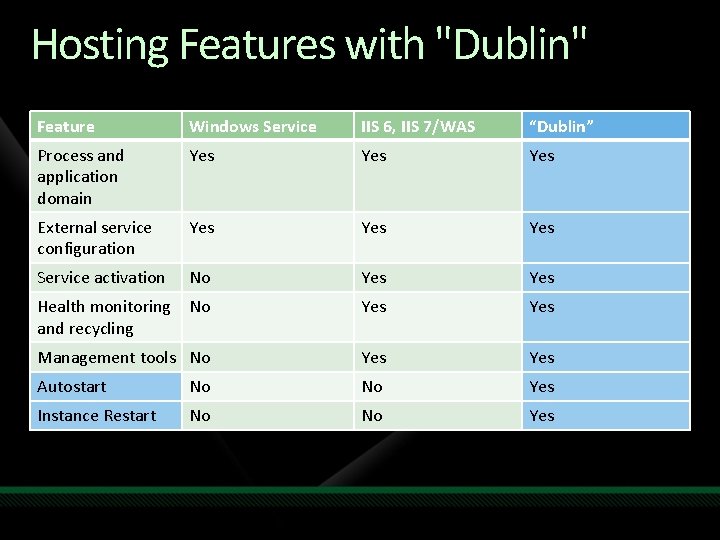
Hosting Features with "Dublin" Feature Windows Service IIS 6, IIS 7/WAS “Dublin” Process and application domain Yes Yes External service configuration Yes Yes Service activation No Yes Health monitoring and recycling No Yes Management tools No Yes Autostart No No Yes Instance Restart No No Yes
"Dublin" + WCF 4 + WF 4 The New Middle Tier Reliability and availability Message-based activation Automatic start improves host responsiveness Persistence model enhanced Improved lock management and restart for failed WF Service instances Scalability Distribute load with the Router. Service Asynchronous messaging with WF Services Load balancing through persistence Better lock management and exception handling
Resources Learning WCF Michele Leroux Bustamante, O’Reilly 2007 Reprinted with updates for VS 2008, August 2008 My Blog: http: //www. dasblonde. net See post-conference blog post for samples from this and other sessions at Tech Ed! Book blog: www. thatindigogirl. com
Question & Answer
Resources www. microsoft. com/teched www. microsoft. com/learning Sessions On-Demand & Community Microsoft Certification & Training Resources http: //microsoft. com/technet http: //microsoft. com/msdn Resources for IT Professionals Resources for Developers www. microsoft. com/learning Microsoft Certification and Training Resources
Related Content Breakout Sessions (session codes and titles) Interactive Theater Sessions (session codes and titles) Hands-on Labs (session codes and titles)
Track Resources Resource 1 Resource 2 Resource 3 Resource 4

Complete an evaluation on Comm. Net and enter to win!

© 2009 Microsoft Corporation. All rights reserved. Microsoft, Windows Vista and other product names are or may be registered trademarks and/or trademarks in the U. S. and/or other countries. The information herein is for informational purposes only and represents the current view of Microsoft Corporation as of the date of this presentation. Because Microsoft must respond to changing market conditions, it should not be interpreted to be a commitment on the part of Microsoft, and Microsoft cannot guarantee the accuracy of any information provided after the date of this presentation. MICROSOFT MAKES NO WARRANTIES, EXPRESS, IMPLIED OR STATUTORY, AS TO THE INFORMATION IN THIS PRESENTATION.
- Slides: 55