
The Phase Diagram module Use the Phase Diagram
- Slides: 88
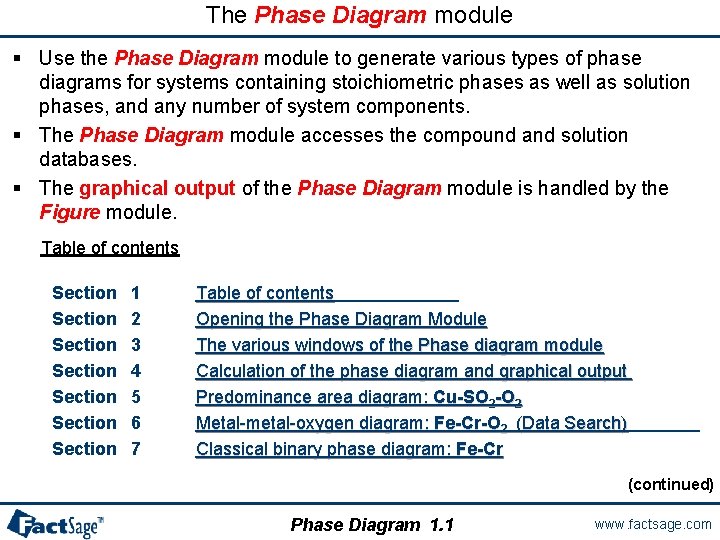
The Phase Diagram module § Use the Phase Diagram module to generate various types of phase diagrams for systems containing stoichiometric phases as well as solution phases, and any number of system components. § The Phase Diagram module accesses the compound and solution databases. § The graphical output of the Phase Diagram module is handled by the Figure module. Table of contents Section 1 Section 2 Section 3 Section 4 Section 5 Section 6 Section 7 Table of contents Table of contents Opening the Phase Diagram Module The various windows of the Phase diagram module Calculation of the phase diagram and graphical output Predominance area diagram: Cu-SO 2 -O 2 Metal-metal-oxygen diagram: Fe-Cr-O 2 (Data Search) Classical binary phase diagram: Fe-Cr (continued) Phase Diagram 1. 1 www. factsage. com
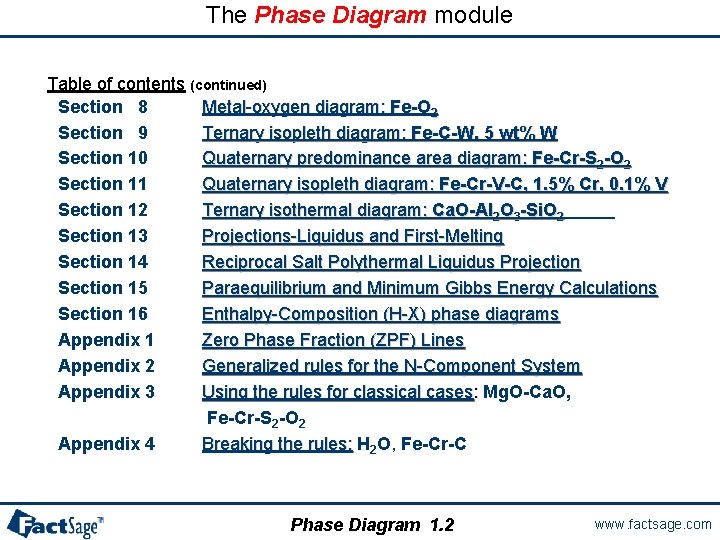
The Phase Diagram module Table of contents (continued) Section 8 Metal-oxygen diagram: Fe-O 2 Section 9 Ternary isopleth diagram: Fe-C-W, 5 wt% W Section 10 Quaternary predominance area diagram: Fe-Cr-S 2 -O 2 Section 11 Quaternary isopleth diagram: Fe-Cr-V-C, 1. 5% Cr, 0. 1% V Section 12 Ternary isothermal diagram: Ca. O-Al 2 O 3 -Si. O 2 Section 13 Projections-Liquidus and First-Melting Section 14 Reciprocal Salt Polythermal Liquidus Projection Section 15 Paraequilibrium and Minimum Gibbs Energy Calculations Section 16 Enthalpy-Composition (H-X) phase diagrams Appendix 1 Zero Phase Fraction (ZPF) Lines Appendix 2 Generalized rules for the N-Component System Appendix 3 Using the rules for classical cases: Mg. O-Ca. O, : Fe-Cr-S 2 -O 2 Appendix 4 Breaking the rules: H 2 O, Fe-Cr-C Phase Diagram 1. 2 www. factsage. com
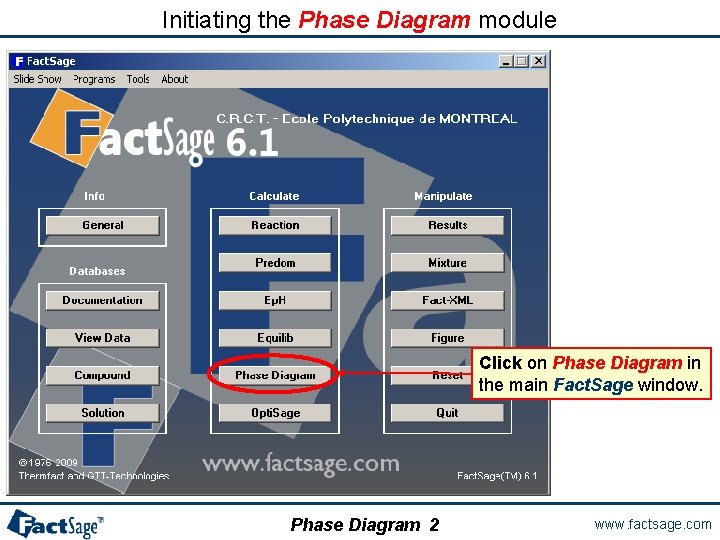
Initiating the Phase Diagram module Click on Phase Diagram in the main Fact. Sage window. Phase Diagram 2 www. factsage. com
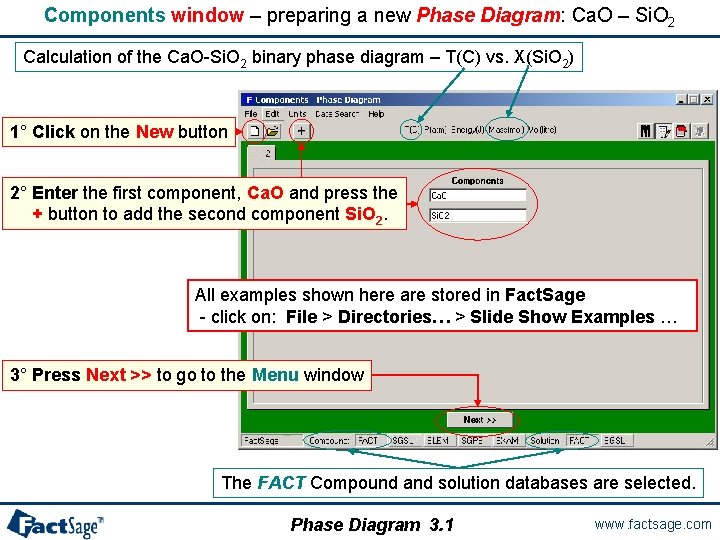
Components window – preparing a new Phase Diagram: Ca. O – Si. O 2 Calculation of the Ca. O-Si. O 2 binary phase diagram – T(C) vs. X(Si. O 2) 1° Click on the New button 2° Enter the first component, Ca. O and press the + button to add the second component Si. O 2. All examples shown here are stored in Fact. Sage - click on: File > Directories… > Slide Show Examples … 3° Press Next >> to go to the Menu window The FACT Compound and solution databases are selected. Phase Diagram 3. 1 www. factsage. com
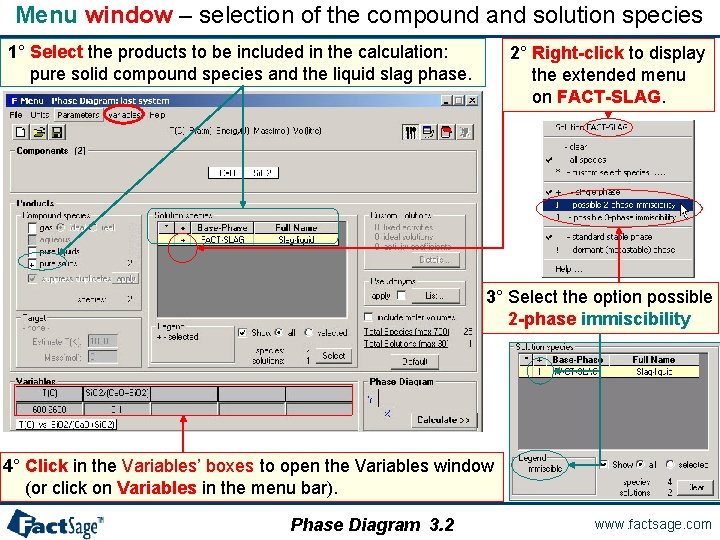
Menu window – selection of the compound and solution species 1° Select the products to be included in the calculation: pure solid compound species and the liquid slag phase. 2° Right-click to display the extended menu on FACT-SLAG. 3° Select the option possible 2 -phase immiscibility 4° Click in the Variables’ boxes to open the Variables window (or click on Variables in the menu bar). Phase Diagram 3. 2 www. factsage. com
Compound species selection - Fact. Sage 6. 4 In Fact. Sage 6. 4 there is a new default exclusion of species from compound species selection When two or more databases are connected, the same species may appear in more than one database. In such cases, a species should generally only be selected from one database. Otherwise conflicts will probably occur. In order to assist users in deciding which species to exclude, the Fact. Sage developers have assigned priorities. When you initially click on "pure solids", "pure liquids", or "gas" you may now see that several species marked with an "X" have not been selected. That is, they have been excluded by default because of probable conflicts between databases. The Fact. Sage developers suggest that these species not be selected for this particular calculation. If you wish to select species marked with an "X" you must first click on 'permit selection of "X" species'. This will then override the default setting and permit you to select species as in Fact. Sage 6. 3. This will also activate the 'suppress duplicates' button and enable you to define a database priority list as in Fact. Sage 6. 3. IMPORTANT : For many calculations, it may frequently be advisable or necessary to de-select other species in addition to those marked with an "X. " Phase Diagram 3. 2. 1 www. factsage. com
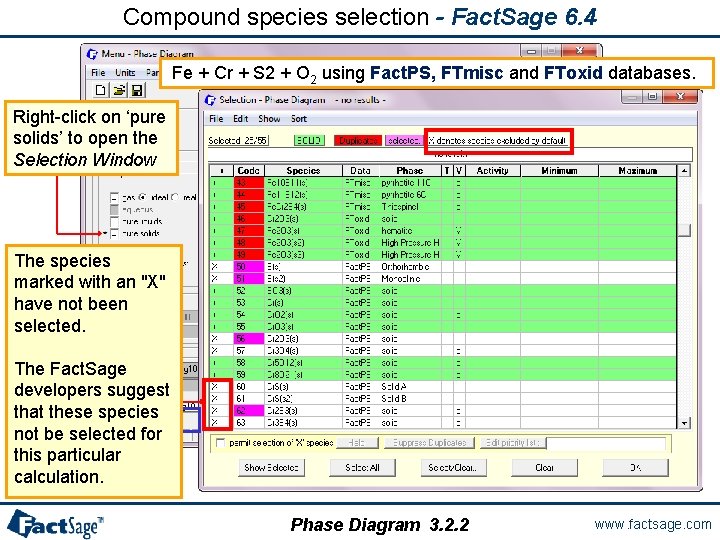
Compound species selection - Fact. Sage 6. 4 Fe + Cr + S 2 + O 2 using Fact. PS, FTmisc and FToxid databases. Right-click on ‘pure solids’ to open the Selection Window The species marked with an "X" have not been selected. The Fact. Sage developers suggest that these species not be selected for this particular calculation. Phase Diagram 3. 2. 2 www. factsage. com
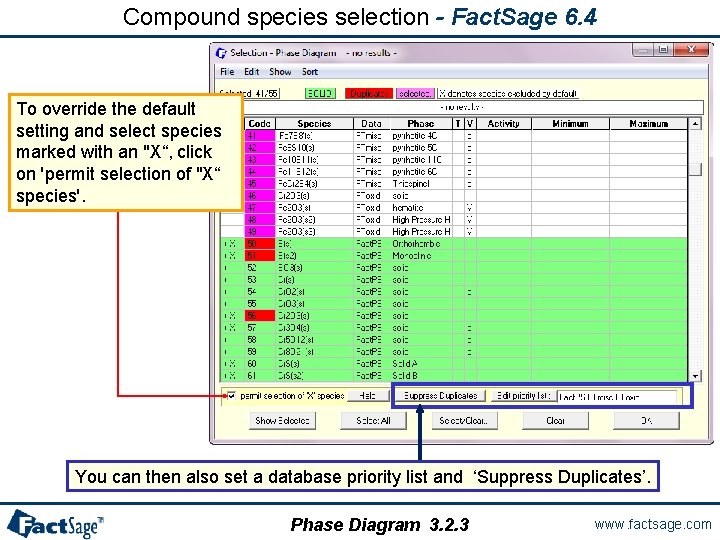
Compound species selection - Fact. Sage 6. 4 To override the default setting and select species marked with an "X“, click on 'permit selection of "X“ species'. You can then also set a database priority list and ‘Suppress Duplicates’. Phase Diagram 3. 2. 3 www. factsage. com
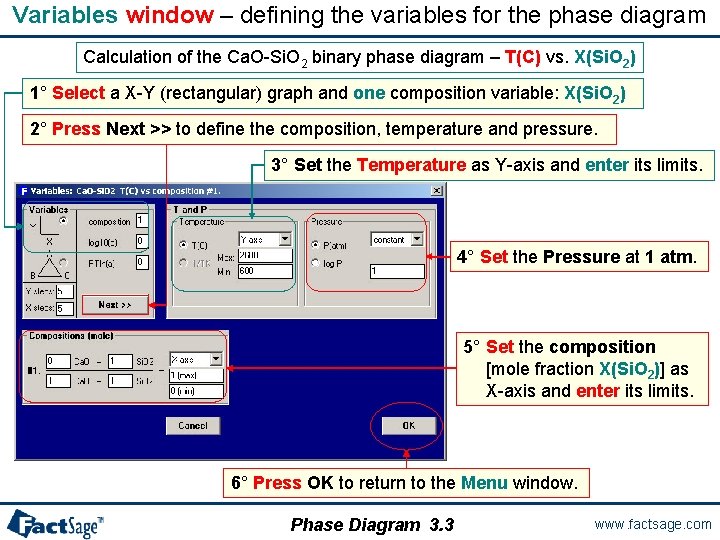
Variables window – defining the variables for the phase diagram Calculation of the Ca. O-Si. O 2 binary phase diagram – T(C) vs. X(Si. O 2) 1° Select a X-Y (rectangular) graph and one composition variable: X(Si. O 2) 2° Press Next >> to define the composition, temperature and pressure. 3° Set the Temperature as Y-axis and enter its limits. 4° Set the Pressure at 1 atm. 5° Set the composition [mole fraction X(Si. O 2)] as X-axis and enter its limits. 6° Press OK to return to the Menu window. Phase Diagram 3. 3 www. factsage. com
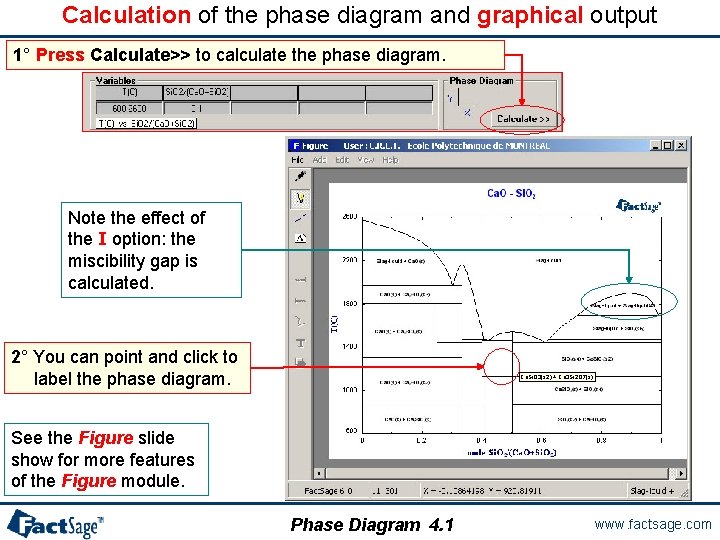
Calculation of the phase diagram and graphical output 1° Press Calculate>> to calculate the phase diagram. Note the effect of the I option: the miscibility gap is calculated. 2° You can point and click to label the phase diagram. Ca. Si. O 3(s 2) + Ca 3 Si 2 O 7(s) See the Figure slide show for more features of the Figure module. Phase Diagram 4. 1 www. factsage. com
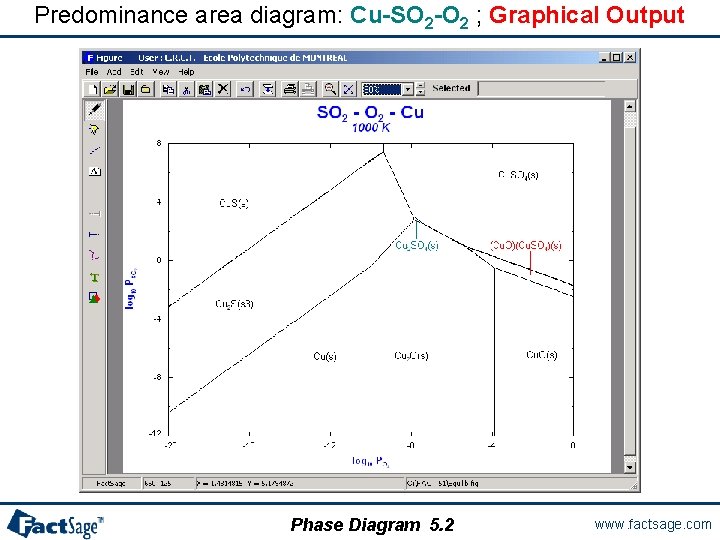
A classical predominance area diagram In the following two slides is shown how the Phase Diagram module is employed in order to generate the same type of diagram that can also be produced with the Predom module. As an example the system is Cu-SO 2 -O 2. Note that SO 2 and O 2 are used as input in the Components window. Phase Diagram 5. 0 www. factsage. com
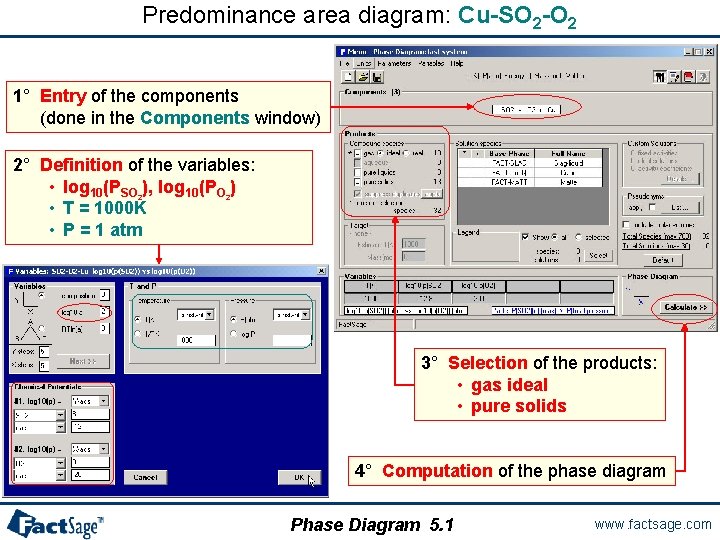
Predominance area diagram: Cu-SO 2 -O 2 1° Entry of the components (done in the Components window) 2° Definition of the variables: • log 10(PSO 2), log 10(PO 2) • T = 1000 K • P = 1 atm 3° Selection of the products: • gas ideal • pure solids 4° Computation of the phase diagram Phase Diagram 5. 1 www. factsage. com
Predominance area diagram: Cu-SO 2 -O 2 ; Graphical Output Phase Diagram 5. 2 www. factsage. com
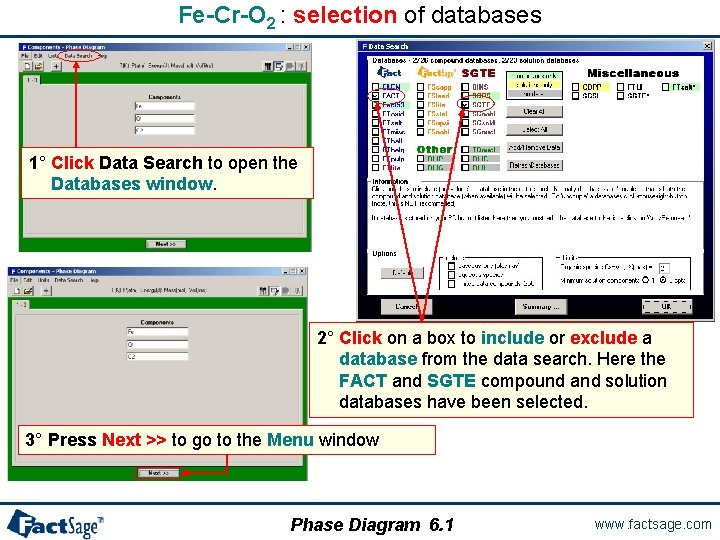
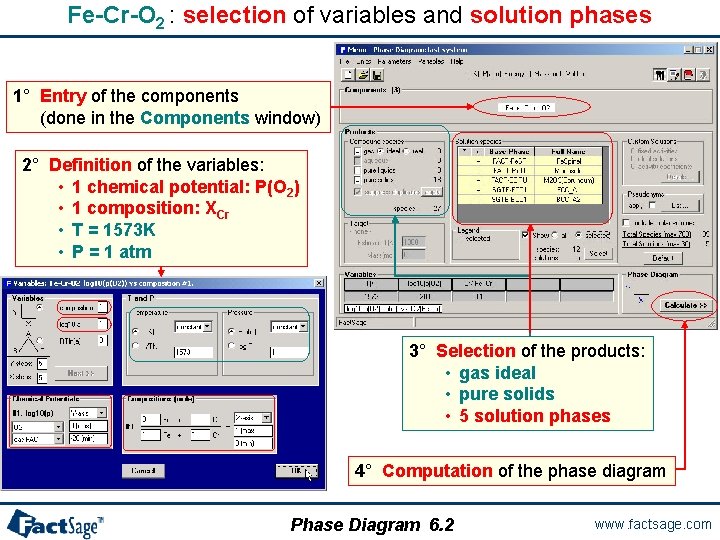
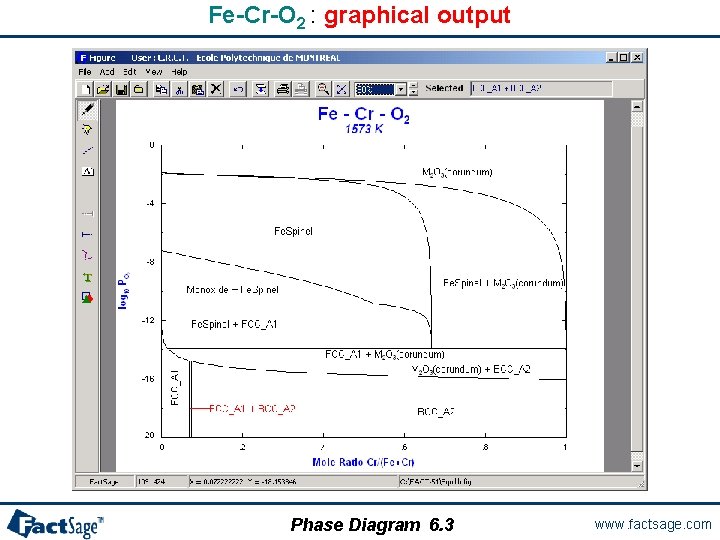
A two metal oxygen system – Fe-Cr-O 2 The following slides show a phase diagram for an alloy system Fe-Cr-O 2 with variable composition under a gas phase with variable oxygen potential (partial pressure) for constant temperature is prepared and generated. Note the use of the «metallic mole fraction» (Cr/(Cr+Fe)) on the x-axis and oxygen partial pressure log P(O 2) on the y-axis. This example combines FACT (for the oxides) with SGTE (for the alloy solid solutions) databases. It shows ``Data Search`` and how to select the databases. Phase Diagram 6. 0 www. factsage. com
Fe-Cr-O 2 : selection of databases 1° Click Data Search to open the Databases window. 2° Click on a box to include or exclude a database from the data search. Here the FACT and SGTE compound and solution databases have been selected. 3° Press Next >> to go to the Menu window Phase Diagram 6. 1 www. factsage. com
Fe-Cr-O 2 : selection of variables and solution phases 1° Entry of the components (done in the Components window) 2° Definition of the variables: • 1 chemical potential: P(O 2) • 1 composition: XCr • T = 1573 K • P = 1 atm 3° Selection of the products: • gas ideal • pure solids • 5 solution phases 4° Computation of the phase diagram Phase Diagram 6. 2 www. factsage. com
Fe-Cr-O 2 : graphical output Phase Diagram 6. 3 www. factsage. com
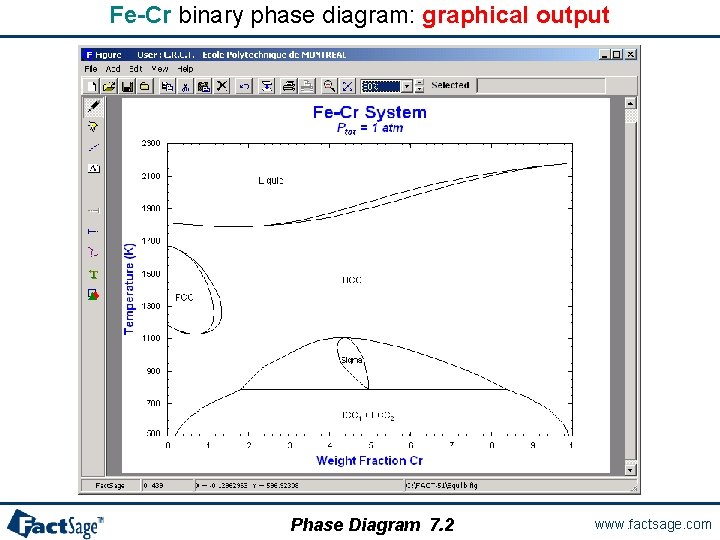
A classical temperature vs composition diagram The following two slides show the preparation and generation of a labelled binary T vs X phase diagram. Note: The labels are entered into the diagram interactively. Click on the «A» button (stable phases label mode) and then move the cursor through the diagram. Where the left mouse button is clicked a label will be inserted into the diagram. The Fe-Cr system is used in this example. Phase Diagram 7. 0 www. factsage. com
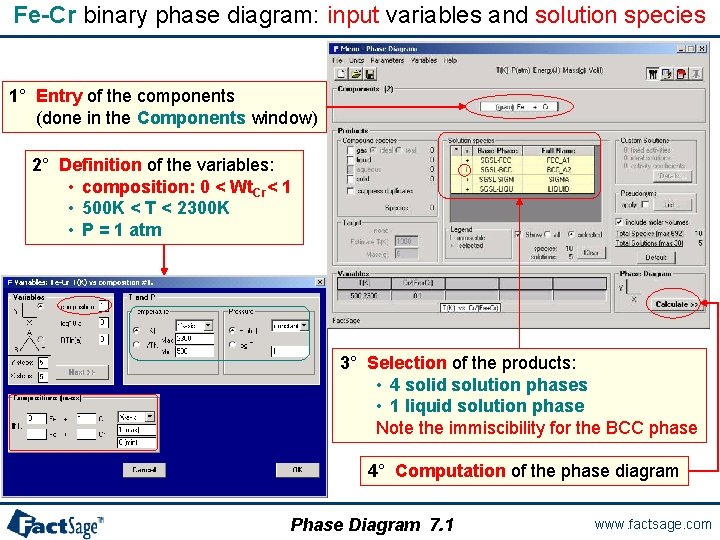
Fe-Cr binary phase diagram: input variables and solution species 1° Entry of the components (done in the Components window) 2° Definition of the variables: • composition: 0 < Wt. Cr< 1 • 500 K < T < 2300 K • P = 1 atm 3° Selection of the products: • 4 solid solution phases • 1 liquid solution phase Note the immiscibility for the BCC phase 4° Computation of the phase diagram Phase Diagram 7. 1 www. factsage. com
Fe-Cr binary phase diagram: graphical output Phase Diagram 7. 2 www. factsage. com
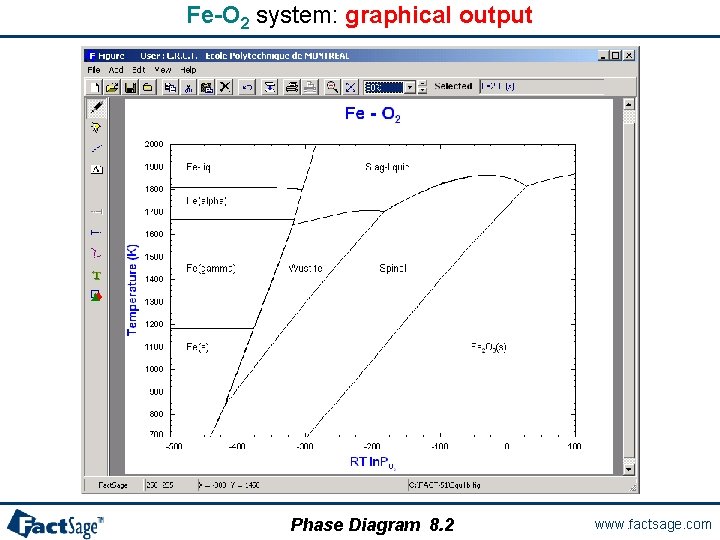
A two potential phase diagram In the following two slides the preparation and generation of a phase diagram with two potential axes is shown. The chosen axes are temperature and one chemical potential in a binary system. Note the difference in the diagram topology that results from the choice of RT ln P(O 2) rather than log P(O 2). The Fe-O 2 system is used as the example. Phase Diagram 8. 0 www. factsage. com
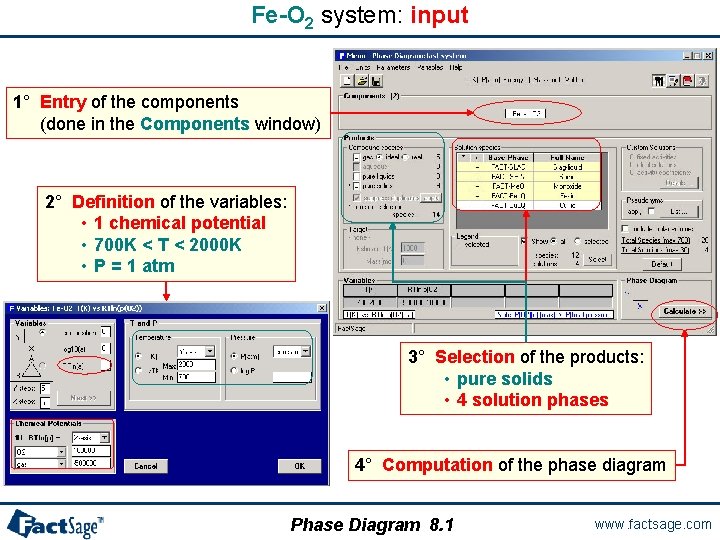
Fe-O 2 system: input 1° Entry of the components (done in the Components window) 2° Definition of the variables: • 1 chemical potential • 700 K < T < 2000 K • P = 1 atm 3° Selection of the products: • pure solids • 4 solution phases 4° Computation of the phase diagram Phase Diagram 8. 1 www. factsage. com
Fe-O 2 system: graphical output Phase Diagram 8. 2 www. factsage. com
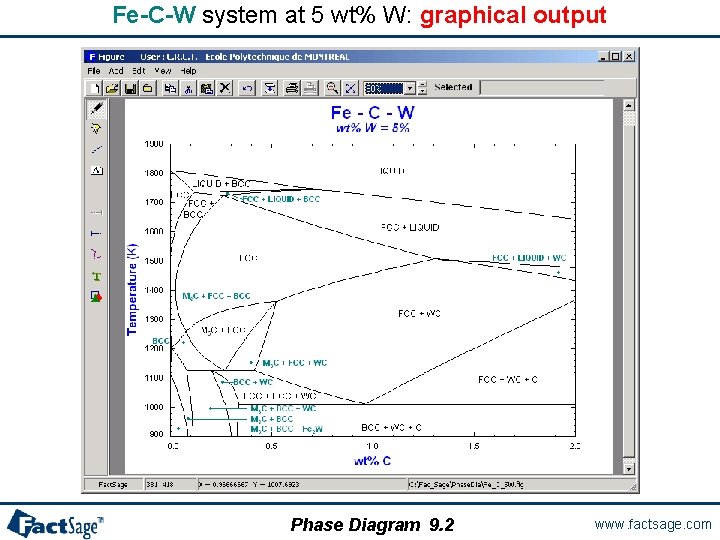
A ternary isopleth diagram The following two slides show a ternary isopleth diagram is prepared and generated. Temperature and one weight percent variable are used on the axes while third compositional variable (here the wt% of the second metallic component) is kept constant. As an example the Fe-W-C system is used. Phase Diagram 9. 0 www. factsage. com
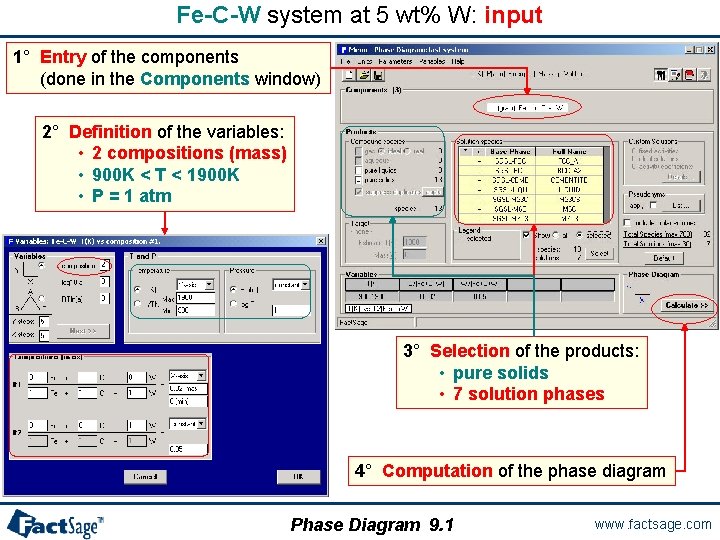
Fe-C-W system at 5 wt% W: input 1° Entry of the components (done in the Components window) 2° Definition of the variables: • 2 compositions (mass) • 900 K < T < 1900 K • P = 1 atm 3° Selection of the products: • pure solids • 7 solution phases 4° Computation of the phase diagram Phase Diagram 9. 1 www. factsage. com
Fe-C-W system at 5 wt% W: graphical output Phase Diagram 9. 2 www. factsage. com
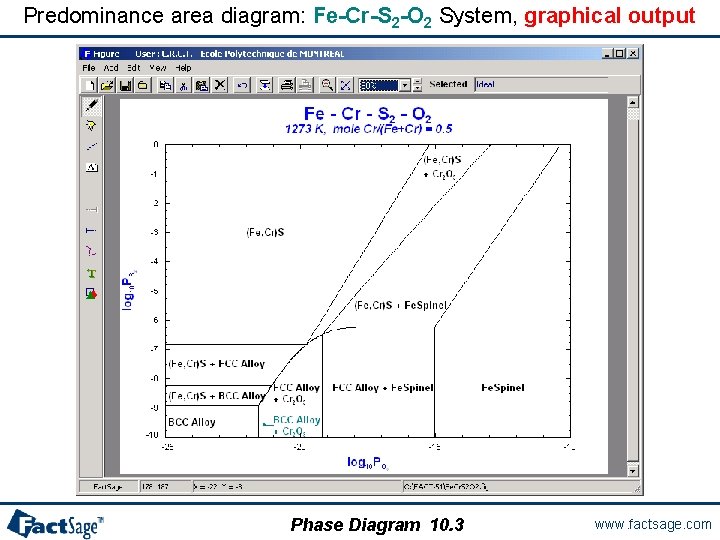
A quaternary predominance area diagram The following three slides show the preparation and calculation of a predominance area type phase diagram with two metal components and two gaseous components. The partial pressures, i. e. chemical potentials, of the gaseous components are used as axes variables. Note the use of the species names O 2 and S 2 in the Components window. These are used to retrieve the data for the correct gas species from the database. Temperature and total pressure are kept constant. Different from the Predom module the present diagram also shows the effect of solution phase formation (FCC, BCC, (Fe, Cr)S, Fespinel). As an example the Fe-Cr-S 2 -O 2 system is used. Phase Diagram 10. 0 www. factsage. com
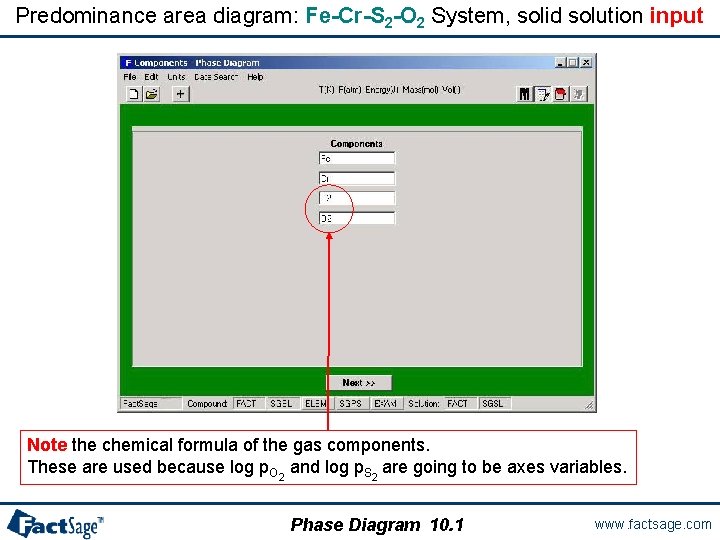
Predominance area diagram: Fe-Cr-S 2 -O 2 System, solid solution input Note the chemical formula of the gas components. These are used because log p. O 2 and log p. S 2 are going to be axes variables. Phase Diagram 10. 1 www. factsage. com
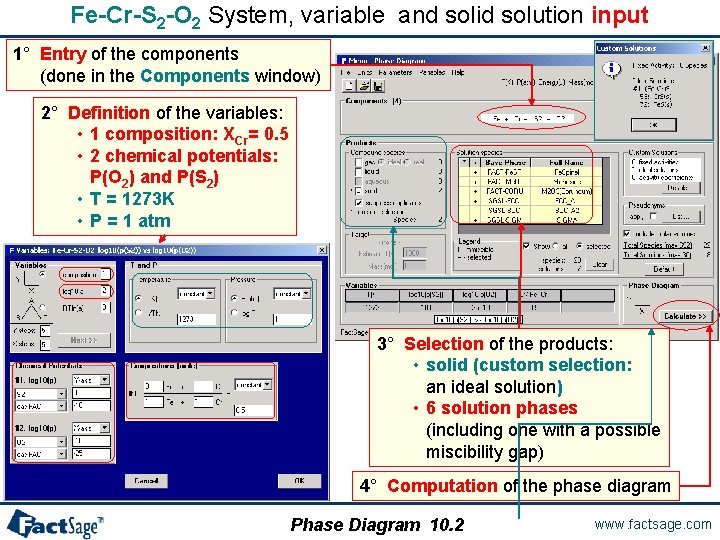
Fe-Cr-S 2 -O 2 System, variable and solid solution input 1° Entry of the components (done in the Components window) 2° Definition of the variables: • 1 composition: XCr= 0. 5 • 2 chemical potentials: P(O 2) and P(S 2) • T = 1273 K • P = 1 atm 3° Selection of the products: • solid (custom selection: an ideal solution) • 6 solution phases (including one with a possible miscibility gap) 4° Computation of the phase diagram Phase Diagram 10. 2 www. factsage. com
Predominance area diagram: Fe-Cr-S 2 -O 2 System, graphical output Phase Diagram 10. 3 www. factsage. com
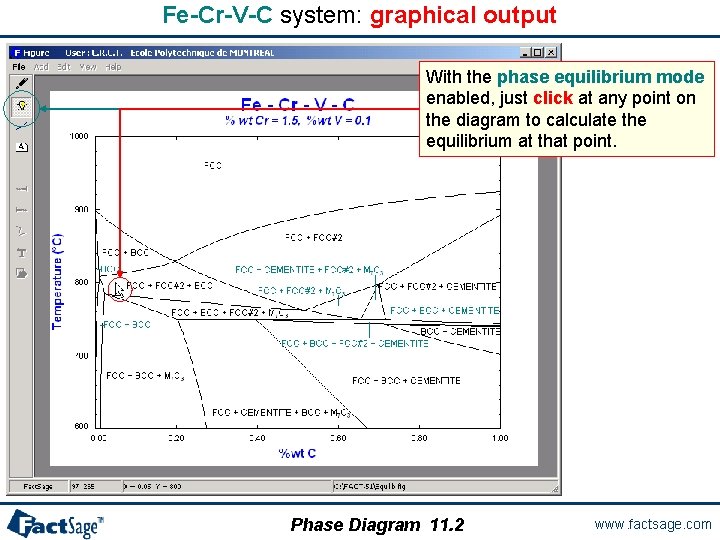
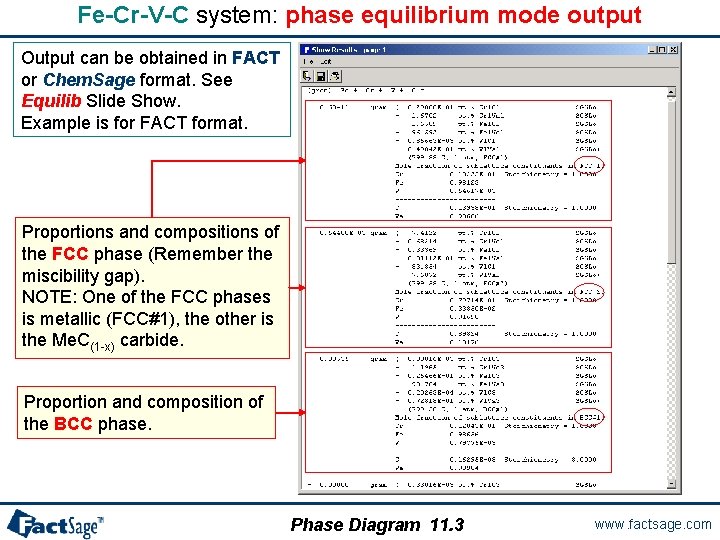
A quaternary isopleth diagram The following three slides show the calculation of a quaternary isopleth diagram is prepared and executed. Furthermore, the use of the Point Calculation option is demonstrated. The resulting equilibrium table is shown and explained. As an example the Fe-Cr-V-C system is used. Phase Diagram 11. 0 www. factsage. com
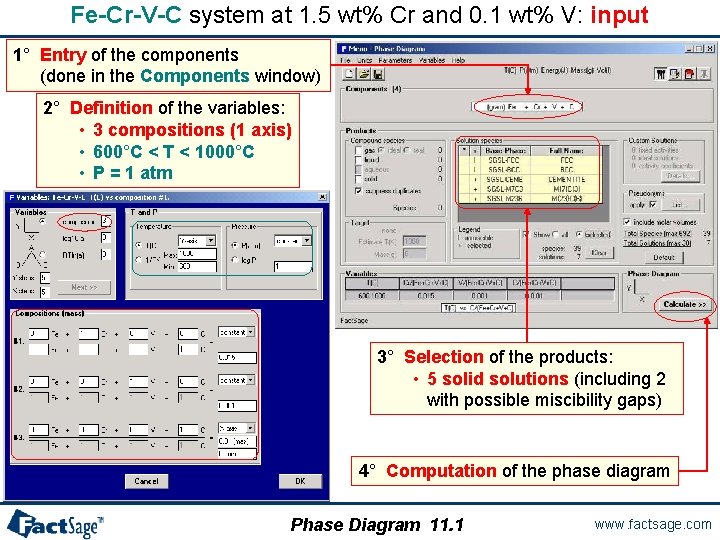
Fe-Cr-V-C system at 1. 5 wt% Cr and 0. 1 wt% V: input 1° Entry of the components (done in the Components window) 2° Definition of the variables: • 3 compositions (1 axis) • 600°C < T < 1000°C • P = 1 atm 3° Selection of the products: • 5 solid solutions (including 2 with possible miscibility gaps) 4° Computation of the phase diagram Phase Diagram 11. 1 www. factsage. com
Fe-Cr-V-C system: graphical output With the phase equilibrium mode enabled, just click at any point on the diagram to calculate the equilibrium at that point. Phase Diagram 11. 2 www. factsage. com
Fe-Cr-V-C system: phase equilibrium mode output Output can be obtained in FACT or Chem. Sage format. See Equilib Slide Show. Example is for FACT format. Proportions and compositions of the FCC phase (Remember the miscibility gap). NOTE: One of the FCC phases is metallic (FCC#1), the other is the Me. C(1 -x) carbide. Proportion and composition of the BCC phase. Phase Diagram 11. 3 www. factsage. com
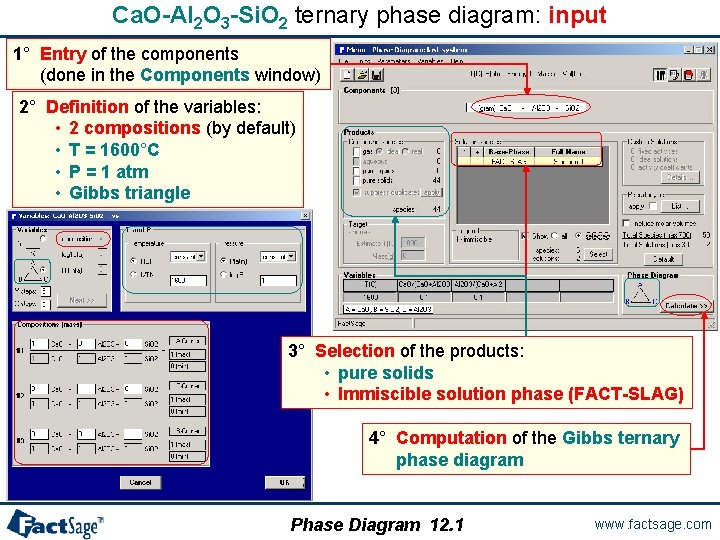
Ca. O-Al 2 O 3 -Si. O 2 ternary phase diagram: input 1° Entry of the components (done in the Components window) 2° Definition of the variables: • 2 compositions (by default) • T = 1600°C • P = 1 atm • Gibbs triangle 3° Selection of the products: • pure solids • Immiscible solution phase (FACT-SLAG) 4° Computation of the Gibbs ternary phase diagram Phase Diagram 12. 1 www. factsage. com
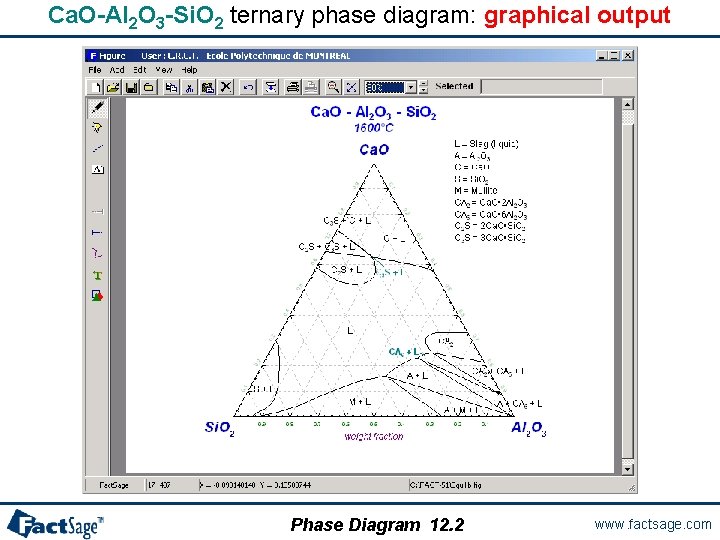
Ca. O-Al 2 O 3 -Si. O 2 ternary phase diagram: graphical output Phase Diagram 12. 2 www. factsage. com
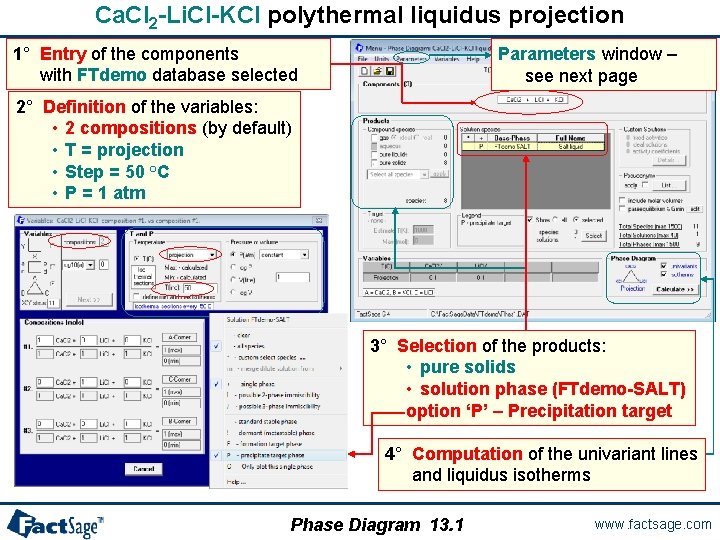
Ca. Cl 2 -Li. Cl-KCl polythermal liquidus projection 1° Entry of the components with FTdemo database selected Parameters window – see next page 2° Definition of the variables: • 2 compositions (by default) • T = projection • Step = 50 °C • P = 1 atm 3° Selection of the products: • pure solids • solution phase (FTdemo-SALT) option ‘P’ – Precipitation target 4° Computation of the univariant lines and liquidus isotherms Phase Diagram 13. 1 www. factsage. com
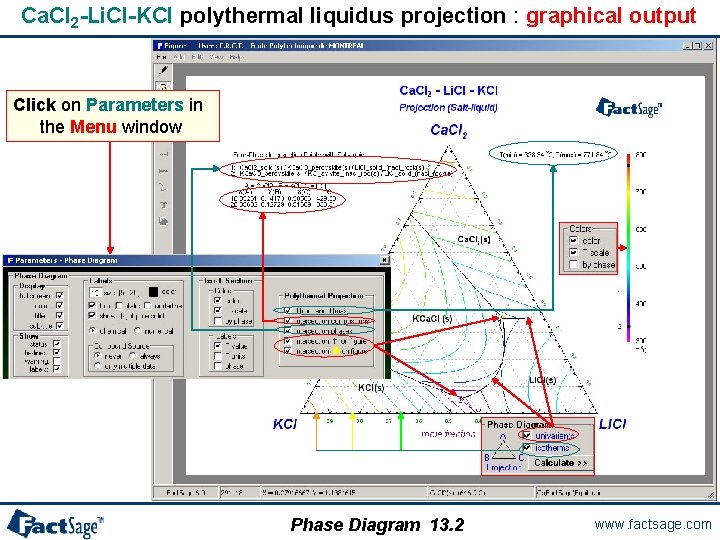
Ca. Cl 2 -Li. Cl-KCl polythermal liquidus projection : graphical output Click on Parameters in the Menu window Phase Diagram 13. 2 www. factsage. com
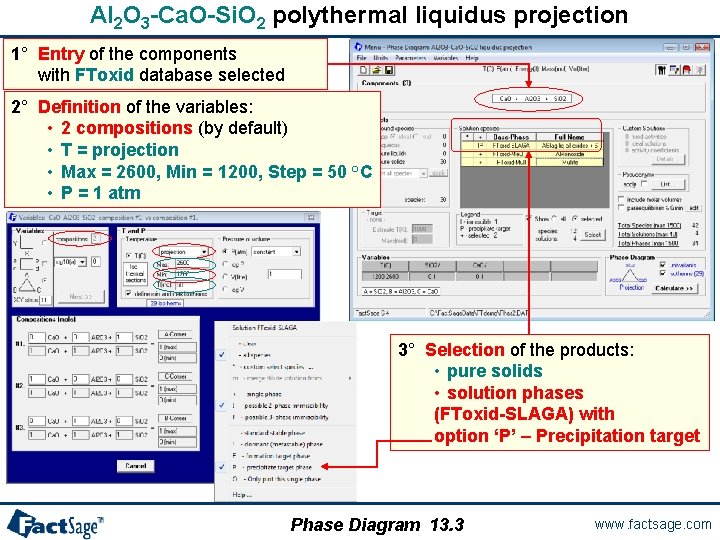
Al 2 O 3 -Ca. O-Si. O 2 polythermal liquidus projection 1° Entry of the components with FToxid database selected 2° Definition of the variables: • 2 compositions (by default) • T = projection • Max = 2600, Min = 1200, Step = 50 °C • P = 1 atm 3° Selection of the products: • pure solids • solution phases (FToxid-SLAGA) with option ‘P’ – Precipitation target Phase Diagram 13. 3 www. factsage. com
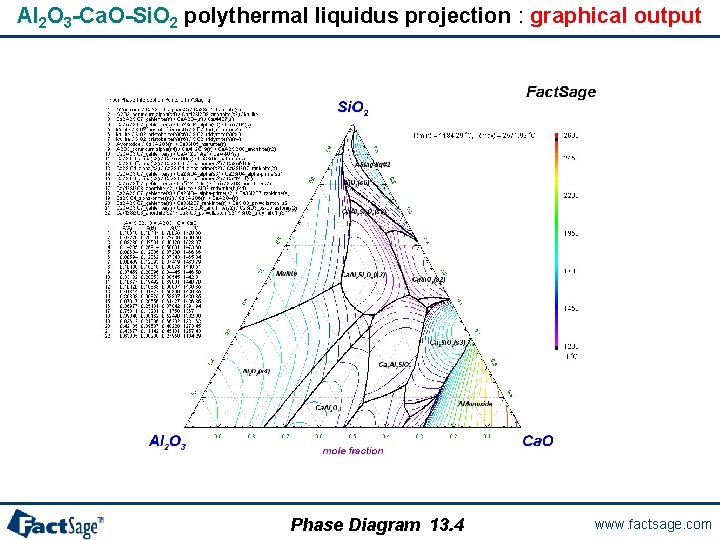
Al 2 O 3 -Ca. O-Si. O 2 polythermal liquidus projection : graphical output Phase Diagram 13. 4 www. factsage. com
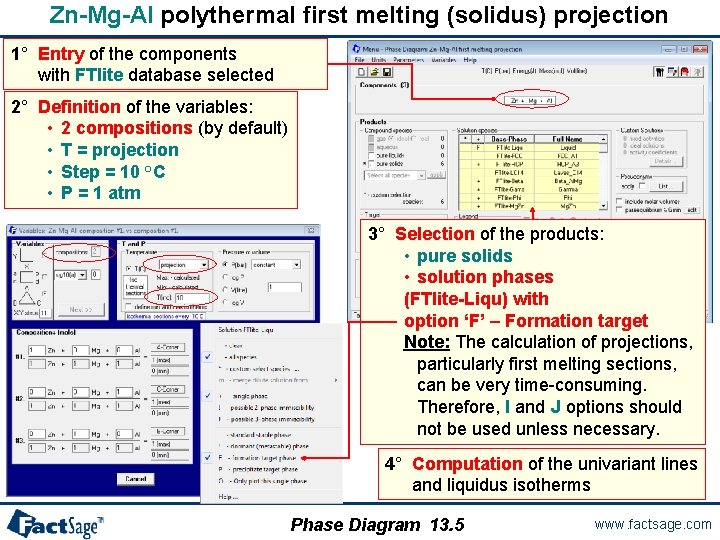
Zn-Mg-Al polythermal first melting (solidus) projection 1° Entry of the components with FTlite database selected 2° Definition of the variables: • 2 compositions (by default) • T = projection • Step = 10 °C • P = 1 atm 3° Selection of the products: • pure solids • solution phases (FTlite-Liqu) with option ‘F’ – Formation target Note: The calculation of projections, particularly first melting sections, can be very time-consuming. Therefore, I and J options should not be used unless necessary. 4° Computation of the univariant lines and liquidus isotherms Phase Diagram 13. 5 www. factsage. com
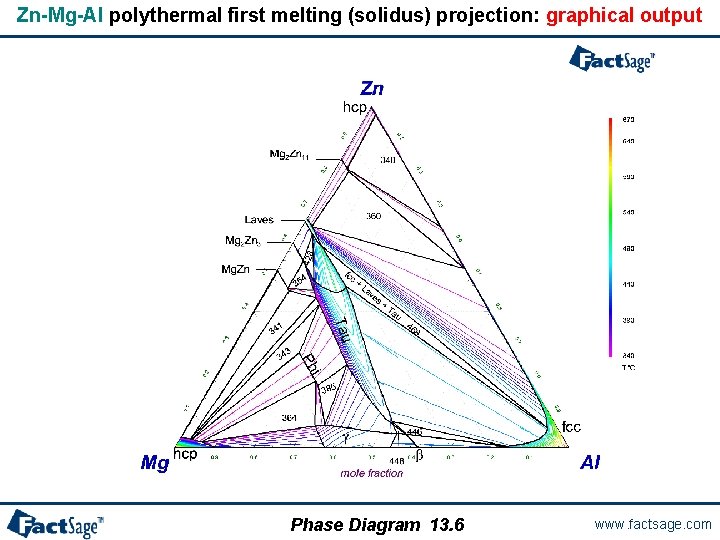
Zn-Mg-Al polythermal first melting (solidus) projection: graphical output Phase Diagram 13. 6 www. factsage. com
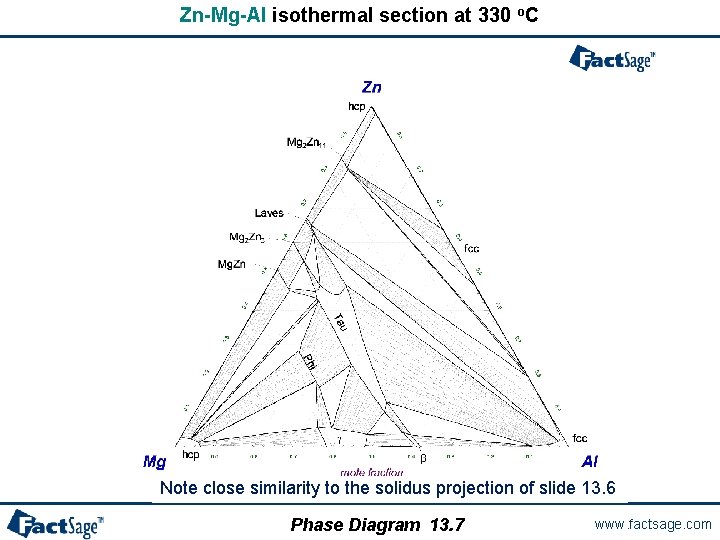
Zn-Mg-Al isothermal section at 330 o. C Note close similarity to the solidus projection of slide 13. 6 Phase Diagram 13. 7 www. factsage. com
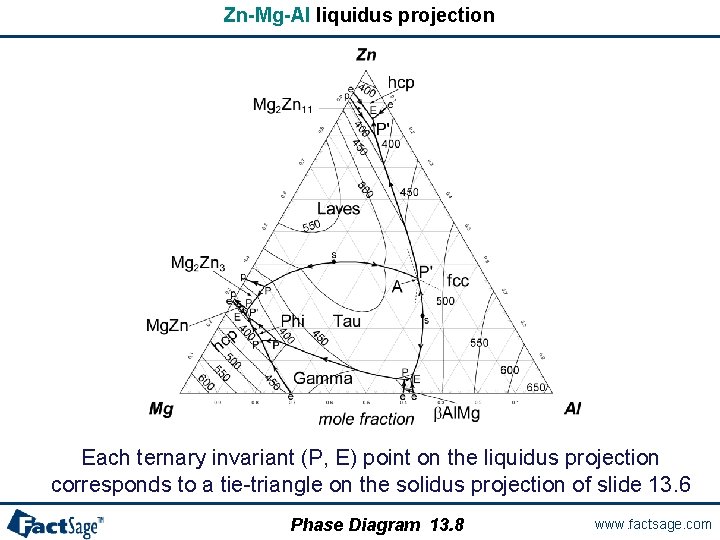
Zn-Mg-Al liquidus projection Each ternary invariant (P, E) point on the liquidus projection corresponds to a tie-triangle on the solidus projection of slide 13. 6 Phase Diagram 13. 8 www. factsage. com
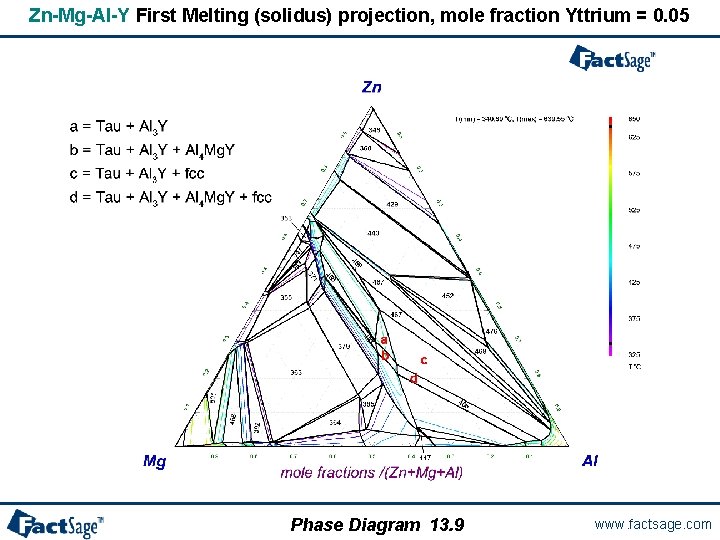
Zn-Mg-Al-Y First Melting (solidus) projection, mole fraction Yttrium = 0. 05 Phase Diagram 13. 9 www. factsage. com
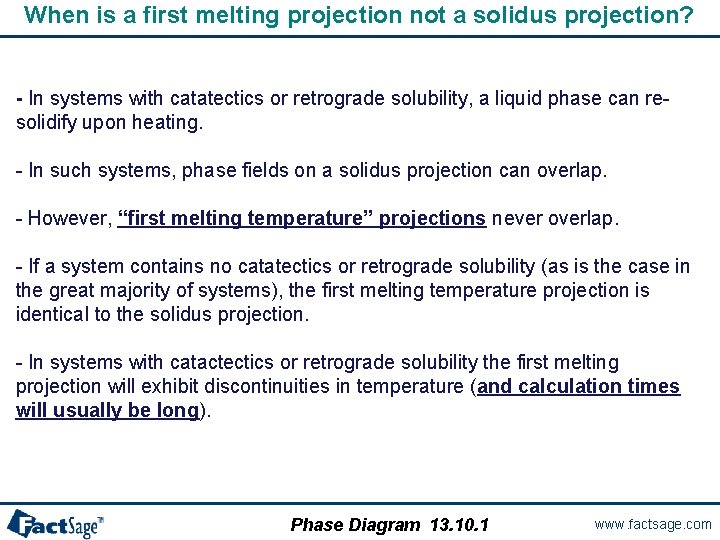
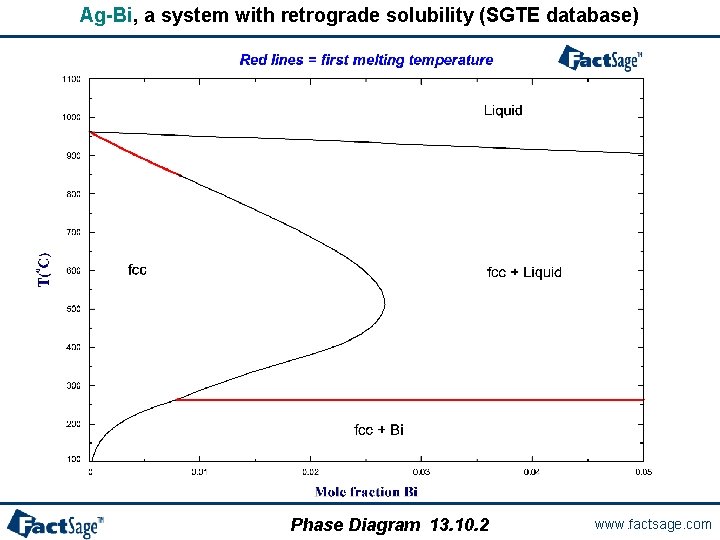
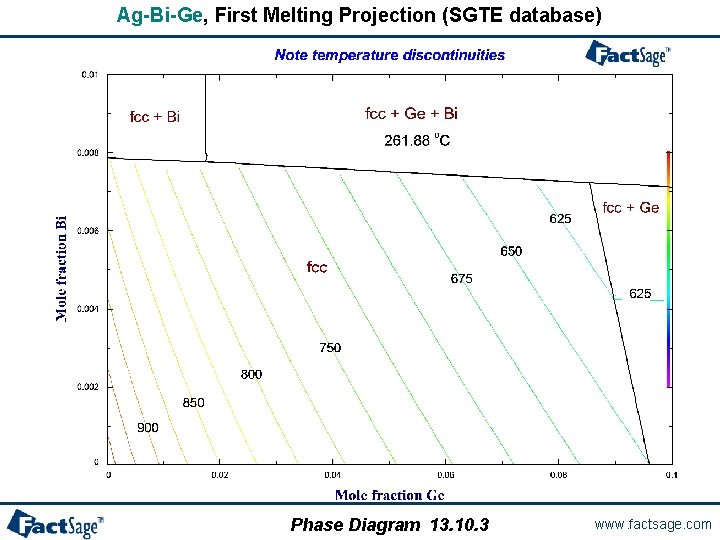
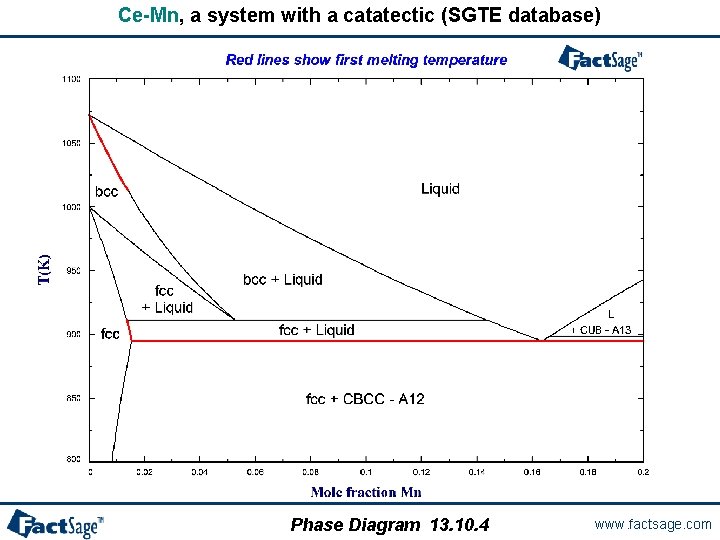
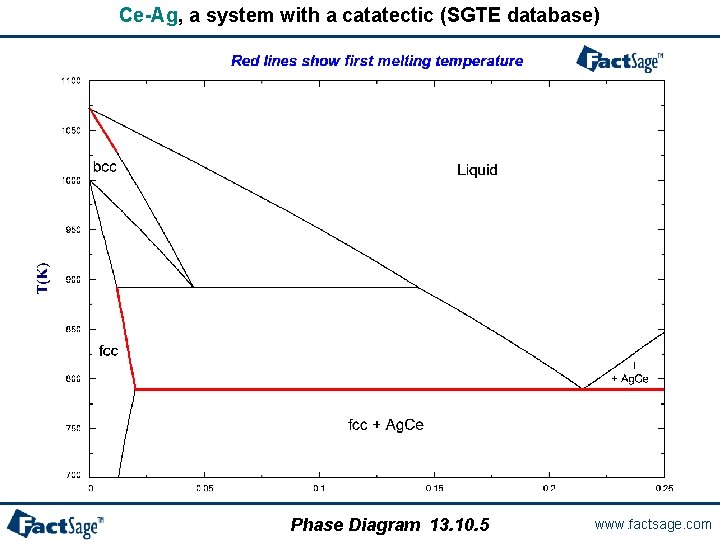
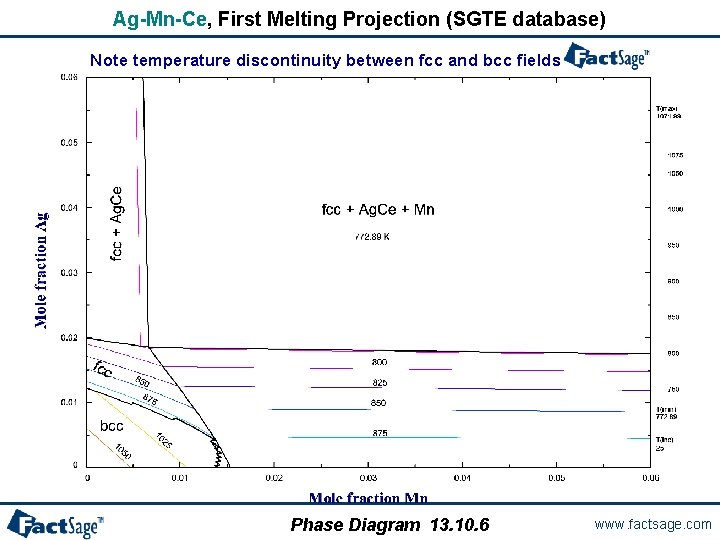
When is a first melting projection not a solidus projection? - In systems with catatectics or retrograde solubility, a liquid phase can resolidify upon heating. - In such systems, phase fields on a solidus projection can overlap. - However, “first melting temperature” projections never overlap. - If a system contains no catatectics or retrograde solubility (as is the case in the great majority of systems), the first melting temperature projection is identical to the solidus projection. - In systems with catactectics or retrograde solubility the first melting projection will exhibit discontinuities in temperature (and calculation times will usually be long). Phase Diagram 13. 10. 1 www. factsage. com
Ag-Bi, a system with retrograde solubility (SGTE database) Phase Diagram 13. 10. 2 www. factsage. com
Ag-Bi-Ge, First Melting Projection (SGTE database) Phase Diagram 13. 10. 3 www. factsage. com
Ce-Mn, a system with a catatectic (SGTE database) Phase Diagram 13. 10. 4 www. factsage. com
Ce-Ag, a system with a catatectic (SGTE database) Phase Diagram 13. 10. 5 www. factsage. com
Ag-Mn-Ce, First Melting Projection (SGTE database) Note temperature discontinuity between fcc and bcc fields Phase Diagram 13. 10. 6 www. factsage. com
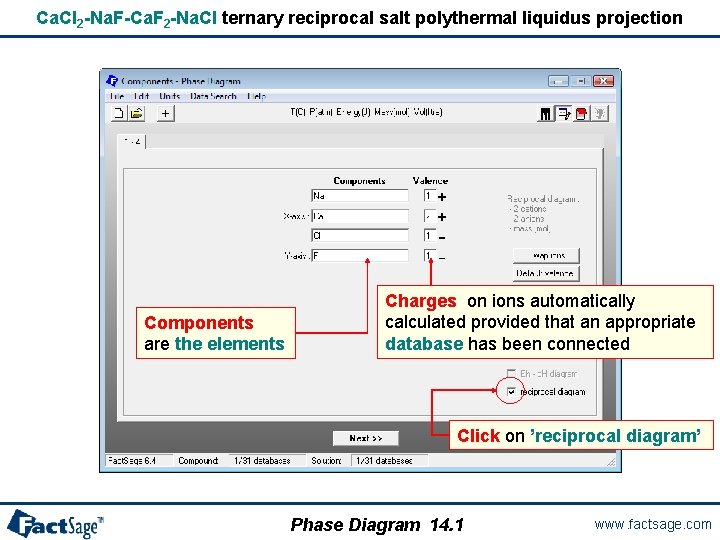
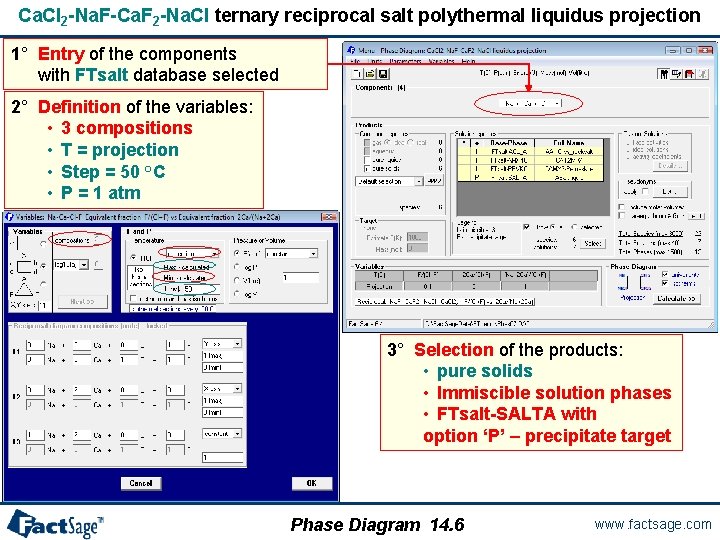
Ca. Cl 2 -Na. F-Ca. F 2 -Na. Cl ternary reciprocal salt polythermal liquidus projection Components are the elements Charges on ions automatically calculated provided that an appropriate database has been connected Click on ’reciprocal diagram’ Phase Diagram 14. 1 www. factsage. com
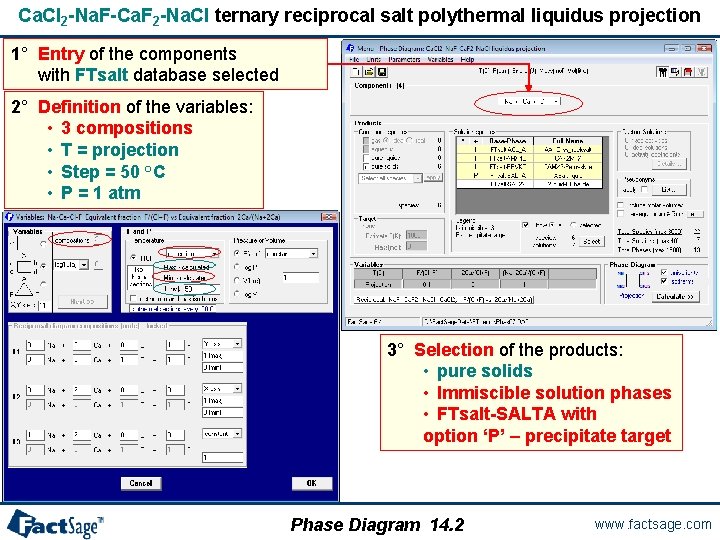
Ca. Cl 2 -Na. F-Ca. F 2 -Na. Cl ternary reciprocal salt polythermal liquidus projection 1° Entry of the components with FTsalt database selected 2° Definition of the variables: • 3 compositions • T = projection • Step = 50 °C • P = 1 atm 3° Selection of the products: • pure solids • Immiscible solution phases • FTsalt-SALTA with option ‘P’ – precipitate target Phase Diagram 14. 2 www. factsage. com
Ca. Cl 2 -Na. F-Ca. F 2 -Na. Cl ternary reciprocal salt polythermal liquidus projection Phase Diagram 14. 3 www. factsage. com
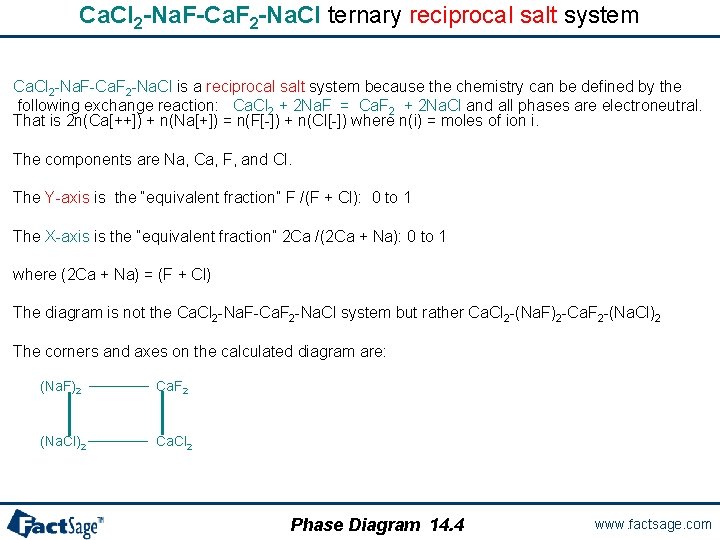
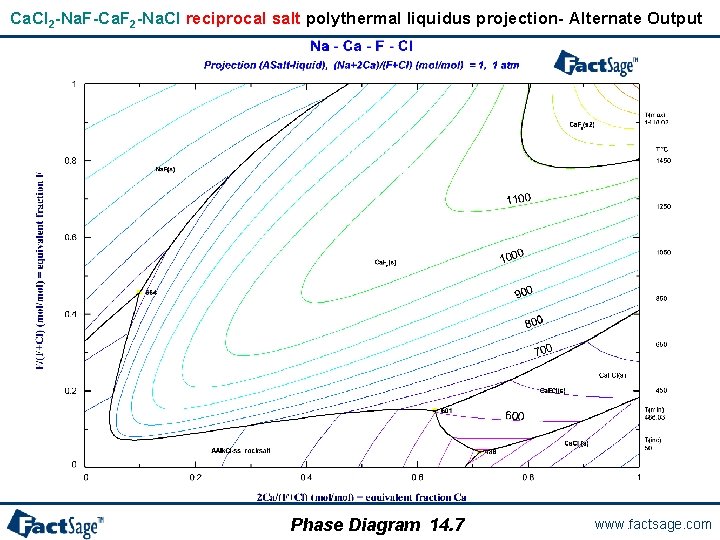
Ca. Cl 2 -Na. F-Ca. F 2 -Na. Cl ternary reciprocal salt system Ca. Cl 2 -Na. F-Ca. F 2 -Na. Cl is a reciprocal salt system because the chemistry can be defined by the following exchange reaction: Ca. Cl 2 + 2 Na. F = Ca. F 2 + 2 Na. Cl and all phases are electroneutral. That is 2 n(Ca[++]) + n(Na[+]) = n(F[-]) + n(Cl[-]) where n(i) = moles of ion i. The components are Na, Ca, F, and Cl. The Y-axis is the “equivalent fraction” F /(F + Cl): 0 to 1 The X-axis is the “equivalent fraction” 2 Ca /(2 Ca + Na): 0 to 1 where (2 Ca + Na) = (F + Cl) The diagram is not the Ca. Cl 2 -Na. F-Ca. F 2 -Na. Cl system but rather Ca. Cl 2 -(Na. F)2 -Ca. F 2 -(Na. Cl)2 The corners and axes on the calculated diagram are: (Na. F)2 ────── Ca. F 2 (Na. Cl)2 ────── Ca. Cl 2 Phase Diagram 14. 4 www. factsage. com
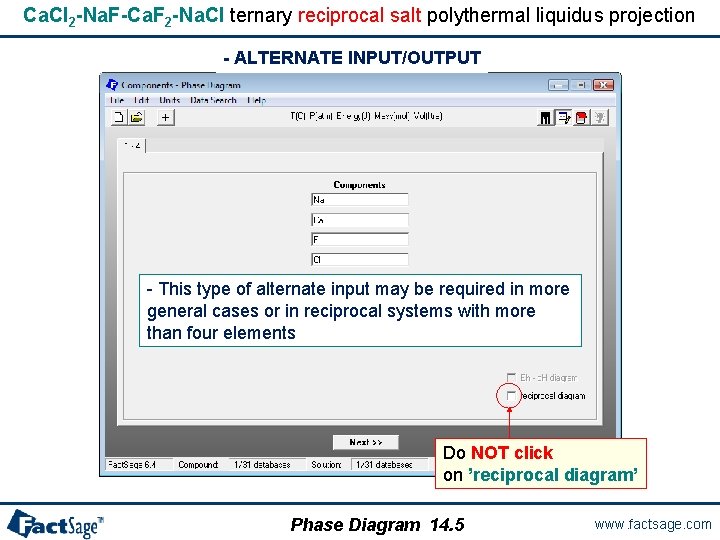
Ca. Cl 2 -Na. F-Ca. F 2 -Na. Cl ternary reciprocal salt polythermal liquidus projection - ALTERNATE INPUT/OUTPUT - This type of alternate input may be required in more general cases or in reciprocal systems with more than four elements Do NOT click on ’reciprocal diagram’ Phase Diagram 14. 5 www. factsage. com
Ca. Cl 2 -Na. F-Ca. F 2 -Na. Cl ternary reciprocal salt polythermal liquidus projection 1° Entry of the components with FTsalt database selected 2° Definition of the variables: • 3 compositions • T = projection • Step = 50 °C • P = 1 atm 3° Selection of the products: • pure solids • Immiscible solution phases • FTsalt-SALTA with option ‘P’ – precipitate target Phase Diagram 14. 6 www. factsage. com
Ca. Cl 2 -Na. F-Ca. F 2 -Na. Cl reciprocal salt polythermal liquidus projection- Alternate Output Phase Diagram 14. 7 www. factsage. com
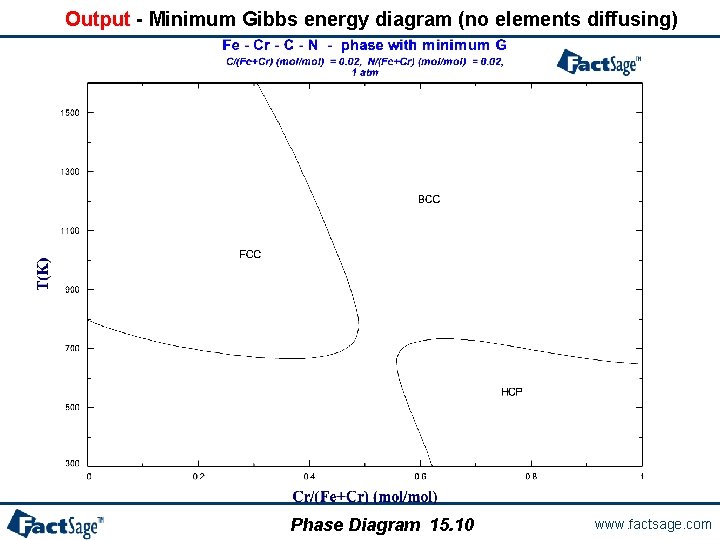
Paraequilibrium and minimum Gibbs energy calculations - In certain solid systems, some elements diffuse much faster than others. Hence, if an initially homogeneous single-phase system at high temperature is quenched rapidly and then held at a lower temperature, a temporary paraequilibrium state may result in which the rapidly diffusing elements have reached equilibrium, but the more slowly diffusing elements have remained essentially immobile. - The best known, and most industrially important, example occurs when homogeneous austenite is quenched annealed. Interstitial elements such as C and N are much more mobile than the metallic elements. - At paraequilibrium, the ratios of the slowly diffusing elements in all phases are the same and are equal to their ratios in the initial single-phase alloy. The algorithm used to calculate paraequilibrium in Fact. Sage is based upon this fact. That is, the algorithm minimizes the Gibbs energy of the system under this constraint. - If a paraequilibrium calculation is performed specifying that no elements diffuse quickly, then the ratios of all elements are the same as in the initial homogeneous state. In other words, such a calculation will simply yield the single homogeneous phase with the minimum Gibbs energy at the temperature of the calculation. Such a calculation may be of practical interest in physical vapour deposition where deposition from the vapour phase is so rapid that phase separation cannot occur, resulting in a single-phase solid deposit. - Paraequilibrium and minimum Gibbs energy conditions may also be calculated with the Equilib Module. See the Advanced Equilib slide show. Phase Diagram 15. 1 www. factsage. com
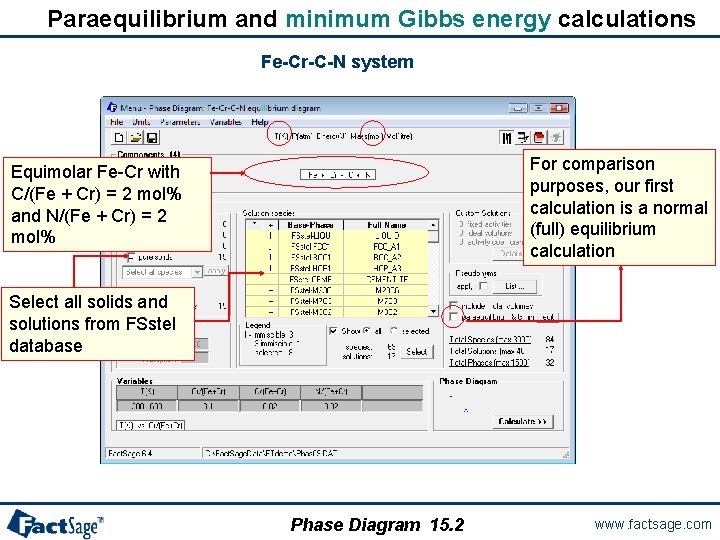
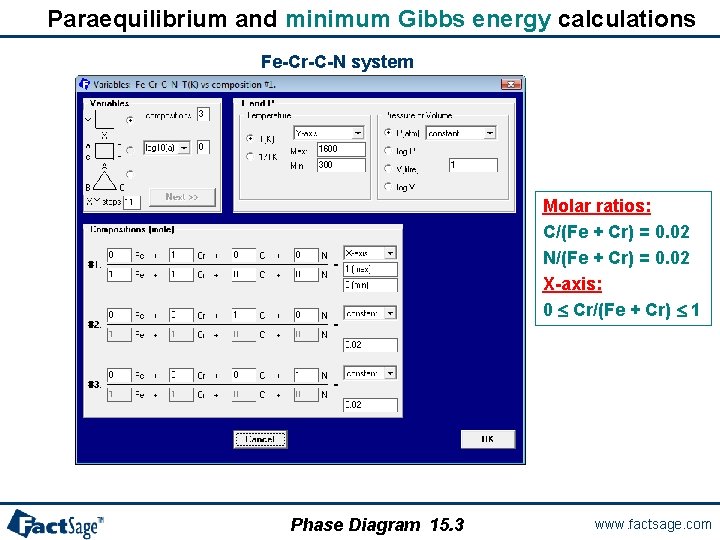
Paraequilibrium and minimum Gibbs energy calculations Fe-Cr-C-N system For comparison purposes, our first calculation is a normal (full) equilibrium calculation Equimolar Fe-Cr with C/(Fe + Cr) = 2 mol% and N/(Fe + Cr) = 2 mol% Select all solids and solutions from FSstel database Phase Diagram 15. 2 www. factsage. com
Paraequilibrium and minimum Gibbs energy calculations Fe-Cr-C-N system Molar ratios: C/(Fe + Cr) = 0. 02 N/(Fe + Cr) = 0. 02 X-axis: 0 Cr/(Fe + Cr) 1 Phase Diagram 15. 3 www. factsage. com
Output - Equilibrium phase diagram Phase Diagram 15. 4 www. factsage. com
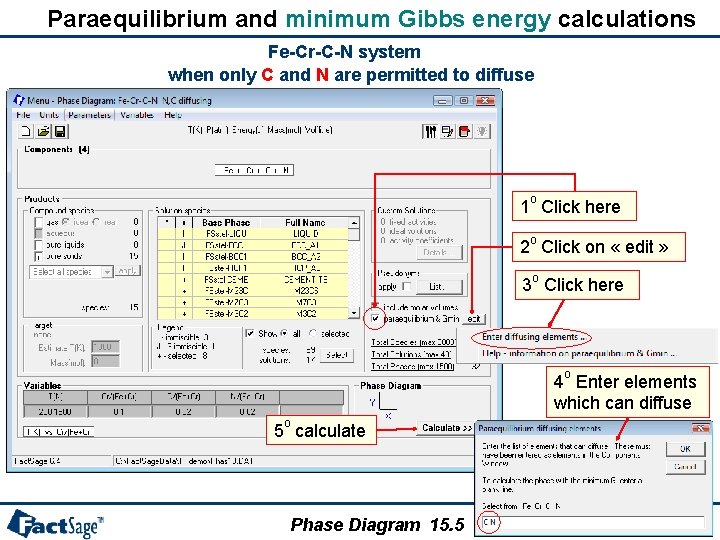
Paraequilibrium and minimum Gibbs energy calculations Fe-Cr-C-N system when only C and N are permitted to diffuse o 1 Click here o 2 Click on « edit » o 3 Click here o 4 Enter elements which can diffuse o 5 calculate Phase Diagram 15. 5 www. factsage. com
Output - Paraequilibrium phase diagram with only C and N diffusing Phase Diagram 15. 6 www. factsage. com
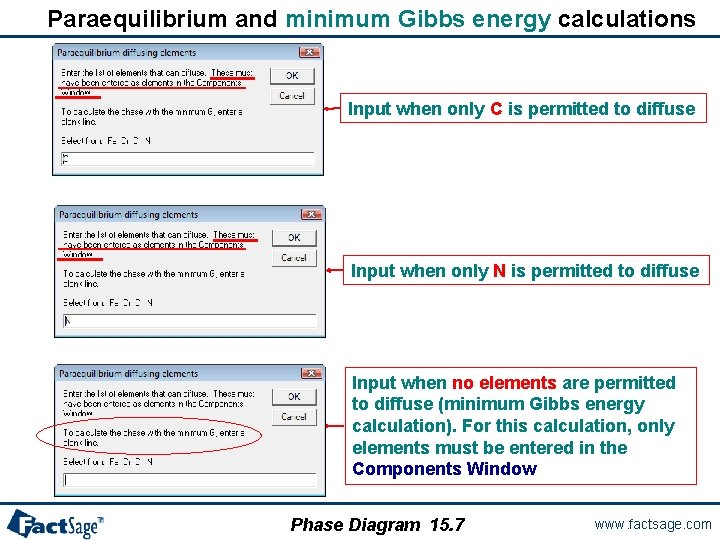
Paraequilibrium and minimum Gibbs energy calculations Input when only C is permitted to diffuse Input when only N is permitted to diffuse Input when no elements are permitted to diffuse (minimum Gibbs energy calculation). For this calculation, only elements must be entered in the Components Window Phase Diagram 15. 7 www. factsage. com
Output - Paraequilibrium phase diagram with only C diffusing Phase Diagram 15. 8 www. factsage. com
Output - Paraequilibrium phase diagram with only N diffusing Phase Diagram 15. 9 www. factsage. com
Output - Minimum Gibbs energy diagram (no elements diffusing) Phase Diagram 15. 10 www. factsage. com
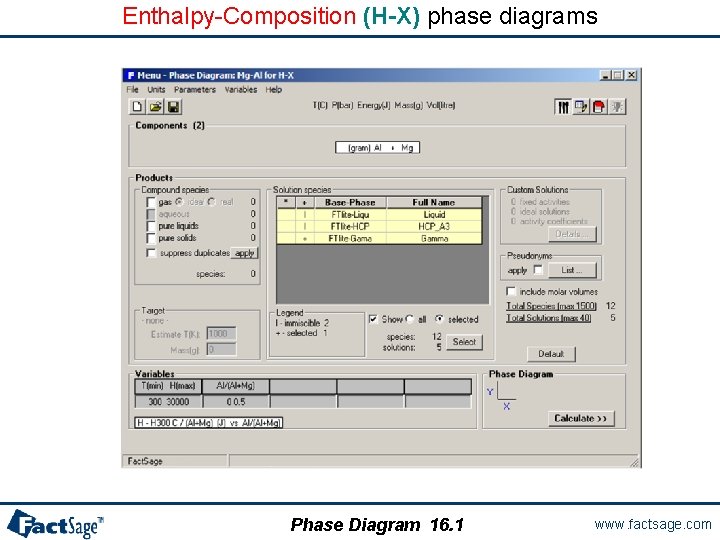
Enthalpy-Composition (H-X) phase diagrams Phase Diagram 16. 1 www. factsage. com
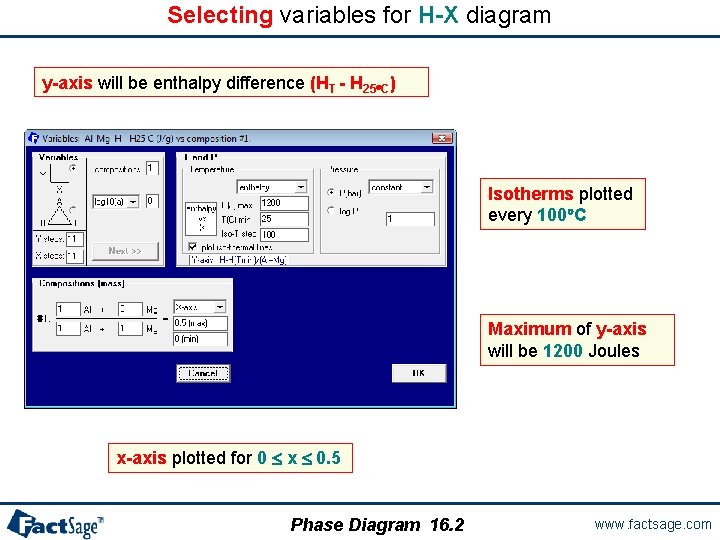
Selecting variables for H-X diagram y-axis will be enthalpy difference (HT - H 25 C) Isotherms plotted every 100 C Maximum of y-axis will be 1200 Joules x-axis plotted for 0 x 0. 5 Phase Diagram 16. 2 www. factsage. com
Calculated H-X diagram for Mg-Al system Phase Diagram 16. 3 www. factsage. com
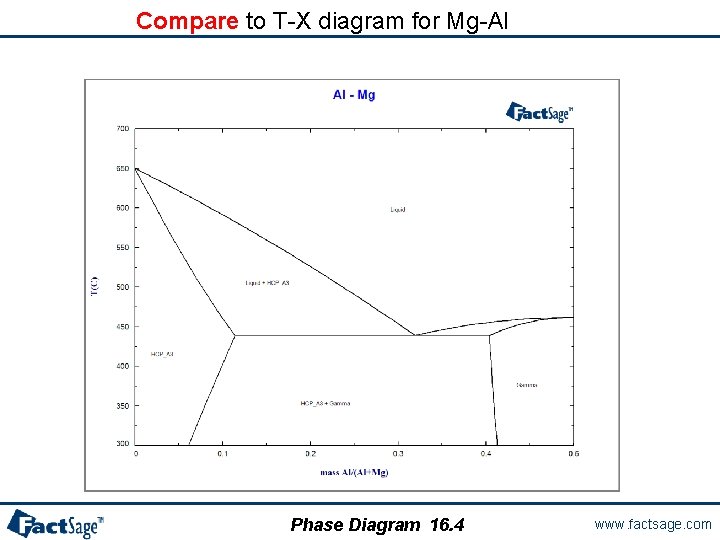
Compare to T-X diagram for Mg-Al Phase Diagram 16. 4 www. factsage. com
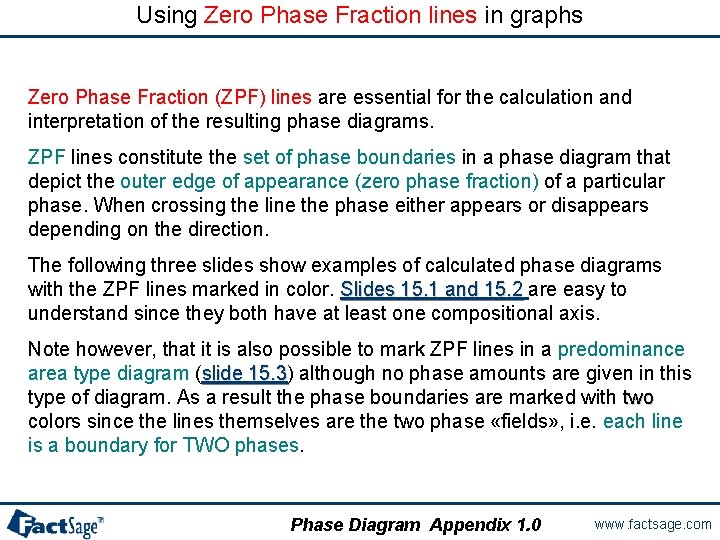
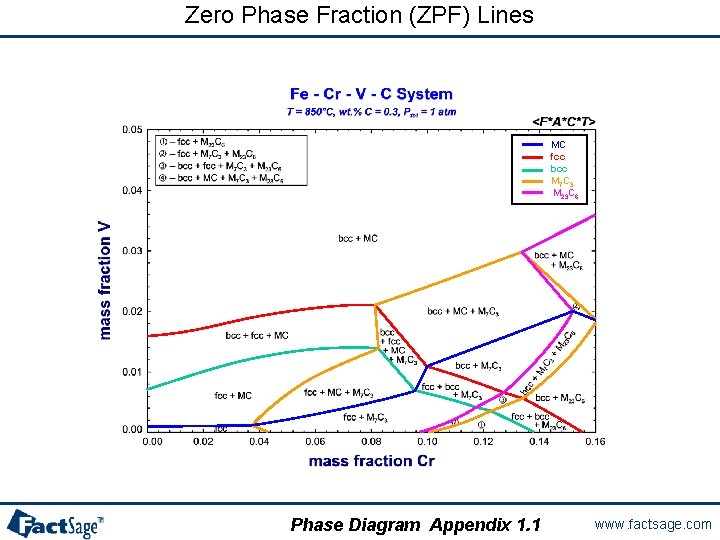
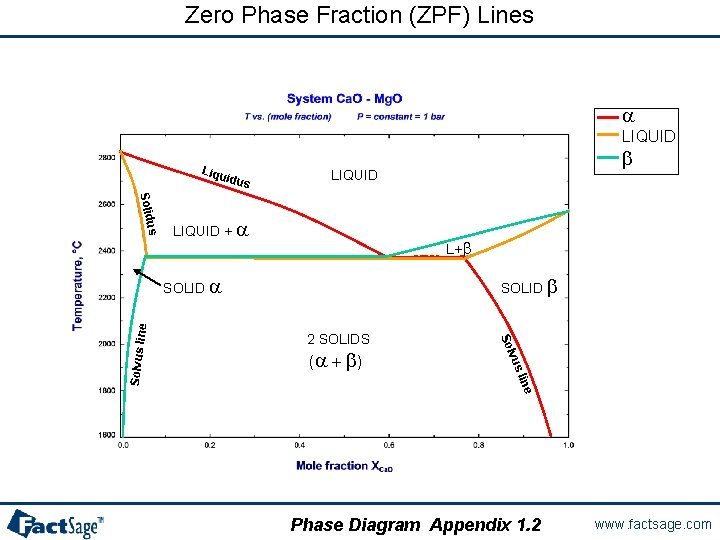
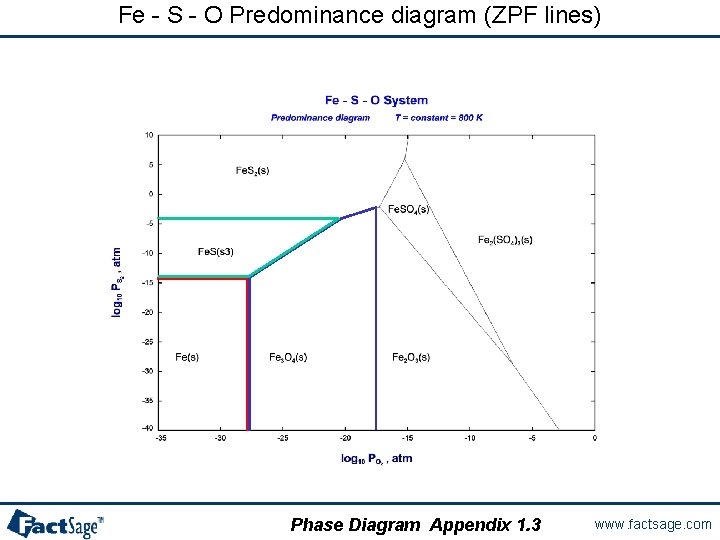
Using Zero Phase Fraction lines in graphs Zero Phase Fraction (ZPF) lines are essential for the calculation and interpretation of the resulting phase diagrams. ZPF lines constitute the set of phase boundaries in a phase diagram that depict the outer edge of appearance (zero phase fraction) of a particular phase. When crossing the line the phase either appears or disappears depending on the direction. The following three slides show examples of calculated phase diagrams with the ZPF lines marked in color. Slides 15. 1 and 15. 2 are easy to Slides 15. 1 and 15. 2 understand since they both have at least one compositional axis. Note however, that it is also possible to mark ZPF lines in a predominance area type diagram (slide 15. 3) although no phase amounts are given in this slide 15. 3 type of diagram. As a result the phase boundaries are marked with two colors since the lines themselves are the two phase «fields» , i. e. each line is a boundary for TWO phases. Phase Diagram Appendix 1. 0 www. factsage. com
Zero Phase Fraction (ZPF) Lines MC fcc bcc M 7 C 3 M 23 C 6 Phase Diagram Appendix 1. 1 www. factsage. com
Zero Phase Fraction (ZPF) Lines a LIQUID Liqu idus b LIQUID us Solid LIQUID + a L+b SOLID b 2 SOLIDS e lin vus (a + b ) Solvus lin e SOLID a Phase Diagram Appendix 1. 2 www. factsage. com
Fe - S - O Predominance diagram (ZPF lines) Phase Diagram Appendix 1. 3 www. factsage. com
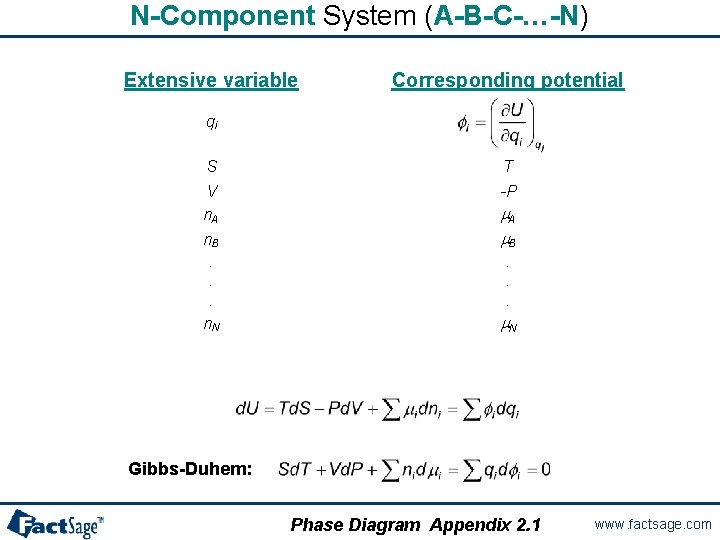
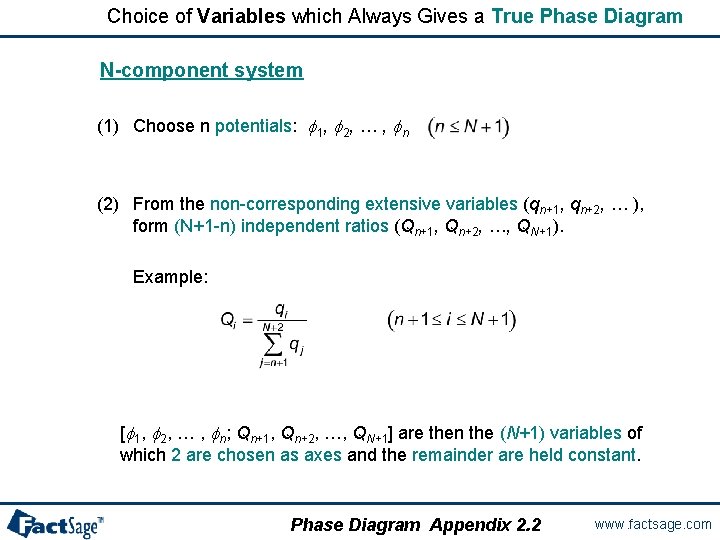
Generalized rules for phase diagrams The following two slides show the rules for the choice of axes variables such that proper phase diagrams result from the calculation. The basic relationship for these rules is given by the Gibbs-Duhem equation which interrelates a set of potential variables with their respective conjugate extensive variables. Only one variable from each pair may be used in the definition of the axes variables. If extensive properties are to be used ratios of these need to be employed in the definition of the axes variables. Phase Diagram Appendix 2. 0 www. factsage. com
N-Component System (A-B-C-…-N) Extensive variable Corresponding potential qi S V n. A n. B. . . n. N T -P m. A m. B. . . m. N Gibbs-Duhem: Phase Diagram Appendix 2. 1 www. factsage. com
Choice of Variables which Always Gives a True Phase Diagram N-component system (1) Choose n potentials: f 1, f 2, … , fn (2) From the non-corresponding extensive variables (qn+1, qn+2, … ), form (N+1 -n) independent ratios (Qn+1, Qn+2, …, QN+1). Example: [f 1, f 2, … , fn; Qn+1, Qn+2, …, QN+1] are then the (N+1) variables of which 2 are chosen as axes and the remainder are held constant. Phase Diagram Appendix 2. 2 www. factsage. com
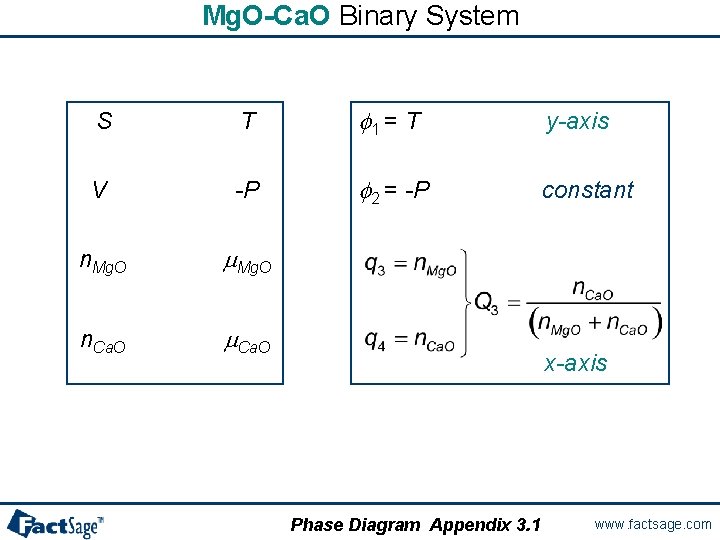
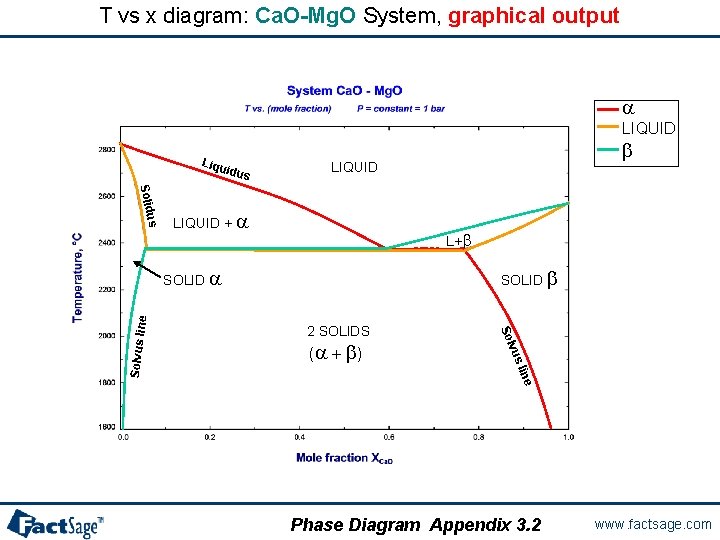
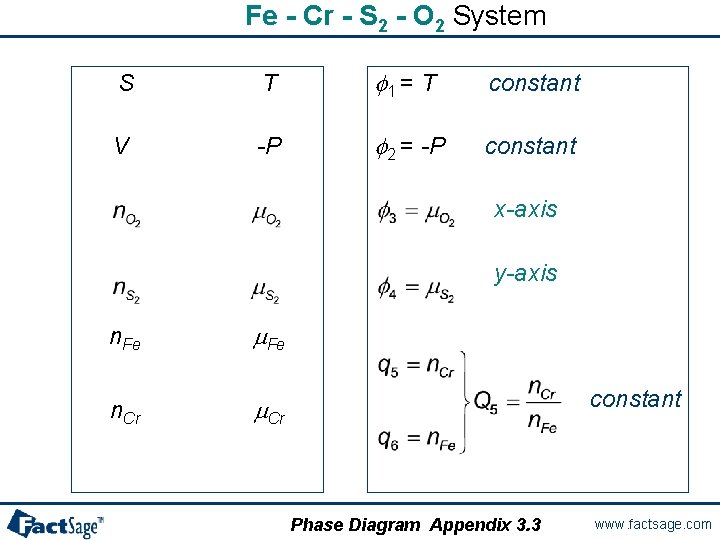
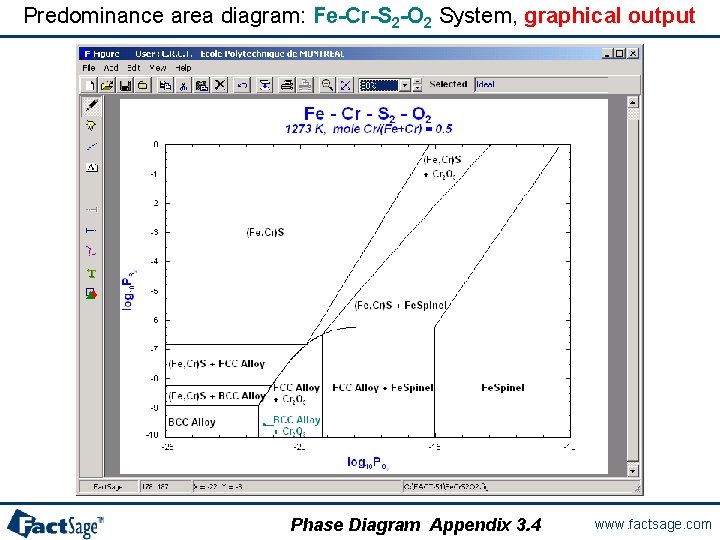
Using the rules for classical cases The following four slides show the rules outlined above are employed for the selection of proper axes in the case of the T vs x diagram of the system Ca. O-Mg. O and the log P(S 2) vs log P(O 2) diagram for the system Fe-Cr-S 2 -O 2. The calculated phase diagrams are also shown. Phase Diagram Appendix 3. 0 www. factsage. com
Mg. O-Ca. O Binary System S T f 1 = T y-axis V -P f 2 = -P constant n. Mg. O m. Mg. O n. Ca. O m. Ca. O x-axis Phase Diagram Appendix 3. 1 www. factsage. com
T vs x diagram: Ca. O-Mg. O System, graphical output a LIQUID Liqu idus b LIQUID us Solid LIQUID + a L+b SOLID b 2 SOLIDS e lin vus (a + b ) Solvus lin e SOLID a Phase Diagram Appendix 3. 2 www. factsage. com
Fe - Cr - S 2 - O 2 System S T f 1 = T constant V -P f 2 = -P constant x-axis y-axis n. Fe m. Fe n. Cr m. Cr constant Phase Diagram Appendix 3. 3 www. factsage. com
Predominance area diagram: Fe-Cr-S 2 -O 2 System, graphical output Phase Diagram Appendix 3. 4 www. factsage. com
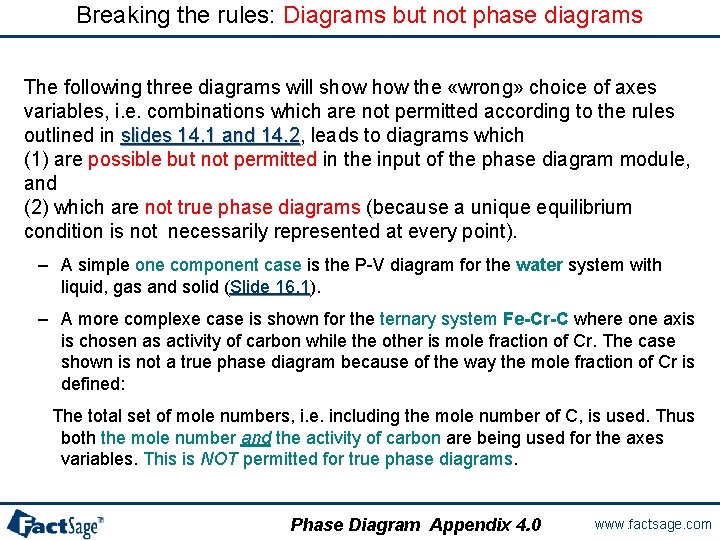
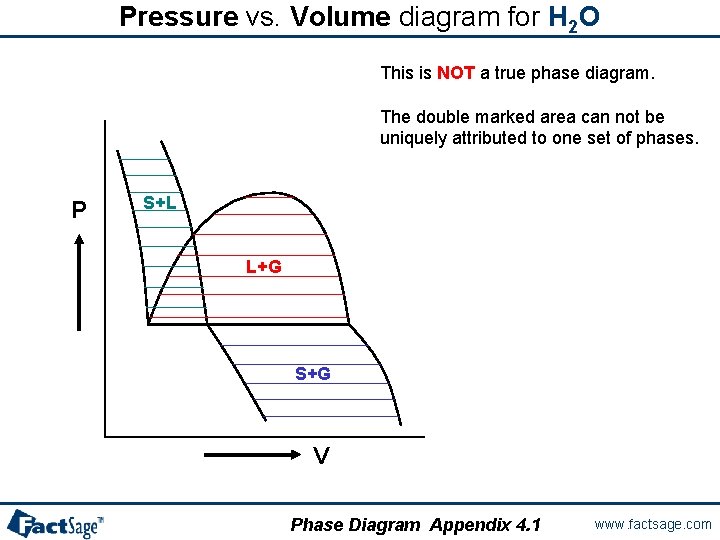
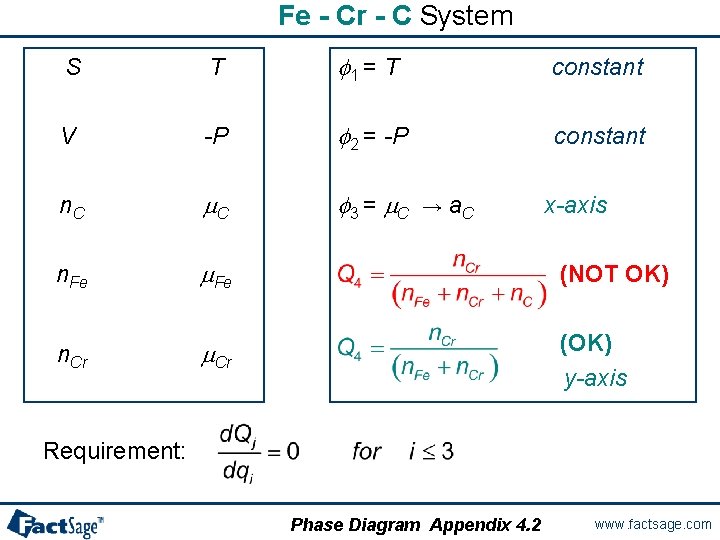
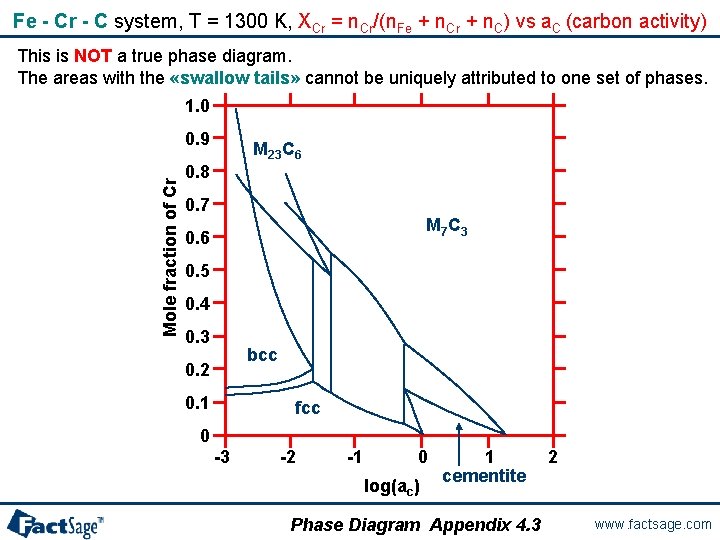
Breaking the rules: Diagrams but not phase diagrams The following three diagrams will show the «wrong» choice of axes variables, i. e. combinations which are not permitted according to the rules outlined in slides 14. 1 and 14. 2, leads to diagrams which slides 14. 1 and 14. 2 (1) are possible but not permitted in the input of the phase diagram module, and (2) which are not true phase diagrams (because a unique equilibrium condition is not necessarily represented at every point). – A simple one component case is the P-V diagram for the water system with liquid, gas and solid (Slide 16. 1). Slide 16. 1 – A more complexe case is shown for the ternary system Fe-Cr-C where one axis is chosen as activity of carbon while the other is mole fraction of Cr. The case shown is not a true phase diagram because of the way the mole fraction of Cr is defined: The total set of mole numbers, i. e. including the mole number of C, is used. Thus both the mole number and the activity of carbon are being used for the axes variables. This is NOT permitted for true phase diagrams. Phase Diagram Appendix 4. 0 www. factsage. com
Pressure vs. Volume diagram for H 2 O This is NOT a true phase diagram. The double marked area can not be uniquely attributed to one set of phases. P S+L L+G S+G V Phase Diagram Appendix 4. 1 www. factsage. com
Fe - Cr - C System S T f 1 = T constant V -P f 2 = -P constant n. C m. C f 3 = m. C n. Fe m. Fe n. Cr m. Cr → a. C x-axis (NOT OK) (OK) y-axis Requirement: Phase Diagram Appendix 4. 2 www. factsage. com
Fe - Cr - C system, T = 1300 K, XCr = n. Cr/(n. Fe + n. Cr + n. C) vs a. C (carbon activity) This is NOT a true phase diagram. The areas with the «swallow tails» cannot be uniquely attributed to one set of phases. 1. 0 Mole fraction of Cr 0. 9 M 23 C 6 0. 8 0. 7 M 7 C 3 0. 6 0. 5 0. 4 0. 3 bcc 0. 2 0. 1 fcc 0 -3 -2 -1 0 log(ac) 1 cementite Phase Diagram Appendix 4. 3 2 www. factsage. com