
The Oscilloscope Advanced Features Automated Measurements see back
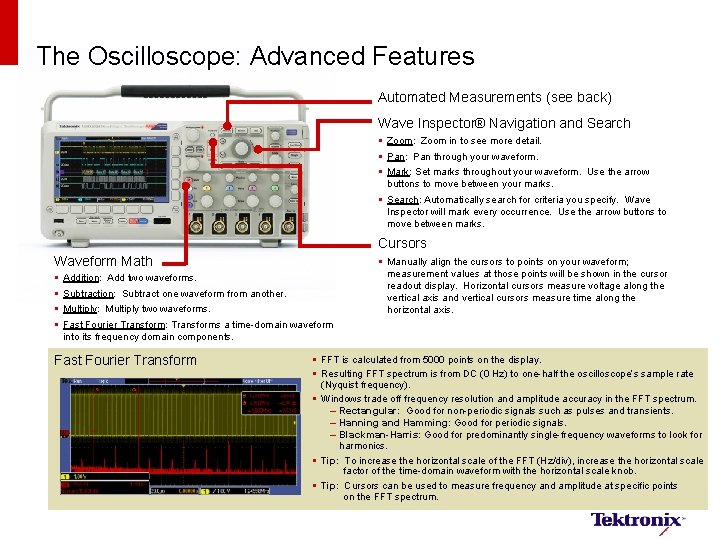
The Oscilloscope: Advanced Features Automated Measurements (see back) Wave Inspector® Navigation and Search § Zoom: Zoom in to see more detail. § Pan: Pan through your waveform. § Mark: Set marks throughout your waveform. Use the arrow buttons to move between your marks. § Search: Automatically search for criteria you specify. Wave Inspector will mark every occurrence. Use the arrow buttons to move between marks. Cursors Waveform Math § § § Manually align the cursors to points on your waveform; measurement values at those points will be shown in the cursor readout display. Horizontal cursors measure voltage along the vertical axis and vertical cursors measure time along the horizontal axis. Addition: Add two waveforms. Subtraction: Subtract one waveform from another. Multiply: Multiply two waveforms. Fast Fourier Transform: Transforms a time-domain waveform into its frequency domain components. Fast Fourier Transform § FFT is calculated from 5000 points on the display. § Resulting FFT spectrum is from DC (0 Hz) to one-half the oscilloscope’s sample rate (Nyquist frequency). § Windows trade off frequency resolution and amplitude accuracy in the FFT spectrum. – Rectangular: Good for non-periodic signals such as pulses and transients. – Hanning and Hamming: Good for periodic signals. – Blackman-Harris: Good for predominantly single-frequency waveforms to look for harmonics. § Tip: To increase the horizontal scale of the FFT (Hz/div), increase the horizontal scale factor of the time-domain waveform with the horizontal scale knob. § Tip: Cursors can be used to measure frequency and amplitude at specific points on the FFT spectrum.
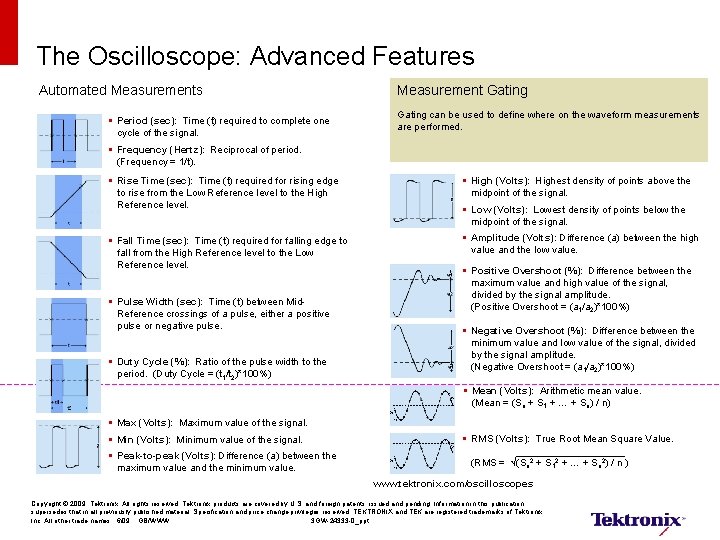
The Oscilloscope: Advanced Features Automated Measurements § Period (sec): Time (t) required to complete one cycle of the signal. Measurement Gating can be used to define where on the waveform measurements are performed. § Frequency (Hertz): Reciprocal of period. (Frequency = 1/t). § Rise Time (sec): Time (t) required for rising edge to rise from the Low Reference level to the High Reference level. § High (Volts): Highest density of points above the midpoint of the signal. § Fall Time (sec): Time (t) required for falling edge to fall from the High Reference level to the Low Reference level. § Amplitude (Volts): Difference (a) between the high value and the low value. § Pulse Width (sec): Time (t) between Mid. Reference crossings of a pulse, either a positive pulse or negative pulse. § Duty Cycle (%): Ratio of the pulse width to the period. (Duty Cycle = (t 1/t 2)*100%) § Low (Volts): Lowest density of points below the midpoint of the signal. § Positive Overshoot (%): Difference between the maximum value and high value of the signal, divided by the signal amplitude. (Positive Overshoot = (a 1/a 2)*100%) § Negative Overshoot (%): Difference between the minimum value and low value of the signal, divided by the signal amplitude. (Negative Overshoot = (a 1/a 2)*100%) § Mean (Volts): Arithmetic mean value. (Mean = (So + S 1 + … + Sn) / n) § Max (Volts): Maximum value of the signal. § Min (Volts): Minimum value of the signal. § Peak-to-peak (Volts): Difference (a) between the maximum value and the minimum value. § RMS (Volts): True Root Mean Square Value. (RMS = √(So 2 + S 12 + … + Sn 2) / n ) www. tektronix. com/oscilloscopes Copyright © 2009, Tektronix. All rights reserved. Tektronix products are covered by U. S. and foreign patents, issued and pending. Information in this publication supersedes that in all previously published material. Specification and price change privileges reserved. TEKTRONIX and TEK are registered trademarks of Tektronix, Inc. All other trade names 6/09 GB/WWW 3 GW-24333 -0_ppt
The Oscilloscope: Basic Features & Functions § Use level 1 text for main slide text in paragraph format. Level 1 text is Arial 20 pt, black, flush left, with bullets. – Use level 2 text for main bullet points – Level 2 text is Arial 18 pt with dashes for bullets – Avoid multiple-line and paragraph-formatted bullets – Level 3 text is Arial 16 pt – Level 4 text is Arial 14 pt – Level 5 text is Arial 14 pt § Use the “Increase Indent” and “Decrease Indent” buttons to change text levels.
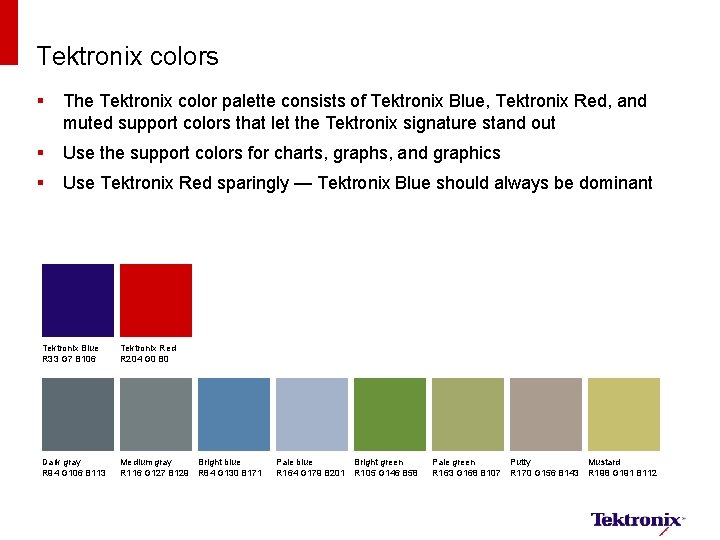
Tektronix colors § The Tektronix color palette consists of Tektronix Blue, Tektronix Red, and muted support colors that let the Tektronix signature stand out § Use the support colors for charts, graphs, and graphics § Use Tektronix Red sparingly — Tektronix Blue should always be dominant Tektronix Blue R 33 G 7 B 106 Tektronix Red R 204 G 0 B 0 Dark gray R 94 G 106 B 113 Medium gray Bright blue R 116 G 127 B 129 R 84 G 130 B 171 Pale blue Bright green R 164 G 179 B 201 R 105 G 146 B 58 Pale green Putty Mustard R 163 G 168 B 107 R 170 G 156 B 143 R 198 G 191 B 112
- Slides: 4