
The ORDER Routine Creating Meaning With Graphic Organizers















- Slides: 61
The ORDER Routine: Creating Meaning With Graphic Organizers The Content Enhancement Series 2006 The University of Kansas Center for Research on Learning Lawrence, Kansas
Understanding the Challenge of Diversity • Increased student diversity results in varying skill levels and types of background knowledge. • Today’s classrooms are very diverse! • Most students have difficulty distinguishing between major concepts, main ideas, and details. • Most students have difficulty distinguishing between essential-to-know information and trivia. 2 University of Kansas Center for Research on Learning 2006
Content Enhancement A way of teaching an academically diverse group of students in which • both group and individual needs are valued and met • students with mild disabilities are enabled to cognitively access the curriculum • the integrity of the content is maintained • critical features of the content are selected and transformed in a manner that promotes student learning • instruction is carried out in partnership with students 3 University of Kansas Center for Research on Learning 2006
Content Enhancement Guidebooks Routines for organizing and leading learning: • The Course Organizer Routine • The Unit Organizer Routine • The Lesson Organizer Routines for teaching concepts: • The Concept Mastery Routine • The Concept Anchoring Routine • The Concept Comparison Routine 4 University of Kansas Center for Research on Learning 2006
Content Enhancement Guidebooks Routines for exploring text, topics, and details • • Clarifying Routine Framing Routine Survey Routine ORDER Routines for increasing performance • • • Teaching Cause and Effect Routine The Question Exploration Routine The Recall Enhancement Routine The Vocabulary LINCing Routine The Quality Assignment Routine 5 University of Kansas Center for Research on Learning 2006
Supporting Research • The ORDER Routine was studied in intermediate and secondary classes (grades 7 -12) characterized by diversity. • In each study, teachers learned the routine easily, and student learning gains were observed by teachers and researchers. 6 University of Kansas Center for Research on Learning 2006
Supporting Research Results were achieved when teachers • received 2 -3 hours of instruction • discussed the routine with colleagues • spent the necessary time to plan and use the routine for more inclusive teaching • taught students how to use the routine • used the routine regularly over time 7 University of Kansas Center for Research on Learning 2006
Learning Strategies Needed by Academically Diverse Students • Surveying readings • Creating visual devices: Pictures Timelines/sequences Graphs/tables/charts • Notetaking • Organizing information • Memorizing information • Clarifying one’s position 8 University of Kansas Center for Research on Learning 2006
Learning Strategies Needed by Academically Diverse Students • • • Resolving issues/problems Creating relationships: Compare/contrast Sequence Cause/effect Patterns Relevance to current lives Relevance to current events Applying information 9 University of Kansas Center for Research on Learning 2006
Mean Points Earned on Four Types of Graphic Organizers by Students without LD 10 University of Kansas Center for Research on Learning 2006
Mean Points Earned on Graphic Organizers by Students with and without LD 11 University of Kansas Center for Research on Learning 2006
What is the ORDER Routine? • A way to help students decide what information from a lecture or reading assignment is important to know. • A way to help students draw a graphic organizer that depicts key pieces of information and their relationships. • A way to help students use information in a graphic organizer. 12 University of Kansas Center for Research on Learning 2006
When Do You Use the Routine? Within the context of regular instruction to help students understand the relationships that exist among critical information that • Is sequential in nature • Compares and contrasts • Describes major elements of an important concept • Presents a problem and possible solutions 13 University of Kansas Center for Research on Learning 2006
Components of the ORDER Routine • The ORDER Device • The Linking Steps • The Cue-Do-Review Sequence 14 University of Kansas Center for Research on Learning 2006
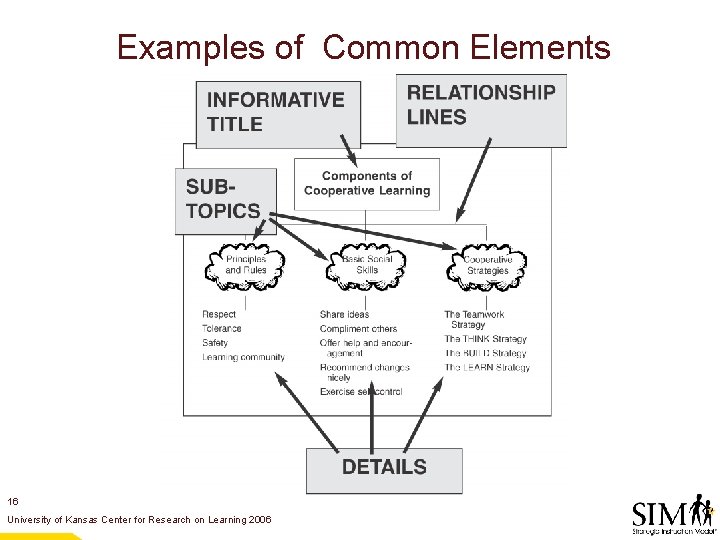
Elements Common to All ORDER Devices • An informative title • The critical content, including 1. Subtopics 2. Details • Lines that depict relationships among the content 15 University of Kansas Center for Research on Learning 2006
Examples of Common Elements 16 University of Kansas Center for Research on Learning 2006
The Four Main Types of ORDER Devices • Sequential • Compare-and-Contrast • Descriptive • Problem-Solution 17 University of Kansas Center for Research on Learning 2006
The Sequential Organizer Displays information that is organized according to: • • Time Distance Natural order Cause-and-effect relationships 18 University of Kansas Center for Research on Learning 2006
Common Examples of Sequential Organizers • • • Timelines A diagram of steps in a procedure Directions from Point A to Point B Events from history Events from a story 19 University of Kansas Center for Research on Learning 2006
Example Sequential Organizer as a Timeline 20 University of Kansas Center for Research on Learning 2006
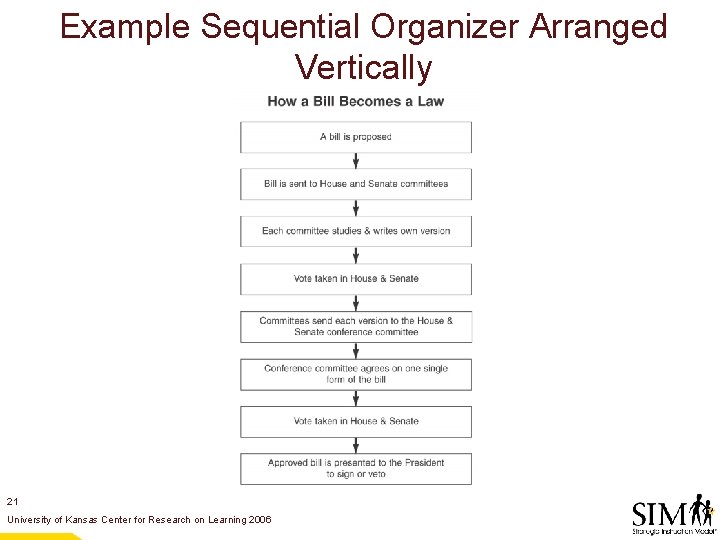
Example Sequential Organizer Arranged Vertically 21 University of Kansas Center for Research on Learning 2006
Example Sequential Organizer as a Cycle 22 University of Kansas Center for Research on Learning 2006
Example Sequential Organizer as a Flow Chart 23 University of Kansas Center for Research on Learning 2006
The Compare-and-Contrast Organizer • Displays information in which two or more topics are compared and/or contrasted. 24 University of Kansas Center for Research on Learning 2006
Example Compare-and-Contrast Organizer 25 University of Kansas Center for Research on Learning 2006
Example Compare-and-Contrast Organizer 26 University of Kansas Center for Research on Learning 2006
Example Compare-and-Contrast Organizer 27 University of Kansas Center for Research on Learning 2006
The Descriptive Organizer • Categorizes information about a topic according to common features or similar characteristics. • Typically contains both subtopics and details. 28 University of Kansas Center for Research on Learning 2006
Example Descriptive Organizer 29 University of Kansas Center for Research on Learning 2006
Example Descriptive Organizer 30 University of Kansas Center for Research on Learning 2006
The Problem-Solution Organizer • Depicts a problem and possible solutions to a problem. • Can also depict pros and cons, consequences, and related details for each solution. 31 University of Kansas Center for Research on Learning 2006
Example Problem-Solution Organizer 32 University of Kansas Center for Research on Learning 2006
Example Problem-Solution Organizer 33 University of Kansas Center for Research on Learning 2006
The Linking Steps • The procedures the teacher uses to guide the development of an ORDER Device with students in an interactive way. 34 University of Kansas Center for Research on Learning 2006
The Linking Steps Open your mind and take notes Recommend a structure DRAW an organizer Decide on the important information Recheck the structure Assign markers Work out an organizer Explain it Recycle it 35 University of Kansas Center for Research on Learning 2006
The CUE-DO-REVIEW Sequence The overall instructional process that is used to introduce the ORDER Routine, implement the Linking Steps, and check students’ understanding of the information presented. 36 University of Kansas Center for Research on Learning 2006
The CUE-DO-REVIEW Sequence CUE The ORDER Routine is explained to students as a way to help them understand what is critical information and how it is organized. 37 University of Kansas Center for Research on Learning 2006
The CUE-DO-REVIEW Sequence DO The teacher follows a set of procedures called the ORDER Steps that enable the teacher and students to co-construct an ORDER Device. 38 University of Kansas Center for Research on Learning 2006
The CUE-DO-REVIEW Sequence REVIEW The teacher asks questions about the topic of the organizer and the process used to create it to check and bolster student understanding. 39 University of Kansas Center for Research on Learning 2006
Enhancement Guidelines Step-by-step explanations of how to learn and use the ORDER Routine. • Get Ready! • Get Set! • Go! • Win! 40 University of Kansas Center for Research on Learning 2006
Get Ready! • • • Select the critical question. Collect materials and ideas. Select information for the ORDER Device. Construct a draft. Plan the lesson. 41 University of Kansas Center for Research on Learning 2006
Types of Critical Questions Lesson Questions: • Questions that focus on acquiring basic knowledge. Many begin with “who, ” “what, ” “where, ” and “when. ” 42 University of Kansas Center for Research on Learning 2006
Types of Critical Questions Unit Questions: • Questions that require students to integrate answers for entry-level questions with larger learning outcomes. Many begin with “how” or “why. ” 43 University of Kansas Center for Research on Learning 2006
Types of Critical Questions Course Questions: • Questions that require students to integrate information across units. They begin in many ways, but the expected answer to this type of question is a conversation that uses information gained from answering lesson and unit questions. 44 University of Kansas Center for Research on Learning 2006
Constructing Your Draft 1. Group the targeted information into broader categories. 2. Select or verify the structure of the organizer. 3. Assign markers. 4. Work out an organizer. 5. Evaluate your organizer. 45 University of Kansas Center for Research on Learning 2006
Organizer Checklist, Section 1 Section I: Important Parts _____ Informative Title. The title specifically states what information the organizer covers. _____ Critical Content. The most important information for understanding the topic of the organizer is displayed as subtopics and details. All subtopics and details are factually correct. _____ Clear Relationships Among Information. The organizer includes arrows, lines, numbers, and other symbols that show pieces of information on the organizer relate to other information. 46 University of Kansas Center for Research on Learning 2006
Organizer Checklist, Section 2 Section II: Quality _____ All Essential Information. All information marked in notes as important is included on the organizer. _____ Appropriate Organization. The correct type of organizer has been selected to display the information. _____ Information in Correct Place. All information appears in the correct place. _____ Legible Information. Handwriting and overall appearance are neat enough so anyone can read the organizer. 47 University of Kansas Center for Research on Learning 2006
Get Set! • Lesson 1: Introduce the four types of graphic organizers. • Lesson 2: Introduce the ORDER Routine. 48 University of Kansas Center for Research on Learning 2006
Lesson 1: Introduce Four Types of Graphic Organizers • Describe how most information is organized. • Describe common elements of all graphic organizers. • Introduce and describe Sequential Organizers. • Introduce and describe Compare-and-Contrast Organizers. • Introduce and describe Descriptive Organizers. • Introduce and describe Problem-Solution Organizers. 49 University of Kansas Center for Research on Learning 2006
Optional Analogy for Sequential Devices Row of Bath Houses and a Sequential Device • Each contains different units that are linked together in a specific sequence. • The sequence of units does not change. 50 University of Kansas Center for Research on Learning 2006
Optional Analogy for Compare-and-Contrast Devices The Duplex and a Compare-and-Contrast Device • • • Both have similarities and differences. Each unit of the duplex has same roof, same number of floors, same front yard. However, each unit’s windows, doors, and porches are different. 51 University of Kansas Center for Research on Learning 2006
Optional Analogy for Descriptive Devices A Shopping Mall and a Descriptive Device • • • Both have a name or title. Both have different categories of stores or information. Each category or store contains smaller items specific to it. 52 University of Kansas Center for Research on Learning 2006
Optional Analogy for Problem-Solution Devices Different Ways to Cool a House and a Problem-Solution Device • • Every problem has at least one or more solutions. Each solution has both advantages and disadvantages. 53 University of Kansas Center for Research on Learning 2006
Lesson 2: Introduce the Routine • Preview the lesson. • Explain and show you will CUE the routine. • Explain and show you will DO the routine. • Explain and show you will REVIEW and debrief. 54 University of Kansas Center for Research on Learning 2006
Go! • Use the routine explicitly. • Build thinking skills. • Build in continuity with ORDER Devices. • Evaluate your use of the routine. • Teach students to construct their own ORDER Devices. • Vary your use of the routine. 55 University of Kansas Center for Research on Learning 2006
Beware of These Pitfalls • Telling the students the type of organizer to create instead of letting them figure out the structure. • Draft organizers don’t have to be prepared before class. • Students don’t need to be involved in constructing the organizer. • Students can skip the “Assign Markers” step. • Thinking, “If I don’t get it right the first time, I won’t ever get it right. ” 56 University of Kansas Center for Research on Learning 2006
Students Win! • Check whether students are learning what they’re supposed to be learning. • Check whether students are personally satisfied with what and how they are learning. • Check whether students’ grades reflect how much they have learned. 57 University of Kansas Center for Research on Learning 2006
You Win! • • Select a growth target. Choose a way to learn. Choose a support system. Plan for confidence building. Debug. Maximize the challenge. Take ownership of the routine. 58 University of Kansas Center for Research on Learning 2006
Develop Your Ensurance Policy • Tell others about the routine & what you are doing. • Set personal use and achievement goals related to the routine. • Create personal reminders to use the routine. • Show your ORDER Devices to colleagues and ask them for their ideas. 59 University of Kansas Center for Research on Learning 2006
Develop Your Ensurance Policy • Invite others to watch you use the routine. • Enlist help and feedback from students. • Collaborate with a colleague in learning and using the routine. • Set aside time to reflect and plan every day. • Monitor your growth by regularly noting your thoughts, ideas, and reactions. 60 University of Kansas Center for Research on Learning 2006
Develop Your Ensurance Policy • Try out the routine right away. • Build on success. • Focus on quality not quantity. • Accept the fact that everyone has to face the challenge of change. • Pause periodically and take stock of what you are learning. • Congratulate yourself on your successes! 61 University of Kansas Center for Research on Learning 2006