
The Operating System Project Start Here Version 4


- Slides: 49
The Operating System Project Start Here Version 4. 60: September 2019
Table of Contents What to do in Week 1 – Test 0 • Brushing up your C programming skills. • Compiling the program. • Understanding how the program flows. • What does Test 0 do? • What do you need to change? • Step by step example. What you need to do - Test 1 What’s the goal of Test 1? • Summary information. • Where do you find resources to help you? 2
Table of Contents(2) What you need to do – Test 2 What’s the goal of Test 2? • Summary information • Where do you find resources to help you? What you need to do – Test 41 • What’s the goal of Test 41? • Summary information • Where do you find resources to help you? 3
Brushing up your C programming skills. While brushing up on your skills, it’s highly recommended that you select an IDE for your project. This will save you many hours of time! There are many places you can review C programming. The document listed below looks at some of the differences between C and Java. The concept of pointers is where most java programmers have difficulty. If you need more information, the web is your friend. C_By_Example. ppt can be found on the Project Home Page – the same place you found this Start_Here. ppt. 4
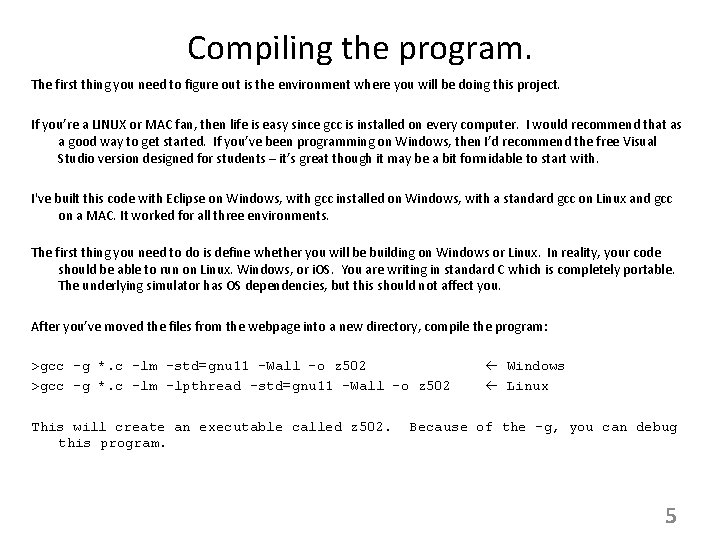
Compiling the program. The first thing you need to figure out is the environment where you will be doing this project. If you’re a LINUX or MAC fan, then life is easy since gcc is installed on every computer. I would recommend that as a good way to get started. If you’ve been programming on Windows, then I’d recommend the free Visual Studio version designed for students – it’s great though it may be a bit formidable to start with. I've built this code with Eclipse on Windows, with gcc installed on Windows, with a standard gcc on Linux and gcc on a MAC. It worked for all three environments. The first thing you need to do is define whether you will be building on Windows or Linux. In reality, your code should be able to run on Linux. Windows, or i. OS. You are writing in standard C which is completely portable. The underlying simulator has OS dependencies, but this should not affect you. After you’ve moved the files from the webpage into a new directory, compile the program: >gcc –g *. c -lm –std=gnu 11 -Wall -o z 502 >gcc –g *. c -lm –lpthread –std=gnu 11 -Wall -o z 502 This will create an executable called z 502. this program. Windows Linux Because of the –g, you can debug 5
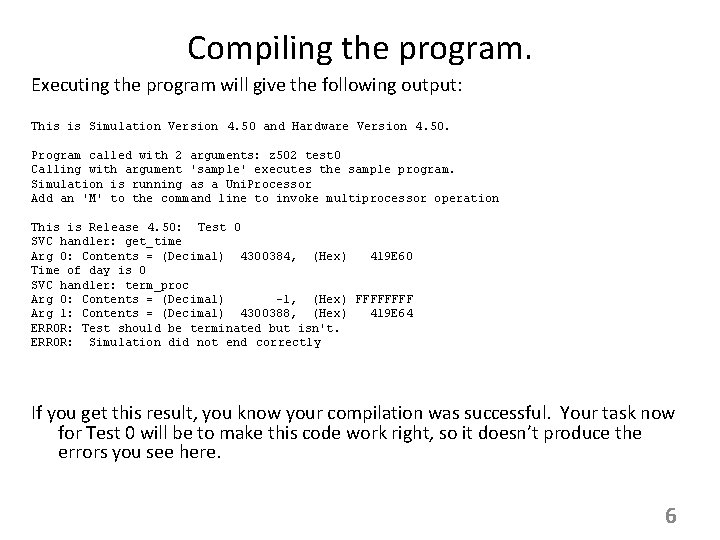
Compiling the program. Executing the program will give the following output: This is Simulation Version 4. 50 and Hardware Version 4. 50. Program called with 2 arguments: z 502 test 0 Calling with argument 'sample' executes the sample program. Simulation is running as a Uni. Processor Add an 'M' to the command line to invoke multiprocessor operation This is Release 4. 50: Test 0 SVC handler: get_time Arg 0: Contents = (Decimal) 4300384, (Hex) 419 E 60 Time of day is 0 SVC handler: term_proc Arg 0: Contents = (Decimal) -1, (Hex) FFFF Arg 1: Contents = (Decimal) 4300388, (Hex) 419 E 64 ERROR: Test should be terminated but isn't. ERROR: Simulation did not end correctly If you get this result, you know your compilation was successful. Your task now for Test 0 will be to make this code work right, so it doesn’t produce the errors you see here. 6
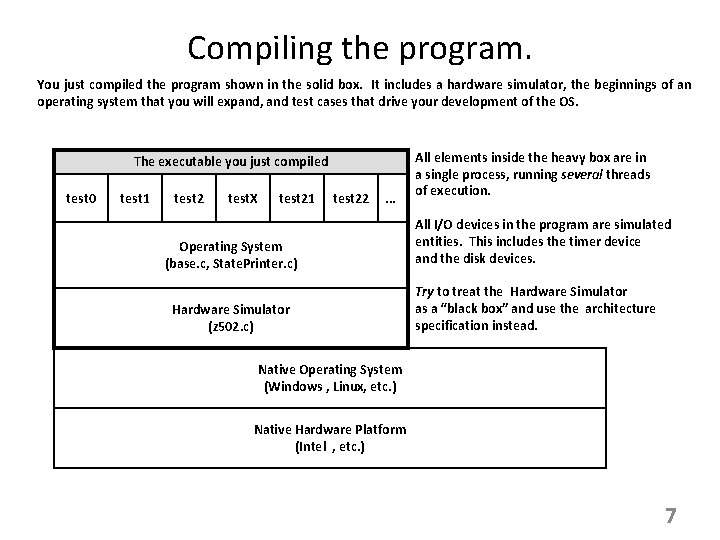
Compiling the program. You just compiled the program shown in the solid box. It includes a hardware simulator, the beginnings of an operating system that you will expand, and test cases that drive your development of the OS. The executable you just compiled test 0 test 1 test 2 test. X test 21 test 22 . . . Operating System (base. c, State. Printer. c) Hardware Simulator (z 502. c) All elements inside the heavy box are in a single process, running several threads of execution. All I/O devices in the program are simulated entities. This includes the timer device and the disk devices. Try to treat the Hardware Simulator as a “black box” and use the architecture specification instead. Native Operating System (Windows , Linux, etc. ) Native Hardware Platform (Intel , etc. ) 7
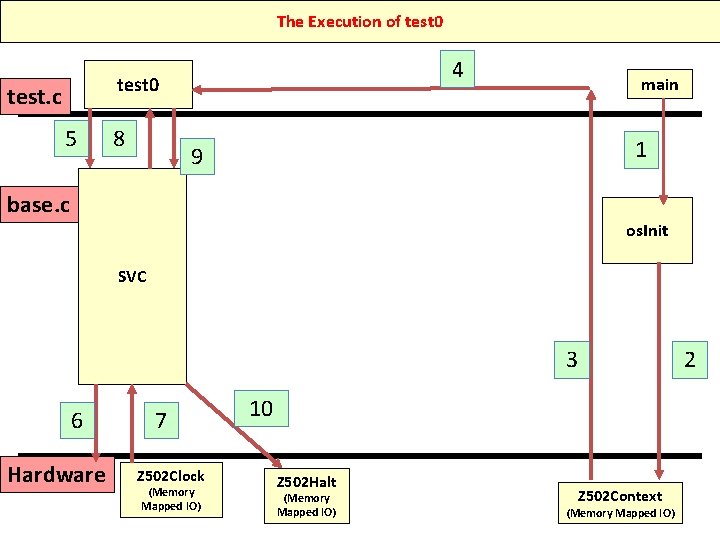
Understanding how the program flows. The next slides describe the starting code that’s given to you (what you’ve already compiled). It shows how the program flows. The important actions are: Test 0 in test. c contains system calls – requests for service from the Operating System. Those system calls come to the routine svc( ) in base. c. This is in the OS – you’re writing the OS so you own this code. In svc, you call (make a subroutine call) to the hardware in order to implement the action requested by Test 0. 8
The Execution of test 0 4 test 0 test. c 5 8 main 1 9 base. c os. Init SVC 3 6 Hardware 7 Z 502 Clock (Memory Mapped IO) 2 10 Z 502 Halt (Memory Mapped IO) Z 502 Context 9 (Memory Mapped IO)
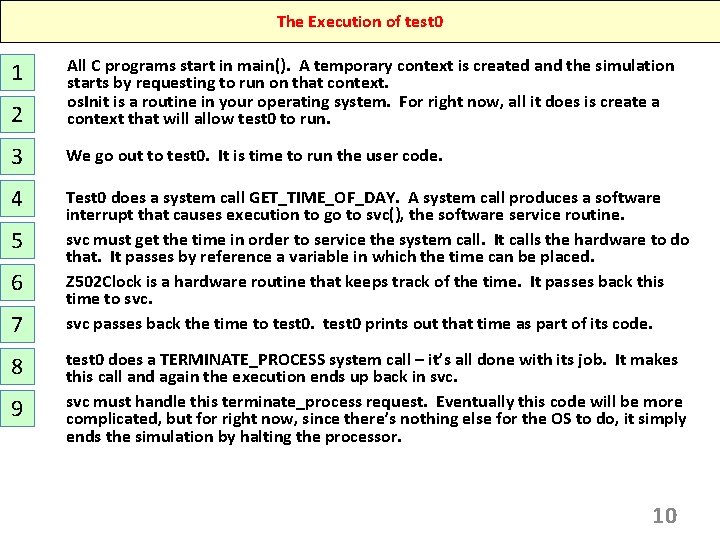
The Execution of test 0 2 All C programs start in main(). A temporary context is created and the simulation starts by requesting to run on that context. os. Init is a routine in your operating system. For right now, all it does is create a context that will allow test 0 to run. 3 We go out to test 0. It is time to run the user code. 4 Test 0 does a system call GET_TIME_OF_DAY. A system call produces a software interrupt that causes execution to go to svc(), the software service routine. svc must get the time in order to service the system call. It calls the hardware to do that. It passes by reference a variable in which the time can be placed. Z 502 Clock is a hardware routine that keeps track of the time. It passes back this time to svc passes back the time to test 0 prints out that time as part of its code. 1 5 6 7 8 9 test 0 does a TERMINATE_PROCESS system call – it’s all done with its job. It makes this call and again the execution ends up back in svc must handle this terminate_process request. Eventually this code will be more complicated, but for right now, since there’s nothing else for the OS to do, it simply ends the simulation by halting the processor. 10
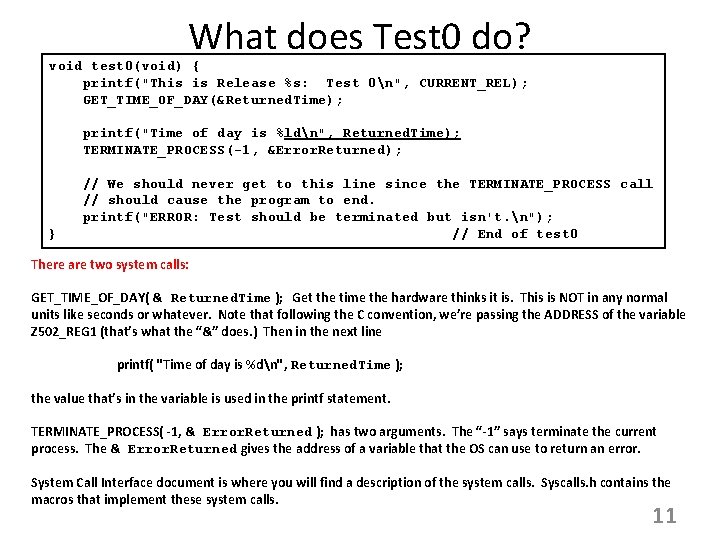
What does Test 0 do? void test 0(void) { printf("This is Release %s: Test 0n", CURRENT_REL); GET_TIME_OF_DAY(&Returned. Time); printf("Time of day is %ldn", Returned. Time); TERMINATE_PROCESS(-1, &Error. Returned); } // We should never get to this line since the TERMINATE_PROCESS call // should cause the program to end. printf("ERROR: Test should be terminated but isn't. n"); // End of test 0 There are two system calls: GET_TIME_OF_DAY( & Returned. Time ); Get the time the hardware thinks it is. This is NOT in any normal units like seconds or whatever. Note that following the C convention, we’re passing the ADDRESS of the variable Z 502_REG 1 (that’s what the “&” does. ) Then in the next line printf( "Time of day is %dn", Returned. Time ); the value that’s in the variable is used in the printf statement. TERMINATE_PROCESS( -1, & Error. Returned ); has two arguments. The “-1” says terminate the current process. The & Error. Returned gives the address of a variable that the OS can use to return an error. System Call Interface document is where you will find a description of the system calls. Syscalls. h contains the macros that implement these system calls. 11
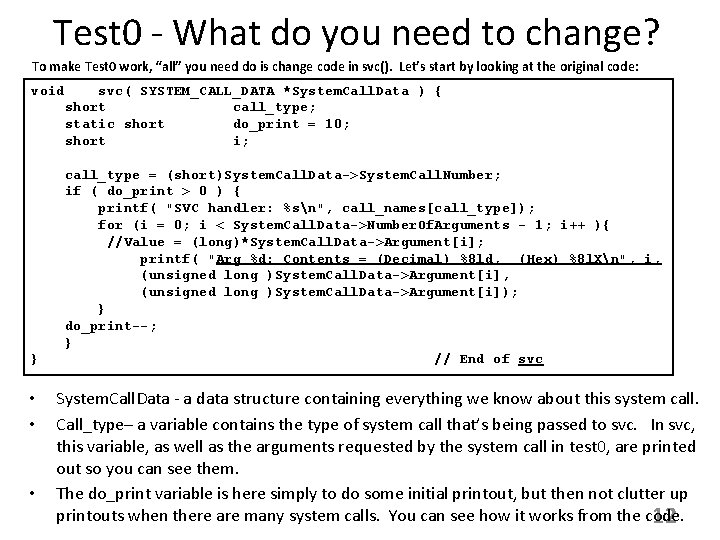
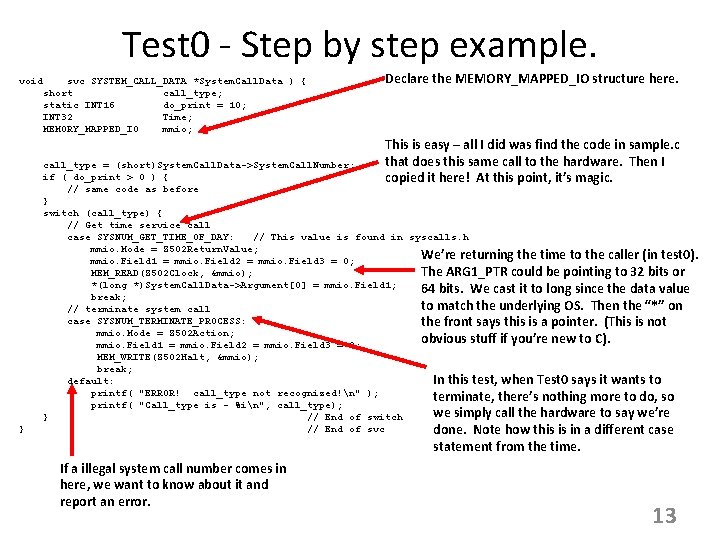
Test 0 - What do you need to change? To make Test 0 work, “all” you need do is change code in svc(). Let’s start by looking at the original code: void svc( SYSTEM_CALL_DATA *System. Call. Data ) { short call_type; static short do_print = 10; short i; } • • • call_type = (short)System. Call. Data->System. Call. Number; if ( do_print > 0 ) { printf( "SVC handler: %sn", call_names[call_type]); for (i = 0; i < System. Call. Data->Number. Of. Arguments - 1; i++ ){ //Value = (long)*System. Call. Data->Argument[i]; printf( "Arg %d: Contents = (Decimal) %8 ld, (Hex) %8 l. Xn", i, (unsigned long )System. Call. Data->Argument[i]); } do_print--; } // End of svc System. Call. Data - a data structure containing everything we know about this system call. Call_type– a variable contains the type of system call that’s being passed to svc. In svc, this variable, as well as the arguments requested by the system call in test 0, are printed out so you can see them. The do_print variable is here simply to do some initial printout, but then not clutter up printouts when there are many system calls. You can see how it works from the code. 12
Test 0 - Step by step example. void svc SYSTEM_CALL_DATA *System. Call. Data ) { short call_type; static INT 16 do_print = 10; INT 32 Time; MEMORY_MAPPED_IO mmio; } Declare the MEMORY_MAPPED_IO structure here. This is easy – all I did was find the code in sample. c that does this same call to the hardware. Then I copied it here! At this point, it’s magic. call_type = (short)System. Call. Data->System. Call. Number; if ( do_print > 0 ) { // same code as before } switch (call_type) { // Get time service call case SYSNUM_GET_TIME_OF_DAY: // This value is found in syscalls. h mmio. Mode = Z 502 Return. Value; We’re returning the time to the caller (in test 0). mmio. Field 1 = mmio. Field 2 = mmio. Field 3 = 0; The ARG 1_PTR could be pointing to 32 bits or MEM_READ(Z 502 Clock, &mmio); *(long *)System. Call. Data->Argument[0] = mmio. Field 1; 64 bits. We cast it to long since the data value break; to match the underlying OS. Then the “*” on // terminate system call case SYSNUM_TERMINATE_PROCESS: the front says this is a pointer. (This is not mmio. Mode = Z 502 Action; obvious stuff if you’re new to C). mmio. Field 1 = mmio. Field 2 = mmio. Field 3 = 0; MEM_WRITE(Z 502 Halt, &mmio); break; In this test, when Test 0 says it wants to default: printf( "ERROR! call_type not recognized!n" ); terminate, there’s nothing more to do, so printf( "Call_type is - %in", call_type); we simply call the hardware to say we’re } // End of switch // End of svc done. Note how this is in a different case statement from the time. If a illegal system call number comes in here, we want to know about it and report an error. 13
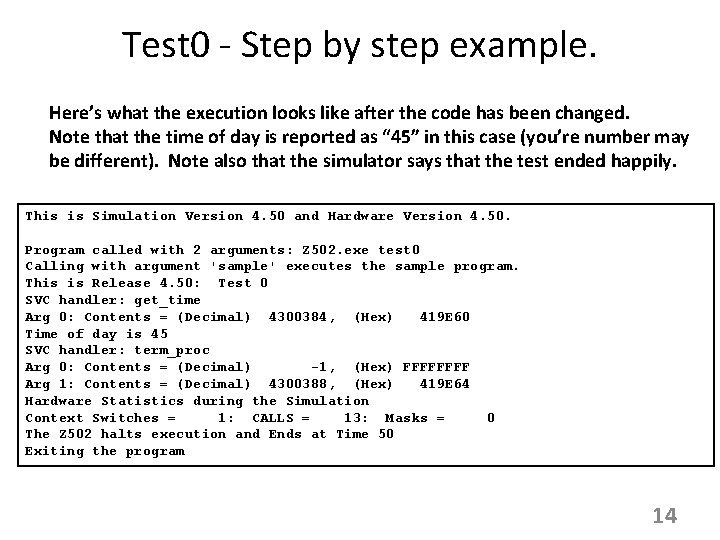
Test 0 - Step by step example. Here’s what the execution looks like after the code has been changed. Note that the time of day is reported as “ 45” in this case (you’re number may be different). Note also that the simulator says that the test ended happily. This is Simulation Version 4. 50 and Hardware Version 4. 50. Program called with 2 arguments: Z 502. exe test 0 Calling with argument 'sample' executes the sample program. This is Release 4. 50: Test 0 SVC handler: get_time Arg 0: Contents = (Decimal) 4300384, (Hex) 419 E 60 Time of day is 45 SVC handler: term_proc Arg 0: Contents = (Decimal) -1, (Hex) FFFF Arg 1: Contents = (Decimal) 4300388, (Hex) 419 E 64 Hardware Statistics during the Simulation Context Switches = 1: CALLS = 13: Masks = 0 The Z 502 halts execution and Ends at Time 50 Exiting the program 14
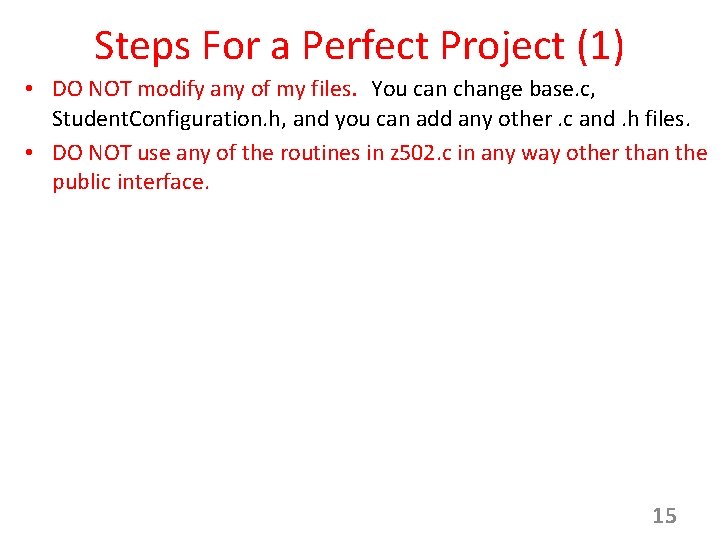
Steps For a Perfect Project (1) • DO NOT modify any of my files. You can change base. c, Student. Configuration. h, and you can add any other. c and. h files. • DO NOT use any of the routines in z 502. c in any way other than the public interface. 15
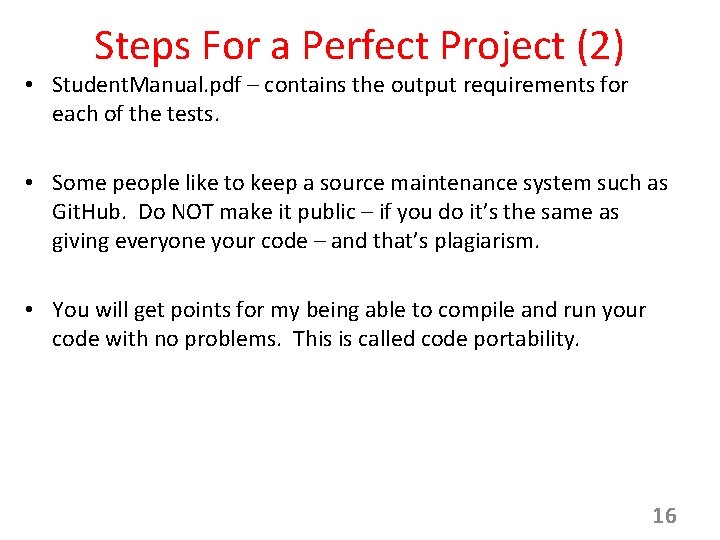
Steps For a Perfect Project (2) • Student. Manual. pdf – contains the output requirements for each of the tests. • Some people like to keep a source maintenance system such as Git. Hub. Do NOT make it public – if you do it’s the same as giving everyone your code – and that’s plagiarism. • You will get points for my being able to compile and run your code with no problems. This is called code portability. 16
Steps For a Perfect Project (3) • Use an IDE. This is a tremendous time saver. I use Eclipse but many people are fond of Microsoft Visual Studio. Any choice is up to you. • You can develop your code on whatever platform you wish. • When you hand in your project, I will compile and run it from the command line in Windows or Linux. Those are the ONLY two OSs I will use. It shouldn’t matter which I use. • On the command line, I will compile using the commands given on page 5 of this document. If you want to give me a script (makefile, . bat file) I will use that. If your code does not produce an executable, you will lose points. This is the meaning of “portability. ” 17
Test 1 - What you need to do Overview This is a “small” incremental step in your code development. It involves only a couple of pieces: 1. Be able to read test names from the command line and execute the correct test. 2. Create a method os. Create. Process that will enable you to generate and save state for each process. 3. In SVC, build a way for a system call GET_PROCESS_ID() to get information about the running process. What follows are steps to accomplish this. 18
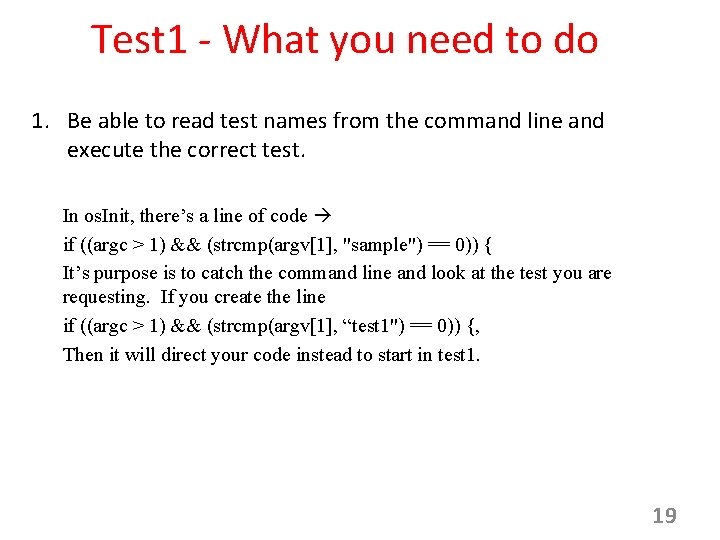
Test 1 - What you need to do 1. Be able to read test names from the command line and execute the correct test. In os. Init, there’s a line of code if ((argc > 1) && (strcmp(argv[1], "sample") == 0)) { It’s purpose is to catch the command line and look at the test you are requesting. If you create the line if ((argc > 1) && (strcmp(argv[1], “test 1") == 0)) {, Then it will direct your code instead to start in test 1. 19
Test 1 - What you need to do 2. Create a method os. Create. Process that will enable you to generate and save state for each process. In Step 1 ( the last slide), you learned how to figure out what test you are running. That’s only ONE of the characteristics of the process you are creating. To save all these properties, it’s easiest to create a structure called a Process Control Block (a PCB). AND since you will be creating many more processes, it’s easiest to have a separate method that you use for this task. You will be asked for the Process ID – this is an Operating System characteristic assigned to a process; you can use whatever value makes sense to you. Store the Process ID in the PCB. 20
Test 1 - What you need to do 3. In SVC, build a way for a system call GET_PROCESS_ID() to get information about the running process. This will work the same way you did the GET_TIME SYSTEM CALL, but now, instead of asking the Z 502 Hardware for the answer, you will ask your own Process Management code to read the PID of the running process. 21
Test 2 - What you need to do What does Test 2 do? This section contains: • Summary information. • Starting Architecture of the Simulator Environment; the Interrupt. Handler • Implementation of Test 2: – Step 1 – Step 2 – Step 3 22
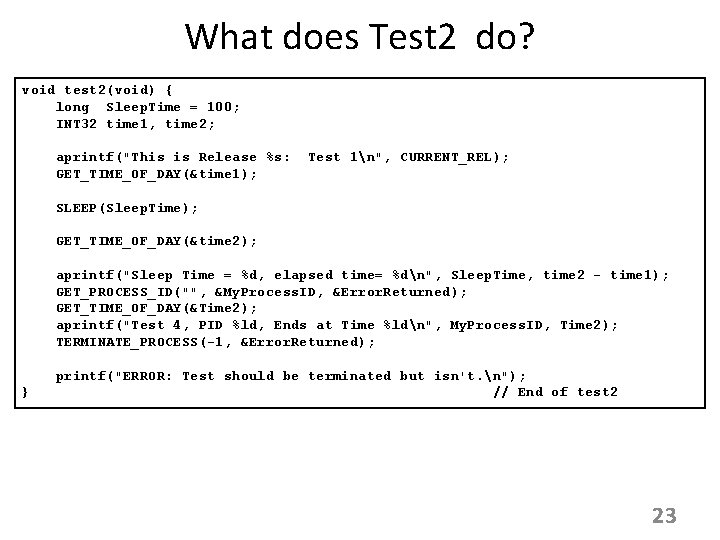
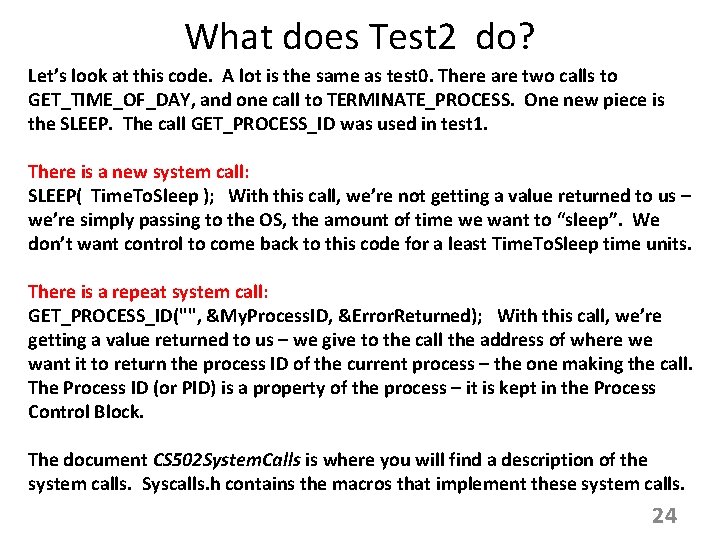
What does Test 2 do? void test 2(void) { long Sleep. Time = 100; INT 32 time 1, time 2; aprintf("This is Release %s: GET_TIME_OF_DAY(&time 1); Test 1n", CURRENT_REL); SLEEP(Sleep. Time); GET_TIME_OF_DAY(&time 2); aprintf("Sleep Time = %d, elapsed time= %dn", Sleep. Time, time 2 - time 1); GET_PROCESS_ID("", &My. Process. ID, &Error. Returned); GET_TIME_OF_DAY(&Time 2); aprintf("Test 4, PID %ld, Ends at Time %ldn", My. Process. ID, Time 2); TERMINATE_PROCESS(-1, &Error. Returned); } printf("ERROR: Test should be terminated but isn't. n"); // End of test 2 23
What does Test 2 do? Let’s look at this code. A lot is the same as test 0. There are two calls to GET_TIME_OF_DAY, and one call to TERMINATE_PROCESS. One new piece is the SLEEP. The call GET_PROCESS_ID was used in test 1. There is a new system call: SLEEP( Time. To. Sleep ); With this call, we’re not getting a value returned to us – we’re simply passing to the OS, the amount of time we want to “sleep”. We don’t want control to come back to this code for a least Time. To. Sleep time units. There is a repeat system call: GET_PROCESS_ID("", &My. Process. ID, &Error. Returned); With this call, we’re getting a value returned to us – we give to the call the address of where we want it to return the process ID of the current process – the one making the call. The Process ID (or PID) is a property of the process – it is kept in the Process Control Block. The document CS 502 System. Calls is where you will find a description of the system calls. Syscalls. h contains the macros that implement these system calls. 24
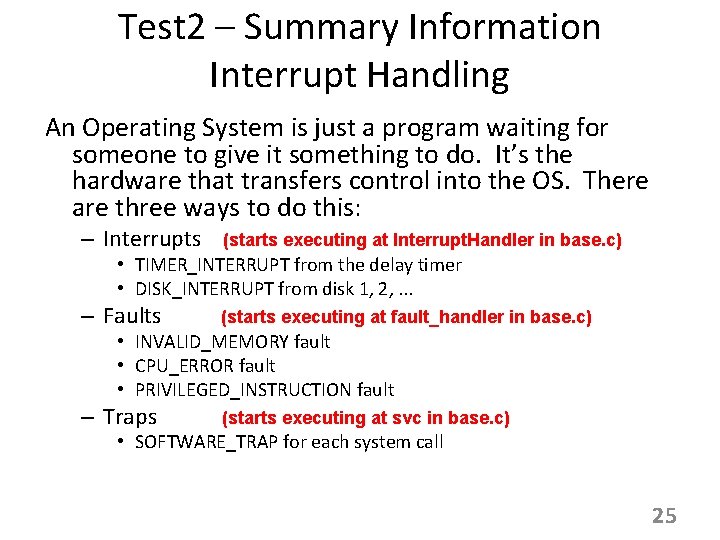
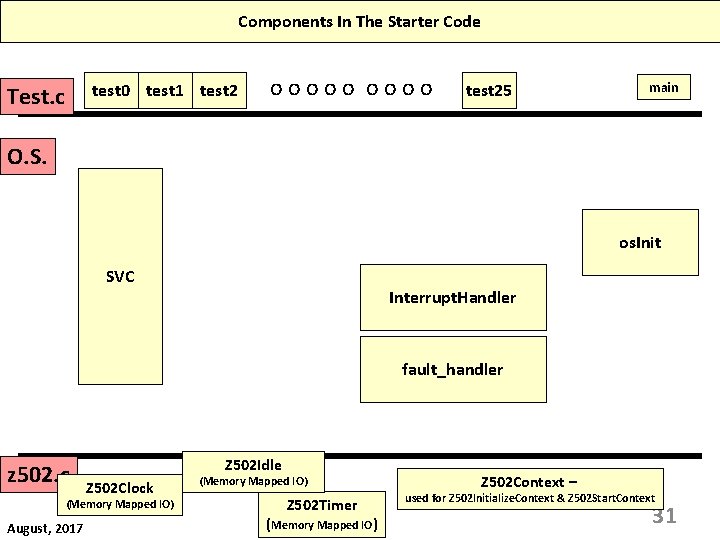
Test 2 – Summary Information Interrupt Handling An Operating System is just a program waiting for someone to give it something to do. It’s the hardware that transfers control into the OS. There are three ways to do this: – Interrupts (starts executing at Interrupt. Handler in base. c) – Faults (starts executing at fault_handler in base. c) – Traps (starts executing at svc in base. c) • TIMER_INTERRUPT from the delay timer • DISK_INTERRUPT from disk 1, 2, . . . • INVALID_MEMORY fault • CPU_ERROR fault • PRIVILEGED_INSTRUCTION fault • SOFTWARE_TRAP for each system call 25
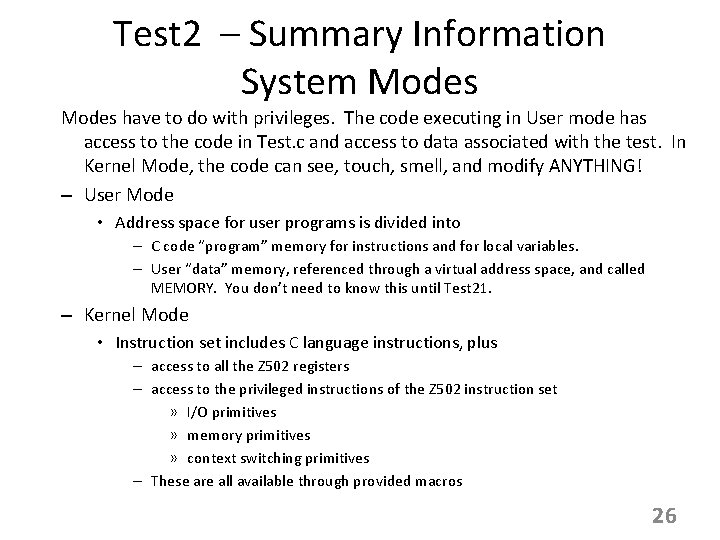
Test 2 – Summary Information System Modes have to do with privileges. The code executing in User mode has access to the code in Test. c and access to data associated with the test. In Kernel Mode, the code can see, touch, smell, and modify ANYTHING! – User Mode • Address space for user programs is divided into – C code “program” memory for instructions and for local variables. – User “data” memory, referenced through a virtual address space, and called MEMORY. You don’t need to know this until Test 21. – Kernel Mode • Instruction set includes C language instructions, plus – access to all the Z 502 registers – access to the privileged instructions of the Z 502 instruction set » I/O primitives » memory primitives » context switching primitives – These are all available through provided macros 26
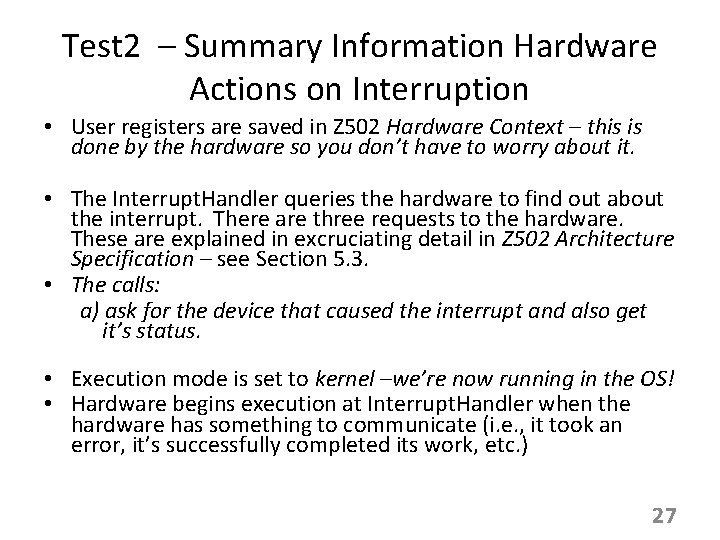
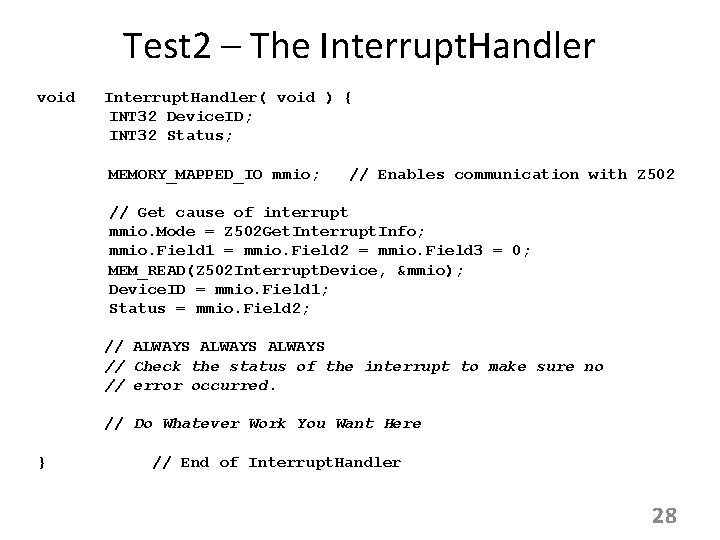
Test 2 – Summary Information Hardware Actions on Interruption • User registers are saved in Z 502 Hardware Context – this is done by the hardware so you don’t have to worry about it. • The Interrupt. Handler queries the hardware to find out about the interrupt. There are three requests to the hardware. These are explained in excruciating detail in Z 502 Architecture Specification – see Section 5. 3. • The calls: a) ask for the device that caused the interrupt and also get it’s status. • Execution mode is set to kernel –we’re now running in the OS! • Hardware begins execution at Interrupt. Handler when the hardware has something to communicate (i. e. , it took an error, it’s successfully completed its work, etc. ) 27
Test 2 – The Interrupt. Handler void Interrupt. Handler( void ) { INT 32 Device. ID; INT 32 Status; MEMORY_MAPPED_IO mmio; // Enables communication with Z 502 // Get cause of interrupt mmio. Mode = Z 502 Get. Interrupt. Info; mmio. Field 1 = mmio. Field 2 = mmio. Field 3 = 0; MEM_READ(Z 502 Interrupt. Device, &mmio); Device. ID = mmio. Field 1; Status = mmio. Field 2; // ALWAYS // Check the status of the interrupt to make sure no // error occurred. // Do Whatever Work You Want Here } // End of Interrupt. Handler 28
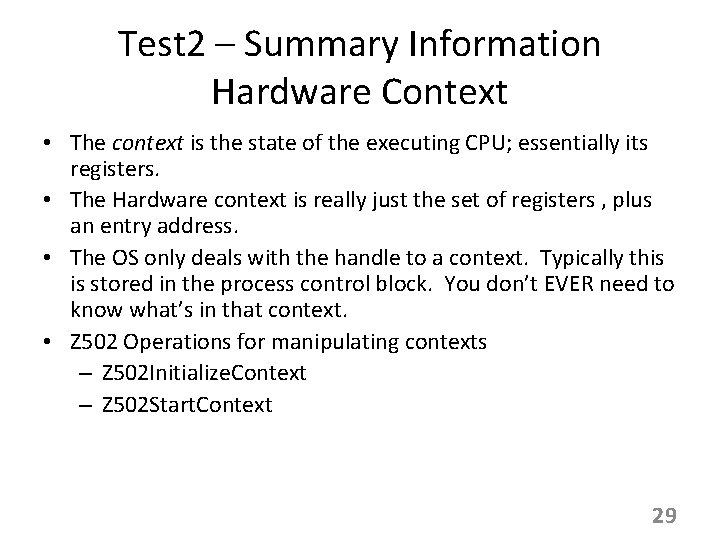
Test 2 – Summary Information Hardware Context • The context is the state of the executing CPU; essentially its registers. • The Hardware context is really just the set of registers , plus an entry address. • The OS only deals with the handle to a context. Typically this is stored in the process control block. You don’t EVER need to know what’s in that context. • Z 502 Operations for manipulating contexts – Z 502 Initialize. Context – Z 502 Start. Context 29
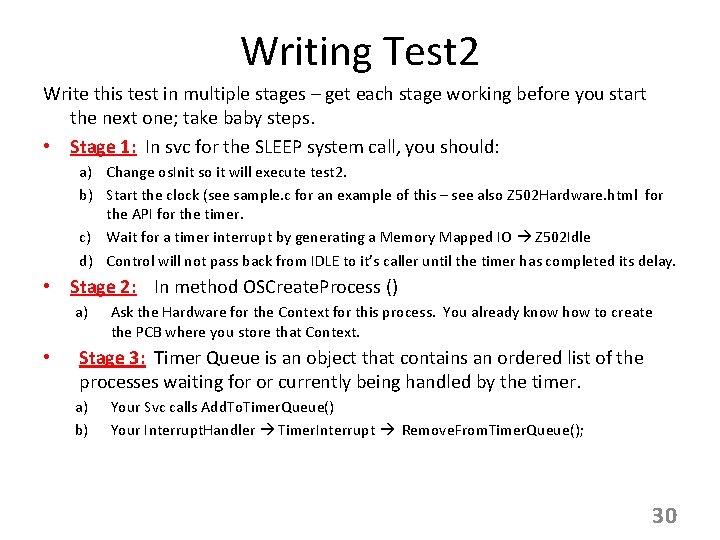
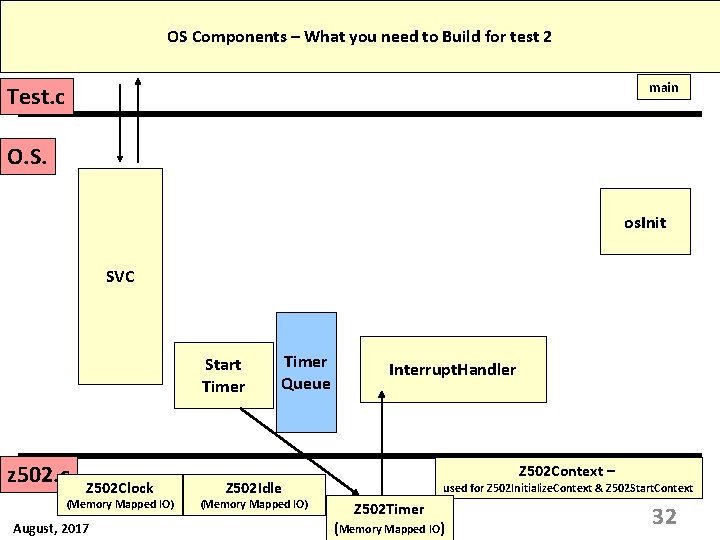
Writing Test 2 Write this test in multiple stages – get each stage working before you start the next one; take baby steps. • Stage 1: In svc for the SLEEP system call, you should: a) Change os. Init so it will execute test 2. b) Start the clock (see sample. c for an example of this – see also Z 502 Hardware. html for the API for the timer. c) Wait for a timer interrupt by generating a Memory Mapped IO Z 502 Idle d) Control will not pass back from IDLE to it’s caller until the timer has completed its delay. • Stage 2: In method OSCreate. Process () a) • Ask the Hardware for the Context for this process. You already know how to create the PCB where you store that Context. Stage 3: Timer Queue is an object that contains an ordered list of the processes waiting for or currently being handled by the timer. a) b) Your Svc calls Add. To. Timer. Queue() Your Interrupt. Handler Timer. Interrupt Remove. From. Timer. Queue(); 30
Components In The Starter Code test 0 test 1 test 2 Test. c ooooo test 25 main O. S. os. Init SVC Interrupt. Handler fault_handler z 502. c Z 502 Idle Z 502 Clock (Memory Mapped IO) August, 2017 (Memory Mapped IO) Z 502 Timer (Memory Mapped IO) Z 502 Context – used for Z 502 Initialize. Context & Z 502 Start. Context 31
OS Components – What you need to Build for test 2 main Test. c O. S. os. Init SVC Start Timer z 502. c Z 502 Clock (Memory Mapped IO) August, 2017 Timer Queue Interrupt. Handler Z 502 Context – Z 502 Idle (Memory Mapped IO) used for Z 502 Initialize. Context & Z 502 Start. Context Z 502 Timer (Memory Mapped IO) 32
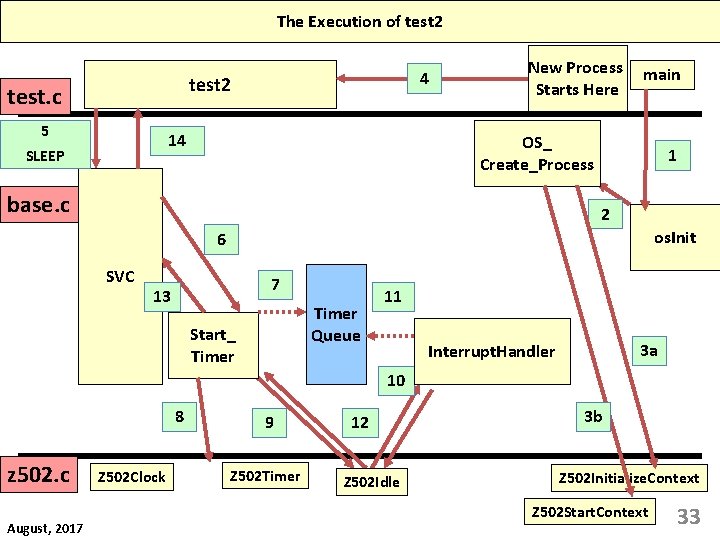
The Execution of test 2 4 test 2 test. c 5 14 SLEEP New Process Starts Here main OS_ Create_Process base. c 1 2 os. Init 6 SVC 7 13 Timer Queue Start_ Timer 11 3 a Interrupt. Handler 10 8 z 502. c August, 2017 Z 502 Clock 9 Z 502 Timer 12 Z 502 Idle 3 b Z 502 Initialize. Context Z 502 Start. Context 33
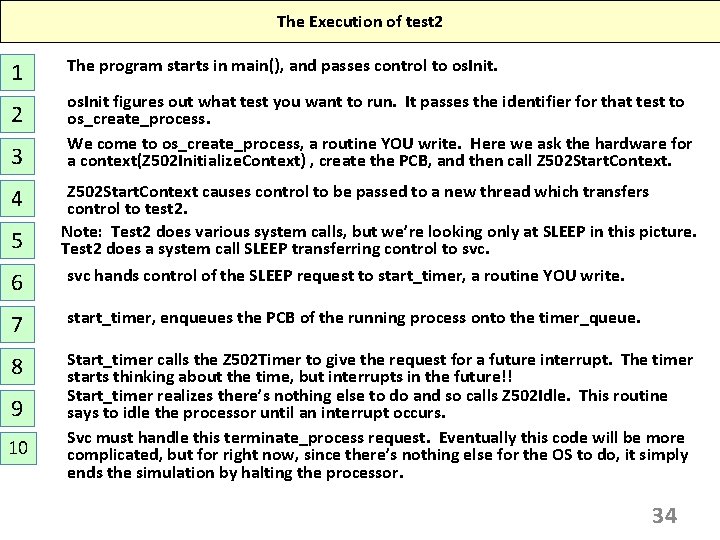
The Execution of test 2 1 2 3 4 5 The program starts in main(), and passes control to os. Init figures out what test you want to run. It passes the identifier for that test to os_create_process. We come to os_create_process, a routine YOU write. Here we ask the hardware for a context(Z 502 Initialize. Context) , create the PCB, and then call Z 502 Start. Context causes control to be passed to a new thread which transfers control to test 2. Note: Test 2 does various system calls, but we’re looking only at SLEEP in this picture. Test 2 does a system call SLEEP transferring control to svc. 6 svc hands control of the SLEEP request to start_timer, a routine YOU write. 7 start_timer, enqueues the PCB of the running process onto the timer_queue. 8 Start_timer calls the Z 502 Timer to give the request for a future interrupt. The timer starts thinking about the time, but interrupts in the future!! Start_timer realizes there’s nothing else to do and so calls Z 502 Idle. This routine says to idle the processor until an interrupt occurs. Svc must handle this terminate_process request. Eventually this code will be more complicated, but for right now, since there’s nothing else for the OS to do, it simply ends the simulation by halting the processor. 9 10 34
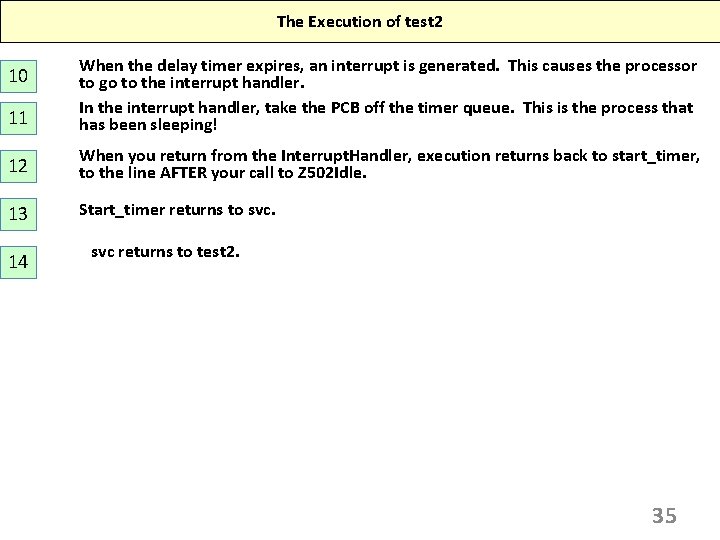
The Execution of test 2 11 When the delay timer expires, an interrupt is generated. This causes the processor to go to the interrupt handler. In the interrupt handler, take the PCB off the timer queue. This is the process that has been sleeping! 12 When you return from the Interrupt. Handler, execution returns back to start_timer, to the line AFTER your call to Z 502 Idle. 13 Start_timer returns to svc. 10 14 svc returns to test 2. 35
Making Tests Visible • Your test may run perfectly, but if I can’t see it happen, it does you no good. • Your code should implement the Scheduler Printer. The auxiliary source for this is supplied to you and examples of calling the Scheduler Printer are given in sample. c. In syscalls. h, there are detailed comments showing you the meaning of each of the fields. • Students frequently ask “when should I call the Scheduler. Printer. The easiest answer is to do it whenever your ready Q changes – whenever something is added or removed from the Q. 36
Test 5 - What you need to do • What’s the goal of Test 5? • Summary information. • Where do you find resources to help you? • Architecture of the Simulator Environment • Z 502 Hardware Organization and Architecture • Generic Operating System Structure 37
Steps For a Perfect Project • When creating a process, put it on the ready Q but don’t run it yet. • How to use up time in the dispatcher while waiting for a process to be on the ready Q: void dispatcher() { while( Ready. Queue. Front( ) == NULL ) { CALL(); CALL is a C macro. } // Other dispatcher code } This has the effect of advancing the simulation time until the next interrupt occurs. 38
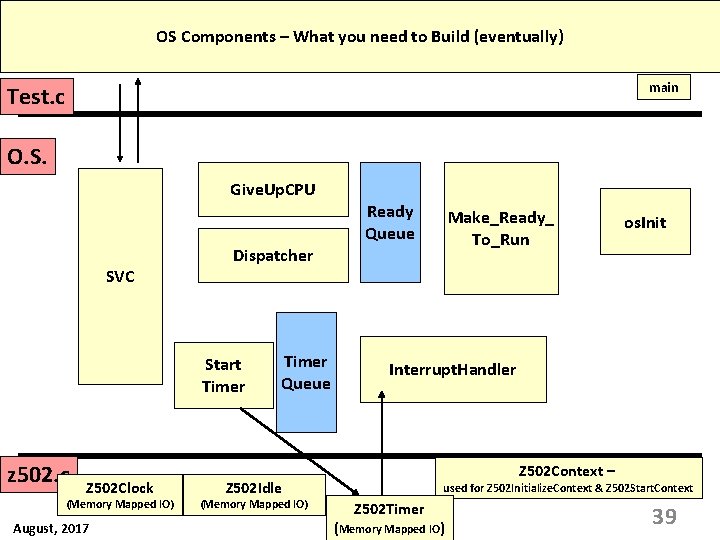
OS Components – What you need to Build (eventually) main Test. c O. S. Give. Up. CPU Ready Queue SVC Dispatcher Start Timer z 502. c Z 502 Clock (Memory Mapped IO) August, 2017 Make_Ready_ To_Run Timer Queue Interrupt. Handler Z 502 Context – Z 502 Idle (Memory Mapped IO) os. Init used for Z 502 Initialize. Context & Z 502 Start. Context Z 502 Timer (Memory Mapped IO) 39
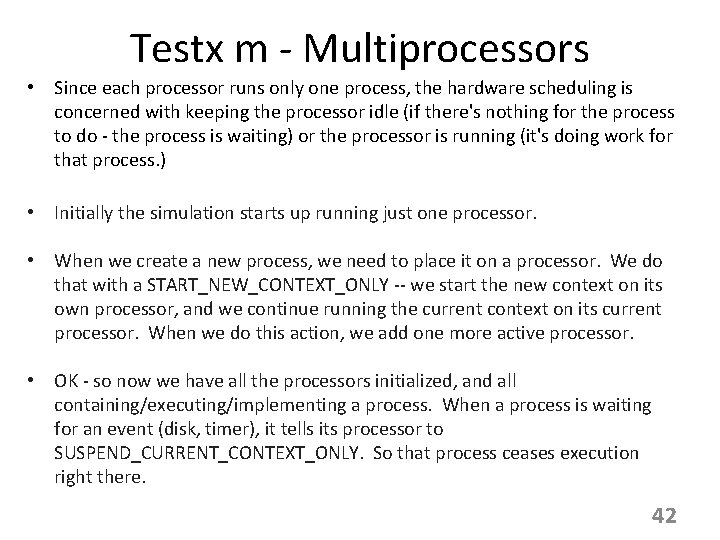
Testx m - Multiprocessors The z 502 system can be run in multiprocessor mode. Do this by executing a test including an “m” as the second argument. “Z 502 test 6 m” What you must do to make this work: 1. Make your code reentrant – now multiple threads will be executing your dispatcher and other OS simultaneously. 2. In single processor mode, a Start. Context assumes that the caller will be suspended – you’re using START_NEW_CONTEXT_AND_SUSPEND. 3. In Multiprocessor mode, the dispatcher starts EVERY process that’s on the Ready Q (Using START_NEW_CONTEXT_ONLY) and then when there are none present, suspends itself using SUSPEND_CURRENT_CONTEXT_ONLY. 4. The hardware provides the support you need, providing you with the current context so you can determine a process’ PID in an easy way. 40
Testx m - Multiprocessors • In the mode we've been using for "single processor", what we mean by that is that there are TWO processors running; one processor is used to execute all the user processes. This processor must be shared among all the processes. So we use the flag START_NEW_CONTEXT_AND_SUSPEND to accomplish this; every time we start a new context (process) on a processor, we have to suspend the process that's currently running there. The second processor is for the exclusive use of the interrupt handler. • This is what we call "single processor". • In "multiple processor" mode, there are many processors to run the processes in a test. • In the tests we have, there are more processors than processes, so we don't really need to share processors - each process can have its own processor it's what's called "processor affinity". In real life this approach produces the best performance because the state of the process is maintained in the caches and registers of the processor. 41
Testx m - Multiprocessors • Since each processor runs only one process, the hardware scheduling is concerned with keeping the processor idle (if there's nothing for the process to do - the process is waiting) or the processor is running (it's doing work for that process. ) • Initially the simulation starts up running just one processor. • When we create a new process, we need to place it on a processor. We do that with a START_NEW_CONTEXT_ONLY -- we start the new context on its own processor, and we continue running the current context on its current processor. When we do this action, we add one more active processor. • OK - so now we have all the processors initialized, and all containing/executing/implementing a process. When a process is waiting for an event (disk, timer), it tells its processor to SUSPEND_CURRENT_CONTEXT_ONLY. So that process ceases execution right there. 42
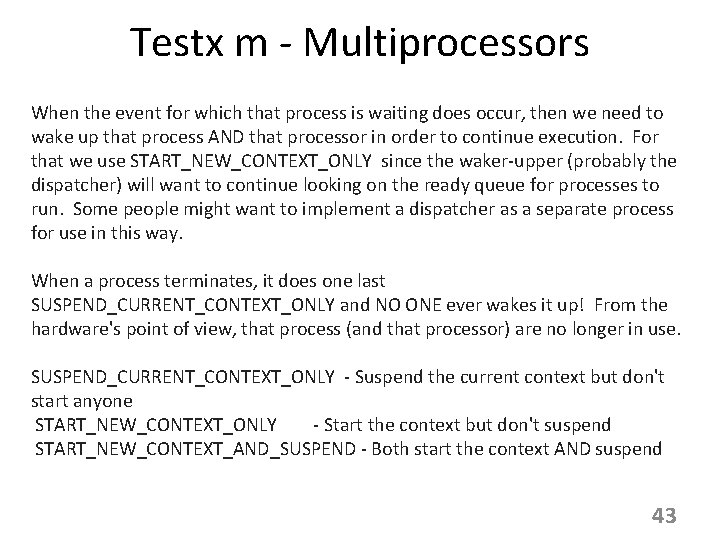
Testx m - Multiprocessors When the event for which that process is waiting does occur, then we need to wake up that process AND that processor in order to continue execution. For that we use START_NEW_CONTEXT_ONLY since the waker-upper (probably the dispatcher) will want to continue looking on the ready queue for processes to run. Some people might want to implement a dispatcher as a separate process for use in this way. When a process terminates, it does one last SUSPEND_CURRENT_CONTEXT_ONLY and NO ONE ever wakes it up! From the hardware's point of view, that process (and that processor) are no longer in use. SUSPEND_CURRENT_CONTEXT_ONLY - Suspend the current context but don't start anyone START_NEW_CONTEXT_ONLY - Start the context but don't suspend START_NEW_CONTEXT_AND_SUSPEND - Both start the context AND suspend 43
Before You Hand In Your Code What do you need to do to assure the highest possible grade? • Make sure your code is portable. I need to be able to compile your code on Linux or Windows using the command line. You will need to export your code OUT of an IDE to make sure this happens. • I need to be able to say “z 502 test 7”. You will lose points if I have to recompile your code for every test. • You must use the Scheduler. Printer correctly. The guidelines are in the Student Manual. • Every test must finish in less than 30 seconds. If this isn’t true, it means you have too many print statements or too many sleeps. 44
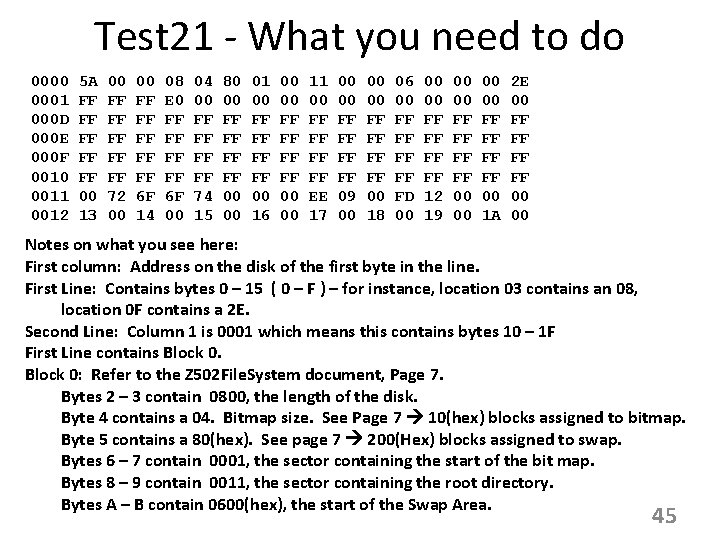
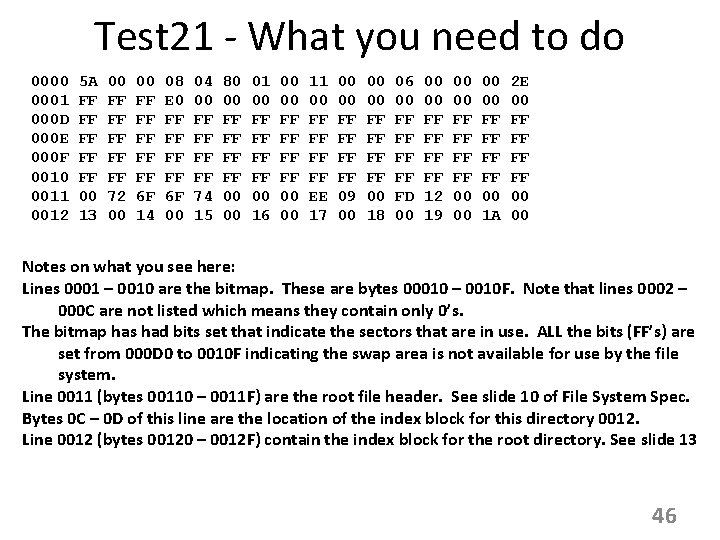
Test 21 - What you need to do 0000 0001 000 D 000 E 000 F 0010 0011 0012 5 A FF FF FF 00 13 00 FF FF FF 72 00 00 FF FF FF 6 F 14 08 E 0 FF FF 6 F 00 04 00 FF FF 74 15 80 00 FF FF 00 00 01 00 FF FF 00 16 00 00 FF FF 00 00 11 00 FF FF EE 17 00 00 FF FF 09 00 00 00 FF FF 00 18 06 00 FF FF FD 00 00 00 FF FF 12 19 00 00 FF FF 00 1 A 2 E 00 FF FF 00 00 Notes on what you see here: First column: Address on the disk of the first byte in the line. First Line: Contains bytes 0 – 15 ( 0 – F ) – for instance, location 03 contains an 08, location 0 F contains a 2 E. Second Line: Column 1 is 0001 which means this contains bytes 10 – 1 F First Line contains Block 0: Refer to the Z 502 File. System document, Page 7. Bytes 2 – 3 contain 0800, the length of the disk. Byte 4 contains a 04. Bitmap size. See Page 7 10(hex) blocks assigned to bitmap. Byte 5 contains a 80(hex). See page 7 200(Hex) blocks assigned to swap. Bytes 6 – 7 contain 0001, the sector containing the start of the bit map. Bytes 8 – 9 contain 0011, the sector containing the root directory. Bytes A – B contain 0600(hex), the start of the Swap Area. 45
Test 21 - What you need to do 0000 0001 000 D 000 E 000 F 0010 0011 0012 5 A FF FF FF 00 13 00 FF FF FF 72 00 00 FF FF FF 6 F 14 08 E 0 FF FF 6 F 00 04 00 FF FF 74 15 80 00 FF FF 00 00 01 00 FF FF 00 16 00 00 FF FF 00 00 11 00 FF FF EE 17 00 00 FF FF 09 00 00 00 FF FF 00 18 06 00 FF FF FD 00 00 00 FF FF 12 19 00 00 FF FF 00 1 A 2 E 00 FF FF 00 00 Notes on what you see here: Lines 0001 – 0010 are the bitmap. These are bytes 00010 – 0010 F. Note that lines 0002 – 000 C are not listed which means they contain only 0’s. The bitmap has had bits set that indicate the sectors that are in use. ALL the bits (FF’s) are set from 000 D 0 to 0010 F indicating the swap area is not available for use by the file system. Line 0011 (bytes 00110 – 0011 F) are the root file header. See slide 10 of File System Spec. Bytes 0 C – 0 D of this line are the location of the index block for this directory 0012. Line 0012 (bytes 00120 – 0012 F) contain the index block for the root directory. See slide 13 46
Test 41 - What you need to do • What’s the goal of Test 41? • Summary information. • Where do you find resources to help you? • Architecture of the Simulator Environment • Z 502 Hardware Organization and Architecture • Generic Operating System Structure 47
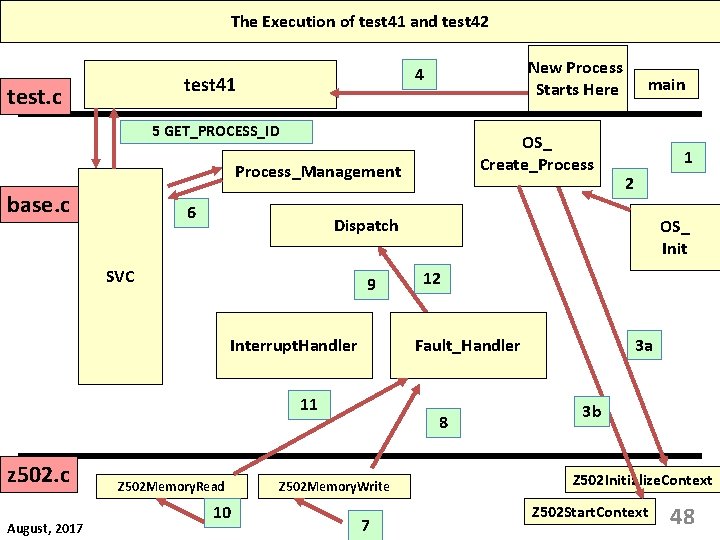
The Execution of test 41 and test 42 test 41 test. c New Process Starts Here 4 5 GET_PROCESS_ID OS_ Create_Process_Management base. c 6 9 Interrupt. Handler 2 Z 502 Memory. Read 10 OS_ Init 12 3 a Fault_Handler 11 August, 2017 1 Dispatch SVC z 502. c main 8 Z 502 Memory. Write 7 3 b Z 502 Initialize. Context Z 502 Start. Context 48
The Execution of test 41 and test 42 1 2 3 4 5 The program starts in main(), and passes control to os. Init figures out what test you want to run. It passes the identifier for that test to os_create_process. We come to os_create_process, a routine YOU write. Here we ask the hardware for a context(Z 502 Initialize. Context) , create the PCB, and then call Z 502 Start. Context causes control to be passed to a new thread which transfers control to test 21. The test may do system calls as we saw in test 2 – test 15. The example we see here is GET_PROCESS_ID. 6 svc hands control of the system call to the appropriate handler. 7 The test does a Memory Request (either read or write). That request ends up in the hardware. If the hardware can handle it, you’re done. If hardware can NOT handle the call, then a page fault is generated. You do the work in your fault handler to make the memory access successful. After completing the page_fault work, always call your dispatcher to schedule the same or a new process. NEVER return from the fault handler. Reads and writes are handled the same way. 8 9 10 49