
The Next Revolution in IT The Big Switch
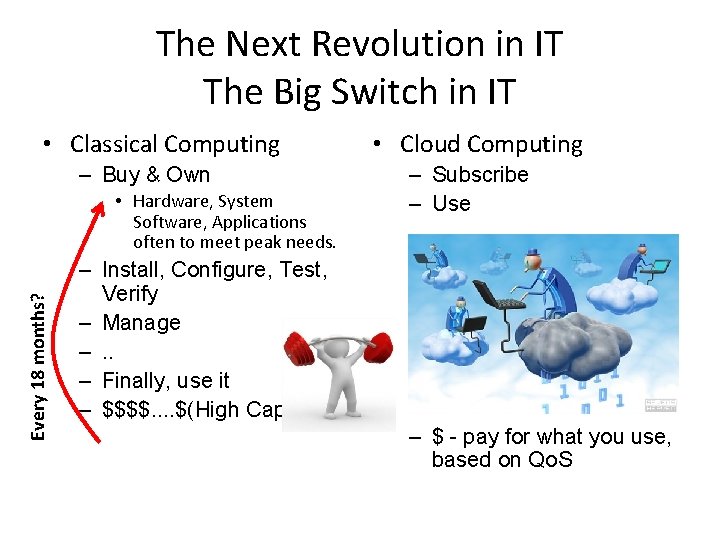
The Next Revolution in IT The Big Switch in IT • Classical Computing – Buy & Own Every 18 months? • Hardware, System Software, Applications often to meet peak needs. • Cloud Computing – Subscribe – Use – Install, Configure, Test, Verify – Manage –. . – Finally, use it – $$$$. . $(High Cap. Ex) – $ - pay for what you use, based on Qo. S
Overview • Computing is being transformed into a model consisting of services that are commoditized and delivered in a manner similar to utilities such as water, electricity, gas, and telephony. • Several computing paradigms, such as grid computing, have promised to deliver this utility computing vision. • Cloud computing is the most recent emerging paradigm promising to turn the vision of “computing utilities” into a reality. • Resources are made available through the Internet and offered on a pay-per-use basis from cloud computing vendors.
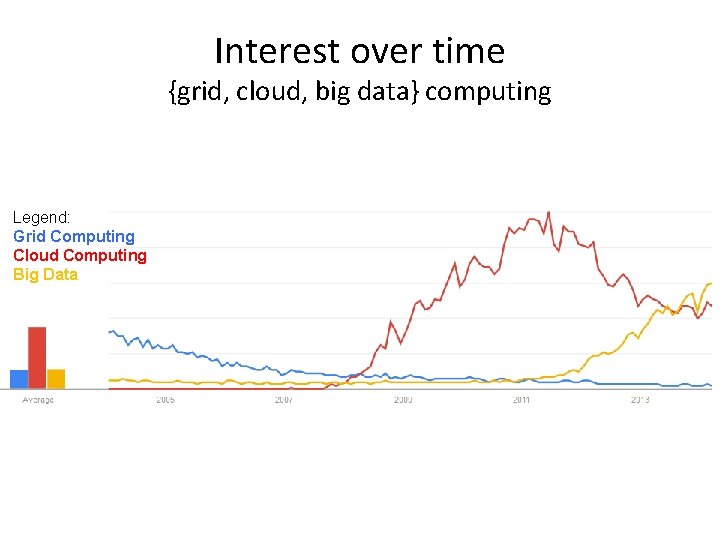
Interest over time {grid, cloud, big data} computing Legend: Grid Computing Cloud Computing Big Data
“Computer Utilities” Vision: Implications of the Internet • 1969 – Leonard Kleinrock, Advanced Research Projects Agency Network (ARPANET) project – “As of now, computer networks are still in their infancy, but as they grow up and become sophisticated, we will probably see the spread of “Computer Utilities”, which, like present electric and telephone utilities, will service individual homes and offices across the country”. – During the last 44 years, several advances have taken place in both “computing” and “communications” areas that are turning the vision of “Computer Utilities” in to a reality.

• computing services will be readily available on demand, just as other utility services such as water, electricity, telephone, and gas are available in today’s society. • In addition, consumers no longer need to invest heavily or encounter difficulties in building and maintaining complex IT infrastructure. • users access services based on their requirements without regard to where the services are hosted. • Cloud computing allows renting infrastructure, runtime environments, and services on a pay- per-use basis. • Chief information and technology officers of large enterprises see opportunities for scaling their infrastructure on demand sizing it according to their business needs. • End users leveraging cloud computing services can access their documents and data anytime, anywhere, and from any device connected to the Internet.
Another view of Cloud Compting don’t care where my servers are, who manages them, where my documents are stored, or where my applications are hosted. I just want them always available and access them from any device connected through Internet. And I am willing to pay for this service for as a long as I need it. ” • Web 2. 0 technologies play a central role in making cloud computing an attractive opportunity for building computing “I systems. • Service orientation allows cloud computing to deliver its capabilities. • virtualization confers on cloud computing the necessary degree of customization, control, and flexibility for building production and enterprise systems.
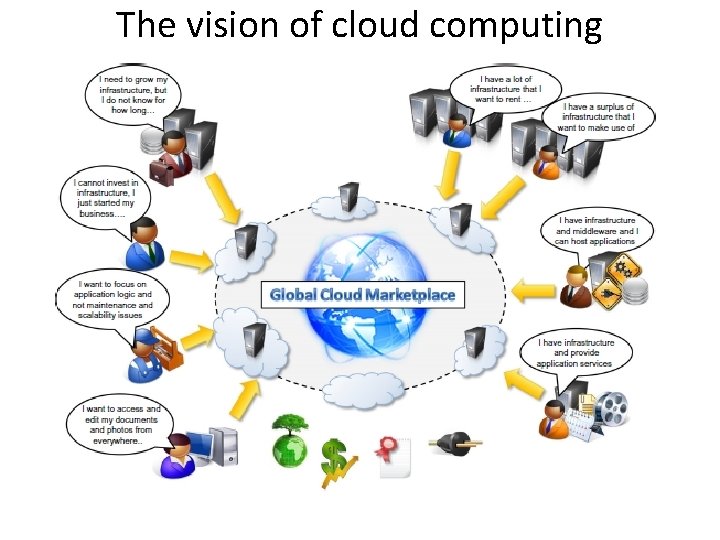
The vision of cloud computing

Defining a cloud Definition given by Armbrust: “Cloud computing refers to both the applications delivered as services over the Internet and the hardware and system software in the datacenters that provide those services. “ It introduces the concept of everything as a service, mostly referred as Xaa. S. U. S. National Institute of Standards and Technology (NIST): “Cloud computing is a model for enabling ubiquitous, convenient, on-demand network access to a shared pool of configurable computing resources (e. g. , networks, servers, storage, applications, and services) that can be rapidly provisioned and released with minimal management effort or service provider interaction. ” According to Reese , we can define three criteria: -The service is accessible via a Web browser (nonproprietary) or a Web services application programming interface (API). -Zero capital expenditure is necessary to get started. - You pay only for what you use as you use it.
Defining a cloud Definition given by Buyya : “A cloud is a type of parallel and distributed system consisting of a collection of interconnected and virtualized computers that are dynamically provisioned and presented as one or more unified computing resources based on service-level agreements established through negotiation between the service provider and consumers. “
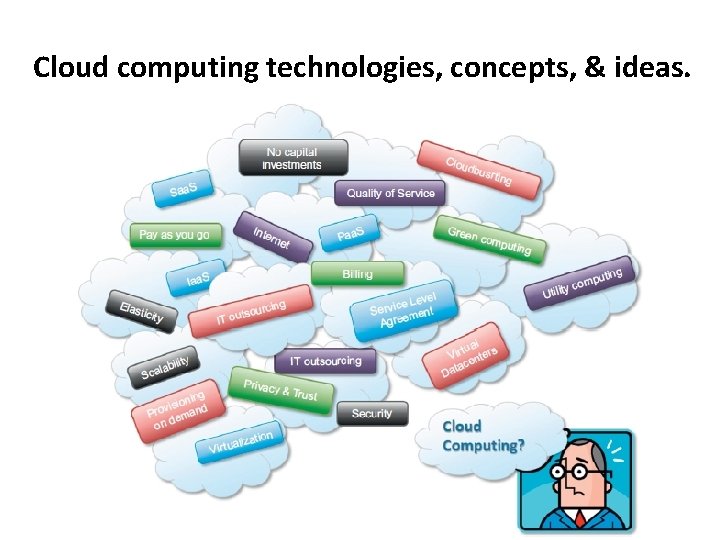
Cloud computing technologies, concepts, & ideas.
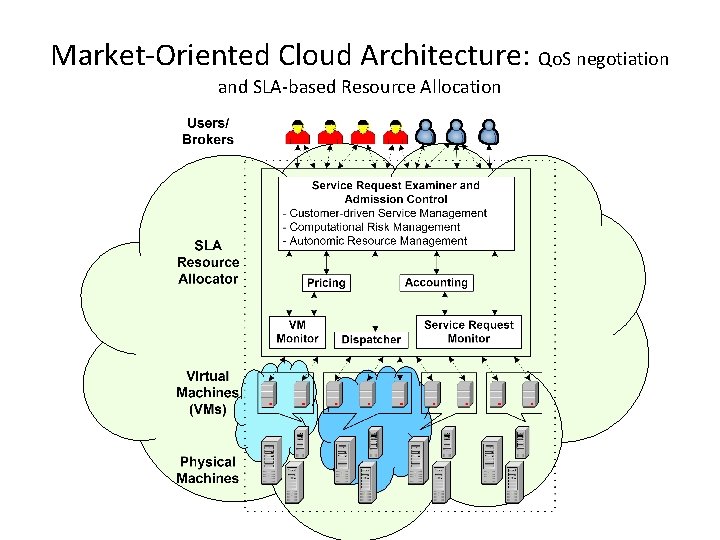
Market-Oriented Cloud Architecture: Qo. S negotiation and SLA-based Resource Allocation
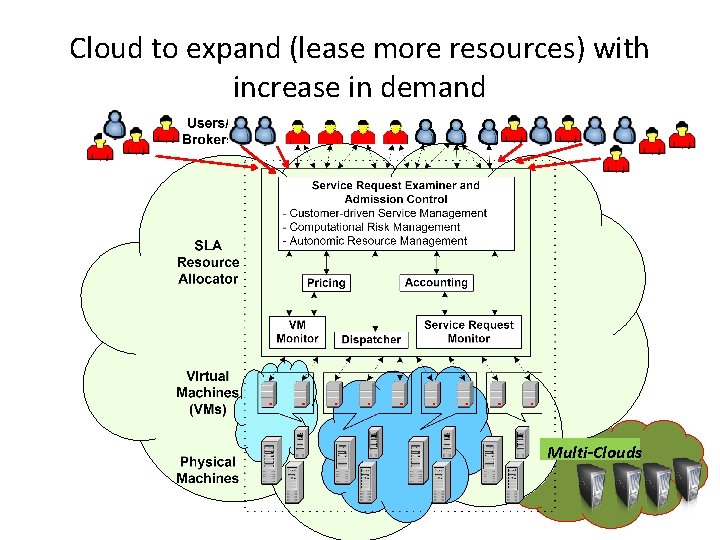
Cloud to expand (lease more resources) with increase in demand Multi-Clouds
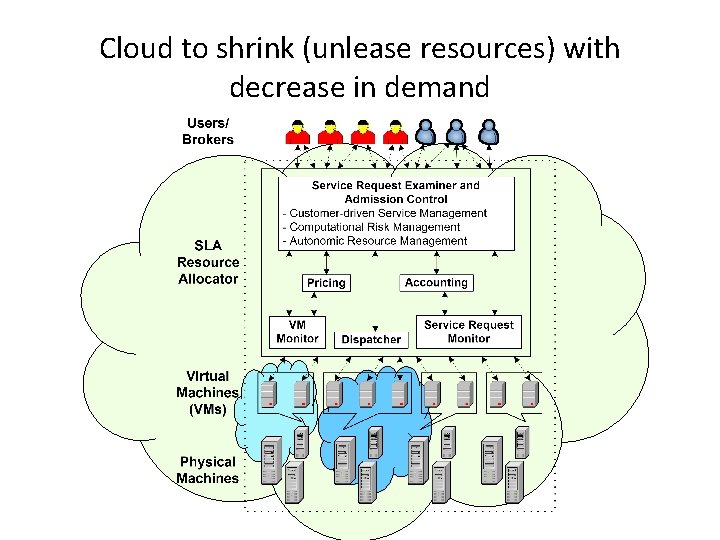
Cloud to shrink (unlease resources) with decrease in demand
A Closer Look-Practical examples • Large enterprises can off load some of their activities to cloud-based systems. Recently, the New York Times has converted its digital library of past editions into a Web-friendly format. • By renting Amazon EC 2 and S 3 Cloud resources, the Times performed this task in 36 hours
A Closer Look-Practical examples • Small enterprises and start-ups can afford to translate their ideas into business results more quickly, without excessive up-front costs. • Animoto is a company that creates videos out of images, music, and video fragments submitted by users. • Animoto does not own a single server and bases its computing infrastructure entirely on Amazon Web Services
A Closer Look-Practical examples • System developers can concentrate on the business logic rather than dealing with the complexity of infrastructure management and scalability. • Little Fluffy Toys is a company in London that has developed a widget providing users with information about nearby bicycle rental services. • They used Google App engine.
A Closer Look-Practical examples • End users can have their documents accessible from everywhere and any device. • Apple i. Cloud is a service that allows users to have their documents stored in the Cloud and access them from any device users connect to it.
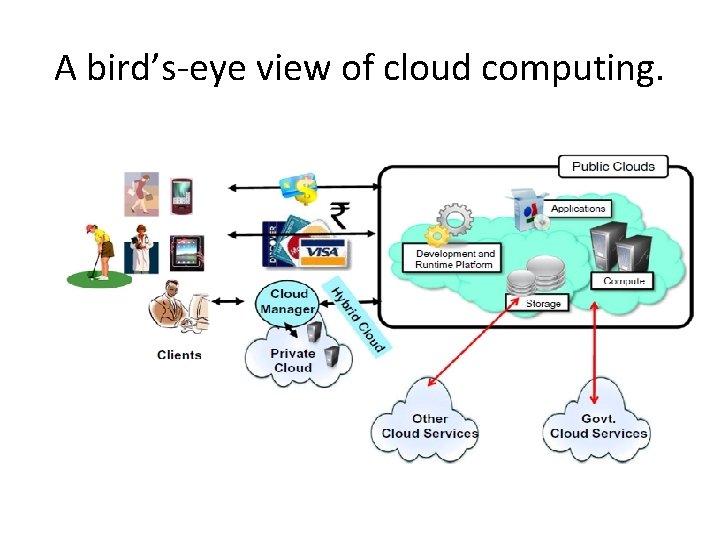
A bird’s-eye view of cloud computing.
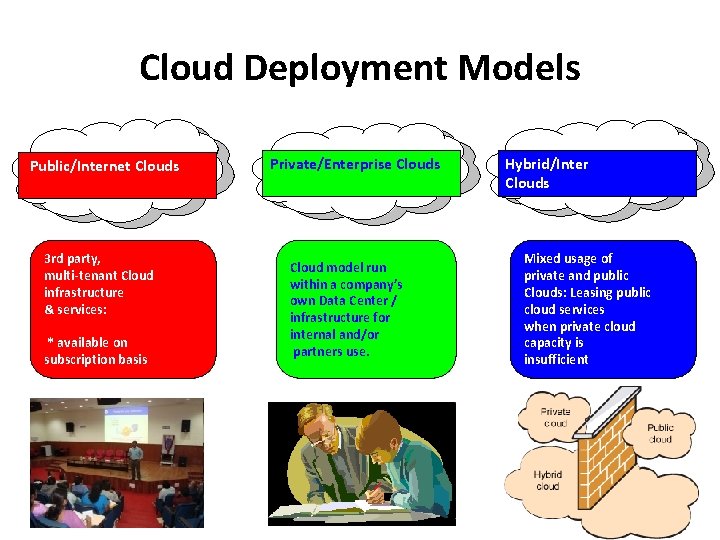
Cloud Deployment Models Public/Internet Clouds 3 rd party, multi-tenant Cloud infrastructure & services: * available on subscription basis Private/Enterprise Clouds Cloud model run within a company’s own Data Center / infrastructure for internal and/or partners use. Hybrid/Inter Clouds Mixed usage of private and public Clouds: Leasing public cloud services when private cloud capacity is insufficient
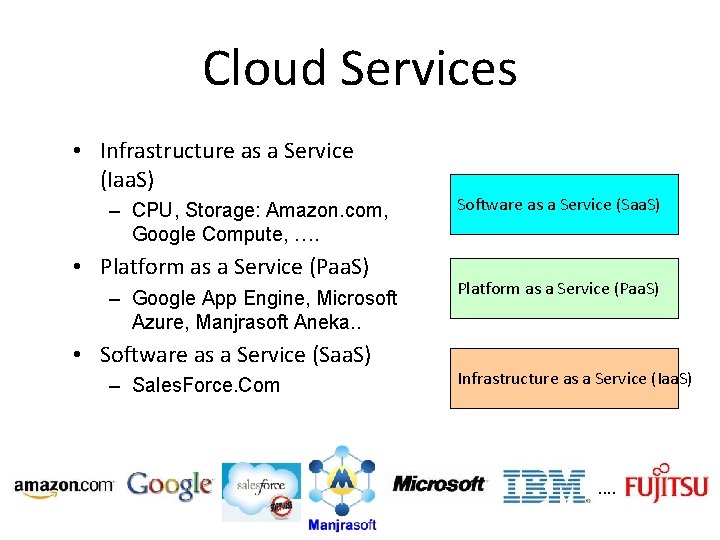
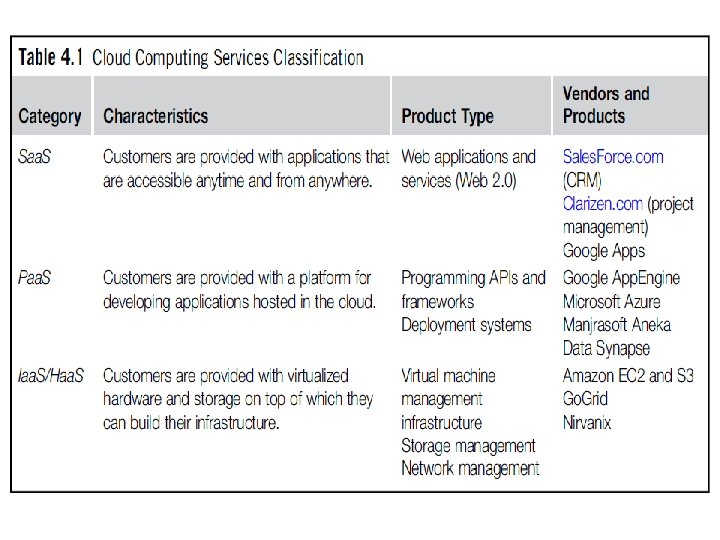
Cloud Services • Infrastructure as a Service (Iaa. S) – CPU, Storage: Amazon. com, Google Compute, …. • Platform as a Service (Paa. S) – Google App Engine, Microsoft Azure, Manjrasoft Aneka. . • Software as a Service (Saa. S) – Sales. Force. Com Software as a Service (Saa. S) Platform as a Service (Paa. S) Infrastructure as a Service (Iaa. S) . .
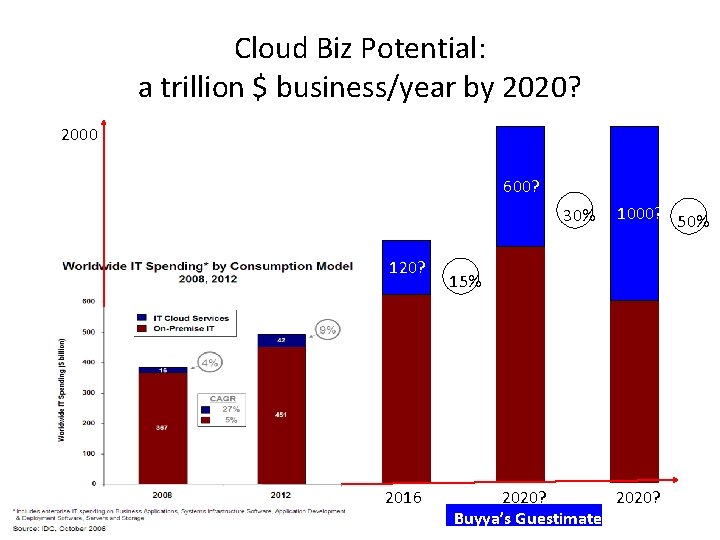
Cloud Biz Potential: a trillion $ business/year by 2020? 2000 600? 30% 120? 2016 1000? 50% 15% 2020? Buyya’s Guestimate!
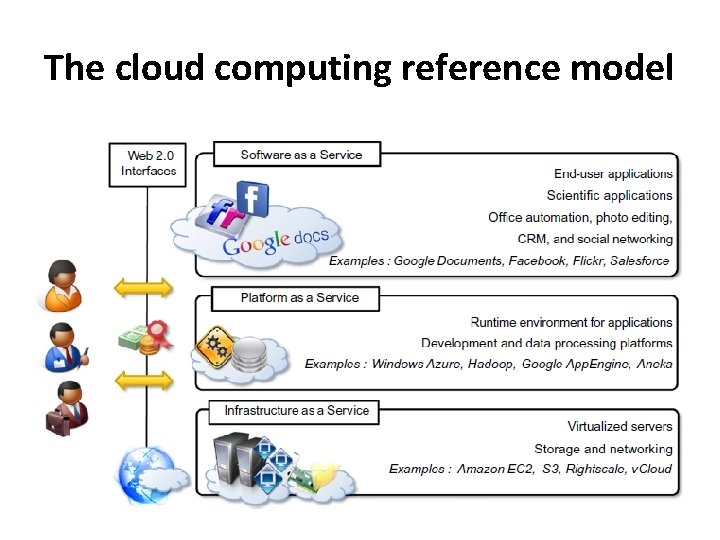
The cloud computing reference model
Characteristics and benefits • • No up-front commitments On-demand access Nice pricing Simplified application acceleration and scalability Efficient resource allocation Energy efficiency Seamless creation and use of third-party services
Challenges ahead • Dynamic provisioning of cloud computing services and resources arises. For example, in the Infrastructure-asa-Service domain, how many resources need to be provisioned, and for how long should they be used, in order to maximize the benefit? • Security in terms of confidentiality, secrecy, and protection of data in a cloud environment is another important challenge. • Different legislation about privacy in different countries may potentially create disputes as to the rights that third parties (including government agencies) have to your data.
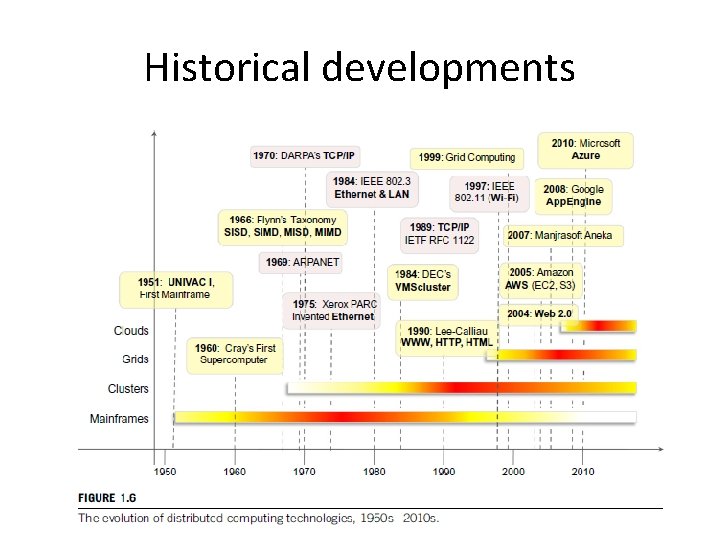
Historical developments
Virtualization • Virtualization is a core technology for cloud computing. • Allowing the abstraction of some of the fundamental elements for computing, such as hard- ware, runtime environments, storage, and networking. • Hardware virtualization: allows the coexistence of different software stacks on top of the same hardware. • Cloud computing solutions to deliver virtual servers on demand, such as Amazon EC 2, Right. Scale, VMware v. Cloud. • Virtualization technologies are also used to replicate runtime environments for programs. • Applications in the case of process virtual machines (which include the foundation of technologies such as Java or. NET), instead of being executed by the operating system, are run by a specific program called a virtual machine.
Web 2. 0 • the Web encompasses a set of technologies and services that facilitate interactive information sharing, collaboration, user-centered design, and application composition. • Transforming the Web into a rich platform for application development and is known as Web 2. 0. • Web 2. 0 brings interactivity and flexibility into Webpages • XML, Asynchronous Java Script and XML(AJAX), Web Services. • Examples of Web 2. 0 applications are Google. Documents, Google. Maps, Flickr, Facebook, Twitter, You. Tube, de. li. cious, Blogger, and Wikipedia. • rich Internet applications(RIAs) are fundamental for making cloud services accessible to the wider public.
Service-oriented computing • Service orientation is the core reference model for cloud computing systems. • Service-orientedcomputing(SOC) supports the development of rapid, lowcost, flexible, interoperable, and evolvable applications and systems. • A service is supposed to be loosely coupled, reusable, programming language independent, and location transparent. • Services are composed and aggregated into a service-oriented architecture(SOA)
• Service-oriented computing introduces and diffuses two important concepts. • Quality of service (Qo. S) identifies a set of functional and nonfunctional attributes that can be used to evaluate the behavior of a service from different perspectives • These could be performance metrics such as response time, or security attributes, transactional integrity, reliability, scalability, and availability. • Qo. S requirements are established between the client and the provider via an SLA • Software-as-a-Service: which deliver software servicesbased solutions across the wide area network from a central datacenter and make them available on a subscription or rental basis.
Utility-oriented computing • services in which resources such as storage, compute power, applications, and infrastructure are packaged and offered on a pay-per-use basis. • Building cloud computing environments : The creation of cloud computing environments encompasses both the development of applications and systems that leverage cloud computing solutions and the creation of frameworks, platforms, and infrastructures delivering cloud computing services.
Application development • Web applications. • Web 2. 0 technologies: rich and complex applications, including enterprise applications • resource-intensive applications: These can be either data- intensive or compute-intensive applications. • For example, scientific applications can require huge computing capacity to perform large-scale experiments.
Infrastructure and system development • Distributed computing, virtualization, service orientation, and Web 2. 0 form the core technologies enabling the provisioning of cloud services from anywhere on the globe.
Computing platforms and technologies • Amazon web services (AWS) : AWS offers comprehensive cloud Iaa. S services ranging from virtual compute, storage, and networking to complete computing stacks. • AWS is mostly known for its compute and storage-on- demand services, namely Elastic Compute Cloud(EC 2) and Simple Storage Service(S 3). • In EC 2 it is possible to choose from a large variety of virtual hardware configurations, including GPU and cluster instances. • S 3 is organized into buckets; these are containers of objects that are stored in binary form. • Users can store objects of any size, from simple files to entire disk images, and have them accessible from everywhere.
Google App. Engine • Google App. Engine is a scalable runtime environment mostly devoted to executing Web applications. • services include in-memory caching, scalable data store, job queues, messaging. • software development kit (SDK) • The languages currently supported are Python, Java, Node. js, C#, PHP and Go.
Microsoft Azure • Microsoft Azure is a cloud operating system and a platform for developing applications in the cloud. • It provides a scalable runtime environment for Web applications and distributed applications in general. • Currently, there are three types of role: Web role, worker role, and virtual machine role.
Hadoop • Apache Hadoop is an open-source framework that is suited for processing large data sets on commodity hardware. • Hadoop is an implementation of Map. Reduce, an application programming model developed by Google, which provides two fundamental operations for dataprocessing: map and reduce. • Yahoo!, the sponsor of the Apache Hadoop project
force. com and Salesforce. com • Force. com is a cloud computing platform for developing social enterprise applications. • Sales. Force. com, a Software-as-a-Service solution for customer relationship management. • The platform provides complete support for developing applications, from the design of the data layout to the definition of business rules and workflows and the definition of the user interface.
Manjrasoft Aneka • Manjrasoft Aneka is a cloud application platform for rapid creation of scalable applications and their deployment on various types of clouds in a seamless and elastic manner. • It supports a collection of programming abstractions for developing applications and a distributed runtime environment that can be deployed on heterogeneous hardware (clusters, networked desktop computers, and cloud resources). • Developerscanchoosedifferentabstractionstodesigntheirap plication: tasks, distributed threads, and map-reduce. • Services manage most of the activities happening at runtime: scheduling, execution, accounting, billing, storage, and quality of service.
Virtualization • Virtualization is a large umbrella of technologies and concepts that are meant to provide an abstract environment—whether virtual hardware or an operating system—to run applications. • virtualization is often synonymous with hardware virtualization, which plays a fundamental role in efficiently delivering Infrastructure-as-a-Service (Iaa. S) solutions for cloud computing.
Why virtualization? • Increased performance and computing capacity: supercomputers can provide immense compute power that can accommodate the execution of hundreds or thousands of virtual machines. • Underutilized hardware and software resources. • Lack of space. • Greening initiatives. • Rise of administrative costs.
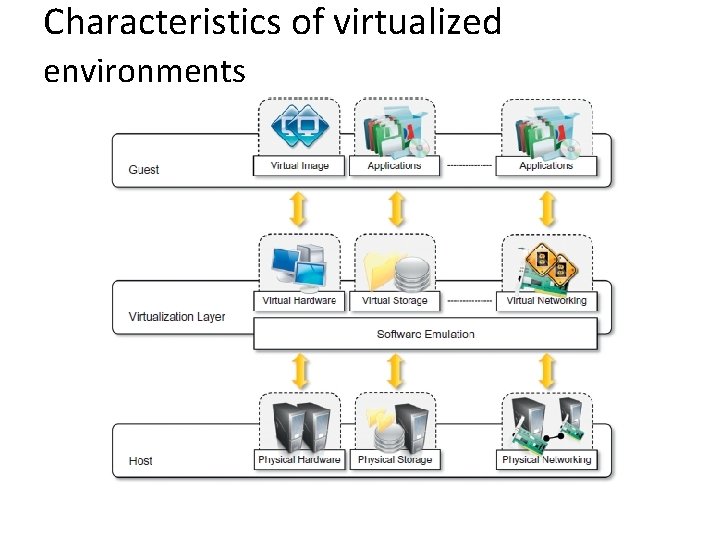
Characteristics of virtualized environments
• Increased security : preventing some harmful operations from being performed • Resources exposed by the host can then be hidden or simply protected from the guest. • sensitive information that is contained in the host can be naturally hidden without the need to install com- plex security policies. • Both the JVM and the. NET runtime provide extensive security policies for customiz- ing the execution environment of applications.
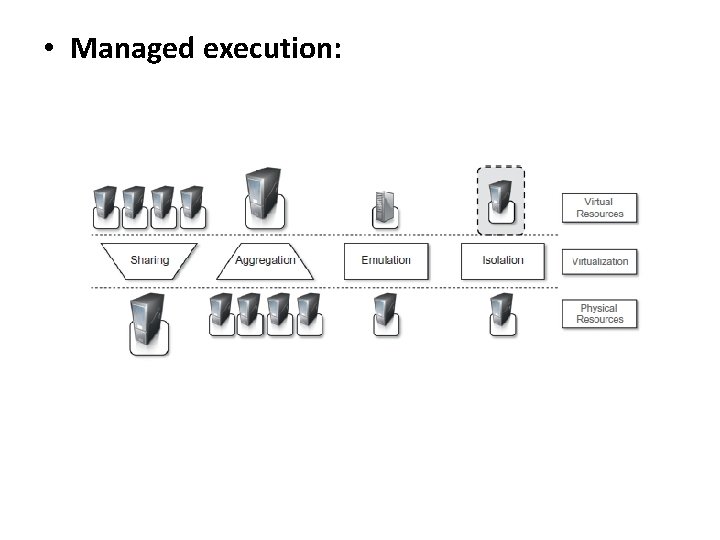
• Managed execution:
• Performance tuning : easier to control the performance of the guest by finely tuning the properties of the resources exposed through the virtual environment. • Portability: In the case of a hardware virtualization solution, the guest is packaged into a virtual image that, in most cases, can be safely moved and executed on top of different virtual machines. (JVM or the. NET runtime)
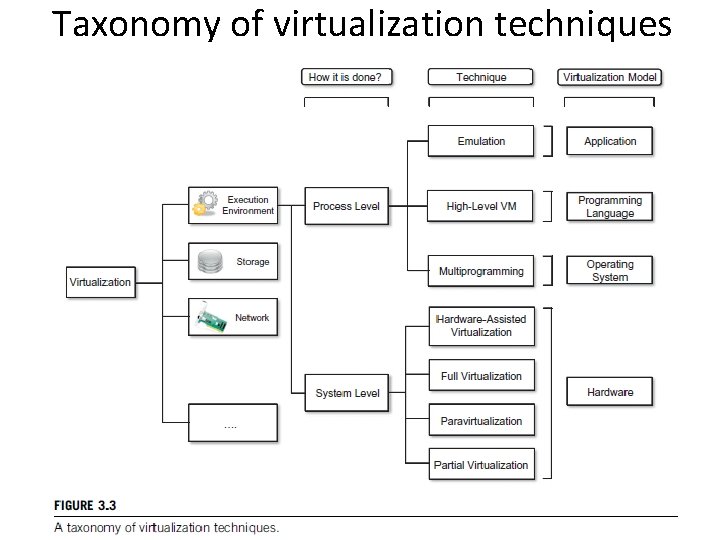
Taxonomy of virtualization techniques
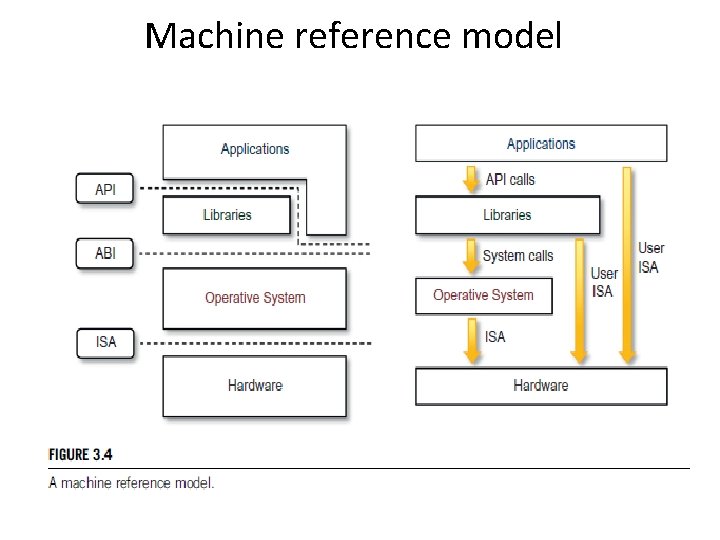
Machine reference model
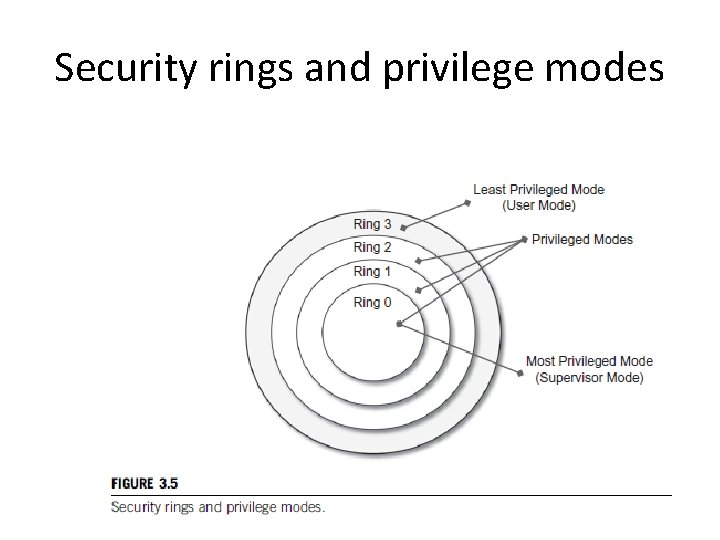
Security rings and privilege modes
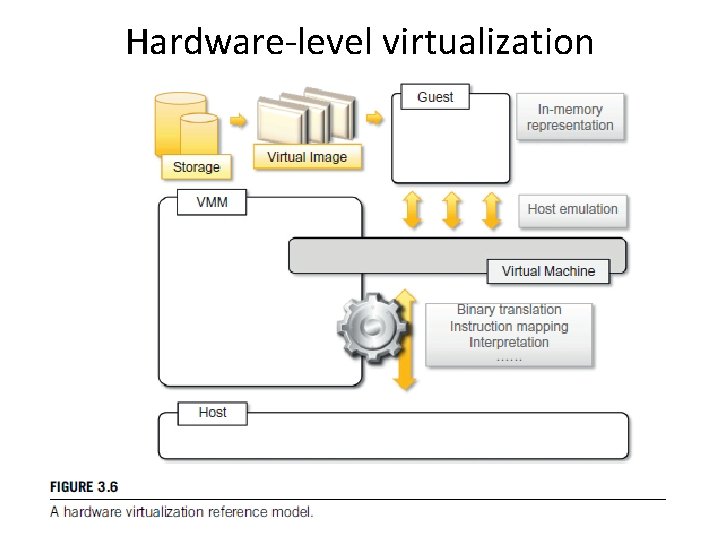
Hardware-level virtualization
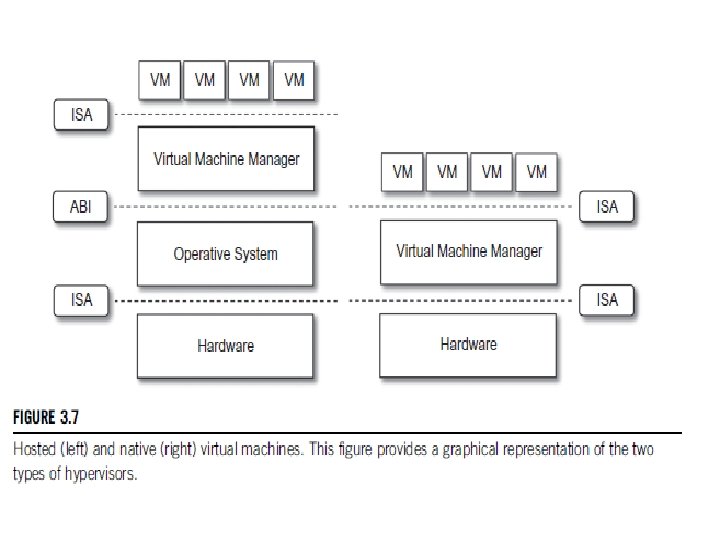
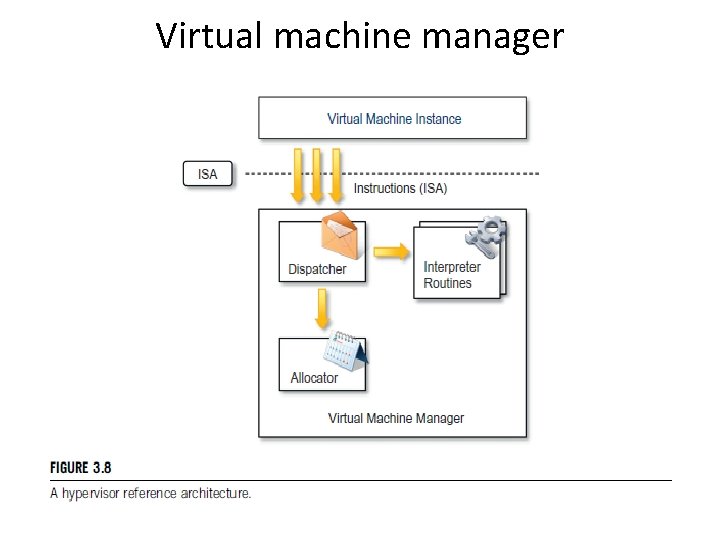
Hypervisors • A fundamental element of hardware virtualization is the hypervisor, or virtual machine manager (VMM). • The hypervisor is generally a program or a combination of software and hardware that allows the abstraction of the underlying physical hardware. • It recreates a hardware environment in which guest operating systems are installed. • There are two major types of hypervisor: Type I and Type II. • Type I hypervisors run directly on top of the hardware. • Therefore, they take the place of the operating systems and interact directly with the ISA interface exposed by the underlying hardware. • This type of hypervisor is also called a native virtual machine since it runs natively on hardware.
• Type II hypervisors require the support of an operating system to provide virtualization services. • This means that they are programs managed by the operating system, which interact with it through the ABI and emulate the ISA of virtual hardware for guest operating systems. • This type of hypervisor is also called a hosted virtual machine since it is hosted within an operating system.
Virtual machine manager
Three properties have to be satisfied: • Equivalence. A guest running under the control of a virtual machine manager should exhibit the same behavior as when it is executed directly on the physical host. • Resource control. The virtual machine manager should be in complete control of virtualized resources. • Efficiency. A statistically dominant fraction of the machine instructions should be executed without intervention from the virtual machine manager.
Hardware virtualization techniques • Hardware-assisted virtualization: – hardware provides architectural support for building a virtual machine manager able to run a guest operating system in complete isolation. – This technique was originally introduced in the IBM System/370. – E. g: x 86 -64 bit architecture introduced with Intel. VT , AMD V • Full virtualization: – Full virtualization refers to the ability to run a program, most likely an operating system, directly on top of a virtual machine and without any modification, as though it were run on the raw hardware. – The advantage of full virtualization is complete isolation, which leads to enhanced security, ease of emulation of different architectures. • Paravirtualization: – transparent virtualization solution that allows implementing thin virtual machine managers. – E. g: VMWare, TRANGO, Wind. River, Xtratu. M • Partial virtualization: Partial virtualization provides a partial emulation of the underlying hardware, thus not allowing the complete execution of the guest operating system in complete isolation.
Operating system-level virtualization • Operating system-level virtualization offers the opportunity to create different and separated execution environments for applications that are managed concurrently. • there is no virtual machine manager or hypervisor, and the virtualization is done within a single operating system, where the OS kernel allows for multiple isolated user space instances. • The kernel is also responsible for sharing the system resources among instances. • E. g: Free. BSD Jails, IBM Logical Partition (LPAR), Solaris. Zones and Containers, Parallels Virtuozzo Containers, Open. VZ, i. Core Virtual Accounts, Free Virtual Private Server (Free. VPS).
Programming language-level virtualization • Programming language-level virtualization is mostly used to achieve ease of deployment of applications, managed execution, and portability across different platforms and operating systems. • It consists of a virtual machine executing the byte code of a program, which is the result of the compilation process. • At runtime, the byte code can be either interpreted or compiled on the fly against the underlying hardware instruction set. • E. g: Java, Python, Groovy, Ruby, . NET Framework
Application-level virtualization • Application-level virtualization is a technique allowing applications to be run in runtime environments that do not natively support all the features required by such applications. • applications are not installed in the expected runtime environment but are run as though they were. • Such emulation is performed by a thin layer—a program or an operating system component that is in charge of executing the application. • Interpretation. In this technique every source instruction is interpreted by an emulator for executing native ISA instructions, leading to poor performance. • Binary translation. In this technique every source instruction is converted to native instructions with equivalent functions. • E. g: Application virtualization : Wine
Storage virtualization • Storage virtualization is a system administration practice that allows decoupling the physical organization of the hardware from its logical representation. • Using this technique, users do not have to be worried about the specific location of their data, which can be identified using a logical path. • E. g: storage area networks(SANs): use a network -accessible device through a large band width connection to provide storage facilities.
Network virtualization • Network virtualization combines hardware appliances and specific software for the creation and management of a virtual network. • Network virtualization can aggregate different physical networks into a single logical network(external network virtualization) • Provide network-like functionality to an operating system partition(internal network virtualization). • The result of external network virtualization is generally a virtual LAN(VLAN). • Internal network virtualization is generally applied together with hardware and operating system-level virtualization. • The guest can share the same net- work interface of the host and use Network Address Translation (NAT) to access the network.
Desktop virtualization • Desktop virtualization abstracts the desktop environment available on a personal computer inorder to provide access to it using a client/server approach. • Sun Virtual Desktop Infrastructure (VDI), Parallels Virtual Desktop Infrastructure (VDI), Citrix Xen Desktop. .
Virtualization and cloud computing • Virtualization in cloud computing allows the customization, security, isolation, and manageability that are fundamental for delivering IT services on demand. • Virtualization technologies are primarily used to offer configurable computing environments and storage. • Hardware (Infrastructure-as-a-Service) and programming language(Platform-as-a-Service) virtualization are the techniques adopted in cloud computing systems.
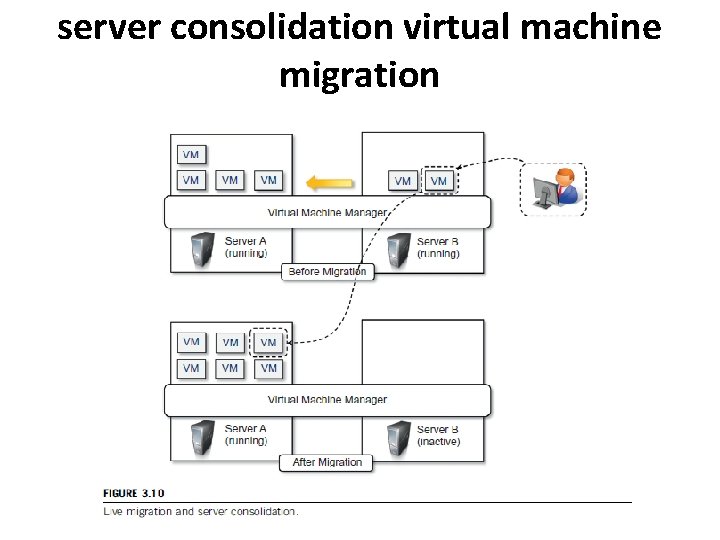
server consolidation virtual machine migration
Pros and cons of virtualization • Pros • Managed execution and isolation: building secure and controllable computing environments. • Portability: • more efficient use of resources.
Cons • Performance degradation: Since virtualization interposes an abstraction layer between the guest and the host, the guest can experience increased latencies. • Inefficiency and degraded user experience • Security holes and new threats
Xen: paravirtualization • Xen is an open-source initiative implementing a virtualization platform based on paravirtualization. • Xen-based technology is used for either desktop virtualization or server virtualization. • Xen Cloud Platform (XCP) • Xen Hypervisor, which constitutes the core technology of Xen.
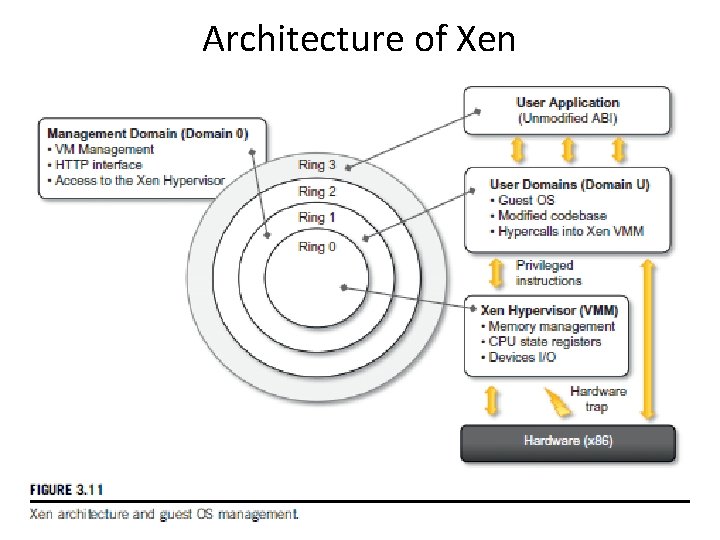
Architecture of Xen
VMware: full virtualization • VMware’s technology is based on the concept of full virtualization, where the underlying hardware is replicated and made available to the guest operating system, which runs unaware of such abstraction layers and does not need to be modified. • VMware implements full virtualization either in the desktop environment, by means of Type II hypervisors, or in the server environment, by means of Type I hypervisors.
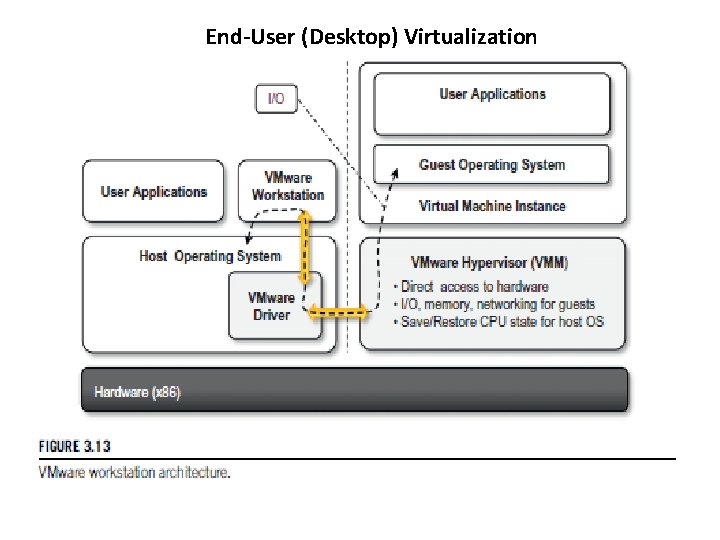
End-User (Desktop) Virtualization
• VMware Player is a reduced version of VMware Workstation that allows creating and playing virtual machines in a Windows or Linux operating environment. • VMware ACE, a similar product to VMware Workstation, creates policy-wrapped virtual machines for deploying secure corporate virtual environments on end-user computers. • VMware Thin. App is a solution for application virtualization.
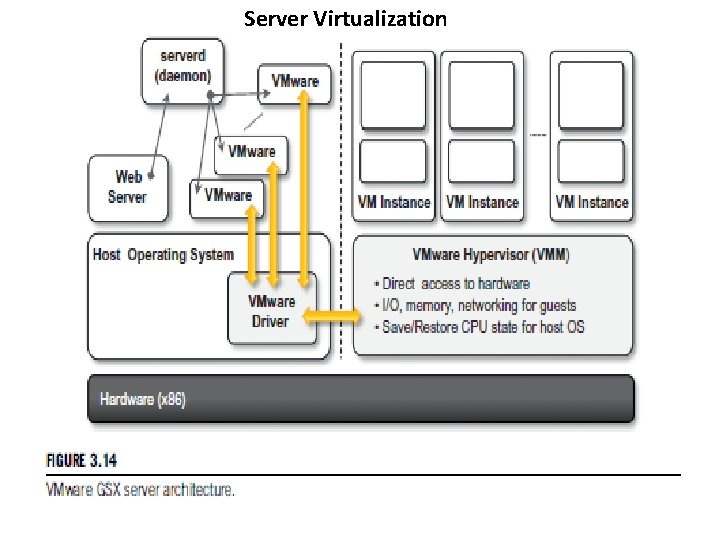
Server Virtualization
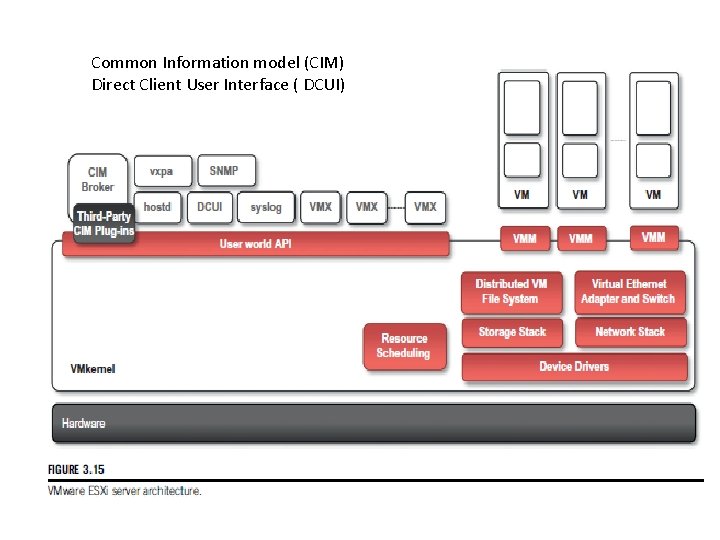
Common Information model (CIM) Direct Client User Interface ( DCUI)
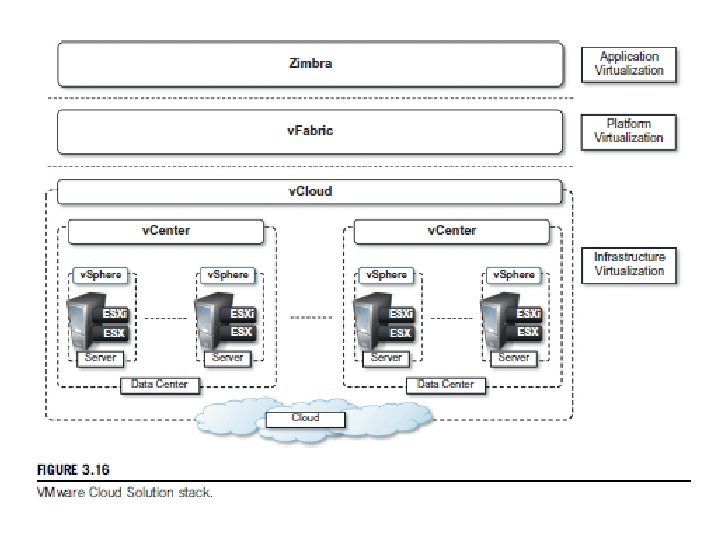
Microsoft Hyper-V • Hyper-V is an infrastructure virtualization solution developed by Microsoft for server virtualization. • Hyper-V is currently shipped as a component of Windows Server 2008 R 2. • it uses a hypervisor-based approach to hardware virtualization.
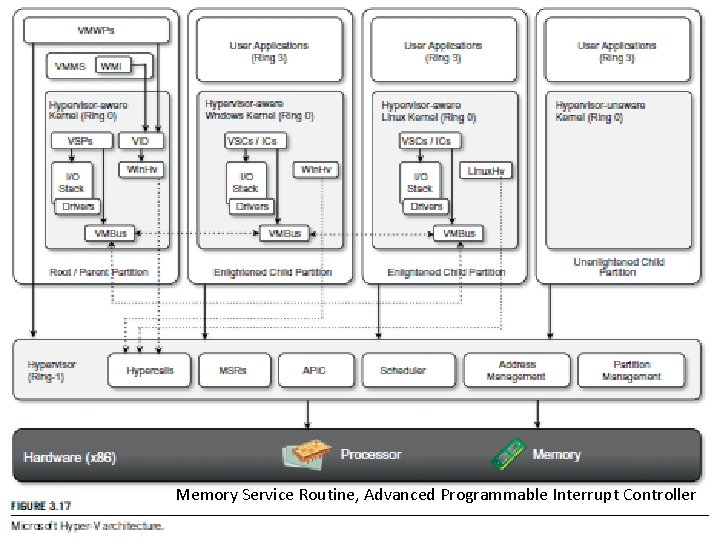
Memory Service Routine, Advanced Programmable Interrupt Controller
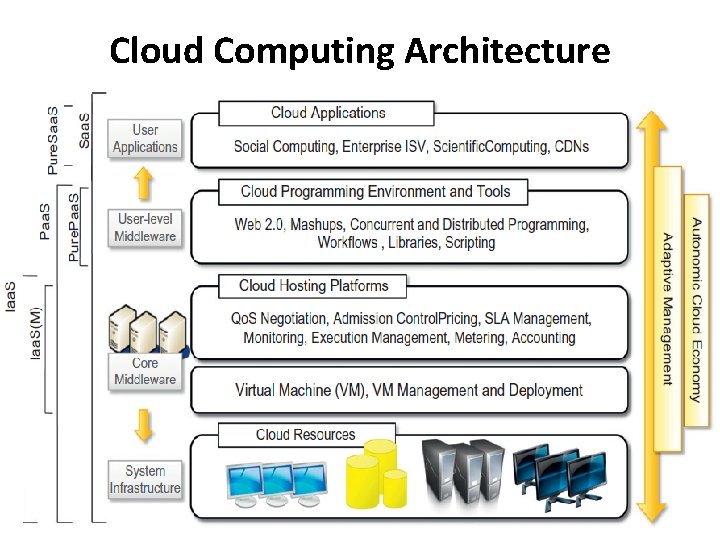
Cloud Computing Architecture
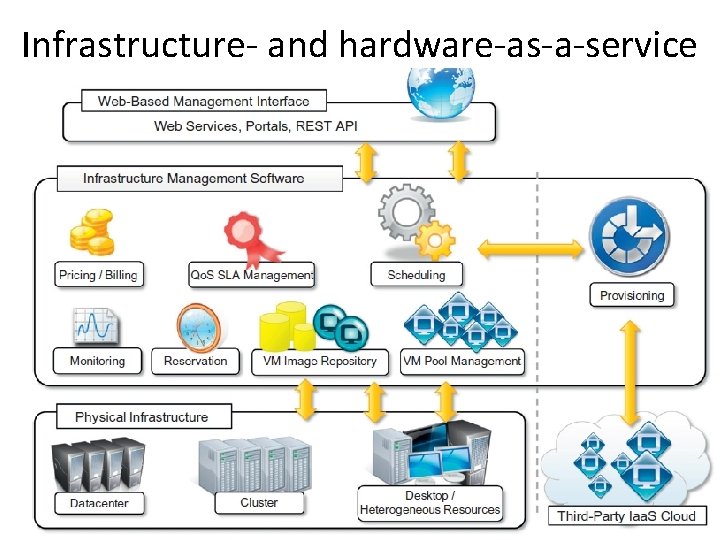
Infrastructure- and hardware-as-a-service
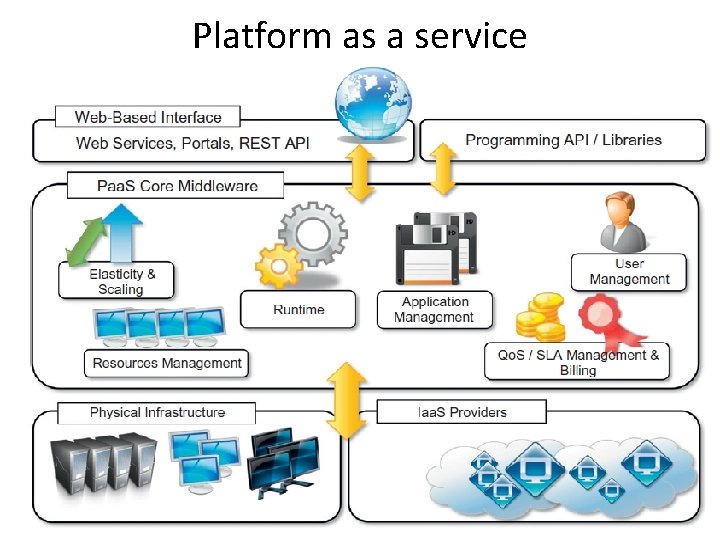
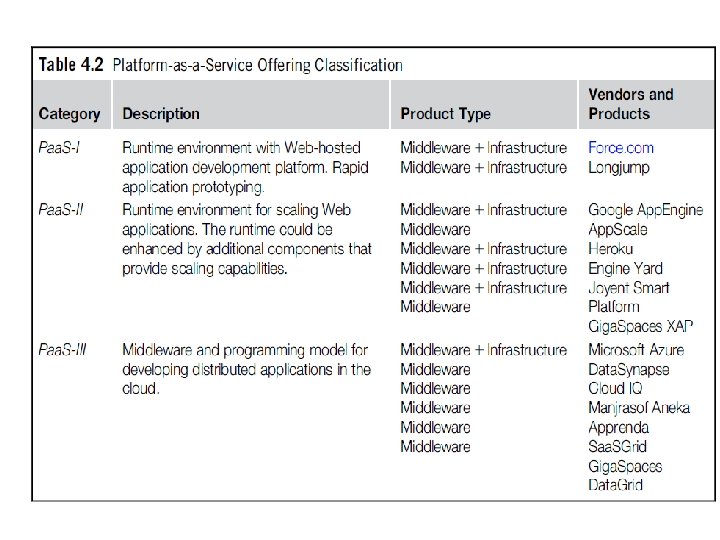
Platform as a service
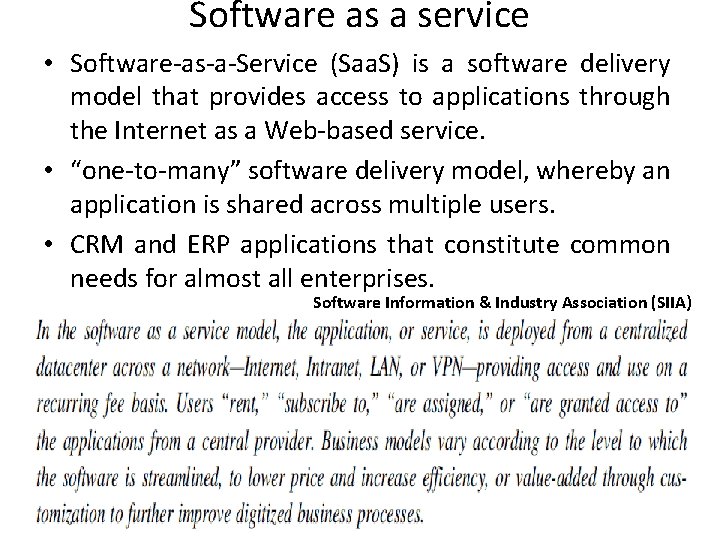
Software as a service • Software-as-a-Service (Saa. S) is a software delivery model that provides access to applications through the Internet as a Web-based service. • “one-to-many” software delivery model, whereby an application is shared across multiple users. • CRM and ERP applications that constitute common needs for almost all enterprises. Software Information & Industry Association (SIIA)
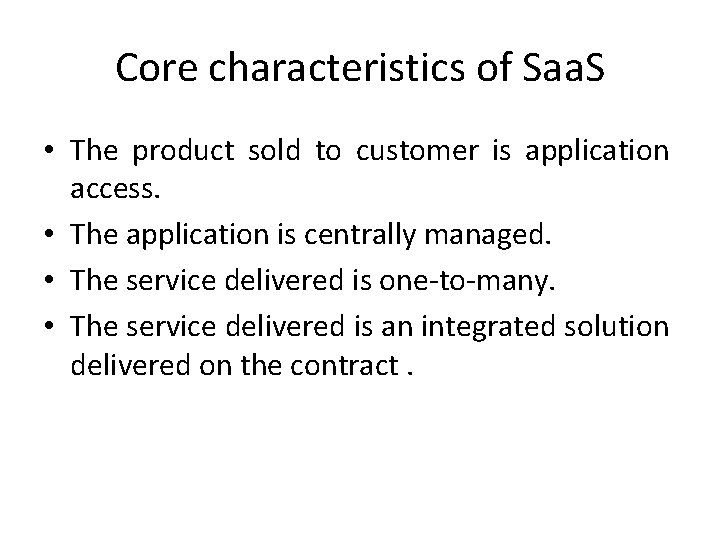
Core characteristics of Saa. S • The product sold to customer is application access. • The application is centrally managed. • The service delivered is one-to-many. • The service delivered is an integrated solution delivered on the contract.
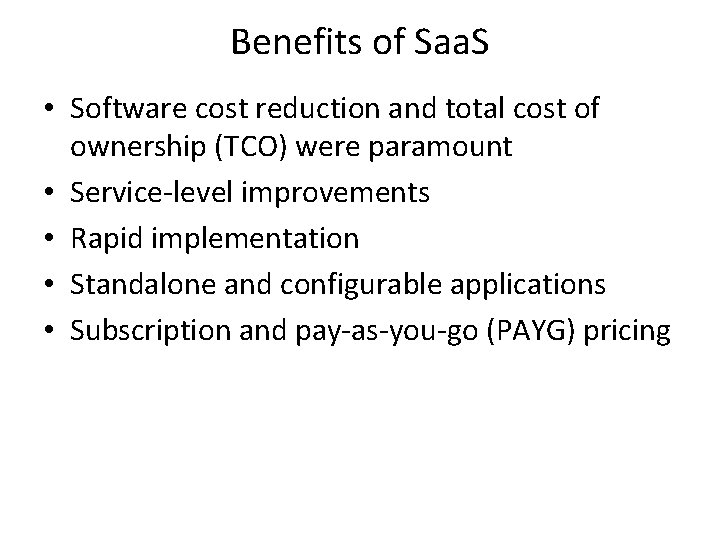
Benefits of Saa. S • Software cost reduction and total cost of ownership (TCO) were paramount • Service-level improvements • Rapid implementation • Standalone and configurable applications • Subscription and pay-as-you-go (PAYG) pricing
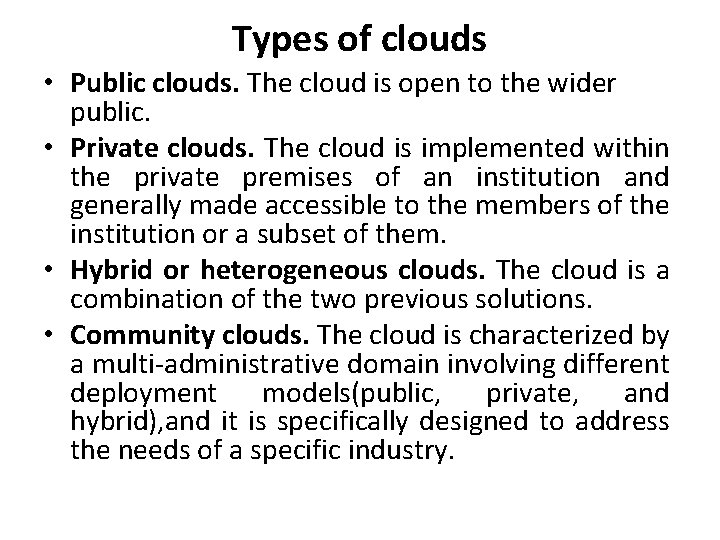
Types of clouds • Public clouds. The cloud is open to the wider public. • Private clouds. The cloud is implemented within the private premises of an institution and generally made accessible to the members of the institution or a subset of them. • Hybrid or heterogeneous clouds. The cloud is a combination of the two previous solutions. • Community clouds. The cloud is characterized by a multi-administrative domain involving different deployment models(public, private, and hybrid), and it is specifically designed to address the needs of a specific industry.
• Public cloud is multi-tenancy, serve a magnitude of user not single user • Public cloud can offer any kind of service: Infrastructure, platform, applications. • Amazon EC 2 is a public cloud that provides infrastructure as a service • Google App. Engine is a public cloud that provides an application development platform as a service; • Sales. Force. com is a public cloud that provides software as a service. • Public clouds can be composed of geographically dispersed datacenters to share the load of users and better serve them according to their locations. • Amazon Web Services has datacenters installed in the United States, Europe, Singapore, and Australia;
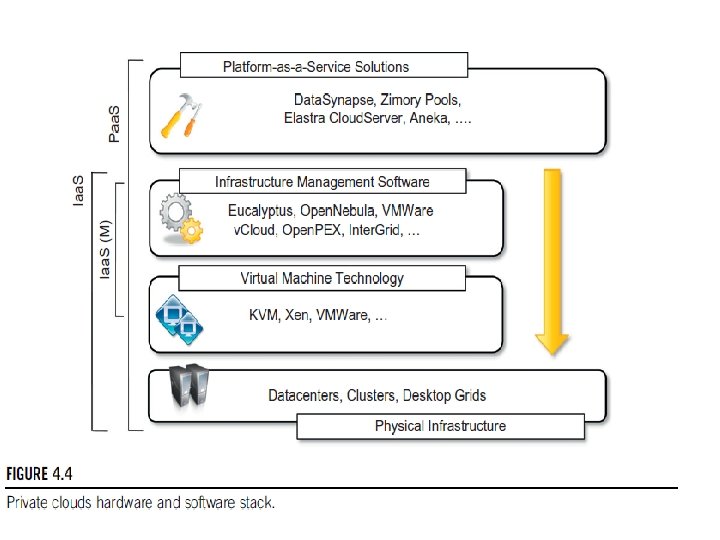
Advantages of using a private cloud computing infrastructure • Customer information protection • Infrastructure ensuring SLAs.
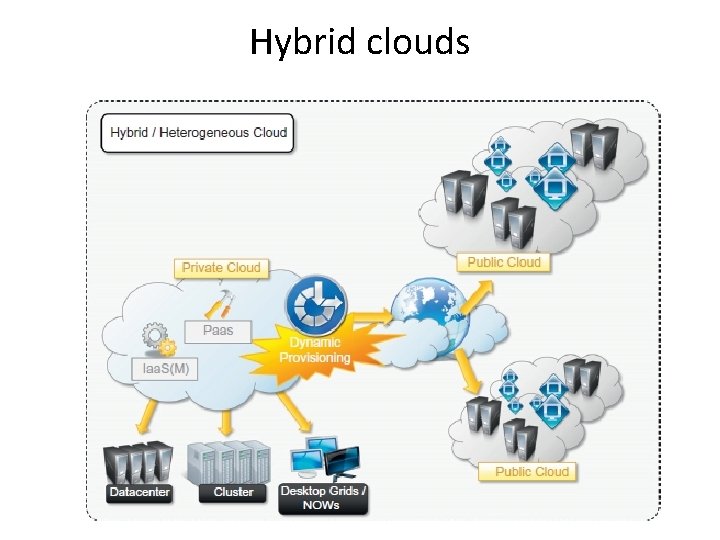
Hybrid clouds
Community clouds • Community clouds are distributed systems created by integrating the services of different clouds to address the specific needs of an industry, a community, or a business sector. • NIST: The infrastructure is shared by several organizations and supports a specific community that has shared concerns (e. g. , mission, security requirements, policy, and compliance considerations). It may be managed by the organizations or a third party and may exist on premise or off premise.
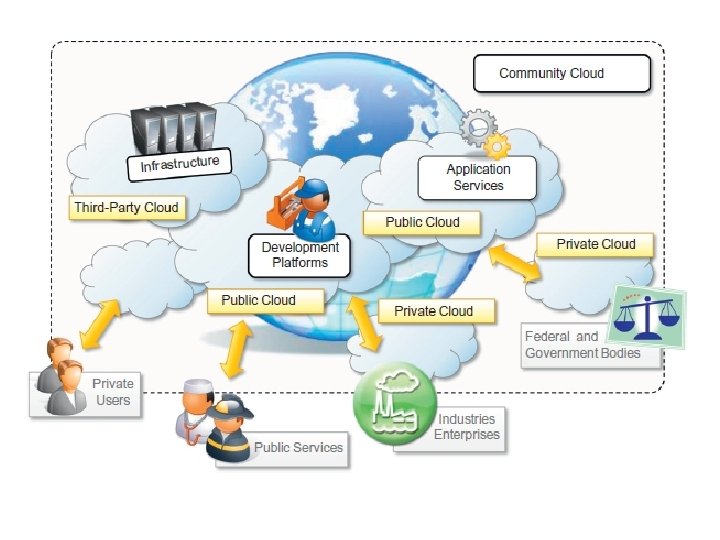
sectors for community clouds • • • Media industry. Health care industry. Energy and other core industries. Public sector. Scientific research.
Benefits of community clouds • Openness. Removing the dependency on cloud vendors. • Community • Graceful failures: no single point of failure. • Convenience and control • Environmental sustainability.
Economics of the cloud • cloud computing allows: – pay-as-you-go model – Reducing the capital costs associated to the IT infrastructure – Eliminating the depreciation or lifetime costs associated with IT capital assets – Replacing software licensing with subscriptions – Cutting the maintenance and administrative costs of IT resources
Pricing models introduced by cloud computing • Tiered pricing – Cloud services are offered in several tiers. – which offers a fixed computing specification and SLA at a specific price per unit of time. – E. g: Amazon for pricing the EC 2 service, which makes available different server configurations in terms of computing capacity (CPU type and speed, memory) that have different costs per hour. • Per-unit pricing – revenue for the cloud provider is determined in terms of units of specific services, such as data transfer and memory allocation. – E. g: Go. Grid, which makes customers pay according to RAM/hour units for the servers deployed in the Go. Grid cloud.
Pricing models introduced by cloud computing • Subscription-based pricing – This is the model used mostly by Saa. S providers – Users pay a periodic subscription fee for use of the software or the specific component services that are integrated in their applications.

- Slides: 95