
The Network Layer in the Internet The Internet

- Slides: 70
The Network Layer in the Internet • The Internet can be viewed as a collection of subnetworks or Autonomous Systems (AS). • IP (Internet Protocol) hosts the whole Internet together. • Communication in the Internet works as follows: – The transport layer takes data streams and breaks them up into datagrams. – Each datagram is transmitted through the Internet. – When all the pieces finally get to the destination machine, they are reassembled by the network layer, which inserts it into the receiving process’ input stream.
IP Addresses • IP addresses are the most common logical addresses. (Everyone on the Internet has one. ) • 32 - bit numbers (IP version 4) • 32 - bits yields 232 unique numbers • 232 = 4, 294, 967, 296 – there are over 4 billion possible IPv 4 addresses – but many are “wasted” due to the allocation scheme
IPv 6: The Next Generation The newest version of IP (version 6, or IPng) uses 128 bits, yielding 2128 unique combinations That’s over 340, 000, 000, 000, 000 possible addresses! • IPv 6 is slowly be integrated in the existing Internet. • IPv 4’s 32 bits continues to be the dominant form of IP addressing.
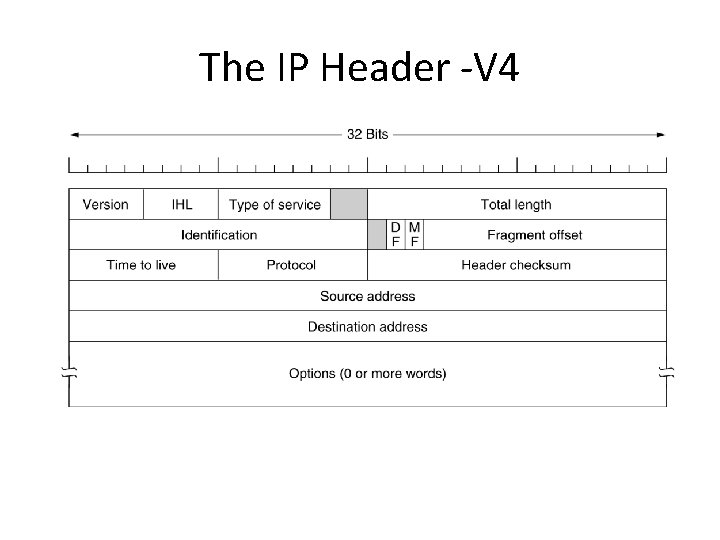
The IP Header -V 4 The IPv 4 (Internet Protocol) header.
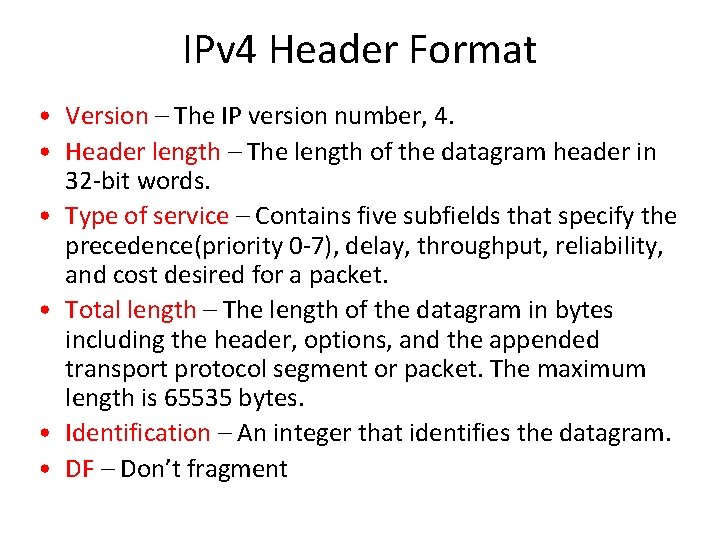
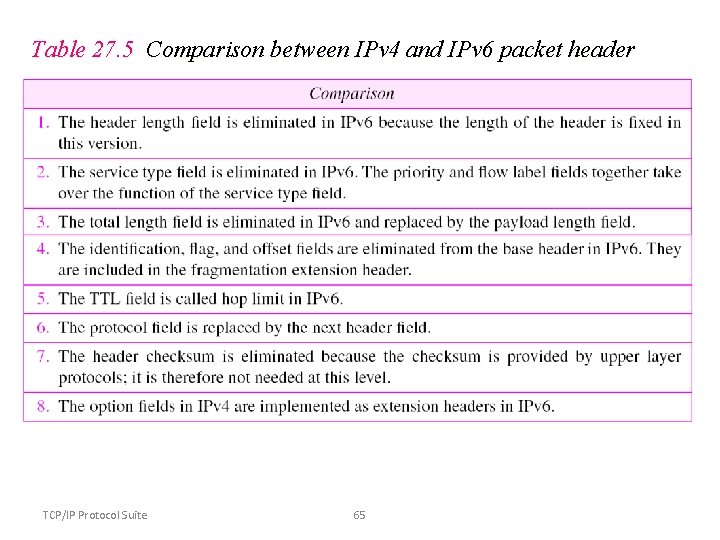
IPv 4 Header Format • Version – The IP version number, 4. • Header length – The length of the datagram header in 32 -bit words. • Type of service – Contains five subfields that specify the precedence(priority 0 -7), delay, throughput, reliability, and cost desired for a packet. • Total length – The length of the datagram in bytes including the header, options, and the appended transport protocol segment or packet. The maximum length is 65535 bytes. • Identification – An integer that identifies the datagram. • DF – Don’t fragment
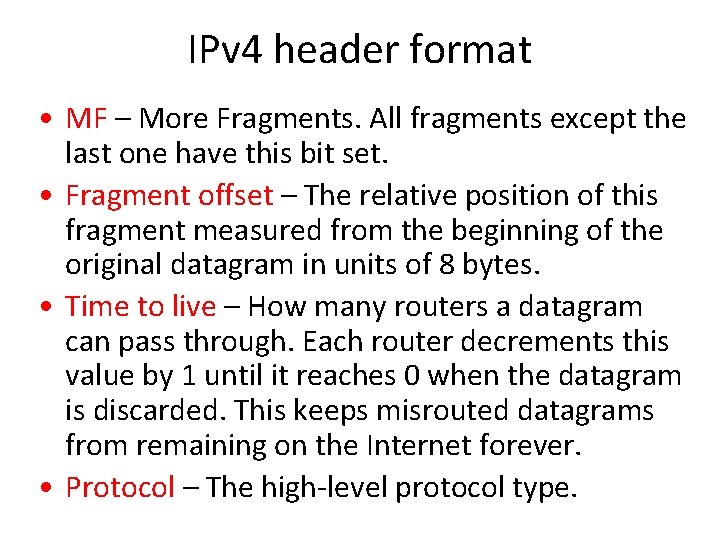
IPv 4 header format • MF – More Fragments. All fragments except the last one have this bit set. • Fragment offset – The relative position of this fragment measured from the beginning of the original datagram in units of 8 bytes. • Time to live – How many routers a datagram can pass through. Each router decrements this value by 1 until it reaches 0 when the datagram is discarded. This keeps misrouted datagrams from remaining on the Internet forever. • Protocol – The high-level protocol type.
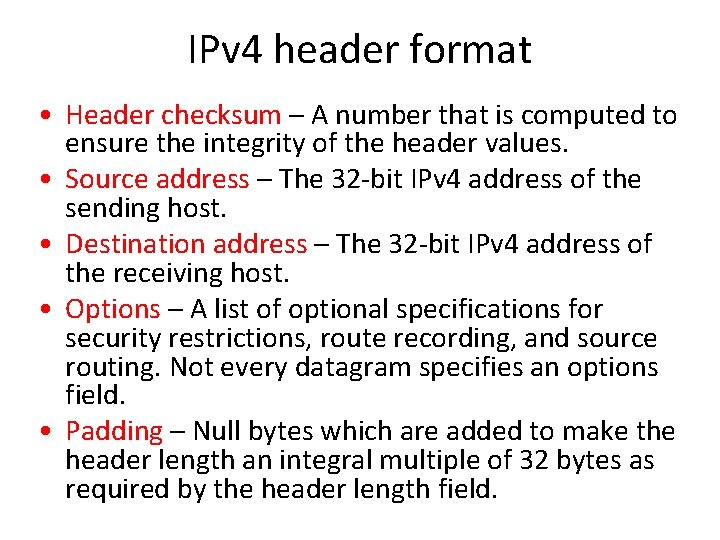
IPv 4 header format • Header checksum – A number that is computed to ensure the integrity of the header values. • Source address – The 32 -bit IPv 4 address of the sending host. • Destination address – The 32 -bit IPv 4 address of the receiving host. • Options – A list of optional specifications for security restrictions, route recording, and source routing. Not every datagram specifies an options field. • Padding – Null bytes which are added to make the header length an integral multiple of 32 bytes as required by the header length field.
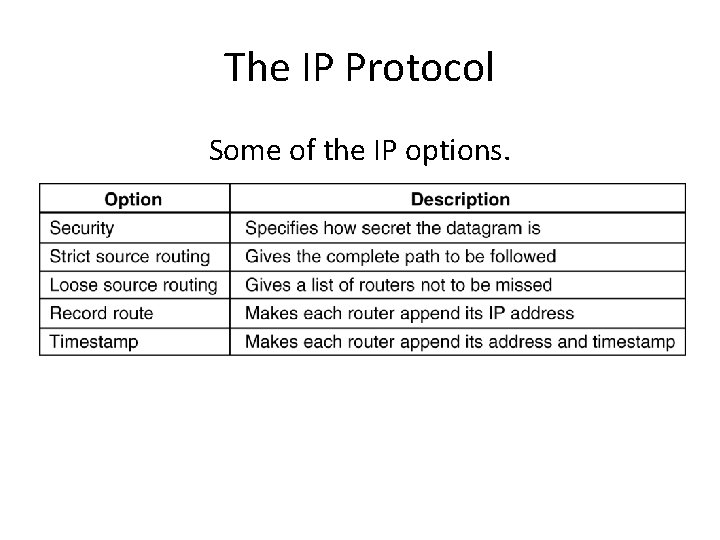
The IP Protocol Some of the IP options. 5 -54
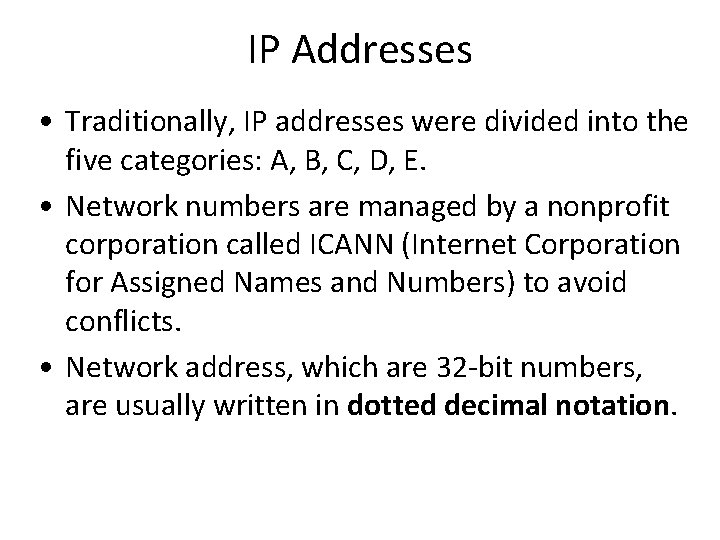
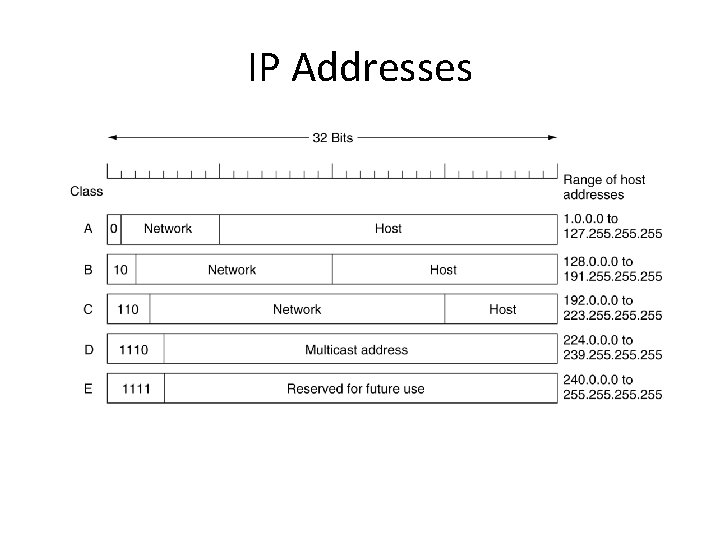
IP Addresses • Traditionally, IP addresses were divided into the five categories: A, B, C, D, E. • Network numbers are managed by a nonprofit corporation called ICANN (Internet Corporation for Assigned Names and Numbers) to avoid conflicts. • Network address, which are 32 -bit numbers, are usually written in dotted decimal notation.
IP Addresses IP address formats.
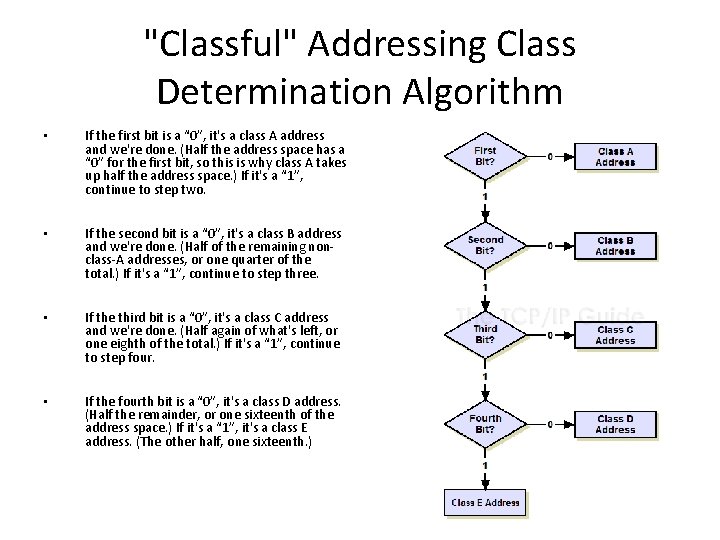
"Classful" Addressing Class Determination Algorithm • If the first bit is a “ 0”, it's a class A address and we're done. (Half the address space has a “ 0” for the first bit, so this is why class A takes up half the address space. ) If it's a “ 1”, continue to step two. • If the second bit is a “ 0”, it's a class B address and we're done. (Half of the remaining nonclass-A addresses, or one quarter of the total. ) If it's a “ 1”, continue to step three. • If the third bit is a “ 0”, it's a class C address and we're done. (Half again of what's left, or one eighth of the total. ) If it's a “ 1”, continue to step four. • If the fourth bit is a “ 0”, it's a class D address. (Half the remainder, or one sixteenth of the address space. ) If it's a “ 1”, it's a class E address. (The other half, one sixteenth. )
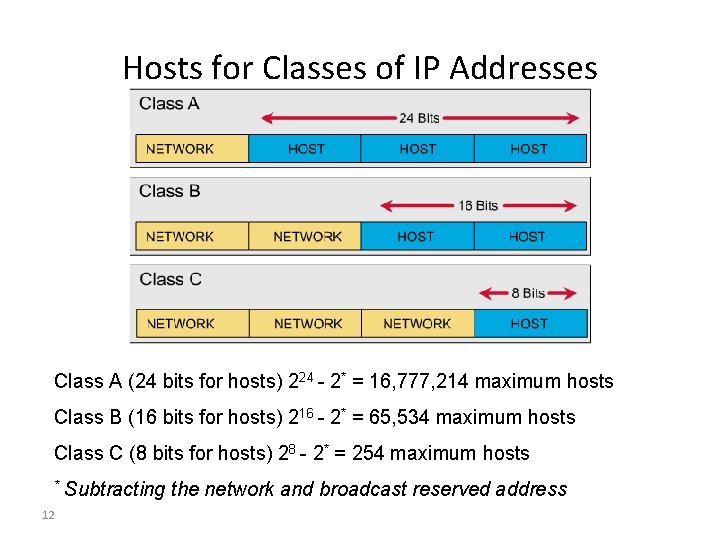
Hosts for Classes of IP Addresses Class A (24 bits for hosts) 224 - 2* = 16, 777, 214 maximum hosts Class B (16 bits for hosts) 216 - 2* = 65, 534 maximum hosts Class C (8 bits for hosts) 28 - 2* = 254 maximum hosts * 12 Subtracting the network and broadcast reserved address
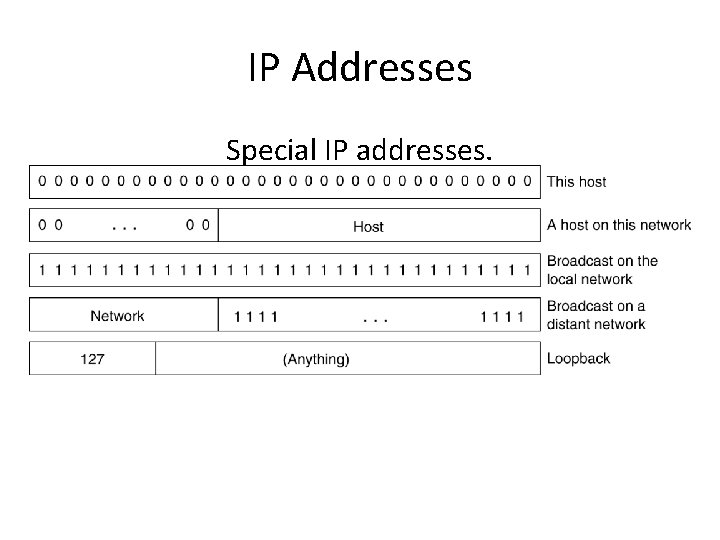
IP Addresses Special IP addresses.
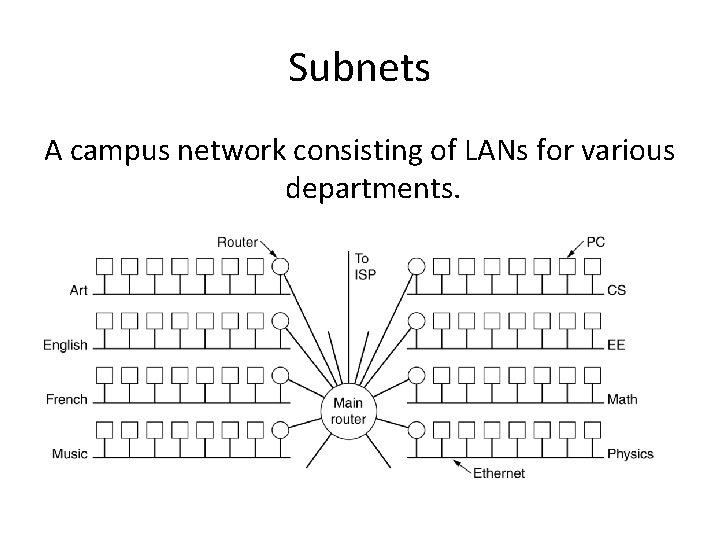
Subnets A campus network consisting of LANs for various departments.
Subnetting • Division of a network into subnets – For example, division of a Class B address into several Class C addresses • Some of the host IDs are used for creating subnet IDs. • Use parts of the host IDs for subnetting purpose • A subnet mask is used to facilitate the flow of traffic between the different subnets and the outside network (hops). • A hop is the distance a data packet travels form one node to the other
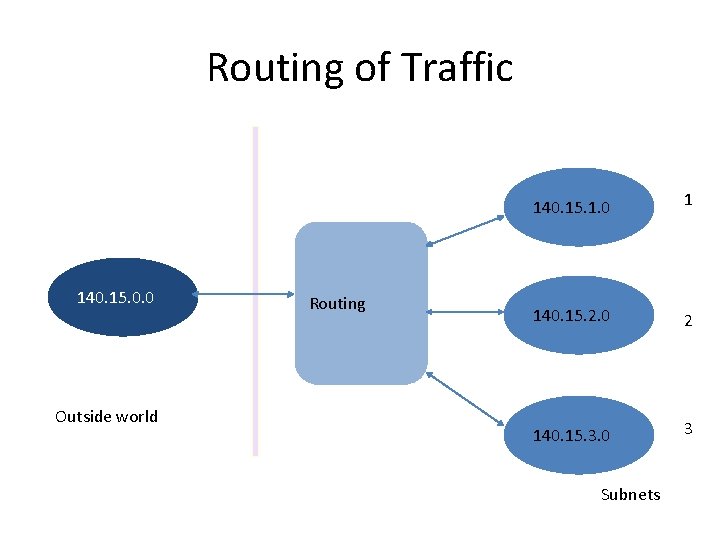
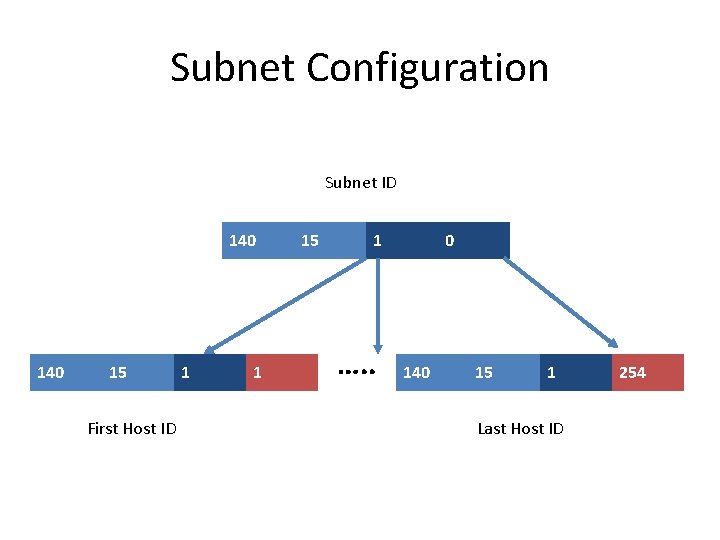
Routing of Traffic 140. 15. 0. 0 Outside world Routing 140. 15. 1. 0 1 140. 15. 2. 0 2 140. 15. 3. 0 3 Subnets
Subnet Configuration Subnet ID 140 15 First Host ID 1 1 15 1 …. . 0 140 15 1 Last Host ID 254
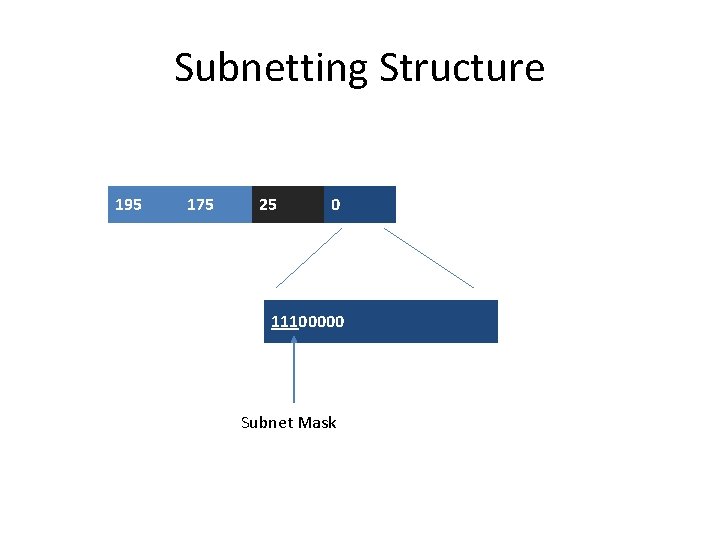
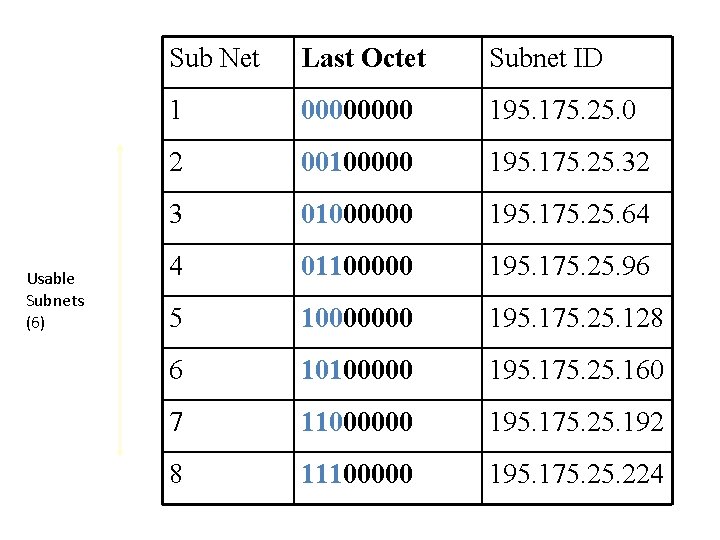
Subnetting Example • Consider the case of a class C address 195. 175. 25. 0 assigned to an organization • Subnets can be constructed by allocating part of the higher-order bits of the host ID • Assume that three of the higher-order bits of the host ID are to be reserved for that purpose
Subnetting Structure 195 175 25 0 11100000 Subnet Mask
Usable Subnets (6) Sub Net Last Octet Subnet ID 1 0000 195. 175. 25. 0 2 00100000 195. 175. 25. 32 3 01000000 195. 175. 25. 64 4 01100000 195. 175. 25. 96 5 10000000 195. 175. 25. 128 6 10100000 195. 175. 25. 160 7 11000000 195. 175. 25. 192 8 11100000 195. 175. 224
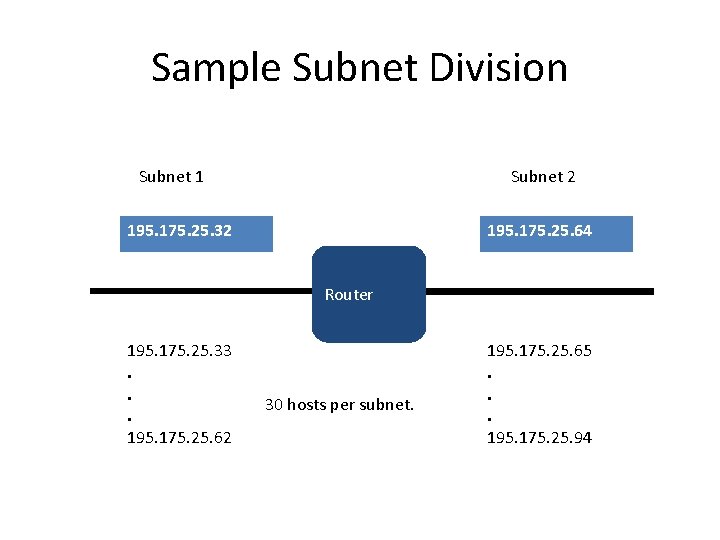
Sample Subnet Division Subnet 1 Subnet 2 195. 175. 25. 32 195. 175. 25. 64 Router 195. 175. 25. 33. . . 195. 175. 25. 62 30 hosts per subnet. 195. 175. 25. 65. . . 195. 175. 25. 94
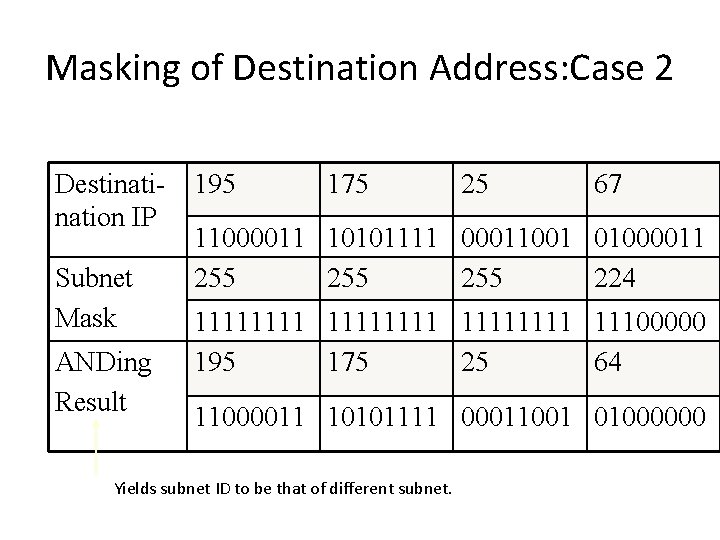
Overview of the Masking Process • IP address and subnet masks are used for the masking operation • The purpose of masking is to identify whether an IP address corresponds to a local host or a remote host • The mathematical technique used is known as the ANDing process
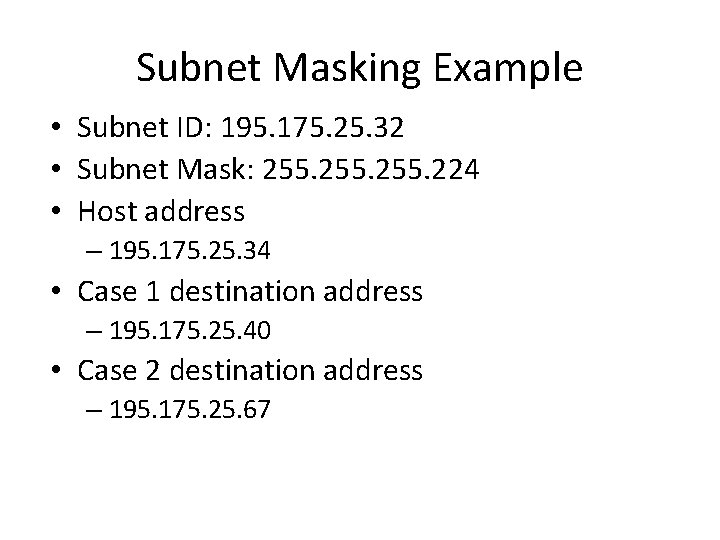
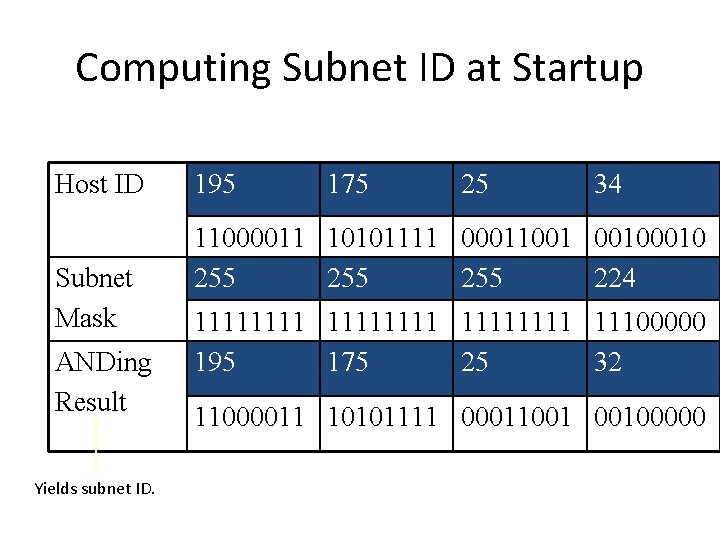
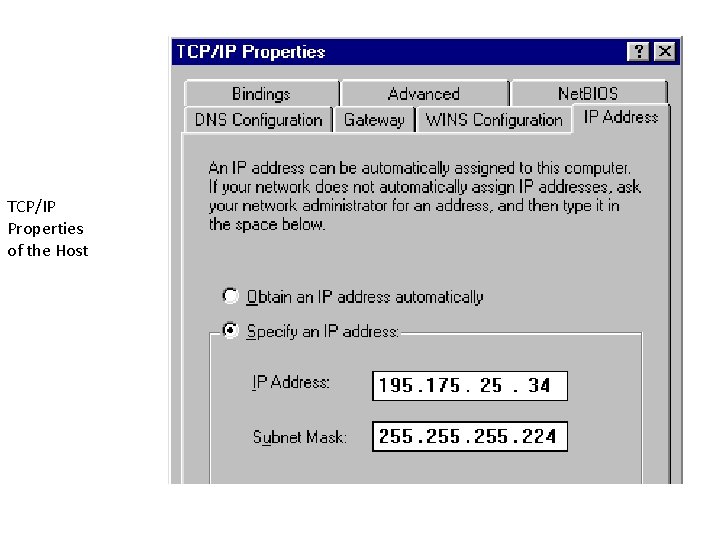
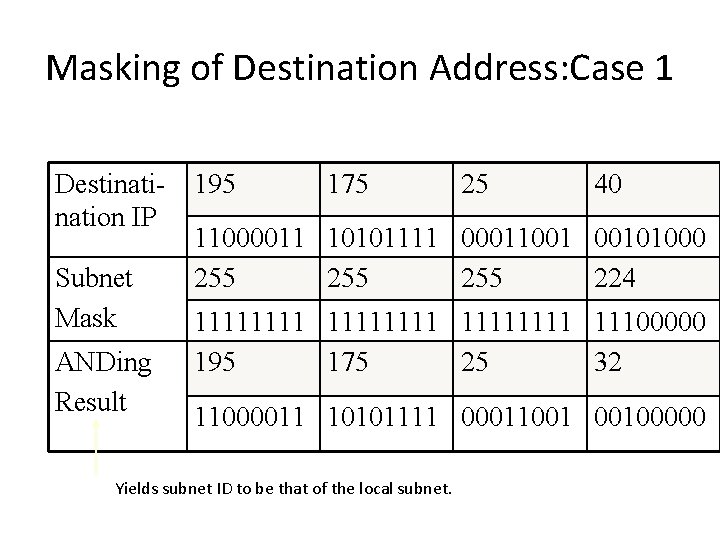
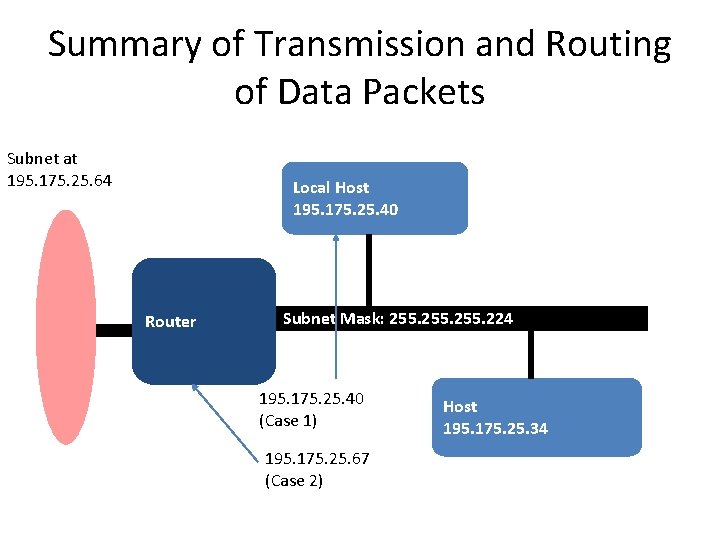
Subnet Masking Example • Subnet ID: 195. 175. 25. 32 • Subnet Mask: 255. 224 • Host address – 195. 175. 25. 34 • Case 1 destination address – 195. 175. 25. 40 • Case 2 destination address – 195. 175. 25. 67
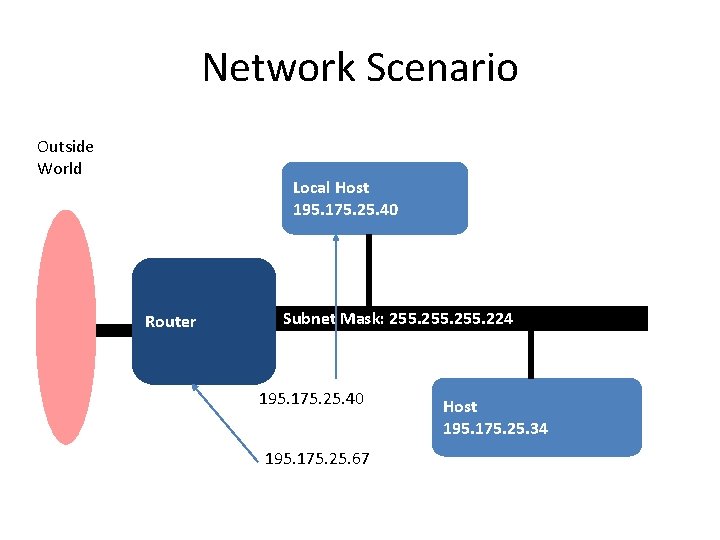
Network Scenario Outside World Local Host 195. 175. 25. 40 Router Subnet Mask: 255. 224 195. 175. 25. 40 195. 175. 25. 67 Host 195. 175. 25. 34
Computing Subnet ID at Startup Host ID Subnet Mask ANDing Result Yields subnet ID. 195 175 25 34 11000011 10101111 00011001 0010 255 255 224 11111111 11100000 195 175 25 32 11000011 10101111 00011001 00100000
TCP/IP Properties of the Host
Masking of Destination Address: Case 1 Destination IP Subnet Mask ANDing Result 195 175 25 40 11000011 10101111 00011001 00101000 255 255 224 11111111 11100000 195 175 25 32 11000011 10101111 00011001 00100000 Yields subnet ID to be that of the local subnet.
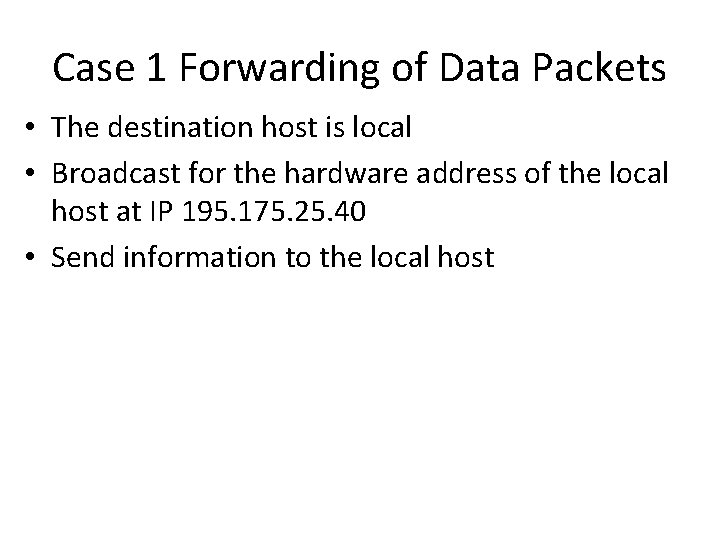
Case 1 Forwarding of Data Packets • The destination host is local • Broadcast for the hardware address of the local host at IP 195. 175. 25. 40 • Send information to the local host
Masking of Destination Address: Case 2 Destination IP Subnet Mask ANDing Result 195 175 25 67 11000011 10101111 00011001 01000011 255 255 224 11111111 11100000 195 175 25 64 11000011 10101111 00011001 01000000 Yields subnet ID to be that of different subnet.
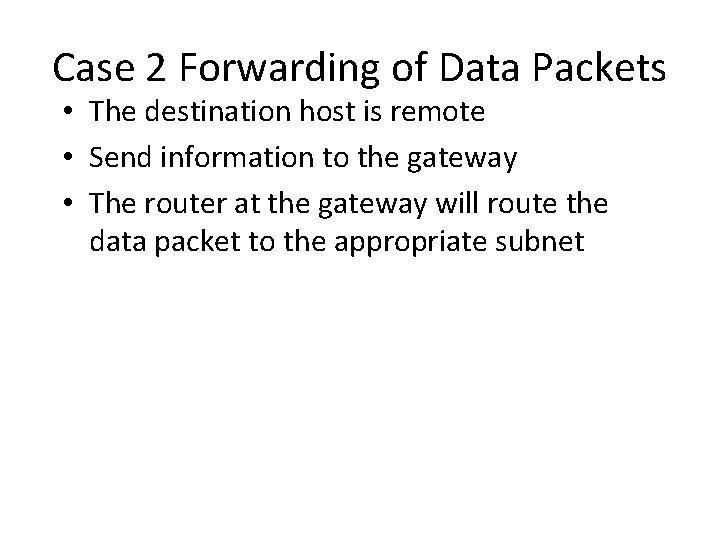
Case 2 Forwarding of Data Packets • The destination host is remote • Send information to the gateway • The router at the gateway will route the data packet to the appropriate subnet
Summary of Transmission and Routing of Data Packets Subnet at 195. 175. 25. 64 Local Host 195. 175. 25. 40 Router Subnet Mask: 255. 224 195. 175. 25. 40 (Case 1) 195. 175. 25. 67 (Case 2) Host 195. 175. 25. 34
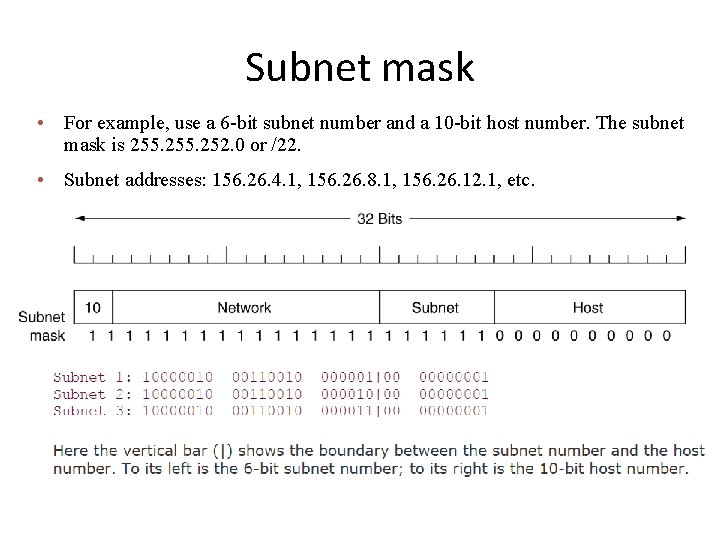
Subnet mask • For example, use a 6 -bit subnet number and a 10 -bit host number. The subnet mask is 255. 252. 0 or /22. • Subnet addresses: 156. 26. 4. 1, 156. 26. 8. 1, 156. 26. 12. 1, etc. A class B network subnetted into 64 subnets.
Supernetting • Subnetting allows an organization to share a single IP network address among multiple physical networks • Supernetting (a. k. a. classless addressing) allows the addresses assigned to an organization to span multiple IP network addresses
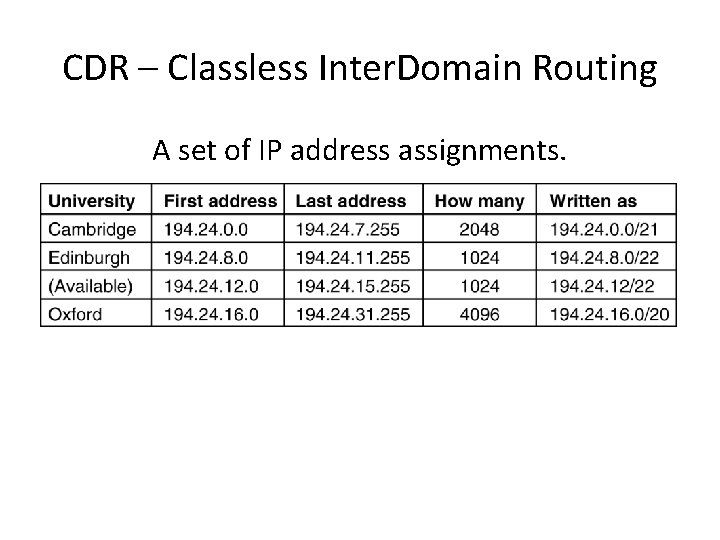
CIDR—Classless Inter. Domain Routing • For most organizations, a class A network, with 16 million addresses is too big, and a class C network, with 256 addresses is too small. A class B network, with 65, 536, is just right. • In Internet folklore, this situation is known as the three bears problem. • The basic idea behind CIDR, is to allocate the remaining IP addresses in variable-sized blocks, without regard to the classes. – – If a site needs, say, 2000 addresses, it is given a block of 2048 addresses on a 2048 -byte boundary. If need 8000 hosts, then allocate a block of 8192 addresses, i. e. , 32 contiguous class C networks.
How a large number of IP addresses are wasted using IPv 4 address classes? • If a network has slightly more number of hosts than a particular class, then it needs either two IP addresses of that class or the next class of IP address. • For example, let use say a network has 300 hosts, this network needs either a single class B IP address or two class C IP addresses. • If class B address is allocated to this network, as the number of hosts that can be defined in a class B network is (2^16 - 2), a large number of host IP addresses are wasted. • If two class C IP addresses are allocated, as the number of networks that can be defined using a class C address is only (2^21), the number of available class C networks will quickly exhaust. • Because of the above two reasons, a lot of IP addresses are wasted and also the available IP address space is rapidly reduced
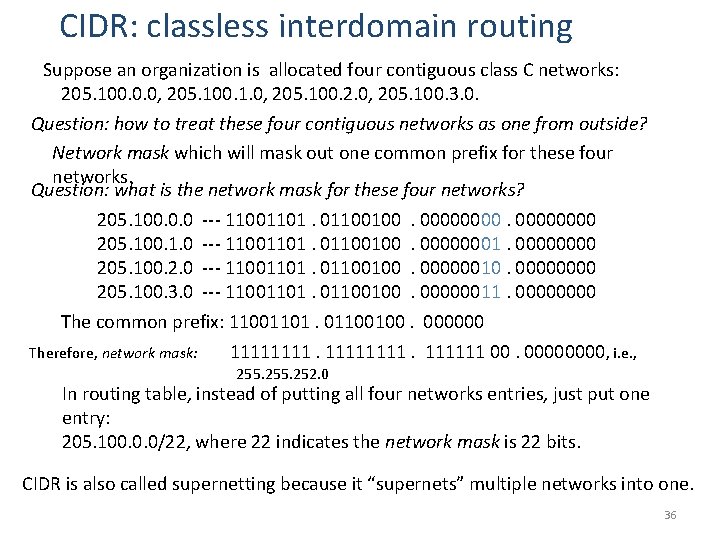
CIDR: classless interdomain routing Suppose an organization is allocated four contiguous class C networks: 205. 100. 0. 0, 205. 100. 1. 0, 205. 100. 2. 0, 205. 100. 3. 0. Question: how to treat these four contiguous networks as one from outside? Network mask which will mask out one common prefix for these four networks. Question: what is the network mask for these four networks? 205. 100. 0. 0 --- 11001101. 01100100. 00000000 205. 100. 1. 0 --- 11001101. 01100100. 00000001. 0000 205. 100. 2. 0 --- 11001101. 01100100. 00000010. 0000 205. 100. 3. 0 --- 11001101. 01100100. 00000011. 0000 The common prefix: 11001101. 01100100. 000000 Therefore, network mask: 11111111 00. 0000, i. e. , 255. 252. 0 In routing table, instead of putting all four networks entries, just put one entry: 205. 100. 0. 0/22, where 22 indicates the network mask is 22 bits. CIDR is also called supernetting because it “supernets” multiple networks into one. 36
CDR – Classless Inter. Domain Routing A set of IP address assignments. 5 -59
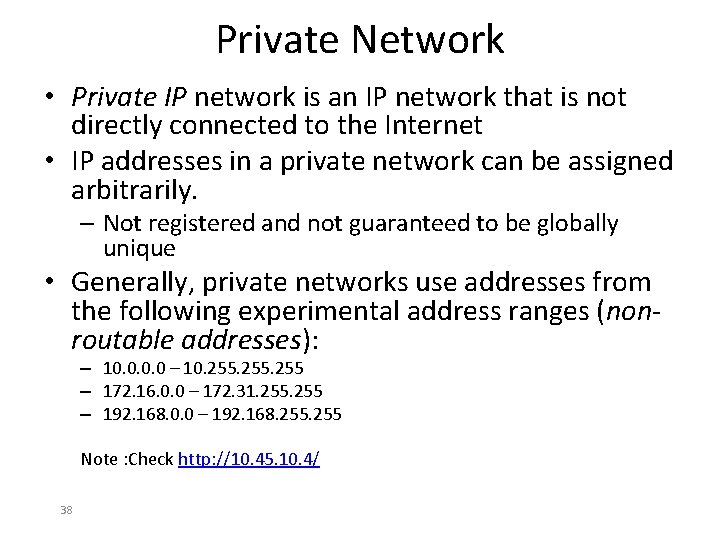
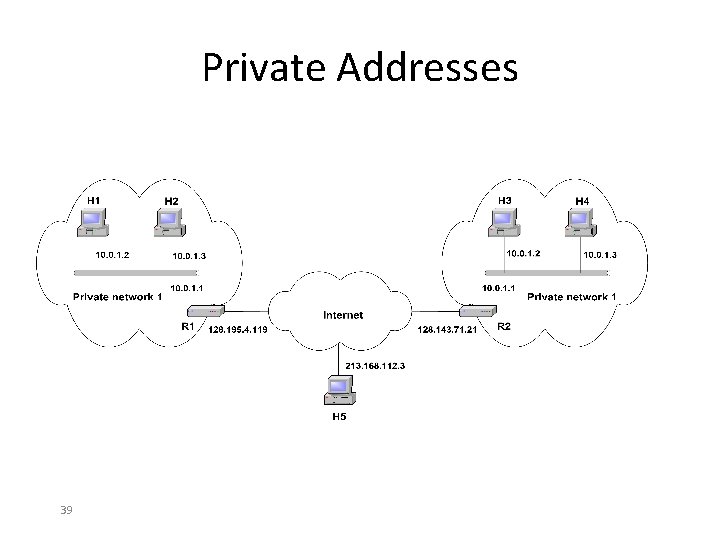
Private Network • Private IP network is an IP network that is not directly connected to the Internet • IP addresses in a private network can be assigned arbitrarily. – Not registered and not guaranteed to be globally unique • Generally, private networks use addresses from the following experimental address ranges (nonroutable addresses): – 10. 0 – 10. 255 – 172. 16. 0. 0 – 172. 31. 255 – 192. 168. 0. 0 – 192. 168. 255 Note : Check http: //10. 45. 10. 4/ 38
Private Addresses 39
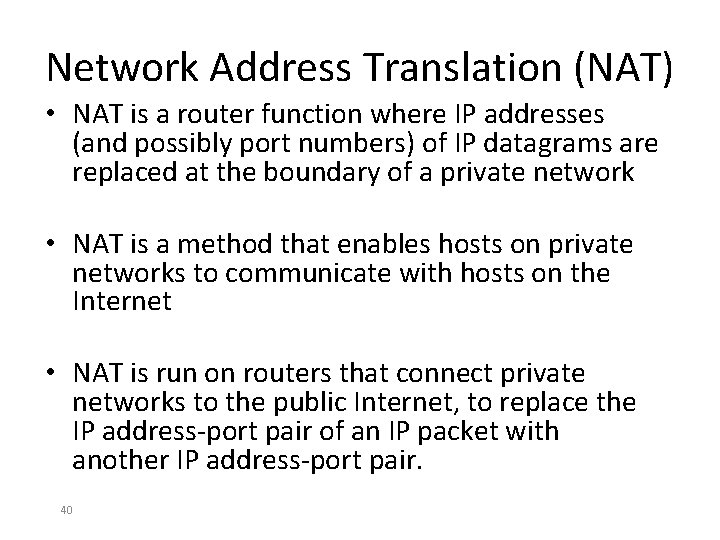
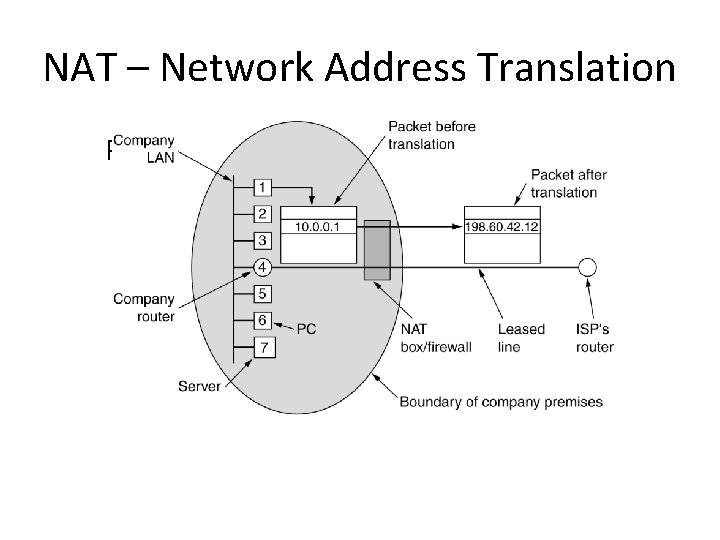
Network Address Translation (NAT) • NAT is a router function where IP addresses (and possibly port numbers) of IP datagrams are replaced at the boundary of a private network • NAT is a method that enables hosts on private networks to communicate with hosts on the Internet • NAT is run on routers that connect private networks to the public Internet, to replace the IP address-port pair of an IP packet with another IP address-port pair. 40
Basic operation of NAT • NAT device has address translation table 41
NAT – Network Address Translation Placement and operation of a NAT box.
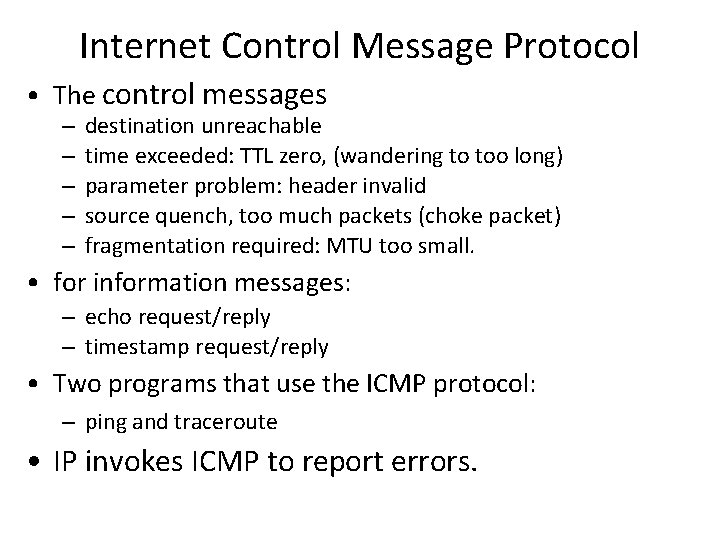
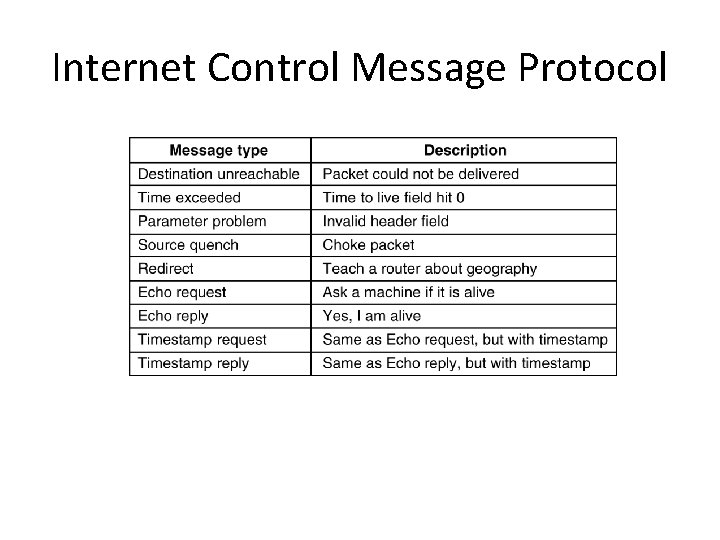
Internet Control Message Protocol • The control messages – – – destination unreachable time exceeded: TTL zero, (wandering to too long) parameter problem: header invalid source quench, too much packets (choke packet) fragmentation required: MTU too small. • for information messages: – echo request/reply – timestamp request/reply • Two programs that use the ICMP protocol: – ping and traceroute • IP invokes ICMP to report errors.
Internet Control Message Protocol The principal ICMP message types. 5 -61
How a host determines its IP address? • A host determines its IP address during the boot-up process either from a configuration file stored in the local hard disk of the system or • using a network protocol like RARP, DHCP, BOOTP from the servers in the network.
ARP– The Address Resolution Protocol • ARP: Address Resolution Protocol – find out the Ethernet address for an IP address – a host broadcast to everyone asking “who owns IP address xxx” – The host with that IP address response with its Ethernet address. • RARP: Reverse Address Resolution Protocol – Find out a host’s IP address. – The host broadcast to everyone asking “My Ethernet address is xx: xx: xx: xx, who knows my IP address? ” – The RARP server looks up the configuration file and reply with its IP address.
Dynamic Host Configuration Protocol • BOOTP (Bootstrap Protocol) is a protocol that lets a network user be automatically configured (receive an IP address) and have an operating system booted (initiated) without user involvement. – Needs manually configuration (a table to map MAC to IP address) • DHCP (Dynamic Host Configuration Protocol) is a communications protocol that lets network administrators manage centrally and automate the assignment of IP addresses in an organization's network.
The Interior Gateway Routing Protocol • The Internet is made up of a large number of autonomous systems(AS) • Two-level routing: – interior gateway protocol – a routing algorithm within an AS. – exterior gateway protocol – a routing algorithm between Ases.
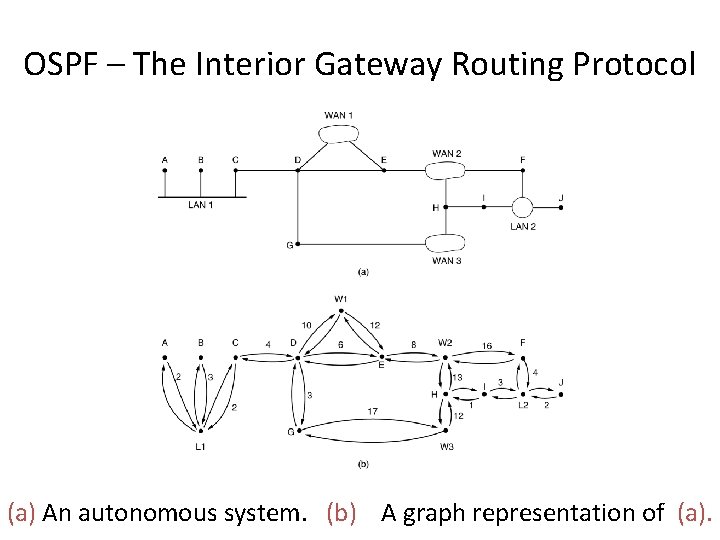
OSPF – Open Shortest Path First • OSPF supports three kinds of connections and networks: 1. Point-to-pint lines between exactly two routers. 2. Multiaccess networks with broadcasting (e. g. , most LANs. ) 3. Multiaccess networks without broadcasting (e. g. , most packet-switched WANs). • OSPF represents the actual network as a graph like this and then compute the shortest path from every router to every other router.
OSPF – The Interior Gateway Routing Protocol (a) An autonomous system. (b) A graph representation of (a).
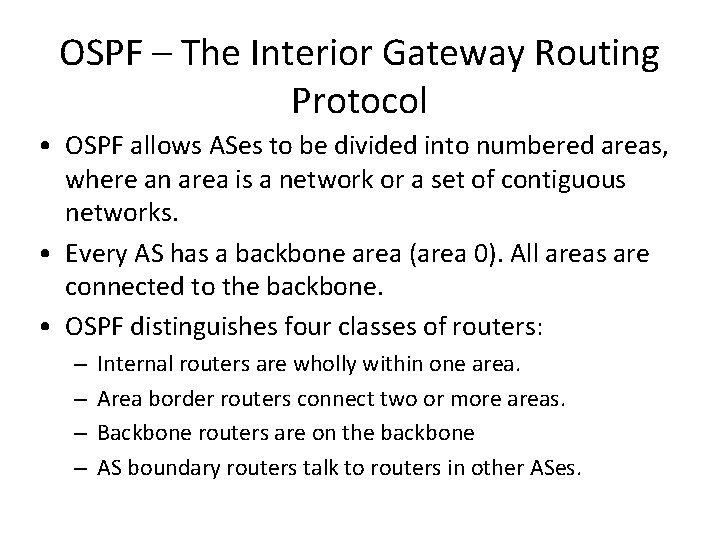
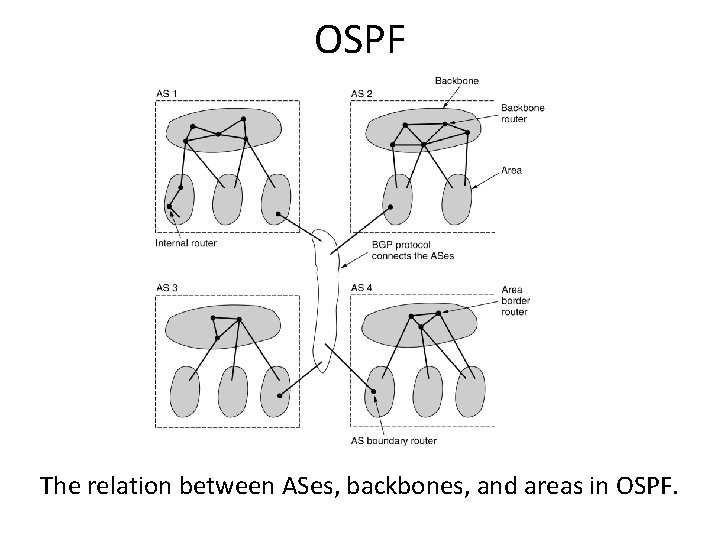
OSPF – The Interior Gateway Routing Protocol • OSPF allows ASes to be divided into numbered areas, where an area is a network or a set of contiguous networks. • Every AS has a backbone area (area 0). All areas are connected to the backbone. • OSPF distinguishes four classes of routers: – – Internal routers are wholly within one area. Area border routers connect two or more areas. Backbone routers are on the backbone AS boundary routers talk to routers in other ASes.
OSPF The relation between ASes, backbones, and areas in OSPF.
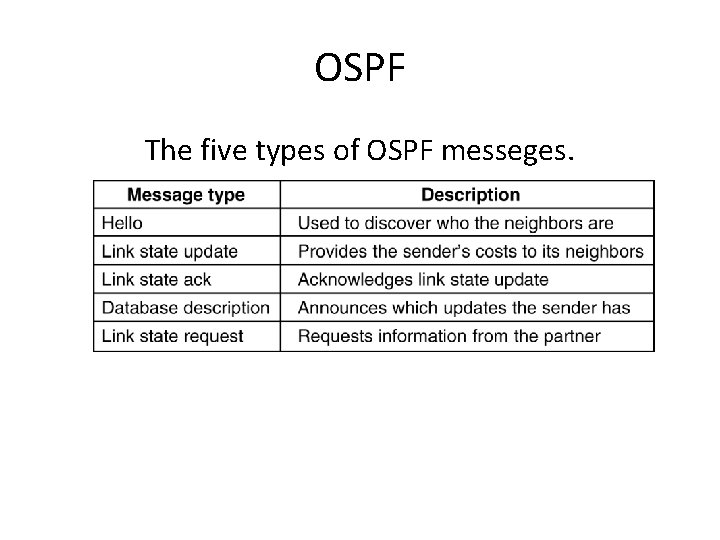
OSPF The five types of OSPF messeges. 5 -66
BGP – The Exterior Gateway Routing Protocol • BGP (Border Gateway Protocol) is a protocol for exchanging routing information between gateway hosts (each with its own router) in a network of autonomous systems. • BGP have been designed to allow many kinds of routing policies to be enforced in the inter. AS traffic.
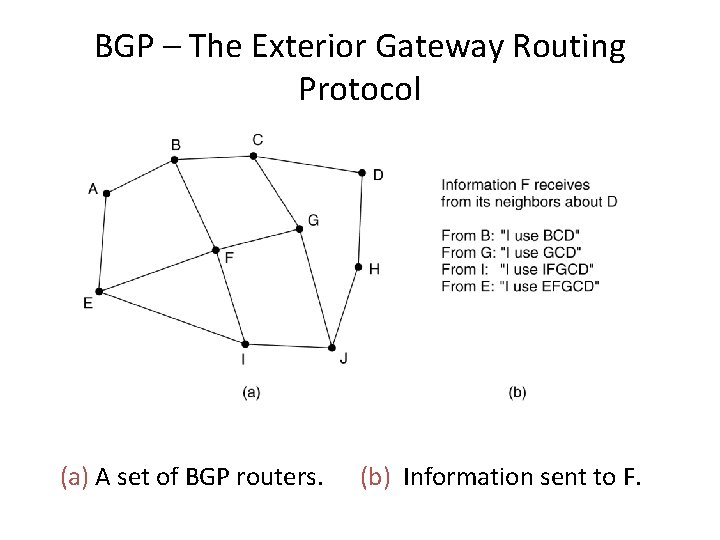
BGP – The Exterior Gateway Routing Protocol • Exterior gateway protocol routers have to worry about politics (security, billing, etc. ) – BGP (Border Gateway Protocol) is essentially a distance vector protocol. – But keep track of entire path. – Discard the route through itself solve count-toinfinity. – Select route based on the distance (score). Any route violating polices has infinite score and is discarded as it pass F.
BGP – The Exterior Gateway Routing Protocol (a) A set of BGP routers. (b) Information sent to F.
Internet Multicating • IP supports multicasting, using class D addresses. • Two kinds of the group addresses are supported: – Permanent groups: • 224. 0. 0. 1: all system on a LAN • 224. 0. 0. 2: all routers on a LAN • 224. 0. 0. 5: all OSPF routers on a LAN • 224. 0. 0. 6: all designated OSPF routers on a LAN – Temporary groups must be created before used. • The query and response packets sent and received by multicast routers are called IGMP (Internet Group Management Protocol). It has two kinds of packets: query and response. • Multicasting routing is done using spanning tree.
IPv 6
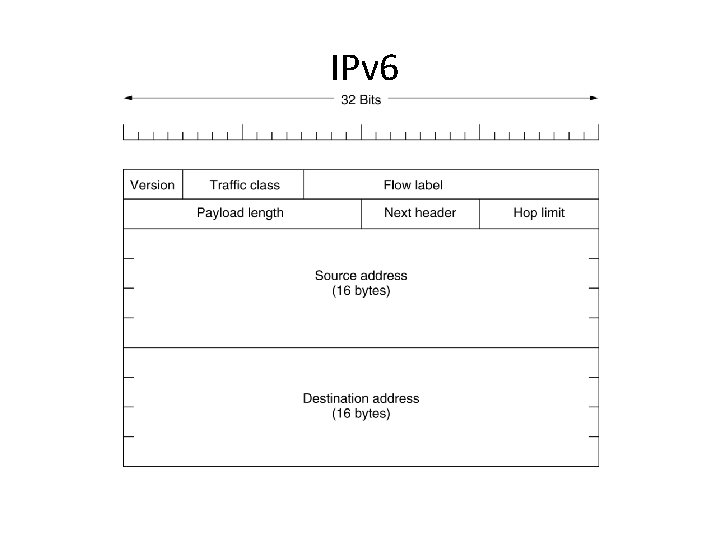
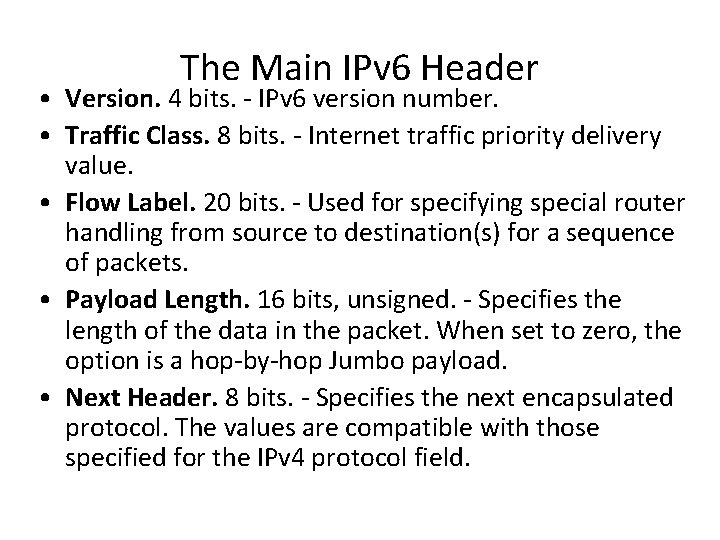
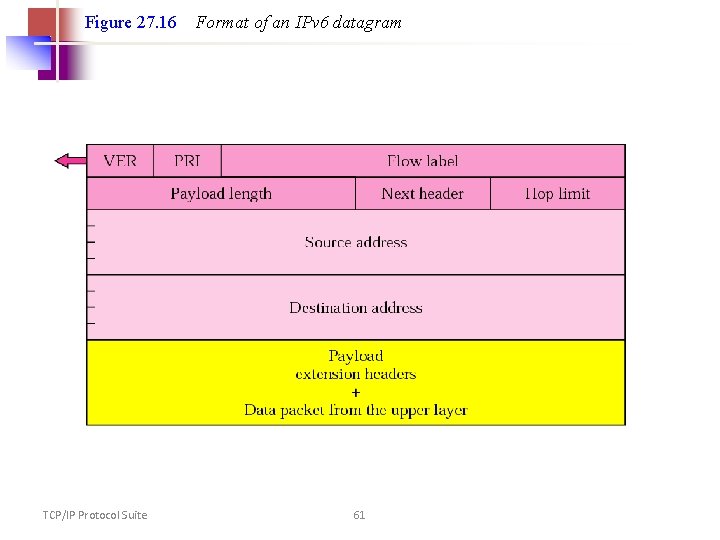
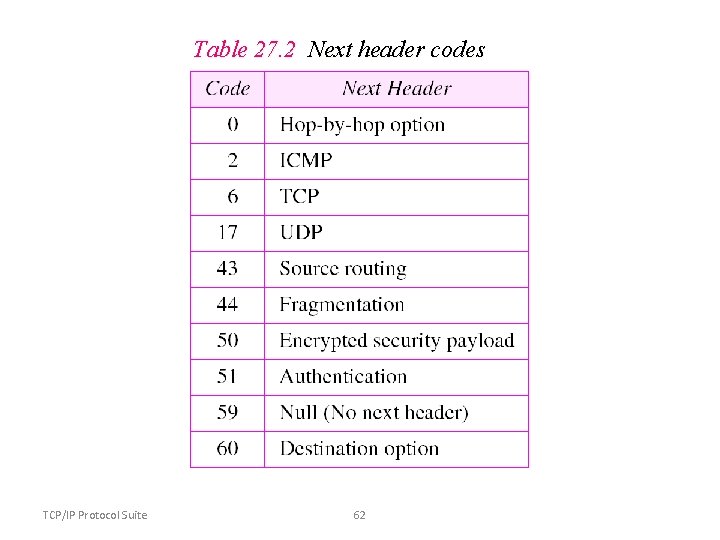
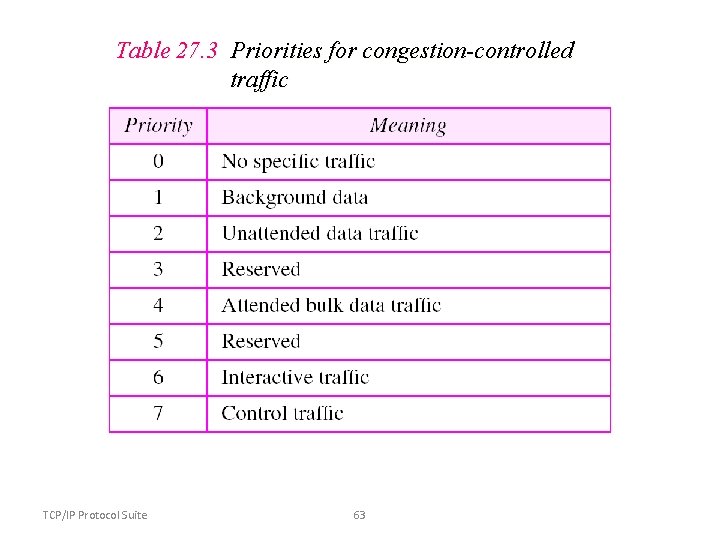
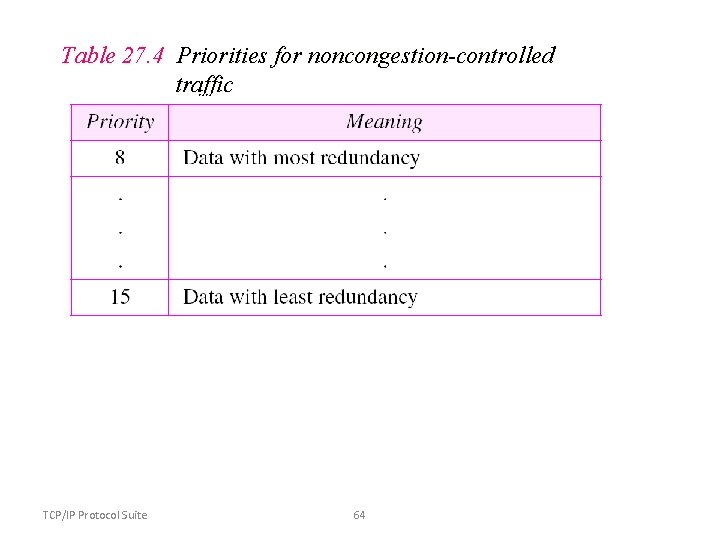
The Main IPv 6 Header • Version. 4 bits. - IPv 6 version number. • Traffic Class. 8 bits. - Internet traffic priority delivery value. • Flow Label. 20 bits. - Used for specifying special router handling from source to destination(s) for a sequence of packets. • Payload Length. 16 bits, unsigned. - Specifies the length of the data in the packet. When set to zero, the option is a hop-by-hop Jumbo payload. • Next Header. 8 bits. - Specifies the next encapsulated protocol. The values are compatible with those specified for the IPv 4 protocol field.
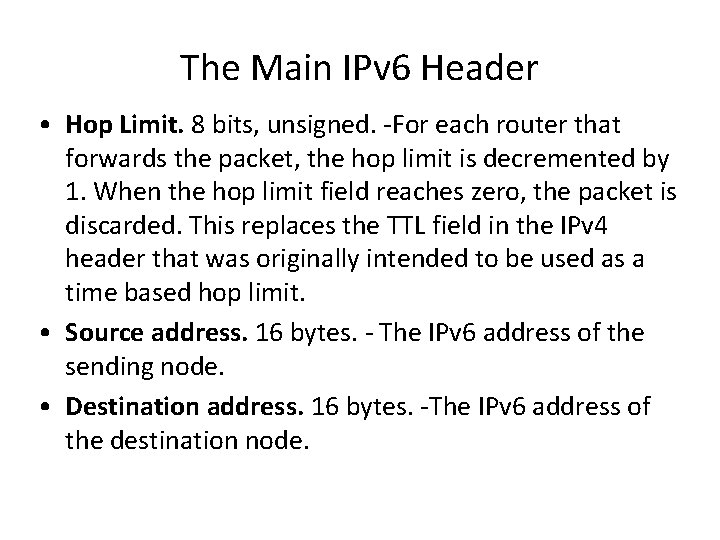
The Main IPv 6 Header • Hop Limit. 8 bits, unsigned. -For each router that forwards the packet, the hop limit is decremented by 1. When the hop limit field reaches zero, the packet is discarded. This replaces the TTL field in the IPv 4 header that was originally intended to be used as a time based hop limit. • Source address. 16 bytes. - The IPv 6 address of the sending node. • Destination address. 16 bytes. -The IPv 6 address of the destination node.
Figure 27. 16 TCP/IP Protocol Suite Format of an IPv 6 datagram 61
Table 27. 2 Next header codes TCP/IP Protocol Suite 62
Table 27. 3 Priorities for congestion-controlled traffic TCP/IP Protocol Suite 63
Table 27. 4 Priorities for noncongestion-controlled traffic TCP/IP Protocol Suite 64
Table 27. 5 Comparison between IPv 4 and IPv 6 packet header TCP/IP Protocol Suite 65
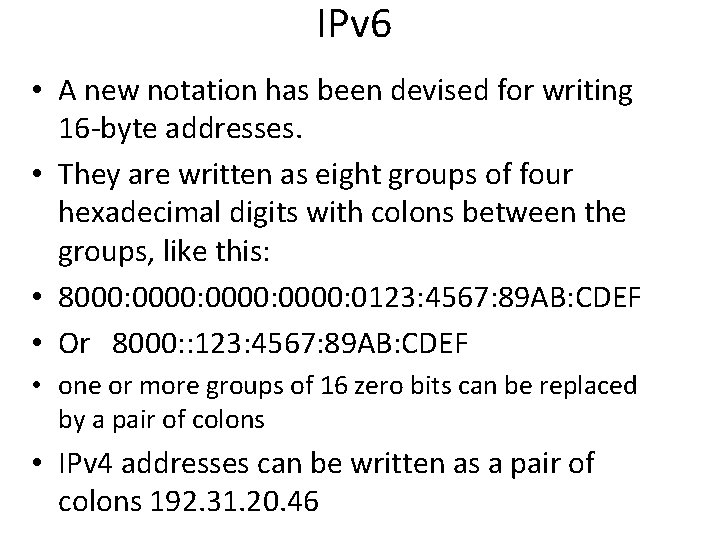
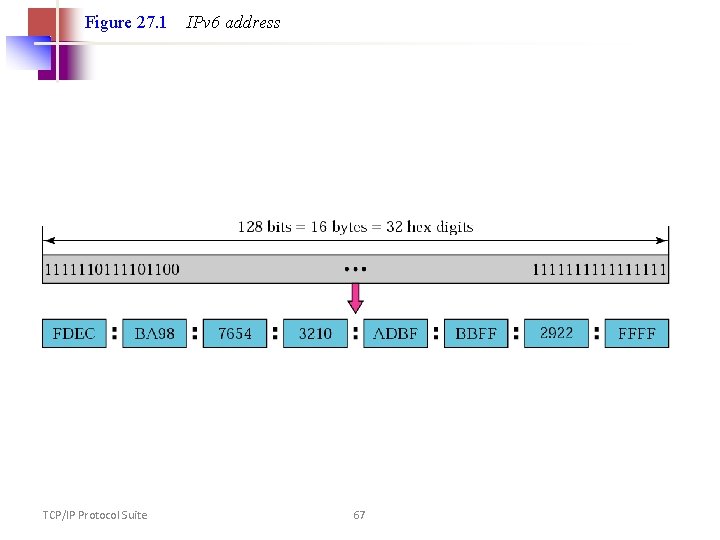
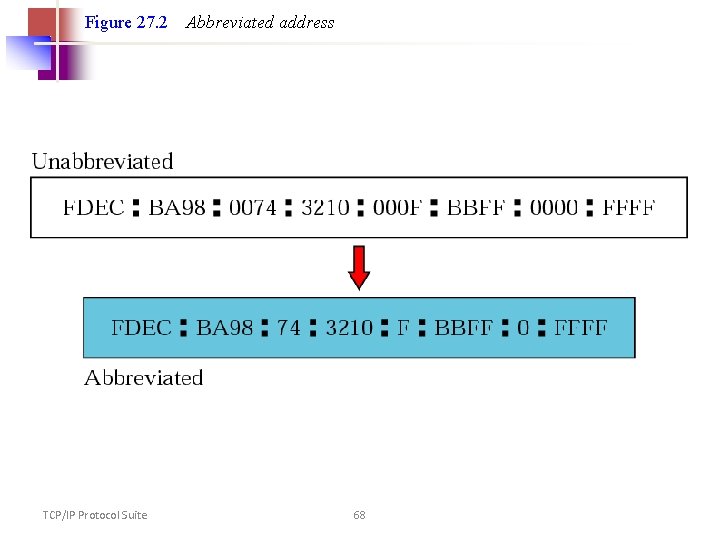
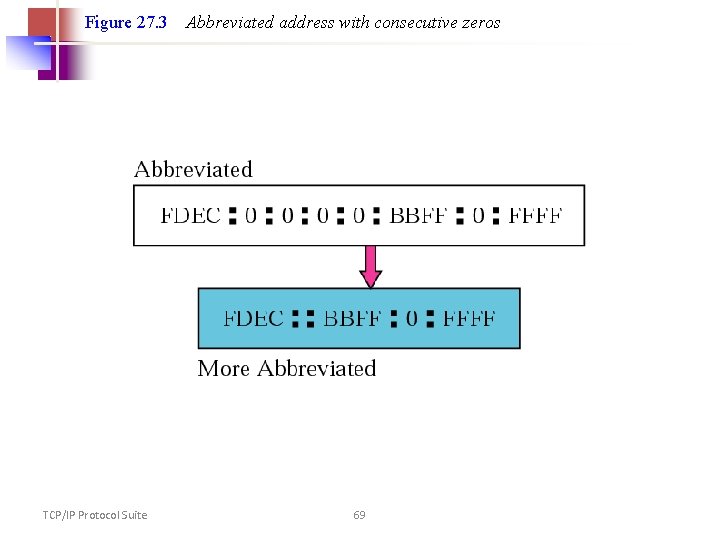
IPv 6 • A new notation has been devised for writing 16 -byte addresses. • They are written as eight groups of four hexadecimal digits with colons between the groups, like this: • 8000: 0000: 0123: 4567: 89 AB: CDEF • Or 8000: : 123: 4567: 89 AB: CDEF • one or more groups of 16 zero bits can be replaced by a pair of colons • IPv 4 addresses can be written as a pair of colons 192. 31. 20. 46
Figure 27. 1 TCP/IP Protocol Suite IPv 6 address 67
Figure 27. 2 TCP/IP Protocol Suite Abbreviated address 68
Figure 27. 3 TCP/IP Protocol Suite Abbreviated address with consecutive zeros 69
IPv 6 – Multicast and Anycast IPv 6 describes rules for three types of addressing: üunicast (one host to one other host) üanycast (one host to at least one of multiple hosts), and ümulticast (one host to multiple hosts). • The introduction of an "anycast" address provides the possibility of sending a message to the nearest of several possible gateway hosts with the idea that any one of them can manage the forwarding of the packet to others.