
The Microchip Technology PIC 16 F 877 Microcontroller
- Slides: 49
The Microchip Technology PIC 16 F 877 Microcontroller C Programming www. microchip. com 9/29/2020 ECE 331 (KEH) 1
PIC 16 F 877 Summary This powerful (200 nanosecond instruction execution) yet easy-toprogram (only 35 single word (14 -bit wordlength) RISC instructions) CMOS FLASH-based 8 -bit microcontroller packs Microchip's powerful PIC® architecture into an 40 -pin dual in-line (DIP) or 44 -pin plastic leadless chip carrier (PLCC) or 44 -pin Thin Quad Flat Pack (TQFP) package. The PIC 16 F 877 A features 256 bytes of EEPROM data memory, self programming, an ICD, 2 Comparators, 8 channels of 10 -bit Analog-to. Digital (A/D) converter, 2 input capture/output compare/PWM functions, the synchronous serial port can be configured as either 3 -wire Serial Peripheral Interface (SPI™) or the 2 -wire Inter-Integrated Circuit (I²C™) bus and a Universal Asynchronous Receiver Transmitter (USART). All of these features make it ideal for more advanced level A/D applications in automotive, industrial, appliances and consumer applications. 9/29/2020 ECE 331 (KEH) 2
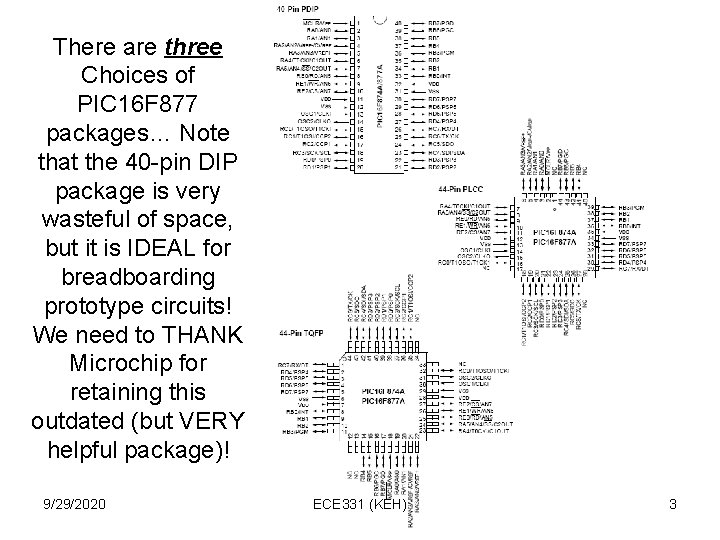
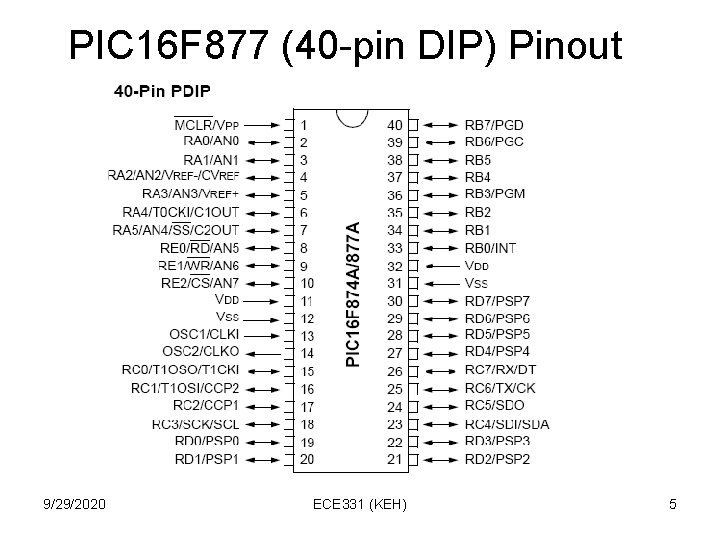
There are three Choices of PIC 16 F 877 packages… Note that the 40 -pin DIP package is very wasteful of space, but it is IDEAL for breadboarding prototype circuits! We need to THANK Microchip for retaining this outdated (but VERY helpful package)! 9/29/2020 ECE 331 (KEH) 3
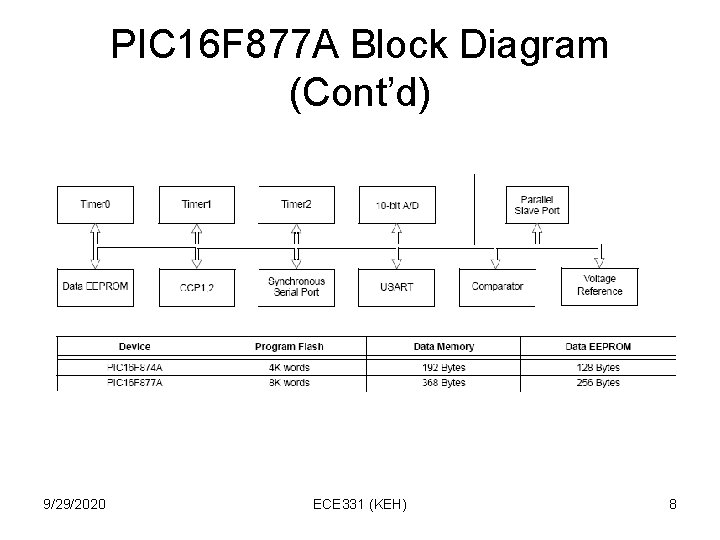
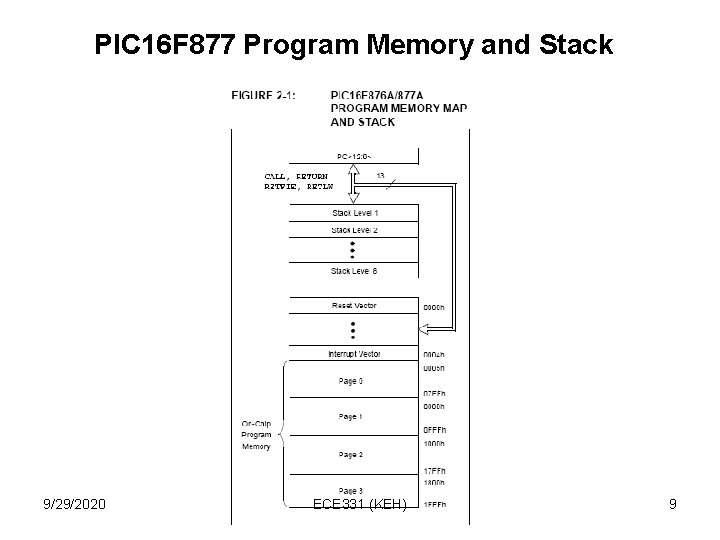
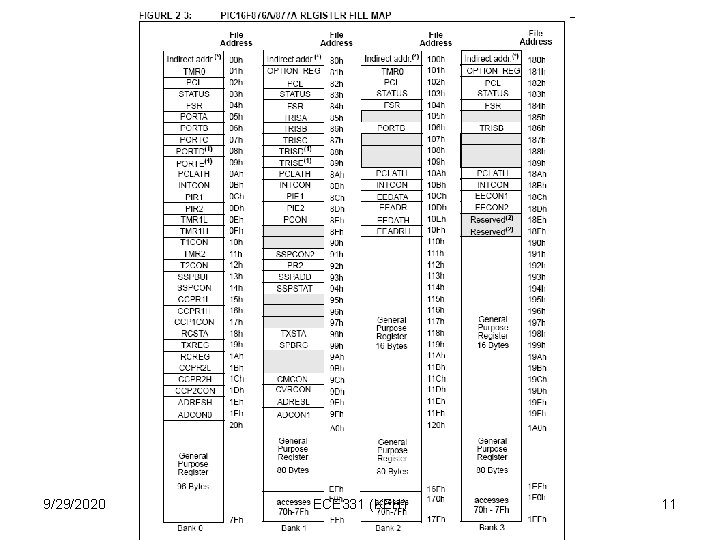
PIC 16 F 877 A Memory • 8 K of flash program ROM (14 -bits wide). Each of the 35 RISC instructions fits in just one 14 -bit wide location, permitting fast (200 ns) instruction execution time, if microcontroller is clocked at its maximum allowable clock rate of 20 MHz. • 368 bytes of volatile data RAM “File Register” locations (8 -bits wide) for temporary storage of data. • 256 bytes of nonvolatile EEROM for storage of calibration data, user-customized option settings, etc. 9/29/2020 ECE 331 (KEH) 4
PIC 16 F 877 (40 -pin DIP) Pinout 9/29/2020 ECE 331 (KEH) 5
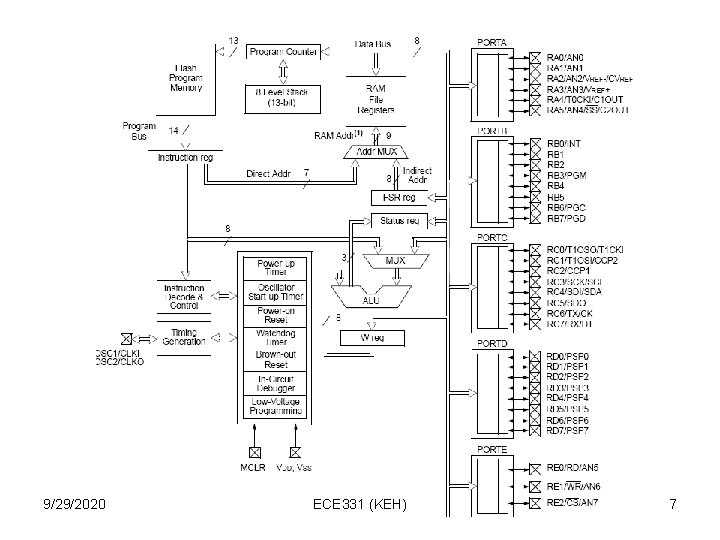
PIC 16 F 877 A Hardware Block Diagram (Figure 2. 1 of PIC 16 F 877 A Datasheet) 9/29/2020 ECE 331 (KEH) 6
9/29/2020 ECE 331 (KEH) 7
PIC 16 F 877 A Block Diagram (Cont’d) 9/29/2020 ECE 331 (KEH) 8
PIC 16 F 877 Program Memory and Stack 9/29/2020 ECE 331 (KEH) 9
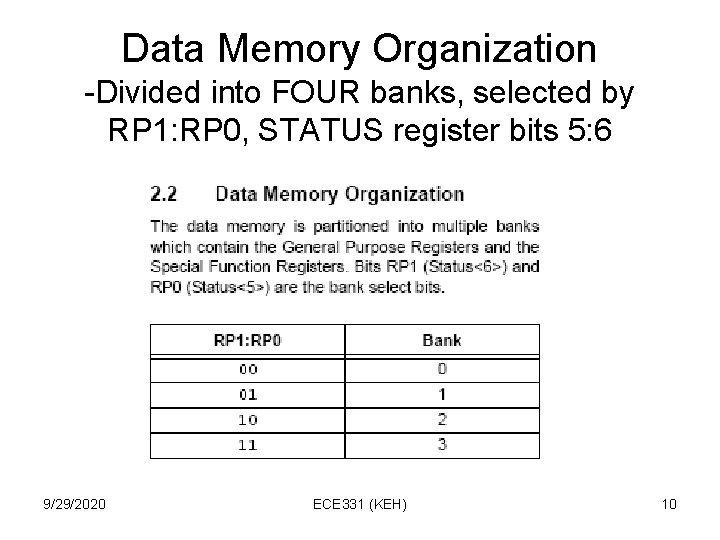
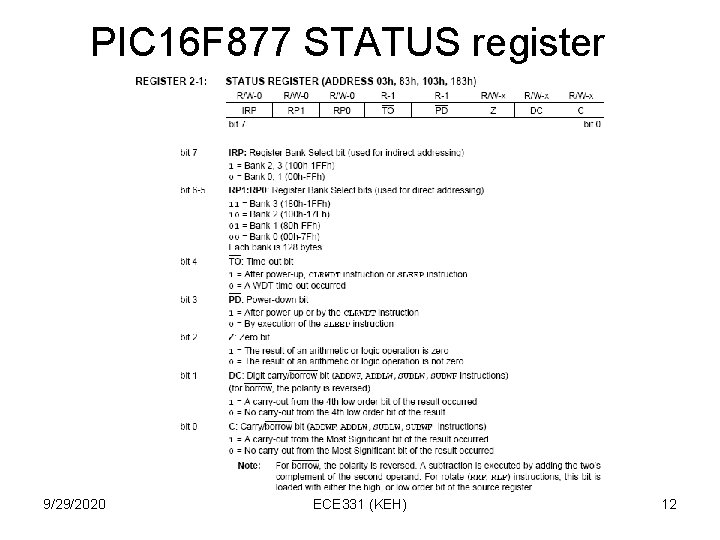
Data Memory Organization -Divided into FOUR banks, selected by RP 1: RP 0, STATUS register bits 5: 6 9/29/2020 ECE 331 (KEH) 10
9/29/2020 ECE 331 (KEH) 11
PIC 16 F 877 STATUS register 9/29/2020 ECE 331 (KEH) 12
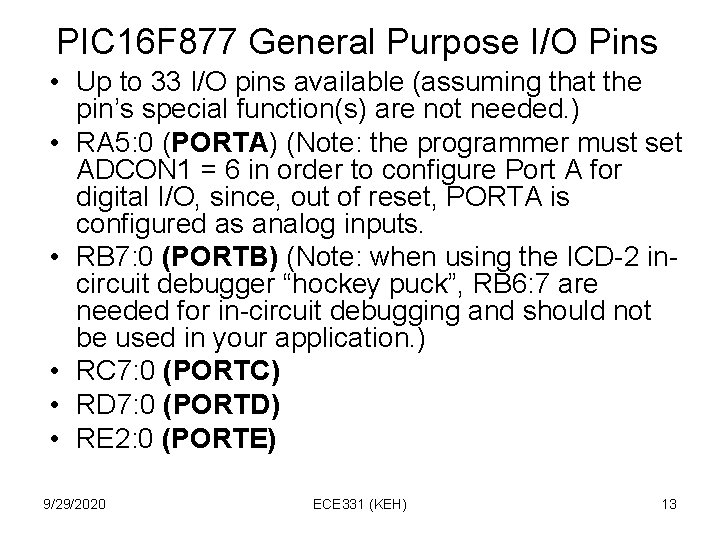
PIC 16 F 877 General Purpose I/O Pins • Up to 33 I/O pins available (assuming that the pin’s special function(s) are not needed. ) • RA 5: 0 (PORTA) (Note: the programmer must set ADCON 1 = 6 in order to configure Port A for digital I/O, since, out of reset, PORTA is configured as analog inputs. • RB 7: 0 (PORTB) (Note: when using the ICD-2 incircuit debugger “hockey puck”, RB 6: 7 are needed for in-circuit debugging and should not be used in your application. ) • RC 7: 0 (PORTC) • RD 7: 0 (PORTD) • RE 2: 0 (PORTE) 9/29/2020 ECE 331 (KEH) 13
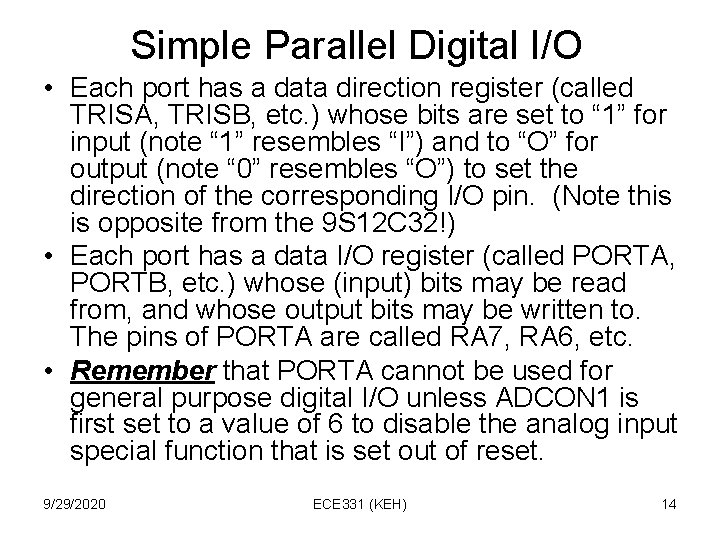
Simple Parallel Digital I/O • Each port has a data direction register (called TRISA, TRISB, etc. ) whose bits are set to “ 1” for input (note “ 1” resembles “I”) and to “O” for output (note “ 0” resembles “O”) to set the direction of the corresponding I/O pin. (Note this is opposite from the 9 S 12 C 32!) • Each port has a data I/O register (called PORTA, PORTB, etc. ) whose (input) bits may be read from, and whose output bits may be written to. The pins of PORTA are called RA 7, RA 6, etc. • Remember that PORTA cannot be used for general purpose digital I/O unless ADCON 1 is first set to a value of 6 to disable the analog input special function that is set out of reset. 9/29/2020 ECE 331 (KEH) 14
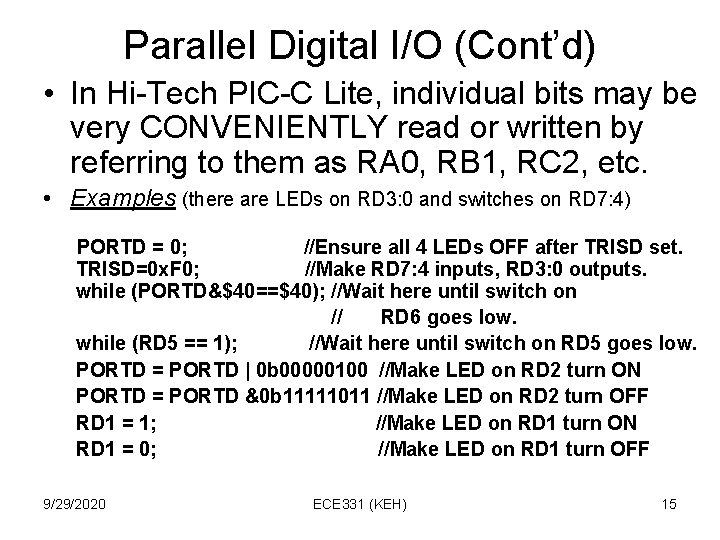
Parallel Digital I/O (Cont’d) • In Hi-Tech PIC-C Lite, individual bits may be very CONVENIENTLY read or written by referring to them as RA 0, RB 1, RC 2, etc. • Examples (there are LEDs on RD 3: 0 and switches on RD 7: 4) PORTD = 0; //Ensure all 4 LEDs OFF after TRISD set. TRISD=0 x. F 0; //Make RD 7: 4 inputs, RD 3: 0 outputs. while (PORTD&$40==$40); //Wait here until switch on // RD 6 goes low. while (RD 5 == 1); //Wait here until switch on RD 5 goes low. PORTD = PORTD | 0 b 00000100 //Make LED on RD 2 turn ON PORTD = PORTD &0 b 11111011 //Make LED on RD 2 turn OFF RD 1 = 1; //Make LED on RD 1 turn ON RD 1 = 0; //Make LED on RD 1 turn OFF 9/29/2020 ECE 331 (KEH) 15
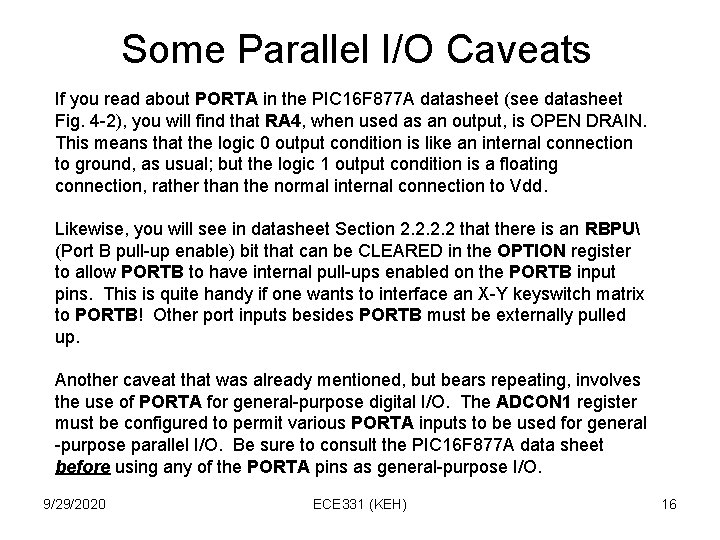
Some Parallel I/O Caveats If you read about PORTA in the PIC 16 F 877 A datasheet (see datasheet Fig. 4 -2), you will find that RA 4, when used as an output, is OPEN DRAIN. This means that the logic 0 output condition is like an internal connection to ground, as usual; but the logic 1 output condition is a floating connection, rather than the normal internal connection to Vdd. Likewise, you will see in datasheet Section 2. 2 that there is an RBPU (Port B pull-up enable) bit that can be CLEARED in the OPTION register to allow PORTB to have internal pull-ups enabled on the PORTB input pins. This is quite handy if one wants to interface an X-Y keyswitch matrix to PORTB! Other port inputs besides PORTB must be externally pulled up. Another caveat that was already mentioned, but bears repeating, involves the use of PORTA for general-purpose digital I/O. The ADCON 1 register must be configured to permit various PORTA inputs to be used for general -purpose parallel I/O. Be sure to consult the PIC 16 F 877 A data sheet before using any of the PORTA pins as general-purpose I/O. 9/29/2020 ECE 331 (KEH) 16
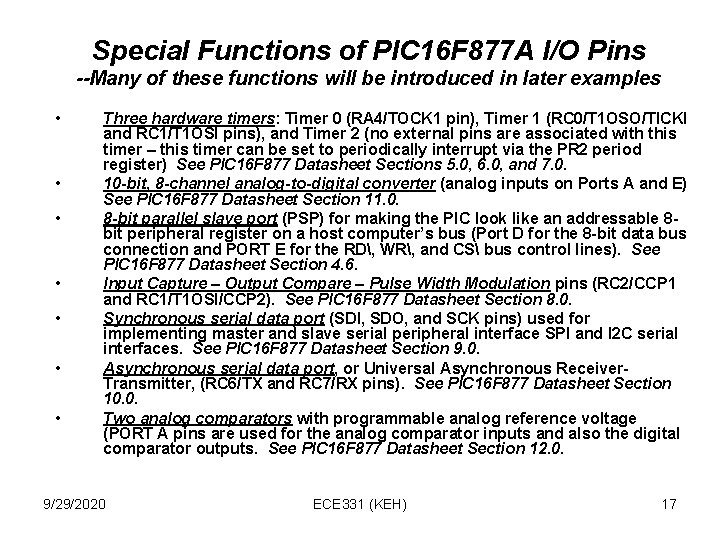
Special Functions of PIC 16 F 877 A I/O Pins --Many of these functions will be introduced in later examples • • Three hardware timers: Timer 0 (RA 4/TOCK 1 pin), Timer 1 (RC 0/T 1 OSO/TICKI and RC 1/T 1 OSI pins), and Timer 2 (no external pins are associated with this timer – this timer can be set to periodically interrupt via the PR 2 period register) See PIC 16 F 877 Datasheet Sections 5. 0, 6. 0, and 7. 0. 10 -bit, 8 -channel analog-to-digital converter (analog inputs on Ports A and E) See PIC 16 F 877 Datasheet Section 11. 0. 8 -bit parallel slave port (PSP) for making the PIC look like an addressable 8 bit peripheral register on a host computer’s bus (Port D for the 8 -bit data bus connection and PORT E for the RD, WR, and CS bus control lines). See PIC 16 F 877 Datasheet Section 4. 6. Input Capture – Output Compare – Pulse Width Modulation pins (RC 2/CCP 1 and RC 1/T 1 OSI/CCP 2). See PIC 16 F 877 Datasheet Section 8. 0. Synchronous serial data port (SDI, SDO, and SCK pins) used for implementing master and slave serial peripheral interface SPI and I 2 C serial interfaces. See PIC 16 F 877 Datasheet Section 9. 0. Asynchronous serial data port, or Universal Asynchronous Receiver. Transmitter, (RC 6/TX and RC 7/RX pins). See PIC 16 F 877 Datasheet Section 10. 0. Two analog comparators with programmable analog reference voltage (PORT A pins are used for the analog comparator inputs and also the digital comparator outputs. See PIC 16 F 877 Datasheet Section 12. 0. 9/29/2020 ECE 331 (KEH) 17
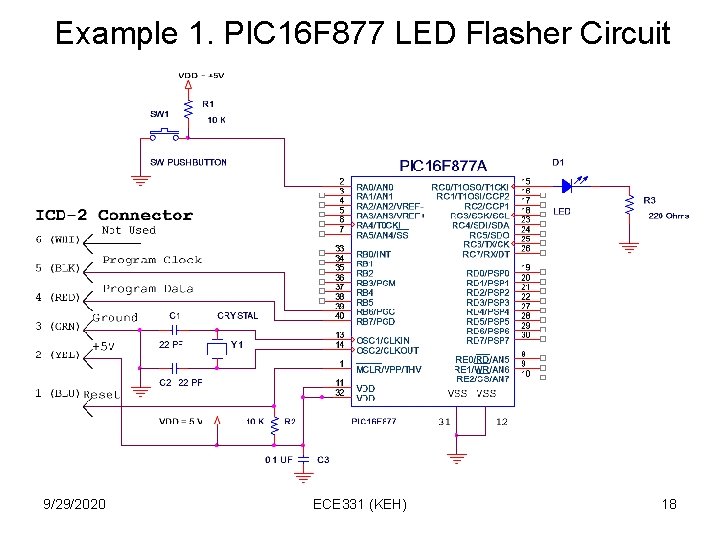
Example 1. PIC 16 F 877 LED Flasher Circuit 9/29/2020 ECE 331 (KEH) 18
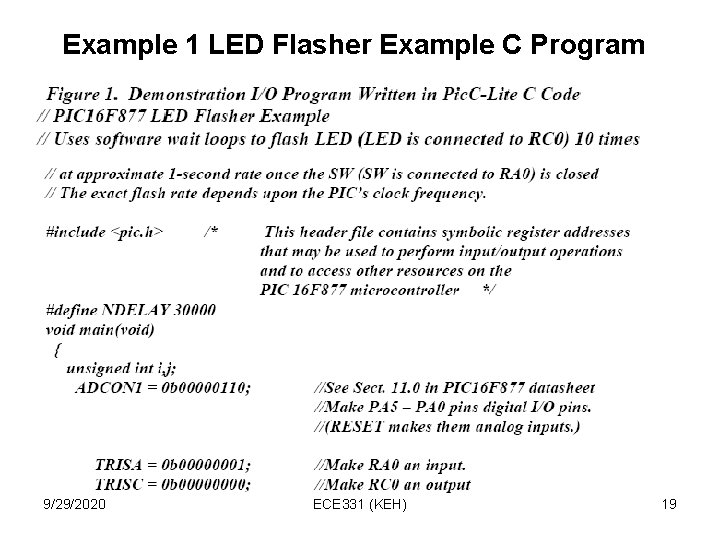
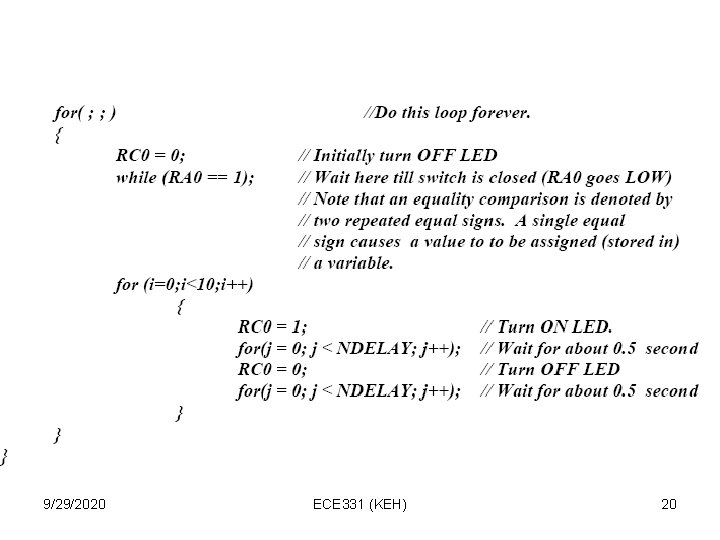
Example 1 LED Flasher Example C Program 9/29/2020 ECE 331 (KEH) 19
9/29/2020 ECE 331 (KEH) 20
Using MPLAB V. 6. 30 Integrated Debugging Environment • CAREFULLY follow the steps listed in the “MPLAB V 6. 30, Pic. C-Lite C Compiler, ICD-2 Debugger” tutorial that is found on your class CDROM to install Microchip’s MPLAB V 6. 30 and also Hi-Tech’s PIC-C Lite on your laptop. • Follow the steps that illustrate how to use the MPLAB simulator and also the Microchip ICD-2 in-circuit debugger to debug the program of Example 1. • There is one important step (Step 12) that I want to emphasize: 9/29/2020 ECE 331 (KEH) 21
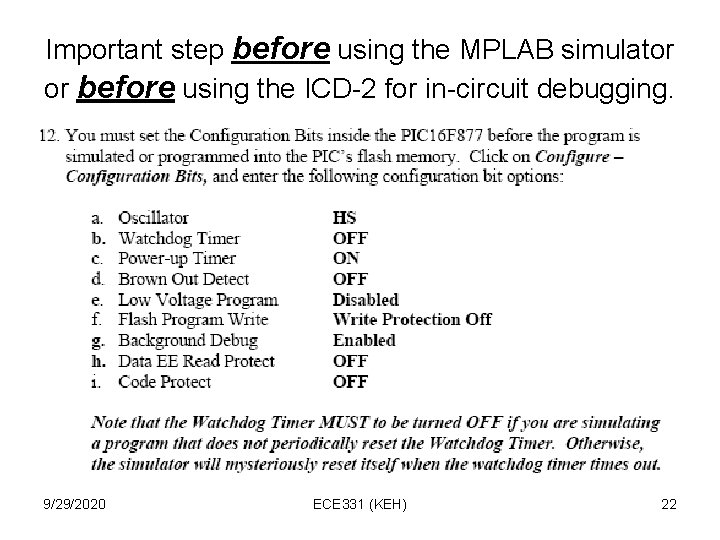
Important step before using the MPLAB simulator or before using the ICD-2 for in-circuit debugging. 9/29/2020 ECE 331 (KEH) 22
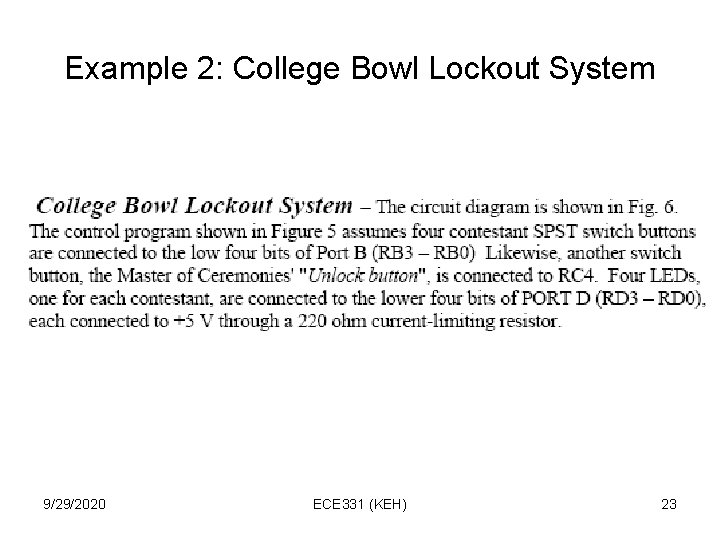
Example 2: College Bowl Lockout System 9/29/2020 ECE 331 (KEH) 23
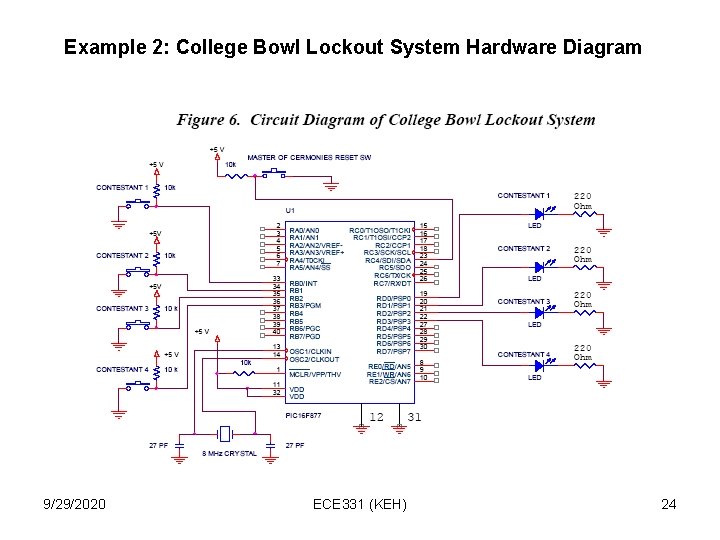
Example 2: College Bowl Lockout System Hardware Diagram 9/29/2020 ECE 331 (KEH) 24
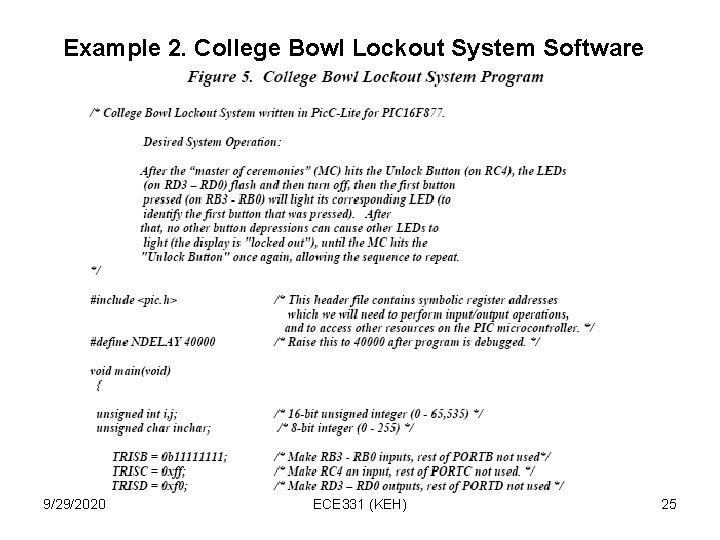
Example 2. College Bowl Lockout System Software 9/29/2020 ECE 331 (KEH) 25
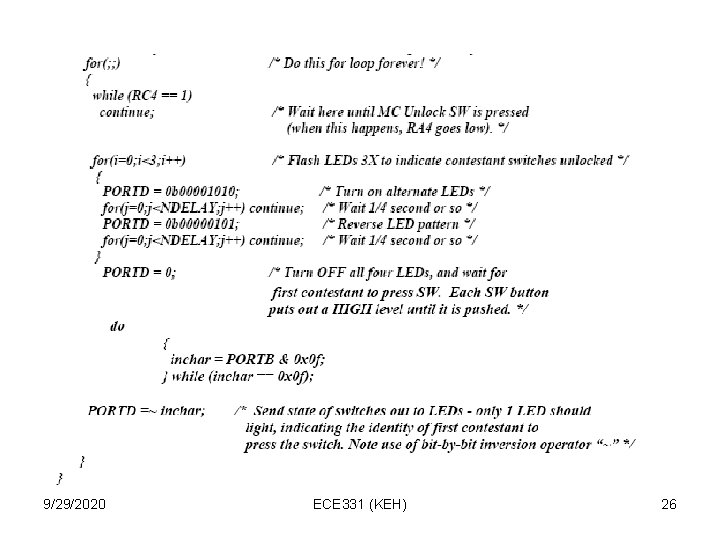
9/29/2020 ECE 331 (KEH) 26
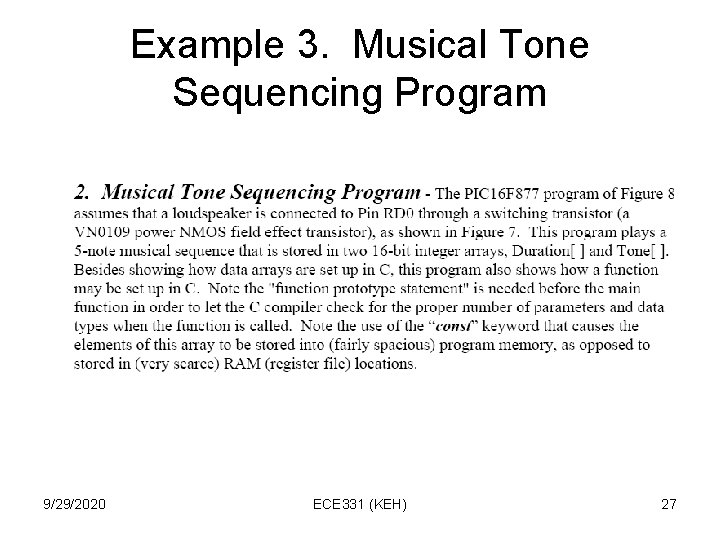
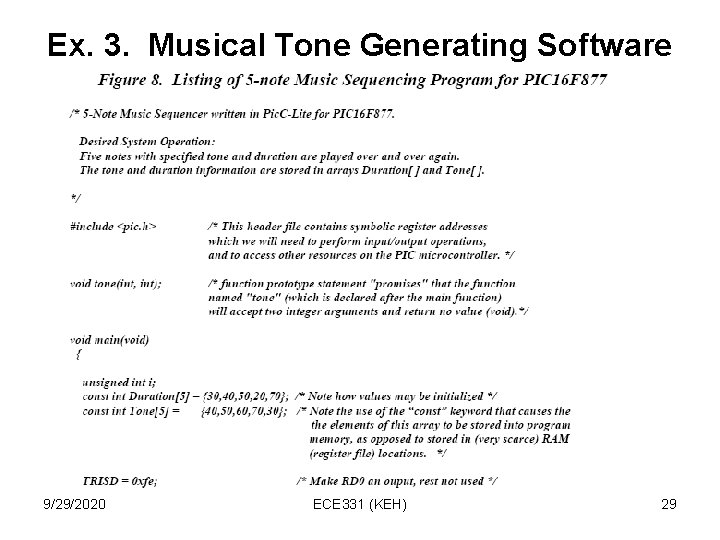
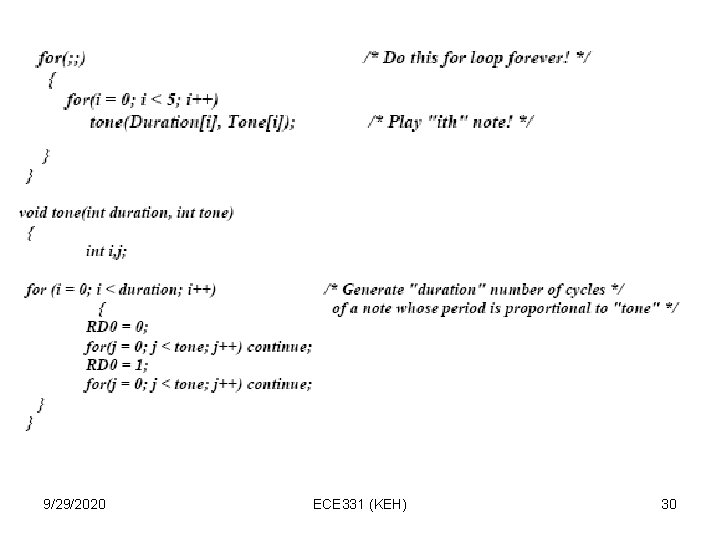
Example 3. Musical Tone Sequencing Program 9/29/2020 ECE 331 (KEH) 27
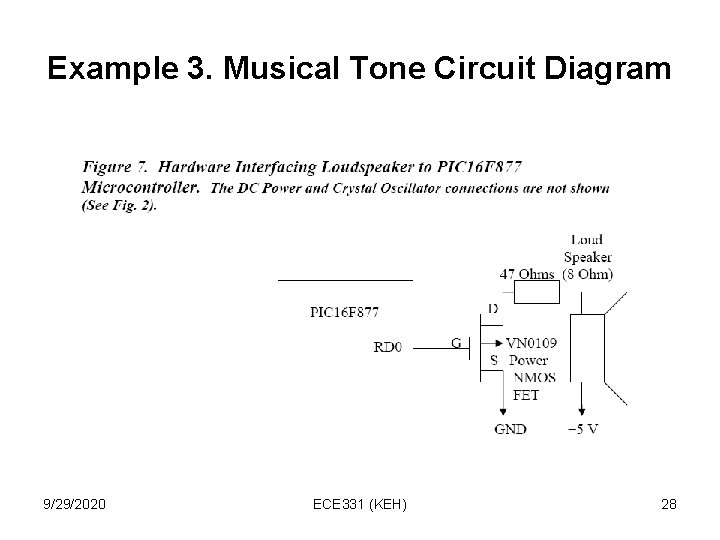
Example 3. Musical Tone Circuit Diagram 9/29/2020 ECE 331 (KEH) 28
Ex. 3. Musical Tone Generating Software 9/29/2020 ECE 331 (KEH) 29
9/29/2020 ECE 331 (KEH) 30
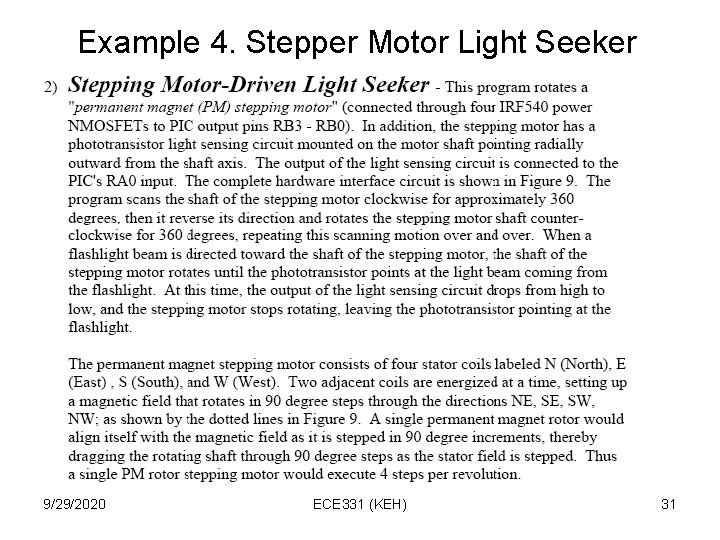
Example 4. Stepper Motor Light Seeker 9/29/2020 ECE 331 (KEH) 31
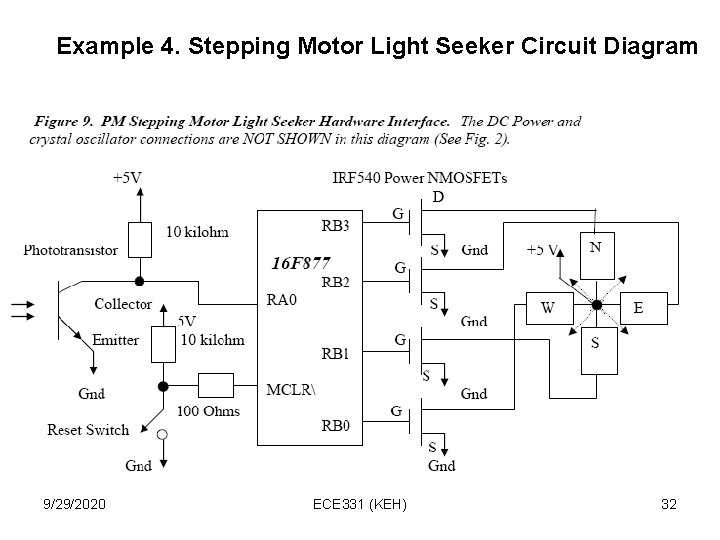
Example 4. Stepping Motor Light Seeker Circuit Diagram 9/29/2020 ECE 331 (KEH) 32
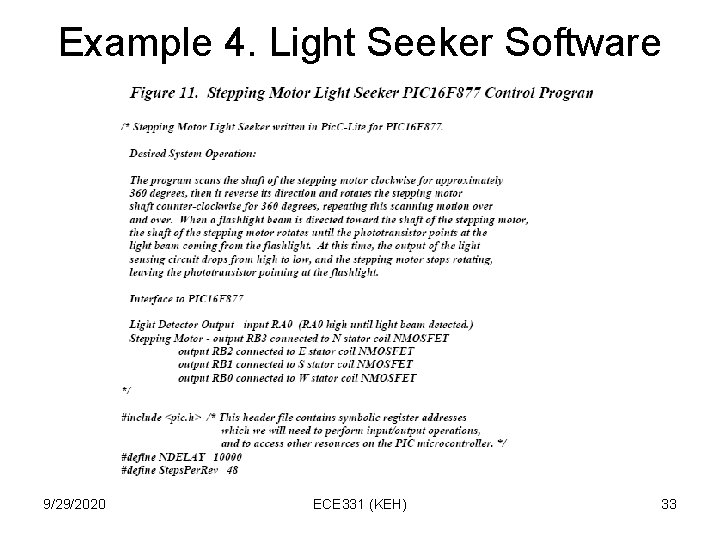
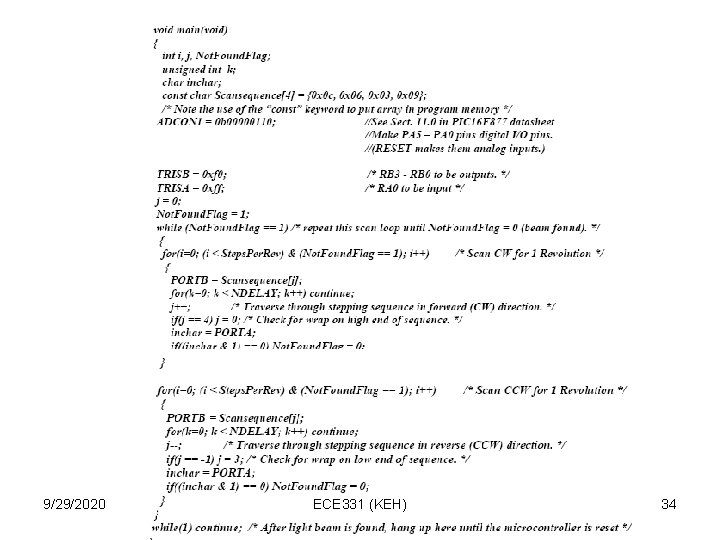
Example 4. Light Seeker Software 9/29/2020 ECE 331 (KEH) 33
9/29/2020 ECE 331 (KEH) 34
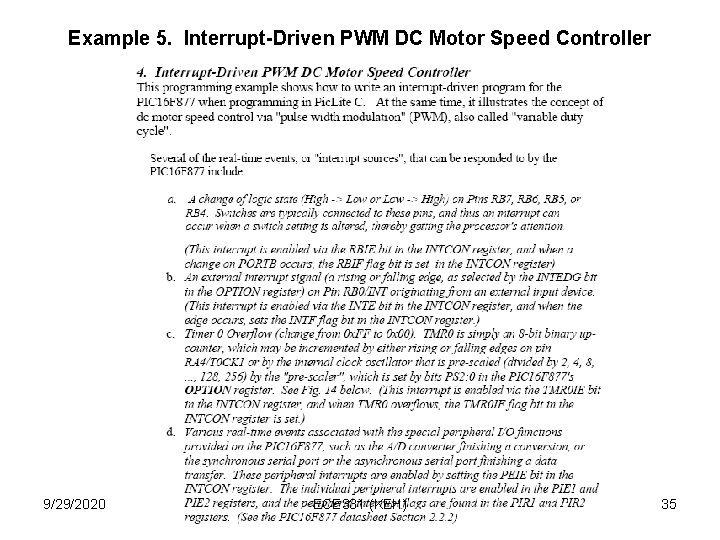
Example 5. Interrupt-Driven PWM DC Motor Speed Controller 9/29/2020 ECE 331 (KEH) 35
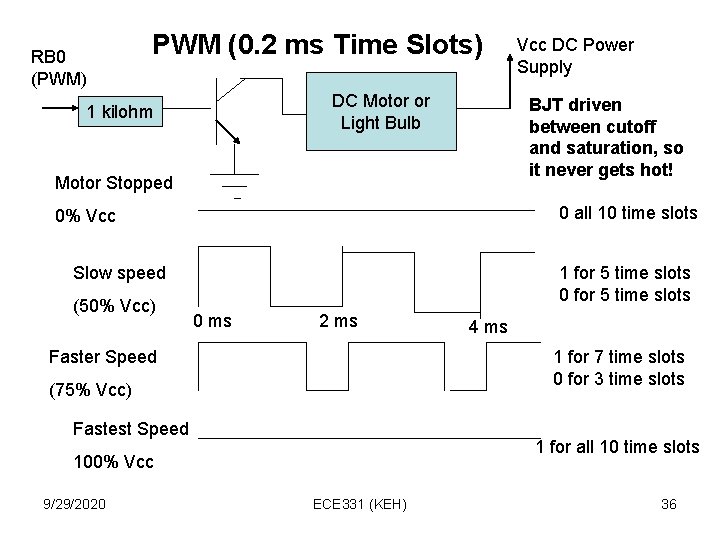
RB 0 (PWM) PWM (0. 2 ms Time Slots) DC Motor or Light Bulb 1 kilohm BJT driven between cutoff and saturation, so it never gets hot! Motor Stopped 0 all 10 time slots 0% Vcc Slow speed (50% Vcc) 1 for 5 time slots 0 ms 2 ms Faster Speed 4 ms 1 for 7 time slots 0 for 3 time slots (75% Vcc) Fastest Speed 1 for all 10 time slots 100% Vcc 9/29/2020 Vcc DC Power Supply ECE 331 (KEH) 36
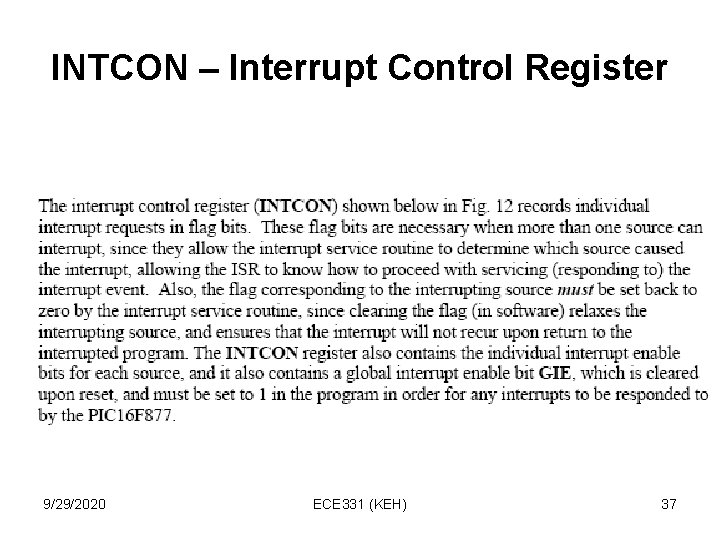
INTCON – Interrupt Control Register 9/29/2020 ECE 331 (KEH) 37
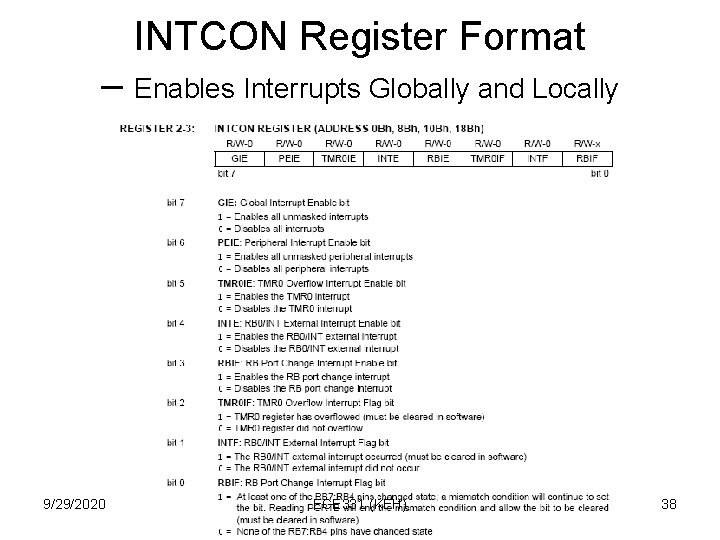
INTCON Register Format – Enables Interrupts Globally and Locally 9/29/2020 ECE 331 (KEH) 38
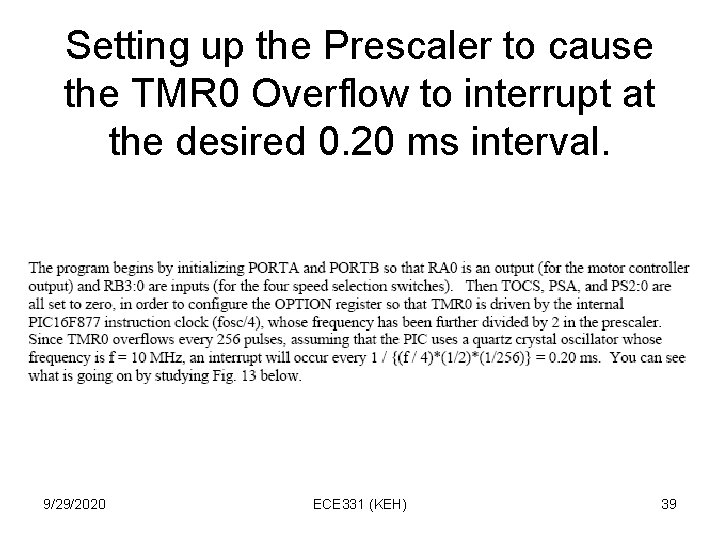
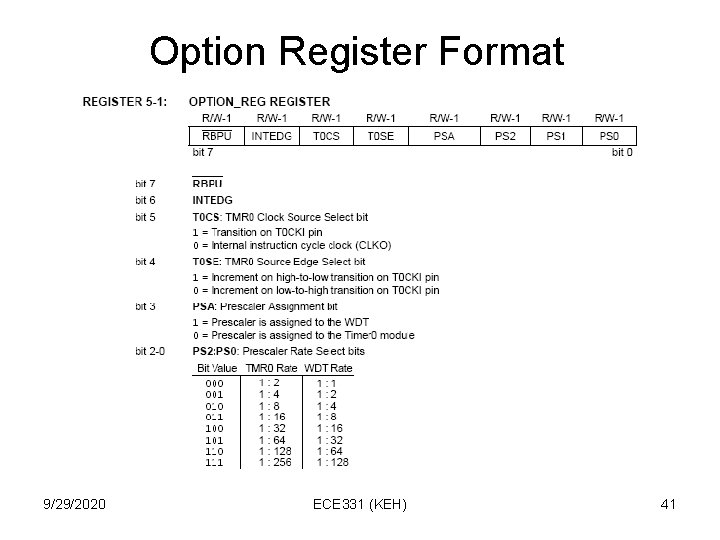
Setting up the Prescaler to cause the TMR 0 Overflow to interrupt at the desired 0. 20 ms interval. 9/29/2020 ECE 331 (KEH) 39
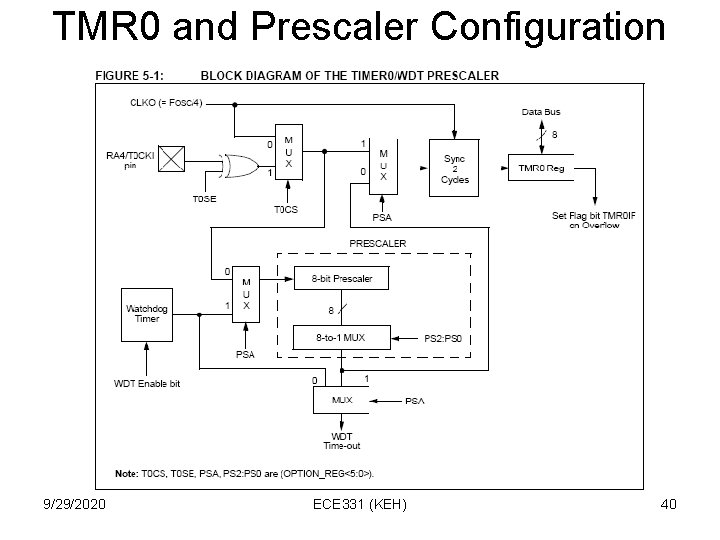
TMR 0 and Prescaler Configuration 9/29/2020 ECE 331 (KEH) 40
Option Register Format 9/29/2020 ECE 331 (KEH) 41
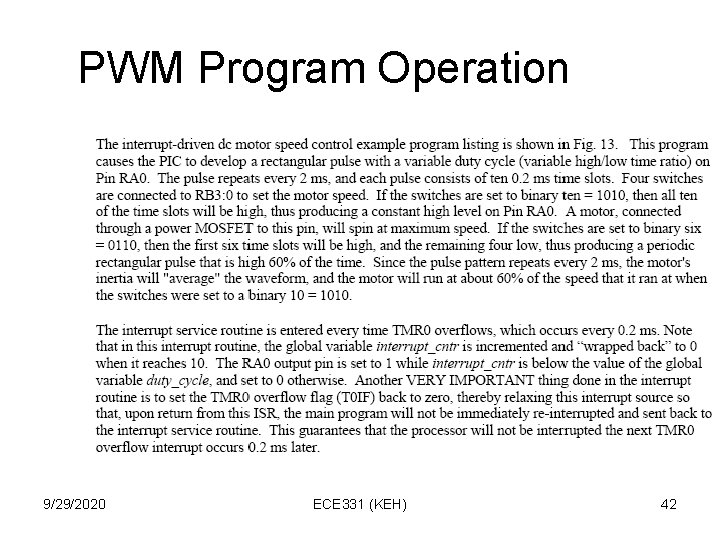
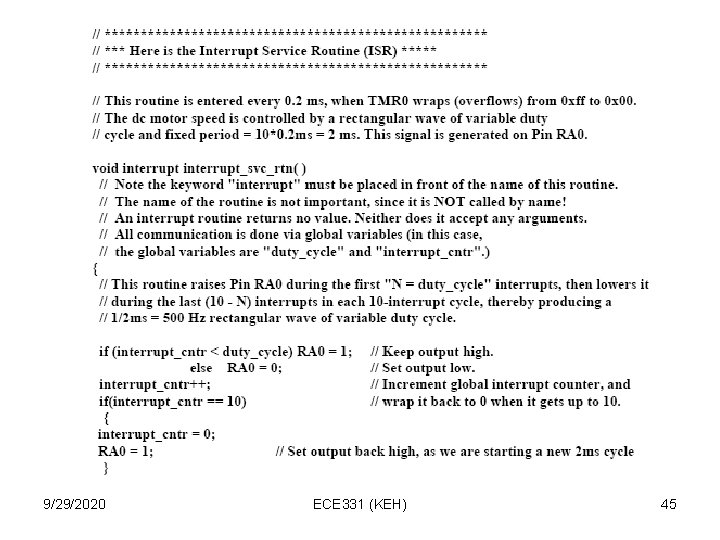
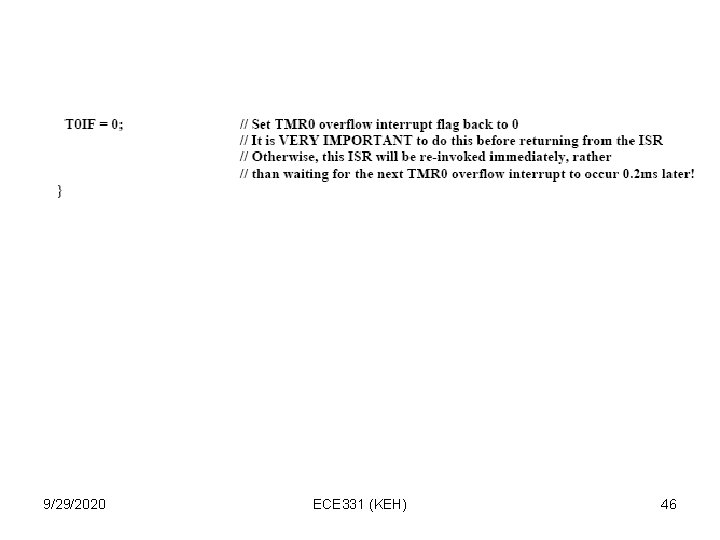
PWM Program Operation 9/29/2020 ECE 331 (KEH) 42
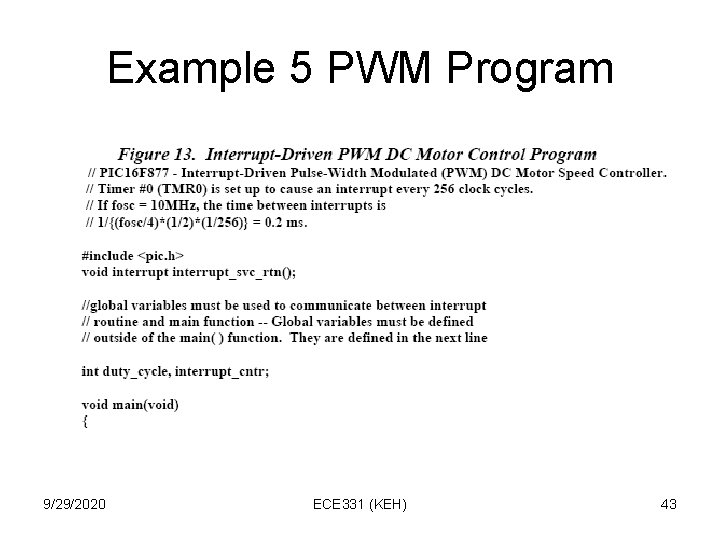
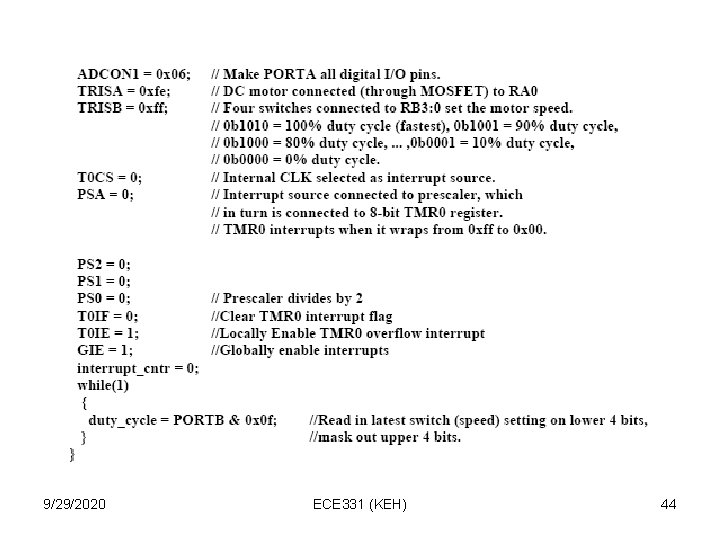
Example 5 PWM Program 9/29/2020 ECE 331 (KEH) 43
9/29/2020 ECE 331 (KEH) 44
9/29/2020 ECE 331 (KEH) 45
9/29/2020 ECE 331 (KEH) 46
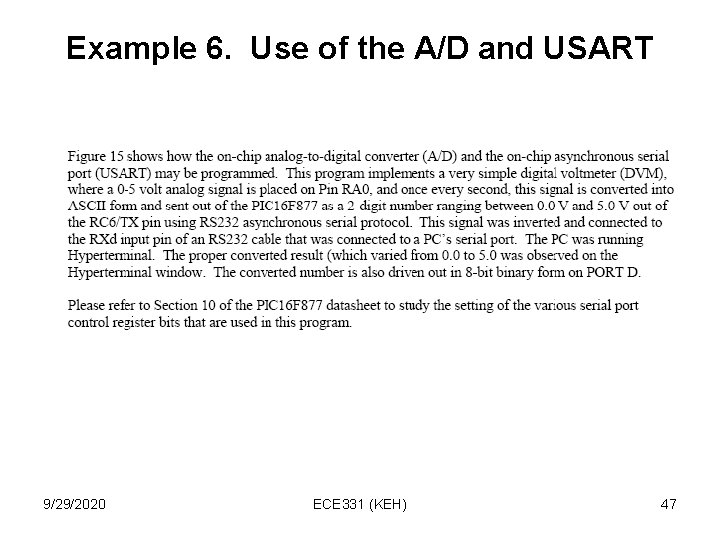
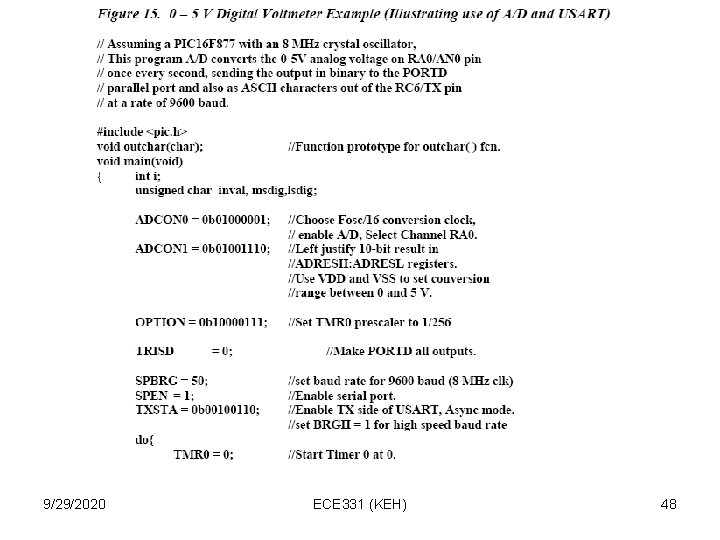
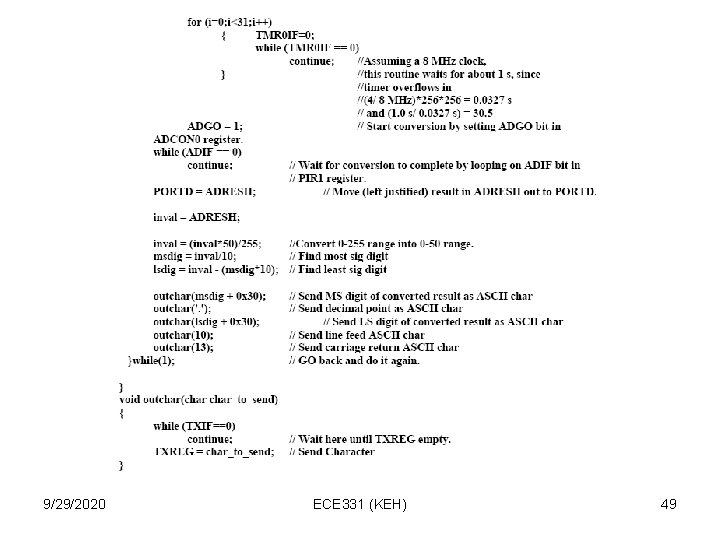
Example 6. Use of the A/D and USART 9/29/2020 ECE 331 (KEH) 47
9/29/2020 ECE 331 (KEH) 48
9/29/2020 ECE 331 (KEH) 49