
The File system Chapter 2 Slides Prepared By
The File system Chapter 2 Slides Prepared By: Kaif Jamal Gilani (Course Coordinator) Kaif Jamal Gilani (Course Teacher) Department of CNET Faculty of CS&IS Jazan University
The four main components of file system are: - • A namespace – a way to name things and organize them in a hierarchy. • An API 2 – a set of system calls for navigating and manipulating objects. • A security model – a scheme for protecting, hiding, and sharing things. • An implementation – software to tie the logical model to the hardware
Pathnames The filesystem is presented as a single unified hierarchy that starts at the directory / and continues downward through an arbitrary number of subdirectories. / is also called the root directory.
• Absolute paths An absolute path is defined as the specifying the location of a file or directory from the root directory(/). In other words we can say absolute path is a complete path from start of actual filesystem from / directory. Examples: /var/ftp/pub /etc/samba. smb. conf /boot/grub. conf
• Relative paths Relative path is defined as path related to the present working directory(pwd). Suppose I am located in book 4/filesystem and I want to change directory to book 4/filesystem/mydir. I can use relative path concept to change directory to kernel. Examples shown in definition.
Filesystem mounting and unmounting • Mounting All files accessible in Unix, or a Unix-style system such as Linux, are arranged in one big tree: the file hierarchy, rooted at /. These files can be spread out over several devices. The mount command attaches a filesystem, located on some device or other, to the file tree.
• For example, • $ sudo mount /dev/sda 4 /users installs the filesystem stored on the disk partition represented by /dev/sda 4 under the path /users. You could then use ls /users to see that filesystem’s contents.
• Unmounting(umount) The umount command detaches the specified file system(s) from the file hierarchy. A file system is specified by giving the directory where it has been mounted. Unmount options: • Umount –l: - removes a filesystem from the naming hierarchy but does not truly unmount it until all existing file references have been closed.
• umount -f : - force-unmounts a busy filesystem and is supported on all our example systems. fuser command: fuser is a simple yet powerful command line utility intended to locate processes based on the files, directories or socket a particular process is accessing. In short, it helps a system user identify processes using files or sockets.
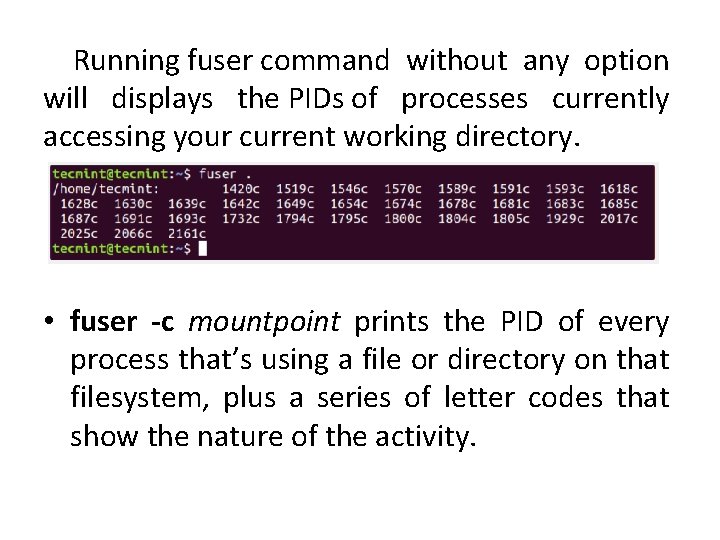
Running fuser command without any option will displays the PIDs of processes currently accessing your current working directory. • fuser -c mountpoint prints the PID of every process that’s using a file or directory on that filesystem, plus a series of letter codes that show the nature of the activity.
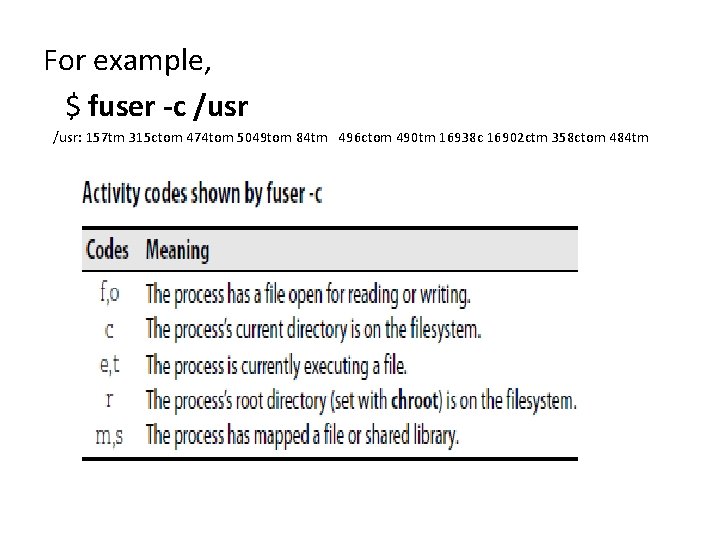
For example, $ fuser -c /usr: 157 tm 315 ctom 474 tom 5049 tom 84 tm 496 ctom 490 tm 16938 c 16902 ctm 358 ctom 484 tm
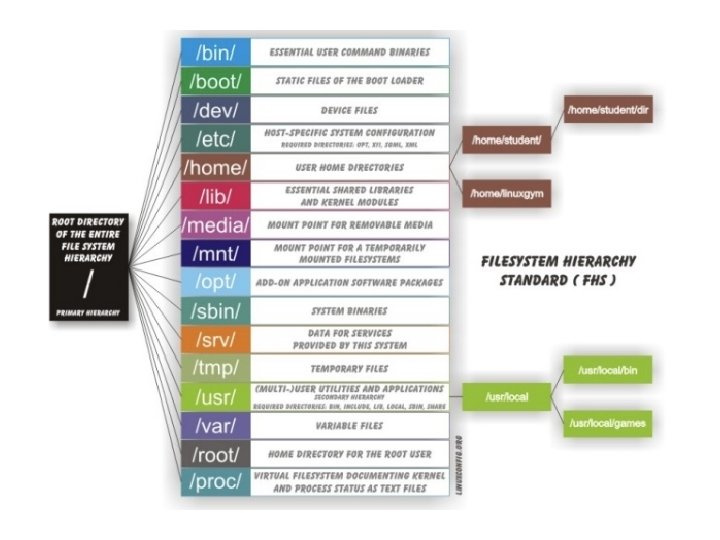
Organization of file tree(Standard directories and their contents)
- Slides: 13