
TESTING THE FIELD WINDINGS OF LARGE ELECTRICITY GENERATORS
- Slides: 44
TESTING THE FIELD WINDINGS OF LARGE ELECTRICITY GENERATORS USING THE RSO TEST METHOD. 3. DETAILS OF THE TDR 200 RSO REFLECTOMETER AND USE OF THE DL 100 DELAY LINE ROWTEST LTD. ROWTEST
THE TDR 200 ROTOR RSO REFLECTOMETER TEST SYSTEM The TDR 200 rotor reflectometer RSO test system consists of 5 main components: 1. The TDR 200 Rotor Reflectometer unit (TDR 200). 2. A Control PC running the Rowtest TDRPlot software. 3. A Rotor connection module (CM 100). 4. A demonstration delay line (DL 100). 5. Set of instruction manuals and software CD. The system is supplied in a padded transit bag which also contains all of the above items (apart from the Control PC), together with a set of contact magnets. The main component parts of the TDR 200 system are shown in the following slides. ROWTEST
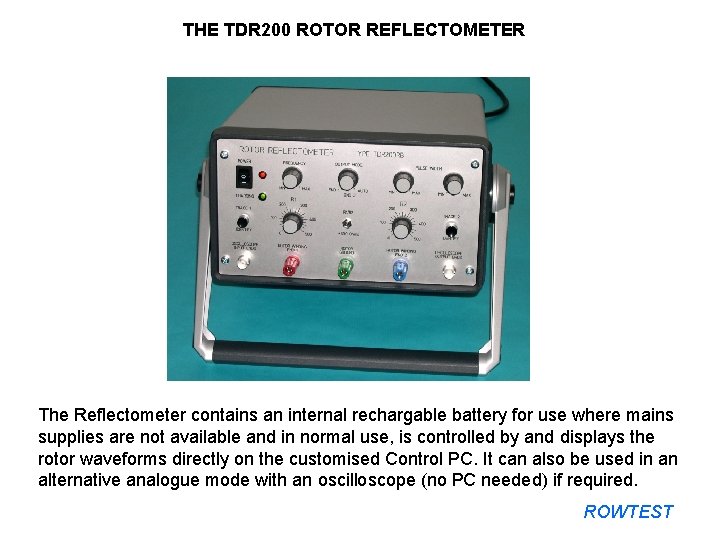
THE TDR 200 ROTOR REFLECTOMETER The Reflectometer contains an internal rechargable battery for use where mains supplies are not available and in normal use, is controlled by and displays the rotor waveforms directly on the customised Control PC. It can also be used in an alternative analogue mode with an oscilloscope (no PC needed) if required. ROWTEST
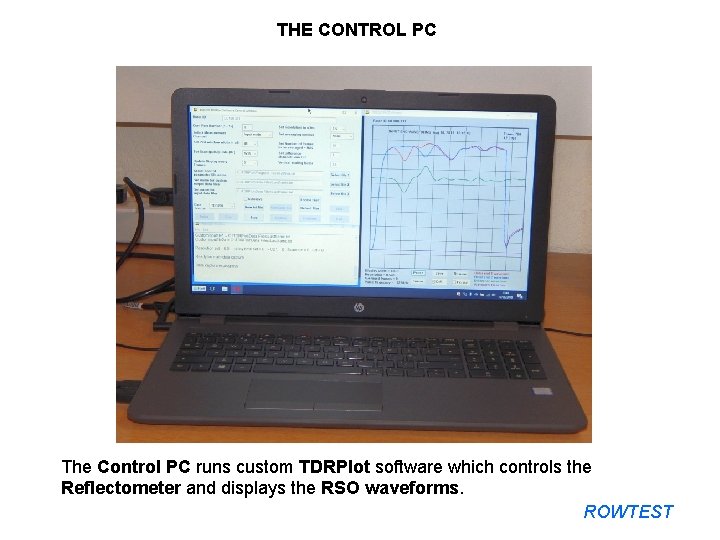
THE CONTROL PC The Control PC runs custom TDRPlot software which controls the Reflectometer and displays the RSO waveforms. ROWTEST
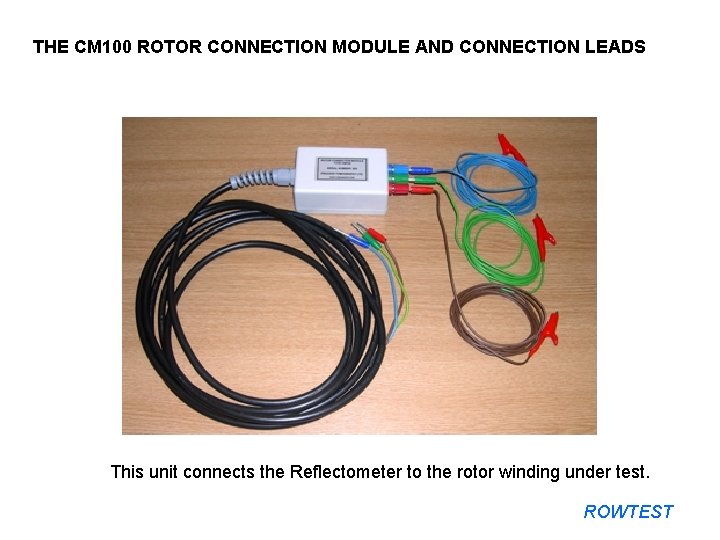
THE CM 100 ROTOR CONNECTION MODULE AND CONNECTION LEADS This unit connects the Reflectometer to the rotor winding under test. ROWTEST
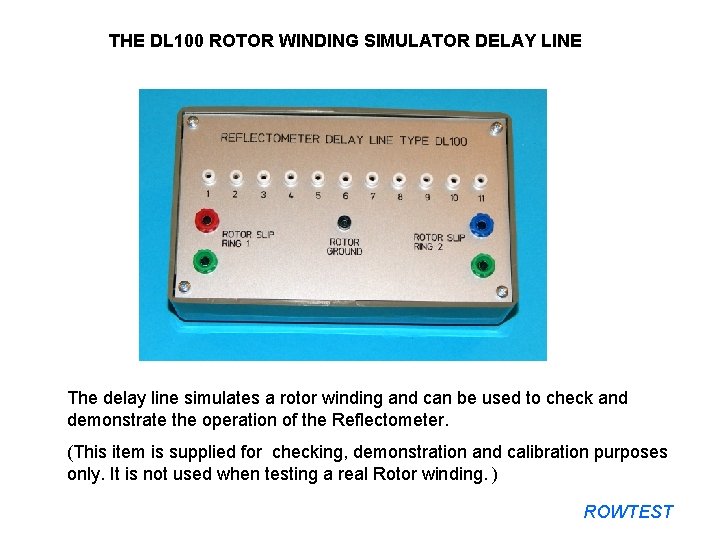
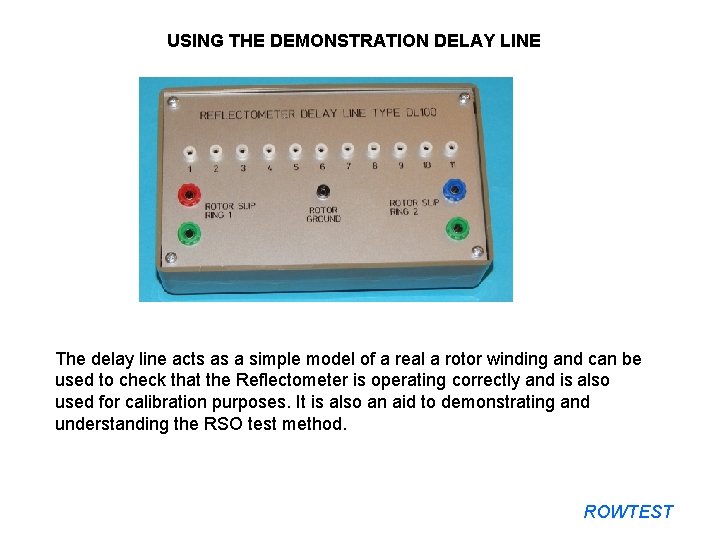
THE DL 100 ROTOR WINDING SIMULATOR DELAY LINE The delay line simulates a rotor winding and can be used to check and demonstrate the operation of the Reflectometer. (This item is supplied for checking, demonstration and calibration purposes only. It is not used when testing a real Rotor winding. ) ROWTEST
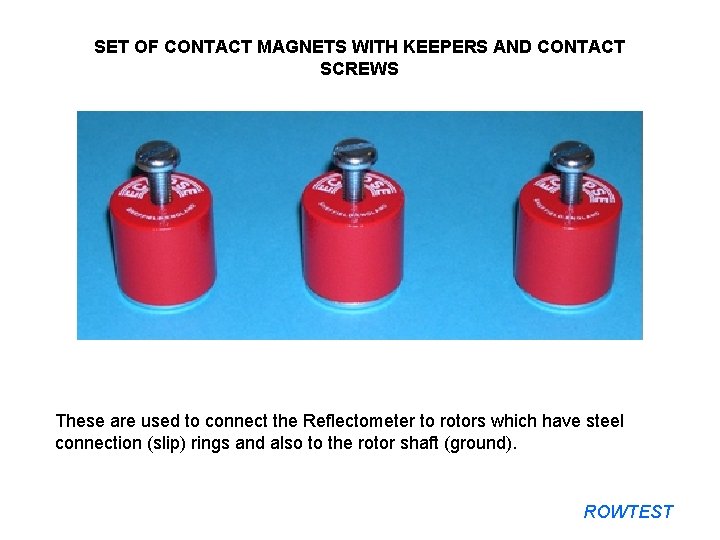
SET OF CONTACT MAGNETS WITH KEEPERS AND CONTACT SCREWS These are used to connect the Reflectometer to rotors which have steel connection (slip) rings and also to the rotor shaft (ground). ROWTEST
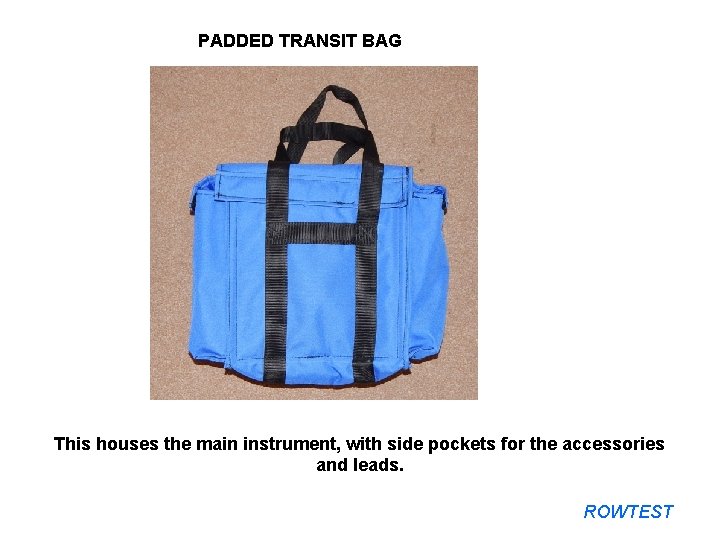
PADDED TRANSIT BAG This houses the main instrument, with side pockets for the accessories and leads. ROWTEST
TDR 200 ROTOR RSO REFLECTOMETER DETAILS The reflectometer unit is contained within a screened metal case with a tilt-and-lock carrying handle. There are controls and connectors on both the front and rear panels and the unit contains a 12 V/2 VA internal rechargeable battery which is charged when the mains switch on the rear panel is turned on. The controls and terminals on the front and rear panels are described in the next few slides. ROWTEST
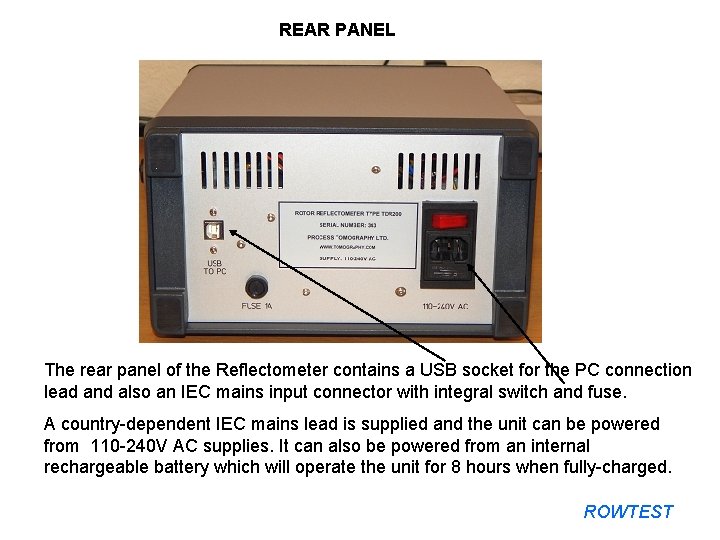
REAR PANEL The rear panel of the Reflectometer contains a USB socket for the PC connection lead and also an IEC mains input connector with integral switch and fuse. A country-dependent IEC mains lead is supplied and the unit can be powered from 110 -240 V AC supplies. It can also be powered from an internal rechargeable battery which will operate the unit for 8 hours when fully-charged. ROWTEST
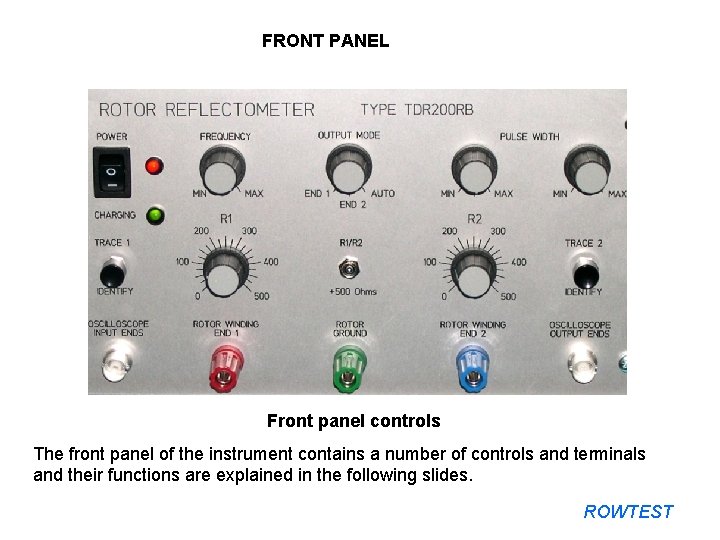
FRONT PANEL Front panel controls The front panel of the instrument contains a number of controls and terminals and their functions are explained in the following slides. ROWTEST
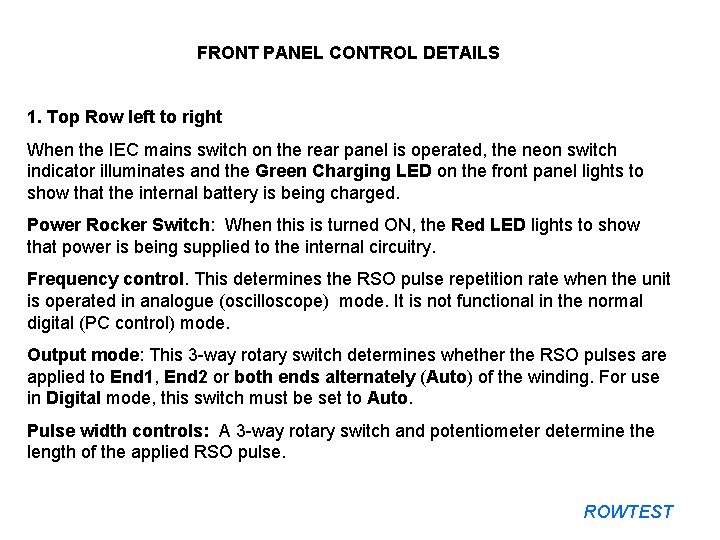
FRONT PANEL CONTROL DETAILS 1. Top Row left to right When the IEC mains switch on the rear panel is operated, the neon switch indicator illuminates and the Green Charging LED on the front panel lights to show that the internal battery is being charged. Power Rocker Switch: When this is turned ON, the Red LED lights to show that power is being supplied to the internal circuitry. Frequency control. This determines the RSO pulse repetition rate when the unit is operated in analogue (oscilloscope) mode. It is not functional in the normal digital (PC control) mode. Output mode: This 3 -way rotary switch determines whether the RSO pulses are applied to End 1, End 2 or both ends alternately (Auto) of the winding. For use in Digital mode, this switch must be set to Auto. Pulse width controls: A 3 -way rotary switch and potentiometer determine the length of the applied RSO pulse. ROWTEST
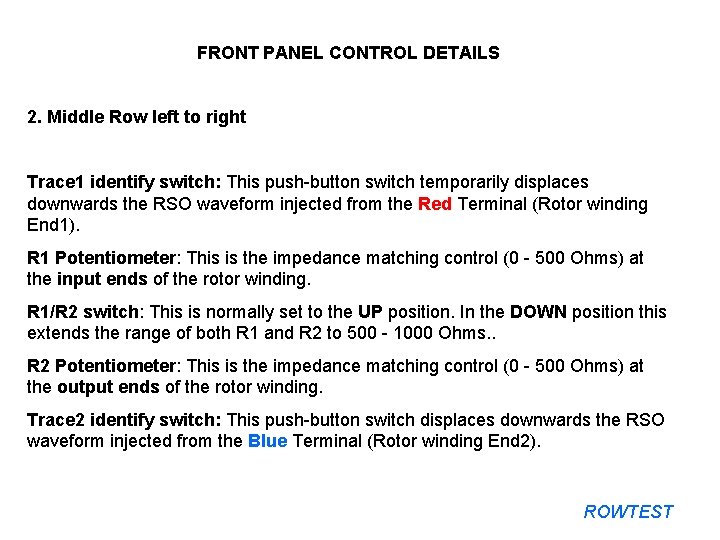
FRONT PANEL CONTROL DETAILS 2. Middle Row left to right Trace 1 identify switch: This push-button switch temporarily displaces downwards the RSO waveform injected from the Red Terminal (Rotor winding End 1). R 1 Potentiometer: This is the impedance matching control (0 - 500 Ohms) at the input ends of the rotor winding. R 1/R 2 switch: This is normally set to the UP position. In the DOWN position this extends the range of both R 1 and R 2 to 500 - 1000 Ohms. . R 2 Potentiometer: This is the impedance matching control (0 - 500 Ohms) at the output ends of the rotor winding. Trace 2 identify switch: This push-button switch displaces downwards the RSO waveform injected from the Blue Terminal (Rotor winding End 2). ROWTEST
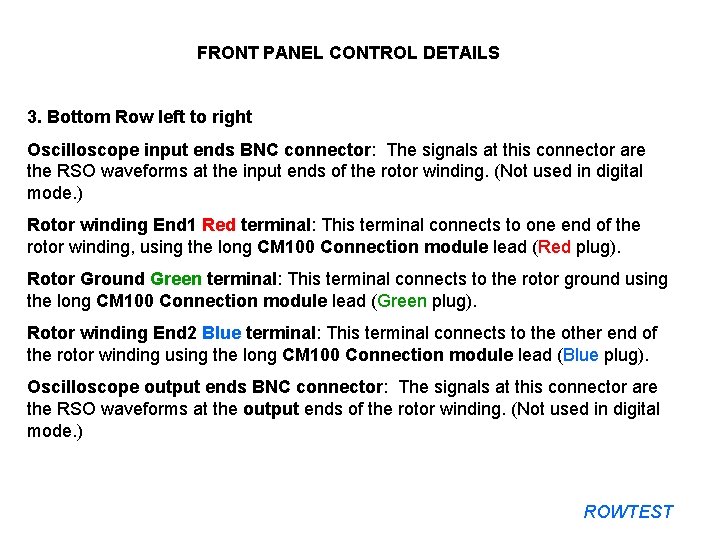
FRONT PANEL CONTROL DETAILS 3. Bottom Row left to right Oscilloscope input ends BNC connector: The signals at this connector are the RSO waveforms at the input ends of the rotor winding. (Not used in digital mode. ) Rotor winding End 1 Red terminal: This terminal connects to one end of the rotor winding, using the long CM 100 Connection module lead (Red plug). Rotor Ground Green terminal: This terminal connects to the rotor ground using the long CM 100 Connection module lead (Green plug). Rotor winding End 2 Blue terminal: This terminal connects to the other end of the rotor winding using the long CM 100 Connection module lead (Blue plug). Oscilloscope output ends BNC connector: The signals at this connector are the RSO waveforms at the output ends of the rotor winding. (Not used in digital mode. ) ROWTEST
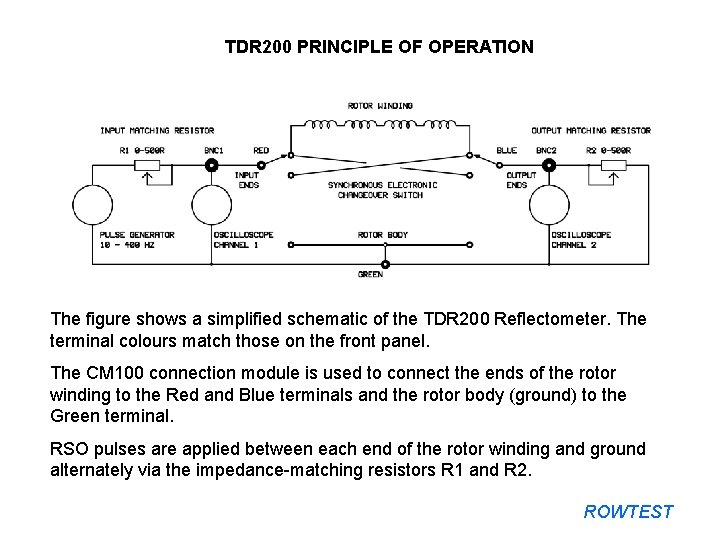
TDR 200 PRINCIPLE OF OPERATION The figure shows a simplified schematic of the TDR 200 Reflectometer. The terminal colours match those on the front panel. The CM 100 connection module is used to connect the ends of the rotor winding to the Red and Blue terminals and the rotor body (ground) to the Green terminal. RSO pulses are applied between each end of the rotor winding and ground alternately via the impedance-matching resistors R 1 and R 2. ROWTEST
DEMONSTRATING THE OPERATION OF THE TDR 200 RSO TEST SYSTEM USING THE DL 100 DELAY LINE The following slides explain the use of the TDR 200 system, using the demonstration DL 100 Delay line which simulates a real rotor winding. ROWTEST
USING THE DEMONSTRATION DELAY LINE The delay line acts as a simple model of a real a rotor winding and can be used to check that the Reflectometer is operating correctly and is also used for calibration purposes. It is also an aid to demonstrating and understanding the RSO test method. ROWTEST
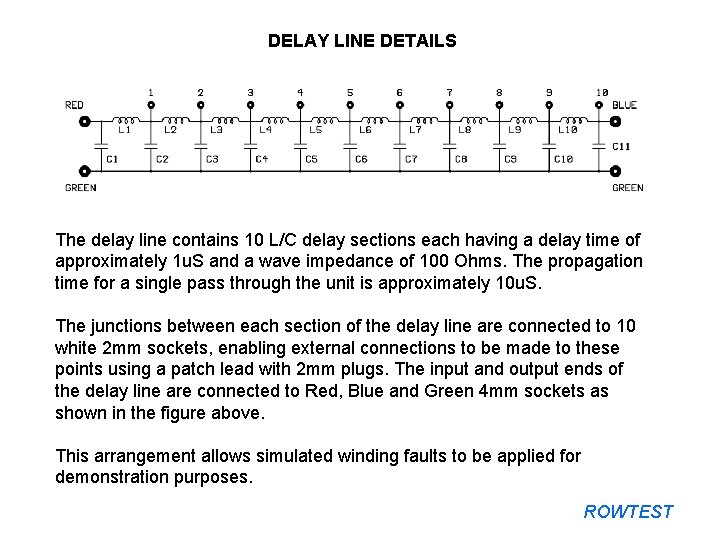
DELAY LINE DETAILS The delay line contains 10 L/C delay sections each having a delay time of approximately 1 u. S and a wave impedance of 100 Ohms. The propagation time for a single pass through the unit is approximately 10 u. S. The junctions between each section of the delay line are connected to 10 white 2 mm sockets, enabling external connections to be made to these points using a patch lead with 2 mm plugs. The input and output ends of the delay line are connected to Red, Blue and Green 4 mm sockets as shown in the figure above. This arrangement allows simulated winding faults to be applied for demonstration purposes. ROWTEST
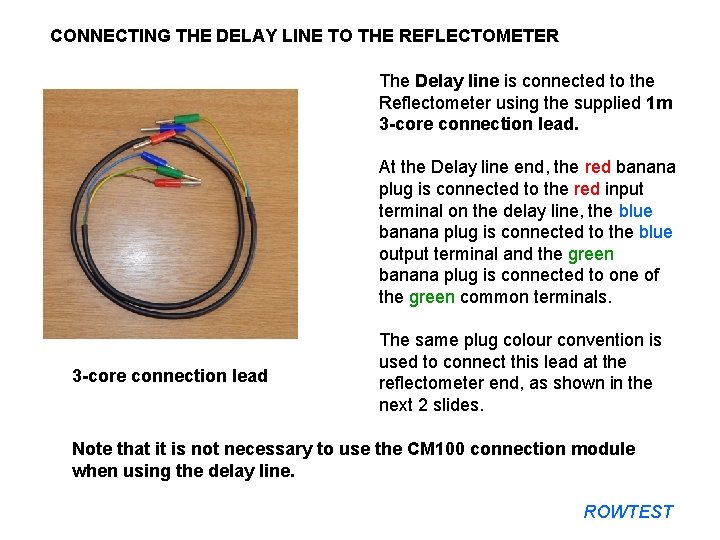
CONNECTING THE DELAY LINE TO THE REFLECTOMETER The Delay line is connected to the Reflectometer using the supplied 1 m 3 -core connection lead. At the Delay line end, the red banana plug is connected to the red input terminal on the delay line, the blue banana plug is connected to the blue output terminal and the green banana plug is connected to one of the green common terminals. 3 -core connection lead The same plug colour convention is used to connect this lead at the reflectometer end, as shown in the next 2 slides. Note that it is not necessary to use the CM 100 connection module when using the delay line. ROWTEST
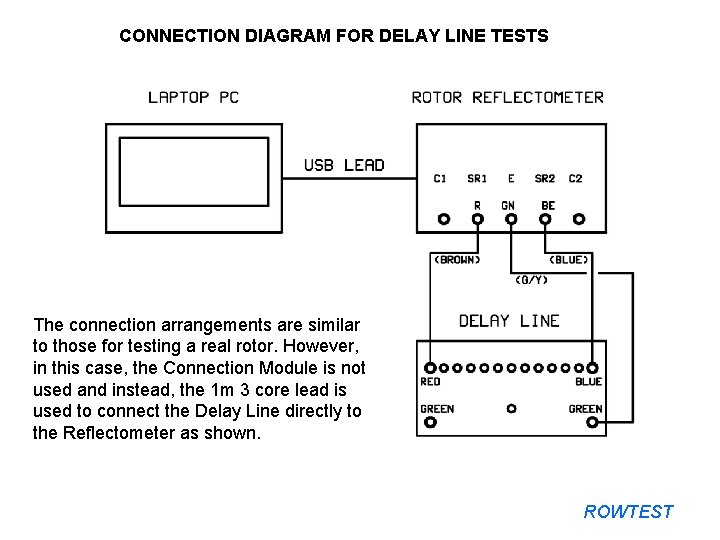
CONNECTION DIAGRAM FOR DELAY LINE TESTS The connection arrangements are similar to those for testing a real rotor. However, in this case, the Connection Module is not used and instead, the 1 m 3 core lead is used to connect the Delay Line directly to the Reflectometer as shown. ROWTEST
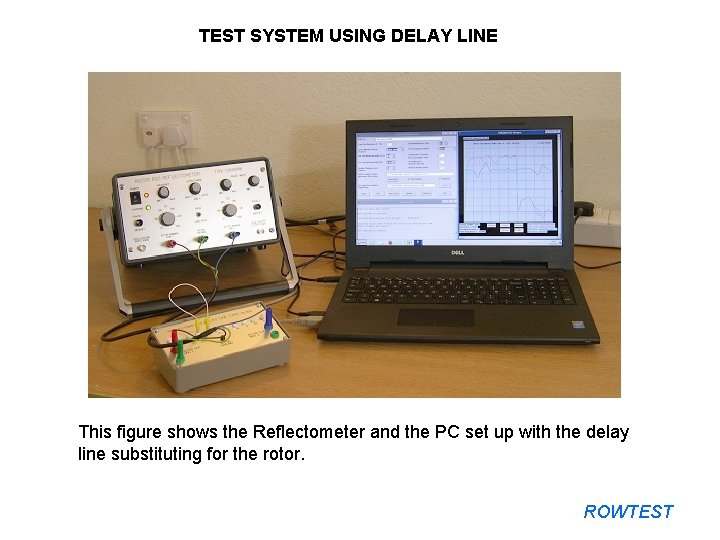
TEST SYSTEM USING DELAY LINE This figure shows the Reflectometer and the PC set up with the delay line substituting for the rotor. ROWTEST
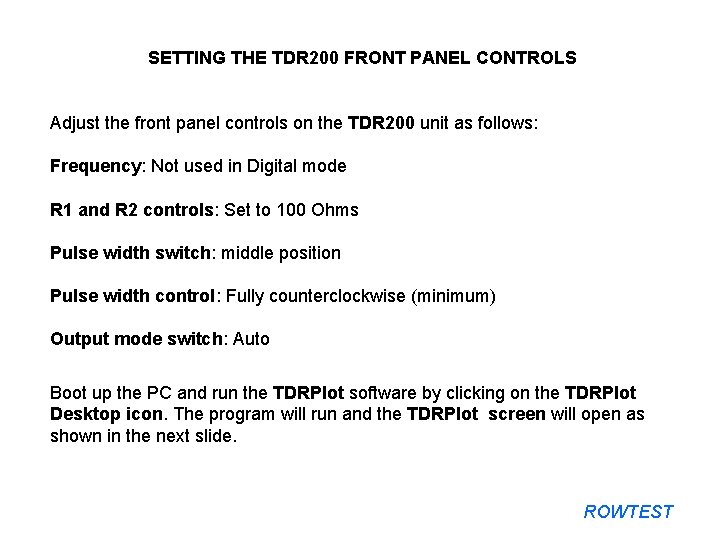
SETTING THE TDR 200 FRONT PANEL CONTROLS Adjust the front panel controls on the TDR 200 unit as follows: Frequency: Not used in Digital mode R 1 and R 2 controls: Set to 100 Ohms Pulse width switch: middle position Pulse width control: Fully counterclockwise (minimum) Output mode switch: Auto Boot up the PC and run the TDRPlot software by clicking on the TDRPlot Desktop icon. The program will run and the TDRPlot screen will open as shown in the next slide. ROWTEST
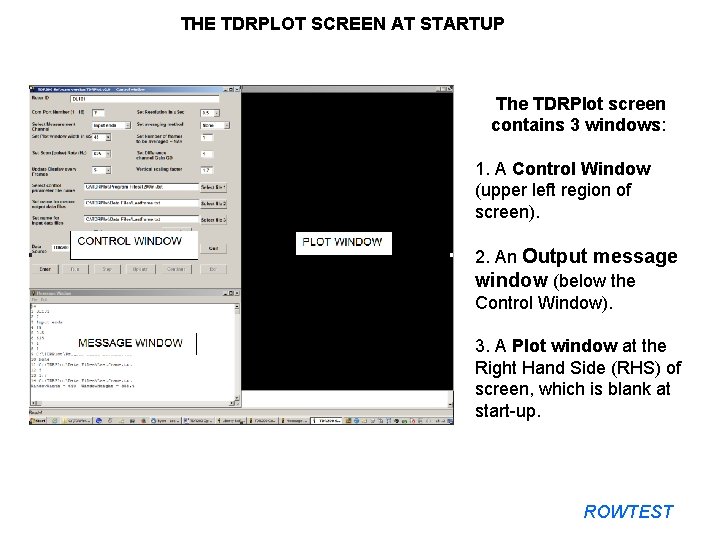
THE TDRPLOT SCREEN AT STARTUP The TDRPlot screen contains 3 windows: 1. A Control Window (upper left region of screen). 2. An Output message window (below the Control Window). 3. A Plot window at the Right Hand Side (RHS) of screen, which is blank at start-up. ROWTEST
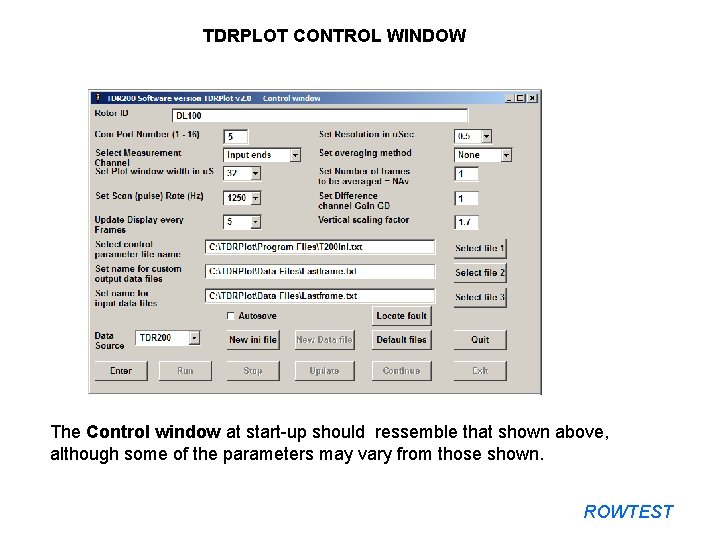
TDRPLOT CONTROL WINDOW The Control window at start-up should ressemble that shown above, although some of the parameters may vary from those shown. ROWTEST
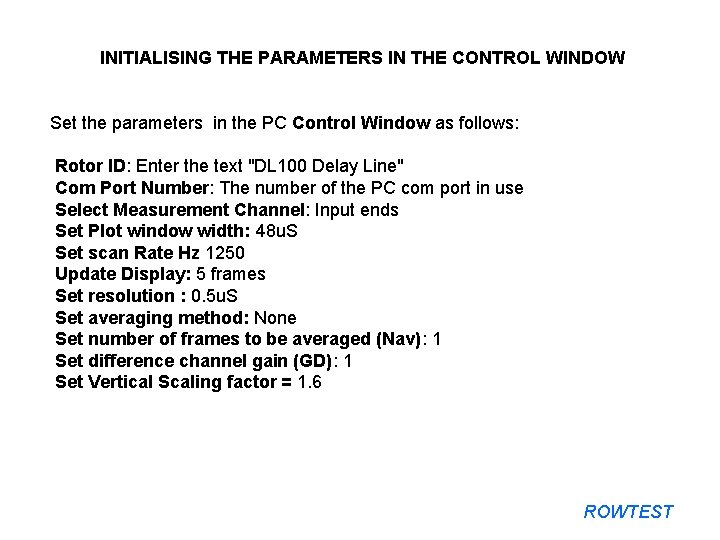
INITIALISING THE PARAMETERS IN THE CONTROL WINDOW Set the parameters in the PC Control Window as follows: Rotor ID: Enter the text "DL 100 Delay Line" Com Port Number: The number of the PC com port in use Select Measurement Channel: Input ends Set Plot window width: 48 u. S Set scan Rate Hz 1250 Update Display: 5 frames Set resolution : 0. 5 u. S Set averaging method: None Set number of frames to be averaged (Nav): 1 Set difference channel gain (GD): 1 Set Vertical Scaling factor = 1. 6 ROWTEST
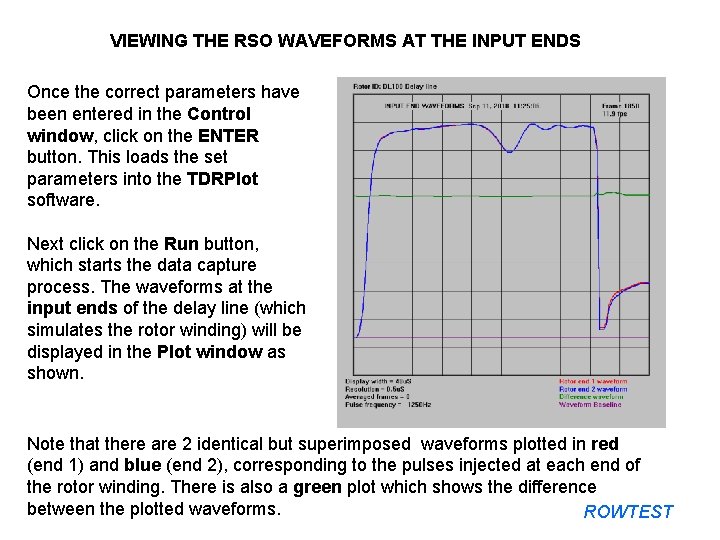
VIEWING THE RSO WAVEFORMS AT THE INPUT ENDS Once the correct parameters have been entered in the Control window, click on the ENTER button. This loads the set parameters into the TDRPlot software. Next click on the Run button, which starts the data capture process. The waveforms at the input ends of the delay line (which simulates the rotor winding) will be displayed in the Plot window as shown. Note that there are 2 identical but superimposed waveforms plotted in red (end 1) and blue (end 2), corresponding to the pulses injected at each end of the rotor winding. There is also a green plot which shows the difference between the plotted waveforms. ROWTEST
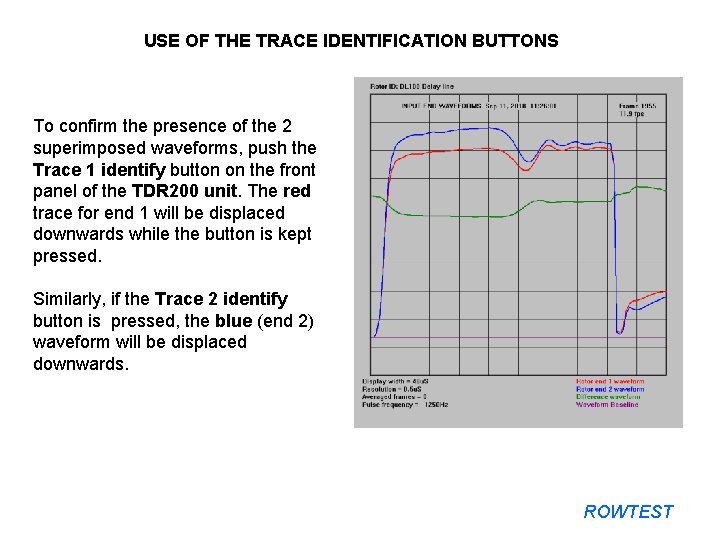
USE OF THE TRACE IDENTIFICATION BUTTONS To confirm the presence of the 2 superimposed waveforms, push the Trace 1 identify button on the front panel of the TDR 200 unit. The red trace for end 1 will be displaced downwards while the button is kept pressed. Similarly, if the Trace 2 identify button is pressed, the blue (end 2) waveform will be displaced downwards. ROWTEST
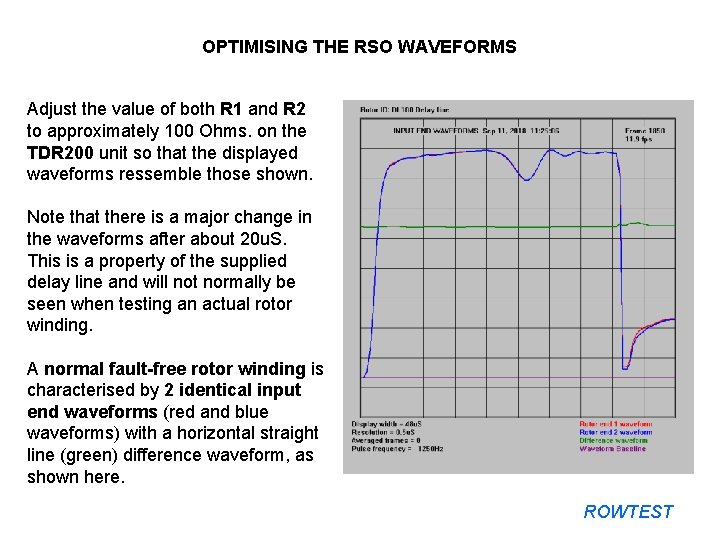
OPTIMISING THE RSO WAVEFORMS Adjust the value of both R 1 and R 2 to approximately 100 Ohms. on the TDR 200 unit so that the displayed waveforms ressemble those shown. Note that there is a major change in the waveforms after about 20 u. S. This is a property of the supplied delay line and will not normally be seen when testing an actual rotor winding. A normal fault-free rotor winding is characterised by 2 identical input end waveforms (red and blue waveforms) with a horizontal straight line (green) difference waveform, as shown here. ROWTEST
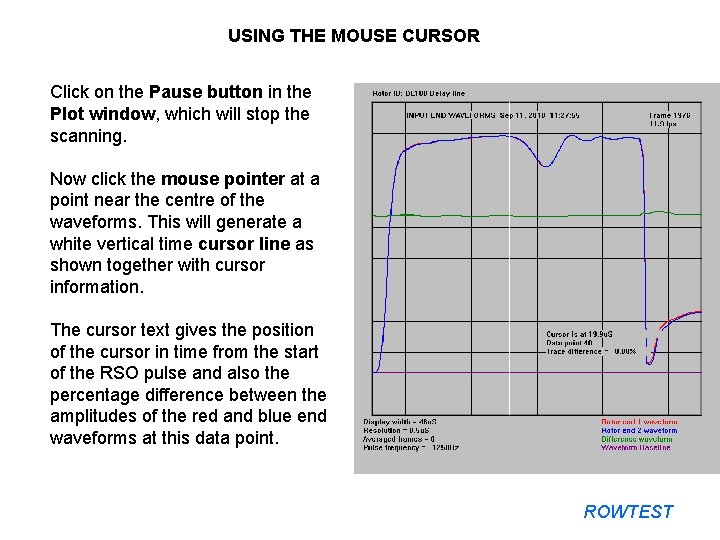
USING THE MOUSE CURSOR Click on the Pause button in the Plot window, which will stop the scanning. Now click the mouse pointer at a point near the centre of the waveforms. This will generate a white vertical time cursor line as shown together with cursor information. The cursor text gives the position of the cursor in time from the start of the RSO pulse and also the percentage difference between the amplitudes of the red and blue end waveforms at this data point. ROWTEST
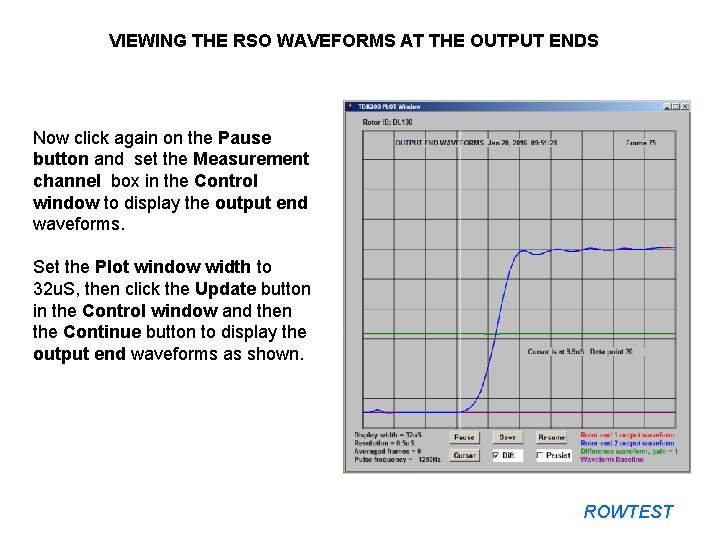
VIEWING THE RSO WAVEFORMS AT THE OUTPUT ENDS Now click again on the Pause button and set the Measurement channel box in the Control window to display the output end waveforms. Set the Plot window width to 32 u. S, then click the Update button in the Control window and then the Continue button to display the output end waveforms as shown. ROWTEST
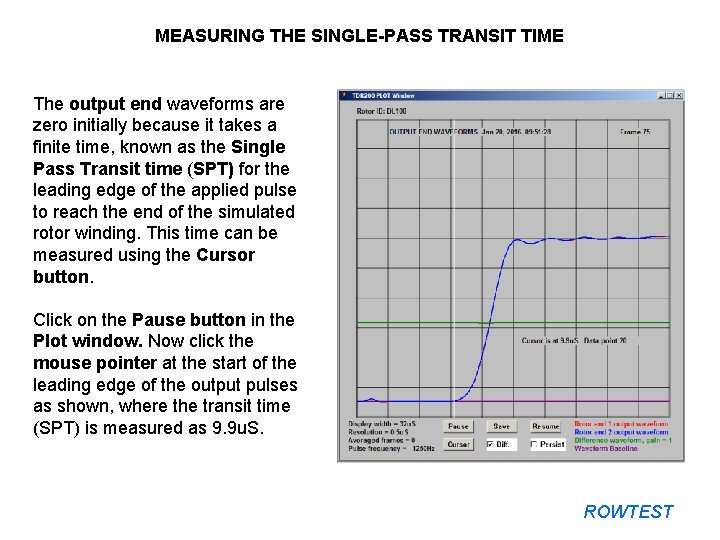
MEASURING THE SINGLE-PASS TRANSIT TIME The output end waveforms are zero initially because it takes a finite time, known as the Single Pass Transit time (SPT) for the leading edge of the applied pulse to reach the end of the simulated rotor winding. This time can be measured using the Cursor button. Click on the Pause button in the Plot window. Now click the mouse pointer at the start of the leading edge of the output pulses as shown, where the transit time (SPT) is measured as 9. 9 u. S. ROWTEST
SETTING THE IMPEDANCE MATCHING CONTROLS R 1 AND R 2 The impedance matching controls R 1 and R 2 have a major effect on the displayed waveforms. However, the effects are identical for both sets of RSO waveforms and it is impossible to obtain different waveforms for each halfwinding of a fault-free rotor winding by incorrect setting of these controls. The correct values of R 1 and R 2 for use with the delay line are approximately 100 Ohms. The visual effect of adjusting R 1 is primarily to adjust the amplitudes of the displayed RSO waveforms. In practice, R 1 is normally set to the same value as R 2, once the correct value for R 2 has been found as described in the following slides. On the front panel of the TDR 200 unit, set the values of R 1 and R 2 = 100 ohms and disconnect the delay line patch lead (yellow plugs). ROWTEST
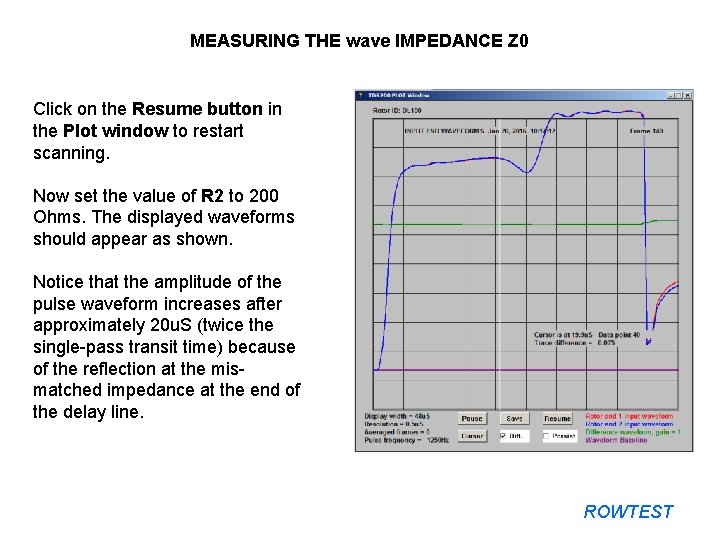
MEASURING THE wave IMPEDANCE Z 0 Click on the Resume button in the Plot window to restart scanning. Now set the value of R 2 to 200 Ohms. The displayed waveforms should appear as shown. Notice that the amplitude of the pulse waveform increases after approximately 20 u. S (twice the single-pass transit time) because of the reflection at the mismatched impedance at the end of the delay line. ROWTEST
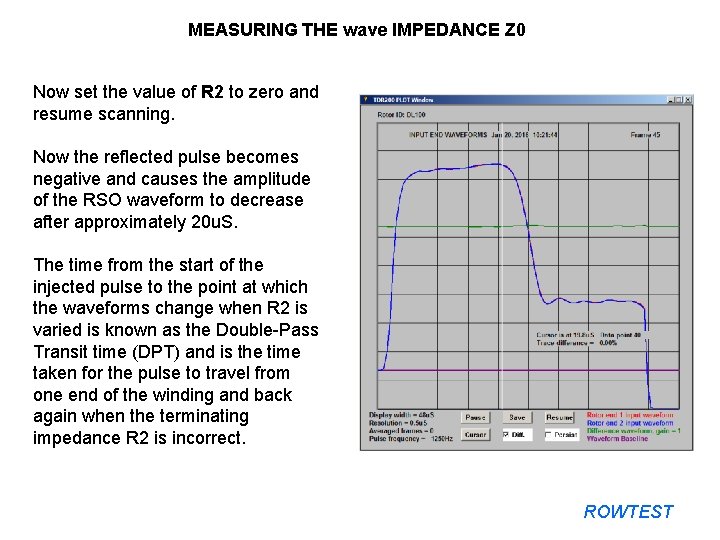
MEASURING THE wave IMPEDANCE Z 0 Now set the value of R 2 to zero and resume scanning. Now the reflected pulse becomes negative and causes the amplitude of the RSO waveform to decrease after approximately 20 u. S. The time from the start of the injected pulse to the point at which the waveforms change when R 2 is varied is known as the Double-Pass Transit time (DPT) and is the time taken for the pulse to travel from one end of the winding and back again when the terminating impedance R 2 is incorrect. ROWTEST
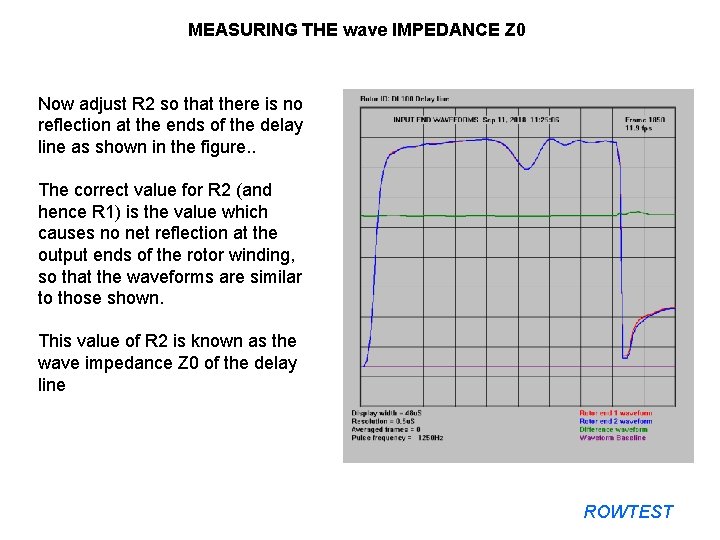
MEASURING THE wave IMPEDANCE Z 0 Now adjust R 2 so that there is no reflection at the ends of the delay line as shown in the figure. . The correct value for R 2 (and hence R 1) is the value which causes no net reflection at the output ends of the rotor winding, so that the waveforms are similar to those shown. This value of R 2 is known as the wave impedance Z 0 of the delay line ROWTEST
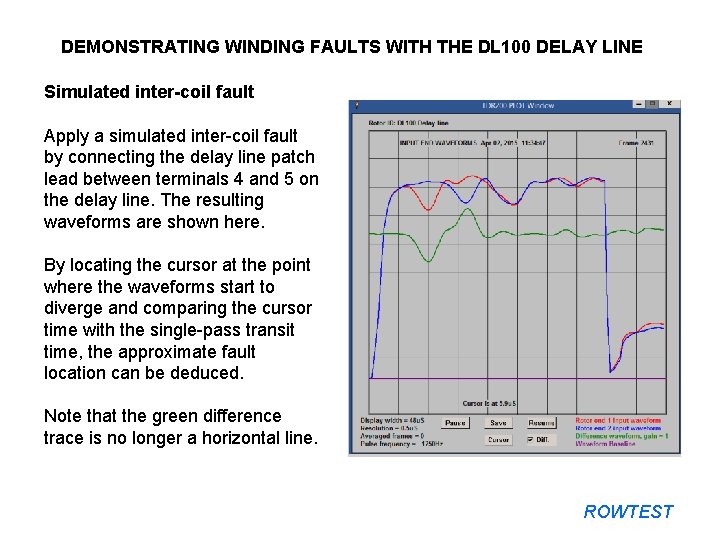
DEMONSTRATING WINDING FAULTS WITH THE DL 100 DELAY LINE Simulated inter-coil fault Apply a simulated inter-coil fault by connecting the delay line patch lead between terminals 4 and 5 on the delay line. The resulting waveforms are shown here. By locating the cursor at the point where the waveforms start to diverge and comparing the cursor time with the single-pass transit time, the approximate fault location can be deduced. Note that the green difference trace is no longer a horizontal line. ROWTEST
SAVING THE RSO TEST RESULTS Once the data capture has been stopped by the use of either the Stop or Pause buttons, the data for the current displayed frame can be saved by clicking on the Save button in the Plot window. The data will be saved as both bit-map and text files to the C: TDRPlotData Files folder The file name is defined by the frame number and the Rotor name. In addition, similar data files are saved automatically to the file names Lastframe. bmp and Lastframe. txt each time the program is exited. Saved data files can also be re-displayed in the Plot window as described in the TDR 200 Instruction manual. ROWTEST
USING THE DELAY LINE TO CHECK THE TDR 200 CALIBRATION The DL 100 delay line supplied with each TDR 200 Rotor Reflectometer system is a precision device, containing a set of carefully-matched electronic components. It is supplied with a set of reference RSO waveforms in a Test Certificate which is included in the Introductory Notes document. These waveforms are measured using the delay line under standardised test conditions as follows: 1. Input end waveforms with no applied faults. 2. Output end waveforms with no applied faults. 3. Input end waveforms with a short applied between terminals 4 and 5. 4. Input end waveforms with a short between terminal 4 and ground. These reference waveforms can be used to check the calibration and functionality of the Reflectometer as described in the following slides. ROWTEST
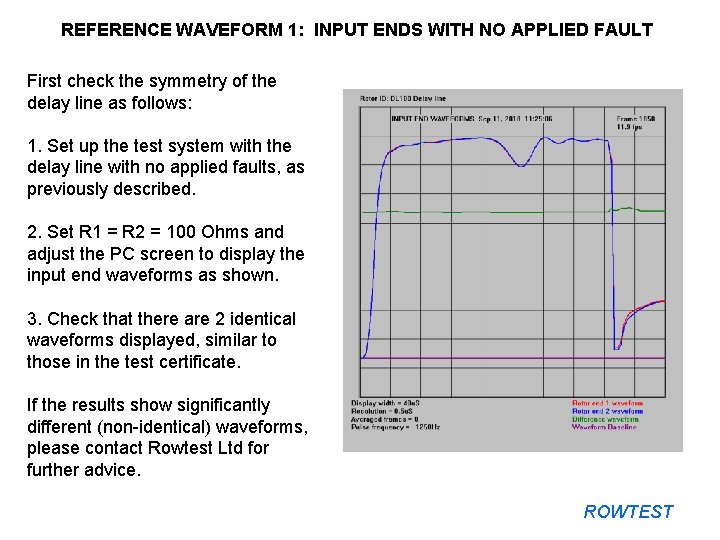
REFERENCE WAVEFORM 1: INPUT ENDS WITH NO APPLIED FAULT First check the symmetry of the delay line as follows: 1. Set up the test system with the delay line with no applied faults, as previously described. 2. Set R 1 = R 2 = 100 Ohms and adjust the PC screen to display the input end waveforms as shown. 3. Check that there are 2 identical waveforms displayed, similar to those in the test certificate. If the results show significantly different (non-identical) waveforms, please contact Rowtest Ltd for further advice. ROWTEST
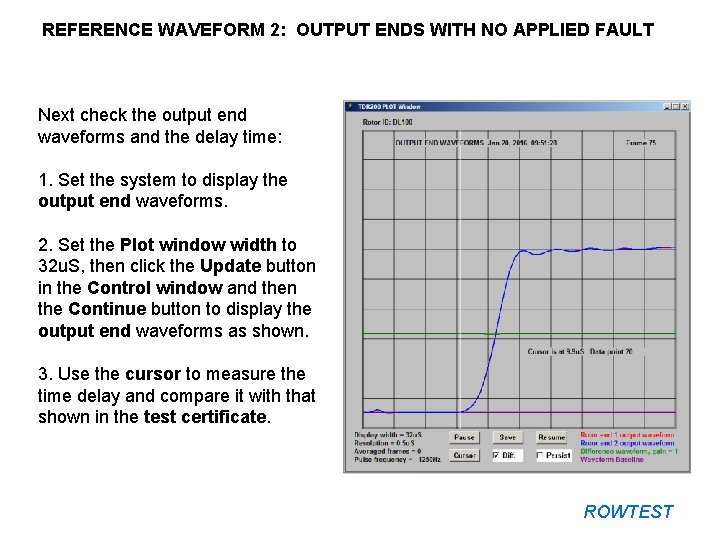
REFERENCE WAVEFORM 2: OUTPUT ENDS WITH NO APPLIED FAULT Next check the output end waveforms and the delay time: 1. Set the system to display the output end waveforms. 2. Set the Plot window width to 32 u. S, then click the Update button in the Control window and then the Continue button to display the output end waveforms as shown. 3. Use the cursor to measure the time delay and compare it with that shown in the test certificate. ROWTEST
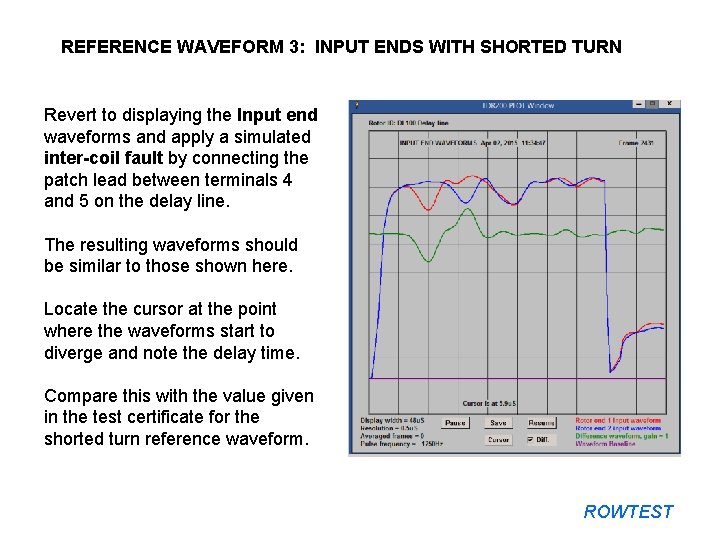
REFERENCE WAVEFORM 3: INPUT ENDS WITH SHORTED TURN Revert to displaying the Input end waveforms and apply a simulated inter-coil fault by connecting the patch lead between terminals 4 and 5 on the delay line. The resulting waveforms should be similar to those shown here. Locate the cursor at the point where the waveforms start to diverge and note the delay time. Compare this with the value given in the test certificate for the shorted turn reference waveform. ROWTEST
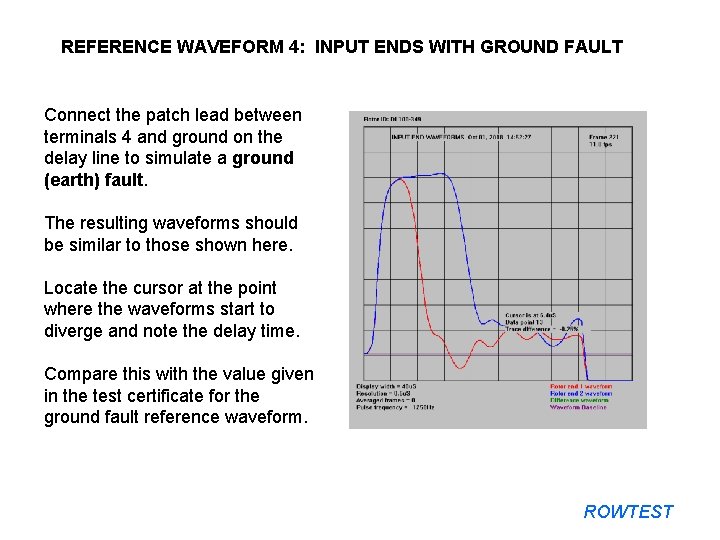
REFERENCE WAVEFORM 4: INPUT ENDS WITH GROUND FAULT Connect the patch lead between terminals 4 and ground on the delay line to simulate a ground (earth) fault. The resulting waveforms should be similar to those shown here. Locate the cursor at the point where the waveforms start to diverge and note the delay time. Compare this with the value given in the test certificate for the ground fault reference waveform. ROWTEST
CALIBRATION SUMMARY Provided the calibration measurement results are similar to those shown in the previous 4 slides, the Reflectometer can be used with confidence to carry out measurements on real Rotor windings. If any problems occur during the calibration process, please contact Rowtest Ltd. for advice by sending an email to: enquiries@rowtest. com ROWTEST
Thank you for viewing this presentation. If you have any questions, please send them to us at enquiries@rowtest. com. We will try to respond to you as soon as we can. ROWTEST